


Best Portable Monitors for PlayStation 4 in 2018
Take your gaming on the road with the GeChich M155, our pick for the best portable monitor for your PlayStation 4.

- Best Overall
- Best on a budget
- Best for PS4 Pro
Short of buying a PlayStation Vita and doing some Remote Play magic, playing your PlayStation 4 on the go can be a tricky and cumbersome experience. But it doesn’t have to be.
That’s thanks to the advent of portable monitors. While it won’t be portable in a handheld sense, you can make it far more comfortable to not only pack up and travel with your PS4, but also play it anywhere you can find a power outlet.
The portable monitors we’ll be taking a look at today are all capable of delivering very competent gaming experiences for your PS4. We’ve highlighted monitors based on a number of factors, including portability, ease of use, and resolution.
Best Overall
GeChic 1503H 15.6-inch Monitor

See at Amazon
GeChic wins our pick for best PS4 monitor with their 1503H model. With a 15.6-inch IPS panel, a resolution that supports up to 1080p, and a 12.5ms response time, this display will show your PS4 games in crisp detail, and you won’t be hitting the “Game Over” screen due to delayed input. The raw stats are exciting enough to consider it for top honors, but it’s all the engineering prowess on display that puts it over the top. It’s remarkably thin and light at 11mm for girth and 798g for weight, making it a breeze to throw into a bag. The GeChic 1503H also comes with a built-in stand, has stereo speakers onboard, and is powered by USB so you only need a power outlet for your PS4 to get your game on.
Bottom line: If you need a monitor that can do it all — and do it all without a fuss — the GeChic 1503H is it. It’s pricey at just over $300, but your PS4 won’t have a better road mate.
One more thing: There’s a VESA bracket available for the 1503H, meaning you can mount the display to something like this and have it look like part of your PS4.
Why the GeChic M1503H Portable Monitor is the best
GeChic offers a keen balance that culminates in a capable portable monitor for not a whole lot of money. The M1503H offers up a crisp 1080p image on a very respectable 15.5-inch slate, all the while doing so for just over $300. There are no compromises on audio, setup is simple, and traveling with it is a non-issue thanks to its lowkey profile.
More than all of that, it’s flexible. Thanks to its standard HDMI and VGA connections, you can find way more uses for this monitor than gaming on your PS4. Use it with your Chromecast when you’re in need of less interactive entertainment, or attach it to a laptop when you need that extra display room to help you stay productive. It does it all.
Best on a budget
GAEMS M155 Portable Gaming Monitor

See at Amazon
If you need to save a few bucks, GAEMS (nope, not a typo) is what you should be looking at. This monitor lives up to its namesake with an edgy design that’ll look great sitting on top of your PS4. This 15.5-inch unit doesn’t quite offer up the 1080p resolution that we’d normally consider a bare minimum for gaming on the PS4, but for its form, function, and cost, we’ll let it slide. It’ll take an HDMI input from your PS4 no problem, and USB power means you’ll only need one AC outlet to get going. As for response time, GAEMS doesn’t advertise an exact number, but claims it’s “virtually lag-free.” For what it’s worth, the reviews don’t suggest any inaccuracies in that claim.
Bottom line: You can’t do any better than the GAEMS M155 for less than $200. You’ll lose some pleasantries for your budget, but it ultimately delivers the goods.
One more thing: GAEMS only includes one speaker in this model, so if you’re looking for stereo audio then you’ll need to use a pair of headphones or external speakers.
Best for PS4 Pro
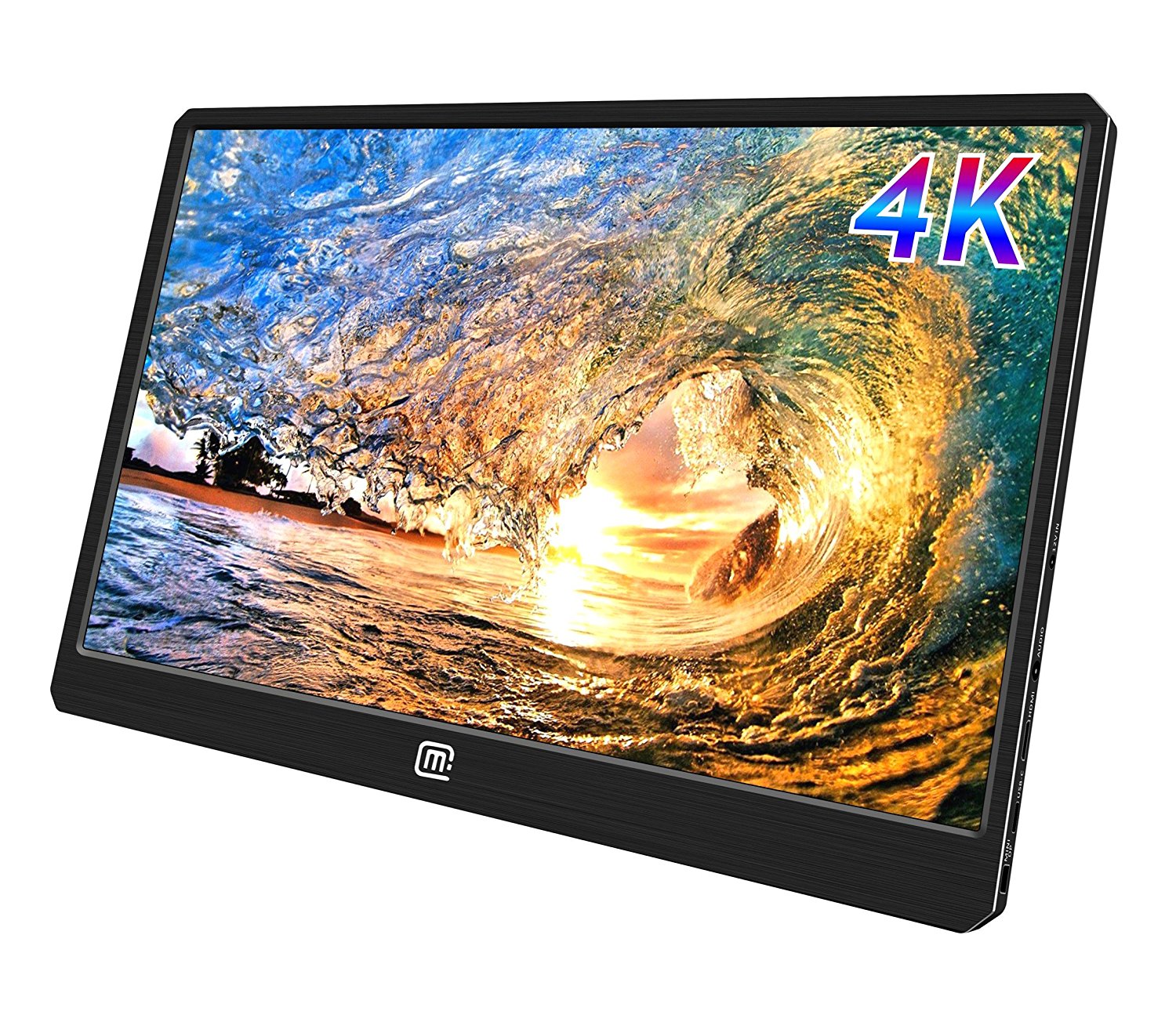
MageDok 4K Portable Monitor
See at Amazon
Didn’t think you could get a portable display that can handle your 4K needs? Guess again. MageDok’s 4K monitor accepts a 4K 60Hz signal over HDMI, something that’s still mostly unheard of in this form factor. Some will argue that 4K is overkill for a 15.6-inch display, but if you are convinced that 1080p is not sharp enough at this size then who are they to judge? At $399, this might be a niche option reserved for the most serious of gamers, but you’ll get every bit of your money’s worth if you decide to go this route. It has stereo speakers, USB-C and DisplayPort connectivity, VESA-standard mounting holes, and comes in at a weight of just 907g.
Bottom line: This is currently your only option if you want to make the most of your PS4 Pro’s 4K capabilities. Unless you’re sensitive to seeing individual pixels at this size, then most people should consider opting for cheaper 1080p sets.
One more thing: While it supports PS4’s 4K resolution, MageDok’s monitor doesn’t support the growing HDR standard. Keep that in mind before buying.
Conclusion
At the end of the day, any portable monitor with an HDMI port will work for your PS4, but the options we highlighted today are advantaged in all the right areas. They’re sizable and sharp in resolution because no one wants to feel like they’re playing on a viewfinder. They all use IPS panels, so you’ll get bright, accurate colors at a range of different viewing angles. Those panels are also 60Hz, so they can show all your PS4 games at 60 frames per second. Last but not least, relatively fast response times means you won’t be lagging behind the competition when playing online. The GeChic M155 offers the best balance of all these important factors, but be sure to explore the others if you feel they can serve your needs better.
Best Overall
GeChic 1503H 15.6-inch Monitor
See at Amazon
GeChic wins our pick for best PS4 monitor with their 1503H model. With a 15.6-inch IPS panel, a resolution that supports up to 1080p, and a 12.5ms response time, this display will show your PS4 games in crisp detail, and you won’t be hitting the “Game Over” screen due to delayed input. The raw stats are exciting enough to consider it for top honors, but it’s all the engineering prowess on display that puts it over the top. It’s remarkably thin and light at 11mm for girth and 798g for weight, making it a breeze to throw into a bag. The GeChic 1503H also comes with a built-in stand, has stereo speakers onboard, and is powered by USB so you only need a power outlet for your PS4 to get your game on.
Bottom line: If you need a monitor that can do it all — and do it all without a fuss — the GeChic 1503H is it. It’s pricey at just over $300, but your PS4 won’t have a better road mate.
One more thing: There’s a VESA bracket available for the 1503H, meaning you can mount the display to something like this and have it look like part of your PS4.
PlayStation 4

- PS4 vs. PS4 Slim vs. PS4 Pro: Which should you buy?
- PlayStation VR Review
- Playing PS4 games through your phone is awesome
Amazon
Motorola’s new Beta Experiences program will let you test new Moto features before they’re public
Motorola is taking app development more seriously.

When you think of Motorola’s phones, you think more about the hardware than the software — not because the latter is bad, but because it’s pretty sparse, yielding to Google’s idea of what Android should be. But there are a few differentiating features, like Moto Voice and Display, that are tucked neatly into the Moto app pre-installed on every phone.
In Sao Paolo, Brazil this week, during the launch of the Moto G6 and E5 series, Motorola’s VP of Product, Dan Dery, told the audience that the company would be launching a new Beta Experiences program to allow early adopters to test new features of existing Moto experiences, along with new ones entirely, in order to provide feedback and shape the future of the company’s software platform.
Launch timing and details were sparse — we’ve reached out to Motorola for more detail — but after years of stagnation from a software perspective, it’s nice to see Moto taking its first-party apps a little more seriously.
More: Moto G6 series hands-on preview
Wink Hub 2 vs. Wink Hub: What’s the difference?
The brain of any smart home is the hub and finding the right one can be pretty important. One of the options you may be considering is the Wink Hub, but there are two different versions to decide between. You can opt for the original Wink Hub and save a little cash, or grab the latest Wink Hub 2 for a bit more, but what makes it worth the extra cash?
With Wink continuing to maintain the original hub there are a few key things to consider when deciding between the two, so let’s break it down.

Design
The original Wink Hub has a rather uninspired design. It’s basically a square with rounded corners, and on the back there is only a power port. Wink updated the look of the Hub 2, making it a bit taller and sleeker looking. The power port has moved to one of the sides, which allows you to place it on a shelf easier, and on the back, it also has an ethernet port.
Odds are you’ll be putting the hub somewhere that it isn’t visible regularly, so the design isn’t going to be the most important selling feature here. The addition of the ethernet port to the Wink Hub 2 allows you to hardwire it to your modem instead of wirelessly connect to it. This makes for a stronger, more secure connection between the hub and your internet.
Supported devices
When it comes to supported services and devices, the two hubs are nearly identical. Both will allow you to use compatible Zigbee, Z-Wave, and Alexa accessories. Each hub has built-in Wi-Fi and Bluetooth, but the Wink Hub 2 does offer Bluetooth Low Energy, which the original does not. You can automate tasks for connected devices on both hubs through If This Then That (IFTTT).
The Wink Hub 2 has Thread support and a security chip to ensure that the software is not tampered with on the device. It also brings along scheduled tasks and Robot, which allow you to complete multiple tasks with just a single tap.
Speed
One of the key differences here is that the Wink Hub 2 has eight times the amount of RAM that the original one did, which means that it can complete tasks much faster. Some side-by-side comparisons have shown that it can complete some routines in under 3 seconds that took upwards of 15 seconds on the original hub to complete. This is a huge difference, and something you will definitely notice regularly.
No one wants to wait upwards of 15 seconds to have the hub turn on your lights or power off a smart outlet that is connected to it. With the upgraded internals, Wink was able to move some of the processing from its servers to the hub itself, allowing it to be more reliable and faster.
Which should you buy?
If you are looking to buy your first Wink Hub today, the Wink Hub 2 is the way to go. You get the newer, sleeker hardware, which has a few new features over the previous version. It also includes some technology that can be taken advantage of in the future, which puts you in a better position to use it long-term.
Already own the original Wink Hub? It’s a little harder to recommend the Wink Hub 2 as a needed upgrade over the original, though if you feel the limitations of the hub, then an upgrade is obvious. The apps are the same, the main features are very similar, and both are very competent smart home hubs that work with tons of different hardware.
See at B&H
OnePlus is assembling an Avengers-themed phone
OnePlus fans will be able to choose between the basic version of its upcoming flagship and a special model based on Avengers: Infinity War. While that’s awesome news for Marvel fans, the bad news is that the Avengers-themed OnePlus 6 might only be available in India. According to Android Central, OnePlus India has inadvertently posted a teaser for the collaboration, which you can see in the image above. The phonemaker has now confirmed the team-up, which it says is a way to celebrate Marvel Studios’ 10th anniversary and to strengthen its ties with Disney India.
Based on that statement, we could assume that the phone will only roll out in the country, though OnePlus didn’t explicitly state that. As Android Central noted, though, it wouldn’t be surprising if that’s the case, since the South Asian nation is the company’s biggest market, followed only by China. Besides, it won’t be unprecedented: OnePlus designed a special edition Star Wars-themed 5T that it only released in the country. So, if you must absolutely get your hands on the brand’s Avengers phone, you’ll probably have to find a friend like Cap who’d go out of their way to help you out.
As for when the phone will be available, the hardware-maker didn’t say. Like the Star Wars 5T, though, OnePlus could release it around the same time the movie starts showing later this month.
“Marvel is one of the most recognized and respected international entertainment brands in the world. The brand’s enduring success and unmatched popularity lies in its epic storytelling with human spirit. With its gigantic library of more than 8,000 characters including some of the most iconic Super Heroes in the world such as Iron Man, Thor, Captain America, The Incredible Hulk and more, Marvel has amassed fans across boundaries and age-groups.
Similarly, OnePlus has amassed an overwhelming and loyal fan following owing to its unwavering focus on bringing the best technology to its users. The rapidly growing brand is constantly incorporating feedback from the community to bring nothing but the best technology to its products.
OnePlus’ association with Marvel Studios is a manifestation of the enduring love and support they have garnered from its respective community over the years with a purpose to go beyond the ordinary and achieve groundbreaking innovations in mobile technology only to create the best user experiences.”
Source: Android Central
Alexa templates make it easy to craft your own skills
If you’ve ever thought to yourself “I wish Alexa can host trivia night” or “I’ll bet Alexa can get people to laugh at my lame jokes,” then you’ll love Amazon’s new offering. The e-commerce giant has launched Alexa Skill Blueprints, a collection of templates you can use to create skills without having to code anything. Amazon says you can whip up skills of your own within minutes simply by filling in the blanks.
Want Alexa to be in charge of your weekly trivia get-together? Just customize the Q&A template or the multiple choice trivia template with your own questions and responses. You can tweak the baby or pet sitter templates, so that your sitter can ask Alexa for info they might have forgotten. All they need to do is say “Alexa, open My Sitter.” The blueprints will also give you a quick way to create a list of your family’s inside jokes and even spin an adventure story with a family member as the hero. If you have an exam coming up, you can also create custom flash cards to help you study.
You currently have 20 templates to choose from on the Blueprints website, but you can use them as many times as you want. Any skill you conjure up will be available on all Alexa-enabled devices associated with your account. Amazon also says it’ll keep adding more templates to keep the collection growing. Unfortunately, you can only access the skill blueprints if you’re in the US, and Amazon didn’t say whether they’ll eventually be available outside the country.

Source: Alexa Skill Blueprints, FAQ
Nest will give away smart thermostats to low-income families
This Earth Day, Nest Labs, Inc. will launch a new initiative called The Power Project that will help get Nest E thermostats in the hands of lower income Americans. It’s a way to ensure that socioeconomic status isn’t a bar to accessing the energy savings that Nest’s smart thermostats can provide.
Over the next five years, Nest plans to install one million Nest E thermostats in what it describes as “low- and moderate-income homes.” To do this, the company will work with various lenders, government programs, utility companies and non-profits, including Habitat for Humanity, Fannie Mae and Southern California Gas.
The driving force behind all of this is that lower income households spend more of their income on utilities than the average US family. According to Nest, on average, an American household spends 3.5 percent of income on their energy bills. But one in five families spends over 20 percent (some even as high as 50 percent) of their income on heating and cooling their homes. Smart devices like the Nest Thermostat E can help lower those bills.
“Creating a home that takes care of the people inside it and the world around it has been Nest’s mission since day one,” Jeff Hamel, head of energy partnerships at Nest, said in a statement. “We’ve joined with Habitat for Humanity, Fannie Mae, and energy providers across the country this Earth Day to bring this mission to life through The Power Project, to connect families with the tools and programs that can help alleviate the burden of high energy costs. Every family deserves to have heat in the cold and light in the dark.”
eBay app uses barcode scanning to list your items in seconds
It’s usually a pain to list your goods on an auction or marketplace site, especially if it’s your first time. You have to describe them, choose photos and (worst of all) choose a price that will reel in potential bidders. eBay, however, thinks it can cut the process down to a few taps. It’s updating its Android and iOS apps with a simplified selling process that it claims can list a product in a matter of seconds. If you have the box for an item, you just have to scan its barcode (or, if that fails, search by name) and choose the item’s condition. After that, the app can fill in a basic description, photos and even the starting price — as elsewhere, eBay can use a mix of structured data and predictive analytics to choose a price based on what’s likely to get a response.
You can still edit the listing before you post it, so you can fine-tune the price or otherwise customize your entry if you don’t completely trust eBay’s judgment.
The company isn’t shy about who the feature is for: it’s aimed at “new sellers” who may not know the ropes. At the same time, it can help would-be buyers by providing more well-labeled listings to choose from. With that said, this approach isn’t for everyone. It won’t help if you don’t have a barcode, of course, but it’s also less than personal. If you’re selling more than what came in the box, or you want to take photos to prove your item is still intact, you’ll still have to put in some work. Think of this as a gentler introduction to eBay’s world rather than a solution for everyone’ problems.
Source: App Store, Google Play
Qualcomm will lay off 1,500 workers to cut expenses
Today, chip maker Qualcomm began the process of laying off around 1,500 workers in California. The move is a part of the company’s promise to its investors that it would cut costs by about $1 billion, according to Bloomberg.
This action comes after a hostile takeover bid from rival Broadcom. Qualcomm pledged that it would cut costs in order to improve earnings, but shareholders were more interested in Broadcom’s offer. However, President Trump intervened in the potential merger, blocking it in the interest of national security. Now, Qualcomm must take steps to improve its earnings. Cutting jobs is, unfortunately, one of those steps.
A person with knowledge of the situation told Bloomberg that these layoffs represented the majority of the job cuts Qualcomm would make, though there would be some others in different departments. The company did look at other options before resorting to layoffs. “We first evaluated non-headcount expense reductions, but we concluded that a workforce reduction is needed to support long-term growth and success, which will ultimately benefit all our stakeholders,” the company said in a statement to Bloomberg.
Source: Bloomberg
Motorola aims to keep the cheap phone crown with the G6 and G6 Play
Year after year, Motorola churns out some of the best inexpensive Android phones money can buy and parent company Lenovo is eager to keep that streak alive. That’s where the new Moto G6 and G6 Play come in — Motorola has embraced some of the trends that have made this year’s premium phones so palatable, and that’s great news for smartphone shoppers who don’t feel like shelling out flagship-level wads of cash.
Now, I know what some of you are thinking: isn’t there a usually a G Plus model too? You’d be correct: the G6 Plus packs a 5.9-inch, 18:9 screen and a camera with an f/1.7 aperture and dual-pixel autofocus. The reason info is so scarce is because Moto doesn’t plan to bring it to the United States — no launch means no hands-on time and very little in the way of detail. Boo.

I’m not too disappointed, though, because the standard Moto G6 is actually quite a bit nicer than I expected. For one, it has the sort of glass-wrapped body one would normally associate with premium phones — the device’s back is wrapped in Gorilla Glass 3 for scratch and scuff protections, though it probably won’t help much in the event you drop it. The mostly metal bodies we got with last year’s G5 series could handle meetings with asphalt much better, but the Moto X4-inspired style on display will be worth the trade-off for some. (Count me in on that one.)
Motorola also jumped on the extra-tall screen bandwagon with its 18:9 Max Vision display — this one in particular is 5.7 inches and runs at Full HD+. In general it’s plenty crisp and vivid for a budget phone, but as with earlier models, you might run into some trouble in direct sunlight. Even when we popped outside to snap a few photos of the New York skyline — in the shade of a tall hotel, no less — it was sometimes difficult to read.
And speaking of the camera, Motorola fitted its G6 with a dual camera comprised of a 12-megapixel and 5-megapixel sensor. Diehards will remember that last year’s G5S Plus was the first Moto device with a dual camera, and the experience here seems very similar — expect a pleasant level of detail and lively colors. Having two rear cameras also makes depth effects possible, and under solid lighting conditions, the dual camera did an impressive job isolating our mostly willing subjects from the background. Not bad at all for a $250 phone. Like a handful of other smartphone makers, Motorola has also released the value of weaving AI into its camera experience, but its approach is a little different.
Unlike, say, Huawei’s P20, the G6 doesn’t recognize what’s in front of the camera and tweak its settings accordingly. Once you’ve downloaded the necessary databases, though, you can point the phone at landmarks and other objects to get more information about them without having to leave the camera app. It’s a great idea in theory, but it could use a little fine-tuning. When I pointed the camera at One World Trade — easily one of the most recognizable landmarks in New York City — the camera drew a total blank. Not a great start. Object recognition fared much better, though. When I pointed the camera at an apple, the G6 offered up a surprisingly pertinent list of web links. Even better, the G6 correctly identified my SLR as a Canon 6D and threw up links to even more information. I didn’t get to test these AI chops too thoroughly but considering the Galaxy S9 and LG’s V30S ThinQ couldn’t correctly identify my specific camera model, it sure seems like Motorola’s in-house AI efforts are on the right track.

Chris Velazco/Engadget
The 8-megapixel front camera has gained some new (if familiar) tricks, too. Most notably, you can now gussy up your face with a set of Live Photo effects in case you want to strap on a set of virtual rabbit ears or wail into a microphone — complete with concert lighting — without jumping into Snapchat or Instagram. You’ll also be able to use that camera to unlock the phone with your face, but it’s a purely 2D solution — that is, it checks your face against stored image data, which makes for super-fast (albeit less secure) authentication.
As usual, Motorola didn’t stray too far from stock Android 8.0 Oreo here, and I’m still perfectly pleased by that. That light touch with software combined with an octa-core Snapdragon 450 keep everything moving at a respectable pace — just don’t expect to do any heavy gaming on this thing. Depending on the model, you’ll also get either 3GB of RAM and 32GB of storage, or a slightly snappier 4GB of RAM with 64GB of storage. Don’t fret about free space too much, though: you can add microSD cards as large as 128GB. There’s also a 10W fast charging USB-C adapter in the box, for rapid refills.
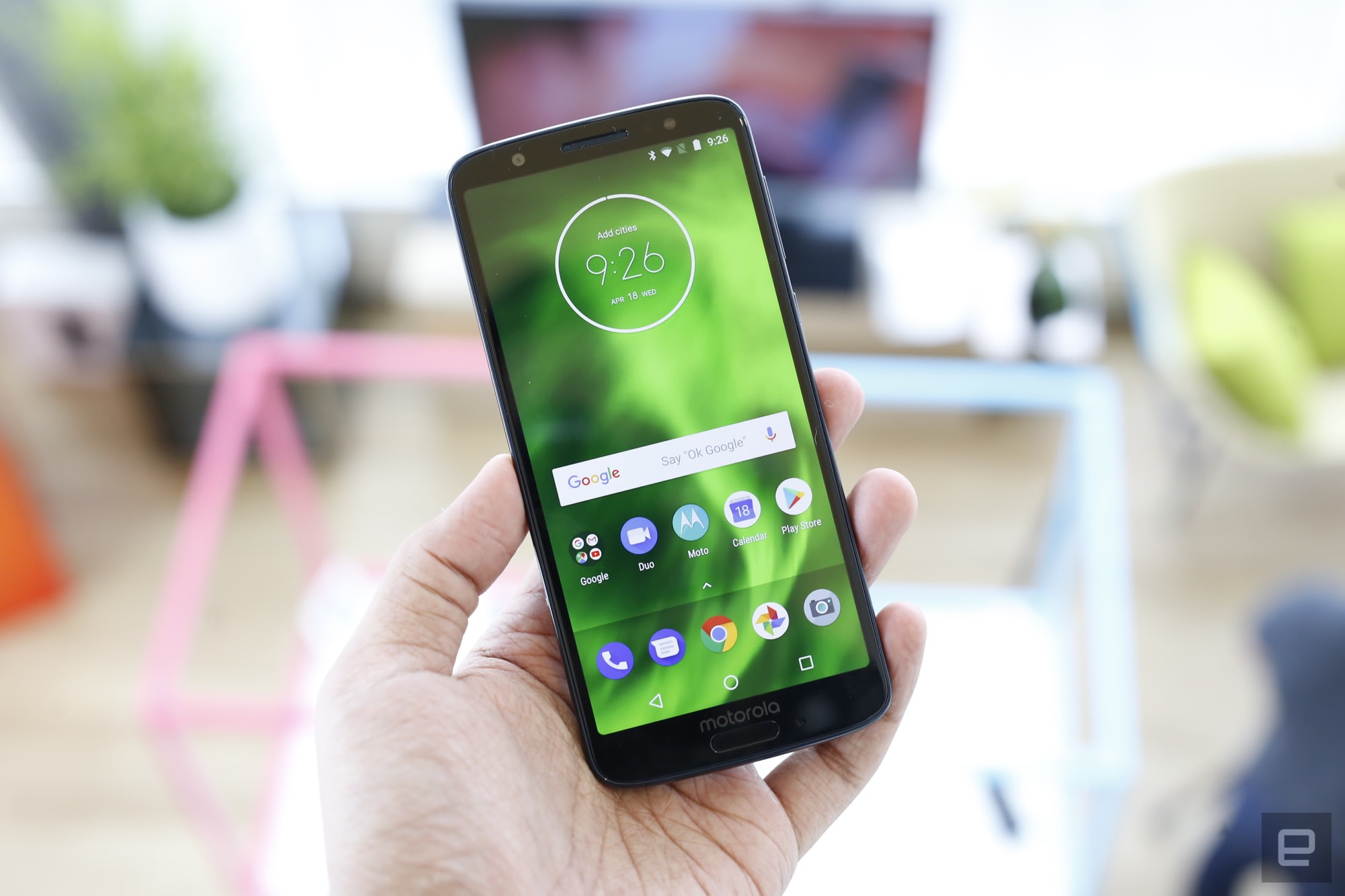
The dual camera and the AI frills won’t appeal to everyone, which is why Motorola put together a more practical option: the Moto G6 Play. At $200, it’s a less expensive option than the standard G6, but you’ll get a much bigger, 4,000mAh battery for your trouble. Combine that with a 5.7-inch Max Vision screen running at 720p and a less powerful Snapdragon 427 CPU and you’ve got a device that, while not tremendously speedy, should get you through your daily routine with plenty of battery life left over. (If performance is a concern, you could shell out a few extra bucks for an improved version with 3GB of RAM instead of 2GB, and 32GB of storage rather than 16GB.) Motorola claims the G6 Play can squeeze 36 hours of use out of a single charge, but we’ll have to see about that.
Considering how well the regular G6’s dual camera seemed during our hands-on time, it’s a shame Motorola couldn’t squeeze it into the less expensive G6 Play. Instead, there’s a more traditional 13-megapixel rear camera (phase detection autofocus) with an LED flash sitting next to it. To Motorola’s credit, however, the G6 Plus definitely doesn’t feel like a $200 phone — it’s wrapped in a glossy non-Gorilla glass and has a reassuring heft to it.
Between these strong mid-range options and the more modest Moto Es the company also announced, it seems clear Motorola is trying to sew up the low-cost smartphone market for itself. The competition is only going to get more fierce as the year rolls on, but Motorola has proven itself to be one of the world’s best — if not /the/ best outright — at crafting quality, inexpensive devices. Based off what I’ve seen so far, Moto just might hold onto that crown for another year.
The Moto E5 Plus is Motorola’s biggest budget phone yet
Ever since their debut in 2014, Motorola’s Moto E series phones have garnered a very specific reputation: they’re decently competent and very, very cheap. With the new Moto E5 Plus, though, Motorola has decided to fiddle with the formula in some interesting ways. It’s easily the most premium Moto E the company has ever made, a fact made more apparent when you compare the E5 Plus to its less powerful sibling, the new Moto E5 Play. In some respects, The E5 Plus even outclasses the more modest of the two new Moto Gs announced today. It’s clear that the role of the Moto E line is shifting, but after some hands-on time, I think Motorola might be onto something here.

A quick note before we go any further: Motorola hasn’t discussed official US prices for either of these phones, leaving that task to the carriers and retailers that’ll sell them. Considering that the price tag is usually one of the Moto E’s standout features, it’s unfortunate Motorola decided not to share that info ahead of time — I’ll update this story once new information becomes available.
The first thing you’ll notice about the E5 Plus is its size — this is a big phone. Part of that is because Motorola went with a 6-inch, 18:9 LCD screen that occupies almost all of the phone’s face. For those keeping count, that’s the biggest screen ever used in a Moto E phone — it even edges out the not-for-US Moto G6 Plus’s 5.9-inch screen — and in general, colors were vivid and viewing angles were solid. The panel itself only runs at 1,440×720 — an obvious concession to keep the price down — but even now, 720p still offers a decent amount of clarity and detail. The other reason the phone is so large is because of its battery: there’s a 5,000mAh cell tucked away in there, and that’s the largest we’ve seen in a mainstream smartphone for a long time. (Just a reminder: the Moto G6 Play also announced today only has a 4,000mAh battery.)
Despite being a big beefy phone in all dimensions, the E5 Plus is wrapped in a glossy plastic that evokes a sense of cohesiveness with the rest of Moto’s new phones and feels awfully nice to hold. Tucked away inside is one of Qualcomm’s Snapdragon 435 chipsets with 3GB of RAM and 3GB of storage (though you can bump that total up with a microSD card). We’ll need to spend more time with the phone before we can pass any real verdicts on performance, but the E5 Plus certainly won’t blow you away — what else would you expect from a phone that should sell for around $200? That said, it had no trouble whipping through apps and playing videos, so users with modest needs probably won’t need to fret much.
The E5 Plus isn’t making its journey to the US alone — there’s also an E5 Play model that feels much more like one of the company’s traditional cheap phones. Unassuming plastic back? Check. Smaller, less impressive screen? Check — it’s 5.2 inches diagonal LCD running at 720p. The camera around back is a purely passable 8-megapixel affair.
To be clear, there are some nice touches here, too. There’s a fingerprint sensor mounted in the Moto logo dimple on the phone’s back, and Motorola’s Moto Actions make what would otherwise be a clean build of Android 8.0 Oreo feel a little more thoughtful and capable. Again, the performance being squeezed out of its Snapdragon 425 (or 427, depending on where you get your phone) and the 2GB of RAM onboard is adequate at best, but that just’s par for the course for these things.
Ultimately, Motorola has churned out one highly impressive Moto E and another cheaper, more traditional model. Having more choice definitely isn’t a bad thing when it comes to smartphones, but I do find my concerned that Motorola might be harming its own chances by blurring the once-firm lines between the Moto G and E series. Right off the bat, I’d personally splurge on an E5 Plus than a G6 Play, and while we’re still not sure about prices, their respective spec sheets hint that they’ll probably be pretty close. That raises a question about whether Moto really needs a cheap phone portfolio this broad in the US, but hey, for now I’m willing to see how things go.
 AIVAnet