


Huawei Mate 10 Pro review

When it comes to the Huawei brand we’re reminded of the way we felt for HTC about a decade back. In other words, we love the products and think they deserve to spend more time under the spotlight. We do what we can to help evangelize the brand.
After initially trickling into the Android smartphone market with the Ascend series roughly five years ago, Huawei has gone on to rebrand it under the Mate line. In that time it has also partnered with Google for 2015’s Nexus 6P and introduced Honor as a subsidiary independent brand in China.
Today the situation is a little different for Huawei. Its last few generations of phones have everything it takes to compete on the flagship battleground. Moreover, it often beats the likes of LG and Samsung with more affordable pricing. Things, on paper, sound awesome, and each new device is eagerly greeted by Android fans.
In practice, though, things could be better for Huawei in the United States. In January it was literally days away from seeing the brand make a formal splash in the US with carrier partnerships.

The scenario changed quickly, and for the worse, for Huawei as government pressure forced the hands of players like AT&T to shy away from offering its phones. Alas, the only way to really get your hands on a Huawei device is to buy it direct. Even retail stores aren’t a sure thing now.
Even though smartphones have been around for a solid ten years now, consumers aren’t fully educated or comfortable enough to buy on their own. A lot of buyers want that comfort of dealing with a carrier or having a retailer they can turn to with problems. This is certainly understandable, but this makes it difficult for Huawei to spread its wings in the US.
We’ve long appreciated the different Huawei phones, even from afar. Those not sold in the United States over the last few years were still admired for their beauty and overall package. Those we got to spend time with we simply loved. That’s the case with one of its newest phones, the Mate 10 Pro.
General Specifications
- 6.0-inch FullView Display (18:9) at 2160x 1080 pixel resolution
- Huawei Kirin 970 octa-core processor (4x 2.36GHz, 4×1.8GHz)
- Android 8.0 Oreo with EMUI 8.0
- 4GB RAM w/ 64GB ROM or 6GB RAM w/ 128GB ROM
- 20-megapixel monochrome and 12-megapixel RGB camera with f/1.6 aperture
- 8-megapixel front-facing camera with f/2.0 aperture
- 4,000mAh battery
- IP67 splash, water, and dust resistance
- USB Type C
Arriving at the start of 2018, the Mate 10 Pro is one of the first flagships out of the gate. It’s one hell of a pacesetter, too. The hardware is incredible and it runs the latest version of Android. It’s exactly the kick in the ass that players like Samsung, LG, and others need.
Design
With glass on the front and back, the phone feels premium in every sense of the word. It’s immediate, too. The second you take it out of the box you’re aware that what you have in hand is special.

The glass is 6H tempered which means it’s robust, strong, and feels oh-so-sexy. And, when paired with the seemingly endless curves, it’s hard not to simply admire its craftsmanship.
Unfortunately, it takes all of 30 seconds to put smudges and smears all over the rear. It’s also about this time when you realize it’s somewhat slick or slippery in hand. This is a shame, too, because you know this is going to lead to either dropping and scuffing the phone, or hiding its beauty behind a case.
The right side of the phone houses the power and volume buttons while the left is where you’ll access the SIM card tray. Up above the screen is the camera and down below is the Huawei branding. There are no hardware buttons for navigation; it’s all software based.
The fingerprint reader is located on the rear near the dual-camera configuration. The cameras are slightly raised and are easy to identify when reaching to unlock the phone by fingerprint. The phone feels a little longer than most and the reader can come across as higher up than expected.
There’s a nice strip area that crosses the phone on the back near the camera which adds a nice touch. It’s purely aesthetic but does help to draw focus to the dual shooters and Leica branding.
Noticeably absent, though, is the 3.5mm headphone jack. We miss it and don’t like having to rely solely on Bluetooth for audio. We get that it makes it difficult to incorporate waterproof and dust-proof protection, but other brands can pull it off.

We do like that the phone can withstand life’s accidents. We take our phones everywhere and they invariably find their way into sticky situations. Be it a spill on a tabletop or dirt and dust from the neighbor mowing his grass, little junk can cause big problems. It’s nice to see Huawei on the right side of the trend of added protection.
Display
Where to start with the screen? It’s gorgeous. It’s gigantic. It feels like the entire phone is one incredible image. Between the actual display and the overall design of the phone we found the Mate 10 Pro to be very sexy; it makes the Pixel 2 feel kinda clunky and uninspired. Well, more than it does already.
We’re fond of the 18:9 aspect ratio if only because it makes bigger phones easier to hold. That’s the case here and the 6-inch screen doesn’t really come off as unwieldy. It’s easier to hold this phone than it was for something 4.5-inches only a couple of years back.
The Mate 10 Pro delivers deep blacks and really rich, vibrant colors. Pictures, text, and video are stunning and do the 2160 x 1080 pixels justice. On the design side, it’s nice that the screen doesn’t have the wrapping or tapered edge that’s become common in some models. This not only makes for more confident navigation and tapping along the edge, but more support in protective cases, too.
 The Mate 10 Pro has an oleophobic screen coating which means smudges and fingerprint oil aren’t much of an issue. If only there were some way to coat the entire phone in something like this and maintain the shiny design.
Software
The Huawei Mate 10 Pro runs Android 8.0 Oreo with a custom, EMUI 8 interface. If you’ve followed Huawei’s phones closely, you know that its homegrown skin skipped from 5.1 up to 8.0. The handset maker might have you believe it’s because there’s such a revolutionary jump in features, but we know it’s to keep better parity with Android releases.
EMUI 8.0 does have a few interesting, and helpful features, including a dock-free PC experience. Indeed, you can plug the phone into a monitor via USB-C, essentially turning the phone into a computer. A split-screen proactive alert notification lets users run apps next to each other and better utilize that big, 6-inch, 18:9 screen.

We’ve only spent a small amount of time with other (non-Nexus) Huawei phones in the past so we can’t speak too strongly for the old EMUI. With that said, we detected and gathered that this version is much less intrusive and invasive. Specifically, notifications alerts, and prompts are toned down as compared to older devices.
 Given this is not offered with a particular service provider, we anticipated a light amount of bloatware, or unnecessary software. Unfortunately, that’s not the case. There are far more extra apps than expected. In fact, there’s a fair mix of custom Huawei selection and other titles.
Were were already familiar with, and relying on, Huawei’s stuff it might not feel so heavy handed. As users who prefer a lean OS, as close to stock as possible, experience, this was all “junk” we don’t feel we’d use. Facebook and Instagram might one of the first apps you install, sure, but Booking.com?
We did like the theme capabilities and enjoyed playing around with the various ways in which we could dress up the phone. There’s a lot here that can be useful, but there’s a lot more that kinda gets in our way.
Cameras
The Mate 10 Pro features a 12-megapixel color sensor with f/1.6 aperture which sits vertically in line with a 20-megapixel true monochrome sense with the same f/1.6 setting. Both lenses are wide angle but neither offers an ultra-wide option like we’re seeing in other phones.
Thanks to Leica, the camera experience is superb in the Mate 10 Pro. There’s a whole array of shooting modes to choose from, including, of course, monochrome. Suffice it to say, there’s something for everyone here. Shooting options exist for daytime, night, in 3D, front-facing, rear, filtered, time lapse, slow motion, etc.
The app walks users through each mode and does a great job of making things feel intuitive. If you’re the kind of person who just wants to open the camera and shoot on automatic mode, you’ll be impressed with things. But, those who like to tinker or spend time in a shot, will really appreciate the tools available.

It didn’t really matter what mode we were in or what we were capturing; the Mate 10 Pro was quick to snap and save. Autofocus was instant, shutter speed was exactly what we expected, and the end results were almost universally gorgeous.
There’s some really cool AI stuff happening in the camera, too. Somehow Huawei has trained its algorithm to recognize all sorts of things in the sensor. By doing so, the phone recognizes the difference between plants, food, sports, and other stuff and adjusts the camera accordingly. This way you don’t have to switch to Pro mode to set color or exposure for a better shot.
If you only look at sensors at the surface and simply focus on bullet points, you won’t realize the depth of possibility and capability. There’s really a lot to play with in the Mate 10 Pro, but it’s not in your face or convoluted.
Usage and Performance
We’re not going to bother teasing the performance and power of the Mate 10 Pro. Given the specifications you’d expect it to be a monster, and it is. It didn’t matter what games we played, how many apps we had open at once, or whether we were hopping in and out of things. The phone is built to run.
Based on where games are today, and how people tend to use their devices, we reckon most users would get a few years of life out of the Huawei Mate 10 Pro.

Even using the phone in the virtual desktop mode was seamless. We’ve had Chromebooks and 2-in-1 devices that don’t handle we well. It’s not quite as simple or robust as what you might get in a pure Chrome OS experience, but we could get used to it.
The 4,000mAh battery lets us get into two days without fear of running low on juice. We’re conditioned to charge at night but it’s not as if we were reaching for a cord very often. With that said, it does replenish quickly, thanks to Huawei SuperCharge.
We would have liked wireless charging in the phone, especially given the all-glass treatment. To be fair, it’s a standard that hasn’t fully developed yet, but it would get better adoption if companies like Huawei used it in flagships. This is a flagship to be sure. And, when you compare bullet points and price tags, this is an area where the Mate 10 Pro misses out.
Given that we tested this in the United States, and in early 2018, we’re not able to fully take advantage of the LTE capabilities. With that said, we experienced fast downloads with our carriers with speeds that were on par with other flagships. We’d love the chance to full kick the tires on this once stronger networks are more fully built out.

As much as we like this phone’s design, color, and general build, we feel like we’re “babying” it. It’s one of those situations where you don’t want to add bulk with a case, but the phone is otherwise slippery and prone to picking up fingerprints. We’re always just one drop away from cracking things on either side.
Conclusion
When it comes to selecting flagship phones in 2018, we’re confident in recommending that the Huawei Mate 10 Pro be on your shortlist. You don’t need half of what this phone can do, that’s for certain. It might be another year or so before you’ll even begin to “task” the device.
We’ve loved our time with the Mate 10 Pro and would be close to calling it a perfect handset. Wireless charging would be icing on an otherwise delicious cake. The glass, for as awesome as it is, scare us somewhat us, and it’s a fingerprint magnet. Quibbles aside, it’s one of the first non-Nexus or non-Pixel phones to really catch our eye, and hold it.
Software is perhaps the only area where we felt let down. It’s not the EMUI stuff or the AI, or even the fact that it’s not pure Android. We just don’t like having so much OEM branded stuff that we cannot uninstall. Huawei’s not yet at the level as Samsung here in the US so we’re not so keen on using their custom apps and services. And, hell, even Samsung recognized it was doing too much and has backed off.
If you have not purchased a new phone in a year or so, and you’re ready to go big, consider the Mate 10 Pro. But, if you’ve already got a Galaxy S8, LG G6, or Google Pixel, you might want to hold on to it as long as you can for now.

Unless you have a killer trade-in deal or can flip your current handset for decent money, it’s hard for us to tell you to spend another $600-$700 so soon. But, with the right offer, you’ll be making a decent step forward.
We would really like to have seen the Mate 10 Pro offered with a wireless carrier. Were you able to spread payments out over two years it would be that much easier for us to recommend it. As it is, though, you have to drop all of it at once.
Regardless of whether you’re buying today or a few months from now, keep the Mate 10 Pro on your radar. Huawei’s put together one hell of a package and it deserves recognition.
As of publication you can purchase the Huawei Mate 10 Pro for about $700 at Amazon and about $800 at Best Buy. Color options may vary based on location and retailer.
Google patent could replace your contacts’ profile pictures with animations
It’s patent time again. Recently we looked at a new Apple patent that could help Siri learn about new words and phrases more quickly, but now it’s Google’s turn. The company has been awarded a patent that looks to be purely aesthetic — but still kinda cool.
The patent itself describes a method of creating “animated user identifiers.” As mentioned in the patent, when you make a call — or video call — the system could take a few pictures through the front-facing camera to create a little animation, then send it to the receiver of the call — who will have a little more to go on that just the name that pops up on the screen. That identifier can then be used again — like in contacts apps, chat apps, or any other time that an identifier might be appropriate.
Google has been thinking of better user identifiers for a while now. Not only is the patent a continuation of a patent that was first filed in May 2016, but Google also implemented a related version of this in Duo, its video calling app. In Duo, the phone starts sending video to the receiver of a video call before they’ve even picked up, so the receiver can see who’s calling them. That video, however, isn’t used again for profile pictures of a user — so it’s a little different than what the new patent describes.
Of course, just because the patent has been awarded to Google, that doesn’t mean that we’ll end up seeing it any time soon. Companies like Apple and Google routinely file and are awarded patents — and those patents often end up not being used. Still, it would be nice to see new features like this show up — and it’s entirely possible that we could see the new system in Android P.
We’ve seen a few new patents come out of Google recently. A few weeks ago, the company was awarded a patent related to using multiple smartphones in a speaker system — so you could sync up your phone with your friends’ phones at a BBQ to all play the same music, without the need for any external speakers.
Editors’ Recommendations
- Google could soon let you sync smartphones for music playback
- New Apple patent could help Siri learn newly created words and phrases
- Cringe along as we turn ourselves into Samsung AR Emojis
- Are they not picking up? Now you can leave a video message with Google Duo
- Apple’s latest patent ensures your screen turns on to the right brightness
Moto E5 Plus vs. Moto E4 Plus: Battle of the ultra-budget Motos
The Moto G series may make the most headlines when it comes to Motorola’s budget handset lineup, but there’s another series that offers arguably even better value for money — the E-series.
At the same time it unveiled the new Moto G6, the company also announced the new Moto E5 Plus. How does it stack up against last year’s Moto E4 Plus? Is it really much of an upgrade? We put the two phones head to head to find out.
Specs
Moto E4 Plus
Moto E5 Plus
Size
155 x 77.5 x 9.6 mm (6.10 x 3.05 x 0.38 inches)
162 x 75.3 x 9.35 mm (6.37 x 2.96 x 0.37 inches)
Weight
198g (6.98oz )
200g (7.05oz)
Screen Size
5.5 inches
6 inches
Screen Resolution
1,280 x 720 pixels
1,440 x 720 pixels
Operating System
Android 7.1.1 Nougat
Android 8.0 Oreo
Storage Space
16GB, 32GB
32GB
MicroSD Card Slot
Yes
Yes
Tap To Pay Services
No
No
Processor
MediaTek MT6737
Qualcomm Snapdragon 435
RAM
3GB
3GB
Camera
Rear 13MP, front 5MP
Rear 12MP, front 8MP
Video
720p at 30 fps
1,080p
Bluetooth Version
Bluetooth 4.2
Bluetooth 4.2
Ports
MicroUSB, 3.5mm headphone jack
MicroUSB, 3.5mm headphone jack
Fingerprint sensor
Yes
Yes
Water resistance
No
No
Battery
5,000mAh
5,000mAh
App Marketplace
Google Play Store
Google Play Store
Network support
All major carriers
All major carriers
Colors
Iron Gray, Fine Gold, Oxford Blue
Black, Mineral Blue, Flash Gray, Fine Gold
Price
$180
TBD
Buy From
Motorola
Motorola
Review Score
4 out of 5 stars
Hands-on
Performance, battery life and charging
Adam Ismail/Digital Trends
The first thing to notice about a new phone is how it performs. While the Moto E4 Plus features a MediaTek MT6737, the Moto E5 Plus instead went with a Qualcomm Snapdragon 435 processor. The two chips perform similarly, but the Snapdragon 435 should be slightly faster than the MediaTek chip. Both phones feature 3GB of RAM. When it comes to storage, the new Moto E5 Plus features 32GB, while the older device offers either 16GB or 32GB.
Both of these phones feature pretty huge batteries, too. You get a 5,000mAh battery in both the Moto E4 Plus and the Moto E5 Plus, and it should get you through more than a day of solid use. Then there’s charging, and the new Moto E5 Plus boasts 15W TurboPower, which should get you 6 hours of use in 15 minutes of charging. The Moto E4 Plus, on the other hand, offers 10W “rapid charging,” so the newer phone should charge a little quicker.
The Moto E4 Plus and Moto E5 Plus are similar — but we expect the Moto E5 Plus to perform a little better, and charge a little faster.
Winner: Moto E5 Plus
Design and durability
Moto E5 Plus Julian Chokkattu/Digital Trends
Motorola has updated its design sensibility for 2018, and the new phone looks much more modern. Like other Moto phones, it features an 18:9 aspect ratio, plus it offers a glass back and the now standard large camera module on the back. The glass back is something that helps make the phone look much more modern — the Moto E4 Plus uses metal instead.
One major difference between these two phones is that the Moto E4 Plus retains a home button under the display, while the Moto E5 Plus instead uses software buttons and moves the fingerprint sensor to the back. Thankfully, both phones have a headphone jack, and both have a MicroUSB port, too — though we hope Motorola will move to USB-C in the next iteration.
When it comes to durability, we think it’s likely that the Moto E4 Plus will be the tougher option. Neither of the two have water-resistance, but given the metal back on the Moto E4 Plus compared to the glass on the Moto E5 Plus, it should fare better when dropped.
We think the Moto E5 Plus is a much better-looking phone, but the Moto E4 Plus is probably slightly more durable.
Winner: Moto E5 Plus
Display
Adam Ismail/Digital Trends
Both the Moto E4 Plus and the Moto E5 Plus feature a 720p display, but considering the aspect ratio on the Moto E5 Plus, 720p translates to a slightly different resolution. They also feature different screen sizes — so the pixel density is also a bit different.
For starters, the Moto E4 Plus offers a 5.5-inch display with a resolution of 1,280 x 720 pixels, which translates to a pixel density of around 267 pixels per inch. The Moto E5 Plus, on the other hand, offers a 6-inch display with a resolution of 1,440 x 720 pixels, giving it a pixel density of 268.
Given the fact that the pixel density is pretty much the same, the larger screen size makes the Moto E5 Plus the winner here.
Winner: Moto E5 Plus
Camera
Moto E5 Plus Julian Chokkattu/Digital Trends
Both of these phones feature the Moto-style camera module, but the cameras are slightly different. The camera on the Moto E4 Plus comes in at 13 megapixels with an aperture of f/2.0, while the Moto E5 Plus’ camera comes in at 12 megapixels, also with an f/2.0 aperture. In general, the E5 Plus offers more features than the E4 Plus, including phase detection autofocus, HDR, and more. The front facing camera on the E4 Plus comes in at 5 megapixels, while the E5 Plus steps things up to 8 megapixels.
We’re going to have to wait and see just how the camera on the Moto E5 Plus performs in the real world, but it’s likely to be an improvement over its predecessor. While we expect the Moto E5 Plus to perform better, despite its lower megapixel count, budget handsets can sometimes surprise you in terms of how poor their cameras are. We’ll call this a tie for now.
Winner: Tie
Software and updates
Julian Chokkattu/Digital Trends
The Moto E4 Plus ships with Android 7.1.1 Nougat, while the Moto E5 Plus instead ships with the newer Android 8.0 Oreo. We don’t expect the Moto E4 Plus to get updated to Android 8.0 anytime soon, and Motorola has outright said that the E5 Plus won’t be getting any major software updates. In other words, if you’re looking forward to Android P, neither of these two phones are for you. The phones will, however, still get security updates.
Moto phones feature almost stock Android, but the company does add a few extra features to the software. For example, the phones have Moto Actions, which allow for you to open apps and control software through gestures — like double twisting your wrist to open the camera.
Given the fact that the Moto E5 Plus features a newer version of Android, it’s the winner here.
Winner: Moto E5 Plus
Special features
When it comes to special features, there really isn’t much to report. They both feature Moto Actions — though given the fact that the Moto E4 Plus has a home button, it offers one-button navigation, meaning you can use gestures to control the phone rather than using the software buttons. Both phones offer other Moto Actions, and they could be helpful to some users.
Winner: Tie
Price
We don’t yet know exactly how much the Moto E5 Plus will cost, but the Moto E4 Plus costs $180. The Moto E5 Plus isn’t available just yet, but when it does come out this spring we won’t be surprised if it’s offered at the same $180 price point, triggering a discount for the older Moto E4 Plus. Until then, this one’s a tie.
Winner: Tie
Overall winner: Moto E5 Plus
The Moto E5 Plus is simply the better phone here. It’s more powerful, has a more attractive, modern design, and boasts a larger display. Of course, that doesn’t mean the Moto E4 Plus isn’t worth buying — and if your budget is tight then look out for an E4 Plus price drop when the E5 Plus lands.
Editors’ Recommendations
- Moto E5 Plus and Moto E5 Play hands-on review
- Motorola’s Moto E5 Plus, E5 Play are solid budget phones that won’t get Android P
- Moto G6 vs. Moto G6 Play: Is the G6 worth the extra cash?
- Nokia 6 (2018) vs. Lenovo Moto G5S Plus: Can Nokia take out the budget champion?
- Moto G6 vs. Moto G5: Is it time to crown a new budget king?
Can digital home assistants top smartphones for control of the smart home?
Just like the magic 8-ball, a new survey says, “Don’t count on it.”
A new survey by market research company GfK finds that nearly 90 percent of consumers view their smartphones as a controller for home products and services, up from 70 percent just three years ago. By comparison, the designation of digital home assistants (Alexa, Google Home, Siri, etc.) is at a flat 41 percent, less than half the smartphone designation.
Smartphones are also the go-to solution for most uses in the home. More than eight in ten (83 percent) of consumers say they use their smartphones at home, compared to 75 percent for laptops, 54 percent for personal computers, and 34 percent for gaming consoles.
“Consumers – especially millennials and Gen Z – rely on their smartphones for 24/7 access to social connections, news, and much more,” said Tom Neri, Commercial Director of Tech & Durables at GfK. “So it is no surprise that people also see smartphones as Smart Home hubs – especially for the many appliances that allow controlling and viewing the home at a distance.”
Despite robust sales of digital home assistants (DHAs), GfK’s study indicates a slow implementation of these new technologies when it comes to smart home technology. While the adoption smart home tech is on the cusp of potential breakthroughs, significant barriers to broad-based adoption could limit the potential of the smart home platform.
According to GfK’s survey, the majority (68 percent) of consumers say they want to connect and service their smart home products themselves. For less tech-savvy consumers, the seamless integration and connection provided by smart speakers like Amazon Alexa and Google Home could be a plus.
However, more than a third of consumers (35 percent) cited personal privacy as a concern regarding digital home assistants. This concern falls in line with a number of other recent surveys regarding smart home technology. A new PCMag survey of more than 1,500 U.S. consumers found that a third of consumers (30 percent) were concerned about cybersecurity and hacking risks, while technology provider Ooma found that 72 percent of people with smart home security systems are concerned that companies are misusing their personal data.
“While consumers have some concerns over smartphone privacy and security – such as being tracked via Location Services – there is clearly a greater lingering worry about the voice listening capabilities of DHAs,” Neri said. “This may be one reason why our study shows digital home assistants scoring below smart coffee makers and light bulbs in owner satisfaction.”
Other concerns with smart home technology cited by consumers include cost, faultiness, difficulty of installation, and interference with home design.
Nevertheless, roughly half (51 percent) of users with digital home assistants say these devices are “extremely integrated” into their day-to-day lives, despite the fact that three-quarters of these DHA owners bought their digital assistants less than a year ago.
For this study, GfK interviewed 1,000 U.S. consumers, balanced by age, gender, and region. The report also provides consumer views of specific smart home brands, a breakdown of the contemporary smart home concept, an examination of further barriers to smart home technology adoption, and additional ways to leverage the opportunities presented by the smart home market.
Editors’ Recommendations
- With smart TVs and devices, Enseo wants hotels to feel like a home away from home
- As Apple and Amazon fight for a share of the smart home market, one lags behind
- Google Home review
- Google Home vs. Google Home Mini vs. Google Home Max: It’s all about the sound
- Puls is an on-demand repair service for your smartphone and smart home
These AirPod look-alikes blend bold style with slick features
No, your eyes aren’t playing tricks on you. The Mobvoi Ticpods Free, currently in crowdfunding on Indiegogo, look remarkably similar to Apple’s fully wireless earbuds, the AirPods.
Like the AirPods, the Ticpods boast a neat auto-pause feature which activates any time you remove one of the earphones from its assigned ear. That’s not all, though — the Ticpods Free are cheaper ($79 at early bird pricing, compared to $159 for AirPods), Android-compatible, and come in several colors.
The Ticpods feature a number of touch-based controls. You can swipe up and down along the length of the earphone to adjust volume, double-tap to skip a song, long-press to ignore phone calls, and more. As mentioned, they have in-ear detection (thanks to accelerometers inside), and Mobvoi claims the Ticpods are optimized to reduce lag when watching videos on a connected device.
While taking phone calls, the Ticpods will activate ambient noise cancellation, and a two-second press will turn on voice recognition, which currently works with both Siri and Google Assistant. The earphones themselves should last for four hours on a single charge, plus an extra 18 hours if you have the charge case with you. They are IPX5 rated for sweatproofing, which means you can wear them to work out without worry, and they’re available in red, white, and navy blue.
Mobvoi is based out of Shangai, with satellite offices in San Francisco (the team that developed the Ticpods) and Seattle, with staffers that previously worked for tech giants like Google, Amazon, and Microsoft. The Ticpods will be the company’s first set of headphones, apart from a smart speaker, the rest of Mobvoi’s offerings are smartwatches.
We also wonder whether the design of the Ticpods will infringe upon trademarks filed by Apple for the AirPods. the white ones look almost identical to AirPods, considering the form factor and the way they hang from the ear. Plus, at $79, they could be a steal, but at the MSRP of $130, you might be better off buying AirPods (at least, if you’re an iPhone user).
As always, we encourage you to stay vigilant when considering products on Kickstarter or Indiegogo, as there is no guarantee that you will ever see the item.
Editors’ Recommendations
- The new Apple AirPods case could be an iPod Nano in disguise, suggests patent
- The best fully wireless earbuds
- AirPods trouble? Here are the most common AirPods problems and how to fix them
- Jabra Elite 65t review
- The best affordable Beats by Dre headphone deals for March 2018
Verizon, AT&T under investigation for allegedly colluding to block eSIM tech
Verizon and AT&T are under investigation by the U.S. Justice Department after claims that the companies colluded to thwart the development of eSIM technology — and make it difficult for you to easily switch carriers.
According to two people familiar with the matter who were cited in a report by the New York Times, the Justice Department first demanded information from Verizon and AT&T, as well as industry standard-setting organization GSMA. This took place in February after formal complaints were filed. Following these events, device manufacturers expressed their concern about carriers’ involvement in restricting the spread of eSIM technology.
Electronic SIM technology, or eSIM, essentially allows customers to quickly and easily switch to a new carrier without having to obtain and insert a new SIM card. The tech could even find a home in a new generation of connected devices, such as connected computers. That may sound great to you as a consumer, but carriers aren’t so happy about it, as it means that customers who find cheaper prices will be able to switch carriers without issue.
Verizon and AT&T, which currently control a combined 70 percent of wireless subscriptions in the U.S., stand to lose a lot of money with the technology. As a result, they even pushed for the ability to lock phones to their networks, which would essentially bypass the goal of eSIM technology in the first place.
In particular, investigators are working to determine if AT&T and Verizon are secretly trying to influence the development of the new tech to unfairly maintain their dominance and, which would hurt consumers.
Several device manufacturers currently support eSIM technology, including Apple, Google, and Microsoft. Apple even included eSIM tech in the Apple Watch Series 3, while Google uses a version of it in the Google Pixel 2 and Pixel 2 XL.
The consensus among consumers and tech companies seems to be that eSIM technology is on the way regardless of what carriers want. This won’t stop the companies from hindering its arrival, however. They could certainly wield enough of their power to slow down the development of eSIM technology or change the eSIM standard in some way.
Editors’ Recommendations
- Android’s texting is outdated, but Google is fixing it
- How to buy the Apple iPhone 8 and iPhone 8 Plus
- Save up to $720 with the best smartphone deals for April 2018
- Which Verizon plan is best for you? We check out family, individual, and prepaid
- CDMA vs. GSM: What’s the difference between these cellular standards?
The best cycling apps
Using a bike computer is a great way to set goals and track cycling progress. However, if you’ve done any shopping around, you’re aware of how expensive it can be. Mobile apps have even gotten so effective in recent years that we wouldn’t blame you for wondering if you needed a bike computer, at all. Depending on your goals, it may make more sense to forgo the handlebar-mounted devices altogether and use your phone to record metrics.
Many cycling-focused apps measure data like speed, distance, and pace, and help with tasks such as route planning, goal setting, community building, coaching, or other bike-related objectives. Because there are so many available, the one you choose depends on what you want to use it for — you may even want to use a few separate apps to accomplish different purposes. To help make the decision process easier, here are the best cycling apps for each type of function.
The best metrics tracker
Strava
It’s hard to beat Strava when it comes to tracking fitness data. The long-running app is quick, comprehensive, and extremely accurate. Compared to many of its competitors — like RunKeeper or Runtastic — it offers a deeper suite of features while also performing them faster. You can use the app to track or calculate your time, distance, average pace, speed, and estimated power output — you’re even able to record your routes live.
Strava is straightforward and intuitive, allowing you to add descriptions post-ride to remember what you liked or didn’t like about it, and it pairs with plenty of external devices like heart rate monitors, power meters, cadence sensors, and foot pods. Best of all, you can share your stats on leaderboards and connect with friends via its deep social offering — something it does better than any other app on the market.
The best indoor trainer
Zwift
If you live in a rainy climate — or prefer the controlled climate and flexible hours of training indoors — Zwift is a fantastic way to push hard, maximize your training, and force yourself to go the extra mile. Better yet, it presents everything in a fun way, gamifying training sessions by allowing you to replicate world class, real-life routes and compete against others.
The app, which works with any turbo trainer, features crystal clear graphics that even show your avatar rising our of your saddle when you’re pumping hard or tucking on fast downhills. You can decide at the beginning whether you prefer to race against others or compete against yourself. Although the mobile app works as its own game, the full experience is enhanced by connecting to a desktop version and using the mobile app as a remote control.
The best route planner
MapMyRide
Today, there are dozens of GPS-based apps which offer route planning and live tracking. However, none of them match the original pioneer of route planning when it comes to versatility and ease: MapMyRide. With years of experience under its belt, the app continues to outshine its competitors. Aside from live-tracking, it allows you to fully customize routes from scratch, leapfrogging from one point to the next to create a unique path with a simple, user-friendly interface.
MapMyRide also lets you peruse other users’ favorite routes and shuffle through previous rides you’ve cycled to decide if you want to do them again with audio prompting. Although the app doesn’t showcase as many social features as Strava, it’s the clear winner in terms of simple map creation.
The best motivational coach
Endomondo
Tracking numbers and monitoring your route isn’t the only thing capable of making training successful — you also need a bit of inspiration from time to time. Endomondo offers this in spades, providing easy ways to set goals, devise training programs, and monitor your progress. If your motivation begins to wane en route to achieving them (halfway up a 12 percent gradient, for example), it offers you that little voice of encouragement.
Its audio coaching delivers feedback about your distance, duration, calories, lap time, pace, heart rate, and more. Plus, it even has an amazing feature called “Pep Talks” where you can have a friend send a personalized message while tracking you live, offering fully customized motivation.
The best companion app
Garmin Connect
If you plan to purchase a fitness tracker to monitor your progress, Garmin is the way to go. Its app is much more user-friendly than some of its competitors and if you own the Garmin Edge cycling computer, you can log everything in a comprehensive daily calendar that breaks down your average speeds, elevations, durations, distances, and other cycling metrics. The app makes it simple to compare your performance with friends — as well as other users — via Garmin Segments and it also crunches detailed charts displaying your data logged over time.
The best visualizer
Relive
Once you’ve sweated, grunted, and suffered through a long and tough ride, there’s nothing as rewarding as being able to recap your ride through high-resolution moving images. Relive does just this, working in conjunction with Strava or Garmin Connect to create a compelling, impressively realistic simulation of the ride you just completed.
Although there are a number of apps which offer map graphics after rides, none feature the visual grace and fluidity of Relive — nor its smooth aesthetic. The videos even look similar to the 3D satellite maps commentators often use during TV coverage of big cycling events. Short of wearing a GoPro, you’ll be hard-pressed to find a better way to capture your cycling memories.
Editors’ Recommendations
- The best bike computers
- Swedish agency says Natural Cycles contraceptive app investigation is ongoing
- The best running apps for iOS and Android
- The cheapest digital power meter for cyclists launches on Android
- Hammerhead challenges Garmin with lightning-fast Karoo cycling computer
Best Shower Speakers

Sing along with your favorite tunes in the shower with these great speakers.
If you’re sick of belting out your favorite tunes in the shower a cappella you may want to consider getting a speaker to use in the shower.
We’ve compiled a list of the best shower speakers you can find to help you sing like nobody’s listening.
- UE Wonderboom
- Polk Audio BOOM Swimmer
- Photive Hydra
- SoundBot SB510
- UE Roll 2
- Fugoo Sport
- UE Boom 2
- Sbode Bluetooth Speaker
UE Wonderboom

UE’s latest water-resistant Bluetooth speaker is cute as a button! The Wonderboom is a compact Bluetooth speaker with big sound, a lovely design, and an IPX7 rating, meaning it can be submerged in up to 1 meter of water for 30 minutes — it’s perfect for the shower. I’ve been testing this speaker and have been very impressed with its low end. The bass is surprisingly warm for such a small unit, and its size, again, is perfect for the shower.
Given its size, the Wonderboom does have a bit of trouble at higher volumes, with clarity capping out around the halfway mark on my phone’s volume. That being said, half my phone’s volume is plenty loud outside the shower and almost too much in it, so you don’t need to crank it at all.
It comes in six fun colors and will cost you about $70.
See at Amazon
Polk Audio BOOM Swimmer
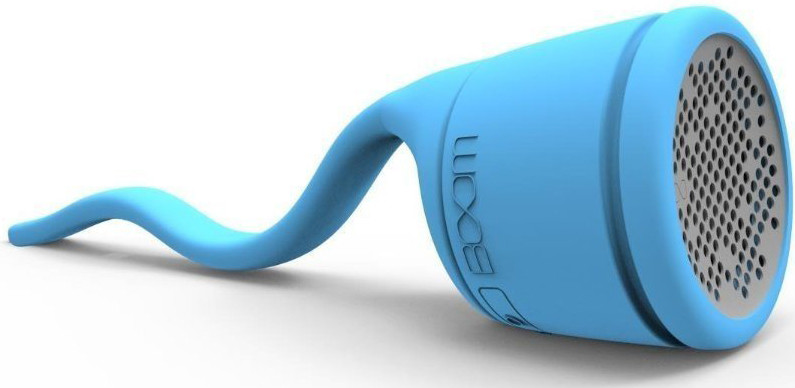
This tadpole-looking device was conceived by the folks at Polk Audio to be as versatile as possible. The tail-end of the speaker is bendable, making it easy to wrap around shower curtain rods or even your shower head pipe, meaning there is always a convenient place to put it.
The Swimmer’s waterproof rating is even greater than it needs to be for use in the shower. It can be submerged in up to 3 feet of water for half an hour without suffering any damage, meaning it can even fall into the tub when you’re taking a bath.
The sound quality is not bad; although, there is very little bass, which isn’t a surprise when you’re talking about something this small. The Polk Audio BOOM Swimmer will only cost you around $20.
See at Amazon
Photive Hydra

The Photive Hydra is perfect for people that want a shower speaker and are more concerned about sound quality than convenience. Sporting a passive subwoofer and two 40mm drivers, the Hydra delivers a fuller sounding low-end, while still providing pleasing, clear treble.
Its IP66 rating won’t allow the speaker to be submerged, but it can handle water jets and splashing just fine, making it more than durable enough to withstand your daily shower.
At roughly $35, the Hydra is a little bulkier and bigger than most of the other speakers on the list, but it’s still compact enough to fit on the edge of your tub or on your shower caddy.
See at Amazon
SoundBot SB510

The SoundBot SB510 is perfect for people who want an easier way to control their music while they are listening in the shower.
The simple interface on the front of SoundBot will let you control playback or adjust volume with just a tap of its buttons, meaning you don’t need to get out of the shower and touch your phone to change songs. Plus, there is even a speaker and microphone for taking calls, so you won’t miss anything important just because you’re bathing.
Its water-resistant rating only protects the SoundBot from splashing; however, It installs super easily with a suction cup that is attached to the back of the speaker, so you should have no problem finding a place for it that’s out of harm’s way. Plus, for $15, it’s the cheapest speaker on our list.
See at Amazon
UE Roll 2

The Ultimate Ears Roll 2 has an IPX7 rating, meaning submerging it in up to 3 feet of water for about half an hour won’t cause any damage, so your daily showers won’t affect it at all. Plus, on the back, it comes with a bungee cord loop, making it easy to wrap or tie the speaker around your curtain rod or shower head, so it stays out of your way while you’re headbanging in the shower.
The UE Roll 2 does come with a couple of improvements over its predecessor model. It has better sound, regarding both volume and quality, than its predecessor, and it also has an increased Bluetooth range of 100 feet, meaning your phone or tablet doesn’t even have to be in the hot, steamy bathroom while you’re getting clean.
The UE Roll 2 will cost you about $99 at full price; however, it’s a very popular product and often goes on sale, so make sure you look out for those deals!
See at Amazon
Fugoo Sport
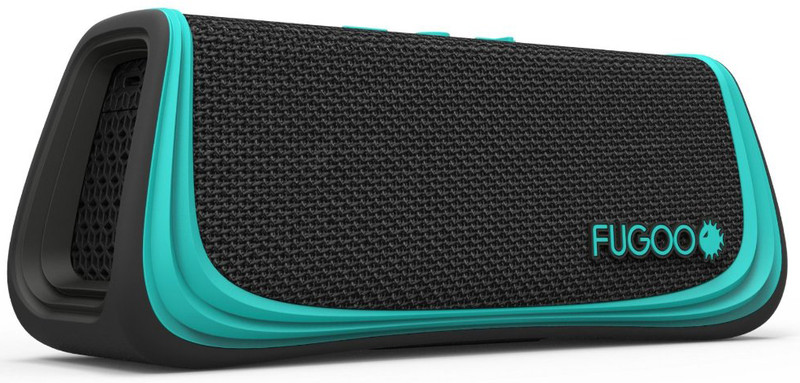
Although it’s another speaker you will need to rest on a shelf or the side of your tub, the Fugoo Sport is an awesome device that carries a starting price of about $89.
The thing that stands out the most is its 40-hour battery life. If you are truly using this in just the shower, you could probably go for weeks without needing a charge. With a waterproof rating of IP67, not only can you submerge the speaker in 3 feet of water for 30 minutes, but it’s also dust-proof, meaning dirt and other particulates won’t cause you any problems.
On top of it all, the sound quality is very good. The Fugoo Sport has six drivers that are spread out across all four sides, giving you clear, well-balanced 360-degree sound.
See at Amazon
UE Boom 2

Taking the UE Boom 2 into your shower is absolutely no problem as it has a very high water-resistant rating, allowing it to be submerged in 3 feet of water for 30 minutes. It’s also protected against dirt and mud, but you can hand-wash the speaker with warm, soapy water just in case it gets messy.
UE Boom 2’s battery will last you approximately 15 hours of playing time, which should amount to a lot of time in the tub, and has a Bluetooth range of 100 feet, making sure your phone, tablet, or PC doesn’t have to be anywhere near the water. Plus, if you truly want the Boom 2 to live up to its onomatopoeic name, you have the option to set up another one to make a stereo pair and really raise the roof.
The UE Boom 2 costs about $100.
See at Amazon
Sbode Bluetooth Speaker

For $50, the Sbode Bluetooth Speaker packs in quite a few features that you’ll find in speakers that cost twice the price.
With eight hours of battery life, you should get quite a few showers between charges, and its IPX6 is plenty of protection from water for your average shower, but you won’t be able to submerge it, so keep it away from bath time! Plus, it has an FM radio built-in, meaning you can go old school and listen to your favorite local morning show while you’re getting ready for the day in the morning.
It also The Sbode Bluetooth Speaker also allows you to stereo pair two speakers to give you a big boost in sound. As an added bonus, the speaker will shut itself off after 10 minutes of stanby, so you never have to worry about forgetting ot turn it off.
See at Amazon
What’s your favorite?
Are you a shower singer? Let us know your favorite speaker to take into the shower with you by leaving us a comment below!
Updated April 2018: We’ve added the very capable and inexpensive Sbode Bluetooth Speaker to the list.
Grilling up some weekend comments

Weekends were made for having fun and relaxing or both if you can find a way to do it.
This weekend is the first weekend in a while where I can sit back and say “I ain’t doin’ sh*t all day” and I’m loving it.
Somehow there always ends up being something that needs done (and I guess the weekend isn’t over just yet so I probably jinxed myself) even when I plan to do a whole lot of nothing but sit somewhere warm with something cold to drink in my hands. Not this weekend. I have the house to myself and my phone is in do not disturb mode until Monday morning while I watch the world go by through the lovely view this lawn chair gives me.

My wife isn’t having as much fun, unfortunately. She’s off on a weekend training thing for her job and enjoying the lovely sights and sounds of Newark, New Jersey until Sunday night. I’ve never had the pleasure of visiting Newark myself, though I have buzzed through the airport for a quick commuter connection and that was enough for me. I’ll just keep this lawn chair company while I decide if I should clean out the grill before I cook some ribs or let the ashes and grease give them a bit of extra flavor.
I’m leaning towards the extra flavor.
Take a minute and jump in the comments to let everyone know what you have going on this weekend or to just talk about anything. If you have a good recipe for something easy I should toss on the grill Sunday afternoon (one that won’t mind a bit of extra flavor so I don’t have to clean anything) holler at me! My butcher is open Sunday until noon (the man is a godsend) and I’ll try anything once.
Today’s best deals you won’t want to miss
Whether you’re looking for new tech gear or household items, we’ve got you covered.
Today you can get big discounts on refurbished Roku streaming devices, iOttie car mounts, Raspberry Pi kits, and more! Don’t pass these up.
View the rest of the deals
If you want to know about the deals as soon as they are happening, you’ll want to follow Thrifter on Twitter, and sign up for the newsletter, because missing out on a great deal stinks!
 AIVAnet