


How to change Fitbit Versa watch bands
Get ready for some potential headaches 😬
As functional as smartwatches are, they also serve as a great extension of your outfit/style. A leather band can help dress up a watch when at a formal gathering, but a silicone one is much better-suited when hitting the gym.

The Fitbit Versa comes with a standard silicone band that can be worn just about anywhere, and while it looks and feels just fine, there are a number of first and third-party bands to choose from to help dress up the watch to your exact liking.
Fitbit opted for a proprietary band system with the Versa, and it’s different from the other one introduced on the Ionic. The new setup can be a pain to deal with, so if you need a helping hand, you’re in the right place.
Step 1 – Push in on the lever of your existing band


With your Fitbit Versa turned upside down, find the quick-release lever (it’s the small metal pin near the Versa’s body).
Once you’ve located it, use your finger to push it in towards the middle of the watch. Not much pressure is required to get it to move, but having fingernails will certainly help!
Step 2 – Pull the band away from the Versa

After you’ve pushed the pin in, angle the top up so that you can pull out the other end of the pin. Just like with the first step, you don’t need a lot of force to get it out.
With this done, repeat the process again for the other end of the band.
Step 3 – Slide the pin of your new band into the Versa

Now that your old watch band is removed, it’s time to connect your new one.
On the new band, push the quick-release pin down so that the end furthest away from the lever is sticking out from the bottom. From here, put it into the corresponding hole.
Step 4 – Set the other end of the pin

Lastly, you’ll need to connect the top end of the band (the one nearest to the lever).
With the bottom part connected and while still holding down the pin, push down and move it up into place. Let go of the pin and you should hear a small “click” letting you know everything’s good to know.
Repeat Steps 3 and 4 to attach the other end of your new band.
Take your time!
The steps required to change the Versa’s bands aren’t all that complicated, but in practice, the mechanism can be tricky to handle. The pin is occasionally finicky to work with if you’ve got big fingers, and the bottom end will often pop out of place when trying to attach the top part.
Following these steps as closely as you can will ensure the process is as smooth as possible, but don’t freak out if things don’t go according to plan at first. Take a deep breath – you got this!
Top 5 things I want to see in Fitbit’s next smartwatch
Every kitchen should have one of these $56 Instant Pot Duo Mini
Get one, for real.

Amazon currently has the 3-quart Instant Pot Duo Mini down to just $55.99 as one of its Gold Box deals of the day. This means that the price that is here now will be gone tomorrow, or sooner if it sells out. We’ve seen deals on Instant Pots disappear pretty quickly, so if you have missed out in the past just click the buy button now.
The Instant Pot combines a bunch of kitchen appliances into one and allows you to do anything from pressure cooking to rice cooking, sauteing to steaming, and even making some yogurt. If it intimidates you a bit, don’t worry. Grab this popular Instant Pot cook book for tons of recipes and ideas of how to perfect your cooking with it.
Need a larger version? The 6-quart option is on sale for $130 and the 8-quart version is priced at $160. That’s $20 off each of them.
See at Amazon
Samsung Pay: Everything you need to know
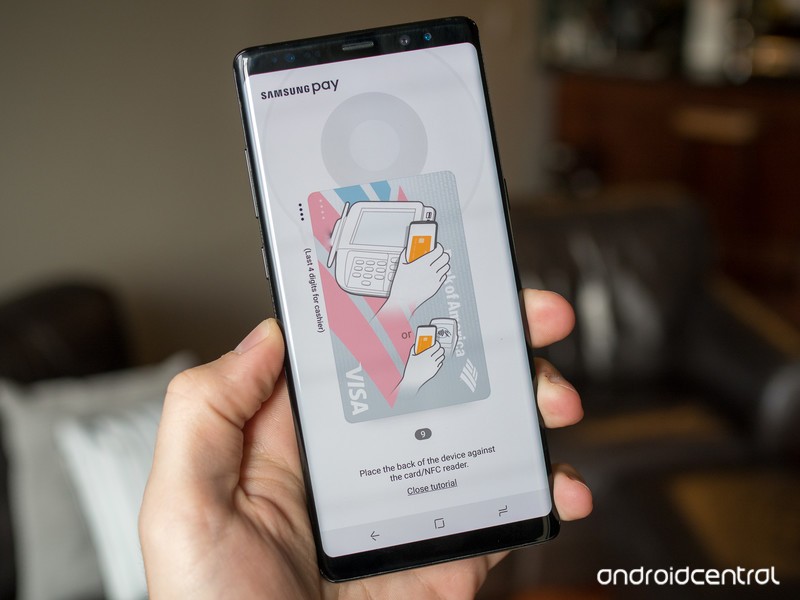
Almost every phone offers mobile payments these days, but Samsung Pay is the most flexible and universally accepted form.
Paying with your phone is still a relatively new prospect, but it’s become a ubiquitous feature on just about every NFC-capable phone over the last few years. The concept is simple; just hold your phone up to a compatible payment terminal to complete a transaction — secured with end-to-end encryption and authorized by your biometrics. Whether you forgot your wallet at home or simply have too many credit cards to manage, mobile payments can be a huge convenience.
There are plenty of different payment solutions, ranging from Google Pay to Apple Pay, but they all fall victim to the same problem: not every payment terminal supports NFC. Luckily for Samsung users, that’s not necessarily a problem. Samsung makes use of a technology called Magnetic Secure Transmission (MST), which emulates the magnetic strip on a physical card to ensure that Samsung Pay works even on older terminals that don’t typically support mobile payments.
The basics
If you’re new to mobile payments in general, there’s a lot to learn. Samsung Pay is largely popular thanks to its MST support, but there are plenty of other reasons one would want to use Samsung Pay over the alternatives. Some may prefer its UI over Google Pay, while others may prefer its selection of supported cards and banks.
What’s the difference between Android Pay and Samsung Pay?
Mobile payment systems have stagnated, unless you have Samsung Pay
Samsung Pay updated with a cleaner and more traditional UI
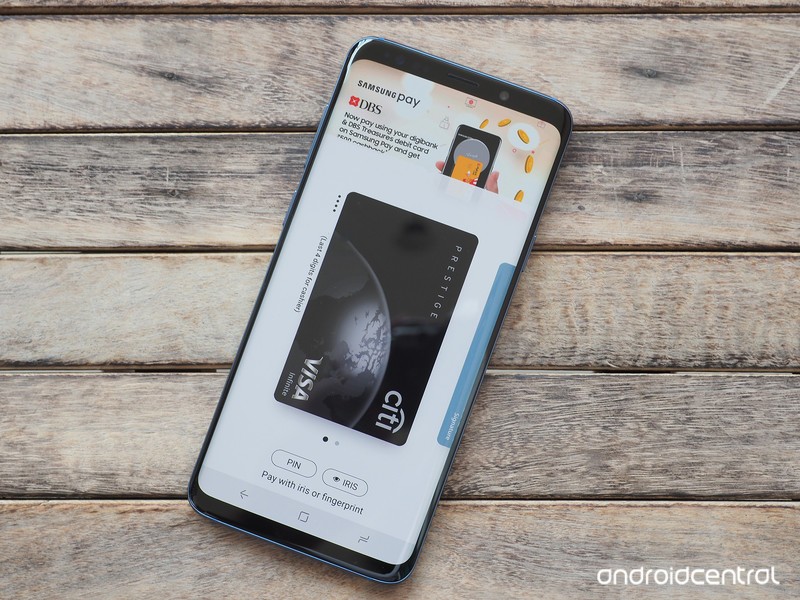
What devices are supported?
Samsung Pay is available on a long list of Samsung phones, but in the U.S. at least, it’s constrained to Samsung’s flagship Galaxy S and Galaxy Note phones, starting with the Galaxy S6 and Galaxy Note 5. In addition, some smartwatches support Samsung Pay — namely most variants of the Gear S2 and Gear S3, though the former lacks MST capability and only makes payments over NFC.
How to use Samsung Pay on the Gear S3 without a Samsung phone
How to set up Samsung Pay with your Samsung Galaxy S8
How to set up Samsung Pay on your Galaxy Note 8
Is Samsung Pay safe?
One of the biggest concerns people have with mobile payments is security. What’s to say someone won’t hack your phone and steal all of your credit card information?
Samsung Pay only works once it’s identified you with biometrics using the fingerprint sensor or iris scanner. From there, it uses tokenization, which replaces your actual card information with generated tokens that are then decrypted by the card’s payment network to authorize the final transaction. Samsung Pay also utilizes Samsung’s Knox platform for additional security.
How secure is Samsung Pay?
How to set up and secure your phone using Samsung’s My Knox
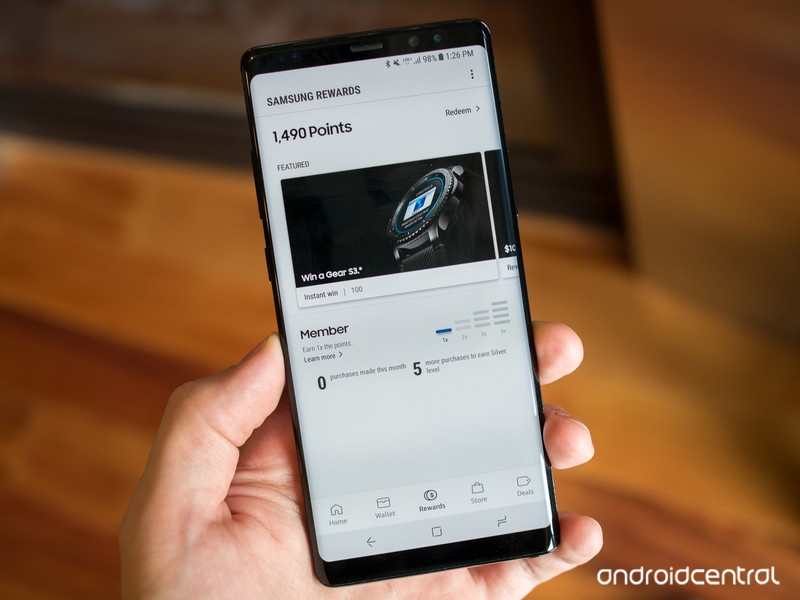
What about the rewards programs?
One of the biggest reasons to use Samsung Pay is its generous rewards programs. With every purchase you make using Samsung Pay, you can earn rewards points that contribute to free gift cards. You can also store existing membership and rewards cards from your favorite stores, giving you one less reason to carry your wallet.
Samsung Pay now offers its own rewards program in the U.S.
Samsung Pay’s rewards program just got a lot less awesome
Where can I use Samsung Pay?
While mobile payments are most commonly used at payment terminals in stores and restaurants, Samsung Pay works elsewhere, too. These days, you can use Samsung Pay to make purchases online and even within apps, with more payment methods than ever — including online services like PayPal.
Samsung Pay adds online and in-app purchases, expands to new countries
Samsung and PayPal strike deal for new in-store and online payment methods
PayPal support finally makes its way to Samsung Pay
What other countries support Samsung Pay?
Samsung Pay is hugely popular in the U.S., but it works in plenty of other places in the world, too. Samsung is constantly expanding its reach — most recently, it launched in Italy, and at the moment it covers 21 unique markets. Depending on where you live, there may be other information relevant to your Samsung Pay experience.
Samsung Pay in the UK: Everything you need to know
Samsung Pay in India: Everything you need to know
What’s your take?
Do you or have you ever used Samsung Pay? How do you feel it compares to other mobile payment services like Google Pay? Is MST a big deal to you? Share your thoughts on this and anything else related to Samsung Pay in the comments below!
Deal: Save BIG at Verizon on the Pixel 2 XL, Moto Z2 Force, Galaxy Note 8 and Galaxy S9

Verizon is currently sporting some great deals on a handful of flagship Android devices. Right now, Big Red is offering $300 off not only the Pixel 2 XL, but also the Motorola Moto Z2 Force edition, the Samsung Galaxy Note 8 AND the Galaxy S9+. If none of those float your boat, you can also grab the Galaxy S9 at a $200 savings.
Not only do you get a serious phone discount, but you also get stellar service on Verizon’s top-ranked network. The savings on these devices comes via monthly bill credits, and this deal doesn’t require a device trade-in — but you’ll need to stay with Verizon for the full 24 months to get the total value of this offer.
Need to knows:
- Purchase of new phone must be on an installment plan
- Discount is applied via 24 monthly bill credits and starts within 2 bills.To get the full value, you will need to stay on your installment payment plan for the full 24 months.
- Activation fee of $25/line applies
- Requires a new line of service to qualify
- If you cancel service, full balance is due
- This deal excludes device’s sales taxes
See More at Verizon
Pixel 2 XL Galaxy Note 8 Galaxy S9 Galaxy S9+

Fitbit Versa vs. The $200 competition: Which should you buy?

The new Fitbit Versa comes in at the sweet spot of $200, which is still $50 less than the least expensive Apple Watch Series 1 model. The Apple Watch also requires the most expensive smartphone companion, an Apple iPhone, while the Fitbit Versa works with Android, iOS, and even Windows 10 Mobile.
While there are a number of fitness band options that could compete with the Fitbit Versa for 24/7 activity tracking, we are focusing on watch form factor options that compete in the $200 or less price range. We also include a few options at the end that you can find for another $50 to $100.
Some of these devices are focused on sports tracking with GPS receivers, some have monochrome displays, and others have limited support for 3rd party apps. One aspect missing from all of these competitors is a vibrant and active community of friends and family that keep many purchasing Fitbit devices for years. Let’s take a closer look at the competition.
Amazfit Bip

The lowest cost competitor, found on Amazon for just $90 and sometimes even for less, in this list is actually one of the most powerful devices available. If you know of someone who maybe just has a passing interest in wearables, then it is tough not to recommend the Amazfit Bip.
The Bip has a 30 to 45-day, yes day, battery life and it is rather stunning to use it and see barely a change in percent remaining each day. In addition, it has GPS and GLONASS, IP68 dust and water resistance, a Gorilla Glass 3 color always-on display, standard 20mm watch band, and basic notification support through a Bluetooth connection to your smartphone. It also only weighs about 31 grams so you won’t even notice it on your wrist. The Bip is available in black, orange, white, and green.
While the Mi Fit app works well to fully customize your Bip experience, there are also third-party apps available if you want to sync your GPS data to other services such as Strava and Runkeeper. While we are seeing more advanced GPS sports watches add VO2 Max metrics, the Bip does it for much less so you get your fitness level, training load, and recovery time within the Mi Fit app.
The Mi Fi app gives you the ability to fine-tune your preferences in order to optimize your battery life while providing you with exactly what you need. It is rather stunning how much data the Bip provides, but it isn’t the highest quality wearable. The Bip reminds me of a Pebble, but when your wearable lasts for weeks while providing just about everything you need it is tough to beat.
The Good
- Inexpensive
- Integrated GPS
- Extremely long battery life
The Bad
- Dull color display
- No social ecosystem
See at Amazon
Polar M200

Polar is a premium brand for sports tracking and for many years stood out as the maker of the most accurate and capable heart rate chest band. It has a few current options for GPS sports watches and the most affordable is the Polar M200.
The Polar M200 is a GPS running watch with integrated heart rate monitor and 24/7 activity and sleep tracking support. It is clearly optimized for running so if you are not a runner, then this is really not a good option for you to consider.
It has a monochrome display with custom Polar interchangeable bands in bright color options. The bezel is rather large and it is not the most attractive wearable option available. It’s a bit awkward to pop out the main body of the device to charge it up via USB.
Sleep tracking is not very accurate and extremely limited compared to the Fitbit Versa. You may also find the notifications to be more annoying than they are helpful with truncated messages and no way to see more. The smartwatch functions are definitely something slapped on to compete in the space, but are not that helpful.
The Polar M200 syncs to Polar Flow on iOS and Android smartphones with smartphone notification support. At $149.95, the Polar M200 is another option for those who need integrated GPS for run tracking. The battery lasts up to six days on the M200.
The Good
- Advanced run metrics
- Integrated GPS
- Accurate heart rate
The Bad
- Monochrome display
- Limited smartwatch capability
- Inconvenient charging mechanism
See at Amazon
Ticwatch E

Another affordable Android Wear smartwatch is available from Mobvoi, the Ticwatch E. For $159.99, you can purchase an Android Wear smartwatch that has integrated GPS, a heart rate monitor, IP67 dust and water resistance, and support for onboard music. This smartwatch has more functionality than many Android Wear devices and performs very well too.
The Ticwatch E has a 400×400 pixels resolution color touchscreen display and weighs in at 41.5 grams. It’s quite a bit larger than a Fitbit Versa, but it packs in a lot and may be the best Android Wear alternative available today.
It has a mic, a speaker, Bluetooth, WiFi, and comes in various strap colors. It does not have NFC so payments from your watch are not supported. Sleep tracking is only provided via third party apps. The battery life is what you can expect on a typical Android Wear smartwatch of one to two days.
The real power of the Ticwatch E is in the Android Wear platform where hundreds of third-party apps can be used, advanced notifications and the ability to respond and initiate communications is supported, and where preferences and settings are available to make the watch experience personal and reflective of your lifestyle.
The Good
- Low price for all the features
- Integrated GPS
- Offline music support
The Bad
- Limited battery life
- No native sleep tracking
See at Amazon
Garmin Forerunner 35

Garmin is known for its capable GPS sports watches and the Forerunner 35 is its most affordable model. It has been out for a couple of years, but at $169.99 it is a solid option for those who want a running or cycling watch with GPS.
Like the Fitbit Versa, the Garmin Forerunner 35 supports 24/7 activity tracking, including automatic sleep tracking and heart rate monitoring. It has a monochrome display and does not support third-party apps so it is clearly focused on fitness first.
The Forerunner 35 is shaped similar to a Fitbit Versa with a watch platform that is more square than circle. Buttons are used to navigate this watch, which is great for runners out in the elements, but also making it feel like a dated device. The 128×128 pixel monochrome display is a bit old school, too, but again is optimized for runners who exercise outside.
Smart notifications are supported on Android and iOS phones, but the smartwatch capabilities are limited. The Forerunner 35 does not support Garmin’s Connect IQ platform with third-party apps so you are only provided with basic notification support.
It has a nine-day battery life as a tracker and has a high level 5 ATM water resistant rating. The Forerunner 35 weighs in at 37.3 grams.
The Good
- Automatic sleep tracking
- Complete run tracking with GPS
- Lightweight
The Bad
- Monochrome display
- Limited smartwatch capability
- No third-party apps
See at Amazon
Polar M430

Another option from Polar that costs $50 more, $199.95, is the M430. The M430 is similar to the M200 with improved sleep tracking technology, advanced fitness features (fitness test, recovery status, and training load), continuous heart rate tracking, and more running metric support.
The Polar M430 weighs in at 51 grams while the M200 is 40 grams. The M430 also has a monochrome non-touchscreen display with side buttons to navigate around the device. Like the Forerunner 35, the M430 has a 128×128 pixels resolution display so it’s not taking any prizes for a modern display.
The Polar M430, like a few wearables in this list, is primarily focused on running. The customization options through the Polar Flow app and website are stunning. However, if you are not a runner, skip this device and look elsewhere for a daily tracker with smartwatch functionality.
The Good
- Integrated GPS
- Advanced run metrics
- Accurate heart rate
The Bad
- Monochrome display
- Limited smartwatch capability
- No third-party apps
See at Amazon
Huawei Watch 2

The Huawei Watch 2 is a powerful Android Wear smartwatch that functions well with both Android and iOS smartphones. It is one of the most complete competitors to the Fitbit Versa with notifications, GPS, onboard music storage, vivid color display, 24/7 activity and sleep tracking, Google Pay, and support for third-party applications through the Google Play Store.
The Huawei Watch 2 is available now for the same $199.99 that is charged for the Fitbit Versa. There is no ecosystem to support competition with family and friends, but you can sync your data to Google Fit and run data to other services such as Strava or Runkeeper.
The Watch 2 lasts for a couple of days as a smartwatch, less than half that of the Fitbit Versa, which is typical for these Android Wear and Apple Watch devices. Battery life may not seem important, but having to charge a wearable every single day may start to wear on you and will limit your ability to track your sleep.
Fully functional notifications, with the ability to respond to them and initiate communications, are supported on the Huawei Watch 2. We haven’t seen many recent Android Wear watches, but the Huawei Watch 2 is one of the best.
The Good
- Advanced smartwatch capability
- Integrated GPS
- Offline music
The Bad
- Limited battery life
- No native sleep tracking
See at Newegg
Samsung Gear Fit2 Pro

Samsung has been in the wearable game for many years and its latest products are refined and provide users with a full and complete experience. The Samsung Gear Fit2 Pro is a cross between an activity tracker band and a smartwatch with a unique band form factor and a large rectangular curved glass display.
The $199.99 Gear Fit2 Pro is powered by Tizen and has more than 3,000 apps and watch faces to choose from, including Spotify, Pear, UA Record, and music player. Samsung Health is one of the most comprehensive services for consolidating all of your daily activity and exercise data and works across wearables and smartphones, even including the iPhone.
The Gear Fit2 Pro has a three to five-day battery life, 5 ATM water resistant rating, 1.5 inch 216×432 color display, 4GB of storage for offline music playback, WiFi/Bluetooth/GPS, and an integrated heart rate monitor. It has everything you could want and weighs in at 34 grams.
It is fantastic at fitness and activity tracking while also being a very functional smartwatch with advanced notification support and tons of settings to customize and personalize the wearable for your needs.
The Good
- Brilliant display
- Unique curved glass design
- Integrated GPS
- Powerful Samsung Health ecosystem
- Functional smartwatch
- Offline music support
The Bad
- Bit bulky for a band
See at Amazon
For a little bit more

While the list above ranges from about $100 to $200, there are also other alternatives available for $50 to $100 more.
Fitbit Versa’s older brother, the Fitbit Ionic, brings the Fitibit OS 2.0 experience seen on the Fitbit Versa with integrated GPS, higher quality materials, and a geekier design. I personally prefer the $299.95 Ionic over the Versa, but I’m a runner and want a wearable with integrated GPS.
In addition to the cool band design of the Gear Fit2 Pro, Samsung released the Gear Sport in late 2017. It’s a more affordable, $299.95, and smaller smartwatch than the Gear S3 Frontier. The Gear Sport is arguably a better smartwatch for Android users than any Android Wear watch. It has a gorgeous high-resolution display, wireless payment system, GPS, 5 ATM water resistance, offline music support, and the best watch interface with a rotating bezel.
The Apple Watch Series 1 is still available from Apple for $249 and if you own an iPhone there really is no smartwatch that is better for you than an Apple Watch. Apple has a very intuitive, and rather addicting, ring and badge reward strategy for motivating you to move and it has proven to be effective. The Series 1 Apple Watch doesn’t have integrated GPS, but it has a glorious display, rock-solid design, a massive third-party application market, wonderful notification system, offline music support, and a significant band market to customize it to your delight.
Closing thoughts
As you can see, there are several alternatives to the Fitbit Versa, but each also has its pros and cons. If tracking your steps, collecting data for various workouts and exercises, understanding the details of your sleep, and monitoring your heart rate in fine resolution are very important to you, then it is tough to beat the Fitbit Versa. It is lightweight, affordable, customizable, and continuously improving. The community aspects and the excellent Fitbit Coach integration are also unique features that set the Fitbit Versa apart from the other options.
Fitbit
- Fitbit Versa vs. Fitbit Ionic: Which should you buy?
- Fitbit Versa hands-on: Fitbit’s finally getting serious about smartwatches
- Fitbit Versa and fitness: Everything you need to know
- Best Fitbit fitness tracker
Fitbit Ionic
Fitbit Versa
Fitbit Charge 2 HR
Would you like a flat screen on the Galaxy Note 9?
A matter of form vs. function.
Samsung’s been dabbling with curved displays for quite a few years now, but since the launch of the Galaxy S8 series last year, the company’s gone all in on these curves for its flagship phones. The Note 8 and S9 series that followed the S8 also came equipped with curved sides, and with the Note 9 on the horizon, people are debating whether or not this is a trend that should stick around.

Some of our forum users recently started talking about if they want to see a curved screen on the Note 9, and for the most part, they seem to want flat displays to make a return.
recDNA
04-24-2018 01:45 PM“
I would pay extra for a Note 9 with a flat screen the same size and screen ratio as my old Note 7.
Reply
Rukbat
04-24-2018 02:42 PM“
We can “get” curved protectors, but they still don’t lie as flat as protectors on flat screens do. (And that video looked like a 2.5D screen, not a completely flat screen.) Whitestone Dome Glass may work, but it’s not available for all phones – and it’s not cheap.
Blues Fan, it’s because we’re willing to buy the ones with less RAM, less storage and fewer features, and pay new price for a…
Reply
Then again, some don’t mind the curved look.
tadpoles
04-24-2018 02:22 PM“
Now that we can finally get good screen protection (spelled OTAO, Zagg, White Dome and others) I have absolutely no problem with the curves. That said, the curved screens do absolutely nothing for me either. Seems like a gimmick but one person’s gimmick is another’s favorite feature.
Reply
With that said, we’d like to know where you stand – Do you want a flat or curved screen on the Galaxy Note 9?
Join the conversation in the forums!
The new Amazon Echo Dot Kids edition has parental controls and a worry-free guarantee
Don’t let your kids accidentally order pizza anymore.
The other day a family member asked me to help him figure out how his youngest daughter, who isn’t even two yet, was spending money on his Fire tablet. She had apparently spent more than $20 just clicking around and buying random videos. I showed him how to set up parental controls and block those activities from happening automatically but not before accidentally spending $2 myself. Amazon does not put a lot of barriers between you and spending money, and that can be an issue if you have young children. Especially when they learn to say “Alexa.”
Today, Amazon introduced the Echo Dot Kids Edition along with upgraded versions of the FreeTime and the more advanced FreeTime Unlimited services.

Let’s start with the Echo Dot Kids Edition. It is available for pre-order for $79.99, comes in three basic colors, and will release on May 9. For the most part it looks just like a regular Echo Dot, but it comes with a kid-friendly rubber case, one-year of Amazon FreeTime Unlimited, and a two-year worry-free guarantee that will replace it if your kids get too rough with it – no questions asked.
FreeTime on Alexa has been around for a while now, but the service is being expanded to include a lot more parental controls and family-oriented options. It can be added for free to any Echo device.
With FreeTime you can set time limits for the Echo Dot to keep your kids from talking to her well into the night, turn off things like voice purchasing (you’re welcome, family member of mine) and other services and skills you don’t want your kids to access (Uber, Domino’s, etc), and review your kids’ activity. If you subscribe to Amazon Music, you can block certain songs, Alexa can have age-appropriate ideas for your children at the ready, too, with knock-knock jokes, voice games to play, and educational questions to ask. The “Magic Word” feature will even give them positive reinforcement when they say “please.” FreeTime will also enable the Echo Dot to be used like an intercom, so you can communicate with your children from across the house.
FreeTime Unlimited expands on that service to add more than 300 free audiobooks from Audible, kid-friendly radio stations and music playlists from iHeartRadio Family, and new Alexa skills developed by kid-friendly brands like Disney, Nickelodeon, and National Geographic. You can even set alarms using voices from some of your kids’ favorite characters.
The FreeTime Unlimited service is restricted to Echo devices that don’t have video, like the Echo Dot and Echo Plus. If you’re already a subscriber, the new features will be added at no additional cost. If you aren’t, it will cost $2.99 a month for Prime members.
The Echo Dot Kids Edition starts at $80, which is $30 more than a regular Echo Dot. But a year of FreeTime Unlimited, which the Kids Edition gets for free, is worth $36 at $2.99 a month. So you’re really saving money on that service and you still get the worry-free guarantee as well. It’s not a bad way to go if you have young kids that are starting to master your electronics faster than you ever did.
You can also get a year of FreeTime Unlimited, with all its new services, packaged with the Fire 7 Kids Edition Tablet.
See on Amazon
Today only, these Black + Decker compact hand vacuums are down to just $20

Today only, Amazon is offering these Black+Decker Compact Lithium Hand Vacuums for only $19.98 apiece. There are several different colors to choose from, and this price is a historic low for almost all of the options. The average price for these is right around $35, with a little wiggle room for some of the less popular colors (like this awesome teal option.)
Almost 1,000 users gave these vacuums a collective 3.9 out of 5 star rating. The vacuum promises to be lightweight while remaining powerful. They’re also easy to charge and easy to clean. The dirt bowl is clear, so you can see when it’s time to dump it, and there are no bags necessary. You’ll get the vacuum, a crevice tool, an upholstery brush, a wall-mount charger, and a base.
I love these for cleaning out my vehicle, but there are tons of other uses, too. Vacuum the mess that your broom and dustpan always seem to miss, keep kitty litter areas clean, make the carpet on your steps look nice, or suck up the glitter and paper scraps that seem to follow your kids around. For $20, you could do a lot worse. Another nice bonus is that the replacement filters are pretty inexpensive, too.
See at Amazon
Interview: Motorola President Sergio Buniac sparked Latin America success, but growth doesn’t stop there

The company has seen massive growth in one region, and now the sights are set globally.
Motorola is a bigger deal than many of us realize. It holds a second-place market share position in several countries, and is extremely popular across massive markets like Brazil and India. It’s even become the top unlocked phone brand in the U.S. And Motorola’s new President, Sergio Buniac, thinks it can go much further — and has a proven plan to work with.
I had the opportunity to sit down with Mr. Buniac for about a half hour over some espresso and pão de queijo, which really is how I aim to conduct all of my interviews going forward. We discussed where Motorola stands today, where it’s headed, and how it plans to replicate its successful Latin American strategy globally. We were also joined by Rudi Kalil, Vice President of Motorola North America, to provide further insight into Motorola’s goals here.
A success story in Latin America
After 20 years with Motorola, Buniac came to this President role from his previous position as SVP of Motorola’s Latin America business segment, where he oversaw the company’s impressive growth in the region. Starting from when Lenovo’s acquisition of Motorola completed in late 2014, Buniac and the rest of the company made moves to capitalize on its strengths and rapidly grow in the region. It was a dual-pronged approach, going after large and competitive countries like Brazil, Argentina and Mexico in a metered way, while aggressively going after smaller and less-developed markets like Chile, Colombia and Peru — the latter group in particular containing couple dozen distinct countries that had great conditions for growth.

With just a couple years of Moto G and Moto E sales in Latin America, Motorola attained an impressive market position. By the end of 2017, Buniac says, Motorola reached a No. 1 or No. 2 position in the top seven Latin American markets. Motorola’s growth last year was 20 times the market’s overall growth — 40% versus 2%. In the “premium” segment, which is defined as the $400-550 range, Motorola moved from just 4% of the market to 30%. Despite that amazing position, he specifically says that Motorola’s view has “never been ‘let’s be No. 1 next week’ — it’s a long-term investment and commitment.” He notes that Motorola has gained impressive market share, but now the goal is the improve customer engagement through improved support, better retail services, beta access to apps and more consistent software updates.
Moto G6 series hands-on preview: Hello photo
Motorola’s Latin America operation is completely centered around the popularity of the Moto G. Its price range of $250-350 is perfect for the overall market conditions, and the numbers show it: Buniac has no reservations about calling it “the most-sold phone in Latin America right now,” and explaining that the rest of its business grows out above and below it with the G as an influence.
Moving to new markets
Motorola is the No. 1 unlocked phone brand in the U.S., but it wants to keep growing.
Seeing so much sustained growth in Latin America, Buniac wants to replicate that in North America — that’s where Mr. Kalil comes in. He has years of experience across the technology industry, in particular with mobile carriers, which is extremely important when you’re trying to make moves in the U.S. and Canada in particular. Kalil very proudly states that Motorola is the top-selling unlocked phone brand in the U.S., driven primarily by the Moto G. But the mission is to at least reach the No. 3 position overall — a bold expectation, considering it’s currently in the 4 or 5 spot, with roughly 4% share. Still, Kalil has some footholds to work with: Motorola’s growth in 2017 was up 50% from the previous year, and it sees particular strength in the Moto Z/Z2 Play and Moto X4 alongside the ever-present Moto G. The Moto E is a mini success story in its own right, being a huge hit with prepaid carriers and taking a top-3 position in its price category.
Moto E5 and E5 Plus hands-on preview: Your next cheap phone

So, what about the Moto Z? It’s clear that this is a product line (and price point) where Motorola continues to struggle. Outside of the Moto Z/Z2 Play being relative hits in their price brackets, Buniac admits that traction for the Z/Z2 Force hasn’t been great. While the idea of Mods continues to draw consumer attention, the shatterproof technology is a tougher sell to consumers — it is, after all, tough to market something that won’t happen. And in general, the super-high-end price range where these phones play is particularly crowded and competitive. He reiterated that Mods are here to stay and gaining traction with consumers across the board, and that there’s work being done to increase the screen size of the Moto Z family while retaining compatibility with existing Mods. Presumably this would come from smaller bezels, a slight change in case design and even the removal of the shatterproof display technology that saddled the Z2 Force with so many design trade-offs. We should start to see these changes in the next generation of the Z line.
Building on strengths
As for the future of Motorola’s phones, Buniac doesn’t feel a dramatic rethinking of the product line is necessary. The Moto Z, X, G and E lines are recognizable and stable, and there’s plenty of room for growth and innovation within the current structure — but he agrees that there are still too many models, saying that Motorola wants to “drive complexity down big time.” Not to the point of how simple things stood when Motorola was owned by Google, but certainly in that direction.
Buniac wants to reduce the number of models and colors inside each line, and reduce the range of models coming to each region. This is all working toward not only making it easier for consumers to understand, but for retail operations to manage and Motorola to ultimately improve after-sale support and software updates. He says that right now, “it’s 90% discipline and 10% innovation,” with the goal of smoothing things out and reaping the benefits from that simplification.
The Z, X, G and E lines will evolve — and the goal is to simplify them so each product improves.
Continued consistency in design and features across the line is extremely important, Buniac says, and you can see that acutely in the new Moto G6 and Moto E5 that clearly borrow from the Moto X4. The software offerings across all four lines are nearly identical, within the restrictions of the hardware differences between them. And then beyond that stable base, Motorola can differentiate in each line with different features that are most important to that market — like Mods, larger displays, longer battery life or advanced cameras, for example.
Buniac understandably didn’t want to reveal anything concrete about future products, particularly as the just-unveiled Moto G6 and E5 were taking the spotlight, but he did leave me with the simple reassurance that “there is always innovation coming […] you will see a few announcements coming this year that are very exciting.”
You can now upload multiple photos/videos to Instagram Stories at once
It’s also easier to find the location tag you’re looking for.
I’ve recently begun using Instagram Stories in place of Snapchat, and for the most part, the experience has been a great one. Now, it’s going to get even better thanks to a couple new features making their way to the Android app.

The biggest change is the ability to upload multiple photos and videos to Instagram Stories at once. From the page where you usually upload content to Stories, you’ll see a new button near the top right of your screen. Tapping this will bring up your gallery of photos/videos, and you can choose up to 10 of them to upload at once.
Once your content is selected, you’ll see them lined up at the bottom. Tapping on each photo will bring it into a fullscreen view with options for adding stickers, filters, etc. as you normally would.

Instagram’s also making it easier to find a location tag for where a photo or video you took was captured. Per Instagram –
It’s also now faster to find the right place when adding the location sticker to a photo or video you’re uploading to your story. Now, when you’re sitting at lunch daydreaming about last weekend at the beach and you decide to share a photo, the location sticker will suggest places from near where your media was captured — making it easier to tag that great taco spot, even if you didn’t exactly remember what it was called.
These features are available in the Android app now, with Instagram noting they’ll be available for iOS in a few weeks.
Download: Instagram (free)
 AIVAnet