


Best Car Chargers for Google Pixel and Pixel 2

Keep your Pixel charged while out on the road. Here are our favorite USB car chargers.
We’ve all been there (some of us more than others): You hop in your car ready to rev on the road and then you check your phone — it’s dying at a rapid pace! You’ve barely enough battery life to get to your destination. Well, that’s what car chargers are for, and if you’ve got a Google Pixel or Pixel 2, this next list should be particularly resonant for you. Here are some of the best car chargers you can buy for your Pixel 2 or Pixel.
- Belkin
- Spigen
- Aukey
Belkin F7U026bt04-BLK USB-C charger and cable

The Belkin car charger with removable 4-foot USB-C cable is consistently suggested as one of the better car chargers for USB-C compatible devices. Make sure that you purchase the 27-watt version, however, which is capable of delivering enough power to rapidly charge your Pixel or Pixel 2. It can power your tablet and Chromebook in the car, too. Belkin’s car charger is available from $39.
Note: This is a replacement model for the defective charger, model F7U004bt04-BLK that Belkin discontinued. If you previously bought that version, you can receive a refund or exchange it free for a newer model by contacting Belkin at claims@belkin.com. More information about the issues can be found here.
See at Amazon
Spigen 30W Quick Charge 3.0 Dual Output USB charger

Spigen is a popular brand in smartphone accessories, and its dual USB car charger is a high-quality part that won’t overheat your Pixel 2 or Pixel. While it’s not USB-PD compliant since it requires a USB-A to USB-C cable, it supports Qualcomm’s Quick Charge 3.0 standard, which allows the Pixel and Pixel 2 to charge at high speeds in the car.
The beauty of the Spigen charger is that it supports a total of 30W and also has a second USB-A port to charge a second device. The best part? It’s only $10.
See at Amazon
Aukey USB-C Car Charger with 5V/3A USB C & Quick Charge 3.0 Ports

Aukey’s charger features both a USB-C port and a USB Type A port, so you can charge your Pixel and another device at the same time. While your Pixel won’t work with the built-in Quick Charge 3.0 support, charging at up to 3A is supported for speedy refills via the USB-C port.
(And hey, if you have other devices that do support QC3, the USB-A port has you covered.) All this for just $17.
See at Amazon
Your picks?
Are you using an awesome USB-C charger that we didn’t mention? Let us know in the comments below!
Updated April 2018: We’ve completely overhauled this list, replacing the recalled Belkin charger with a newer, safer one (sorry about that), removed the Maxboost charger and replaced it with a Spigen.
Google Pixel 2 and Pixel 2 XL
- Pixel 2 FAQ: Everything you need to know!
- Google Pixel 2 and 2 XL review: The new standard
- Google Pixel 2 specs
- Google Pixel 2 vs. Pixel 2 XL: What’s the difference?
- Join our Pixel 2 forums
Best Buy
Verizon
Google Store
Project Fi
Google Pixel + Pixel XL
- Google Pixel and Pixel XL review
- Google Pixel XL review: A U.S. perspective
- Google Pixel FAQ: Should you upgrade?
- Pixel + Pixel XL specs
- Understanding Android 7.1 Nougat
- Join the discussion in the forums!
Google Store
Verizon
You can now filter movies by location, showtimes, and more in Google Search
There’s also an updated user interface.
Although there are plenty of apps dedicated for finding movie showtimes and purchasing tickets, I still often turn to Google Search for my movie-searching needs. Google Search has been doing a solid job at presenting movie info for some time now, but a new update is bringing a fresh look and handy features.

Next time you search “movies” or “showtimes” on the Google app on your phone, you’ll see a new “Movie showtimes” menu with two main tabs for browsing through movies and nearby theaters.
The Movies tab shows a list of various cards for movies that are playing, with each one showing its current rating, the nearest theater it’s playing at, its runtime, and more. Tapping on a movie card will bring up more information, and you can look up showtimes for future dates and at other theaters in your area.
Moving over to the Theaters section, you’ll get a list of the theaters closest to you, and tapping on one will show a list of what’s playing for that day.


Along with all this, you’ll also find new filters for narrowing down your search – including the date, genres, screen type, ratings, time, and more.
This new layout for movie searches is available now for Google Search on mobile browsers and the Google Android app in the U.S. and India in English and Hindi.
Best Large Screen (Phablet) Android Phone in 2018
Possible shooter causes YouTube HQ in California to go on lockdown
6 patients have been reported so far.
At the YouTube headquarters in San Bruno, California, police have responded to multiple 911 calls regarding a possible active shooter in the area.

KRON4, a San Franciso-based news network, reports that one witness heard 20 different shots at one point, and at 1:00 PM local time, the San Bruno Poice Department tweeted that residents should stay away from 901 Cherry Ave. due to “police activity.”
YouTube employees have been seen guided out of the building with their hands above their heads, and numerous tweets from people on the scene have reported blood drips on stairs, police officers with rifles at the ready after arriving at the scene, and workers wildly running around the building.
Product Manager Todd Sherman has an ongoing thread about his personal encounter, with another employee (Vadim Lavrusik) saying that they heard shots and was then barricaded inside a room with their coworkers.
At least six patients have been announced on the San Bruno scanner so far. Google’s Communications Twitter profile announced that it was “coordinating with authorities and will provide official information here from Google and YouTube as it becomes available.”
Developing..
Fortnite for Android: Everything You Need To Know!

The hottest game of 2018 will be coming to Android in the coming months.
Fortnite has been blowing up lately. Millions of people have become obsessed with the game, both as players and just watching popular Twitch streamers play the game.
Interested to learn more about what the heck Fortnite is all about? Just keep reading.
Latest Update: Still no firm release date for Android with the developers at Epic Games stating a release is still months away. This is largely because there are so many Android devices to support — but you can do your part by logging into the Epic Games website and selecting your preferred device and be notified once the game is available.
What is Fortnite?
Fortnite is what would happen if you combined two of the most addictive games out there — Minecraft and PUBG.
Fortnite offers a free 100-player Player Vs Player (PvP) Battle Royale game mode. Just like PUBG, you’re dropped onto the large island map and must arm yourself and outlive your competition. But in Fortnite, you always start out armed with a pickaxe which can be used as a melee weapon or for harvest raw supplies for building walls, ramps, and shelters.
It certainly adds extra layers of strategy to the format, creating essentially a perfect storm of addictive gaming action that’s as fun to watch as it is to play. Oh, speaking of storms all the action takes place in the eye of a deadly electrical storm meaning you can’t just hunker down and hide out the whole game. You got to keep moving.
How do you play the game?
Just like PUBG, your goal is to be the last man standing — with up to 100 players involved in each match, that’s no small task.
Each game starts with the players jumping out of the flying “Battle Bus” and parachuting down onto a giant island. Once landed, you must loot nearby buildings for items, guns, and ammo to defend yourself and attack other players.
You also need to keep an eye on the map, as every few minutes the storm closes in on the play area. If you’re caught in the storm, you slowly die so you do not want to forget to regularly check where you are on the map. Eventually, the play constricts to a tiny area for the final showdown between the remaining players — there can only be one winner!
Unlike PUBG, you’re able to carry more than two guns. Instead, you’re limited to the number of weapons and items you can carry at one time. Also, guns are color coded to denote their rarity — from grey (common) to orange (legendary) — and the rarer the gun, the deadlier it is.
Then there’s the crafting element. Every player starts out with a pickaxe which can be used as a melee weapon or used to break down trees and buildings to harvest the raw resources. You can then use these raw resources to build your own structures, whether it be a defensive wall to provide cover from an advancing enemy, a set of stairs to reach the second floor of a building or your own watchtower to snipe players from across the map. The resources you mine will determine the strength. Steel is stronger than brick, which is stronger than wood.
When will it be available for Android?
Fortnite has been available for PC, Xbox One and PlayStation 4 for a few months now, and is now widely available on iOS devices after a brief invite-only beta.
There have been no firm dates set for an Android release by Fortnite’s developer, Epic Games, but they have said to expect support for Android to come in the next few months. For now, Android users can head on over to Epic Games, log in or create your Fortnite Account, and then let the developers know which device you plan to play on which will also add you to the mailing list to be informed when the game eventually drops.
Until then, at least we’ve got PUBG to tide us over.
Will it be free to play?
Epic Games has so far released the PvP Battle Royale game for free across all platforms including the mobile version for iOS. The console version also has a paid game mode called Save The World that’s Player vs Environment (PvE). Save The World plays more like Minecraft, where you’re harvesting more resources and stocking up on loot to survive waves of AI enemies in a sort of tower defense-style of gameplay.
The PvE mode will not be available in Fortnite Mobile for iOS and, frankly, it’s the PvP mode that everyone is crazy for so that’s quite alright with us.
However, the iOS version offers in-app purchases for cosmetic items to customize your player and people sure have been buying stuff. According to this report from Sensor Tower analtyics, Fortnite Mobile players spent more than $1 million during the first 72 hours of its release on iOS. Wow.
So, to answer the question, you have the option to spend money on Fortnite if you want a cool looking character, but the game is free to play and you won’t need to pay to win.
Will there be support for Bluetooth controls?
Epic Games has indicated that Bluetooth controller support will be coming later, but as of right now only touchscreen controls are available.
Is it cross-platform?
Epic Games have indicated that you will be able to play Fortnite across all platforms. Your Fortnite profile can be connected to all the platforms you play on so you can add to your stats however you connect to the game.
Don’t be worried about getting mismatched as the one mobile player in a server of PC and console players. If you’re playing solo on mobile, you will only be matched up against other mobile players. If you join a squad with friends playing on another platform, then that squad will be matched against a multi-platform population, essentially making cross-platform play opt-in.
- Learn more about Fortnite Mobile
Are you hyped for Fortnite?
We’ll be sure to let you know when the game launches for Android. Until then, you can create your Epic Games account and start playing on one of the other platforms to start getting a handle on the game
Android Gaming

- Best Android games
- Best free Android games
- Best games with no in-app purchases
- Best action games for Android
- Best RPGs for Android
- All the Android gaming news!
I can’t wait for laptops with Apple’s own chips
Apple might be ready to ditch Intel’s x86 chips in the Mac in favor of a custom-designed piece of silicon. At least that’s the story out of Bloomberg, which believes that a transition by Apple to its own CPUs could begin by 2020. It’s just a single, as yet unsubstantiated story, but it’s already made a dent in Intel’s share price, even if Apple is hardly its biggest customer. And yet it’s clear that between Intel’s recent problems and Apple’s successes, it’s time that divorce proceedings begin.
The company has been down this road before. In 2005, it decided that PowerPC’s failure to maintain performance parity with Intel was enough. Despite previously bragging that existing PowerPC chips were faster, Apple had to transition its operating system and apps over to Intel’s x86 architecture.
It’s clear that Apple and any third-party chip supplier will have a relationship that would be politely described as problematic. After all, Apple prefers to control every part of its business, including every component that is in its hardware. You can see this in the iPhone, iPad and Apple Watch, which use custom internals and, because of that, rarely miss production deadlines. The Mac, meanwhile, has suffered from stop-start refresh cycles and component troubles, and much of the blame for that has been laid at Intel’s feet.
Between the cost of Intel’s hardware and the recent Spectre and Meltdown security flaws, there are plenty of reasons to take the business elsewhere. There’s also the fact that Apple’s in-house chip team is designing silicon that can, at least on paper, stand equal to the best Intel can offer. Geekbench tests of the iPhone X’s A11 chip found that it was almost a match for the 2017 MacBook Pro. If Apple can beat an Intel chip in its smartphones without trying, imagine what it’ll achieve when it bothers.
The A11 was also the first chip to ship with Apple’s three-core custom GPU, which it designed once it had ended its relationship with Imagination Technologies. The British designer had worked with Apple on its PowerVR graphics chips since the first-generation iPhone. But Apple decided to part ways with the company in early 2017.
Apple would release its first-generation graphics chip on the next iPhone a few months later, to much surprise from the industry. The silicon was able to squeeze 30 percent more performance and use half as much power than the previous year’s PowerVR. Apple clearly has the skills, knowledge and expertise required to build its own desktop chips, should it want to.
In fact, Apple’s chip team is already producing Mac chips, just not the CPU. The small T2 engine inside the new MacBooks controls the machine’s bootloader and FaceTime Camera and protects your personal data. These functions were previously controlled by the CPU, and you can bet that, even if Intel remains inside Apple’s machines, its responsibilities will shrink.

I imagine that we won’t see these chips pop up in the Mac Pro any time soon, or even the higher-end MacBook Pros. After all, those machines are designed to appeal to professional users who won’t want to sacrifice their existing software setups. The MacBook, however, seems like an ideal candidate for Apple’s first custom CPU.
The suffix-less machine is designed to be ultraportable, with a tiny footprint and a superlight chassis. If an existing A-series chip can already smoke a Core i5 CPU, then I would not be surprised to see a future iteration beat the Core m3 you currently find in the base model. And since the emphasis here isn’t on crunching heavy pro applications, users should see huge gains in battery life.
I’ve spent the better part of six months using an iPad Pro as one of my “travel” machines, often running Slack and Pages side by side. Doing this job, it’s the sort of work that Apple’s lower-end machines are designed to do without breaking a sweat. And the one thing that would stop me from adopting an iPad Pro as my main travel machine is that I like how messy OS X can be.
Because I stack browser windows and documents on top of each other like a deskful of papers, iOS’s multitasking rigidity can feel constrictive. But if Apple can run OS X, or even a slimmed-down version of its operating system, on a mobile device only slightly larger than an iPad, then I’m all in. Imagine if the MacBook packed the same 41.4-watt-hour battery as the company’s tablet, but with the more energy-efficient chip, too.
If there’s a downside, it’s that nobody’s particularly looking forward to yet another messy transition. Those of us who hold off on getting a new MacBook do so because we’re not yet ready to buy all-new USB-C accessories, for instance. Or there are the folks who are still feeling sore that their expensive headphones won’t work on the new iPhone without an adapter. With new in-house components, there could be a couple of years during which your particular application may not work as well as it could, or should.
It’s likely that you’ll also have to kiss Windows compatibility goodbye, at least in the very short term. It’s worth remembering that Microsoft, too, is dipping a toe into using mobile chips to run desktop software, and the ASUS NovaGo runs Windows 10 on a Snapdragon 835. Admittedly, it does so with a boatload of caveats, including no support for 64-bit software, but it’s still early days. And at least Apple has already pushed through its 64-bit transition without too much grousing.
That may be the thing that’s the most exciting, since Apple will have learned plenty of lessons from its PowerPC transition. At the time, XCode was able to compile builds of software for Intel’s chips, and pretty easily too. If the anecdotal evidence is true, then perhaps the change won’t be as painful as we might think. Not to mention that Apple has learned plenty since then, and is also doing its best to bring iOS and Mac OS together.
The only limit to this is if Apple can take what it has learned from the iPhone and iPad to hit the ground running in computers. But given how quickly it has already managed to become a capable designer of mobile chips, I wouldn’t bet against them.
Facebook rolls out news verification tools to everyone in the US
Facebook has been fighting fake news for a while now, ranking “trusted” sources and demoting “engagement bait” stories. Last October, the company began testing a feature that provided information on article publishers to help people decide which sources were worth reading, trusting and sharing. Now the company is set to roll this out to everyone in the US, along with two more options to give you more context when you see a story in your news feed.
Facebook says that its research has shown that people can evaluate the credibility of articles online. “Based on this research,” wrote the company in a blog post, “we’re making it easy for people to view context about an article, including the publisher’s Wikipedia entry, related articles on the same topic, information about how many times the article has been shared on Facebook, where it is has been shared, as well as an option to follow the publisher’s page.” If the publisher doesn’t have a Wikipedia entry, Facebook will say so, which can be valuable information, as well.
You’ll also start seeing “More From This Publisher” and “Shared By Friends.” The former will give you a quick look at other stories recently published by that source while the latter will show which of your friends have shared the article you’re reading. Facebook is continuing to test what information is needed to help people evaluate the credibility of articles, too. Folks in the testing group will see even more info, like the description from the author’s Wikipedia entry, a button to follow their Page or Profile, and other articles they’ve published recently.
The team says that it designed these new features using feedback and input from a diverse set of people and publishers, including those in the Facebook Journalism Project. The company promises to improve this experience in the future and provide even more helpful context about the news on Facebook.
Source: Facebook
$1,099 Vive Pro Starter Kit has everything you need for VR but the PC
One of the bigger complaints about the HTC Vive Pro from our review was that the $799 headset felt like an upgrade path for existing Vive owners — not an entry point for new users. HTC and Valve must’ve heard those complaints and the pair will start packing its existing $300 accessory pack in with the Vive Pro. The Vive Pro Starter Kit will set you back $1,099, and it comes with the Vive Pro headset, two Vive 1.0 controllers and a pair of Vive 1.0 base stations. More than that, if you already have your Pro, HTC is giving away $100 store credits for the Viveport marketplace. The bundle will go on sale April 5th.
Via: VR Focus
Source: Vive
DHS may have found unauthorized Stingray devices in Washington DC
The Associated Press reports today that the Department of Homeland Security (DHS) has confirmed that it found what appear to be unauthorized cell-site simulators, also known as Stingrays, in Washington DC last year. The agency told Senator Ron Wyden in a letter that it had found “anomalous activity” consistent with these sorts of devices in the Washington area and a DHS official told the AP that the findings were obtained through a 90-day trial that began in January of last year. Senator Wyden sent the DHS a letter last November requesting information on the use of cell-site simulators by foreign intelligence services.
Cell-site simulators work by tricking mobile devices into pinging a signal off of them instead of a cell tower. The device then holds onto that signal and gives users access to where that phone is located. A number of US agencies and law enforcement groups including the FBI, IRS, ICE and police forces are known to use Stingrays and their use has been challenged in court multiple times.
Though the DHS acknowledged that cell-site simulators are suspected to be in use in Washington, the agency provided little else in the way of information about who might be using them or why. The agency didn’t say exactly what type of devices were found to be in use or how many were detected. Christopher Krebs, who leads the DHS’ National Protection and Programs Directorate, said in the letter to Wyden that the agency doesn’t have the resources to continuously detect these devices but that it did share its findings with “federal partners.”
In 2014, security-focused firms performed public sweeps in Washington, with the aim of spotting cell-site simulators near government buildings like the White House, the Pentagon and the Supreme Court. Aaron Turner, president of consulting company Integricell, was a part of those sweeps and told the AP that every embassy “worth their salt” has this type of device.
Source: Associated Press
Apple iPad review (2018): A little better, a little less competition
The tablet business has been tough in recent years, but last year Apple found a hit in its low-cost iPad. Its admirable performance and battery life made up for its lack of frills, and that $329 price tag certainly didn’t hurt either. Apple saw its iPad sales grow year-over-year for the first time in ages after its release, all but ensuring we’d get a sequel — and here we are.
Apple spent most of its time at a launch event in Chicago lauding this year’s $329 iPad ($299 with that education discount) as a great machine for kids in classrooms. I won’t dig into that too much in this review — there are people far more qualified than me to explore the relative merits of iOS versus Chrome OS in schools. While the iPad’s announcement explored its use almost exclusively as a classroom tool, it’s a lot more than that. In fact, just like the iPad we got this time last year, Apple’s latest is the best budget tablet you can buy right now.

Hardware
No, I swear I’m not reusing photos — the 2018 iPad looks identical to last year’s model, which in turn looks like 2013’s iPad Air with a Touch ID sensor. For those who haven’t been keeping track, that means we’re working with an aluminum body that’s 7.5mm thick and weighs just a hair over one pound. It would’ve been nice if Apple could’ve shaved a few fractions of a millimeter off the iPad’s waistline to match its slimmer Pro-series tablets, but that’s a pretty minor complaint. It’s not as if the 2018 model is uncomfortable to hold for prolonged periods of time. The volume keys, headphone jack and nanoSIM slot (on the LTE model) are all exactly where they’ve been for years, and they all work exactly the way they’re intended to.
This design is arguably a classic, but a few more modern flourishes couldn’t have hurt. The 8-megapixel camera around back is adequate for the occasional snapshot, but considering how strongly Apple played up the importance of “creating” during its education-focused launch event, a camera pulled from a more modern iPhone would’ve been nice. Having a Smart Connector (like the one that graces the left side of every iPad Pro) here would also have been really helpful. Students and adults alike would’ve benefitted from the ability to magnetically attach accessories like keyboards to their inexpensive tablets, but hey — the company has to keep its Pro line special somehow.
And my biggest quibble with the 2017 iPad is back: the noticeable gap between the 9.7-inch Retina display and the glass that covers it. Apple’s Pro line eliminates that gap by bonding those two elements together, which makes for a slimmer design and eliminates the hollow, plasticky feeling you’ll notice when poking at the screen. If you’re coming to this iPad from a much older model, though, this might not seem like a big deal. After all, the Retina display still renders text and images crisply and gives colors a pleasant amount of verve, even under the warm Spring sun.
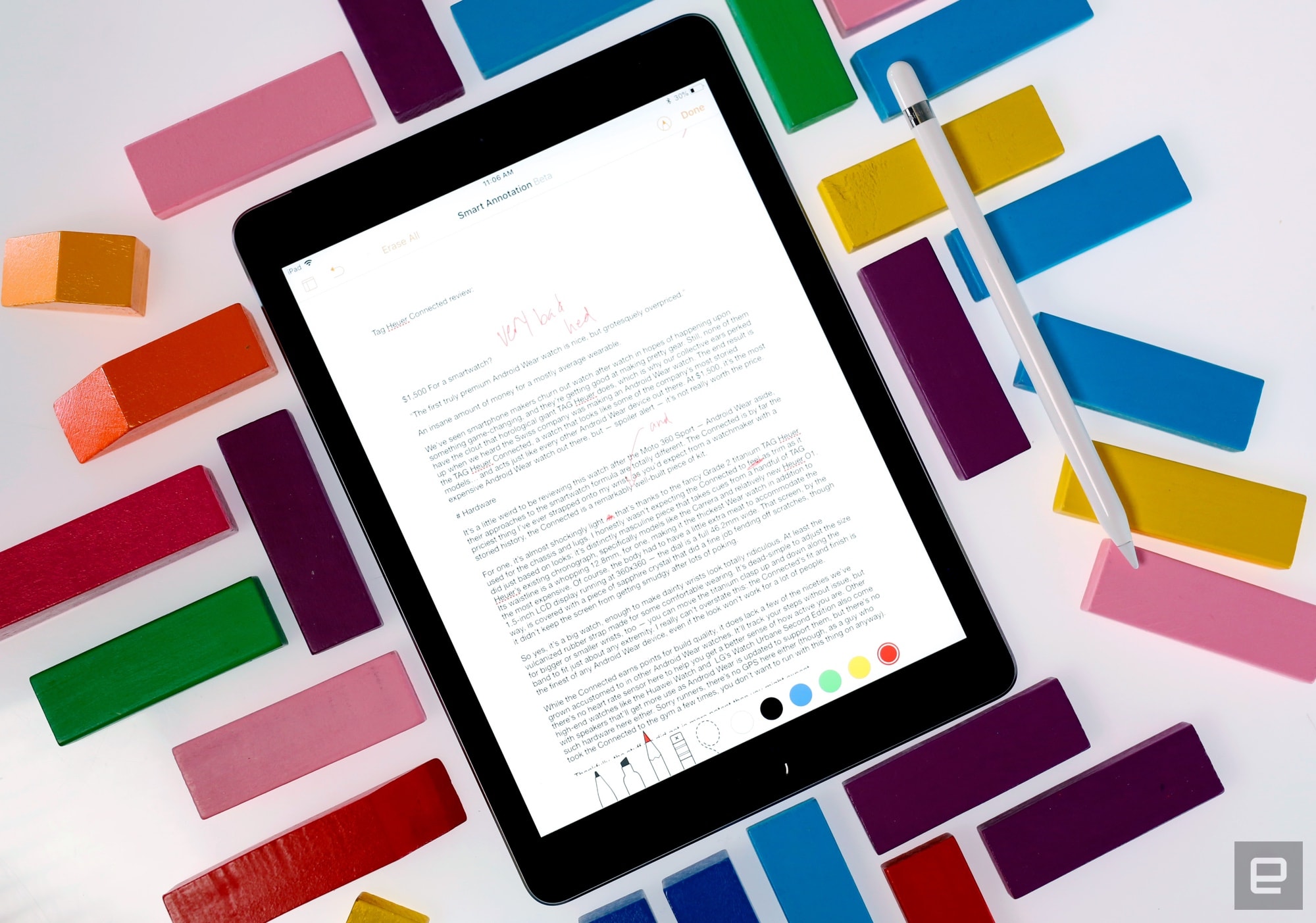
As usual, though, the most valuable changes are hidden inside the iPad itself. This year, the iPad uses one of Apple’s A10 Fusion chipsets — you know, the ones that powered the iPhone 7 and 7 Plus a year and change ago. Also hidden between the Retina Display’s glass is a new touch sensor that allows the 2018 iPad to play nice with Apple’s $99 Pencil accessory. (More on that later.)
Could this iPad have been made better with a few slightly different design choices? Certainly. Pencil support aside, this is about as by-the-book as Apple hardware updates get. For the price, though, it’s hard to complain about the minor issues and omissions here.
Chris Velazco/Engadget
Software and performance
As I mentioned before, the iPad runs with an A10 Fusion chipset that pairs two high-performance CPU cores with two energy efficient cores for less strenuous tasks. These chipsets were plenty impressive in the iPhone 7 and 7 Plus and they continue to do great work here, too. In fact, with the A10 Fusion in place, this cheap tablet has more computing power on offer than the first two iPad Pros. If Apple’s presentation in Chicago was any clue, it wants kids to use that horsepower to dissect virtual frogs and learn about the world around them using augmented reality. That all worked well enough, both in Apple’s demo areas and in my own testing. Kids will have a blast using the 2018 iPad… assuming they attend a school well-heeled enough to afford them.
Of course, the benefits of a more powerful chipset in a tablet like this are clear to everyone, not just those toiling away in school. I’ve spent a little more time than I care to admit whipping through matches in PUBG Mobile with the graphics cranked up too high, and the iPad kept up without a single hiccup. (Pro tip: Don’t try to use the Apple Pencil to aim.) Ditto for Drake’s jam Fortnite, which similarly runs like a charm. When it came time to actually get work done, I found I could seamlessly jump between multiple apps and run them side-by-side without so much as a stutter.

Chris Velazco/Engadget
More importantly, the 2018 iPad is an excellent vessel for iOS 11.3 and its multitude of tablet-specific features. When I tested the iPad last year, iOS 11 hadn’t arrived yet, so this is the first opportunity I’ve had to try Apple’s relatively new interface on a low-cost tablet. In short, it feels great. The company has said the iPad represents its vision for the future of personal computing, and with iOS 11 on-board, even a budget machine like this could feasibly fill the role served by a traditional PC for some.
Apple’s iPad Pros may wring much more power out of their chipsets, but to my surprise, this $329 tablet often felt just as fast at most tasks. Not bad at all for a budget machine. You won’t need to worry too much about battery life too much, either. As always, Apple claims you’ll be able to get “10 hours of battery life on a single charge”, and always, the company is low-balling it. In our video playback tests (looping an HD movie with screen brightness set to 50 percent), the iPad routinely lasted 1.5 to 2 hours more than Apple’s estimate.

Chris Velazco/Engadget
Life with the Pencil
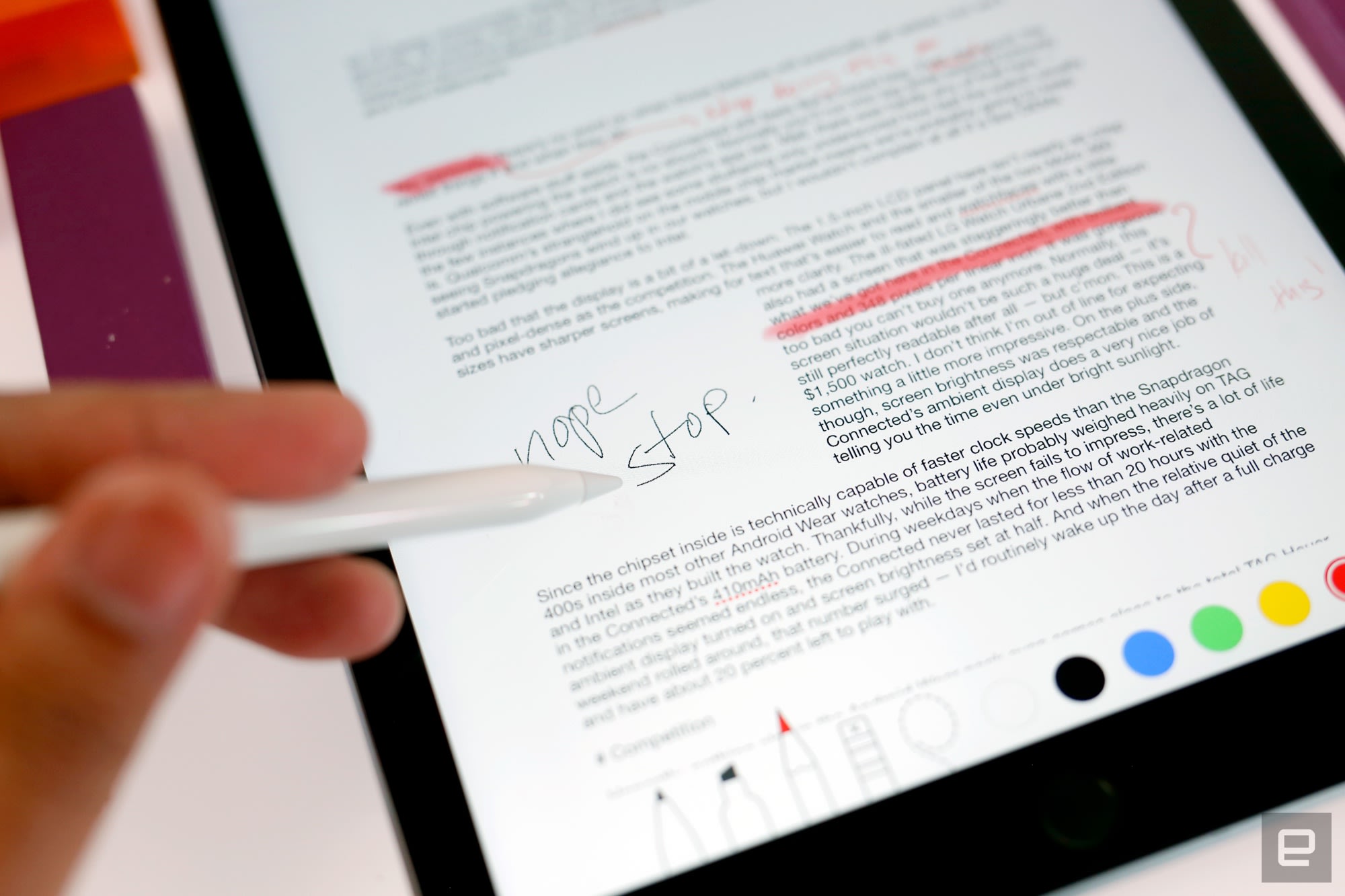
Apple’s Pencil has been around for over two years now, it has changed very little since the day it launched. For the most part, that’s a good thing: its pressure sensitivity and tilt detection make it an elegant, capable companion for artists and ardent note-takers. But does it work as well here as on an iPad that costs twice as much? Unless you’re a professional digital artist, the answer is “yes.” I’ve never had much of an eye for art, but our video producer Brian Oh — an Apple Pencil neophyte, mind you — found doodling on the 2018 iPad surprisingly pleasant. Ditto for the handful of children I yielded the iPad to over Easter weekend, though their work was largely lacking in, err, artistic integrity. Meanwhile, I spent most of my time with the Pencil jotting down quick notes marking up documents with Pages’ new smart annotations and found nothing amiss.
The only real difference between using the Pencil on a $650 iPad Pro 10.5 and on a tablet that costs half that is the way it feels. The gap between the Retina display and the glass covering it means the pencil makes a more pronounced plunking sound than an iPad Pro when you tap the screen with it. Otherwise, it works as well as the first batch of Pros Apple released — you know, the ones before Apple started including 120Hz ProMotion displays.
To be clear though, most people won’t need to splurge on an Apple Pencil. I’ve loved my time with it, and it’s undeniably useful, but I can’t say its blend of utility and price is worth $99 for most people. (Sadly, the $50 Logitech Crayon unveiled in Chicago will be sold exclusively to educators). If nothing else, the Pencil’s journey down-market may offer a bit of insight into the future of the iPad Pro. After all, the Pencil was one of the Pro line’s marquee features; now that anyone who buys a new iPad can use one, it stands to reason that other factors will soon differentiate the Pro from Apple’s basic tablet. All of a sudden, rumors of iPad Pros with notches and even larger screens don’t just sound plausible — they seem probable.
The competition

There’s still some relatively lively competition in the premium tablet space, but down here in the budget zone, truly good options are harder to come by. If you’re not sold on the 2018 iPad, you may want to consider something like Samsung’s Galaxy Tab S3. Sure, it came out last year, but it packs an absolutely gorgeous 9.7-inch Super AMOLED display and a thinner frame than the iPad. At $449 it’s more expensive than the standard iPad, but it also comes with one of Samsung’s S Pens right in the box for note-taking and sketching. Some will also welcome the ability to magnetically attach a keyboard, though in our experience, Samsung’s keyboard is pretty lousy.
If kicking back with a movie on a tablet is more your speed, the iPad might be overkill. Something like Amazon’s surprisingly decent Fire 10 HD tablet may fit the bill better. It lacks access to Google’s services, but it’s quicker than we anticipated and its 1080p screen was nicer than we’re used to from Amazon. And the best part? It’s really cheap — just $150 for the base, 32GB model. Meanwhile, Acer was the first company to unveil a tablet powered by Google’s Chrome OS. The timing of Acer’s announcement was seemingly chosen to take some of the wind out of Apple’s sales, and it’s mostly a play for classrooms, but Chrome OS is plenty capable if you have modest needs. Alas, it’ll still be a few weeks before we get to take the $329 Chromebook Tab 10 out for a spin.

Chris Velazco/Engadget
Wrap-up
It’s too early to tell what sort of impact the 2018 iPad will have in schools — while it might have the edge in education apps, the iPad is still more expensive than most of the Chromebooks you’ll find floating around school corridors. Outside of those hallowed halls, though, the 2018 iPad’s appeal is much clearer. Sure, you could easily spend less money on a tablet if you wanted to, and you couldn’t exactly call this iPad “exciting.” Even so, its potent combination of price, polish and power make this iPad the best value tablet money can buy.
In ‘Ready Player One,’ the real world doesn’t matter
When Steven Spielberg introduced Ready Player One at SXSW this year, he made a surprising statement: “This is not a film that we’ve made, this is — I promise you — a movie.” And really, there’s no better way to put it. It’s a pop culture-driven, nostalgia-inducing blockbuster that works best as a ride, but it falls apart the moment you think critically about it. It’s not something that’ll be taking any deep stances on VR, and it certainly doesn’t have time for much social commentary (aside from some heavy-handed moralizing at the end).
Spoilers ahead for Ready Player One.
While Spielberg’s film is an improvement on Ernest Cline’s novel in almost every way, with slightly stronger characters and a scope beyond 80’s pop culture references, it’s also a missed opportunity. It does little to show us the world and people outside of those VR headsets, which makes it more difficult to care about the stakes of our heroes’ virtual adventure. It’s surprising to say, given how much I loathed the source material, but that’s one area where the book did a better job.
The film starts out similarly, describing a future where the world is semi-collapsed and people live in city slums. Their only escape is the Oasis, a VR world where practically anything is possible. But while the film briefly shows people gaming in the Oasis and doing a few odd jobs (we see a brief shot of a woman pole dancing), we don’t really see how society functions if everyone is wearing headsets. Cline’s book at least gives us a glimpse at how the world could be shaped around VR. In the novel, our hero Wade Watts (AKA Parzival online) goes to a public school on planet Ludus inside Oasis. Partially, it’s because he was bullied in a real world school, but it’s also easy to see the advantages of a VR-driven education, where teachers can make lessons completely interactive.

Spielberg’s adaptation of Ready Player One, based on a script by Zak Penn and Cline, skips the Ludus entirely, and along with it much of the world building. All we know is that the world is in a shambles, but it’s unclear what it actually looks like outside of a brief glimpse at the stacks of trailers Wade calls home. The main thrust of the film is the same as the novel: Wade and his friends are racing to find the hidden keys left by the Oasis’s creator, James Halliday, following his death. Whoever finds all of the keys gets full control of the virtual world. And, as you’d expect, there’s a rival group on the same mission: Innovative Online Industries (IOI), a well-funded tech corporation that’s eager to own the Oasis and monetize the hell out of it.
While the book spans years, the film boils down much of its action to a few weeks. And consequently, Wade’s journey doesn’t seem nearly as compelling. That sped up narrative also gives us little chance to see how the world reacts to his accomplishments. He’s the first person to find one of Halliday’s keys, but the only glimpse of celebrity is him being briefly mobbed by a few fans in the Oasis. There’s never a sense of how people in the real world respond. Never mind that it’s a remarkable achievement — something that thousands (perhaps millions) of people failed to do over the five years since Halliday’s death.
I wasn’t really expecting much from the film to begin with. But I grew increasingly annoyed at how much Spielberg, an artist who’s no stranger to grounding fantastical narratives with human emotion, ignored the actual people who live most of their lives in VR. Instead, he’s more focused on showing us how much fun the Oasis can be. The first key challenge is an insane, action-packed race filled with dozens of pop culture references. And it’s great to see the return of some cult heroes, like the Iron Giant, in the huge final battle. But again, that’s all spectacle with very little heart.

Warner Bros.
There’s something inherently sad about a world where everyone is strapped into VR most of the time. But in the brief looks we get at crowds of actual humans, it’s all played for laughs. We see both kids and adults strapped to headsets outside during the day, who are more concerned with what’s happening with their virtual characters than their physical bodies. I get it, VR looks silly, especially once haptic suits and omnidirectional treadmills are in play. But how does a society work if everyone’s just walking around wearing VR headsets? Throw me a bone Spielberg, I’d like to see how they can even cross the street.
At least the film does a decent job of telling us why it’d be a bad thing for the world if IOI got its hands on the Oasis. In one of the more memorable scenes, the company’s head of operations, Nolan Sorrento, proudly proclaims they’ll be able to fill around 80 percent of a player’s view with ads before there’s a risk for seizure. That’s obviously a bit extreme, but it resonates today, now that we’ve seen how far companies will push their technology, even if there’s a risk for societal harm. Just look at Facebook’s latest controversy around Cambridge Analytica, a company that didn’t actually hack anything, they just absorbed as much personal data as the social network made available. And then there’s Facebook’s mishandling of fake news and nefarious ads, which likely had an impact on the 2016 election.
Ready Player One adds slightly more depth to Art3mis, the badass female player that Wade inevitably falls for. In the film, she’s also a member of a resistance group that’s fighting against IOI. Aside from that setup though, the movie doesn’t tell us much about Art3mis’s group. Does it only exist in one city? Is it a worldwide resistance? And it’s not as if they’re fighting for the freedom of an open platform like the World Wide Web. In the end, the Oasis is still a product of one company, albeit a seemingly benevolent one.

Warner Bros.
The most disappointing element of the film is the way it ends. (Spoilers ahead, naturally.) Upon finding the final key and gaining control of the Oasis, Wade and his clan institute a new rule: the VR world will be shut down on Tuesdays and Thursdays. While the intent might be helpful — people should really take off those headsets once in a while — it’s a bit of a Luddite solution. What about people who depend on the Oasis for a living? And is it actually noble to cut off access to a resource that everyone relies on for education? Shutting down the Oasis for a few days would be as helpful as disconnecting the Internet for a few days, or locking people out of their smartphones to cure tech addiction.
Spielberg’s Ready Player One is a curious adaptation. For the most part it succeeds, especially if you’re just looking for a fun ride through pop culture in VR. But like Jurassic Park and Minority Report before it, it could have been so much more if Spielberg paid attention to the real world.

