


Congress released Mark Zuckerberg’s statement for Wednesday’s hearing
On Wednesday, Facebook founder and CEO Mark Zuckerberg will testify before Congress. Today, Congress released a copy of his statement. In it, Zuckerberg takes responsibility for Facebook’s myriad failures over the past few years and pledges to do better. You can read the full text of the statement at CNBC.
“[I]t’s clear now that we didn’t do enough to prevent these tools from being used for harm as well,” Zuckerberg says in his statement. “That goes for fake news, foreign interference in elections, and hate speech, as well as developers and data privacy. We didn’t take a broad enough view of our responsibility, and that was a big mistake. It was my mistake, and I’m sorry. I started Facebook, I run it, and I’m responsible for what happens here.”
Zuckerberg outlines how exactly the company got to the point where the Cambridge Analytica scandal could occur, then turns to what the company is doing to improve and prevent anything like this from ever happening again. That includes safeguarding the platform by taking actions such as removing developers’ access to data if their app hasn’t been used in three months, reducing the data an app has access to, requiring developers to sign a contract that “imposes strict requirements in order to ask anyone for access to their posts or other private data” and restricting APIs. The company is also investigating apps that had access to large amounts of personal data and is putting together better controls over who has access to your data.
Zuckerberg also addresses Russian interference in elections, and the company is in the process of building new tech to prevent this kind of abuse from ever happening again. He pledged to increase investment in security by hiring more people working on content review, as well as to make advertising policies stronger. Additionally, the Facebook CEO addressed the Honest Ads act, which “raise the bar for all political advertising online.”
Source: CNBC
In pursuit of the perfect AI voice
The virtual personal assistant is romanticized in utopian portrayals of the future from The Jetsons to Star Trek. It’s the cultured, disembodied voice at humanity’s beck and call, eager and willing to do any number of menial tasks.
In its early real-world implementations, a virtual receptionist directed customers (‘To hear more menu options, press 9’). Voice-typing software transcribed audio recordings. It wasn’t until 2011 that Apple released Siri and the public had its first interactions with a commercially viable, dynamic personal assistant. Since Siri’s debut with the release of the iPhone 4S, Apple’s massive customer base has only gotten larger; the company estimates that more than 700 million iPhones are currently in use worldwide.
Amazon’s Alexa and Microsoft’s Cortana debuted in 2014; Google Assistant followed in 2016. IT research firm Gartner predicts that many touch-required tasks on mobile apps will become voice activated within the next several years. The voices of Siri, Alexa and other virtual assistants have become globally ubiquitous. Siri can speak 21 different languages and includes male and female settings. Cortana speaks eight languages, Google Assistant speaks four, Alexa speaks two.
But until fairly recently, voice — and the ability to form words, sentences and complete thoughts — was a uniquely human attribute. It’s a complex mechanical task, and yet nearly every human is an expert at it. Human response to voice is deeply ingrained, beginning when children hear their mother’s voice in the womb.
What constitutes a pleasant voice? A trustworthy voice? A helpful voice? How does human culture influence machines’ voices, and how will machines, in turn, influence the humans they serve? We are in the infancy stage of developing a seamless facsimile of human interaction. But in creating it, developers will face ethical dilemmas. It’s becoming increasingly clear that for a machine to seamlessly stand in for a human being, its users must surrender a part of their autonomy to teach it. And those users should understand what they stand to gain from such a surrender and more importantly, what they stand to lose.
Terri Danz is a vocal coach who was named by entertainment-industry publication Backstage as one of the top eight in the United States. Her clients include singers, news anchors and stand-up comedians wishing to improve their technique, range and nerves. Among her most high-profile clients are comedian Greg Fitzsimmons and actor Taylor Handley.
Danz believes that current VPA voices lack resonance — the vocal quality most associated with warmth.
When I asked Danz to listen to three Siri voice samples from three different eras — iOS 9 (2015), iOS 10 (2016) and iOS 11 (2017) — she connected their differences to Apple’s target audience.
“As the versions progress from iOS 9, the actual pitch of the voice becomes much higher and lighter,” said Danz. “By raising the pitch, what people hear in iOS 11 is a more energized, optimistic-sounding voice. It is also a younger sound.
“The higher pitch is less about the woman’s voice being commanding and more about creating a warmer, friendlier vocal presence that would appeal to many generations, especially millennials,” continued Danz. “With advances in technology, it is becoming easier to adapt quickly to a changing marketplace. Even a few years ago, things we now take for granted in vocal production may not have been developed, used or adopted.”
There is research to support Danz’s conclusions: The book Wired for Speech: How Voice Activates and Advances the Human–Computer Relationship by Clifford Nass and Scott Brave explores the relationships among technology, gender and authority. When it was published in 2005, Nass was a professor of communications at Stanford University and Brave was a postdoctoral scholar at Stanford. Wired for Speech documents 10 years’ worth of research into the psychological and design elements of voice interfaces and the preferences of users who interact with them.
According to their research, men like a male computer voice more than a female computer voice. Women, correspondingly, like a female voice more than a male one.
But regardless of this social identification, Nass and Brave found that both men and women are more likely to follow instructions from a male computer voice, even if a female computer voice relays the same information. This, the authors theorize, is due to learned social behaviors and assumptions.
Elsewhere, the book reports another, similar finding: A “female-voiced computer [is] seen as a better teacher of love and relationships and a worse teacher of technical subjects than a male-voiced computer.” Although computers do not have genders, the mere representation of gender is enough to trigger stereotyped assumptions. According to Wired for Speech, a sales company might implement a male or female voice depending on the task.
“While a male voice would be a logical choice for [an] initial sales function, the complaint line might be ‘staffed’ by a female voice, because women are perceived as more emotionally responsive, people-oriented, understanding, cooperative and kind.
However, if the call center has a rigid policy of ‘no refunds, no returns,’ the interface would benefit from a male voice as females are harshly evaluated when they adopt a position of dominance.”
Rebecca Kleinberger, a research assistant and PhD candidate at the MIT Media Lab, added some scientific context to Nass and Brave’s findings. Her primary academic interest is voice and what people can learn about themselves by listening to their voice.
“Unlike a piano note, which, when looking at a spectrogram, will be centered around a single main frequency peak, a human voice has a more complex spectrum,” Kleinberger said. “Vocal sounds contain several peaks that are called formants, and the position of those formants roughly corresponds to the vowel pronounced. So the human voice might be seen more as playing a chord on the piano rather than a single note. Sometimes, these formants are going to have a musically harmonious relationship between themselves, like a musical chord, and sometimes, they have an inharmonious relationship and the chord sounds ‘off’ according to the rules of western harmony.”
“Interestingly, in the lower frequencies, those formants have a more harmonious relationship than in the higher,” Kleinberger continued. “Because of bone conduction, we each individually hear the lower part of our own voice better or louder than the higher parts. This seems to play a role in the fact that most of us dislike hearing our own voice recorded and also why generally we might prefer lower voices to higher voices.”
It might also be why Siri’s 2013 voice, according to communications-analytics company Quantified Communications, had a pitch that was 21 percent lower than the average woman’s — not only to reflect “masculine” qualities but also to sound acoustically pleasing.
What might we learn from all of this? Users want technology to assist them, not tell them what to do. And a fledgling technology company, eager to gain a foothold in a competitive marketplace, might rather play into cultural assumptions — create a feminine voice that is, ironically, low in pitch — instead of challenging deeply ingrained biases. It’s more expedient to uphold the status quo instead of attempting to change it.
Engadget reached out to several technology companies and asked how they determined the voice they use. Amazon was the only company that responded and stated in an email in Engadget, “To select Alexa’s voice, we tested several voices and found that this voice was preferred by customers.” In an article in Wired, writer David Pierce interviewed Apple executive Alex Acero, who is in charge of Siri’s technology. The company’s designers and user-interface team sifted through hundreds of voices to find the right ones for Siri.
“This part skews more art than science,” Pierce writes. “They’re listening for some ineffable sense of helpfulness and camaraderie, spunky without being sharp, happy without being cartoonish.”
The common retort to concerns about bias and subjectivity is that technology does not determine culture but is merely a reflection of the culture. But in an interview with the Australian Broadcasting Corporation, Miriam Sweeney, a feminist researcher and digital media scholar at the University of Alabama, discusses how digital assistants are often subject to verbal abuse and sexual solicitation. The VPA will respond to this abuse with a moderate, even apologetic tone, regardless of the user’s treatment. And when VPAs have feminine voices, which are often programmed to flirt back or respond with sassy repartee, it renders that bad behavior acceptable.
No real human should be subject to this sort of treatment. If developers’ quest is to create a relatable, digital stand-in, they may have to imbue their creations with a basic sense of dignity and respect.

Anyone who has given a public speech knows that voices change depending on the environment you’re in.
In an auditorium, for instance, sweat collects. Muscles in the shoulders, neck and throat tighten. And much of the resulting physical pressure goes to the throat’s vocal folds, which bear increased tension and vibrate at a faster rate. That’s why so many people sound strained and high-pitched when speaking to a crowd. Combine this with irregular, quickened breathing that can cause a voice to shake or crack and even the most practiced orator can fall victim to nerves.
In the course of her research, Kleinberger has also observed that your voice — the musicality, the tempo, the accent and especially the pitch — changes depending on the person you’re talking to. Kleinberger notes that when women are in a professional setting, they typically use a lower voice than when they speak to their friends.
These variables are ingrained in the human experience, because reproducing sound is an inverse process that begins with mimicry. There are many ways, for example, to shape one’s mouth to make the “ma ma” sound, and positive reinforcement from parents and peers will shape people’s vocal techniques from a young age.
A major part of VPAs’ appeal is that they replicate human interaction — they respond to their users with predetermined jokes, apparently offhand remarks and short, verbal affirmations. Yet unlike humans, they are unerringly consistent in the way they sound.
Wired for Speech co-author Scott Brave, who is now CTO of FullContact (which helps businesses analyze their customers for marketing and data purposes), expressed enthusiasm for a more “neurological” layer of insight — insight he did not have when he and Nass were conducting their experiments. He also discussed what surprised him most while writing Wired for Speech.
“One of the studies I was involved in [years ago] was related to emotions in cars, and what was the ‘right’ emotion for a car to represent as a co-pilot,” said Brave, who earned a PhD in human-computer interaction at Stanford. “It turns out that matching the user’s emotions is more important that what the emotion is. It makes the user think, ‘Hey, this entity is responding to me.’”
“If a person isn’t feeling calm, is it always going to be the case that a calming [computer] voice will be the most effective?” asked Brave. “The best way to get someone to change his or her state is to first match that state emotionally and then bring that person to a place that’s soothing.”
Perhaps trying to pinpoint a perfect voice was the wrong question all along. The future is no longer about developing a single ideal voice that appeals to the widest audience possible. That’s just a stopgap measure on the path toward the real goal: to create a voice that, like ours, changes in response to the human beings around it.
“Technologies have individuality of voice, but they lack prose of voice.”
“Ideally, the machine acknowledges context to what is being said,” said Brave. “Because the needs of a user get expressed over the course of a conversation. A user cannot always express what he wants in a few words.
“Some of that context is linguistic: What does a person mean when he says a particular word? Some of that is emotional, and some of that is historical,” said Brave. “There are many types of context. And our current systems are aware of very few.”
Kleinberger agreed with this sentiment.
“[When technologies speak to us currently], they’re doing so in voices that are uncanny, still slightly robotic and non-contextual,” said Kleinberger. “Technologies have individuality of voice, but they lack diversity and responsivity of the prosody, vocal posture and authenticity. An individual’s prosody changes all the time and is very responsive to the context.”
Today, technology can pick out a voice’s subtleties to a specific, perhaps discomforting degree. Hormone levels, for example, can affect the texture of a person’s voice.
“Our voice reveals a lot about our physical health and mental state,” Kleinberger said. “Changes in tempo in sentences can be used as a marker of depression, breathiness in the voice can be an indicator of heart or lung disease, and acoustic information about the nonlinearity of air turbulences could even predict early stages of Parkinson’s disease.
“Smart home devices are listening to us all the time, and soon, they might be able to detect those physical and mental conditions, and as the voice is also very dependent on our hormone levels, even one day detect if someone is pregnant before the mother knows it,” Kleinberger continued.
An always-on AI can act as a fly on the wall. It can extract metadata as it listens to partners and family members talk to one another. It can detect the social dynamics among people solely from the acoustic information it gathers. What it cannot do, as of now, is explicitly act upon this information. It will not change its phrasing to match a person’s unstated preference; it will not raise or lower its pitch depending upon who is requesting its help — yet. Kleinberger believes we may be as few as five years from this.
Could a personal assistant someday listen to its users, detect stress, suss out power imbalances in relationships and match its voice, phrasing and tempo accordingly? If so, the “ideal” voice is specific to each person, and like a human’s voice, it should adjust itself in real time throughout the day.
If this is successfully implemented, it has enormous societal potential. Imagine an AI that corresponds to its user’s manner of speaking — that raises its voice or reacts sharply in response to its user’s tone, not just the content of her speech.
“Could Siri mimic the voice of the user to be more likable? Absolutely. We humans do that all the time unconsciously, adapting our vocal timbre to the people we talk to.”
There is an uncanny, morally gray area that comes with this territory. The goal of many developers is to create a seamless illusion of sentience, yet if users are being monitored and judged beyond their control or consent, the technology can easily be read as insidious or manipulative. Kleinberger mentioned Microsoft’s infamous Clippy as a cautionary example of how users want to be catered to but not intruded upon unsolicitedly.
“There are many tangible benefits from collecting data from the voice, but I believe that creating a ‘truly caring dialogue’ between Siri and a user is not one of them,” said Kleinberger. “But could Siri mimic the voice of the user to be more likable? Absolutely. We humans do that all the time unconsciously, adapting our vocal timbre to the people we talk to.
“It would be great,” Kleinberger concluded, “as long as the whole process and the data are transparent for and controlled by the user.”
On the issue of privacy, Apple is more discreet than competitors like Google or Facebook. Rather than pulling data off a server to customize its assistance, Apple emphasizes the less intrusive power of its machine learning and AI.
But Apple’s competitors already have that, and recently, Siri has fallen behind other VPAs with regards to its overall ability and diversity of features. It’s become apparent that the more personal information a user surrenders, the more the VPA can learn from it, and the better the VPA can serve the user.
Human-to-human relationships, after all, require openness and transparency. Perhaps for humans to create that sort of dialogue with technology — whether through voice or another avenue — they must be similarly open and transparent to the technology. And a trusting relationship cuts both ways: Companies need to be more explicit and aboveboard about the type of data they collect from consumers and how that data is used.
How much of yourself are you willing to sacrifice in search of symbiotic perfection?
Windows 3.0-style file browser lets you navigate like it’s the 90s
Microsoft has released the source code for File Manager, the computer-navigating interface that debuted in Windows 3.0 and persisted through most of the 90s. Remember clicking rightwards through different folders, all nested in a single massive rectangle? Now you can run the interface in any version of Microsoft’s operating system, including Windows 10.
File Manager was available on Microsoft computers from 1990 through 1999, though it was replaced as the primary navigational interface by Explorer from Windows 95 onwards. It was the operating system’s first flagship graphical user interface to replace the MS-DOS command line, meaning it was likely the introduction to GUIs for many early 90s kids. If you were one and want to run it on your bleeding-edge 21st-century machine for nostalgia’s sake, head over to Github where it’s available for free on an MIT license. If that’s too onerous, well, there’s always the litany of Windows 3.0 programs that the Internet Archive uploaded to run in your browser.
Via: TechCrunch
Source: Github
What we’re buying: Toto’s toilet upgrade and an old Game Boy Advance
This week’s hardware IRL is still in the bathroom. Devindra Hardawar explains how his toilet upgrade bested even the SNES Classic to make it his most recent must-buy. Elsewhere, Rob LeFebvre (once again) gets his hands on a Game Boy Advance SP.

Devindra Hardawar
Senior Editor
My favorite gadget this winter was a surprising one. It wasn’t the SNES Classic, which I’d spent months pining over in nostalgic anticipation. It was a $330 toilet seat.
Specifically, Toto’s C200 Washlet. It has everything: a built-in seat warmer, which is ideal on cold days; a slow-close lid, to avoid loud seat slams in the middle of the night; there’s even a deodorizer, which makes stinky smells evaporate into thin air. Most importantly, there’s the remote-controlled bidet — an elegant tool for a civilized age (at least, that’s what I tell myself).
While it’s not technically “smart” (it’s not app- or web-connected), the Toto Washlet feels like an ideal smart home upgrade. It’s a vast improvement over a traditional toilet seat in just about every sense. And trust me, once you get used to a bidet, you’ll wonder how you ever lived with toilet paper alone.
In many ways, the Toto Washlet is an example of what every smart home device should be: something that makes our lives easier in innovative new ways. It’s an extravagance, sure, but one that’ll make the unavoidably smelly parts of our days a bit more pleasant. It’s also surprisingly easy to install, even in an apartment. You just need to remove your current seat, secure the Washlet, split the water flow going to your toilet (it comes with a handy tool for that) and plug it into power.
Listen, the world is falling apart around us. It’s hard to maintain hope when confronted with an endless stream of absurdity every waking moment. For a few minutes a day, the Toto Washlet is an escape from the shit.

Rob LeFebvre
Contributing Writer
I’ve had some sort of Game Boy since I picked up the original back in the early ’90s. I thought the Game Boy Advance I purchased in the ’00s was the future of gaming: I never had a Gameboy Color, so it was a breakthrough to me.
When the SP came out a couple of years later, of course, I had to have one of those (two, actually, since both my kids “needed” their own). I’ve also owned way too many DS and 3DS handhelds since then, but that’s a different story. I’ve sold or donated all my old hardware (sadly), though, in an attempt to make up for my penchant for tiny gaming gadgets — don’t ask how many PSPs I’ve owned and then sold over the years.
About three months ago, though, I traded with a musician friend: his original Game Boy Advance and a copy of Final Fantasy Tactics Advance in return for my vocal processing pedal, which he considered a pretty great trade for the little console. I was excited to check out such a seminal title in the tactics genre; I’ve loved the Fire Emblem series forever and figured it was time to try Tactics.
Unfortunately, the tiny screen and lack of backlighting diminished how long I could play the game. I needed a Game Boy Advance that had a backlight, which led me to Facebook Marketplace. I spent the intervening months shopping for a bargain, and just this past week, I finally bought a gorgeous, scratch-free purple Game Boy Advance SP — the clamshell one.

I’d like to say, “Boy, what a difference that made,” but while the lit screen does help quite a bit in dim light, it’s still a tiny, hard-to-see three-inch screen. The GBA SP has a button to turn the backlighting off and on, but there’s no way to increase the brightness. In a world of bright, crisp, high-resolution screens all around me, a 2003-vintage GBA SP pales in comparison. Still, there’s something magical about playing on a device that forces me to concentrate on one game at a time; especially since this version of FF Tactics isn’t available on any modern handheld or mobile device. I find myself lured back into the itty-bitty world of Ivalice and battles that require a bit of a time commitment to work through successfully.
While I may be fueled purely by nostalgia, the little SP just feels adorably wonderful in my hands. It’s lovely to play on a device that has no internet connectivity nor vast catalog of enticing new games to download. What I have is what I must play; it’s a callback to the early days of gaming when there weren’t thousands of free new experiences around every corner. So, while I may complain that it takes more effort to play FF Tactics Advanced on my little purple SP and wish for some sort of modern port to iOS or 3DS, I think that would ruin half the joy of it. I’d rather force myself to delve into this massive, 60-hour game on an 18-year-old handheld than have it just be a low-priority distraction on another console. Now, to head to the pawn shop and see what other games I can buy for it.
“IRL” is a recurring column in which the Engadget staff run down what they’re buying, using, playing and streaming.
Blackmagic’s new $1,295 compact shoots 4K RAW movies
As it teased, Blackmagic Design has unveiled a 4K version of its popular portable RAW camera at NAB 2018. The Pocket Cinema Camera 4K packs a full-size, dual native ISO Micro Four Thirds sensor and can internally record 4K HDR RAW at 4,096 x 2,160 and 60 fps in 12-bit RAW or 10-bit ProRes. Best of all, it costs $1,295, nearly half the price of Panasonic’s video-oriented GH5s, making it the cheapest 4K RAW camera available by a long ways.
The Pocket Cinema Camera 4K (let’s call it the BMPCC 4K) sports an all-new body that’s lot more modern than the original. It’s built using carbon-fiber, rather than metal, which makes it lighter, Blackmagic Design said. It’s also got a bigger grip and a larger array of physical dials and buttons for recording, ISO, shutter, aperture, white balance and other features. Most of those things were controlled from the rear display before, so the new model should handle much better.
The original BMPCC had a Micro Four Thirds mount but used a reduced-size sensor. Luckily, the BMPCC 4K has a full-sized Micro Four Thirds sensor with native DCI 4K (4,096 x 2,160) resolution and 13 stops of dynamic range. Much like with Panasonic’s GH5s, it uses the full sensor width to maximize the field of view, and dual native ISO with a top ISO setting of 25,600 for better low-light performance. There’s no sign of autofocus or in-body stabilization, but those aren’t deal-breakers for the BMPCC 4K’s filmmaker market.
![ProEXR File Description =Attributes= cameraAperture (float): 36 cameraFNumber (float): 8 cameraFarClip (float): 1e+30 cameraFarRange (float): 1e+18 cameraFocalLength (float): 40 cameraFov (float): 13.6855 cameraNearClip (float): 0 cameraNearRange (float): 0 cameraProjection (int): 0 cameraTargetDistance (float): 2.21183 cameraTransform (m44f): [-1, 7.64274e-15, 8.74228e-08, 1.46387e-33, -8.74228e-08, -8.74228e-08, -1, 0.0607741, 0, -1, 8.74228e-08, -1.10716, 0, 0, 0, 1] channels (chlist) compression (compression): Zip dataWindow (box2i): [0, 0, 5999, 2999] displayWindow (box2i): [0, 0, 5999, 2999] lineOrder (lineOrder): Increasing Y name (string): "" pixelAspectRatio (float): 1 screenWindowCenter (v2f): [0, 0] screenWindowWidth (float): 1 type (string): "scanlineimage" vrayInfo/vrayrevision (string): "28079 Feb 27 2018 02:25:11" =Channels= A (half) Ambient Occlusion Output.B (half) Ambient Occlusion Output.G (half) Ambient Occlusion Output.R (half) B (half) Black Anodised Glossier Alpha.B (half) Black Anodised Glossier Alpha.G (half) Black Anodised Glossier Alpha.R (half) Black Metal Grain Alpha.B (half) Black Metal Grain Alpha.G (half) Black Metal Grain Alpha.R (half) Bloom.B (half) Bloom.G (half) Bloom.R (half) Button Black Satin Alpha.B (half) Button Black Satin Alpha.G (half) Button Black Satin Alpha.R (half) Diffuse Shading (Total) Output.B (half) Diffuse Shading (Total) Output.G (half) Diffuse Shading (Total) Output.R (half) G (half) GP (2).B (half) GP (2).G (half) GP (2).R (half) Glare.B (half) Glare.G (half) Glare.R (half) Hero Black Rubber Alpha.B (half) Hero Black Rubber Alpha.G (half) Hero Black Rubber Alpha.R (half) R (half) RGB color denoised.B (half) RGB color denoised.G (half) RGB color denoised.R (half) Reflection Shading Output.B (half) Reflection Shading Output.G (half) Reflection Shading Output.R (half) Screen Alpha.B (half) Screen Alpha.G (half) Screen Alpha.R (half) Sensor Glass Alpha.B (half) Sensor Glass Alpha.G (half) Sensor Glass A](https://www.aivanet.com/wp-content/uploads/2018/04/1523295160_7924784120173.jpg)
Video can be recorded onto standard SD, UHS-II or CFast 2.0 cards in both ProRes and RAW, at up to 4K 60 fps or cropped 1080P at 120 fps. The BMPCC also offers a new technical twist: You can record 4K video directly to a media drive via the USB-C Expansion Port. “That means customers can turn projects around much more quickly because they don’t have to transfer files,” said Blackmagic. “All they need to do is unplug the USB-C drive and then connect it to their computer to start editing.”
The BMPCC has a 5-inch touchscreen that’s hopefully a lot brighter than the notoriously dim one on the original. That can be used to frame shots and check focus, or adjust menu settings and add metadata. Other usability features include histograms, focus and peaking indicators and 3D LUTs. HDR can be directly recorded using an extended video mode, reducing much of the normal time-consuming post-production.
You can record audio from a 3.5mm jack or professional mini-XLR inputs with phantom power and, yes, there is a headphone jack. Battery life was a weak point on the first BMPCC, but the new model uses LP-E6 batteries that can be charged via the USB-C port or a locking DC power connector.
DaVinci Resolve 15

Blackmagic also launched DaVinci Resolve 15, a “massive update” to its popular visual effects, motion graphics and editing package. The Fusion compositing VFX package is now integrated into Resolve 15, offering “a true 3D workspace with over 250 tools for compositing, vector paint, particles, keying, rotoscoping, text animation, tracking stabilization and more,” said Blackmagic. It includes support for Apple Metal, and recognizes multiple GPUs and CUDA for improved speed.
For colorists, DaVinci Resolve 15 gets expanded HDR support with improvements for encoding Dolby Vision HDR and Samsung/Amazon’s HDR10+. Editors, meanwhile, get “dramatically improved load times” and features like stacked timelines and timeline tabs, improved keyboard customization, image stabilization on the edit page, Netflix render presets and more. Finally, there’s an update to the Fairlight audio app with features like ADR, pitch correction, normalization and cross-platform plugin support.
DaVinci Resolve 15 is now available in a public beta, free to current DaVinci Resolve and DaVinci Resolve Studio customers. If you’re not one of those folks, you can get DaVinci Resolve Studio for $299. Blackmagic also unveiled a pair of consoles for the Fairlight audio app starting at $21,995.
‘Radical Heights’ is Cliff Bleszinski’s free-to-play battle royale game
That didn’t take long. After announcing that LawBreakers wasn’t living up to expectations (and making enough money), and teasing a new project on Friday, developer Boss Key has revealed the “passion project” it teased. Try to feign surprise when you find out that it’s a free-to-play battle royale game. On the surface, Radical Heights stands out from the crowd with a vibrant, quasi cel-shaded, retro-futuristic game-show vibe that hearkens back to the ’80s. Meaning, there’s are a lot of extreme pastels and hot pink triangles complementing its over-the-top Saturday morning cartoon tone.
Based on the trailer below, the game looks like it’s every bit an Early Access title. There’s footage of a small team battling it out with an assailant in an arcade, grabbing cash from destroyed cabinets bathed in neon lights and drowned in intentionally cheesy music, but animations are stiff and the gunplay looks fairly rough.
You can apparently bank money that you pick up and use it to buy new weapons from vending machines, rather than finding armaments randomly scattered about the map a la PlayerUnknown’s Battlegrounds. And seemingly in tribute to Insomniac Games’ early Xbox One title Sunset Overdrive, there are trampolines scattered about, offering quick access to rooftops and higher vantage points.
It might even be an open-world game, as there’s an emphasis on riding bicycles (and doing BMX tricks) in the trailer, along with footage of various locales like golf courses and suburban neighborhoods. One would expect that as match time dwindles down, the “dome” you’re playing in will shrink. Or it might not. We don’t have long to find out, though: Radical Heights launches on Steam’s Early Access program for work-in-progress games tomorrow, April 10th.
In last week’s LawBreakers announcement, Boss Key said that pivoting an existing game to free-to-play wasn’t possible without publishing planning and additional resources. As such, it wouldn’t work for the studio’s freshman effort. When LawBreakers was first announced it had a much more vibrant art style and was, you guessed it, F2P.
The post also specifically said that the team’s next project was something it had complete creative control over; it looks like Boss Key is self-publishing Radical Heights. So, the new project’s direction adds more evidence to the theory that that LawBreakers publisher Nexon and Boss Key didn’t agree on certain elements.
The thing is, Early Access battle royale games are a dime a dozen these days. Will what Radical Heights has to offer be enough to pry millions of people away from Fortnite (which also uses a cartoony and vibrant art style) or PUBG? Tomorrow’s just a day away.
Via: Game Informer
Source: Radical Heights (YouTube)
Final Cut Pro 10.4.1 and Motion and Compressor Updates Now Available on Mac App Store
Apple today released Final Cut Pro version 10.4.1, the latest update to its professional video editing software that it previewed last week.
The update is available from the Mac App Store free of charge for existing users, while Final Cut Pro remains $299.99 for new users in the United States. The update may still be in the process of appearing for some users.
Final Cut Pro 10.4.1 introduces a new ProRes RAW format, which combines the visual and workflow benefits of RAW video with the performance of ProRes, a lossy video compression format developed by Apple for post-production.
With ProRes RAW, editors can import, edit and grade pristine footage with RAW data from the camera sensor, providing ultimate flexibility when adjusting highlights and shadows — ideal for HDR workflows. And with performance optimized for macOS, editors can play full-quality 4K ProRes RAW files on MacBook Pro and iMac systems in real time without rendering. ProRes RAW files are even smaller than ProRes 4444 files, allowing editors to make better use of storage while providing an excellent format for archiving.
The update also adds advanced closed captioning tools that allow video editors to view, edit, and deliver captions from right within the app.

Apple says Final Cut Pro users can import closed caption files directly into their project or create them from scratch. Captions appear in the viewer during playback and can be attached to video or audio clips in the timeline, so they automatically move with the clips to which they’re connected.
Final Cut Pro 10.4.1 release notes:
Closed Captions
• Import caption files into a Final Cut Pro project to automatically create time-synced, connected captions in the timeline
• See captions directly in the Viewer
• Use the Inspector to adjust text, color, onscreen location, and timing
• Create captions in multiple languages and formats in the same timeline
• Use the new Captions tab in the Timeline Index to search text, select captions, and quickly switch between different versions of your captions
• Attach captions to audio or video clips in the timeline
• Extract embedded captions from video to view and edit the captions directly in Final Cut Pro
• Send your project to Compressor in a single step, making it easy to create a compliant iTunes Store package with audio and video files, captions, and subtitles
• Validation indicator instantly warns about common errors including caption overlaps, incorrect characters, invalid formatting, and more
• Embed captions in an exported video file or create a separate caption sidecar file
• Share captioned videos directly to YouTube and Vimeo
• Support for CEA-608 and iTT closed caption formats
ProRes RAW
• Support for ProRes RAW files lets you import, edit, and grade using pristine RAW image data from the camera sensor
• RAW image data provides ultimate flexibility when adjusting highlights and shadows — ideal for HDR workflows
• Enjoy smooth playback and real-time editing on laptop and desktop Mac computers
• Highly efficient encoding reduces the size of ProRes RAW files, allowing you to fit more footage on camera cards and storage drives
• ProRes RAW preserves more of the original image data, making it an ideal format for archiving
• Work natively with ProRes RAW or ProRes RAW HQ files created by ATOMOS recorders and DJI Inspire 2 drone
Enhanced export
• The new Roles tab in the share pane displays title, video, and audio roles in a single, consolidated interface
• Quickly view and choose roles to be included in exported video files
• Roles settings and enabled/disabled states from the timeline are carried through to the share pane
• Embed closed captions in a video file or export a separate captions sidecar file in CEA-608 and iTT formats
Apple has also updated Final Cut Pro’s companion apps Motion and Compressor with ProRes RAW and closed captioning features respectively. Likewise, the updates are now rolling out on the Mac App Store.
Tags: Final Cut Pro X, Motion, Compressor
Discuss this article in our forums
iMovie for Mac Updated With iPhone X Support for App Store Video Previews and Bug Fixes
Apple today released iMovie version 10.1.9 for macOS as a free update to its consumer video editing software on the desktop. It’s the first update to the app since shortly after macOS High Sierra was released.
iMovie 10.1.9 adds support for the iPhone X and additional iPad resolutions in relation to App Previews, the feature for creating short videos that appear alongside screenshots in App Store listings on iPhone and iPad.
The update also includes a range of bug fixes and stability improvements:
• Resolves an issue which could prevent logging into Facebook
• Resolves an issue in which HEVC video clips and HEIF photos could appear black in the viewer
• Resolves an issue in which the import date was used as the capture date when importing from certain SD cards or AVCHD cameras
• Resolves a playback issue with Sound Designer 2 files
• Resolves an issue in which iMovie could hang when quitting the app
• Resolves an issue in which opacity controls may disappear when using iMovie in German or Polish
• Fixes an issue that could prevent sending certain iMovie projects to Final Cut Pro
• Addresses an issue that could lead to slower media import from SD cards on iMac Pro
• Improves stability when working with Camtwist Studio
iMovie and the 10.1.9 update are available for free on the Mac App Store. The update may still be rolling out for some users.
iMovie for iOS has yet to be optimized for the iPhone X display.
Tag: iMovie
Discuss this article in our forums
iPhone With Triple-Lens Rear Camera Said to Be Introduced Next Year
At least one new iPhone with a triple-lens rear camera led by a 12-megapixel lens will be introduced in 2019, according to Taiwan’s Economic Daily News.
A very rough mockup of an iPhone X with a triple-lens rear camera
The report claims the camera will have a 6P lens design with 5x zoom, but it doesn’t specify whether that pertains to optical, digital, or hybrid zoom. The single-lens iPhone 8 has up to 5x digital zoom, while the dual-lens iPhone 8 Plus and iPhone X have up to 2x optical zoom and 10x digital zoom.
If the report proves to be accurate, then Apple will be following in the footsteps of Huawei and its new P20 Pro smartphone, which also has a three-lens rear camera system, including a primary 40-megapixel f/1.8 lens, a 20-megapixel f/1.6 monochrome lens, and an 8-megapixel f/2.4 telephoto lens with 3x optical zoom.
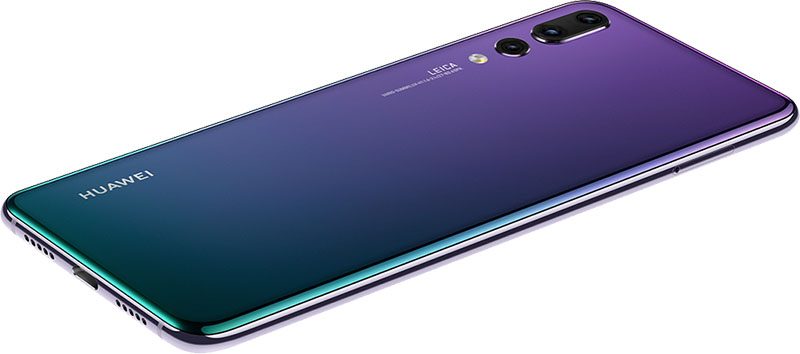 Huawei P20 Pro
A three-lens rear camera would provide a lot of advantages, including greatly improved low-light performance. In his P20 Pro review, The Verge’s Vlad Savov said Huawei’s new camera system is “superior to those on the Galaxy S9 and iPhone X,” though he noted that personal preference may sway that decision.
All in all, this rumor sets the stage for a third-generation iPhone X with an even better camera, and possibly 3x optical zoom, later next year. As far as this year is concerned, KGI Securities analyst Ming-Chi Kuo doesn’t expect many changes to the iPhone X’s current dual-lens rear camera system.
Tag: udn.com
Discuss this article in our forums
The Best Huawei P20 Pro cases
Is Huawei’s new P20 Pro the best smartphone not to be picked up by U.S. carriers? Maybe. All we know is it’s extremely powerful, and has a unique triple-lens, rear-facing camera system that’s as groundbreaking as it is weird. But none of the phone’s power will save its glass-and-metal construction if it decides to make a face-date with the sidewalk. There are many ways to lessen the chances of a broken phone, but not many are as easy and time-saving as buying a protective case.
But there are so many types of case out there — how do you know which one to pick? Never fear, we’ve found some of the best Huawei P20 Pro cases that you can buy to keep your phone looking great.
EasyAcc Anti-Slip Clear Gel Case ($8)
A great choice if you don’t want to obscure the looks of your phone, a clear gel case provides a basic level of protection. This case from EasyAcc does so with a covering of shock-absorbent TPU material that extends all the way around the edges of the device, includes tactile button covers, and extends slightly out from the screen to ensure your phone’s display doesn’t rest on any surfaces. It’s soft and flexible, aiding grip, and it protects well against scratches and other hazards. While it won’t provide the sort of protection you’ll see in bulkier cases, it still offers decent protection for the money you put down, and it’s a great choice if you prefer a design that doesn’t distract from your phone.
Buy one now from:
Amazon
Spigen Rugged Armor ($13)
One of the biggest names in protective cases, Spigen‘s cases are the choice of many, and it’s easy to see why. The Rugged Armor case is one of Spigen’s most beloved and widespread designs, and uses the shock-absorbing properties of TPU to protect your P20 Pro. An intricate spiderweb pattern on the inside of the case helps transfer energy away from your phone, while air cushions at each corner help to mitigate shocks against those most vulnerable areas. The case raises the display and camera lenses from the ground, keeping them scratch-free, while the carbon fiber-style panels at either end of the case give it a futuristic look. This is a great case that strikes a balance between protection and style.
Buy one now from:
Amazon
KuGi Ultra-Thin Wallet Case ($10)
If you’re looking for an elegant, businesslike case that protects your phone while still looking good, then this wallet case from KuGi has you covered. Durable and long-lasting PU leather protects your phone from every angle, thanks to the flip cover that protects your screen when not in use. An inner shell also helps to keep your phone in place and covers the sides, as well as acting as more direct protection when the phone is in use, or being used in the case’s landscape stand mode. The case also has a card slot on the cover’s inner lining with enough room for a credit card, making it perfect for short trips out without your wallet or purse.
Buy one now from:
Amazon
Yoodi Rugged Leather-Style Case ($9)
It’s not just leather wallet cases you need to keep an eye out for if you’re looking for a bit of class. The leather-style panel on the back of this case from Yoodi looks good and does the business, giving your fingers a grippy surface, as well as looking stylish. The bottom panel that imitates brushed metal finishes the look. Of course, it’s made of neither of these materials, not at this price — but our old friend TPU gives decent protection against most bumps, scratches, and drops, providing style and substance.
Buy one now from:
Amazon
Official Huawei Smart View Case ($24)
Who knows the P20 Pro as well as Huawei? The Smart View case has a minimalist design, and uses a polycarbonate (PC) shell that clips around the phone’s frame, as well as a front cover that protects the screen when not in use. The PC shell doesn’t fully cover the sides, which is definitely worth keeping in mind if you’re worried about scratches, and it’s hard, reducing shock-absorption. However, it will hold up well against more direct threats. It’s slim and lightweight, and it perfectly matches the P20 Pro’s design — but the real draw is the cover’s Smart View capabilities. When closed, the P20 Pro will display notifications, weather, and other details through a small see-through section of the cover, ensuring that you’re easily able to stay up-to-date without having to uncover your phone. It’s a neat trick, but do keep in mind that the protective qualities of this particular case might not be as strong as some other cases.
Buy one now from:
Mobile Fun Amazon
Editors’ Recommendations
- Protect your new phone with one of best Huawei P20 cases
- The best Galaxy S8 cases and covers to protect your device
- Don’t live on the edge, get one of the best Galaxy S7 Edge cases
- These are the best cases and covers for the Honor 9 Lite smartphone
- Add style and functionality with the best iPad Pro 9.7 cases

