


Pepper the robot’s latest gig is at the Smithsonian
Pepper, a multipurpose human-shaped robot, design by Softbank, is the first robot to be adopted in Japanese homes.
Pepper the robot certainly gets around. Besides welcoming folks at department stores and airports, the friendly android is also helping out at Pizza Hut and even working as a Buddhist priest. It recently put in a spell at a grocery store in Scotland, too, though admittedly that didn’t work out so well.
The diminutive droid’s latest gig is at the Smithsonian in Washington, D.C. The organization claims to be “the first museum, research, and education complex in the world to experiment with this new and innovative technology,” and is using 25 of the robots across its various locations in D.C.
Built by Japanese telecoms giant SoftBank in collaboration with French robotics firm Aldebaran SAS, Pepper can recognize faces and emotions, and respond through voice or by showing messages and information on its torso-based tablet. It can also be programmed with data specific to its workplace in order to provide the best possible experience for humans who interact with it.
The Smithsonian’s Pepper robots can “answer frequently asked questions, tell stories, and collect limited information, as well as dance, play games, and pose for selfies.” Pose for selfies? It’s all set, then.
The hope is that the “novel interactive experience” provided by Pepper will be able to help solve common problems associated with places like museums, such as encouraging visitors to make their way to under-attended galleries, and getting them to engage more with the exhibits.
At the Smithsonian’s National Museum of African Art, for example, Pepper will be translating Kiswahilli phrases at the upcoming World on the Horizon exhibit, while its ARTLAB+ educational space will have Pepper teaching students coding and software engineering.
“When you meet Pepper, you can’t help but smile,” said Rachel Goslins, director of the Arts and Industry Building, who’s leading the program. “We’re eager to experiment with how Pepper can help us support docents and educators in the vital work they do while providing a fun and surprising experience for the millions of children and adults who visit us each year.”
If you happen to be in Washington, D.C. anytime soon and you’d like to finally meet Pepper, you’ll find the robot at these locations: The National Museum of African American History and Culture, Hirshhorn Museum and Sculpture Garden, the Smithsonian Castle, National Museum of African Art, and the Smithsonian Environmental Research Center. Full details are available here.
Want to see Pepper in action? Check out how Digital Trends got on with the bot when we bumped into it a while back.
Editors’ Recommendations
- Pepper’s next gig is at Pizza Hut, but the robot won’t be tossing any dough
- Hackers could seize robots with ransomware, costing companies millions
- Google Arts & Culture explores remote world heritage sites in virtual reality
- More than selfies: Google’s apps bring the world of art to your phone
- Are you James Bond or Maxwell Smart? Find out at the Spyscape espionage museum
OnePlus opens May 16 London OnePlus 6 launch event to 1,000 of its biggest fans
Andy Boxall/Digital Trends
OnePlus has space for 1,000 people at its upcoming launch event for the OnePlus 6, and you’ve got the chance to attend. Usually, phone launches are reserved for press, partners, company employees, and other specially invited people. OnePlus, however, says it’s proud of its community of fans, and is always keen to involve them in activities, which is why it’s selling tickets to the OnePlus 6’s unveiling.
That’s right, it’s not giving the tickets away, but you won’t mind shelling out for one, because each person who attends the event will not only be one of the very first to use the OnePlus 6 itself, but will also get a bag full of desirable OnePlus goodies. The items inside the “swag bag” will far exceed the price paid for the ticket, says OnePlus. The gifts won’t end on the day either, as attendees will get something extra when they order the phone too.
You’re going to have to be quick though. Only 1,000 tickets will be available, and they will be ready to buy as you’re reading this. There is one important thing to remember before you head off to grab one — the event is being held in London on May 16, so if you don’t live in or nearby the city, you’ll have to factor in travel costs too. OnePlus isn’t covering anything like that, and while the swag bag is certainly going to be cool, its contents are unlikely to add up to the price of a plane ticket.
How much will you pay for a ticket? If you’re early enough, it’s 16 British pounds ($21), or if you miss out on the early deal, the cost rises to 30 British pounds ($41). There are also deals on buying more than one ticket if you’ve got a OnePlus-loving friend. When OnePlus launched the OnePlus 5T last year, it ran a similar offer in New York, and the swag bag contained a backpack, a T-shirt, stickers, and a money-off coupon for the phone itself. The company says everything is going to be bigger and better for the OnePlus 6, including the contents of the bag.
If you’re too far away and can’t make the journey, OnePlus will livestream the event online. For those keen to grab a ticket and visit London on May 16, pre-orders for the tickets opened at 8 a.m. British time on Wednesday, April 25. Maybe we’ll see you there?
Editors’ Recommendations
- Will OnePlus release a new OnePlus X model after the OnePlus 6?
- Everything you need to know about the 6-inch OnePlus 5T
- Here’s everything we know about the OnePlus 6 smartphone so far
- The $500 question: Can the Honor View 10 beat the OnePlus 5T in a camera shootout?
- Honor View 10 review
The new Opera Touch mobile web browser emphasizes single-handed browsing
Opera wants to make the mobile browsing experience a little smoother. The company launched a new mobile web browser called Opera Touch, which aims to take the mobile browsing experience and make it a whole lot easier.
Opera designed Touch to be easily usable with one hand only — and that is where the inspiration came from for a lot of the browser’s experience. For example, Opera has added a so-called “Fast Action” button at the bottom of the screen, which allows users to access the browser’s features with only their thumb.
”This means that, unlike in most other browsers, you can more easily browse and search the web when on the move,” Opera product manager Maciej Kocemba said in a statement.
Opera has added a few other features to make using the browser easy — and those features are aimed at being quick and super easy to use. For example, when you launch Opera, the browser will be immediately ready to search, with the keyboard activated and the search bar in use. The browser, as you would expect in 2018, also supports voice search, and QR codes.
Of course, Opera Touch is not the only new product from Opera. The company also launched an updated version of its desktop browser, which is aimed at seamlessly connecting the mobile and desktop browsing experience. To that end, Opera has allowed for connectivity between the mobile and desktop browser without the need to even log in. To connect the browsers, all you really have to do is scan the appropriate QR code using Opera Touch on your phone, which establishes a connection — that Opera calls Opera Flow. Whenever something is added to Opera Flow on one device, it will be added to the other, too. The connection is encrypted, so if you are worried about security, you don’t need to be with Flow.
It will be interesting to see if features like this can be helpful for customers. Companies have been trying for a while to easily sync the web browsing experience between multiple devices, but we are not sure that Opera Flow is the solution.
Editors’ Recommendations
- The best web browsers
- Keep on clicking with the 10 best browsers for Android
- Samsung rescues data-saving app Opera Max, launches new version
- How to enable cookies
- Major web browsers will support web-based fingerprint, facial authentication
I tried Blendle, the ‘Netflix of journalism,’ for a week and went broke — but you might not
Les Shu/Digital Trends
In less than a decade, the way we consume news has drastically changed. We’re not waiting for a nightly news broadcast or a daily paper — you get up-to-the-minute breaking news alerts wherever you are, whatever you’re doing, thanks to smartphones.
But while we can easily access a variety of news at our fingertips, many publishers have adapted to the digital landscape by adding paywalls, restricting content to non-subscribers to remain profitable. Maintaining subscriptions to various publications can be tricky, which is why Blendle wants to help. It’s an à la carte service that offers access to popular news stories for a small fee, and it has been dubbed the “Netflix of journalism.”
It’s an à la carte service that offers access to popular news stories for a small fee.
Blendle has been around since 2014, but it was originally only available in the Netherlands and Germany. The company began partnering with major U.S. publishers in 2016, and while it’s technically still in a closed beta, we set up an account through the iOS app.
The comparison to Netflix is a bit of a misnomer: Blendle works more like iTunes, allowing you to select individual stories and pay a small fee, as opposed to paying a monthly subscription fee to access all of its content. The business model is good for casual news readers, but not so much if you’re a news junkie.
Nearly perfect design
Blendle carries a diverse selection of U.S. publications. You’ll find most major newspapers including The New York Times, Washington Post, and Wall Street Journal. There’s a good list of magazines as well, including Mother Jones, The New Yorker, as well as industry-specific publications like Ad Age. There are a few glaring omissions, however, such as The Atlantic.
Les Shu/Digital Trends
You’ll have to look else where if you want access to regional and local magazines, or niche publications. Blendle mostly carries national publications with a large print run. It makes sense not to carry regional or niche publications, as they are more likely to attract readers who are willing to subscribe.
While magazines were up to date, newspapers were consistently a day behind.
Blendle’s website and the mobile app are absolutely gorgeous. It’s easy to search for content via publication, and there’s a curated content tab on the homepage. As you scroll through, you see a headline, image, and a small excerpt for each article. Additionally, you can set up reading lists and alerts to quickly find stories that interest you.
While we liked the service’s design, we did run into the problem of accidentally purchasing stories. All you need to do is tap on a story, and you’ll be charged for it. The good thing is Blendle works as an honor system, providing refunds at the end of each story if you clicked it accidentally, or if you didn’t like the story or reporting itself.
There’s another issue that’s a bit more problematic: While magazines were up to date, newspapers were consistently a day behind. We’re not sure if this is because the service is still in beta, but we’ve reached out to Blendle to learn more.
Small charges add up quickly
Blendle initially seemed too good to be true. Instead of paying for an entire issue of The New Yorker, I could just pay a few quarters for the stories I’ll actually read each week. Pricing depends on the publisher and length of story but, for the most part, almost all content is available for less than $.50. While it sounds like a win-win scenario, we crunched some numbers to see whether the service is really worth it.
Les Shu/Digital Trends
I noted down the number of stories I read for an entire week, to see exactly how much I would spend on Blendle. The total ended up being 66 stories, which costed $33 on Blendle. Apparently, a few cents here and there add up pretty quickly. If I kept up the same pace every week, my Blendle habit would come out to a little over $1,700 each year.
If I kept up the same pace every week, my Blendle habit would come out to a little over $1,700 each year.
Sure, $1,700 sounds expensive, but how does it compare to directly subscribing to the publications? If I subscribed to the seven publications I used on Blendle, I would have saved a little over $1,200 during the course of the year.
This doesn’t mean Blendle is a poor product. It’s just not meant for me. If you’re a casual reader, it’s the perfect platform. Choose when you want to read an article, and it won’t be blocked behind a paywall. If you find yourself consistently reading from these publications every week or so, it may make more sense to just subscribe to them.
Blendle has the potential to be a win-win scenario for many. You can read a story for a few cents, and publishers actually make money from people who aren’t likely to pull the trigger on an annual subscription.
Editors’ Recommendations
- Salon will mine digital currency on your PC if you opt to disable ads
- What is fake news? How to spot it in an age of misinformation
- Cutting the cord? Let us help you find the best service for live-streaming TV
- Ad-free Facebook access could cost as much as $168 a year
- Keep up-to-date with the best news apps on iPhone and Android
Why can’t Americans buy the best Android phone of 2018? Scaremongers
Jack Taylor/Getty Images
In 2011, U.S. customs seized and presumably destroyed 60,000 Kinder Surprise eggs — a hollow chocolate egg with a capsule inside containing a toy. Why? The Food and Drug Administration banned the eggs for fear that over-eager children may scoff the chocolate egg and toy down in one go, thus choking on the plastic parts.
“These chocolate treats may be cute and seasonal but they are too dangerous to children to be imported legally into the United States,” the Customs and Border Protection website read at the time.
There’s no evidence Huawei products are a security threat.
Then it was candy. Today it’s phones. While Huawei phones are not yet banned, Americans are now being told these devices are a threat to national security, giving the impression that simply by owning one, all our personal and private information is being monitored and presumably stored or stolen by a clandestine operation on another continent. No-one wants that, in the same way we don’t want little kids choking on a miniature plastic toys.
But there’s no evidence Huawei products are a security threat. Like the original Kinder Surprise, Huawei phones are sold all over the world (almost) without incident. As scaremongers keep the P20 out of U.S. stores, Americans are missing out on one of the best Android phones available. And that’s shame, even if you don’t want one.
One less option
There are plenty of smartphones to buy. Spend over $500 and it’s almost assured that it’ll be good. Great, even. So why cry over a phone from a brand you don’t really know? It’s simple: Choice. Having more choice is excellent for us, because it pushes companies to give us better prices and make even better devices in the future, because they’re having to work harder to earn our support.
Shutting out a manufacturer lessens that choice. Apple and Samsung must be chuckling away, because thanks to political and business machinations, they’ve not had to fight a newcomer. The Huawei P20 Pro isn’t a perfect phone, but it’s easily as good as any other phone released in the past year. Its camera is better than any other, and right now it’s our favorite Android phone of 2018. It’s absolutely worth your money. Like the Kinder Surprise, it’s inviting, fun, and you can’t buy one.
Won’t someone think about the security?
You may be thinking, “I trust these people saying Huawei and ZTE phones, services, and infrastructure equipment are a potential security risk.” It’s a fair point, and inviting trouble wouldn’t be sensible at all. You can read all about Huawei’s denial of any government involvement and how it’s privately owned — not by the state — on its site here, but is there any truth to the accusations?
“All devices have some level of risk, which varies from device to device and manufacturer to manufacturer”
Andrew Blaich, head of device intelligence at mobile security firm, Lookout, told Digital Trends there are three factors at play:
“First, speculation fueled by fear, uncertainty, and doubt. Second, insider knowledge of something known, but the information cannot be revealed at this time. Third, a general guidance to minimize any possible risk in the future based on geopolitics or other factors.”
Is there any truth to Huawei hardware having backdoors that would allow governments to spy in its users? “As of now, there is no publicly available evidence that this has happened,” he said.
Andy Boxall/Digital Trends
Additionally, Blaich said it’s unfair to single out Huawei, adding, “All devices have some level of risk, which varies from device to device and manufacturer to manufacturer, all depending on the companies, developers, agencies, technology pipeline, app stores, or network operators involved.”
Building trust
Does that mean we should just accept the risk? No, of course not, so how about looking at Huawei’s relationship with the United Kingdom as a model for keeping everyone happy?
Huawei set up the the Huawei Cyber Security Evaluation Centre in 2010 with the U.K. intelligence agency, GCHQ.
Huawei is a major supplier of network infrastructure in the U.K., and its phones are available through all the big-name carriers with or without a contract. It has a 13 percent market share, according to Counterpoint research, behind Apple and Samsung. To help assuage concerns over security, Huawei set up the the Huawei Cyber Security Evaluation Centre (HCSEC) in 2010 with the U.K. intelligence agency, GCHQ. In it, phones and network equipment are tested by Huawei employees, extensively vetted by the U.K. government, and everything is reported to the CEO of the National Cyber Security Centre, which is a part of the GCHQ itself.
“The Oversight Board concludes that in the year 2016-17, HCSEC fulfilled its obligations in respect of the provision of assurance that any risks to U.K. national security from Huawei’s involvement in the U.K.’s critical networks have been sufficiently mitigated,” reads the HCSEC 2017 annual report.
Huawei works with the U.K. government in a sensible way to reduce fears. The result is more phones on sale, and a stronger, faster, more robust network on which they operate.
Losing out
Huawei didn’t become the world’s third largest phone maker and the largest supplier of telecoms equipment by not adapting. It’s conscious of China’s poor record when it comes to espionage, and it knows it needs to do all it can to convince governments and companies it’s not a threat.
Its success has come with a limited amount of exposure in the U.S. But it’s a business, and selling phones and equipment in America means more profit, and a greater chance to become the world’s number one phone manufacturer — a repeatedly-stated company goal.
American phone buyers aren’t just missing out on the P20 Pro; but also Huawei’s investment and expertise in 5G network equipment. The Wall Street Journal reported Washington is consumed with the idea that China will have wider 5G connectivity before the U.S., and wants to do nothing to assist in its technological advancement. It’s a closed-minded approach that may see consumers suffer once again, and place more control in the hands of officials and carriers.
The barrier has resulted in Huawei deciding to leave the U.S. to get on without it for now. Current Huawei CEO Eric Xu said he “couldn’t explain” what was going on between China and the U.S., and that it was “beyond him.” Instead, Huawei will focus on the places where it’s already seeing success. And who can blame it?
Don’t just shrug your shoulders
That’s it. No P20 Pro for you. But if you want one, what can you do? Write to government representatives. Write to networks. How about going into AT&T, Verizon, or Best Buy stores and asking for the Huawei P20 Pro? If enough people tell them, it’ll get back to management. Or, why not import one and really thumb your nose at the establishment? It’s not a choking hazard, so customs won’t seize it. Alternatively, you could always not buy a phone through AT&T or Verizon next time, and choose an unlocked Google Pixel 2 instead.
Why not import one and really thumb your nose at the establishment?
Don’t think this will make a difference? If 60,000 Kinder Surprise eggs were stopped at the border, imagine how many slipped through. This, and a subtle change in packaging by Kinder, resulted in the considerably more throat-friendly Kinder Joy being sold in American stores by 2017. If we’re proactive enough, and refuse to take scaremongering at face value without evidence, perhaps Huawei’s next phone (which will have 5G, by the way) and the network equipment it connects to will be vetted by a government-backed operation in the U.S., to make sure no one is listening in.
More choice means we all win, remember?
Editors’ Recommendations
- Huawei CEO teases upcoming P20, targets 2019 for 5G-connected phone
- Huawei P20 Pro vs. Huawei P10 Plus: A year is a long time in tech
- Huawei P20 Pro vs. Samsung Galaxy S9 Plus: Are three better than two?
- The best keyboards for Android that will help you type efficiently in 2018
- Huawei P20 Pro vs. Apple iPhone X: A battle of flagship smartphones
Moto G6, G6 Play, and G6 Plus: Everything you need to know!

It has six Gs. Count ’em.
Motorola’s new Moto G6 series isn’t a reinvention of the product line exactly, but it moves the brand further in that luxury budget category so many companies, from Honor to Xiaomi, are vying to win.
There are three new phones in the series — the Moto G6, G6 Plus and G6 Play — and they’re all intriguing in their own ways. Let’s take a look at what you need to know.
Read (and watch) our preview!
Interested in jumping right into the action? We’ve got a full hands-on preview for you to look at right… now.
Moto G6 series hands-on: Hello photo
There are three to choose from

The Moto G6 isn’t a single phone, but three (so far), each aimed at a different segment of the budget market.
The Moto G6 Play is the cheapest, and forgoes some of the camera fanciness for a $199 price point. It’s also made of shiny plastic instead of shiny glass. Its 720p display isn’t great, but it’s good enough in its 5.7-inch, 2:1 aspect ratio. Its rear fingerprint sensor is tucked into the Motorola batwing symbol, which is awesome.
In the middle, the Moto G6 is the one that most people will be interested in. Made of curved Gorilla Glass 3 and adorned with two rear cameras and the ability to wake and respond to voice commands without turning on the screen first. The 5.7-inch 1080p panel is bright and gorgeous, and there’s a front-facing fingerprint sensor. At $249, it’s going to be tough to beat in the budget segment.
The Moto G6 Plus, which isn’t going to be available in North America, adds a more powerful Snapdragon processor to the mix. It’s also got a bigger 5.9-inch 1080p screen than the Moto G6, and features a slightly better camera combo, front and rear.
Moto G6, G6 Play, and G6 Plus specs
Not every country is getting every model
The reality is that Motorola approaches each market in which it sells like a separate business, and caters the release schedule for each product to various market demographics.
The Moto G6 Play and Moto G6 will be available in almost every market that Motorola operates, including the U.S. and Canada.
Unfortunately, because the Moto X4 is already so close in style and specs to the Moto G6 Plus, Motorola is choosing not to sell it in the U.S.
Let’s take it to 11 2:1

Every model in this year’s Moto G6 series has a 2:1 (aka 18:9) screen aspect ratio, aligning it with popular budget models like the Honor 7X and the new Nokia 6 as well as most high-end phones today.
That means the phones are each taller and narrower than their Moto G5 predecessors, but despite the significantly larger screen size on paper, there isn’t much additional usable space on the 5.7-inch Moto G6 than compared to, say, the 5.2-inch Moto G5 Plus, which has a more traditional 16:9 screen.
A glass house

In addition to elongating each phone, Motorola has swapped out the metal enclosures of last year’s G5 for glass — at least on the two higher-end Moto G6 phones (the G6 Play is made of a shiny plastic resin, much like the Moto E5).
The Gorilla Glass outer layer is surely more slippery and prone to picking up fingerprints, but its curves also shimmer in the light and feel more substantial, making the new Moto series much more attractive and premium-looking than their predecessors. Motorola also includes a simple clear rubberized case in the box to keep that glass looking pristine when you’re expecting to be a bit rough on the phone.
Go out and Play

The Moto G6 Play has a 4000mAh battery which, despite the phone’s last-generation Snapdragon 427 processor, ensures that it should have multi-day battery life. More importantly, it seems to be a great phone for people who just want a no-frills Android Oreo experience.
The 13MP camera isn’t going to change the game, but in our brief time with it, it worked very well, and launched quickly.
The G6 is the G5 Plus sequel

It may not seem like it on paper, but the Moto G6 is the real sequel to last year’s Moto G5 Plus. It has a Snapdragon 450 platform, which seems on paper to be a step down from the G5 Plus’s Snapdragon 625, but it’s basically the same chip with only a few minor regressions, like maximum clock speed.
For U.S. buyers, the Moto G6 is actually going to be a pretty big upgrade, owing most to the…
Camera, man

The Moto G6 has a dual camera setup: a main 12MP sensor with an f/1.8 lens and a secondary 5MP sensor that facilitates portrait mode and a few other niceties.
Motorola is also taking the camera experience a lot more seriously than in previous generations, with an interesting Smart Camera mode that identifies objects and landmarks.
The Moto G6 Plus also has a dual camera, but its 12MP sensor has a slightly wider f/1.7 lens, and its front-facing camera has a special low-light mode that uses pixel binning to get more light from every one of its 16 megapixels.
Say it, don’t spray it

On the Moto G6 and G6 Plus, Motorola has improved the popular Moto Voice functionality, allowing users to perform actions on the device itself (like turning off Bluetooth or starting to play a specific movie on Netflix) in addition to activating Google Assistant when necessary. The phones can also be activated by voice without turning on the screen first.
It’s a nice compromise and something that will be quite useful for those who use their phone in the car or when it’s across the room.
Get on the beta train

If you’re looking to be on the forefront of Motorola innovation, you’ll soon be able to sign up for the company’s new Beta Experiences program, which promises to allow users to sign up for beta versions of Motorola’s new and upcoming software and apps. We don’t know a whole lot yet about the particulars, but it’s good to know that Motorola is taking software experiences more seriously than before.
Motorola’s new Beta Experiences program will let you test new Moto features before they’re public
Where and when can you buy them?

Here’s the rub. While the Moto G6 series is already available to buy in Brazil, and will be coming to Mexico and a few other countries in Latin America in the coming weeks, it’s not coming to North America or Europe until late May.
We’ll update you when we know exactly what’s going on with the pre-order details, but if you’re interested in checking out the cases that are already available for the phones, we’ve got an early list.
Should you upgrade to the Moto G6 or another phone?

There are so many great budget phones to choose from, and Motorola has some stiff competition. At the same time, if you already have a Moto G5 series phone, should you upgrade?
- Moto G6 Plus vs. Moto G5 Plus: Should you upgrade?
- Moto G6 Plus vs. Xiaomi Redmi Note 5 Pro: Spec comparison
What’s on your priority list?
Let us know what you think about the Moto G6 series? Let us know in the comments below!
How to change Fitbit Versa watch bands
Get ready for some potential headaches 😬
As functional as smartwatches are, they also serve as a great extension of your outfit/style. A leather band can help dress up a watch when at a formal gathering, but a silicone one is much better-suited when hitting the gym.

The Fitbit Versa comes with a standard silicone band that can be worn just about anywhere, and while it looks and feels just fine, there are a number of first and third-party bands to choose from to help dress up the watch to your exact liking.
Fitbit opted for a proprietary band system with the Versa, and it’s different from the other one introduced on the Ionic. The new setup can be a pain to deal with, so if you need a helping hand, you’re in the right place.
Step 1 – Push in on the lever of your existing band


With your Fitbit Versa turned upside down, find the quick-release lever (it’s the small metal pin near the Versa’s body).
Once you’ve located it, use your finger to push it in towards the middle of the watch. Not much pressure is required to get it to move, but having fingernails will certainly help!
Step 2 – Pull the band away from the Versa

After you’ve pushed the pin in, angle the top up so that you can pull out the other end of the pin. Just like with the first step, you don’t need a lot of force to get it out.
With this done, repeat the process again for the other end of the band.
Step 3 – Slide the pin of your new band into the Versa

Now that your old watch band is removed, it’s time to connect your new one.
On the new band, push the quick-release pin down so that the end furthest away from the lever is sticking out from the bottom. From here, put it into the corresponding hole.
Step 4 – Set the other end of the pin

Lastly, you’ll need to connect the top end of the band (the one nearest to the lever).
With the bottom part connected and while still holding down the pin, push down and move it up into place. Let go of the pin and you should hear a small “click” letting you know everything’s good to know.
Repeat Steps 3 and 4 to attach the other end of your new band.
Take your time!
The steps required to change the Versa’s bands aren’t all that complicated, but in practice, the mechanism can be tricky to handle. The pin is occasionally finicky to work with if you’ve got big fingers, and the bottom end will often pop out of place when trying to attach the top part.
Following these steps as closely as you can will ensure the process is as smooth as possible, but don’t freak out if things don’t go according to plan at first. Take a deep breath – you got this!
Top 5 things I want to see in Fitbit’s next smartwatch
Every kitchen should have one of these $56 Instant Pot Duo Mini
Get one, for real.

Amazon currently has the 3-quart Instant Pot Duo Mini down to just $55.99 as one of its Gold Box deals of the day. This means that the price that is here now will be gone tomorrow, or sooner if it sells out. We’ve seen deals on Instant Pots disappear pretty quickly, so if you have missed out in the past just click the buy button now.
The Instant Pot combines a bunch of kitchen appliances into one and allows you to do anything from pressure cooking to rice cooking, sauteing to steaming, and even making some yogurt. If it intimidates you a bit, don’t worry. Grab this popular Instant Pot cook book for tons of recipes and ideas of how to perfect your cooking with it.
Need a larger version? The 6-quart option is on sale for $130 and the 8-quart version is priced at $160. That’s $20 off each of them.
See at Amazon
Samsung Pay: Everything you need to know
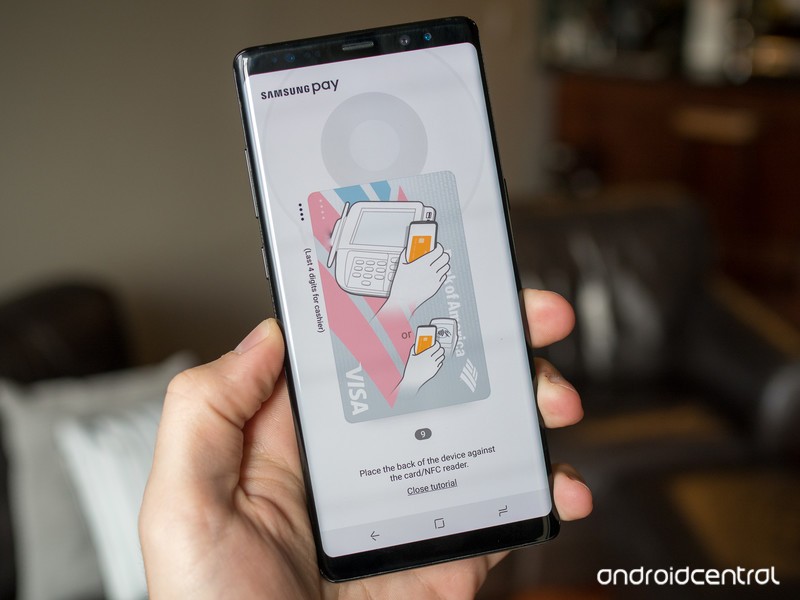
Almost every phone offers mobile payments these days, but Samsung Pay is the most flexible and universally accepted form.
Paying with your phone is still a relatively new prospect, but it’s become a ubiquitous feature on just about every NFC-capable phone over the last few years. The concept is simple; just hold your phone up to a compatible payment terminal to complete a transaction — secured with end-to-end encryption and authorized by your biometrics. Whether you forgot your wallet at home or simply have too many credit cards to manage, mobile payments can be a huge convenience.
There are plenty of different payment solutions, ranging from Google Pay to Apple Pay, but they all fall victim to the same problem: not every payment terminal supports NFC. Luckily for Samsung users, that’s not necessarily a problem. Samsung makes use of a technology called Magnetic Secure Transmission (MST), which emulates the magnetic strip on a physical card to ensure that Samsung Pay works even on older terminals that don’t typically support mobile payments.
The basics
If you’re new to mobile payments in general, there’s a lot to learn. Samsung Pay is largely popular thanks to its MST support, but there are plenty of other reasons one would want to use Samsung Pay over the alternatives. Some may prefer its UI over Google Pay, while others may prefer its selection of supported cards and banks.
What’s the difference between Android Pay and Samsung Pay?
Mobile payment systems have stagnated, unless you have Samsung Pay
Samsung Pay updated with a cleaner and more traditional UI
What devices are supported?
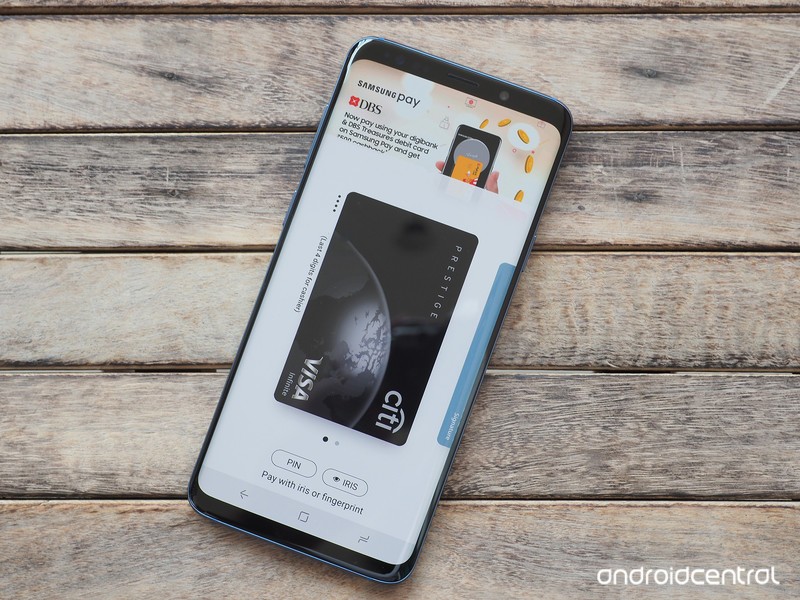
Samsung Pay is available on a long list of Samsung phones, but in the U.S. at least, it’s constrained to Samsung’s flagship Galaxy S and Galaxy Note phones, starting with the Galaxy S6 and Galaxy Note 5. In addition, some smartwatches support Samsung Pay — namely most variants of the Gear S2 and Gear S3, though the former lacks MST capability and only makes payments over NFC.
How to use Samsung Pay on the Gear S3 without a Samsung phone
How to set up Samsung Pay with your Samsung Galaxy S8
How to set up Samsung Pay on your Galaxy Note 8
Is Samsung Pay safe?
One of the biggest concerns people have with mobile payments is security. What’s to say someone won’t hack your phone and steal all of your credit card information?
Samsung Pay only works once it’s identified you with biometrics using the fingerprint sensor or iris scanner. From there, it uses tokenization, which replaces your actual card information with generated tokens that are then decrypted by the card’s payment network to authorize the final transaction. Samsung Pay also utilizes Samsung’s Knox platform for additional security.
How secure is Samsung Pay?
How to set up and secure your phone using Samsung’s My Knox
What about the rewards programs?
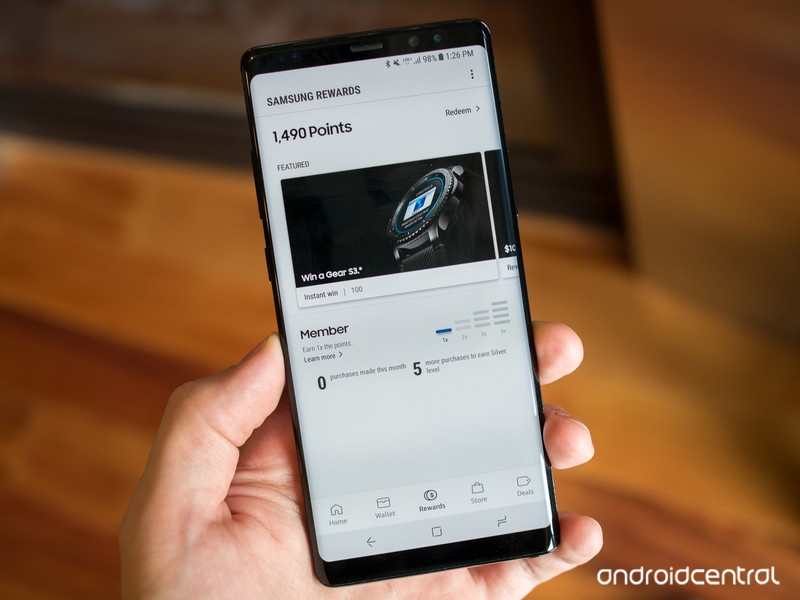
One of the biggest reasons to use Samsung Pay is its generous rewards programs. With every purchase you make using Samsung Pay, you can earn rewards points that contribute to free gift cards. You can also store existing membership and rewards cards from your favorite stores, giving you one less reason to carry your wallet.
Samsung Pay now offers its own rewards program in the U.S.
Samsung Pay’s rewards program just got a lot less awesome
Where can I use Samsung Pay?
While mobile payments are most commonly used at payment terminals in stores and restaurants, Samsung Pay works elsewhere, too. These days, you can use Samsung Pay to make purchases online and even within apps, with more payment methods than ever — including online services like PayPal.
Samsung Pay adds online and in-app purchases, expands to new countries
Samsung and PayPal strike deal for new in-store and online payment methods
PayPal support finally makes its way to Samsung Pay
What other countries support Samsung Pay?
Samsung Pay is hugely popular in the U.S., but it works in plenty of other places in the world, too. Samsung is constantly expanding its reach — most recently, it launched in Italy, and at the moment it covers 21 unique markets. Depending on where you live, there may be other information relevant to your Samsung Pay experience.
Samsung Pay in the UK: Everything you need to know
Samsung Pay in India: Everything you need to know
What’s your take?
Do you or have you ever used Samsung Pay? How do you feel it compares to other mobile payment services like Google Pay? Is MST a big deal to you? Share your thoughts on this and anything else related to Samsung Pay in the comments below!
Deal: Save BIG at Verizon on the Pixel 2 XL, Moto Z2 Force, Galaxy Note 8 and Galaxy S9

Verizon is currently sporting some great deals on a handful of flagship Android devices. Right now, Big Red is offering $300 off not only the Pixel 2 XL, but also the Motorola Moto Z2 Force edition, the Samsung Galaxy Note 8 AND the Galaxy S9+. If none of those float your boat, you can also grab the Galaxy S9 at a $200 savings.
Not only do you get a serious phone discount, but you also get stellar service on Verizon’s top-ranked network. The savings on these devices comes via monthly bill credits, and this deal doesn’t require a device trade-in — but you’ll need to stay with Verizon for the full 24 months to get the total value of this offer.
Need to knows:
- Purchase of new phone must be on an installment plan
- Discount is applied via 24 monthly bill credits and starts within 2 bills.To get the full value, you will need to stay on your installment payment plan for the full 24 months.
- Activation fee of $25/line applies
- Requires a new line of service to qualify
- If you cancel service, full balance is due
- This deal excludes device’s sales taxes
See More at Verizon
Pixel 2 XL Galaxy Note 8 Galaxy S9 Galaxy S9+

 AIVAnet