


The best lightweight gaming laptops
Back at CES a few months ago, I wrote that we were entering a golden age in lightweight gaming laptops. It started last year with NVIDIA’s small, power-efficient Max-Q graphics, followed by Intel and AMD’s surprising team-up on Core H with Radeon RX Vega M graphics. Now Intel has ramped up the power further with its six-core, eighth-gen Core-i7 and Core-i9 portable processors. Over the past few months, a slew of lightweight gaming laptops using this tech have hit the market. But which ones are best? Let’s take a look.
The basics
First, let’s define the category of lightweight gaming laptops. They should have discrete GPUs by NVIDIA or AMD, as opposed to just integrated graphics. They should also weigh less than five pounds, or else you’re getting into regular, possibly backbreaking gaming laptop territory. Those are the basics, but models with better performance, longer battery life and smaller profiles will obviously be the most desirable. Other features, like a touchscreen, are icing on the cake.
The defining traits I mentioned — discrete graphics and a small size — benefit not just gamers on the go, but folks who do video editing, 3D animation, VR and other jobs that require extra GPU power. With two such defined markets, many of the laptops on this list carry understated styling, rather than the flashy looks common to gaming-first models. As it happens, many gamers actually prefer this less-is-more vibe anyway.
Modern games, however, still require maximum power. To deliver that muscle without killing your battery, NVIDIA launched Max-Q versions of its GTX 1050, 1060, 1070 and 1080 chips. They run at clocks speeds 10 to 15 percent lower than the full versions but otherwise have the same specs. So performance for the GTX 1070 Max-Q GPU ranks somewhere between the full GTX 1060 and GTX 1070 versions, but closer to the full GTX 1070.

Intel, meanwhile, worked with AMD to integrate an eighth-generation CPU, AMD Vega graphics and GDDR5 memory onto one chipset. The result is a laptop with GTX 1050 and 1060 levels of power, Intel claims, but lower power consumption than NVIDIA’s chips. Dell and HP, to start with, are using Vega M GL graphics (equivalent to around GTX 1050 Ti) for their latest 2-in-1 models and are claiming stellar battery life, even on 4K touchscreens.
The latest NVIDIA, AMD and Intel tech is nice, but fitting power into a small form factor still means compromising. You’ll never have as much battery life or as compact a design as with an ultraportable, nor will you get as much performance as on a seven-pound gaming laptop. Heat and fan noise are other unavoidable side effects.
Still, you can now get nearly everything you want. There are a number of models in the $2,000 price range with powerful NVIDIA GTX 1070 Max-Q graphics that weigh just over four pounds and still manage to offer decent battery life. If you need more power, you can step up to GTX 1080 Max-Q, and if battery life and budget are more of a concern, go down to GTX 1050/1060 Max-Q, Vega, or NVIDIA’s MX150 on the very low end. With all that in mind, let’s take a look at our top picks.
The best lightweight high-performance laptops
Until AMD’s dedicated Radeon Vega Mobile GPU arrives, NVIDIA graphics are the only way to get top gaming performance or run Oculus or Vive for VR. Thanks to Max-Q, you can fit a GTX 1080 GPU into a sub-five-pound laptop, but the sweet spot for GPUs is NVIDIA GTX 1070 Max-Q (MSI, Gigabyte and other models) and regular GTX 1060.
You might notice that several of these laptops have similar styling and the same 144Hz screen and chip options, showing that lightweight gaming laptops (like other PC categories) are subject to commoditization. That doesn’t strike me as a huge deal, though, as long as the performance is there.
Gigabyte Aero 15X

The 4.4-pound, $2,200 Gigabyte Aero 15X with NVIDIA GTX 1070 Max-Q graphics topped a lot of lists last year because of its long battery life compared with rival machines. The addition of an Intel six-core, eighth-gen i7-8750H in the latest version and a 144Hz screen makes it that much more interesting. The performance is better for gaming, VR and video editing, and it retains the excellent battery life, great keyboard, generous port offering and low-key styling. That styling might too OEM-generic for some, though, and the relatively high price and middling touchpad are also marks against it.
MSI GS65 Stealth Thin
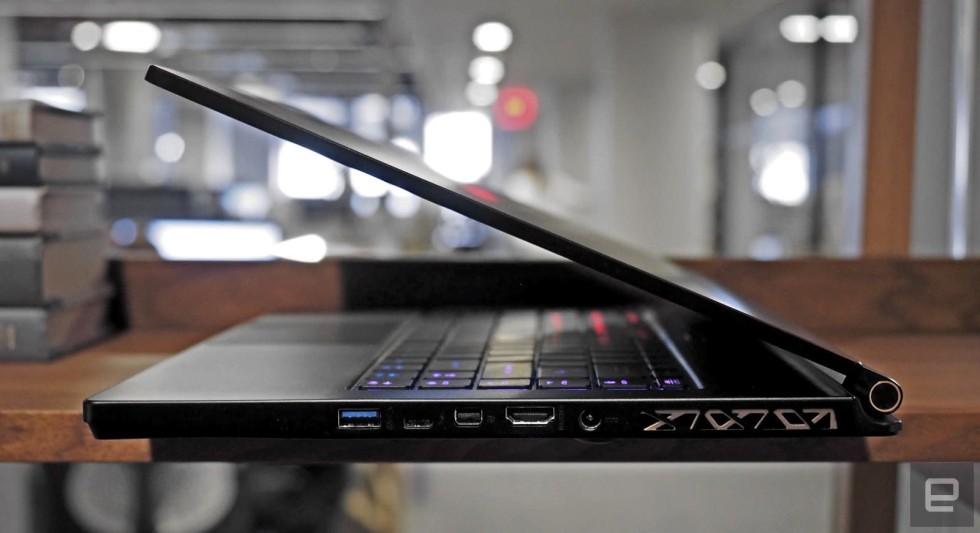
MSI’s first lightweight gaming laptop with GTX 1070 Max-Q graphics, the GS63VR, did nearly everything well, but the battery life was mediocre, thanks to a smallish 52Wh cell. The company rectified that issue with the $2,099 MSI GS65 Stealth Thin, also packing the six-core i7-8750H CPU. Runtime is now much longer with the addition of an 82Wh battery, and yet it’s actually lighter than the last model, at 4.1 pounds, because of the slimmer bezels and case (which look nice, to boot). The performance is as great as you’d expect for gaming, but battery life isn’t quite as long as on the Aero 15X. What’s more, it can get pretty hot on the bottom.
Razer Blade (2017)

If you’re willing to settle a bit on performance, the 14-inch, 4.1-pound Razer Blade offers a lot for the money. It has full-on NVIDIA GTX 1060 graphics and an optional 4K touch display (which might be overkill for a 14-inch screen), along with Intel’s last-gen i7-7700HQ processor. The best part is the price: Since the 2017 version is overdue to be replaced (it came out in February 2017), Razer has cut it by $200, to $1,700, with a 1080p screen.
ASUS ROG Zephyrus

We’ll be the first to admit that the ASUS ROG Zephyrus isn’t for everyone. It squeezes top-flight NVIDIA GTX 1080 Max-Q graphics and an eighth-gen Core-i7 CPU (for the latest model) into a 4.93-pound, 18mm-thick body. The performance is crazy, but the downsides are steep: The battery life is “laughable,” “terrible” and “abysmal,” according to three recent reviews, including Engadget’s. It’s also limited to 1080p resolution and costs $2,700, but if you want a sub-five-pound GTX 1080 laptop, it’s the only one around.
Origin EVO-15S

Origin is another company that has embraced NVIDIA’s Max-Q, and its top-end model is the 4.3-pound, $2,000 EVO15-S. As MSI and Gigabyte did with their flagships, Origin just updated it with Intel’s latest eighth-gen, six-core chip, while offering NVIDIA GTX 1070 Max-Q or GTX 1060 graphics. Like its rivals, it also offers 144Hz 1080p and 4K screen options. If budget is an issue, the low-spec model with GTX 1060 graphics costs just $1,621, making it one of the cheapest high-performance, lightweight models.
The best budget lightweight gaming laptops
If you have a more modest budget and don’t need to play The Witcher 3 at 120 fps, good news: There are a lot of lightweight gaming laptop options that still have decent graphics. This category includes laptops with NVIDIA GTX 1050 Ti and the new Intel/AMD Radeon Vega RX Vega M graphics.
HP Omen 15 (2017)

With a 4.8-pound weight, great screen, sporty gaming design and NVIDIA GTX 1050 Ti graphics, there’s a lot to like with HP’s $1,300 Omen 15. It can stand up to Dell’s Alienware lineup for gaming, but does so in a smaller, lighter body. The downsides are battery life, which is pretty bad, and the aforementioned design, which is not ideal for sober graphics work.
Gigabyte Aero 14

Gigabyte pulled off a nice trick with the Aero 14, offering GTX 1050 Ti graphics, a QHD (2,560 x 1,440) screen, Intel Core i7-7700HQ chip and gigantic 94Wh battery, all in a 4.2-pound package. As on other Aero models, the design is low-key, so it’s suitable for regular work, but you can also get it in bold green or orange colors. The main downside is the $1,500 price (with the 1050 Ti graphics), which is more than similarly specced laptops.
Origin EON15-S

Origin’s EON15-S tips the scales at 5.08 pounds, but since it’s one of the cheapest models with decent gaming performance, we’ll give them a few grams. For $1,160, you get NVIDIA GTX 1050 Ti graphics, a Core i7-7700HQ CPU and 16GB of RAM, making it suitable for serious gaming and video editing or graphics work.
Dell XPS 15 2-in-1 and the HP Spectre x360 15

These convertible laptops aren’t really for gaming and have yet to be reviewed or shipped, so don’t consider this a recommendation. But it’s worth mentioning Dell’s XPS 15 2-in-1 and the HP Spectre x360 15, as both are now available to order and carry Intel and AMD’s new RX Vega M tech, which could be game-changing in a number of categories.
Both have the “GL” flavor of the RX Vega M and Intel Core i7 chip combo, which is supposed to offer performance between NVIDIA GTX 1050 Ti and 1060 Max-Q graphics. They also have 360-degree 4K touchscreens with styluses, offer lovely designs and, most important for our category, weigh around 4.5 pounds.
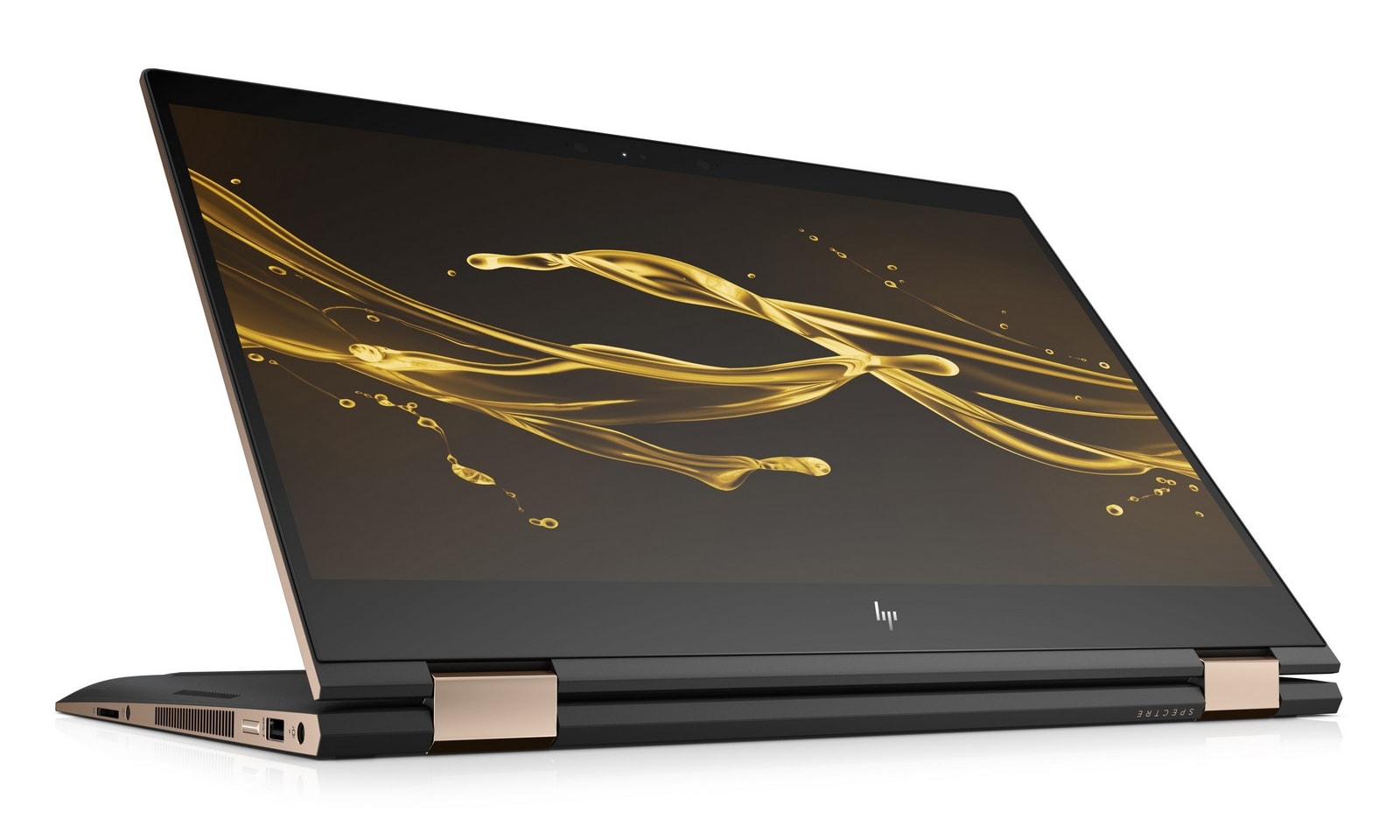
At the same time, HP promises up to 13.5 hours of battery life for the Spectre x360 (above), which would top any GTX 1050 Ti laptops. And both models will cost a reasonable $1,700 with 16GB of RAM and a 256GB SSD. All of this sounds great, but the proof will be in the testing, so we’re reserving judgment until we can get our hands on them.
Wrap-up
I write and work on my computer, but also game and edit photos and videos, and I hardly think I’m unique in demanding one laptop that can do all that. I also like this category because it’s just fun to see how much tech manufacturers can squeeze into a small PC. Luckily, there are a lot more choices for lightweight gaming laptops now than a year ago, especially in the sweet spot between about $1,500 and $2,000. What I’m hoping to see with RX Vega M and future chips from AMD is more of the same, but with even better pricing — and I’m sure I’m not unique in that regard, either.
Apple A12 and Snapdragon 700 Chip Production May Lead TSMC to Earn Record Profits in 2018 After All
Last week, Apple supplier TSMC saw its shares decline around nine percent after it cut its full-year revenue growth target to 10 percent, compared to its previous 10-15 percent estimate. The manufacturer blamed the cut on lower-than-expected smartphone demand and growing uncertainty in the cryptocurrency mining market.
Apple’s stock also declined around four percent on Friday, as many analysts equated the slowing smartphone demand with poor or declining sales of the iPhone X, which has an A11 Bionic chip fabricated by TSMC, in the second quarter.
Now, a report from DigiTimes suggests that TSMC may post better-than-projected revenues and profits in 2018 after all, as it gradually ramps up volume production of so-called A12 chips for Apple’s next-generation iPhone lineup. The wafers are expected to be manufactured based on TSMC’s advanced 7nm process.
The sources said that TSMC will see its revenue ratio for advanced 7nm process hit a high of 20 percent in 2018, and may therefore post better-than-projected revenues and profits for the second half of the year and register an annual revenue growth of over 10 percent.
TSMC may also benefit from Qualcomm’s decision to roll out its new Snapdragon 700 series processors in May, ahead of schedule, according to the report. Qualcomm has allegedly grabbed significant orders from non-Apple smartphone vendors and will have TSMC fabricate the chips in the second half of the year.
The report is questionable given that TSMC presumably factored in production of A12 chips into its revenue guidance last week, but the better-than-projected revenues could rest more on the Qualcomm portion of the news.
How much money TSMC makes is a data point that Apple analysts often attempt to interpret in order to gauge iPhone sales. A constant flow of reports have claimed iPhone X sales have significantly declined following the device’s late 2017 launch quarter, but Apple has yet to disclose any official figures.
Apple will report its second quarter earnings results on Tuesday, May 1, including how many iPhones it sold during the January-March period, but it doesn’t provide a model-by-model breakdown of sales. Apple reported record-breaking revenue of $88.3 billion and 77.3 million iPhone sales in the first quarter.
Tags: TSMC, digitimes.com, A12
Discuss this article in our forums
How to Enable Markup Annotation Tools in macOS
Recognizing the utility of Markup annotation tools, Apple has extended their availability in recent versions of iOS, but it’s worth bearing in mind that you can access a similar and equally useful annotation toolset within several native Mac applications.
In macOS, accessing an application’s Markup toolbar lets you draw on and annotate images or PDF documents within the app using arrows, shapes, and text. You can also use it to quickly sign a document with your digital signature.
We’ve highlighted which native apps support Markup in this article. But before you can access the toolset in desktop apps, you’ll need to check that the relevant extension is enabled on your Mac. Keep reading to learn how it’s done.
How to Enable the Markup Extension in macOS
Click the Apple () symbol in your Mac’s menu bar and select System Preferences….
Click the Extensions preference pane.
Click Actions in the left column of the Extension pane.
If it isn’t already ticked, click on the box next to the Markup extension in the right column.
One of the most useful Markup integrations can be found in Mail. Once you’ve dragged an image into your message, hover your mouse cursor over it, click the arrow button that appears in the upper right corner, and select Markup from the dropdown menu.

Your attached image will be foregrounded with the Markup toolbar across the top, ready for you to apply your annotations.
Markup can be accessed in the same manner within TextEdit as well as some third-party document editors. To test whether it’s available, simply hover your cursor over the image once it’s inside your document and look for the arrow in the upper right corner.

In Preview, the Markup toolbar has its own button next to the Search input field on the right of the taskbar. You also get a few extra Markup tools here, like Adjust Color, Adjust Size, and Crop, so if you can’t annotate an image within your application of choice then Preview should be your next stop.

Finally, the Markup toolset is also accessible in Apple’s Photos application: Next time you’re editing an image, click the Extensions icon (the three dots in a circle) and select Markup to enter annotation mode.
Related Roundup: macOS High Sierra
Discuss this article in our forums
Toyota Brings CarPlay, Apple Watch Support, Qi Charging and More to 2019 Avalon and Corolla Hatchback
Back in January, Toyota finally announced support for CarPlay, becoming one of the last major car manufacturers to support Apple’s system for accessing iPhone apps through a vehicle’s infotainment system. Mazda, one of the other major holdouts, announced similar support last month.
2019 Toyota Avalon and Corolla Hatchback
At its January announcement, Toyota revealed that the redesigned 2019 Avalon sedan would be the first Toyota model to include CarPlay support, with other Toyota and Lexus models adding support in the future. Several of those follow-on vehicles have since been announced, including the 2019 Corolla Hatchback, 2019 RAV4 and the 2019 Lexus UX. Other 2019 models with Toyota’s Entune 3.0 and Lexus’s Enform 2.0 systems will similarly be gaining CarPlay support.
Toyota invited me to Del Mar, California, earlier this month to preview both the Avalon and Corolla Hatchback, and I got to spend some time trying out and talking to Toyota representatives about not only CarPlay but other features of the new vehicles that will appeal to smartphone and smartwatch users. The Avalon and Corolla Hatchback really represent opposite ends of the spectrum in terms of market demographics, so it’s good to see Toyota looking to embrace the feature for all types of customers.
2019 Toyota Avalon
The 2019 Avalon, arriving at dealers in the U.S. in mid-May, will be the first opportunity for Toyota fans to take advantage of CarPlay. While the Avalon has largely catered to an older demographic with a conservative sedan design, Toyota is upping the ante with the new fifth-generation design, which has been completely rebuilt from the ground up to modernize the sedan and appeal to not only the model’s traditional audience but also younger drivers looking for sportier performance and a more aggressive design.
 2019 Toyota Avalon Touring
To that end, Toyota is offering the new Avalon in four grades, with the XLE and Limited grades offering the updated yet balanced look while the XSE and Touring grades offer a sportier design with a bold, mesh-patterned front grille, larger wheels, and black accents. The Touring model offers new Sport S and Sport S+ driving modes for those who want a more responsive driving experience that lets them feel the road more and optionally enhances engine sounds.
Base prices for the new Avalon start at $35,500 for the XLE model and rise to $42,200 for the Touring model, with the XLE, XSE, and Limited grades all available with hybrid powertrain options at a premium of just $1,000.
Apple fans will find a lot of new features to like in the 2019 Avalon, and they will undoubtedly make their way into much of the rest of the Toyota lineup as models are refreshed. CarPlay support is the big addition, and Toyota has made it standard across all four Avalon grades, which is a refreshing contrast to some other manufacturers that limit it to specific grades or packages.
I won’t go into much detail on CarPlay specifically, as it’s essentially the same experience from vehicle to vehicle and many users are already familiar with it from other vehicles launched over the past few years.
 2019 Avalon with CarPlay home screen
Suffice it to say, CarPlay brings your iPhone’s interface to your dashboard, letting you interact with a number of key stock and third-party apps to handle audio, navigation, phone calls, messages, and more. By plugging your phone into a USB port in your car, you can have convenient access to these functions in an interface that’s easy to use by voice or touch while on the road, and it’s all tied into your digital life already on your phone.
 2019 Avalon with Apple Maps via CarPlay
As far as CarPlay details specific to the Avalon, the sedan’s 9-inch touchscreen is a fantastic palette for CarPlay, with responsive touch capabilities and a great display size that makes it easy to see and reach everything while you’re on the road.
Toyota has thoughtfully considered the design here, with the center console flowing smoothly up into the climate control system and the infotainment system as the large screen appears to float at the top of the stack. Hardware buttons to the left and right of the display let you access certain basic functions by feel, although the ones on the right side are quite a reach for the driver. Touchscreen and steering wheel controls do help avoid the need to use the buttons.
 2019 Avalon overall dashboard and center stack layout
The Avalon only supports wired CarPlay, with the USB port for data and power located inside the center console storage compartment. A removable tray that sits at the top of the console box under the lid is a nice spot to rest your phone so you can keep everything tucked away.
 Phone sitting in console tray and connected via USB, with two other USB charge ports visible
It’s a tidy solution, but with the Avalon also offering Qi wireless charging (standard on XSE, Limited, and Touring and an option on XLE as part of a moonroof package) in a fairly spacious compartment at the front of the console, it’s unfortunate that wireless CarPlay isn’t supported. It would really be the ideal solution to be able to toss my phone onto a wireless charging pad when I hop into the car and have CarPlay pop right up without needing to plug in any cables, but hopefully it won’t be too many more years before that becomes reality.
 Qi charging pad in center console
I asked Toyota why it took so long to add CarPlay support, and they told me that they’ve historically been very conservative in adding these types of features, as they’re wary of negatively impacting the user experience and are committed to collecting significant data on performance and other considerations before adopting new technologies. User privacy has been one particular area of concern, which is likely a significant reason why Toyota isn’t rolling out support for Android Auto alongside CarPlay.
Aside from CarPlay, Toyota is clearly invested in more generally making things easier for the increasing numbers of mobile devices in our lives. In addition to the USB charging and data port in the console that lets you hook up to CarPlay, there are four other 2.1A charging-only USB ports in the Avalon — two more in the center console and two on the back of the console within easy reach of the rear passengers.
 Pair of 2.1A USB charge ports on rear of center console
Considerations also extend to device storage, with one of the cupholders in the center console offering a flat rear wall to double as a phone holder, as long as your phone isn’t too big. A slot in the rear fold-down armrest also serves as a convenient place to store a phone or a small tablet for rear passengers.
 Phone storage with Qi charging pad (on some grades) tucked into front of console, cupholder also designed to hold phones
Onboard smartphone features also extend beyond CarPlay, with Toyota offering a Remote Connect app that lets you remotely start or stop your car, lock or unlock your doors, check the vehicle status for any open doors, windows, or trunk, and see where your vehicle was last parked. The app could use some design updates and support for iPhone X, but it gets the job done.
 Remote Connect main screen, remote start confirmation, and vehicle finder
The app also supports guest drivers, which allows you to set up different categories of drivers such as friends, family, valets, or other specific people, and activate limits on speed, curfew, total miles, and driving radius/time. If the vehicle exceeds any of those limits, you’ll receive a notification on your phone.
 Remote Connect vehicle status and guest driver alert options
Remote Connect isn’t a new feature, but with the 2019 Avalon, it’ll be gaining Apple Watch and Android smartwatch apps that let you manage the most basic controls like remote start and lock/unlock right from your wrist, similar to the existing capabilities available through phones.
 Remote Connect Apple Watch app
Remote Connect requires the Entune 3.0 Audio Plus package (standard on XLE and XSE) or Premium Audio package (standard on Limited and Touring, optional on XLE and XSE), and also requires a separate subscription priced at $8/month or $80/year after a free six-month trial. It’s unfortunate that there’s a separate subscription charge for this feature, but Toyota certainly isn’t the only manufacturer charging extra for it.
Another interesting feature for smartphone and connected home users is built-in Alexa support across all Avalon grades. Once you log into your Amazon account, your Toyota will be linked to your Alexa home, which means you’ll be able to perform both car-to-home and home-to-car tasks. For example, you’ll be able to ask Alexa to turn on your house lights from your car. Some Alexa functions such as setting timers or turning on ovens won’t be available from the car, but many will. In reverse, you’ll be able to ask Alexa questions about your car from within your home, making sure doors are locked, checking on fuel level, or even checking where the car is parked.
Alexa’s in-car capabilities can also handle general queries, allowing you to ask for details such as weather. Alexa’s capabilities can be expanded with third-party skills as well, letting you order pizza from your car using only your voice, for example. Unfortunately, the in-vehicle Alexa support won’t be coming for iOS users until the fall, while Android users will get it at launch. Another limitation is that initially, Alexa will only support a single vehicle at a time, as Toyota and Amazon are still working on how to let users distinguish among multiple vehicles.
One of the reasons users have been clamoring for CarPlay support is dissatisfaction with Toyota’s own Entune system, which lets you connect a smartphone to the car via Bluetooth and access a suite of apps such as Scout GPS Link from Telenav, iHeartRadio and Pandora for music, NPR, Yelp, and more. Entune 3.0, which debuted on the 2018 Camry and Sienna and is making its way into more of Toyota’s lineup for model year 2019, offers a new and improved platform but has still received lukewarm reviews from users.
 2019 Avalon with Entune 3.0 home screen
Three different levels of Entune 3.0 are available, with increasing levels of hardware quality available on the Audio Plus and Premium Audio tiers. The two higher levels are also required for supporting such features as Remote Connect, Wi-Fi Connect to leverage a Verizon data connection to create a Wi-Fi hotspot in your car, and Safety Connect, which offers emergency and roadside assistance, automatic collision notifications, and stolen vehicle locator functionality.
Scout Link GPS, which comes with a three-year subscription included on Audio Plus and subsequently requires a $24.99/year subscription, in particular has been maligned as clunky with a rather unfriendly interface and connectivity issues between phone and car. The embedded Dynamic Navigation built into the Premium Audio tier is much better (again with a three-year subscription included and then requiring a $169 fee plus dealer labor every two years for updates), but overall the Entune 3.0 apps can’t compete with CarPlay’s design and ease of use, as well as the convenience of having the most crucial apps from your phone seamlessly show up on your car’s display.
2019 Corolla Hatchback

I won’t go into as much detail on the Corolla Hatchback, as Toyota isn’t quite ready to release full details on the car ahead of its summer release, but what I can say is that the in-vehicle tech offers a very similar experience, with a slightly smaller 8-inch touchscreen and CarPlay and Alexa support standard throughout all grades.
 2019 Corolla Hatchback with CarPlay home screen
Remote Connect availability is a bit more limited here, as the lower SE grade (both manual transmission and CVT models) only includes basic Entune 3.0 standard, which doesn’t support Remote Connect.
 2019 Corolla Hatchback with Entune 3.0 home screen
The Audio Plus package required for Remote Connect is standard on higher-end XSE models and an option on the SE CVT model. It’s not available at all on the manual SE model. The Audio Premium package with embedded navigation is an available option for the XSE CVT model. Toyota tells me that Apple Watch Remote Connect support will be available standard on the XSE CVT model and as part of an Audio Plus and Blind Spot Monitor upgrade package on the SE CVT model.
 2019 Corolla Hatchback with Apple Maps via CarPlay
With the Corolla Hatchback coming in at a much cheaper price point than the Avalon, there are also a few sacrifices in terms of connectivity, with a single 1.5A USB port for connecting to the infotainment system somewhat awkwardly positioned under the instrument panel and a second 2.1A charge-only port in the center console. Rear passengers don’t have their own dedicated ports easily accessible, and Qi wireless charging is available only as an option on the XSE CVT model.
All Avalon and Corolla Hatchback models also include Wi-Fi Connect capabilities, which turns your car into a Wi-Fi hotspot through Verizon. A free trial of six months or 2 GB of data is included, after which you’ll need to add the car as a line on a Verizon plan.
Wrap-up
It’s great to see Toyota finally getting onboard with CarPlay, as it’s become something many users have come to expect in their vehicles with an increasing number of car buyers considering it to be a “must have” feature. Making CarPlay standard across all grades ensures that even entry-level users will have access without needing to pay for packages or higher model grades they may not necessarily want or need.
CarPlay puts your most important phone functions at your fingertips or a voice command away while behind the wheel, and with the standardized interface you’ll have a familiar experience no matter what kind of car you’re driving. But what surrounds and augments the CarPlay interface certainly differs from manufacturer to manufacturer, and it’s good to see Toyota embracing features like Remote Connect with Apple Watch support, Qi wireless device charging, Alexa connectivity, and Wi-Fi hotspot services.
Not all of the extra features are perfect, and in some cases app designs could use some work, but that’s pretty typical of car manufacturers and a big reason why users have clamored so long for CarPlay in the first place.
And unfortunately some of these features come with extra fees, which is understandable with products like Wi-Fi hotspot where Verizon provides ongoing data services for the vehicle, but somewhat less so with Remote Connect. There’s certainly an infrastructure cost associated with handling communication to and from the car, but it should be pretty minimal and it would be nice if it could be baked into the cost of the vehicle rather than under a subscription plan that likely includes hefty profit margins.
Overall though, the new technology features coming to Toyota’s lineup are welcome additions that many Apple fans will be able to benefit from and should help bolster Toyota’s appeal as today’s technologically connected consumers comparison shop for their next vehicles.
Related Roundup: CarPlayTag: Toyota
Discuss this article in our forums
ASUS Zenfone Max Pro M1 hands-on: A well-rounded budget smartphone
It’s been a while ASUS has a launched a smartphone in the Indian market. Once a decent mid-segment player, ASUS lost the plot when it came to affordable smartphones amidst stiff competition from several Chinese players.
But the company is back with ASUS Zenfone Max Pro M1 (ZB601KL) – an affordable smartphone that aims to take on the competition from the very successful Redmi Note 5 and Note 5 Pro as well as the broad Honor lineup.
Launched in a press event in New Delhi today, the Zenfone Max Pro is a first-to-world device and aims to bring marquee 2018 features like taller display and dual cameras to a well-rounded budget smartphone. I spent some time with the ASUS Zenfone Max Pro M1 in the days leading up to the launch, and here are my first impressions of the same.
Specifications
| Operating System | Android 8.1 Oreo |
| Display | 5.99-inch Full HD+ (2160 x 1080) IPS 18:9 aspect ratio 450 nits brightness 2.5D arc glass panel |
| Processor | Qualcomm Snapdragon 636 64-bit octa-core CPU (8 x Kryo 260 cores) Adreno 509 GPU 14nm FinFET technology |
| RAM | 3/4GB |
| Storage | 32/64GB Supports microSD card up to 256GB |
| Front Camera | 8MP F2.0 aperture 85.5-degree view angle 5 element lens Soft-light LED flash |
| Rear Camera | 13MP + 5MP depth sensing sensor F2.2 aperture 80-degree view angle Phase Detection AF 5 element lens LED flash 4K UHD video recording |
| Battery | 5000 mAh Bundled 2A/10W charger |
| Dimensions | 159 x 76 x 8.61mm |
| Weight | 180 grams |
Design

The ASUS Zenfone Max M1 doesn’t stand out in the sea of affordable smartphones in the market. Not that it is a bad thing since most brands in this segment – barring Honor maybe – prefer going for the predictable, yet functional, design. As we’ve seen with the success of Xiaomi’s Redmi series, looks like most customers also don’t care much.
The ZenFone Max Pro has a reliable aluminum alloy body and sports a taller display which combined with thin bezels allow for a 5.99-inch display in what is usually a 5.5-inch chassis. The high 83% screen-to-body ratio is a pretty good number and with rounded edges and corners, the phone is quite comfortable to hold and use despite the large display size.
Display
The Zenfone Max Pro sports a 5.99-inch Full HD+ IPS display with 18:9 aspect ratio. It’s a pretty vibrant display for its price, and with a contrast ratio of up to 1500:1, the colors are quite accurate. The brightness is quite high, which allows for a good sunlight legibility.
While there’s no Gorilla Glass protection, the display is scratch-resistant and comes with oleophobic protection.
Hardware

Powered by the Qualcomm Snapdragon 636, the Zenfone Max Pro comes in two memory variants – 3GB RAM with 32GB internal storage and 4GB RAM with 64GB internal storage.
The Snapdragon 636, a successor of the reliable and popular Snapdragon 625 chipset, is claimed to offer more than 50% faster performance and even greater efficiency than its predecessor. It packs in eight Qualcomm Kryo cores compared to the standard ARM Cortex A53 cores on the older Snapdragon 625. Without any benchmark tests between the two, the Zenfone Max Pro looks like a fine performer. It chugs along nicely with anything thrown at it, even graphic-intensive games. In the little time I spent with the device, I did not notice any lags or stuttering. The Android experience is a breeze, really.
One of the highlights of the Zenfone Max Pro is that it manages to pack in a 5000mAh high capacity battery in a slim and compact chassis. The power-efficient Snapdragon 636 processor and the big battery is a solid combo that will give the phone a long battery life. And then there’s the bundled 2A/10W charger that charges the phone quick enough – in less than three hours.
The ZenFone Max Pro features a triple slot tray, so users can use two 4G SIMs and a microSD card – all at the same time – if they so desire.
ASUS is also highlighting the peerless (in its segment) audio experience on the Zenfone Max Pro with a 5-magnet speaker and NXP smart amplifier onboard. To boost the audio even further, the Zenfone Max Pro comes in-box with a nifty Max-Box accessory that passively amplifies the audio without any electronics. It’s a plain vanilla cardboard and magnet setup based on precision acoustics.
Software
The Zenfone Max Pro drops the company’s proprietary ZenUI skin in favor of pure Android 8.1 Oreo experience. The latest Android version with no bloatware – which the company has been notorious of in the past – should garner a lot of fans who prefer stock Android instead of heavy customizations that sometimes are not well thought out and often wear down the performance.
ASUS has shared that the final firmware of the device will also support face unlock.
Camera

The Zenfone Max Pro packs in a dual camera at the back. There’s a 13MP rear camera with a 5MP depth sensing sensor – so yes, you can use the depth of field effect for those bokeh shots and portraits.
On the front, there’s an 8MP camera with bokeh mode and softlight LED flash for decent selfies even in low light conditions. In the absence of the secondary sensor, the camera automatically creates a shallow depth of field for photos with prominent foreground subjects.
There’s too much going on with the Camera app on the Zenfone Max Pro. There are several shooting modes, filters, beautification settings, and more. It’s not the best experience, but yes, a lot of options to play around are welcome. That said, ASUS has informed that the Camera app on the final firmware that goes on retail devices will be improved even further. We’ll see how it goes.
Gallery

Summary

The ASUS Zenfone Max Pro M1 is a well-rounded smartphone where the sum of parts is greater than the whole. It’s a very capable phone, but we need to dive deeper and use it for a longer period with extensive testing before sharing a final verdict on the same. That said, the initial impressions are mostly positive, considering the price.
The ASUS Zenfone Max Pro M1 is a well-rounded device that ticks all the boxes for an affordable smartphone.
Available in two color variants – Meteor Silver and Deepsea Black – the lower spec’d variant of the Zenfone Max Pro is priced at ₹10,999 ($166) while the higher spec’d variant is priced at ₹12,999 ($196). The device comes bundled with the complimentary Max Box accessory. The company has also announced that it will follow up these with another variant soon with 6GB + 64GB memory and a 16MP + 5MP rear camera setup for a price of ₹14,999 ($225).
After ASUS signed up a strategic agreement with Flipkart last week, the ASUS Zenfone Max Pro M1 will be exclusively available on the online retailer starting May 3. The device comes with Flipkart’s new ‘Complete Mobile Protection’ at a special introductory price of ₹49 only.
What are your thoughts on this new affordable smartphone from ASUS and would you want to pick one up? Tell us in the comments!
The Animus Control Panel opens a dev toolbox for ‘Assassin’s Creed: Origins’
Following up on its scholarly Discovery Tour download for Assassin’s Creed: Origins, Ubisoft released a new interface for PC that lets you go under the hood of the game and tinker with some of its core settings. Sorry, console gamers — this is a PC-only exclusive.
The free Animus Control Panel lets you do things people normally do with mods by adjusting 75 different sliders within 11 categories. You can modify your saved game so you run twice as fast, nerf enemy soldiers, or even increase the number of animals you can tame. You can also swap your avatar with various characters in the game. If you’ve ever wanted to cruise through Giza as Aya on a war chariot with a posse of hungry hungry hippos in tow, here’s your chance.
The dizzying array of settings can be somewhat overwhelming at first, so Ubi has included some pre-set configurations to get you started. Hardcore Stealth, for instance, amps up enemy awareness so they will alert to the slightest noise, but you can assassinate even high-level characters with one stab. God Mode is pretty much what you’d expect, and Mad World makes enemies and the environment more aggressive.
There’s a basic guide for using the Animus Control Panel at the Ubisoft forums, and would-be assassins are encouraged to share their settings and discuss the different parameters of the various configurations.
You can access the ACP in the main game menu or in the save files overview screen. You’ll need a Uplay account in “online” mode and a save file to modify. After tweaking the settings, your new save file will be labeled “Animus Hacked.”
As might be expected, drastically changing some parameters can prevent objectives in the story mode from unlocking.
In addition to Discovery Mode, Ubisoft has followed up the release of Origins with two DLC expansions and numerous free updates, including a New Game+ mode, a Final Fantasy crossover, and the ongoing Trials of the Gods weekly challenges. If you’re just getting started in Egypt, we’ve got a beginner’s guide to get you going as a neophyte Medjay. And watch out for those Phylakes!
Editors’ Recommendations
- Here’s how you can complete ‘Far Cry 5’ in just a few minutes
- The 20 best PS4 games you can buy right now
- April’s best games bring the return of Kratos and something exciting on Switch
- Cleaning up your game library? Use our tips to organize your digital clutter
- How to password protect a PDF
We put the last 4 iPhones through a battery beatdown
How does the battery in the iPhone X compare to that of its predecessors? Is it better? Worse? The same? Is investing in a new phone really worth it if you’re only considering battery life? Well, we ran a quick test to find out.
Apple’s website claims the battery in the iPhone X can last up to two hours longer than that in the iPhone 7. And although the iPhone 7 wasn’t actually one of the phones we tested, that kind of power could theoretically allow for up to 12 hours of continuous internet use or 60 hours of wireless audio playback. But did it stack up?
Taking into consideration equal usage, we made sure all four of the phones we were testing — i.e., the iPhone X, 8 Plus, 7 Plus, and 6S Plus — were connected to the same Wi-Fi network and had their screens set to 50-percent brightness. We also ensured each was utilizing the same account, so they would receive notifications at the same time. Once set up, we streamed a 10-hour Nyan cat video and waited to see which order the phones died in.
Battery Test Results
1st: iPhone X
2nd: iPhone 6S Plus
3rd: iPhone 8 Plus
4th: iPhone 7 Plus
Battery life didn’t vary substantially across devices — there was only a two-hour difference between the first and last place phones. The phone that came out on top, however, was the iPhone X, which stayed alive for 9 and a half hours. The 6S Plus (surprisingly) came in second place with 8 hours and 47 minutes, the 8 Plus in third with 7 hours and 46 minutes, and the 7 Plus with 7 hours and 22 minutes.
It’s hard to make any definitive assumptions based on these results, though. While the 6S Plus coming in second was definitely unusual considering it is the oldest phone in our lineup, this entire experiment calls into question which activities and hardware actually drain a battery the quickest.
The iPhone 7 Plus touts a 2,9000mAh battery — the largest battery ever placed in an iPhone — yet it showcased the worst battery life of any device in our lineup. This also brings up questions regarding screen size, since the X was the smallest phone of the lot.
In another smartphone test, we pitted all the major flagship phones against one another in a battery test, and the iPhone X came in last place. The iPhone X may not be able to compete with other leading phones on the market, sure, but it still got first place in our experiment. Why is this? We’re not entirely sure.
Frequent use of the facial unlocking feature on the iPhone X might drain its battery faster, but we didn’t use it in our last experiment, and there are tons of other factors that might affect a smartphone’s battery life.
At the end of the day, however, if battery life is your priority, you’re better off reevaluating your battery usage than buying a newer model.
David Cogen — a regular contributor here at Digital Trends — runs TheUnlockr.com, a popular tech blog that focuses on tech news, tips and tricks, and the latest tech. You can also find him over at Twitter discussing the latest tech trends.
Editors’ Recommendations
- Four generations of iPhone go head-to-head in our app-launching drag race
- Battery battle: Samsung Galaxy S9 Plus vs. iPhone X, Pixel 2 XL, and more
- Samsung Galaxy S9 review
- How to buy the Apple iPhone 8 and iPhone 8 Plus
- Moto E5 Plus vs. Moto E4 Plus: Battle of the ultra-budget Motos
Some Gmail users woke up to find spam sent from their accounts
On Sunday morning, many Gmail users woke up to find spam in their sent folders. Understandably, many people’s first thoughts were that their accounts were hacked. That does not appear to be the case, however, as some users reported that spam was still being sent from their accounts even after changing their passwords.
“My email account has sent out 3 spam emails in the past hour to a list of about 10 addresses that I don’t recongnize[sic],” reads a post on the Google help forums. “I changed my password immediately after the first one, but then it happened again 2 more times. The subject of the emails is weight loss and growth supplements for men advertisements. I have reported them as spam. Please help, what else can I do to ensure my account isn’t compromised??”
The content of the emails makes it clear that they are spam and include such topics as shady loans, male growth supplements, and other such things.
Several users also reported that the spam emails appear to be linked to Telus, a Canadian telecoms company. The company has said that the emails were not sent from its servers and that it is currently working with its 3rd party vendors to address the issue.
There are currently spam emails being circulated which are disguised to appear from https://t.co/rpexKwMFiR. We can confirm they are not being generated by TELUS nor are they being sent from our server. We are working with our 3rd party vendors to resolve the issue. pic.twitter.com/LzYZMTU0ZN
— TELUS Support (@TELUSsupport) April 22, 2018
In terms of account security, several users noted that had two-factor authentication on their accounts making it very unlikely that they were hacked.
“My account is totally secured and has no access from anywhere but my PC and my phone,” another user replied. “Along with 2 factor authentication. Still getting these spam emails from ‘myself’, come on google fix it up.”
Fortunately, Google is aware of the issue. In response to a tweet about the topic, Google’s Seth Vargo said that the company’s engineers are working on the problem.
Hey Alex, thanks for letting us know. Our engineering teams are aware of this and are working on a resolution 🙂
— Seth Vargo (@sethvargo) April 22, 2018
Editors’ Recommendations
- How to reset your Apple ID password and gain control of your account
- 15 annoying iPhone 7 problems, and how to fix them
- Latest Windows 10 Insider build makes it easier to control your GPUs
- Make your phone awesome with these Samsung Galaxy S9 tips and tricks
- The best shows on Netflix right now (April 2018)
Apps featured by the Apple App Store saw a bump of up to 800% in downloads
It has long been the dream of iOS app developers everywhere to land a coveted spot on one of the App Store’s featured lists. But it’s not just bragging rights that these developers may be winning — it could also be a major spike in download numbers. As per a new report from Sensor Tower, apps that are featured in the App Store — particularly as the “App of the Day” or “Game of the Day,” can see their download numbers increase by as much as 800 percent.
The data certainly seems to support Apple’s claim that its new App Store in iOS 11, which made its debut in September, would increase exposure for developers and also help customers discover new and exciting apps. In conducting its recent study, Sensor Tower looked at data from September 2017 to present day; “Game of the Day” apps saw an increase of 802 percent in downloads when compared to the previous week (before being featured). “App of the Day” apps, on the other hand, enjoyed a 685 percent boost.
And while these two spots offered the greatest leg up, even being featured in one of the new App Store Stories or in an App List resulted in greater downloads by 222 percent and 240 percent, respectively. It appears that Apple has made good on its promise to help both creators and consumers alike with its app store redesign.
The iOS 11 App Store offers a heavily curated view of apps; not only does it show potential customers what the most popular apps are in terms of downloads, it also shows off what Apple itself thinks of as the best or must-have apps. The App Store now offers app roundups, themed collections, as well as articles about certain apps and interviews with their developers.
However, it would appear that the apps that Apple is choosing to feature are still those that likely would have ended up with big download numbers anyway. In fact, Sensor Tower found that 13 of the top 15 featured developers already had at least one million U.S. iPhone downloads since the new App Store launched. That said, it is not the case that only the well-established developers are getting the limelight. Sensor Tower notes that about 29 percent of the apps the App Store featured had fewer than 10,000 downloads since the new App Store’s launch.
“While it’s clearly the case that big publishers are more likely to receive the largest number of features, small publishers still very much have their chance to benefit from a feature on the App Store,” said Jonathan Briskman, Sensor Tower’s Mobile Insights Analyst.
Editors’ Recommendations
- Best iOS app deals of the day! 6 paid iPhone apps are free for a limited time
- App downloads and revenues continue to grow on Android and iOS
- There’s an entire photo studio in your phone with this AR app
- The best Mac apps
- The best drone apps
OnePlus India is giving away 6,000 tickets for Avengers: Infinity War
If you’ve bought a OnePlus phone in India, you’ll be able to get a complimentary ticket for Avengers: Infinity War.

OnePlus India tied up with Disney last year to give away 10,000 tickets for Star Wars: The Last Jedi as a way of thanking its community, and the company is now doing the same for Avengers: Infinity War ahead of the launch of the OnePlus 6. OnePlus India has announced that it will give away 6,000 tickets for the upcoming Avengers movie, with everyone that has purchased a OnePlus device in India eligible to claim the tickets.
Like last year, the tickets will be redeemable via Paytm, and customers in ten cities — Mumbai, New Delhi, Bangalore, Chennai, Kolkata, Chandigarh, Hyderabad, Kochi, Pune and Ahmedabad — will be able to claim tickets for the movie on either April 27, 28, or 29. To claim the tickets, you’ll have to head on over to OnePlus India’s website, enter your OnePlus phone’s IMEI number, select your city, and hit the “Get It” button to generate a coupon code for the ticket.
Once you receive the coupon code, hit up Paytm and select the show timing. The tickets will go live later this week, and you’ll be able to select shows at the following theaters:
- Mumbai – PVR Icon Infiniti Mall Versova
- Pune – PVR Pune Market City
- Hyderabad – PVR Kukatpally Forum Sujana Mall
- Chandigarh – PVR Elante Mall
- Chennai – PVR Ampa Sky Walk Mall
- Kolkata – Cinemax Mani Square Mall
- Delhi – PVR DLF Mall of India
- Bangalore – PVR Forum Mall – Koramangala
- Kochi – PVR Lulu International Shopping Mall
- Ahmedabad – PVR Acropolis
OnePlus says that the ticket giveaway is the first of “several unique engagements” planned for its Indian community, and while it didn’t go into further detail on what’s in the works, we received confirmation last week that the company will be releasing an Avengers-themed OnePlus 6 in the country.
OnePlus 6: News, Rumors, Release Date, Specs, and more
 AIVAnet