


Amazon Prime lands futuristic love story ‘Zoe’
Sundance film festival darling Drake Doremus’ futuristic love story, Zoe, is one of the more anticipated titles of the year. The director of Like Crazy, Douchebag and Breathe In will premier his eighth film on Saturday as the Tribeca Film Festival’s headlining title. According to Deadline, Amazon has acquired the exclusive rights to the movie, and will bring it to Prime Video this summer.
Amazon has been pushing to get “bigger” movies lately in an effort to lure more people to Prime, and has been announcing a whole slate of sci-fi originals, including an upcoming series based on William Gibson’s The Peripheral, Ian M. Banks’ Consider Phlebas and the service’s current Philip K. Dick-based Electric Dreams.
In Zoe, Ewan McGregor and Léa Seydoux play co-workers at a research lab that designs tech to make romantic relationships better, says Deadline. As the couple’s work continues, they find much more than they’d planned to. The film also stars Christina Aguilera, Theo James, Rashida Jones and Miranda Otto.
Source: Deadline
Apple Launches Battery Replacement Program for Non-Touch Bar 13-Inch MacBook Pro Models
Apple today announced a new worldwide battery replacement program for some 13-inch MacBook Pro models that do not have a Touch Bar. Affected machines were manufactured between October 2016 and October 2017.
Apple says that a limited number of these units feature a component that can fail and cause the built-in battery to expand. It is not a safety issue, according to the company, and Apple will replace all eligible batteries.
Customers who want to see if their machines are eligible for a fresh battery should use the serial number checker on the MacBook Pro Battery Replacement page. You can find your serial number by clicking on the Apple logo in the menu bar and selecting “About This Mac.” The serial number is located at the bottom of the information window.
Affected customers who are eligible for a new battery will need to visit an Apple Authorized Service Provider, make an appointment at an Apple retail store, or mail their device into an Apple Repair Center after initiating a repair with Apple Support.
Apple suggests customers who are getting a battery replacement back up their machines ahead of time. Apple also says that if the MacBook Pro in question has damage that will impair the replacement of the battery, it must be addressed prior to the battery replacement process.
Any customer who has already paid for a replacement battery can contact Apple Support about a refund.
The battery replacement program covers affected MacBook Pro models for five years after the first retail sale of the unit.
Related Roundup: MacBook ProBuyer’s Guide: MacBook Pro (Don’t Buy)
Discuss this article in our forums
AfterShokz Trekz Air review

When we’re young, and throw on headphones, we want to drown out the world with our music. We like to escape to our favorite places or to dive into playlists, leaving obligations and worry behind.
And, as an adult, we enjoy the isolation when at the gym or in the library. However, as much as we’d like to, we can’t do this when walking on the street. Riding a bike? Navigating your way through the Port Authority or a train station? You need to hear ambient noises. It’s downright dangerous to tune out the real world.
What’s a good audio balance? Open-air headphones, like the AfterShokz Trekz Air, do a good job of blending cancelling out ambient and white noise, but not to the point where you don’t hear a horn honking or person addressing you.

When it comes to earbuds, most OEMs incorporate some form of noise isolation or cancellation. While both are great, and have their respective use cases, the AfterShokz solution is a little different. And it’s welcome, too.
Enter the AfterShokz Trekz Air
As a pair of wireless headphones that wrap the back of your head, the Trekz Air use bone conduction to help deliver your audio. Moreover, it leaves your ears unobstructed. Yes, it delivers your bass and lows into your temples and cheekbones; the mids and highs are projected back into your ear.
Priced around $150, the Trekz Air are aimed at athletes and those serious about their workout. Sure, they work for all purposes and can be used for commutes and chilling poolside, but you wouldn’t drop that kind of money on some so-called everyday earbuds.
To describe the audio experience it might be easier to picture these as tiny speakers and not headphones. The “OpenFit” design provides two bone conduction transducers, one for each cheek. When worn they sit out in front of the ear and snug themselves against your cheek. There are two ear ports or speaker grille-like spots which play the music near your ear.

Powered on and paired, the Trekz Air never get to where they are overly loud. In fact, we had to keep the volume levels at around 75% or higher to really enjoy the music and make out the details. On the other side of the coin, those around us could never really hear anything happening. Sure, you can listen closely for it, and hear something, but the earphones were largely an intimate experience.
More on Design
Getting back to the design for a moment, the headphones are very, very flexible. Because they’re built using actual titanium, the AfterShokz Trekz Air can be twisted, pulled, and thrown in a bag without fear of breaking.
Created to be worn around the neck when not in use, they won’t actually drape. The light weight and flexible design, however, never feel obtrusive or distracting.
These are the sort of headphones/earphones you want when you’re getting into a solid workout or breaking a sweat on the treadmill. The IP55 rating means they’ll stand up against sweat; the silicon coating feels soft and inviting. This is different from being just waterproof, and also an important distinction.
On each side of the Trekz Air you’ll find a small housing that contains batteries and controls. They also help stabilize the earphones and keep them still when worn. Controls are simple in that the right unit has power and volume buttons. Each press signals a pressing by playing a tone with the max volume tone being unique.

Interestingly enough, we found that the Trekz Air didn’t fit all heads. Whereas it was snug as a bug for a few testers, others found them wanting to fall behind the head and onto the neck. It happened often enough that we had to double-check the box to make sure we didn’t have a large model and that a small might be available.
Audio Experience
How do the AfterShokz Trekz Air sound? In short, pretty good. The long version, though, is that you have to keep levels high and that they’re never “full” or “warm” like other headphones. The goes back to the target user and their needs; it’s sound for convenience and comfort. They’re not your all-purpose headphones or the ones you’ll grab to whisk yourself off to The Dark Side of the Moon.
Depending on what sort of music you’re listening to, you may find the bone conduction a little weird. This was especially the case at first for a few testers. Heavier, bass-laden music vibrates your face in a way that could be off-putting or distracting.
The earphones do allow for hands-free phone calls. To help, each speaker has noise-cancellation to lower the ambient sounds and enhance voice.

Battery
One of the downsides to keeping volume levels as high as we did is that it impacts battery life. To be sure, AfterShokz tells us we should get up to six hours of usage from a full charge. We don’t know that we would have gotten that as the indicator (visible on phone) dropped quicker than expected.
Regardless, you’ll find yourself charging these up more often than you might like. Instead of every few days we felt more comfortable with nightly routine. Factor in some commute time, an occasional phone call, and a little YouTube TV at lunch and you’ll have it almost halfway drained before hitting the gym or setting out for a run.
There is a quick-charge mode that lets you charge the Trekz Air for just 15 minutes where it adds an hour of time. So, throw these on the charge while you’re getting changed and ready for a workout.

Conclusion
We liked the time we spent with the AfterShokz Trekz Air but we don’t know that we’ll be reaching for them very often. The build quality is superb and we love the Midnight Blue color. And, fortunately for us they fit the head nicely and stayed put in all cases.
On the other hand, we didn’t like having to keep volume levels so high. It was as we didn’t even hear things until around 30% or so. Not only that, but the battery life left us feeling short-changed.
The bone conduction is an interesting and effective concept, but it’s not for everybody. At roughly $180, the Trekz Air are not priced for everybody. If you live an active lifestyle or often find yourself at the gym, these may be more appealing.

One area where these headphones excel as compared to your typical earbuds is the warranty. AfterShokz provides a two-year warranty for them where a lot of the competition only give one. This could be a deal-changer for more physically demanding and rigorous users.
You can learn more about, and purchase, the Trekz Air at the AfterShokz website. Additionally, you can purchase them at retailers such as Amazon, Best Buy, and Walmart. with pricing as low as $150 in some places. At that price we feel more confident in suggesting them.
Google Clips review: the $249 smart camera that shoots for you
Are you a parent or pet owner? If so, you are probably frustrated with your inability to share enough content online. Don’t worry, Google’s here to help. The search giant has released Google Clips to help make sure every single person in your friend lists sees your little creatures, furry or otherwise.
We’ve played around with one for some time and we’re ready to give you our full Google Clips review. Google Clips is a small camera that captures short videos, so we will keep this review appropriately short and simple.
Related Articles
Here are the best 360-degree cameras you can buy right now
Opting for one of the many 360 degree cameras out there is a great way to take your videography to the next level. It allows you to capture your entire surroundings and can give viewers …
Best of Android 2017: Which camera LOOKS the best?
This year saw the release of some of the best and most interesting smartphone cameras to date. Dual lenses have become the norm among high-end devices and camera software is giving users more power. But …
Design and build quality
Google Clips focuses on simplicity. The tiny square weighs only 60.6 grams (with the clip on) and measures two square inches. It is equipped with a large shutter button, three LED lights, a rotatable lens, a nearly invisible reset button, and a USB-C port.

Everything feels solid. The colorful back makes it look fun. The spotted white clip case offers both protection and functionality. Nothing feels loose, the button offers good feedback, and the lens can be rotated with complete confidence.
A minimalist device is judged by the details, and we can say Google didn’t miss a single one with the Clips camera.
Edgar Cervantes
A minimalist device is judged by the details, and Google didn’t miss any here. The search giant has given you what you need and nothing more. It looks like a smaller, more elegant action camera, but its features make it something else entirely.

A bit on the specs and performance
Google Clips touts a 12MP sensor with 1.55μm pixels, so it can handle low light situations with minimal noise. The clips I recorded in the darker environments looked rather clean.
The Google Clips’ biggest caveat is it shoots at 15 fps, which is crazy slow for video.
Edgar Cervantes
The 130-degree field of view also makes it simple to get potential subjects in frame. That field of view is especially important because the camera has no viewfinder. You can see a live preview using the smartphone app, but that is only for peace of mind. Once you get a feel for how wide the lens is, it is very easy to just wing it.
The camera’s biggest caveat is it shoots at 15fps, which is crazy slow for video. This is because it is meant to produce short, shareable clips, but we must also keep in mind pets are an important part of the equation. Pets can be fast; especially my bengal cat. I had to scrap some of the videos because the frame rate just couldn’t keep up with some of its movements.

The f/2.4 aperture offers a good balance, letting in enough light to keep shots well exposed without much noise and keeping a healthy depth of field for that fixed focus.
Under three hours of battery life is not great for a camera that just sits there waiting for stuff to happen.
Edgar Cervantes
Another downside is battery life. Google claims about three hours per charge. I found it was usually a little less than two and a half hours. It’s not horrible, but I wish it was more. The camera is meant to be waiting for stuff to happen, after all — it’s not like you can really ration that juice.
There’s also no audio — videos will be silent. That’s definitely a downside for many of us, but according to Google it’s all part of the plan. They only made this to produce light, shareable clips. Audio would apparently hurt the cause (also remember that in many places it’s illegal to record video and audio of an unsuspecting person, but silent video is OK).
The only other thing you need to know is the camera uses Wi-Fi Direct and Bluetooth LE to connect to your smartphone. Those work well and make for a fast connection.

How Google Clips works
You can’t do much manually with Google Clips, but that is the whole point. This camera will do everything for you. It can recognize people, animals, and fun moments. The camera will simply start recording seven-second clips when the time is right — or at least, that is the claim.
Google Clips picks its shots using its baked-in smart system, powered by artificial intelligence which Google trained with the help of professional photographers. It can also sync with your Google Photos account, which the camera will use to recognize familiar faces. Furthermore, Google states the camera will learn to better recognize people, pets, and potential clips of interest with time and use.

It all works as part of Google’s magic algorithm. Simply turn the lens to the right, point it in the direction of your desired subject, and let it do its thing. Of course, the shutter button will also force Google Clips to start recording when you know there’s a picture or clip to be had.
How does Google Clips work? In summary: it’s all part of Google’s magic algorithm.
Edgar Cervantes
It has 16GB of storage, which I found was enough. It will take a while before you start feeling the need to delete anything. I never went past 15 percent of its capacity before offloading what I had.
Does it do a good job?
For the sake of testing Google’s AI, we decided not to touch the shutter button. This is not exactly a test of camera quality (though that matters too), we just wanted to know if Google Clips is actually smart enough to capture the right moments.

The truth is it didn’t get all the moments I wanted. It’s better to think about Google Clips as a bonus round rather than as your sole camera of record. Like, there was a time at the beach when I saw a dude popping a sick wheelie on his bike. I thought the camera would definitely get that. It didn’t. Maybe the bike was too fast, I don’t know. I was also shooting my cat and noticed him sprinting around his favorite dead tree, chasing a ball he pushed himself. It didn’t record that either.
Regardless, it will probably capture more than you, though. In both instances, I probably wouldn’t have been able to record the moments, even if I rushed for my camera phone. Clips also captured plenty of normally impossible shots, which were great.
Want to see some of them? We converted the videos to GIFs for the sake of web viewing. In addition, the GIF files have also been compressed, as the originals are about 10 MB each. Depending on your data plan, these clips might not so shareable, after all, huh?
Anyways, those who want to see the full, uncompressed clips can click here.


Sorry parents, I don’t have any kids to test it with — maybe one day. Let’s focus on these clips for now. As you can see, the camera struggled with dynamic range. If the background was too bright, it blacked out the subjects. You can still appreciate them, but we wish they were better exposed.
We also took Google Clips out for a ride on my motorcycle. This may not be an action camera, but it did an alright job at it.
Can’t complain about much else. These are pretty fun short videos. Google Clips did its job pretty well.

The app
You don’t need the app to shoot, but it will help for retrieving videos and getting the details right. Just like the device, the application is pretty straightforward. The clips show up in a vertical stream and play as you scroll over them.
Tap on the clips and you will be shown three options: save, edit, and delete. There isn’t much in the way of editing here — basically all you can do is crop the clip.
There is also a toggle on the top-right corner. Switch it on and the icon will turn into that Assistant logo from Google Photos. Google Clips already uses its artificial intelligence to get curated clips, but this switch pretty much grabs the best out of the bunch and presents them to you in an even more exclusive list.


Tap the Google Clips icon on the top and more options will show up. You can see a live preview from there. In addition, a settings button will appear on top, in between battery and storage percentage indicators.
The settings is where you can make pretty much all the important decisions, like if you want to output footage in GIF, MP4 or live photo formats. You can also improve the video quality, modify the capture rate, modify the Hz, and more.


I like this application. It is intuitive and there is not much of a learning curve to worry about. It does what it is meant to do in a very efficient way. I have had no problems with it so far, which makes it amazing in my book.
Price and conclusion
Google Clips turned out to be a pretty fun device. It produces some good quality short videos you can easily share online without wasting all your data. They show more than a simple photo, but provide more snackable content than a full video.

Google’s algorithm works pretty well too, at least most of the time. It misses some good moments, but overall I found it caught shots of unexpected events I likely would’ve missed. It is great for shooting candid videos of unpredictable beings like kids and animals.
The Google Clips is $249. It is hard to justify that price for what is essentially a glorified GIF generator.
Edgar Cervantes
I wish Google had done better in some areas (frame-rate, battery life, no mic), but the Google Clips camera is amazingly fun — if you can get it for the right price. That’s the problem, though. This thing is way too expensive for what it does.
You can grab a Google Clips camera for $249, but it’s hard to justify that price for what is essentially a glorified GIF generator. Plenty of great portable action cameras out there for less money could do the same job, and then some, with a bit of extra effort.
Buy Google Clips
Amazon is keeping select Star Wars and Marvel discs as Prime exclusives
For Star Wars and Marvel fans who still prefer DVDs and Blu-Rays over digital, you might not be able to shop at Amazon for your physical media needs. Unless, of course, you’re a Prime member. That’s because the online giant has made a number of recent Star Wars and Marvel Cinematic Universe DVD and Blu-Ray titles to be Prime exclusives.

According to The Verge, the Prime exclusive list includes the following titles: The Force Awakens, Rogue One, The Last Jedi, Ant-Man, The Avengers, Captain America: First Avenger, Winter Soldier, Civil War, Guardians of the Galaxy Vol. 2, Iron Man 3, Spiderman: Homecoming, Thor: The Dark World and Ragnarok. Some, like Avengers: Age of Ultron, Doctor Strange, Guardians of the Galaxy Vol. 1, The Incredible Hulk and Iron Man 1 and 2 don’t appear to be exclusives. We’ve reached out to Amazon to get a full list of titles, as well as to know just how long the exclusivity will last.
Amazon has done these Prime exclusives before with movies like Birdman and The King’s Speech, as well as a number of video game titles like GTA 5 and Assassin’s Creed Syndicate. But Star Wars and Marvel movies are some of the hottest selling titles out there, and the fact that Amazon is making them Prime exclusive could be an effort at getting even more people to sign up for the $99-a-year service (or $49-a-year if you’re a student. Students can also get Prime by paying $5.49 a month). Plus, the fact that Avengers: Infinity Wars and Solo: A Star Wars Story are hitting theaters in the coming weeks makes these particular titles all the more enticing. Or it could also be a way for Amazon to get its digs in against Disney, which happens to be the company that owns both Star Wars and Marvel movie franchises.
Of course, Amazon isn’t the only place for you to get DVDs and Blu-Rays for these movies. You can still get them from other retailers, like Target or Wal-Mart.
Source: The Verge, Slate
How to join and use the Xbox One Insider Program
If you’re an Xbox One user, chances are you’ve heard of the Xbox Insider Program. The Insider Program is Microsoft’s way of testing new system updates and features before rolling them out to the public. So that means if you join the program, you get to try new Xbox One updates and give feedback before your friends. Sound cool? Here’s how to join and use the Insider program, as well as what to expect after you join.
Joining the program
Step 1: Navigate to the store on the Xbox One dashboard. Search for “Xbox Insider Hub” and download (it’s free).
Step 2: Launch the app and click “Join.” Read the terms and conditions before confirming your participation.
Starting out
After joining, you will notice that the Insider Program is set up somewhat like a game. Under your gamertag will be a level ranking (Level 1, Observer, Rookie is where you start) and next to that will be experience points (0/20 to start). You start out as what Microsoft calls an “Omega” user, which is open to all Xbox One owners.
Don’t worry about all that for now, though. What you should be interested in is the third menu option, “insider content.” In the Insider content menu, you will find exclusive system updates, apps, and occasionally game-related content. Right now, that includes the Minecraft beta program, which lets you preview new game updates (provided you own Minecraft already, of course).
The main feature of the Insider Program is Xbox One Update Preview, which you will see all the way to the right within Insider content.
Understanding Xbox One Update Preview
When you click on Xbox One Update Preview, you’ll notice that you have to join again. Yes, you already joined the Insider Program a few minutes ago, but Microsoft wants to make sure you’re truly prepared for what comes next.
The text warns: “If you enroll your console in Preview, you should expect regular system updates and occasional issues that may reduce functionality.”
How many system updates should you expect? As an Omega user, it fluctuates, but expect one, maybe two per week.
What about those “occasional issues?” Yes, because the updates are essentially betas, you might run into a few snags here and there. While it’s unlikely you will have serious problems using your Xbox One, keep in mind that it may not be the smoothest experience at all times.
Still in?
If intermittent performance issues don’t sound like a deal-breaker, click join. Again, read the terms and conditions before confirming your selection. This is where Microsoft informs you that you can exit the program whenever you want.
Importantly, though, if you exit the program when your system is on an active preview (before it’s rolled out to the public), there’s a decent chance you’ll have to initialize your system again. While this doesn’t mean you’ll lose your games and apps, you will have to go through the initial console setup again.
After joining, it can take a couple hours until your first preview build is available for download.
How do I level up?
Remember how we mentioned you start at level 1 (Omega)? Over the course of your Insider Program tenure, you can move up to get access to more updates and early content by completing polls, quests, and surveys listed inside the app. Your level will rise as you participate in preview builds and complete tasks. As you can see, sometimes you won’t have stuff to do to raise your level. Be patient.
The Insider Program has four tiers:
- Omega: Anyone can join.
- Delta: Reach level 2 and be an insider for at least one month.
- Beta: Reach level 4 and be an insider for at least three months.
- Alpha: Invite only. Microsoft occasionally invites extremely active Delta/Beta insiders to join Alpha.
As you move up the ranks, expect more frequent updates and early features.
Editors’ Recommendations
- Here’s how to enroll in the iOS beta program to get updates early
- New Windows 10 Skip Ahead build forces Mail app users to open links in Edge
- How to use Skype
- ‘Marvel vs. Capcom: Infinite’ is now part of the Xbox Play Anywhere program
- Genius Kitchen adds new content to inspire and educate your culinary mind
‘God of War’: How to find every Jötnar Shrine
Hidden in the huge Norse world of God of War is a metric ton of collectibles. Many make you a better fighter or survivor, but a whole lot of them are devoted to adding context to the game’s story and explaining the gods and other peoples who live in the God of War‘s new world. Among the most interesting are the Jötnar Shrines, a set of 11 special triptychs scattered across the world, which tell the stories of famous giants and their run-ins with Odin, Thor, and the other Aesir gods.
Most players will come across some of the Giant Shrines on their travels, but to find them all, you have to be diligent and willing to explore the many realms of Norse mythology. Here is all you need to know to find every single Giant Shrine in God of War.
Wildwoods
You’ll find the first Giant Shrine in the Wildwoods, past the gate you’ll open by pulling the chain and freezing the gear that holds it open. Back outside, take the path to the left until you reach a chain you can climb up. It’ll take you back into the stone structure; take the stairs up to the right into a hallway that leads to the wooden shrine.
Riverlands
From the Edge of the Riverlands area, you will soon come through a stone structure where you encounter a Revenant. In the next room, climb the wall and follow the path ahead until it branches left and right. Take the left path into another room, where you’ll fight Draugr and another Revenant. Clear them out and head to the far end of the room to find the second shrine.
Veithurgard
Once the water level has fallen in the Lake of Nine, head to the northern end to Stone Falls, where you find controls to open the big golden gates that block the passage to Veithurgard. Once you make it through, you’ll find yourself on a smaller lake. Head to the right to land on the mainland and follow the path up toward the castle. Past the chained dragon, you will find a drawbridge that leads to the castle itself, which you’ll need to open by finding the necessary runes around the courtyard in front of it. Once the door is open, head straight in to find the shrine against the wall.
Lookout Tower
As you head for the mountain, you cross the bridge from Tyr’s Temple to the Lookout Tower. Inside the door, turn left and break down a wooden barrier to find the shrine in the room beyond.
Alfheim — Ringed Temple
Later, you travel to the realm of Alfheim and venture to its Ringed Temple by sailing across the Lake of Light. After working your way to the entrance, you reach the bright blue door in the front of the temple, although you won’t be able to enter it yet. Head down to the right to find Sindri’s shop. The shrine is right next to it.
The Mountain
Once you have cleared the Black Breath, continue through the mountain on your quest. You eventually hit a room in which the plan is to use a mining claw as an elevator to reach the summit above. Once you’re past that, you encounter Sindri and a lengthy boss fight that leaves Atreus with electrified arrows. Further on, you find a room where Helwalkers attack you that includes a stump from which you can pull shards of World Tree Sap. Backtrack the way you came slightly to find a red sap-covered wall. Use the shard and one of Atreus’ lightning arrows to clear it to reveal the shrine beyond.
Lookout Tower Beach
Once the water level in the Lake of Nine has lowered a second time, return to the beach just west of the Lookout Tower. Your goal is to get behind the statue of Thor that the World Serpent snacked on earlier. To do that, use the spinner up above the beach to the left to clear spikes from the climbing path up the wall. Keep ascending until you finally reach a zip line that will take you to an area behind the remains of the Thor statue. Fight off the Revenant, then look to the right side from your landing at the end of the zip line to find the shrine.
Thamur’s Corpse
Heading north in search of the giant’s Magic Chisel will take you to the massive frozen corpse of the giant Thamur. Once you have collected the chisel, you exit back the way you came near Thamur’s hand, where you will find one of the magically sealed Hidden Chambers you have been encountering throughout your journey. With the chisel, you can open these doors, and this is your first chance to try to the new item out. Open the Hidden Chamber of Odin here, and as you venture inside, the first room will contain a shrine.
Konunsgard
You need the Favor “Hail to the King” from Brok and Sindri to access Konunsgard. Don’t bother heading this way until you have completed all their earlier favors (excluding the ones that take you to Niflheim with Sindri). That will get you the entry stone that gets you through the gate in King’s Hollow at the end of the tributary off the lake. To find the Giant Shrine, you first need to find the three entry stones that allow you access into the Konungard Stronghold, which you find by exploring the area outside. Once you make it through the doors, head up the staircase and look for an opening on the right to find the shrine.
Muspelheim
Muspelheim is an optional realm you can reach by using the Realm Travel Room in Tyr’s Temple. To get to it, you need to locate four pieces of the Muspelheim cipher, which are located around the Lake of Nine in Midgard. They are not especially hard to come by if you keep your eyes open and explore, and Muspelheim makes some powerful crafting components available. You will find Brok in Muspelheim soon after you arrive, setting up shop near the end of the bridge to Tyr’s Temple. The Giant Shrine is right behind him, a little to your left as you exit the tunnel.
Tyr’s Temple — Secret Room
The final shrine will only become accessible as you work your way through the story, and it’s pretty close to the end. After exploring Tyr’s Vault for the first time, you will work to get a key to one last location inside Tyr’s Temple. As you venture into it, you eventually come to an elevator that will descend down into the depths of the temple. As the elevator reaches the floor below, pull a 180 to face the wall behind you, where you will find the final shrine.
Editors’ Recommendations
- ‘God of War’ review
- Here’s how to find a ‘Last Guardian’ Easter egg in ‘Shadow of the Colossus’ on PS4
- ‘God of War’ beginner’s guide
- ‘Shadow of the Colossus’ remake beginner’s guide
- ‘God of War’ combat guide: How to crush enemies with Kratos
An artificial beauty spot could warn you of cancer before symptoms emerge
ETH Zurich
Cancer is one of the leading causes of death in first-world countries. While not every type of cancer can be cured, however, spotting it early can help patients get the treatment they need. That’s something researchers from ETH Zurich in Switzerland think they may be able to assist with — courtesy of a smart new biomedical “tattoo” that is able to detect 40 percent of cancer types, including colon, breast and prostate cancer. Its creators claim that the tattoo, which looks like a beauty spot, is able to identify these cancers at an early non-symptomatic stage while they have a cure rate of more than 90 percent.
“Colon cancer, breast cancer, and prostate cancer disrupt the body’s calcium homeostasis and lead to higher blood calcium levels,” Martin Fussenegger, professor in the Department of Biosystems Science and Engineering, told Digital Trends. “The biomedical tattoo consists of microencapsulated human cells that detect persistent high blood calcium levels, and correspondingly produce the sun-tan pigment melanin which [results in] a visible beauty spot in the event of cancer development.”
Fussenegger suggests such a sensor could be used as a handy diagnostic device for everyone, especially those with a genetic predisposition to certain cancer types. He also noted that, while cancer was the focus of the group’s proof-of-concept study, the biomedical tattoo could theoretically be repurposed to track other medical conditions which develop over time. These could include neurodegenerative disorders like Parkinson’s disease or Alzheimer’s.
“We have tested the biomedical tattoo successfully in mice suffering from breast and colon cancer,” he said. “Those mice developed a visible skin tattoo. We have also confirmed that the biomedical tattoo is visible in pigskin, a skin type that is very similar to the human skin.”
Next up, the team hopes to reproduce the results in larger animals such as mini-pigs or non-human primates, before teaming up medical specialists to prepare clinical trials.
This isn’t the first time we have heard about tattoos able to monitor health measurements. A University of Texas project we wrote about last year created graphene-based tattoos which can be laminated onto skin using water, much like a temporary tattoo. Unlike regular tattoos, these can then function as sensors for vital signs such as the electrical signals from the body, skin temperature, and hydration. A similar principle has also been used to develop special paint coatings which change color when a building is in need of repair.
The ETH Zurich biomedical tattoo project was recently published in the journal Science Translational Medicine.
Editors’ Recommendations
- Will your cell phone give you cancer? Maybe if you’re a rat
- A ’bionic’ larynx sounds far more natural than regular artificial voice boxes
- Biotech startup is creating genetically engineered ‘superblood’ to battle cancer
- When diagnosis time means life or death, NVIDIA’s advanced AI can save lives
- Bizarre laser treatment promises to zap away acne and skin disease
Astonishing artificial muscle can lift 12,600 times its own body weight
Anyone who has ever done body-weight exercises knows that pull-ups are pretty tough. Possibly not for a new artificial muscle developed by researchers from the Department of Mechanical Science and Engineering at the University of Illinois, though. The new muscle, which could one day be used for augmenting the strength of robots, is capable of lifting up to 12,600 times its own weight. That’s significantly better than some of the previous artificial muscle projects we’ve covered. Add in a leather jacket and Austrian accent, and we’re basically on track to create The Terminator.
“Currently, electric motors are used in everyday technologies,” Caterina Lamuta, one of the researchers on the project, told Digital Trends. “Motors are a very well-developed technology, yet they are heavy and bulky. We develop artificial muscles: these are electrically driven actuators that look like muscle fibers. They are simple and monolithic, have no moving parts, and don’t produce any noise. [For this project,] we developed a novel type of artificial muscles made of a bundle of carbon fibers, embedded into a silicone rubber matrix.”
This composite material is tightly twisted until a spontaneous coiling is obtained. The contraction of the composite coiled yarn can be induced by heating it or adding an electric current, or else swelling by solvent absorption. The performance of these carbon fibers-based muscles is particularly impressive. Not only can they lift the aforementioned 12,600 times their own weight, but they can also support up to 60 MPa of mechanical stress, and contract 25 percent of their initial length.
Compared to natural skeletal muscles, they provide 18 times higher work for the same weight. With just 0.172 V/cm of applied voltage, the authors demonstrated how a 0.4 mm diameter muscle bundle could lift half a gallon of water.
“These super-strong and lightweight muscles can be used for several applications, ranging from robotics and prosthetic and human assistive devices,” Professor Sameh Tawfic, who also worked on the project, told us. “The key is that they are made from light and commercially available materials, and they are actuated by [only a] small voltage.”
A paper describing the work, titled “Theory of the tensile actuation of fiber reinforced coiled muscles,” was recently published in the journal Smart Materials and Structures.
Editors’ Recommendations
- Watch this inflatable robot slither around Harvard using artificial snakeskin
- This amazing robot intestine barfs out perfectly mixed rocket fuel
- This tiny, self-folding robot could one day be part of a large ant-like swarm
- This robot with jet-powered feet is proof that we’re living in the future
- Awesome Tech You Can’t Buy Yet: Home coffee roasters, wooden coding bots, and more
Best Drones for Under $50 to Earn Your Wings

Earn your drone pilot wings by starting small and mastering the basics.
Sure, we all want to get our hands on the latest and greatest drones. Those commercials always make them so easy to use, and that’s true to an extent… until things go sideways and your drone takes off into the sunset (sorry, Mr. Mobile!).
The fact is, accidents happen — especially when you’re relatively new to drones. If you’ve never flown a drone before, you need to spend some good time just understanding how to keep a drone in the air, make minute mid-air adjustments, and “become one with the drone” before moving on to bigger and better drones. Fortunately, there’s no shortage of good training drones available for under $50!
Here are your best bets for snagging a fun drone to practice on. They’re ideal for anyone interested in owning their first drone and learning how to fly for aerial videography, drone racing, or simply picking up a new hobby. Note that these drones are all recommended for ages 14 and up.
- AUKEY Mini Drone
- EACHINE E10 Mini Quadcopter
- Hubsan X4 Quadcopter
- Holy Stone HS170 Predator Quadcopter
- UFO 3000 LED Drone
- Cheerwing Syma Quadcopter w/ HD WiFi Camera
AUKEY Mohawk drone
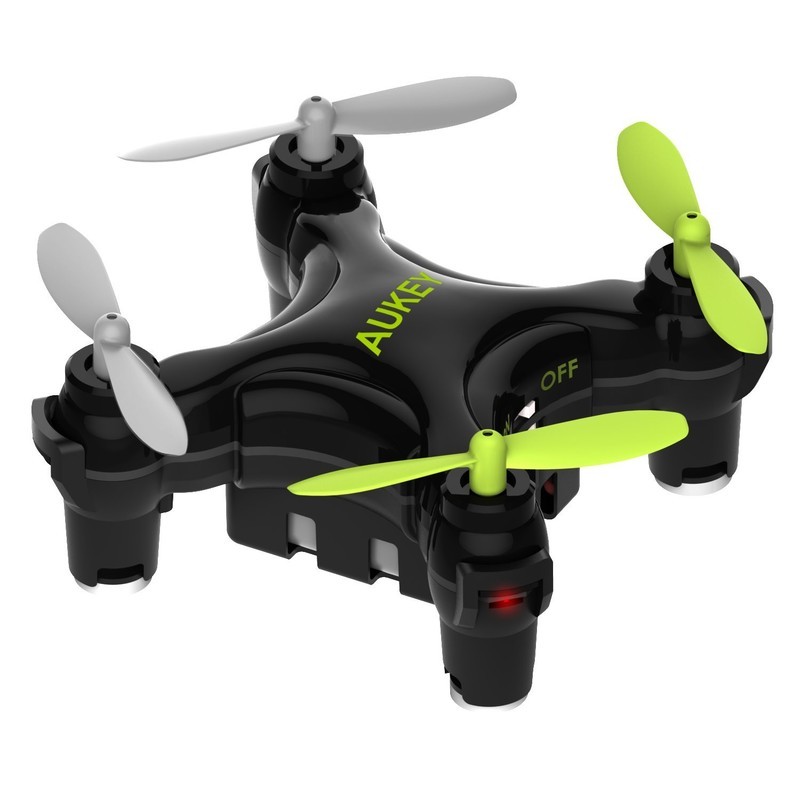
AUKEY has been making some fun, budget drones for a while now and really offering some good options for beginners. The Mohawk is a mid-sized drone that’s designed for novice pilots.
For starters, it features one-button takeoff and landing, because most crashes from novices occur just getting the thing into the air or safely onto the ground. It’s mostly made of plastic so you will want to avoid any serious crashes if possible.
You can expect around 10 minutes of flight time per battery charge and a range of just over 350 feet. You’ll probably want to stock up on a ton of replacement batteries, so you can extend your flight sessions.
See at Amazon
EACHINE E10 Mini Quadcopter

The EACHINE E10 Mini Quadcopter is a perfect first drone for someone interested in learning the basics of drone flight. This drone is a great option for kids, too, with a simple, kid-size controller and everything you’ll need to practice drone flying.
This drone has some impressive features, including one-button 360-degree rolls and a return home function built into the directional control stick. There’re also 4 LED lights on the underside of the drone, which help with visibility in low-light conditions.
Best of all is the price — just $33 for the E10C with a 2.0MP camera, these are ideal little drones for novice pilots still learning the basics. They are super portable and quite durable, and if they stop working after an epic crash, it’s not the end of the world.
It’s worth noting that you’ll want to give the battery some time (at least 20 minutes) to cool down before recharging after a flight, otherwise you risk drastically shortening the lifespan of the battery and the drone.
See at Amazon
Hubsan X4 Quadcopter
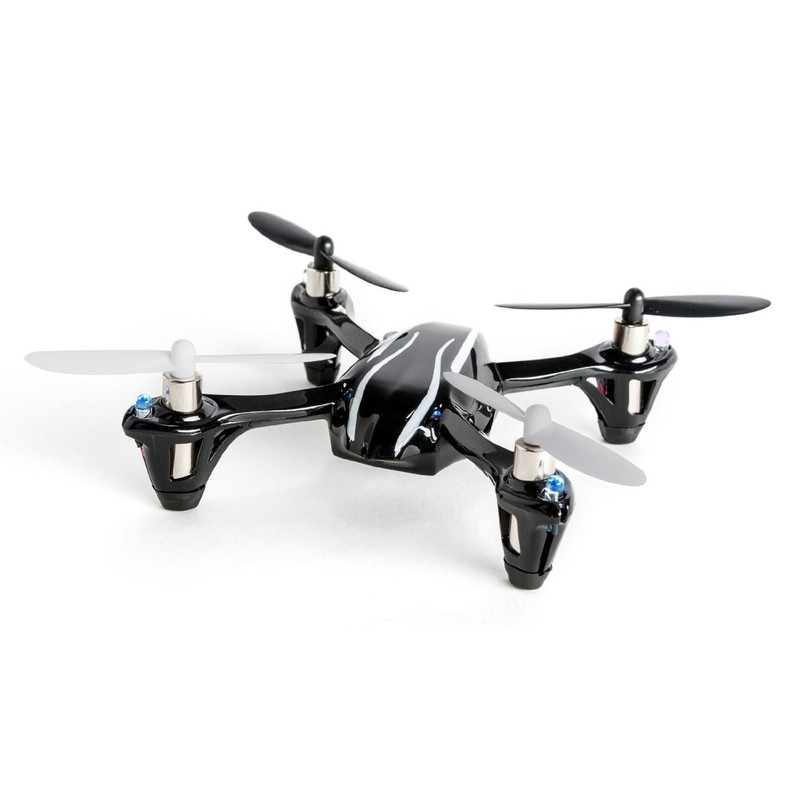
The Hubsan X4 Quadcopter is a basic, palm-size drone that’s a great option for beginners and kids. It features all the standard features you’d expect, including a 6-axis gyro system to help with flight stability and LEDs to help you keep the drone properly orientated while in flight.
A fully charged battery will deliver about 5 minutes of flight time, so you’re probably going to want to invest in a set of spare batteries. If you buy the drone and the extra batteries, it’ll still come out to about $50, except you’ll get 5 times the flight time by swapping in fresh batteries.
See at Amazon
Holy Stone HS170 Predator Quadcopter
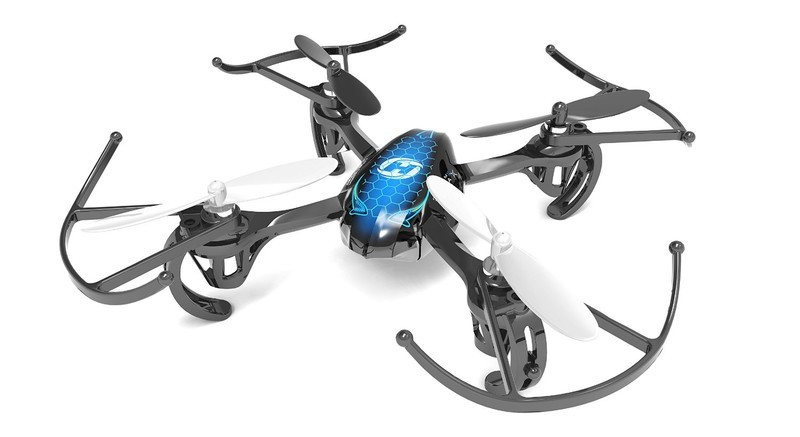
If you’re looking for a cheap and reliable drone the Holy Stone Predator is a great option. It comes with its own controller that’s simple enough for beginners to pick up and fly and is capable of pulling off stunts and withstanding light winds for outdoor flights.
The real bonus here is the size — it’s small enough to allow for practice indoors if you’ve got the space, with blade guards built in for protection. A fully charged battery supplies 6 minutes of flight time; with replacement batteries really cheap and easy to swap in and out, this is a cheap drone with affordable accessories. Get this drone for just $40.
See at Amazon
UFO 3000 LED Drone

When you’re learning how to fly a drone, crashes will happen. The UFO 3000 LED Drone helps to mitigate that by keeping the blades fully protected. Any novice pilot can bump into walls and whatnot while they learn how to zip around on low and high-speed modes, as well as perform flips with the simple press of a button.
Oh, and then there’s how cool this drone is, with its blue and green LEDs creating four brilliant rings of light — it’ll really look out-of-this-world when you fly it at night. Two batteries ship with this drone, with flight time averaging around 7 minutes on a full charge.
Light up the skies this summer for just $50!
See at Amazon
Cheerwing Syma Quadcopter w/ HD Wi-Fi Camera
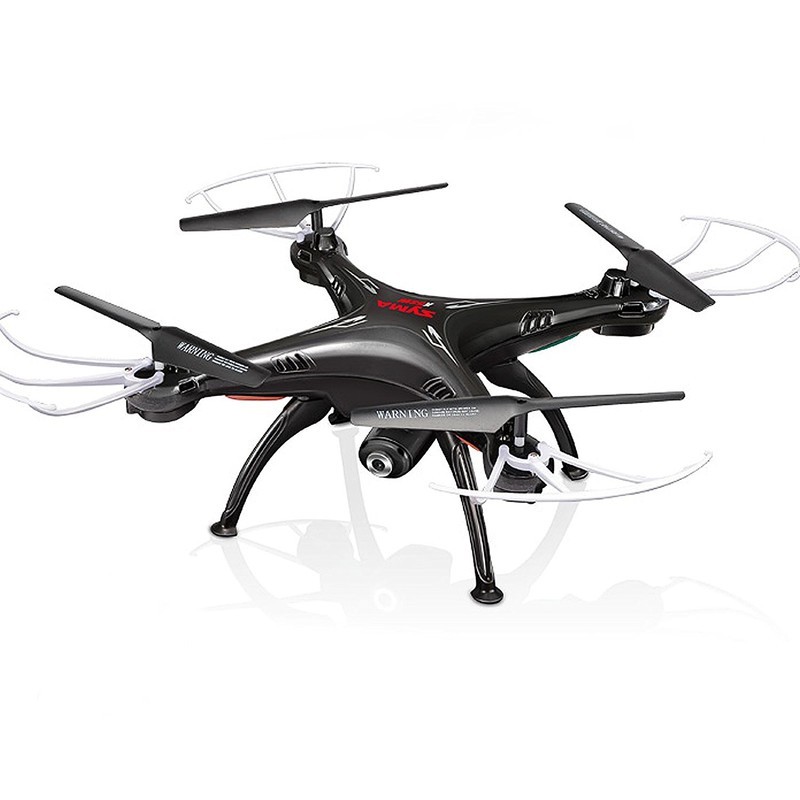
The Cheerwing Syma offers the best value if you’re after something a little more macho than a mini-drone. Featuring a pretty archaic camera for photos and video (fun for practicing but nothing you’d want to put on a demo reel), this is one of the cheapest camera drones you’ll find.
This kit comes with everything you’ll need to get flying and is probably a better place to start for someone who aims to own a drone like the DJI Phantom and wants to start off learning how to control bigger drones. Flight time is still under 7 minutes, which is standard for drones in this price range. Despite the low-res camera, you are able to test out some FPV flying if you’re keen and have your own Google Cardboard headset.
Another benefit of this style of drone is the modular nature of the landing feet and blade guards. Once you’ve become confident with your piloting abilities, removing the guards will reduce the overall weight and allow for a decent boost of speed and maneuverability for practicing enhanced maneuvers.
See at Amazon
What’s your favorite?
Got a favorite drone for under $50? Let us know in the comments below!
Updated April 20, 2018: Added the Aukey Mohawk and updated pricing.
 AIVAnet