


Amazon Alexa: Everything you need to know about the heart of the Echo
You wouldn’t have the Amazon Echo (or Echo Dot, or Echo Show, or whatever) without Amazon Alexa. Here’s what you need to know about the two.
Latest News
April 18, 2018 — A new Call of Duty skill delivers personalized coaching, tips on objectives to complete, and more
We don’t blame you if you never thought of pairing Alexa with Activision’s Call of Duty: WWII, but someone apparently did and made a skill just for that.
The new Call of Duty Alexa Skill can connect to your Call of Duty account, and after doing so, you can ask your Echo about how to improve your game based on the last match you just played, get updates on new Contracts you should complete, see which friends are playing, and more. Activison says the skill allows for personalized responses to over 2,500 questions and can dish out 250,000 responses using a custom “solider” voice.
Although it’s still in beta, you can start using the skill right now by enabling it and then saying “Alexa, Ask Call of Duty ___”
What is Alexa?
Amazon Echo. Or Alexa. They’re one and the same, really. That is, an Amazon Echo without Alexa really isn’t any more than just a speaker. And Alexa without a speaker is just … Well, nothing.
Confused yet. I don’t blame you. Let’s explain the difference this way:
Echo is hardware, Alexa is software
Amazon Echo — and all of its permutations — is hardware. Alexa is software. She (and I have zero problem if you refer to Alexa as a she) is the brains behind the Echo, and all the things you can do with it. And because she’s software, she’s available on more than just Amazon’s own devices.
Anyone can put Alexa on anything. You can make your own Alexa speaker for just a few bucks and a little bit of nerdy know-how. There are third-party Alexa speakers that look like Amazon’s own Echo Dot. There are third-party Alexa speakers that look like speakers. You can get Alexa baked into a smart thermostat. She’s built into the HTC U11 smartphone.
The point is, Alexa can be built into pretty much anything these days.
But that’s just half of the story.
It’s all about the Alexa Skills, baby …
Alexa starts out by knowing what Amazon tells it. She already knows how to tell the time, and set alarms and timers, or answer general questions and read headlines. But Alexa also has the ability to learn more. A lot more.
Or, more precisely, you have the ability to teach Alexa new things.
See all of Amazon’s Skills here
Amazon calls these things “Skills,” and there are hundreds of them.
Want to teach Alexa to turn on your smart lights, or open your garage door, or do anything she doesn’t already know how to do? You need a Skill. That’s where developers come in. Amazon has made it so that anyone can write an Alexa Skill, and companies and their developers have been doing so for years now.
Think about the things you do every day. Listen to satellite radio? There’s a Skill for that. Lock your house after you’re already at work? It’s a little daunting, actually. There are hundreds and hundreds of Skills, of varying degrees of usefulness. (Dog facts, uh, OK.)
How to enable and disable Alexa Skills
Alexa calling and messaging
All of that connected home stuff is great, and it’s important. But one of the more exciting avenues of potential lies in Alex Calling and Messaging. As the name implies, it’s the ability to make calls and leave messages through Alexa. From the outset it works with Echo devices and the Alexa app on phones and tablets. If you have an original Echo or Echo Dot, you can make voice calls. If you have an Echo Show, you can make video calls, or even “drop in” on a close acquaintance (they have to approve you first) without them having to hit a single button.
That’s where these $50 Echo Dots really make a lot of sense. Now Amazon has a means for you to communicate not just on that little Dot, but also on your phone. It’s two birds with one stone, and it’s really just the start of things. And it makes up for where Amazon failed in trying to make its own phone. Folks didn’t want a Fire Phone, but they do want an Echo — especially an inexpensive on — and in buying one they have to put the Alexa app on their phone.
It’s not quite a benevolent Trojan Horse, but it’s close.
Read: Amazon is getting close to being the king of all messaging
Amazon Alexa
- Which Amazon Echo should you buy?
- Get more Alexa Skills
- How to enable and disable Alexa Skills
- How to customize Flash Briefing
- How to get sports updates
- How to sync your calendar with Alexa
- How to shop with Alexa
- Send voice messages with Alexa
See more at Amazon
Best Galaxy S9 Cases

Find a sleek and stylish case to keep your S9 protected.
Whether you bought your Samsung Galaxy S9 at launch or have decided to upgrade to the S9 after reading the reviews, you’re going to want to buy a case to keep it safe. here, which means it’s time to ruminate over which accessories to buy!
Here are the best cases we’ve found for the Galaxy S9. We’ll be updating this article as more awesome options become available.
- Samsung S-View Cover
- Samsung Hyperknit Cover
- Samsung Alcantara Cover
- Otterbox Commuter Series
- RhinoShield CrashGuard bumper
- Lifeproof SLAM case
- Speck Presidio case
- BodyGuardz Ace Fly clear case
- Spigen Rugged Armor case
- VRS Design Clear Slim case
- Ringke Fusion Clear Case
- SUPCASE Unicorn Beetle Series case
- dbrand skins
Samsung S-View Cover

We’ll start out with some of Samsung’s own cases, although they’re not yet available for purchase.
The first one is the perennially awesome S-View case. This folio-style flip case features a clear cover for the screen that keeps it protected from scratches while also letting you see notifications and accept calls with a swipe. It can also be folded up as a hands-free stand.
Samsung hasn’t listed a price, but the Note 8 S-View cover launched at $60 so we can probably expect similar pricing here.
See at Samsung
Samsung Hyperknit Cover

Google seemed to start the fabric case trend, but we’re happy to see Samsung also embracing it.
Made of woven nylon, this case looks brilliant in red with a nice, soft finish. Everyone’s going to want to see your brand new phone, so why not add a bit of extra flash while keeping it safe? With extra protection in the corner and clean cutouts around the camera and fingerprint sensor on the back you’ll love the functional and stylish design on display here. You can get yours for just $35.
The Galaxy S9 and its Hyperknit case are a match made in heaven
See at Samsung
Samsung Alcantara Cover

First-party accessories are always on the more expensive side, so they really need to offer customers something unique. Samsung’s Alcantara covers have been recent standouts, offering a combination of sound protection and a cozy finish for your Galaxy devices.
The Alcantara case won us over with the Note 8, so we’re pretty happy to see it offered by Samsung for the S9. Made of Alcantara, a lightweight material that’s rugged and durable while keeping a slim form factor, you’ll get a stylish and grippy case that won’t add much bulk to the phone. It’s not yet available to buy but would be worth keeping an eye out for.
Samsung offered the Alcantara case for $50 for the Note 8, so we’d expect something similar for the S9.
Samsung’s Alcantara case is the most luxurious way to protect your Galaxy S9 or S9+
See at Samsung
RhinoShield CrashGuard bumper

If you would really prefer not to put a bulky case on your phone but still want some added peace of mind for those rare times where your phone slips out of your hand, consider the CrashGuard bumper from RhinoShield.
This is a really well-designed bumper that’s rugged and shock absorbing in the corners and along phone’s edges — exactly where you need it most. It’s quick and easy to install and lets you still fully show off the design of your phone.
You can get this minimalist case solution for just $25.
See at Amazon
OtterBox Commuter Series

Few names are as symonymous with phone cases as OtterBox. They’re built a reputation as a trusted brand by designing really rugged cases and backing their products with superior customer service.
We’d recommend the Commuter series case which is a pocket-friendly case that still delivers the rugged protection you’ve come to expect from an OtterBox case. It’s got one big cutout on the back for the camera and fingerprint sensor and includes port covers to keep dirt out. You can get yours for just $33 from Amazon.
We’ve highlighted the Commuter Series here, but OtterBox has over 10 different case styles available for the Galaxy S9 which you can check out on their site.
See at Amazon
Lifeproof SLAM case

When you’re dropping over $700 on a brand new phone, you want to protect it from everything life might throw at it, especially if you plan on spending a ton of time outside this summer.
Lifeproof cases typically offer protection from dirt and snow, but the SLAM case focuses exclusively on drop protection. Lifeproof says this case can survive drops from up to two meters (6.5 ft) thanks to the reinforced bumpers. It’s also got a rugged backplate that’s clear to show off the phone’s design and also compatible with wireless charging. While it’s not quite as Lifeproof as you’d expect, it’s also not as expensive as other Lifeproof cases at only $50. Plus, it looks pretty cool with the black and neon green, do you think?
Looking for the classic FRE Lifeproof case? That is slated to start shipping from the Lifeproof website at the end of the month for a whopping $89. You can preorder it so you’re one of the first to get it when it’s available.
See at Lifeproof
Speck Presidio

Speck has a full line of cases available for the Galaxy S9, but we’ll focus on the Presidio case here because it’s a great place to start. It’s got a simple design with smart features where it counts like double protection in the corners and a slim profile that’s compatible with wireless charging. It’s been drop tested up to 10 feet and the matte finish is scratch resistant so it shouldn’t show wear. Get this classic looking case for just $35.
This is just one of the many case styles Speck offers, so check them all out if you want something with a bit more flair.
See at Amazon
BodyGuardz Ace Fly clear case

Looking to show off your Galaxy S9 without leaving it prone to drop damage? BodyGuardz offers a clear case they say is built using the same impact gel used in padding and helmet technology for athletes.
Whether or not that marketing talk sways you, the Ace Fly clear case looks like a reliable clear case. BodyGuardz backs their products with a lifetime warranty and you have a 30-day money back guarantee so if you don’t love it you can simply return it.
Available for $35, these cases are also compatible with the Pure Arc Tempered Glass screen protector, so if you’ve used BodyGuardz screen protectors before and trust the brand this would be a good combo to keep your Galaxy S9 fully protected right out of the box.
See at Amazon
Spigen Rugged Armor case

The Spigen Rugged Armor case is my go-to phone case. It’s a sleek, one-piece case that adds good protection to your phone without much bulk. Thin enough to not impede wireless charging, this is a great minimalist case that still offers rugged protection.
More importantly, it always comes in at a great price. At just $11.99, it’s one of the cheapest options currently available from a brand we trust.
See at Amazon
Spigen Liquid Crystal clear case

Looking for a clear case option under $20? Spigen’s got you covered there, too. Just like the Rugged Armor case, the Liquid Crystal is slim and pocket-friendly. Made of flexible TPU, it’s easy to slip on and will provide quality protection while still letting you show off your phone’s design.
You can get the Liquid Crystal for $11.99 or add a funky print or some sparkles for just $12.99.
See at Amazon
VRS Design Clear Slim case

These clear cases from VRS Design basically offer it all. It’s a clear case that shows off the body of the Galaxy S9 with a shockproof bumper available in the exact color to match your device.
Better still, these cases are thin enough to be fully compatible with wireless charging. Make sure you get the right color for your phone to complete the look.
You can get this case for just $15 on Amazon.
See at Amazon
Ringke Fusion Clear Case

The best way to protect your phone from drop damage is to not drop your phone. The latest Fusion clear case from Ringke includes a handy wrist strap built into the case.
Whether or not you want to use the wrist strap is up to you, but it’s a thoughtful addition to a consistently stellar case style. Available as a clear case or with a Orchid Purple or Smoky Black bumper accent, you can get this case for just $11 on Amazon.
See at Amazon
SUPCASE Unicorn Beetle Series case

The Unicorn Beetle case is one of those phone cases that people buy with every new device. It’s got that classic rugged design with ridges to help with grip and it includes a built-in screen protector to keep your S9 in pristine condition.
Port plugs keep dust and pocket lint out of your charging port and headphone jack, and it also comes with an optional belt-clip holster. Rugged enough to keep your phone protected and yet thin enough to work with wireless charging, get your Unicorn Beetle Series case starting at just $14.99.
See at Amazon
dbrand Skins

Dbrand Skins are a consistently popular option for phone enthusiasts who want to customize the look of their phone without adding any bulk. They of course offer an awesome level of customization for creating a skin for your Galaxy S9.
You can pick between nine different texture styles for the back, the minimal bezels on the top and bottom of the display, and even around the camera sensor! You can mix and match and create your dream skin. Didn’t get the phone color you wanted? Make it your own with dbrand!
See at dbrand
Update April 18, 2018: Added the RhinoShield CrashGuard and updated pricing and images. This is still your best options (and best prices) for protecting your Galaxy S9.
Samsung Galaxy S9 and S9+
- Galaxy S9 review: A great phone for the masses
- Galaxy S9 and S9+: Everything you need to know!
- Complete Galaxy S9 and S9+ specs
- Galaxy S9 vs. Google Pixel 2: Which should you buy?
- Galaxy S9 vs. Galaxy S8: Should you upgrade?
- Join our Galaxy S9 forums
Verizon
AT&T
T-Mobile
Sprint
Learn how to code for free with Area 120’s new app ‘Grasshopper’
Available now for Android and iOS.
Google’s a company that wears many different hats, and for all of those one-off projects that are especially experimental, they’re dreamed of and made at Area 120. Area 120 made news most recently for its intuitive Reply app that brought Smart Replies to all of your messaging apps, and now it’s back in the spotlight with Grasshopper.

Grasshopper is a new app that’s available for Android and iOS, and its main goal is to teach you how to code in JavaScript for free.
Upon opening the app and logging into your Google account, you’ll be asked whether you’re new to coding or if you’ve coded before. After selecting this and completing a brief tutorial, you’ll be able to choose a practice schedule. Grasshopper recommends that you practice daily to build a habit of doing so, but you can also choose to be reminded every other day, twice per week, or not get any reminders at all.


You’ll start out learning the fundamentals of coding, and as you complete increasingly difficult puzzles, you’ll unlock Animations and Animations II. You can also take quizzes at any time to test your knowledge about what you’re learning.
Rounding out the experience is an Achievements tab that shows you your coding streaks, the JavaScript keys you’ve learned, and all of the concepts you’ve unlocked. There’s also a Code Playground section that gives you free range to create whatever you’d like.
Grasshopper is available for download now, and while it’s still a little rough around the edges, does a great job at creating a warm and welcoming environment that makes you want to keep coming back for more. I’ll likely be keeping it on my Pixel 2 to check it out from time to time, and I’d love to hear your thoughts on the app down in the comments below.
Download: Grasshopper (free)
Today’s best deals you won’t want to miss
Whether you’re looking for new tech gear or household items, we’ve got you covered.
Today you can get big discounts on on the Nest learning thermostat, pressure washers, PlayStation VR, and more! Don’t pass these up.
View the rest of the deals
If you want to know about the deals as soon as they are happening, you’ll want to follow Thrifter on Twitter, and sign up for the newsletter, because missing out on a great deal stinks!
How to organize your games on the PlayStation 4
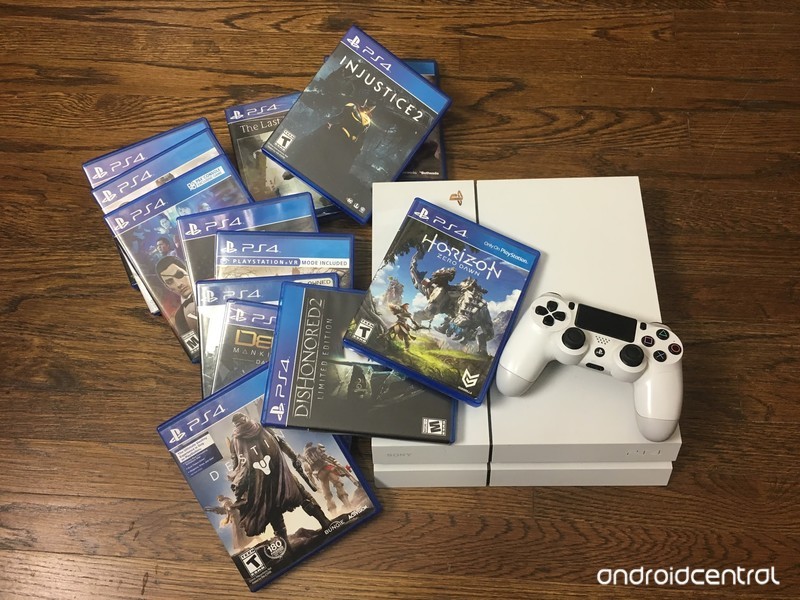
Customize your PlayStation home menu to the best of your ability
If you’re anything like me you love a well-organized screen. Currently, your home screen on your PlayStation 4 will show all of your games and apps in order of the ones that were last used. Well… Everything from my computer to my phone is organized, so why not my PS4 as well? This option is handy for organizing your PSVR games as well, that way they’re not cluttering your home screen when you aren’t in the mood to play them just yet!
Creating folders in the main menu
1000 games or apps will fit into each folder. You can start making a folder at any time on your PS4. After they are made, you can add any one of the games and apps to each folder. This way you will be able to separate them by genre!
Select the game or app you want to add to a folder and press the “options” button on your DualShock controller.
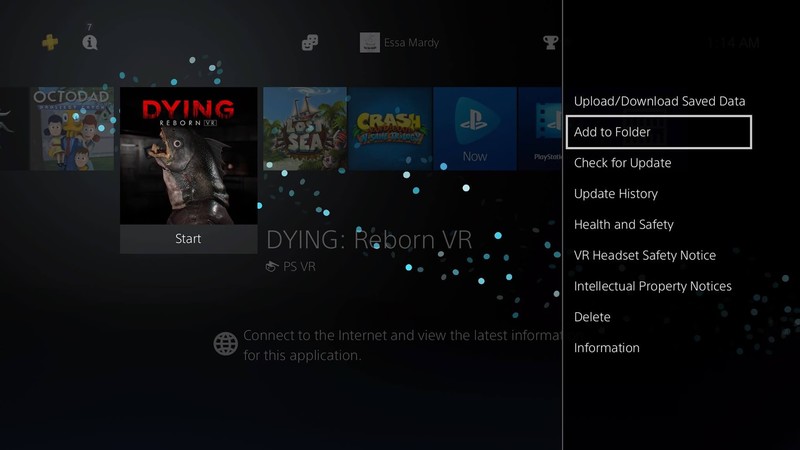
Select the “Add to folder” option.
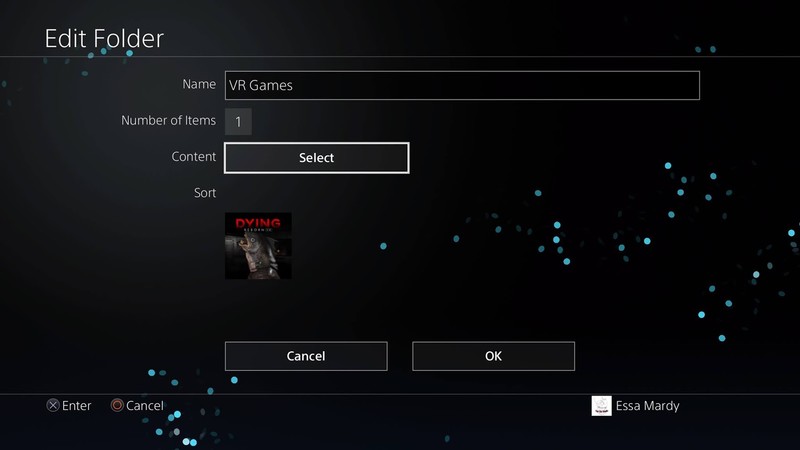
Name your folder based on the organization you plan on using and select “OK”.
Creating folders in the Library
Creating folders from the main menu isn’t the only place you’ll have the option. You can also do this directly from your Library!
Select “Library” from your home menu.
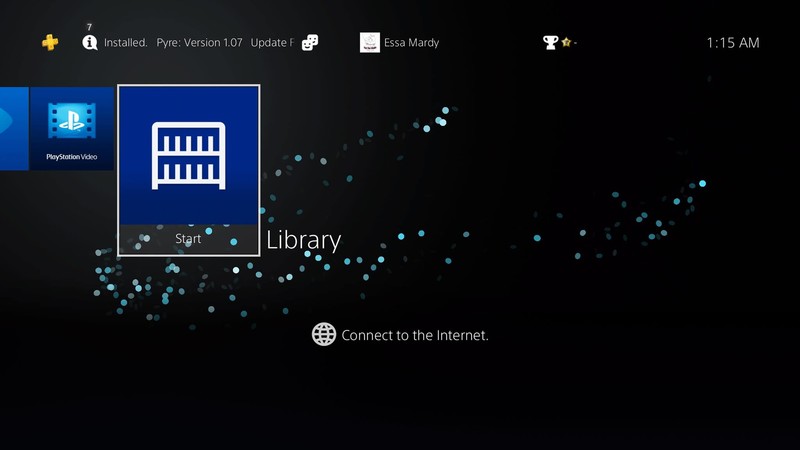
Select the “Folders” tab.
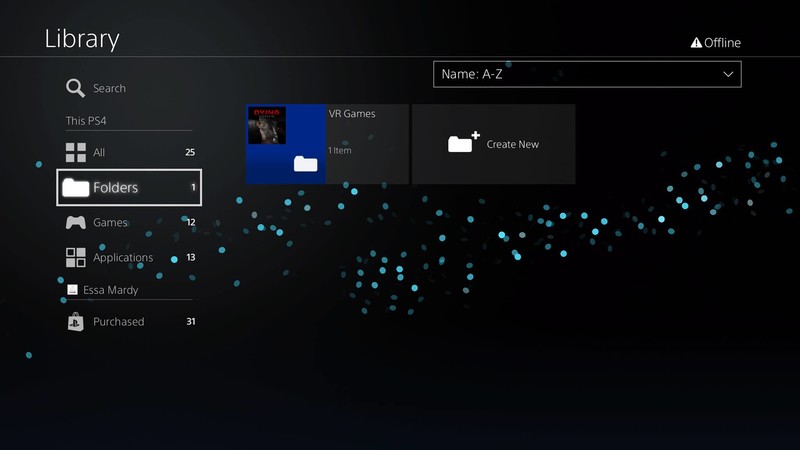
Select “Create New” by pressing the “Options” button on your controller, then name the folder what you wish.
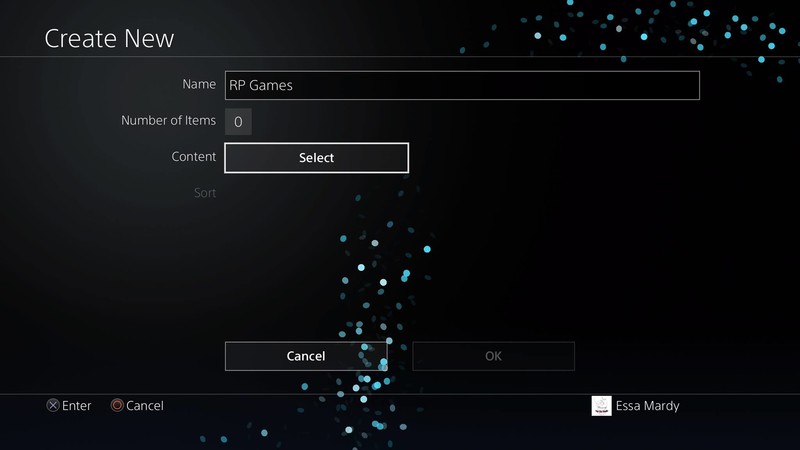
Select “Content” and add the content you wish to be in this folder and press confirm.
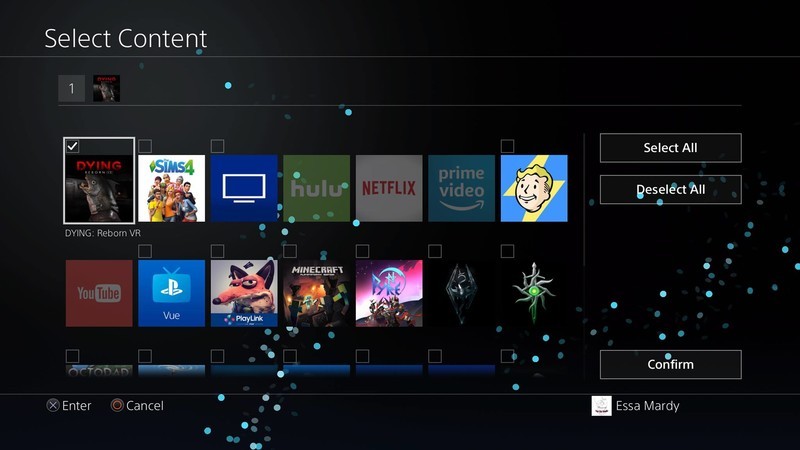
Then select “OK”
Adding more content to a folder
Press the options button when hovered over the desired folder.
Select “Edit”
Select the “content” option.
Select each game and app you wish to add to a folder.
Select “Confirm”
Deleting a folder
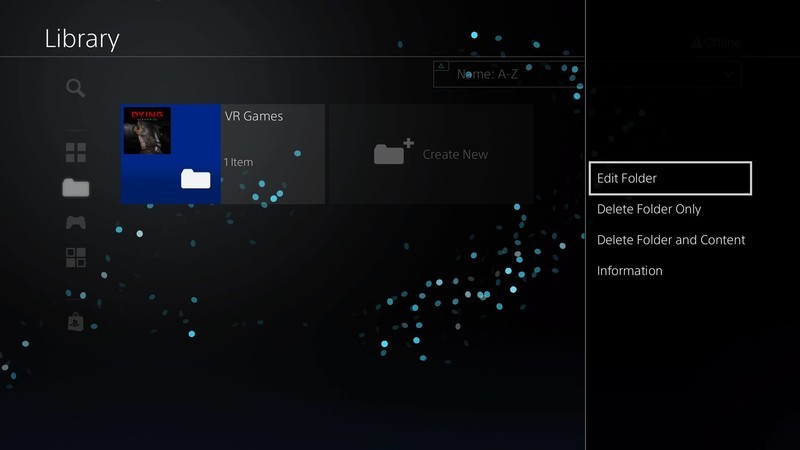
This will work from either your main menu or the Library, as long as you have the option to select the folder in question!
Press the “Options” button on your DualShock controller while you have the Folder in question highlighted.
Select “Delete Folder Only.” This option will ONLY delete the folder and re-locate the games and apps back to being on your home screen.
Select “Delete folder and content.” This option will delete the folder AND the games and apps inside. If you select this option you will have to re-download all of your games and apps, so make sure you select the right one!
What are your favorite ways to organize your PlayStation 4?
Show us screen captures in the comment section below of what your home screen looks like!
PlayStation 4
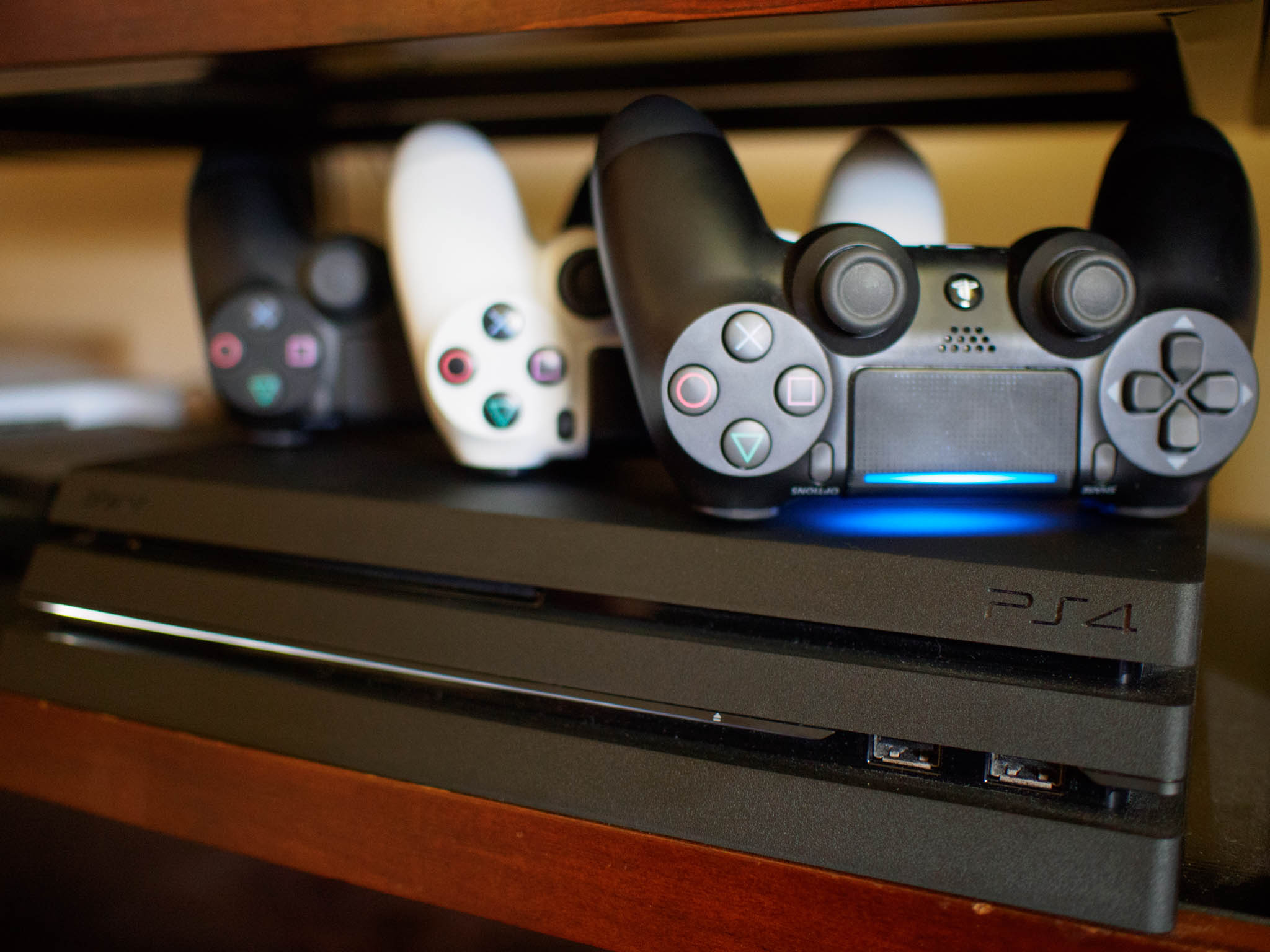
- PS4 vs. PS4 Slim vs. PS4 Pro: Which should you buy?
- PlayStation VR Review
- Playing PS4 games through your phone is awesome
Amazon
Save $100 on the insanely powerful Razer Phone for a limited time
Right now you can save $100 on the Razer Phone when you use coupon code 120HZ during checkout. While it may not have a flashy edge-to-edge display or the latest and greatest in camera technology, the Razer Phone has a bunch of features that are quite appealing. It has a 120Hz UltraMotion display with HDR, dual front-firing speakers, a huge 4000mAh battery, and more.

We wrapped up a recent second opinion review saying:
The bottom line here is that the Razer is asking $700 for a phone that offers supreme performance in some areas while falling short in others. Depending on how you primarily use your phone will be key in determining whether a ridiculously smooth (but occasionally dim) display backed by top-end performance specs can outweigh a lackluster (but functional) camera setup. Whether fantastic, front-facing speakers offer more value to you than a seamless display with no bezels.
If you love gaming and play a lot of them on your phone, this is the phone for you. If you’re looking for something that looks a little more modern and don’t need the gaming enhancements, check out this great deal on an Essential Phone.
See at Razor
The end of Konami’s Champions League partnership isn’t great for PES
The battle between the Pro Evolution Soccer (PES) and FIFA franchises has raged on for years over which gave the superior soccer/football experience. But Konami’s deal with the UEFA for a virtual Champions League mode in its games gave PES an edge over its rival. So today’s announcement that the soccer organization is ending its 10-year partnership with Konami might be dire news for future PES titles.
Access to UEFA’s teams has been a big feather in PES’ cap, especially to compete with FIFA’s bounty of licenses, including the ever-popular English Premier League. While the UEFA’s announcement didn’t state when its partnership with Konami will end — in other words, whether its teams will show up in PES 2019 — the news leaves the door open for who will get Europe’s teams next. Combined with FIFA’s improved ‘The Journey’ story mode becoming a standout feature for the franchise, it’s unclear how Konami’s series will compare should EA pick up the UEFA Champions League, too.
Source: UEFA
Facebook is testing playable game ads so you can try before you buy
If you’ve played any free-to-play mobile games recently, you’ll be familiar with the playable ads that let you try a little bit of gameplay while waiting for the advertisement to time out. Google Play has been trying out its own “try before you buy” instant app concept with a handful of developers lately, too. Now Facebook is testing similar technology in playable ads on Facebook so that people can try out a game without installing it first.
The company is testing these new ads in the News Feed with a “couple dozen” game developers; and it plans to roll out playable ads to its Audience Network (Facebook’s off-platform ad network) next, then to all advertisers later this year. Facebook says that people pay more attention to interactive ads over non-interactive ones, spending 47 percent more time with the former ad type, making it a popular choice among advertisers that have tested it, including Gram Games and Miniclip.
‘GLOW’ season two elbow drops on Netflix June 29th
At last, Netflix’s comedic ode to women’s pro wrestling is getting its promised follow-up. The streaming service has revealed that the second season of GLOW will premiere on June 29th. The teaser clip is really a tribute to all thing ’80s (we hope you like Flashdance), but Netflix’s press description gives a better clue as to what’s coming next. The Gorgeous Ladies of Wrestling have to confront the “realities of their newfound fame,” while Ruth and Debbie tackle their problematic friendship and Sam gets used to having his teenage daughter at home.
As we noted back in June 2017, the first season of GLOW proved to be a hit both because of its stellar cast (and not just big names like Alison Brie or Marc Maron) and its ability to cover everything from the many, many tropes of pro wrestling to personal drama and social issues. We’d expect more of the same in the second season, especially now that the creators can spend less time setting up the premise and more time on the plots both inside and outside of the ring.
Source: Netflix (YouTube)
The EverCam promises a year of home security on a single charge
Eufy is Anker’s smart home line of products, which includes robot vacuums, smart scales and even an Echo Dot competitor called Genie. Now Eufy has its own wireless security system called EverCam, and it’s taken to Kickstarter to both fund and gauge interest in the item, which boasts a long battery life, easy installation and a 1080p camera.

EverCam can be mounted to any flat surface with a sticky base and attach the camera via a rounded magnet. The battery is supposed to be able to last up to one year if active and up to three years in standby mode. It’s also waterproof. The software includes facial recognition technology that’s powered by deep neural network algorithms, so you can figure out who stole you Amazon box off of the porch. It also uses a 3-step scanning and filtering process to eliminate excessive false alarms from animals or random moving objects. The camera itself offers a 140˚ wide-angle lens with a large f2.2 aperture to capture as much of the view as possible in high def.
Better yet, the EverCam system won’t charge you a monthly fee for storing your footage (though there is a paid option to store it remotely). Instead, it stores video on an microSD card; you’ll get a 16GB version with your purchase. Your data is secure, too, and secured with AES 128-bit encryption. You can only access it when you place the SD card into your own registered base station while you’re logged into your account. That means no one can just grab your SD card and see your video.
Via: PopSci
Source: Eufy/Kickstarter
 AIVAnet