


What’s new on Amazon Video for May 2018
Mayday!!! Mayday!!! Great shows ahead!
It’s springtime. Maybe. If it’s not snowing where you are, it’s probably springtime. And that means we’ve got the latest lineup on Amazon Prime Video for May 2018.
More Bond? More Bond. Baywatch? Baywatch! Back to School and Bad News Bears? Booyah!
If you need me, I’ll be lounging by the pool with a tablet and a movie or two.
Amazon Prime Video has is one of the go-to destinations for on-demand content, thanks in no small part to devices like the $50 Amazon Fire Stick, the all-new $70 Amazon Fire TV, and even the $229 Amazon Echo Show.
But hardware is the easy part. Buy it once, and then use the heck out of it. What’s not quite so easy is keeping up with everything that’s new on Amazon Prime Video — because new shows are always coming and going.
Here’s what’s new on Amazon Prime Video in May 2018!
Don’t have Amazon Prime Video yet? Get a free 30-day trial!
Movies coming May 1
- 3 Ways to Get a Husband (2009)
- 40 Days and 40 Nights (2002)
- A Very Brady Sequel (1996)
- A.I. Artificial Intelligence (2001)
- An Inconvenient Truth (2006)
- Baby Boom (1987)
- Back to School (1986)
- Bad News Bears (1976)
- Barefoot (2014)
- Beyond Borders (2003)
- Blame (2017)
- Brother Nature (2016)
- Bull Durham (1988)
- Cool World (1992)
- Cyborg (1989)
- Diamonds Are Forever (1971)
- Dr. No (1962)
- Eight Men Out (1988)
- Elizabethtown (2005)
- Evolution (2001)
- Foxfire (1996)
- Frailty (2001)
- From Russia with Love (1964)
- Gator (1976)
- Ghost Town (2008)
- Goat (2016)
- Goldfinger (1964)
- Holy Air (2017)
- Hot Boyz (2000)
- Immigration Tango (2011)
- Insomnia (2002)
- Iron Eagle IV: On the Attack (1999)
- Kalifornia (1993)
- Live and Let Die (1973)
- Love Is A Gun (1994)
- Manhunter (1986)
- Men with Brooms (2002)
- Murder on the Orient Express (1974)
- Never Say Never Again (1983)
- New Rose Hotel (1999)
- Ninja Masters (2009)
- Octopussy (1983)
- Outcast (2014)
- Perfect Score (2004)
- Perfume: Story of a Murderer (2006)
- Psychopaths (2017)
- Race for Your Life, Charlie Brown (1977)
- Rocky (1976)
- Rocky II (1979)
- Rocky III (1982)
- Rocky IV (1985)
- Rocky V (1990)
- Sabrina (1995)
- Saturday Church (2017)
- School Ties (1992)
- Set Up (2011)
- Starting Out in the Evening (2007)
- Strategic Air Command (1955)
- The Benchwarmers (2006)
- The Benefactor (2015)
- The Box (2007)
- The Brady Bunch Movie (1995)
- The Counterfeit Traitor (1962)
- The Crow (1994)
- The Elephant Man (1980)
- The Golden Compass (2007)
- The Hangman (1959)
- The House I Live In (2013)
- The Hurt Locker (2008)
- The Last Castle (2001)
- The Legend of Bagger Vance (2000)
- The Man with the Golden Gun (1974)
- The Saint (1997)
- The Spy Who Loved Me (1977)
- Thief (1981)
- Thirst Street (2017)
- Thunderball (1965)
- Twisted (2004)
- Untamed Heart (1993)
- Wild Thornberrys (2002)
- Wish Upon a Star (1996)
- Wonder Boys (2000)
- You Only Live Twice (1967)
TV series coming May 1
- Aristocrats: Limited Series
- Banished: Limited Series
- Charles II – The Power and The Passion: Limited Series
- Daniel Deronda: Limited Series
- David Copperfield: Limited Series
- Desperate Romantics: Limited Series
- Ivanhoe: Limited Series
- Jane Eyre (1983): Limited Series
- Jane Erye (2006): Limited Series
- Life in Squares: Limited Series
- Little Dorrit: Limited Series
- Lorna Doone: Limited Series
- Love in A Cold Climate: Limited Series
- Mansfield Park: Limited Series
- Martin Chuzzlewit: Limited Series
- Middlemarch: Limited Series
- Oliver Twist (1985): Limited Series
- Oliver Twist (2007): Limited Series
- Our Mutual Friend: Limited Series
- Pride and Prejudice: Limited Series
- Sense and Sensibility (1981): Limited Series
- Sense and Sensibility (2008): Limited Series
- Sinbad: Limited Series
- Tess of the D’Urbervilles: Limited Series
- The Buccaneers: Limited Series
- The Hitchhiker’s Guide to the Galaxy: Limited Series
- The Lost World: Limited Series
- The Office: Limited Series
- The Pickwick Papers: Limited Series
- The Tenant of Wildfell Hall: Limited Series
- The Way We Live Now: Limited Series
- Tom Jones: Limited Series
- Vanity Fair (1998): Limited Series
Coming May 4
- Last Flag Flying (Amazon Original, 2017)
Coming May 5
- Diablo Guardian (Prime Original series), Season 1
- Warrior (2011)
Coming May 11
- Rocky & Bullwinkle (Prime Original series), Season 1
Coming May 12
- Baywatch (2017)
- Orphan Black, Season 5
- Still Mine (2012)
Coming May 15
- How to Be a Latin Lover (2017)
Coming May 18
- You Are Wanted (Prime Original series), Season 2
Coming May 18-20
- Live TV: Pro Beach Volleyball Tour (Austin Open)
Coming May 19
- Beatriz at Dinner (2017)
- Shooters (2003)
Coming May 22
- Dino Dana (Prime Original series), Season 2
Coming May 23
- Beast of Burden (2018)
Coming May 25
- Picnic at Hanging Rock (Prime Original series), Season 1
Coming May 27
- Just Getting Started (2017)
- The Wedding Plan (2016)
Coming May 29
- Howards End, Season 1
Previously, on Amazon video …
Here’s what was (or still is, depending on when you’re reading this) new on Amazon Video in April:
Coming April 1
- 30 Beats (2012)
- 52 Pick-Up (1986)
- A Simple Plan (1998)
- A Suitable Girl (2017)
- Basic Instinct (1992)
- Brooklyn’s Finest (2009)
- Carrie (1976)
- Danny Roane: First Time Director (2007)
- Desperately Seeking Susan (1985)
- Drugstore Cowboy (1989)
- Escape from New York (1981)
- Eye for An Eye (1996)
- Flashback (1990)
- For a Few Dollars More (1967)
- Fred 3: Camp Fred (2012)
- Fred: Night of the Living Fred (2011)
+ Fred: The Movie (2010) - Friday the 13th (1980)
- Funny About Love (1990)
- Gamer (2009)
- Hangman (2017)
- Hellbenders 3D (2012)
- Hitler’s Bodyguard (Season 1)
- Ice Mother (2017)
- Internal Affairs (1990)
- Kickboxer (1989)
- Ladybugs (1992)
- Life Stinks (1991)
- Man in the Moon (1991)
- Marathon Man (1976)
- Married to the Mob (1988)
- Meatballs (1979)
- Merlin (Seasons 1-5)
- Miami Blues (1990)
- My Art (2016)
- Mystery Team (2009)
- Mystic River (2003)
- Paranormal Activity (2007)
- Philadelphia (1993)
- Prancer (1989)
- Project Nim (2011)
- Quigley Down Under (1990)
- Red State (2012)
- Salsa (1988)
- Shanghai Surprise (1986)
- She’s Having a Baby (1988)
- Sleepers (1996)
- Small Soldiers (1998)
- Snake Eyes (1998)
- Spaceballs (1987)
- Stand Up Guys (2012)
- Standing in the Shadows of Motown (2002)
- Steel Magnolias (1989)
- Storage Wars Northern Treasures (Season 1)
- Superstar (1999)
- Tenderness (2009)
- Texas Chainsaw Massacre II (1986)
- The Big Wedding (2013)
- The Conspirator (2011)
- The Departure (2017)
- The Dogs of War (1981)
- The Foot Fist Way (2008)
- The Karate Kid (1984)
- The King of Comedy (1982)
- The Marc Pease Experience (2009)
- The Phantom (1996)
- The Rage: Carrie 2 (1999)
- The Replacements (2000)
- The Thomas Crown Affair (1999)
- The Winning Season (2010)
- Thirst Street (2017)
- Throw Momma from the Train (1987)
- Trading Mom (1994)
- Troy (2004)
- Up in Smoke (1978)
- Uptown Girls (2003)
- Warpath (1951)
- Wayne’s World 2 (1993)
- Wishmaster (1997)
- Wishmaster 2: Evil Never Dies (1999)
- Wishmaster 3: Beyond the Gates of Hell (2001)
- Wishmaster 4: The Prophecy Fulfilled (2002)
- World’s Craziest Foods (Season 1)
Coming April 2
- Chavela (2017)
- Psychopaths (2017)
- The Missing (Season 2)
Coming April 5
- The Killing of a Sacred Deer (2017)
Coming April 6
- Blame (2017)
- The Florida Project (2017)
Coming April 10
- Hours (2013)
Coming April 12
- I Can Do Bad All by Myself (2009)
- Saturday Church (2017)
Coming April 13
- Bosch (Prime Original, Season 4)
Coming April 15
- Fame (2009)
Coming April 18
- Aida’s Secrets (2016)
Coming April 23
- Red Rock (Season 3)
Coming April 24
- Vikings (Season 5)
Coming April 25
- The Vanishing of Sidney Hall (2017)
Coming April 27
- All or Nothing: Dallas Cowboys (Season 3)
- Little Big Awesome (Prime Original, Season 1A)
Updated April 17, 2018: May’s listings are here!
Windows 10 update will support more password-free logins
It’s not just web browsers that are moving beyond passwords. Microsoft has revealed that Windows 10’s next update will support the new FIDO 2.0 standard, promising password-free logins on any Windows 10 device managed by your company or office. You could previously use Windows Hello to avoid typing in a password, of course, but this promises to be more extensive — you could use a USB security key to sign into your Azure Active Directory.
FIDO 2.0’s centerpiece is Web Authentication, a standard that enables no-password sign-ins across a much wider spectrum of sites and services than before. Microsoft had already publicly committed to supporting the technology through its Edge browser, but this takes it to the operating system level. Don’t be surprised if other OS developers follow suit, especially for work-oriented platforms where passwords are all too common.
Source: Microsoft Secure
China’s relaxed rules on foreign car makers are good news for EVs
China is taking steps that could not only help ease trade tensions with the US, but help electric car manufacturers around the world. The country is phasing out rules that required foreign automakers to share factories and profits with local brands if they wanted to avoid a 25 percent tariff. EV companies will no longer have to find partnerships as of this year, while all other car manufacturers will be free of the requirement by 2022. There had been threats of instituting a similar sharing requirement in the US, so this may be a preemptive measure.
Whatever the motivations, it’s good news for at least some EV brands. It won’t make much of a difference for American brands that already have joint ventures, as backing out could be costly and hurt their access to the market. However, it could be a major victory for Tesla and other EV builders that want to establish Chinese factories, but don’t relish the thought of a forced alliance and the potential loss of trade secrets that comes with it. Elon Musk had floated the idea of equal trade rules for cars, but he might not need to argue for them now.
This isn’t likely a selfless gesture. China has a much stronger position in the automotive market than it did several years ago, and not just because of those existing, hard-to-untangle partnerships. Geely, for instance, is an international powerhouse — it owns Volvo, Polestar, Lotus and Lynk & Co, so it’s likely to weather new competition. Other companies have had the advantage of years of protection, too.
Even so, this could easily transform the vehicular landscape over the next several years. American and European EV producers might grow more quickly now that they can tap into the most populous country on the planet, and their Chinese counterparts may have to step up their game now that they’ll face more challenges.
Source: Wall Street Journal
The best to-do apps
Plenty of people still rely on pen and paper, but it’s inarguable that smartphones have become commonplace for keeping tabs on what needs to get done. And while Apple and Google both offer basic reminder apps, many people might crave something a little more robust. Fortunately, both app stores are teeming with task management apps, so much so that picking the right one can be overwhelming.
As a chronically disorganized human, I’ve found to-do apps are key to my productivity. As such, I periodically reevaluate what I use and check to see how the various big-name options have evolved. Eventually, in quest to find the best task management service for most people, I settled on five options: Todoist, Remember the Milk, Things, Wunderlist and Any.do.
There are a host of factors that go into evaluating these services, but they include pricing, design, ease of use, cross-platform support and “power” features. This last category encompasses things like natural language support, voice commands, attaching notes or files, sharing tasks or projects with co-workers or family members, and integration with other services, to name just a few examples.
Narrowing the field
While all the apps I tried would work well for most users, it didn’t take long for me to conclude that Remember the Milk and Any.do aren’t the absolute best options. Points in favor of RTM included solid platform support; it has apps for iOS, Android and the Apple Watch as well as a web interface for when you don’t want to use mobile. It also has detailed reminder integration, with options to ping you via email, text, Twitter or push notifications. You can connect RTM to many third-party services, too, including Gmail, Google Calendar, Siri, IFTTT, Alexa and more.
The main knock against RTM is its price. The “pro” subscription costs $39.99 a year and adds subtasks, unlimited task sharing with others, colored tags, Apple Watch access and mobile reminders. Ultimately, restricting important features like mobile reminders and subtasks to a pricey subscription makes it tough to recommend. It also doesn’t help that RTM’s web app feels both dated and a little arcane. The mobile app is lovely, though — if you’re a phone-first user who doesn’t care so much about reminders and subtasks, the free version of RTM is worth checking out.

Remember the Milk’s web interface.
Any.do stands out mostly for its unique take on task management. For better and worse, it doesn’t display tasks the way other apps do. Rather than using different lists as the main way to organize your life (“home,” “work” and so on), Any.do defaults to showing what you need to get done today, tomorrow, further out (the next week, say) and “someday.” Naturally, you can put items into different lists as well, but the main interface is designed around managing what you said you wanted to get done today, regardless of whether it’s a personal item or something from your work list.
To that end, Any.do works well alongside your calendar, to which you can allow access when you set up the app. It’ll then show your appointments and to-do items side by side. And for those of us who never manage to check everything off, there’s a feature called the “Any.do Moment” that gives you a rundown of your day and lets you re-assign tasks to different days depending on what you have the bandwidth for.

Any.do’s main app interface (left) and adding a task (right).
Another nice feature is its auto-completing suggestions that pop up when you make a new task. Items like “call,” “buy,” “clean,” “email” and more show up for you to tap on; when tapping “call” you can start to fill in a name and it’ll then suggest contacts from your list. Google does something similar when you create calendar entries on mobile, and it does make it easy to fill out many common chores.
If you’ve found that “standard” to-do apps don’t work well for you and you want to try a more proactive organizer, Any.do might fit the bill. The free version is fairly generous with features, though you’ll need to upgrade for location-based reminders, unlimited Any.do Moments (it’s not clear how it restricts them in the free version), customized recurring tasks and unlimited size attachments. Any.do’s plans range from $32 a year for a single device to $35 a year for unlimited devices. There’s also a low-risk $4 per month plan if you want to give it a shot before committing.
A great (but expensive) option for Apple users
Things is one of the best app I tried, but a few things immediately disqualify it from contention for the top spot. First, it’s for Apple devices only. There’s no web interface; instead, you can buy separate apps for the Mac, iPhone (with Apple Watch support) and iPad. It’s not cheap, either — the Mac app costs an eye-popping $50, while the iPhone and iPad apps are $10 and $20, respectively. Most people will probably need to shell out $60 to get fully up and running, and there’s no way to demo the iOS versions before putting down your money. (The Mac app offers a two-week demo, which should be enough time to know if Things is right for you.)
However, it’s worth noting that if you subscribe to the other apps on this list, you’re going to spend around $30 per year. Developer Cultured Code has been supporting Things for years, so while that up-front cost is significant, you hopefully won’t have to think about it again for a long time.
If you can get past these caveats, you’ll find an extremely powerful but streamlined task management app. From a pure design standpoint, Things is delightful. The typeface is large and easy to read without taking up too much space. Tasteful animations abound without distracting you from your tasks. Subtle visual clues let you see how far you’ve gotten through a larger project. The whole thing feels polished, and is just a lot of fun to use.

Things (the Mac version is above) offers a ton of organizational flexibility.
Despite Things’ simple design, there’s a lot of organization options under the hood. At a high level, your “areas” can hold basic to-do items, but you can also add sub-areas, called projects, which you can use to group to-dos under a single header. For example, I have a “work” area that has simple to-dos (like “finish expenses”) as well as bigger projects with multiple steps (like this to-do list review roundup, which had multiple items below it). Projects and to-do items can hold extensive notes, as well as have due dates and reminder dates. To-dos can also have sub-tasks assigned. If you’re the kind of person who prefers to break down tasks into small steps, Things is well-suited to the job.
Unfortunately, there are a handful of features missing here that you’d expect to see in an app this expensive. Adding due dates and reminders is easy enough through a little calendar interface, but you can’t use natural language. Typing “send weekly team email every Friday” or “order groceries tomorrow at 3pm” doesn’t do anything by default. On the Mac, you can click the calendar item and then type in “this Friday” or “the 20th” and it’ll add a due date, but you can’t do that on the iOS apps. Things also doesn’t support location-based reminders, file attachments or collaboration of any kind.
If you’re a heavy Apple user, can stomach the price and don’t mind the missing features (I personally can live without collaboration tools and location reminders), Things has much to offer. But given the price and exclusive focus on Apple devices, many people will do better elsewhere.
The final contenders
I wasn’t surprised that my search narrowed to Todoist and Wunderlist — they often show up on best-of lists like this. Both work on just about every device — in addition to the standard iOS and Android apps are Chrome extensions and apps, Windows 10 and Mac apps for Todoist, good Apple Watch support for both… the list goes on. There’s even a Todoist Safari extension! Neither app is quite as granular as Things, but you can still lay out projects with to-do items nested below; each of those items can have sub-tasks as well.
Before going too deep into each app, however, it’s important to note one big caveat for Wunderlist: It was bought by Microsoft in 2015, and the company has confirmed Wunderlist will eventually be replaced by a new app. That app, simply called To-Do, has been out in an open beta for a year now, so naturally I gave it a shot. It does much of what Wunderlist can do, but it lacks Wunderlist’s natural language input for adding due dates. There also aren’t any collaborative features, at least not yet.

Wunderlist on the left, To-Do on the right.
Due to the uncertainty surrounding Wunderlist and To-Do’s currently missing features, Todoist feels easier to recommend. At $28.99 for an annual subscription, it’s one of the more affordable options, and with that you get a raft of features. (The free version omits some tools, but it’s worth trying to see how it works before subscribing.) Its organizational system can be as simple or as complex as you want — projects hold to-do items, which can in turn have as many sub-tasks as you want to add. And you can make a folder of projects to add another layer to your organization system, if you’re so inclined.

Todoist’s task interface and comments section.
Todoist also has natural language support so you can have tasks pop up “every 11th” or “Friday at 2PM,” and it’s easy to collaborate on projects with other Todoist users. The app also includes location-based reminders. Unfortunately, it doesn’t know things like your home or work address by default, but it’s still easy to locate places and get reminded when you leave or arrive.
For the times when you can’t get everything done by a due date, Todoist features a “smart schedule” that looks at your upcoming tasks and figures out where to slot in things you’ve missed. Of course, you can just reschedule things yourself, but Smart Schedule makes it easy to clear out overdue items fast so you can get on with your day. Todoist also lets you attach files and add comments; those comments can work as a notes section as well as a way to get the attention of others shared on a particular task.
The bottom line is that every time I thought of a feature I might want in a to-do app, a little digging showed that it was available in Todoist. The app is reliable, receives frequent updates, is available on any platform you choose and is easy to use while still offering flexibility and power. It might not have the slickest design among to-do apps, but it is the most practical option for most people.
Roland’s TR-8S drum machine is ready to tackle the stage
If you know the history of drum machines, the first thing you want to do with the TR-8S, is load up the 808 kick drum. It’s a deep, satisfying boom that’s been an important part of everything from hip-hop to rock. But after you get done having fun with four-on-the-floor bass hits, it’s time to get to the real work — your own rhythms. For that, it’s tough to beat the latest digital percussion instrument from Roland for ease of use and features.
Based on the TR-8 (itself based on the legendary TR-808), the $699 TR-8S expands on the abilities of both of those drum machines, creating something that’s more than just a grab for some nostalgia-based cash. It’s a feature-filled addition that should be welcome in any percussion and production set up. With its extensive library of drum kits and sounds, a sampling feature and expanded programming controls the latest Roland Rhythm Performer is better than the sum of all its parts.
At first glance, it looks like its predecessors. But on the left and right side of the console are the new features that make the TR-8S shine. On the left, are the eight sequence buttons available per pattern (a sequence is typically a 16-note drum part). That’s six more than the machines that came before it and it opens up a whole new world of pattern programming.
While a sequence is playing, musicians can press any of the eight buttons (that are ordered A thru H) to make that selected part the next one in a pattern. This allows real-time selection of multiple beats in any order you want. Additionally, you can press multiple buttons at once and the instrument will play those sequences in alphabetical order.
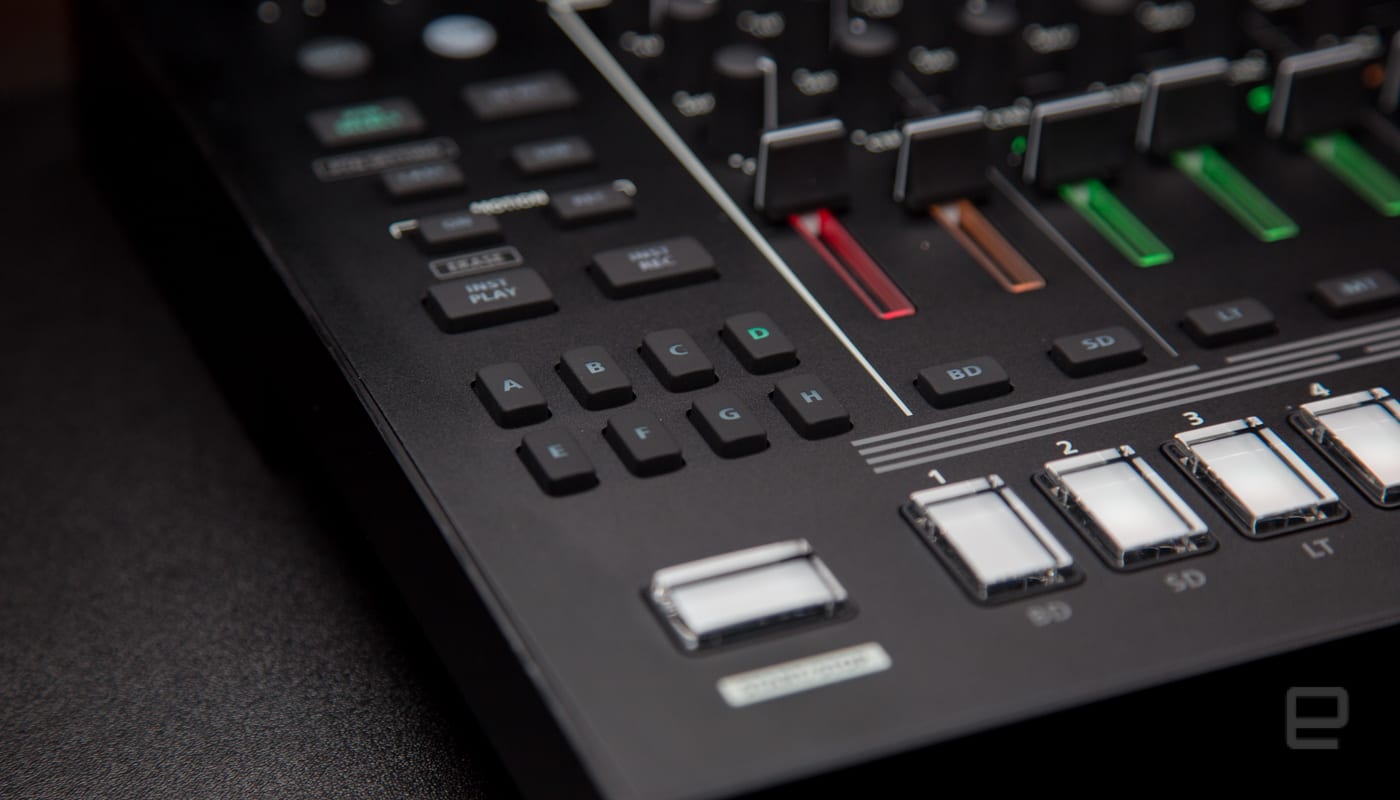
Building patterns on the TR line has always been easy and, with the addition of those the extra drum parts, I found playing live with the instrument to be more enjoyable. Typically I have a list of patterns that I can jump back and forth between different sections in a song. With the additional six parts available, I could just push a button to prime up another section of a composition. Plus, being able to press multiple buttons and have sequences play in order gave me the ability to easily create more complex patterns in a live setting.
Another feature the TR-8S introduces, that was missing from the TR-8, is that when you save a pattern it also saves the current sound and effect parameters. Something that would have saved me a bit of embarrassment at a show once when I jumped to a pattern on my TR-8 and was greeted with a complex mess of hand claps and low toms instead of what I had saved and expected from that pattern. The moral of that story, obviously, is check all your gear and settings before playing live.
In addition to keeping me from looking like I don’t know what I’m doing onstage. The TR-8S also makes its new features simple to find and implement when I’m onstage. So now, I’m not fumbling trying to remember how to do something. Nearly everything is a button push, followed by twisting the “Value” knob.

Under that Value control is where most of the new goodies are, including the shining star of the TR-8S: the Sample button. With it, I was able to quickly add my own samples to instruments and kits and add them to my patterns. Yes, I added a dog bark. Everyone loves a dog bark in their songs. But I could add voices, actual hits from my drums and really anything I could think of to sample via an SD card.
In order to get my random sounds out to the world, I can select from a huge library of sounds which now includes my personal samples via the INST (instrument) button. To change feel and sound of an entire pattern, the drum machine’s Kit button has access to 150, well, kits (a group of sounds packed together). Which again are also a breeze to change and set up for a pattern. Tap on the button and twist the knob until you get the percussion or sound you’re looking for. That’s it.
One thing I’m still not excited about is the Auto-Fill feature. It was introduced on the TR-8 as a way to mix up a pattern the way a drummer adds a fill while playing. You can adjust it to fill every 2, 4, 8, 16, or 32 measures. I’ve never found the fills to add much to my compositions. You may find them worthy of use and if you do, like everything else, it’s easy to implement.
That’s really the theme of the TR-8S. Everything is simple to find, use and implement. In my time with it both at home and while practicing with my bands, I found it to be one of the easiest to understand electronic instruments I’ve used. At practice, other band members quickly picked up how to create their own beats and patterns after only a cursory explanation of how the TR-8S worked.

Drums and guitars are easy to understand. Electronic instruments, on the other hand, can be mired in complex menus and archaic processes to produce the sounds a musician wants. The TR-8S bucks that with an instrument that old-school drum machine users and folks new to electric percussion can sit in front of and be able to create complex beats for a band, song or just for fun within a few minutes.
The TR-8S is solidly built (important for gigging), has a ton of features that Roland says its users have been asking for and because the company built it for live performances is robust enough for touring musicians and at-home producers. The $700 price tag seemed steep at first, but after spending a month with the TR-8S, it’s clearly worth every dime.
Source: Roland
IRS’ direct online payment system goes down on tax day
We hope you weren’t relying too heavily on internet payments to file your taxes on time. The Internal Revenue Service’s Direct Pay system failed (and is still unavailable as we write this) on April 17th — you know, the last day before the tax filing deadline. You can still pay online with a credit or debit card, but that entails a transaction fee. Otherwise, you’re looking at old-school checks.
It’s not certain what happened to Direct Pay or when it will be back. IRS Acting Commissioner told those at a hearing that it was “probably” an internal technical glitch rather than a cyberattack. Don’t panic too much at this point, then. The agency is trying a “hard reboot” to solve it. And in case you’re wondering: Kautter is promising that the IRS won’t punish people if the technical failures prevent them from filing on time. If you’re truly without options at this point, you’ll likely get a reprieve.
Whatever the cause, the failure underscores the challenges of offering such a vital government service online. The IRS’ Direct Pay system not only has to cope with tremendous demand from taxpayers (5 million people filed returns at the last moment in 2017), but protect against hacks and brute force denial-of-service attacks. That’s a daunting challenge for any organization — and when the IRS has a less than stellar track record on this front, it’s no exception to the rule.
Source: IRS
Nike’s 3D-printed textiles make running shoes even lighter
Nike’s use of 3D printing to craft ever-better performance shoes has reached its next logical level. The company has introduced Flyprint, the first 3D-printed textile upper for performance footwear. The material is ultimately a TPU filament melted and applied in layers, but the geometry is the key: Nike is using athlete data (such as that from distance runner Eliud Kipchoge) to determine the composition of the textiles. The result is a high-performance shoe upper that can be rapidly customized for specific regions and individual runners.
Regardless of the runner, Flyprint promises to be both lighter and more breathable than previous textiles. The fused nature of 3D printing also eliminates the frictional resistance that comes with conventional fabric. There can be very specific benefits for individual athletes, however. The first implementation, the Zoom Vaporfly Elite Flyprint, is destined for Kipchoge and promises to not only be 0.38oz lighter (a big difference in this category), but more resistant to the water absorption that can bog you down during a run.
You’ll first see the technology in action when Kipchoge uses an Elite Flyprint pair in a London marathon on April 22nd. However, you will have the chance to get a hold of the shoes yourself… if you’re lucky. Nike is selling a “limited run” of the Flyprint shoes in London through the Nike App on the marathon weekend, so you’ll need to act fast (and possibly book a trip) if you have to be the envy of your fellow hypebeasts. Flyprint will no doubt be used elsewhere — it’s just a question of when it’s available to the masses.
Via: Sole Collector
Source: Nike (1), (2)
Amazon is turning William Gibson’s ‘The Peripheral’ into a series
It’s about time we got a serious attempt at adapting William Gibson’s work to the small screen. With the success of Richard K. Morgan’s Altered Carbon and Philip K Dick’s The Man In The High Castle, streaming studios with an eye on originals can only benefit from Gibson’s seminal take on the future. Now, according to The Hollywood Reporter, Lisa Joy and Jonathan Nolan, the creative team behind HBO’s Westworld reboot, are taking on The Peripheral, Gibson’s 2014 sci-fi thriller, for Amazon Studios.
According to the Hollywood Reporter, the series landed at Amazon via a competitive bid. The studio apparently gave Joy and Nolan a script-to-series order (there won’t be a pilot) for their Warner Bros.-affiliated production company Kilter Films. The novel focuses on Flynne Fisher, who lives in near-future America. Fisher subs in for her brother, a cyber-enhanced combat veteran who now works security in a virtual world for the Milagros Coldiron company. When she realizes that the game world looks a lot like a futuristic London, then witnesses a murder, she realizes that things might not be so virtual, after all.
Amazon has been pushing genre adaptations quite a bit lately, with the Ian M. Banks’ first Culture novel, Consider Phlebas and a Lord of the Rings TV series as prime examples. Gibson’s novel has a sequel to Peripheral coming out this year, titled Agency, which could bode well for fans of the adaptation as well as Amazon if it does well.
Source: The Hollywood Reporter
LG appliances now respond to both Alexa and Google Assistant
LG has officially joined the ranks of appliance makers that support more than one voice assistant. The electronics giant has announced that its current collection of ThinQ-branded appliances now takes commands from both Amazon’s Alexa and Google Assistant. The amount of control you’ll have will vary, of course, but there are common elements: you can make ice in your fridge door, turn off the oven or cool down with your air conditioner.
This isn’t the first company to officially support more than one voice assistant, but those brands are still few and far between. LG is certainly one of the largest given its international scope. And frankly, it’s good to have smart appliances that give you choices for voice commands. When you’re likely to own an appliance for a decade or more, you don’t want to be locked into a single AI helper that might be rendered obsolete.
Source: PRNewswire
New York to investigate cryptocurrency exchanges
As the SEC and other US regulators look for ways to deal with cryptocurrency, New York is taking a step forward. The state’s attorney general, Eric T. Schneiderman, sent letters to 13 virtual currency exchanges on Tuesday that request specific disclosures about how each company manages its business.
Schneiderman’s office also launched the Virtual Markets Integrity Initiative, which it describes as “a fact-finding inquiry into the policies and practices of platforms used by consumers to trade virtual or ‘crypto’ currencies like bitcoin and ether.”
More people are investing their money into these currencies, and Schneiderman believes that they have a right to transparency and accountability from exchanges, which may not make things as clear as they should be to consumers. With reports of theft, sudden trading outages, potential market manipulation and difficulties withdrawing funds, Schneiderman said, it’s essential to get the requested information out as clearly as possible.
The letters contain a fairly exhaustive questionnaire so exchanges can disclose the ownership and control of each company, details on basic operation and fees, the specific trading policies and procedures, information on outages and trading suspensions, what internal controls are in place and policies on privacy and money laundering.
Source: NY Attorney General
 AIVAnet