


Samsung’s Alcantara case is the most luxurious way to protect your Galaxy S9 or S9+

Protection for your phone and enjoyment for your hand.
Alcantara is a fabric typically associated with the interiors of race cars and their sporty consumer counterparts, but in recent years it’s been adapted as a choice for consumer electronics as well. Microsoft has been putting feet of the stuff on the Surface Pro and Surface Laptop, and Samsung has also locked it in as a go-to material for its flagship phone cases. And I’m glad it has, because the Alcantara case for the Galaxy S9 is, without a doubt, the most luxurious way to protect your phone.
And better yet, it doesn’t have a luxury price tag.
See at Amazon
Most other cases focus on a hierarchy of protecting your phone, being thin and light, and looking good. The Alcantara case does these things, of course: it’s thick enough to provide drop protection, it’s relatively thin and definitely light, and it has a unique style that looks good to most people. But it goes a step better by also being wonderful for your hand to feel, which is something so often overlooked by other cases.
You just enjoy having fabric in your hand rather than a cold and sterile phone.
Holding the Alcantara case is, indeed, a luxurious experience. The tiny little fibers have enough of a pile to give you added grip, but not enough to feel like you’re holding a phone made out of literal carpeting. After a while you don’t really perceive it as being a fabric case, you just enjoy using a device that isn’t cold and sterile anymore. Though you’d expect the case to get kind of gross with sweaty or wet hands, it really doesn’t — the fact that it’s a light fabric actually helps wick away moisture. There’s a reason why they put Alcantara on car steering wheels: it’s soft and comfortable to hold for long periods.
The core of the case is a hard plastic shell that’s rigid enough to hold up to drops and bumps, and the Alcantara fabric is precisely laid over the top. There’s a subtle lip around the front of the phone that’ll help protect the curved screen from errant touches and also protect it when it’s face-down on a table. The case does accumulate a little bit of lint and dirt over time, depending on where you’re tossing the phone, but that’s a small downside you expect with a fabric-laden case — and it’s easy enough to just wipe off. That’s a straight trade-off for not having to think about scratches and scuffs on a traditional hard plastic case, though.
Unlike the last generation, there are plastic button protrusions that are easy to find without looking and give you satisfying feedback — I’d say this is the one improvement that needed made from the previous model. Samsung has left most of the bottom of the case open to accommodate a wide variety of chargers and headphones you may be plugging in, and there’s ample cutout space on the back for the cameras and sensors. The raised edges make the fingerprint sensor particularly easy to use for unlocking, but if there’s one downside here it’s that the steeper angle makes it a bit tougher to use as a notification shade pull-down.
Yes, spending $50 on a case in a world where Amazon-beholden race-to-the-bottom accessory makers have great choices at $10 can seem nutty to some people. There are cheaper cases out there that offer good protection for your phone at a fraction of the price. But they don’t also provide that wonderful feeling for your hand in the way that the Alcantara case does. And that makes it worth the money entirely, before you even get to the fact that it both looks great and offers solid protection for your spendy Galaxy S9. I’ll be using one on my Galaxy S9+ as long as I have the phone.
See at Amazon
Samsung Galaxy S9 and S9+
- Galaxy S9 review: A great phone for the masses
- Galaxy S9 and S9+: Everything you need to know!
- Complete Galaxy S9 and S9+ specs
- Galaxy S9 vs. Google Pixel 2: Which should you buy?
- Galaxy S9 vs. Galaxy S8: Should you upgrade?
- Join our Galaxy S9 forums
Verizon
AT&T
T-Mobile
Sprint
Blizzard gives 16-year-old ‘Warcraft III’ a widescreen makeover
When Blizzard launched a public test realm for Warcraft III last year, it became pretty clear that the developer still has plans for the 16-year-old game. Now, Blizzard has rolled out what could be the biggest Warcraft III update in years — and it’s also the last version to support Windows XP. The update finally comes with aspect-correct widescreen support, allowing you to make full use of flat screen displays without the ugly stretching. According to Blizzard’s notes, it got rid of the stretching by tweaking the interface a bit, adding a few elements to create a cleaner UI.
Flat screen displays exploded in popularity around the same time the game launched in 2002. It’s unfortunate that it took Blizzard 16 years to roll out an aspect-correct widescreen support, but it’s a welcome change for those who still play it. Other than that, the rest of the update isn’t as a huge, but could still make the game more enjoyable. Game lobbies now support up to 24 players, 12 new team colors have been added and Blizzard has unleashed quite a big list of bug fixes. So, if you still have a Windows XP computer and want to relive the early 2000’s, now’s the time to bust it out of storage.
Via: Rock Paper Shotgun
Source: Blizzard
The Morning After: ‘Fortnite’ went down and Gmail’s redesign
Hey, good morning! You look fabulous.
Morning! Have you heard that Google’s planning a Gmail refresh? We have the details on that, plus the latest information on an unfortunate Fortnite outage and how people are dealing with it.
FYI.Google plans redesign for Gmail on the web

Google has been working on a redesign for the web version of Gmail, and G Suite customers are the first to know about it. You can expect a new look for Gmail on the web, as well as easy access to G Suite apps from within Gmail, native offline support without a Chrome app and access to its Smart Reply feature on the website. A Google spokesperson told Engadget: “We need a bit more time to compose ourselves, so can’t share anything yet — archive this for now, and we’ll let you know when it’s time to hit send.”
That doesn’t seem right.Even genuine replacement Apple displays can mess with iPhones

If you’re not Apple or an authorized repair center and you put a genuine Apple replacement display into an iPhone 8, 8 Plus or X, it’ll no longer be able to adjust its brightness automatically. There’s some debate over whether the issue is a bug or a feature, but the aftermarket repair community is raising the alarm, seeing it as a possible trial for Apple to eventually make devices that are impossible for people to fix on their own.
Epic says it is applying a ‘major’ database upgrade.‘Fortnite’ is down.

The good news: Fortnite’s latest update, complete with Port-a-Fort grenades and a new replay system has arrived. The bad news: Right now no one can play it since the game has been down for about 12 hours across all systems due to database problems. In the meantime, tens of thousands of people are still watching archived streams on Twitch just to remember what the game feels like.
Get ready for the series’ first PS4 entry arriving April 20th.‘God of War’ review

To top the extreme spectacle of the previous God of War games, the latest entry goes deliberately small to start — the first hour or so focuses on hunting and fighting in the snowy Nordic woods with Kratos and his son, Atreus. Nathan Ingraham explains why this all adds up to the rare revival of a series that exceeds its origins in many ways.
We walked away with very little new information.The Zuckerberg hearings were a wasted opportunity

Until this week, Congress had tried for years to get Zuckerberg to personally appear on Capitol Hill, instead of, say, dispatching another company executive. It’s a shame, then, that the lawmakers ultimately squandered the time they had with him this week with repeated questions, soapboxing and misunderstandings that could’ve been cleared up ahead of time.
Take a look.The Big Picture: Side view satellite images turn the Earth into ‘Sim City’

When you see the side-view images versus regular, flat satellite shots, the differences are striking.
A pretty good deal if you subscribe to both anyway.Hulu and Spotify bundle will only cost you $13 a month

Spotify subscribers can add on Hulu’s Limited Commercials package, which typically costs $8 on its own, and pay a total of just $13. Plus, for the first three months, it will only cost $9.
But wait, there’s more…
- Zero Motorcycles is building the powertrain for an electric T-Rex
- ‘The Spy’ is Netflix’s chronicle of Israeli secret agent Eli Cohen
- Trump signs controversial FOSTA-SESTA bill into law
- FOSTA-SESTA’s real aim is to silence sex workers online
- Bloomberg: Apple HomePod sales are slow
- HP’s latest Pavilion PCs are built for gamers on a budget
The Morning After is a new daily newsletter from Engadget designed to help you fight off FOMO. Who knows what you’ll miss if you don’t Subscribe.
Craving even more? Like us on Facebook or Follow us on Twitter.
Have a suggestion on how we can improve The Morning After? Send us a note.
PUBG tweaks ‘zone of death’ pacing in major new update
In its latest update, PUBG has tweaked gameplay to make it faster paced, more tactical and more violent. The main tweak to PC 1.0 Update 10 is timing in the “Blue Zone,” a shrinking death region that forces players together as they die off. As many requested, it will contract at a faster speed early in the game, reducing the ability of players to linger and gather loot. At the same time, speeds later on have been slowed, with damage ramped up in the final stages.
The aim, it would seem, is to curtail passive play, a strategy that basically involves hiding and trying to keep your health up — if several players are left at the end, the one with the most health wins. It will also force players to plan more carefully so that they’re in good strategic positions through the climactic finishing zones.
PUBG has also adjusted settings so that safe zones favors land rather than water, reducing the chances that players will be stranded on islands at the end. The final blue zone will narrow to the center of the map, rather than a random spot, and inactive time has been halved. Again, all of that should make for more fevered climactic battles.
PUBG’s latest update has also added three new areas for more gameplay variety and shows safe zones on the original Erangel and later Miramar maps. Finally, clothing items are no longer available as loot, so you have to get them the old-fashioned way — via in-game purchases or by slaying another player.
If you find that still doesn’t make PUBG intense or violent enough, the company recently unleashed its new Codename Savage map onto test servers. It’s the smallest yet at just 4 x 4 km (2.5 x 2.5 miles) and throws you straight into the fighting from the get-go — a style that has drawn comparisons to Fortnite.

Source: PUBG (Steam)
Microsoft Mixer streams now support Lightstream Studio effects
Microsoft’s Twitch competitor Mixer makes livestreaming pretty straightforward thanks to a broadcast feature built directly into Xbox One and Windows 10. However, if you want to make your streams looks a bit more polished with effects and overlays, things can get complicated. Today, the company is announcing a new partnership with Lightstream Studio, which will help streamers give their broadcasts a professional visual edge.
Lightstream Studio is a web-based tool that lets streamers add images, transitions, effects, overlays and text to their streams, without any significant technical know-how. And, the Mixer team says, “if there are other services streamers love using for alerts (like StreamLabs, StreamJar or Tipeeestream), they can easily link their third party accounts within their Lightstream settings.”
Streamers can direct their streams to Lightstream Studio from their PC, mobile device or Xbox native broadcast. If they visit mixer.golightstream.com from a mobile device, they’re also be able to remotely control their stream for scene switching. The partnership is currently available in beta for Mixer Partners and Mixer Pros, and can be enabled in the Mixer Manage Channel settings, but Mixer says it’s looking to roll the feature out to everyone as soon as it can.
Source: Mixer
How to Set Up Mail VIP Contacts in macOS, iOS 11, and iCloud Mail
In Apple Mail, finding email messages from certain contacts can be made easier by giving them a “VIP” status. Short for Very Important Person, VIPs are identified in your inbox by a star next to the person’s name in any messages you receive from them. Messages from the same VIP are also displayed in their own folder in a special VIP smart mailbox that sits in Apple Mail’s Favorites bar.
You can assign up to 100 VIPs, and if you use iCloud Contacts, your VIPs are available on any other Apple devices signed in to the same account. Moreover, you can choose to be notified of emails only when the messages are from people in your VIPs list, thanks to Apple Mail’s custom alerts feature. Keep reading to learn how to set up VIPs on macOS, iOS 11 (including Apple Watch), and iCloud Mail.
How to Add a Contact to Your VIP List in macOS
How to Revoke a Contact’s VIP Status in macOS
How to Set Up VIP Alerts in macOS
How to Add a Contact to Your VIP List in iOS 11
How to Revoke a Contact’s VIP status in iOS 11
How to Set Up VIP Alerts in iOS 11 and Apple Watch
How to Add a Contact to Your VIP List in iCloud Mail
How to Revoke a Contact’s VIP Status in iCloud Mail
How to Add a Contact to Your VIP List in macOS
Launch the stock Mail app on your Mac.
Select a message in your inbox from the sender that you want to make a VIP.
Move your mouse cursor next to the person’s name in the message header and click the star that appears so that it turns opaque. Alternatively, click the down arrow next to the name or address and select Add to VIPs in the dropdown menu.
With at least one contact in your VIPs list, a special VIP inbox will appear in the Favorites bar. If you click the VIP inbox and select a VIP, only messages from that person will be shown in the message list.
How to Revoke a Contact’s VIP Status in macOS
In Mail, you can right-click on a person’s VIP mailbox in the sidebar and select Remove from VIPs. Alternatively: Select a message in your inbox from the person whose VIP status you want to remove.
Click the star next to the person’s name so that the symbol is no longer opaque. You can also click the down arrow next to the name or address and select Remove from VIPs in the dropdown menu.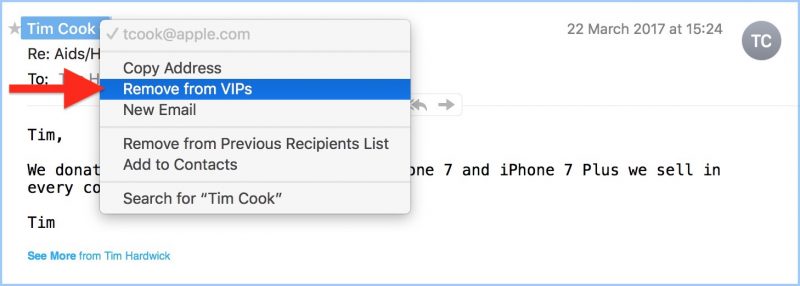
How to Set Up VIP Alerts in macOS
Launch the Mail app.
Select Preferences… from the Mail menu bar.
Stay in the General pane, and select VIPs from the dropdown menu next to New message notifications.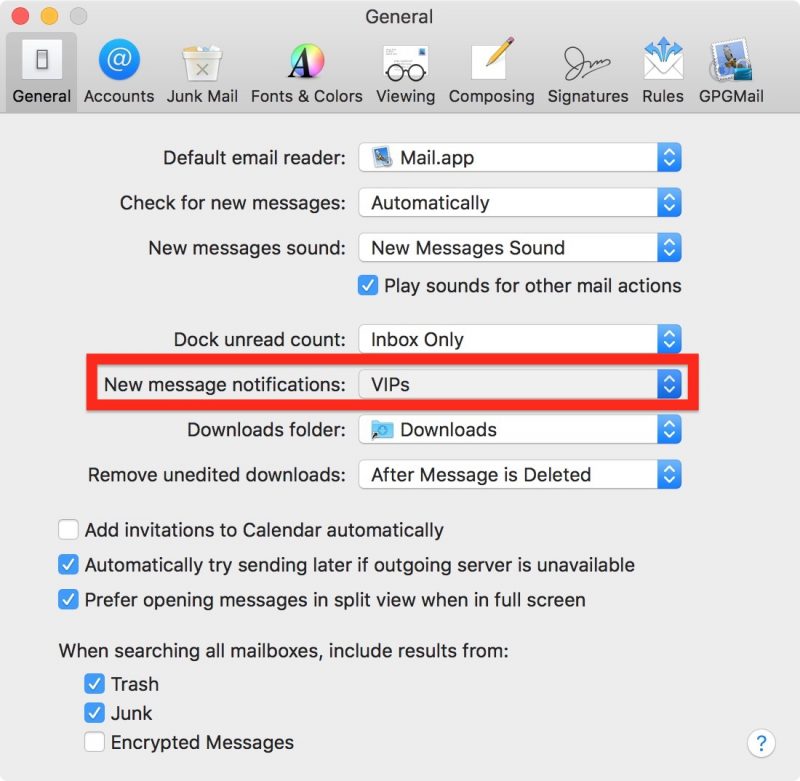
How to Add a Contact to Your VIP List in iOS 11
Launch the Mail app on your iPhone or iPad.
Tap Mailboxes in the upper left corner of the screen.
If you’ve not created any VIPs before, tap the VIP inbox, which should appear below your regular mailboxes. If you’re adding to an existing VIP list, tap the circled ‘i’ icon next to the VIP inbox.
Tap Add VIP. This option will appear either at the center of the screen if you have no VIPs yet, or at the bottom of your existing VIP list.
Select the person from your contacts that you’d like to add to your VIP list. (Note that the contact card needs to include their email address, otherwise you won’t be able to add them as a VIP.)
How to Revoke a Contact’s VIP status in iOS 11
Launch the Mail app on your iPhone or iPad.
Tap Mailboxes in the upper left corner of the screen.
Tap the circled ‘i’ icon next to the VIP inbox.
Swipe across the name of the person you want to remove from your VIP list, tap Delete, and you’re done. Alternatively, if you want to remove several contacts, tap Edit in the upper right corner of the screen.
Tap the red minus symbol next to the contacts that you wish to remove from your VIP list.
Tap Delete.
Tap Done in the upper right corner of the screen.
How to Set Up VIP Alerts in iOS 11 and Apple Watch
You can set custom notifications using the VIP alerts button on the VIP list screen. To change your custom VIP alerts at any time, open the Settings app and tap through to Notifications -> Mail -> VIP.
Similarly, you may find email alerts on your Apple Watch aren’t worth your time unless the messages are from specific people. So add these to your VIP list, and you can disable all watch Mail notifications except for VIP alerts. You can find these settings in the iOS Watch app in Notifications -> Mail.

How to Add a Contact to Your VIP List in iCloud Mail
If you haven’t already, navigate to icloud.com in a web browser, sign in using your Apple ID credentials, and select Mail in the web app list.
Select a message in your inbox from the sender you want to make a VIP.
Click the sender’s name or email address in the message header.
In the dropdown menu, tick the checkbox next to VIP and click Save.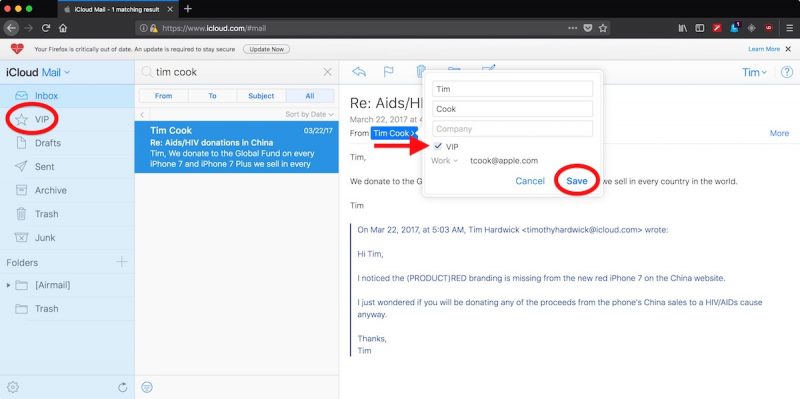
Note that you can also make a sender a VIP by dragging a message from the sender to the VIP folder in the iCloud Mail sidebar.
How to Revoke a Contact’s VIP Status in iCloud Mail
In iCloud Mail, select a message from the person whose VIP status you want to remove.
Click the sender’s name or email address in the message header.
In the dropdown menu, untick the checkbox next to VIP and click Save.
Related Roundups: Apple Watch, watchOS 4, iOS 11, macOS High SierraTag: MailBuyer’s Guide: Apple Watch (Neutral)
Discuss this article in our forums
‘God of War’ returns to form with good ol’ father-son bonding
By the time 2010’s God of War III wrapped up, the bottomless pit of anger at the heart of protagonist / anti-hero Kratos had played itself out. The pantheon of Greek gods was destroyed, and Kratos was either dead or had disappeared — and it almost didn’t matter which. Over the course of three games, he had gone from a flawed, murderous but sympathetic character to rage personified. Without that anger, what was left to say about Kratos?
A lot, it turns out. Sony wisely put Kratos’ adventures on hold following a disappointing 2013 prequel before showing off a completely re-invented God of War for the PS4, lead by God of War II writer / director Cory Barlog. After spending the last week playing the game’s main quest, I can definitively say that developer Santa Monica Studios has successfully brought God of War into the modern gaming era. The game’s visuals are stunning, gameplay is varied and engaging, the new combat system and over-the-shoulder point add a fresh feel while keeping the fluid action the series is known for. But, most importantly, Kratos is more nuanced and shows more emotion in the game’s opening hour than he did in the entire previous trilogy.

That’s an exaggeration, but pairing Kratos with his mysterious son Atreus and letting them explore the Nordic landscape and its accompanying mythology together widens Kratos’ emotional palette considerably. He’s cold and distant and critical, but never uncaring, and watching their bond ebb and flow throughout the game infuses it with a relatable heart even as the pair battle giant ogres, witches, demons and dragons. This growth doesn’t just come through cutscenes, either — having a constant companion to chat with means the player is always learning about both characters. It also provides an emotional barometer that gives an insight into how both Kratos and Atreus are holding up through their mythical trials.
That small, relatable father / son bond exemplifies how Santa Monica Studios made God of War work. To top the extreme spectacle of the previous God of War games, the latest entry goes deliberately small to start — the first hour or so focuses on hunting and fighting in the snowy Nordic woods with Atreus. The game lets you get your feet wet with the new battle mechanics, and there’s a “boss” not too long into the game that lets Kratos flex his still-considerable might. But it’s a far cry from riding on the back of Gaia as a group of Titans assails Mt. Olympus and takes down the god Poseidon.

However, scaling things back means that when the game does inevitably get bigger and more epic, it has a much larger impact. The first time Kratos and Atreus paddle a small boat out into the vast Lake of Nine and come face-to-face with the shockingly huge World Serpent (which you can see at the end of this trailer) is jaw-dropping. It’s also thrilling when you start exploring the vast world and come across the ruins of ancient civilizations, something that was a hallmark of previous games. God of War successfully grounds Kratos as a citizen of a small corner of the world who gets reluctantly thrust into progressively more complex and difficult circumstances.
The game’s increasing stakes match up well with Kratos and Atreus’s growing combat skills. In yet another departure from earlier games, you’re not going to be racking up 100-hit combos right off the bat, if ever (the game doesn’t keep track anymore, for one thing). I’m a veteran of the series, but Kratos and his new axe felt significantly different than the Blades of Chaos from earlier games. Part of that was the control scheme — after years of bashing the triangle and square buttons for various combos, the right shoulder buttons are used for light and heavy attacks. It took me a good several hours to get used to the change. Enemies also seem to take more punishment than in earlier games, making it a little harder to cut down large groups. But as the game’s battles got more complicated, I was unlocking advanced skills, getting used to the new weapons and generally feeling much more god-like than I did at the beginning of the game. Both Kratos and I had some rust to shake off, it seems.

On the surface, the game’s story also starts out small: Kratos leaves his home with Atreus to scatter the ashes of his wife, who had just died at the game’s start. They’re heading for the highest mountain in the realms, per her dying request. Naturally, there a number of hindrances along the way, and things become far more complex by the time the game hits its second half, with the pair plundering ruins, fighting mythical beasts, dealing with interpersonal drama and finding their road getting longer and longer.
Along the way, Kratos has to figure out exactly how much to tell his son about his past. Atreus does not know that Kratos is a god, nor does he know that makes him a god. That tenson underlies many of their interactions throughout the game and provides for some wonderful character development as Kratos begins to trust his progeny more and more.

After a lot of world-building, the second half of the game throws everything into high gear — I could barely put it down. After a somewhat slow start, the narrative develops quickly, while the environments and enemies get progressively more challenging and cunning. But both Kratos and Atreus grow stronger, which makes the challenging combat more of a delight than a burden. And while undeniably brutal and bloody combat remains a hallmark of the series, the shocking gore that overpopulated God of War III and the Ascension prequel get turned down significantly. You’re not cutting out a centaur’s entrails or beating a realistic female avatar’s brains out this time. (In yet another sign of maturation, the disappointing and misogynistic sex mini-games that cluttered up previous entries are nowhere to be found.)
Ultimately, this all adds up to the rare revival of a series that exceeds its origins in many ways. Big budget, AAA gaming is so often focused purely on multiplayer, on bleeding players dry with loot boxes no one was asking for. It turns out that a combo of engaging story, wonderful visuals and fun combat still has a place in the world. God of War’s developers have clearly paid attention to what Naughty Dog did with The Last of Us and Uncharted 4 as well as what Crystal Dynamics did to bring Tomb Raider into the present. Getting up-close and personal with well-written characters can bring a much-needed dose of humanity to any game — even when you’re throwing an axe through hordes of undead enemies.
God of War is out on April 20th for the PlayStation 4.
‘Fortnite’ has been down for hours, but don’t tell Twitch
Yesterday Epic Games delivered the big 3.5 patch for its popular battle royale game Fortnite, but within hours users started having trouble logging in. Around 6 PM ET yesterday the servers went down for good, and later the team tweeted “We’re bringing the servers offline for emergency maintenance. We apologize for this inconvenience. We currently have no ETA on when servers will be back up.” The game’s status page has been updated several times since then referring to a database problem, but there’s still no word when it will be back up.
With the outage nearing half a day, anxious gamers worldwide have been itching to get back to the action, not to mention the many people who live stream for others. As of 3 AM ET, the Twitch category for Fortnite showed nearly 50,000 viewers, who were mostly watching archived replays or streamers just hanging out chatting. Record holding streamer Ninja logged out after averaging 80,000 viewers even during the outage.
So if you’re still up, let us know how you’re dealing with the down time. Are you heading back to PUBG, watching old archives or just finding something else to do entirely?
We’re bringing the servers offline for emergency maintenance. We apologize for this inconvenience. We currently have no ETA on when servers will be back up. Stay updated with our status page here: https://t.co/3y0X6buriO
— Fortnite (@FortniteGame) April 12, 2018
Fortnite down all night, still averaged around 80k+ until 2 am… That is an incredible feeling.
Alarm set to wake me up at the normal stream time! However I have a feeling Fortnite might still be down.
— Ninja (@Ninja) April 12, 2018
Watch live video from dakotaz on http://www.twitch.tv
Source: Fortnite Status, Fortnite (Twitter)
Now Cortana for Android beta can read your texts out loud
Cortana for Android has just made it easier to use your phone hands-free — so long as you’re a beta tester for the voice assistant on the platform, that is. Microsoft has given Cortana’s beta version the power to read text messages aloud, less than a month after the stable version of the app got the ability to text messages using your voice. Combined, the two features make it possible to communicate back and forth even while you’re driving, cooking or doing any other task that requires the use of both hands.
The tech giant chose to launch the feature quietly and only announced it on its private Google+ community for beta users. According to Thurrott and Windows Central, though, you can take the feature for a spin by toggling on the new “Read incoming messages aloud” option in the Settings menu. It’ll instantly work if your phone is connected to a Bluetooth device, like the car’s or any other Bluetooth speaker. But apparently, there are options you can switch on so that Cortana will always read texts aloud or whenever your phone is connected to a wireless headset.
It’ll likely take some time before the feature gets a wider release, depending on how it fares during the testing period. In case it’s something you need right now, though, you can head over to Cortana’s beta page to become a tester.
Via: Windows Central
Source: Thurrott, Google Play
Bloomberg: HomePod sales are slow, per suppliers and analysts
It has only been a few months since Apple entered the smart speaker market with its $349 HomePod, but a report by Bloomberg’s Mark Gurman suggests it’s not selling as well as the company hoped. The report cites sources close to suppliers for some of its components, Apple Store workers and industry analysts who report that between its relatively high price, late entry to the market after the holiday season and somewhat limited AI capabilities, the HomePod isn’t making much of a dent.
With all of those elements going against it, it’s not hard to see why the speaker might not be flying off the shelf, with its current position as a high-priced iPhone accessory instead of a truly smart standalone unit. Most of the issues we noted in our original review, while others like its tendency to mark certain types of wood, came up later. Apple’s hiring push and the addition of a new AI lead suggest it’s making Siri improvements a priority, and we have some ideas about what that should look like.
Still, there’s space for the HomePod to improve. An upcoming software update will add anticipated features like multiroom audio and the ability to pair speakers in a stereo setup. The Slice Intelligence estimates cited suggest that while it vastly trails Amazon’s Echo devices in total sales (just like everyone else) its high price means it is still taking a fair share of revenue — 19 percent in February and March, compared to 8 percent for Google Home and 5 percent for Sonos.

Source: Bloomberg
 AIVAnet