


Apple warns Mac users that 32-bit apps will soon stop working
Starting tomorrow, you’ll see an alert box when you open a 32-bit app in MacOS 10.13.4. The one-time-per-app warning is designed to encourage users — and developers — to update their apps before Apple’s full transition to 64-bit. It’s not clear when the complete switch will happen, but when it does, all support for the legacy architecture will cease and apps that haven’t been updated will stop working.
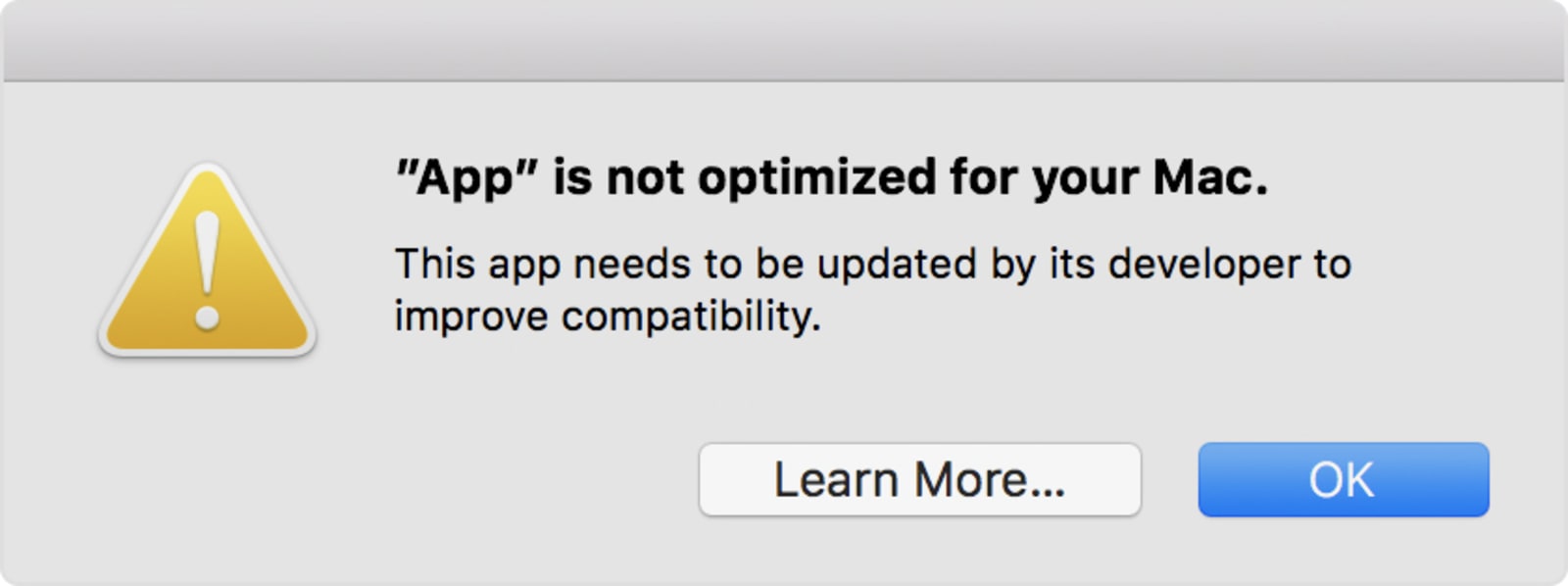
The company has already completed the transition with iOS, but doing the same on desktop is likely to be more complicated, simply because it’s been around a lot longer. As Apple says, the change is long overdue. Plus, while there is a dedicated MacOS App Store, many apps come from other channels, so there is certainly the possibility of data loss if developers don’t update their apps to 64-bit versions. Apple has released a support document to address these concerns.
As well as receiving the alert, users can check for 64-bit compatibility through the system report feature. From the Apple menu, choose About This Mac, then click the System Report button. Scroll down to Software, then select Applications. When you select an individual application you’ll see a field called ’64-bit (Intel)’. If it’s marked ‘yes’, you’re golden. If ‘no’, then you’ll need to update the app. If an update isn’t available, Apple recommends contacting the developers directly.
Source: Apple
The real star of Vizio’s 2018 TV lineup is value
If you’re in the market for a 4K TV this year, Vizio’s latest lineup is filled with several compelling options. In fact, the only issue is that it might be tough to figure out which model is best for you. First, there’s the new P-series Quantum, which is Vizio’s brightest and most feature-packed TV ever. But the rest of the company’s P- and M-series sets are also cheaper and better equipped than before. An abundance of choices is ultimately a good thing for shoppers, of course — just be prepared to do your homework.

Vizio got its start as a purveyor of cheap HDTVs just as consumers started upgrading their aging standard definition sets. But something surprising happened: they also ended up building pretty great TVs, especially in recent years. Vizio managed to keep its prices low while delivering sets with full-array backlighting, which let TVs light up the portions of screens they need to, while keeping other areas dark. That ensured improved black-levels and contrast, without the uneven lighting you see on edge-lit screen — Samsung and other TV makers still rely on this setup heavily. With its 2018 TVs, Vizio is aiming to deliver even more “local dimming” zones.
The flagship 65-inch P-Series Quantum ($2,300), for example, sports a whopping 192 zones, compared to “just” 100 from similarly-sized standard P-series model. Those extra local dimming areas let the Quantum model reach 2,000 nits of peak brightness, which is among the highest I’ve ever seen from a TV. The differences between the two P-series sets were easy to see in our brief demo. Footage on the Quantum TV looked noticeably brighter, and due to that, also sported a better contrast ratio.

That’s not to say the standard P-series looks bad — it’s still superior to most other LCD TVs — it’s just lost a bit of its luster. In fact, aside from a new case with three thin bezels, it seems like Vizio hasn’t changed much since the 2016 P-series. As I said last year, that’s mostly a testament to how good that TV was in the first place.
The Quantum TV, not surprisingly, gets its name from Quantum Dot technology, the same thing Samsung has been using on its QLED sets. It’s capable of delivering a wider color gamut than any of Vizio’s other TVs, and that was also noticeable during my demo. Neon imagery and city skylines were lush with color — they seemed a tad more “alive” than the same footage on the P- and M-series TVs. Vizio is also going for a classier hardware look with the Quantum model, with a near bezel-less design. It’s an impressive TV in all respects, but it’ll also have to compete with LG’s 65-inch OLED sets, which start at $2,600 and deliver superior contrast and black levels. (OLEDs don’t have to worry about local dimming zones, since each of their pixels can be turned on and off independently.)
Even if you don’t want Vizio’s highest-end TV, though, it’s still a useful product for shoppers since it drives the cost of the company’s other sets lower. The standard 65-inch P-series, for example, is now just $1,300, down from $2,000 last year. As for the M-series, it continues to be a solid value at $1,000 for the 65-inch set, though it’s a bit less compelling now that the higher-quality P-series is dramatically cheaper. If you’re looking for a bigger TV, the 75-inch P-series is now just $2,500, while the 70-inch M-series is $1,500.

Devindra Hardawar/Engadget
Like I said, you’ll have some hard choices to make when it comes to choosing one of these models. Do you aim for the higher quality P-series? Or go for a great deal with the M lineup? And at $2,500, how can you not get a great-looking 75-inch TV (especially when it’s $1,000 less than last year)?
Vizio’s E-series TVs are also getting Dolby Vision this year, on top of HDR10. That’s not too shabby for a slightly cheaper line — it starts at $350 for the 43-inch version, and goes all the way up to a 75-inch model for $1,550. Once again, though, the fact that the M- and P-series TVs are significantly cheaper makes it tough for shoppers to settle on the E models. (Yes, it’s worth the extra $200 to jump from the $800 65-inch E-series set to the M model.)
One notable change this year for all of Vizio’s sets? The TV tuner is back! The company removed that feature in 2016 as part of its push to modernize TV viewing. But just like with the bundled tablets it introduced that year, which it gave up on 2017, Vizio is course-correcting. You’ll be able to tune into over-the-air channels with the new sets, just like with the competition. There’s also a new streaming TV service coming to Vizio’s SmartCast OS, which collects free videos available on the internet. The company doesn’t have a name for that feature yet, but it’ll be accessible with a grid channel lineup, and it’ll also include any OTA channels within your reception range.
As I mentioned last year, it’s never been a better time to buy a 4K TV. And now Vizio’s lineup is more tempting than ever before. The P-Series Quantum won’t be available until summer, unfortunately, but you can snag the other models starting today on the company’s website. They’ll show up at retailers in the coming weeks.
Images Reveal Google’s Gmail Redesign Coming to Web Browsers on Mac and PC
Google has reportedly been working on a design overhaul of its Gmail interface on the web, and today The Verge obtained a collection of images that show off this redesign. The new look of Gmail is said to currently be in testing within Google and “with trusted partners.”
Images via The Verge
According to the new images, Gmail for the web will update to fall in line with Google’s mobile Gmail apps, including some elements of the company’s Material Design. One of the major visual differences is a new sidebar that provides multiple options for customization. Users can choose to add Google Calendar, Google Keep, or Google Tasks in the side window, or collapse it completely and focus only on their inbox.
Along with Material Design and the sidebar, The Verge noted that Google is adding three new layouts for Gmail users to pick from:
Google is providing three new layouts to choose from, including a default view that highlights attachments like documents and photos, a comfortable view that doesn’t highlight attachments, and a compact view that increases the amount of messages you can see on a single page. The compact view is the most similar to the existing Gmail design, allowing existing users to keep a similar layout.
There will also be two new additions coming to the web called smart replies and snooze, both taken from the Inbox by Gmail app. Smart replies is also on the basic iOS and Android Gmail apps, providing users with straightforward replies for quickly responding to emails. Snooze lets users temporarily remove emails and reminders from their inboxes until they want them to reappear.

The internal test of the Gmail update is believed to expand to G Suite and Gmail users “in the coming weeks.”
Tags: Google, Gmail
Discuss this article in our forums
China Times Echoes Poor HomePod Sales, Says Apple Has Reduced Orders to 200,000 Per Month
A new supply chain report out of Taiwan echoes a recent Bloomberg News story suggesting that HomePod sales have been lackluster, but as with most channel checks, it can be difficult to draw accurate conclusions.
Namely, the China Times claims that Apple has reduced its HomePod shipment forecast to 200,000 units or less per month in the second quarter, down from around 500,000 units per month in the first quarter, due to lower-than-expected sales. Apple is also said to revise down its shipment forecast for all of 2018.
HomePod sales may very well be lackluster, as a relatively niche product with an expensive $349 price tag, and given a handful of early reviews that criticized Siri’s capabilities, but Apple CEO Tim Cook has previously warned against trying to interpret single data points from the supply chain.
Cook on Apple’s first quarter earnings call in 2013:
I suggest it’s good to question the accuracy of any kind of rumor about build plans. Even if a particular data point were factual, it would be impossible to interpret that data point as to what it meant to our business. The supply chain is very complex and we have multiple sources for things. Yields can vary, supplier performance can vary. There is an inordinate long list of things that can make any single data point not a great proxy for what is going on.
For example, the China Times report only mentions Inventec and a few smaller suppliers affected by the cuts, despite reports that Foxconn would begin assembling HomePods alongside Inventec at some point in 2018. It’s possible that Inventec has simply lost a portion of its orders as Apple diversifies its production.
A few months have passed since the HomePod launched, too, so early adopters who were eagerly waiting to purchase the speaker have likely already done so. Just like an iPhone, sales can be expected to be strongest within the first few weeks of availability, followed by a gradual decline over time. Production cuts are to be expected.
Moreover, the HomePod has yet to even launch outside of the United States, Australia, and the United Kingdom, so sales remain limited geographically. Apple said the speaker will launch in France and Germany later this spring.
If sales are in fact poor, one way that Apple could boost interest is by offering a more affordable HomePod, and today’s report echoes rumors about a possible lower-priced version. However, the report predicts that Apple wouldn’t launch a revised or cheaper HomePod until at least the fourth quarter of this year.
We’ll likely never know exactly how well the HomePod is selling, as Apple said it will group the speaker under its “Other Products” category in its quarterly earnings reports, alongside the Apple Watch, Apple TV, AirPods, Beats, iPod, and more. But we’ll be listening to the May 1 earnings call for any potential hints.
Related Roundup: HomePodTag: chinatimes.comBuyer’s Guide: HomePod (Buy Now)
Discuss this article in our forums
For that lopsided look, add an SLR lens to a smartphone with this accessory
Smartphone lenses expand the usual fixed-zoom built-in lens to cover more views — but what about turning those SLR or mirrorless lenses you already own into a smartphone accessory? That’s the idea behind the Cinematics International Company Limited’s new DOF smartphone adapter that allows photographers and filmmakers to pair nearly any lens with a smartphone.
No Film School spotted the oddity during the National Association of Broadcasters Show in Las Vegas this week. The adapter comes in two pieces, a frame that holds the smartphone and an adapter that mounts the lens. The company says the smartphone frame accommodates smartphones across different brands, while the lens adapter is available in mounts for most lenses, including Canon, Nikon, Sony, and others.
The odd mix allows the lens, including the zoom controls, to be used with a smartphone. No Film School calls it a “working cinema camera” suggesting focus controls on the lens are still used in the set-up, too. With no electronic connection between the smartphone and the lens, some features are going to be missing — though there’s no electronic connection with smartphone add-on lenses either. There’s no word yet on a price or release date.
Cinematic International Company Limited is a company based in China that offers different photography accessories. The company’s eBay store includes accessories from follow focuses to modified lenses.
Placing a pricey cinema lens on the front of a small-sensor smartphone camera is a bit of an odd concept. Lenses designed for smartphones are much less expensive and much smaller. Mixing a lightweight smartphone and a heavy lens is also going to create an odd balance for shooting handheld.
But the rig by Cinematic International Company Limited actually isn’t odd enough to be completely unique. The Beastgrip DOF adapter is a similar concept, with a smartphone case and a lens mount for mixing a smartphone with a DSLR or cinema lens. (Moment also makes an adapter that can make a DSLR filter fit a smartphone.) Beastgrip’s option also includes cold shoe mounts on the smartphone case to add on accessories such as a microphone. The product originally launched on Kickstarter from startup Beastgrip but is now available at retail. The DOF adapter is $140 while the grip and case is sold separately for the same price.
Editors’ Recommendations
- Moment Filmmaker Collection brings cinematic shooting to smartphone cameras
- Fujifilm brings 120 fps video to X-T2, introduces longest lens yet for GFX
- Canon brings full frame to the Hollywood level with its new cinema camera
- Lomography’s Neptune lens system now goes as wide as 15mm
- Sigma goes wide with new Art lens that has less than one-percent distortion
Airbus has a good reason for letting a drone close to its aircraft
Ordinarily, you don’t want drones going anywhere near planes.
A small flying machine colliding with a large flying machine — one with people on board — almost certainly isn’t going to end well, which is why strict flying bans are in place around airports for quadcopters and other remotely controlled aerial devices.
So why is Airbus happily flying drones right up close to its own aircraft?
It’s actually to make planes safer, as the aerospace giant is using the machines to help with visual checks of aircraft, “considerably reducing aircraft downtime and improving the quality of inspection reports,” Airbus says.
The company unveiled its Advanced Inspection Drone this week in Florida at the MRO Americas exposition, a gathering of aviation maintenance professionals from around the world.
Designed for use inside a hangar away from the elements, the custom-built quadcopter uses a laser-based obstacle detection and anti-collision system to ensure it never gets too close to the parked plane. Following a predefined inspection path, the machine flies around the aircraft, all the time capturing high-resolution images of its exterior.
The data is sent wirelessly to a tablet, allowing the operator to review it in real-time. For a more detailed look, the images are transferred to a desktop inspection station, where a technician uses dedicated software capable of detecting any visual surface damage by comparing the real-world images against the aircraft’s 3D structural model.
“The new inspection process will take only three hours, including 30 minutes of image capture by the drone, and will improve operator safety,” the company said. “By contrast, traditional aircraft visual inspection is performed from the ground or using a telescopic platform, in particular for the upper parts of the aircraft, a process which could typically last up to one day.”
So as you can see, using drones in this way drastically reduces the inspection time, enabling the airplane to return to service more quickly while at the same time offering enhancements to the overall quality of the inspection reports.
Airbus says its new drone platform is part of its “Hangar of the Future” initiative that brings together innovative technologies such as drones and collaborative robots for aircraft inspection.
The aerospace company says it’s already demonstrated its Advanced Inspection Drone to several airlines, many of which have expressed an interest in incorporating it into their own aircraft maintenance procedures. The kit will be available for use in the final quarter of this year.
Editors’ Recommendations
- Drone-catching drones to bolster security at this week’s Winter Olympics
- This super-sized drone has several tricks up its sleeve
- Do more with your drone: 5 things you can do with a UAV (aside from taking pics)
- A drone and helicopter reportedly tangled in South Carolina. The helicopter lost.
- World’s fastest ever delivery drone could deliver medical supplies in U.S.
The humble LED could help prevent shark attacks on surfers
Whether you’re a rookie surfer battling with ankle-busters or an experienced pro trying to kiss up against those curls, the last thing you want to see is a shark snapping at your heels. Or any body part, for that matter.
Truth be told, shark attacks on humans are pretty rare, but a team of researchers in Australia think they may have found a way to make our seas even safer, especially for surfers.
It involves the humble LED, which, when attached as part of a set to the underside of a surfboard, helps to hide the surfer’s silhouette from nearby sharks that would otherwise spot them zipping across the water.
The team at Sydney’s Macquarie University says tests with the light-emitting diodes in shark-rich waters have so far proved 100 percent successful, which is certainly good news for whoever’s been on the board. Just kidding — they’ve been using foam dummies to test the kit.
Nathan Hart, who’s been leading the research, told the Macquarie Lighthouse that to come up with an effective design, it was important to understand how sharks “see” as they move through the water, and also to learn about how the predators respond to their prey.
“Studying the sensory systems of sharks and what triggers them to attack, and how they might mistake a human for a seal was where it all started,” Hart said, adding, “Pure basic research can sometimes lead to unexpected applications and potentially contribute to life-saving technology.”
Hart says his team is currently in talks with a possible commercial partner, with a view to refining the design for use not only on consumer surfboards, but also sailing craft such as kayaks, for which the system appears to be equally effective.
Now, you may be thinking: “Well, it’s all well and good while the surfer is on the board, but what about when they’re in the water before and after riding a wave?”
Hart has already thought of that, and has led another team in the development of a wetsuit that’s camouflaged to deter sharks, which is great news for divers, too. Inspiration for the special suits, which come in contrasting shades of blue, came from research a few years back that suggested sharks are colorblind.
While die-hard surfers would never hang up their board for fear of a shark attack, these innovative designs could certainly offer peace of mind when out on the ocean waves.
Editors’ Recommendations
- It’s Jason Statham vs. a giant shark in ‘The Meg’ trailer
- Xiaomi-backed ‘Blackshark’ phone will be a powerful gaming beast
- Here’s all the best tech gear and gadgetry that survived Shark Tank
- Blea Shark e-surfboards let you surf on flat water at 30 miles per hour
- NASA crash-test dummies take a beating to make aviation safer
Google Lens can now identify the breed of that cute dog you just saw
Trevor Mogg
Google celebrated National Pet Day this week by adding a couple of new animal-focused features to its Photos app.
In a blog post peppered with undeniably cringeworthy wordplay, Google Photos product manager Kristi Bohl highlights “a few pet-tential ways” to mark the day.
Under the title “puparazzi alert,” Bohl explains that if you happen to take a lot of photos of your beloved pet — and who out there doesn’t take a lot of photos of their beloved pet? — then its Photos app may now take it upon itself to show you how the best of those images would look in a lovely photo book.
“We use machine learning to save you time by selecting the best photos of your four-legged friend and laying them out in a photo book,” Google’s product manager writes. “For those of you in the U.S. or Canada, all you have to do is decide if you want a hardcover or softcover book, and then order.”
Next up is a new feature for Google Lens, the company’s A.I.-powered photo-analyzing tool that works inside Photos and recently became available for most Android devices as well as the iPhone. It means that if you’re a fan of taking pictures of cute dogs and cats that you stroll by on a day out, Lens will use its smarts to quickly tell you the breed of the animal and also offer up some information about it.
Simply open Google Photos, select the image and then tap on the Lens icon at the bottom of the display to pull up the data.
Another suggestion from Bohl is to transform your dog or cat into a Hollywood movie star, or something like that. “If your pet is ready for a big screen debut, open your Google Photos app, go to the Assistant tab, and click on the movie button,” Bohl says. “Then, if available, choose the Meow Movie or Doggie Movie option, select your pet, and we’ll compile the best photos of your four-legged pal into a movie, set to pet-themed music.”
The product manager reminds us that Photos also lets you search your personal image library by breed, species, and even emoji.
With all of Photos’ animal-related features well and truly communicated, Bohl ends her post like this (brace yourself): “Howevfur you pampurr your pets, we hope you can try out a few of the features that Google Photos has to off-fur.” Ouch!
Editors’ Recommendations
- Flagship face-off: Samsung’s Galaxy S9 Plus vs. Google’s Pixel 2 XL
- The Samsung Galaxy S9 has finally arrived — here’s everything you need to know
- Not happy with Pinterest search results? Refine it with text and photo queries
- Make your phone awesome with these Samsung Galaxy S9 tips and tricks
- Awesome Tech You Can’t Buy Yet: adventure blankets, powered surfboards, and more
It’s time to factory reset your phone
Is your phone acting up? A factory reset may help it!

Despite what the Indiana weather likes to believe, we’re officially entering spring. With that comes pretty flowers, awful allergies, and the fun that is spring cleaning. And what better way to start than by cleaning off your phone?
Well, not physically cleaning your phone — although that isn’t a bad idea — but giving your phone’s software a good scrubbing. If you’ve had your phone for a while, you may notice it isn’t running as smoothly as the day you purchased it.
Imagine your phone is like a desk: when you first get it, you may set a computer or other essential item on top. As time goes on, you start putting bills and other pieces of paper on top of the desk. Then the day comes when you really need that one specific invoice, but it’s buried underneath notes, bills, and other junk.
The same happens on your phone: it’s a blank slate when you first buy it, then you fill it up with apps, game saves and photos. A year later, it has to work extra hard to sift through the files to find what it needs to launch Instagram and show you adorable dog photos. This isn’t the problem it was on older smartphones, but it can still happen to the heaviest of power users.
 Be sure to back up your content before resetting your phone.
You can go through and individually delete apps and old photos, but the fastest and best method is to just bite the bullet and factory reset your phone. You shouldn’t have to factory reset your phone, but it’ll do the best job at making your phone feel new again. Before getting started, make sure your photos and videos are backed up with a cloud service. You’ll also lose save data for any games that don’t use a cloud backup system like Google Play Games, so weigh that option before you actually reset anything. When you’re ready to nuke everything from orbit, we have some handy instructions to walk you through it!
How to prepare your Android phone for a factory reset
How to factory reset an Android phone
When you’re ready to set your phone up again, follow the same steps you did when you first bought it. You’ll probably see the option to restore a backup from your previous phone, but skip that and set it up as new: it’ll take a little bit extra time to get everything in place, but your phone will act smoother for it.
Head to Play Store to download apps but — again — don’t download all the same ones that were on your phone before the reset. If you were having battery issues, it’s likely a misbehaving app was causing it. Again, it’ll take some trial and error, but only install a few apps at a time to help you narrow down which one was misbehaving.
You shouldn’t have to factory reset your phone, but we don’t live in a perfect world. Factory resetting your phone and setting it up as new may take a few hours, but your device will be better for it.
How often do you factory reset your devices? Let us know down below!
Should you upgrade to the Galaxy S9+ from the S8+?
Small changes can make a big difference.
For people that are looking to buy a large Android phone in early 2018, one of your best options is easily Samsung’s Galaxy S9+.

The S9+ has proven itself to be one heck of a smartphone, but as great as it is, it’s really not all that different compared to last year’s Galaxy S8+. Sure, there are subtle upgrades when it comes to the camera, design, and processing power, but are those changes worth the extra cash if you’re still rocking last year’s model?
Some of our forum users recently started debating this point, and these are the thoughts they had to share.
swagglepuff
04-08-2018 12:58 PM“
Not really a worthy upgrade in my opinion from the s8 plus. My s8 plus is running the same software as the S9 plus. There was no noticeable performance increase or battery life that was super impressive and made me go wow. It felt like I was using a skinned version of my s8 plus. The ARmoji was utterly terrible and the face tracking was terrible as well. The star of the show the camera wasn’t…
Reply
mlblack16
04-08-2018 01:19 PM“
I’ve noticed a substantial difference in battery over my S8+. I’m pretty happy so far with the noticeable speed of this device, slightly larger feel of the display size, and the continued refinement of the software by Samsung.
Granted, I get to trade up every year on Verizon, so I only had to pay some fees, otherwise it was less than $100 upgrade and I’m happy.
Reply
Retinella
04-08-2018 04:00 PM“
For me, the placement of the fingerprint sensor was enough of an upgrade. I have small hands and I had to do some hand gymnastics to reach the FPS on the S8+. I don’t have to do that on the S9+.
Reply
Dimas de Leon
04-10-2018 12:46 PM“
Stereo speakers and FPS scanner was enough for me to upgrade, and this is the first time I’m using stock UI since they enabled pull down for notifications and a 5×6 grid (but I believe these two became available with the Note 8).
Reply
Now, we’d love to hear from you – Do you recommend upgrading to the Galaxy S9+ if you already own the S8+?
Join the conversation in the forums!
Samsung Galaxy S9 and S9+
- Galaxy S9 review: A great phone for the masses
- Galaxy S9 and S9+: Everything you need to know!
- Complete Galaxy S9 and S9+ specs
- Galaxy S9 vs. Google Pixel 2: Which should you buy?
- Galaxy S9 vs. Galaxy S8: Should you upgrade?
- Join our Galaxy S9 forums
Verizon
AT&T
T-Mobile
Sprint
 AIVAnet