


Best Samsung Phones in 2018
- Best overall
- Best small phone
- Best with a stylus
- Best durable phone
Best overall
Samsung Galaxy S9+

See at Amazon
The Galaxy S9+ isn’t much different from its predecessor, but seeing as that was Samsung’s best-ever-selling phone, that’s not a bad thing. This phone is all about giving you the most features in the most beautiful package. You get top-end specs across the board, plus all of the hardware features you expect: waterproofing, wireless charging, an SD card slot, a headphone jack and more.
The camera is all-new this year, with a sensor that does fantastic processing to remove noise and sharpen fine detail. It’s aided by a dual-aperture lens to get the best combination of light and detail in different shots, and is paired with a secondary telephoto lens for zoom and portrait mode shooting.
Interestingly the Galaxy S9+ has completely supplanted the Galaxy Note 8 just a handful of months later — except for the stylus, of course.
Bottom line: The Galaxy S9+ doesn’t require much thought — it can do everything, and look great doing it, with few real downsides.
One more thing: If you don’t need the extra size or battery, the Galaxy S9 is available — and it’s less expensive.
Best small phone
Samsung Galaxy S9

See at Amazon
The Galaxy S9 takes the Galaxy S9+’s proven formula and shrinks it down a bit, making it easier to use in one hand and fit in your pocket with a 5.8-inch display. In terms of quality of experience, things are identical to the larger phone — it has the same core software, features, hardware, and capabilities.
Of course, there are a few fringe differences. The Galaxy S9 doesn’t have a secondary rear camera, meaning it can’t take Live Focus (portrait mode) photos or use the 2X telephoto zoom. It also has a smaller battery, coming in at just 3000mAh, which is perhaps the biggest downside on this smaller body. The GS9 has 4GB of RAM rather than 6GB, which doesn’t make a huge difference now but could matter in a year or so when apps are more demanding.
But if you’re not a power user and don’t want to spend the extra money, the Galaxy S9 will get everything you need done and do it in style.
Bottom line: All of the core Samsung Galaxy experience can be had for about $120 less than the Galaxy S9+.
One more thing: Shop around for deals from various carriers and retailers, as many will have big incentives to get Samsung’s latest phone.
Best with a stylus
Samsung Galaxy Note 8

See at Amazon
Just 6 months after launching, the Galaxy Note 8 was almost entirely supplanted by the new Galaxy S9+. The Note 8 is a fantastic phone, but with the addition of features and specs, the Galaxy S9+ is the same or better across the board, with a larger battery, newer camera, faster processor, and slightly more compact body.
The only trump card the Note 8 can play is that it has a stylus, which is obviously a big deal for a small number of faithful Note owners. But in order to get the stylus you give up some of the newer features you could get from the Galaxy S9+ — and you’ll probably be paying more to get it.
Bottom line: If you have to have a stylus, there’s no substitute for the Galaxy Note 8.
One more thing: As it has aged, there are some (small) deals to be had on the Note 8 if you shop around.
Best durable phone
Samsung Galaxy S8 Active

See at AT&T
See at T-Mobile
The Galaxy S8 Active offers an identical core experience to the Galaxy S8, down to every little feature like wireless charging and specific hardware components. At the same time, the entire outside of the phone is considerably thicker, wider, taller and heavier than the Galaxy S8, with a flat screen and no glass on the back. It also has a plastic-like coating on the screen to make it shatter-resistant, which is great for those who need it but a slight detriment to the rest of us as it picks up casual scratches much easier.
Yes it’s a generation old at this point, but until Samsung releases a Galaxy S9 Active, the S8 Active will be the go-to for those who need a Samsung experience but one that can take a beating.
Bottom line: The Galaxy S8 Active isn’t the best phone Samsung makes, but it’s still one of the best “rugged” phones out there.
One more thing: All of that extra size let Samsung put an extra 1000mAh of battery capacity in, totaling 4000mAh, so you really don’t have to worry about battery life on the Galaxy S8 Active.
Updated April 2018: Now that the Galaxy S9 and S9+ are here, the list has been simplified. The Galaxy S9+ is our top choice, the Galaxy S9 is the best small phone, and the Note 8 is only for those who need a stylus. The Galaxy S7 is removed, as even though it’s cheaper, it’s not worth buying such an old phone today.
Snapchat gets group video calls and Mentions feature for tagging friends
You can video call with up to 16 people at once.
Although it’s not for me, I’ve got to give Snapchat credit for releasing frequent updates to its app with bug fixes, new features, and controversial UI changes. In the latest update, Snapchat’s adding group video calls and the ability to tag friends in your stories.

To start a group video call, you’ll need to either start a new conversation with a group of people or go to an existing one. Tapping the new video icon will initiate a live video chat with everyone that’s part of the group, and everyone will get a notification once you’ve started the call.

You can use all of Snapchat’s lenses/filters while in a call, and up to 16 people can be chatting at once. You can turn off your camera at any time if you just want to use your voice, and if you tap the phone icon from the group page, you can start an audio-only call that up to 32 people can join.
As for tagging friends in stories, Snapchat is referring to this new feature as “Mentions.” When adding a new photo or video to your public story, typing “@” and then a friend’s name/username will start auto-populating a section above your keyboard of recommending people to tag.
People that view your stories with tagged users can swipe up to add them as friends, and the person you tag will get a notification once you’ve posted a photo/video they’re in.
These two features are rolling out to Snapchat now!
Download: Snapchat (free)
Best Wallet Cases for the Samsung Galaxy S9 and S9+

Cut down on your daily carry with a wallet case for your Samsung Galaxy S9!
The Samsung Galaxy S9 and S9+ is a downright sexy phone, so in some ways, it’s a shame to cover it up with a case.
But the benefits of rocking a wallet case might be worth it. With services like Google Pay and Samsung Pay there are more ways to pay with your phone, so a wallet case will let you keep your ID and your most essential cards with your phone so you can ditch that dingy old wallet.
- Samsung LED View Wallet Case
- Case Mate Wallet Folio Case
- ProCase Leather Wallet Case
- Spigen Slim Armor CS Case
- Poetic Nubuck Credit Card Slot Case
- GOOSPERY Canvas Diary Wallet Case
Samsung LED View Wallet Case

It’s always worth starting out with any cases made by Samsung itself since they’re always the most premium options for your new phone.
This case is unlike any other wallet case on this list, as it allows you to receive notifications right on the front cover via LEDs. That way you can check the time, see what that latest notification is about, and respond to incoming calls or alarms with a swipe. On the inside, you’ll find a card slot for storing your ID or credit cards.
Because it’s made from Samsung and features those cool LEDs on the front cover, this thing is quite pricey at around $60 depending on the color you want.
Also available for the Galaxy S9+.
See at Amazon
Case Mate Wallet Folio Case

When you think of leather cases, you likely imagine a folio wallet case as it’s the most common style. Consider this option from Case Mate which features a classic folio design with multiple card slots, a see-through slot for your ID, and a side pocket for storing cash.
The integrated case holds your phone in place while the front flap keeps your display protected when closed. Case Mate backs their products with a lifetime warranty and you can get your case for either the Galaxy S9 or S9+ for $60.
See at Amazon
ProCase Leather Wallet Case

Want that genuine leather look at half the price? Check out this wallet case from ProCase.
Made with genuine leather, this case offers two card slots on the inside, a pocket for storing cash and receipts, and also features a magnetic closure to keep things secure. Like other folio-style wallet cases on this list, it can be folded over to be used as a kickstand for hands-free media viewing.
Available in three color options, this case looks great and will keep your Galaxy S9 protected for just $30.
Also available for the Galaxy S9+.
See at Amazon
Spigen Slim Armor CS Case

Want a wallet case but not a fan of leather or folio-style cases? Check out the sneaky and durable Slim Armor CS case from Spigen.
Instead of storing cards in the front flap, the Spigen Slim Armor uses a hidden compartment in the back plate to keep up to two cards and some cash secure. No one will know that your phone is hiding anything at a glance giving you a bit of extra peace of mind with a minimalist case that is still designed first and foremost to keep your phone safe.
You can get it in black for $15 or in alternative color options for $17, and it’s also available for the Galaxy S9+.
See at Amazon
Poetic Nubuck Credit Card Slot Case

Poetic is known for making some pretty bold design decisions for their cases, and they certainly came up with something pretty unique with the Nubuck case.
This unique looking case combines a sturdy TPU shell with perforated PU leather around the bottom half of the case, which holds the card slot that can store up to 2 cards at a time. To access your cards, you pull the tab on the back to pop the cards out, allowing you to keep your cards private with the pull tab blending into the design of the phone.
Storing the cards on the back of the phone may impede with wireless charging but if you run into any issues simply remove the cards and you should be good to go.
This is also one of the more affordable cases on this list at just $13, so if you’re after a unique leather case for your Galaxy S9 or Galaxy S9+, this is the case for you!
See at Amazon
GOOSPERY Canvas Diary Wallet Case

These stylish folio cases from GOOSPERY are colorful and fun but the best part is the price — at just $14, they offer a great value for a case that will really stand out from the crowd.
Available in eight unique color combinations, GOOSPERY has combined canvas fabric and synthetic leather built around a TPU case that will keep your phone secure and protect it from drop damage. This case also converts to a media stand with a magnetic clasp along with an earpiece cut-out so you can talk on the phone with the cover closed.
Also available for the Galaxy S9+.
See at Amazon
Samsung Galaxy S9 and S9+
- Galaxy S9 review: A great phone for the masses
- Galaxy S9 and S9+: Everything you need to know!
- Complete Galaxy S9 and S9+ specs
- Galaxy S9 vs. Google Pixel 2: Which should you buy?
- Galaxy S9 vs. Galaxy S8: Should you upgrade?
- Join our Galaxy S9 forums
Verizon
AT&T
T-Mobile
Sprint
ASUS’ Zephyrus M is a thin gaming laptop with a six-core i7
Today, ASUS Republic of Gamers (ROG) announced the Zephyrus M laptop, which is the thinnest gaming laptop to have an eighth generation Intel Core i7 processor and NVIDIA GeForce GTX 1070 graphics. The laptop will be available for preorder starting April 3rd. The laptop starts at $1499, with the top-of-the-line model at $2199.
The Zephyrus line is designed for gamers who want the power of a gaming desktop in the form factor of a relatively slim and lightweight laptop. The display is 15.6 inches, with full HD resolution (1980 x 1080) on an AHVA IPS-type panel with a 144Hz refresh rate and 3 ms response time. It’s also got onboard wide-view tech, which means colors stay true even from extreme angles. It weighs about 5.5 lbs and is 15.1 x 10.3 x 0.7~0.78 inches.

The $2199 model comes with 16GB of DDR4 RAM and a 256 GB SSD, as well as a 1 TB SSHD. It also has an active aerodynamic system, which ensures that the laptop runs cool without sacrificing speed or performance. The system also runs quietly. As far as ports, it has 1 USB-C, 2 USB-3.1 Gen 1, 2 USB-3.1 Gen2, 1 HDMI 2.0 and 1 3.5-mm jack. It also has a built-in HD camera and mic, with a backlit keyboard. The battery is a 4-cell Li-ion 55WHrs, and the laptop has switchable GPU modes so the user can switch between G-SYNC or power-saving mode. You can see full specs of all the models here.
We reviewed the ASUS ROG Zephyr laptop and were impressed by both its form factor and onboard features. While the battery life left something to be desired, and the screen wasn’t 4K (which are issues with this model as well, though the GPU switching can help with the battery problems), we were still in awe of how much ASUS ROG was able to pack into this laptop.
ASUS ROG announced a full line of new gaming systems today that are all powered by the newest eighth generation Intel Core processors, which allow gamers to customize their lighting. These include the Zephyrus M as well as the Huracan desktop, the Zephyrus, the G703, the Strix SCAR edition, the Strix Hero edition, the Strix GL12, and the H370 and B360 series motherboards.
Source: Business Wire (1), Business Wire (2)
Tesla doubled its weekly Model 3 production in Q1
Today, Tesla issued a press release regarding its Model 3 production in the first quarter of 2018. The company produced 34,494 vehicles total; 9,766 of those were Model 3. The release noticed that Model 3 production was a fourfold increase over Q4 of 2017, and Tesla anticipates continuing to increase Model 3 rate by quarter.
Tesla has been in the limelight because of its recent Model 3 production woes. The company spent most of the fourth quarter of 2017 addressing its bottleneck issues, and was confident that the problems had mostly been ironed out by the beginning of 2018. The company was targeting 2,500 Model 3s a week, with 5,000 by the end of Q2. Last week, it produced 2,020 Model 3 vehicles.
It appears as though this release from Tesla is a response to an article from The Information yesterday about the company’s persistent Model 3 problems. According to the article, Elon Musk has taken “direct control” of the process in order to smooth things out. The release claims that the company is on track to meet its 2018 goals for both Model S and Model X delivery. It will be interesting to see what happens over the course of the year, and whether the company is able to finally fix its production problems.
Source: Tesla
Gnarbox’s mobile video editing drive now comes in an SSD version
Gnarbox broke new ground in portable storage with its first drive, which let pros start editing photos and videos before they’ve reached a PC. But what if you still want something more powerful? Don’t worry, you’re covered: the company is crowdfunding Gnarbox 2.0, an updated version with an NVMe-based solid-state drive (instead of the previous model’s basic flash storage) as its centerpiece. Hook up a camera through USB-C and you can back up your photos and videos at a rapid 450MB/s, which might set your mind at ease if you have a ton of footage to save. You’ll also find a faster processor (an unnamed 2.4GHz quad-core Intel chip) and an OLED that lets you perform some backups without even needing your phone.
An SD card slot, 802.11ac WiFi and microHDMI are also onboard for transfers and previews. The drive is IP67 water-resistant, so you can afford to take it with you on a messy outdoor shoot.
Software also plays an important role, with four new mobile apps coming from Gnarbox itself. Safekeep helps you manage your backups and transfers, while Selects helps you preview, color-correct and rate RAW photos ahead of bringing them into Adobe Lightroom. Sequence helps you edit rough cuts and turn footage into useful formats, such as Apple’s ProRes video format or projects for both Adobe Premiere and Apple’s Final Cut Pro. And if you need to view images on a TV, there’s Showcase. The 2.0 drive ties into Adobe Lightroom CC for mobile photo editing and LumaFusion for multi-track video clips.
Gnarbox 2.0 should reach backers in December 2018 if all goes according to plan, with prices depending on just how much storage you need. It starts out at $299 ($249 for early backers) for a 128GB version best-suited to photo editors, and scales up to $649 ($599) for a 1TB version that should handle at least some lengthier video projects. That’s a lot compared to a plain external drive, but this isn’t about gigs per dollar — it’s a mini-PC meant to to speed up your editing workflow and save you from bringing a laptop to some shoots. If minutes matter, it might be worth the premium.
Source: Kickstarter
Samsung’s latest gaming laptop has a 6-core i7 processor too
The Samsung Odyssey Z — not to be confused with the Magnavox Odyssey or Samsung’s VR headset — is the electronics juggernaut’s latest gaming laptop. Once you open the lid, you’ll see just how far that design ethos goes. The keyboard has been pushed to the lowest portion of the tray, and in between that and the 1080p display is what Samsung calls the Z AeroFlow Cooling System. Here’s how the company describes it:
The custom designed Dynamic Spread Vapor Chamber is an intelligently made airflow, which covers both GPU and CPU from edge to edge for optimal heat management, so you can game at full performance with peace of mind.
The Vapor Chamber is aided by Z AeroFlow Cooling Design, to efficiently push the cold air to the hottest parts of the device above and below simultaneously, whilst expelling the warm air out from the vents. Two built-in Z Blade Blowers add sophistication to the Odyssey Z’s thermal architecture, ensuring a sweat free gaming session.
The laptop features an NVIDIA GeForce GTX 1060 Max-Q GPU; up to 16GB of DDR4 RAM; an eighth-gen, 6-core Core i7 processor and special concave keyboard caps to keep your fingers in place. What’s a Max-Q processor? Well, it’s a low-power version of NVIDIA’s regular mobile GPUs.

Rather than sit in the middle under the keyboard like on a traditional laptop, the Odyssey Z’s is smaller and sits off the lower righthand side. Much like where a mouse would be with a desktop computer. Above the trackpad resides a quartet of shortcut keys for capturing and recording your exploits.
Compared to the Razer Blade, it’s a little bigger at every turn, measuring 14.78 x 10.03 x .71 inches and 5.3 pounds against the Blade’s 13.6-inch, 4.47 pound chassis. Razer’s gaming laptop is also available with a standard 1060, and a comparable configuration is around $1,800.
Pricing isn’t available for the Odyssey Z just yet, but the laptop will go on sale in China and Korea this month, with an ambiguous Q3 2018 release window for domestic customers.
Source: Samsung
Apple Employees Begin Receiving Rewards for ‘Close Your Rings’ Internal Challenge
In February, Apple updated its website with a new section explaining the advantages of closing the Apple Watch’s three Activity rings. At the same time, the company kicked off an internal challenge for its employees that tasked them with closing their Move, Exercise, and Stand rings every day for the entire month.
Images via Reddit user utopicunicornn
Those who managed this feat have now begun receiving their rewards, and posting shots of the loot on Reddit. Included in the gift is a card that congratulates employees on achieving their personal Activity ring goals for an entire month, along with an exclusive all-black Woven Nylon band that has a hint of the Activity ring’s blue/green/red color scheme on the band fastener.
This was the second “Close Your Rings” fitness challenge for company employees, with the rewards last year including an Activity rings pin and a matching T-shirt. For the 2018 challenge, eBay users have already begun taking advantage of the Woven Nylon band’s exclusive status, with Buy-it-Now prices going as high as $250-$350 at the time of writing. Apple sells Woven Nylon bands for $50.
Besides internal challenges, Apple frequently launches public Activity challenges on Apple Watch, with recent ones focused on International Women’s Day, Heart Month, and the New Year.
Related Roundups: Apple Watch, watchOS 4Buyer’s Guide: Apple Watch (Neutral)
Discuss this article in our forums
Instagram limits access to user data for unofficial apps
If one of the unofficial, third-party Instagram apps you’ve been using suddenly stopped working properly, it might be because the platform has limited their access to user data in a surprise change to its API. The photo-sharing platform has apparently reduced the number of times developers can pull data from Instagram’s API from 5,000 calls per hour to 200 calls per hour. It even cut off some apps’ access to its API entirely. Based on discussions posted on Twitter and developer Q&A website Stack Overflow, the change rolled out on Friday last week — TechCrunch has also confirmed the new limits from a couple of sources.
Those limits mean that apps and developers that need to pull data all the time — such as those in customer service and apps that analyze hashtags or make sure the people you follow are following you back — won’t be able to do their job. Once they hit their limit, then they won’t work anymore. As Recode notes, the limits also mean that third-party developers will only have access to a fraction of users’ data going forward, and that might be what Instagram intends to happen in the first place.
Instagram’s parent company has been reeling from the backlash caused by the revelation that Cambridge Analytica harvested data from over 50 million people’s accounts. Since it’s always had plans to restrict developers’ access by 2020 anyway, it might have decided to move things up a bit in an effort to prevent the same thing from happening or perhaps to show users that it cares about their privacy. That is, if this isn’t just a trial period or a mistake. Unfortunately, Instagram hasn’t officially announced the changes, has refused to comment about the issue and seems to be playing its cards close to its chest.
Via: Recode
Source: TechCrunch
HTC Vive Pro review: Better in every way — but it’s not for you
What if HTC could make the Vive VR headset again, but with better ergonomics, and higher quality screens? That’s basically the Vive Pro. It’s not a sequel — it’s more of a remaster. One that incorporates everything VR headset makers have learned over the past few years. (Spoiler: Comfort matters. A lot.) At $799 with no sensors or controllers, though, it’s strictly for enthusiasts and professionals with plenty of disposable income.

Hardware
The first thing you’ll notice with the Vive Pro is that it’s a deep blue, compared to the original’s all-black design. While that’s helpful for distinguishing the two, aesthetically the blue shade doesn’t really add much. The headset looks much larger, but paradoxically, it’s also significantly lighter. Its plastic case and humdrum design doesn’t really distinguish it from other VR headsets, but current Vive users will notice the differences. Instead of a constant work in progress, this new headset feels like a completely finished product.
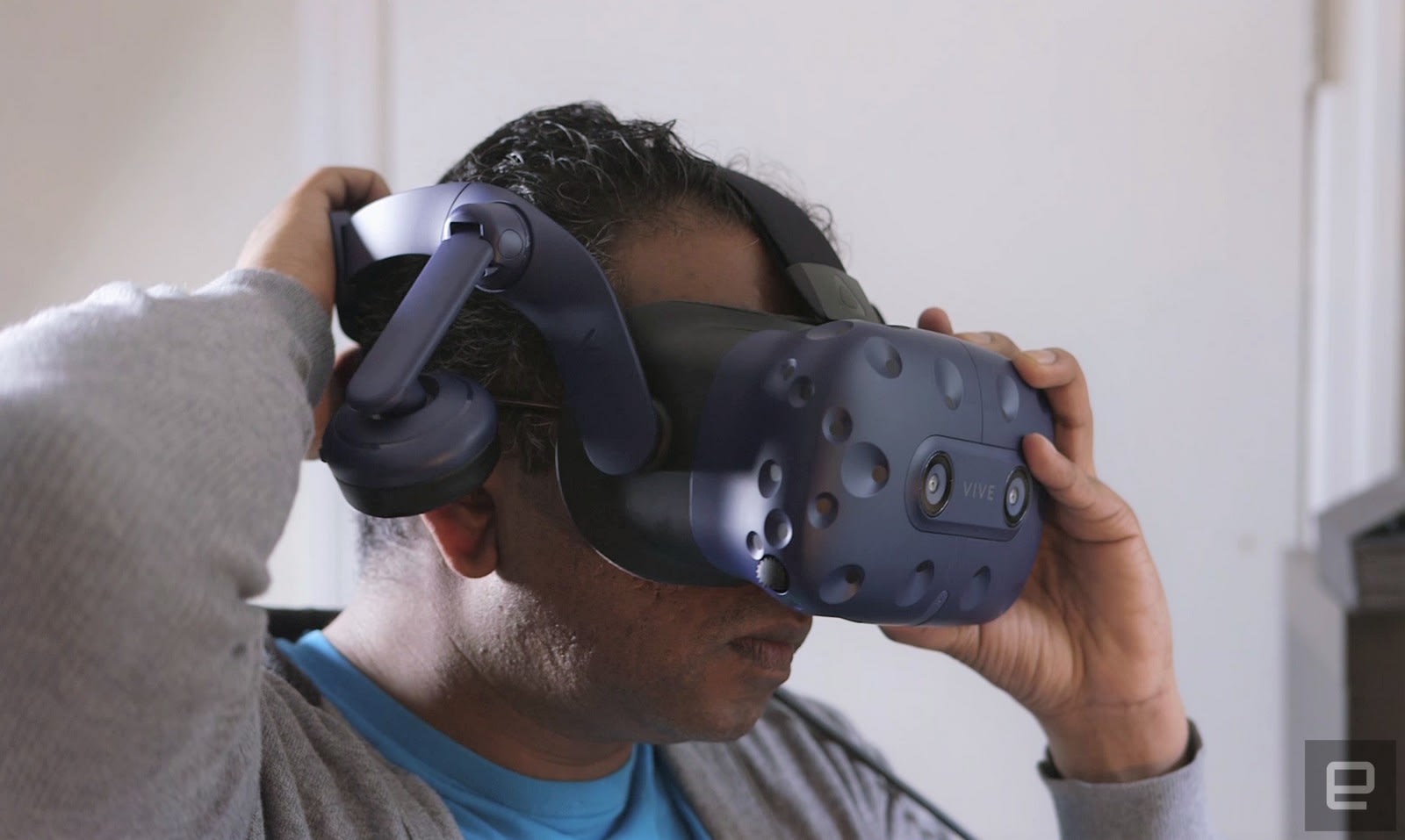
Most importantly, there’s a new head strap system. It’s similar to the Deluxe Audio accessory HTC released a year after the Vive’s debut, which added headphones and replaced the original headstraps. While this new system looks a bit complex at first, and makes the headset much longer than before, it’s actually a pretty straightforward. You simply place the eyepiece over your face, rest the back strap against your head and rotate the dial to straighten it. There’s an adjustable band at the top, but that’s something you only have to deal with the first time you put it on.

Devindra Hardawar/Engadget
It’s a huge improvement over what HTC launched with two years ago, which involved using three separate velcro straps to secure the Vive to your head. That was functional, but incredibly clunky. And coupled with the additional weight of the original headset, tough to wear comfortably for extended periods. The Vive Pro, on the other hand, balances the weight of the headset well, similar to Sony’s PlayStation VR.
Its built-in headphones are also hard to miss. They have a generous amount of padding, and can be adjusted easily. While they may make the headset look a bit overstuffed, they’re far more convenient than the earbuds on the Vive, which was just another wire to deal with. And they’re certainly better than trying to juggle larger headphones with an already oversized VR headset. Audio purists might disagree (we get it, you really like your Grados), but a built-in design makes more sense for VR. Both the Oculus Rift and Samsung’s HMD Odyssey make it clear that’s a far better option for maintaining immersion and presence, which should be the primary goal for every headset.
The Vive Pro also has significantly more plush cushioning around its entire faceplate, and even more at the back of the head strap. It made a huge difference after several hours of testing — my forehead was still a bit sweaty, but I wasn’t left with any lasting pain around my face. It also feels easier to clean than before, and as always, you can replace it when it wears out. The Vive, meanwhile, just had some basic foam face protection, which was harder to maintain and tougher to wear. It might seem like a trivial difference, but it’s important given just how much skin contact VR headsets make. Aside from headphones, that’s not something we worry about with most gadgets.

Devindra Hardawar/Engadget
I haven’t even gotten to the biggest technical upgrade yet: the higher resolution screens. The Vive Pro’s OLED displays runs at 1,440 by 1,600 pixels per eye, that’s a 78 percent higher resolution the original Vive. It keeps the same 110-degree field of view though. That’s standard for high-end VR headsets like the Oculus Rift and Samsung HMD Odyssey, but it would have been nice to see HTC push things forward a bit. The huge Star VR headset boasts a 210-degree FOV, for example.
Since the Vive Pro is currently being sold as a standalone headset, so you’ll have to buy two of HTC’s Lighthouse sensors and VR controllers separately. HTC is offering all of those accessories together for a $299 bundle (which is $231 less than buying them all individually), but that’s still a significant expense on top of the Vive Pro’s $799 price tag.
If you’ve already got that equipment, then setting up the Vive Pro is as simple as connecting its breakout box to your computer’s USB 3.0 and DisplayPort connections, and then plugging in in the headset itself. If you’re doing it for the first time, though, you’ll have to find space at two opposing corners of your room to mount the Lighthouse sensors.
I was able to make do with placing them on my bookshelves, but if don’t have something like that around, you might have to mount the sensors to your walls. It’s also a shame that HTC’s SteamVR 2.0 sensors won’t be available until the end of the year, since those will be able to track your movement in much larger spaces. But I suppose that won’t be very useful until we see the Vive’s wireless adapter, which is coming this summer.
In use
Brian Oh/Engadget
The first time I used the Vive Pro, it took me a few minutes to figure out how to adjust its new head strap properly. Once I got that sorted, I noticed instantly that it fit much more securely (and more comfortably) than the original. It’s not as front-heavy as the Vive, which would hurt the bridge of my nose when I wore it too long. It’s more like the PlayStation VR — a large headset that’s still comfortable to wear thanks to some smart ergonomics.
As you’d expect, the Vive Pro’s improved screens made just about everything look better, from text in Viveport to enemies in Superhot. While playing Duck Season, I was able to make out where my distant targets were more easily. And flying around the globe in Google Earth VR felt even more immersive than before. But while the experience is better than the original, it’s not exactly a night and day — it’s certainly not enough to justify upgrading to a pricey new VR headset if you already have one.

Brian Oh/Engadget
You’ll also have to make sure you have a computer that can run the Vive Pro at its best. HTC says it has the same minimum system requirements as the Vive — an Intel Core i5-4590 CPU or better, and at least an NVIDIA GTX 1060 card or an AMD Radeon RX480. But at CES, the company also admitted that you’ll need faster hardware to take advantage of the better visuals. That’s not surprising, but it’s something to keep in mind if your system can barely run the Vive already.
On my recently refreshed rig, which is powered by an Intel Core i7-8700K CPU and a GTX 1080, I didn’t notice any hiccups or slowdown across a wide variety of VR titles. But, that’s the same video card HTC was using at CES, so it’s a safe bet for optimal Vive Pro performance.
While I appreciated the slightly better visuals, it still felt a bit archaic to be using my original Vive controllers with a new headset. They’re larger and heavier than Oculus’s excellent Touch Controllers, which were released in 2016. Valve has its own modernized VR controllers coming for SteamVR, which are significantly smaller and offer individual finger tracking, but there’s no word on availability.
Basically, there are a lot of downsides to jumping on the Vive Pro bandwagon early, as you’ll likely be tempted to replace your controllers and trackers later this year.
Pricing and the competition

At $799 on its own, the Vive Pro is a great deal more expensive than the standard $499 Vive kit, which includes the original headset, two base stations and two motion controllers. Normally you’d have to spend another $530 to snag all of those, but HTC is now offering a $299 bundle to make life a bit easier for new users. Still, that means a complete Vive Pro setup will cost $1,098. If that sounds crazy well… it is.
Of course, the Oculus Rift is still a solid competitor too, especially since it’s now just $399 with all of its sensors and is bundled with superior controllers. At that price, the lower resolution doesn’t really seem like a huge deal. Windows Mixed Reality headsets are another option, especially Samsung’s $499 HMD Odyssey, which almost matches the Vive Pro’s resolution and has great motion controllers.
Another plus with Mixed Reality headsets, they don’t require setting up any annoying sensors. And they support SteamVR, giving you access to the same games and apps as the Vive.
Wrap-up

Brian Oh/Engadget
I give HTC some credit for fixing most of the problems I had with the original Vive. But at the moment, the Vive Pro isn’t a must-have upgrade, especially without its upcoming accessories. Its expensive pricing cements the fact that this isn’t a headset meant for most people. It’s really something for VR developers and designers who want the best hardware on the market right away.
Everyone else would be better off with the Vive, or just waiting until HTC announces a complete Vive Pro kit with new accessories later this year. Just don’t expect that to be cheap either.
 AIVAnet