


Dell rebrands Inspiron gaming laptops to G Series, serves up four new models
Dell has announced a name change for its Inspiron-branded laptops for gamers: the G Series. With the new brand come four new laptops starting at $749 and packing features like the latest eighth-generation Intel Core processors, discrete GeForce graphics with Max-Q technology, and Ultra HD screen resolutions. They arrive in three Dell-icious flavors: the G7 family, the G5 family, and the G3 models.
Right now, Dell only serves up one 15.6-inch G7 laptop, one 15.6-inch G5 laptop, and two laptops under the G3 banner sporting 17.3 and 15.6-inch screens. First, let’s start with the G7 and G5 models that are mostly the same save for a few slight differences, which you’ll find below in italics.
G7 and G5 15.6-inch laptops
Dell G7 15
Dell G5 15
Screen size:
15.6 inches
Screen type:
In-Plane Switching
Resolution:
3,840 x 2,160
1,920 x 1,080
Processor:
Core i9-8950HQ
Core i7-8750HQ
Core i5-8300HQ
Core i7-8750HQ
Core i5-8300HQ
Graphics:
GeForce GTX 1060 with Max-Q
GeForce GTX 1050 Ti
GeForce GTX 1050
Memory:
4GB to 16GB DDR4 @ 2,666MHz
*supports 32GB
4GB to 16GB DDR4 @ 2,400MHz
*supports 32GB
Storage:
256GB SSD
512GB PCIe SSD
1TB Hybrid (8GB cache)
128GB SSD + 500GB HDD
128GB SSD + 1TB HDD
256GB SSD + 1TB HDD
256GB SSD
512GB PCIe SSD
1TB HDD
1TB Hybrid (8GB cache)
128GB SSD + 500GB HDD
128GB SSD + 1TB HDD
256GB SSD + 1TB HDD
Audio:
2x speakers
Waves MaxxAudio Pro
Camera:
720p Webcam
Connectivity:
Wireless AC
Bluetooth 4.2
Ports:
1x HDMI 2.0
3x USB-A 3.1 Gen1
1x Thunderbolt 3
1x SD card reader
1x Ethernet port
1x headphone / microphone jack
Security:
None
Optional fingerprint reader
Battery:
56WHr
AC adapter:
130-watt (GTX 1050, 1050 Ti)
180-watt (GTX 1060)
Dimensions:
15.32 x 10.82 x 0.98 inches
Weight:
Starting at 5.82 pounds (GTX 1050)
Starting at 6.28 pounds (GTX 1060)
Colors:
Licorice Black
Alpine White
Matte Black
Beijing Red
Starting price:
TBD
TBD
You’ll see a few differences between the G7 15 unit and the G5 15 version. For starters, you can only get the Core i9-8950HQ processor in the G7 version, along with system memory clocked at 2,666MHz: the G5 unit only includes DDR4 memory clocked at 2,400MHz.
Other differences include an additional 1TB 5.400RPM hard drive option for the G5 laptop, and a different set of colors between the two units: Matte Black or Beijing Red for the G5, and Licorice Black or Alpine White for the G7.
Note that both laptops support Nvidia’s GeForce GTX 1060 with Max-Q technology. This essentially means Nvidia turned down the chip’s power consumption so it can run inside thin notebooks without the need for bulky cooling fans. But due to the power reduction, the chip has a 10 percent lower performance than the non-Max-Q version installed in larger, bulky gaming laptops. The trade-off, of course, is a quieter, cooler gaming laptop without reverting to integrated graphics.
Finally, the G5 provides an optional fingerprint scanner, whereas the G7 doesn’t appear to have any additional security-related hardware.
Dell calls revamped XPS 15 the ‘smallest performance 15.6-inch laptop’
Dell’s XPS 15 has been one of our favorite full-size clamshell notebooks for a few years now. It’s eschewed fancy 2-in-1 features for a solid design, excellent performance, and solid battery life, and the 2018 refresh doubles down on the equation while creating the “smallest performance 15.6-inch laptop.”
Clearly, Dell focused on improving the performance and dialing in some of its most recent design concepts but kept the notebook’s primary strengths intact. Here’s what’s new with the latest XPS 15.
First up is one of the first notebooks we’ve seen that builds in Intel’s latest and greatest eighth-generation CPUs. As with the previous generation XPS 15, Dell is using the high-power “H” versions of the chips, with options ranging from the quad-core Core i5-8300U to the six-core Core i7-8750H and what we presume is the Core i9-8950HK (Dell did not specify the version in its release information). These processors will represent the fastest notebook options available and should retain the XPS 15’s performance advantages.
Next is the addition of an Nvidia GeForce GTX 1050 Ti GPU to the existing Intel integrated graphics and Nvidia GeForce GTX 1050 configurations. In our testing, we’ve found the GTX 1050 Ti to offer meaningful performance improvements over its slower sibling, and that should enhance the XPS 15’s gaming and creativity application chops.
We can’t discount the XPS 15’s dimensions, either, which are a scant 14.06 inches wide by 9.02 inches deep, and between 0.45 and 0.66 inches thin. According to Dell, that makes the notebook the “smallest performance 15.6-inch laptop” around, and given its starting weight of 4.0 pounds it’s also one of the lightest. That doesn’t meant the XPS 15 suffers in the battery life department, either — it’s still available with a 97-watt-hour battery capacity that’s only three watts less than the 100-watt limit imposed by airlines. Dell says that results in the longest battery life for a 15-inch laptop at 21.5 hours.
Another significant performance improvement is tied to the notebook’s connectivity, where Dell has now equipped the USB-C port with the fastest version of Thunderbolt 3 with a full four lanes of PCIe Gen 3. That’s an upgrade from the two lanes of PCIe found in the previous version. Other ports include two USB-A 3.1 Gen 1 ports, a full-size HDMI port, and an SD card reader.
As with the previous versions, Dell has two display options for the newest XPS 15. There’s a Full HD (1920 x 1080 or 141 PPI) panel promising a 1,200:1 contrast ratio and 100 percent sRGB coverage, and a 4K UHD (3840 x 2160 or 282 PPI) touch display with 500 nits of brightness, a 1,500:1 contrast ratio, and 100 percent sRGB coverage. Both options use Dell’s InfinityEdge technology for tiny bezels, contributing to the notebook’s impressively small dimensions.
Here are the complete specifications for the new machine:
Dell XPS 15 (2018)
Screen size:
15.6 inches
Screen type:
In-plane switching
Resolution:
3840 x 2160
1920 x 1080
Processor:
Intel Core i5-5300H
Intel Core i7-8750H
Intel Core i9-9850HK
Graphics:
Intel UHD Graphics 630
Nvidia GeForce GTX 1050 with 4GB GDDR5
Nvidia GeForce GTX 1050 Ti with 4GB GDDR5
Memory:
Up to 32GB DDR4-2666MHz
Storage:
Up to 1TB PCIe SSD
Up to 1TB HDD
Audio:
2x speakers
Waves MaxxAudio Pro
Camera:
720p webcam
Connectivity:
Wireless AC
Bluetooth 4.2
Ports:
1x HDMI 2.0
2x USB-A 3.1 Gen1
1x USB-C with Thunderbolt 3
1x SD card reader
1x headphone/microphone jack
Security:
Optional fingerprint scanner in power button
Battery:
56WHr
97WHr
AC adapter:
130W
Dimensions:
14.06 x 9.25 x 0.45-0.66 inches
Weight:
Starting at 4.0 pounds (56WHr battery)
Starting at 4.5 pounds (97WHr battery)
Colors:
Gray and black
Starting price:
$1,000
Pricing for the new Dell XPS starts at $1,000. Availability is estimated to start in May.
Editors’ Recommendations
- Dell rebrands Inspiron gaming laptops to G Series, serves up four new models
- HP’s Mike Nash on why new Spectre x360 15 is thicker, much more powerful
- Dell XPS 13 9370 review
- The best cheap gaming PCs
- Dell Inspiron 5675 gaming desktop review
Pixel 2 vs. Galaxy S9 vs. iPhone X — Which should you choose?
This is a tough one.
If you’re currently in the market to buy a new flagship smartphone, there are three devices that easily stick out above the rest — including the Google Pixel 2, Samsung Galaxy S9, and the Apple iPhone X.

These three phones have proven to be the best of the best, and for anyone that’s willing to spend a bit of cash to get one of the most premium experiences possible, either of these handsets is more than up to that challenge.
One of our forum users recently said they switched back to the Pixel 2 XL after spending some time with the Galaxy S9+ and iPhone X, and this quickly sparked a debate about which of these three phones is the better buy.
Here’s what some of you had to say.
areyes163
03-31-2018 11:32 PM“
While I didn’t have the pixel first I to had the s9 plus and iPhone x. Both great devices but so far I’m enjoying the pixel more. It’s been 5 days and I am still content.
Reply
toiday
03-31-2018 11:50 PM“
I got annoyed by the extra Bixby button. Keep accidentally press it. The curved edge are useless. Reading text at the edges look distorted. Can’t find a good screen protector without spending $50. I definitely don’t want to create an account with Samsung. The fewer accounts, the better. Stay with Pixel is the best choice.
Reply
deng66
04-01-2018 03:42 PM“
Just get both..you know you want to (and will eventually!!!!) 🙂 I had the X and it’s a great phone with a lot of good qualities. The screen is great and I really started to like the gestures. But like all iphones, no matter how great the phone hardware is, it’s still the same old iOS with the same lack of customization that always frustrates me within a month or two of using it. I’m…
Reply
04-02-2018 11:54 AM“
I had the Pixel 2 XL for about 2 weeks before I shipped it back and went back to iOS. What pulled me back was I really enjoyed my Apple Watch and couldn’t find something I considered comparable on Adroid Wear (Watch OS), missed the consistency of signal/loss of features of my AirPods, and the blue shift of the 2 XL was just a noticeable nuisance (especially for the cost of the device). Also USB-C…
Reply
With that said, we’d now like to hear from you – If given the choice, would you choose the Pixel 2, Galaxy S9, or iPhone X?
Join the conversation in the forums!
Samsung Galaxy S9 battery problems, explained: Exynos vs. Snapdragon
U.S. users get the better experience for a change.

New phones should have better battery life than their predecessors. That’s a given, and part of the unspoken rule of technological progress. And yet in recent years that hasn’t been a given. Along the way, we’ve seen blips — Snapdragon 810, anyone? — on the way to greater efficiency.
This year, the culprit is Samsung’s Exynos 9810, the ultra-fast chip that ships with all Galaxy S9 and S9+ units outside of the U.S. Samsung’s new custom M3 cores inside the phone are clocked extremely high, up to 2.7GHz when only one of the four performance cores is engaged, and that, according to an excellent overview by AnandTech, ramps up the voltage (and the heat output), causing it to churn through the Galaxy S9’s battery like a raccoon through garbage.
Technically, there is nothing surprising about this — the Exynos 9810’s M3 cores are extremely powerful, besting Qualcomm’s proprietary Kryo cores by a large margin in synthetic tests like Geekbench. But Samsung appears to have failed the task of balancing real-world performance with device longevity, and given Android’s scalability, such theoretical performance advantages are not always borne out in the mundanities of daily tasks.
In other words, it looks like the Exynos 9810 is a battery dud. Here’s what AnandTech’s Andrei Frumusanu had to say about the chip:
In a vacuum, the Exynos 9810 could be seen as a good improvement over the Exynos 8895. However Samsung LSI isn’t only competing against itself and iterating on its products, it needs to compete against ARM’s ever-evolving offers as well. Unfortunately it feels like S.LSI keeps being one generation behind when it comes to efficiency – the A72 beating the M1, the A73 beating the M2 and now the A75 beating the M3.
If you were to shift the microarchitectures one year ahead in Samsung’s favour then suddenly we would have had a much better competitive situation. Currently a 17-22% performance lead does not seem worth a 35-58% efficiency disadvantage along with the 2x higher silicon area cost.
To summarize, the chip used in the majority of the world’s markets is around 20% faster than its predecessor, but in some cases over 50% less efficient. This isn’t theoretical, either:
The Exynos 9810 Galaxy S9 absolutely fell flat on its face in this test and posted the worst results among our tracking of the latest generation devices, lasting 3 hours less than the Exynos 8895 Galaxy S8. This was such a terrible run that I redid the test and still resulted in the same runtime.

Strategy Analytics, 2018
Separate tests from Strategy Analytics, an independent research firm based in the UK, show that AnandTech’s results are not unique: the Exynos Galaxy S9 measured a 25% battery disadvantage compared to SA’s leader, the upcoming Sony Xperia XZ2 (though it must be said that Sony commissioned the test).
The reason for Samsung’s poor showing isn’t because the Exynos 9810 is a bad chip, or even that it’s inherently power-hungry; it appears that Samsung merely programmed the core scheduler poorly, resulting in clock speeds and voltage settings that aren’t appropriate for the task at hand. Again, AnandTech:
When looking at the power curves correlated with our traditional integer power virus we see that there’s an immense increase in power consumption at the higher frequencies. Indeed going from 2.3GHz to 2.9GHz would have doubled power usage, and even 2.7GHz comes at a steep power price. Given that power usage scales roughly along the lines of voltage cubed, the SoC’s efficiency suffers with the increased frequency. The good news here is that Samsung’s efficiency curve is quite steep and linear, that means backing down on frequency should see significant efficiency gains.
I’ve had a look through Samsung’s scheduler and DVFS mechanisms which controls the switching between the 1/2/3/4 core modes and generally I’ve been unimpressed by the implementation. Samsung had made use of hot-plugging to force thread migrations between the cores which is an inefficient way of implementing the required mechanism. The scheduler is also tuned extremely conservatively when it comes to scaling up performance, also something we’ll see the effects of in the system performance benchmarks.

To (mis)use a car analogy, the S9 has been programmed to use the wrong gears for the task at hand, burning fuel at times when the car could be cruising, and puttering along on a single cylinder when two or more are needed. This is theoretically fixable with a firmware update, but Samsung must have done extensive testing of the Exynos-based S9 before shipping it to consumers, and this looks really bad, especially when it is also shipping U.S. and Canadian models with the extremely efficient, altogether improved Snapdragon 845.
In a recent essay, my iMore colleague, Rene Ritchie, made a good point about Samsung’s divided focus:
Having two silicon targets just means, as opposed to infinite time, you have half the time to optimize for each.

He is referring to the fact that Samsung Electronics builds the same phone using system-on-a-chip components from two companies: Samsung LSI, which operates independently from its parent company, and Qualcomm, which designs the Snapdragon 845. There are a number of reasons for this division, and some would argue that it’s Qualcomm’s fault that Samsung is in this position at all (you can catch up on that story on your own time), but the reality is that Samsung’s attention is divided, and it may not have devoted the necessary resources to properly optimizing the Exynos-equipped S9 to achieve the same combination of performance and battery longevity that customers expect.
One can also safely make the assumption that a company like Samsung LSI is trying to bottle the same kind of magic that Apple has achieved with its A-series chips, which still dominate many of the same synthetic benchmarks that Samsung attempts to dominate by ramping up peak speeds. Apple’s silicon advantage isn’t nearly as cut-and-dry as many Apple pundits would like to present it — Android’s silicon flexibility requires being able to scale to levels of performance that Apple has never needed to achieve with iOS — but there’s no question that on a high level, Apple’s in-house silicon team is ahead of the competition. AnandTech again:
What needs to happen with the [Samsung] M4 is a much larger efficiency boost to remain competitive with ARM’s upcoming designs and actually warrant the use of an internal CPU design team.
Qualcomm, on the other hand, appears to have another successful product with the Snapdragon 845: it’s slightly faster than its predecessor without regressing in efficiency, so the U.S. variant of the S9 appears to offer slightly better battery life than the S8. The Galaxy series has never excelled in uptime, but there’s never been such a gulf between Samsung’s two versions, until now.

Leaving aside the complicated technical aspects of the story, this is nothing but a bad-news story for Samsung, as it wants nothing more than to make customers believe they are buying the same phone wherever they happen to live. Samsung goes out of its way not to specify the processor in the Galaxy S9’s marketing, and for good reason. Many of Samsung’s millions of customers will know the differences, and subsequent advantages or disadvantages, of the two SoCs, but most will not.
What Samsung risks, however, is providing an experience that those unwitting owners would consider sub-optimal, with battery life less than its last-generation product, and a gaping maw of real-world battery life tests between the U.S. and the rest of the world.
Let’s hope a fix is in the works.
Samsung Galaxy S9 and S9+
- Galaxy S9 review: A great phone for the masses
- Galaxy S9 and S9+: Everything you need to know!
- Complete Galaxy S9 and S9+ specs
- Galaxy S9 vs. Google Pixel 2: Which should you buy?
- Galaxy S9 vs. Galaxy S8: Should you upgrade?
- Join our Galaxy S9 forums
Verizon
AT&T
T-Mobile
Sprint
Samsung Galaxy S6/S6 Edge won’t receive software updates anymore
The Galaxy S6 Edge+ and Galaxy S6 Active are still being supported.
The Galaxy S9 and S9+ may be the hottest Samsung devices out right now, but just a few years back, Samsung’s flagship phones were far different compared to what they are today. Four years ago, the all-plastic Galaxy S5 and its weird perforated back was considered the best the company had to offer.

Samsung made a huge leap forward in design when it launched the metal and glass Galaxy S6 series in 2015, and this essentially paved the way for the Samsung phones we know and love today. All good things must come to an end, however, as Samsung’s officially stopped all future software updates for its S6 lineup.
The Samsung website has a continuously updated list of phones that are scheduled to receive monthly and quarterly security updates, and Android Police recently discovered that a good chunk of the Galaxy S6 series has been removed.
More specifically, this means there won’t be any future updates for the Galaxy S6 or S6 Edge.
The S6 Edge+ and S6 Active were originally removed from the list as well, but they have since been added back to it. These two phones were released a few months after the S6 and S6 Edge debuted, but it’s likely Samsung will halt updates for the Edge+ and Active at some point before the year is over.
Companies deciding to stop supporting phones is never the most joyous thing to talk about, but in the case of the S6 and S6 Edge, Samsung did a solid job with three years of support – even if it wasn’t the fastest to release new software.
Are any of you still rocking a phone from the Galaxy S6 series?
Samsung Galaxy S6
- Galaxy S6 review
- Galaxy S6 complete specs
- Galaxy S6 news | GS6 edge news
- Galaxy S6 beginner’s guide
- Galaxy S6 forums | GS6 edge forums
Amazon
Outfit your home with new USB wall receptacles, timer switches and more starting at $13 each
Make them more functional.

Amazon is running a one-day deal on a variety of TopGreener USB outlets, sensors, and timers. We’ve featured a number of highly-rated options from TopGreener in the past, and these are no exception. If you’re looking for the most affordable way to add USB ports to your wall outlets, this version gives you two USB and two AC outlets, and includes the wall plate, all for just $12.79. This model offers the same configuration, but has a 3.1A output instead of 2.4A that the previous one did. It’s available for the same price, but you need to add your own wall plate which ends up making it slightly more expensive.
The sale also includes a 2-pack of the 2.4A outlets with a pair of USB cables for $28.48, a programmable timer switch for $13.11, and a countdown timer switch for $14.99.
Don’t forget, these prices are only good for today, April 3, so don’t miss out.
See at Amazon
Facebook Messenger now supports 360-degree photos and HD videos
HD videos are capped at 720p, but at least we’re getting somewhere.
Despite the hot mess that Facebook is still finding itself in, the company’s taken some time to update its Messenger app with a couple useful features for sharing photos and videos. Starting today, you can now send and receive 360-degree photos and HD videos in Facebook Messenger.

To send 360-degree/panorama photos, simply add them to a conversation like you would with a regular picture. A compass icon will appear next to the photo to indicate its interactive nature, and you can move them around both on the Messenger mobile app and on your desktop at Messenger.com.
As for HD videos, you can now send clips from your camera roll and newsfeed in crisp 720p. That may be a far cry from 4K or even 1080p, but it’s still a step in the right direction.
Support for 360-degree images is available across the globe, and 720p HD videos are currently supported in the U.S., UK, Canada, Australia, Belgium, France, Finland, Denmark, Norway, Romania, Hong Kong, the Netherlands, Japan, Taiwan, South Korea, Singapore, Sweden, and Switzerland.
Facebook kept logs of calls and messages on Android phones, and followed the rules to do it
Best Large Screen (Phablet) Android Phone in 2018
- Best overall
- Best for features
- Best for battery
- Best with a stylus
Best Overall
Google Pixel 2 XL

See at Best Buy
Google’s Pixel 2 XL offers sleek and solid hardware, all of the requisite specs inside and software that’s simple and intuitive at a breakneck pace. With a 6-inch 18:9 display and stereo speaker, its size is useful without being too big.
The software features and Google’s apps aren’t numerous, but they’re delightfully useful without being bothersome. And with three years of guaranteed updates, you don’t have to worry about the future — Google’s phones are well-known for holding onto their performance longer than most.
Google has once again set the standard for Android cameras, with great hardware buoyed by the “HDR+” processing that can create amazing images. Photos are accurate with an extra punch of color, and can manage tough scenes with little issue. And with Android 8.1, the Pixel Visual Core enables dramatically better photos in third-party apps.
Bottom line: The best big Android phone experience comes straight from Google with the Pixel 2 XL. Great hardware and amazing software support a top-notch camera anyone can enjoy.
One more thing: Verizon will tout the Pixel 2 XL is “exclusive” to the carrier, but you can buy the phone unlocked from a variety of sources and use it on your carrier of choice.
Why the Google Pixel 2 and 2 XL are the best Android phones
If you want the best possible Android experience, you go straight to the source: Google. And if you need a big screen, the Pixel 2 XL’s 6-inch screen does the job. The company has gotten serious about user experience and interface design, and it really shows with Android Oreo on the Pixel 2 and 2 XL. Everything is blazing fast, smooth, consistent and intuitive throughout the interface, and ulti-window and picture-in-picture modes make the most of the screen real estate.
Google has gotten really good at user experience and interface design.
And it’s not just software customization that makes it happen — Google has included a Snapdragon 835, 4GB of RAM and 64GB (optionally, 128GB) of storage to make sure your phone has plenty of room to run. The big 3520mAh battery gets you through a full day as you’d expect.
The Pixel 2 XL’s 6-inch OLED display has seen its fair share of criticism, and is the one true weak point of the phone, but that’s just something you give up to get this hardware and software experience — even though that’s a tougher pill to swallow at $849.
They don’t focus on the number of features, but on the impact of each one.
If there’s one knock on the Pixel 2 XL, it’s that it doesn’t have the sheer volume of features in its hardware or software that some of the competition does. It doesn’t have a headphone jack, wireless charging or an SD card slot; and if you’re used to having a bunch of specialized software features on your Samsung, LG or Huawei phone you won’t find them here.
But for most people, those are relatively small prices to pay to get a daily experience of using a phone that’s fast, intuitive, smart and filled with a core set of features that can actually wow you. And with years of guaranteed software updates, you won’t be left out in the cold. That’s what you get from the Pixel 2 XL.
Best for features
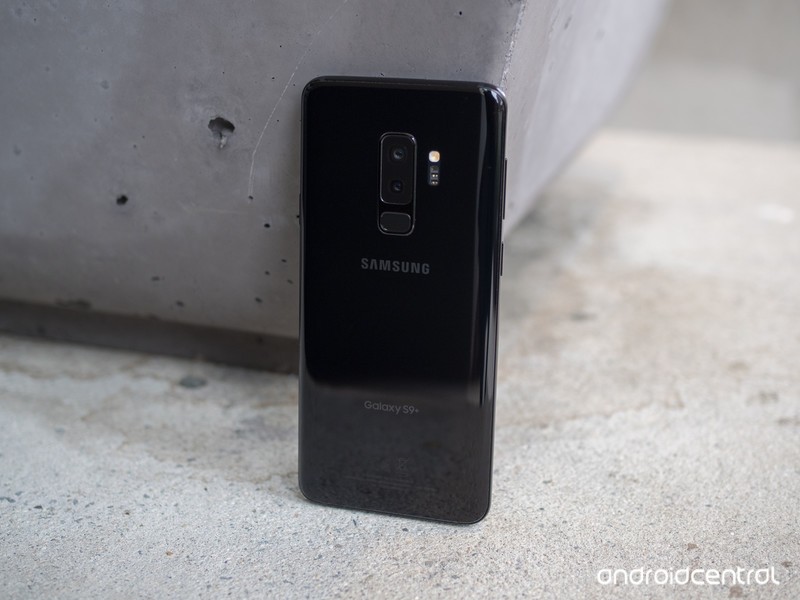
Samsung Galaxy S9+
See at Amazon
The Galaxy S9+ isn’t much different from its predecessor, but seeing as that was Samsung’s best-ever-selling phone that’s not a bad thing. This phone is all about giving you the most features in the most beautiful package with a big display. You get top-end specs across the board, plus all of the hardware features you expect: waterproofing, wireless charging, an SD card slot, a headphone jack and more. The 6.2-inch AMOLED display is really big, and it’s the best screen out there in terms of brightness and overall quality.
The camera is all-new this year, with a sensor that does fantastic processing to remove noise and sharpen fine detail. It’s aided by a dual-aperture lens to get the best combination of light and detail in different shots, and is paired with a secondary telephoto lens for zoom and portrait mode shooting.
Bottom line: The Galaxy S9+ doesn’t require much thought — it can do everything, and look great doing it, with very minor downsides.
One more thing: The regular Galaxy S9 may be cheaper, but it also has a notably smaller screen, smaller battery, and only one rear camera. It’s not entirely the same experience.
Best for battery life
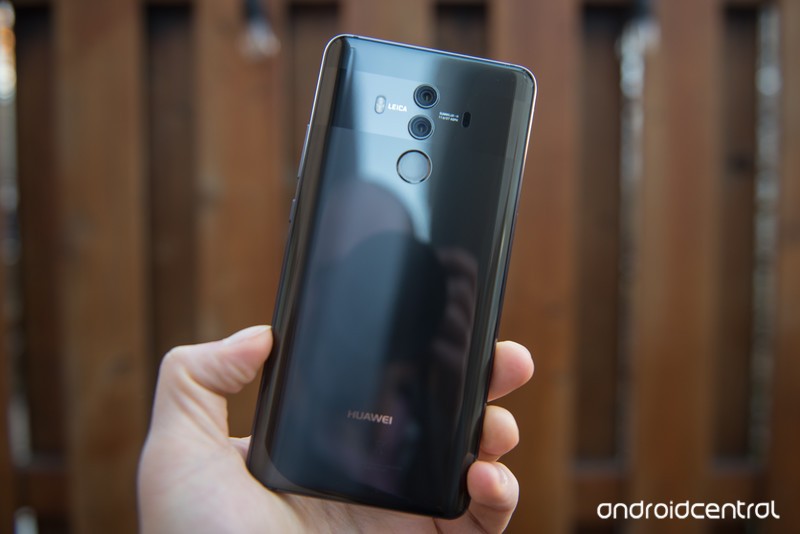
Huawei Mate 10 Pro
See at Amazon
Unlike its predecessor the Mate 9, Huawei’s Mate 10 Pro is an absolute looker — and it clearly positions itself right next to the flagship competition. Metal and glass are finely crafted and filled with top-notch specs, and its Leica-tuned dual cameras are capable of some wonderful shots with the help of the Kirin processor inside.
Alongside all of that, the Mate 10 Pro hits it out of the park with battery life. The combination of a 4000mAh battery, efficient processor, somewhat-restrictive software and a 1080p display make this a true two-day flagship for many people, and that’s rare today.
The only downside, as ever, is Huawei’s EMUI software. Though it has gotten better with Oreo, it still has many areas that are rough on the eyes, not very functional or inexplicably broken when it comes to integrating with third-party apps.
Bottom line: It’s a true flagship with all of the best specs, and incredible battery life. You just have to give a little in terms of software experience.
One more thing: When searching for a Mate 10 Pro, make sure you’re getting the U.S. unlocked model so that you have proper network bands and warranty support.
Best with a stylus
Samsung Galaxy Note 8

See at Amazon
Just 6 months after launching, the Galaxy Note 8 was almost entirely supplanted by the new Galaxy S9+. The Note 8 is a fantastic phone, but with the addition of features and specs, the Galaxy S9+ is the same or better across the board with a larger battery, newer camera, faster processor and slightly more compact body.
The only trump card the Note 8 can play is that it has a stylus, which is obviously a big deal for a small number of faithful Note owners. But in order to get the stylus you give up some of the newer features you could get from the Galaxy S9+ — and you’ll probably be paying more to get it.
Bottom line: If you have to have a stylus, there’s no substitute for the Galaxy Note 8.
One more thing: As it has aged, there are some (small) deals to be had on the Note 8 if you shop around.
Conclusion
The best Android phone with a big screen is the Pixel 2 XL thanks to its fast, simple and powerful software experience. The Galaxy S9+ is a close second place with its extra features and beautiful display, and the Mate 10 Pro is still here for all of those who need a ton of battery life. The Note 8 is also worth considering if you need a stylus.
Best Overall
Google Pixel 2 XL
See at Best Buy
Google’s Pixel 2 XL offers sleek and solid hardware, all of the requisite specs inside and software that’s simple and intuitive at a breakneck pace. With a 6-inch 18:9 display and stereo speaker, its size is useful without being too big.
The software features and Google’s apps aren’t numerous, but they’re delightfully useful without being bothersome. And with three years of guaranteed updates, you don’t have to worry about the future — Google’s phones are well-known for holding onto their performance longer than most.
Google has once again set the standard for Android cameras, with great hardware buoyed by the “HDR+” processing that can create amazing images. Photos are accurate with an extra punch of color, and can manage tough scenes with little issue. And with Android 8.1, the Pixel Visual Core enables dramatically better photos in third-party apps.
Bottom line: The best big Android phone experience comes straight from Google with the Pixel 2 XL. Great hardware and amazing software support a top-notch camera anyone can enjoy.
One more thing: Verizon will tout the Pixel 2 XL is “exclusive” to the carrier, but you can buy the phone unlocked from a variety of sources and use it on your carrier of choice.
Updated April 2018: The Pixel 2 XL takes our top spot, reflecting its continued strength in the Android world. The Galaxy S9+ steps in as the top Samsung phone, while the Note 8 remains as an option for stylus lovers and the Mate 10 Pro sticks around for its great battery life.
The $200 Eufy RoboVac 11c pet edition is down to its lowest price yet
Your dog will probably be less scared of this than a regular vacuum.
The Eufy RoboVac 11c pet edition is down to $199.99 on Amazon. This is the first direct discount for the pet edition since it was released a little over a month ago. While there has been at least one coupon code deal in that time, it has never gone this low before. This price is so low, it’s actually $50 cheaper than the older RoboVac 11 model is right now.

This is a new release from Eufy, and it’s designed to clean pet fur more efficiently. It can automatically increase suction power when it detects a surface that is normally harder to clean and lasts for up to 100 minutes per charge. There are two side brushes and a wide rolling brush to help clean up fur, dirt, dust and more. You can use it on hard floor surfaces as well as medium-pile carpet. It has 4.1 stars based on 85 user reviews.
You can get a free set of 33-foot string lights with this purchase as well. Just add these to your cart and use the code H775AYGM.
See on Amazon
Samsung Gear Fit2/Fit2 Pro get new health features and updated UI
The update is rolling out to the fitness trackers now.
Samsung’s Gear Fit2 and Gear Fit2 Pro are two admirable fitness trackers, and today Samsung released a software update for both that aims to make them even better for living your best and healthiest life.

First off, Samsung’s bringing its Weight Management and Fitness Program features to the wearables. Weight Management will allow you to quickly compare your exercise and food intake throughout the day so you can keep an eye on how many calories you’re burning and taking in, whereas Fitness Program enables you to control exercise routines on your phone or TV right from your wrist.
In addition to this, the Gear Fit2 and Fit2 Pro are also getting a slightly tweaked user interface to better-display information on their small screens.


The Workout Screen now shows three sets of customizable information, including things like calories burned, the duration of your workout, how far you’ve walked/run, heart-rate, etc. A new Multi-Workouts widget allows you to have quick access to your most-used workout types, and the Health Summary widget shows a breakdown of all your activity for the entire day.
This update is rolling out now to the Fit2 and Fit2 Pro through the Samsung Gear app, so be sure to keep an eye out for it over the next couple days.
Samsung Gear Fit2 Pro review: The best fitness tracker for most people
 AIVAnet