


Huawei’s unlocked powerful Mate 10 Pro is now down to $650
Don’t let this limited time discount slip out of your hands.
From its 6-inch display to its 6GB of RAM or 128GB of internal storage, the Huawei Mate 10 Pro packs a whole lot of features to justify its price tag. In mid-March, this phone dropped $100 from its regular $800 price, but now it’s down another $50 from that price. It’s available in both blue and gray at this price.

Our review here at Android Central delved into the pros and cons of this device, stating:
Huawei will tell you the Mate 10 is all about onboard artificial intelligence and everything that AI can bring to the smartphone experience.
And AI is all well and good. What makes the Mate 10 Pro a great buy today is its excellence in the core smartphone experience. Things like getting to the end of the day on a single charge, no matter what you’re doing. And taking excellent photos even in challenging night-time conditions.
This is the first price drop we’ve seen on this phone, so don’t miss out. B&H has matched this discount, and keep in mind that it doesn’t charge sales tax at the time of purchase to those who live outside of NY and NJ.
See at Amazon
This Alexa-enabled Robovac is down to just $180
This price is good for just one day.

Right now you can save $70 on the purchase of this Alexa-enabled Robovac at Amazon. This normally sells for $250 and has only dropped as low as $200 in the past. This price drop is temporary, though, and will be gone when the day ends.
The vacuum can be scheduled to clean at certain times, monitored through the free smartphone app, and even activated using just your voice through an Alexa device, like the Echo Dot. It provides just under two hours of cleaning per charge, and it is good to use on both hard surface floors and thin carpets.
See at Amazon
Android Phone With The Best Camera of 2018
- Best overall
- Best for features
- Best runner-up
We’re keeping an eye on the newly-announced Huawei P20 Pro, which appears to be ready to beat all the phones on this list, but we’re running it through its paces before crowing it the new champ. Stay tuned.
Best overall
Google Pixel 2 / 2 XL
See at Best Buy
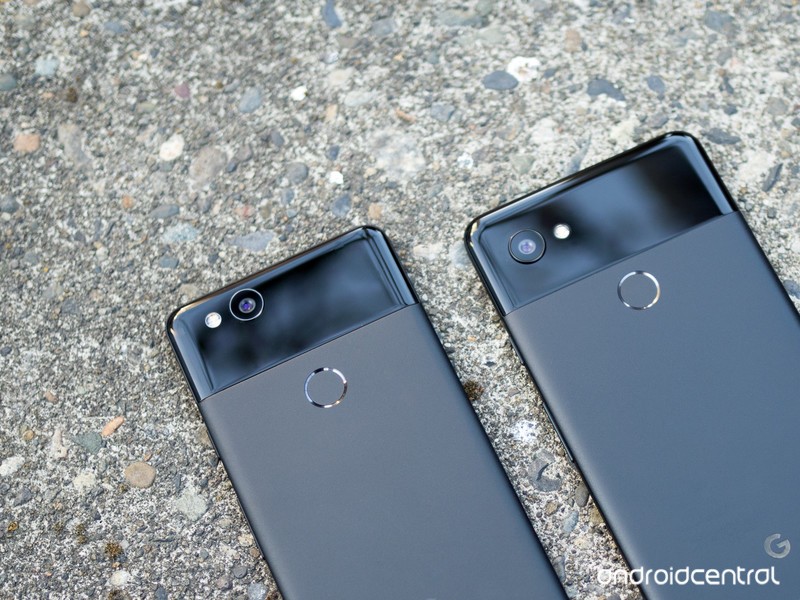
Google’s Pixel 2 and 2 XL don’t have amazing camera hardware, but still manage to take amazing photos in almost every situation thanks to its “HDR+” processing. This after-capture processing creates photos that have amazing colors and dynamic range, akin to what you’d find by applying a good editing pass to photos from any other phone.
You don’t get a ton of settings to tweak, but that’s kind of the situation with all of Google’s software. But when you see the photos that come out of these phones, you won’t be looking to tweak anything — you’ll just enjoy looking at beautiful images. The one area where the Pixel 2 and 2 XL have been somewhat beaten is in low light, where they just can’t cut down and clean up noise in the same way the Galaxy S9+ can. That’s certainly a trade-off at this point.
The Pixel 2 and 2 XL also have amazing video stabilization that settles down and smooths out even the shakiest of handheld capture.
Bottom line: For a fantastic “point and shoot” experience that also generates amazing photos, the Pixel 2 and 2 XL are the ones to get.
One more thing: Unlike the Galaxy S9 and S9+, you get the same camera experience with either size of the Pixel 2 and 2 XL.
Why the Google Pixel 2 and 2 XL are the best
Back when Google released its original Pixels in 2016, no one expected them to have the best cameras in the Android ecosystem. In 2017, the legacy was already established, and no one had any doubt: the Pixel 2 series has an amazing camera. Whether you go with the diminutive Pixel 2 or the larger 2 XL, the same fundamentals are true: incredible photo quality in any lighting condition; bullet-fast shutter speeds; amazing video stabilization; and fun features, like Portrait Mode and Motion Photos.
Many other phones can take fundamentally good photos, and the new Galaxy S9 and S9+ do that particularly well, but nothing touches the amazing colors and dynamic range the Pixel 2 and 2 XL can provide. They produce photos that look like you took a shot with another phone, and applied a set of tasteful edits to bring out all of the best parts of the scene — but it happens automatically every time you press the shutter button.
The Pixel 2’s camera app doesn’t have the same breadth of features as many of its competitors — there’s no manual mode at all — but much of the magic happens behind the scenes. Google has also added a new piece of hardware to the mix, the Pixel Visual Core, to allow third party apps to access the machine learning prowess of the Pixel 2’s camera.
Best for features
Samsung Galaxy S9+
See at Amazon
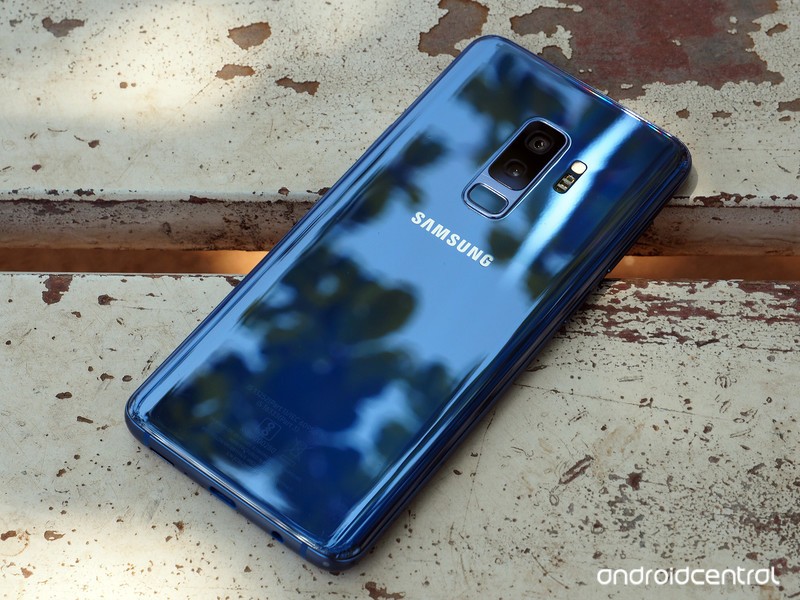
The Galaxy S9+ has a pair of rear cameras and a crazy switching aperture on its main lens that can adjust to give you the best possible shots in a variety of lighting. In the daytime the GS9+ takes sharp, accurate photos with just a subtle bump of saturation but doesn’t go overboard with HDR processing.
At night, the GS9+ is arguably the best smartphone camera available today. Its f/1.5 lens lets in a ton of light, and the sensor captures amazingly sharp images with almost no noise and colors that are mostly accurate to the scene.
This one is close, but the Galaxy S9+ comes up short of the Pixel 2 and 2 XL simply because it lacks the amazing colors and dynamic range found in Google’s phones. But when you add in all of the GS9+’s other camera features, like an advanced Pro mode, 960 fps slow motion video and other shooting modes, it may tip you over in its direction.
Bottom line: The Galaxy S9+ is a great overall camera that excels particularly in low-light conditions. It also piles on the features and really only comes up short in daylight shots.
One more thing: If you opt for the smaller Galaxy S9, you don’t get a secondary camera, meaning you miss out on portrait mode and lossless 2X zooming.
Best runner-up
Huawei Mate 10 Pro
See at Amazon
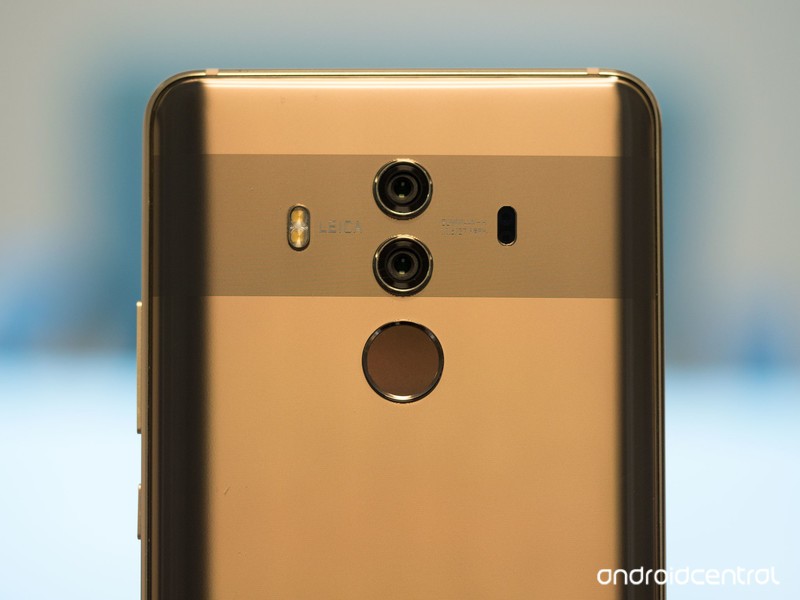
Huawei hasn’t always been known for great cameras, but in the last couple generations of its flagships it’s really gone all-out and made huge strides in quality. The Mate 10 Pro’s dual rear cameras and in-house processor pair up for great overall quality.
The main 16MP f/1.6 camera is a great all-around shooter, nearly on par with the Pixel 2 XL in both daylight and low light thanks to a huge improvement in dynamic range and low-light processing from its predecessor. The secondary camera is a 20MP monochrome unit, meaning you can take fantastic black-and-white shots with the press of a button that are far better than filters you’d have to apply to other photos.
Huawei’s video mode isn’t as good as the competition, and the “AI” portions of the experience are a bit of a gimmick, but the Mate 10 Pro is a great overall shooter despite those shortcomings.
Bottom line: The Mate 10 Pro doesn’t necessarily beat any of the other cameras in particular areas, but is a solid all-around choice with no big shortcomings or compromises.
One more thing: Don’t be swayed by the “Leica” branding here, because it’s effectively just a name and nothing more — focus on what the cameras can actually do.
Conclusion
The Pixel 2 and 2 XL are still the best Android cameras available, based on their amazing ability to capture beautiful photos in every situation without any tweaking, guessing with settings or edits after capture. The Galaxy S9+ gets close as an overall package, offering more features and arguably better low-light shots, but comes up short enough in colors and dynamic range that it isn’t quite as good as the Pixels. The Mate 10 Pro offers another good all-around option, with no clear shortcomings and a monochrome camera that impresses.
Best overall
Google Pixel 2
See at Best Buy
Google’s Pixel 2 and 2 XL don’t have amazing camera hardware, but still manage to take amazing photos in almost every situation thanks to its “HDR+” processing. This after-capture processing creates photos that have amazing colors and dynamic range, akin to what you’d find by applying a good editing pass to photos from any other phone.
You don’t get a ton of settings to tweak, but that’s kind of the situation with all of Google’s software. But when you see the photos that come out of these phones, you won’t be looking to tweak anything — you’ll just enjoy looking at beautiful images. The one area where the Pixel 2 and 2 XL have been somewhat beaten is in low light, where they just can’t cut down and clean up noise in the same way the Galaxy S9+ can. That’s certainly a trade-off at this point.
The Pixel 2 and 2 XL also have amazing video stabilization that settles down and smooths out even the shakiest of handheld capture.
Bottom line: For a fantastic “point and shoot” experience that also generates amazing photos, the Pixel 2 and 2 XL are the ones to get.
One more thing: Unlike the Galaxy S9 and S9+, you get the same camera experience with either size of the Pixel 2 and 2 XL.
Update, March 2018: The Pixel 2 and 2 XL remain at the top of our list, but the Galaxy S9+ has arrived to replace the Note 8. The LG G6 has been removed as it aged, and is replaced by the great all-around Mate 10 Pro.
Samsung’s newest fast wireless charging stand is already $20 off
Charge without the wires.

Samsung’s fast wireless charging stands are down from $69.99 to just $49.99 in both black and white. This price drop brings the popular wireless charging option down to a new all-time low. You can grab it for the same price from Samsung and Best Buy.
It is compatible with all Qi devices, including Samsung’s Galaxy S8, S9, Note 8, and other devices like the iPhone 8, iPhone X and more. The multi-colored LED halo shows off the charging status. It comes with a fast charge wall charger as well, which many other options don’t.
This is Samsung’s 2018 version of the charging pad, which only just hit the market back in February.
See at Amazon
Samsung’s Exynos processor is causing poor battery life for the Galaxy S9
At least there’s wireless charging, right?
When Samsung announced the Galaxy S9/S9+ at MWC this past February, one of the more concerning aspects were the unchanged battery capacities. Just like the S8 series before it, the Galaxy S9 and S9+ come equipped with 3,000 mAh and 3,500 mAh batteries, respectively. Thanks to this and a power-hungry processor, this has resulted in less-than-awesome battery performance for a lot of users.

Similar to many of Samsung’s other phones, the Galaxy S9 and S9+ have different processors based on which region you buy the phone in. The handsets are powered by the Snapdragon 845 here in the States, but in other parts of the world, they use Samsung’s own Exynos 9810 chipset. Battery life is perfectly fine for the Snapdragon-equipped variants, but the Exynos ones have bit somewhat of a dumpster fire.
Strategy Analytics recently conducted a battery life test comparing the Exynos Galaxy S9 against some of its top competitors, and out of seven phones that were tested, it came in at sixth place.
Sony saw a couple big wins with the Xperia XZ2 and XZ2 Compact that came out of the test with 36 hours and 1 minute and 34 hours and 20 minutes, respectively, and even last year’s LG G6 fared quite well with 32 hours and 35 minutes. However, the Galaxy S9 with the Exynos processor clocked out at just 26 hours and 52 minutes.
For this test, Strategy Analytics said —
Battery performance for all devices was measured by determining the length of time taken to fully empty the battery under a ‘typical user scenario.’
AnandTech also found similar results in its testing. While the Galaxy S9+ with the Snapdragon 845 saw 10.48 hours of battery life while web browsing on Wi-Fi, the Exynos-powered Galaxy S9 saw just 6.80 hours.
That sort of battery performance is abysmal for a flagship phone like the Galaxy S9, and it’s pretty ironic considering that the culprit of this issue is Samsung’s own mobile processor.
If you’ve got a Galaxy S9 or S9+ with the Exynos 9810, what’s your battery life been like?
Samsung Galaxy S9 and S9+
- Galaxy S9 review: A great phone for the masses
- Galaxy S9 and S9+: Everything you need to know!
- Complete Galaxy S9 and S9+ specs
- Galaxy S9 vs. Google Pixel 2: Which should you buy?
- Galaxy S9 vs. Galaxy S8: Should you upgrade?
- Join our Galaxy S9 forums
Verizon
AT&T
T-Mobile
Sprint
How to get custom text tones back on your Samsung Galaxy S8 or Note 8 on Android Oreo

We can get dozens of text messages a day, so why not spice them up with custom tones for your loved ones?
Custom text message tones might seem like a small feature, but they can be immensely useful. A custom text message tone can tell us to respond to one notification among a sea of default notification tones. A friend of mine has a custom text tone, a revolver shot, that echoes through the station when his wife texts him.
- Why you need another text messaging app now
- How to set custom text tones in Android Messages
- How to set custom text tones in Pulse
- How to set custom text tones in Textra
- How to set custom text tones in Mood
Why you need another text messaging app now
Before Samsung updated its Galaxy S8 and Note 8 phones to Oreo, there was a place in Samsung Contacts to set a personal ringtone and notification tone for friends’ incoming messages. After the Oreo update, Samsung contacts only have the option to set a personal ringtone. I don’t know why this was removed during the update, though it may have something to do with changes to notification in Android Oreo.
What we do know is that if you still want a custom text tone for individual contacts, you can still have them, but you’ll have to switch to another text messaging app for it. There are dozens of great text messaging apps out there, but all of our favorites support custom text tones on a per-conversation basis.
Find your new favorite text messaging app here.
After you’ve picked one, here is how to set a custom text tone in each of them.
How to set custom text tones in Android Messages
Tap the Conversation you wish to set a custom notification for.
Tap the three-dot menu icon in the top right corner of the screen.
Tap People & options.


Tap Notifications.
Tap Sound.
Tap your desired tone.
Tap Save.


How to set custom text tones in Pulse
Tap the Conversation you wish to set a custom notification for.
Tap the three-dot menu icon in the top right corner of the screen.
Tap Conversation options.


Scroll to the bottom of the menu and tap Notification Channel Settings.
Tap Sound.
Tap your desired tone.
Tap Save.


How to set custom text tones in Textra
Tap the Conversation you wish to set a custom notification for.
Tap the arrow down icon in the top right corner of the screen.
Tap Customize this conversation.


Tap Notifications.
Tap Notification Sound.
Tap your desired tone.
Tap Save.


How to set custom text tones in Mood Messenger
Tap the Conversation you wish to set a custom notification for.
Tap the three-dot menu icon in the top right corner of the screen.
Tap Options.


Scroll to the bottom of the menu and tap Current tone under Notifications & Sounds.
Tap the bell icon to go to the system sounds list.
Tap your desired tone.
Tap Save.


Your turn
Going away from the standard Samsung Messages can be a big change for some users, but it’s a small price to pay to get that distinct tone when a parent or an ex-boyfriend is texting you. In fact, may I suggest a notification tone for just such a contact?
Samsung Galaxy S8 and S8+
- Galaxy S8 and S8+ review!
- Galaxy S8 and S8+ specs
- Everything you need to know about the Galaxy S8’s cameras
- Get to know Samsung Bixby
- Join our Galaxy S8 forums
Verizon
AT&T
T-Mobile
Sprint
Unlocked
Canadian Galaxy Note 8 units to receive Oreo update April 5
That’s this Thursday.
A brief delay between Galaxy S8 Oreo rollouts on U.S. and Canadian units is happening again with the Note 8. A week or so after the U.S. counterparts started receiving their Oreo updates, Canadian Note 8 users can look forward to Android 8.0 starting April 5.
While only Rogers has definitively issued a date on its update schedule, Samsung typically rolls out major updates to all of its carrier partners at once, and the Note 8 is no exception.
Big-name features include improved notifications, an overhauled app launcher, punchier edge lighting, and lots more.
Samsung Galaxy Note 8
- Galaxy Note 8 review
- Galaxy Note 8 vs. Galaxy S8+
- Which Note 8 color is best?
- Complete Galaxy Note 8 specs
- Join our Galaxy Note 8 forums
Verizon
AT&T
T-Mobile
Sprint
Best Buy
The Galaxy Note 8 has been updated to Oreo on these U.S. carriers
The waiting game is over!
Samsung’s Galaxy Note 8 is still one of the most powerful Android phones on the market, and now that Android Oreo is making its way to the device on U.S. carriers, it’s about to get even better for a lot of users.

The Oreo update is still in its early days for the Note 8, but in any case, these are the carriers that have updated it so far.
AT&T
AT&T is the first network to start updating the Galaxy Note 8 to Oreo, and the update was first spotted by XDA user jetman5843 (Thanks, Nick!). The update weighs in at 1407.35MB, and it changes the build number of the Note 8 to R16NW.N950USQU3CRC2.


Oreo for the Note 8 brings the March 2018 security patch, and all of the features you’d expect to see are included – such as picture-in-picture, notification dots, and smoother performance across the board.
Sprint
@androidcentral hey y’all… #AndroidOreo for @sprint #samsungnote8 is live! pic.twitter.com/0B70sa5tXO
— Eliezer Wagner (@Admiral_EliW) March 30, 2018
Sprint has also begun updating the Note 8 to Oreo. At 1330MB, it’s not small, but it brings all of the features one would expect to the game.
Verizon
@androidcentral Verizon is on board pic.twitter.com/Ex6EeFpEhi
— Harlen Marks (@HarlenM) March 30, 2018
Verizon also seems to be in the early stages of rolling out Android Oreo to Note 8 users. The company’s official update tracker hasn’t been updated just yet, but it’s only a matter of time.
T-Mobile
THIS JUST IN! @TMobile #GalaxyNote8 #Android #Oreo update approved! Will start hitting customers phones as early as Sunday night!!! (No April Fool’s here) 🤘 – Des pic.twitter.com/r1yEl2myMW
— Des 📷 📱 (@askdes) March 30, 2018
T-Mobile has kicked off the Oreo update for the Note 8. The OTA update will hit Note 8 users starting April 2, and with T-Mobile also onboard, all four carrier variants of the Note 8 in the U.S. have been updated to Oreo.
Update, April 2, 2018: This tracker has been updated to reflect T-Mobile’s rollout.
Samsung Galaxy Note 8
- Galaxy Note 8 review
- Galaxy Note 8 vs. Galaxy S8+
- Which Note 8 color is best?
- Complete Galaxy Note 8 specs
- Join our Galaxy Note 8 forums
Verizon
AT&T
T-Mobile
Sprint
Best Buy
Galaxy S8 Active on AT&T and T-Mobile updated to Android 8.0 Oreo
The update’s rolling out now on both carriers.
Over the last couple weeks, U.S. carriers have been hard at work to update the Galaxy S8 and Note 8 to Android 8.0 Oreo. Shortly after Samsung’s main flagships got their Oreo treatment, the same can now be said for the S8’s Active cousin.

AT&T and T-Mobile are two of the three carriers in the United States that carry the Galaxy S8 Active, and both have started pushing Android Oreo to the phone on their networks. AT&T’s update weighs in at around 1.2GB, whereas T-Mobile’s is a bit heftier at over 1.3GB. Even with that difference in size, however, the update is essentially the same across both carriers.
With 8.0 Oreo, you’ll find features such as picture-in-picture, Google’s Autofill API, a new emoji style, smoother performance, and quite a bit more.
This update also brings the latest March 2018 security patch, and it updates the Samsung Experience to v9.0.
Sprint is the only other big U.S. carrier that sells the S8 Active, and there’s currently no word on its status. However, with AT&T and T-Mobile both initiating the update process, it shouldn’t be too much longer before Big Yellow follows suit.
Android Oreo
- Android Oreo review!
- Everything new in Android Oreo
- How to get Android Oreo on your Pixel or Nexus
- Oreo will make you love notifications again
- Will my phone get Android Oreo?
- Join the Discussion
MrMobile’s LG V30 Giveaway!

There are few things more useful when shooting a car review than a wide-angle lens, which is why I was so crushed to discover that I’d left my LG V30 at home when I flew down to Florida to film the Tesla Model 3 last week. Combine that oversight with the total destruction of my first review device while taking some sick underwater photos in Hawaii, and the story of MrMobile and the LG V30 is, at times, a sad one.
Fortunately, I’ve got just the thing to turn that frown upside-down. LG has given me three of the Raspberry Rose V30 devices to give away (one to U.S. followers and two for the entire global audience), and all you have to do to enter is follow a couple accounts on Instagram! To refresh yourself on just what a useful beastie the V30 can be, hit up MrMobile’s review and Android Central’s take as well. Then head on over to the MrMobile Instagram page to enter! No Instagram account? No worries; I’ll have another giveaway on another platform soon enough.
Good luck and happy double-tapping!
MrMobile on Instagram
Stay social, my friends
- YouTube
- The Web
- Snapchat
 AIVAnet