


Smart doorbells are way less invasive than smart cameras in the home

They can’t help once intruders are inside, but they can still see them entering, along with delivery drivers and friends.
The Nest Hello is officially up for grabs, and as someone who never managed to get their hands on any of the Ring Doorbells, I totally want one. I already have a Nest Cam IQ sitting on a bookshelf in my living room, and I love the way Nest products can interact with Google Assistant.
See at Amazon
But the biggest reason I want a smart doorbell — regardless of brand — is because, as the title of this article says, they’re significantly less invasive to the user than a camera watching their every move.
Cameras like the Nest Cam IQ do a great job of catching intruders once they’re inside, but there’s a level of privacy sacrificed.
My Nest Cam IQ is positioned with a perfect viewpoint of both my living room and my front door, meaning that if anyone tries to break in, I’ll be able to see their face as soon as they open the door and follow along with what they’re doing. Of course, I can also use my camera as an intercom through the app, and warn them that they’re being watched so they (hopefully) leave without taking anything.
I can even set dead zones in the camera’s field of view so that if it detects motion from, say, my TV or the tree behind my kitchen casting shadows into the living room, it won’t send me false notifications. That’s all great (at least in theory; I still get false notifications all the time), but it’s also a little creepy to have a camera always watching, even if it’s one you set up and control.
Sure, you can set your camera to automatically turn on when you leave and back off when you come home, but that doesn’t always work perfectly in my experience, especially if you have more than one resident with this feature set up on their phone. I’m not particularly worried about anyone hacking into my Nest Cam, and even if they did, they’d mostly just see hours of footage of my fiancée and I working on our laptops or playing Spelunky on the Xbox, but it’s just nice to have a certain level of privacy in your home.

That’s where smart doorbells come in. At the root level, they serve the same purpose as smart cameras in the home: notifying the owner of unwanted intrusions and capturing footage. But the biggest difference is that these doorbells obviously sit outside of your front door — leaving you to yourself inside.
I love the idea of smart doorbells. Just like with smart cameras, you’ll be notified of any unusual activity, and with the Nest Hello you can even set up a Google Home to alert you when someone’s at the door. This can be great when you’re out at work and expecting a package — as soon as the delivery driver comes to your door, you can use your doorbell to tell them to leave the package on your porch.
Smart doorbells and cameras provide different kinds of protection, and you might be better off buying both.
A smart doorbell could also potentially help you cover more entryways, depending on the layout of your living space. The window to my spare bedroom/office is directly to the left of the front door, and at the moment there’s nothing keeping watch on that room (don’t get any ideas now). With a Nest Hello or Ring Doorbell, I could keep watch on both entryways, and even get a decent view of the parking lot ahead.
Of course, smart doorbells aren’t perfect. If you live in an apartment like I do, your landlord might not let you install one — not a problem with smart cameras, which don’t require any installation and simply run off of a power outlet. There’s also the matter of not being able to see intruders once they’re inside. Once again, that comes back to having a smart camera in the house and deciding if a daily perceived lack of privacy is worth potentially catching a home invader.
I think in the end, the best solution is to have both a smart doorbell and a smart camera to cover the most ground and balance out each device’s setbacks. But if I had to choose just one, I think I’d go for the smart doorbell. Break-ins are always a possibility, but I feel safe in my neighborhood, and the practical applications of a doorbell for catching delivery drivers or telling friends to let themselves in seem far more useful to me than a surveillance camera watching my every move.
Do you have any smart home tech? And what would/did you choose between a smart doorbell and a camera? Let us know in the comments below!
See at Nest
OnePlus 6: News, Rumors, Release Date, Specs, and more!
This is everything you need to know about the OnePlus 6!
OnePlus has been on a cycle of releasing two smartphones per year: a major release in the spring, and a minor tweak of that previous phone in the fall. It’s nearly spring 2018, which means it’s nearly time for another OnePlus phone. Here’s everything you need to know about the upcoming OnePlus 6!
The design

The OnePlus 5T was the first time the company increased the size of its displays, and it looks like there will be more refinements coming with the OnePlus 6. The 6 will keep the stretched out design, but will add a notch up top, similar to… some other phones you may have seen. In addition to a high-quality display, OnePlus is also expected to move to a glass back, hopefully including Qi wireless charging in the process.
According to the image, the fingerprint reader will still be mounted on the rear of the phone, though earlier rumors suggested there would be an in-display fingerprint sensor. The dual cameras are still present, though this time in the center instead of the upper left. Of course, this is a leaked image and should be taken with a grain of salt until the official announcement is made.
More: OnePlus 6 supposedly leaks with iPhone X notch and glass back
Specifications

Of course, a phone isn’t just a pretty external design. The internal hardware needs to be up to snuff to push pixels and take all of our lovely Instagram photos. Fortunately, it seems the OnePlus 6 will be up to the task. Early benchmarks suggest the phone will ship with Qualcomm’s Snapdragon 845, the same chip that will likely be found in every other flagship device this year. Benchmarks have been gamed in the past — so take this all with the same grain of salt as before — but it’s a safe bet for OnePlus to include all the latest internal hardware with the OnePlus 6, just like they’ve done in previous generations.
A new image recently popped up revealing numerous specs for the OnePlus 6, and while we can’t confirm any of the information presented, it does allow us to build the following spec sheet:
| Operating System | Android 8.1 with Oxygen OS |
| Display | 6.2-inch OLED with notch 2160x 1080 resolution, 18:9 aspect ratio |
| Processor | Qualcomm Snapdragon 845 |
| Camera | 12MP + 20MP rear combo |
| RAM | 8GB |
| Storage | As much as 256 GB |
| Battery | 3300mAhNon-removableDash charging (assumed) |
| Rear cameras | Dual cameras |
| Water resistance | No |
| Colors | Black |
More: Exclusive: OnePlus 6 has 19:9 notched display, Snapdragon 845, top benchmarks
The software

We haven’t seen any leaks for specific software features coming with the OnePlus 6, but it’s safe to expect the same vanilla Android style that OnePlus has used since 2014. OxygenOS is a known quantity at this point, featuring a few key improvements over what ships in Google’s Pixel line. There will surely be an Open Beta for users who like to live on the bleeding edge and try new features at the cost of stability. Expect a true dark theme, expect gesture controls and a few other little niceties that add up to a great software experience.
Price and availability
This is still up in the air at this point, but we can make an educated guess based on OnePlus’ previous devices. The OnePlus 5 retailed for $479, while the OnePlus 5T goes for a cool $499. It’d be nice if the OnePlus 6 kept that same price, but another small price increase isn’t out of the question.
That same leaked image mentioned above suggests that the OnePlus 6 will cost as much as $749, but it’s unclear what currency this is representing. The same post compares the OnePlus 6 against the iPhone X and Galaxy S9+ with $1517 and $1200 price tags, respectively, so either way, we can probably expect OnePlus’s next flagship to cost a good deal less compared to most other OEMs.
As for availability, the OnePlus 3 was released in June of 2016, and the OnePlus 5 in June of 2017. Some early reports suggest we may see an earlier release this year, but June is a safe bet.
Stay tuned for more!
This is what we know — and a bit of what we’re guessing — about the OnePlus 6 for now. We’re expecting an earlier than normal release this year, so stay tuned for more coverage!
OnePlus 5T and OnePlus 5
- OnePlus 5T review: Come for the value, not the excitement
- OnePlus 5T specs
- Should you upgrade from the OnePlus 3T?
- OnePlus 5T vs. Galaxy S8: Beast mode
- All of the latest OnePlus 5T news
- Join the discussion in the forums
OnePlus
Amazon
Updated 3/21/18 – Added new specs and pricing info.
Let these $10 Spigen Bluetooth headphones be your impulse buy of the day
Buy now, celebrate later.

We’ve featured plenty of deals on affordable Bluetooth headphones, but most of the time they are from smaller brands. Right now, you can pick up a set of Spigen Bluetooth headphones for just $9.99, which is the absolute lowest price we’ve seen them hit. These headphones have been selling for $21.99 recently, and in the past have sold for as much as $26.99.
This price drop is only available for the black version of these Bluetooth 4.1 headphones. They are compact, lightweight and deliver high-quality audio. You can use them in the gym, while hiking, biking, and much more. Each charge will give you 4.5 hours of playback and 175 hours of standby, making them perfect to keep in your bag, at your desk, or anywhere else.
Whether you already have a good pair of Bluetooth headphones and need a backup pair, or you finally want to see what all the hype is about, you won’t want to miss out on this deal.
See at Amazon
How to customize the Galaxy S9’s Always On Display
Make the most of that beautiful AMOLED display.
Samsung was one of the first on the scene with an “always-on” display, leveraging its use of AMOLED displays to show you information when your screen is “off” while also preserving battery life. The Always On Display has picked up plenty of customization and configuration options over the generations, and now on the Galaxy S9 it’s worth looking at the settings to see how you can customize the look, and function, of yours.
To get started, go to your phone’s Settings, then Lock screen and security and scroll down to the subsection of Lock screen and Always On Display. This is where you’ll see four different actions. We’re going to break down all the ones that are important.

Always On Display
Tapping the “Always On Display” section, you get three separate options: Content to show, Auto brightness and Set schedule.
Content to show
“Home button and clock” is the default layout, which gives you a big clock widget (more on customizing this, below) and a virtual home button you can press to wake the phone from sleep. If you don’t find yourself hitting the home button to wake the screen, or you find yourself often hitting it on accident when picking up the phone, you can turn it off by going to the “Clock or information” option. To save battery life and simplify things totally, you can switch to just “Home button.”
Auto brightness
The whole idea of the Always On Display is that it’s subtle and not bothersome. Leaving it on Auto brightness will accomplish this goal, letting the phone measure ambient brightness levels and adjust the brightness of the Always On Display to strike a balance between readability and subtlety.
If you want to turn it off and set things manually, it’s probably because you want to keep it at a very low setting all the time for maximum subtlety. You can choose between four different brightness levels, and you can check how it works in the real world by letting Always On Display come on, then double-tapping the clock to get an adjustment slider.
Set schedule
This is primarily a battery-saving feature, letting you configure Always On Display to only come on when you feel you “need” it during the time of day when you’re probably out of the house and regularly have your phone right in front of you in standby. For example, you may not want to have Always On Display on until about 9:00 a.m., and then you’re happy to have it turned off by 9:00 p.m. when that information isn’t too critical. By keeping it off for the first couple and last couple hours of your day, you can save some battery life.
Clock and FaceWidgets
Backing out to the main lock screen settings, you can tap into “Clock and FaceWidgets” to configure the look of the Always On Display clock(s).
Clock style
You get over a dozen different clock styles to show on your Always On Display, and you can even download more from the Samsung Themes store. Scroll through and tap on one to see how it looks in full size. Some, like the multi-time zone clock, let you tap to customize them. Once you pick one, you can then tap “Color” down at the bottom to change the background color from white. There are several solid colors, then some soft rainbow-like options. Again, the changes show up live above.
Roaming clock
This is pretty simple. You can set your “Home” time zone, and then whenever you’re in a different time zone, your Always On Display will show both the local time and what time it is back at home. By default, the phone will set your “Home” time zone to wherever you are when you start up the phone for the first time.
FaceWidgets
These “FaceWidgets” are the big information-rich panels you find at the top of your lock screen and also your Always On Display if you enable them. You can have a music controller (for all media, actually), a schedule calendar, and an alarm information readout. They’re all moderately useful, and can give you little pieces of information on what’s going on with your phone without having to turn the screen on.
With FaceWidgets enabled for your Always On Display, you interact with them by first double-tapping on the clock, then swiping left or right to move through them one at a time. Any further interaction, beyond using play/pause on the music widget, will require the whole screen to turn on and show you more.
Contact information
Samsung envisions this setting as letting you provide contact information for someone if your phone is lost and has a lock screen so that it can’t be unlocked to be returned to you. You can put an alternate phone number or email address on there, and someone could contact you to get your phone back.
In reality, this is just a text field you can make say anything you want. If you just want it to say “Andrew’s Galaxy S9” you can do that and it’ll display permanently on your Always On Display.
Notifications
The only part of this settings are that pertains to the Always On Display is at the very bottom, with “Where to show.” Here you’ll be able to turn off notification icons on the Always On Display, if you want that screen to simply show the clock and/or FaceWidgets, and never show what notifications have recently piled up. Most people will want to leave this on its default state, which makes the Always On Display even more useful for getting information at a glance.
Now you have the power to take that Always On Display and make it your own! Go experiment with the settings and find the best combination for your phone.
Samsung Galaxy S9 and S9+
- Galaxy S9 review: A great phone for the masses
- Galaxy S9 and S9+: Everything you need to know!
- Complete Galaxy S9 and S9+ specs
- Galaxy S9 vs. Google Pixel 2: Which should you buy?
- Galaxy S9 vs. Galaxy S8: Should you upgrade?
- Join our Galaxy S9 forums
Verizon
AT&T
T-Mobile
Sprint
Hublot is launching a Wear OS smartwatch that costs $5,200
Meet the Big Bang Referee 2018 FIFA World Cup Russia.
Although the Android Wear name might be dead, Google’s Wear OS smartwatch platform is still chugging along mostly as a result of fashion and luxury brands like Kate Spade, Tag Heuer, and others. Hublot is the latest such company to jump into the Wear OS game, and it’s doing so with a smartwatch that costs a whopping $5,200.

Hublot is a Swiss watchmaker that’s been in business since 1980, and its parent company is LVMH — the same company that owns Tag Heuer. Hublot will only be making 2,018 units of its smartwatch, and should you be one of the lucky few to obtain one, you’ll get a watch with a titanium body, six H-shaped screws along the bezel, and a real Kevlar insert. All of this is packed into a 49mm body, and as the name of the watch suggests, it’s launching as part of a promotion with this year’s World Cup.
All referees during the 2018 World Cup will be given Big Bang Referee 2018 World Cup Russia watches to wear, with Hublot noting that —
The referees’ watches will be connected to goal-line technology, an electronic video assistance system for refereeing which follows all the trajectories of the ball and determines for certain if the ball did or did not entirely cross the goal line.


Along with this, the watch will also notify wearers of any matches 15 minutes before kickoff, whenever goals are made, player changes, and red/yellow cards. During a match, a special watch face will show the current score, the number of cards/goals, player substitutions, and the match time.
You’ll be able to purchase the Big Bang Referee 2018 FIFA World Cup Russia starting May 1, 2018 from Hublot shops, but considering its $5,200 price tag, I imagine this is something that only die-hard FIFA fans and watch-collectors will be genuinely interested in.
While we’re on the subject, what’s the most you’d ever spend for a smartwatch?
Android Wear needs way more than just a Wear OS rebrand
Android Wear
- Everything you need to know about Android Wear 2.0
- LG Watch Sport review
- LG Watch Style review
- These watches will get Android Wear 2.0
- Discuss Android Wear in the forums!
Best Google Pixel 2 XL Cases

What are the best cases for the Google Pixel 2 XL?
The Google Pixel 2 XL is a beautifully designed phone — especially if you snagged the panda/Stormtrooper Black and White edition. But as much as you’ll want to show it off, you’re also going to want to protect a phone that cost you close to $1000.
We’ve rounded up the best case options specifically for the Pixel 2 XL.
- Google Live Cases
- Google Fabric Cases
- Incipio Esquire Series
- Spigen Tough Armor
- Spigen Thin Fit
- Supcase Unicorn Beetle Pro
- Ringke Fusion
- Caseology Vault Series
- i-Blason Ares
- Vena vCommute wallet case
Google Live Cases

Just like the smaller Pixel 2, Google offers its customizable Google Live Cases for the Pixel 2 XL with a personal photo or a wide range of styles curated by Google.
Maybe you’ll decide on a gorgeous satellite photo from Google Earth which also pairs with a matching live wallpaper for a cohesive look around your device. Looking to add a bit more of an artistic flair to your case? Check out the Artworks Live Case and find something that matches your style.
Google has curated a great selection of cases that feature artwork, photos from space, and naturally beautiful images that are really quite stunning. Prices start around $50 depending on whether you choose a minimalist shell or a more rugged dual-layer case. Create and customize your own case via the Google Store.
See at Google Store
Google Fabric Cases

If you prefer your phone case to have some texture for grip, you’re probably going to love the Google Fabric Case. It features the same fabric finish look found on other recent Google products such as the Google Home Mini.
Designed in-house by Google, you can be sure of the build quality and fit for your Pixel 2 XL. These cases offer a premium microfiber liner to ensure your device stays scuff-free and your choice of four color combinations for $40.
See at Google Store
Incipio Esquire Series

Like the concept of the Google Fabric Case but don’t like the idea of spending $50 for it? You’ll definitely want to check out the Incipio Esquire series case.
This case is made of an impact-resistant TPU frame that will keep your phone protected, but the real eye-catching feature here is the ultra-soft fabric finish on the exterior of the case. There is a nice-sized cutout around the fingerprint sensor and camera on the back but it’s otherwise a very sleek and minimalist design.
You can get yours straight from Incipio or from Amazon for roughly $18.
See at Amazon
Spigen Tough Armor case

Spigen has a very solid lineup of cases for the Pixel 2 XL, but one of the more rugged and functional cases they sell is the Tough Armor style. The combination of a flexible TPU sleeve and a rugged outer shell provides great dual-layer protection for your phone, with Spigen’s air cushion technology offering support in the corners. Despite its rugged design, the Tough Armor case is still mightly slim adding just 2.5 mm of thickness.
Another great feature is the pop-out kickstand built into the shell. There are so many handy reasons to have your phone propped up, and having this feature built right into the case means you don’t need to add a pop socket or style ring. For all its durability and functionality, the Tough Armor case is just $17 on Amazon.
See at Amazon
Spigen Thin Fit

It can be an issue finding a case for larger phones like the Google Pixel 2 XL that doesn’t add too much bulk to your phone. The Spigen Thin Fit case is about as minimalist as phone cases get.
Available in black, this case will match the look of the Pixel 2 XL and features precise cutouts around the fingerprint scanner and camera on the back. It’s thin enough to keep the Active Edge compatibility fully intact and yet still features Spigen’s Air Cushion technology in the corners for added drop protection.
Keep your Pixel 2 XL safe from scuffs and scratches without sacrificing the slim design with the Thin Fit case for just $12.
See at Amazon
Supcase Unicorn Beetle Pro case

When you name your phone case after the Unicorn Beetle — one of the gnarliest looking armored bugs in the natural world — you better back it up with a rugged case. Combining a polycarbonate outer shell with a flexible and shock-absorbing TPU sleeve around back, the Unicorn Beetle Pro goes an extra step further by including a built-in screen protector to provide maximum protection for your Pixel 2 XL. There’s also an optional belt clip holster if it’s convenient for you.
It’s otherwise a pretty standard design for a rugged case: beefy in the corners where it needs to be yet slim and sporty enough as to not turn your phone into a thick brick of plastic. You can get yours from Amazon starting at $18 for the black style, with three other styles available for $20.
See at Amazon
Ringke Fusion

Looking for a reliable clear case for the Pixel 2 XL at a very reasonable price? Check out the Ringke Fusion case.
Starting at just $10 for a crystal clear version, these cases offer two layers of protection for your phone — a rugged and shock-resistant TPU bumper combined with a ridged PC panel covering the back. There’s a protective lip around the front to save the display glass from harm, and there are precise cutouts around the fingerprint sensor, camera, and USB-C charging port.
Get the clear version if you want to preserve the original look of the Pixel 2 XL, or opt to spend $11 on the Rose Gold or Smoke Black versions.
See at Amazon
Caseology Vault Series

Caseology has a couple different cases available for the Pixel 2 XL. We recommend the Vault Series ($15) because it’s got a classic design. Made of flexible TPU, it features a sleek finish along the back and textured grip around the edges. It’s available in black and should look great whether you went with the Just Black or Black and White Pixel 2 XL.
If you’re looking for something a bit more substantial, check out the Parallax Series ($16) which offers a slim, two-piece design to keep your Pixel well-protected. It’s also available in some really cool color combinations. Or consider the Legion Series ($15), which offers a more rugged matte shell around the back of the case.
See at Amazon
i-Blason Ares

If you’re looking for a solid case that provides optimum protection for your Pixel 2 XL, and you’re ok with adding a little bit of bulk to your already large phone, then i-Blason’s Ares case is the one you want. It has extra reinforcement in the corners to provide superior drop protection, has a built-in screen protector, and a transparent back so you can still enjoy the look of your phone.
Pricing starts around $18 for the black version, but you can also snag four other color combinations for around $20 apiece.
See at Amazon
Vena vCommute wallet case

Vena’s sleek wallet case isn’t your typical folio-style wallet case, and it’s the perfect way to cut down on pocket carry with your Pixel 2 XL. This case features a magnetic flap on the back that covers a slot big enough for about three cards or a couple cards and some cash. There’s a raised lip in the card slot, so even if you only have on card, you can still slide it out easily.
The folding magnetic flap doubles as a kickstand so you can watch video hands-free, at starting at $16, it’s an excellent value.
See at Amazon
How will you keep your phone protected?
Are you going to be picking up a case for your Pixel 2 XL? Let us know if you’re getting one off our list or opting for a different option in the comments below!
Updated March 2018: Added the i-Blason Ares rugged case and the Vena vCommute wallet case to the list.
Google Pixel 2 and Pixel 2 XL
- Pixel 2 FAQ: Everything you need to know!
- Google Pixel 2 and 2 XL review: The new standard
- Google Pixel 2 specs
- Google Pixel 2 vs. Pixel 2 XL: What’s the difference?
- Join our Pixel 2 forums
Best Buy
Verizon
Google Store
Project Fi
‘Inside Oculus’ at GDC 2018: All the biggest news

Here’s what Oculus had to say at GDC 2018.
Oculus had its “Inside Oculus” presentation today at GDC 2018, and alongside some stats on usage and a promise to invest more money in “AAA” content, there were a few major announcements that have the VR world atwitter, including new information about Oculus Go and the “Santa Cruz” project, as well as some improvements to Oculus Home.
Here’s what you need to know.
See Gear VR at Amazon
User-generated content coming to Oculus Home

Oculus Home is set to expand, offering users a way to bring their own creations into their Rift hangouts. Using the .glb file format, users will be able to directly import models from Oculus Medium. This essentially means that if you can dream it up and create it with Medium’s powerful set of tools, it can live in your Home.
But what about showing off your creations? Inviting friends and leaving your own Oculus Home to visit others has always been an envisioned part of Rift Core 2.0, and it’s expected to become a reality this summer. Users will be able to hang out together in their Homes and will be able to launch together into any apps or experiences that support the Oculus Platform SDK.
Oculus Go further revealed

Oculus Go, the forthcoming standalone headset, has garnered a lot of attention, and many have been asking for more details. It turns out that the hardware inside Oculus Go is similar to a phone, except unnecessary stuff like LTE radio and glass, have been removed to up battery life and reduce heat.
The eye buffer will not be limited to 1024 x 1024, like on the Gear VR. Instead, Oculus Go uses Fixed Foveated Rendering to create a clearer image. The amount of foveation can apparently be adjusted on the go, and the quality at the center (where you’re looking the most) can be upped while the outer edges remain lower-res.
The Snapdragon 821 processor (CPU) inside Oculus Go will likewise deliver better clock rates and a higher 72 frames-per-second (FPS) ceiling than the 60 FPS ceiling on the Gear VR. That 72Hz refresh rate means a brighter, more vibrant display, and a lot of existing Gear VR apps will be able to handle the transition without difficulty.
Finally, Oculus Go is intended to further the goal of turning VR into a daily activity, with social, replayability, and competition as main drivers. Three games will be at the forefront of this model:
- Anshar Online
- Catan VR
- They Suspect Nothing
More on Oculus ‘Santa Cruz’

The full-sized, wireless headset from Oculus, codenamed “Santa Cruz,” has likewise garnered a lot of attention, and now Oculus has revealed further details.
The Santa Cruz headset will have a display with a 72Hz refresh rate, four cameras on the front for controller and positional tracking, and six-degrees-of-freedom (6DoF) controllers. It seems to be positioned as a higher-end Oculus Go, sort of like a VR gaming console that focuses on heat management in order to up performance at all costs.

As for the controllers, Oculus offered three images: prototype, current, and future. After seeing prototypes at Oculus Connect 4, developers asked for a button setup more similar to Oculus Touch. Current Santa Cruz controllers are still using a touchpad, but the future model looks like it will bring joysticks back into the equation.
Positional Timewarp is now a thing
Positional Timewarp (PTW) is expected to help remove lateral jutter when inside the headset, but it will only work if developers share compositor depth buffers with Oculus. If you aren’t a developer, you have less to worry about, but it should also be used to better integrate apps into the Rift Core 2.0 Dash.
What do you think?
Are you especially excited about any of the major Oculus announcements? Be sure to let us know in the comments!
Today’s best deals you won’t want to miss
Whether you’re looking for new tech gear or household items, we’ve got you covered.
Right now there are great discounts on the Google Daydream View VR headsets, 10-outlet surge protectors, $10 headphones, and more! Don’t pass these up.
View the rest of the deals
If you want to know about the deals as soon as they are happening, you’ll want to follow Thrifter on Twitter, and sign up for the newsletter, because missing out on a great deal stinks!
Best Wear OS Smartwatch in 2018
- Best overall
- Best for watch lovers
- Best mid-sized alternative
- Best value
Best overall
LG Watch Sport
See at Newegg
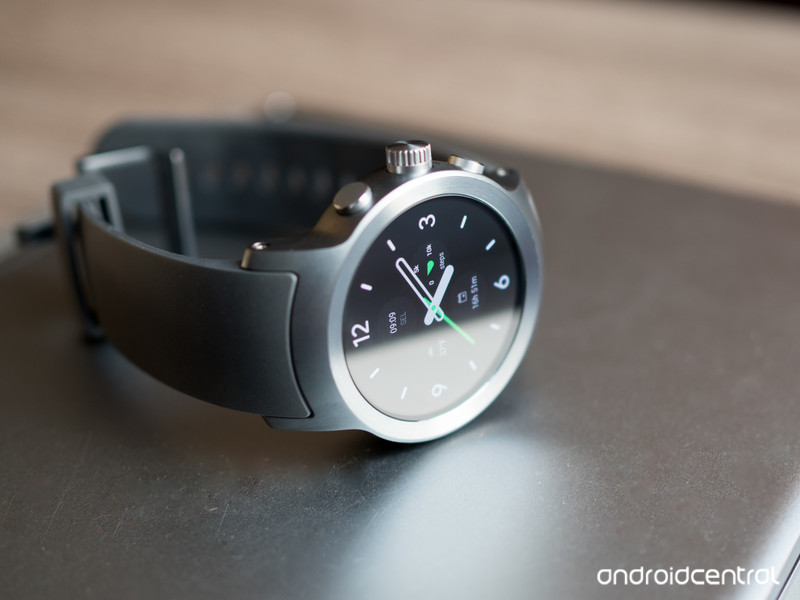
LG’s Watch Sport has everything: a big, beautiful P-OLED display, a high-speed processor, NFC for Google Pay, LTE for independent connectivity, and a massive 430mAh battery. It has been among the first devices to receive Wear OS updates, which means that early adopters can benefit from all the platform’s new features.
It may be big, but the stainless steel chassis wears it well, and it hides a very accurate heart rate sensor on the back. At $259, it’s not cheap, but it’s worth it.
Bottom line: The LG Watch Sport is a big watch, but it’s also big on features.
One more thing: If the Sport is too big, and too pricey, LG has another option, the sleeker LG Watch Style, for $120.
Why the LG Watch Sport is the best
The LG Watch Sport is a beast. It’s big, heavy and expensive. And yet it’s the best Wear OS watch out there right now, mainly because it packs so many features into one device. Want to pay with your watch? Go ahead. Want to use it independently to track a run using GPS? Sure, it can do that, too.
Android Central’s Andrew Martonik summed it up nicely in his review:
Many technology enthusiasts will still be wooed into considering the LG Watch Sport, even at $349. The allure of a fresh smartwatch that fixes many pain points of previous Wear OS watches will be strong. It has a great display without a dreaded flat tire, a nice case that is, unfortunately, a bit too thick but has great build quality, and every feature you could want crammed inside.
The LG Watch Sport is for the wearable fan who wants to experience Wear OS 2.0 to the fullest right from the start, and see the latest Google has to offer on some great hardware from LG.
LG has a hit on its hands, despite the watch’s size, and there is something encouraging about how much more capable it is than previous generations of watches.
Best for watch lovers
LG Watch Style

See at Amazon
As much as we love our former pick in this category, the Huawei Watch, LG’s newest slim smartwatch, the Watch Style, gets our pick for a timepiece that best imitates a real watch. While it lacks the features of its more expensive and much larger kin, the Watch Sport, it makes up for it in sheer usability. The 1.2-inch POLED display is delightful, and Wear OS works really well on the spinning crown, which enables smooth scrolling without having to touch the display.
Bottom line: The Watch Style may be the best all-round Wear OS watch for the mainstream.
One more thing: It comes in three colors, including the always coveted rose gold.
Best mid-sized alternative
Huawei Watch 2 Classic

See at Amazon
It may not look much like the original Huawei Watch, but the Huawei Watch 2 Classic is the nicer, metal version of the company’s new Wear OS series, and we like it a lot. A gorgeous, sharp 1.2-inch OLED panel and a comfortable leather wrist band make for plenty of enjoyment, plus the heart rate monitor and GPS let the Watch 2 Classic live on its own, sans phone, when you want to go on a run. We just wish that chronometer bezel could spin.
Bottom line: If you’re looking for something like the LG Watch Sport in a much smaller package, this is the one for you.
One more thing: Wait until it’s on sale on Amazon, where it gets discounted regularly.
Best value
ASUS ZenWatch 3

See at Amazon
Wear OS is, first and foremost, a way to interact with your phone remotely. ASUS has positioned the ZenWatch 3 as a way to enjoy the best Wear OS features without emptying your wallet. The round display, metal and leather help it stand out a bit, but it’s at a very price-conscious $199.
Bottom line: If you really want Wear OS but don’t need the super-high-end feel of a more expensive watch, the ZenWatch 3 does the trick.
One more thing: ZenWatch 3 is available in two distinctly different color options — a bright silver with a grey band, or stealthier black with a dark brown band.
Conclusion
The LG Watch Sport is not just a good watch, it’s the best Wear OS watch you can currently buy. While that may change in the coming months with new wearables from big names like Huawei, Sony and others, no other Wear OS device right now does as much, and so well, as the LG Watch Sport.
Best overall
LG Watch Sport

See at Newegg
LG’s Watch Sport has everything: a big, beautiful P-OLED display, a high-speed processor, NFC for Google Pay, LTE for independent connectivity, and a massive 430mAh battery. It has been among the first devices to receive Wear OS updates, which means that early adopters can benefit from all the platform’s new features.
It may be big, but the stainless steel chassis wears it well, and it hides a very accurate heart rate sensor on the back. At $349, it’s not cheap, but it’s worth it.
Bottom line: The LG Watch Sport is a big watch, but it’s also big on features.
One more thing: If the Sport is too big, and too pricey, LG has another option, the sleeker LG Watch Style, for $249.
Update, March 2018: The LG Watch Sport is still the best Wear OS smartwatch you can buy right now.
YouTube bans videos that sell guns and accessories
Gun videos may be a thing of the past on YouTube, with the Google-owned company updating its policies on firearms-related content. Videos can no longer sell guns or accessories via direct sales or even have links to sites that sell them. Videos also cannot have instruction on manufacturing firearms or associated items like magazines or silencers.
Accessories banned include bump stocks, gatling triggers, drop-in auto sears and conversion kits, as well as high-capacity magazines. Instruction on upgrading firearms to automatic or simulated automatic firing capabilities is similarly prohibited. This isn’t YouTube’s first policy update around firearms, either; the company banned gun mod tutorials after the Las Vegas shooting last year.
According to Motherboard, YouTube has already removed some of these types of videos, causing some consternation among popular gun vloggers. “As much as I appreciate that they are now defining their guidelines much more clear…they have imposed this NEW rule without talking to anyone beforehand and there is no transitional period,” slingshot vlogger Jörg Sprave told the site. “Many gun channels must now be afraid, as they might get plenty of strikes in no time for older videos and then lose their channels. They should at least get some time to clean up their videos so the new rules are kept. Again, not the way you treat ‘partners.’”
Via: The Verge
Source: Google
 AIVAnet