


Google Play offering discounts inspired by ‘Ready Player One’
Get savings on movies, audiobooks, and more.
Steven Speilberg’s Ready Player One is officially in theaters, and in celebration of its highly-anticipated release, Google Play is running discounts on a number of audiobooks, e-books, and movies that should help to itch your 80s nostalgia craze.

When it comes to e-books and audiobooks, Google Play is running deals on titles like Starship Troopers, Ender’s Game, A Clockwork Orange, and many others. You can browse through the entire collection of sales here.
As for movies and TV shows, there’s even more to check out. Google’s discounted titles start at just $4.99, and they include Back to the Future, Jurassic Park, Alien, The Shining, etc. There are far too many movies to list here, so you can check out the entire sale on Google Play.
These savings are available now, and after you pick up a movie/book or two, be sure to drop a comment down below and let us know what you got!
See at Google Play
Google will predict Final Four winners based on in-game data
Google has been working closely with the NCAA during this year’s tournament, but now, during the Final Four, the company will be using predictive analytics to figure out who will win games. The wrinkle here is that the team will use data from the first half of the game to come up with their prediction during halftime. They’ll then create an ad right in the Alamodome, which will air before the beginning of the second half of the game.
The analytics that the Google Cloud team will be using to predict which team will win will be based on the interesting facts they’ve uncovered while analyzing NCAA data: “everything from who blocks more shots per minute (for the record: juniors) to whether teams with a certain type of animal mascot cause more March Madness upsets (hint: meow),” according to a blog post.
But the team wondered whether they could do more if they used machine learning and their analytics to figure out what might happen during a game, based on how the teams were performing before halftime. That’s why they’re trying this halftime experiment using Google Cloud Platform tech. You can learn more about exactly what they are trying to do over at their blog.
While this is certainly exciting for basketball fans, the Cloud Platform team is hoping that the techniques they use, and what they learn from the experience, will be broadly applicable. The team will break down what their results were after the Final Four.
Source: Google
Apple Shares Recommended Graphics Cards and Chassis in New eGPU Support Document for macOS High Sierra 10.13.4
macOS 10.13.4, released to the public yesterday afternoon, introduces official support for eGPUs (external graphics processors) on Thunderbolt 3 Macs. Alongside the release, Apple has published a detailed support document that outlines how eGPU support works and provides graphic card and chassis recommendations for use with your Mac.
One or more eGPUs can be used with the 2016 MacBook Pro and later, the 2017 iMac and later, and the iMac Pro, so long as macOS High Sierra 10.13.4 is installed. Apple has added eGPU support for graphic-intensive operations like using VR headsets, 3D gaming, and developing VR apps.
Apple’s support document outlines all supported eGPU configurations, with Apple recommending only AMD Radeon cards. There are no supported Nvidia cards.
It’s also worth noting that Apple has eliminated support for some cards that were supported during the beta, such as the AMD RX 560.
It’s important to use an eGPU with a recommended graphics card and Thunderbolt 3 chassis. And if you’re using a MacBook Pro, the eGPU’s Thunderbolt 3 chassis needs to provide sufficient power to run the graphics card while charging the computer.
Apple recommends AMD Polaris, Vega 56, and Vega 64 graphics cards, paired with a specific Thunderbolt 3 chassis. For the AMD Radeon RX 570, RX 580, and Radeon Pro WX 7100 cards (of which Apple recommends the Sapphire Pulse series and the AMD WX series), Apple recommends the following Thunderbolt 3 chassis:
- OWC Mercury Helios FX3
- PowerColor Devil Box
- Sapphire Gear Box
- Sonnet eGFX Breakaway Box 350W
- Sonnet eGFX Breakaway Box 550W3
- Sonnet eGFX Breakaway Box 650W3
For the AMD Radeon RX Vega 56 cards, Apple recommends the Sapphire Vega 56 and the XFX Vega 56 with the OWC Mercury Helios FX, PowerColor Devil Box, Sonnet eGFX Breakaway Box 550W3, or Sonnet eGFX Breakaway Box 650W3.
The Sonnet eGFX Breakaway Box 650W3 is the only chassis recommended for AMD Radeon RX Vega 64, Vega Frontier Edition Air, and Radeon Pro WX 9100 graphics cards, while the only recommended all-in-one eGPU product is the Sonnet Radeon RX 570 eGFX Breakaway Puck.
For the MacBook Pro, eGPUs and accompanying TB3 chassis must be able to provide sufficient power to run the graphics card while also charging the computer. In the case of the 15-inch model, that means the chassis needs to support at least 85W of charging power.
Apple says eGPU support has been designed to accelerate Metal, OpenGL, and OpenCL apps that benefit from more graphics power, and not all apps will support eGPU acceleration. Apple says eGPUs will work with most of the following types of apps:
- Pro applications designed to utilize multiple GPUs
- 3D games, when an external monitor is attached directly to the eGPU
- VR applications, when the VR headset is attached directly to the eGPU
- Pro applications and 3D games that accelerate the built-in display of an iMac or MacBook Pro. (This capability must be enabled by the application’s developer.)
Multiple eGPUs can be used together, but Apple recommends users connect eGPUs directly to the Mac instead of daisy-chaining them through another Thunderbolt device or hub.
macOS High Sierra 10.13.4 does not support eGPUs in Windows using Boot Camp, when the Mac is in macOS Recovery, or when system updates are being installed.
Related Roundup: macOS High Sierra
Discuss this article in our forums
CrunchyRoll’s first game is based on ‘DanMachi’
Anime streaming network CrunchyRoll is making a video game based on the Is It Wrong to Try to Pick Up Girls in a Dungeon? series. The free-to-play Memoria Freese/Dan-Memo is available for both Android and iOS and will feature in-app purchases and an original storyline from the show’s first season. Series creator Fujino Omori is handling writing duties, with Yoshitsugu Matsuoka, Inori Minase, Saori Ōnishi and others lending their talents to the voice cast. And don’t worry about dubs here: CrunchyRoll promises there will be Japanese voices with English subtitles.
As far as gameplay goes, it looks like a 2D dungeon-crawler RPG with turn-based battles, little kids with gigantic swords and gorgeous animated cutscenes. This marks the first time the streaming network has made a game, splitting production duties with Japan’s social network platform, Gree. For anime fans, it looks like the Easter Bunny might’ve arrived a little early.
Twitter will host Final Four ‘watch parties’ with live analysis
Twitter’s sports offerings have grown quite a bit over the last couple of years. Between game coverage, 24/7 streams and analysis shows, Twitter keeps expanding its sports content, and this weekend, Variety reports, it’s adding March Madness Watch Parties to its slate. In partnership with Turner Sports, CBS Sports and the NCAA, Twitter will host a “live social-viewing experience” during both Men’s Final Four games this weekend as well as the National Championship game on Monday. The Watch Parties will consist of analyst commentary, highlights and even some special guests.
On board for these parties are analysts Brendan Haywood, Candace Parker and Andy Katz as well as reporters Allie LaForce and Dana Jacobson. Video will be of them reacting to the games while tweets related to March Madness will appear below. The first Watch Party will begin on Saturday, March 31st at 6PM Eastern, when Michigan and Loyola Chicago go head to head. The Watch Party will continue during the Kansas/Villanova game Saturday night and during the final game on Monday.
You can join the Watch Party here and through the NCAA’s @marchmadness Twitter account.
Via: Variety
Source: Twitter
Open Bionics’ latest 3D-printed arm goes on sale next month
Open Bionics announced today that its 3D-printed Hero Arm prosthetic will be available for purchase in the UK next month. The company’s founders started Open Bionics because they were interested in developing prosthetic limbs that were less expensive than traditional options, which typically cost tens of thousands of dollars. Using 3D-scanning and 3D-printing, they aim to produce more affordable options that can be constructed much more quickly than other prosthetic devices. In the past, they’ve developed Star Wars-, Iron Man- and Frozen-themed prosthetic hands for children as well as a Deus Ex-inspired arm.
The Hero Arm is the company’s latest design. Open Bionics says its three-times more affordable than similar multi-grip bionic arms and each one is custom built for the person using it. It’s available for children as young as eight years old and Open Bionics is touting it as the “world’s first medically approved 3D-printed bionic arm.” We’ve reached out to see what exactly they mean by “medically approved.”
The device weighs less than a kilogram and can lift up to eight. It also has a long-lasting battery, custom covers that can be switched out and offers multiple types of grips that can be reconfigured depending on the user’s preferences. The Hero Arm has a freeze mode so users can hold a position without added effort, feedback in the form of lights, sounds and vibrations and a posable wrist that can rotate 180 degrees, making it easier to grab things at odd angles.
You can check out more features in the video below. The Hero Arm will be available in the UK starting April 25th.
Source: Open Bionics
ASUS NovaGo review: ‘Always online’ comes with limitations
As the first Snapdragon-powered PC available, the ASUS NovaGo has a lot riding on it. When Qualcomm and Microsoft teamed up to make connected PCs, they promised devices that would remain always on, always online and provide access to the apps you need to work on the go. So far, parts of that puzzle are missing — like eSIM support from carriers. But that hasn’t stopped the first wave of laptops, starting with the $599 NovaGo, from trying to leave their mark. It’s meant to deliver the benefits of smartphone-like connectivity and battery life in a laptop, but unfortunately also highlights the limits of an unproven platform.
Hardware
Let’s be real — the NovaGo isn’t the prettiest. There’s nothing much to say about its staid black-on-gray color scheme, and it doesn’t have sexy, skinny sides, although I appreciate its sturdy build. It doesn’t help that it’s heavier than most ultraportables too. Slick machines like MacBooks, Dell XPSes or HP Spectres are lighter and more attractive, but they also tend to cost at least $1,000. Perhaps the NovaGo’s relatively bland looks serve as a good reminder that we’re really dealing with a midrange, albeit ambitious, machine here.
The 13-inch full HD screen on this thing is adequate inside an office or a cab, but suffers under direct sunlight. It’s hard to read what you’re working on outdoors, as a result of both the dimness and the reflective finish of the screen. Audio is also problematic; Sound is muffled when I play music with the laptop in my… lap. You’re probably not going to blast the speakers when you’re using this in, say, an airport or restaurant, unless you’re desperate or inconsiderate, but it’s still worth noting.
I had no trouble with the NovaGo’s keyboard, though. The keys are amply spaced, and offer comfortable travel and satisfyingly spongy feedback. Don’t expect Thinkpad-level of travel or response, though. This is a better keyboard than the MacBooks and MateBooks I tote around to shows, but it’s not surprising from a thicker device like the NovaGo. The touchpad, meanwhile, is plenty roomy, although I don’t like that the fingerprint sensor is embedded in the top right corner, taking up space.
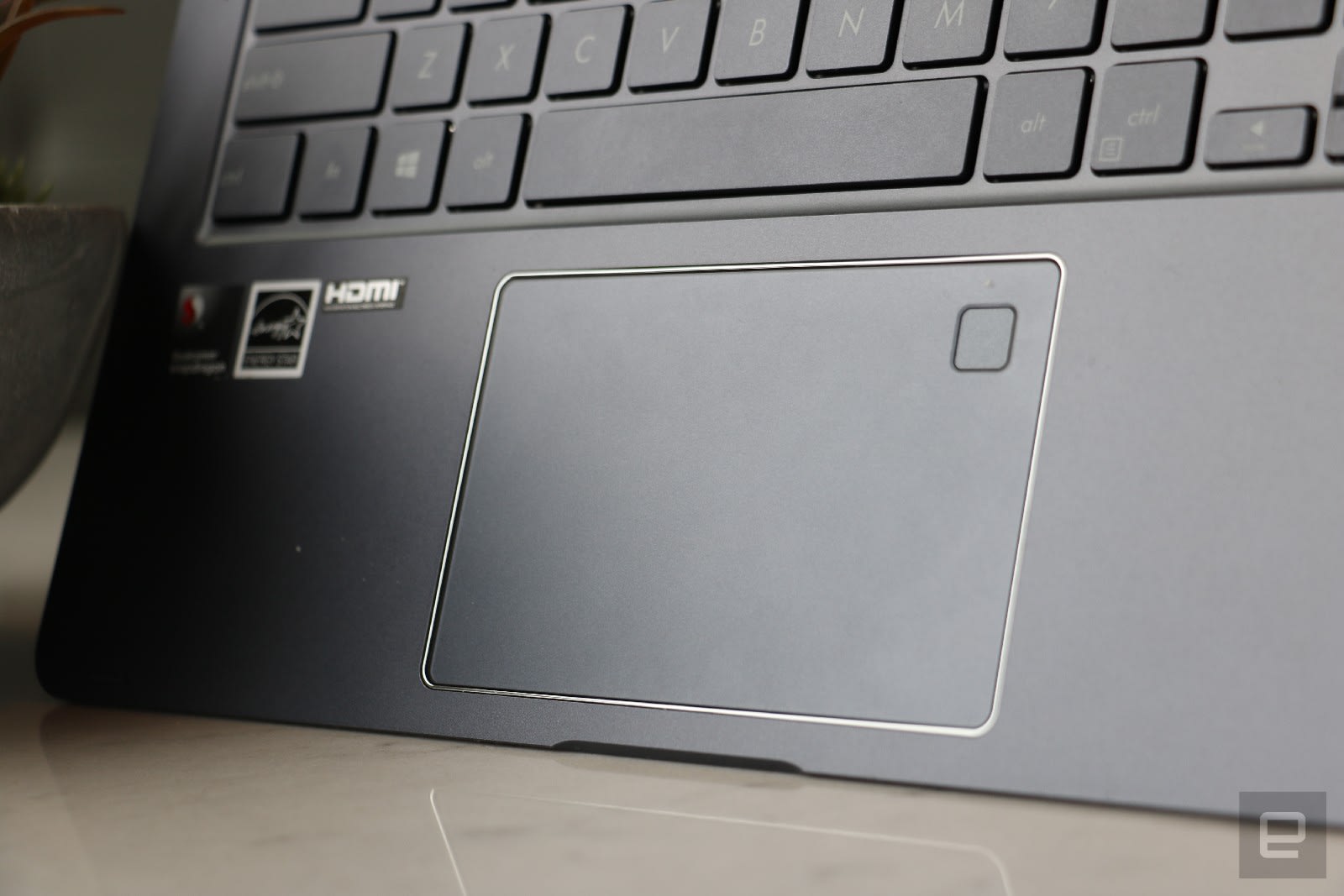
Pinch and swipe gestures on the trackpad work well — no major complaints here aside from the occasional mistake when I’m trying to drag to highlight text. I also don’t have much to report on the webcam — the selfies are just as grainy and discolored as you’d expect, but good enough to snap a lo-fi portrait to send to your friend on Telegram or WhatsApp. At least it’s centered above the screen and not stuck in some unflattering angle below your display.
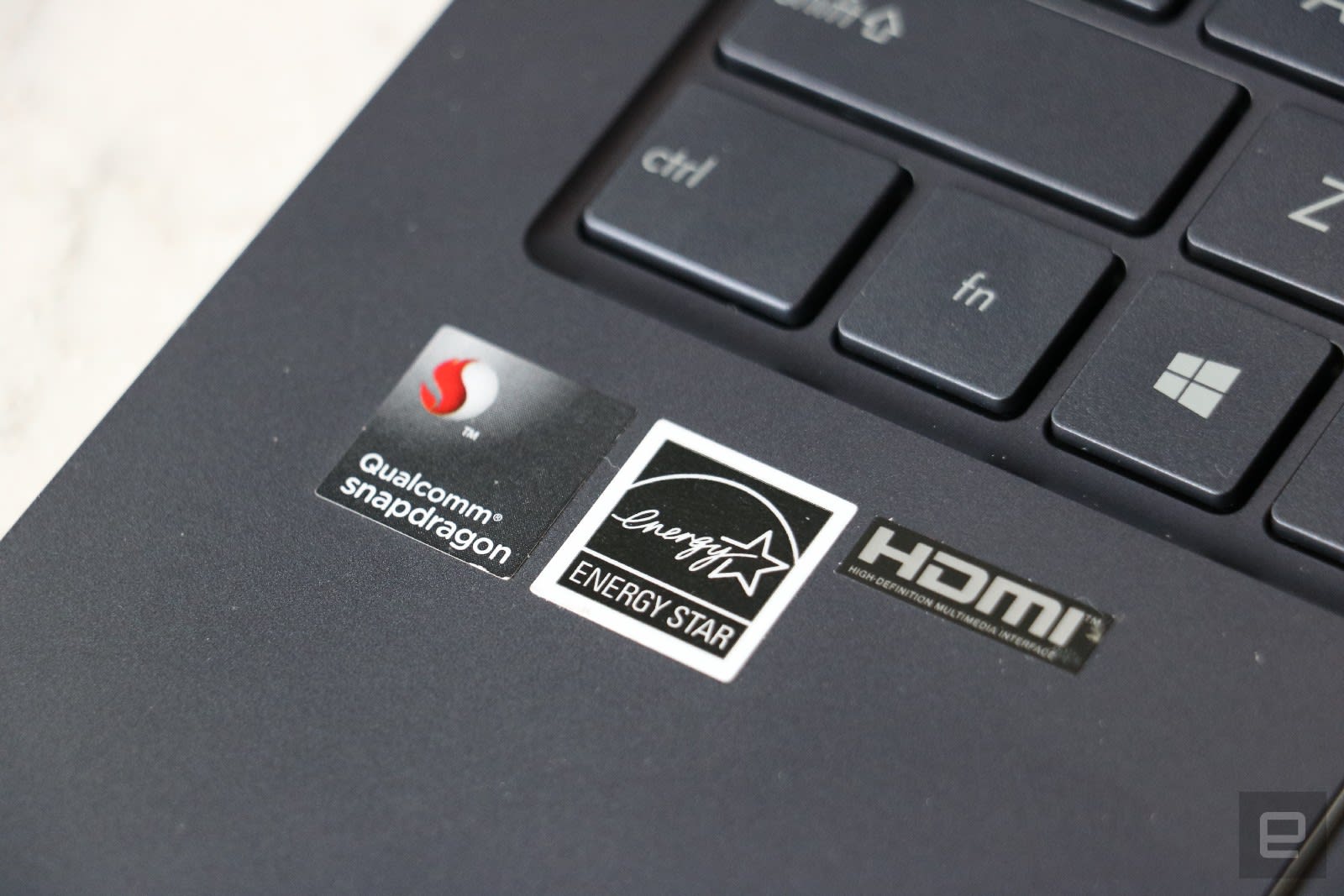
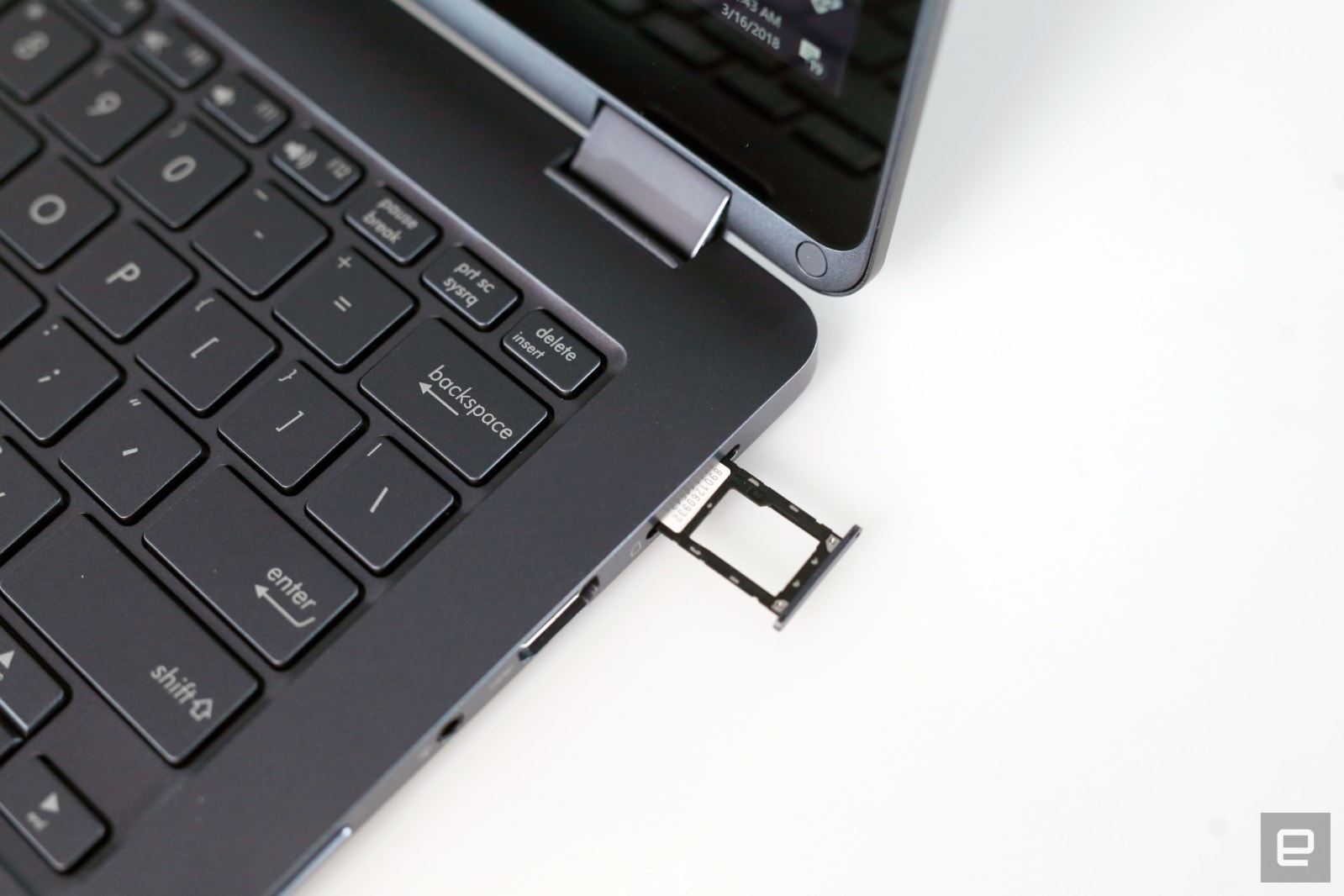
Something the NovaGo has over the competition is its relatively generous array of ports. You’ll find two USB-A ports, plus HDMI and microSD sockets. There’s even a headphone jack! Though, I wish you didn’t need to push an ejector pin into a minuscule hole to access the microSD and SIM card slot. I understand this is the same way you’d access it on a phone, but it’s incredibly inconvenient. Oddly, for a device that’s supposed to be smartphone-like in battery and connectivity, the NovaGo lacks a USB-C port. You’ll have to lug around a separate ASUS-specific charger for this laptop.
Finally, there’s the integrated eSIM and SIM card slot. Our review unit came with a T-Mobile SIM card, although in the future you should be able to pick your own carrier over the air via the embedded eSIM. Thanks to the Snapdragon 835 and its included X16 Gigabit LTE modem, the NovaGo reached impressive speeds in most parts of New York City.
Performance and battery life
Cherlynn Low / Engadget
Speaking of the Snapdragon 835, how does a smartphone-grade CPU hold up when powering a Windows 10 laptop? Well, it depends.
Analyzing the NovaGo’s performance is a complicated task. The typical benchmarks we use, like PCMark, don’t work on the ARM-based emulator. And honestly I’m not sure it’s fair or logical to pit the the Snapdragon 835 against high-end laptop chips like Intel’s Core i7 or i5. But I’ll say this: In general, I encountered few lags on the NovaGo. Sometimes it stuttered when loading a webpage that’s animation-heavy, and it slows down when I have more than three dozen Chrome tabs open. But I’ve also been able to do some light editing on Photoshop CC while writing this review and having Audacity open in the background with no major delay.
Let’s be very clear about what software this runs, by the way. By default, the NovaGo will run Windows 10 S, which limits the apps you can install to stuff you can find in Microsoft’s store. But from now till some point in 2019, Microsoft is offering all connected PCs a free upgrade to Windows 10 Pro, which is what my review unit arrived with. This let me download and install 32-bit apps like Audacity and Photoshop CC. It’s a bit of a hassle to upgrade, but you should, since it’ll give you access to more apps.
Even after upgrading, though, you won’t be able to use 64-bit programs and even some 32-bit apps that access the kernel drive, since the emulator designed for these ARM-based systems can’t process those. While I was able to install Steam, I had a hard time finding compatible games. Most of the programs I use for my work have a 32-bit version I could run, although Photoshop Elements and OpenVPN don’t. With the upgrade, the Windows on Snapdragon ecosystem is more capable than Chrome OS… slightly. Depending on your workflow, this could be a dealbreaker.
Still, the NovaGo has its benefits. The best thing about working on this laptop outside is its connectivity. It’s such a joy to unfold the notebook in a cab or at a restaurant and not have to set up a hotspot or ask for the WiFi password to get connected. After awhile, I just started to take my Internet connection for granted, which is incredibly freeing. Just remember to add the price of a data plan when you’re budgeting for this device — LTE doesn’t come for free.
Another advantage of the NovaGo’s similarity to a smartphone is what Qualcomm and Microsoft describe as “always-on”. The notebook wakes from sleep ever so slightly faster than other ultraportable PCs, making it just a bit more smartphone-like.
By the way, you can also use the NovaGo as a tablet or prop it up in tent mode, thanks to its sturdy 360-degree hinge. I rarely used it in anything other than a traditional laptop, but for those who want to give desk-side presentations, this is handy.
| ASUS NovaGo | 14:00 |
| Dell XPS 13 (2018) | 9:50 |
| Lenovo Thinkpad X1 Carbon/Yoga (2018) | 15:30 |
| Surface Book 2 15-inch | 20:50 |
| Surface Laptop | 14:49 |
| Apple MacBook Pro 2016 (13-inch, no Touch Bar) | 11:42 |
On our battery test, which involves looping a local full HD video, the NovaGo lasted a respectable 14 hours before conking out. That’s lower than the promised 20 hours, and worse than the Surface Book 2, Surface laptop and Lenovo Thinkpad X1 Carbon and Yoga. But remember, it’s also hundreds of dollars cheaper.
Competition
Here at Engadget, we don’t often review laptops in the NovaGo’s price range, so it’s difficult to find comparable systems. Plus, the NovaGo is a unique beast — for now, anyway. The only other connected PC available at the moment is the HP Envy x2, which is smaller, lighter and costs $400 more. For your money you do get a stylus and a detachable, backlit keyboard. But that’s really all we can tell so far.
Consumers can already order one, but we haven’t received our review unit yet and can’t vouch for it. But, since the HP laptop also uses the same ARM-based Snapdragon 835 CPU as the ASUS, it’s safe to say you’ll face the same compatibility challenges on both.
If you’re fine with a more traditional laptop, you can always consider an upcoming Intel system with embedded eSIM, such as Acer’s Swift 7 or Lenovo’s Thinkpad X1 range. Although we’ve tested the latter, none of these laptops appear to have connectivity activated yet.
Then there’s the midrange laptops or even low-cost devices like HP’s Stream series or Chromebooks that run limited operating systems in exchange for sub-$500 prices. But the NovaGo easily beats those in connectivity and battery life.
Wrap up

The NovaGo is a respectable debut for Windows on Snapdragon — it lasts long, offers speedy connections almost everywhere and performs well for the price. But the hardware could definitely be better — a brighter display and better-placed speakers would be welcome upgrades.
Ultimately, my biggest issue with the NovaGo is its app compatibility, or lack thereof. While I didn’t run into major issues, knowing I might not be able to install something I need was like constantly looking over my shoulder for a stalker.
You might be better off waiting a year to buy into the connected PC ecosystem, seeing as one of its standout features — eSIM support from carriers — is not yet live. Plus, it’ll give developers time to make more compatible apps (if they choose to).
For now, I struggle to see the appeal of the NovaGo as a primary workhorse, but it’s more than capable as a secondary laptop specifically for productivity on the go. It’s a valiant first effort from ASUS, Qualcomm and Microsoft that will hopefully get better the second go around.
The best juicer
By Lesley Stockton
This post was done in partnership with Wirecutter. When readers choose to buy Wirecutter’s independently chosen editorial picks, it may earn affiliate commissions that support its work. Read the full article here.
After pushing almost 40 pounds of leafy, crunchy, pulpy produce through nine top machines, we think the Tribest Slowstar is the best and most versatile juicer for the home. Its single vertical auger turns at a slow 47 rpm, making it one of the slowest juicers available—key for getting maximum nutrients and enzymes from produce—and it yielded more juice than nearly every other model we tested, meaning less goes to waste. It also comes with a 10-year warranty on parts, so you can crank it up every day without worry about wear and tear.
Should I get a juicer?
Juicers are expensive machines that take up a lot of counter space; they’re not for dabblers. But if you’re already a juice enthusiast, you can offset the cost of boutique juice by making your own at home. If you drink green juice five times a week, even factoring in a little extra for electricity, the savings can add up to hundreds of dollars over the course of a year.
How we picked and tested

The Tribest produces high yields with low foam. Photo: Michael Hession
When selecting a juicer, the important things to look at are juice yield, ease of use, foam production (oxidation), and longevity. Slow juicers deliver better results than centrifugal models when it comes to juice yield and foam production. Models with a smaller footprint, like our top pick, the Tribest Slowstar, are great for people with limited kitchen space. Slow juicers also tend to be quieter. This might not be an issue for everyone, but if you make juice early in the morning while the house is asleep, noise might be something to consider. We also found that all of the juicers had one thing in common—they were a bit of a pain to clean. The parts aren’t dishwasher safe, so you have to clean the components by hand.
Since 2013, we’ve put 17 juicers through two tests, noting ease of use, yield, foam production, flavor, ease of cleaning, and amount of prep required. First, we tested their ability with greens and soft fruit by making a kale-grape juice with 8 ounces each of curly kale and Thompson green grapes. We then tested each juicer for its ability to juice hard fruits and vegetables, using 8 ounces each of carrots and apples, 4 ounces of celery, and 1 ounce of ginger. All yields were measured by weight.
Our pick

Our favorite juicer, the Tribest Slowstar. Photo: Michael Hession
For the second year in a row, the Tribest Slowstar, a vertical single-auger, slow-press juicer, aced all of our tests. It yielded nearly the highest amount of green juice and hard-vegetable juice with low effort, experienced no motor jams, and generated minimal foam. This juicer is one of the most efficient with greens, ejecting very fine, dry, almost sawdust-like pulp after extraction. It has a generous feed tube opening that makes for quicker prep and easier juicing. The quiet machine is backed with a 10-year warranty that covers the motor and parts, one of the better guarantees among the juicers we tested.
The Tribest handled a constant stream of kale with supersoft grapes without gumming up or stalling out. Flavor was a good indicator of how much of the greens actually made it into the glass; juices that were sweeter had extracted less kale and more grape. The flavor of the Tribest juice was as fresh and bright as any we’ve had at boutique juice bars, with a nice balance between the kale and the grapes. The hue was a vibrant green, like Technicolor in a glass, with minimal foam. The Tribest also handled hard and fibrous vegetables and fruits like a champ.
Runner-up

Our runner-up, the Omega VSJ843. Photo: Michael Hession
The Omega VSJ843 turns at a very slow 43 rpm, the slowest of the machines we’ve tested, and it shows in the low-foam juices it produces in its very quiet operation. The VSJ843 produced 25 percent more green juice than even the high-yielding Tribest, so if you’re interested in only smooth green juices, you might prefer it to our pick. However, for most people, its higher price, lower yields on carrot-apple juice, and lack of versatility make it a close runner-up.
The VSJ843 really improved on its predecessor, the VRT400, with almost pulp-free juices, offering the smoothest juice we’ve ever produced in a home kitchen. It made slightly less carrot-apple juice than the Slowstar, but it blew the Slowstar out of the water in our kale-grape test. The Omega VSJ843 comes with a 15-year warranty on motor and parts, so you can juice with confidence for a very long time.
Budget pick

Our budget pick, the Omega J8004. Photo: Michael Hession
The Omega J8004 is a quality machine and a favorite of our founder, Brian Lam. As he said in his original juicer guide, “It’s more efficient at squeezing nutrients and liquid from leafy greens than the more popular (and admittedly great) Breville juicers. Compared to the Brevilles, some juice experts say you’ll get nearly double the juice from the Omega. At about $260, the Omega costs slightly more than low-end juicers, but it offers better quality and taste, it’s easy to clean and it’s built to last a decade.”
Though it’s not the cheapest of the juicers we tested, the Omega J8004 represents the best value, especially considering the excellent 15-year warranty on the motor and parts. However, there are some trade-offs. First, it’s quite big, requiring a 16-by-7-inch space on the counter. It also isn’t great with softer, juicy fruits. Its feed tube is also an inch narrower than the Tribest’s, which makes a difference in how much prep work you need to do with vegetables and fibrous fruits.
This guide may have been updated by Wirecutter. To see the current recommendation, please go here.
Note from Wirecutter: When readers choose to buy our independently chosen editorial picks, we may earn affiliate commissions that support our work.
ZTE brings the first Android Go phone to the US for $80
Today, handset maker ZTE made the first Android Go phone available in the US. The Tempo Go retails for $80 and is available for purchase at the company’s website.
As you’d expect, the specifications aren’t exactly the top of the line — the device is 5.73 inches tall and 2.83 inches wide, with a 0.36-inch depth. The screen resolution is 854 x 480. It has a 5 MP rear-facing camera and a 2 MP front-facing camera, with a 2200 mAh battery. It runs on a 1.1 GHz quad-core Qualcomm 210.
The phone is designed to run Android Oreo Go Edition (which we call Android Go), which is a lightweight operating system designed for older and slower phones. It’s not designed to be able to live up the the expectations of those who want the latest and greatest phone. Instead, these phones allow for less full-featured apps, with the tradeoff of access to modern conveniences, such as Google Assistant, and the most up-to-date security features.
Via: Android Police, The Verge
Source: ZTE
‘Away’ is a full-length CG movie made by one person
A boy dangling from a tree in a barren desert. A forest filled with standing stones that have circular holes punched through them. Turtle-riding cats. Spooky caves. Curious elephants. These are just a few of the shots in the first trailer for Away. The 3D animation is far from perfect, but there’s a clear, distinctive style throughout. The most impressive part, though, is revealed in the video’s description: “Animated feature film by Gints Zilbalodis.” Unlike the latest Pixar movies, Away is being made by just one person. It’s a colossal challenge, but one that the 23-year-old animator has been building toward for eight years.

Zilbalodis grew up in the Latvian capital of Riga. His parents met in art school, so it was no surprise that he quickly fell in love with illustration and filmmaking. As a bright-eyed 15-year-old, he made a two-minute short called “Rush,” with a “pretty old iMac” and a piece of software called Toon Boom. The hand-drawn tale depicts a boy crossing a busy road and narrowly missing a flurry of cars. As he contemplates his near-death experience, another car honks its horn, causing the youth to twist his head and accidentally walk down a manhole. “I was attempting to make something funny,” Zilbalodis said, “but that’s not what I’m good at.”
The budding animator enrolled at JRRMV, an art-centric high school in Riga, where he worked on a short called “Aqua” in his spare time. The film revolves around a cat that has to overcome its fear of the ocean. Zilbalodis “isn’t really sure” where the idea came from, but he had a cat — his family’s first — called Josephine at the time.
“Aqua” (2012)
As the film progresses, the sea-trapped moggie learns to dive into the water, catch fish, and swim back to the surface like a kingfisher. Zilbalodis had followed a classic narrative structure called the hero’s journey (character goes on an adventure, overcomes great odds and comes home changed), but he did so by accident: He only realized it after reading a pile of screenwriting books, including the revered The Writer’s Journey: Mythic Structure for Writers, by Christopher Vogler.
The cat was little more than a stick figure, because Zilbalodis “couldn’t draw very well.” The short is also stuttery, because he was “lazy” and used “very few frames.” Still, it was good. The shots were dynamic, and the music, performed by his childhood friend Bertrams Pauls Purvišķis, was a perfect match. Zilbalodis’ teacher and parents urged him to show the film at a theater owned by his uncle. He eventually caved and invited the entire school to what became an informal premiere. “The only time I could get was in the morning,” he said, “while classes were happening at school. So I had to arrange a school trip for everyone.”
Zilbalodis posted “Aqua” on Vimeo the same day. He refreshed the page every hour and was taken aback when it was selected as a Staff Pick. “At that time, Staff Picks were worth so many views,” he said. The coveted recommendation meant it was quickly seen and covered by animation blogs. Later, he posted the video to YouTube and Newgrounds. The latter, which rose to fame in the early noughties as a place for independent Flash animation, had been a big influence on Zilbalodis as a child. “Aqua” was one of the first videos to be uploaded in HD on the site.
“I invited the entire school to the premiere.”
At this point, the Latvian animator realized two things. The first was that he didn’t want to work in a large company. He enjoyed every part of the filmmaking process and hated the idea of specializing. The second was that he wanted to switch to 3D, because the medium would cover his sub-par drawing skills and facilitate more complicated camera moves.
“Priorities” (2014)

Zilbalodis spent the next 18 months working on a short called “Priorities.” The film is about two castaways — a pilot and his dog — who crash in a secluded cove and try to escape on a makeshift raft. Stormy weather, though, knocks the lovable canine into the ocean, and the man is forced to pick between salvation and his best friend. “At the time, my family had its first dog,” he explained. “So just like the cat [in “Aqua”], I was inspired by the animal.”

Concept art for “Priorities.”
The film is nine minutes long and consists of just four shots. Zilbalodis was imitating Alfonso Cuarón, the Mexican film director behind Gravity and Children of Men, and his cinematographer Emmanuel Lubezki. The pair are known for their prolonged, uninterrupted shots that show more of the world or a string-like connection between characters. Zilbalodis also experimented with handheld camera movements inside his 3D world. The teenager was worried that the film would look like a video game and hoped this imperfect style would give it a more organic feel. “It’s a kind of mixture between a handheld and very digital look,” he said.
Zilbalodis used Maya, a popular program for video game and animation modeling, to develop the short. He found the application “very hard,” however, and struggled to create complex effects. “But actually, that helped me to find my style,” Zilbalodis explained. The young director learned to embrace his shadowless character models and simple facial expressions. “The aesthetic of the film was influenced by the things I couldn’t do and had to think around,” he said. “Many of the decisions I made were done to hide my lack of knowledge.”
“Priorities” became his graduation movie. He premiered the film at his uncle’s theater and sent copies to a few animation festivals. He also posted it to Vimeo, which was risky, because many festivals refuse films that are already available to the public. The inverse happened, however: The upload was successful and attracted more interest from festival organizers, including some that Zilbalodis hadn’t considered before. “I just thought that I couldn’t or wouldn’t be accepted,” he said. The teenager attended a number of festivals that year, including Animafest Zagreb, in Croatia, and one that takes place inside Japan’s New Chitose Airport.
“Followers” (2015)

Concept art for “Followers.”
Zilbalodis’ next film, “Followers,” was funded by the Latvian government. It was a small grant, but enough to sustain the filmmaker while he juggled the occasional freelance project. The short is about a robber who is ditched by his partner and forced to spend time in prison. He escapes and befriends a delinquent boy who becomes an unlikely “follower” — that is, until he recognizes the cycle he’s creating and turns himself over to the police.
The visuals are a huge step up from “Priorities.” Zilbalodis is “mostly happy” with the film but thinks some of the themes aren’t particularly clear. “I think I was using just too many things at the same time,” he said. “It’s a bit overwhelming to watch.” Still, he learned a lot about Maya and complementary software including After Effects and Apple’s Logic Pro X. He also concluded that the higher visual fidelity wasn’t worth the longer rendering times. “It was very stressful, because when I made a mistake I had to re-render everything,” Zilbalodis said.
Next, he made “Inaudible,” a short about a deaf musician. It came out on June 18th, 2015, just six months after “Followers.” The fast turnaround was enabled by Zilbalodis’ new lifestyle, which was free of schoolwork and nonessential freelance projects. But it was also a result of the Latvian government grant system — with only one contest per year, Zilbalodis had to work quickly to be eligible for funding.
“If I had taken a year off, I would have been forced to find another job or start doing freelance work.”
“Maybe I should have allowed myself a bit more time,” he said. “But if I had taken a year off, I would have been forced to find another job or start doing freelance work. And I didn’t want to do that. I wanted to focus on my own films.”
“Inaudible” (2015)

Concept art for “Inaudible.”
All of these projects have led to Away, a 70-minute feature set for release next year. At the outset, Zilbalodis split the movie into four chapters, or shorts, to help manage the workload and secure financial support from the Latvian government. He made the first chapter, “Oasis,” and sent it to some animation festivals last year. “But it wasn’t very successful there,” he said. The animator thinks it struggled because it’s part of a larger story and “doesn’t really have a very good conclusion.” At 17 minutes, it’s also pretty long for a traditional short.
Zilbalodis was undeterred, however. He decided to go back and remake “Oasis” before progressing with the final three chapters. The critical reception also made him rethink how he wants to release the feature; now it will be shown in its entirety only at animation festivals. “I think the story works much better when seen in its entirety,” he said. “So now I’m focusing on the feature film; however, I will be maintaining the four-chapter structure.”
Away will follow a boy as he befriends a small bird and tries to find his way back home. It’s inspired by Future Boy Conan, a post-apocalyptic anime series directed by Studio Ghibli co-founder Hayao Miyazaki in the late 1970s. Zilbalodis is also a fan of The Motorcycle Diaries, a 2004 live-action biopic about a young Ernesto Guevara, and cinematic video games, including Journey and The Shadow of the Colossus.
Working on this project is, in many ways, easier for Zilbalodis than his previous shorts. He knows the complete story, which means he doesn’t have to come up with a whole new concept and world for each chapter. “When I finish a chapter, I can jump right into the next one and I already have the characters and designs,” he explained. The animator and director still uses the same tools — Maya, After Effects and Logic Pro X — but has switched to the Viewport in Maya for real-time rendering. “So it doesn’t really take time to render,” Zilbalodis said. “Once I make something, it’s already rendered and finished.”

Away (2019)
Ideally, Away will be picked up by a distributor and get a theatrical release. Otherwise, Zilbalodis will consider selling the film through VOD platforms such as iTunes and Vimeo On Demand. And of course, he would like to show the film at his uncle’s theater in Riga.
As a one-man studio, Zilbalodis is unusual. But he doesn’t seem fazed by the scale of the project, which now stands at “about 80 percent done.” The animator points to small and single-person studios that have created hit video games such as Stardew Valley, Cave Story and Axiom Verge. “There’s no reason why people couldn’t do that in filmmaking or animation,” he said. “I think there will be many people doing this in the future.”
Source: Gints Zilbalodis (Vimeo)
 AIVAnet