


Uber considers Waymo partnership following lawsuit
Now that Waymo’s long-running lawsuit against Uber is finally settled, the two companies are free to cozy up to a possible partnership. According to a report at The Information, Uber executives, led by new CEO Dara Khosrowshahi, have been looking for a way to get Uber riders into Waymo’s autonomous cars.
Even though Waymo is already collaborating with Lyft, a working relationship with Uber would likely help the Google-owned autonomous car division get more of its self-driving cars on the road. Uber would be able to stay competitive with its largest rival, too, without falling too far behind in the public consciousness. There’s no indication, says The Information, that Waymo is ready to make a deal, however. Still, CEO Khosrowshahi is aware that Waymo’s self-driving systems are more advanced than Uber’s own, the site’s sources note, and would benefit from working with the Alphabet company.
Source: The Information
MWC 2018 teased a 5G-powered world that’s so close to being real
Before packing my bags for Spain, I took stock of my inbox for MWC meeting requests. A quick search showed I had more than 100 emails about 5G. “Solutions for cloud-based 5G infrastructures,” one read. “5G is happening,” another proclaimed. “Meet with XX 5G exec?” “XX invites you to experience the new 5G era.” From demos of super fast phones and connected street lights, to obscure infrastructure projects that will actually form the backbone of 5G, the thirst was real.
Cut to the first official day of the show, and it was almost impossible to avoid the in-your-face signs attempting to lure you to “5G open innovation” demos. Everywhere we turned, we were confronted with yet another banner. This isn’t surprising of course, 5G is very much a mobile communications standard and we were in Barcelona for Mobile World Congress, after all.
This isn’t the first time 5G news has permeated MWC — in years past, we saw companies show off “the first 5G phone,” even before the spec was approved. But at MWC 2018, we were seeing not just a few obvious proofs of concept, but a broad creative range of connected devices.
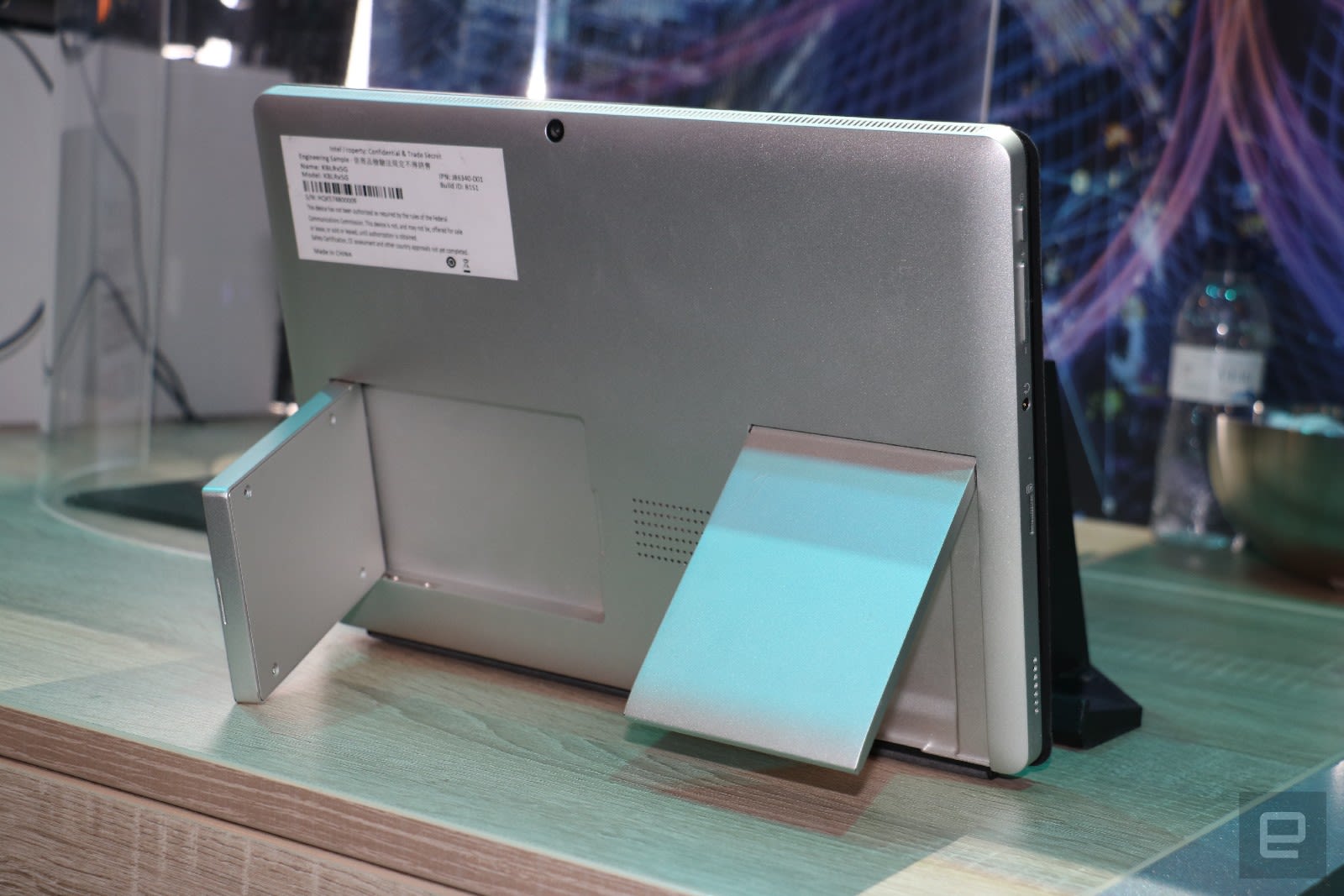
Intel, for example, had one of the most comprehensive sets of 5G applications on display. It showed off a 5G-capable PC concept, but it also showcased a 5G-connected car, as well as simulations of virtual cities. In those scenarios, devices like cars, traffic lights, drones and base stations communicate with each other to create a world that can basically think for itself. For example, cars packing 5G radios can allow passengers to conduct conference calls or watch Netflix at impressively high speeds while on the move. But a world with 5G everywhere could have gas pumps to automatically select the right type and amount of fuel for you and process the payment without having to leave the driver’s seat.
Self-driving cars can warn each other of upcoming turns and slowdowns, as well as allow for a traffic management to pre-emptively re-route autonomous vehicles to avoid congestion. Of course, we didn’t get to see that whole system in action just yet — what was on display was a cute setup with toys carrying transmitters to simulate that futuristic world.
Intel also shared a virtual map of a theoretical city that’s deeply integrated 5G into all sorts of devices. These ran the gamut from drones and weather sensors, to Bosch air quality monitors and General Electric’s CityIQ street lamps that track pedestrian traffic and listen for gunshots. Many of these are actually already live in various cities, but for the sake of MWC, Intel plotted their data onto a map of Barcelona. The company showed how, in theory, this information could all be collected and used not just for easing congestion, but also to deliver things like Amber alerts through digital billboards.
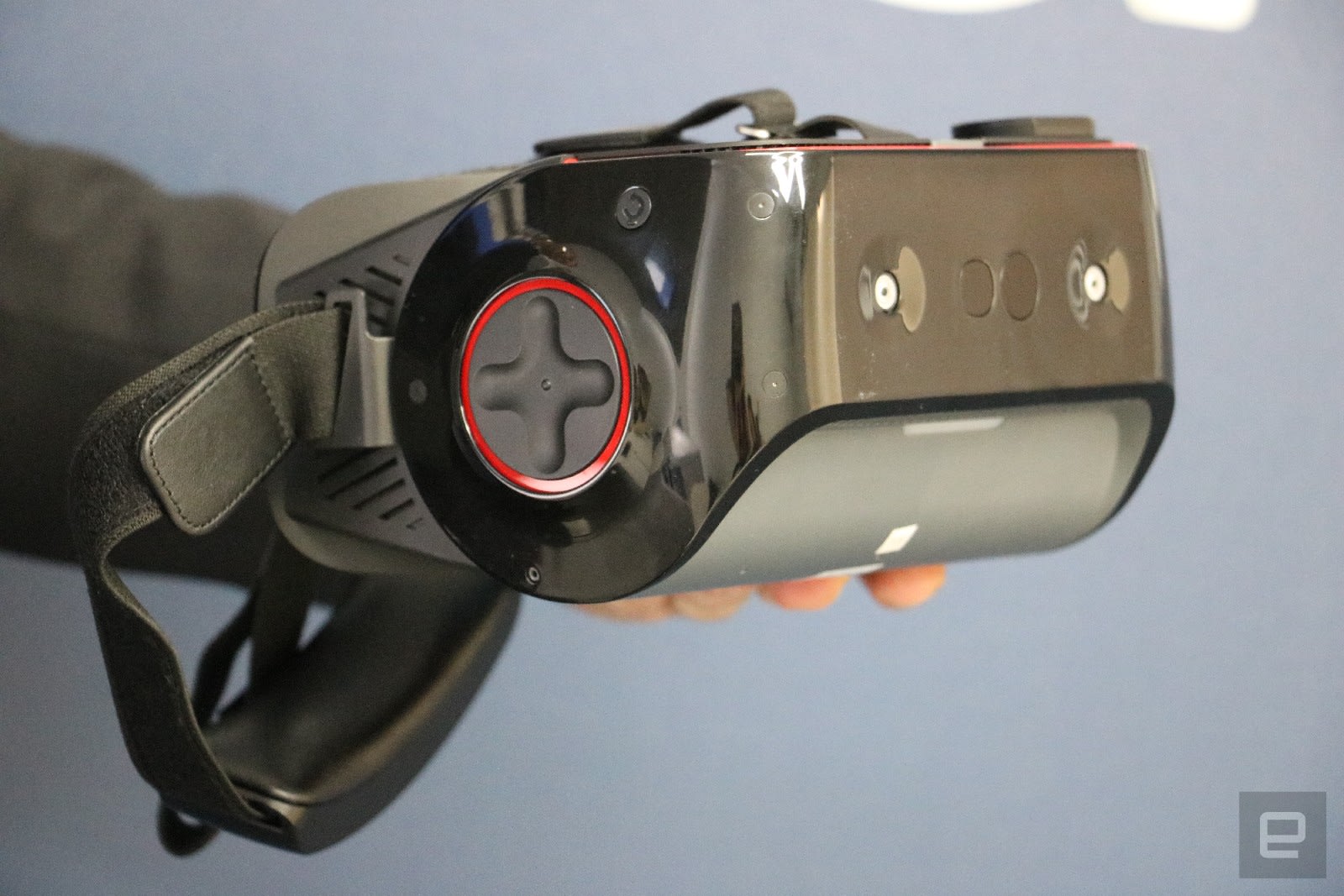
Above: Qualcomm’s Snapdragon 845 reference design headset (not the 5G version).
Meanwhile, in a meeting room above its booth, Qualcomm secretly showed off a virtual reality headset that uses a blend of on-device and cloud-based graphics processing to push an impressively high-res immersive experience. The characters I saw, and the details on their costumes and surroundings, were extremely clear, to the point where I could see small stains on a person’s jacket.
But more importantly, I was able to explore this detailed world without any noticeable delay caused by the cloud-based graphics processing, thanks to the 5G connection. During my demo with Qualcomm, I was also able to turn my head around freely. Even when the receiver on top of the headset was obstructed from view of the base station in the top right corner of the room, I was still receiving high-quality VR graphics with barely a flicker in the experience. This is noteworthy as millimeter waves, which are a key part of the new 5G spec, are notorious for being susceptible to signal interference.
This is just a demo, of course, but since it uses components that are already compliant with the new spec, it’s a good indicator of what’s possible when 5G rolls out.
Now that there is an industry standard, companies also rushed to show off products that would help network operators get connected. For example, Huawei unveiled a 5G customer-premises equipment (CPE) terminal — like a signal repeater you can buy to access your service provider’s 5G network in areas with spotty coverage.
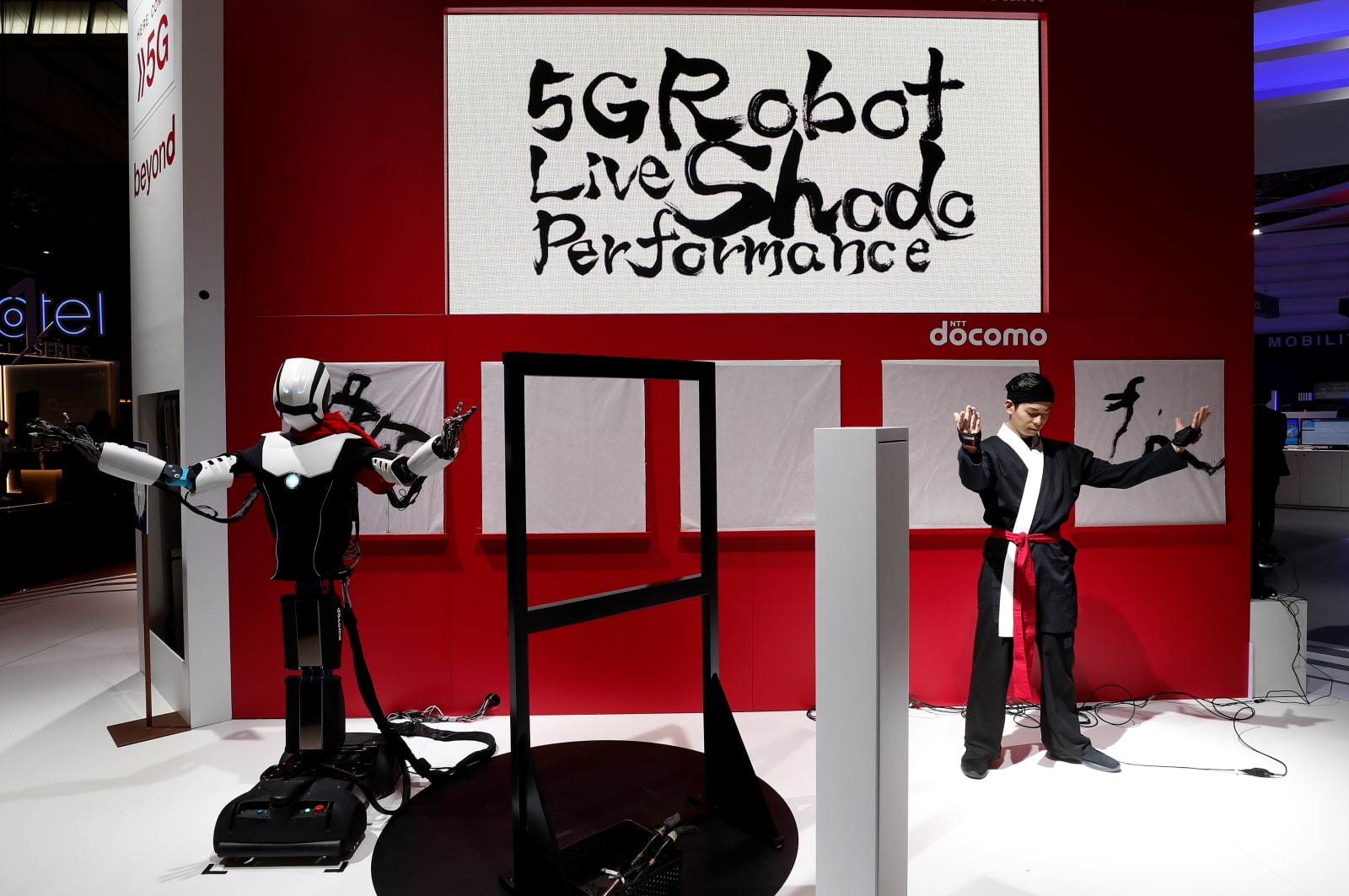
Carriers like T-Mobile, Telefonica and Deutsche Telekom also announced plans to bring 5G to their customers, while somewhere in far-flung Hall 7, people were invited to control 5G-connected robot football players that were in a whole other part of the convention center.
We are inching ever closer towards 5G becoming a reality, and nowhere was the excitement about this development as palpable as it was at MWC 2018. Although the event was altogether a strangely quiet show, it’s obvious 5G fever hasn’t broken. I’m sure we’ll hear more about how 5G can change our lives soon enough, but meanwhile I still have to wait 30 minutes to download all the podcasts I need for my 9-hour flight home. Thanks a lot, 4G.
Catch up on the latest news from MWC 2018 right here.
Tencent lets parents reward kids’ good grades with game time
If you grew up with video games as a kid, you probably struck a deal with your parents: pass a school test with flying colors and you can play more. Tencent wants to formalize those arrangements. Chief executive Ma Huateng has proposed digital contracts that offer game time to kids (for Tencent games, of course) in return for either reaching certain academic criteria or performing chores around the home. He wasn’t specific about when these agreements would be available, but he noted that children could have their friends witness the signing of a contract.
This isn’t an altruistic gesture. Tencent’s Honor of Kings (Arena of Valor in the US) has been so popular and addictive in its native China that the mobile multiplayer title now has time limits to prevent kids from playing too long. Between that and a degree of Chinese government pressure (games like HoK have been likened to “opium” by one delegate), Tencent has an incentive to implement its own limits before officials impose them.
Not that it’s the only company facing scrutiny. The World Health Organization has considered formally recognizing video game addictions, and mobile OS developers like Apple have promised more parental controls that restrict overall phone use. In that light, Tencent isn’t so much leading the way as it is responding to an emerging trend.
Source: Wall Street Journal
Volkswagen’s I.D. Vizzion EV is all about a customized ride
Volkswagen’s I.D. platform just got its flagship product, the Vizzion. The electric vehicle will have a range of about 370 miles (600 kilometers) via a 111kWh battery pack, two motors for all-wheel-drive capabilities and will be ready for autonomous driving.
The vehicle was unveiled at the Geneva Motor Show and is part of Volkswagen’s electrification roadmap of 50 new electric vehicles on the road by 2025. Like the rest of the I.D. vehicles, it’s built using the MEB platform which the automaker says will make its cars less expensive and can offer up long EV ranges.
During the presentation, the automaker called the Vizzion, “it’s most emotional and customized Volkswagen.” The idea is that when people are not driving, they want an environment that suits their needs.

Volkswagen noted that we would learn about the vehicle during its press conference tomorrow at the Geneva Motor show. But what we know now is that it’ll have 300 horsepower, a top speed of 112 miles-per-hour and a zero to 60 of 6.3 seconds.
During the event, the automaker also showed off the Kuka robotics-built arm that the company believes will help charge vehicles in parking lots. According to both companies, the arm and its charger would be available to all vehicles.
Click here to catch up on the latest news from the 2018 Geneva Motor Show.
Waze Carpool users can now choose who they ride with
Waze just updated its Carpool app, giving drivers and riders more control over who they’ll be sharing a ride with. If you’re not familiar with the app, Waze Carpool sets up drivers and riders who are headed in the same direction and those behind the wheel get a bit of cash from the individuals they’re transporting. The fees are low, since they’re meant to just cover driving costs, not be a source of income, and the app is meant to encourage ride-sharing in the name of reduced traffic and benefits to the environment.
With yesterday’s update, Carpool users will no longer be blindly matched. Instead, using star ratings, profile information and connections to your job or friends, you can choose who you’ll be riding with. Those with routes most similar to yours will appear at the top of list. Additionally, users can now filter riders by gender or choose to ride with their coworkers only and can send multiple ride or drive requests in order to up their chances of finding a Carpool match.
The updated up is available now and Waze says that it will be releasing more customization options soon. The app is currently available in California, Texas and Israel.
Via: Android Police
Source: Waze
Walmart is making its own meal kits in some stores
Walmart isn’t content to sell third-party meal kits in its bid to take on Amazon and Blue Apron. It’s launching its own line of kits that will give you a meal for two without hunting down and preparing ingredients. The kits cost between $8 and $15, and range from one-step-and-you’re-done offerings like a pot roast (above) to more flexible pre-portioned kits like steak Dijon.
The kits are available right now in 250 stores. They’ll be available in over 2,000 stores by the end of 2018, and you’ll have the option of grabbing them through the company’s Online Grocery Pickup service.
These aren’t quite the same as the kits you tend to get through the likes of Blue Apron, which tend to involve more preparation and more original creations. However, there’s no question about Walmart’s intentions: it’s hoping you’ll grab its kits on the way home rather than subscribe to an internet delivery service. You might have to go out of your way, but you also don’t have to base your meal plans around a fixed schedule.
Via: TechCrunch
Source: Walmart
Google makes it easier to search from the comforts of iMessage
GBoard is great for accessing Google without leaving iMessage, but, unless you’re already using it as your default keyboard, switching back and forth is clunky. That should change with today’s update for the Google app on iOS. Now the Google app is available within the iMessage app drawer and it offers weather forecasts, trending news and location-based information in addition to GIFs, YouTube videos and search.
And within the Google app itself on iPad, you can drag a link, image or text into iMessage or the Notes app for safe keeping. Cool. In other iOS love, if you’re a Safari fan, now when you share a website using the Google dialog option, you’ll be presented with other items related to the URL at hand.
The iMessage tools are only available in the US at the moment, which is a little inconvenient. The Giphy extension is hit-or-miss and Apple’s own GIF search is stringent in terms of results, so hopefully a global roll-out is imminent. As TechCrunch notes, some of these new features have existed within the Google app for a bit before moving to iMessage.

Via: TechCrunch
Source: Google
Review: Yale’s $220 Assure Lock SL is a Sleek, Keyless HomeKit Deadbolt
Smart locks are one of the more popular types of HomeKit accessories, and Yale’s Assure Lock SL deadbolt announced last October is one of the more interesting options on the market today. It’s available in Polished Brass, Oil Rubbed Bronze, and Satin Nickel, and I’ve been using the Oil Rubbed Bronze for the past few months.
With the Assure Lock SL, Yale has pursued an interesting strategy of offering a $169 basic keyless entry deadbolt that can also accommodate one of several optional $50 hardware modules that add support for HomeKit, Z-Wave, or Zigbee smart home integration.
Locking Overview and Design
While most smart deadbolts allow users to lock and unlock from the outside with both a keypad code and a standard key, the Assure Lock SL foregoes support for a standard key entirely. As a result, it allows for a much cleaner look from the outside with only a small keypad visible, and it obviously also prevents the lock from being manually picked.
 Exterior view
It sounds like a dangerous design decision that could easily leave you locked out if your batteries run out, but Yale has a solution to that dilemma – touching a standard 9V battery to a pair of terminals on the bottom of the lock will provide enough power to allow you to enter your code and unlock the door. Other manufacturers like Schlage and Kwikset are also hopping on this bandwagon as a solution toward eliminating keys entirely, so it’s likely to become even more popular in the future.
Now, I don’t know anyone who carries a 9V battery everywhere they go, so it means if your lock loses power while you’re gone you’ll need to run to the store, borrow one from a neighbor, or maybe even keep one hidden outside your door. It’s obviously more work than just unlocking with a key, but part of the appeal of smart locks is that you don’t need to carry keys with you. Hiding a key outside your door has some risk because anyone who finds it can unlock your door, but a hidden 9V battery is useless unless the person also knows your unlock code for the keypad.
While the decision to omit support for a traditional key makes for a very clean look from the outside, unfortunately the same isn’t as true for the inside. As with most smart locks, the interior component is a relatively bulky affair, needing room for manual deadbolt control, electronics, and space for 4 AA batteries to power the unit. In addition, there needs to be room for the network module to add support for HomeKit, Z-Wave, or Zigbee.
Hardware Installation
Installation is straightforward and will be generally familiar to anyone who has installed even a traditional deadbolt. After your old deadbolt has been removed, you pretty much just repeat the process in reverse, inserting the latch through the edge of the door and then sandwiching it with the exterior touchscreen assembly on one side and an interior mounting plate on the other side, being careful that the posts on the mounting plate line up with the proper holes on the exterior and that the cable from the exterior touchscreen is fed through to the inside of the lock.
Yale provides three pairs of bolts in different lengths to secure the two sides together, depending on the thickness of your door. Just make sure you have everything lined up and level before you tighten them down. A rubber gasket around the edge of the exterior escutcheon helps provide a solid level of weather protection.
 Interior view of mounting plate (left) and attached interior escutcheon (right)
From there it’s a matter of connecting the cable to the interior assembly, feeding the cable past a guide to secure it so that it doesn’t get pinched when everything is assembled, and using three short screws to attach the interior escutcheon to the mounting plate. Install the matching strike plate on the door frame opposite the latch if you wish, and your lock is ready to be tested for manual operation to make sure everything is properly aligned.
Once everything looks good, you’re ready to install the four AA batteries and screw on the battery compartment cover, and the lock will power up with verbal cues to help walk you through the programming process. The verbal cues are a nice addition beyond the normal beeps that provide feedback on most other locks.
Programming
Programming is fairly simple, with the lock itself offering voice guidance starting with the creation of a Master PIN code that allows for changing settings, and then up to 25 user codes to provide door access. From there, you’re good to go if you’re happy with the factory settings, but you can also customize a fair number of options, including whether the lock should automatically re-lock 30 seconds after opening, whether an interior indicator light should come on to confirm locked status, one-touch locking so you can lock your door without having to enter a user code, and more.
There’s also a Privacy option that lets you use a button on the inside of the lock to enter a “do not disturb” mode that temporarily disables all user codes to keep even authorized users from entering.
I found it was easiest to complete the traditional setup process before moving on to adding in the HomeKit compatibility, so once the initial programming was done, I unscrewed the battery compartment cover, removed the batteries, and inserted the iM1 network module into the slot. Reinstalling the batteries and battery cover starts the system back up, and you use the Master PIN code to enroll the module.
 Batteries and orange iM1 HomeKit module installed
Once that’s done, you can use the Yale Secure iOS app to get the lock online via Bluetooth and synced up with your HomeKit data. Installing a network module also increases the number of user codes you can store for the lock from 25 to 250.
General Operation
While smart features handled through an app or HomeKit are nice, a smart lock also needs to work well in manual operation, and the Yale Assure Lock SL handles that well. It offers a sleek, unobtrusive look from the outside, and with a touchscreen interface, aside from a Yale logo it’s completely blank until you activate it. Once you touch the screen, it lights up brightly to make it easy to see in the dark, and the backlit numbers won’t wear off like on some other keypad locks.
Compared to other locks that can only communicate with simple beeps, the Assure Lock SL includes a small speaker that lets it emit not only several different tones to help convey information, but also provide voice guidance during setup in three languages: English, Spanish, and French. The voice guidance can also provide information during normal operation, such as alerting someone trying to enter that Privacy mode has been turned on or if they’ve taken too long between entering digits of the PIN code and their time has expired.
Overall operation is smooth, with the keypad accurately registering presses even with gloves on. After entering a PIN code when unlocking the door, you do have to press the checkmark key to confirm your entry, which feels like an unnecessary extra keypress, but that’s a minor quibble.
Yale Secure App
The Yale Secure app for managing lock functions from your phone is a simple app, but it offers a clean look based on a black, yellow, and white color scheme. It supports multiple homes and displays all of your compatible Yale locks that are online, making it easy to lock and unlock with a tap.
 Lock setup and options
It also lets you manage assigned user codes, monitor battery level, and adjust all of the settings you’d otherwise need to manage in a bit more cumbersome manner directly from the lock’s touchscreen. User codes can be easily added and deleted as needed, but it would be nice if codes could be set to automatically expire after a period of time or only allow entry at certain times.
 Managing PIN codes
Finally, the app keeps an eye out for firmware updates for your lock and applies them when they’re available. This isn’t a full HomeKit app, so you won’t be able to use Yale Secure to see the status of other HomeKit devices or set up automation with multiple devices here.
HomeKit Operation
As with other HomeKit-enabled smart locks, the Yale Assure SL can be controlled via Siri or Apple’s Home app for iOS, and it can be integrated with other HomeKit products through automation routines to activate based on groupings into rooms or scenes, or with triggers where an event on one HomeKit device causes another device to be activated.

Throughout my testing, the lock was responsive to HomeKit commands, with its status showing up quickly in the Home app and quickly locking or unlocking from either Siri commands or the Home app, regardless of whether I was home or away. With a range of HomeKit devices around the house, setting up a “Good Night” scene makes it easy to ensure all lights are turned off, doors are locked, and the garage door is closed before heading off to bed.
Battery Backup
As I outlined above, there’s no physical cylinder for unlocking the Assure Lock SL with a key, so if the batteries in the lock die, Yale’s backup solution is to touch a 9V battery to terminals on the bottom of the lock to give it enough power to open up. If you can get your hands on a 9V battery easily enough, it’s pretty nice solution, and hopefully you won’t ever have to use it if you heed low-battery warnings and make sure your lock’s batteries don’t run out.

I tested out the 9V battery backup method several times, and while it’s a little finicky getting a good connection to the terminals and holding the battery steady, once you’ve got everything in place the lock powers up just fine and lets you lock and unlock normally.
After three months of occasional use, the Yale Secure app is still reporting 83 percent battery life remaining on the set of AA batteries that came with the lock. If this is indeed accurate and a relatively linear measure of battery life, battery changes should be few and far between, further limiting the potential need to use the 9V battery backup solution.
Wrap-up
The Yale Assure Lock SL is a very nice smart lock. It performs well in all three aspects of operation: direct interaction with the lock, app management, and HomeKit integration. It’s proven reliable with solid battery life, and the 9V battery backup system is an innovative method for eliminating the need for keys entirely.
At $169 plus an additional $50 for the HomeKit module, the Assure Lock SL is fairly pricey, but not completely out of range compared to competing products. On the one hand, the separate network modules make it easy to add support for a smart home system after purchase and you only have to pay for it if you want it, but on the other hand, $50 feels a bit high and it only lets you work with your choice of a single smart home protocol.
The Yale Assure Lock SL with included iM1 HomeKit module is available for $219.99 in Satin Nickel, Polished Brass, and Oil Rubbed Bronze from a variety of retailers such as Best Buy (Satin Nickel/Polished Brass) and Amazon (Satin Nickel/Polished Brass). Amazon also has the lock/module package in Oil Rubbed Bronze, but is charging $249.99 for some reason.
Note: Yale/Assa Abloy provided the Assure Lock SL to MacRumors free of charge for the purposes of this review. No other compensation was received. MacRumors is an affiliate partner with Best Buy and Amazon and may earn commissions on purchases made through links in this article.
Tags: HomeKit, Yale
Discuss this article in our forums
Google Search App Now Available for iMessage
Google today announced the launch of a new Google Search app extension for Messages, which can be accessed through the dedicated Messages App Store available within the Messages app on the iPhone and iPad.
When having a conversation with someone in the Messages app, you can tap on the new Google Search icon to bring up an interface that allows you to conduct Google searches without the need to exit the Messages app.
There are quick buttons to access the weather, restaurants located nearby, attractions in the area like parks and museums, trending news stories, and trending videos. You’ll also see a search bar at the top of the interface for traditional searches, and there’s a GIF button for quickly searching for GIFs to share. This functionality is limited to the United States at the current time.
The Google app for iOS now supports an iMessage extension to help you search and share GIFs, restaurants and videos, whenever you’re messaging a friend. You can tap on the icon for “Food” or “Nearby” to share your favorite locations, or perform a search and share a card directly into the conversation. Want to research a new restaurant before sharing it with friends? Just tap on the restaurant card, and we’ll take you to the Google Search page, where you can look up the busiest times, as well as menus and reviews. Switch to GIF Search mode, and you can find and share a “happy birthday” GIF.
Google’s new iMessage extension is available today, with no need to update the app or install anything to get the new feature. It’s automatically available in Messages through the iMessage apps drawer.
In addition to the new iMessage extension, Google today also announced a new related suggestions option in Safari. When you share a webpage with Google using the Share extension on an iOS device, Google will show suggestions for related content so you can learn more about a particular topic without the need to type a new query into the search box.
You can bring up this new option by visiting a webpage, selecting the Share icon, and then choosing the “Search Google” shortcut.
The final feature Google added to the Google iOS app today is support for drag and drop on the iPad. With drag and drop, you can move text, images, links, and more to and from the Google app.
Google for iOS can be downloaded from the App Store for free. [Direct Link]
Tag: Google
Discuss this article in our forums
MoviePass App Tracks Your Location Before and After Movies
MoviePass, the app that allows you to watch a movie in theaters each day for the low price of $10 per month, is unsurprisingly planning to use your location data to make money.
As TechCrunch points out, MoviePass CEO Mitch Lowe recently told an audience at a Hollywood event that MoviePass is collecting and monetizing through location information.
“We get an enormous amount of information. We watch how you drive from home to the movies. We watch where you go afterwards,” said Lowe.
MoviePass, which is owned by a data analytics firm, has made no secret of the fact that it plans to use data generated from subscribers to make money. “There are dozens and dozens of businesses like ours that invest in building a large subscriber base,” Lowe told Recode in early February. “Netflix buys $8 billion of content a year, and believe me, they have to borrow the money to do it. Or companies like Facebook — it’s free, but they’re monetizing all the advertising and all the data about you. That’s exactly what we are [doing].”
While MoviePass has been transparent about how it plans to make money, most people are likely not aware of the extent of the data the company collects. As TechCrunch says, it’s likely users assumed MoviePass would collect data like ticket sales, movie choice, promotions, and more, rather than detailed location data that tracks your movement before and after seeing a film.
MoviePass’s privacy policy says that the app requires access to location when selecting a theater, and that it makes a single request for location coordinates. There’s no mention of ongoing tracking, so it’s not clear if this is something the MoviePass app is doing on the sly, if such tracking has yet to be implemented, or if the CEO’s comments were exaggeratory.
MoviePass(R) requires access to your location when selecting a theater. This is a single request for your location coordinates (longitude, latitude, and radius) and will only be used as a means to develop, improve and personalize the service. MoviePass(R) takes information security very seriously and uses reasonable administrative, technical, physical and managerial measures to protect your location details from unauthorized access. Location coordinate data is transmitted via Secure Socket Layer (SSL) technology into password-protected databases.
iOS users who are concerned about MoviePass collecting excessive data can restrict access to their location on the device level. To do so, open the Settings app, navigate to Privacy, and then choose Location Services. From there, select MoviePass.
You can opt to change your location setting to “Never,” “While Using the App,” and “Always.” You’ll probably want to leave it on “While Using the App,” as location information is required when making a ticket purchase. Alternatively, you can toggle “Never” on and off whenever you use the MoviePass app for further security.
MoviePass charges $9.95 per month (or $7.95 if you pay for an annual subscription) and allows customers to see a 2D movie each day. MoviePass provides customers with a debit card that’s loaded with money to make ticket purchases, so it works at more than 90 percent of theaters across the United States.
With ticket prices that often exceed $10 in certain areas for a single movie, MoviePass is a solid deal, if you don’t mind sacrificing your privacy for cheaper movies.
As of January 2018, MoviePass had 1.5 million subscribers. The MoviePass app can be downloaded from the App Store for free. [Direct Link]
Tag: MoviePass
Discuss this article in our forums

