


Pandora goes full Spotify with personalized playlists
Spotify began building custom-curated playlists back in 2015 and now Pandora is offering a similar option for its listeners. With that Pandora calls “personalized soundtracks,” the company will put its Music Genome to work creating a library of playlists based on your listening habits. “The personalized playlists fit your moods, activities and favorite genres and are updated each week based on your individual musical tastes,” chief product officer Chris Phillips explained in a blog post. “We combined our human curation with personalized algorithms to automatically serve up new artists and songs anticipating the perfect balance of discovery and steady favorites.”
Of course, this isn’t the first time Pandora has offered curated playlists. Last October, the service revealed a set of 250 options covering a range of genres and themes. Those playlists were powered by the company’s trademark Music Genome Project as well, but now Pandora is tailoring the playlists to each user with collections that mostly center on genres and moods. In fact, the company says it employs over 75 machine-learning algorithms to do the heavy lifting here. Basically, you should see more music that you’ll be interested in rather than a more generic list. You’ll also see more playlist options as you stream more music over time.
Since its introduction, Spotify’s “Discover Weekly” playlist has become one of the service’s more popular features. If you’re not familiar, it pulls in a mix of new tunes every week based on what you listen to. Spotify followed that up in 2016 with “Release Radar,” a list of newly-released music that refreshes once a week that’s, once again, catered to your listening habits. Apple Music also offers mixes influenced by the songs you stream. The weekly update is something Pandora will do here with its new options as well. And to be honest, it’s a great way for listeners get fresh music on a regular basis with minimal effort.
Pandora’s new “personalized soundtracks” will be available inside the “Browse” tab of the “Featured Playlists” section of the app. Unfortunately, it’s still in the testing phase, but the company says the new feature is rolling out to more users “over the next couple of months.” When they do pop up in the app for Premium users, you’ll be able to share a playlist with anyone — Plus, Premium and free users will all be able to give the shared track listing a spin.
Source: Pandora
New Sixth-Generation iPad vs. 10.5-Inch iPad Pro
Support for the Apple Pencil was one of the major differentiating factors between the fifth-generation iPad and the 10.5-inch iPad Pro, with Apple Pencil connectivity limited to Apple’s more expensive flagship tablets.
Now that Apple Pencil support has been built into the sixth-generation iPad, which costs just $329, the Apple Pencil is far more accessible and there’s less separating Apple’s cheapest tablet from its priciest models. In the video and post below, we go over all of the differences between the new iPad and the existing iPad Pro.
Subscribe to the MacRumors YouTube channel for more videos.
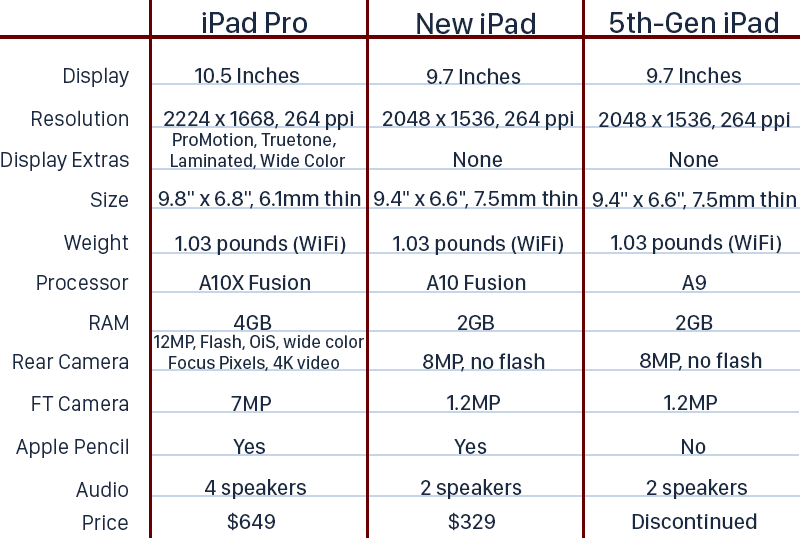
The iPad Pro and the sixth-generation iPad may seem similar at first glance due to the shared Apple Pencil support, but the iPad Pro continues to offer a faster processor, better cameras, and a better display to justify its high price tag.
Apple’s iPad Pro, for example, uses ProMotion technology with a 120Hz refresh rate, which makes all motion on the screen smoother, crisper, and more responsive.
It’s dramatically different than other iPad displays with smoother text, better gameplay, and enhanced videos. True Tone technology, which adjusts the white balance of the display to match the ambient lighting is also an iPad Pro-only feature, as is wide color, for brighter, more vivid colors.
The sixth-generation iPad, meanwhile, uses the same non-laminated display that was first used in the iPad Air, albeit with improvements to make it brighter and a new touch sensor to allow for Apple Pencil support. It’s Retina, but otherwise unremarkable.
The iPad Pro is also using an A10X Fusion chip, new in 2017, while the iPad is equipped with the A10 Fusion from the 2016 iPhone 7 and iPhone 7 Plus. Major improvements have been made in processor and GPU speed in recent iterations, so the iPad Pro is going to be a good bit faster than the iPad, though you’re not going to notice in everyday tasks.
If camera quality is of importance, the iPad Pro has the latest 12-megapixel f/1.8 camera that is leagues better than the 8-megapixel f2.4 camera in the iPad. The iPad Pro’s camera supports a laundry list of features not available in the iPad, like True Tone Flash, stabilization for live photos, wide color capture, 4K video recording, and more.
The iPad Pro’s front-facing camera is also 7-megapixels, a big upgrade over the 1.2-megapixel front-facing camera in the iPad. To make it easy to compare the two tablets at a glance, we’ve made a handy chart that also includes the fifth-generation iPad:
So which one should you buy? If you want an impressively fast but affordable tablet that works with Apple Pencil and is going to play the most recent games and apps for several years to come, go with the iPad.
If you want the fastest, thinnest device you can get with the absolute best display available on the market, go with the iPad Pro, but don’t buy right now if you can hold out for a refresh. We’re expecting to see updated iPad Pro models either in June or September with slimmer bezels, no Home button, and support for the Face ID facial recognition system first introduced in the iPhone X.
Related Roundup: iPadBuyer’s Guide: iPad (Buy Now)
Discuss this article in our forums
Here’s how to master the new Road to the Show in ‘MLB The Show 18’
Road to the Show has been an MLB The Show staple for years. The create-a-player campaign mode lets you step into the shoes of the fledgling prospect, work your way up the farm system, and eventually, if you play well enough, become a Major League legend. The mode returns in MLB The Show 18 for PlayStation 4, but with a significant change to its progression system. This time around, it places more emphasis on each plate appearance and fielding opportunity than ever before. To help you navigate Road to the Show’s new system, here are a few things you should know and do throughout your journey to the Hall of Fame.
How player progression works
You don’t have the same control over stats as you did in previous iterations. What you do on the diamond impacts your statistical categories automatically. Gone are the points that you can apply to power, contact, vision; in comes a system that allows for both progression and regression. Whether you create a player or import your player from MLB The Show 17, they will be bound by these new rules.
First, you choose an archetype, each of which has clear strengths and weaknesses. We chose to be a power-hitting first baseman, so while our prospect started off with solid power and contact stats, his speed, and thus his stealing, started off low.
Now, all of this doesn’t mean you don’t have control over your player’s stats. For the most part, you do — by performing well on the field. For example, position players have 10 major stat categories (with numerous secondary categories): Contact R, Contact L, Power R, Power L, Vision, Stealing, Speed, Reaction, Arm, and Fielding. If you swing and miss, your contact rating versus a right or left-handed pitcher goes down. If you take a ball or foul off a pitch, your plate vision increases. If you get a base hit, your contact rating goes up. If you catch a fly ball, your reaction and fielding rating goes up. If you steal a bag, yeah, you guessed it, your stealing attribute increases.
It’s important to note that elevating a stat from one value to the next takes many successful net gains. If you are sitting on 67 Power versus right-handers, it will take a good number of positive gains to move to a 68. With that in mind, don’t be alarmed when you mess up on a play and a stat drops.
Sometimes it doesn’t work perfectly
So here’s the thing: While the new system does make each game in a long season’s grind feel more important, the stat boosts don’t always work as they should, particularly at the plate. You can hit a blooper to center field, dig out a double and see your power increase. Conversely, you can smoke a shot to the warning track that is caught at the wall and get no boost in any category at all. Also, if you swing and miss twice, yet hit a homer on the 0-2 pitch, you still get knocked for your plate vision despite hitting a home run in the at-bat.
Focus on increasing stat caps in training
While most stat increases come from on-the-field play, in between series, you will get to utilize training sessions. Sadly, these are non-interactive but result in instant, full stat gains or stat cap increases. At first, you only have the batting cage which focuses on power, vision, contact, and plate discipline. As you progress through your first season, you unlock the practice field and training facility, the latter of which has some crossover with the batting cage.
You can only choose one training category each time, and one of the three exercises available within. These exercises provide boosts for one to three stat categories. We suggest looking through all three categories before zeroing in on your decision. If there is an exercise that raises a stat’s cap (they will be the ones completed with teammates), almost always choose that one. All of your stats have caps and they start off much lower than the all-mighty 99 limit. The only way to raise the cap is through training, whereas you can always improve stats in games.
It may be hard to pass up two power stat points, but trust us, if you don’t pick stat cap exercises, you wind up hitting your cap in a category, which means that it can only stay the same or degrade until you raise the cap. The only time it may be a good idea to not choose an exercise that increases a stat’s cap is when you are nowhere near the current cap. For instance, we decided to pass on moving our Batting Clutch cap from 85 to 90 because our guy only had a 56 at the time.
Showtime and Perks
Showtime, which lets you enter slow motion, can be helpful in pivotal situations. It’s a meter at the bottom of your screen that maxes out at 120 points. In reality, you can use almost all of it one at-bat if you press R2 to trigger it seconds before the pitcher’s windup. The meter is automatically filled at the beginning of the game, but once used, it’s gone. So when should you use it?
It’s a matter of personal preference, but we like to use it when there are runners in scoring position that we can knock in with a hit. Wait for the ball to leave the pitcher’s hand first, though, since you don’t want to activate it if the pitch is clearly outside of the zone. Showtime lets you square up a pitch with great timing really easily since the baseball basically crawls through the air.
The other time we like to use Showtime is when we want to steal a base. Activating it zooms in on the pitcher. As soon as you see his throwing arm twitch, you can initiate a steal, exit Showtime, and voila, you got an excellent jump and have a great chance to steal a bag effectively.
You can also allocate some or all of your Showtime meter to perks, which you can access by viewing your player. Perks can do things like lower the velocity of a pitch or automatically cause a fly ball on contact. You can activate an assigned perk by pressing the D-pad. Personally, we prefer to stick with the full Showtime meter, but if you find yourself not using it, perks can provide a sure-fire means to getting the result you want on a given play.
No two journeys to the Majors play out the same
Lastly, know that your road to the Majors can be confusing at times. One of our gaming writers here at Digital Trends was about to get called up to the Majors just a few months into his first year. He was batting around .350 at a position his MLB club needed. However, another one of our writers played through a whole season in AA (150+ games) batting over.400 at a position in need and never even sniffed AAA. He started the next season in AAA, and one month in with similar numbers, and still hadn’t received an inkling from his manager that he would be making the next step anytime soon.
Your trajectory as a player and control over your own destiny becomes yours as your career progresses, but while in the farm system, just know it may take some time.
If you’re having trouble at the plate, make sure to check out our MLB The Show 18 batting guide.
Editors’ Recommendations
- ‘MLB The Show 18’ batting guide: How to hit like a pro
- ‘MLB The Show 18’: How to master pitching and keep runners off the basepaths
- ‘MLB The Show 18’ Review
- ‘MLB The Show 18’ throws some heat at in-game microtransactions
- When a movie isn’t enough, the best shows on Netflix will keep you busy for days
NASA delays James Webb Space Telescope, pushes launch to 2020
NASA/Desiree Stover
Last year, NASA welcomed spring with a beautiful new image of the James Webb Space Telescope. This year, the space agency has some less uplifting news.
Due to technical hangups and “avoidable errors,” NASA officials said this week that the launch of the Webb will be delayed until 2020 and costs may rise above the congressionally mandated $8 billion spending cap.
Problems were encountered with the portion of the spacecraft meant to house the expandable telescope in flight, which started a review of the program. All of the hardware is complete, according to NASA’s acting administrator Robert Lightfoot. “However,” he told reporters in a teleconference, “work performance challenges that were brought to light have prompted us to take some action.”
Space missions have always been accompanied by delays. The Webb is no exception. Just last September, NASA announced the telescope would miss its October 2018 target launch, pushing liftoff back to between March and June of 2019. But, upon further review, the agency has scheduled 2020 as a more realistic date.
“We need to successfully integrate both halves of the observatory into the final flight configuration and complete some vital testing after an independent assessment of the remaining tasks,” Lightfoot said. “Frankly, the tasks are taking longer to complete than we expected, which will result in a new target launch window, which we now expect to be approximately May of 2020.”
After two decades of construction, the agency announced the completion of the James Webb Space Telescope in November of 2017, following the first important pretest to measure its primary mirror. Over the next few months, the telescope went through a series of grueling trials that shook, rattled, and froze the state-of-the-art machine, subjecting it to conditions it will have to face in outer space. With the final gold-coated segment of its 21-foot-wide mirror array in place, the telescope can now sprawl like an enormous sunflower.
Now scheduled to launch in May 2020, the Webb telescope will be the most powerful telescope in existence, built to capture infrared light from the first galaxies of the ancient universe.
To launch the satellite, the Webb telescope’s sunshield will be folded a dozen times before being packed into a bullet-shaped capsule. Once 930,000 miles distant from Earth (at the Earth-Sun L2 Lagrange point), the array will unravel in a glorious, sky-gazing display.
“The groundbreaking sunshield design will assist in providing the imaging of the formation of stars and galaxies more than 13.5 billion years ago,” Webb sunshield manager Jim Flynn said in a statement last November. “The delivery of this final flight sunshield membrane is a significant milestone as we prepare for 2018 launch.”
At over $8.7 billion in construction and operating costs, the Webb telescope is more than four time as expensive as its predecessor, the Hubble Space Telescope, and 100 times more powerful. However, where the Hubble was within reach of astronauts who could spacewalk to the telescope if anything were to wrong, the Webb will be too far into space for an easy mission. For that reason, it’s imperative that everything work as planned before the Webb telescope is sent on its journey.
Updated on March 28: NASA delays launch until 2020.
Editors’ Recommendations
- Get your Sagan on with 60 awe-inspiring photos of the final frontier
- NASA’s planet-hunting deep space telescope is about to run out of fuel
- China’s ‘Heavenly Palace’ space station will fall to Earth in the next few weeks
- NASA’s new X-ray navigation could guide robots through deep space
- Watch NASA test fire a giant rocket engine for its mighty Space Launch System
God of War for PlayStation 4: Everything you need to know!
Goodbye Blades of Chaos, hello whatever sharp thing is lying around.

In 2013, Sony Santa Monica decided to put Kratos, one of PlayStation’s most iconic characters, to bed so they could focus on crafting other games. With a trilogy and a handful of spin-offs starring the vengeful greek god completed and a shift in a focus on mature story driven games, Sony retired the God of War series for five years.
After assessing the series, Sony Santa Monica found a way to revive the series in a new and exciting way while sticking to Sony’s formula. Now, Kratos is set to return in a completely new way next month in a “reimagining” of the series which will be titled simply God of War.
Pre-order on Amazon
A man running from his past in new and unfamiliar territory

God of War’s story is mostly being kept a secret but what we do know so far sounds like a new, compelling take on Kratos’ life. Set an unknown amount of years after God of War 3, Kratos has fled Greece to Norway in a time before Vikings, a time where the gods that Vikings worship walk the Earth.
Players will control a more mature Kratos, one that has both changed physically and mentally. Kratos has remained in peak physical shape but has grown a bushy beard and the ashes of his fallen family that have been basically tattooed to him are starting to fade. While he is known for his almost uncontrollable rage, Kratos has chosen to settle down with a family and hide from his past.
Kratos will make a strong effort to contain his rage to help teach his son how to survive in the harsh world.
After his wife passes away, he and his son, Atreus, recognize her last wish of having her ashes spread across the land and they set out on a dangerous adventure where they grow closer as father and son. Over the course of the game, Kratos will make a strong effort to contain his rage to help teach his son how to survive in the harsh world that awaits them and Atreus will learn more about his father’s complicated past.
With the Norse mythology setting, Kratos and Atreus will encounter Norse gods who have taken precautions to protect themselves from Kratos as they’re aware of his involvement in the destruction of Olympus. Sony Santa Monica has stayed tight lipped on which specific Norse gods will make appearances but many have been speculating the likes of Loki and Thor. Other characters and elements of Norse mythology have been spotted in trailers and marketing material such as the beheaded Mímir.
Additionally, players will battle monsters like trolls, what appear to be ogres, and potentially even dragons which can be seen lurking in the background of the reveal trailer.
Slower but still brutal gameplay
God of War is well-known for its violent, fast-paced gameplay which sees Kratos thrashing around blades and chains to slice large groups of baddies to shreds. With the new God of War, players will notice a much more grounded approach to the combat in the game. Gone are the days of 100+ hit combos, Kratos’ attacks aren’t as fast anymore but he’s still as brutal and relentless as before. God of War director Cory Barlog noted that they wanted players to think about how they fight, almost like a Dark Souls approach to combat but in a way that is accessible to everyone. It’s a bit slower and more methodical when compared to the trilogy that came before.
While the game is completely single-player, you can issue commands to Atreus who will shoot arrows and act as a distraction for some enemies.
At the end of God of War 3, Kratos lost his iconic weapons and has now had to settle for a magical axe. Players can infuse the axe with different abilities to enhance the axe in a variety of different ways. The axe can also be thrown to pin enemies against surfaces, damage them normally, hit environmental objects like explosive containers, and even stun larger enemies by hitting key weak points on their body. Instead of having to pick up the axe by walking over to it, Kratos can call it back to him like Thor’s hammer.
Kratos also has a meter that builds over time that allows him to unleash all of his rage and become extra deadly with more powerful attacks. While the game is completely single-player and Kratos is the only playable character, you can issue commands to Atreus who will shoot arrows and act as a distraction for some enemies.
As with almost every other game today, God of War has adapted a crafting system for new armor, weapon upgrades, and more. Players will also be given XP to level themselves up for new skills, this also applies to Atreus who has his own unique abilities and upgrades.
A world filled with secrets and hidden dangers
With a new story, setting, and approach to gameplay, Sony Santa Monica decided to change up the level design this time around. While the series has been fairly linear in the past, God of War is opening up its new world. Sony Santa Monica has been clear that the game is NOT open world but you go off the beaten path to find secrets like chests and even optional boss encounters.
It’s not entirely clear how many optional bosses there are or how rewarding they are but if you’re one of those gamers who loves to peak around every corner and squeeze through every crevice, God of War is right up your alley.
All the ways to buy God of War

If all of this sounds great and you’re really excited to play God of War, you can snag a copy wherever games are sold for $59.99 on April 20th, 2018. Remember the game is exclusively available on PlayStation 4 so if you don’t have a PS4, you can get the limited edition God of War PS4 Pro which includes a custom console and controller, a 1TB hard drive, and of course, a physical copy of God of War with some extra digital content. You can pick this up from retailers like GameStop, Walmart, and Amazon for $399.99.
Pre-order on Amazon
If you’re looking to go the extra mile and drop a few extra bucks to have some additional goodies, there are plenty of options. Starting at the cheapest option (excluding the standard edition), those who like to get their games digitally can pick up the Digital Deluxe Edition which includes a handful of digital items including the following:
– God of War Digital Full Game
– God of War Digital Mini Artbook by Dark Horse Comics
– God of War PS4™ Dynamic Theme
– “Exile’s Guardian” Shield Skin
– God of War Digital Comic – Issue 0 by Dark Horse Comics
– “Death’s Vow” Armor for Kratos
– “Death’s Vow” Armor for Atreus
The Digital Deluxe edition will set you back $69.99 and is available directly from the PlayStation 4 Store. For those who like big statues and other physical items, you have two options: The Collector’s Edition and the Stone Mason;s Edition.
For $129.99, you can grab the Collector’s Edition which includes slightly less stuff than the Stone Mason’s Edition but if all you care about is the statue then this is the cheapest option. The Collector’s Edition includes the following:
– Full Game
– 9″ Kratos & Atreus Statue by Gentle Giant
– Limited Steelbook Case
– 2″ Huldra Brothers Carvings
– Exclusive Lithograph
– Cloth Map
– Digital Contents Include:
– Defender of the Chosen Shield
– Death’s Vow Armor Set
– Exile’s Guardian Shield
– God of War Digital Comic #0 by Dark Horse
– God of War Digital Mini Artbook by Dark Horse
– Dynamic Theme
Pre-order on Amazon
For $149.99, you can get the Stone Mason’s Edition which includes everything in the Collector’s Edition and the three physical items seen below:
– Stone Mason’s Ring
– Mimir’s Head Talking Keychain
– 2″ Horse and Troll Carvings
Pre-order at Amazon
God of War releases on PlayStation 4 on April 20th, 2018.
PlayStation 4

- PS4 vs. PS4 Slim vs. PS4 Pro: Which should you buy?
- PlayStation VR Review
- Playing PS4 games through your phone is awesome
Amazon
Amazon announces reference device for an Alexa-powered smart lamp
There’s no shortage of Alexa gadgets to choose from, but Amazon wants to make sure you’ve got access to as many options as possible. On March 28, the online shopping giant announced three new white-box reference devices that’ll make it as easy as possible for more companies to kick out their own Alexa speakers and lamps.

Amazon partnered with original design manufacturers (ODMs) JUNLAM, Narui, and Adition to create the reference devices, and they include two speaker designs and one smart lamp.
Smart speakers that use Alexa are a dime-a-dozen, but smart lamps are still a rarity. Adition created the Amazon’s reference lamp, and it’s described as —
A smart home solution that gives soft, warm light with dimming support. It doubles as an Alexa-enabled smart speaker with a 2-mic solution, Bluetooth and Wi-Fi connectivity, and support for multiple music services.
It looks a lot like an Echo Plus that had its plastic body swapped out for a lamp, and I personally think the design is solid. The Alexa lamps that actually come to market won’t look identical to what Adition’s designed, but they’ll likely have the same general shape and features.


The two smart speakers from JUNLAM and Narui are fairly generic-looking, and both offer a 2-microphone system, Bluetooth, Wi-Fi, and stereo speakers.
Amazon makes it easier to find previously heard songs with Alexa
Free games for PlayStation 4 you probably haven’t heard of

Free is always the better deal!
Sometimes we get bored of the games in our current library and need to spice things up a bit. So what happens if you’re on a tight budget or waiting for payday? You check out the free section of the PlayStation Store of course!
For the sake of giving you something new and interesting, I won’t be adding games like Warframe or War Thunder to the line-up. Those games are wildly popular and chances are you’ve already been playing them. This one is all about the diamonds in the rust!
Spelunker World
It’s time to experience the joy of discovery with Spelunker World. There are plenty of things to find from treasures to collect to devices that will make your adventure easier. Play solo or grab your friends to figure out all the puzzles and get deeper into the Earth’s crusts! Spooky monsters and deadly traps are waiting for your in these ruins, so get the team and see what lies at the end of the tunnel!
See on PlayStation the Store
Skyforge
If there is anything most gamers are a sucker for, it’s a good massively multiplayer online role-playing game (MMORPG). While other MMOs for the PlayStation exist, including DC Online, I feel that Skyforge has hit the nail on the head. While DC Online was fun to play I found as the quests continued on it required a lot more reading than my “I’m trying to relax” brain appreciated. Sometimes you just want to power through and grind levels doing all the quests you can, and Skyforge does just this. The scenery was beautiful, there was nothing complicated about the gameplay, leveling up was fun and the community was wonderful!
See on PlayStation the Store
Happy Dungeons
This adorable title will allow you to become the hero you want to be in the way you’ve always wanted to. Wield your magic, grab your sword and shield or even dual wield your daggers! Happy Dungeons is a role-playing game with multiplayer options for you to bring your friends in on the fun! Bonus feature? You don’t need PlayStation Plus to play online with your friends!
See on PlayStation the Store
Pox Nora
Fantasy games are getting wildly popular, and Pox Nora is here to bring you a new turn-based adventure. Here you will take on quests to raise your stature in this world of immortals and fight your way to the top. They have a grid-like fighting system, complete with deciding your attacks and defenses. Collect your heroes, runes, and cards to strengthen your army! Are you ready for the battle?
See on PlayStation the Store
Dungeon Defenders II
Here you have a fun adventure where you’ll battle small orcs to protect what is yours and find more loot. The graphics for Dungeon Defenders II is colorful, vibrant and fun to watch. Even the gameplay was simple and easy to get the hang of! So, grab your choice weapon and make your way through the obstacles!
See on PlayStation the Store
Thoughts?
What do you think of the free-to-play games listed above? Which one is your favorite? If I didn’t list one that you know you love to tell me about it in the comments below!
Updated March 2018: We’ve added new free titles for you to check out!
PlayStation 4

- PS4 vs. PS4 Slim vs. PS4 Pro: Which should you buy?
- PlayStation VR Review
- Playing PS4 games through your phone is awesome
Amazon
Google releases Android P developer preview for Wear OS
There’s a darker UI, restrictions on apps running in the background, and more.
About two weeks after Google rebranded Android Wear as Wear OS, the company is now releasing the first Android P developer preview for its smartwatch platform. This first preview is intended to be used exclusively by developers and not for regular daily use, but it does give us a glimpse of what Google’s cooking up.

First off, one of the biggest user-facing changes is a slightly tweaked user interface. Menus and gestures will remain the same, but Google’s adopting a darker background for menus and the notification panel. Some watches were updated with this new look with Wear OS 2.8 back in January, and going forward with Android P, this will be the default look for all devices.
To improve battery life, Android P is introducing a couple big changes to Wear OS. Wi-Fi will automatically turn off when your watch is connected to your phone via Bluetooth and apps will no longer be able to run in the background unless your watch is charging. Watch faces and complications will be the only exception to this rule, and Google notes that both of these features will be rolled out to Wear OS “gradually.”
This is the very first developer preview, and as such, not ready for daily use.
In another attempt to extend the time between charges, Android P will also automatically disable Wi-Fi, Bluetooth, and any cellular radios when your watch has been off your wrist for “an extended period of time.”
Last but not least, Google also notes that “To improve app compatibility, Android P has started the process of restricting access to non-SDK methods and fields.”
There’s currently no timeline for Android P’s public launch for Wear OS, but if it lines up with Android P for phones and tablets, we should see it launch at some point in August. If you’re a developer or someone that doesn’t mind running buggy software, the Android P preview is available now for the Bluetooth versions of the Huawei Watch 2 and Huawei Watch 2 Classic.
Wear OS by Google officially replaces Android Wear
How to use Google Pay on your Wear OS smartwatch

Google Pay is here and easier to use than ever.
The biggest perk about having access to parts of your smartphone from your watch is convenience. Whether that means checking the weather while you are getting dressed, or being able to easily glance down for a moment to check your notifications. Google Pay is now available for use right from your wrist, provided that your watch is running Wear OS and has NFC.
How to set up Google Pay on your watch
Using Google Pay is thankfully an uncomplicated affair once you’ve got everything set up. It will take a few minutes to get yourself situated, so it’s something you’re going to want to do before you roll out of the house to run your errands.
First you’ll want to install Google Pay on your phone, and add the card that you want to use. Next make sure that your watch is connected to your phone via Bluetooth. From here you can open up Google Pay on your watch, and tap add card to choose from your previously-added cards. If you want to add a different card all you need to do is tap add card once again and switch back to your phone to verify details. Once it has been verified it will be added to the cards available with the Google Pay app on your watch.
Download: Google Pay (free)
Step by step instructions to set up Google Pay
Install Google Pay on your phone.
Add the card you want to use, verifying with your bank.
Make sure your watch is connected to your phone via Bluetooth.
Open Google Pay on your watch, tap add card to choose from cards on your phone.
And that’s it!
How to use Google Pay on your watch
In a fast-paced world, there are times when convenience is definitely key. Sometimes you only have a few minutes to dart into the corner store for that caffeine rush first thing in the morning, or you’re already distracted. That’s where having access to Google Pay right from your wrist comes in. With just a tap, you’ll be able to pay for your purchases and continue about your day. For anyone who has accidentally left their wallet (or even their phone) at home, this is a serious boon.
More watches with Google Pay are coming.
First thing’s first, you’ll want to launch the Google Pay app on your watch. You can program one of your hardware buttons to launch Google Pay, and even better, it doesn’t need to be connected to your phone in order to make a payment. If you’re ready to pay with your default card, just place the top edge of your watch to the payment terminal. When the payment is accepted you’ll feel a long vibration on your watch, and the payment terminal will likely also beep.
Now, if you want to switch to one of your alternate cards, that’s also easy to do. If you swipe up on your watch screen, it will reveal additional cards that you can choose from. These are the cards that have been entered and verified in the Google Pay app on your phone. If you want to switch to a new default card, tap on the card it view it, swipe up on the card, and then tap the blue bar with a check mark at the bottom. When it’s time to delete a card follow the same steps, but instead of tapping the blue bar, swipe up one more time and then tap the trash can to delete that card.
Step by step instructions to use Google Pay
To get ready to pay, launch the Google Pay app on your watch.
Place the top edge of your watch to the payment terminal until you get a long vibration on the watch.
- The payment terminal will also likely beep to confirm.
If you want to switch cards before paying, swipe up on the screen to reveal additional cards.
- To change a new card to default, tap on the card to view its details, swipe up on the card and then tap the blue bar with a check mark at the bottom
- To delete a card, follow the same steps but give the bar an extra swipe up and tap the trash can to remove
You’re now ready to pay like a pro with just your smartwatch!
Android Wear
- Everything you need to know about Android Wear 2.0
- LG Watch Sport review
- LG Watch Style review
- These watches will get Android Wear 2.0
- Discuss Android Wear in the forums!
Today’s best deals you won’t want to miss
Whether you’re looking for new tech gear or household items, we’ve got you covered.
Today you can get great deals on a variety of devices including Apple’s newest iPad, the UE Wonderboom speaker, the G610 mechanical keyboard, and more! Don’t pass these up.
View the rest of the deals
If you want to know about the deals as soon as they are happening, you’ll want to follow Thrifter on Twitter, and sign up for the newsletter, because missing out on a great deal stinks!
 AIVAnet