


Nickelodeon will use VR and AR to keep kids off Netflix and YouTube
Nickelodeon has announced an explosion of content for the 2018-2019 season in a bid to keep easily-distracted kids watching the network. More than 800 brand new episodes of new and returning series will hit its screens — a 20 percent increase compared to last year — and it plans on moving into the VR and AR landscape through its kid-facing apps.
Highlights will include a reboot of Teenage Mutant Ninja Turtles and a remake of preschool classic Blue’s Clues, plus Keep it Spotless, a new competition series executive produced by WWE star Jon Cena which sees real kids competing in a variety of physical and paint-filled challenges while trying to stay as clean as possible. The network has also renewed Lip Sync Battle Shorties for a new 10-episode cycle, and has commissioned Los Casagrandes as a companion series to its current success story The Loud House, in a bid to bring more diversity to the network.
Elsewhere, Nickelodeon has announced a new partnership with IMAX to bring SlimeZone — its first multiplayer, social VR experience — to select IMAX VR Centers around the globe, and has unveiled a new AR mode for its Sky Whale mobile gaming app. It’s also expanding its location-based offerings with SlimeFest, a music festival for kids, which will take place in Chicago in June and feature a host of Nick favorites, including Liam Payne, Flo Rida and Lip Sync Battle Shorties star JoJo Siwa.
According to Nickelodeon Group president Cyma Zarghami, this content deluge comes in a bid to keep kids on board in the face of distractions elsewhere. Speaking to Variety, she said, “TV is still the biggest platform. Kids are definitely migrating to other places — we don’t pretend they don’t love Netflix and they don’t love YouTube — but what we are able to do is set up a mass simultaneous audience, which is still important to a lot of people.” She added that thanks to “a new energized relationship” with Paramount, the company needs to maintain its market dominance and take steps to ensure its longevity, and noted that “your odds of getting a fat hit are greater if you have more at-bats.”
Source: Business Wire
Microsoft confirms ‘S Mode’ will replace Windows 10 S
This week, Microsoft VP Joe Belfiore confirmed the rumor that Windows 10 S would no longer be standalone software. Instead, users will be able to access the platform as a “mode” within existing full Windows 10 installations.
We use Win10S as an option for schools or businesses that want the ‘low-hassle’/ guaranteed performance version. Next year 10S will be a “mode” of existing versions, not a distinct version. SO … I think it’s totally fine/good that it’s not mentioned.
— Joe Belfiore (@joebelfiore) March 7, 2018
Windows 10 S was designed to be a competitor for Chrome OS — a lightweight, more secure and more powerful operating system. However, implementation left something to be desired. In order to take full advantage of Windows 10 S, users were required to obtain a copy Windows 10 Pro. It’s more than many users wanted or needed.
The official details aren’t clear, but according to a leak from early February, S Mode will be available for all versions of Windows 10 except Core+ and Workstation. The cost of unlocking S mode would depend on the version of Windows you’re running; it would be free for some, while others would have to pay a $49 fee.
It’s not clear when this will take place, or when we’ll see more details from Microsoft on Windows 10 S. Belfiore says in his tweet that this will happen “next year,” so we may have to wait awhile before it actually comes to fruition.
Via: The Verge
Source: Twitter
Next iPhone X Lineup Said to Feature Smaller Notches, 2019 Models May Ditch Notch Entirely
The next-generation iPhone X will feature a smaller notch for the TrueDepth camera system, while future models released in 2019 or later will have no notch whatsoever, according to Korea’s ET News.
The report reiterates Apple’s widely rumored plans to release three new iPhone models this year, including a second-generation 5.8-inch iPhone X, a larger 6.5-inch version dubbed iPhone X Plus, and a mid-range 6.1-inch model with design tradeoffs like an LCD screen to achieve a lower price point.
The interesting bit is that all three iPhone models are said to feature slimmer bezels and smaller notches, emphasis ours:
Apple is planning to release two models with OLED display and a model with LCD display during this fall. It is heard that OLED models will be available in 5.85-inch display and 6.46-inch display while a LCD model will be available only in 6.04-inch model. All three of these models will have Face ID function and it is heard that there will be less bezel and smaller notch design.
An unnamed industry source added that Apple has decided to remove the notch “from 2019 models,” suggesting the third-generation iPhone X could be the first model with a truly full-screen design.
“Apple decided to get rid of notch design starting from 2019 models and is having discussions with relevant companies,” said a representative for an industry. “It seems that Apple is planning to implement full-screen that is more complete to its new iPhones.”
The report claims each iPhone will have Face ID, but it’s unclear how Apple would manage to fit the required TrueDepth sensors on the front of the devices without a notch. The report speculates that Apple could drill holes into the display itself, or use patented multi-layer Black Matrix technology.
Barclays analysts have also predicted the trio of new iPhone models released in 2018 could have smaller notches. ET News previously said Apple was exploring ways to combine a face recognition module with a camera module.
Apple removing the notch on the iPhone X is almost certainly its end goal, but as with any supply chain report, the timing of the move is uncertain.
Related Roundup: iPhone XTag: etnews.comBuyer’s Guide: iPhone X (Buy Now)
Discuss this article in our forums
Bloomberg Narrows Down Potential Locations for Apple’s Upcoming U.S. Campus
Earlier in January, Apple detailed a series of plans to to bolster the U.S. economy, which included the confirmation of its fourth campus based in the United States. At the time, the company said its new campus will “initially house technical support for customers” and that it won’t be located in California or Texas, but no other hints regarding its location were given.
Today, Bloomberg posted a new piece theorizing potential locations for Apple’s fourth campus in an attempt to predict where Apple might end up. In partnership with Moody’s Analytics, Bloomberg was provided with data regarding the top 15 U.S. cities for tax incentives and a local business environment, top 15 cities for workforce education and human capital, and top 15 cities for public transport.
Apple’s latest U.S. campus, Apple Park
This information was cross-referenced with known data including current Apple headquarters, call centers, data centers, repair centers, smaller corporate offices, and major parts suppliers, to result in areas of the country that Apple could be interested in. Bloomberg ultimately hypothesized that Apple “seems likely” to end up in one of three areas: the northeast, potentially in Pennsylvania, Massachusetts or upstate New York; the southeast, in North Carolina or Florida; or Midwest, in Illinois or Wisconsin.
When you consider all these factors, Apple seems likely to choose among northeastern states such as Pennsylvania, Massachusetts and upstate New York; North Carolina and Florida in the southeast; and Midwestern states like Illinois and Wisconsin. The East Coast has one obvious advantage: the ability to provide customer support before existing call centers in Texas and California open for the day, as well as its proximity to hundreds of suppliers. The company could also consider the northwest, where it has a couple of offices, including an R&D center for cloud services in Seattle, and several suppliers.
In regards to Moody’s top 15 cities data, Bloomberg argued that these statistics will be the main criteria Apple looks at when planning its fourth campus. These cities could provide Apple with incentives in exchange for its investment, a talented workforce that emphasizes bachelor’s degrees instead of advanced engineering degrees (“which arguably fit better with Apple’s plans to recruit technical support people, rather than those working on products and operations”), and available commuting options for employees, including a nearby airport for those flying in from other offices.
As the company makes plans for its latest campus, this month it has also named Kristina Raspe as its new vice president of global real estate and facilities. On her LinkedIn page, Raspe said that she’s responsible for a variety of the company’s real estate assets, including corporate and data center construction.
Cities that have already expressed interest in becoming the home of Apple’s fourth U.S. campus include Sidney, Nebraska and Orlando, Florida, but Apple said back in January that it won’t confirm the location until later in 2018.
Check out Bloomberg’s full article for more information on the potential locations of Apple’s upcoming campus.
Tag: Apple real estate
Discuss this article in our forums
EFF: Geek Squad has been working with the FBI for a decade
When the defense in a California doctor’s child pornography case accused the FBI of paying Geek Squad’s crew to look for evidence in the defendant’s computer, Best Buy denied it enjoys close ties with the agency. Now, according to the EFF, the big-box retailer’s team of IT technicians are even closer to the feds than previous reports indicated. The non-profit has received the results to the Freedom of Information Act (FOIA) it filed last year and found that Best Buy has been enjoying “a particularly close relationship with the agency” over the past 10 years, at least.
One of the documents the EFF got its hands on is a memo from 2008, detailing a meeting with the FBI’s Cyber Working Group at the Geek Squad’s repair facility in Kentucky. During that meeting, the company even gave the feds a tour of the facility. Other documents showed that the two entities worked so frequently together, that they’ve developed a process for reporting suspicious content.
When a repair technician finds something they believe is child porn in a computer, they have to call the feds, and an FBI agent would arrive to inspect it. If the agent agrees that it’s child porn, the PC or hard drive would be seized and sent to an FBI office nearest to the location of the device’s owner. The agents there would then dig deeper and secure a search warrant if needed.
The FBI classifies the Geek Squad technicians who call in the reports as informants, but some of the documents in EFF’s possession suggest they sometimes do more than report something they find. One shows that the feds paid at least one tech $500, and it’s reportedly one of the payments involved in the child pornography case that compelled the EFF to file for a FOIA.
The EFF says that by paying informants, the agency is encouraging technicians to actively look for content. Case in point: the technician who called in the evidence for the California doctor’s case reportedly found it in an unallocated space in his computer. That suggests that they didn’t just stumble upon the evidence — they used software with the intention of finding files that were already deleted. The EFF says the relationship between the agency and the retailer “potentially circumvents computer owners” Fourth Amendment rights, so it plans to it’s planning to go after the other documents the feds failed to produce for the FOIA it filed.
Source: EFF
Google’s AI scans and tags millions of ‘Life’ magazine photos
Google is pretty big on art. Its technology has turned clumsy doodles into masterpieces, transformed smartphones into virtual exhibitions and, in a move that caused momentary internet hysteria, helped selfie-takers find their fine art doppelganger. Now it’s unveiled a new set of machine-learning experiments that not only make exploring art more engaging, but help solve some of the biggest challenges faced by curators and museums.
First up is Art Palette, which lets you choose a group of colors and then matches your selection to artworks from institutions around the world. Handy if you’re after some prints for your newly-decorated apartment, or if you’re wondering what masterpieces your outfit is channelling today. Then there’s Life Tags. Life magazine’s 70-year run saw millions upon millions of photos taken, but only five percent ever published. This tool unveils four million photographs from its archives and makes them instantly searchable via thousands of automatically created labels, from “astronauts” to “zombies”.
Finally, there’s the MoMA tool, which is big news for art curators and museums. The Museum of Modern Art in New York has been taking photos of its exhibitions since its first in 1929, but many of them were missing corresponding information. Identifying the art in each photo (and there are 30,000 of them) would have taken months, if not years. Google’s MoMA identification tool automatically recognizes the artworks in each photo, and has helped turn the pictures into an interactive archive of the museum’s exhibitions.
Much of Google’s art-focused machine learning technology has been directed at consumers — fun ways to immerse them in a world they may not otherwise have access to. But as these latest tools demonstrate, the practical applications are significant, saving curators hours of manual, tedious tasks — and everyone gets to enjoy the result.
Facebook adds video chat to its lightweight Messenger app
Microsoft isn’t the only one making video chat more accessible in its messaging app. Facebook is rolling out an update to Messenger Lite for Android that brings video chats to those with lower-end phones or dodgy internet connections. You can have the same face-to-face conversations you do with the full Messenger app, just in a 10MB client that’s easier to download and shouldn’t tax your device as much. You’ll need a reasonably solid connection for the actual chats, of course, but that’s easier to manage than requiring one whenever you want to open the app.
As with Microsoft’s Skype optimization just days earlier, there’s a clear reason for Facebook to make video chat as widely available as possible: maximizing its audience. Nearly half of Android users using Google Play are running wholly obsolete versions of Android (Android 5 and earlier), and thus older phones. If Facebook wants more users to try video chat, it needs to loosen the requirements so that more people can give the feature a try.
Source: Facebook, Google Play
Microsoft’s Virtual Assistant Gains Alternative ‘Cortana’ Activation Command
Microsoft is giving users of its Cortana virtual assistant another way to activate it with their voice. As reported by The Verge, owners of the first Cortana-integrated Invoke speaker can now summon the assistant using just “Cortana” rather than the typical “Hey, Cortana” phrase, although that continues to work as well. The alteration is expected to trickle down to Cortana for iOS in the near future.
Microsoft hasn’t offered a reason for the new option, but probably doesn’t need to, given that many users will find “Cortana” easier to say, just as Amazon’s “Alexa” is on supporting devices. Alexa users can also choose an alternative “Echo” invocation, but owners of Apple devices must use the phrase “Hey, Siri” (and its equivalent in other languages) to get the attention of Apple’s digital assistant.
Apple has never indicated it will offer a way to customize the “Hey, Siri” invocation – perhaps because it’s not technologically viable, given the way Siri listens for the activation phrase via an energy-preserving coprocessor. But the ability to do so could theoretically help users specify which device their request is directed at when multiple Apple devices are present (“Hey, HomePod,” for example). Aside from offering a little more personalization, the option could also help device owners prevent accidental or prank requests from other sources, like TV ads, podcasts, and so on.
Tags: Siri, Microsoft, Cortana
Discuss this article in our forums
MoviePass can’t answer important location tracking questions
Yesterday it surfaced that MoviePass CEO Mitch Lowe said — during a presentation called “Data is the New Oil: How Will MoviePass Monetize It?” — that his company could watch how subscribers drive home from the movie and see where they went. The setup sounds a lot like the post-ride tracking Uber added and then pulled last year. Media Play News included the quotes in the middle of an article about MoviePass projecting that it will pass 5 million subscribers, and the outlet has since posted a full quote showing exactly what the CEO said.
Mitch Lowe (via Media Play News):
We get an enormous amount of information. Since we mail you the card, we know your home address, of course, we know the makeup of that household, the kids, the age groups, the income. It’s all based on where you live. It’s not that we ask that. You can extrapolate that. Then because you are being tracked in your GPS by the phone, our patent basically turns on and off our payment system by hooking that card to the device ID on your phone, so we watch how you drive from home to the movies. We watch where you go afterwards, and so we know the movies you watch. We know all about you. We don’t sell that data. What we do is we use that data to market film.
Contacted by Engadget, the company didn’t have anything further to say publicly than this statement from a spokesperson.
At MoviePass our vision is to build a complete night out at the movies. We are exploring utilizing location-based marketing as a way to help enhance the overall experience by creating more opportunities for our subscribers to enjoy all the various elements of a good movie night. We will not be selling the data that we gather. Rather, we will use it to better inform how to market potential customer benefits including discounts on transportation, coupons for nearby restaurants, and other similar opportunities. Our larger goal is to deliver a complete moviegoing experience at a price anyone can afford and everyone can enjoy.

The statement focuses on MoviePass keeping information gathered private, but doesn’t give us confirmation on exactly when and how it’s using subscriber GPS. Lowe’s full comments address some of the controversy by revealing that his company starts with the demographic and publicly available information that many companies get based on things like your address and credit card info.
However, the MoviePass privacy policy only mentions a “single request” for location, nothing about tracking before and after.
THEATER CHECK-INs
MoviePass® requires access to your location when selecting a theater. This is a single request for your location coordinates (longitude, latitude, and radius) and will only be used as a means to develop, improve and personalize the service. MoviePass® takes information security very seriously and uses reasonable administrative, technical, physical and managerial measures to protect your location details from unauthorized access. Location coordinate data is transmitted via Secure Socket Layer (SSL) technology into password-protected databases.
So what’s really happening? Without further clarification from MoviePass, an answer could be in the patent Lowe referenced. Just a few days ago MoviePass sued a similar service called Sinemia for violating its patent, which covers using a reloadable card and verifying the customer’s location via GPS.
Patent US8484133B1 (co-authored by MoviePass co-founder and COO Stacy Spikes) is viewable online and describes how the service works. The patent, covers booking a ticket, making sure the card has the right amount, recording when/where it was used and for what. It only mentions the use of GPS in one instance, to verify if a user is within 100 yards of the selected theater before loading the appropriate amount of money on the MoviePass card which operates as a virtualized credit card.

The GPS ping mentioned there is to stop fraud, while the location of the event and what happened is tied to the card itself. If the company is currently doing more with GPS tracking, it’s not mentioned in the patent Lowe cited. However, Helios and Matheson Analytics Inc. recently bought a large stake in MoviePass, which could change the future of its technology. In a Wired profile late last year, Lowe didn’t mention watching via GPS, but instead proposed using Helios maps to suggest nearby options (like parking or restaurants), then pay for them with the same card and one monthly bill.
MoviePass patent:
Once the membership card is in hand, the member can book a movie online using the web site of the service on a PC, or the service app on a smart device. At this point, the card has no funds on it. As shown in the debit card reload process 105, the member selects a movie to watch on either the MoviePass™ website or mobile application (app). The member is then directed to check-in at the chosen theater. When the member is at the theater and checks in using the mobile app, MoviePass™ confirms the location of the member. This verifies: 1) that the member is at the correct theater at the correct time for the booked movie; and 2) that the person checking in is indeed the member. The identity of the member is verified to a high degree of certainty based on study results that show the likelihood of a mobile phone owner to loan the phone to another for several hours is extremely low. According to this aspect of the invention, while a person might loan their membership card to another person, the card cannot be used unless the phone is present with the card at the theater at the time of the ticket purchase. This reduces the possibility of “membership sharing” to a minimum. In an embodiment, the location is verified using the global positioning system (GPS) capabilities of the mobile device. In alternate embodiments, a third party location service can be used instead of the member’s own device. Once the member’s location is verified as being the location of the selected theater, MoviePass™ requests the credit card service to place funds on the card. The card is instantly loaded and the member can then purchase the theater ticket at the theater kiosk or box office.
Source: Media Play News, Google Patents
How to Set Up Out-of-Office Replies in Apple Mail and iCloud Mail
Apple’s native Mail application in macOS lacks a specific option for enabling out-of-office replies, but there is another way you can set them up on a Mac, and that’s with Rules. It’s worth bearing in mind at the outset that your Mac needs to be powered on for this out-of-office method to work. That’s because Apple Mail rules are only applied locally to incoming emails, and aren’t active on the server side.
If you’re looking for a longer term out-of-office solution, you’ll want to check out Vacation mode in iCloud Mail, which we cover in the second part of this tutorial. Click this link to jump there now.
How to Create an Out-of-Office Reply Using Mail Rules
Launch the Apple Mail app.
From the menu bar, select Mail -> Preferences….
Select the Rules tab.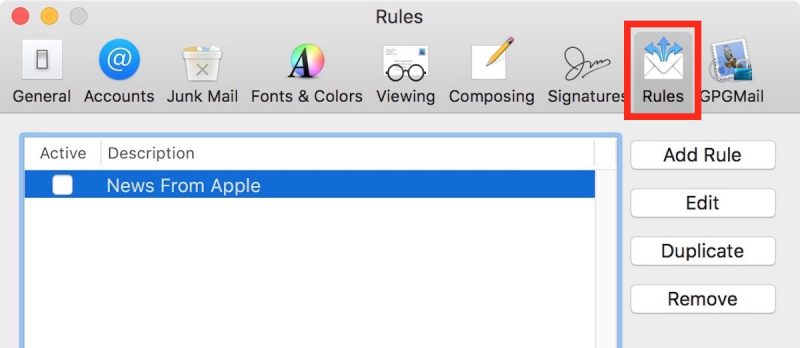
In the Rules dialog box that appears, click the Add Rule button and give the rule an identifiable description, such as “Out of Office Reply”.
Leave the default “any” selection in “If any of the following conditions are met”.
For the initial condition, select Account from the first dropdown menu, and then choose the email account that you want your out-of-office rule to apply to from the condition’s second dropdown menu.
In the second condition under “Perform the following actions:”, select Reply to Message from the dropdown menu.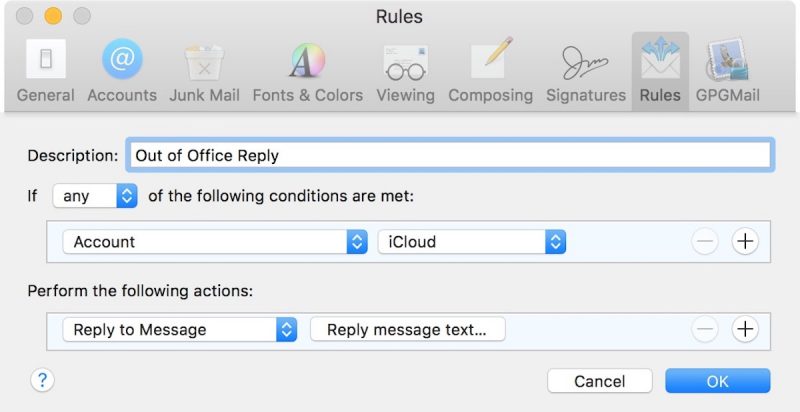
Now click Reply message text….
In the input window that appears, type the text you want to appear in the automatic response email that will be sent when you’re away.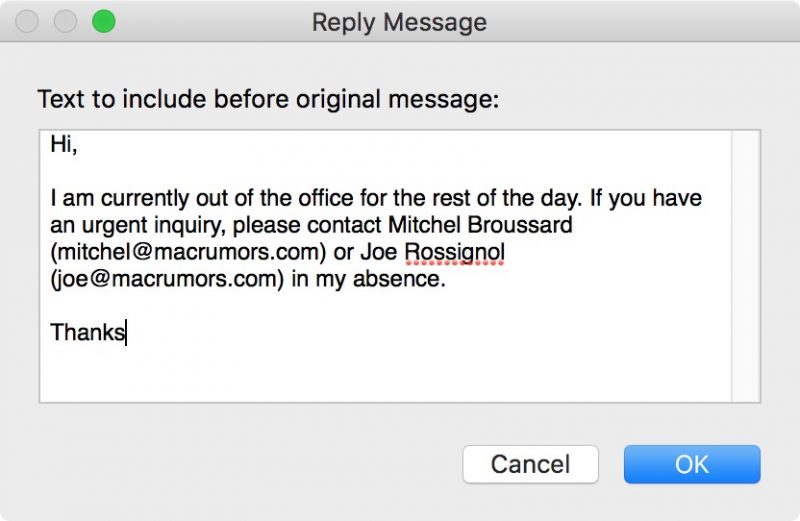
Click OK to close the input window when you’re done.
Click OK to close the Rules dialog box.
WARNING! At this point, Apple Mail will ask if you want to apply the new rule to existing messages in your mailbox. Be very sure to respond to this question with a negative. In other words, click Do Not Apply, for the simple reason that clicking the alternative “Apply” option will cause Mail to send the automatic reply to all the messages currently sitting in your inbox, and you don’t want that!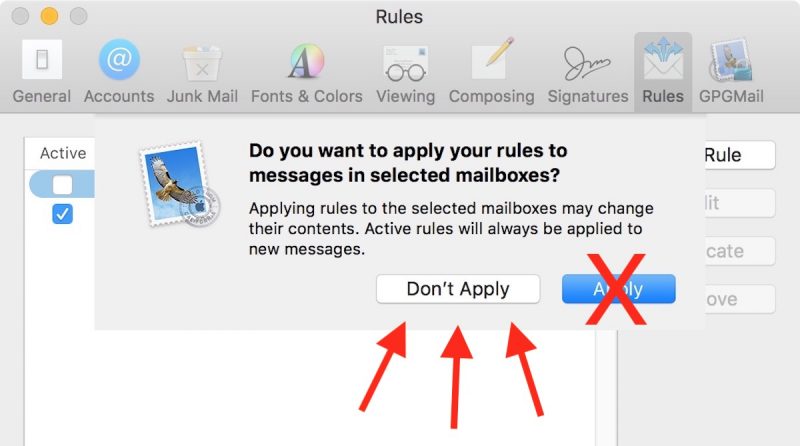
Your out-of-office reply rule is now active. Leave things as they are and keep your Mac on, and all incoming messages to that account will be responded to automatically. To make the out-of-office reply inactive upon your return, simply uncheck the box next to the said rule. The next time you’re away, simply check the box again to reactivate it.And that’s it. It’s worth noting that you can tweak the rule’s conditions to suit your needs – so that the out-of-office reply is only sent out to specific people, or only in response to emails with certain subjects, for example.
How to Set Up Out-of-Office replies in iCloud Mail
Unlike Apple Mail in macOS, iCloud Mail has a dedicated out-of-office feature called Vacation mode that you can enable remotely from any web browser.
For obvious reasons, Vacation mode will only be useful to you if you have an iCloud email address. Other account holders looking for an out-of-office solution are better off using a third-party email client such as Mozilla Thunderbird. And with that caveat, here’s how to get Vacation mode in iCloud Mail up and running.
Open a browser and navigate to http://www.icloud.com.
Log in using your iCloud credentials and then click on the Mail icon.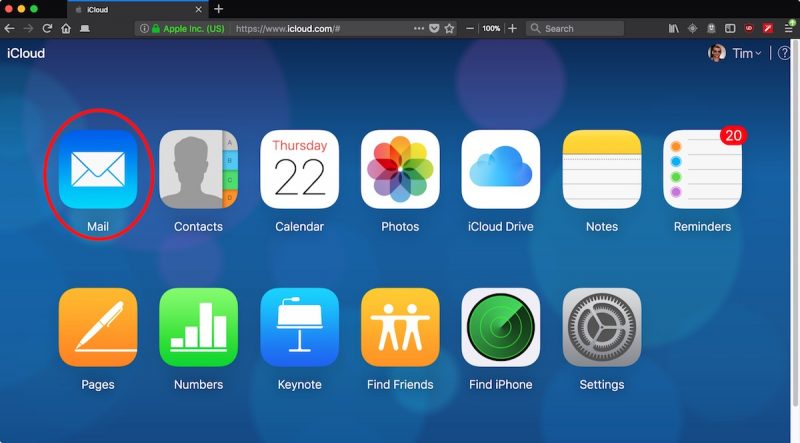
When your Mail screen loads, click the cog icon in the lower left corner of the window and select Preferences… from the popup menu.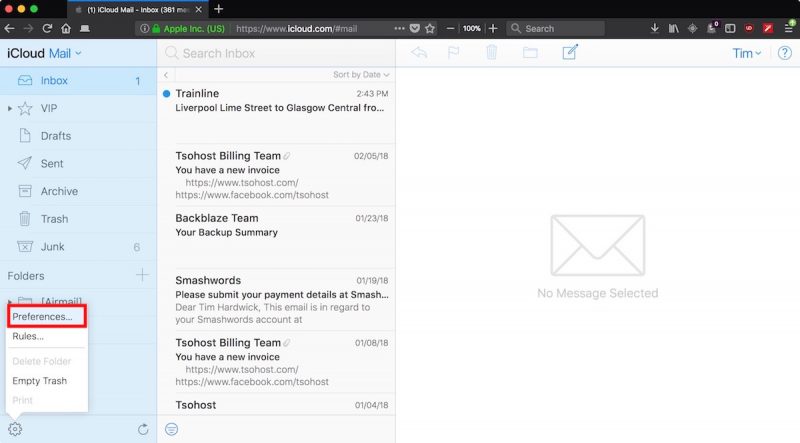
Click the Vacation tab and check the box next to “Automatically reply to messages when they are received”.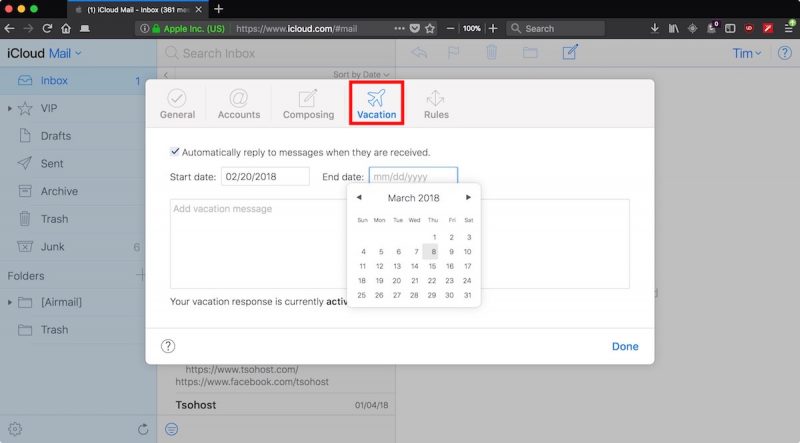
Using the calendar dropdowns, click on a Start date and an End date between which you’d like your out-of-office replies to remain active.
Lastly, enter the text of your automatic reply into the input box, and then click Done.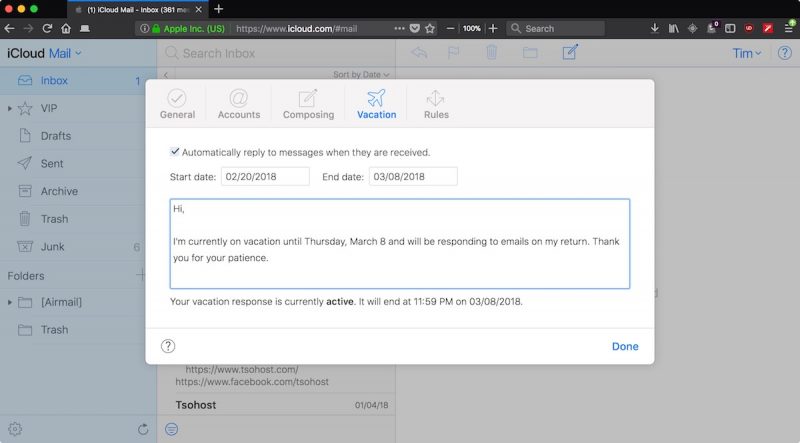
Related Roundup: macOS High Sierra
Discuss this article in our forums

