


YouTube TV Price Increasing to $40 for New Subscribers Starting Tomorrow
The price for Google’s YouTube TV subscription service will be increasing to $40 per month for new subscribers starting tomorrow, up from the current price of $35 per month.
Google first warned potential subscribers about the new pricing for YouTube TV in February, and today is the last day to sign up at the current $35 per month price point. Existing subscribers will continue to be able to pay $35 per month for the service.
Introduced in April of 2017, YouTube TV is a live streaming television service designed to compete with services like Sling TV, Hulu with Live TV, DirecTV Now, and Playstation Vue.
YouTube TV provides subscribers with access to TV shows on more than 40 channels, with participating networks that include ABC, CBS, Fox, NBC, the CW, Disney, ESPN, FX, USA, and dozens more.
As of early February, YouTube TV launched an Apple TV app, making the subscription service available on all Apple devices. YouTube TV is available in a wide range of locations across the United States.
Related Roundup: Apple TVTags: YouTube, YouTube TVBuyer’s Guide: Apple TV (Buy Now)
Discuss this article in our forums
Apple Seeds Fifth Beta of watchOS 4.3 to Developers
Apple today seeded the fifth beta of an upcoming watchOS 4.3 update to developers, one week after seeding the fourth beta and a three weeks after releasing watchOS 4.2.3, a minor update focusing on bug fixes.
Once the proper configuration profile has been installed from the Apple Developer Center, the new watchOS beta can be downloaded through the dedicated Apple Watch app on the iPhone by going to General –> Software update.
To install the update, the Apple Watch needs to have at least 50 percent battery, it has to be placed on the charger, and it needs to be in range of the iPhone it’s paired to.
watchOS 4.3 introduces support for Nightstand mode in portrait orientation, a feature that was previously only available when the watch was placed in landscape orientation. There’s also a new charging animation when the Apple Watch is placed on the charger, a new app loading animation, your Activity data is now displayed on the Siri watch face, and the battery complication more accurately reports battery life.
Subscribe to the MacRumors YouTube channel for more videos.
The watchOS 4.3 update also brings the return of a much-desired feature that allows music playing on the iPhone to be controlled using the Music app on the Apple Watch.
In prior versions of watchOS, starting with watchOS 4, the Music app could only be used to control music playing on the watch itself. With the tvOS 11.3 beta installed, there’s also an option to control music playing on the Apple TV with the watch.
Apple plans to release watchOS 4.3 to the public in the spring, and until then, it will be limited to developers. Apple offers public betas of tvOS, iOS, and macOS, but watchOS betas are not available for public beta testers because there’s no way to revert to an earlier version of watchOS once an update is installed.
Related Roundups: Apple Watch, watchOS 4Buyer’s Guide: Apple Watch (Neutral)
Discuss this article in our forums
Quick Takes: PGA TOUR Gets Augmented, Interview With HQ Trivia’s $25,000 Winner, and More
In addition to our standalone articles covering the latest Apple news and rumors at MacRumors, this Quick Takes column provides a bite-sized recap of other headlines about Apple and its competitors on weekdays.
Monday, March 12
– PGA TOUR introduces augmented reality app: PGA TOUR AR uses Apple’s ARKit platform on iOS 11 to project 3D models of featured holes on any flat surface. Fans will be able to select their favorite player on the golf course, compare shot trails from each round, and compare the shots of different players.
The first featured hole will be No. 6 at the Arnold Palmer Invitational starting March 15, while shot trails can be reviewed from the seventh hole of last month’s AT&T Pebble Beach Pro-Am tournament. The end goal is for at least one hole to be featured at every tournament on the PGA TOUR schedule.
Commentary: PGA TOUR AR is free on the App Store for iPhone 7 and iPhone 7 Plus, iPhone 8 and iPhone 8 Plus, iPhone X, and iPad Pro models. The app is somewhat rudimentary at launch, but an update later this year will enable fans to view 3D shot trails for selected players at live golf tournaments.
– Apple Bluewater re-opens Saturday, March 24, according to a photo shared yesterday by Joe White on Twitter: The store has been closed for nearly eight months to allow for renovations to be completed. Apple Bluewater is located in Greenhithe, Kent, on the edge of Greater London in England.
@Apple Bluewater re-opening March 24 after 9 month refurbishment. pic.twitter.com/8UtXL3ThmO
— Joe White (@JoeWhiteLondon) March 11, 2018
– Canada to initiate mobile emergency alerts on April 6: iPhones and other LTE-enabled smartphones in Canada will receive emergency alerts from the government about life-threatening situations, such as tornadoes, flash floods, and child abductions, when necessary. On an iPhone, these will appear in the form of a push notification at no cost to the user. There is currently no way to opt out.

Commentary: This long-overdue feature, already in place in the United States, should greatly extend the visibility of emergency alerts beyond TV and radio in Canada. Test alerts, to be identified as such, are scheduled to begin in May.
Other Reading:
- BuzzFeed News interviews Mikey Elkins, winner of $25,000 on HQ Trivia: The 25-year-old physical education teacher from Jacksonville, North Carolina said he was “sitting on his toilet” guessing most of the answers to win the special one-person-takes-all prize on Sunday.
- AAPL sets another all-time high closing price: $181.72. Apple’s market cap rises to around $922 billion.
- Intel fights for its future: Jean-Louis Gassée, an Apple executive in the 1980s, argues that Intel acquiring rival chipmaker Broadcom would be a “suicidal defensive move” against a possible Broadcom-Qualcomm merger, which could improve Qualcomm’s relationship with Apple.
For more Apple news and rumors coverage, visit our Front Page, Mac Blog, and iOS Blog. Also visit our forums to join in the discussion.
Tag: Quick Takes
Discuss this article in our forums
Mac App Store App ‘Calendar 2’ Mines Cryptocurrency by Default, but Feature is Being Removed
A Mac App Store app called Calendar 2 has been mining a digital coin known as Monero using customers’ machines, and Apple took no action against the app despite knowing about it for at least 24 hours.
As Ars Technica points out, Calendar 2 is supposed to have an opt-in feature that allows users to choose to let the app mine cryptocurrency to unlock paid features that normally require an in-app purchase, but instead, it’s been bugged and has been mining Monero by default.
Image via Ars Technica
Surprisingly enough, Apple has allowed the Calendar 2 app to remain available in the Mac App Store despite the fact that it openly embraces cryptocurrency mining. Ars Technica asked Apple if the app violated App Store policies, but did not receive a response, and more than 24 hours after Ars contacted Apple, the app remains available for purchase in the Mac App Store.
It’s not clear if Apple has left the app in place because it approves of allowing cryptocurrency mining in the Mac App Store as a way to enable paid features or because Mac App Store apps often receive little attention from the company.
Regardless, because of the attention the feature has received from the media today, Qbix, the company behind Calendar 2, has decided to remove the feature from the app. Qbix founder Gregory Magarshak told Ars Technica that the currency miner’s rollout had been complicated by bugs that prevented it from working as intended, with the miner running continuously even when not approved by the user. Other bugs caused it to use too much of a Mac’s resources.
Magarshak originally said Qbix would update the app to fix the bugs, but he later told Ars that Qbix has decided to remove the miner in the app, so there will be no way to get free features via cryptocurrency mining going forward. From an email he sent to Ars Technica:
We have decided to REMOVE the miner in the app. The next version will remove the option to get free features via mining. This is for three reasons:
1) The company which provided us the miner library did not disclose its source code, and it would take too long for them to fix the root cause of the CPU issue.
2) The rollout had a perfect storm of bugs which made it seem like our company *wanted* to mine crypto-currency without people’s permission, and that goes against our whole ethos and vision for Qbix.
3) My own personal feeling that Proof of Work has a dangerous set of incentives which can lead to electricity waste on a global scale we’ve never seen before. We don’t want to get sucked into this set of incentives, and hopefully our decision to ultimately remove the miner will set some sort of precedent for other apps as well.
Even though the features are going to be removed from the Mac App Store app, it continues to be unclear how Apple feels about cryptocurrency mining within apps and if the company’s apparent indifference on the issue is going to lead to additional Mac apps attempting to go this path to implement features in exchange for processing power.
Websites and malware have been sneakily mining for currency by taking advantage of unsupecting users, but Calendar 2’s method of openly offering features in exchange for free mining is new to the Mac App Store.
Tag: Mac App Store
Discuss this article in our forums
Lenovo ThinkPad X1 Carbon vs. Apple MacBook Pro 13
Bill Roberson/Digital Trends
Lenovo’s ThinkPad line is one of the most iconic notebook families around. From the ThinkPad logo with the red dot on the lid, to the red TrackPoint nubbin, to the typical ThinkPad keyboard layout, you’d have no problem picking one out of a lineup. And they remain just as well-built as always, as evidenced by the latest clamshell member, the ThinkPad X1 Carbon.
Apple’s MacBook Pro is also a recognizable notebook line that’s maintained a consistent design aesthetic over the years. Today’s model has the same understated elegance as always and confirms Apple’s reputation for rock-solid build quality.
So, which one of these premium and highly familiar notebooks is worth your investment? We pit the Lenovo ThinkPad X1 Carbon against the MacBook Pro 13 to find out.
Specifications compared
Lenovo ThinkPad X1 Carbon
MacBook Pro 13
Dimensions
12.73 × 8.54 × 0.62 (in)
11.97 × 8.36 × 0.59 (in)
Weight
Starting at 2.49 pounds
3.02 pounds
Processor
Up to 8th-generation Intel i7
Up to 7th-generation Intel Core i7
RAM
Up to 16GB RAM
Up to 16GB RAM
Display
14-inch IPS display
Optional Dolby Vision HDR
13.3-inch IPS display
Resolution
Full HD (1,920 x 1080 or 157 PPI)
WQHD (2,560 x 1440 or 210 PPI)
2,560 × 1,600 or 227 PPI
Storage
Up to 1TB PCIe SSD
Up to 1TB PCIe SSD
Touch
Optional touch display
Touch Bar
Ports
2 x USB Type-A 3.1, 2 x USB-C with Thunderbolt 3, 1 x HDMI, microSD card reader, 3.5mm combo headset
Touch Bar: 4 x USB-C (Thunderbolt 3)
Non-Touch Bar: 2 x USB-C with Thunderbolt 3
3.5mm combo headset
Webcam
720p HD with optional infrared camera for Windows Hello support, ThinkShutter privacy screen
720p FaceTime HD
Operating System
Windows 10
MacOS Sierra
Battery
57 watt-hour
Touch Bar: 49.2 watt-hour
Non-Touch Bar: 54 watt-hour
Price
$1,520+
$1,199+
Review
3.5 out of 5 stars
3 out of 5 stars
Design
Apple updated the MacBook Pro line in late 2016, utilizing essentially the same silver aluminum chassis and elegant but conservative design. It’s thinner than ever and its display is more modern with smaller bezels. Thus, the MacBook Pro still looks good in any environment, and you’ll be happy with Apple’s usual attention to detail, overall fit and finish, and granite-like solidity.
The sixth-generation ThinkPad X1 Carbon has also undergone some relatively subtle design changes. It’s still rock-solid in hand, with a carbon material finish that provides a soft touch and with zero flex throughout the chassis. It’s also the usual black ThinkPad aesthetic that’s aggressively businesslike, with updated branding that’s subtler but still recognizable.
Both notebooks have iconic designs, and both sport build qualities that are worthy of their premium pricing. The ThinkPad gets some extra points, though, for fitting a 14-inch display into a chassis that’s nearly the same size and thickness as the MacBook Pro 13’s while being almost half a pound lighter. Ultimately though, this one’s going to come down to pure aesthetic taste because when it comes to the design essentials, they’re evenly matched.
Winner: Tie
Performance
The MacBook Pro 13 received its last update in 2017, gaining 7th-gen dual-core Intel Core processors with stepped-up Iris Plus GPUs for slightly better graphics performance. The ThinkPad X1 Carbon, however, enjoys the latest and greatest eighth-generation quad-core Intel Core processors that are significantly faster when working hard and more efficient when running less demanding tasks.
Both manufacturers utilize very fast PCIe NVME solid-state drives (SSDs) in their premium notebooks, and so they both enjoy speedy storage performance. You won’t find large files and demanding database applications to slow them down.
The ThinkPad X1 Carbon doesn’t sport the slightly faster Intel Iris graphics, but its processor performance is much better than the MacBook Pro’s last generation CPUs can attain. Lenovo wins this round as well.
Winner: Lenovo ThinkPad X1 Carbon
Keyboard, Mouse, and Pen
When it comes to input options, people tend to either love or hate what Apple has done with the MacBook Pro in deference to ultimate thinness. There was a time, for example, when MacBook keyboards were considered exemplars of typing perfection. Today, Apple has opted for a more modern “Butterfly” key mechanism that’s very clicky (and loud) but also suffers from very short travel. The touchpad is huge, which is a plus, and famously has the best touchpad you’ll find on a laptop.
Finally, you can get two versions of the MacBook Pro 13. There’s one with the OLED Touch Bar strip that runs along the top of the keyboard and adds some task-specific touch input, and then there’s one without it. If you opt for the Touch Bar version, you’ll also gain a Touch ID fingerprint scanner that lets you log in without typing a password.
Lenovo’s ThinkPad X1 Carbon, on the other hand, enjoys the always-excellent ThinkPad keyboard with superior travel, a precise tactile feel, and an overall experience that welcomes fast, accurate typing. It also offers the TrackPoint nubbin sitting in the middle of the keyboard for an old-school input option that longtime users will appreciate.
The extra TrackPoint buttons do encroach on the standard touchpad’s space, however, providing a smaller space for swiping and gestures than we like. Nevertheless, it’s still precise and enjoys Microsoft Precision touchpad support. You can also opt for a touch display for some added convenience, and Windows 10 Hello password-less login is supported by an optional infrared camera and a fingerprint scanner. There’s even a physical privacy cover for the webcam if you want to ensure your notebook isn’t spying on you.
As we said in the beginning of this category, you’ll likely either love or hate Apple’s input options. We think most people will appreciate Lenovo’s more traditional approach, though, and so we’re assigning the win to the ThinkPad.
Winner: Lenovo ThinkPad X1 Carbon
Connectivity
Apple’s latest MacBook design drops any pretense at supporting legacy peripherals, offering USB-C ports with Thunderbolt 3 support as the only option. On the MacBook Pro 13 with Touch Bar, you’ll get four ports, and on the version without the Touch Bar you’ll get two. Add in a 3.5mm combo audio port and the usual 802.11ac Wi-Fi and Bluetooth radios, and that’s the extent of the MacBook Pro’s connectivity.
The ThinkPad X1 Carbon is an entirely different beast when it comes to hooking up. It comes with two USB-A 3.1 ports for legacy add-ons, two USB-C ports with Thunderbolt 3, a full-size HDMI port, and a microSD card reader. Whew, that’s a lot of ports. The 3.5mm combo audio jack joins 802.11ac and Bluetooth to round out a very well-connected notebook indeed.
We really, really appreciate machines that combine legacy and futuristic support, and the ThinkPad X1 Carbon offers that in spades. Good for Lenovo, and it wins this category handily.
Winner: Lenovo ThinkPad X1 Carbon
Display
Apple’s MacBook Pro line is renowned for offering some of the best displays around. The MacBook Pro 13 is no different, offering a 13.3-inch display with 2,560 x 1,600 resolution (227 PPI) that’s extremely bright, has a wide color gamut with excellent accuracy, and strong contrast. It’s not a 4K display, but it’s sharp enough and makes a great platform for anyone who works with photos and video.
Lenovo offers a few display options with the ThinkPad X1 Carbon. The entry-level model is a Full HD (1,920 x 1,080 or 157 PPI) panel that offers better-than-average color gamut and accuracy and good contrast. Only its relatively low brightness holds it back, although its anti-glare coating helps it overcome bright ambient lighting. There’s also a WQHD (2,560 x 1,440 or 210 PPI) display option for some increased sharpness, and at the high end, you can opt for an extremely bright (500 nit) panel that supports Dolby Vision high-dynamic range (HDR).
We like the sound of that HDR-enabled WQHD display, given its promise of incredibly bright and dynamic colors, and we appreciate Lenovo’s wide range of options. However, the MacBook Pro 13 out of the box offers a superior display that’s proven to be the best option for creative types. We’ll give Apple the win here, with some props to the ThinkPad’s greater display diversity.
Winner: MacBook Pro 13
Portability and Battery Life
Regarding weight and thickness, the MacBook Pro 13 is no longer particularly special at just over three pounds and 0.59 inches. And its bezels are small, but not the smallest all around, resulting in a chassis that’s diminutive but not especially so. It’s a comfortable machine for tossing in a backpack, but it’s no longer an industry leader.
Also, Apple actually decreased battery life to make the machine as thin as possible — an unfortunate compromise. The Touch Bar version has the smallest battery capacity at 49.2 watt-hours, in spite of adding in an OLED strip that needs some power. The non-Touch Bar version has a more impressive 54 watt-hours. The MacBook Pro 13 offers good but no longer superior battery life.
While the ThinkPad X1 Carbon has a larger display, it’s only slightly larger overall than the MacBook Pro 13. It’s just slightly thicker at 0.62 inches. However, it’s also a half-pound lighter, meaning that it’s going to weigh you down less as you’re trekking from place to place.
The Lenovo also sports a 57 watt-hour battery, which when combined with the 14-inch Full HD display and efficient eighth-generation Intel Core processors promises solid battery life. And in fact, it was decent enough in our testing, running our more intensive tests at a competitive rate. Oddly, it fell behind in our video looping test, which is unusual for the latest class of machines.
Overall, both of these machines are well-equipped to be taken on the road. They aren’t the lightest or thinnest laptops, nor ones with the best battery life. However, when you pit the two of them up against each other, the different pros and cons equal out pretty squarely.
Winner: Tie
Availability and Price
The MacBook Pro 13 is a distinctly premium notebook. The Touch Bar version starts at $1,800 and comes with a Core i5 processor, 8GB of RAM, a 256GB SSD. Pricing goes all the way up to $2,900, which nets you a Core i7 processor, 16GB of RAM, and a 1TB SSD. The non-Touch Bar version is a less expensive option (and the one we prefer), starting at $1,300 for a Core i5, 8GB of RAM, and a 128GB SSD.
The ThinkPad X1 Carbon is also priced at a premium, starting at $1,520 for a Core i5, 8GB of RAM, a 256GB SSD, and Full HD display. That runs all the way up to $2,580 for a Core i7, 16GB of RAM, a 1TB SSD, and that lust-worthy WQHD display with Dolby Vision HDR.
Neither of these machines is easy on the wallet. The MacBook Pro 13 starts out at a lower price, but that’s if you give up the Touch Bar and go with less storage. When you compare identical configurations between the two, the MacBook Pro 13 comes out to be $20 cheaper, with one significant difference: CPU. The current MacBook Pro 13 features a 7th-gen processor, while the new ThinkPad has an 8th-gen processor, which results in some significant performance differences.
On the high-end side of things, the ThinkPad X1 Carbon still wins with the option for that vivid HDR display. Lenovo gets the nod here.
Winner: Lenovo ThinkPad X1 Carbon
The ThinkPad X1 Carbon wins this premium notebook battle
Apple will likely update the MacBook Pro line sometime in 2018, at least adding in the latest generation of processors. In the meantime, the current non-Touch Bar MacBook Pro 13 is a great machine for MacOS users and those who’ve bought into the Apple ecosystem.
Unlike some Windows laptops, the ThinkPad X1 Carbon fares well in the places where the MacBook traditionally excels, such as in durability, design, and battery life. The ThinkPad X1 Carbon probably won’t win over a lot of Mac fans, but overall, Lenovo has made upgrades in all the best places, without wasting energy with something like a Touch Bar. We think you’ll find your money better spent on Lenovo than Apple in this comparison.
Editors’ Recommendations
- Lenovo revs up the ThinkPad X1 line with Intel 8th-gen, HDR displays, and Alexa
- Lenovo ThinkPad X1 Carbon (2018) review
- MacBook Air vs. MacBook Pro 13 (non-Touch Bar)
- MacBook Pro 13 vs. MacBook Pro 15
- Asus ZenBook 13 vs. HP Spectre 13
Can Toshiba’s dynaEdge AR glasses succeed where others have failed?
A bright-yellow plastic hardhat sits on the conference table – not a standard sight at Digital Trends’ New York City office. The array of Toshiba executives around the table? Standard fare, but the product they’re here to show off isn’t. Called the dynaEdge AR Smart Glasses, it’s Toshiba’s first Windows-based smart glasses. And Mark Simons, President of Toshiba America, has high hopes for it, comparing it to “the laptop, which we invented back in 1985.”
A bold statement, but an interesting comparison. The dynaEdge isn’t the first augmented reality headset – we all remember Google Glass – but it is the first wearable Windows 10 PC to fit in a pair of glasses.
Toshiba’s dynaEdge
is the first wearable Windows 10 PC to fit
in a pair of glasses.
“For decades, Toshiba has been instrumental in streamlining the operations of businesses around the world through cutting-edge, mobile computing technologies,” said Carl Pinto, a vice president with Toshiba. “We believe that wearable PCs, combined with smart glasses, will take on-the-job productivity to a whole new dimension.”
The dynaEdge combines a head-mounted display screen with a wearable PC about the size of a transistor radio. Think of the PC instead as three Samsung Galaxy Note 8’s glued together. That box houses a full Windows 10 computer, including a 6th Gen Intel Core M processor, 16GB of RAM, a removable battery, solid state storage, a finger print reader, and so on. It connects to the wearable Toshiba AR100 Head Mounted Display, a 3-ounce device with a micro-screen like that found in Google Glass. Thanks to an ingenious clip, it can be worn on either the left or right side of eyeglasses, protective eyewear, or anything else you’d strap over your face.
Toshiba envisions the product in a wealth of applications, from field work, to assistive tech, to assembly lines, to warehousing – basically, anywhere someone needs a feed of information, and doesn’t want to schlep around a binder of notes and instructions. Because it’s a full Windows 10 PC, it can stream video with a few simple clicks.
“Rather than an engineer assessing whether a plane is airworthy by sending pictures, someone can be looking at a plane and engineers can assess it live,” Carl told Digital Trends. Imagine the utility of having schematics at your fingertips when working in a clean room, or under the hood of a car.
We tested out the dynaEdge briefly, and thought it felt extremely durable. The arm is segmented to allow for multiple adjustments and designed to stay put when positioned. The screen was easily legible, even in bright conditions, and we watched video with only the tiniest lag. A speaker and microphone allowed us to carry on conversations as readily as on a phone. The dynaEdge has swipe and tap functionality, but much of the navigation takes place on the belt-mounted PC. That component has navigation buttons, a power button, and more.
[…] wearable PCs, combined with smart glasses, will take on-the-job productivity to a new dimension.
Toshiba is hardly the first company to go after the wearable, headmounted display market. Besides Google (and the knockoffs from Chinese companies like AltoTech), which is pushing back into the Enterprise as of last fall, there’s Epson, which has been making Moverio augmented reality glasses for years. Its latest, the Moverio BT-300, isn’t something you’d wear around all day, but the design keeps improving and there’s clearly a market for it.
Why does Toshiba think it can succeed when other companies have stumbled? Simons can only smile. “We waited to launch, we talked to companies about exactly what they wanted,” he said. It seems clear that big business has already agreed about the utility of the product. Time will tell.
Toshiba expects to sell the dynaEdge in the last quarter of 2018.
Editors’ Recommendations
- Bose’s new prototype AR glasses focus on what you hear, not what you see
- Elac Element EA101EQ-G integrated amplifier review
- Five years on, Microsoft’s Surface has made your PC better
- Native Union Eclipse review
- The Olfinity will help us gauge, clean, and augment the air that we breathe
Meet the 21st-century game show in the form of the Hangtime app
You may have chilled with your friends in person a few years ago, but today, hanging out is something you can do with your friends … in solitude. Meet Hangtime, a new mobile gaming platform that will allow its users to play live trivia games and quizzes while interacting with other human players, all without ever meeting those players in person. During each game, you can compete to win cash and other prizes while talking to and interacting with friends in either private or public “Hangs,” or digital rooms.
Every day at 2 a.m. and 6 p.m. ET, Hangtime provides its users with trivia and quiz shows. Think of it as the 21st-century answer to Wheel of Fortune or Jeopardy! Only instead of watching contestants compete on television, you can take part in the action yourself.
As it stands, the app features three game shows: Pop Quiz and Perfectly Adequate Games, both hosted by Will and Erinn of Perfectly Adequate Films, and The Good Game Show, hosted by Jon Hudson, a local New York City-based comedian. And for an even more social experience, you can tune into live pre- and post-game shows hosted by live animated characters who promise to engage with you and help organize your private hangs.
“TV has always been a social experience centered around popular shows that air during certain times of the day. However, with the transition to mobile devices, viewers have been given the power to watch any content, anytime, anywhere. As a result, we lost the social benefits of watching TV as a group,” said Mike Schabel, CEO of Kiswe, the company that built Hangtime. “By reintroducing social experiences to live video on mobile devices, Hangtime provides fun ways to bring friends, old and new, together to watch and play live game shows. Interactive and collaborative gaming is the first step toward our vision that mobile video is best when shared live with friends. During the beta phase of the app, we were able to build an incredible community of loyal Hangers, and we’re excited to bring this new gaming experience to everyone starting today.”
Hangtime relies on Kiswe’s patented cloud video technology, which promises live mobile video experiences for users across the country. In addition, you can see a live scoreboard to follow how you’re stacking up against other contestants during a game, as well as a comprehensive leaderboard that will allow you to compete tournament-style with your friends throughout the week. Of course, there are chatrooms that encourage chatting, collaborating, and competing with other competitors or your close friends, and Hangtime says it will continue to add more game formats as it develops. The app is available for download today on iOS or Android.
Editors’ Recommendations
- Tune in or lose out: Why we’re clearing our schedules for ‘appointment gaming’
- Who cares about loot? For ‘Sea of Thieves,’ Rare hid the real fun in the hijinks
- Catch every touchdown, ad, and trailer: How to watch the 2018 Super Bowl
- Win less than $20 in HQ Trivia? Now you can still collect your cash
- Dear game designers: Please rip off these brilliant game ideas from 2017
You can now use Alexa on your tablet to call your contacts
You may or may not be excited about the idea of a phone-less future, but it looks like it’s coming. Alexa users can use Amazon’s voice assistant to place voice or video calls on their iOS, Fire, or Android tablets from today.
Amazon had previously introduced the ability to make voice and video calls from Amazon Echos in May of last year, but that functionality was restricted to only calling other Echo speakers or smartphones with the Alexa app installed. Starting from today, March 12, Amazon has made it possible to use Alexa to place or receive a voice or video call on your tablet, too, expanding your options for staying in touch.
Getting going is as easy as downloading the Alexa app for Android or iOS and entering your Amazon log-in details. After that, you’ll be prompted to allow Alexa access to your contacts and to verify your phone number via a text message. If you’re on a Fire tablet, Alexa should already be installed and should be available for calling. Fire HD 10 tablet users can ask Alexa to make calls completely hands-free, but for other Fire tablets (Fire 7, HD 8, or older generations), you’ll likely have to hit the home button first before you can ask Alexa to make the call.
If you want to video chat you’ll have to be sure that your intended contact has an Echo device with a screen — an Echo Show or Echo Spot — or you’ll only be able to make voice calls. However, you can also set up opt-in “Drop In” support for instant video or voice if you want an instant connection with a loved one or friend. Landline support is also available, and you can ask Alexa to call a specific landline number, but both yourself and your recipient will have to be using an Echo Connect to receive the call. Similarly, users will only be able to place a call to the emergency services if they have an Echo Connect.
It’s still a little limited. You’re restricted to only being able to call Amazon Echo devices or your contacts who also have the Alexa app — so it’s only Alexa-to-Alexa for now — and it’s currently only available to users in Canada and the U.S.. You’ll also need a stand-alone Echo device to call landline numbers. However, the calls are sent over Wi-Fi, and so are completely free, and since getting set up is as simple as installing an app, it’s a great way to easily stay in touch.
Editors’ Recommendations
- You can now ask your LG AC unit to cool your home
- iDevices’ new products at CES 2018 will make your home smarter than you
- Automate all the little stuff in your life with these awesome IFTTT recipes
- Put your health first and get into shape with the best iPhone fitness apps
- How to jailbreak your iPhone on iOS 11: A beginner’s guide
Slingshot malware that attacks routers may be state-sponsored espionage tool
Keeping up with security updates for our various connected devices could be a full-time job. Whether it’s our smartphones, our PCs, our home assistants, or other devices, seemingly not a day goes by that we don’t hear about one security vulnerability or another. This time around, it’s the most central device in our networks, the router, that’s under attack.
Kaspersky recently reported on a new, fairly sophisticated, attack on MikroTik routers that its researchers described during the company’s Security Analyst Summit. Dubbed Slingshot, the vulnerability is a rather tricky piece of malware that can collect all kinds of information from PCs that are attacked via a compromised router — including screenshots, passwords, keyboard data, and other information.
While Kaspersky notified MikroTik of the issue and that company has already resolved the vulnerability, Kaspersky believes that other routers could still be affected. What makes Slingshot so potentially dangerous is that it piggybacks on legitimate router downloads and file executions — in this case, DLL files — which are used to infect PCs with kernel-mode malware that runs on affected machines without causing crashes. This malware, dubbed Cahnadr, joins with another piece called GollumApp that gives attackers “complete control” over a PC.
Digging into the details of the vulnerability, it’s obvious that the malware is particularly sophisticated, so much so that Kaspersky’s researchers suspect it’s the work of a group that’s highly organized, professional, and indeed likely to be state-sponsored. Given the kind of information that the malware seeks out, it’s also likely that it’s designed to perform cyber-espionage, and given that it can access the system at a very low level it’s capable of stealing any kind of information that exists on an infected PC.
There’s nothing we can do in response to attacks like Slingshot other than the single most important step: make sure that all of our devices are fully updated. Installing all OS and hardware updates is more important than ever, and that’s true not just for the most visible devices we use every day, like our smartphones and PCs, but also those hidden devices like routers that can serve as attack vectors for every other device on our networks.
Editors’ Recommendations
- Bitdefender Box (2018) review
- Lenovo’s fingerprint scanner software is broken, update it today
- Qualcomm is working on patches to address Meltdown and Spectre flaws
- The best free antivirus for Mac
- How to find the IP address of your router and login info
Spotify’s ‘Made For You’ is a love letter to music addicts
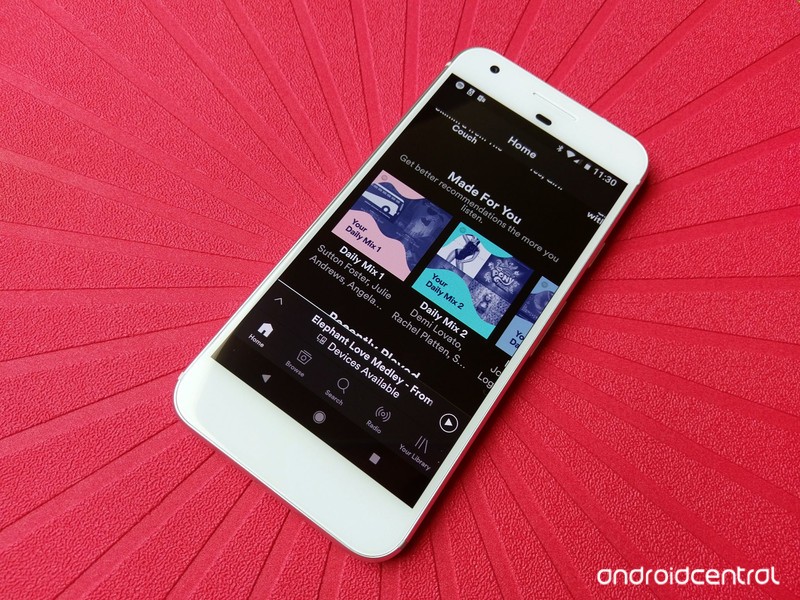
Spotify has the solution to your music curation woes, and they made it just for you.
Finding something to listen to can be a tricky proposition for any music lover. Do I want something new? Do I want something familiar? Do I want something fun? Well, Spotify is known far and wide for their algorithmic prowess, but the best example of it isn’t the Discover Weekly or the year-end statistics. No, siree, the best use of Spotify’s number-crunching genius is a little section in Your Library called Just For You.
When I began my affair with Spotify, everyone raved to me about Discover Weekly and Spotify’s many playlists, but I’m a girl of particular tastes. When Discover Weekly fell flat, I stuck to my traditional playlists and a few favored albums. However, days into my Spotify experience, something wonderful happened: my Just For You section in Spotify began populating with Daily Mixes. Spotify’s Daily Mixes can pick up on your listening habits, the trends around the music you listen to, and extrapolate them into a never-ending radio station that’s — well — just for you.



As your history with Spotify grows, your Daily Mixes can evolve and expand, too. You can refine them just like you would any other radio station by hearting and blockin songs as you go, and since the Daily Mixes adjust daily to reflect the songs you’ve listened to in the previous 24 hours, that means that while Discover Weekly will give you new music once a week, Daily Mixes can give you new music every day based on what you listened to yesterday.
The mixes aren’t completely infallible. Like any other algorithm on Spotify, they can miss, and your Daily Mixes can overlap, especially if you listen to a few particular styles of music constantly. It also seems to be persistent when trying to add some albums or artists to certain genre mixes, but as you listen and as you rate, you make your mixes better.

I’m a playlist junkie, but my Daily Mixes are rapidly becoming my go-to when the inevitable question arises: what do I want to listen to today? Do Daily Mixes hit the spot for you as you use Spotify? How many Daily Mixes do you have? Tell us in the comments!
 AIVAnet