


Pick up a 12-pack of Soylent for as little as $24 and put an end to skipping meals
Here’s your impulse buy of the day.

Unless you live under a rock, odds are you’ve heard of Soylent before. This meal replacement drink has been the center of attention for quite some time, and people seem to really love it. Right now, you can save $10 on a variety of flavors by using coupon code 10TRYSOYLENT during checkout. These rarely go on sale during the year, and most of the discounts tend to take place during January for those kickstarting a New Year’s resolution.
This discount drops a 12-pack of the original flavor down to just $24, or you can try the coffee flavor or vanilla for $5 more. If you don’t need the premade drinks, you can pick up just over 2-pounds of the powder for $24 as well.
With Soylent being a full meal replacement, this is a great way to get those meals in during your busy times. We’ve all been there before, caught up at the office, sitting for long hours in front of our monitors, and the last thing on our mind is food. It’s not healthy, so stop doing it and put the excuses behind. Use this discount to make the first step towards a healthier you.
Our pal Mark Guim has had amazing success using Soylent. He says:
I’ve been drinking Soylent for about two years and I absolutely love it. When I have a busy schedule, I prefer to drink it rather than order delivery or cook a meal. Ordering out can get very expensive and cooking can take a long time.
When trying to lose weight in the past year, counting calories has been important. Tracking with Soylent is easy because I know every bottle is 400 calories. I don’t drink Soylent for all my meals, but I’ve lost over 30 pounds this year by going to the gym 3-4 times a week and keeping my intake to about 2,000 calories a day.
Not ready to fully commit yet? Amazon has a Soylent Sample Box which is just $6 and comes with 3 different flavors in it. Once you receive the sample box, Amazon will give you a $6 credit to spend on a future Soylent purchase. If you already ordered a sample box, your credit stacks with the $10 discount, so be sure to get your order in right now.
See at Amazon
Android Oreo is starting to arrive on the Galaxy Note 8
The update was first spotted in France.
It’s a well-known fact that Samsung and fast software updates go together like water and oil, so it really shouldn’t come as too much of a surprise that the Galaxy Note 8 is just now being updated to Android Oreo – seven months after the phone was released.

First spotted by SamMobile, Oreo appears to be rolling out to Note 8 handsets in France as part of the initial rollout. Other countries are expected to follow suit soon, but there’s no specific time frame in place just yet.
The Oreo update changes the Galaxy Note 8’s firmware number to N950FXXU3CRC1, and it comes with the latest March 2018 security patch.
You can check and see if you’ve got an Oreo update waiting for you by going to the Software Update tab in Settings, but even with this initial sighting, it could be a while before your particular unit gets the Oreo treatment. Along with waiting for Samsung to expand it to other regions, you’ll have to wait even longer if you bought the Note 8 through a wireless carrier.
Even with all that said, what are you looking forward to most with Oreo on the Note 8?
Samsung Galaxy Note 8
- Galaxy Note 8 review
- Galaxy Note 8 vs. Galaxy S8+
- Which Note 8 color is best?
- Complete Galaxy Note 8 specs
- Join our Galaxy Note 8 forums
Verizon
AT&T
T-Mobile
Sprint
Best Buy
These apps will help you make the most of St. Patrick’s Day
There are the apps to use to help you have a fun and safe St. Patrick’s Day!
Whether you like bar hopping, wearing green or just driving snakes out of places snakes shouldn’t be in, St. Patrick’s Day has something for everyone. If you are planning a night on the town, there are a few applications for your Android phone to help you!
Google Maps

The easiest way to find bars nearby is by firing up Google Maps and exploring spots nearby. You’ll be able to read reviews, see hours of business, and of course navigate to the business. Picking up some friends along the way? You can add multiple stops to your trip to make sure you get everyone. Taking public transit? You can browse transit schedules and find out which station to be at. Get separated from your group? Simply share your location.
Download: Google Maps
More: Google Maps: Everything you need to know!
Uber and Lyft

Drinking and driving is a terrible idea. If your group isn’t going to have a designated driver, be ready to use a ride-sharing service. Depending on your market, this could either be Uber or Lyft . Better still, you can get a ride from inside Google Maps. If neither of these is in your market, your local taxi company may have an app, or may be available from taxi aggregator Curb. Failing that, call a good friend if you have one too many. Just don’t get behind the wheel.
Download: Curb – The Taxi App (Free)
PubRally

If Google Maps doesn’t produce the best recommendations for your taste, or if you just want to be sure you follow the crowd, check out PubRally. You can find nearby pub crawls, chat with other participants, and even compete in challenges. Because the only thing better than getting belligerently drunk is getting belligerently drunk for points.
Download: PubRally (Free)
Allrecipes

You may need something filling the next morning to cure your hangover, or you could be like me and just want to make a dynamite corned beef and cabbage. Either way, there are plenty of applications to help you follow along with a recipe, and my favorite is Allrecipes. You can sort by your tastes, the type of meal you want to cook, and create a central shopping list from your recipes. There are even drink recipes for those that want to party from the safety of their own home.
Download: Allrecipes (Free with ads)

According to the Internet, all of the cool kids have moved from Snapchat to Instagram. If you want to share your St. Paddy’s Day journey from that cool green tie you wore at work to all those shots you did at the bar to your stack of pancakes the next day, you’ll obviously want to world to see each and every step along the way. Be one of the cool kids and do it on Instagram.
Download: Instagram (Free)
What are your picks?
Which apps do you use to help celebrate St. Patrick’s Day? Let us know down below!
Time to bust out your old NES/SNES cartridges with the $30 Hyperkin RetroN 2 gaming console
Go retro today.
The Hyperkin RetroN 2 Gaming Console for SNES/NES is down to $29.54 on Amazon. That price is the lowest it has ever been despite some recent fluctuations. It normally sells around $44 and has even gone as high as $48.

This is not a gaming emulator like those Raspberry Pi kits we’ve shared or the classic consoles Nintendo has released over the last couple years. This is hardware designed to play your old cartridges. If you have a huge collection of NES and SNES games that you haven’t touched in years, buy this system and play them again. The console can support up to two NES or SNES controllers and comes with one of each. It will connect with old controllers as well.
If you don’t have your own collection, time to start scrounging around on eBay or the local thrift shop. According to the reviews, it also plays Super Famicom games although that doesn’t seem to be officially supported.
See on Amazon
OnePlus 6: News, Rumors, Release Date, Specs, and more!
This is everything you need to know about the OnePlus 6!
OnePlus has been on a cycle of releasing two smartphones per year: a major release in the spring, and a minor tweak of that previous phone in the fall. It’s nearly spring 2018, which means it’s nearly time for another OnePlus phone. Here’s everything you need to know about the upcoming OnePlus 6!
The design

The OnePlus 5T was the first time the company increased the size of its displays, and it looks like there will be more refinements coming with the OnePlus 6. The 6 will keep the stretched out design, but will add a notch up top, similar to… some other phones you may have seen. In addition to a high-quality display, OnePlus is also expected to move to a glass back, hopefully including Qi wireless charging in the process.
According to the image, the fingerprint reader will still be mounted on the rear of the phone, though earlier rumors suggested there would be an in-display fingerprint sensor. The dual cameras are still present, though this time in the center instead of the upper left. Of course, this is a leaked image and should be taken with a grain of salt until the official announcement is made.
More: OnePlus 6 supposedly leaks with iPhone X notch and glass back
Specifications

Of course, a phone isn’t just a pretty external design. The internal hardware needs to be up to snuff to push pixels and take all of our lovely Instagram photos. Fortunately, it seems the OnePlus 6 will be up to the task. Early benchmarks suggest the phone will ship with Qualcomm’s Snapdragon 845, the same chip that will likely be found in every other flagship device this year. Benchmarks have been gamed in the past — so take this all with the same grain of salt as before — but it’s a safe bet for OnePlus to include all the latest internal hardware with the OnePlus 6, just like they’ve done in previous generations. Based on the available information and the specs from previous releases, this is our best guess for what will power the OnePlus 6:
| Operating System | Android 8.1 with Oxygen OS |
| Display | 6-inch OLED with notch 2160x 1080 resolution, 18:9 aspect ratio |
| Processor | Qualcomm Snapdragon 845 |
| RAM | 8GB (assumed) |
| Storage | 64/128GB (assumed) |
| Battery | 3300mAhNon-removableDash charging (assumed) |
| Rear cameras | Dual cameras |
| Water resistance | No |
| Colors | Black |
More: Exclusive: OnePlus 6 has 19:9 notched display, Snapdragon 845, top benchmarks
The software

We haven’t seen any leaks for specific software features coming with the OnePlus 6, but it’s safe to expect the same vanilla Android style that OnePlus has used since 2014. OxygenOS is a known quantity at this point, featuring a few key improvements over what ships in Google’s Pixel line. There will surely be an Open Beta for users who like to live on the bleeding edge and try new features at the cost of stability. Expect a true dark theme, expect gesture controls and a few other little niceties that add up to a great software experience.
Price and availability
This is still up in the air at this point, but we can make an educated guess based on OnePlus’ previous devices. The OnePlus 5 retailed for $479, while the OnePlus 5T goes for a cool $499. It’d be nice if the OnePlus 6 kept that same price, but another small price increase isn’t out of the question.
As for availability, the OnePlus 3 was released in June of 2016, and the OnePlus 5 in June of 2017. Some early reports suggest we may see an earlier release this year, but June is a safe bet.
Stay tuned for more!
This is what we know — and a bit of what we’re guessing — about the OnePlus 6 for now. We’re expecting an earlier than normal release this year, so stay tuned for more coverage!
OnePlus 5T and OnePlus 5
- OnePlus 5T review: Come for the value, not the excitement
- OnePlus 5T specs
- Should you upgrade from the OnePlus 3T?
- OnePlus 5T vs. Galaxy S8: Beast mode
- All of the latest OnePlus 5T news
- Join the discussion in the forums
OnePlus
Amazon
PlayStation Aim controller: Everything you can do!
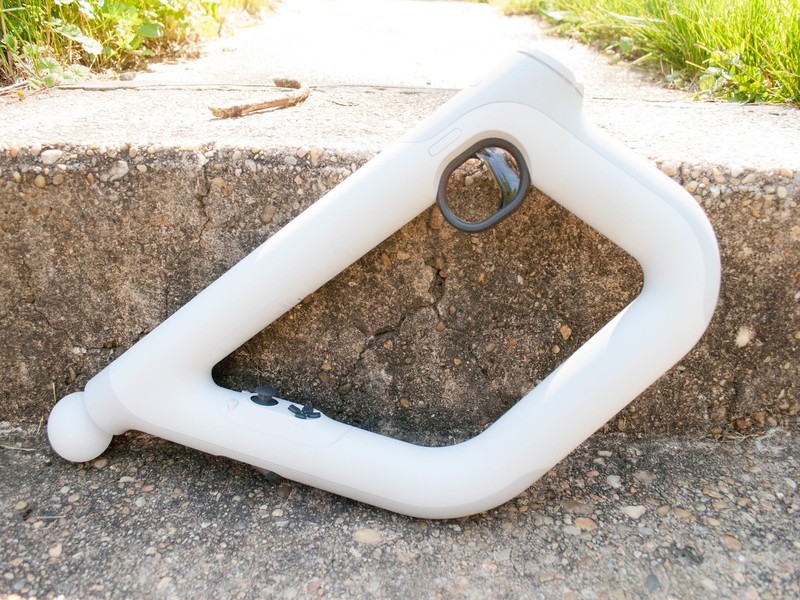
This is your rifle. There are many like it, but this one is yours.
The PlayStation Aim controller was built to bring a new layer of immersion to PlayStation VR games where you’re shooting anything that moves, but it’s good for much more than feeling like a gun when you can’t see the real world.
It’s got the functionality of a DualShock controller in an entirely new format, and we have the details on everything it can do here.
See at Amazon
Getting started with the Aim controller

When you first pick up the Aim controller, it does feel like the controller equivalent of a rifle. It’s light enough that the weight doesn’t make holding it for extended periods of time a drag. On that same note it’s also hefty enough that you won’t wear out immediately, although after extended play sessions your shoulders might disagree. Furthermore, it is armed with a trigger mechanism, two analog sticks, and buttons all over the place.
This controller was built for games like Farpoint on PlayStation VR, adding serious degrees of immersion when you are shooting things in VR. It operates like a Move controller, with far more functionality than a normal move controller. The most comfortable way of using it involves using both hands to figure out where everything is and find what you need by touch.
Buttons

The buttons on the PlayStation Aim controller are really what gives it the type of functionality that it has. There are L1, L2, R1, R2, Options, Share, and more built directly into the controller. So unlike a normal move controller, you have far more access to everything that you can do with a normal controller. In fact, when navigating the PlayStation menu, you’ll use those buttons and analog sticks to select the app or game you want to play.
This essentially means that using a combination of the buttons usually found on a DualShock 4 controller, and a Move globe, the Aim controller has all the functionality of both previous controllers. This allows you to share screenshots or video while shooting things in VR with the push of a button, as well as being able to jump completely out of a game and back to the home screen.
Where can I use it?

At release, the PlayStation AIm controller was only compatible with one game, Farpoint. While the selection started off small, more games have been added, making it more immersive than ever to play a shooter in VR.
- Arizona Sunshine
- Bravo Team
- ChromaGun
- Dick Wilde
- DOOM: VFR
- Farpoint
- Rom: Extraction
- Special Delivery
- The Brookhaven Institute
- Firewall Zero Hour
While you can try to use it in unsupported games, it really does not work out particularly well. Trying to use it like a two-handed move controller feels particularly unwieldy and doesn’t link up well, and trying to use it like a controller is difficult in the same way. It’s very obvious that the games with Aim support have put thought into ensuring that the controls sync up with the controller in your hand well.
Where do I buy an Aim controller?

The PlayStation Aim controller first hit the market on May 16th, 2017, and initially, finding one was a bit difficult. Thankfully that issue has been solved, and you can pick it up separately for about $60, or grab it in a Farpoint bundle for about $83!
This means you can order your controller offline, or head up to the store and pick one up in person. You should be able to find them at places like Best Buy, Target, Walmart, and of course GameStop if you prefer buying in person.
See at Amazon
PlayStation 4

- PS4 vs. PS4 Slim vs. PS4 Pro: Which should you buy?
- PlayStation VR Review
- Playing PS4 games through your phone is awesome
Amazon
Samsung Galaxy S9 & S9+: Everything you need to know!

It’s been a long time coming, but the Galaxy S9 and S9+ are here.
Samsung’s latest phones are definitely iterative updates over last year’s dramatically redesigned Galaxy S8 series, but that’s OK: Samsung fixes a lot of the original’s issues while making drastic improvements to the camera and biometrics systems.
Want to learn more? Start here.
Read (and watch) our Galaxy S9 review!
The first place you’re going to want to start is with our full Galaxy S9 review, which gives you everything you need to know about Samsung’s latest phones. Before you read, watch the complete condensed version in video above!
Samsung Galaxy S9 review: A fantastic phone for the masses
Samsung Galaxy S9 India review: As good as it gets
What are the big changes over the S8 series?
In a word, the camera. Samsung has kept the primary sensor at 12 megapixels, but that’s where the similarities end. The S9 and S9+ have adjustable apertures, switching seamlessly between f/1.5 and f/2.4. The Galaxy S9+ also gets a second 12MP sensor with a “telephoto” lens that provides 2x lossless zoom, and facilitates Live Focus, Samsung’s version of portrait mode that debuted with the Galaxy Note 8.
In terms of specs, the Galaxy S9+ has an extra two gigabytes of RAM over the regular S9, which is different from last year’s models. And, obviously, the fingerprint sensors have been relocated to a much more sensible place on the back of the phone — below the now-vertical camera modules.
Samsung Galaxy S9 and S9+ specs
Should you upgrade?
The big question is whether you should upgrade to the Galaxy S9. If you’re running a Galaxy S6 or S7, the answer is absolutely. If you’re rocking a still-new Galaxy S8 or even a Note 8, the answer is no. While there are substantial differences that clearly make the Galaxy S9 a better phone, the S8 isn’t even a year old at this point, and is poised to get some major improvements when it’s updated to Android 8.0 Oreo.
Samsung Galaxy S9 vs. Galaxy S8: Should you upgrade?
Samsung Galaxy S9+ vs. Galaxy Note 8: Which should you buy?
Which phone is better?
There are so many phones on the market right now — how do you decide which one to buy? This section will get longer as we spend more time with the Galaxy S9 and S9+, but for now, here are our looks at the new phones compared to some of the best devices on the market.
The Galaxy S9 is the smaller of the flagships, and here’s how it compares to some of the other major phones on the market.
Samsung Galaxy S9 vs. iPhone X: The best of metal and glass
Samsung Galaxy S9 vs. Google Pixel 2: Which should you buy?
Samsung Galaxy S9 vs. Honor View 10
And how about the larger Galaxy S9+?
Samsung Galaxy S9+ vs. Google Pixel 2 XL: The true flagships
Samsung Galaxy S9+ vs. OnePlus 5T: Here’s what the extra $300 gets you
Which Galaxy S9 should you buy?

OK, so you’ve made up your mind to buy the Galaxy S9 — but should you get the S9 or the larger, slightly better S9+? That’s a difficult question to answer, but we tried to help you make that decision more easily.
Here’s why the Galaxy S9+ is worth the extra money over the GS9
What colors are available?

Like last year, there are multiple colors of the Galaxy S9 series to purchase: Midnight Black, Lilac Purple, Coral Blue and Titanium Gray. U.S. buyers only get access to three of the four — silver is only available internationally — and both blue and purple are slight updates over last year.
What color Galaxy S9 should I buy: Black, blue, purple, or silver?
When and where can you buy it?

The Galaxy S9 is now available worldwide, at carriers and, in some countries, unlocked.
In the U.S., the Galaxy S9 costs between $720 and $800, while the Galaxy S9+ goes for between $870 and $915. For all the details, take a look at our roundup of the best Galaxy S9 deals.
Where to buy the Galaxy S9: Best deals for your new phone
Getting started with the Galaxy S9

Once you pick up your new phone, there are a few things you should do immediately. Here’s how to make your GS9 experience great!
The first 9 things to do with your Galaxy S9
The first 5 things to turn off in the Galaxy S9’s software
Help me get started with accessories!

Once you have your Galaxy S9 or S9+, you’ll want to look into accessories like cases and screen protectors that make the phone even better. We’ve rounded up our favorites for you.
The best Galaxy S9 accessories
The best cases for the Galaxy S9
Samsung Galaxy S9 and S9+
- Galaxy S9 review: A great phone for the masses
- Galaxy S9 and S9+: Everything you need to know!
- Complete Galaxy S9 and S9+ specs
- Galaxy S9 vs. Google Pixel 2: Which should you buy?
- Galaxy S9 vs. Galaxy S8: Should you upgrade?
- Join our Galaxy S9 forums
Verizon
AT&T
T-Mobile
Sprint
This Is The Best Time To Buy A Used Galaxy S8

Take advantage of the early-adopter craze and get a Galaxy S8 used. Saving money is awesome.
It’s tempting to rush out and buy a new Galaxy S9. Being a smartphone junky is kind of like that, and having the very latest and the very greatest is like an itch that needs to be scratched. A side effect of this that we see year after year is having like-new phones up for sale and it’s possible to take advantage of that to get a great new-to-you phone at about half the price of buying it new. That means right now is the perfect time to buy a used Galaxy S8.

Taking a look at Swappa for the Galaxy S8 will make you smile if you’re looking for a phone. Prices are starting around $360 for phones that work perfectly but have a few signs of being used like tiny scratches on the glass and $400 or so will get you an S8 that looks like it’s brand new. That’s about $350 cheaper than it was when it was brand new and it’s difficult to find any differences in a well-kept S8 bought six months ago and one still in the shrink wrap. In many cases, there is still plenty of time left under the original warranty and sellers often offer their own warranty on top of anything you get through PayPal or your Credit Card company.

Of course, Swappa and other well-known marketplaces for used gear are there to make sure you’re happy with the sale, too if buying through Craigslist or somewhere similar makes you nervous.
This is something we see every year when the hot new phone from Samsung becomes available but it’s especially relevant this year. The Galaxy S9 is a really nice phone but it doesn’t offer a lot over the Galaxy S8. The biggest feature of the new chipset is 5G-like network capabilities and you probably won’t have much use for that for the next 18-months. The display, camera, millions of apps and all the other things you love about it are all there and having them while saving a bunch of money makes them even nicer. Even if you’re looking for a larger Galaxy S+ model, the S8+ matches up nicely against the Galaxy S9+ and you’ll be able to save even more money.
It’s definitely something to think about. Even if you weren’t planning on buying a new phone in 2018 it’s a tempting idea. Just don’t think too long about it because the best ones won’t be around very long; other people have the same idea.
See at Swappa
Samsung Galaxy S8 and S8+
- Galaxy S8 and S8+ review!
- Galaxy S8 and S8+ specs
- Everything you need to know about the Galaxy S8’s cameras
- Get to know Samsung Bixby
- Join our Galaxy S8 forums
Verizon
AT&T
T-Mobile
Sprint
Unlocked
Where to buy the Galaxy S9: Best deals for your new phone
Everywhere you can buy the Galaxy S9 and S9+, and where to get the best price.
The Galaxy S9 and S9+ are now available to purchase in many countries around the world. Carriers are falling over themselves to give you a good deal on an early purchase of Samsung’s latest phones. Here are all of the latest deals from the top carriers and retailers.
U.S.
Verizon
You’ll be able to pick up the Galaxy S9 for $33.33 per month and the Galaxy S9+ for $38.75 per month. Both of those are the prices over 24 months, meaning you’ll ultimately pay $799 for the S9 and $929 for the S9+. Ouch. To help reduce those costs, you can trade-in an eligible phone on Verizon and get a credit up to $350 (details below). Additionally, Verizon is offering a $150 prepaid MasterCard if you port your existing number to a new line of service.
- $350 credit: iPhone X/8/8 Plus, Samsung Galaxy S8/S8+/Note 8
- $300 credit: iPhone 7/7 Plus/6S/6S Plus, Google Pixel/Pixel XL/Pixel 2/Pixel 2 XL, LG G6/V30, Motorola Z2 Force/Z Force, Samsung Galaxy S7/S7 Edge/S7 Active
- $200 credit: iPhone 6/6 Plus, HTC 10, LG G5/V20, Motorola Moto Z Droid/Z2 Play, Samsung Galaxy S6/S6 edge/S6 edge+/S6 Active/Note 5
- $100 credit: iPhone SE, HTC M9/M9+, LG G4/V10, Motorola Moto Z Play/Turbo 2, Samsung Galaxy S5/Note 4/Note Edge
See at Verizon
AT&T
AT&T has upped the price for the phones beyond what you’d pay unlocked or from T-Mobile. The carrier is advertising $26.34 per month for the GS9 and $30.50 per month for the S9+ – but that’s over 30 months, so the full price comes out to $790 and $915, respectively.
For a limited time, though, AT&T is offering up to $395 in bill credits when buying the Galaxy S9 on the company’s leasing plan, AT&T Next. This applies to both the S9 and S9+.
See at AT&T
T-Mobile
T-Mobile is matching the unlocked pricing of $720 for the Galaxy S9 and $840 for the S9+. T-Mobile says that the S9 series plugs into its new 600MHz spectrum, which offers more coverage in rural areas. T-Mobile is doing its usual trade-in bill credit deal for the new phones, offering $360 off either the Galaxy S9 or S9+ with an eligible trade-in. Here are the phones eligible for $360 in credit:
- GS8
- GS8+
- GS8 Active
- GS7
- GS7 edge
- GS7 Active
- Note 8
- iPhone 8
- iPhone 8+
- iPhone 7
- iPhone 7+
- iPhone 6s
- iPhone 6s+
- LG V30
- LG V30+
Here are the older phones eligible for a smaller $200 in credit:
- GS4
- GS5
- GS6
- GS6 edge
- GS6 edge+
- GS6 active
- Note 4
- Note 5
- iPhone 5s
- iPhone SE
- iPhone 6
- iPhone 6+
- LG V20
- LG G6
- LG G5
See at T-Mobile
Sprint
On Sprint you’ll pay $792 for Galaxy S9 and $912 for Galaxy S9+, but they’re also available through Sprint’s Galaxy Forever lease program, which allows you to upgrade to the newest Galaxy after 12 months, for $33 per month for S9 and $38 per month for the S9+.
Sprint’s prepaid carrier Boost Mobile is also planning to sell the Galaxy S9, but things are simple: only the small phone, only in black, and only on the full sale date with no pre-orders.
See at Sprint
Amazon
Amazon matches every other retailer with U.S. unlocked pricing at $719 and $839, with all three colors of both sizes of the phone available. When shopping at Amazon, be sure to get the proper U.S. model rather than the international models that can also be found from third-party sellers — buying an international model may be a tad cheaper in some cases, but won’t come with a warranty.
See at Amazon
Best Buy
You can buy the carrier versions of the Galaxy S9 and S9+ for Verizon, AT&T and Sprint, plus the unlocked version (we recommend that one) at their usual prices. Best Buy runs its own trade-in program, and also typically matches whatever the carriers are offering directly in terms of incentives. Best Buy also offers 24-month no-interest financing if you have a Best Buy credit card.
See at Best Buy
Samsung
If you prefer buying your phones directly from the manufacturer (consider it!), without all the bloatware and potential SIM locking, Samsung is offering both the S9 and S9+ unlocked. In the U.S., you’ll pay $719 for the Galaxy S9 and $839 for the Galaxy S9+, but both are available with Samsung’s financing program if you’d prefer to pay over several months.
Samsung also sells the carrier variants of both phones, matching the pricing you’d find from the carriers but not necessarily any of the other incentives above and beyond that.
See at Samsung
Canada
Rogers
It shouldn’t come as much of a surprise that Rogers has the Galaxy S9 and S9+. The amount you pay depends on which plan type you choose, with the pricing working out as follows:
- Premium+ Tab: $249 for the Galaxy S9 / $379 for the Galaxy S9+
- Premium Tab: $449 for the Galaxy S9 / $579 for the Galaxy S9+
- Smart Tab: $599 for the Galaxy S9 / $729 for the Galaxy S9+
- Talk & Text or No Tab: $999 for the Galaxy S9 / $1129 for the Galaxy S9+
You can get either the S9 or S9+ for as low as $0.93 after trading in an eligible device with activation on a 2-year Share Everything plan, but you’ll need to either buy the phones in person or have them ship to your local Rogers store to take advantage of this. As if that wasn’t enough, Rogers is also offering a free Samsung Fast Wireless Charging Stand (a $90 value) with the purchase of a Galaxy S9/S9+ on select 2-year Share Everything Plans. Unlike the above promo, this is available both in-stores and online.
See at Rogers
TELUS
In addition to Rogers, you’ll also be able to get the Galaxy S9 through TELUS. The regular S9 will cost between $250 and $450 upfront depending on which plan you choose, with the same holding true for the S9+ that varies at $380 and $580. For customeres that pre-order before March 15, TELUS is offering a $150 bill credit that’s applied directly to your account.
See at TELUS
Bell
Bell is selling the S9 and S9+ for $250 on a 2-year term with an $80/month contract, or $450 for a $70/month contract. It’s $1019 outright. The S9+ costs $380 and $580 in the same configurations. As with all other carriers, the phone comes in either grey or purple.
See at Bell
Unlocked
In Canada, Samsung is selling the Galaxy S9 and S9+ unlocked, starting at $960 for the smaller phone and moving up to $1100 for the larger one. Both phones remain unlocked once you put a SIM card into them, but they download (and keep) the carrier details from the first SIM that was inserted into them, much like their carrier counterparts. In Canada, Samsung is offering only the Lilac Purple and Titanium Grey models.
See at Samsung
UK
O2
O2 in the United Kingdom is selling the Galaxy S9 for £49.99 upfront and then £56 per month for 24 months. If you want the larger and more impressive Galaxy S9+, you’ll pay the same £49.99 upfront cost but a more expensive £61/month charge.
Thanks to the O2 Recycle program, you can score £100 off the purchase of either phone when trading in the Galaxy S7, S7 edge, S6, S6 edge, or S6 edge+.
See at O2
Vodafone
Vodafone is also offering the Galaxy S9 series in the UK, and for the regular S9 you’ll pay £29 upfront followed by £59/month. If you want to step up to the Galaxy S9+, you’ll pay a bit more ay £49 upfront and then £69 per month.
See at Vodafone
EE Mobile
For EE Mobile customers, you can get the Galaxy S9 for £58 per month and the S9+ for £68 per month. The former comes with 64GB of storage while the latter has 128GB, but no matter which you choose, you’ll be able to get the phones in either Lilac Purple, Coral Blue, or Midnight Black.
Similar to a lot of other carriers, EE Mobile is also running its own trade-in deal. If you have a Galaxy S7 or S7 edge, you can trade it in to EE and get a £250 discount on either the S9 or S9+.
See at EE Mobile
India
The Galaxy S9 and S9+ are now available for purchase in India, with prices starting at ₹57,900 ($890). Both devices are on sale direct from Samsung India as well as Flipkart and Paytm Mall, and will be heading to thousands of retail stores across the country.
Both the 64GB and 256GB storage configurations are available in India, but if you’re interested in picking up the 256GB model, you’ll have to buy from Samsung India’s store. Samsung is rolling out a ₹6,000 ($90) cashback to those picking up the phone via Paytm, and HDFC credit and debit card users can also get ₹6,000 off on either device. Here’s how much the Galaxy S9 and S9+ cost in India:
- 64GB Galaxy S9: ₹57,900 ($890)
- 256GB Galaxy S9: ₹65,900 ($1,000)
- 64GB Galaxy S9+: ₹64,900 ($1,015)
- 256GB Galaxy S9+: ₹72,900 ($1,120)
See at Flipkart
Samsung Galaxy S9 and S9+
- Galaxy S9 review: A great phone for the masses
- Galaxy S9 and S9+: Everything you need to know!
- Complete Galaxy S9 and S9+ specs
- Galaxy S9 vs. Google Pixel 2: Which should you buy?
- Galaxy S9 vs. Galaxy S8: Should you upgrade?
- Join our Galaxy S9 forums
Verizon
AT&T
T-Mobile
Sprint
Subway Surfers is the first game to hit 1 billion downloads on the Play Store
The game still has 20 million daily players.
Endless running games are a dime-a-dozen nowadays, but one of the oldest and most iconic is Subway Surfers. Subway Surfers was first released on the Google Play Store in May of 2012, and on March 15, 2018, developers SYBO and Kiloo announced that it’s the first game to cross 1 billion downloads on the Play Store.

Per Jacob Møller, CEO of Killo –
We are thrilled to be the biggest game in the world on the Google Play platform. Surpassing 1 billion downloads is a historic accomplishment. In this case, history was written by a talented team of developers and a fantastic collaboration between SYBO and Killo.
Over the past few years, Subway Surfers has seen enormous growth. Looking at Google Play and iOS downloads combined, the game was downloaded 350 million times in 2015, another 330 million downloads came in 2016, and 2017 saw a whopping 400 million downloads – making it the biggest mobile game of last year.
I’ve run across Subway Surfers a few times while browsing through the Play Store, but I personally never realized just how popular it was. SYBO and Kiloo note that the game still has 20 million daily players, and looking at last years numbers, it doesn’t seem like the Subway Surfers hype will be dying anytime soon.
Download: Subway Surfers (free)
 AIVAnet