


Canon’s 120-megapixel sensor enhances video better than CSI
Canon has been playing with high-megapixel sensors up to 250 megapixels since 2010, but it’s now showing what very high-resolution video looks like. It shot some clips with its 120MXS CMOS sensor (13,280 x 9,184 effective pixels) showing how much detail it retains even when you digitally zoom deeply into the video. You can do that with stills already, but it’s impressive to see it happen at nearly 10 fps, bringing to life the silly “enhance video” cliché from Blade Runner and CSI-type shows.
Making 13K video play at even 10 fps is no trivial feat. Canon said the readout is possible thanks to no less than 28 digital signal output channels on the APS-H-sized (29.22 x 20.20mm) chip. The final output format runs at 90 MB/s, or around 9MB per frame, so considering the chip catches about 60 times as much detail as a 1080p sensor, the images are heavily compressed.
Another video taken by Canon at a soccer match shows the potential downside to the tech. The 120-megapixel chip can zoom in to clearly show faces, even when positioned far away from the crowd. If married with face-detecting tech, a powerful computer could thus keep tabs on an entire stadium full of people at once.
At CES 2018, Canon said that it would start “offering [the chip] to solutions providers, integrators, and others who are looking for advanced components to create their own unique products and solutions.” That means we could start seeing the benefits — and drawbacks — of such chips in the near future.
Source: Canon (YouTube)
Twitter Introduces Easier Method for Sharing Specific Clips From Live Videos
Twitter this week updated its iOS and Android apps with a new feature called “Timestamps,” which the company said will make it easier to share brief moments from longer live videos.
Previously, Twitter users had to direct their followers to specific time codes in a live video so that people knew which moment they were referring to. The Timestamps update is a direct response to that, according to product lead for Periscope Mike Folgner.
Now, when users tap the share sheet extension on a live video, Twitter displays a playback track that they can scrub through to find the exact moment they want their followers to watch. Then they can tap the “new tweet” button, type in any commentary on the video clip, and press “tweet.” The clips can also be sent via direct message or copied and shared through a link.
So, we built Timestamps which lets anyone Tweet a live or replay video starting from the exact moment they want to discuss.
People have always used Twitter to talk about the things they experience. With Timestamps, now we can show rather than just tell everyone what’s happening.
People who see the tweet will be able to watch the specific moment shared within, and if the broadcast is still live they can skip forward in time by tapping “live.” Folgner said the feature is available across all live videos, “whether from a professional content publisher or someone broadcasting from their phone.”
🚀📣 Really excited to launch Timestamps, an easy way to point people to the part within a live video that matters most. pic.twitter.com/ECsyXH9Xzm
— Kayvon Beykpour (@kayvz) March 29, 2018
Timestamps are available now on Twitter for iOS [Direct Link] and Android, Twitter.com, and Periscope.
Tag: Twitter
Discuss this article in our forums
UK citizens might lose .EU domains after Brexit
Europe has formally told UK businesses and individuals that it will revoke .EU domains held in the UK after Brexit unless a new deal is negotiated. “As of the [Brexit] withdrawal date, undertakings and organizations that are established in the UK but not in the EU … will no longer be eligible to register .EU domain names,” the European Commission wrote. Worse, it added that existing .EU domains might be cancelled immediately after Brexit with no possibility of appeal.
An EU Scrutiny Committee issued a report early this year that set the stage for the domain decision. “By default, when the UK leaves the European Union, and any transition period ends, UK persons and organizations that have registered .EU domain names will no longer be legally eligible for these registrations.” it wrote.
As of the withdrawal date, undertakings and organisations that are established in the United Kingdom but not in the EU and natural persons who reside in the United Kingdom will no longer be eligible to register .eu domain names or, if they are .eu registrants, to renew .eu domain names registered before the withdrawal date.
However, the idea of immediately chopping existing domains appears to have taken even EURid, the consortium which regulars the domain, by surprise. As The Register notes, it also goes against internet industry norms, which usually permit grandfathering of domains. For instance, the .SU domain for the Soviet Union still exists, even though the region itself disappeared in 1991.
The EU has the right to do whatever it wants with the .EU domain, however, and the original, 2006 rules plainly state that it’s only available to people with EU residence. And as the commission points out, the UK voted itself out of Europe and will soon become a “third country.”
The EU also recently told the UK that it will be kicked out of the Galileo satellite program. It could be using both issues to apply more pressure in negotiations for Brexit, which is set to take place in exactly a year. It left the door open a hair, though, saying things the .EU revocation is “subject to any transitional arrangement that may be contained in a possible withdrawal agreement.”
Via: The Register
Source: European Commission
Mac Desktop Extension Software Duet Display Rendered Inoperable in macOS 10.13.4
Users of popular Mac desktop extension app Duet Display are being advised not to update to macOS 10.13.4, due to “critical bugs” that prevent the software from communicating with connected iOS devices used as extra displays.
When installed on a Mac and an iPad (or iPhone) and the two devices are connected using a Lightning cable or 30-pin connector, Duet allows users to extend their macOS desktop space on the Retina display of the iOS device. However, unspecified changes in the latest update to macOS High Sierra, released by Apple yesterday, causes the Duet client app to hang, and users are being advised to hold back from upgrading, at least for now.
The critical issue was highlighted by Duet’s ex-Apple developers in a blog post on the Duet support site, quoted from below.
Unfortunately, the upcoming version of macOS has several critical bugs that make it impossible for Duet to work properly. We have alerted Apple to their issue, but we have not received a concrete timeline on a fix. These features continue to work as expected in 10.13.3.
Duet’s developers are recommending that users contact Apple through the company’s online bug reporting form to get the issue prioritized. In the meantime, the developers are “actively looking” into workarounds to reinstate Duet’s functionality in macOS 10.13.4.
Duet Display is priced at $19.99 in the App Store, and unlocking the Pro features to turn the iPad Pro into a drawing tablet costs an additional $19.99 per year through an in-app subscription. Duet Display is available from the App Store. [Direct Link]
Related Roundup: macOS 10.14Tag: Duet Display
Discuss this article in our forums
The USDA won’t regulate genetically edited plants
The US Department of Agriculture has zero plans to regulate plants altered with gene-editing technologies, according to the agency’s Secretary Sonny Perdue. It won’t prevent the release of crops created using CRISPR, for instance, so long as the final product is something that could’ve been developed through traditional breeding techniques and it’s not a plant pest or achieved with the help of plant pests. That means giving plants traits like resistance to disease, chemicals or flooding and bigger seeds is A-OK, since those could be achieved at a much slower rate with traditional breeding. However, entirely new plants that aren’t possible in nature created using, say, genes from several distant species, aren’t acceptable.
As MIT’s Technology Review noted, the Obama administration originally wanted to regulate genetically edited plants for safety, but the current admin scrapped those plans. Perdue said that the USDA is hoping to allow and encourage “innovation when there is no risk present” by taking this no-regulation approach. Although there’s bound to be pushback against his agency’s decision due to increasing concerns about what we ingest, we could see more and more altered plants from universities and companies like Monsanto working on genetically modified crops.
Perdue said in a statement:
“…I want to be clear to consumers that we will not be stepping away from our regulatory responsibilities. While these crops do not require regulatory oversight, we do have an important role to play in protecting plant health by evaluating products developed using modern biotechnology. This is a role USDA has played for more than 30 years, and one I will continue to take very seriously, as we work to modernize our technology-focused regulations.
Plant breeding innovation holds enormous promise for helping protect crops against drought and diseases while increasing nutritional value and eliminating allergen. Using this science, farmers can continue to meet consumer expectations for healthful, affordable food produced in a manner that consumes fewer natural resources. This new innovation will help farmers do what we aspire to do at USDA: do right and feed everyone.”
Via: MIT Technology Review
Source: US Department of Agriculture
The latest macOS update brings support for external GPUs
With the latest release of macOS High Sierra, Apple has officially delivered on a couple of items in the works since WWDC 2017 last June. macOS 10.13.4 brings the external GPU (eGPU) support that lets developers, VR users gamers and anyone else in need of some extra oomph to plug in a more powerful graphics card via Thunderbolt 3. While that may not make every underpowered laptop VR ready, it certainly makes staying macOS-only more palatable for some power users.
Another notable addition is Business Chat in Messages for users in the US. Twitter, Facebook, WhatsApp and others have tweaked their services to enable customer service linkups and now Apple has its version available on the desktop. With it, you can interact with business representatives or even make purchases. Other tweaks include waiting for the user to select login fields before autofilling password information in Safari, a smoke cloud wallpaper that had previously been restricted to the iMac Pro and a Safari shortcut for jumping to the rightmost tab by pressing Command-9.
Whether you’re on Mac or Windows, there’s also a new version of iTunes available to go with the just-released iOS update. iTunes 12.7.4 brings its new Music Video section to the desktop, just in case you didn’t feel like clicking over to YouTube (or, more likely, Apple has snagged an interesting exclusive).
Source: Apple Support, eGPU FAQ
How to Get Your Mac’s Dock to Show Running Apps Only
Last week we explained how you can use a simple Terminal command to insert spaces in your macOS Dock and visibly group together app icons. In this article, we’re going to highlight another simple Terminal hack that turns the Dock into more of a straightforward app switcher by making it display only apps that are currently running on your Mac.
Seeing only active apps at the bottom of your desktop can be a refreshing change if your Dock has become cluttered with various app shortcuts over time, and you can always use Spotlight (key combination Command-Space to activate) or an alternative method to launch your Mac apps.
When following the simple steps below, just bear in mind that Terminal is a powerful app, so make sure you enter the commands properly, especially if you’re not familiar with it.
How to Show Only Active Apps in Your Dock
Launch the Terminal app found in Applications/Utilities. (To quickly open the Utilities folder in Finder, select Go -> Utilities from the menu bar, or use the key shortcut Shift-Command-U.)
At the Terminal prompt, type the following command and press Enter: defaults write com.apple.dock static-only -bool true; killall Dock
Your Dock will reboot in order to show only the currently running apps on your Mac in the order they were launched. 
How to Revert the Dock Back to Its Original State
If you decide you don’t like this way of using the Dock, follow the steps below to return it to its usual behavior.
Launch the Terminal app again if it’s not already open.
At the Terminal prompt, type the following command and press Enter: defaults write com.apple.dock static-only -bool false; killall Dock
Your Dock will reboot and revert to showing both running and non-running apps.If there’s a specific active app that you’d like to hide from the Dock for whatever reason, there are a couple of third-party utilities that might help. Dock Dodger is a free drag-and-drop tool that can hide certain apps from the Dock even when they’re running (once placed on the tool’s droplet, you have to restart the app in question to hide it, although our success rate varied depending on the app). If you’re willing to open your wallet, GhostTile is a more recent and reliable paid-for alternative with similar functionality.
Related Roundup: macOS High SierraTag: macOS Dock tricks
Discuss this article in our forums
Scientists mimic odd leaf structure for potential use in cleaning up oil spills
Mother Nature is perhaps the most reliable muse, inspiring the likes of artists, scientists, and engineers with tried-and-true evolutionary designs. But many of nature’s most sophisticated structures have only recently been unlocked, enabling researchers to mimic things like a gecko’s grip and the ability of an octopus to camouflage itself.
To tackle some of today’s most pressing man-made natural disasters, a team of researchers from the University of Southern California have turned to the leaves of a floating fern called Salvinia molesta, which have strange eggbeater-shaped protrusions. The unusual shape contained within these leaves makes them “super-hydrophobic,” meaning they repel water. The aim is to make man-made materials that are inspired by these leaves that can separate oil from water, hopefully resulting in more efficient oil spill cleanups.
“In our work, super-hydrophobic, micro-scale artificial hairs with eggbeater heads inspired by the Salvinia molesta leaf were fabricated by a new three-dimensional printing process,” Yong Chen, a USC engineer who led the research, told Digital Trends. “We are the first to build this eggbeater structure, at the same size as in nature, by using 3D-printing technology.”
It isn’t easy to re-create the complex structures found in nature. To do so, Chen and his team used an advanced technique called immersed surface accumulation 3D printing to develop the array of microstructures that have both super-hydrophobic and oil-absorbing properties. Together, these forces offer an efficient way to separate oil from water, and potentially clean up vast areas on contaminated ocean.
“Eventually, the technology can be applied to manufacture materials in large scale and accommodate massive oil spills in the ocean,” Chen said. “The ‘Salvinia effect’ also has the potential for liquid-handling technology that executes micro-droplet manipulation, a breakthrough where the adhesion of liquid to a robotic arm can be tuned accordingly and result in the efficient transfer for tiny amounts of liquid and 3D cell culture.”
So far, the researchers have developed a small prototype demonstrating the eggbeater structures. Moving forward, they plan to increase the size of their structure to treat larger areas, such as oceans impacted by oil spills.
A paper detailing the prototype structure was recently published in the journal Advanced Materials.
Editors’ Recommendations
- Graphene-based wearable could help save babies from ‘crib death’
- Awesome Tech You Can’t Buy Yet: Stink-proof pet beds, origami kayaks, and more
- 14 major milestones along the brief history of 3D printing
- A material supreme: How graphene will shape the world of tomorrow
- MIT’s latest invention pulls clean drinking water out of thin air
T-Mobile is bringing back the Sidekick, but it isn’t what you think
T-Mobile rolls out the world’s first Smartshoephone.
The T-Mobile Sidekick was an iconic product that introduced a slide-out screen, and now the carrier is bringing back the name. The T-Mobile Sidekicks are the world’s first Smartshoephone, and T-Mobile is leveraging a “Step into Something Amazing” foot-first design to bring the capabilities of your smartphone to your feet.
The Sidekicks are “fully tricked out for speed on the fastest LTE network ever and optimized for unlimited data with T-Mobile ONE,” and offer a bonus slide-out screen, toe tap to exchange contact info, and a feature that lights up the shoes when you’re receiving a call.

There’s also a built-in fitness tracker, hazard avoidance, edge to edge smart design, retractable smart laces that double up as charging cables, and a “no-BS personal voice assistant.”
T-Mobile rolls out some of the best April Fools’ Day gags (remember the T-Mobile Onesie from last year?), and this time around the carrier is going all-in with the Sidekicks. The shoes are actually up for pre-order for $65, but sadly they’re just regular sneakers decked out in T-Mobile magenta and with Sidekicks printed on the side. If you’re interested, you’ll have to pick these up before April 15.
See at T-Mobile

OnePlus explains the rationale behind the notch on the OnePlus 6
This is why the OnePlus 6 will have a notch.
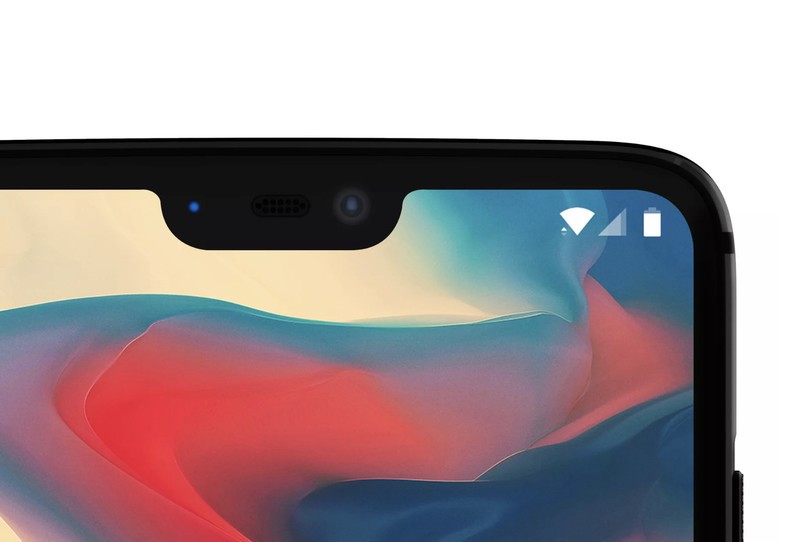
OnePlus confirmed earlier this week that the OnePlus 6 will feature a cutout at the top of the display. The move ostensibly led to a lot of backlash, and OnePlus CEO Pete Lau took to the company’s forums to discuss the decision, stating that the notch was borne out of a pursuit of “optimal phone design.”
OnePlus realized it wasn’t going to need the entire width of the bezel for the components, and it didn’t want to switch the front camera away from a central position as it would affect the Face Unlock feature. Lau said the company even considered a pop-out camera along the lines of the Vivo Apex, but ultimately disregarded the idea as the technology was still in its infancy.
According to Lau, the notch also maximizes screen real estate, freeing up space at the top of the screen. Furthermore, Lau said that the display OnePlus selected for its upcoming flagship was already optimized for a notch-based design, making it easier to ramp up production.
Lau’s reasoning makes sense from a business standpoint, but it’s clear that the design of the OnePlus 6 will be a polarizing issue for its fans. Here’s Pete Lau’s forum post in its entirety.
Hey everyone,
Even among tech communities, the OnePlus Community is a little different. Through your tech-savviness and passion you hold us accountable for our decisions. In doing so, your help has been instrumental to our success. By now, most of you are aware that our next device will feature a cut-out near the top of the display, popularly known as a “notch”. A fiery debate has sparked online, so we wanted to give you guys some insight into our rationale behind this product decision.
One of our biggest challenges as a smartphone manufacturer is to make the most out of every square inch of your device. A well-known principle in tech is that individual components become smaller with each passing year. Our role as a smartphone manufacturer is to maximize the use of the space we free up. Since our components no longer require the entire width of a top bezel, we focused our efforts on maximizing the amount of screen real estate. It’s easy to get caught up in a debate on aesthetics, but to us this decision was simply about pursuing optimal phone design. Being able to offer more screen without compromising on size or performance is a great benefit. That said, we wanted to offer the biggest display possible without compromising on hardware, which is why we opted for the notch design.
A central placement is optimal for our front-facing camera for several reasons. Moving the module elsewhere would also affect the angle of the camera, making it harder to orient the camera and take photos quickly. Such a move would also compromise the speed and reliability of our industry-leading Face Unlock feature. We also considered using a smaller module, but decided not to as this would have lowered the quality of your photos. Other speculative technologies, such as a mechanical ‘pop-out’ camera, are currently in their infancy. While interesting, the technology is not at a stage where it can deliver on durability, speed and performance.
To offer our users the best possible viewing experience, we work with world-leading screen manufacturers. We prioritize three key considerations when implementing a new display. First, we look to maximize the viewable area. Through the notch, we can free up a considerable amount of space near the top of the display, absorbing the notification and status icons. At 19.616mm by 7.687mm, the notch occupies a minimal amount of space in the top-center part of the display. Our research has shown that the space occupied by the notch typically goes unused in standard use. The notch makes optimal use of the vacated space. You gain more viewable space, without losing anything.
Our second priority is display performance. Whether you’re looking at brightness level, chromatic accuracy, or color range, there are a lot of factors that determine whether a display is comfortable to look at. Our displays have to match a wide range of requirements, before we consider them ready for market. We ultimately selected a display that matched all of our criteria. It was also optimized for a notch-based design, which we considered an additional benefit. The result is a screen with a larger viewable area and superior performance.
Finally, as our devices gain in worldwide popularity, we need to scale up production accordingly. That means using a display that is readily procurable is the only way we can keep up with global demand. This translates to fewer delays, faster shipping, and the ability to service more people. Our mission is to share the best technology with the world. We dedicated ourselves to implementing a display that is both scalable, while delivering a viewing experience that matches our quality standards. To grow into a sustainable business, we have to deliver a high quality experience on every level. In order to do so, we will continue to make use of any opportunity to improve the accessibility of our devices around the world.
We believe in offering our community the best possible smartphone experience. By listening to your opinions and feedback, we aim to design smartphones that meet your needs and standards. While many of you have asked us not to increase the physical size of our phones, others requested larger and more immersive displays. The notch helps us accomplish both requests. No two people have the same opinion on smartphone aesthetics. Our focus was to deliver the biggest and best screen we’ve ever had, without compromising on the tech you love. When all is said and done, that’s what matters most.
Frequently Asked Questions
We know you guys have a lot of questions. Below you will find answers to some of the most frequently asked questions we’ve seen.
Will the notch cut off my notifications if the status bar reaches a certain width?
OxygenOS will be optimized to work alongside the notch, ensuring you will always be able to view and access all of your notifications.
The notch cuts into the display, so the actual display size is smaller!
You actually get more screen. Thanks to the notch, we have managed to significantly increase our screen-to-body ratio. It’s like booking an airplane seat with extra leg room, which is used to absorb the clock and status bar.
If you’re integrating the front-facing camera, receiver, and LED light in the notch, why do you still need a chin?
A ribbon found at the bottom of each display connects the display to the internal hardware. This connection in itself demands the use of a bottom bezel. Our goal is to maximize the amount of real estate available to the user. So, we decided to reduce the size of the top bezel. The result is the largest viewable area we have ever produced.
The notch ruins my ability to enjoy movies and games. Can’t you block out the notch through software?
We understand the need to tailor your experience to your personal preferences. That’s why we have a compatibility mode on our next device. By setting this mode to individual apps, you are able to black out the sides of the notch when in landscape mode. We have tested compatibility mode with the 1000 most popular apps in the Play Store, and it works wonderfully.
 AIVAnet