


Quick Takes: Spotify for Apple Watch and StreamKit for watchOS 5 to Debut at WWDC 2018?
In addition to our standalone articles covering the latest Apple news and rumors at MacRumors, this Quick Takes column provides a bite-sized recap of other headlines about Apple and its competitors on weekdays.
Monday, March 26
Highlights
1. Spotify for Apple Watch to debut at WWDC? An anonymous and unverified tipster has informed MacRumors that Spotify will unveil an official Apple Watch app at WWDC 2018 in June, based on personal involvement with the project.
Third-party Spotify app Snowy, which was never released, as its developer Andrew Chang was hired by Spotify to help build their official Apple Watch app
The app will supposedly be a lead example of Apple’s tentatively named StreamKit framework that will enable cellular Apple Watch models to receive push notifications from third-party apps like Facebook and Twitter, completely independent from a paired iPhone, on watchOS 5.
2. Are corporations that use Wikipedia giving back? Wikimedia’s revenue chief Lisa Gruwell expresses some concerns about seemingly one-sided relationships with companies that utilize its information.
“I don’t mean to sound like the Lorax here,” said Gruwell. “If you overuse something and you don’t give back to it, you can harm it. In the case of Alexa and Siri, our content gets intermediated. Wikipedia works because people can contribute to it, people can edit it. Also, once a year, when we ask people can donate. When they get their information not from us — but Wikipedia content through something like Siri or something like Alexa — that opportunity to either contribute back as an editor is broken, and that opportunity to contribute, to donate is also broken.”
Gruwell said Wikimedia’s relationship with Google is by far the best, both in terms of how much they contribute to the organization—more than $1 million in the 2017 fiscal year—and how the companies work together.
By comparison, Apple, Facebook, and Microsoft all contributed around $50,000 through their employee donation matching programs, while Amazon wasn’t named on Wikimedia’s list of donors in 2017 whatsoever.
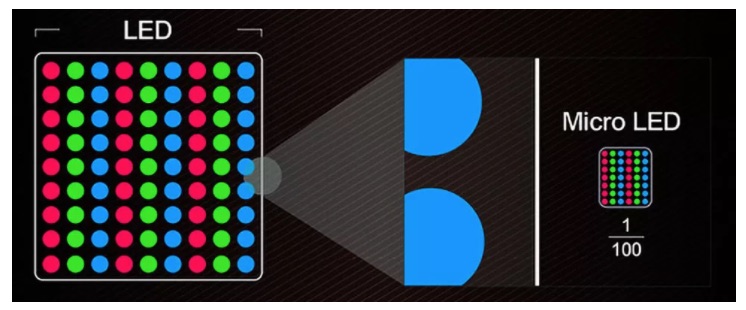 An illustration of the size difference between traditional LEDs and Micro-LEDs via CNET
3. MicroLED is the first new screen tech in a decade. Can it beat OLED? CNET’s Geoffrey Morrison provides a detailed explanation of the advantages and technology behind microLED displays. Apple is reportedly developing its own microLED displays, but we’re likely at least a few years away from seeing them in an Apple Watch or iPhone.
Other Links
- Interview: Apple logo creator Rob Janoff on making timeless work, fielding criticism, and what makes a good designer: 9to5Mac’s Michael Steeber interviews Rob Janoff, who designed the classic six-color Apple logo in 1977. Janoff was also interviewed by Forbes contributor Will Burns, ahead of a design-related event he is headlining on March 28.
- Heart Rate Variability (HRV): What is it, and why does the Apple Watch track it? by iMore’s Serenity Caldwell
For more Apple news and rumors coverage, visit our Front Page, Mac Blog, and iOS Blog. Also visit our forums to join in the discussion.
Related Roundups: Apple Watch, watchOS 4Tags: Spotify, Quick TakesBuyer’s Guide: Apple Watch (Neutral)
Discuss this article in our forums
After 17 hours, the first nonstop flight from Australia to U.K. touches down
The mere thought of sitting on a plane for 17 hours in a row may have your butt cheeks twitching in horror, but that’s precisely what 230 passengers have just done after taking the first nonstop commercial flight from Australia to the United Kingdom.
Qantas Flight QF9 — a Boeing 787-9 Dreamliner — landed at London’s Heathrow airport early Sunday morning local time after a 9,240-mile (14,875-kilometer) journey from the western Australian city of Perth. The flight took a body-creaking 17 hours and 6 minutes and marks the first direct commercial flight between Australia and Europe.
“This is a truly historic flight that opens up a new era of travel,” Qantas CEO Alan Joyce commented . “The response to the flight has been amazing, both for the attention it’s received since we announced it and the bookings we’ve seen coming in.”
The new flight joins an elite club of ultra-long-haul services that take 17 hours or more to complete, made possible by fuel-efficient planes on routes where demand makes them a viable option for carriers.
Passengers disembarking the plane in London seemed pretty upbeat about the experience, according to the BBC, with one couple saying they felt “as fresh as daisies,” and another describing the 17-hour journey as “very comfortable.”
Qantas’ Dreamliner at the start of its historic flight to London.
The new service between the two countries allows passengers to avoid a time-consuming pit stop in Singapore, Dubai, or one of the other midway hubs that usually split the lengthy flight. But it does mean placing yourself in a confined space with hundreds of other people for more than 17 hours. And if the person in the seat behind really loves tapping that touchscreen as they explore the full range of in-flight entertainment offerings, then you’re in for one helluva ride. (By the way, DT has some great tips for coping with long-haul flights.)
Keen to allay fears that 17 hours would be just too long to park yourself on a plane, Joyce said the plane serving the new route is “hands-down the most comfortable aircraft that Qantas has ever put in the sky.”
The CEO said Boeing designed the Dreamliner “with features to reduce jet lag, turbulence, and noise, [together with] more space in every class as well as bigger entertainment screens and more personal storage.”
Qantas also worked with the University of Sydney to create a menu designed to reduce the effects of jet lag following the journey, and conducted tests to find the best serving times to help ensure the most comfortable flight experience.
The new route is certainly a far cry from Qantas’ debut service between Australia and the U.K. that launched in 1947. Flying aboard a Lockheed Constellation aircraft that carried just 29 passengers, the trip took four days and an incredible seven stops. Those numerous “hops” earned the journey the nickname by which it’s still known today: The Kangaroo Route.
Editors’ Recommendations
- The five longest flights in the world make New York to London feel like a hop
- Boeing 737 MAX 7 aircraft graces the skies for the first time
- The best free flight simulators
- Airbus Vahana pilotless air taxi prototype completes its first test flight
- 11 best pre-flight safety videos worth switching your iPad off for
The University of Hawaii is on its way to being entirely solar powered
If you needed another reason to spend your four college years in paradise (and by that, we mean Hawaii), the state’s university may have just given you one. The University of Hawaii (UH) has announced that its Maui College campus is slated to become one of the first in the United States to derive 100 percent of its energy from on-site solar photovoltaic systems (PV) coupled with battery storage. So whether you want to spend your college days surfing or knowing that your institution of higher learning is helping you to reduce your carbon footprint, the University of Hawaii may be looking like an increasingly appealing choice.
The result of a partnership with Johnson Controls and Pacific Current, this new venture will also help four other UH community college campuses on the island of O’ahu to “significantly reduce their fossil fuel consumption.” In fact, these four colleges will see their fossil fuel use decline by 98 percent, 97 percent, 74 percent, and 70 percent. Still, they won’t be quite as efficient as the main campus on Maui, whose new PV plus storage system will be able to eliminate the institution’s fossil fuel-based energy use altogether when it goes into effect in 2019.
While this new initiative is clearly a commendable one, it doesn’t come as much of a surprise. After all, back in 2015, Hawaii became the first state in the U.S. to commit to achieving 100 percent renewable energy by 2045. Moreover, UH and the Hawaii Legislature have pledged that the university system will be at “net-zero” by the beginning of 2035, which means that the system will produce as much renewable energy as it consumes.
“With the implementation of phase two, these five UH campuses will have reduced fossil fuel energy consumption by ~14 GWh annually (45 percent) and added ~13 GWh renewable energy generation,” said UH vice president for community colleges John Morton. “We are proud to move the entire University of Hawaii System closer to its net-zero energy mandate, to celebrate UH Maui College’s achievement and to position the O’ahu community college campuses within reach of 100 percent renewable energy generation.”
Once energy conservation measures are implemented, the total on-site capacity will be 2.8 MW of solar PV and 13.2 MWh of battery distributed energy storage at UH Maui College, and 7.7 MW of solar PV and 28.6 MWh of battery distributed energy storage to the UH Community Colleges O’ahu campuses.
These eco-friendly projects are slated to be complete by the second quarter of 2019.
Editors’ Recommendations
- The Ray is a stretch of highway paving the way for the future of motoring
- Squaw Valley is going completely green with renewable energy
- Wind and solar could supply 80 percent of U.S. energy needs
- A material supreme: How graphene will shape the world of tomorrow
- From poop to power: How farms could double as energy production plants
Super Straps Promise Instant Relief from Pain Caused By Your Backpack

Don’t let a heavy backpack keep dragging you down.
It’s probably fair to say that with how much time we collectively spend sitting behind computer screens and staring down at our phones during the day, we should all be a bit more conscious of improving our posture.
Backpacks are a great way to organize and carry all the important equipment you need, whether you’re a college student, photographer, or outdoors enthusiast — but even the best-designed backpacks can add massive strain to your back and neck. No matter how much weight you’re carrying around in your backpack your neck is forced to compensate by cranking forward and that can lead to increased pain and tension around your neck, shoulders, and back.

That’s where Super Straps aims to help, by lifting some of the weight off your shoulders and better balancing things so you can walk upright. We’ve all seen how a heavy backpack can weigh someone down and cause them to slouch their shoulders — Super Straps can help by redistributing the weight more naturally across your shoulders and neck.

These things seem to operate with black magic. Simply install the Super Straps along the inside portion of your backpack straps and pull down on the Super Straps drawstrings to pop out the supports. Just watch the video above and see the genuine reactions from people trying them out for the first time. These straps will work on any backpack with shoulder straps up to three inches wide and can be swapped to a different bag super easily.
Super Straps will retail for $75, but there are deals to be had for Kickstarter backers right now! You can snag your very own pair of Super Straps for just $49, grab two sets of Super Straps for $89, three pairs for $129 and so on. Whether you know someone who could really make use of these or are planning a backpacking trip with friends, Super Straps could make a great gift for practically anyone.
There’s a full month remaining in this Kickstarter project which as already well surpassed its funding goal by over 1000 %. This is the third Kickstarter project by BetterBack and the goal is to start shipping units to backers by October 2018.
See Super Straps on Kickstarter
Pay once to host your website for life with Dragify
As business moves online and people’s attention moves to the web more and more, having your own website is more than an asset — it’s almost a necessity. But maintaining a website means paying monthly or yearly hosting fees which can quickly add up over time.
Fortunately, there are companies like Dragify Website Hosting which will keep your website hosted and domain registered for a one-time payment of just $49.99.

This deal from Android Central Digital Offers is here to alleviate frustration and to alleviate the strain on your bank account. Dragify is also a custom website designer that lets you create your own website the way you want it, which is included for free to allow you to create professional-looking sites without scripting or coding. Typically this service would cost you upwards of $500, but with this deal, you’ll save 91%.
Dragify uses Litespeed Web Servers which handle traffic spikes and neutralizes DDoS attacks with ease, while CloudLinux prevents individual sites from using too many resources while also providing better security. You’ll also be able to create as many 500MB email accounts, forwarders, and auto-responders as required for your business or site.
Having your own website, whether it’s for personal promotion or for your business, is an important tool to have in your promotional arsenal. And if you’re creating a site just for fun or to have as a creative outlet, then it’s even more important that Dragify is incredibly easy, since you want to get to the fun and creativity sooner rather than later.
Why continue to pay monthly hosting fees get a lifetime subscription to Dragify Website hosting for only $49.99 at Android Central Digital Offers?
See at Android Central Digital Offers
You won’t regret buying one of these $6 stands for your phone or tablet
Keep them safe!

There’s no denying that these things are a bit silly, but they are also extremely practical. Lamicall’s adjustable phone stand is down to just $6.49 when you use the coupon code 7LM3H6FB at Amazon. This is a savings of just over $3 and drops it right into impulse purchase territory.
It can hold your phone in both portrait and landscape mode, and it’s designed to work with devices from 4 to 8 inches in size. This means it will work with your iPhone, Galaxy device, and even Nintendo Switch. It’s made from a durable aluminum so it will keep your device steady and the rubber cushions help prevent scratches.
The stand comes with a lifetime guarantee.
See at Amazon
Unlocked Galaxy S8 and Note 8 will get Oreo in 2-3 weeks
You can thank “rigorous testing” for the delay.
Over the past couple weeks, all four major carriers in the United States started pushing Android Oreo to the Galaxy S8 on their networks. This came as exciting news for people that purchased the phone through these companies, but those rocking unlocked models have been left in the cold. Thankfully, a Samsung employee recently shed some light on what’s going on.

On the official Samsung forums, moderator SamsungTrevor shared the following message –
We understand that many of you have Unlocked Galaxy S8/+ and Note 8 devices and may be wondering why those with Carrier models are seeing the updates first. The reason for this is that Unlocked devices must go through more rigorous testing than Carrier-specific devices because we need to make sure there is proper network functionality across ALL supported networks. (Ex. Carrier-specific devices are made to handle that one network. Unlocked devices need to be able to handle ANY / ALL compatible networks. Thus, they require some more preparation.)
After further explaining the process that goes behind software updates for unlocked models, SamsungTrevor then said –
We’re working with our Carriers to get Oreo out to ALL eligible Galaxy S8/+ and Note 8 devices within the next 2-3 weeks. Although we can’t guarantee an exact date as its pending final testing, we promise to update this thread (and your devices!) the moment it becomes available.
I can’t imagine unlocked Galaxy S8 and Note 8 owners will be too pleased knowing they may have to wait another 3 weeks before getting the Oreo update, but at the very least, there’s a light at the end of the tunnel.
Android Oreo
- Android Oreo review!
- Everything new in Android Oreo
- How to get Android Oreo on your Pixel or Nexus
- Oreo will make you love notifications again
- Will my phone get Android Oreo?
- Join the Discussion
Acer debuts the first Chrome OS tablet, the Chromebook Tab 10

Coming to the Americas in April for $320, the rest of the world in May for €329 including VAT.
It was inevitable, and we’ve heard rumors and news and news about rumors of a tablet running Chrome OS for years. All that is behind us now because Acer has pulled the wraps off the first Chrome tablet and it’s called the Acer Chromebook Tab 10.
It looks like it will be a winner, too. This 10-inch tablet (9.7-inch display) has a 2018 x 1536 resolution and runs on the same OP1 platform the Samsung Chromebook Plus sports under its hood. There’s a Wacom EMR pen with its own slot to keep it in bundled in the box, and the standards like 4GB of RAM and SD card reader are there. The full specifications:
| Operating system | Chrome OS with Android support through Google Play |
| Display | 9.7-inch QXGA backlit LED, 2048×1536 |
| Processor | OP1 platform |
| Storage | 32GB eMMC |
| Expandable | microSD |
| RAM | 4GB |
| Rear camera | 5 MP |
| Front camera | 2 MP |
| Connectivity | 2×2 MIMO 802.11ac Wi-FiBluetooth 4.1 |
| Ports | USB 3.1 Type-CCombo headphone/microphone jack |
| Battery | 34 Wh (Up to 9 hours) |
| Stylus | Wacom EMR (included)With onboard housing |
| Software | Support for Chrome Educational licensingPlanned support for Google Expeditions AR |
| Dimensions | 172 x 238.8 x 9.98 mm550 g |
| Colors | Cobalt Blue |
Like most of the Chromebooks we’ve seen for 2018 so far, the Chromebook Tab 10 is being marketed as a Chromebook, erhm, Chrome Tablet for Education. That means it will have full support for Google Classroom and a Chrome Education license (those are sold separately). In the past Chromebooks for Education had their own expensive slot in the Chromebook world and not every model could take advantage. The Education branding seems to be changing though, and it’s great to see solid but affordable Chrome devices qualify for policy management through the Chrome Education license.
The Acer Chromebook Tab 10 combines advances in hardware and application support to enable more meaningful learning for an even wider range of K-12 students [and] encourages students to discover new ways of understanding the world around them. -James Lin, General Manager, Commercial & Detachable Notebooks, IT Products Business at Acer
Most of us won’t be buying a Chromebook Tab 10 or any other model to use in an educational capacity, though. The good news is that the Chromebook Tab 10 doesn’t compromise when it comes to consumer features, either.
The Wacom EMR pen is a fantastic way to add dedicated stylus support to Chrome, as it communicates with the system the same way an active stylus does but needs no power source. Everything is baked into the display and the nib is tracked for both position and pressure. A great selection of Android drawing and writing apps have been updated to work with Chrome’s pen support and the experience is actually quite good.
One potential sticking point is having just 32GB of storage available because Android apps do not have access to the SD card to store data. Yet. A solution is in the works, but in the meantime, you might have to mind what you install. Gamers take note.
All in all, this looks to be a fabulous way to kick off the new Chrome tablet category with a solid spec sheet and an even better price tag. April is right around the corner and you can bet we’re itching to see what the Chromebook Tab 10 brings to the table.


Chromebooks
- The best Chromebooks
- Should you buy a Chromebook?
- Google Play is coming to Chromebooks
- Acer Chromebook 14 review
- Join our Chromebook forums
We need to take some responsibility for our data privacy violations

I think at this point we all can agree that the Facebooks of the world really are evil and it’s all their fault. Or can we?
I’m talking about the aggregate of evils regarding our privacy that Facebook has been caught doing red-handed, which finally has reached peak evil when it was found to be abusing Android permissions to scrape your call logs because it has your attention right now and this is important. Except the company wasn’t really abusing anything and is just really really good at grabbing all of your data and that’s just as important. It went pretty much like so:
- Old versions of the Android READ_CONTACTS API bundled your call logs with a contact into the data about the contact itself.
- Facebook wants you up upload your contacts so you can see others who also have the Facebook app installed (and can spam the ones who don’t) and someone noticed that they could scrape the call logs and get information about who you called, who called you, when, and how long you talked.
- Facebook being Facebook didn’t bother to tell you it was doing this, but did say in their privacy policy that you can see and remove any data they have about you if you like so technically they were above the board here.
- Android was updated and access to call logs was split out of the READ_CONTACTS permission.
- The old permission still applied if you had an old phone, didn’t revoke it yourself by reinstalling the Facebook app, or had a version of Facebook that was baked in and you didn’t have any control over any of this to start with.
- When you finally did update and saw the new permissions, you probably didn’t read them and tapped install anyway. If you did read them, you probably didn’t understand them and didn’t bother to find out what they meant.
- Zuckerberg buys a volcanic island and begins plans for his doomsday device. Probably.
I’ll start by saying what we’re all thinking and can all agree on: that’s all seriously messed up. But a lot of it is our own fault and that’s not something anyone wants to talk about.
Google may be able to “fix” this but then we shift trust and responsibility from one company that makes billions from our data to another.
Google should have never let this happen. Another thing most will agree with but is that really what we want? Google cannot see the future nor read anyone’s mind. Some of the smartest people in tech work for Facebook and they simply found a way to game a system and they did until they had to stop. You can bet that there are smart people working at places like Facebook and trying to game the current system, too, because your data is what makes these companies worth billions of dollars. More of your data equals more dollars and if you can bring in more dollars to the company you work for some of it trickles down to you. And it’s not Google’s responsibility to monitor what you install and what you don’t; it’s only there to enforce the rules as best it can and update the rules when it thinks of a better way.
We also can’t ignore that people have been telling us all that Facebook was a super shady company for a long time. This isn’t even the first time the call-log scraping has been brought up to mostly deaf ears. And we’ve been told to read permissions and EULAs and everything else we have to agree with before we tap the Yes/Install/DO IT NOW buttons and largely ignored that advice, too. We’ve been given plenty of information that should have made us take a closer look at what Facebook was doing and most of us chose to ignore it because we didn’t understand much of it or simply didn’t care.
It’s obvious that this all wasn’t good enough or that nobody cared. We don’t need to look any further than Facebook’s current permissions that include the ability to pull all of the data from your call history and then check to see how many installs the app has to prove it. It’s right there in black and white now and has been for a while, but people either trusted that Facebook would never do such a thing, didn’t bother to even look at the permissions, or saw them and installed the app anyway.
I think and sincerely hope that it’s just the difficulty of keeping track of it all and not that nobody cares.
Picking on Facebook is easy because it is so bad. But all of this goes for every app on every screen.
What’s less obvious is how it can be fixed. If you’re that person who doesn’t care what type of information Facebook has on you and is OK with them doing whatever they like with it, you have nothing to worry about here. Please be sure to delete me from your contacts if I happen to be in them, by the way, because I care and Facebook also tries to build a profile on me based on any data you have about me without asking either of us for permission. For everyone else, it’s simply time to take some responsibility and police our own actions. That’s easier than you might think and here are a few tips to get you started.
Know what you are giving a company and what you get in return. That means think about all the data a huge company like Google collects from you and how they handle that data then decide if it’s a good deal for you. It also means to think small and decide if it’s worth letting Toyota have access to your contacts so that your car can announce a caller by name while you’re driving. Everything is give-and-take, and you need to make sure what they are taking is worth what they are giving.
Every piece of software on every device with a screen has terms you need to agree to before you start using it. Read them. Read every word and question anything you do not understand. Question the answers you get, too, until you’re satisfied.
Decide what services you need versus what services you don’t. Do you really need Alexa and Cortana and Google Assistant and Siri and Bixby and Roscoe’s Rib Rack’s automated drive-thru knowing everything about you? Keep the things you need (as long as you’re comfortable with the terms) and ditch the things you don’t.
Don’t sign in to your new Android phone during the setup. Skip past and get everything running so you can see what you might want to uninstall or disable before you’ve logged in with your Google account. Once you’ve deleted and disabled the huge amounts of spyware and garbage that companies love to install on your new phone, open the Gmail app and you’ll be sent to the sign-in process.
If you find apps on your phone that you can’t disable or delete, find out why. The answer could be because of a legitimate need (many Android apps depend on other apps being in place to work) or it could be because that app is from a company interested in things you do and places you go and wants to send data back to the mothership. If, for example, you’re not OK that some Android apps need Chrome to be installed and not disabled, make sure your next phone doesn’t have Chrome installed. Or iTunes. Or OneNote. Or whatever.
Use some common sense. And it’s OK to ask questions if you don’t trust your own common sense, too. Nobody is a walking encyclopedia that knows the right answer to everything and you’ll always be able to find someone who is an expert on the things you aren’t.

The old saying goes “if you want something done right, you do it yourself.”
If we don’t start taking some responsibility ourselves when it comes to our privacy there are no good outcomes. We don’t want or need lawmakers who are older than the transistor itself trying to decide what’s best for us, we don’t want any one company (like Google) acting as a gateway for all of our personal information. And we don’t want to keep seeing things like Facebook screwing us over (and over) until we have nothing left that it wants. We can do this. You can do this.
And you don’t have to do it alone.
PUBG for Android: Tips and tricks to help you stay alive!

How to survive as long as possible in PUBG Mobile!
The massively popular battle royale game PUBG has made its way over to Android and iOS. The 100-man free-for-all style of the game is exciting, but requires a ton of practice to get really good. That doesn’t mean that there aren’t some tips and tricks you should know headed into the fray.
So, if you’re looking to get started, here are some tips and tricks to help you stay alive in PUBG Mobile!
Download: PUBG Mobile (Free)
Drop by buildings and alone (if you can)

In PUBG Mobile, the strategy starts right away by choosing where you want to drop. The two most important things to remember while your dropping from the sky at the beginning of the match are buildings hold the loot, and everyone else is trying to kill you.
Always try to head for buildings when you’re falling from the sky because that’s where you will find loot, but also, if you can try to pick a place where other people aren’t going. If you can manage to drop by buildings with little to none other players around you, you’ll be off to a good start.
Loot First

Once you are done falling from the sky, the action in PUBG Mobile can be fast, and if you want to survive, you’ll need to loot up.
The first priority is always to get a weapon in your hands. After that, you’ll want either body armor or a healing item for when things get tough. Don’t skip anything at first; any weapon is better than nothing. A pistol will still execute a kill faster than punching someone.
Once you have a couple of weapons and other items, you can start making decisions on which weapons you want to keep and manage your inventory a little more.
Try to limit running around in the open

The goal of PUBG Mobile is to be the last man standing, and by that measure, hiding can be a pretty useful tactic. Of course, as the map shrinks, you will eventually need to make a break for the safe zone to stay alive, but you should never run out in the open unless you have no other choice.
When you do need to run out in the open, make sure you are doing it as fast as possible. That means planning your dashes for the safe zone a little more carefully and trying to stay in cover as much as you can.
Supply crates are rarely worth it

You hear the plane flying overhead, you see the crate falling with parachute overhead, and you realize it’s going to drop close to your position. Unless you’re absolutely certain there are no other players around, don’t rush for the red smoke once the crate lands.
Instead of running for the crate and standing in the open next to it, watch what happens, plan out an attack on whoever ended up with the gear, and take it by force for yourself, away from the action. If you’re sitting around and no one arrives, continue to tread carefully; someone else might have the same strategy in mind.
Don’t shoot at enemies out of range

I have made this mistake FAR too often, and it gets me killed about 8/10 times. When you aim at enemies that are too far away and try to kill them with a gun they a short range all your doing is making them — and everyone else in the area — aware of your location.
If you see an enemy that hasn’t spotted you yet and you want to take them out, be smart about it. Track where they go, try to sneak up on them, and when they are in range, fire away!
Play with your friends

Playing by yourself against 99 other players is tough, so if you’re learning the game you might benefit from playing with some friends in either duo or squad mode.
In these modes you get knocked down before being killed, giving your friends chance to revive you for another go. It’s also nice to have more eyes on the surroundings and more guns in the battles.
You can play squads without friends by selecting the auto-fill option. This will pair you with three strangers, so you might not have as much success, but you may also not die so quickly.
Get lucky

There’s no doubt about it, in PUBG Mobile there’s a bit of luck. If you happen to land in a spot that has good equipment, and/or always end up being in the safe zone, you will inherently have an advantage.
In the late game, it’s critical that you focus on the minimap when the circle is about to move and adjust yourself accordingly. It’s easy to get caught off guard and there are going to be those times when you need to move in on someone else who was lucky enough to be within the next circle. If this is the case, have a look around, see how you can advance and utilize grenades (especially smokes and flashbangs).
If you happen to be the lucky one and have a solid position within the next circle, keep scanning around for movement. Knowing your enemies position is paramount.
Do you have any great tips?
Share them with everyone and join in the fun! Leave a comment down below!
 AIVAnet