


Flat Earth advocate finally launches his homemade rocket
For years, “Mad” Mike Hughes has not only insisted that the Earth is flat, but has maintained he could prove it by launching himself into space with his own rocket. He even claimed to have launched a homebrew rocket in 2014, but didn’t have evidence of it besides his recovery from the landing. However, he finally did it — not that he’s about to change scientists’ minds. Hughes’ steam-powered vessel launched near Amboy, California, climbing to about 1,875 feet before coming down in the Mojave Desert. Despite the clear lack of safety features, paramedics determined that Hughes should be fine.
He had originally pegged the launch for November, but had to postpone the launch multiple times due to a mix of legal requirements (the Bureau of Land Management wasn’t fond of him firing a crewed rocket on public ground) and engineering troubles. He eventually launched from private land provided by Amboy’s owner, and turned a mobile home into a vertical ramp to make sure he stayed on private lands.
Hughes hopes to fly much, much higher the next time around. His aim is to build a rocket that will launch from a balloon and take him to an altitude of 68 miles — roughly where space begins. If all goes according to plan, that would take place in August.
The irony, as you might guess, is that this launch wouldn’t even be possible with a flat Earth. A disc-shaped planet would have gravity that pulls straight down at only one point, and would become increasingly horizontal. Unless Hughes had perfect placement, his rocket would likely go very sideways. And that’s assuming the atmosphere stayed put (it would likely float off into space) or that Earth would maintain a steady distance from the Sun (Earth’s orbit keeps it from crashing into the star). Hughes is dependent on the science that disproves his beliefs just for the sake of living, let alone climbing high enough to discover that he’s wrong.
And there he goes!!! #MadMikeHughes blasts off from #Amboy 03-24-17 pic.twitter.com/CrA0C9PEI0
— Matt Hartman (@ShorealoneFilms) March 25, 2018
Via: Gizmodo
Source: AP News, Matt Hartman (YouTube)
SpaceX rocket carved giant hole in the ionosphere
Rockets can leave a mark on the atmosphere well after they’ve left, and SpaceX may have learned that first-hand. Researchers have determined that a Falcon 9 launch in August 2017 (the Formosat-5 mission above) not only created circular shockwaves, but cut a 559-mile hole in the plasma of the ionosphere that lasted for up to 3 hours — it was akin to a localized magnetic storm. The phenomenon was produced by virtue of the rocket’s light payload.
As Ars Technica noted, most rockets have a curved trajectory to reduce the effect of gravity and alleviate stress. SpaceX’s rocket, however, was carrying such a light payload (Formosat-5 weighed just 1,047 pounds) that it could and did take a near-vertical path. Think of it as dropping a rock in the water instead of skipping it — you’re going to create a much bigger splash.
The ionosphere hole didn’t cause much chaos by itself. However, more frequent and more powerful launches with these kinds of disruptions could significantly skew GPS navigation. Rocket operators may have to watch their launches going forward to be sure they don’t play havoc with phones and cars on the ground below.
Via: Ars Technica
Source: Wiley
Hyundai’s Kona is ready for almost anything
Imagine you’re going out for the night with friends. You have the perfect jeans. You just picked up a great shirt or blouse. You’re having a great hair day, your sock game is on point. Hell, you even picked up a new smartphone earlier in the day. You look great and step out on the town. Except you’re missing a shoe.
That’s the new Hyundai Kona crossover (starting at $19,500). The great-looking person who’s ready to take on the world and is so much fun to be around you don’t even notice the missing shoe until way into the night. Sure, it’s confusing at first, but you get over it. You’re a having a good time, why spoil it? I really enjoyed driving the Kona even though its “missing shoe” continues to be a head-scratcher. (Don’t worry, we’ll get to what the “shoe” is soon enough).
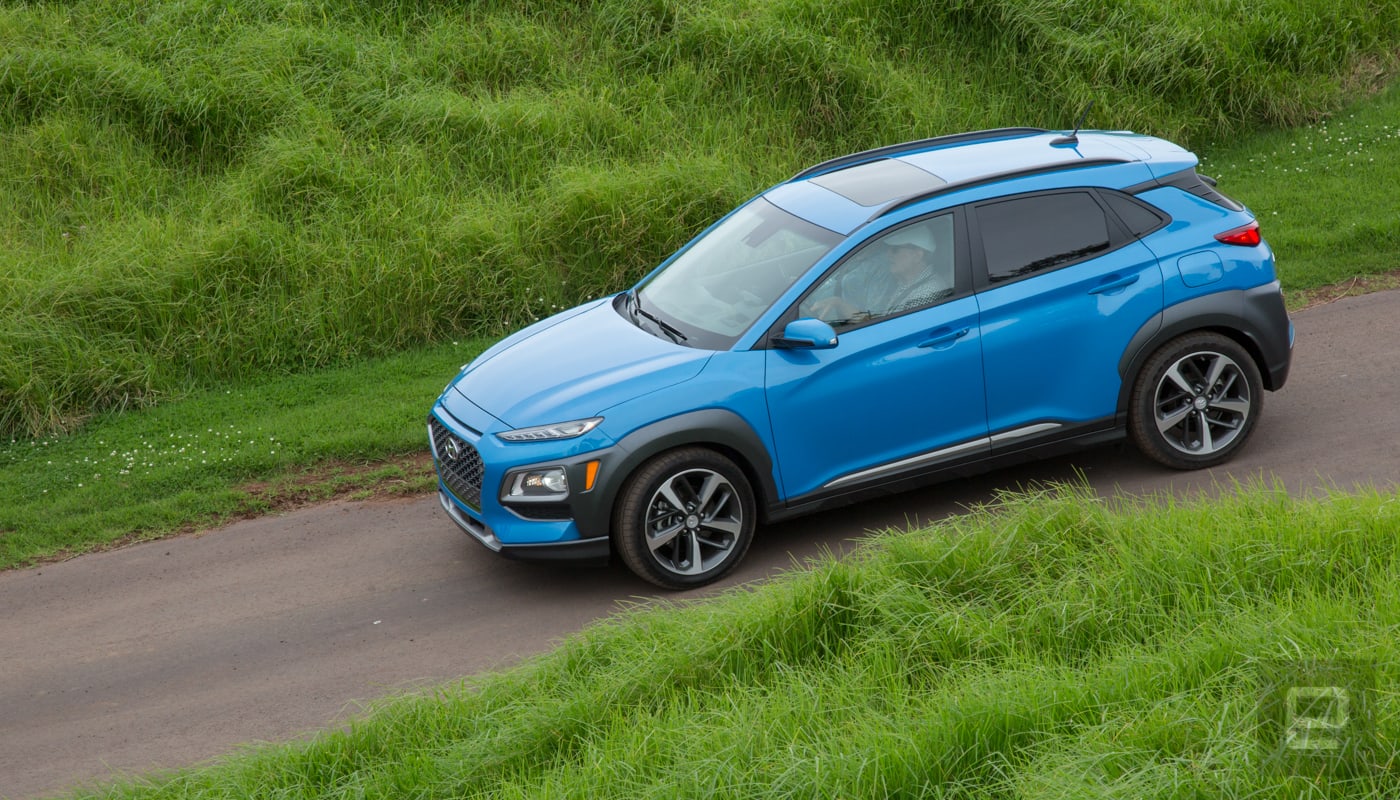
First off, Hyundai hit a sweet spot with the design. The look should appeal to the younger crowd while not turning off older buyers. It has aggressive lines but not so much that it looks like it’ll slice your hand if you get too close. From all angles, it’s a looker.
The interior, though, isn’t as stunning. But comfortable seats and a logical control layout — that’s carried over from other Hyundais (and Kias) — should keep most people happy. Everything is where you expect, and I didn’t have to hunt to find any features. And, of course, you can add a little flair if you’re into that (for a price).
There’s an option to add green highlights to the trim and stitching of the interior. It’s a nice touch, but seems like it’s not going to win over many older buyers. I think it gave the car a nice pop, but you know, lime green isn’t everyone’s cup of tea. What nearly everyone will like is the pop-up heads-up display (HUD) option available on the top trim level. For folks interested more in hauling gear or tons of groceries instead of looking cool, there’s 45.8 cubic feet of storage space with the rear seats folded down and storage space under the cargo floor for various knick-knacks.
Behind the wheel, the 1.6-liter turbo engine (175 horsepower and 195 pounds of torque) found in the Limited and Ultimate trim levels was punchy enough to give me the confidence needed during stoplight takeoffs that I wouldn’t be left behind by other drivers. It was also able to overtake slower drivers going uphill and the 7-speed dual clutch transmission performed well during spirited drives and while cruising.
The base level and second level trim options offer a 2.0-liter engine with 147 horsepower and 132 pounds of torque. If you’re not looking for speed and power, it should be adequate for your needs. All trim levels offer a $1,300 upgrade to all-wheel drive (AWD), which seems like a no-brainer especially if you live in an area with inclement weather.
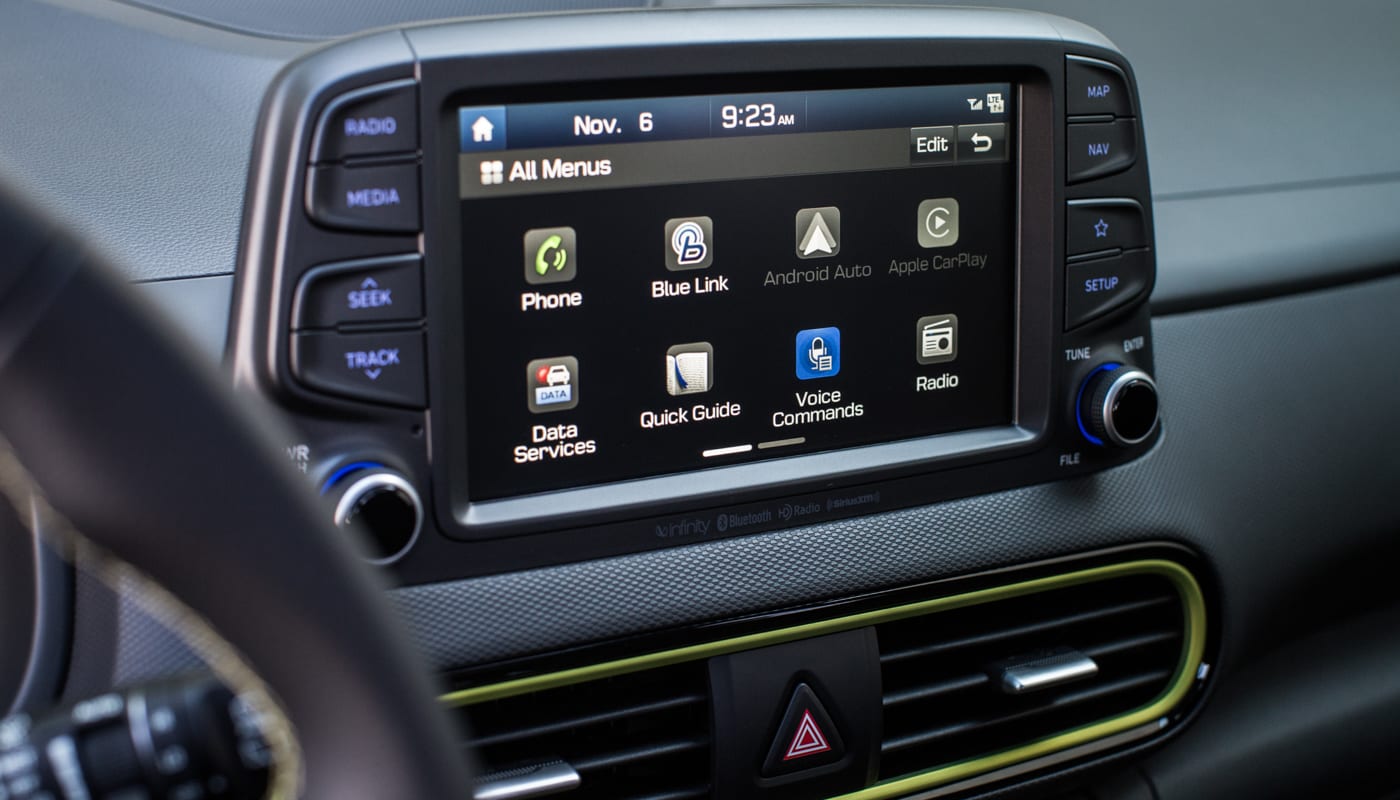
The Kona also continues Hyundai’s commitment to tech inside its cars. The infotainment system works well without the automaker overthinking the design. It’s easy to use and quick to navigate. It’s recently updated Blue Link system only adds to that utility. Press the voice button and using natural language, the system will help you find and navigate to a destination. All the processing is done in the cloud, so you do need a network connection, but in my tests, it worked as well as the voice control in CarPlay and Android Auto. Which, by the way, are both standard on all trim levels.
The Blue Link system also has a companion app, MyHyundai, that does the usual companion app stuff: lock and unlock doors, turn on the car, flash lights, honk the horn. You can also track the car on the map. Great for when you forget where you parked it, but better when you have new drivers and you need to locate them. Sorry kids, mom and dad now know you didn’t go to the library to study.
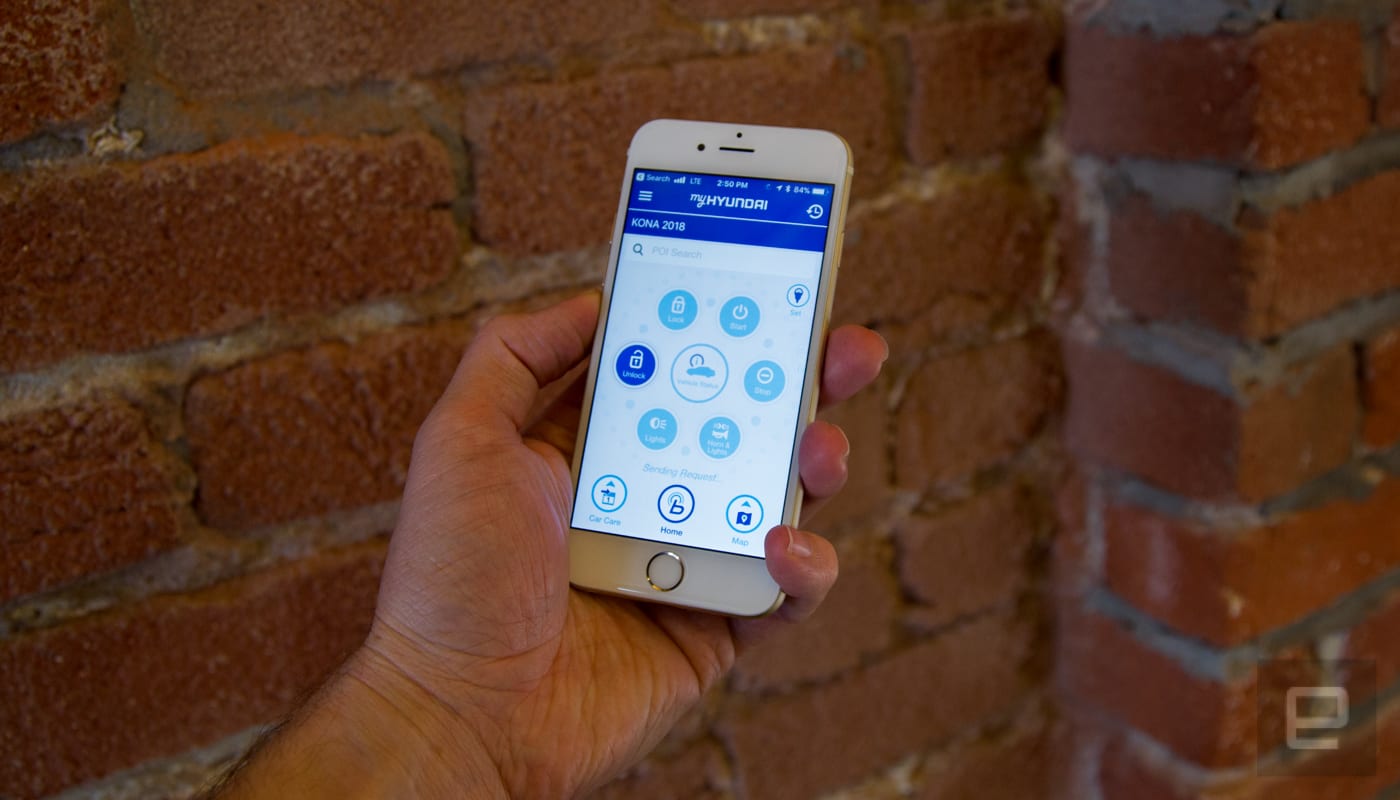
The MyHyundai app also includes monthly vehicle reports to make sure all the systems are operating normally, a diagnostic feature, and even the ability to schedule maintenance with a local dealer and see what it’ll cost. It’s a car app that you’ll actually want to launch and use on a regular basis. During my tests, it launched quickly and offered a wealth of information and access to features that I would use day to day.
Plus, Hyundai offers Alexa and Google Home support so you can turn your car on with your voice. I was unable to test this feature, but according to the automaker, Hyundais have been started 12 million times with the voice of their owners. So people seem to like it.
What I liked was how well the lane-keep assist worked on the Ultimate trim level (starting at $27,400). It handled sharpish corners on the highway better than I expected and kept the car centered in its lane most of the time. This was during a rainstorm and it only truly got confused when the lane markers were almost completely invisible thanks to a downpour. That should mean that the Kona is not only a great cruising-around car but almost perfect for heavy traffic. That’s where the missing shoe comes in.
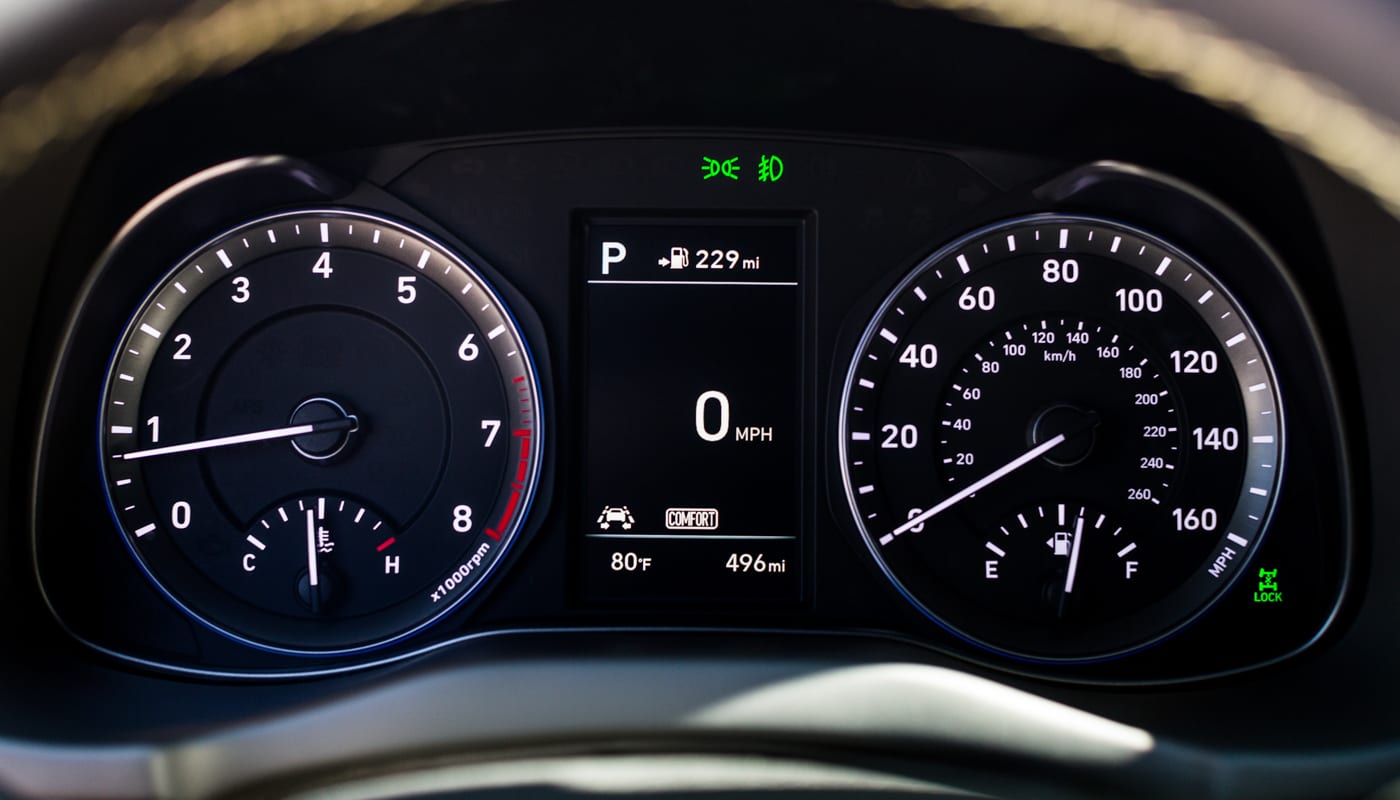
The Kona does not have adaptive cruise control. It’s confusing because the car has the hardware for the system because the Ultimate version of the car I drove had the forward collision-avoidance assist. So the hardware is there. Hyundai said that it’s heard feedback about adaptive cruise control on the vehicle and it’s seeing what it can do about that. So maybe during a refresh, the car will be able to track cars while using cruise control. Still, it’s an odd omission.
Yet, without cruise control that can track other cars, the Kona is a great small SUV. Its styling sets it apart from other cars in the segment (the Toyota CH-R is odd looking and the Honda HR-V is boring) as being exciting but not polarizing. The crossover continues Hyundai’s inclusion of technology that people actually want either as standard or without costing an arm and a leg. Plus, with the Kona EV on the horizon, the automaker has the potential to make a big splash in the electric car market if that version is as nice as the gas-powered Kona.
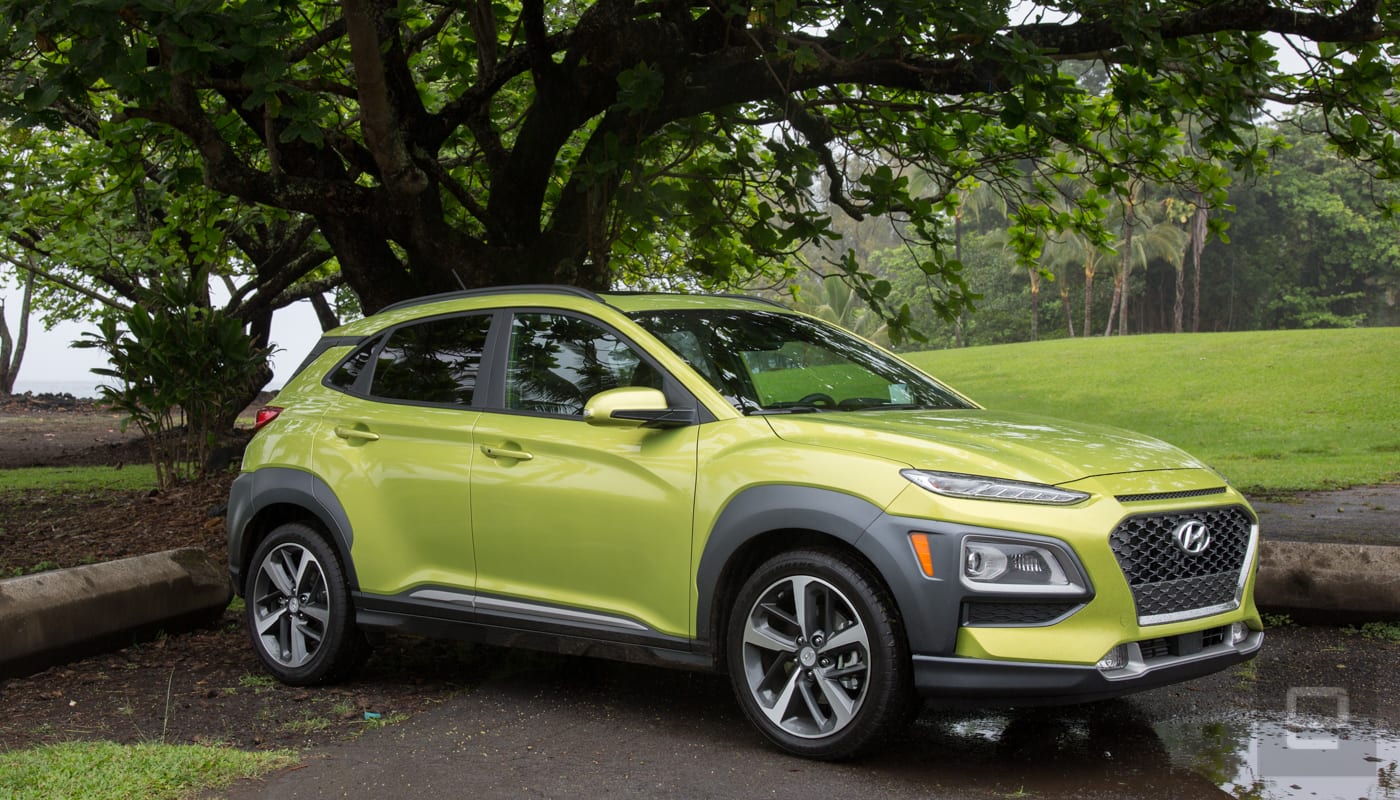
But first, it needs to add that second shoe to the ensemble.
Source: hyundai
Kronaby refreshes its smartwatch for the new season, teases contactless payments
Swedish watch brand Kronaby has updated its range of connected watches for the new 2018 season, and wowed us with a beautiful revision of the Sekel model, which now sports a stunning reflective blue face and a choice of leather or metal link straps. In addition to the eye-catching Sekel, the sportier Apex now comes with two subdials, and the company has announced a partnership with bPay, a contactless payment system.
The Sekel caught our eye instantly, due to the sunray brushed blue dial matched with a polished stainless steel case, and it’s covered in sapphire crystal. The Sekel range is made to reflect traditional Scandinavian style. The case size has also been reduced down to 41mm for the new season, and it visually balances out very well.
For the Apex, Kronaby has added a second subdial to the watch, increasing the sporty look and providing more visual information for the wearer. It operates in the same way as the single subdial on the existing Apex, with functionality added through the app. It can show the date, world time, step count, and other information. We also liked the suede leather strap, which is very soft and comfortable to wear, and the black, stainless steel, and sandy color scheme is a truly classic combination.
Kronaby also shared plans to integrate contactless payments into its watches from May, in select markets. Using a chip placed in the strap, Kronaby has partnered with bPay, a Barclays Bank payment system that despite the name, operates with many different credit and debit cards. All you’ll need to do is wave your watch at a compatible contactless payment terminal to pay.
Andy Boxall/Digital Trends
The contactless payment plan joins a pair of other Kronaby initiatives — an invitation beta program to test out new features in the app, and a range of keyring-like Bluetooth trackers which send alerts to the watch itself. These are still in development, but the early prototypes we saw shunned the recent obsession with making this kind of product tiny, and instead made them visible and stylish. Definitely more for attaching to a bag, than hiding in a wallet.
Kronaby’s new 2018 season watches will be released in April, with the 41mm Sekel with the blue dial costing 575 euros, and the 43mm Apex with dual subdials priced at 595 euros. Its Nord range has also been refreshed, and starts at a reasonable 295 euros.
Editors’ Recommendations
- If you’re ever lost, Garmin’s Tactix Charlie smartwatch will guide you home
- Frederique Constant debuts world’s first mechanical smartwatch
- Kronaby Apex Review
- Everything we know about ‘Deadpool 2’
- SteelSeries serves up the first Hi-Res Audio-certified headset for gamers
NBA is testing final-quarter live-stream broadcasts for under $1
It looks like the NBA is experimenting with micro-transactions, offering fourth-quarter game streams for only 99 cents. Over at The Verge, a basketball fan named Vasu Kulkarni shared a notification he received from the NBA app, offering a low-cost live stream at the end of the Miami-Oklahoma City Game.
Wow. @NBA experimenting with in app micro-transactions, offering 4th quarter of a game for $0.99. The future is here. pic.twitter.com/pu602ZAokn
— Vasu Kulkarni (@Vasu) March 24, 2018
The NBA has several different streaming options, from the pricey League Pass that offers every game all season long to the NBA Digital package that lets fans subscribe to certain teams or watch single games on a pay-per-view basis.
Presumably, this is some sort of marketing test tailored initially to a limited number of hardcore NBA fans. The NBA hasn’t responded to inquiries from The Verge about how widespread the pilot program is.
NBA commissioner Adam Silver has expressed his interest in micro-transaction-fueled streaming broadcasts in the past. At the Consumer Electronics Show two years ago, he outlined plans to entice casual viewers with streaming broadcasts. “I think you’re going to get to the point where somebody wants to watch the last five minutes of the game, and they go click, they’ll pay a set price for five minutes as opposed to what they would pay for two hours of the game,” he said.
The push notifications could target local teams or, as Silver suggested, a possible record-breaking performance unfolding in a pivotal game.
Silver has been an outspoken fan of social media engagement and has championed efforts to attract younger viewers who often regard TV broadcasts as outdated as AM radio. At a Code Commerce event in New York, he cited a Twitch stream of a video game as inspiration, but also noted, “I think to a lot of older consumers, used to looking at sports, it might might look incredibly cluttered.”
Streaming is the future of sports broadcasts, and sports fans have empathetically indicated they’re willing to pay for it. With most sporting events running upwards of three hours, breaking it into more consumable chunks is a natural progression. It’s also an easier decision to spend a buck or two on the last few minutes or innings of a close game rather than subscribing to a season-long package.
Editors’ Recommendations
- No TV? No problem. Get your March Madness fill online with our full list
- NFL’s ‘Thursday Night Football’ has found a new home on Fox
- Cord-cutting 101: How to quit cable for online streaming video
- Interesed in Verizon Fios? Here’s everything you need to know
- Can’t get enough sports? FuboTV might be the perfect streaming service for you
Wear OS vs. Apple Watch: Which one will ‘wow’ your wrist?
Wearable tech is growing more popular every year. We’ve seen fitness trackers soar, smart jewelry take off, and luxury brands are beginning to get in on the act with hybrid smartwatches. But true smartwatches are one of the most popular choices among early adopters of wearable tech. Big names such as Huawei and LG offer devices running Google’s Wear OS (previously known as Android Wear) smartwatch platform, while Apple is on its own with the Apple Watch.
If you’re ready to strap on a smartwatch, you have a choice between two dominant platforms: Google’s Wear OS or Apple’s Watch OS. Which one will suit you better, and which should you avoid? We’ve compared the specs, features, and designs to help you decide where to spend your cash.
Specs
Wear OS
Apple Watch
Controls
Touchscreen, “Digital Crown” depends on manufacturer
Touchscreen, “Digital Crown” dial
Voice Control
Google Assistant
Siri
App marketplace
Google Play
Apple App Store
Fitness and health monitoring
Google Fit (or watch manufacturer app)
Apple Health
Heart rate sensor
Depends on manufacturer
Yes
Waterproof
Depends on manufacturer
Splash/water resistant to IPX7
Smartphone compatibility
Android 4.3+ and iOS 9+
iPhone 5 and later
Price
$100+
$250+
Design
When you’re dealing with a smartwatch, design is just as important as functionality. A watch is more than just a timepiece — it’s an accessory. Both Google and Apple have gone out of their way to ensure their flagship smartwatches bring out the best in design and aesthetics.
Brenda Stolyar/Digital Trends
In Wear OS’s case, devices like the Sony SmartWatch 3 boast a square face, while most, like the Movado Connect and the classically-styled Fossil Q Explorist, feature rounded bodies.
Wear OS watches run the gamut in terms of design. Some, like the LG Watch Sport, have Apple Watch-like rotating crowns. Others boast physical keys that launch apps, and other special features, like Casio’s WSD-F20.
While older versions of Wear OS (Android Wear) were sometimes awkward to use on rounded screens, the Android Wear 2.0 update brought a welcome redesign. Rather than having to swipe left or right to navigate menus and select apps, the new interface is a simple, vertical design that focuses on up/down gestures. Wear OS smartwatches provide ample opportunities for customization, from changing the watch face to buying an aftermarket strap. The LG Watch Sport is the exception to the rule — its band houses a cellular radio, so it isn’t swappable — but watches like the Huawei Watch 2 and Fossil Q Venture can be accessorized to your heart’s content.
The Apple Watch, on the other hand, has a square screen. You can choose from various watch faces, and there’s an extensive range of Apple Watch bands that cater to fashionistas and fitness freaks alike. Each of the Apple Watch models — the Apple Watch Series 3, Apple Watch Series 2, the Watch Series 1, the Watch Nike+, the Watch Hermès — support a slew of different band and case materials, and come in two sizes: 38mm and 42mm.
The Apple Watch Series 3 comes with an aluminum, stainless steel, or ceramic body and a choice of different straps, but prices vary wildly. The design is consistent across the range of Apple Watch models: A square body with rounded edges and a bright little screen. It’s characterized by the digital crown, a clever, functional wheel that adds a touch of flair. It’s far thinner and slimmer than most of Wear OS’s offerings, though we are seeing more refined designs over time.
Best Bitcoin miners
Where once mining Bitcoin was something that you could conduct at home, with your consumer PC or maybe even a decently powerful graphics card (GPU), today Bitcoin mining is an industry unto itself. It needs cheap electricity, good airflow for cooling, and most importantly, powerful hardware. For Bitcoin mining, you need an ASIC miner.
Where many altcoins are today mined using powerful GPU mining rigs — forcing up graphics card prices for gamers — Bitcoin mining is so competitive and difficult, that you need specific hardware for the job. Specifically, Application Specific Integrated Circuits, or ASIC miners. Although many of them use the same chips designed to do the job fast and efficiently, the power they draw and their cooling solutions can differ a lot.
Getting rich quick with Bitcoin has largely passed, even for those willing to invest a lot, but with cheap electricity and the right hardware, you can at least get off on the right foot.
The best
Bitmain Antminer S9 ($2,000+)
The hands-down best Bitcoin mining rig in the world is the Bitmain Antminer S9. Although it has a sequel waiting somewhere in the wings, for now it offers the best performance per watt of any Bitcoin mining rig out there. Bitmain has been at the forefront of ASIC miner development for some time now and the Antminer S9 is the most powerful piece of kit it has ever produced.
Its hash power measures up at 13-14 TH per second, which is nearly three times that of its predecessor, the S7. It also only draws 1,300 watts of power, which is significantly less than some of the competitor ASIC miners out there, making it much more efficient than them too. Although there are some miners which claim to have a higher hash rate, or better power efficiency, nothing comes close to the Antminer S9 when it comes to the mix of the two.
With a projected earnings of around 0.0009804 Bitcoin per day, it holds great potential to earn a good amount for any new owners, though electricity cost is still a major component in that calculation. Make sure you don’t plan to run it in your bedroom either, as the S9 can get quite loud if it doesn’t have access to cool air.
The only real downside with the Antminer S9 though, is getting hold of one at a reasonable price. Current stock on the Bitmain website is entirely sold out and buying from third-party resellers can see enormous inflation over the standard price. You could buy one second hand, but mining hardware can burn out very quickly, so you roll the dice when you don’t know what usage it has seen already.
Bitmain
The rest
Bitmain Antminer T9 ($2,000+)
Although less powerful and less efficient than the Antminer S9, the T9 is also a popular choice among miners because it is considered the more reliable of the two. It doesn’t push the ASIC chips as hard and features a longer warranty (180 days vs 90 days for the S9). For those wanting a more hands-off mining set up, T9’s offer greater reliability and potentially a more stable investment, at the cost of not as great a return on it.
By the numbers, most T9s are available at around the 11.5 TH per second range, with a power draw of 1,450w. Bitmain’s site suggests that future batches may have a hashrate closer to 12.5 TH per second, though those units will draw as much as 1,576 watts to achieve it.
As with the S9, getting a hold of a T9 is difficult. The Bitmain website doesn’t even list them on the store at the time of writing, so you will need to resort to Amazon or eBay to find yours. Prices are rather favorable compared to S9 listings, with some purportedly “new” units selling for around $2,000, while second hand units can be found for closer to $1,000.
Bitmain
Bitmain Antminer S7 ($1,000+)
Superioru/Amazon
Although less efficient and substantially less powerful than its newer counterparts, one alternative for Bitcoin miners with shallower pockets is the Antminer S7. With a hash rate around 4.7 TH per second and a power draw of 1,300 watts, you aren’t going to mine anywhere near as much as the T9 or S9, but they do tend to be substantially cheaper.
Bitmain doesn’t sell the S7 any more, but it can be found on auction sites and some retailers for $1,000 new, or for a few hundred dollars second hand.
That said, due to the reduced efficiency of this device, you will need very cheap electricity to avoid running at a loss. Anything north of $0.09 per kwh and you’re wasting your time. That might change if Bitcoin’s price goes up, but if and when that will happen is anyone’s guess.
Amazon Bitmain
Avalon 741 ($1,600+)
Modenzi
As much as Bitmain hardware is the most popular for Bitcoin mining, it’s not the only company producing it. Canaan is a Chinese company that produces reasonably powerful and efficient mining rigs itself, but getting hold of one is rather difficult. If you want to purchase its latest Avalon 821 or 841 miners, you’ll need to buy them in batches of at least 20 — with a price tag of more than $35,000.
Where their efficiency and power can rival the Antminer S9, their scarcity makes them hard to recommend. Instead, you are likely better off opting to buy an Avalon 741, which is easier to find, though far from as powerful or efficient.
Available new on Amazon for around $1,600 or second hand on auction sites for around half of that, you’ll get a reliable 7TH per second for your money with a power draw of around 1,150 watts.
Amazon
Pagolin Miner M3X ($1,020+)
The chips that Pagolin Miner uses in its design are much larger than their contemporaries. Where the S9 and others use 16nm ASIC chips, the M3X has nearly 200 28nm chips and they show it through their power draw. The M3X requires anywhere between 1,800 watts and 2,000 watts of power, making it the most power hungry ASIC miner on this list. However, with a hash rate of between 12 and 13.5 TH per second, it’s also one of the most powerful.
Crucially though, it’s also much more affordable. Where the running costs are going to be far higher with a unit like this than many of the others listed here, the M3X can cost you as little as $1,020 if you’re willing to wait until May for it to ship out to you. There’s also a batch that will ship out in early April for just a couple of hundred dollars more.
Although cheap electricity is even more important with a device like the M3X due to its poor efficiency, the lower up-front cost means that you could, in theory, get a faster return on your investment under the right circumstances.
Pangolinminer
Now that you’ve picked your prospective mining rig, here’s a guide on how to get started.
Editors’ Recommendations
- One way to cool your massive bitcoin mining rig? Submerge it in oil
- How to mine Bitcoin
- Protect your Bitcoin with the 10 best cryptocurrency apps for iOS and Android
- Mining Bitcoin in the cloud is like renting a money printer and yes, it’s bizarre
- What is Bitcoin mining?
Get ready to spend all your time and money with ‘My Tamagotchi Forever’
App Attack is a weekly series where we search the App Store and Google Play Store for the best apps of the week. Check out App Attack every Sunday for the latest.
Sometimes, adults need a break from their hectic lifestyles with a blast from the past. This week we have an app that turns a favorite childhood toy into a game on your smartphone.
Released worldwide last week, My Tamagotchi Forever — available for both Android and iOS — is an updated version on the classic game. With the mobile app, you’re in charge of raising multiple Tamagotchis as they fill up Tamatown, the village you get to customize as you play along. In the trailer, the game is marketed as a way for adults to have a convenient Tamagotchi experience on their smartphones. But I found that it was actually way more work than I anticipated.
When I first downloaded the game, I was intrigued by the colorful graphics and seeing my Tamagotchi come to life. I was excited to take care of it and watch it evolve — in the same way I used to as a kid, when I would proudly carry around the little plastic egg. But I quickly realized this game was less about taking care of my Tamagotchi and more about spending money in order to get ahead.
In My Tamagotchi Forever, you’re still in charge of making sure your pet goes to the bathroom, showers, eats, gets enough sleep, and is entertained with games. At the bottom of the screen, you’re able to see the levels of all those categories and when it’s time to complete each action. But after a week of playing, I noticed that the only part I’d often get notifications for was the fact that my Tamagotchi “was bored and wanted to play.”
The arcade is where you’d earn a majority of your coins, aside from completing other tasks like feeding your pet or washing it. While the games are fun to play, you’re limited in the amount of time and levels you could continue on for. If you play for too long or die in the game, you’re asked to watch an ad in order to continue. While there are four games you can choose from, having the full variety requires downloading third-party games as well.
I tried to get by without purchasing any coins or diamonds, both of which are the main forms of currency in the game. This currency is spent on clothes, food, and different items to decorate Tamatown. While you can still complete the levels by making sure to play consistently and complete some of the tasks, there are some tasks that are left out because there isn’t enough money to accomplish them.
By level 13, I had managed to raise one baby Tamagotchi, two toddlers, two teens, and one adult. Each type of character you get is always a surprise, and evolves based on how you take care of it. This basically means the more attention you give it and the more you provide for it, the cooler it will grow up to be. I have yet to experience the Tamagotchis that resemble the classic look, however, and I might not even be able to do so before I reach the last level.
While I was able to keep up with having enough coins to feed it, the tough part was filling up the photo book. This is where you take pictures of your pet around town with different items like a swing set, soccer goal, drone, and more. The point is to be able to complete each page in order to receive coins, but it becomes tough when certain items cost 9,000 coins or are locked to specific levels.
As far as pricing goes, the diamonds you can purchase range from $2 for a pack of 20, all the way up to $100 for a pack of 4,000. You can also double your coins in the arcade for $2 — which isn’t outrageous, but definitely takes the fun out of why Tamagotchis were so enjoyable to begin with.
Aside from microcurrencies, there’s also an extreme amount of notifications you’ll get to your phone. I specifically allowed for push notifications until I started receiving them so often that I had to opt out. It made the original Tamagotchi seem far less needy than I remembered, in comparison to this app.
For a game that’s meant to attract adults, it’s important to note that it’s going to require a lot of attention. While you can get by doing a minimal amount of work — making sure it’s fed, clean, and getting sleep — you’re going to have to allocate a large amount of time to make sure you’re completing each level. Especially if you’re trying to beat the game having accomplished every minor task on your list.
Editors’ Recommendations
- ‘The Sims Mobile’ puts a fun, millennial spin on a popular classic
- ‘My Tamagotchi Forever’ is an endless barrage of microtransactions
- What a good boy! These video games let you pet dogs — and other animals
- My Nintendo rewards program will soon offer free Switch games
- Check out 30 of the best iPhone games you need to be playing
How to use the Galaxy S9’s super slow-mo to give your videos a cinematic touch
Samsung’s new Galaxy S9 smartphone may not look radically different from the previous year’s model, but it adds some nifty features like AR Emoji and “super slow-mo,” the latter of which gives users the ability to record video in (small bursts of) slow motion. Super slow-mo records video at 960 fps in 720p resolution. It’s an easy feature to use, and once you learn how, you will be able to take some incredibly stylish shots. Here’s how to get started.
Step 1: Open the camera app. At the top of the screen, you will see the current mode the camera is in. Swipe right until you get to Super Slow-Mo.
Step 2: You can now choose whether to manually activate slow-mo, or have it trigger automatically.
In manual mode, simply tap the record button to start recording video. Next, tap the button to the right to begin recording in slow-motion.
The S9 will only record slow-motion in 0.2-second bursts (when the video is played, this ends up being about 6.4 seconds of footage). You can, however, tap the slow-mo button again, recording multiple slow-mo sections in one video.
If you choose automatic slow-mo, tap the record button, and a square will appear in the camera’s viewfinder. When the camera detects motion within the square, it will begin recording in slow-motion (again, it will only do so for 0.2 seconds). Line up the viewfinder so the person or object you want to record will move through the square, and you should be good to go. As with manual mode, the S9 can record multiple bursts of slow-mo in one video.
Step 3: Once you finish recording your video, it will appear in the phone’s gallery. You can tell which videos have slow-motion segments because they will sport an icon depicting multiple circles. Once you select the video, you will see that same icon on the screen. Tap it, and the bar at the bottom of the screen (which tells you how far into the video you are) will display marks to show which segments are in slow-motion.
You can edit the video, adding music, toggling slow-motion on or off, and trimming sections of the footage. Swipe up to get additional options, such as making the footage loop or play in reverse.
That’s all there is to it. Have fun experimenting with slow-motion recording.
David Cogen — a regular contributor here at Digital Trends — runs TheUnlockr, a popular tech blog that focuses on tech news, tips and tricks, and the latest tech. You can also find him on Twitter discussing the latest tech trends.
Air-fueled ion thruster could provide unlimited power for space missions
The European Space Agency (ESA) has successfully tested a prototype ion engine powered by air that could provide propulsion for orbiting satellites almost indefinitely, and could even help power future missions to Mars.
Satellites in orbit traditionally use an onboard propellant — usually xenon — to adjust their orientation and keep their orbit from decaying. Their life is limited by how much propellant they can carry, however. The new “air breathing” design skims molecules from the upper atmosphere and converts them into useable fuel.
In conjunction with the space agency Sitael, the test was conducted in a vacuum chamber in Italy to simulate an altitude of approximately 125 miles. “This project began with a novel design to scoop up air molecules as propellant from the top of Earth’s atmosphere,” said Louis Walpot of the ESA in the announcement.
There are no moving parts on the thruster — all it needs is electricity for the coils and electrodes. Although electricity is plentiful in space, either from solar panels or nuclear decay, it can’t provide thrust.
The electric field is used to compress the air and then accelerate the stream of plasma created. “Providing atmospheric drag compensation without the use of carry-on propellant, this kind of electric propulsion would let satellites orbit at very low altitudes around Earth for very long operational time,” Walpot told Space.com. “Normally their orbit would decay rapidly and they’d reenter the atmosphere.”
A new collector intake created by QuinteScience in Poland gathers air molecules as the engine travels through space at nearly five miles per second, and Sitael designed a dual-stage thruster to charge and accelerate the incoming air. “The collector-plus-thruster design is entirely passive in nature — the air enters the collector due to the spacecraft’s velocity as it orbits around Earth,” Walpot explained. “All it needs is electric power to ionize the compressed air.”
The basic Hall thruster design is not new, but the test results using nitrogen and oxygen proved the collector could work on actual space missions. “When the xenon-based blue colour of the engine plume changed to purple, we knew we’d succeeded,” Walpot said.
Because the atmosphere on Mars is not nearly as dense, a spacecraft would need to reduce its altitude to 75 miles or less to scoop up carbon dioxide, which could also be used as fuel.
“This result means air-breathing electric propulsion is no longer simply a theory but a tangible, working concept, ready to be developed, to serve one day as the basis of a new class of missions,” Walpot added.
Editors’ Recommendations
- Get your Sagan on with 60 awe-inspiring photos of the final frontier
- NASA plans to use nukes to save the Earth from a killer asteroid
- Airbus wants to bring down a defunct space station with a giant harpoon
- China’s ‘Heavenly Palace’ space station will fall to Earth in the next few weeks
- NASA’s planet-hunting deep space telescope is about to run out of fuel
 AIVAnet