


Tim Sweeney wants Unreal to power the cross-platform revolution
It’s 2018 and developers are finally taking mobile games seriously — or it’s the other way around, depending on whom you ask.
“I think what we are seeing is now these AAA games from traditional PC and console developers going mobile, and they are among the most popular mobile games that exist,” Epic Games co-founder Tim Sweeney says.
Epic CTO Kim Liberi jumps in and adds, “I think it’s almost the other way, I think it’s that mobile developers are taking games more seriously.”
Either way, the mobile game market has shifted drastically over the past few years, and today major developers are building massive experiences for tiny screens, often putting fully fledged PC and console titles directly on handheld devices. Think Fortnite, Ark: Survival Evolved, PlayerUnknown’s Battlegrounds and Rocket League. All of these games, and countless others, run on Unreal, Epic’s engine (and Fortnite is Epic’s in-house baby, of course).
Running on Unreal means these games can play across all platforms with relative ease — the same code is powering the PlayStation 4, Xbox One, Nintendo Switch, PC and mobile editions of each game. It’s the same title across all platforms.
That means there’s no reason, say, Xbox One and PlayStation 4 players can’t link up and jump into games together. Well — there’s no technical reason. Sony has long been a holdout in this space, refusing to allow cross-console play. Both Microsoft and Nintendo are open to the idea, while the PC and mobile markets have been primed for years.
“Fortnite runs on six platforms, so there are 36 combinations of platforms and 35 of them can all play together,” Sweeney says. “We’re one link away from having it all connected. But we’re talking with everybody and I feel that it’s now becoming inevitable, as these trends of people playing across platforms. Eventually you won’t be able to tell kids in school, ‘Sorry, you can’t play with those particular people who are your friends because they’re on a different platform.’ That’s just not gonna hold water anymore.”
It’s not going to make sense from a business perspective, either, Sweeney argues.
“We’re one link away from having it all connected.”
“At the core of these businesses is profit and loss calculations but really, what gaming is about ultimately is people,” he says. “Can you imagine how dysfunctional Facebook would be if people who were using Facebook on iOS weren’t allowed to communicate with people using Facebook on Android? But that’s the state of console gaming right now.”
Epic is supporting the cross-platform trend with Unreal Engine. The latest version will make it easier for developers to bring their console or PC games to mobile devices, using Fortnite as a successful case study. Another improvement heading to Unreal 4.20, which lands for developers this summer, is a new live record and replay feature. This allows players to cinematically view and edit their gameplay after the match is done — not only allowing serious players to study their strategies, but also empowering YouTubers and Twitch streamers to create movie-like highlight reels.
Coming soon
Looking to the future, Epic is working on fine-tuning high-end graphics capabilities and motion-capture animation processes — these are things that major, AAA developers might use. Partnering with NVIDIA and Microsoft on new ray-tracing technology, at GDC Epic showed off a demo in the Star Wars universe and featuring the technique running in real-time. The quality was stunning, but this kind of tech isn’t quite ready for everyday consumers.
As Liberi explains it, “It’s running on a quite powerful piece of hardware right now because experimental technology runs on a –“
“It’s one PC with four GPUs,” Sweeney chimes in.
“Four GPUs, yeah. Nvidia DGX-1 with four GPUs.”
That’s certainly not what most folks have at home, but the tech should catch up to accessible gaming hardware in the near future.

Epic Games
In other news of a visually striking nature, Epic also developed a real-time motion-capture animation system in partnership with 3Lateral. Using the company’s Meta Human Framework volumetric capture, reconstruction and compression technology, Epic was able to digitize a performance by actor Andy Serkis in a shockingly lifelike manner — in real-time and without any manual animation. The technology also allowed Epic to seamlessly transfer Serkis’ performance (a MacBeth monologue) onto the face of a 3D alien creature.
Partnering with 3Lateral, Cubic Motion, Tencent and Vicon, Epic also showed off Siren, a digital character rendered in real-time based on a live actress’ performance.

“[3Lateral] is the company that actually builds the digital faces that then we work out how to make them look realistic in the engine,” Liberi says. “What they’re able to do is what they call four-dimensional capturing, which is like a scan but it’s a scan that moves over time. Because of that, they’re able to refine the facial animation systems for the digital human to get all the nuances of every wrinkle, how every piece of flesh moves.”
Click here to catch up on the latest news from GDC 2018!
Lab-grown meat is inevitable. Will we eat it?
In 2013, two people tasted a burger made from cultured meat live on the air, and for many, it was their first introduction to lab-grown meat and the researchers creating it. The two were tasked with trying this first cultured burger and giving their honest thoughts on how it tasted, how it felt and how it compared to a typical burger. One noted “some intense taste” while the second said, “The texture, the mouthfeel has a feel like meat.” Both pointed out that the lack of fat in the burger made it a little dry, but overall the consensus was that it was very close to traditional meat. Now, less than five years later, no fewer than seven companies are developing cultured meat to bring it to the market, some aiming to sell products as early as this year.
For some, cultured meat is a tech triumph, for others it’s a cool new food and for many, it offers a way to help address some pretty major food and environmental challenges or maybe even save the world. But it’s also a fundamental break from how we’ve always interacted with meat. Eating meat has always meant the death of an animal in some way or another, but with cultured meat, that’s no longer the case. And while that’s pretty awe-inspiring, it’s also, let’s face it, really weird. Whether cultured meat becomes a commercial reality this year or a decade down the road, it’s likely on its way, so it seems wise to figure out what people think of it, how to get people to trust it and ultimately, how to sell it.
Cultured meat is meat. Its journey onto your plate might be drastically different from that of the meat we eat now, but regardless of its history, it is, in fact, meat. Scientists start with what are known as satellite cells — cells that can develop into muscle cells — and provide them with all the nutrients they need to live and develop. Throw some edible material in there that acts as scaffolding on which the cells can grow, make sure there’s the optimal amount of movement and the correct temperature, and eventually you have meat that can be cooked and eaten just like any pork, beef or chicken you get from the store today. That’s a simplification of a complicated process that scientists are still refining, but that’s essentially it. Try to do what happens naturally, but do it outside of an animal.
Plenty think that a good product at the right price will sell itself. “I think the most important thing we’re doing, and the primary thing we’re doing, is just putting our heads down and trying to make something that’s really good,” Josh Tetrick, CEO of Just (formerly Hampton Creek), said. And Bruce Friedrich, executive director of the Good Food Institute (GFI), a nonprofit organization that helps companies bring their cultured meat and plant-based products to market, thinks the merits of the foods will be enough to get people on board. “Clean meat gives you everything that people get from eating meat, or want from eating meat, from live animals but without the things people prefer not to think about,” he said. “It is a product that really sells itself.”
PETA has been a backer of cultured-meat research for decades, and President Ingrid Newkirk has no doubt that it’s on the way. “It’s going to happen. Younger people are very excited about it. It’s new. It makes sense. It’s not your grandpa’s idea of what you eat,” she said. “It’s going to happen. No worry at all.”
There will surely be people who jump on the cultured-meat bandwagon early on and avidly, but there will certainly be people who need more convincing. Just a few months ago, when talking to the team behind Finless Foods, a startup working on developing cultured-fish products, we also asked some individuals if they would eat fish grown in a lab. One person said she probably wouldn’t. Another said she definitely wouldn’t. When asked why, she said, “Because that’s disgusting.” And she’s far from the only person who thinks that.
Again, cultured meat requires you to reassess everything you know about meat. It introduces a new set of rules, and regardless of whatever positive impact it may have on the environment, animal welfare or sustainability, it may take some time to adjust to. But there are a few groups working to explore these foods as well as how people will react to and interact with them going forward. And while they all take different approaches, they all explore these foods in relation to what people currently accept as normal. They’re looking at what’s acceptable, what’s familiar and what are people OK with and then asking, “Now, how does cultured meat fit in?”

As a kid, Mike Lee was interested in auto shows and, in particular, concept cars. It was an industry that presented a tangible idea of what its future products might be, and to him, that was fascinating. When he started his career in food, Lee went to trade shows and was excited to see how people imagined the future of food. “I remember going to one of the early trade shows, kind of expecting to see like, ‘Oh, my gosh, I’m gonna see the future of food here,’ and then I didn’t,” said Lee. “I wanted to make sure there was always a space for people to dream a lot more aggressively and view that in a way that hopefully inspires how people are innovating more-straightforward things today.” That led to The Future Market.
Like the concept cars of auto shows, The Future Market presents concept food products. It tries to develop around six new products each year. Some of those products are devices like Nanobrew, a home brewing kit that uses wild, airborne yeast to produce beer; AnalyzeMe, a pill that can track and report on your microbiome; and Mini Mill, a small countertop mill that lets you make your own flour at home. Others are foods with a focus on sustainable farming. Crop Crisps, for example, are crackers that come in four flavors, but each flavor comes out every four years since the main cracker ingredient — hard red wheat, white winter wheat, lentils or chickpeas — is grown on a rotation that allows the farm’s soil to be replenished with the right balance of nutrients. And Alga Marina is pasta made from holistically farmed seaweed.
And of course, there’s cultured meat. Heritage Culture offers premium cuts of Kobe and wagyu beef, all grown through cellular agriculture, while Faux Fin allows for guilt-free consumption of shark fin soup, since the shark meat has been cultured. And then there’s Jia Rou Canting, a Chinese restaurant that cultures its own meat in an in-house bioreactor and offers cultured meat alongside traditional meat on its menu.
To be clear, none of these things currently exist. They offer a glimpse into what could be on our shelves and on our plates in the near future. And importantly, they do it by taking a step into the future while keeping one foot anchored in the familiar. “I think the whole Chinese food menu is really kind of the epitome of what we think is necessary to get people over the hump,” said Lee. “Which is, they need some sort of anchor in the familiar, because when everything is crazy, it just throws your brain into a loop. So for that we try to say, ‘How do we make this idea, which is so fantastical and almost science fiction-like, as boring as possible in a good way?’”
The Future Market’s concept products are also introduced to people in a concept pop-up grocery store that the company has brought to the Fancy Food trade show over the past couple of years. One option for customers who visit the concept store is a way to customize their grocery order based on the issues and concerns that are most important to them. Through a series of questions, they’re asked about things like whether they’re more inclined to choose foods that reduce their weight or reduce global warming, if they’re more interested in savings or supporting sustainable farming, and if they want Michelin-star flavors or fast food prices. Their answers are then used to map their food interests, and products that appeal to their main concerns are collected. As mentioned before, these products don’t exist and can’t actually be purchased, but people can experience what it might be like to shop for them in the future by picking what they want, ordering it and having it theoretically shipped to their homes.
Lee said the people who’ve stopped by take their time looking through the products and seem to try to absorb what it might be like to see such items in real stores. “It gets them to question their values,” said Lee. “Things like Faux Fin, which is the cell-ag shark fin soup — it kind of throws your whole value system out of whack, right? If you’re a person who’s trained to say, ‘I don’t eat shark fin soup because it’s cruel to sharks,’ but you remove that whole cruel-to-sharks part out of the equation, what does that do to what you think about shark fin soup?”
The Institute for the Future (IFTF) takes a similar approach, providing examples of possible future-food products and technologies, all rooted in the familiar. As part of its Artifact from the Future project, IFTF developed Lunchabios — a Lunchables-type product that allows kids to culture their own cheese — as well as an incentivized receipt that notes discounts earned by buying sustainably sourced foods.
“What’s interesting about the artifacts is that of course they don’t exist today,” said Rebecca Chesney, a research director at IFTF, “but they’re kind of like a puzzle where we’ve layered together things that do exist.” One artifact introducing a future with cultured meat is Churchill’s Carnery. “It’s basically imagining a brewery of the future, but the brewery is not for beer, it’s for meat,” said Chesney. And its name is inspired by a 1931 Winston Churchill essay entitled “Fifty Years Hence,” which reads, “We shall escape the absurdity of growing a whole chicken in order to eat the breast or wing by growing these parts separately under a suitable medium.”
“If you’re a person who’s trained to say, ‘I don’t eat shark fin soup because it’s cruel to sharks’ … what does [using cultured meat] do to what you think about shark fin soup?”
Like The Future Market, IFTF offers people a way to experience the future of food firsthand through its Edible Futures events, which present new foods to people in an educational dining experience. Chesney said that it gets those who attend to think about these foods and realize they might be open to eating them in the future.
While The Future Market and IFTF are taking familiar products and pushing them a few steps toward the future, Oron Catts confronted the familiarity of food with the idea of cultured meat nearly a decade before that first cultured beef burger was eaten on live TV. And he did so using a fairly different method. Catts is the director of SymbioticA, part of the Centre of Excellence in Biological Arts at the University of Western Australia, and in 2003, he created an art exhibition called Disembodied Cuisine, an installation that put cultured frog meat on display and ended with it being cooked and eaten. According to the Tissue Culture and Art Project website, the exhibit “played on the notion of different cultural perceptions of what is edible and what is foul.”
So even in its earliest days, cultured meat has been introduced to the public by situating it in or putting it up against what is comfortable and what is familiar. It’s an interesting and active way to gauge how people feel about something they can’t yet buy. And it offers the chance to surface and maybe even address their concerns before they’re faced with them at an actual store or a restaurant.

Getty Images/iStockphoto
However, it might also be important to take a look at the ways in which cultured meat strays from what’s considered normal. “Cultured meat just isn’t normal,” said Ben Wurgaft, an anthropology postdoctoral fellow at MIT. “It’s not. There are all kinds of technical reasons why this is not normal.” Wurgraft believes that it’s important to highlight and discuss the differences between cultured and traditional meat because burying them does the consumer a disservice. Because there are differences and they should be talked about. Otherwise consumers, the people these products are entirely intended for, could feel swindled. They deserve to know how their food was made and how it got to their plate. That’s especially true for something as groundbreaking as cultured meat. Transparency about such a large departure from the norm will be crucial to its success.
“I think that it would really be beneficial for anyone who’s involved in the food system, whether they’re working on these technologies or not, to really be open about what’s happening so that people feel like they can make the decisions themselves and they don’t feel like they’ve been duped,” said Chesney.
When it comes to transparency, the companies developing cultured meat recognize the importance of it. “I think having a really open and honest conversation about what this technology is is extremely important,” said Selden. In that interest, he tries to talk to people about cultured-meat technology as much as he can, whether that be to the media or at conferences. Mark Post, whose Maastricht University lab was behind that first cultured burger, spun out his research into Mosa Meat and has continued to participate in the university’s annual conference on cultured meat. And Memphis Meats, which declined an interview for this piece, updates its website with images and videos of its ongoing product tastings.
But these companies, which are all working to develop commercially available products, have proprietary secrets that they have to keep under wraps. And while that hasn’t prevented many of them from discussing cultured meat, it has kept them from giving us a solid look at their progress and their technology.
Wurgaft, who’s working on a book about the effort to create cultured meat, said he’s not one to assume it’s right around the corner. “You have interested parties telling us that they’ve made progress, and they may have resolved some of the basic technical problems,” he said. “But at present we have no way of really confirming this.” He argues that the closed nature of this industry makes it hard to instill trust.
“It’s hard to establish not just public trust but trust of people like myself if you can’t tell us the full story about what’s happening in labs,” said Wurgaft. “I understand completely that they can’t because of the nature of their responsibility to investors. And my beef isn’t with the venture capital system itself, rather with its promissory character: We’re saddled with stories and promises that we can’t confirm, so we don’t know how much hope to invest in them.”
“We’re saddled with stories and promises that we can’t confirm, so we don’t know how much hope to invest in them.”
Where cultured-meat companies can’t fully deliver, independent groups have stepped in. New Harvest, a nonprofit organization that funds cultured-meat and cellular-agriculture research, agrees that openness and transparency are necessary. It makes an effort to host honest discussions about the technology, its limitations and what it realistically can offer here and now. Erin Kim, New Harvest’s communications director, said that misrepresenting the success of current technologies “just creates a disconnect between the public understanding of where the science is and where the products are versus the reality of it.” She added, “I think that we should always maintain a critical eye to these things as well, and I don’t think that this field should be afraid to critique itself and to be critiqued. We are definitely coming from a place of recognizing that there’s still so much science that is yet to be done and that a lot of the conversation right now is still very speculative.”
New Harvest currently funds six researchers working on cultured meat and offers smaller, shorter-term grants as well. One group receiving such funding is working on a bioreactor — the device required to grow cultured meat at scale. “There has been all this talk about bioreactors for all these years, about how they’re going to be like breweries and so on,” said Kim. “Still, there was not an actual visible prototype of one of those bioreactors.” But in January, New Harvest posted a picture of the research group’s unfinished prototype, and the response was wild. “I think people were so excited to see, OK, this is potentially what one of these bioreactors could one day look like,” said Kim.
It’s not just academic groups that benefit from the work New Harvest does. Companies like Perfect Day Foods, which makes animal-free dairy products; Clara Foods, which is working on an animal-free egg white; and Finless Foods all have roots in New Harvest.
New Harvest’s academic and open approach to cultured meat is shared by another group on the other side of the world. The Shojinmeat Project, based in Japan, is a citizen-science cultured-meat venture that encourages anyone who’s interested to try their hand at growing their own meat. People involved in the project are growing everything from seashells to sea urchin, and Yuki Hanyu, Shojinmeat’s founder, cultured and tried foie gras with a few other amateur meat growers. Additionally, in the spirit of open access, the group has published a cultured-meat recipe and instructions on how to build a small bioreactor at home, both online and in a comic book about cultured meat. “I appreciate the openness, because I think that there’s still such a need for that that is unmet. And we’re trying to fill those gaps with our effort, but the more other players can get in on that, the better,” said Kim.
The need for transparency and openness in the introduction of new foods was a lesson learned quite deeply through GMOs. The technology was introduced and its products put into the food supply without a conversation with the people who would be eating it. To many, that felt like a trick. It looked like an industry was messing with their food and doing so secretively, and it led to a massive public backlash.
“I think a lot of the agriculture industry has learned lessons the hard way from the rolling out of GMOs,” said Mary Haderlein, a new food and beverage strategist and principal of Hyde Park Group Food Innovation. “If you look at that history and you see what they did right and what they did terribly wrong, to kind of instill consumer confidence or nonconfidence, you just don’t want to go down that road anymore.”
“Not talking to the public about what you’re putting into the food supply is a gigantic mistake,” said Finless Foods CEO Mike Selden. “The backlash against GMOs was, in a way, warranted, not because GMOs are bad and not because GMOs are unhealthy or bad for the environment but because you’re changing someone’s food without explaining to them what you’re doing. That warrants backlash.”
Even those instrumental in bringing GMOs to the world realize that the lack of communication surrounding them at the time was a problem. About GMOs, Monsanto CTO Robert Fraley has said in the past, “If I could have do (sic) one thing differently I would have focused on communicating to the public.”
With cultured meat, we’re already seeing a difference. Cultured-meat products aren’t even on the market yet, but the development of them has been in the news for years. Even if they can’t give details on their own technology, cultured meat CEOs are talking about the products, answering questions and putting information in places where it’s easy to find. Because secrecy about food doesn’t do anybody — consumer or producer — any good.

Getty Images/iStockphoto
And as Wurgaft pointed out, one more issue that will play a hand in cultured meat’s success is trust. That can be hard to instill, especially with something as intimate as food.
The good news is that we don’t have to rely on companies themselves to foster trust in their products. They should do as much as they can in that regard, but having an outside opinion from someone who doesn’t have a stake in the game can often go even further. That’s where regulation comes in.
Agencies like the USDA and the FDA lay out ground rules for our foods already, and while not everyone may agree on their process or their standards, setting safety requirements does offer some level of order and assessment on which trust can be built.
The bad news is that neither of those agencies has a plan for cultured meat yet. As of now, it’s not entirely clear how the US government will regulate it, or even who. While a spokesperson declined to say how the FDA might regulate cultured meat, they said, “Given information we have at this time, it seems reasonable to think that cultured meat, if manufactured in accordance with appropriate safety standards and all relevant regulations, could be consumed safely.”
While the USDA is largely concerned with slaughtered meat, it’s still up in the air as to whether it will be involved with cultured meat. “USDA has not made any determinations on ‘cultured meat’ (i.e., animal species-specific tissues cultivated in vitro from livestock stem cells),” a spokesperson said. “FDA would need to evaluate the safety of ‘cultured meat’ first before USDA could make any type of labeling determinations and determine whether it meets the definition of ‘meat.’” So for now it seems regulation, like cultured meat itself, is still being worked out.

Getty Images/iStockphoto
While there are still so many unknowns when it comes to cultured meat, there is evidence that people are generally on board. A study published last year in PLOS One found that 65 percent of 673 surveyed US individuals would probably or definitely try cultured meat while only 8.5 percent said they definitely would not. And adding to the evidence of public support, in 2016, Israel-based SuperMeat raised more than $230,000 in an Indiegogo crowdfunding campaign. In an email, SuperMeat co-founder Shir Friedman said, “The crowdfunding was a way for SuperMeat to show potential investors, as well as the world, that there is massive public support for clean meat.”
Tetrick said Just will have a nugget, foie gras or sausage on the market this year. Only time will tell if that’s the case, but in the meantime, there’s still one major issue for cultured-meat companies to address: What do you call it? “I think it’s going to be important because there’s so much interest in this, and so many people writing about it, and there’s so much opportunity for confusion,” said Haderlein. “I think they should all get on the same page.”
GFI is a proponent of the term “clean meat.” Friedrich said, “The reason we’re using clean meat is that it didn’t previously have a meaning in food. Then it’s also sort of a nod to clean energy. Clean energy is energy that’s better for the environment. Clean meat is obviously better for the environment. It also is just a cleaner product because it doesn’t have any of the contamination or any drug residues or whatever that come with live animals.” Selden told me that he believes clean meat is the most accurate. “It gets across really what we’re doing here,” he said. “We’re creating something that is actually cleaner.”
But not everyone is totally behind that term. “The main reason I don’t like clean meat is its substantial, moral indictment of contemporary carnivory,” said Wurgaft. “It’s an effort to superimpose the logic of animal rights vegetarians on existing dietary practice. I also don’t think it’s clean, because I don’t think that we know that it’s clean, environmentally speaking.”
New Harvest tends to use the term “cultured meat,” and Kim said that’s partly because clean meat can have different meanings depending on who’s using the term and it can become an ideological issue that New Harvest doesn’t want to get involved in. She also said that because of New Harvest’s academic approach to the field, cultured meat makes more sense for it. “It may not be the most appealing term, but it’s one that has been accepted by the scientific community,” she said. “It’s still the one that, if you do searches for academic papers, you’re going to find stuff written about cultured meat and not clean meat.”
Tetrick said that while he once stood behind clean meat, he’s come to think that it might not be the best term for it. But he also doesn’t like cultured meat or “lab-grown meat.” “Most people, most of my friends, don’t really have an understanding of what the word ‘cultured’ means, in connection with meat,” he said. So now he’s leaning toward just calling it meat and adding a description of what makes it different. He said that once it becomes more accepted, that’s probably where the term will end up anyway. “When smartphones first came out, it was a smartphone, but today I don’t refer to my phone as a smartphone. I say it’s my phone,” said Tetrick. “So I bet tomorrow, when it’s normalized, we’ll just call it meat.”
Images: New Harvest (cultured meat); Getty Images/iStockphoto (meatless meat vessels)
YouTube will ‘frustrate and seduce’ you into its music service
It’s no secret that many people use YouTube as an unofficial Spotify alternative, and artists aren’t happy knowing that many of these listeners have little incentive to pay for music as a result. YouTube has a new solution, though: nag users until they switch over. The service’s music head Lyor Cohen told Bloomberg in an interview that YouTube will boost the number of ads you see between music videos. This would theoretically “frustrate and seduce” you to the point where you subscribe to YouTube’s next-gen streaming service.
This would give the new service a head start, and might soften complaints that it neither pays artists enough nor does much to encourage paid streaming. YouTube has offered paid music services for a while, but it doesn’t have anywhere near the clout of Spotify or Apple Music and their tens of millions of subscribers. Why pay for music on YouTube when you can listen to it for free with only occasional ad interruptions? While more frequent ads are bound to irritate some listeners, they might create a clearer division between free and paid access.
Whether or not it works is another story. Apple and Spotify have a gigantic head start in a market where there isn’t much room for other competitors. Frequent ads are only going to do so much to convert users. There’s also the question of the network effect (you listen to Spotify because your friends do, for example) and deep integration with devices. YouTube will have to make itself relatively ubiquitous if it’s going to grab a significant chunk of the paid music market.
Via: Variety
Source: Bloomberg
Researchers create robotic fish that can swim underwater on its own
Observing fish in their natural ocean habitats goes a long way toward understanding their behaviors and interactions with the surrounding environment. But doing so isn’t easy. Using underwater vehicles to get a look at these species is one option, but they often come with a slew of limitations. Some are loud and use propellers or jet-propulsion that disturb fish and their surroundings. And many are designed in a way that doesn’t allow them to blend in with the marine environment. Controlling such vehicles is also a challenge and in many cases, they have to be tethered to a boat. But researchers at MIT’s Computer Science and Artificial Intelligence Laboratory (CSAIL) have come up with a potential solution — a soft robot that can swim on its own underwater.

The device, called SoFi, uses actuators to push water in and out of chambers in its tail, allowing the tail to move in a side-to-side motion much like that of a real fish. SoFi can also be controlled through an acoustic communication system that allows researchers to direct its motion. It can move forward, turn, dive up and down, swim up to 18 meters deep and last for up to 40 minutes at a time. It’s also designed to look a lot like a fish, isn’t very large and in tests was able to maneuver around reefs and swim alongside real fish without disturbing them. You can see it in action in the video below.
Next, the research team would like to boost the robot’s speed, use it to study marine life over long periods of time, see if it can be used to influence the behavior of marine life and create robot swarms. “To our knowledge, this is the first robotic fish that can swim untethered in three dimensions for extended periods of time,” CSAIL PhD candidate Robert Katzschmann, a researcher on the project, said in a statement. “We are excited about the possibility of being able to use a system like this to get closer to marine life than humans can get on their own.”
The work was published today in Science Robotics.
Image: MIT CSAIL
Source: Science Robotics
Kia’s Niro Hybrid is a great SUV, if you’re not in a hurry
Crossovers, SUVs, CUVs or whatever you want to call them will continue to dominate showrooms. You can’t blame automakers, the drivers of this country love a high-sitting utility vehicle — even if it’s really just a raised hatchback. It’s also the reason more hybrid and EV powertrains are making their way into these vehicles.
With that in mind, Kia introduced the Niro Plug-In Hybrid — an electrified version of its small crossover. It has an impressive EV-only range (26 miles), and a lot of tech that people expect from a new car including semi-autonomous features. With a starting price of $27,900, the SUV is an impressive vehicle… as long as you’re not in a hurry.
The best part of the Niro Hybrid is that many features that are usually options come as standard. For example, while BMW and Mercedes charge you for Android Auto and CarPlay support, Kia just throws it in for free. The company knows that people want to plug their phones into their cars.
Yet, even if you decide not to use your smartphone, the infotainment system is solid. It’s not breaking any new ground with its grid layout. But it accomplishes what these systems need to do: Give drivers quick access to navigation and media without too much clutter. This is the same system found in Hyundai vehicles, and in both instances, it’s adequate. This is still something of a ringing endorsement, though, since most systems are terrible to navigate or throw way too much information at the driver.
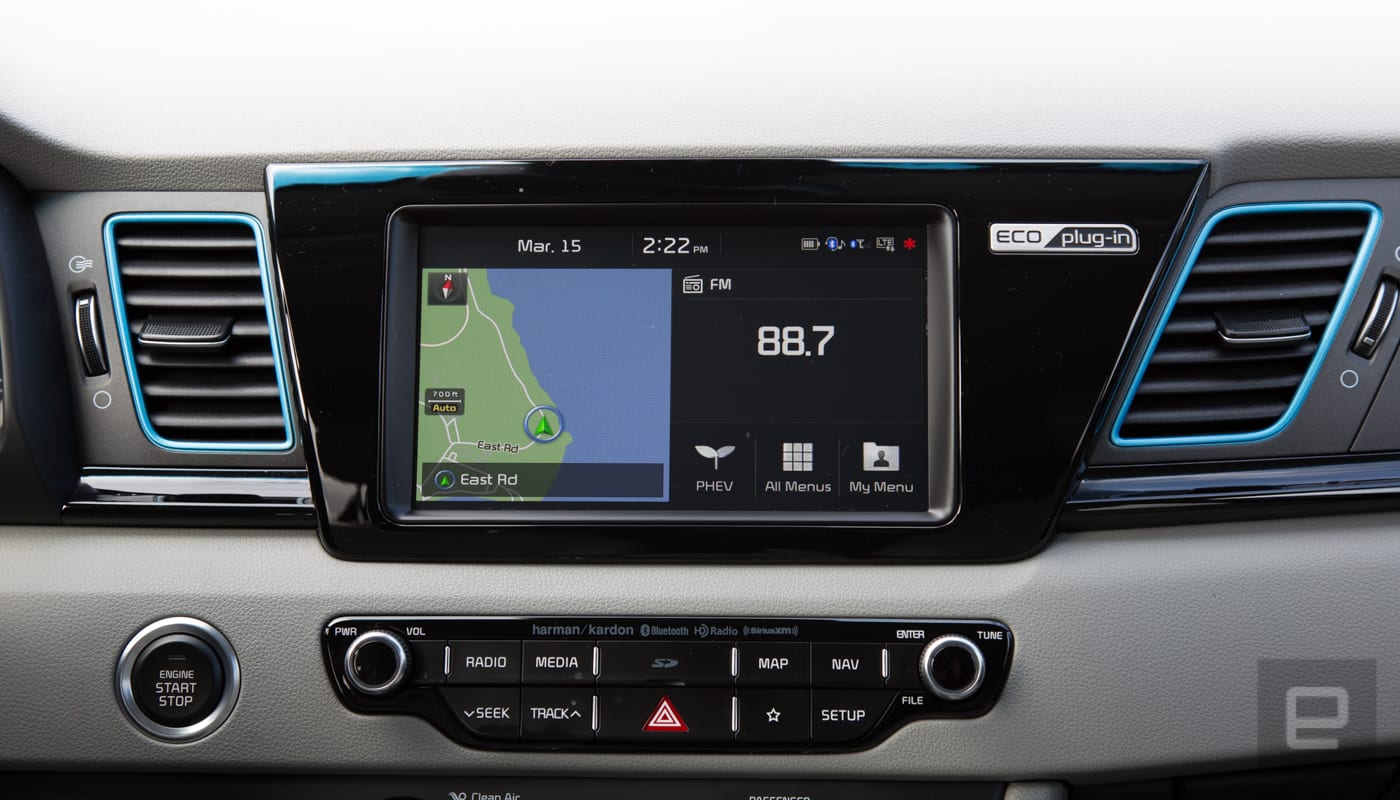
In addition to a solid infotainment system, Kia has the UVO app. I found it to be helpful for starting the car, warming it up and tracking its EV charge. Set up was easier once I realized there’s an eco version of the KIA UVO app. I spent an embarrassing amount of time trying to get the regular app to sync with the car. Bonus, the app is also available on the base model Niro.
The tech that’s available as standard in the base model extends to the adaptive cruise control and lane keep assist. The systems are not as polished as Nissan’s ProPilot Assist (found in the new Leaf and Rogue) or Tesla’s Autopilot, but it’s nice to see these features standard on a crossover. That said, the lane-keep assist on the Kia is really best on straight roads or very wide curves. Anything curvier and you’re going to be hassled audibly to get back in your lane, rather than actually “assisted.”
I’m also not a fan of how the adaptive cruise control system handles stopped traffic. When it encounters a car that’s stationary, the vehicle slows to a few miles an hour then disengages the cruise control. This means the car is still rolling forward towards the vehicle in front of it. Owners will probably get used to this, but the first few times it happens, it can be alarming.

Another issue drivers may need to get used to is the acceleration of the Niro Hybrid. Or really, the lack thereof. Off the line, the Niro — in regular mode — takes its sweet time to get up to speed. Fortunately, there’s a sport mode that’ll get the 137 horsepower engine and 195 pounds of torque to go from zero to 60 in nine seconds.
Hitting the corners also isn’t the Niro’s strong suit. The suspension did an admirable job smoothing out the many potholes and cracks and in San Francisco’s roads, but the Niro’s body-lean around tight corners kept me from pushing it during spirited drives through the mountains.
Even though it’s not going to win any drag races, being tuned for efficiency does have its advantages. In hybrid mode, I averaged 41 miles to the gallon. For a vehicle with enough storage to handle two keyboards, a synth and three drum machines in Pelican cases (as a musician, this is my “family”) without putting down the rear seats, that’s pretty great.
Kia rates the pure EV mode of the Niro plug-in hybrid as 26 miles per charge. Somehow, I got 26.3 in one instance. I rarely got the full promised range though, and I’ve never actually gone over that range in another car. That’s without altering my driving habits during a mixed road of highway (about 30 percent) and city streets. Additional tests, yielded mid to low 20s.
Which brings me back to the acceleration. If you’re not someone that needs the thrill of speed at every stop light, the tradeoff is great range. With a promised 26 miles and real-world tests getting close or even beating that number, for folks with short commutes, there might be weeks or even months between fill-ups.
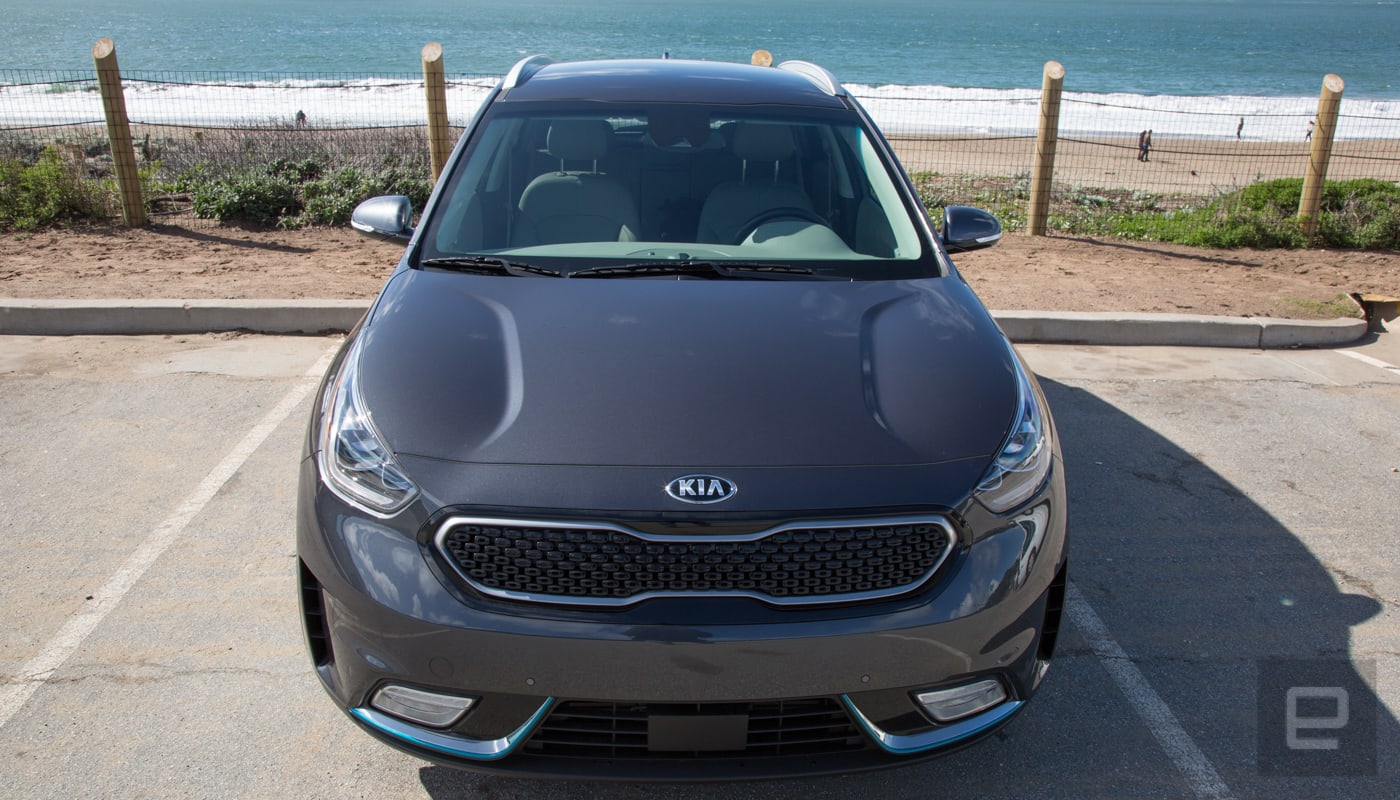
You will have to wait to get that EV range. Level 2 (the industry standard public charger) charging takes about two-and-a-half hours, while plugging the Niro into a typical 120-volt outlet requires about nine hours to get back to 100 percent. Unfortunately, there’s no DC fast charging option.
The additional options that are available for higher trim models can drive the price up to $34,500 (such as the EX Premium, which I drove for the review). It has heated seats, a slightly larger display (8 inches instead of seven), parking assist, blind spot assist, a better sound system and some other features. Yet the big ticket items (adaptive cruise control, smartphone support, lane keep assist etc) are all included on the base model. It’s worth noting that none of the upper trim levels offer any better performance options — they all have the same engine and electric motor.

So yes, the Niro Plug-in Hybrid can get pricey, quick, but it doesn’t have to if you focus on what makes this a great urban SUV with a small footprint (and with plenty of tech that doesn’t cost you extra). The inclusion of features like semi-autonomous modes, smartphone integration etcetera bodes well not only for Kia customers, but for anyone looking for a new car. Making these features standard forces other automakers to do the same. Let’s just hope they can pull it off in a car as charming (but maybe just a bit quicker off the line) as the Plug-In Niro.
Source: Kia
Study Confirms Apple Watch Can Detect Abnormal Heart Rhythm With 97% Accuracy
The heart rate monitors built into the Apple Watch and other wearable devices can detect abnormal heart rhythms with 97 percent accuracy, according to a new study conducted by the team behind the Cardiogram app for Apple Watch in conjunction with researchers at the University of California, San Francisco.
More than 139 million heart rate and step count measurements were collected from 9,750 users of the Cardiogram app who also enrolled in the UC San Francisco Health eHeart Study, with the data used to train DeepHeart, Cardiogram’s deep neural network.
Once trained, DeepHeart was able to read heart rate data collected by wearables, distinguishing between normal heart rhythm and atrial fibrillation with a 97 percent accuracy rate, both when testing UCSF patients with known heart issues and Cardiogram participants.
At a 97 percent accuracy rate, Cardiogram’s study suggests the Apple Watch alone does a better job of detecting abnormal heart rhythms than FDA-approved accessory KardiaBand. From Cardiogram co-founder Johnson Hsieh:
97% accuracy refers to the c-statistic, or area under the sensitivity-specificity curve. Surprisingly, both the sensitivity and specificity of DeepHeart were even higher than an FDA-cleared Apple Watch ECG attachment — 98% (vs 93%) sensitivity and 90% (vs 84%) specificity.
Published in JAMA Cardiology this morning, the study confirms the results from a similar preliminary study done in May of 2017. According to Cardiogram, today’s study marks the first peer-reviewed study in a medical journal that demonstrates popular wearables from companies like Apple, Garmin, Polar, LG, and others can detect a major health condition.
Atrial fibrillation, or an abnormal heart rhythm, is a condition that can be indicative of major health problems and it can lead to heart failure and stroke. Atrial fibrillation often goes undiagnosed, which is where the Apple Watch and other wearables can help. The Apple Watch won’t replace a traditional EKG, but it can alert people to a problem much earlier than it might otherwise be detected. From the study’s conclusion:
This proof-of-concept study found that smartwatch photoplethysmography coupled with a deep neural network can passively detect AF but with some loss of sensitivity and specificity against a criterion-standard ECG. Further studies will help identify the optimal role for smartwatch-guided rhythm assessment.
In addition to studies on the Apple Watch’s ability to detect atrial fibrillation, Cardiogram and UCSF have also been working to determine if the Apple Watch heart rate monitor can also detect conditions like hypertension, sleep apnea, and early signs of diabetes. Preliminary studies have suggested all of these conditions could be spotted in data collected by Apple Watch and other common wearable devices.
Apple has been working with researchers at Stanford on its own study to determine whether the heart rate sensor in the Apple Watch can be used to detect abnormal heart rhythms and common heart conditions. While in the study, if an abnormal heart rhythm is detected, participants will be contacted by researchers and asked to wear an ePath monitor to test heart health.
Apple Watch owners can sign up to participate in the Apple Heart Study by downloading and installing the Apple Heart Study app. Those who want to join Cardiogram’s studies can install the Cardiogram app and sign up to join the mRhythm study.
Related Roundups: Apple Watch, watchOS 4Buyer’s Guide: Apple Watch (Neutral)
Discuss this article in our forums
Apple Releases Safari Technology Preview 52 With Bug Fixes and Feature Improvements
Apple today released a new update for Safari Technology Preview, the experimental browser Apple first introduced two years ago in March of 2016. Apple designed the Safari Technology Preview to test features that may be introduced into future release versions of Safari.
Safari Technology Preview release 52 includes bug fixes and feature improvements for Service Workers, Loading, JavaScript, CSS, Web API, Accessibility, Web Driver, Web Inspector, WebAssembly, and Media. Today’s update also removes support for running legacy NPAPI plug-ins other than Adobe Flash.
The Safari Technology Preview update is available through the Software Update mechanism in the Mac App Store to anyone who has downloaded the browser. Full release notes for the update are available on the Safari Technology Preview website.
Apple’s aim with Safari Technology Preview is to gather feedback from developers and users on its browser development process. Safari Technology Preview can run side-by-side with the existing Safari browser and while designed for developers, it does not require a developer account to download.
Tag: Safari Technology Preview
Discuss this article in our forums
Instagram Now Allows Live Hashtags and Profile Links in Your Bio
Instagram today made a change to user bios, allowing “#” hashtags and “@” links to other Instagram users.
Starting today, when you add a @ or a # to your Instagram bio, it will become a live link that leads either to a hashtag page or to another profile.
Instagram says it has implemented this change to allow users to better express themselves and their interests in their profiles, adding information like #guitarlover, #pencilsketching, #makeuptutorial, and more.
To add a hashtag or link in your bio, you need to navigate to “Edit Profile” and select the “Bio” section. When typing a # or a @ here, you will see a list of recommended hashtags and accounts. Selecting a hashtag or an account you want to add will automatically link it in your bio.
For privacy reasons, Instagram says that when you mention someone else’s profile in your bio, they’ll receive a notification and can remove the link to their profile if desired.
Tag: Instagram
Discuss this article in our forums
Master of the Galaxy: Get the best from the Galaxy S9 Plus’ camera
One of the main reasons you’ll buy a Samsung Galaxy S9 Plus is because of the camera. It’s a considerable step beyond the camera on the Galaxy S8 and S8 Plus, incorporating the best aspects of the Galaxy Note 8’s camera, plus taking fantastic low-light shots, along with a host of new features to explore. The question is, where do you start? We’d suggest pulling on your boots, getting outside, and snapping away. Before you do so, however, here are some top tips and features to try out, ensuring you get the best from your new phone.
Galaxy S9 Plus camera modes
Open the Galaxy S9 Plus’s camera app and you’re greeted by a packed viewfinder screen, with plenty of icons to tap, and a row of modes across the top. Looking at the phone in portrait orientation, here’s what they all do, with some insider tips so you can get the best from them.
Live Focus
Andy Boxall/Digital Trends
By default, the camera app starts in Auto mode. Swipe right to enter Live Focus, which automatically blurs out the background to increase the depth-of-field in your picture. It uses both the camera lenses on the Galaxy S9 Plus to achieve this effect, and there is an on-screen slider to adjust the amount of blur it adds.
Top tip: You need to be less than a meter and a half away from your subject for the mode to activate. Watch for the on-screen notification — a yellow box with the words “Live focus ready” — before pressing the shutter button. If you’re taking a picture of a person, look for the palette icon in the bottom right of the screen. Tap it to alter the skin tone, like a basic beauty mode.
Pro Mode
Andy Boxall/Digital Trends
Swipe right from Live Focus mode to activate Pro mode. Here, you can alter ISO, focus, white balance, and exposure to create the best photo possible. It’s called Pro mode for a reason — we recommend learning all about how the values alter your photo before using Pro mode to take an important picture. Do this either by experimentation, or by using our guide here.
Top tip: Look for the icon saying Standard alongside the different values. Tap it, and you can select different filters in Pro mode, while still adjusting all the other properties as usual. Look for the two Tone settings to change the shadows, contrast, highlights, and other aspects of the scene in real time.
Panorama
Andy Boxall/Digital Trends
The next feature is Panorama. Presented with an expansive scene, this creates a widescreen-style photo to capture everything you see. Tap the shutter release and follow the on-screen instructions, which include a guide to make sure the picture is straight.
Top tip: Look for the yellow icon above the shutter release. It should be activated by default, and it’s for a feature called Motion Panorama. This captures a video at the same time as a still panoramic photo. Once the panorama has been taken, go into the Gallery app and find the photo, where the option to view it as a Motion Panorama will be added. Tap it, and a video version plays. Try tilting your phone left and right to control the playback. At the top of the screen is the option to save the video too.
Food Mode
The final swipe to the right enters Food mode. We all enjoy taking photos of great food before we eat it, and this adjusts the camera’s settings to make those images truly reflect the eventual tastiness. The good thing is, Samsung’s Food mode goes well beyond being a simple filter. We think it’s worth warning your dinner companions that it may take a while to snap your food using the Galaxy S9 Plus, because the effects are so impressive.
Top tip: When you activate Food mode, it automatically puts a tilt-shift-style blur around the focal point, isolating the dish without using Live Focus mode. Rather than fix the focal point in one place, Samsung lets you move it around the screen. Simply touch the box and slide your finger around, so you can better frame the shot. Patience is key here — swipe about in the wrong way and it’s a little too easy to flip the camera view round to the selfie cam.
If you don’t like the blur feature, look for the yellow drop icon and tap it. This switches the feature off. Another aspect we like here is activated using the palette icon, where you can adjust the color temperature using a simple slider. It’s really helpful when compensating for the different lighting conditions found in restaurants and cafes.
Super Slow Motion Video
Returning to the Auto mode, we’ll now look at the modes accessed by swiping to the left. The first is a major new feature for the Galaxy S9 — Super Slow Motion video. The phone will record short bursts of video at 960 frames per second (fps) at 1280 x 720 pixels, and the results can be dramatic and visually stunning. That is, if you get it right. This takes not only practice, but the right environment, and a good understanding of how the feature works.
Top tip: You can either capture slow motion video automatically or manually. To switch between the two, look for the button marked Manual or Auto (depending on the mode you’re already in) located at the bottom left of the screen in portrait mode. Auto mode waits for something to happen on screen before capturing a slow-mo video, ideal if you’re controlling the action; but manual mode is better when things are going on that you cannot control.
Hyperlapse
Alongside the Slow Motion Video mode is AR Emoji, which we’re not going to discuss, as Digital Trends already offers an entire guide for you to enjoy. The final camera mode is Hyperlapse, which may well be familiar to many out there already, as it has been a feature on several phones including iPhones. It lets you shoot video at high speed, compressing lengthier scenes down into more manageable times, and in a creatively interesting way.
Top tip: Check the icons at the bottom of the viewfinder, and you’ll see one that lets you alter the recording speed. You can keep it on Auto, which is the default, or choose between 4x, 8x, 16x, or 32x. Also, watch for the two time counters shown when you start recording. The time in brackets shows the amount of time you’ve been recording, while the other counter represents the length of the final video once you’ve finished.
Galaxy S9 Plus Auto camera tips
Andy Boxall/Digital Trends
Now you’re familiar with the different camera modes on the Galaxy S9 Plus, let’s take a closer look at some of the other settings and features available in Auto mode, as this is likely where you’ll spend most of your time.
There are five icons running along the bottom of the viewfinder.
- Use the second from the left to expand the view to use the entire screen.
- Use the second from the right to try some filters. The filters are split into categories, and are “live,” so you can see how the end result will look right in the viewfinder. While in the filter mode, tap the “+” icon on the far right to visit the Samsung store and download additional filters. There are many available for free, but most will only be available to add to images already taken, and will be found in the Gallery app’s edit mode.
- The Galaxy S9 Plus has a hybrid zoom feature, so you can zoom into your subject by 2x, without a loss of quality. Samsung helpfully has a button dedicated to this, and you can see it in the bottom right of the viewfinder.
- On the opposite side of the zoom button is a mysterious icon that looks like an eye. This activates Bixby Vision, a feature of Samsung’s AI-powered assistant, Bixby. Point it at something, and it’ll translate text, provide location information, read QR codes, identify wine, and more. Each category can be selected from a scrolling list along the bottom of the screen.
Take a moment to dig into the Settings menu, using the gear icon on the far left.
- We recommend activating the Grid, making it easier to frame and compose your pictures.
- Go to Edit Camera Modes and make sure Sports Mode is ticked. This will then show up in the modes along the top of the screen, and is designed to help take photos of fast moving objects.
- While in this setting, you can rearrange the way the modes are displayed, if you’d prefer them in a certain order. Or, alternatively, you can remove any modes you are unlikely to use, tailoring the menu for you.
Try out all these tips, modes, and settings, and you’ll quickly master the Galaxy S9 Plus’s camera, ready to take pictures like a pro. If you have your own tips, feel free to share them with all of us in the comments below.
Huawei MediaPad M5 and M5 Pro review
Android tablets have been seeing a steady decline in sales recently, but Huawei is still managing to find success in the diminishing tablet market. The previous MediaPad M3 offered a solid Android tablet experience and now Huawei is refreshing its tablet lineup with the MediaPad M5 and M5 Pro. If you’re on the market for a new Android tablet your options are admittedly slim, but are the MediaPad M5 and M5 Pro good enough to still warrant a purchase?
Design
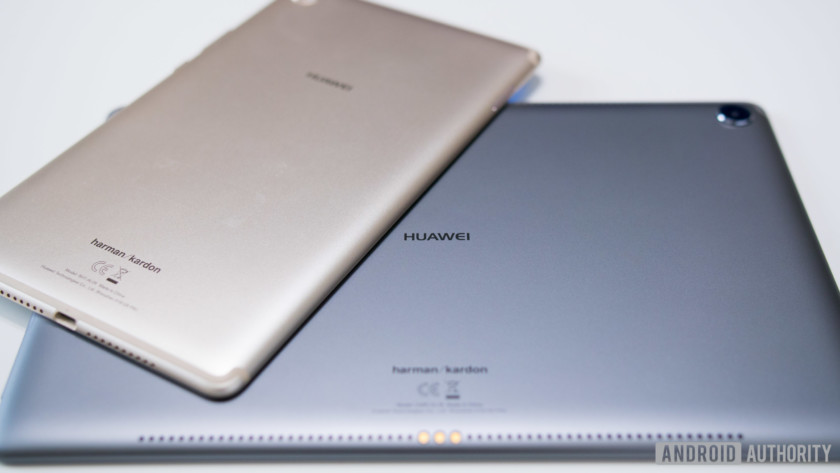
The designs of the MediaPad M5 and M5 Pro are fairly standard. After all, there isn’t a whole lot you can do in terms of aesthetics when designing a tablet. The M5 and M5 Pro feature all-metal unibody designs that are very smooth to the touch, but since these are much larger devices in comparison to a smartphone, having them slip out of your hands isn’t an issue. The corners are nicely rounded and the backside tapers down along the edges, providing a sleek appearance and comfortable feel in the hand. New to the MediaPad M5 lineup is the addition of 2.5 D glass on the front that compliments the rounded and curvy aesthetic of these tablets very well.
Plastic antenna bands can be found on both the M5 and M5 Pro along the top and bottom to help with radio signals and cell reception on the LTE variants. They’re never the prettiest things to look at, but Huawei has color matched them to the devices themselves. As such, they aren’t too much of an eyesore, especially on the darker devices, like the gray pictured above.

Unlike our smartphones where display bezels are increasingly getting smaller, the M5 and M5 Pro have thick bezels all around, but thick bezels make much more sense on tablets. The bezels give you an area ideal for properly resting your thumbs to comfortably hold these tablets without interfering with the display. This is especially useful on the larger M5 Pro which is more oriented towards landscape use.
There are several elements on the M5 Pro that encourage you to use this tablet primarily in landscape.
There are several elements on the M5 Pro that encourage you to use this tablet primarily in landscape. The front-facing camera is on the long side, the Huawei logo is in landscape, and the power and volume buttons are on the short side of the tablet. Using it in portrait is obviously possible, but it’s a much more awkward experience when interacting with the M5 Pro’s physical hardware. The front-facing camera ends up on the right or left side and the power and volume buttons will either be at the bottom or top when holding the tablet in portrait.
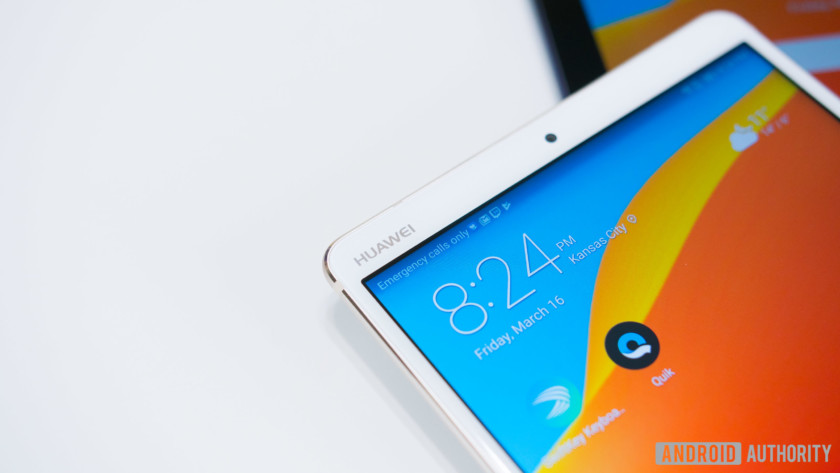
This contrasts dramatically with the 8.4-inch M5, which has a portrait style layout, with ports and buttons positioned to mirror our typical smartphones. When holding the tablet in portrait, the power and volume buttons are on the right side, the front facing camera is at the top bezel with a Huawei logo flanking the left side, and the USB type C port is on the bottom.
Display
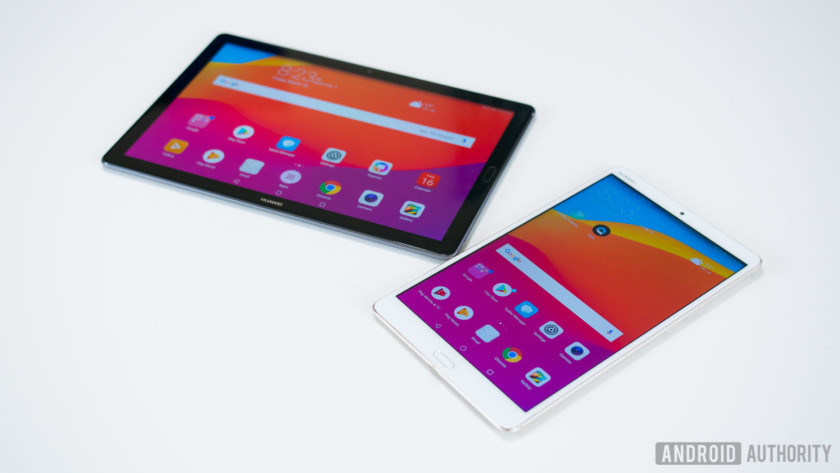
The beauty of the MediaPad M5 lineup is that no matter which one you get, they’re completely identical in specifications save for the physical size and battery capacities. Starting with the displays, both the M5 and M5 Pro feature IPS panels with 2,560×1,600 resolution. The M5 measures in at 8.4 inches while the M5 Pro will give you a much larger viewing experience at 10.8 inches.
With 2K resolution, both displays are incredibly sharp, which makes for a great experience no matter what you’re doing. The screens are also quite vibrant, rich in color and provide plenty of contrast which I did not expect from these IPS panels. Watching YouTube and Netflix, browsing the web, and playing games are fantastic and super enjoyable, especially on the larger M5 Pro.
Performance
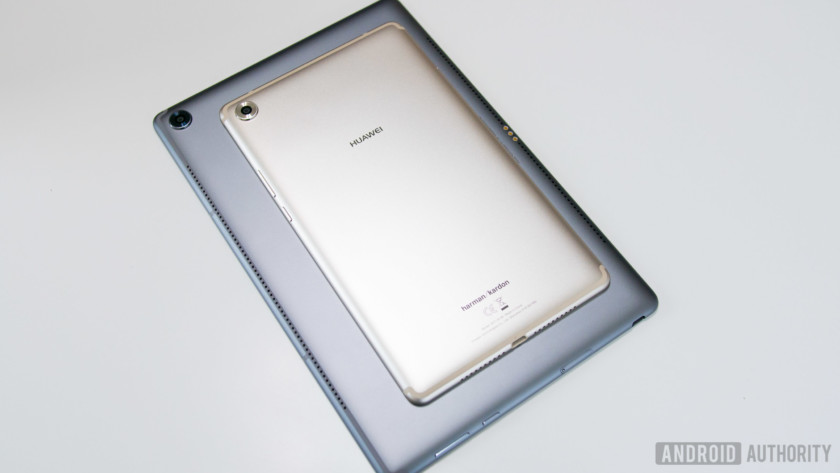
Both MediaPad M5 tablets use Huawei’s in-house Kirin 960 processor backed by 4 GB of RAM.
On the inside of the MediaPad M5 tablets is Huawei’s in-house Kirin 960 processor backed by 4 GB of RAM. This is Huawei’s last generation processor, but it’s still plenty powerful as performance has been very smooth in daily operation.
Swiping and scrolling through the interface, browsing the web, multitasking, or playing graphically demanding games is a pleasurable experience. These tablets are fast and responsive which is great to see on tablets that are designed for both work and play. How well will the performance hold up months down the road? Only time will tell, but for now they’ve done a an excellent job of keeping up with my daily demands.
Hardware
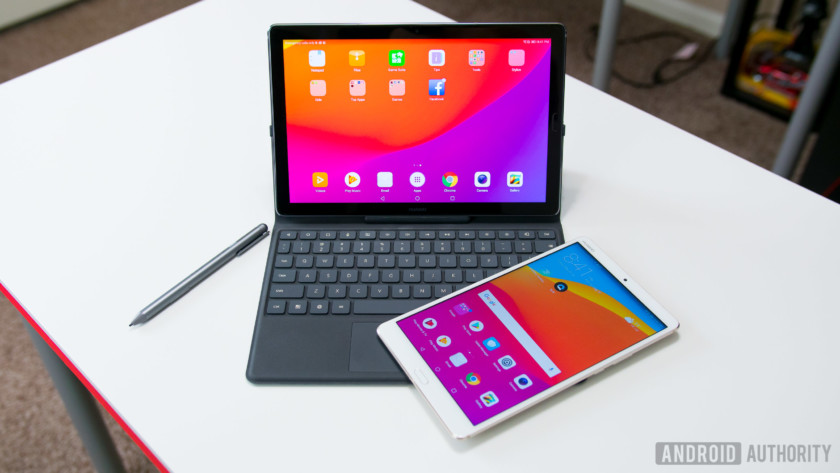
As for general hardware the M5 and M5 Pro are available in 32, 64, and 128 GB versions, with microSD expansion and the addition of a SIM card slot on the LTE variants. Fingerprint sensors can be found on the front bezels which are not only fast at unlocking but can also be used for navigating the OS in lieu of the on-screen soft keys. No headphone jack on either model, unfortunately, but they do come bundled with an adapter to allow you to use your headset of choice. Huawei does however make up for it with some very impressive speakers powered by Harmon Kardon. The 8.4-inch M5 comes with dual speakers, and the larger 10.8-inch models have an even more jaw-dropping quad speaker system.
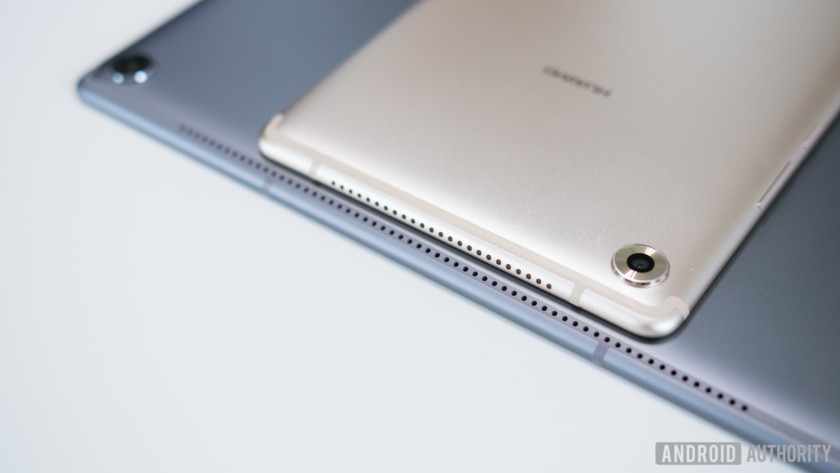
I was a little bit skeptical of the speaker placement, as they’re side-firing speakers on the 8.4-inch and rear-firing on the Pro model. But these speakers are so incredibly loud that it almost doesn’t matter. Not only are they loud, but the sound quality is very good. They’re crisp and clear, with no signs of distortion even at max volume and provide a nice amount of low-end punch. They’re some of the best speakers I’ve ever heard on tablets and makes the Netflix, YouTube, and music listening experience that much more enjoyable. These are very media-centric tablets after all, and these speakers complete the package.
The 8.4-inch M5 comes with dual speakers, and the larger 10.8-inch models have an even more jaw-dropping quad speaker system.
What makes the M5 Pro a “pro” tablet is the inclusion of a keyboard dock and an M Pen stylus with 4,096 levels of pressure sensitivity. The M Pen does exactly what you would expect from a stylus. You can create drawings, jot down notes, and even do handwritten calculations with Huawei’s calculator app, which I thought was one of the neater uses of this pen. The tablet will also detect when you’re using the pen and automatically default to a handwriting keyboard instead of the normal on-screen keyboard.
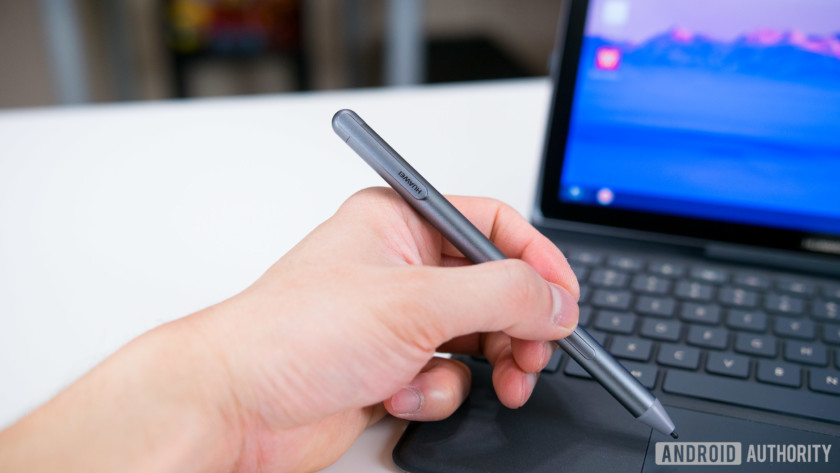
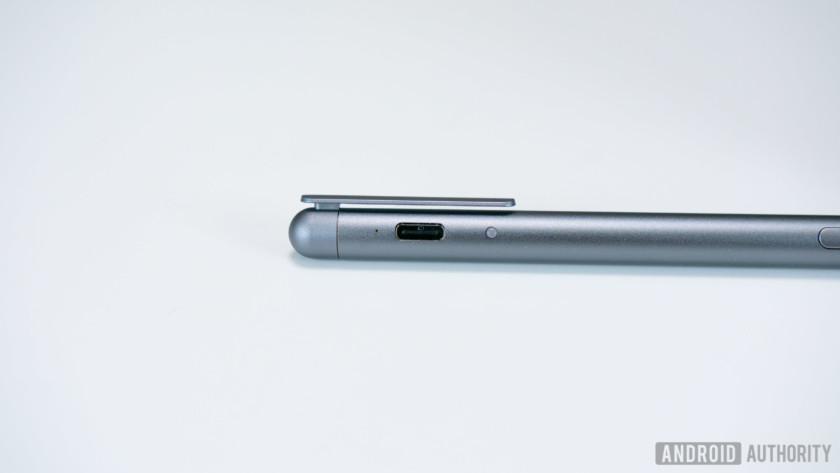
The M Pen is the size of a normal pen, making it comfortable to use, and it has solid weight so that it doesn’t feel cheap. The Pen has its own battery and is charged via its USB type-C port, which can be hidden by the pen’s clip when it isn’t in use. Huawei says a single charge is good for 50 days worth of use, and while I haven’t had the pen long enough to verify that claim, the only time I’ve charged it so far is when I initially took it out of the box, which, as I write this, was a week ago.
Editor’s Pick
ExpressVPN review
ExpressVPN is easily one of the most recognizable third-party VPNs (Virtual Private Networks) and for good reason. It claims to offer fast speeds, impressive security, complete privacy, competitive pricing, and everything else you’d expect from a …
Similar to Microsoft’s Surface Pen, the M Pen is magnetic, allowing it to hinge on the side of the tablet, but the magnet is pretty weak. It’s very easy for the pen to fall off.
There are two buttons on the side of the pen with one allowing you to select any portion of the screen to create and edit a screen grab. It’s basically Huawei’s knuckle sense gesture, executed with a pen. The other button serves as a “left click” and allows you to interact with the OS, open applications, etc. without having to lift the pen off of the display.
The keyboard dock, on the other hand, gives the M5 Pro an experience akin to a laptop. Unlike the pen, the keyboard dock does not have its own battery. It draws its power directly from the tablet. The keyboard connects to the tablet via copper connectors and is secured into place with plastic arms. It works fine, but sliding the tablet into place feels cheap and clumsy.
When the tablet is securely attached, the keyboard dock doubles as a protective case, giving the tablet protection on all sides. The backside can be folded in order to prop up the tablet when typing on your lap or desk. It’s made of a soft touch material both inside and out and feels nice and comfortable to the touch. My only concern is that it can possibly stain with prolonged use, especially the inside, which has a much more tacky feel.

The main benefit of the keyboard dock is to give you a physical typing experience that allows for quicker and easier productivity when typing emails, creating word documents or spreadsheets. It’s not the most spacious keyboard but it’s a surprisingly comfortable keyboard to type on. The keys are clicky with a satisfying amount of travel, and it offers some of physical shortcuts for adjusting screen brightness, volume, multimedia playback controls, and the standard android navigation keys.

The keyboard does have a couple of downsides though. Huawei did the best they could with the trackpad given the size limitation, but it’s uncomfortable to use, and scrolling or moving windows around is laggy and slow in comparison to using the touch screen. There’s no noticeable input delay when typing, but when using the keyboard to control system functions such as volume the input response isn’t instantaneous and sometimes takes a couple of seconds or more before the keystroke wants to register.

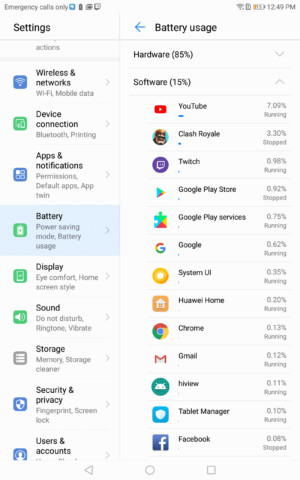
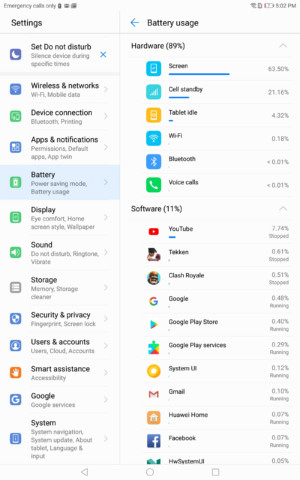
In terms of battery life, the M5 Pro and standard 10.8-inch M5 come with a 7,500 mAh battery. The 8.4-inch model runs on a 5,100 mAh cell. Both capacities are quite large for their respective sizes and have proven to be more than enough for several days of casual use and can easily last me an entire day on heavy use.
Both 10.8-inch models come with a 7,500 mAh battery. The 8.4-inch model runs on a 5,100 mAh cell.
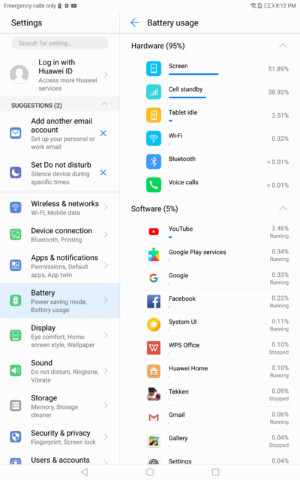
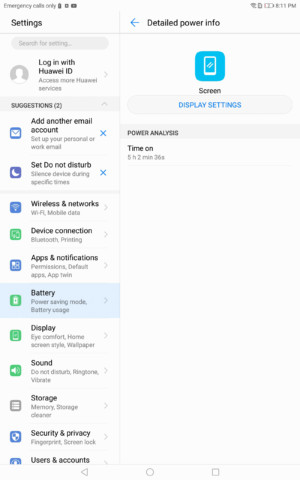
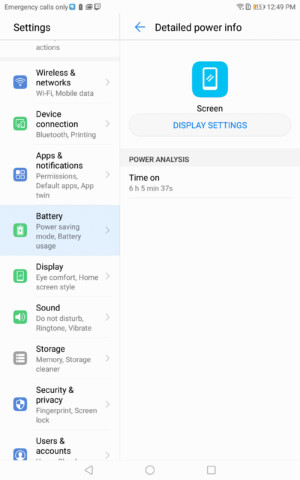
I primarily use my tablets for multimedia purposes, which consist of several hours of YouTube, watching livestreams on Twitch, and playing games on a daily basis. This typically means seven to eight hours of screen on time on the M5 Pro, and 5 to 6 hours on the M5. Battery-saving properties such as Huawei’s power saving mode and smart resolution for lowering the screen resolution can help extend these tablets’ batteries even further, but I haven’t felt the need to use them as of yet.

Camera

The entire MediaPad M5 lineup features the same cameras across the board with an 8 MP front-facing shooter and a 13 MP rear camera. Tablet cameras historically have never been all thatgood, and the MediaPad M5s don’t do much to change that. If you’re in a pinch, the photos are more than serviceable, but the quality isn’t going to compare to the smartphones that we have today.
There’s plenty of resolution with 13 MP, but photos do not appear very sharp, colors are washed out, and dynamic range is lacking with very little details in the shadows. Huawei does manage to keep the majority of the camera experience that you’d find on their smartphones intact on the MediaPads with all of the same shooting modes. The only exception is portrait mode and Huawei’s signature wide aperture mode, which is most likely due to the fact that the MediaPads don’t have dual rear cameras.
Software
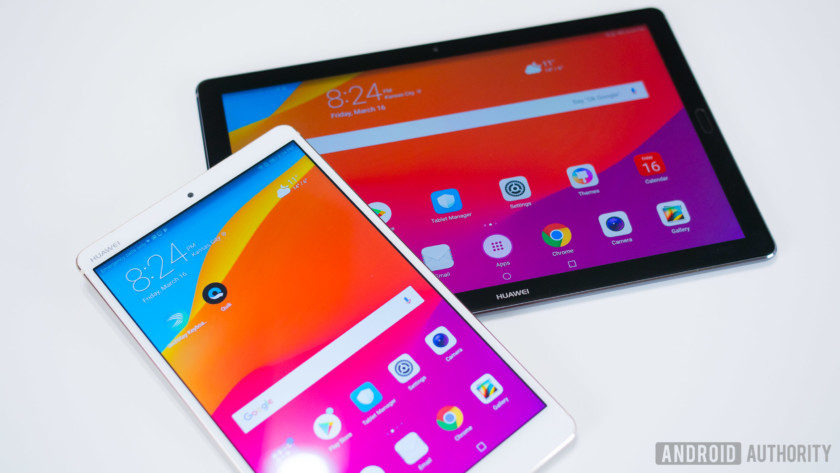
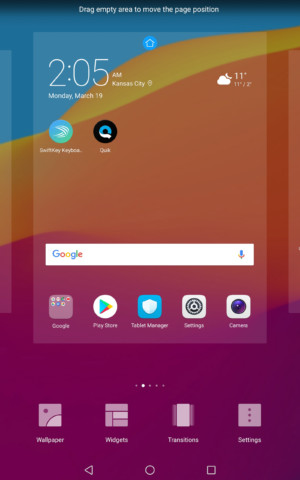
The MediaPad M5 and M5 Pro ship with Android 8.0 Oreo with EMUI version 8.0. It’s the same exact experience as Huawei’s smartphones, except blown up to a larger size. As usual, EMUI looks aesthetically very similar to Apple’s iOS, with rounded squared icons, a spotlight-esque search feature, and no app drawer by default. The app drawer can be reenabled through the system settings.
EMUI has never been a favorite skin of mine due to its similarity to iOS, but the heavy amount of bloatware that comes preinstalled on these tablets are more bothersome than the skin itself. You’ll find a handful of preinstalled games and other applications such as eBay and Booking.com. Thankfully, most of them can be uninstalled but it still creates an unnecessary hassle.
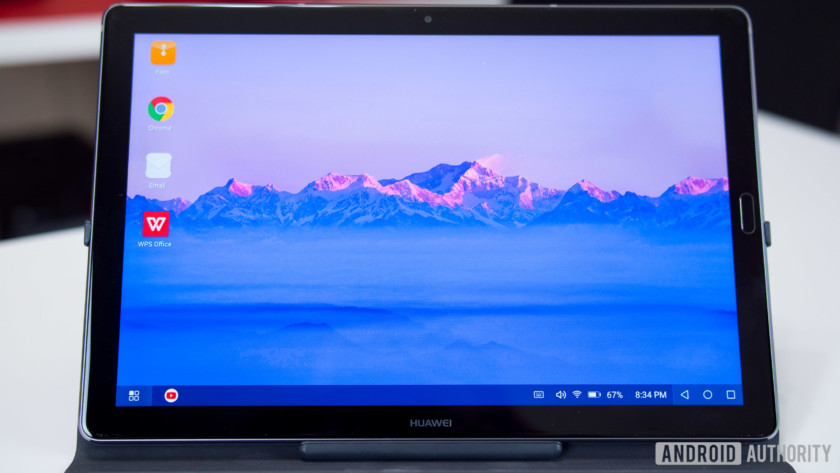
Specific to the M5 Pro’s software is the addition of a desktop mode. The desktop mode can be automatically launched when the tablet is inserted into the keyboard dock and will also work with a third-party bluetooth keyboard. As the name suggests, this turns the UI into a more traditional desktop experience such as Windows 10 or ChromeOS. There’s a task bar with apps stowed away in a drawer on the bottom left corner and other elements such as the time, notifications, and basic system functions, all accessible on the right side. The multitasking experience is also more like a desktop with all applications opening in windowed form and can be minimized and stacked on top of one another. This makes productivity even easier on the M5 Pro, but for some reason not every application that you download from the Play Store is accessible in desktop mode including the Play Store itself and many of Google’s other applications.




Gallery

Specifications
| Display | 8.4-inch IPS 2560 x 1,600 resolution 359 ppi 16:10 aspect ratio |
10.8-inch IPS 2560 x 1,600 resolution 280 ppi 16:10 aspect ratio |
10.8-inch IPS 2560 x 1,600 resolution 280 ppi 16:10 aspect ratio |
| Processor | HiSilicon Kirin 960 octa-core |
HiSilicon Kirin 960 octa-core |
HiSilicon Kirin 960 octa-core |
| GPU | Mali-G71 MP8 | Mali-G71 MP8 | Mali-G71 MP8 |
| RAM | 4 GB | 4 GB | 4 GB |
| Storage | 32/64/128 GB microSD expansion |
32/64/128 GB microSD expansion |
64/128 GB microSD expansion |
| Cameras | Rear: 13 megapixel AF Front: 8 MP FF |
Rear: 13 megapixel AF Front: 8 MP FF |
Rear: 13 megapixel AF Front: 8 MP FF |
| Battery | 5,100 mAh Non-removable |
7,500 mAh Non-removable |
7,500 mAh Non-removable |
| Connectivity | Wi-Fi 802.11 a/b/g/n/ac (2.4/5 GHz) Bluetooth v4.2, optional LTE |
Wi-Fi 802.11 a/b/g/n/ac (2.4/5 GHz) Bluetooth v4.2, optional LTE |
Wi-Fi 802.11 a/b/g/n/ac (2.4/5 GHz) Bluetooth v4.2, optional LTE |
| Sensors | Accelerometer Fingerprint Gyro Hall Ambient light |
Accelerometer Fingerprint Gyro Hall Ambient light |
Accelerometer Fingerprint Gyro Hall Ambient light |
| Authentication | Lock type: pattern, PIN, password
fingerprint scanner |
Lock type: pattern, PIN, password
fingerprint scanner |
Lock type: pattern, PIN, password
fingerprint scanner |
| Audio | Dual speakers with Harmon Kardon | Quad speakers with Harmon Kardon | Quad speakers with Harmon Kardon |
| Software | Android 8.0 Oreo, EMUI 8.0 | Android 8.0 Oreo, EMUI 8.0 | Android 8.0 Oreo, EMUI 8.0 |
| Dimensions and weight | 212.6 x 124.8 x 7.3 mm 316 g |
258.7 x 171.8 x 7.3 mm 498 g |
258.7 x 171.8 x 7.3 mm 498 g |
| Colors | Gold, Grey | Gold, Grey | Gold, Grey |
Pricing & Final Thoughts
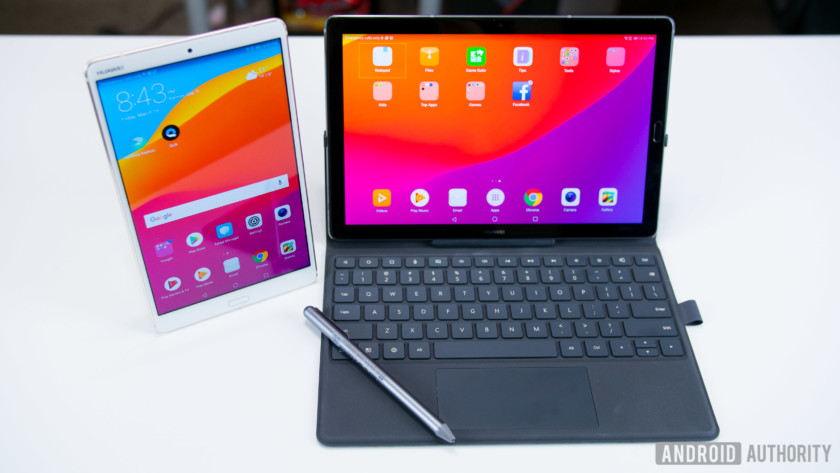
Pricing for the MediaPad M5 starts at 349 Euros and ranges upwards to 599 Euros depending on size, storage, connectivity, and whether you opt for the Pro or standard versions. As we mentioned previously, when it comes to Android tablets, the amount of options out there are very limited, but the MediaPad M5 line is a very solid offering from Huawei. These are some of the best Android tablets we’ve seen in a while. They’re well designed with gorgeous displays and fantastically loud speakers that make them great for multimedia purposes. They certainly live up to the MediaPad name, and if you’re into turning your tablet into an on-the-go work station, the M5 Pro offers the appropriate peripherals for both work and play.
 AIVAnet