


Today’s best deals you won’t want to miss
Whether you’re looking for new tech gear or household items, we’ve got you covered.
Right now there are great discounts on the Google Daydream View VR headsets, 10-outlet surge protectors, $10 headphones, and more! Don’t pass these up.
View the rest of the deals
If you want to know about the deals as soon as they are happening, you’ll want to follow Thrifter on Twitter, and sign up for the newsletter, because missing out on a great deal stinks!
Best Wear OS Smartwatch in 2018
- Best overall
- Best for watch lovers
- Best mid-sized alternative
- Best value
Best overall
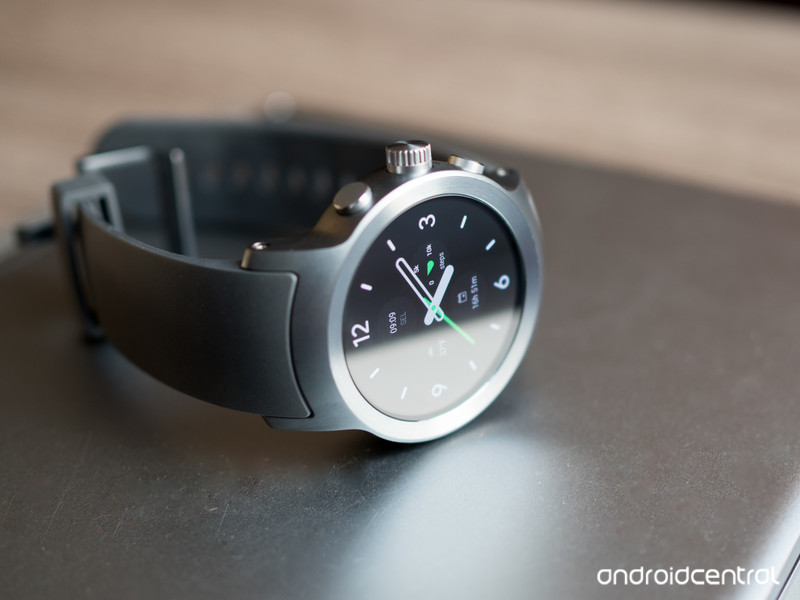
LG Watch Sport
See at Newegg
LG’s Watch Sport has everything: a big, beautiful P-OLED display, a high-speed processor, NFC for Google Pay, LTE for independent connectivity, and a massive 430mAh battery. It has been among the first devices to receive Wear OS updates, which means that early adopters can benefit from all the platform’s new features.
It may be big, but the stainless steel chassis wears it well, and it hides a very accurate heart rate sensor on the back. At $259, it’s not cheap, but it’s worth it.
Bottom line: The LG Watch Sport is a big watch, but it’s also big on features.
One more thing: If the Sport is too big, and too pricey, LG has another option, the sleeker LG Watch Style, for $120.
Why the LG Watch Sport is the best
The LG Watch Sport is a beast. It’s big, heavy and expensive. And yet it’s the best Wear OS watch out there right now, mainly because it packs so many features into one device. Want to pay with your watch? Go ahead. Want to use it independently to track a run using GPS? Sure, it can do that, too.
Android Central’s Andrew Martonik summed it up nicely in his review:
Many technology enthusiasts will still be wooed into considering the LG Watch Sport, even at $349. The allure of a fresh smartwatch that fixes many pain points of previous Wear OS watches will be strong. It has a great display without a dreaded flat tire, a nice case that is, unfortunately, a bit too thick but has great build quality, and every feature you could want crammed inside.
The LG Watch Sport is for the wearable fan who wants to experience Wear OS 2.0 to the fullest right from the start, and see the latest Google has to offer on some great hardware from LG.
LG has a hit on its hands, despite the watch’s size, and there is something encouraging about how much more capable it is than previous generations of watches.
Best for watch lovers
LG Watch Style

See at Amazon
As much as we love our former pick in this category, the Huawei Watch, LG’s newest slim smartwatch, the Watch Style, gets our pick for a timepiece that best imitates a real watch. While it lacks the features of its more expensive and much larger kin, the Watch Sport, it makes up for it in sheer usability. The 1.2-inch POLED display is delightful, and Wear OS works really well on the spinning crown, which enables smooth scrolling without having to touch the display.
Bottom line: The Watch Style may be the best all-round Wear OS watch for the mainstream.
One more thing: It comes in three colors, including the always coveted rose gold.
Best mid-sized alternative
Huawei Watch 2 Classic

See at Amazon
It may not look much like the original Huawei Watch, but the Huawei Watch 2 Classic is the nicer, metal version of the company’s new Wear OS series, and we like it a lot. A gorgeous, sharp 1.2-inch OLED panel and a comfortable leather wrist band make for plenty of enjoyment, plus the heart rate monitor and GPS let the Watch 2 Classic live on its own, sans phone, when you want to go on a run. We just wish that chronometer bezel could spin.
Bottom line: If you’re looking for something like the LG Watch Sport in a much smaller package, this is the one for you.
One more thing: Wait until it’s on sale on Amazon, where it gets discounted regularly.
Best value
ASUS ZenWatch 3

See at Amazon
Wear OS is, first and foremost, a way to interact with your phone remotely. ASUS has positioned the ZenWatch 3 as a way to enjoy the best Wear OS features without emptying your wallet. The round display, metal and leather help it stand out a bit, but it’s at a very price-conscious $199.
Bottom line: If you really want Wear OS but don’t need the super-high-end feel of a more expensive watch, the ZenWatch 3 does the trick.
One more thing: ZenWatch 3 is available in two distinctly different color options — a bright silver with a grey band, or stealthier black with a dark brown band.
Conclusion
The LG Watch Sport is not just a good watch, it’s the best Wear OS watch you can currently buy. While that may change in the coming months with new wearables from big names like Huawei, Sony and others, no other Wear OS device right now does as much, and so well, as the LG Watch Sport.
Best overall
LG Watch Sport

See at Newegg
LG’s Watch Sport has everything: a big, beautiful P-OLED display, a high-speed processor, NFC for Google Pay, LTE for independent connectivity, and a massive 430mAh battery. It has been among the first devices to receive Wear OS updates, which means that early adopters can benefit from all the platform’s new features.
It may be big, but the stainless steel chassis wears it well, and it hides a very accurate heart rate sensor on the back. At $349, it’s not cheap, but it’s worth it.
Bottom line: The LG Watch Sport is a big watch, but it’s also big on features.
One more thing: If the Sport is too big, and too pricey, LG has another option, the sleeker LG Watch Style, for $249.
Update, March 2018: The LG Watch Sport is still the best Wear OS smartwatch you can buy right now.
YouTube bans videos that sell guns and accessories
Gun videos may be a thing of the past on YouTube, with the Google-owned company updating its policies on firearms-related content. Videos can no longer sell guns or accessories via direct sales or even have links to sites that sell them. Videos also cannot have instruction on manufacturing firearms or associated items like magazines or silencers.
Accessories banned include bump stocks, gatling triggers, drop-in auto sears and conversion kits, as well as high-capacity magazines. Instruction on upgrading firearms to automatic or simulated automatic firing capabilities is similarly prohibited. This isn’t YouTube’s first policy update around firearms, either; the company banned gun mod tutorials after the Las Vegas shooting last year.
According to Motherboard, YouTube has already removed some of these types of videos, causing some consternation among popular gun vloggers. “As much as I appreciate that they are now defining their guidelines much more clear…they have imposed this NEW rule without talking to anyone beforehand and there is no transitional period,” slingshot vlogger Jörg Sprave told the site. “Many gun channels must now be afraid, as they might get plenty of strikes in no time for older videos and then lose their channels. They should at least get some time to clean up their videos so the new rules are kept. Again, not the way you treat ‘partners.’”
Via: The Verge
Source: Google
A posture trainer works, if you want it to
In our line of work, everywhere is an office. Particularly at trade shows and other big events, you can find Engadget editors writing stories in hotel lobbies, the back of cabs or anywhere there’s a power outlet. I’m no more consistent at home. Sometimes I stare at my laptop from the comfort of the couch or sit on the floor if my desk isn’t proving to be an inspiring location. I hadn’t given it much thought until an Upright Go posture tracker arrived on my doorstep. Had a complete disregard for ergonomics made its mark on my spine? Well, I’m still not quite sure.
The $80/£70 Go is the second posture tracker from Upright after the Pro, both of which were crowdfunded into production. “Posture tracker” might be overselling it a little, though. Cut through the marketing and the Go is just a simple tilt sensor in a pretty package. The device itself has a lovely rubbery finish and comes in a neat little travel case with space for alcohol wipes and extra adhesive strips. It’s small and light, and once you’ve slapped it on your upper back, you forget about it within 30 seconds.
Posture sensors have taken many forms, such as cushions, belts and little gadgets you clip to your clothes with magnets. Upright prefers you stick its devices directly to your body. The gel adhesive that binds the Go to your skin is a bit like the glue they use to stick shampoo samples to magazines. It’s strong enough for the job but still very easy to remove. It doesn’t irritate the skin one bit, and Upright says each strip can last up to 10 days with proper care and cleaning (you get four spares in the box and can order more online for less than a dollar a piece).

In all, the device is completely inoffensive, which is essential for something you’re supposed to wear for an extended period. Even the vibration feels like it happens away from the skin, quietly whispering in your direction rather than full-on nagging.
The purpose of the Go isn’t simply to track, but also to train. When you first use the device, you plug your weight, age and height into the companion app, and it comes up with a personalized training schedule for you. Each day, you have to sit or stand with good posture for a certain amount of time to get your gold star. The time increases gradually (it creeps up in minute increments) for a few weeks until you complete the program. After this, Upright recommends training in 20-minute sessions a few times per week.
I don’t see a great deal of value in this personalized schedule. I was barely done poking around the app before my first day’s goal of nine minutes was up. The next day I was challenged to sit still for 10 minutes, and so on. Unless you’re a fidgety toddler, it’s really not hard. I came to realize it wasn’t supposed to be. The idea is to lure you, through easily achievable goals, into forming a positive habit.
When in training mode, the Go will vibrate if you lean forward too much, lightly nudging you to straighten your back and correct your posture. It’s not nearly as annoying as you might imagine, but it’s not something you can entertain all day. You see, it doesn’t account for when you’re leaning into your desk to grab that cup of coffee, getting up out of your chair or tying your shoelaces. There are countless scenarios that register to the Go as false positives, so inevitably you’re going to put it into tracking mode at some point.
Tracking mode doesn’t change much. The thing just won’t vibrate if you hunch past the threshold. Whatever mode you’re in, the device still tracks the time spent straight or stooped, presenting them in colorful, accessible graphs and charts. On the whole, the app is well designed, with an intuitive user interface, all the product information you could want and even built-in chat to get at customer-support staff directly.
But the actual data the app shows you is of highly questionable use. Seeing that you spent an hour of the day in the red zone just isn’t something you can act on. Maybe you were eating for 20 minutes of that anyway, or crawling around for a few trying to find a floor socket for your phone charger, etc. Sure, you could hop into the app to recalibrate it every time you go from sitting to standing or turn it off when you know you’re about to rack up five minutes of unavoidable hunch, but that’s just hassle. After all, one of the best things about the Go is you should forget about it until it’s time to charge it that evening.

The fact the data isn’t of great worth speaks to the imprecision of it all. From sticking the Go as best you can in line with your spine to calibrating it yourself, there’s plenty of scope for human error. It’s not a great posture analyzer, either. If perfectly positioned and calibrated, yes, it can detect you hunching over. But there are many, many ways posture can be ‘bad.’ I can shimmy my hips all the way to the front edge of my chair and slouch right back into it, putting a ton of pressure on my lower back. But according to the Go, my posture is still in the green because I’m not leaning forward.
Maybe you sit up relatively straight all day, but lean on one elbow with a phone pushed up against your ear for hours on end. While the Go might give you the thumbs up, a chiropractor would probably be horrified.
One thing I had to educate myself on was what ‘good’ posture should feel like. “Sit up straight” and “don’t slouch” are commands you might’ve heard often as a kid, but like eating your greens, it’s just something you respond to without knowing or really caring why. It’s natural to connect poor posture with back pain: Because you’re not making full use of the spine as a supportive structure, you’re taxing the muscles and joints that pick up the slack.

Image: South_agency via Getty Images
Poor posture can cause fatigue, all kinds of muscular pain and headaches. It can impact your gait, circulation, breathing and generally accelerate wear and tear on your body. Hunching over and putting pressure on your intestines can slow down your digestive system. It can also sap your energy levels, harm your mood and affect how other people perceive you.
It’s not an exact science, and some of these symptoms develop slowly over a long period. And therein lies another problem. It’s not like after a few days of using the Upright Go, you’re going to be pain free, in great spirits and evacuating regularly. It’s no quick fix, and since it’s not exactly the most elaborate posture analyzer, it might not be the right fix for you at all. The only thing I can definitively say the Go has done for me is give me upper-back pain.
I’m pretty sure this is the good type of pain, though. The gym-goer’s no pain no gain kinda pain; a sign I’m working supportive muscles I’ve let shrivel. And perhaps that’s what I didn’t initially understand about the device. It’s not about what it does or doesn’t do. It’s about how you respond to it.

When it comes to posture sensors, there aren’t a great many to choose from. In fact, the $60/£60 Lumo Lift is the closest thing you can get to the Upright Go, and it does basically the same thing. Similar products have come and gone over the years, most starting out as crowdfunding projects. Now all you’ll find is dormant websites.
There isn’t anything out there right now that evaluates your posture any better than the Upright Go, and maybe there doesn’t need to be. Sure, the data is useless as far as I’m concerned, but there’s more to it than the core functionality. There are plenty of “smart” things that probably don’t need to exist. For example, do you really need an app to walk you through brushing your teeth? I don’t think posture sensors fall into that unnecessary category, however.

Perhaps the Go’s real power lies in the fact you bought one in the first place. It’s a physical reminder you’re trying to make self-improvements in much the same way a step-counter is a symbol of your desire to be more active. You put it on each day, switch it to tracking mode, and you try, regardless of what the data says when you eventually take it off again. There’s no immediate benefit, and there are no guarantees. There’s little need for the device or app to even function as long as you’re aware it’s on your body and what it’s supposed to mean. In this instance, it’s not the way that matters, but the will.
Source: Upright
Samsung’s 2018 QLED TVs start at $1,500
Today, Samsung released pricing details on its 2018 QLED line. The smallest, base model Q6F, at 55 inches, retails for $1,500, while the flagship Q9F 75-inch model inches is $6,000.
The full range of pricing is as follows:
- QN82Q6F: $4,500
- QN75Q9F: $6,000
- QN75Q8F: $4,800
- QN75Q7F: $4,000
- QN75Q6F: $3,500
- QN65Q9F: $3,800
- QN65Q8F: $3,000
- QN65Q7C: $2,700
- QN65Q7F: $2,600
- QN65Q6F: $2,200
- QN55Q8F: $2,200
- QN55Q7C: $2,000
- QN55Q7F: $1,900
- QN55Q6F: $1,500
The Samsung QLED TVs have quite a few impressive features. Ambient mode allows the TV to blend into the room, rather than showing a blank screen. HDR10+ features vary depending on the specific model you’re purchasing, but all TVs come with Bixby, Samsung’s smart assistant. We got to spend some time with this series of TVs and pronounced them Samsung’s smartest line yet.

Tobii’s EyeCore will make next-gen VR experiences even more immersive

VR and AR may be the next big thing immersive experiences but so far, their user interfaces have been anything but intuitive. Conventionally, head mounted displays have operated under the assumption that its users are owls: their eyes are locked in their skulls, facing forward requiring them to use their noses as VR cursors. Tobii is working to change that by integrating eye tracking into the next generation of Head Mounted Displays.
Specifically, Tobii is partnering with Qualcomm to incorporate its EyeCore tracking capabilities to HMDs running Qualcomm’s Snapdragon 845 mobile VR platform. This promises to dramatically improve how we interact with the content of and other users within our VR and AR experiences.
For one, the EyeCore system offers Foveated Rendering. This means that the system renders whatever you’re looking at in high definition. However the rest of the field of view that you are not focused on is rendered at a lower resolution. This reduces the load on the GPU, improves battery performance and reduces the amount of heat the system as a whole produces. Additionally, the EyeCore system eliminates the need for users to manually tune the HMD’s interpupillary distance (ie how far apart your eyes are), automatically calibrating the headset’s lenses to whoever wearing it.
The Eyecore system also offers a number of other advantages over conventional HMD interfaces. In online social interactions, for example, it can make avatars appear more lifelike. Instead of the standard, 1000-yard deer-in-the-headlights look that VR avatars have, you’ll now be able to make eye contact with whomever you’re interacting with — or at least give them some wicked side-eye. In gaming situations, Tobii’s system can improve hand eye coordination since the system is empowered to infer the user’s intentions based on what they’re looking at rather than just what your head is pointed at. During a demo on Wednesday, in which I was tasked with throwing rocks at virtual bottles, the ability to look at my target with my eyes rather than my nose dramatically improved my accuracy and made the entire process feel far more natural.
Even in more mundane applications like navigating VR menus, eye tracking can vastly improve the user experience. Conventional VR menus work a lot like the PC paradigm. First you look at what you want to select, then you have to use your hands to guide the mouse/controller cursor to hover atop the item you want to activate before clicking on it. With eye tracking, the experience is far more intuitive — like modern mobile UIs. Basically, you just look at the menu item you want to select and simply click the controller button. It doesn’t sound like a big deal but actually reduces the amount of clicks needed to enjoy your VR Netflix offering by a third.
Overall, I was very impressed with how much easier VR applications were to use with eye tracking enabled. Not only that, it also reduced the amount of strain on my neck (since I wasn’t having to whip my head around to look at everything outside of my direct line of sight), reduced the effects of the HMD’s weight and generally made the VR experience seem more natural. I can’t wait to see what other applications VR and AR developers decide to work this capability into with the next generation of HMDs.
Click here to catch up on the latest news from GDC 2018!
Facebook hit with fine in South Korea for limiting user access
South Korea’s telecommunications regulator is fining Facebook 396 million won (approximately $396,706) for slowing users’ connections in 2016 and 2017. ABC News reports that the Korea Communications Commission (KCC) began investigating Facebook’s actions last May and determined that the company had violated a law prohibiting the unnecessary limitation of user access. The problem arose when the social media giant began rerouting some South Korean users’ Facebook access to networks in Hong Kong and the US. In some cases that caused connections to slow by as much as 450 percent.
“Facebook did not actively look into the complaints from local telecoms service providers that users are complaining about slower connections and as a result its service quality was not maintained at an appropriate level,” the KCC said in a statement. “When controversies erupted in South Korea about Facebook’s rerouting, the company restored the connections to their original state around October and November of 2017.” ISPs in the country received multiple complaints per day regarding slow connections during the timeframe in which Facebook was rerouting to non-domestic networks.
Facebook claimed it didn’t violate the South Korean law because its terms of use say that it can’t guarantee its services won’t be subject to delays. However, the KCC didn’t accept the argument and has recommended Facebook change that section of its terms of use. In a statement, Facebook said, “We are disappointed with the KCC’s decision. We strive to deliver optimal performance for all our users and will continue working with Korean internet service providers toward this goal.”
Via: ABC News
Instagram users can now link to hashtags and profiles in their bios
Hashtags are incredibly important to the way Instagram operates; back in December, the social network began allowing people to follow hashtags like they do profiles. Now the company is bringing them even more front and center. Starting today, Instagram is allowing users to link to both hashtags and profile links in their bios. Now, when you include a “#” or “@” in your bio, it will automatically become a live link that will lead to a hashtag or profile page.

It makes sense — after all, part of Instagram’s success hinges on the ubiquitous use of hashtags and how easy it is to find new-to-you users. This move helps individuals connect more fully with the hashtags they contribute to, as well as with other accounts they run (or accounts of friends and family) on the service.
If you do link to someone else’s account, that person will receive a notification. They then have the option to remove the link from your profile. It’s a good security measure that will surely cut down on abuse of this feature.
Spotify wants to improve in-car streaming, starting with Cadillacs
More than 70 million people subscribe to Spotify’s streaming music, and a significant chunk of those subscribers use the service in their cars. The problem is, the experience of using Spotify in a car can vary pretty wildly from the experience the company has built for other screens. In a bid to change that, Spotify and Cadillac teamed up to create an app that runs on those Caddies themselves and streams music over their built-in LTE connections. Right now, owners of the XTS, CTS, ATS, CTS-V and ATS-V can start using the app, but it’ll appear on upcoming 2019 Cadillacs and still more GMC vehicles shortly.
On the surface, this doesn’t sound like a particularly huge deal — apps for services like Pandora and iHeartRadio already exist for use in Cadillacs, after all. What seemed special after playing with this new Spotify experience for a little while is just how… Spotify it felt. Once you’ve signed into the account (either by punching in credentials on the car’s touchscreen or generating a PIN inside Spotify on a smartphone), you’ll find a slew of suggested playlists, a history of recently played tracks and full access to your Spotify library. There are some limitations due to driver distraction guidelines — you can’t sift through long lists of tracks, for instance — but the service’s suggestions are good enough that I didn’t need to worry about being served lousy or inappropriate music.

Pairing an existing Spotify account takes seconds.
Chris Velazco/Engadget
More importantly, whipping through these options and finding the right tunes to play felt incredibly fast on the Cadillac’s capacitive touchscreen. While the line between car interfaces and smartphone interfaces has started to blur in recent years, the process of navigating options and settings in a vehicle still needs a lot of polish. With this Spotify app at least, I got the impression that engineers and designers from both sides of the company wanted to stick as closely as possible to the Spotify experience everyone is already used to.
That close collaboration also means that Spotify doesn’t act like a separate app so much as a core part of these cars’ radios instead. If you turn off the car, get out, walk away, listen to some Spotify music and return to the car, the app picks up right where you left off. You’re also able to set specific Spotify playlists as radio presets, for occasions when you need those coffeeshop jams fast. If nothing else, it’s clear that Spotify wants to become the default means of listening to music in cars, and it believes deep integrations like this are how it will win the day.
Since this is the first deep car integration Spotify has worked on, a few things I hoped to see just weren’t there yet. The biggest omission (for me, anyway) was support for podcasts — Spotify has invested time and effort into fleshing out the podcast experience in its desktop and mobile apps, and considering the national average commute time hovers around 45 minutes, it seems odd that Spotify would’ve chosen to leave this out. That said, Jonathan Tarlton — Spotify’s Senior Manager of Automotive Business Development — told Engadget that the company is committing to a quick update cycle.
Still other features are in the offing. To use Spotify on a Cadillac, you have to be a Spotify Premium subscriber, but according to Tarlton, Spotify is also exploring ways to bring a free listening experience to these vehicles. There’s no voice control here yet either, though we know based on job listings that Spotify is taking those kinds of interactions very seriously.

Playlists as presets? Sure, why not.
Chris Velazco/Engadget
Those shortcomings, while mildly confusing, are understandable given the time involved; it only took four weeks to go from early iteration to near-final code. While that first push is complete, teams in the US and Spotify’s native Sweden are cooking up ways to make Spotify in cars more thoughtful and responsive. Thanks to in-car sensors that wouldn’t be accessible if Spotify was just running as an app on a phone, future versions could take into account new kinds of data and fold those signals into its suggestion model. Theoretically, Tarlton said, the in-car Spotify app could tell when the windshield wipers were engaged and could proffer a handful of appropriate rainy driving playlists. (When asked for a concrete example of a sensor-driven feature in progress, Tarlton basically told me to stay tuned.)
Since Spotify is as much a data science company as it is a streaming service, I’d argue it’s very welled suited to customizing what we hear based on the nuances of our vehicles. And to be clear, even though Cadillac gets the first crack at this new experience, Spotify is working to get similar apps up and running on cars from a wide swath of manufacturers. Spotify is coming for your car, and considering what we know about the company’s plans, this might be one invasion worth embracing.
Facebook faces user lawsuit for disclosing data to Cambridge Analytica
State, federal and legislative officials in the US and UK want to know how much personal Facebook data may or may not still be in Cambridge Analytica’s hands, but some aren’t waiting to hear what they’ll find. A user has sued the social media giant on behalf of many other individuals whose information ended up with the political firm, which acquired data on 50 million Facebook users in 2015.
Lauren Price of Maryland filed suit against Facebook today in federal court in San Jose, California, specifically for allowing her and other users’ personal information to be siphoned without authorization. The suit asserts claims of negligence and violations of California unfair competition laws, according to Bloomberg.
“This case involves the absolute disregard with which defendants have chosen to treat plaintiff’s personal information,” Price’s lawyers said in her complaint, according to Bloomberg. “Facebook, for its part, knew this improper data aggregation was occurring and failed to stop it, or actively avoided discovering such knowledge in order to profess supposed ignorance.”
This legal action comes a day after shareholders sued Facebook for the stock price slump caused by the backlash against the company’s failure to safeguard user privacy. The company has lost $50 billion in value this week.
Source: Bloomberg
 AIVAnet