


Pokémon Go players can use Facebook to log in and sync devices
Niantic is making it easier to log into Pokémon Go, perhaps in an effort to prevent you from giving up on the game completely if you don’t play for long stretches of time. You can now link Pokémon Go with your Facebook account, so you don’t have to spend time trying to remember a password you invented on the fly when you signed up. By linking your accounts, you’ll easily be able to access your game and progress across multiple devices. You’ll also be able to continue accessing your game even if you signed up using a university or work email address you might lose access to in the future.
If you log into the game using a Pokémon Trainer Club account, you’ll be able to link your Trainer profile with Facebook and Google. So, in case you’re not a big social media user or have used a school or work email address, you can choose to log in with one of your Gmail addresses instead. Whether this move will help prevent Niantic from losing more players remains to be seen. For now, head to the Settings menu within the game and choose the platform you’d like to link if the feature sounds useful.
Source: Pokémon Go
Ron Gilbert’s ‘Thimbleweed Park’ gets physical collector’s editions
Fans of adventure game classics have a reason to give Thimbleweed Park one more look — it’s about to get a physical release, complete with both standard ($35) and limited collector’s editions ($65) for PS4 and Switch. Made by Ron Gilbert and Gary Winnick (Monkey Island, Maniac Mansion) the side-scrolling adventure game erupted from a 2014 Kickstarter before its eventual release on PC, consoles and mobile devices.
The collector-ready Big Box Edition includes treats like a poster, newspaper and post-it notes. The PS4 edition has exclusive stickers and a tape cassette, while the Switch version drops those to add stickers and a phone book. In case you missed it, the game’s maker’s promised not just a homage, but a real new point and click adventure investigating strange deaths and other odd events in its namesake town.
New rules have made boxed editions a bit harder to come by, but Limited Run Games is again handling the job for this one. Quantities are limited, and they go on sale March 30th.
An announcement so important, it’s worth breaking my Twitter shunning: Thimbleweed Park is getting physical PS4 and Switch releases via @LimitedRunGames. https://t.co/blBIoC9dYD pic.twitter.com/rwZyuda3SQ
— Ron Gilbert (@grumpygamer) March 14, 2018
Source: Thimbleweed Park, PS4 CE, Switch CE
How to Block Nuisance Calls and Messages on Your iPhone
Unsolicited phone calls and messages can become a regular annoyance and even a cause of stress for many smartphone users these days. Thankfully, Apple provides features in iOS 11 that allow you to block nuisance calls and messages from the same number coming through to your phone, and in this article we’re going to show you how to set them up.
Whether it’s messages from a debt collector looking for the wrong person, a random number from a foreign country that keeps calling in the middle of the night, or just someone in your contacts that you’d rather not hear from again, following the steps below should stop them from bothering you.
How to Block a Recent Caller in iOS 11
If the number you want to block is a recent caller, follow these steps on your iPhone. Launch the Phone app.
Tap Recents.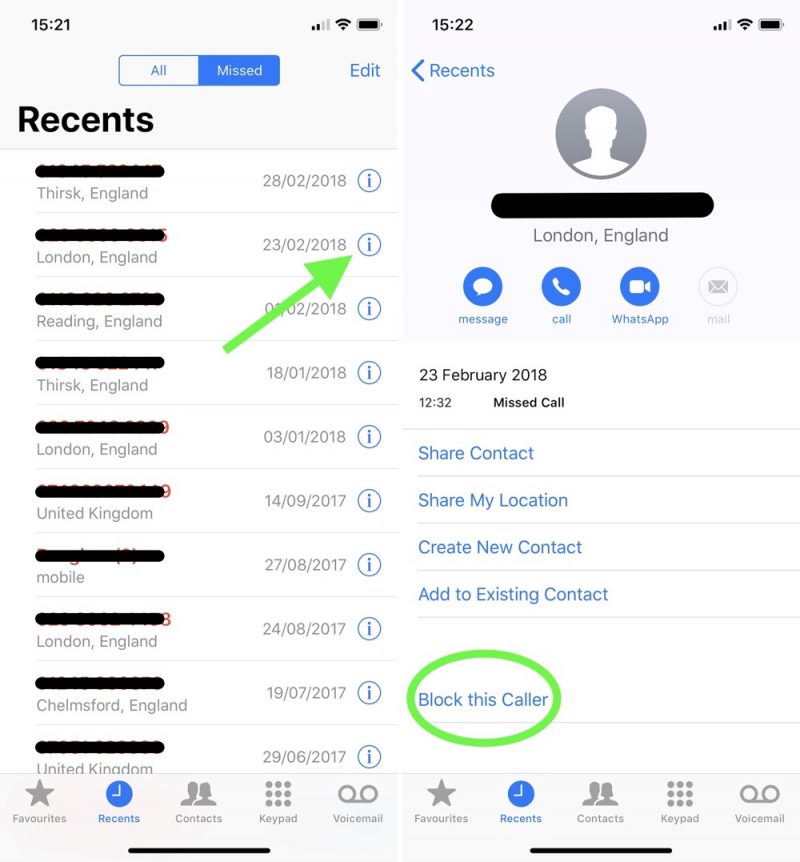
Locate the number you want to block in the All or Missed calls list.
Tap the information icon (the encircled lowercase “i”) to the right of the number.
Scroll down the Caller ID screen and tap Block this Caller.
How to Block a Number That Messages You
If you’re the recipient of unwanted messages from a specific number, here’s how to prevent them from coming through to your iPhone.
Launch the Messages app.
Navigate to the main messages list if necessary, and tap a message received from the number you want to block.
Tap the information icon (the encircled lowercase “i”) at the upper right of the message window.
At the top of the Details screen, tap the name of the contact or the associated phone number.
Scroll down the Caller ID screen if necessary and tap Block this Caller.
How to Block a Number in FaceTime
If you received a FaceTime call from a number that you want to block, follow these steps.
Launch the FaceTime app.
Tap either the Video or Audio button, depending on the type of FaceTime call you received from the caller you want to block. 
Locate the unwanted call you received in the list and tap the information icon (the encircled lowercase “i”) next to it.
Scroll down the Caller ID screen if necessary and tap Block this Caller.
How to Manage Blocked Contacts on iPhone
Follow these steps to add or remove a contact from your blocked list of numbers.
Launch the Settings app.
Tap Phone in the list.
Tap Call Blocking & Identification.
To remove a contact from your blocked list, tap Edit in the upper right corner of the screen, tap the red minus button that appears next to the contact(s) you want to remove, and then tap Done.
To add a contact to your blocked list, tap Block Contact… and select the contact from your Contacts list. All of the numbers in the contact card you select will be added to your blocked list.Note that you can also access and manage your blocked contacts list in the Settings app via Messages -> Blocked and FaceTime -> Blocked.
Try a Third-Party Blocking Solution
If you’re inundated with spam calls from different numbers on a regular basis, then consider one of the many third-party blocking solutions available from the App Store: Several apps like Hiya and TrueCaller use an implementation of Apple’s CallKit to identify and block suspect numbers before your phone even rings.
After installing one of these apps, you can manage their call permissions at any time from within the Settings app, by tapping Phone and selecting Call Blocking & Information.
Related Roundup: iOS 11
Discuss this article in our forums
Why It’s Time to Market Your Mobile Publication to Older News Consumers
Whether you own an online publication that caters to mobile users or you write for such an outfit, then you may have been wondering just who to go after next in terms of reader demographics. While common sense may tell us to target mobile tech-obsessed younger audiences and millennials, it seems that the older generation is quickly catching up—not just in terms of content consumption but also in the usage of mobile and smart technologies to consume said content.
It may actually be time for mobile news outfits, especially those who earn their revenue through a subscription billing model for publishers, to start catering to this particular demographic as well.
The growing interest of older consumers in mobile technology and mobile media
This paradigm shift has been observed by quite a few think tanks and market research groups in the past few years. One recent study from the Pew Research Center showed that 67% of Americans ages 65 and above consumed mobile news in 2017—a marked 24% increase from 2016. The same was true for those aged 50 to 64, with 79% saying they read the news from tablets and smartphones. That’s only a 16 % leap from 2016’s 63% figure, but it’s still a considerable bump.
And it’s not just news that the older generation is interested in consuming. Wall Street research firm Barclays revealed through a report published by FierceCable that between the first quarters of 2016 and 2017, there was 45% increase in the number of adults aged 50-64 who watched videos online. Online video watchers aged 65 and up also rose, with a 36% increase from the first quarter 2016. Conversely, traditional TV viewing saw a sharp decline for the first time in years, specifically among Americans in the age 50-64 bracket.
The assistive benefits of mobile technology in online media consumption
What could be the reason for this catch-up act? One possible reason we can point to is that the senior population is just finding out just how convenient it is to get all the information they need in one device, something that they can carry wherever they go—the same kind of benefit that has enamored the younger populations toward mobile technologies.
This was proven through another recent Pew Research study, where it was discovered that once seniors got over the difficult hump of learning how to operate the mobile device they bought, most of them—a whopping 76%—then proceeded to consuming a high level of online media daily. They are found to be very active in social media as well, with 70% of older adults who use Facebook indicating that they logged in to the service several times daily.
Another reason for this uptick could be that older readers are now finding that mobile technologies are actually assistive in their media consumption activities. Unlike with traditional forms of media (such as TV and newspapers), a mobile device allows the user to enlarge font sizes, to zoom in on videos, as well as slow down and repeat playback on the spot.
The question though is: would it be profitable for mobile news publishers to cater to this new demographic? The answer is a resounding yes. Just like their younger counterparts, the older generations are made up of voracious media consumers, and there is no doubt that they can and will pay for more content if given the option. The burden then is on mobile publishers to make their subscription payment process more accessible and streamlined in order to facilitate use for older users.
The time is ripe for mobile publishers to target a new audience
With this proven trend of an older population increasingly turning to mobile technologies and media, mobile publishers are now presented with a unique opportunity to roll out strategies that can attract readers from more age demographics rather than simply focusing on just one or two.
The fact that they are now also free to focus on strengthening their online mobile content rather than dividing their resources between digital and traditional media also allows them to target this bigger and more diverse audience base better than ever before. This, of course, can translate to more readership—and more revenue in the long term.
Tired of your superyacht’s tiny TV? Enter the crazy, 200-inch C Seed Supermarine
When you’re obscenely wealthy, it can be quite maddening (we imagine) to stroll along the deck of your superyacht and catch a glimpse at the regular-size TV screens mounted on its mahogany walls. Who do those TVs think they are, being so small and dim?! Luckily, there’s a solution: The C Seed Supermarine, a rather unique television (the product of a collaboration between luxury tech manufacturer C Seed and the Porsche Design Studio) which actually folds out of the deck of today’s mondo sea vessels.
C Seed is calling the Supermarine, which comes in 144-inch and 201-inch models, “the first real superyacht TV” — we were hoping this meant it was a superyacht that transforms into a TV, Optimus Prime-style, but alas, it’s just a TV.
Jokes aside, it is an absurdly cool TV, boasting a luminosity of a claimed 4,500 nits — that’s leaps and bounds above the brightest HDR televisions available on the market today — and 48-bit color depth. And while you may not be able to find content to fill out these specs, these factors should still make the Supermarine the best gigantic television ever made for viewing in the blazing sunlight on the open sea. That’s just the tip of the iceberg, too.
Crafted largely from marine-grade aluminum and steel, the TV resides in a shallow compartment built into the deck when not in use, and rises silently out of its enclosure before unfolding — a process that takes just one minute. You can rotate the TV up to 180 degrees in either direction using the remote control, and as you might expect, the TV is 4K-capable.
It’s also got two built-in broadband speakers and a subwoofer, but in case that’s not good enough, why not go ahead and splurge on the C Seed Supermarine Speakers?
Like the TV, they’re designed to live underneath the deck until you need them, at which point they rise up like some sort of crazy ballistic missile system (maybe we watch too much Batman), at the ready for your cinematic excursions or your opulent, hip hop-inspired deck parties.
Each speaker projects audio in a 110-degree beam angle, so with two, you’ll have near full deck coverage. The speakers support full range coverage from 2.0 stereo to 9.1 surround sound, and each unit can reach up to 125 dB which, if you’re wondering, rises far above airplane-takeoff levels.
If you actually do own a superyacht and want to procure this system for your next voyage, you’ll want to contact C Seed directly via the company’s website. For more details on both the TV and speakers, check out the brochure.
Editors’ Recommendations
- Comcast Xfinity: Everything you need to know about cable’s biggest player
- What is a smart TV, and why should you consider buying one?
- Meet MHL, the easiest way to wire your phone to your TV
- The best outdoor speakers you can buy
- Which Echo to buy: Here’s a rundown of all the Alexa speakers
Reddit scatters in-feed sponsored posts inside its mobile apps
Reddit’s mobile app users will soon start seeing multimedia-sponsored posts inside their feeds. Reddit recently announced the rollout of native promoted posts. The ads will appear like a regular Reddit post with the same tools — excluding the blue “promoted” ad label — and will start rolling out to iOS users first, with Android to follow in the next few weeks.
Reddit anticipates the new Promoted Posts, a type of native mobile ad, will lead to more engagement because the usual slew of options like upvotes, downvotes, and comments are all intact. The platform’s existing mobile ad formats do not allow for comments, a change that the company suggests will result in better performance on those new ads.
The new ad format maintains Reddit’s other ad tools, including the option to target users based on interests, community, geography, or the device being used. Comments can also be turned off on the ads, just like with desktop-based ads.
The company says that the ads allow businesses to reach Reddit’s unique group of mobile users. After launching the app versions (iOS and Android) of one of the 10 largest websites less than two years ago, the apps have grown in popularity. Now, 41 percent of the time spent browsing Reddit comes from a user on a mobile device. Stats also show mobile users spending 30 percent more time on the platform compared to desktop users.
The new ad format also brings new options for a unique group of viewers — Reddit says that 80 percent of mobile app users aren’t on the desktop version. The new format will also open up more chances for placing ad bids on the Reddit platform.
The new ad format is launching without testing, which means Reddit doesn’t have solid statistics on the ads yet. Reddit has now grown to 330 million users that are active monthly on the platform, creating an average of around 14 billion screen views every month. The platform brings in nearly 11 million post submissions in that same time frame. On a daily basis, Reddit sees 2.8 million comments and 58 million up or down votes. Young adults are the most active on the platform, with 79 percent of users falling in the 18-34 age group. About half the users are U.S.-based, with 70 percent from English-speaking locations.
Editors’ Recommendations
- Twitter’s new share tools mean enjoying tweets at any time
- 9 things you need to know about the Russian social media election ads
- Adobe enables faster workflow with updates to XD, InDesign, and Illustrator
- Google now allows users to mute those annoying reminder ads
- Desktop users could soon post to Facebook Stories in their browser
How to disable automatic downloads on your PlayStation 4
You get a say in when your games download updates.

To surprise you with a cool new game you might want to play, your PlayStation 4 is set up by default to automatically download game updates the moment a publisher makes them available. It’s a nice feature, right until it isn’t. Whether you’re on a metered internet connection some of the time or you want some additional control over how your console handles data, sometimes you want to shut this feature off.
Here’s how to disable automatic downloads on your PlayStation 4.
Disabling Automatic Downloads
Accessing this feature means diving deep into your system settings. Here’s how you get it done.
Go to your Settings on the PlayStation 4


Scroll down to select System once you’re in the settings
Select Automatic Downloads once you’ve selected System


Uncheck the box labelled System Software Update Files, this will stop your PlayStation 4 from downloading software updates.
Uncheck the box labelled Application Update Files, this will stop all of your applications from downloading updates when you don’t want them to. 
You’ve successfully disabled your automatic downloads. Be sure to check all of your games and apps frequently for updates before they use them, otherwise you might find yourself needing an update before you are allowed to play online with friends!
PlayStation 4

- PS4 vs. PS4 Slim vs. PS4 Pro: Which should you buy?
- PlayStation VR Review
- Playing PS4 games through your phone is awesome
Amazon
Samsung Galaxy S9+ India review: As good as it gets
The Galaxy S9+ is an iterative update, and that’s okay.

Samsung introduced a radical new design last year with the Galaxy S8 series, with the Infinity Display design language seeing a switch to the 18.5:9 form factor. Samsung also went all-in on its curved panels, and unlike the Galaxy S7, there wasn’t a flat screen option available with the Galaxy S8.
With the Galaxy S9, Samsung is sticking to the same design aesthetic. The Galaxy S9+ that I’m reviewing today looks near-identical to last year’s S8+, with the major change being the dual camera at the back. The S9+ is getting the secondary telephoto lens from the Galaxy Note 8, enabling 2x lossless zoom. Samsung also switched out the position of the fingerprint sensor to underneath the camera module, making it easier to access.
Then there’s the pricing — the 64GB Galaxy S9+ is available in India for ₹64,900 ($1,000), or the same price point as the Galaxy S8+ last year. Samsung is also introducing a 256GB model for ₹72,900 ($1,120) for those looking for even more storage.
About this review
I (Harish Jonnalagadda) am writing this review after using the Galaxy S9+ (SM-G965F) for ten days in Hyderabad, India. The unit didn’t pick up any updates over the review period, and was running baseband version G965FXXU1ARB1. I used the phone on Airtel and Jio’s 4G networks.

Galaxy S9+ Design and display
From the front, the Galaxy S9+ is indistinguishable from last year’s flagship, and that’s not a bad thing at all. The S8+ led the field in terms of design, and that hasn’t changed with the Galaxy S9+.
The way the screen curves away on each side to meet the mid-frame is particularly evocative, and there are few phones that manage to deliver such an immersive experience. The Galaxy S9+ is still one of the best-looking phones in the market.
Although the Galaxy S9+ shares the same battery size as its predecessor and the design hasn’t changed all that much, the phone is 16g heavier. The added weight gives it a nice heft, and somehow makes it feel more substantial.
The headphone jack is becoming a rarity on flagships, but the Galaxy S9+ thankfully retains the jack, and it doesn’t look like Samsung will abandon the analog connector anytime soon. The phone also comes with the same AKG earbuds as last year, and they’re significantly better than the usual set of bundled earphones. That is, if your phone comes with a set of earbuds at all — Google doesn’t include a pair with the Pixel 2 XL.
Round the back, Samsung finally settled on a more sensible location for the fingerprint sensor — it is now located underneath the dual imaging sensors. While it is a welcome move, it still isn’t in the natural resting position of your index finger. That’s a minor quibble, as the sensor itself is significantly easier to access without having to contort your hand.
Then there’s the 6.2-inch QHD+ Super AMOLED display, which is the best you’ll find on a phone today. Samsung’s AMOLED panels are the best in the business, and with the Galaxy S9+ the company is touting increased brightness — to the tune of 15% over the S8+ — and more color saturation.
The result is that the display on the Galaxy S9+ is absolutely stunning: colors are saturated, viewing angles are great, and sunlight legibility is excellent. Samsung also offers a ton of customization options to tailor the display to your liking.
The Galaxy S9+ has an iterative design, but that’s not a bad thing.
The default resolution is set to FHD+ (2220×1080), but you’ll be able to change it to QHD+ (2960×1440) from the settings. You can also change the default font, change the size of the font, and use display scaling to tailor the interface elements to your preferences. With the navigation keys now located on the screen, you can change the position of the back and recents buttons as well.
The color balance is set to Adaptive display out of the box, and you can tweak the settings to make the colors cooler or warmer. There’s also the option to change the screen mode to AMOLED cinema or AMOLED photo. You also get a Video Enhancer setting that boosts the colors and brightness when viewing videos on the default video player and any video streaming services you have installed on the device.
Talking about viewing multimedia, the Galaxy S9+ comes with stereo speakers up front, with the second speaker tucked into the earpiece. The overall sound isn’t significantly louder than the Galaxy S8+, but the soundstage is wider as there are two speakers, and it makes watching videos that much more enjoyable.

Galaxy S9+ Hardware
The Galaxy S9+ comes with Samsung’s latest Exynos 9810 chipset. The performance is identical to Qualcomm’s Snapdragon 845, but you do get marginally better battery life with Samsung’s own platform.
Both chipsets are built on Samsung Foundry’s 10nm node, but what’s particularly impressive is just how quickly Samsung was able to develop its own Mongoose CPU core. The core is now in this third version, and the 9810 fields four Mongoose M3 cores alongside four Cortex A55 cores.
The thid-gen M3 core is 2x faster at single-core performance over its predecessor.
The M3 cores go up to 2.9GHz and do the heavy lifting, whereas the 1.9GHz Cortex A55 cores are used for energy-efficient tasks. Samsung is claiming a two-fold increase in single-core performance over second-generation M2 cores, and a 40% uptick in multi-core performance.
The Exynos 9810 also comes with a Mali G72 MP18 GPU — built on ARM’s second-generation Bifrost architecture — clocked at 572MHz, with Samsung touting a 20% performance increase over its predecessor. The Galaxy S9+ puts that power to good use, and you’re not going to see any slowdowns in day-to-day usage.
As you’d imagine, the Galaxy S9+ has the latest hardware elsewhere — you get 6GB of LPDDR4X RAM as standard, and the device is available with either 64GB or 256GB of internal storage. Both variants get UFS 2.1 flash storage modules, but if you’re opting for the higher storage model, know that it’s available only in Midnight Black. The Coral Blue and Lilac Purple color hues look stunning, and the blue model in particular stands out in a sea of black phones.
Then there are the extra features in the form of IP68 dust and water resistance, and a microSD slot that can accommodate cards up to 400GB in size.
Carrier aggregation

The Galaxy S9+ has a Category 18 LTE modem that enables a maximum download speed of 1.2Gbps and 200Mbps upload. It achieves this by a method called carrier aggregation — where multiple channels are aggregated to increase the bandwidth. By doing so, you should see vastly higher download speeds on cellular connections.
Carrier aggregation isn’t a new technology. For instance, Airtel rolled out carrier aggregation last year in a few regions — including Kerala and Bangalore — where it combined frequencies in the TD LTE and FD LTE spectrums (2300MHz and 1800MHz) to enable data speeds up to 135Mbps. Similarly, Jio offers carrier aggregation in a few markets, with speeds in excess of 100Mbps.
Whether you’ll actually see those speeds is contingent on several factors, including the congestion at the cell tower and your proximity to it. But if you see a 4G+ (or LTE+) indicator on the status bar, your device is leveraging carrier aggregation.
Airtel and Jio have been offering carrier aggregation for some time now.
Coming back to the Galaxy S9+, Samsung is stating that it partnered with Airtel and Jio to enable speeds up to 250Mbps on the device. That’s significantly faster than the speeds I normally see on either carrier, and for the most part, I haven’t been able to cross 50Mbps in my testing. If anything, Airtel’s cellular performance has degraded to such an extent in Hyderabad that I don’t even get over 10Mbps at most locations.
Jio is considerably better, delivering around 40Mbps on average throughout the city, but don’t hold out for speeds in excess of 200Mbps. The arrival of Jio has catalyzed India’s 4G segment — with the carrier now claiming hte title of the world’s largest data network, and cellular usage is set to grow exponentially as millions of Indians make their way online for the first time.
Although the Galaxy S9+ has an LTE modem with 6CA, it’s likely you’ll won’t cross 100Mbps on Airtel or Jio, at least for the time being.
Intelligent Scan

The Galaxy S9+ introduces a new biometric authentication system called Intelligent Scan. The feature uses a combination of iris scanning and facial recognition to authenticate, and it works better than either of those of two systems on their own.
Iris scanning is secure and you can use the authentication method with Samsung Pay, but it isn’t as fast as using the fingerprint scanner. On the other hand, facial recognition is quick, but it isn’t as secure. Intelligent Scan strikes a decent balance — it is fast, and works in low-light conditions as well.
While the feature works reliably enough that it obviates the need for a fingerprint sensor, there’s a drawback. It isn’t as secure as using your fingerprint, and it doesn’t work with Samsung Pay. So instead of a replacement, it is designed to complement the fingerprint sensor at the back.
Battery life

Like previous Samsung flagships, the Galaxy S9+ comes with wireless charging, and it works with both Qi and PMI standards. The one downside is that wired fast charging speeds are still limited to Quick Charge 2.0, so it isn’t as fast as something like Dash Charge or Motorola’s TurboPower.
That makes a difference, as the 3500mAh battery on the Galaxy S9+ doesn’t really manage to deliver a day’s worth of usage. You can get it to last a day on medium use, but if you’re using a lot of cellular data or consuming a lot of multimedia content, it won’t last a day.
In fact, I got much better battery life from the Moto Z2 Force, which has a paltry 2750mAh battery. In similar usage scenarios, the Z2 Force laster significantly longer, and I got more screen-on-time.
With the Galaxy S9+, I averaged around four hours of screen-on-time spread over the course of 14 hours. More often than not, I saw the battery level plunge to 10% before 10 p.m. You do get a battery saver mode that reduces the screen brightness and kills background services, and you can even tailor the options if you’re looking to eke out the most battery life out of the device.
You can set battery saver to kick in at a certain threshold, and select from various modes. Max, for instance, throttles the chipset, kills background network usage, and switches the screen resolution to HD+.
Overall though, the Galaxy S9+ doesn’t measure up to the likes of the Pixel 2 XL and other flagships when it comes to battery longevity.

Galaxy S9+ Software
Like the hardware front, not a whole lot has changed on the software side of things from last year. Thankfully, the Galaxy S9+ comes with Android 8.0 Oreo out of the box with Samsung Experience 9.0 on top, and anything less than that would’ve been a massive letdown.
For the most part, the user interface is unchanged from Nougat. One addition with Oreo is the systemwide autofill API, which makes it a breeze to log into apps. Like years past, Samsung has filled the Galaxy S9+ with a smorgasbord of features — honestly, there are so many customization options that you’ll need to spend an entire afternoon setting up the phone.
With the Galaxy S9+, Samsung is promoting AR Emoji — the manufacturer’s take on Animoji. Essentially, you’ll be able to create an avatar of yourself, and it animates in real-time to correspond with your facial movements. I’m sure there’s a segment for a feature like that, considering selfie phones are all the rage nowadays, but I haven’t gotten a lot of utility out of AR Emoji.
If you’ve used a Samsung phone in 2017, you’ll feel right at home on the Galaxy S9+.
There is little in the way of character customizability, and more often than not, the avatar that is created doesn’t resemble you at all. The one thing AR Emoji does have in its favor is ease of use — it doesn’t take long to get started with the service, and you can export your creations and share them on most messaging platforms without having to jump through hoops.
Samsung will undoubtedly add more features to AR Emoji over the coming months, but in its current state, there’s not a whole lot to get excited about.
Talking about gimmicks, Bixby Voice went live in India at the end of last year, and it works fine for the most part. But most of the functionality you get with Bixby is already present on the Google Assistant, so you don’t really need to use the service. Samsung is late to the virtual assistant game, and it just doesn’t have the troves of data that Google and Amazon have amassed over the years.
What’s particularly irksome about Bixby is that it gets a dedicated hardware button on the left. Sure, you can disable the service entirely, but there’s no way to configure another action for the button.
Samsung Pay

Samsung Pay is one of the features I like the most about Samsung phones. It’s particularly great that it is heading to budget devices as well.
The service has picked up a lot of useful features since its debut last year. It now fully supports UPI — eliminating the need for a standalone service like Tez, and Samsung added support for more banks, so there’s a good chance that the card you have in your wallet works with Samsung Pay. You can also link your Paytm and MobiKwik wallets with the service.
Currently, Samsung Pay is the only mobile payments service in India. ~~Android~~ Google Pay is yet to make its debut in the country, as is Apple Pay. Being the first to a market has its inherent advantages, particularly when you consider that Samsung has localized Samsung Pay for the Indian market. But in and of itself, the payments service is better than the likes of Google Pay as it works with both NFC and Magnetic Secure Transmission.
Samsung Pay works everywhere, and also lets you pay your bills.
MST essentially mimics a credit card stripe, allowing Samsung Pay to work on older card readers that don’t have NFC. It is this feature that makes it stand out, as you can use Samsung Pay at any retail store. I’ve been using the service for over a year now, and it continues to work flawlessly for making offline purchases.
In addition to being convenient, Samsung Pay is also more secure as it obfuscates your actual card details. It instead creates a virtual card — which is used for transacting at offline stores. The service recently picked up the ability to make bill payments, so you can pay your mobile, gas, water, broadband, as well as DTH bills from within Samsung Pay itself.
Samsung is also set to kick off its loyalty program — Samsung Rewards — in India. The service hasn’t gone live yet, so there’s not a whole lot of information available, but it should be in line with what’s offered in the U.S. For now, Samsung says that you’ll be able to redeem the reward points for movie tickets, food and beverage vouchers at various stores, and to get discounts on Samsung’s products.
We should know more about Samsung Rewards in India in the coming months, but if you haven’t used Samsung Pay yet, there are plenty of promotions within the app that incentivize you to get started.

Galaxy S9+ Camera
The camera is the one area where the Galaxy S9+ has received a considerable upgrade from last year. Samsung is introducing a camera module with variable aperture for the first time on a phone, with the lens able to go from f/1.25 to f/2.4. There’s also a new super slo-mo feature that shoots at 960fps, and it’s a lot of fun when done right.
The camera on the Galaxy S9+ is a beast.
First up, the camera sensor at the back. The Galaxy S9+ gets two sensors this time around, whereas the standard Galaxy S9 features a solitary camera at the back. The secondary sensor is the same as the one we’ve seen on the Galaxy Note 8 last year — it is a telephoto lens that lets you zoom in up to 2x without any noticeable loss in image quality.
Samsung also changed the interface of its camera app, with the various modes now selectable by swiping left or right anywhere on the screen. You get a set of new options for AR Emoji and the slow-motion video mode.


Overall, the Galaxy S9+ produces images with amazing detail and dynamic range, both in daylight and low-light shooting scenarios. It’s a breeze to get consistently great shots with the S9+ — which is the hallmark of a great camera.

Galaxy S9+ Bottom line
The Galaxy S9+ is an evolutionary model that carries over the same design as the S8+ but with a few key tweaks for 2018. The camera is the major new addition, and it finally holds its own next to the Pixel 2 XL. The display, meanwhile, is the best you can get on a phone, and there’s no lack of features thanks to wireless charging, IP68 certification, microSD slot, and the 3.5mm jack.
Samsung is cognizant of the Indian market — having been in the country for over 20 years — so it is aware that there are tens of millions of Galaxy S6/S7/Note 5 customers that are looking to upgrade to a new flagship this year. The Galaxy S9+ is aimed at those users — if you already have an S8 or S8+, it makes little sense to pick up the Galaxy S9+. The design is identical, and while the camera is better from last year, that alone doesn’t justify upgrading to the Galaxy S9+.
But if you’re using a Galaxy S7 or older, or are looking to make the switch from an iPhone, then you’ll love what the Galaxy S9+ has to offer. The display is nothing short of incredible — after using a Pixel 2 XL for several months, it’s a refreshing change to use a screen with vibrant colors.

Should you buy it? Of course
The Galaxy S9+ is available for ₹64,900 ($1,000), and you can get a ₹6,000 ($90) cashback if you’re buying the phone from Patym Mall. HDFC bank credit and debit card holders can also avail a ₹6,000 cashback on the device, bringing the effective cost down to ₹58,900. If you’re a “loyal” Galaxy user, you’ll be eligible to receive an additional ₹6,000 over and above the exchange value of your phone when trading up to the Galaxy S9+. That’s decent value considering the sheer amount of features you get with the Galaxy S9+.
Furthermore, there aren’t many contenders to the Galaxy S9+ in India. The Pixel 2 XL is now available for roughly the same price, and while the software experience is leagues better, that OLED panel shouldn’t have ever made its way onto a phone, much less a flagship. The Pixel 2 XL also has a great camera, but the Galaxy S9+ isn’t far behind on that front, and it comes with a 3.5mm jack, a significantly better AMOLED panel, and a more premium design.
If you’re considering alternatives from the other side of the aisle, there aren’t any. The iPhone 8 Plus loos and feels severely outdated thanks to its chunky bezels, and the iPhone X is astronomically priced in India.
In fact, the phone picked up two price hikes over the course of the last three months, which means it is more expensive to pick up an iPhone X than it was when it launched in India. The 64GB iPhone X now costs ₹95,390 ($1,470), which is ₹30,490 ($470) more than what the Galaxy S9+ retails for in India.
If you’re in the market for a flagship that doesn’t miss out on any features while offering a premium design and an incredible camera, you can’t go wrong with the Galaxy S9+.
See at Flipkart
Lyft tests ‘all-access’ subscriptions for riders
The next development in ride hailing services could be subscriptions, as Lyft recently emailed a number of riders invites to its “All Access” program. While the specific plans offered to each person varied, the idea is that by paying a weekly or monthly rate they could pre-buy a number of rides. For people using the service as a substitute for car ownership it could be appealing at the right price, but there’s the rub.

Engadget
Variety writer Janko Roettgers received an offer of $199 for up to 30 free rides a month (as long as each ride costs less than $15 — if it goes above that he’d be charged the additional cost), while another writer saw a $300 offer for the same package. We also received an invite, promising up to 7 rides per week (as long as they’re worth less than $15) for $49.
Apparently these tests have been going on for a few months, and CNET reports that CEO Logan Green said on a call that “The ideal scenario is moving to a subscription model.” There’s no word on when this may roll out more widely, or at what price.
Facebook’s Express WiFi program now has an app on Google Play
Facebook has quietly launched its Express WiFi app on Google Play, and it’s now available for download in Indonesia and Kenya. The application gives users a way to purchase internet connection from participating businesses instead of paying for a more expensive and, in many places in developing nations, typically slow and spotty mobile connection. Facebook originally launched its Express WiFi program in India last year, but it required users to download an app from a telecom to reconfigure their phone settings. This Google Play app will make the program’s rollout in other countries much smoother and easier.
A Facebook spokesperson has confirmed the app’s rollout to TechCrunch:
“Facebook is releasing the Express Wi-Fi app in the Google Play store to give people another simple and secure way to access fast, affordable internet through their local Express Wi-Fi hotspots.”
Express WiFi identifies places that sell connections as “WiFi zones,” and users can find the nearest one on a map within the application. Once connected, users can go to any website they want, download music, watch videos and so on and so forth, unlike with Facebook’s Free Basics. The heavily criticized feature provides people in dozens of developing nations with free connection, but they can only access the social network itself along with a few services the company approved.
In countries where most people can’t afford or don’t have access to mobile data, Free Basics has made Facebook the internet. And since there’s so much fake news circulating on the platform, Facebook has become a purveyor of misinformation. A connection that allows people to access what they want is definitely the better option. So long as the app’s “data packs” are cheaper than potential users’ local mobile data rates, I can see people paying for them.
Via: TechCrunch, Sensor Tower
Source: Google Play
 AIVAnet