


The best gaming mouse
By Thorin Klosowski
This post was done in partnership with Wirecutter. When readers choose to buy Wirecutter’s independently chosen editorial picks, it may earn affiliate commissions that support its work. Read the full article here.
After researching more than 60 gaming mice, testing 12 with the help of four panelists, and playing over 50 hours of Overwatch with them, we’ve concluded the Razer DeathAdder Elite is the best gaming mouse for most people. Our panel testers preferred the DeathAdder Elite for its simplicity and its comfort through extended gaming sessions, which isn’t surprising considering previous models of the DeathAdder have been our picks for years.
How we picked and tested

We tested wired and wireless gaming mice. Some looked like they belong on Batman’s utility belt and others were hardly any different than normal mice. Photo: Kyle Fitzgerald
In our survey, Wirecutter readers identified the key characteristics they look for in a gaming mouse:
- Comfort: Whether or not a mouse feels good in your hand is the most important feature.
- Buttons: We focused on mice with fewer than 10 buttons.
- Sensor: We looked for modern sensors, including the Pixart 3360 and its variants, all of which have at least 12,000 DPI resolution.
- Software: Most gaming mice come with software suites to assign keystrokes and macros, tweak its sensitivity, and customize its lighting. The software should support multiple profiles to match the game you’re playing.
- Price: Half of our survey respondents said they’d prefer to pay between $51 and $75 for a gaming mouse, which happens to be how much a great gaming mouse costs.
For wireless mice, we also considered:
- Performance: A wireless mouse should have no latency, interference, or lag, because if it does, there’s no point in buying one for gaming. We looked for mice you can also use with a wired connection.
- Battery life: Because of high polling rates and lighting effects, wireless gaming mice tend to have awful battery life compared with regular wireless mice, often peaking at just 25 to 30 hours.
We read editorial reviews and forums and surveyed our readers to prune our list to eight wired mice and four wireless options. We ran each mouse through MouseTester to evaluate tracking speed, jitter and anti-jitter, polling rate, and sensitivity. Every mouse we tested passed these tests without issue.
Then, we used each mouse to play several hours of Overwatch and Starcraft II. We also used each for work over several weeks. Finally, we asked a group of Wirecutter staffers and friends with a range of hand sizes and grip styles to evaluate the finalists.
To read about our testing procedures in more detail, please see our full guide to gaming mice.
Our pick: Razer DeathAdder Elite

Photo: Kyle Fitzgerald
The Razer DeathAdder Elite is the best gaming mouse for most people because it’s comfortable for a wide range of hand sizes and grips, has seven easy-to-reach buttons and an accurate sensor, and has a simple, effective design. Razer’s Synapse software is easy to use on both Windows and Mac (if a bit ugly), and it supports all the customization options you could possibly want. At 5 inches long, 2.8 inches wide, and 1.7 inches high, it’s on the larger sizer of most gaming mice, but our medium- and smaller-handed testers didn’t have any issues with it—in fact, it was the most universally liked option among our testers, who were able to find a comfortable position across all grips. It typically sells for around $55, well within the price range our survey respondents wanted to pay and in line with other models we tested.
Runner-up: Logitech G502 Proteus Spectrum

Photo: Kyle Fitzgerald
The Logitech G502 Proteus Spectrum divided our test panel. Three of the panelists loved it, and praised its comfort, button positioning, and its best-in-class scroll wheel. But two didn’t. It isn’t as comfortable for as many hand sizes and grips as our main pick—our small-handed palm-grip testers couldn’t easily reach every button because it’s a bit longer and wider than the DeathAdder Elite, at 5.2 inches long and 2.9 inches wide. The G502 has 11 buttons, four more than the DeathAdder, and offers adjustable weights. But its software is a bit quirkier and the lighting is less customizable than the DeathAdder’s.
A Wireless Option: Logitech G703

Photo: Kyle Fitzgerald
The Logitech G703 is the best wireless gaming mouse because it’s as accurate as a wired mouse, it’s the most comfortable mouse we tested, its six buttons are enough for most people’s needs, and it’s less expensive than the competition. For a long time, wireless gaming mice were subpar due to latency and interference, but the Logitech G703 passed our sensor tests and we didn’t experience any connection issues. The battery life, though not great, did hit Logitech’s claims of around 25 hours, which is about as good as it gets for gaming mice. The G703 has the same great sensor as the G502, and you can turn down its polling rate to preserve battery. Our panelists were mixed on the comfort of the G703, but nobody outright hated it. It’s smaller than both the DeathAdder and the G502, measuring 4.9 inches in length, 2.7 inches wide, and 1.7 inches high.
This guide may have been updated by Wirecutter. To see the current recommendation, please go here.
Note from Wirecutter: When readers choose to buy our independently chosen editorial picks, we may earn affiliate commissions that support our work.
Lyft Testing Monthly Subscription Plans With Prices Reportedly Starting at $200/Month
iOS and Android ride-hailing app Lyft has begun testing monthly subscription plans for “high-frequency users,” in a style comparable to services like Netflix, Apple Music, and MoviePass.
According to The Verge, the terms of each “All-Access Plan” vary and an overall detailed report from Lyft has yet to come out, but prices appear to start at $200/month for 30 standard Lyft rides. Standard rides are defined as those costing up to $15 for each ride. Higher tiers are priced at $250, $300, and one for $400/month provides 60 rides.
All-Access Plan image via Hunter Owens
Images of the ads for All-Access Plans promote “predictable pricing,” the ability to cancel anytime, and auto-renew payments.
Lyft CEO Logan Green discussed the new subscription plans this week, saying, “We are going to move the entire industry from one based on ownership to one based on subscription.” As is typical for these tests, it’s still unclear if and when Lyft will launch subscription plans for all of its users.
“We’re always testing new ways to provide passengers the most affordable and flexible transportation options,” the spokesperson said. “For the past few months, we’ve been testing a variety of All-Access Plans for Lyft passengers.”
Lyft recently expanded to Toronto at the end of 2017, which marked the company’s first market outside of the United States. Earlier in 2017, the ride-hailing company partnered with self-driving startup Waymo in an effort “to bring autonomous vehicle technology into the mainstream.”
The company has had an ongoing rival in similar ride-hailing app Uber, which itself trialed monthly subscription payments for its users back in 2016 but never launched the service on wide scale.
Tag: Lyft
Discuss this article in our forums
Lisa Brennan-Jobs to Publish Memoir of Her Childhood With Steve Jobs and Chrisann Brennan
Grove Press this week announced that Lisa Brennan-Jobs, the eldest daughter of late Apple co-founder Steve Jobs and artist Chrisann Brennan, is working on a memoir about her childhood spent between two imperfect but extraordinary parents. The news was first reported by the Associated Press.
Lisa Brennan-Jobs and Steve Jobs via BHW
In the book, titled Small Fry, Brennan-Jobs recounts how Jobs was “rarely present” in the early years of her life, as he denied paternity. As she grew older, however, Jobs began to show an interest in her and apologized for his behavior.
The memoir’s description notes that Jobs ushered his daughter into a “new world of mansions, vacations, and private schools.” Brennan-Jobs was “thrilled” to receive attention from her father, but he could be “cold, critical and unpredictable” at times, echoing stories about his management style at Apple:
When she was young, Lisa’s father was a mythical figure who was rarely present in her life. As she grew older, her father took an interest in her, ushering her into a new world of mansions, vacations, and private schools. His attention was thrilling, but he could also be cold, critical and unpredictable. When her relationship with her mother grew strained in high school, Lisa decided to move in with her father, hoping he’d become the parent she’d always wanted him to be.
Brennan-Jobs, 39, graduated from Harvard University in 2000 and is now a professional writer. Jobs named the Apple Lisa, released one year before the original Macintosh, after her. She has three half-siblings, including Reed Jobs, Erin Jobs, and Eve Jobs, from Jobs’s later marriage to Laurene Powell.
Small Fry is scheduled for release in September, according to the Associated Press and a listing on the HarperCollins Canada website.
Tag: Steve Jobs
Discuss this article in our forums
Google joins forces with band OK Go to create classroom activities
Rock band OK Go is known for their complex, nerdy music videos. They danced in microgravity inside a parabolic plane in one, set a Rube Goldberg machine in motion in another and used the sounds they could create inside a car in yet another one. Since teachers love to use their videos as a teaching aid — say, to challenge students to identify the science behind them or to recreate the way they used various tools to make sounds — the band has decided to create teaching materials for K-12 educators.
OK Go brainstormed for ideas with Dr. AnnMarie Thomas, head of the Playful Learning Lab at the University of St. Thomas in Minnesota. After that, they teamed up with Google’s Science Journal team to “develop tools that allow students to explore the world around them through music.” The result is “OK Go Sandbox,” a collection of classroom activities, including ones challenging students to recreate the things the band did in their videos, along with the tools they can use to accomplish them.
For instance, Google’s Science Journal team created a a pitch detection feature for their app that makes it possible to create sounds with glasses of water, like what OK Go did in a couple of music videos. They also made another feature that plays data values as pitches, allowing students to compose songs by feeding data to the app. You can watch a couple of Sandbox videos below, but you can learn more about the project (either because you’re curious or you want to do the classroom activities even though you’ve been out of school for years) on its website.
Source: OK Go Sandbox, Google
A ‘Narcos’ video game is on the way for PC and consoles
A video game version of Pablo Escobar could grace your monitors, asking a poor guy whether he prefers “plata o plomo” (silver or lead), as soon as next year. Narcos producer Gaumont has forged a deal with British game publisher Curve Digital to develop a video game adaptation of the hit Netflix series. Curve’s sister company Kuju — some of its better-known titles include Art Academy and Marvel: Ultimate Alliance — will be doing the actual development, but it’s still unclear what kind of game the adaptation would be.
Kuju studio chief Brynley Gibson only said that his team is “looking forward to creating a game that matches the fantastic storyline and gritty action of the Netflix series.” Tim Stephen, Head of Legal and Business Affairs at Gaumont, also said that it trusts the developers to create a game that will thrill the series’ fans and allow “them to engage with the storylines and characters they have come to know over the past three seasons.”
The first two season of Narcos revolved around the infamous Colombian drug kingpin Pablo Escobar, his family, cohorts and massive cocaine empire. Season three’s focus shifted to Escobar’s rivals, the Cali Cartel, so you at least have an idea of which characters will be in the game. We’ll definitely know more about it before it drops: Curve and Kuju plan to release the game in 2019 for the PS4, Nintendo Switch, Xbox One and PC. If that release date’s too vague and far away, don’t worry: Narcos season 4, which will focus on Mexico’s Guadalajara cartel, might arrive on Netflix by the end of the year.
Source: IGN, Comicbook
Apple is holding an education-focused event on March 27th
Well, can’t say we saw this one coming. We were expecting Apple to take some time this month to talk about a sequel to its popular, low-cost iPad, and maybe even share some more information about its long-awaited wireless charging mat. Instead, Apple just sent out invites to an education-focused press event on March 27 where the company will discuss “creative new ideas for teachers and students” at a high school in Chicago.
The drastic change in locale is a clear signal that this event is far from Apple’s business as usual, but it would still make sense for Apple to talk about the future of its cheap iPads. Remember, inexpensive, easy-to-manage machines like Chromebooks have become widely used for schools looking to make sure classrooms are more connected and students are more digitally literate. This might be Apple’s next attempt at claiming a larger chunk of that market for itself, but for now, we’ll just have to wait 11 days and see for ourselves.
ThinkPad X1 Yoga review (2018): Flexibility comes at a cost
Lenovo’s ThinkPad X1 Carbon is the ideal business laptop. But it’s also strictly a traditional notebook. If you’re looking for something a bit more flexible, the X1 Yoga might be a better option. Just like Lenovo’s other Yoga machines, it has a hinge that lets you twist the screen a full 360 degrees, letting you use it as a giant tablet or in a tent formation. And of course, it also offers most of the features we loved on the X1 Carbon.
The two laptops look pretty similar — that is, until you put them side by side. They share the same sleek black carbon-fiber aesthetic and sturdy build quality, but the Yoga is noticeably larger. It’s also significantly heavier, weighing in at 3.1 pounds compared to the X1 Carbon’s 2.5 pounds. The Yoga is more of a throwback to ultraportables from a few years ago whereas the X1 Carbon looks and feels more modern.
And while both laptops feature 14-inch screens, the Yoga’s display has significantly larger bezels around the top and sides. You can choose from 1080p and 1440p options, and you can also opt for that higher resolution with Dolby Vision HDR. That feature will make black levels and bright highlights look better on supported videos from services like Netflix.
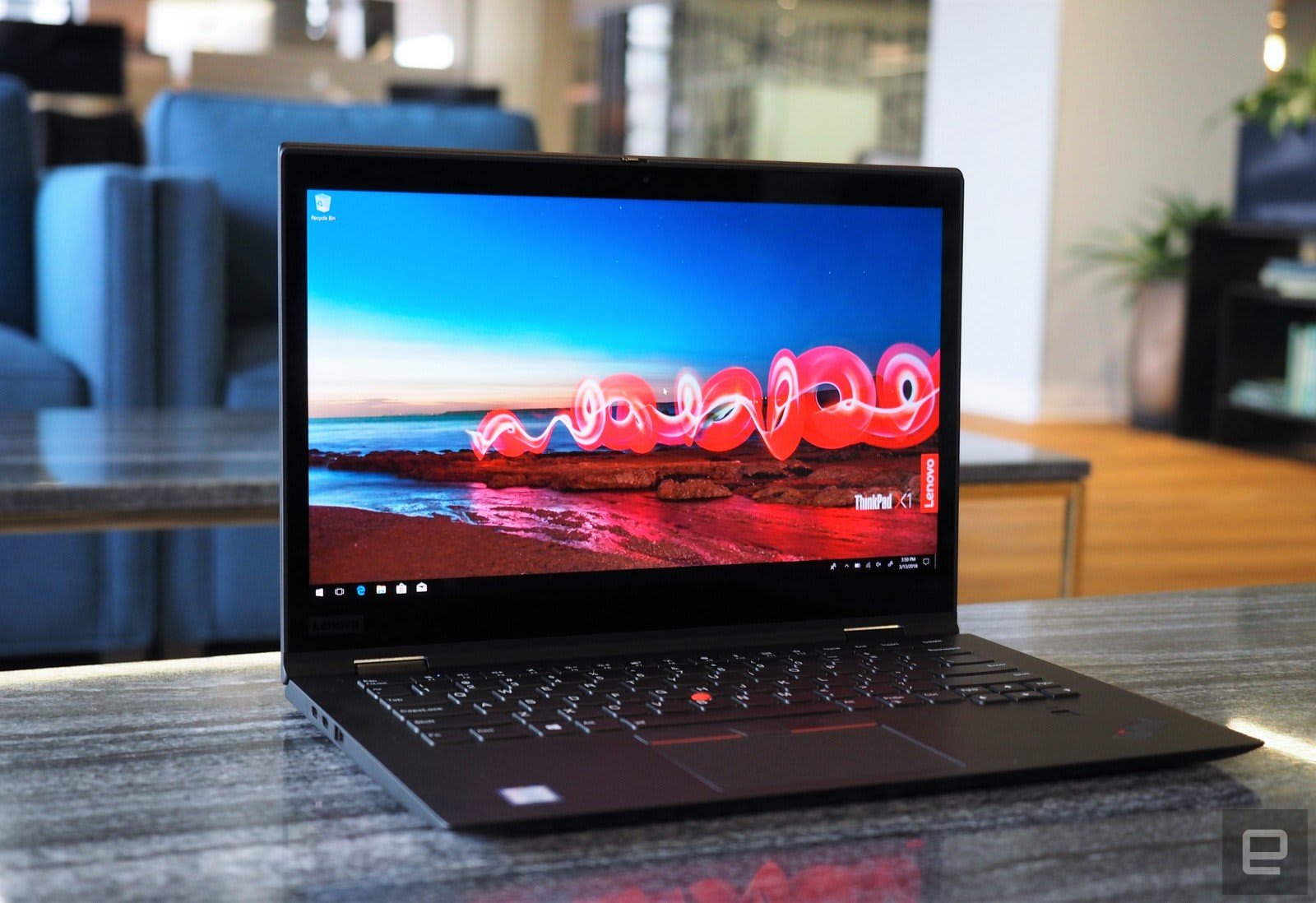
Another difference? The X1 Yoga’s Wave keyboard isn’t as deep as the Carbon’s, as it’s built to pull the keys into the case when you fold over the display. Still, it’s ultimately better than what you’ll find on most thin laptops. The keyboard feels on par with Dell’s XPS 13, and it’s far better than Apple’s flat MacBook keyboards. The trackpad is just as smooth and accurate as the Carbon’s, and ThinkPad purists will appreciate the return of the red TrackPoint nub.
As for other components, the X1 Yoga has a physical-privacy shutter to block its 720p webcam (which is far easier to switch than the Carbon’s). When it comes to ports, there are two USB-C Thunderbolt 3.0 sockets, two traditional USB 3.0 connections, a full-sized HDMI port, a headphone/mic jack and microSD and Micro SIM slots around the back.

Devindra Hardawar/Engadget
We’re keeping this review short because the X1 Yoga and Carbon are basically the same machine under the hood. They both feature eighth-generation Intel Core processors and UHD 620 graphics. They’re fast performers when it comes to most productivity tasks, but you won’t be using them to play many games. Mostly, we were interested in seeing if the convertible functionality of the Yoga made a huge difference. After several days of testing, the answer is a bit complicated.

Devindra Hardawar/Engadget
As you’d expect, the X1 Yoga is a much more flexible machine to use. When I wanted to focus on a long article or dive into digital comics, I appreciated being able to turn it into a huge tablet. Given its size, it’s not a machine I would use in that orientation for very long, but it’s still genuinely useful. And as is typical for 2-in-1s, the tent mode was helpful for watching Netflix in bed. It also made the Yoga a useful companion to my desktop setup; I was able to keep an eye on TweetDeck while diving into Overwatch matches. As for battery life, it was almost exactly the same as the Carbon, lasting 15 and a half hours in our video-looping test.
The X1 Yoga also comes with Lenovo’s ThinkPad Pen Pro stylus, which sits in a slot near the fingerprint reader. That makes it a particularly useful machine for anyone who’s grown used to jotting down notes or marking up images and presentations with Windows Ink. The stylus is very responsive on the X1 Yoga’s touchscreen, but it’s still a bit too thin to hold comfortably for long. There’s a reason Microsoft’s Surface Pen is as thick as a normal ballpoint: It simply feels better in your hands.

Devindra Hardawar/Engadget
The X1 Yoga’s size and weight are a trade-off compared to the X1 Carbon though. That machine practically disappeared in my bag as I walked around town, whereas I always noticed the Yoga’s extra heft. If you’re choosing between those machines, you’ll have to decide if the added flexibility is worth having a heavier machine. The X1 Yoga is also slightly more expensive than the Carbon, starting at $1,649 compared to $1,519. If you’re looking for something lighter and cheaper, Dell’s XPS 13 two-in-one is pretty compelling. Microsoft’s Surface Book 2, on the other hand, is a more powerful option that’ll cost you a bit more.
There’s no doubt that the X1 Carbon is the star of IBM’s ThinkPad lineup. But the Yoga still seems like a compelling option for people who want the reliability of the ThinkPad name but want to use their laptop in different ways.
A New York town just placed a moratorium on crypto mining
As cryptocurrency becomes a more important force in the world market, more companies are cropping up to mine it. And that, in turn, is becoming a problem for places where these miners are setting up. The town of Plattsburgh, New York, has become the first in the US to place a moratorium on cryptocurrency mining. It’s not an outright ban, at least not yet — it doesn’t affect miners currently operating in the city, just new ones looking to set up shop, and it’s only in place for 18 months.
Why Plattsburgh, New York? It’s simple: the small town has the “cheapest electricity in the world,” as Mayor Colin Read told Motherboard. Mining involves using high powered computers to solve complex problems, and thus be rewarded with cryptocurrency. It generates a lot of heat and uses an inordinate amount of electricity. It makes sense that these mining enterprises would look for places with inexpensive electricity. The problem is that it’s resulted in higher electric bills for everyone else in the town.
This doesn’t mean Plattsburgh is hostile to cryptocurrency miners, though. The town is interested in various proposals, including charging the miners for overages in the city’s power budget. The city currently has a budget of 104 megawatt-hours per month; if it exceeds that, Plattsburgh is forced to buy electricity on the open market. This is expensive, and the cost is distributed equally among the town’s residents. In the future, it could be covered by cryptocurrency miners.
Plattsburgh isn’t the only place that is facing problems with cryptocurrency miners. China is trying to ban the practice because of pollution, among other concerns. These processes are having a real impact on the environment and energy resources, and it’s important to figure out how to manage them effectively.
Via: Motherboard
Source: City of Plattsburgh
Apple to Host March 27 Event in Chicago: ‘Creative New Ideas for Teachers and Students’
Apple today invited the media to an event on Tuesday, March 27 at Lane Tech College Prep High School in Chicago. The keynote will commence at 10:00 a.m. Central Time and will be focused on “creative new ideas for teachers and students.”
Apple’s invite for March 27 event via The Verge’s Nilay Patel
Apple’s tagline suggests the event will be focused on education, and there are several rumored products in the pipeline that could fit within those plans. Here’s a recap of everything that could be announced at the March 27 event:
- 9.7-inch iPad for $259: Taiwanese websites DigiTimes and the Economic Daily News reported that Apple is considering releasing a cheaper 9.7-inch iPad for $259—perhaps this will be education pricing. The current 9.7-inch iPad was released in March 2017 for $329.
- MacBook Air for $799 to $899: KGI Securities analyst Ming-Chi Kuo said Apple will launch a more affordable MacBook Air in the second quarter of 2018. The estimated $799-$899 price range comes from WitsView researcher Yubin Qiu. The current MacBook Air starts at $999.
- AirPower charging mat: A trio of reports claim Apple will launch AirPower in March. The mat can inductively charge multiple Apple devices at once, including the iPhone 8, iPhone 8 Plus, iPhone X, and Apple Watch Series 3. It will also be able to charge AirPods placed in an optional charging case.
- iOS 11.3 availability with ClassKit and Classwork
- Wild card — a second-generation iPhone SE: Rumors have been swirling about an iPhone SE refresh, with speculated features ranging from a larger 4.2-inch display to an iPhone X-like design, but KGI Securities analyst Ming-Chi Kuo recently cast doubt on the device launching in the first half of 2018.
More details to follow…
Tag: Apple event
Discuss this article in our forums
Best Sleeves for Google Pixelbook

Need a great case or sleeve for your Google Pixelbook? We can help.
The Google Pixelbook is a very expensive Chromebook with an amazing display. That means you’ll definitely want to protect your investment by slipping it into some kind of case or sleeve. Here are the ones we like.
- Bellroy Sleeve for Google Pixelbook
- Google’s Pixelbook Sleeve
- Mama Mouth PU Leather Folio
- Kroo Neoprene Protective Sleeve
- Tomtoc UltraSlim Sleeve
- CAISON Laptop Sleeve Case
Bellroy Sleeve for Google Pixelbook

Bellroy’s Pixelbook sleeve is one of Google’s recommended choices, and it’s hard to argue that it’s not one of the best.
Made from water-resistant fabric with genuine leather accents, to keep your Pixelbook safe and look good while doing it the Bellroy sleeve is custom built for the Pixelbook.
There’s a loop for the Pixelbook Pen, and when your Pixelbook isn’t inside it you can use it as a tablet stand by pushing in the top flap. the Bellroy case is a tight fit at first because it’s designed to hold everything snugly, but like many other things, it gets better with a little age.
There’s also a three-year warranty in case something rips or tears, which is great to see on any laptop sleeve that costs over $80.
See at Google
Official Google Pixelbook Sleeve

Google’s “official” Pixelbook sleeve is $100. We need to mention that right up front because that’s a lot of money for a microfiber sleeve. But you have to admit it’s one of the nicest microfiber sleeves you’ll ever see.
What makes it great for the Pixelbook is the custom fit. On the surface, a Pixelbook is just a 12-inch laptop and will fit into most any sleeve or case made for a mid-sized laptop. But the Pixelbook is also incredibly slim and incredible square. This sleeve is form fit to hold it in place and even has room for the Pixelbook pen. If a microfiber sleeve can be worth $100, this one is it.
See at Google
Mama Mouth PU Leather Folio

The Mama Mouth PU Leather Folio case is another that’s specially designed for the Pixelbook and is a great way to keep things protected. It also comes in eight different patterns and colors.
Designed to protect from dust, dirt and bumps and bruises, this folio case is made of synthetic leather on the outside and plush microfiber on the inside. It’s easy to take off if you want to go into tablet mode and the back and bottom serve as a stable platform for viewing anything on the screen.
it’s also really affordable at a price under $20!
See at Amazon
Kroo Neoprene Protective Sleeve

The Kroo Neoprene Sleeve offers complete protection and is spill resistant.
It’s a generic 13″ laptop sleeve, but one sized right to fit the Pixelbook’s 3:2 display. Featuring a padded interior as well as an external pocket for things like the Pixelbook Pen, the nylon zippers will keep your Pixelbook safe and sound inside its own padded cell.
The Kroo neoprene case comes in six color combinations and costs about $15.
See at Amazon
Tomtoc UltraSlim Sleeve

The Tomtoc UltraSlim sleeve is designed to fit 13-inch MacBooks, Surface laptops, and the Pixelbook and has room for a second device like your phone or an Amazon Kindle.
The external felt is hardened and durable while the interior felt is soft and gentle, and genuine leather accents make this one quite the looker.
The magnetic flap keeps everything closed up until you need to get to your Pixelbook, and there’s a cutout on the side to top up the battery without removing it from the case.
The Tomotc UltraSlim Sleeve lives up to its name and will keep your Pixelbook safe. It costs about $20.
See at Amazon
CAISON Laptop Sleeve Case

If you’re looking for good basic protection without any frills or fuss, the CAISON Laptop Sleeve is perfect.
Made of water-resistant nylon, it’s also fully padded with a fleece interior and is designed to hold most any 13-inch laptop, including the Pixelbook. The zipper is also padded and there is a roomy external pocket to hold your phone or other small accessories.
The CAISON Laptop Sleeve comes in black, blue, grey or military green and costs about $15.
See at Amazon
Update March 2018: This post has been updated to make sure the best choices when it comes to a Pixelbook sleeve are here.
Chromebooks
- The best Chromebooks
- Should you buy a Chromebook?
- Google Play is coming to Chromebooks
- Acer Chromebook 14 review
- Join our Chromebook forums
 AIVAnet