


IKEA puts TaskRabbit to work assembling your FLOTTEBO and FÄRLÖV
Last fall, IKEA bought TaskRabbit with the obvious goal to offer customers help building its notoriously tough-to-construct furniture. Today, the company started allowing customers in select US markets to schedule a worker straight from the IKEA app to come by and assemble their stuff.
According to IKEA’s site, There’s no same-day construction yet — the earliest you’re able to book is for the next day — but you only pay after the furniture is built. Assembly is a minimum of $36 and is a flat rate per item category (all beds cost the same to build, no matter the complexity), though some bigger items like bathrooms and kitchens are excluded.
Currently, customers can book help through IKEA’s website wherever TaskRabbit is available. They can also schedule it from six stores in the New York area (Brooklyn, Long Island, Elizabeth and Paramus) and around San Francisco (Emeryville and Palo Alto). The service will roll out to more IKEA locations in 2018 including ones in Los Angeles, Miami, Houston, Boston, Washington, DC and more.
Before buying TaskRabbit last September, IKEA was testing using its contract workers to help customers build its products in the UK, as Recode reported. The furniture titan likely acquired TaskRabbit to compete with Amazon’s own localized assembly service, TechCrunch pointed out, but it probably won’t have much use for the service’s other offerings, like sending someone to buy your groceries.
Via: TechCrunch
Source: IKEA
Put March Madness on your face with $3 VR livestreams
Turner Sports, CBS Sports and the NCAA will once again be offering VR livestreams of the March Madness tournament, Variety reports. The NCAA March Madness Live VR app will host 21 games starting with the first and second rounds and continuing through the National Championship. Users will be able to choose whether they want to view the game from a particular camera or watch produced coverage with multiple camera angles and audio. First and second round games will include commentary from TBS, CBS, TNT and truTV telecasts while the app will host play-by-play commentary from Spero Dedes, Steve Smith, Rich Waltz and Steve Lavin during Sweet 16 and Elite 8 games. Dedes and Smith will also provide commentary during the Semifinal and Championship matchups.
Last year, the NCAA also teamed up with Turner Sports and CBS Sports on VR game coverage beginning with the Sweet 16. In 2016, the NCAA provided free VR streams of the Final Four and National Championship games.
Pricing will be a little different than last year’s. Individual games will cost $3 while the full tournament pass is priced at $20. The NCAA March Madness Live VR app will also have full-length game replays, game highlights and video-on-demand featuring coach and player interviews, among other content. You can get the app through Facebook’s Oculus Store and the Google Play store starting today.
Via: Variety
Source: NCAA
MoviePass CEO Admits He Was ‘Completely Inaccurate’, iOS App ‘Has Never Tracked’ Users in Background
Last week, movie subscription service MoviePass received negative press when CEO Mitch Lowe mentioned that the company watches “how you drive from home to the movies” and notices “where you go afterwards” using location tracking in the background on iOS. This week, through customer support emails and in an interview with Variety, MoviePass and Lowe are apologizing over this “mischaracterization” of how the service locates its members and are trying to clear things up once and for all.
In a letter that began hitting subscriber inboxes yesterday, Lowe admitted the need to “eliminate any misconceptions” that MoviePass is collecting location related data when it shouldn’t be. He explained that the MoviePass app uses “standard” location services capabilities on an opt-in basis, and specified that there are only two events that would prompt MoviePass to identify your location: when you perform a search for nearby theaters and when you check into a theater.
Otherwise, Lowe stated that Moviepass does not follow you before or after you watch a movie, or at any time that the app is not open.
MoviePass does not track and has never tracked or collected data on the location of our members at any point when the app is not active.
Last week, following Lowe’s comments, the company removed the background tracking capabilities from the iOS app. In the letter, the CEO said that MoviePass “does not use and has never used this feature.”
Lowe echoed these sentiments in an interview with Variety, explaining that prior to the update, MoviePass used Apple’s three standard privacy tracking options: “Never,” “While Using the App,” and “Always” — the option that was removed. In regards to the “Always” tracking capability, Lowe said that because the company never used it, “it was confusing to have it there.” Lowe mentioned that MoviePass lost just “half a dozen” customers over the newly raised privacy concerns.
In an interview with Variety on Monday, Lowe said he was mistaken about what data the MoviePass app actually collected. “I said something completely inaccurate as far as what we are doing,” he said. “We only locate customers when they use the app.”
He added, “If you get in your car and drive five miles, we don’t know where you are or where you are going.”
While MoviePass has confirmed it isn’t tracking subscribers in the background and when the app is closed, the service is still built around collecting and sharing user data with exhibitors and studios. MoviePass ensures that this data has been “completely anonymized,” so that “there’s never any personal information” shared with its partners. MoviePass monetizes this data sharing process and is the main way the service intends to stay afloat and make money going forward.
Lowe also mentioned the company’s vision for its future, where MoviePass wants to be the center of “this whole night at the movies” idea, giving users recommendations for events after watching a movie. Of course, following the privacy concerns of the last few weeks, Lowe reiterated that, “When we do that, if we do that, we’ll send a request to each customer to let them opt in or opt out.”
Tag: MoviePass
Discuss this article in our forums
YouTube for iOS Gains New Dark Mode
YouTube is adding a new dark theme to its iOS app, which is rolling out to iOS users starting today, reports The Verge.
The new theme, once available, can be activated by tapping on your account icon, selecting settings, and choosing “dark theme” to turn it on. Dark theme will invert many of the colors of the YouTube AI, replacing the traditional white background with a black background.
Image via Redditor amievengabereal
YouTube introduced a hidden dark mode feature for the desktop starting last year, and since then, the feature has been one of the most requested for its mobile apps.
The dark theme for mobile devices has been in testing for the last few months and it has been previously available to a small number of YouTube users.
You may not see the new dark theme available as an option right away, but it should be rolling out to all iOS users over the course of the day. YouTube also says a dark mode is coming to Android in the near future.
YouTube is a free download for iPhone and iPad. [Direct Link]
Tag: YouTube
Discuss this article in our forums
Apple Announces WWDC 2018 Kicks Off on June 4 in San Jose, Registration Now Open for Developers
Apple today announced that its 29th annual Worldwide Developers Conference will kick off on Monday, June 4 and will last through Friday, June 8 with the conference to be held once again at the McEnery Convention Center in San Jose, California.
Developers can register to attend starting today, and Apple says registration will be open until Thursday, March 22 at 10:00 a.m. Pacific Time. As is typical, Apple will be selecting WWDC attendees using a lottery system due to the popularity of the conference.
Tickets will be priced at $1,599, and only developers who win Apple’s ticket lottery will be able to purchase a WWDC ticket. To enter the lottery, developers must have been a member of the Apple Developer Program or the Apple Developer Enterprise Program as of March 13, 2018 at 10:00 a.m. Pacific Time.
Developers who are chosen through the WWDC ticket lottery will be notified by March 23 at 5:00 p.m. Pacific Time. Apple also plans to make up to 350 WWDC Student Scholarships available this year for students and members of STEM organizations. Scholarships provide a free WWDC ticket, free lodging, and free one year membership to the Apple Developer Program.
Scholarship submissions will open on Monday, March 26, 2018, and students will be asked to build an interactive scene in Swift playground that can be experienced within three minutes.
Apple uses its Worldwide Developers Conference to introduce new software, to debut new hardware products, and to network with thousands of developers from all over the world. This year, Apple is expected to introduce iOS 12, macOS 10.13.4, tvOS 12, watchOS 5, and new software for the HomePod.
Apple will hold a keynote event on Monday, June 4, where we will get our first glimpse at new software products and perhaps some new hardware. Rumors suggest Apple could use the event to introduce new lower-cost MacBook Air models and refreshed iPad Pro models equipped with Face ID.
Last year was the first year that Apple held its Worldwide Developers Conference at the McEnery Convention Center in San Jose, California rather than at the Moscone Center in San Francisco, and it appears the new location will be used for the foreseeable future.
Apple says that developers who are not chosen to attend the conference and “Apple enthusiasts everywhere” will be able to live stream the conference through the Apple Developer website or through the dedicated WWDC app for iPhone, iPad and Apple TV.
Those who are not picked for WWDC are also able to attend alternate events throughout San Jose during the week of WWDC, such as AltConf, which was announced this morning. Tickets to AltConf, which allows developers to mingle and provides a venue for watching the keynote and other WWDC events, are free. AltConf will take place from June 4 to June 7.
Related Roundup: WWDC 2018
Discuss this article in our forums
Hands-on: Fitbit Versa is a smarter, more affordable smartwatch for the masses
Fitbit knows the Ionic isn’t the most accessible smartwatch on the market. It’s a device for serious athletes that don’t mind paying a premium price to get the most top-of-the-line features. Now, Fitbit is launching a new smartwatch that it hopes will appeal to a much larger audience.
The Fitbit Versa is a departure from the Ionic on the design front, which is a good thing. The Ionic is bulky, angular, and not suitable for every size wrist — the Versa gets rid of all those pain points. In fact, this new watch is the lightest metal smartwatch in the U.S., and measures just 11.2 mm thick. It comes with a 1.34-inch LCD display and a 145 mAh battery under the hood too, but don’t let that capacity fool you — Fitbit claims the Versa can last four days on a single charge.


Don’t miss
Fitbit Ionic review
Fitbit is probably the most well-known company in the fitness tracker world, but smartwatches are new territory. The closest they’ve come to making a smartwatch was 2015’s Fitbit Blaze, but even that wasn’t all that …
The most exciting thing here is what Fitbit is doing in software. The company is debuting female health tracking on the Versa, which is a way for women to track and understand their menstrual cycle and how it connects to their health. You can log your cycle data and record your symptoms, and even see dynamic cycle predictions based on your history. This is all thanks to Fitbit’s proprietary cycle algorithm that supposedly gets smarter and more accurate as you log your period. The best part? All of this menstrual cycle data is available right on your wrist.
You can get even more granular details in the Fitbit app, which will also feature educational content on menstrual cycles, ovulation, fertility, and more. You can even connect with other women in the Community tab in the app for support and advice.
Female health tracking is coming to the Ionic in Spring 2018.

Related
Best fitness trackers (February 2018)
Fitness trackers have come an extremely long way over the years. No longer are they glorified pedometers; they’re much more than that. Most standard fitness trackers nowadays can track your steps taken, distance traveled, how …
The Versa also brings Fitbit OS 2.0, a much improved version of the operating system that launched on the Ionic. Fitbit is trying to make the OS smoother and more intuitive, and based on my short time with the device I think it’s headed in the right direction. Fitbit OS 2.0 is much smoother on the Versa, and I didn’t notice too many hiccups when scrolling around the UI. It also now allows you to swipe down from the top of the watch to get your notifications — the Ionic made you swipe up from the bottom. Swiping up from the bottom on the Versa brings you to the redesigned health dashboard that offers a simplified, holistic view of your fitness stats.


Now, you can see your daily and weekly health stats, historical activity, heart rate, and exercise summaries right on your wrist. The software will get better over time, too — Fitbit will introduce reminders, celebrations, logging, insights, sleep summaries, and social challenges to the Versa and Ionic sometime in 2018.
Fitbit OS 2.0 is a big step in the right direction, and it’s only going to get better over time.
The downside to buying Fitbit smartwatches is that you aren’t able to reply to messages from your wrist. That’s changing with the Versa. If you’re an Android user, you can respond to text messages with a pre-populated or customized reply directly from your wrist. This feature will expand to other messaging apps in the future too.
As for iOS users — you’re out of luck. iOS isn’t as open as Android, so Apple doesn’t currently offer a way for quick replies to work on the iPhone. Fitbit says it’s trying to make it work, so perhaps we may hear more about this later in the year.
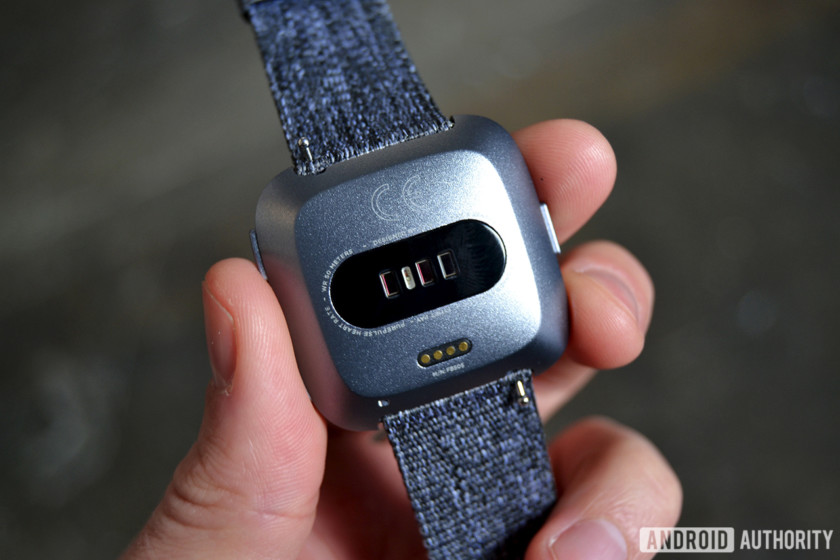
Of course, this is a Fitbit device, so it also offers 24/7 heart rate tracking, on-screen workouts with Fitbit Coach, over 15 exercise modes, Connected GPS (no built-in GPS here), and swim tracking thanks to its 5 ATM rating. It also has 2.5 GB available for music storage (4 GB in all). You can load around 300 of your favorite songs on the device, listen to stations from Pandora, and now listen to curated playlists and Flow from Deezer.
Fitbit Pay is only available on one model in the U.S., and you’ll have to pay extra for it.
The only questionable decision here is the fact that contactless payments are only available on one model in the U.S., and you’ll have to pay extra for it. Fitbit Pay is only available on the Special Edition Versa, which costs $30 more than the standard model without Fitbit Pay. That’s only in the U.S. though — all Fitbit Versa models around the world have an NFC chip for Fitbit Pay. It’s hard not to think of this as a cash grab for the U.S. market.
Luckily you won’t have to pay an arm and a leg for this device. The Versa is available for pre-order today (March 13) at Fitbit.com for $199.95, with other online retailers offering the device for pre-order starting tomorrow, March 14. The $200 model comes in three color options: black with a black aluminum case, gray with a silver aluminum case, or peach with a rose gold aluminum case. The Special Edition model costs $229.95, but that also gets you a really nice woven band in either charcoal (pictured above) or lavender colors. Special Edition models also come with a black classic band in the box.
Both models will be available worldwide in April 2018 through Amazon, Best Buy, Kohl’s, Macy’s, Target, Verizon, and Walmart.
Pre-order now from Fitbit
At $200, the Fitbit Versa undercuts the Apple Watch Series 1 by $50, which is exactly what Fitbit needed to do to get this on more people’s wrists. The Ionic was a good, but weird foray into the smartwatch world for Fitbit, and the Versa seems like a huge step in the right direction.
Next: Fitbit announces Ace, the company’s first kid-friendly fitness tracker
FandangoNOW is joining Movies Anywhere
It’s the 5th service to join the initiative.
Last October, Movies Anywhere launched as a way to simplify everyone’s digital movie libraries by combining your iTunes, Google Play, Prime Video, and Vudu purchases under one single app. It was a dream come true for a lot of people, and it’s getting even better with support for FandangoNOW.

Just like the other services mentioned above, you can now link your FandangoNOW account to Movies Anywhere and have all of your Fandango purchases automatically join your existing Movies Anywhere collection.
Even if you aren’t currently a big FandangoNOW user, this is still exciting news. Let’s say you’re in the market to buy a new movie, and FandangoNOW has the lowest price thanks to a sale it’s running. Instead of buying it there and not being able to add it to the rest of your collection, you can now purchase it for the lower price and still have it live with your entire library.
Movies Anywhere says it already supports nearly 7,500 different titles, and on a similar note, today (March 13, 2018) also marks the first day that you can digitally purchase Star Wars: The Last Jedi.
How to set up and get started with Movies Anywhere
Grab the charging accessories you need in this Anker sale good for today only
The juice is loose.
The Anker PowerPort Speed 2 Quick Charge 3.0 dual USB wall charger is down to $17.98 on Amazon from a street price of $24. That’s the lowest direct price drop we’ve seen on this charger. This is just one of the items on sale in Amazon’s Gold Box deal of the day today.

You could also get the Anker PowerCore Elite 20000mAh portable battery charger on sale. It’s down to $41.99 from a street price around $56. That’s a match for its lowest price ever.
Here’s a few more of the deals that are good today only:
- PowerDrive 4 4-port USB car charger – $11.19 (from $17)
- PowerLine+ 6-feet USB-C to USB 3.0 cable – $9.79 (from $14)
- PowerLine+ 6-feet Lightning cable – $11.89 (from $17)
All Anker products are covered by an 18-month warranty.
See on Amazon
How to stream 3D movies from your PC to your Gear VR
VR is great for immersing yourself in a virtual cinema, even if you’re watching 3D videos.

Your Gear VR can take you into a virtual space for gaming, but it’s also a great way to view videos. It supports more than just flat videos. You can view 3D, 180°, or 360° videos inside the device. And while you can watch content that is stored directly on your Gear VR, sometimes you need to view video files from your PC.
Luckily, this isn’t that complicated thanks to so impressive apps. Here are the best ways to stream 3D movies from your PC to your Gear VR.
Skybox VR

Skybox VR is an app designed to let you stream videos from your PC to VR headsets, including the Gear VR. It works through Skybox’s AirScreen functionality that requires a PC client and you having the app on your Gear VR. I can also work with a UPnP/DLNA server.
You have to have both of your devices on the same wireless network but once it’s setup on your PC and Gear VR you just use the PC client to move individual videos or entire folders into your Skybox library and can play them on your Gear VR.
We looked at Skybox VR back when it was in alpha testing, but it’s been almost a year since then for the developers to iron out kinks and improve the app.
With Skybox VR you can even stream the same video to multiple headsets at once so you can experience videos together. You can also use it to view 2D, 180°, or 360° videos.
See in Oculus Store
Using your own media server

Another way that you can view 3D content is to play it through your own media server such as Plex, Emby, or Kodi. These are a great way to stream media to multiple devices within your home and make it easy to view different kinds of media.
If you already have a media server setup, you’ll have to have an app that works with it on your Gear GR. There are a few options, including Skybox mentioned above, but another good one is Pigagus.
Pigasus can automatically find a media server and supports playback of 3D, 2D, 180°, or 360° videos.
See in Oculus Store
Get watching
That’s all you need to start watching your favorite 3D content. Let us know in the comments what you like to enjoy watching on your Gear VR and what setup you use to do it.
Which Galaxy S9 color should I buy: Black, purple, blue, or gray?
Now, this is a big decision.
The Galaxy S9 and S9+ have very subtle design differences compared to the Galaxy S8 and S8+, but one clear way to recognize them at a glance are their new colors. Midnight Black, Lilac Purple, Coral Blue and Titanium Gray are the color options, and aside from black they’re all fresh hues we haven’t seen before.
Here’s a good look at all four colors, and some information on what you can expect from each one so you can make an informed decision when you go to order.
Galaxy S9 in Midnight Black
Samsung’s been doing Midnight Black phones for a few years now, and the Galaxy S9’s version is no different. This is a solid black color with no real extra shine or glimmer to it. The metal frame is now more of a gray color on account of its texturing, which differs from the high-gloss black finish on the Galaxy S8. It’s very similar to the black Galaxy S7, in fact.
Who is it for?
If you want to play it safe, go for the Midnight Black color. It hides scratches better than the other lighter colors, and you won’t be attracting any unwanted attention to your phone. If you plan on just putting a case on your phone anyway, black is probably the easiest color to re-sell later on when you’re done with the phone.
Galaxy S9 in Lilac Purple
Lilac Purple is a brand new color for Samsung, and it kind of picks up where Orchid Gray left off in the Galaxy S8. It’s far more reflective and has a deeper color to it that’s more susceptible to changing its look in various lighting conditions, which means it will range from a deep purple (in dark lighting) to almost a grayish pink color (in bright light). The metal frame is a dull purple or pink, depending on the light. Of all four colors, Lilac Purple stands out the most — partially because there just aren’t many purple phones out there, but also on account of its reflectivity and pink accents.
Who is it for?
If you’re looking for a stand-out phone that’ll get noticed and never be confused for anyone else’s at the dinner table, Lilac Purple is the color for you. It’s a good bet that even among Galaxy S9 and S9+ owners that Lilac Purple will be the lowest-selling variety, so you have the best shot at staying unique for a while when you choose it.
Galaxy S9 in Coral Blue
Having a name like Coral Blue is a bit of a misnomer — this isn’t anything like Samsung’s previous blues, but more of a powder blue instead. I’d consider it a gray-based phone with some blue to it when you get it in bright lighting. When it’s in darker areas, you can’t tell it apart from the Titanium Gray model. The metal frame is a little bit of a giveaway with its soft blue shade, but even then it still doesn’t substantially stand out. It still has some of that reflectivity that Lilac Purple does, and that’s really the only time that it shows off a lot of its blue tendencies.
Who is it for?
Coral Blue is a great balance between the simple Midnight Black and the overtly bright Lilac Purple. Most of the time it’s quite simple and sleek looking, but in the right light it can show off its reflections and look far more blue. Coral Blue is a handsome, sophisticated color that you can’t go wrong with.
Galaxy S9 in Titanium Gray
Titanium Gray is a simple color, without much of the color-shifting tendencies seen in Lilac Purple and Coral Blue. It’s just gray, and when you get it in brighter or darker lighting, it just looks a bit closer to white and a bit closer to black. In the right lighting, it’ll look identical to Coral Blue. The metal frame is just a pure gray that looks like the most natural metal color, giving it more of an industrial look than the other three.
Who is it for?
Titanium Gray won’t be available in the U.S., so strike it off of your list if you’re buying it there. But if you have the choice, give it a look if you don’t want Midnight Black but aren’t interested in the shimmering color-changing feature of Lilac Purple or Coral Blue. Gray will always be gray no matter what, and if that sounds like a safe bet then you should go for it.
Regional differences matter (a little less this time)

As ever, not all regions are getting the same colors of the Galaxy S9 and S9+. In the U.S., we have access to three colors: black, purple and blue. As far as individual U.S. carriers go, most are offering all three colors of both sizes of the phone — but depending on which store you go to or whether you order online, stock may be limited.
Unfortunately, Titanium Gray is only for international markets. Around the world, you can expect two or three colors offered depending on the individual country (and carrier) you’re buying in. And of course this can change over time as exclusivity deals run out and new ones are made — and there’s a good chance Samsung will end up changing its color strategy over the course of the year.
Samsung Galaxy S9 and S9+
- Galaxy S9 review: A great phone for the masses
- Galaxy S9 and S9+: Everything you need to know!
- Complete Galaxy S9 and S9+ specs
- Galaxy S9 vs. Google Pixel 2: Which should you buy?
- Galaxy S9 vs. Galaxy S8: Should you upgrade?
- Join our Galaxy S9 forums
Verizon
AT&T
T-Mobile
Sprint
 AIVAnet