


How to find the best TV antenna for free HD channels
You can stream a lot of TV online, but for things like the Olympics and breaking news, you’ll want a local broadcast station to deliver the goods. Buying an antenna isn’t like buying a toaster, though — there is no objectively “best” antenna that will work for most people. Instead, you’ll need to do a bit of research and testing.
If you want to get as many free channels as possible, including your local ABC, NBC, FOX and CBS affiliates, you’ll need to consider where those broadcast towers are located, how strong of a signal they send to your location and what kind of obstructions might be in the way. Thankfully, there are some tools that can help.
Find your local channels (and where they come from)
A free website called AntennaWeb can tell you a lot about what antenna you’ll need. Just plug in your zip code and it will provide you with a list of channels, the strength of antenna they require and a map showing where those broadcasts are coming from. For example, here’s what AntennaWeb returns for where I live in San Diego:

You’ll notice that all the channels come from different directions and have different signal strengths (as noted by their colors).
For contrast, here’s where I used to live in Los Angeles:
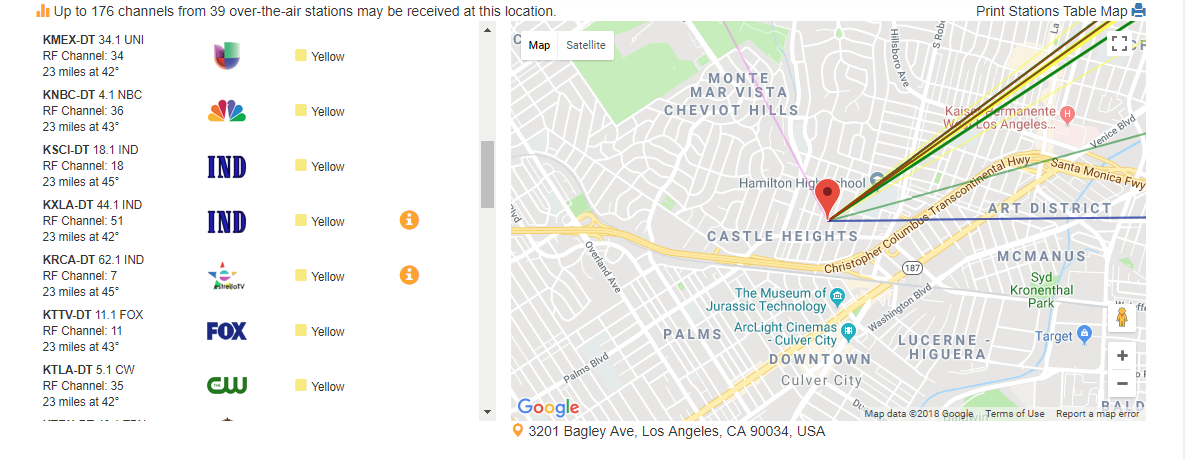
Here, almost all the channels came from one direction, so it’d be best served by a different antenna than the San Diego location. And unfortunately, if you live in a rural area, you may not find that you have any channels available at all.
Pick the right kind of antenna
From the AntennaWeb list, pick the channels that are important to you and note their colors and where they come from.
Armed with that information, you can start searching for antennas. You’ll want to consider a few things.
-
Size and range. Yellow and green channels on that list should work with smaller antennas while red and blue channels may need something bigger and more powerful. You can also note the distance of each channel from your location and compare it to the range offered by the antenna (though the antenna’s range is probably lower than the specs state, thanks to buildings and other obstructions — so always overestimate how much range you’ll need).
-
Indoor vs. outdoor. If you’re close to the broadcast towers in your area — 20 miles or less — and don’t have too many obstructions, you may be able to get by with an indoor antenna that mounts to the wall near your TV. Here are the Wirecutter’s picks for the best indoor antennas to get you started.
-
Directional vs. multi-directional. If you’re in a city, you’ll probably get more channels with an antenna that can receive signals from multiple directions, known as a multi-directional or omni-directional antenna. However, directional antennas tend to be more powerful and can grab stations from farther away — as long as all the channels you’re interested in come from one direction (which is likely if you’re in the suburbs). 1byone makes both directional and multi-directional outdoor antennas that work well in my experience.
-
Amplified. You can get a signal from your antenna by plugging it directly into your TV, but many antennas also come with amplifiers. Amplifiers plug the antenna into a wall outlet, boosting its signal so they can reach farther. This can be good if you’re far away from all of your stations (or if you have to use a coaxial cable longer than 50 feet), but it can also cause problems. The amplified version will usually cost a tad more, but it’s worth trying if the non-amplified version isn’t getting the stations you want.
You shouldn’t have to spend too much to find a good antenna. Most of these categories should have options between $20 and $60, with amplified versions on the higher end of that range.
Once you find an antenna with the right combination of features, you’re ready to try it out.
Exchange it if you don’t get the channels you want

The unfortunate reality of TV antennas is that it’s difficult to know which models will work for your specific location. Beyond all of the above characteristics, buildings, trees and terrain can make a big difference. The best way to find the right antenna is to test it yourself.
So when you buy an antenna, buy from a store with a good return policy — preferably one without a hefty restocking fee — and try it out at home. If you have an indoor antenna, place it as high up as you can, near a window if you can, and on the side of the house facing the most broadcast towers. If you can mount a larger antenna in the attic or on the roof instead of on the living room wall, all the better. It’ll take a bit more work, but you’re basically guaranteed better reception.
Once you’ve mounted the antenna, plug it into the coaxial port on your TV, open your TV’s menu and find the option to scan for over-the-air channels. Once the process is finished, you can see which channels your antenna was able to find and how good of a signal they have. If you aren’t getting as good a signal as you’d hoped, try moving or repositioning the antenna or plugging in an amplifier (if it came with one). If that still doesn’t work, you may have to try something bigger or more powerful. After a little trial and error, you should find the perfect antenna and positioning, and you can enjoy your free, over-the-air HD channels.
Images: Getty Images/iStockphoto (Roof antennas/checkout registers)
ThinkPad X1 Carbon review (2018): The best business laptop returns
Lenovo’s ThinkPad lineup has always been focused on balancing tradition with modernity. It carries the legacy of IBM’s iconic laptop brand, but the company also has to make sure it keeps up with the competition. That’s truer than ever with the new X1 Carbon, Lenovo’s flagship ultraportable, which packs in Intel’s latest chips and a few nifty upgrades. It doesn’t have a folding screen, and it can’t be turned into a slate like the X1 Yoga and the Tablet can. It’s simply a laptop — but it’s one that’s polished enough to compete with the likes of Dell’s XPS 13 and Apple’s MacBook Air.
Hardware
Now in its sixth generation, the X1 Carbon retains everything that’s made the line an ideal productivity machine over the past few years. It starts out at just 2.5 pounds and measures 16 millimeters thick. It’s noticeably lighter than the 2.7-pound XPS 13, so much so that it’s hard to tell that it’s actually a bit thicker. The X1 Carbon’s sturdy carbon-fiber case returns, as does the soft-touch coating, which makes it feel surprisingly luxurious, especially on your wrists.
Aside from some branding tweaks, nothing has changed design-wise. You’ll be able to tell it’s a Thinkpad from across the room. For some users, though, that’s more a feature than a compromise. There’s something comforting about the clean lines of the traditional ThinkPad. Lenovo has modernized the Carbon line over the years, of course — the bezels around the screen got thinner, for example — but not so much as to hide its heritage.

Lenovo also brought back the touchscreen option in the Carbon’s 14-inch display, which was missing in the last generation. It’s a nice thing to have, especially when browsing around the web, but the laptop’s matte finish makes the touch experience a bit rough as compared with mobile glass screens. Our review unit came with a standard 1080p display, but you can also upgrade to a higher-resolution 1440p model that packs in Dolby Vision HDR.
Despite the lower resolution, the screen looks great when browsing the web and watching movies. But if you plan to watch a lot of movies, or you just want the latest tech, it’s worth springing for the HDR option, which will deliver deeper blacks and brighter highlights. The slight jump beyond 1080p will also make text and photos a bit sharper.
If you’re privacy conscious, you’ll definitely appreciate the physical shutter that can be used to block the webcam. It’s a better option than tape, but it would’ve been nice if it were easier to switch on and off. It requires a decent amount of force to be moved, and you might lose a bit of fingernail in the process.

Devindra Hardawar/Engadget
Unfortunately, there’s no Windows Hello support in the webcam unless you upgrade to the higher-resolution monitor. It’s unclear why that is, but it might be due to the size of the 1080p panel. At least the fingerprint reader is more secure than before. The sensor can authenticate your identity entirely on its own, without sharing any data with the computer. The laptop also features two far-field array microphones, which can be useful when you’re shouting commands at Cortana from across the room.
As for connectivity, the Carbon X1 features two Thunderbolt 3–compatible USB-C ports, which can also charge the laptop, as well as two USB Type A connections and an HDMI port. There are also micro-SIM and micro-SD card slots tucked away in the back.
Performance and battery life
PCMark 7
PCMark 8 (Creative Accelerated)
3DMark 11
3DMark (Sky Diver)
ATTO (top reads/writes)
Lenovo ThinkPad X1 Carbon (2018, Core i5-8250U, Intel HD 620)
6,298
5,002
E3,701 / P2,062 / X493
4,706
2.96 GB/s / 1.97 GB/s
Dell XPS 13 (2018, Core i7-8550U, Intel UHD 620)
6,438
4,918
E3,875 / P2,166 / X526
4,901
3.1 GB/s / 527 MB/s
Surface Book 2 (15-inch, 1.9Ghz – 4.2Ghz Core i7-8650U, 6GB NVIDIA GTX 1060)
6,195
4,882
E14,611 / P11,246 / X4,380
15,385
2.25 GB/s / 1.26 GB/s
Surface Book (2016, 2.6GHz Core i7-6600U, 2GB NVIDIA GeForce GTX 965M)
5,452
4,041
E8,083 / P5,980 / X2,228
11,362
1.71 GB/s / 1.26 GB/s
Surface Pro (2017, Core i5, Intel HD 620)
5,731
4,475
E2,782 / P1,666 / X431
4,260
1.6 GB/s / 817 MB/s
Surface Laptop (Core i5, Intel HD 620)
5,075
4,279
E2,974 / P1,702 / X429
3,630
658 MB/s / 238 MB/s
ASUS ROG Zephyrus (2.8GHz Intel Core i7-7700HQ, NVIDIA GTX 1080)
6,030
7,137
E20,000 / P17,017 / X7,793
31,624
3.4 GB/s / 1.64 GB/s
Alienware 15 (2.8GHz Intel Core i7-7700HQ, NVIDIA GTX 1070)
6,847
7,100
E17,041 / P16,365
20,812
2.9 GB/s / 0.9 GB/s
Alienware 13 (2.8GHz Intel Core i7-7700HQ, NVIDIA GTX 1060)
4,692
4,583
E16,703 / P12,776
24,460
1.78 GB/s / 1.04 GB/s
Razer Blade Pro 2016 (2.6GHz Intel Core i7-6700HQ, NVIDIA GTX 1080)
6,884
6,995
E18,231 / P16,346
27,034
2.75 GB/s / 1.1 GB/s
ASUS ROG Strix GL502VS (2.6GHz Intel Core i7-6700HQ , NVIDIA GTX 1070)
5,132
6,757
E15,335 / P13,985
25,976
2.14 GB/s / 1.2 GB/s
HP Spectre x360 (2016, 2.7GHz Core i7-7500U, Intel HD 620)
5,515
4,354
E2,656 / P1,720 / X444
3,743
1.76 GB/s / 579 MB/s
Lenovo Yoga 910 (2.7GHz Core i7-7500U, 8GB, Intel HD 620)
5,822
4,108
E2,927 / P1,651 / X438
3,869
1.59 GB/s / 313 MB/s
Razer Blade (Fall 2016) (2.7GHz Intel Core-i7-7500U, Intel HD 620)
5,462
3,889
E3,022 / P1,768
4,008
1.05 GB/s / 281 MB/s
Razer Blade (Fall 2016) + Razer Core (2.7GHz Intel Core-i7-7500U, NVIDIA GTX 1080)
5,415
4,335
E11,513 / P11,490
16,763
1.05 GB/s / 281 MB/s
ASUS ZenBook 3 (2.7GHz Intel Core-i7-7500U, Intel HD 620)
5,448
3,911
E2,791 / P1,560
3,013
1.67 GB/s / 1.44 GB/s
Razer Blade Stealth (2.5GHz Intel Core i7-6500U, Intel HD 520)
5,131
3,445
E2,788 / P1,599 / X426
3,442
1.5 GB/s / 307 MB/s
The Carbon X1 isn’t exactly a surprising machine — it’s a rock-solid, ultralight business laptop. It sports the same killer keyboard found on all of Lenovo’s professional machines, with a liberal 1.8 millimeters of travel. Typing on it felt better than many desktop keyboards I’ve used, and it certainly blows away Apple’s disastrous flat MacBook options. The touchpad is smooth and accurate, and I’ve got to give Lenovo credit for sticking with the iconic red ThinkPad nub. It takes a bit of getting used to, but it’s a great way to maneuver through Windows in cramped environments.

Devindra Hardawar/Engadget
The Carbon X1 is powerful enough to handle most productivity tasks, thanks to Intel’s 8th-gen processors. Since there’s no dedicated graphics, it’s not a great option for playing games or 3D rendering, but that won’t matter to business users. For the most part, what struck me about the Carbon X1 was just how much it felt like those old ThinkPads I used to adore in the Windows XP era. Of course, it’s a lot lighter and thinner, but it felt just as reliable and empowering. It booted up quickly, launched everything I needed without skipping a beat and, most important, never left me wanting for more power.
In our battery test, which involves looping an HD video, the laptop lasted for 15 and a half hours. That’s among the best we’ve seen in ultraportables. While using it a bit more realistically throughout the day, it typically lasted for eight hours.
| ThinkPad Carbon X1 (2018) | 15:30 |
| Dell XPS 13 (2018) | 9:50 |
| Surface Book 2 15-inch | 20:50 |
| Surface Book with Performance Base (2016) | 16:15 |
| Surface Laptop | 14:49 |
| Surface Pro | 13:40 |
| ASUS ROG Zephyrus | 1:50 |
| Surface Book with Performance Base (2016) | 16:15 |
| Apple MacBook Pro 2016 (13-inch, no Touch Bar) | 11:42 |
| Apple MacBook Pro with Retina display (13-inch, 2015) | 11:23 |
| Apple MacBook Pro 2016 (15-inch) | 11:00 |
| HP Spectre x360 15t | 10:17 |
| Apple MacBook Pro 2016 (13-inch, Touch Bar) | 9:55 |
| ASUS ZenBook 3 | 9:45 |
| Apple MacBook (2016) | 8:45 |
| Samsung Notebook 9 | 8:16 |
| Alienware 13 | 7:32 |
| HP Spectre 13 | 7:07 |
| Razer Blade Stealth (Spring 2016) | 5:48 |
| Razer Blade Stealth (Fall 2016) | 5:36 |
| Dell XPS 15 (2016) | 5:25 (7:40 with the mobile charger) |
| Alienware 15 | 4:31 |
| Razer Blade Pro (2016) | 3:48 |
| ASUS ROG Strix GL502VS | 3:03 |
Pricing and the competition

Devindra Hardawar/Engadget
The ThinkPad X1 Carbon starts at $1,519 with a Core i5 8th-generation processor, 8GB of RAM and a 256GB M.2 SSD. Personally, I’d spend the extra $180 to add the HDR 1440p screen. As usual, you can customize just about every component of the machine on Lenovo’s website, so you’re not just stuck with preconfigured systems that might include features you don’t want.
Not surprisingly, being a business-class machine, it’s more expensive than typical ultraportables. The XPS 13 starts at $999, and you can even get a MacBook Pro cheaper than the Carbon X1 with similar specs and an older 7th-generation Intel CPU. Basically, you’re not buying a ThinkPad if you’re trying to save money.
Wrap-up

Devindra Hardawar/Engadget
While the ThinkPad Carbon X1 isn’t a huge evolution over last year’s model, Lenovo packed in enough upgrades to keep the line in step with modern ultraportables. Unfortunately, you’ll have to go beyond the entry-level model to see the best new features, like the HDR display. Perhaps next year we’ll see a major design leap for the Carbon line — but, knowing the rabid ThinkPad fans out there, Lenovo will have to tread carefully. Bold new ideas are what the X1 Yoga and Tablet models are for. The Carbon, meanwhile, remains the most refined business laptop around.
Amazon brings Alexa calls and messaging to tablets
You no longer need to hang around an Echo speaker to make free calls and messages with Alexa. As of now, you can use Alexa to place calls (including video calls) and send messages from Android tablets, iPads and of course Amazon’s own Fire models. How easy it is depends on the device. It’s easiest on the Fire HD 10, where you only have to ask Alexa to get in touch; other Alexa-ready Fire tablets require that you tap the home button first. And for everyone else, you’ll have to open the Alexa app.
As usual, you don’t need a tablet or Echo speaker to receive calls — you just need the Alexa app. Amazon’s Drop In feature also works between tablets and other Echo devices in your home, so you can use your tablet to ask someone a question when they’re on the other end of the house. Effectively, Amazon is turning your slate into an intercom.
Source: Amazon (1), (2)
The UK is getting a MoviePass clone
It’s hard to deny that MoviePass (the service that allows you to see one 2D movie a day in theaters for a set monthly fee) has been a huge hit in the US. That’s why it’s hardly surprising that the UK has a MoviePass clone of its own in the works. Called cPass, it claims to be the first UK and European movie ticket subscription service, with prices set as £9.95 ($13.83) per month. The service is currently in sign-up mode and hasn’t actually launched yet.
The service seems to work similarly to that of MoviePass. Once you register for cPass and pay the fee, you receive a card in the mail. Then, you simply choose the movie, theater and time you want to see, and “Check in” on the cPass app. When you arrive at the theater, just swipe your card at the box office and enjoy your movie.
The problem is that no major UK-based theater chains had actually ever heard of cPass, according to Deadline. Odeon, Vue, Cineworld and Curzon are all listed as chains that cPass works with, but there is no agreement in place between them. According to cPass’s FAQ, the company doesn’t have partnerships with these cinemas, which already offer their own unlimited movie subscriptions. However, the founders told Deadline that cPass can operate “at any venue that accepts credit and debit cards.”
The big question for any of these unlimited movie ticket deals is how to monetize it. After all, MoviePass loses money on every subscriber. It’s becoming increasingly clear, though, that the real source of revenue is the subscribers themselves — the data that each user provides, and the way that these users can be advertised to as a result of that. It remains to be seen what will happen with cPass, and whether it will actually launch as a fully fledged service.
Source: Deadline, cPass
Philips Hue Reveals First Products in Outdoor Lighting Range Coming This July
At CES in January, Philips announced that it was working on a line of Hue lights for outdoors, so that users could connect and control their lighting on a patio, balcony, or other environment outside. Today, the company has revealed the first set of Philips Hue outdoor range products that will be launching in the United States and Europe this July.
Philips noted that the outdoor products will be available in both the Philips Hue white and Philips Hue white and color ambiance ranges. The outdoor devices will be fully compatible with the Philips hue ecosystem and work “in the same way as the indoor range,” Philips explained. Users will just have to connect their outdoor lights to their Philips Hue bridges, and the new lights will appear in the Hue app and Apple’s Home app so that they can be controlled with taps and through Siri.

The new lights include the Philips Hue Lily, which can be used to highlight key features in a garden, and the Philips Hue Calla, which can be placed in the ground and light pathways through outdoor spaces. Philips said the new line is designed for outdoor weather conditions and each fixture is easy to install.
“Our customers are always looking for new ways to extend their smart lighting system and the new Philips Hue outdoor range takes it a huge step further,” said Sridhar Kumaraswamy, Business Leader Home Systems & Luminaires at Philips Lighting. “While Philips Hue bulbs and luminaires are available for every area inside your home, we wanted to traverse the threshold and offer connected luminaires designed for outside areas. The Philips Hue outdoor range enables you to make the most of your outside areas, be it creating the ideal ambiance to host a BBQ at the weekend or beautifying your garden.”
In terms of price, the Philips Hue outdoor Lily base pack will cost $279.99/€299.99, including three lights and “all the accessories you need to get started.” The Calla bollard base pack will be the cheaper option at $129.99/€139.99. There will also be a number of standalone lighting products in the white range, including Lucca, Tuar, Turaco, and Ludere, with prices starting at $49.99/€69.99.

The company didn’t give any further information on the upcoming Hue app version 3.0 update for iOS and Android devices, expected for Q2 2018. At CES, Philips said the update will “enhance” existing features while also adding in new ones so that Hue lights can be activated “with even more ease.”
Tag: Philips Hue
Discuss this article in our forums
Rihanna is Apple Music’s Most Streamed Female Artist
Rihanna is the world’s most streamed female recording artist on Apple Music, ahead of Taylor Swift, Beyoncé, and Ariana Grande.
Apple recently announced that the Barbadian singer has become the first female artist to surpass two billion streams worldwide on Apple Music, having achieved the milestone on International Women’s Day last Thursday.
Work!@Rihanna sets new streaming record on #InternationalWomensDay. 2 billion streams worldwide and counting. 🔥🔥https://t.co/eiwiOCsVbY
— Apple Music (@AppleMusic) March 10, 2018
It’s unclear if the count is limited to Rihanna’s own songs or includes her features in songs by other artists like Drake, Eminem, and Jay-Z, but it’s an impressive accomplishment either way on the heels of her 30th birthday.
Rihanna topped Apple Music’s list of the top 20 most streamed female artists worldwide:Rihanna
Taylor Swift
Beyoncé
Ariana Grande
Adele
Sia
Lana Del Rey
Selena Gomez
SZA
Lady Gaga
Katy Perry
Nicki Minaj
Demi Lovato
Halsey
Fifth Harmony
P!nk
Kehlani
Mariah Carey
Little Mix
Miley CyrusAll eight of Rihanna’s studio albums are available to stream on Apple Music, whereas some artists don’t offer their complete discography on the service.
Tag: Apple Music
Discuss this article in our forums
Microsoft’s mad scientists are making AR more tactile
Unless you hate fun, Microsoft’s best division is far and away its Research group, which has given us the nearest thing to a Holodeck, a live-action version of Minecraft and much more. Microsoft’s gang of crazy researchers is at it again, showing off a bunch of new controllers for augmented and virtual reality. They’re strictly experimental for now, but show a lot of potential for making AR and VR more fun and useful.
The most versatile controller is called “The Claw” (below). It’s a squeezable, gun-like device that let’s you pick up and handle virtual objects and, thanks to haptic feedback, feel their softness and texture. It can even detect the differences between users’ grips and the “situational context of the virtual scene,” as Microsoft puts it.
In other words, depending on how you hold The Claw, it will deliver touch sensations, resistance that prevents you from penetrating virtual objects, or small vibrations to simulate textures. It does that thanks to a motorized arm connected to the controls on your trigger finger, and a voice-coil to generate the vibrations.
“Haptic Links,” meanwhile, is a two-handed controller that can simulate experiences you do with, well, two hands. That includes banal tasks like carrying boxes or operating a hammer drill, to more highly-skilled activities like playing the trombone or maracas.
Haptic Links “dynamically alter[s] the forces perceived between the user’s hands to support rendering of a variety of two-handed objects and interactions,” Microsoft said. The team created three separate versions that control tension and degrees of freedom: a layer hinge, chain, and ratchet-hinge, each of which works best for different types of simulations.
Lastly, Microsoft showed off the “Canetroller,” a simulated cane for the blind. When you sweep it around a simulated world, it stops when it hits objects, thanks to a wearable, programmable brake. Via vibrotactile feedback, it vibrates when you sweep it across the ground, just like a cane in the real world. Both sensations are enhanced by auditory feedback that simulates the sound of a cane in the real world.
Much like audio descriptions help the blind follow TV shows, movies or smartphone content, a device like the Canetroller could help the blind and low-vision users navigate virtual worlds. “‘Conventional’ virtual reality experiences are heavily visual in nature and not accessible to the vision impaired,” said Microsoft. “Microsoft Research hopes its work can inspire researchers and designers to design more effective tools to make VR more inclusive to differently-abled people all over the world.”
Source: Microsoft
Toshiba’s smart glasses are powered by mini Windows PCs
Toshiba is stepping into the world of wearable computing with its new Windows-powered smart glasses. You can think of them as a slightly more powerful pair of Google Glasses — except, instead of being purely standalone, they’re attached to one of Toshiba’s dynaEdge Mini PCs. Those systems are basically Windows laptops shrunken down into handheld, battery powered bricks. Portable computers are popular with industrial field users who need powerful computers on the go, but find laptops to be too cumbersome. With its new AR100 Head Mounted Display, Toshiba is aiming to make those systems a lot more useful.
The headset weighs just three ounces, and it can be worn over an existing pair of glasses. Its main selling point is an integrated micro-display — while you’re wearing it, it’s as if you’re looking at a five-inch mobile screen from 17 inches away. Additionally, the headset also features GPS, a head tracking accelerometer, a 5 megapixel camera, and a tiny touchpad. For communication, it also packs in dual noise cancelling microphones and an ear speaker.
Toshiba also created a custom interface for controlling the headset, which lets you quickly jump to things like documents, the camera and video chatting with the DynaEdge’s directional controller. While the Head Mounted Display looks more like a goofy sci-fi prop at first glance, I found it to be pretty comfortable to wear. After some adjustment, the display was also easy to see.

Toshiba is positioning this headset as something industrial users might wear when they need to pull up equipment schematics, or when they need to have a quick video chat with someone for field repairs. I was able to pull up PDFs easily, and zoom into specific sections using the touchpad. And while the camera isn’t great, it’s clear enough to let people see exactly what you’re seeing. Whenever you’re recording video, the headset displays a red light as a privacy warning to bystanders. It didn’t take long for me to get used to wearing the display, but I found controlling the interface with the DynaEdge’s controller to be a bit clunky.

At the end of the day, this headset just a tiny screen in your field of vision. It’s not trying to overlay augmented reality imagery like Microsoft’s HoloLens. Its connection to the DynaEdge PC is also a bit clunky — you’ll always have a cable trailing to that, and you’ll have to carry it as you move around with the headset. Beyond the standard model, Toshiba is also delivering the headset attached to safety goggles, a construction helmet, and a headstrap, which will be useful for people with very large glasses.
The AR100 Head Mounted Display system starts at $1,899 for the glasses and a DynaEdge system with a Core M processor. You can also upgrade to faster processors, as well. While this is clearly a first step for Toshiba, it’s an intriguing one. The headset isn’t something that’s meant for consumers, but it’s a glimpse at how wearable computing could change the lives of professional users.
Breaking down Elon Musk’s surprise, sold-out talk at SXSW
An email sent in the dead of night on Saturday revealed Elon Musk, the founder of Tesla and SpaceX, would appear at SXSW for a surprise Q&A session. By 8:30 the following morning, the Moody Theater was sold out; by noon, when Musk was scheduled to take the stage, the arena was packed.
Musk, prodded along by Westworld co-creator Jonathan Nolan, started by talking about his goals for SpaceX and the future of interstellar travel. Audience members submitted questions on a private network, and the first asked how everyday people could help get humans to Mars. Musk’s answer essentially boiled down to, “I appreciate your support, but I got this.”
Though Musk has his hand in myriad industries — transportation, energy, artificial intelligence and space, to name a few — interplanetary travel was the star of the conversation. Early on, the lights dimmed as Nolan introduced the Falcon Heavy & Starman video that hit YouTube over the weekend, highlighting the recent, successful Falcon Heavy launch that put a Tesla in space.
Musk and Nolan’s on-stage talk was casual and meandering, littered with tidbits about Musk’s work habits, his plans for the future and the more terrifying realities of artificial intelligence.
Catch up on the latest news from SXSW 2018 right here.
Microsoft’s Slack rival gets translation and Surface Hub compatibility
Teams just turned one, and for its anniversary, Microsoft has unveiled new professional features for it that go well beyond what rivals like Slack offer. Probably the most important ones for enterprises are compatibility with their existing telephone systems, automatic in-line translation, Surface Hub support, and the ability for participants to dial in with regular telephones.
Microsoft says that its new Direct Routing service will transform Teams into a “full voice service” that works for both calling and meeting room devices. For instance, “Microsoft Teams will be natively supported on a Surface Hub (above), enhancing the capabilities of Teams in huddle spaces and meeting rooms,” the software giant said. Team Meetings will also support audio and HD video conference room systems from Lenovo, HP, Logitech and others, along with any Skype Room systems.
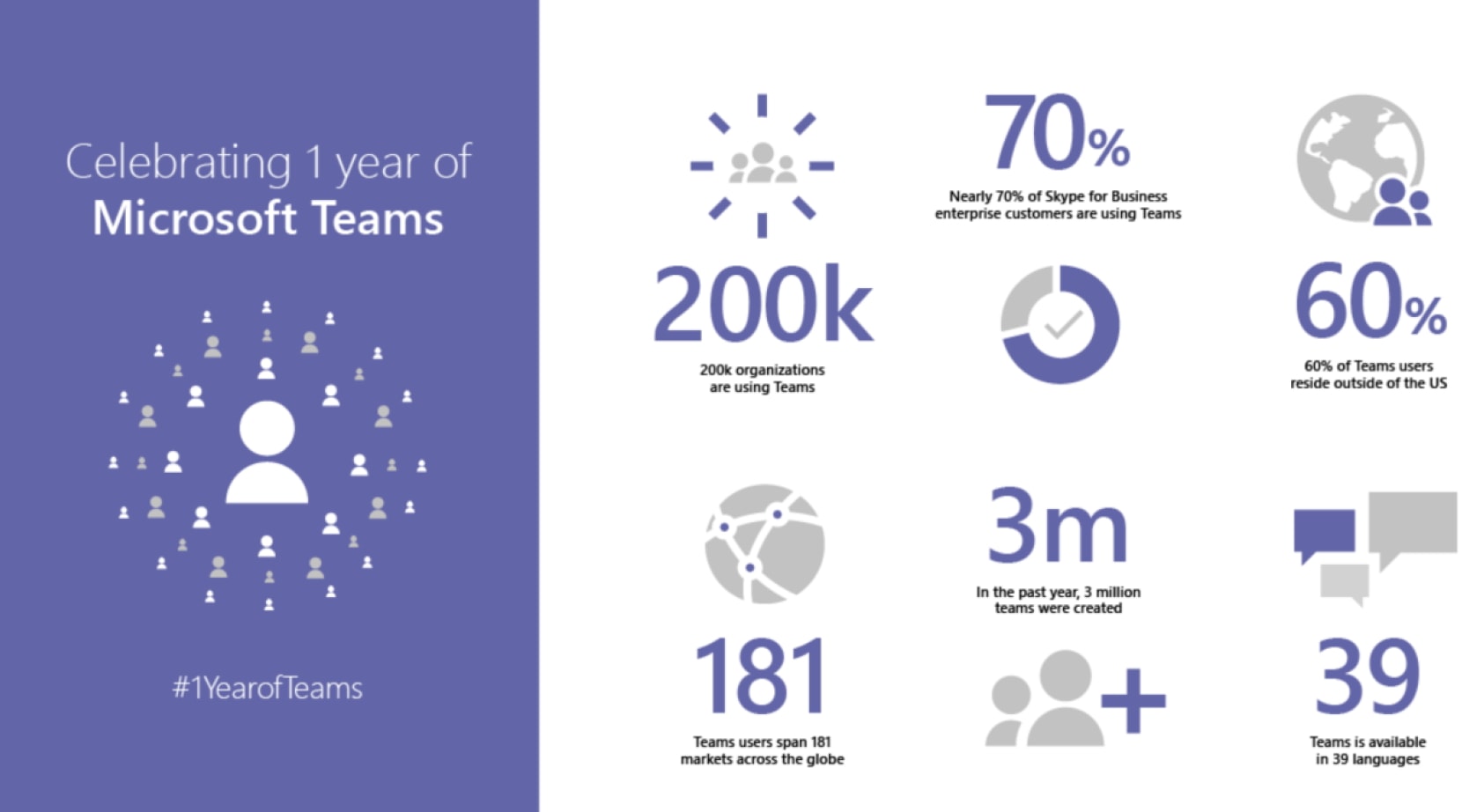
Microsoft’s AI has also made it easier to initiate and participate in Teams chats. You can now start, join or add people to meetings by giving natural language voice commands to Cortana, for one. If participants that speak different languages join in, Teams will support in-line message translation to let them “fluidly communicate with one another by translating posts in channels and chat.”
Another interesting feature is background blur on video. To help participants see you more clearly, the system will blur out a distracting background, putting the focus of the video on you rather than any clutter behind. It’ll also let you share a live video stream, photos or screens from your smartphone.
Finally, Microsoft will soon enable one-click cloud recording, with timecoding and automatic transcription. That’ll let team members search within conversations, read captions and play back portions or all of a meeting. A future upgrade will include facial recognition so that comments can be assigned to specific individuals.
With its relative simplicity, Slack will always have its place, but Microsoft is targeting large enterprises that already have its apps in-house. The ability to use Slack as an full in-house meeting system, even if participants don’t have access to a computer or internet, will no doubt make it a lot more useful for companies. The enterprise calling features are set to arrive in Q2 of 2018, and the other features, like Cloud Recording and in-line translation, will arrive later in the year.
 AIVAnet