


MoviePass can’t answer important location tracking questions
Yesterday it surfaced that MoviePass CEO Mitch Lowe said — during a presentation called “Data is the New Oil: How Will MoviePass Monetize It?” — that his company could watch how subscribers drive home from the movie and see where they went. The setup sounds a lot like the post-ride tracking Uber added and then pulled last year. Media Play News included the quotes in the middle of an article about MoviePass projecting that it will pass 5 million subscribers, and the outlet has since posted a full quote showing exactly what the CEO said.
Mitch Lowe (via Media Play News):
We get an enormous amount of information. Since we mail you the card, we know your home address, of course, we know the makeup of that household, the kids, the age groups, the income. It’s all based on where you live. It’s not that we ask that. You can extrapolate that. Then because you are being tracked in your GPS by the phone, our patent basically turns on and off our payment system by hooking that card to the device ID on your phone, so we watch how you drive from home to the movies. We watch where you go afterwards, and so we know the movies you watch. We know all about you. We don’t sell that data. What we do is we use that data to market film.
Contacted by Engadget, the company didn’t have anything further to say publicly than this statement from a spokesperson.
At MoviePass our vision is to build a complete night out at the movies. We are exploring utilizing location-based marketing as a way to help enhance the overall experience by creating more opportunities for our subscribers to enjoy all the various elements of a good movie night. We will not be selling the data that we gather. Rather, we will use it to better inform how to market potential customer benefits including discounts on transportation, coupons for nearby restaurants, and other similar opportunities. Our larger goal is to deliver a complete moviegoing experience at a price anyone can afford and everyone can enjoy.

The statement focuses on MoviePass keeping information gathered private, but doesn’t give us confirmation on exactly when and how it’s using subscriber GPS. Lowe’s full comments address some of the controversy by revealing that his company starts with the demographic and publicly available information that many companies get based on things like your address and credit card info.
However, the MoviePass privacy policy only mentions a “single request” for location, nothing about tracking before and after.
THEATER CHECK-INs
MoviePass® requires access to your location when selecting a theater. This is a single request for your location coordinates (longitude, latitude, and radius) and will only be used as a means to develop, improve and personalize the service. MoviePass® takes information security very seriously and uses reasonable administrative, technical, physical and managerial measures to protect your location details from unauthorized access. Location coordinate data is transmitted via Secure Socket Layer (SSL) technology into password-protected databases.
So what’s really happening? Without further clarification from MoviePass, an answer could be in the patent Lowe referenced. Just a few days ago MoviePass sued a similar service called Sinemia for violating its patent, which covers using a reloadable card and verifying the customer’s location via GPS.
Patent US8484133B1 (co-authored by MoviePass co-founder and COO Stacy Spikes) is viewable online and describes how the service works. The patent, covers booking a ticket, making sure the card has the right amount, recording when/where it was used and for what. It only mentions the use of GPS in one instance, to verify if a user is within 100 yards of the selected theater before loading the appropriate amount of money on the MoviePass card which operates as a virtualized credit card.

The GPS ping mentioned there is to stop fraud, while the location of the event and what happened is tied to the card itself. If the company is currently doing more with GPS tracking, it’s not mentioned in the patent Lowe cited. However, Helios and Matheson Analytics Inc. recently bought a large stake in MoviePass, which could change the future of its technology. In a Wired profile late last year, Lowe didn’t mention watching via GPS, but instead proposed using Helios maps to suggest nearby options (like parking or restaurants), then pay for them with the same card and one monthly bill.
MoviePass patent:
Once the membership card is in hand, the member can book a movie online using the web site of the service on a PC, or the service app on a smart device. At this point, the card has no funds on it. As shown in the debit card reload process 105, the member selects a movie to watch on either the MoviePass™ website or mobile application (app). The member is then directed to check-in at the chosen theater. When the member is at the theater and checks in using the mobile app, MoviePass™ confirms the location of the member. This verifies: 1) that the member is at the correct theater at the correct time for the booked movie; and 2) that the person checking in is indeed the member. The identity of the member is verified to a high degree of certainty based on study results that show the likelihood of a mobile phone owner to loan the phone to another for several hours is extremely low. According to this aspect of the invention, while a person might loan their membership card to another person, the card cannot be used unless the phone is present with the card at the theater at the time of the ticket purchase. This reduces the possibility of “membership sharing” to a minimum. In an embodiment, the location is verified using the global positioning system (GPS) capabilities of the mobile device. In alternate embodiments, a third party location service can be used instead of the member’s own device. Once the member’s location is verified as being the location of the selected theater, MoviePass™ requests the credit card service to place funds on the card. The card is instantly loaded and the member can then purchase the theater ticket at the theater kiosk or box office.
Source: Media Play News, Google Patents
How to Set Up Out-of-Office Replies in Apple Mail and iCloud Mail
Apple’s native Mail application in macOS lacks a specific option for enabling out-of-office replies, but there is another way you can set them up on a Mac, and that’s with Rules. It’s worth bearing in mind at the outset that your Mac needs to be powered on for this out-of-office method to work. That’s because Apple Mail rules are only applied locally to incoming emails, and aren’t active on the server side.
If you’re looking for a longer term out-of-office solution, you’ll want to check out Vacation mode in iCloud Mail, which we cover in the second part of this tutorial. Click this link to jump there now.
How to Create an Out-of-Office Reply Using Mail Rules
Launch the Apple Mail app.
From the menu bar, select Mail -> Preferences….
Select the Rules tab.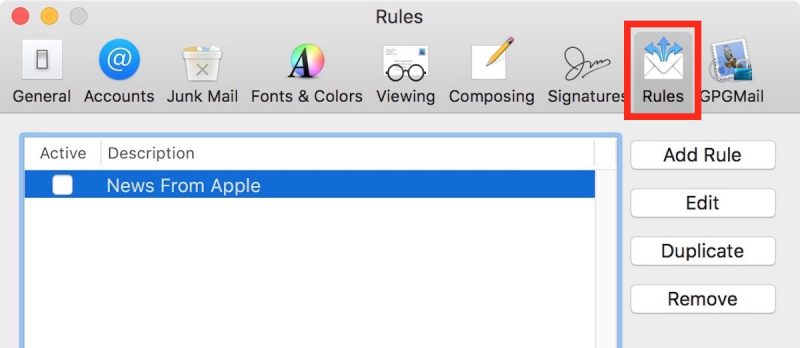
In the Rules dialog box that appears, click the Add Rule button and give the rule an identifiable description, such as “Out of Office Reply”.
Leave the default “any” selection in “If any of the following conditions are met”.
For the initial condition, select Account from the first dropdown menu, and then choose the email account that you want your out-of-office rule to apply to from the condition’s second dropdown menu.
In the second condition under “Perform the following actions:”, select Reply to Message from the dropdown menu.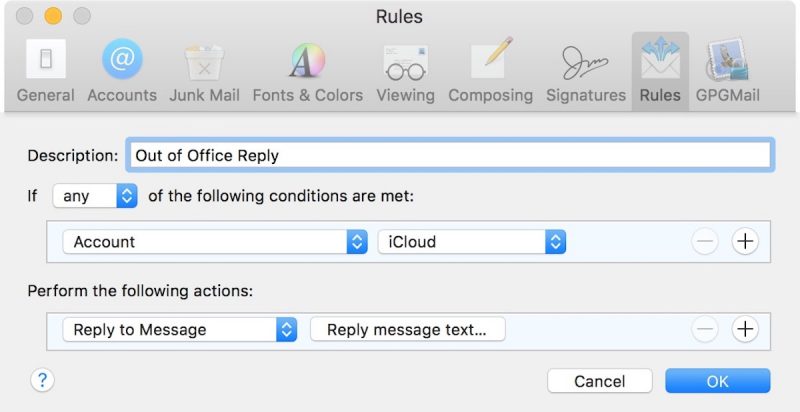
Now click Reply message text….
In the input window that appears, type the text you want to appear in the automatic response email that will be sent when you’re away.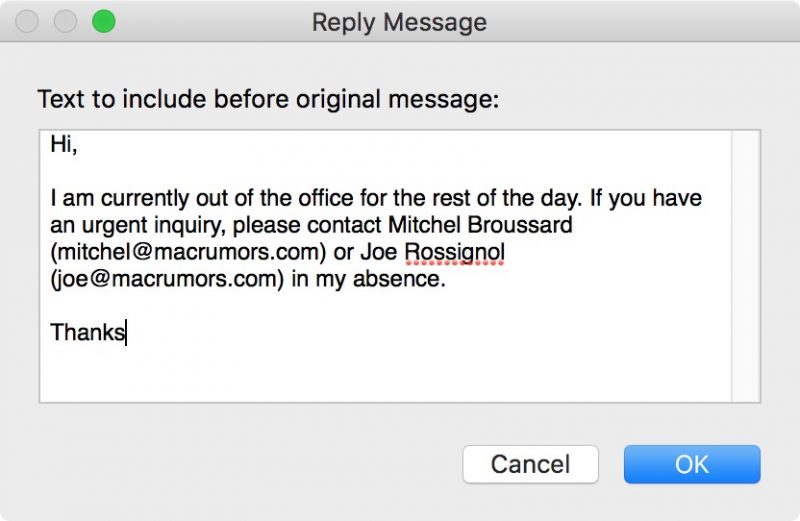
Click OK to close the input window when you’re done.
Click OK to close the Rules dialog box.
WARNING! At this point, Apple Mail will ask if you want to apply the new rule to existing messages in your mailbox. Be very sure to respond to this question with a negative. In other words, click Do Not Apply, for the simple reason that clicking the alternative “Apply” option will cause Mail to send the automatic reply to all the messages currently sitting in your inbox, and you don’t want that!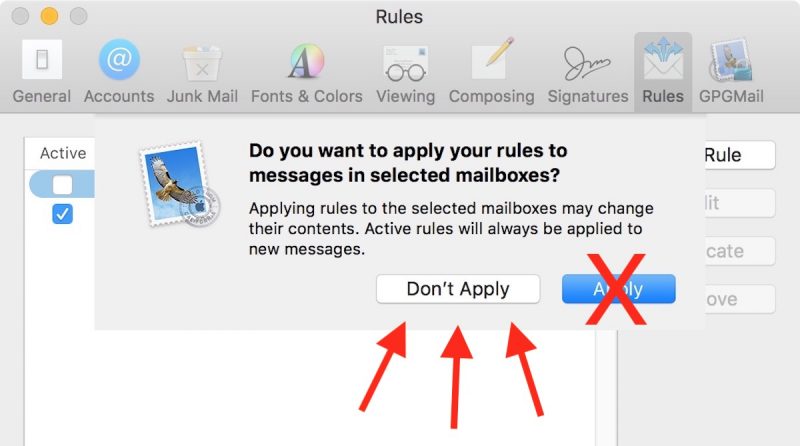
Your out-of-office reply rule is now active. Leave things as they are and keep your Mac on, and all incoming messages to that account will be responded to automatically. To make the out-of-office reply inactive upon your return, simply uncheck the box next to the said rule. The next time you’re away, simply check the box again to reactivate it.And that’s it. It’s worth noting that you can tweak the rule’s conditions to suit your needs – so that the out-of-office reply is only sent out to specific people, or only in response to emails with certain subjects, for example.
How to Set Up Out-of-Office replies in iCloud Mail
Unlike Apple Mail in macOS, iCloud Mail has a dedicated out-of-office feature called Vacation mode that you can enable remotely from any web browser.
For obvious reasons, Vacation mode will only be useful to you if you have an iCloud email address. Other account holders looking for an out-of-office solution are better off using a third-party email client such as Mozilla Thunderbird. And with that caveat, here’s how to get Vacation mode in iCloud Mail up and running.
Open a browser and navigate to http://www.icloud.com.
Log in using your iCloud credentials and then click on the Mail icon.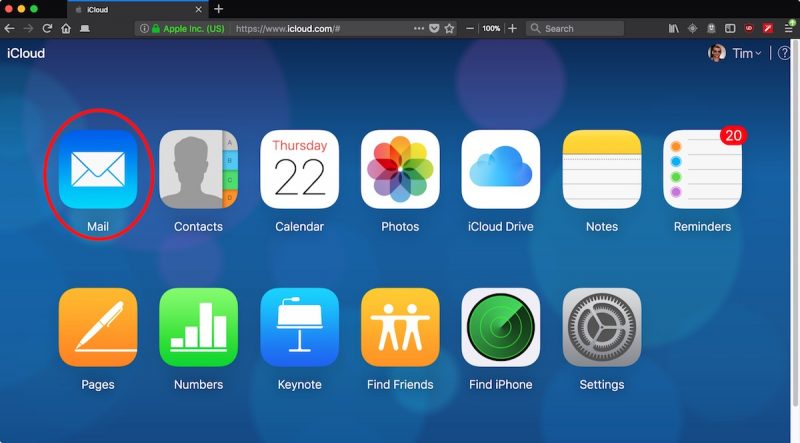
When your Mail screen loads, click the cog icon in the lower left corner of the window and select Preferences… from the popup menu.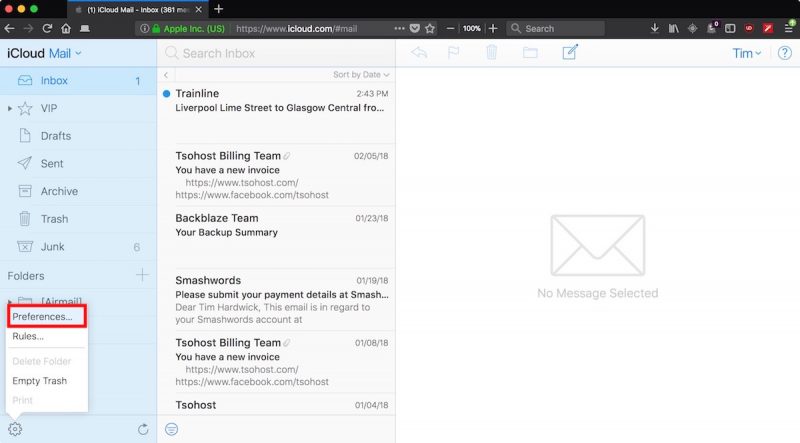
Click the Vacation tab and check the box next to “Automatically reply to messages when they are received”.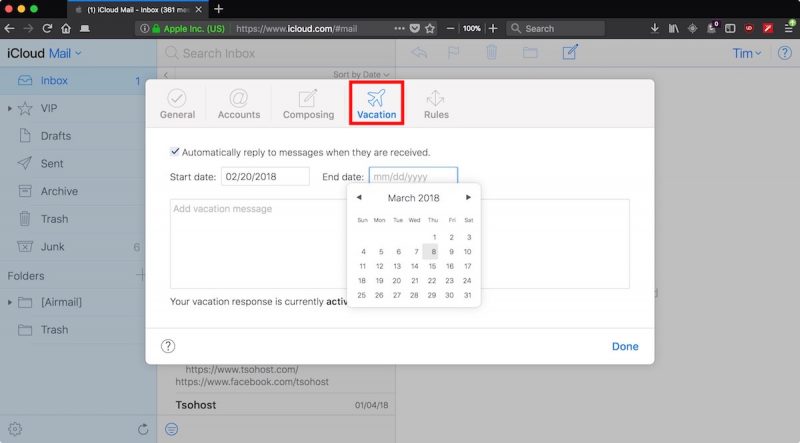
Using the calendar dropdowns, click on a Start date and an End date between which you’d like your out-of-office replies to remain active.
Lastly, enter the text of your automatic reply into the input box, and then click Done.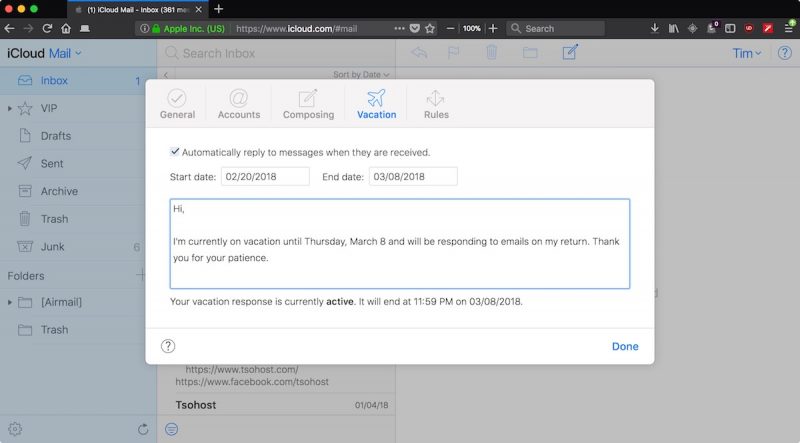
Related Roundup: macOS High Sierra
Discuss this article in our forums
Uber’s self-driving trucks are making deliveries in Arizona
Uber announced today that its self-driving trucks have been operating in Arizona for the last couple of months. The company said it has two main transfer hubs in Sanders and Topock, but other than that, Uber is being pretty tight-lipped about the operation. For instance, it hasn’t shared how many trucks are in use, how many miles they’ve driven, what they’re shipping or how often drivers have to take over for the autonomous system, and has only said that the trucks have completed thousands of rides to date.
You can check out how the system works in the video below. The idea is that a regular semi will pick up a delivery load from a shipper and drive it to a transfer hub. There, one of Uber’s self-driving trucks, and a safety driver, will take the trailer and transport it over the longest leg of the trip. Once the truck nears the delivery destination, it will again head to a transfer hub where a conventional truck and driver will pick up the trailer and take it to its final stopping point. Shipment details are handled by Uber Freight — the app the company launched last May that connects shippers and truck drivers.
Uber made its first delivery with a self-driving truck in 2016, when one of its semis transported 2,000 cases of Budweiser from Fort Collins, Colorado to Colorado Springs. Since then, Embark has joined the self-driving semi shipment game, delivering Frigidaire appliances between Texas and California in 2017 and making a long-haul trip from California to Florida earlier this year.
Uber’s self-driving trucks are a result of the company’s acquisition of Otto in 2016, a deal that eventually led to a major legal dispute with Waymo. Uber and Waymo agreed to a settlement last month and are reportedly now considering a partnership.
Via: Recode
Ultimate surround sound guide: Different formats explained
It was the summer of ’69. We’re not talking about the Bryan Adams song here; we’re actually referring to the first time surround sound became available in the home. It was called Quadraphonic sound, and it first came to home audio buffs by way of reel-to-reel tape. Unfortunately, Quadraphonic sound was very short-lived. The technology, which provided discrete sound from four speakers placed in each corner of a room, was confusing — no thanks to electronics companies battling over formats (sound familiar?) — and it ultimately failed to catch on.
Immersion in a three-dimensional sphere of audio bliss was not to be given up on, however. In 1982, Dolby Laboratories introduced Dolby Surround, a technology that piggybacked a surround sound signal onto a stereo source through a process called matrix encoding. Not long after, Dolby brought us Pro Logic surround and has since done its part to advance the state of surround sound in the home for an increasing number of channels and configurations.
Surround sound has since become a standard inclusion in home theaters, but it remains a confusing technology for many. Though most understand the concept of using multiple speakers for theater-like sound, many don’t understand the difference between all the formats. From basic 5.1 to Dolby Atmos setups with multiple overhead speakers, it’s a lot to wrap your head around. With our detailed guide, we hope to provide a little clarity to help you on your surround sound quest.
Surround sound 101
The speakers
Surround sound, at its most basic, involves a set of stereo front speakers (left and right) and a set of surround speakers, which are usually placed just to the side and just behind a central listening position. The next step up involves the addition of a center channel: A speaker placed between the front left and right speakers that is primarily responsible for reproducing dialogue in movies. Thus, we have five speakers involved. We’ll be adding more speakers later (lots more, actually), but for now we can use this basic five-speaker arrangement as a springboard for getting into the different formats.
Matrix
For the purposes of this discussion, “matrix” has nothing to do with the iconic Keanu Reeves movies. In this case, matrix refers to the encoding of separate sound signals within a stereo source. This approach was the basis for early surround-sound formats like Dolby Surround and Dolby Pro Logic, and was motivated in part by the limited space for discrete information on early audio-video media, such as the VHS tape.
Pro Logic
Using the matrix process, Dolby’s Pro Logic surround was developed to encode separate signals within the main left and right channels. Dolby was able to allow home audio devices to decode two extra channels of sound from media like VHS tapes, which fed the center channel and surround speakers with audio. Because of the limited space, matrixed surround signals came with some limitations. The surround channels in basic Pro Logic were not in stereo and had a limited bandwidth. That means that each speaker played the same thing and the sound didn’t involve much bass or treble information.
5.1: Surround takes shape
Dolby Digital 5.1 / AC-3: The benchmark
Remember laser discs? Though the medium was first invented in 1978, it wasn’t until 1983, when Pioneer Electronics bought majority interest in the technology, that it enjoyed any kind success in North America. One of the advantages of the laser disc (LD) is that it provided a lot more storage space than VHS tape. Dolby took advantage of this and created AC-3, now known better as Dolby Digital. This format improved on Pro-Logic in that it allowed for stereo surround speakers that could provide higher bandwidth sound. It also facilitated the addition of a low-frequency effects channel, adding the “.1” in 5.1, which is handled by a subwoofer. All of the information in Dolby Digital 5.1 is discrete for each channel — no matrixing necessary.
With the release of Clear and Present Danger on laser disc, the first Dolby Digital surround sound hit home theaters. Even when DVDs came out in 1997, Dolby Digital was the default surround format. To this day, Dolby Digital 5.1 is considered by many to be the surround sound standard, and is included on most Blu-ray discs.
Image courtesy of Dolby
DTS: The rival
What’s a technology market without a little competition? Dolby more or less dominated the surround-sound landscape for years. Then, in 1993, DTS (Digital Theater Systems) came along, providing its own digital surround sound mixing services for movie production, first hitting theaters with Jurassic Park. The technology eventually trickled down to LD and DVD, but was initially available on a very limited selection of discs. DTS utilizes a higher bit rate and, therefore, delivers more audio information. Think of it as similar to the difference between listening to a 256kbps and 320kbps MP3 file. The quality difference is noticeable, but according to some, negligible.
6.1: Kicking it up a notch
In an effort to enhance surround sound by expanding the “soundstage,” 6.1 added another sound channel. The sixth speaker was to be placed in the center of the back of a room and was subsequently referred to as a back surround or rear surround. This is where a lot of confusion began to swirl around surround sound. People were already used to thinking of and referring to surround speakers (incorrectly) as “rears,” because they were so often seen placed behind a seating area. Recommended speaker placement, however, has always called for surround speakers to be placed to the side and just behind the listening position.
The point of the sixth speaker is to give the listener the impression that something is approaching from behind or disappearing to the rear. Calling the sixth speaker a “back surround” or “surround back” speaker, while technically an accurate description, ended up being just plain confusing.
To make things even more confusing, each company offered different versions of 6.1. Dolby Digital and THX collaborated to create a version referred to as “EX” or “surround EX” in which information for the speaker is matrix encoded into the left and right surround speakers. DTS, on the other hand, offered two separate 6.1 versions. DTS-ES Discrete and DTS-ES Matrix performed as their names suggested. With ES Discrete, specific sound information has been programmed onto a DVD or Blu-ray disc, while DTS-ES Matrix extrapolated information from the surround channels.
7.1: The spawn of Blu-ray
Just when people started getting used to 6.1, 7.1 came along in conjunction with HD-DVD and Blu-ray discs as the new must-have surround format, essentially supplanting its predecessor. Like 6.1, there are several different versions of 7.1, all of which add in a second back-surround speaker. Those surround effects that once went to just one rear surround speaker could now go to two speakers in stereo. The information is discrete, which means that every speaker is getting its own specific information — we can thank the massive storage potential of Blu-ray for that.
Dolby offers two different 7.1 surround versions. Dolby Digital Plus is the “lossy” version, which still involves data compression and takes up less space on a Blu-ray disc. Dolby TrueHD, on the other hand, is lossless. Since no compression is involved, Dolby TrueHD is intended to be identical to the studio master.
Image courtesy of Dolby
DTS also has two 7.1 versions, which differ in the same manner as Dolby’s versions. DTS-HD is a lossy, compressed 7.1 surround format, whereas DTS-Master HD is lossless and meant to be identical to the studio master.
It is important to note here that 7.1-channel surround mixes are not always included on Blu-ray discs. Movie studios have to opt to mix for 7.1, and don’t always do so. There are other factors involved, too. Storage space is chief among them. If a bunch of extras are placed on a disc, there may not be space for the additional surround information. In many cases, a 5.1 mix can be expanded to 7.1 by a matrix process in an A/V receiver. This way, those back surround speakers get used, even if they don’t get discrete information. This is becoming less common, however, especially when it comes to 4K Ultra HD Blu-ray, which often support multiple seven-channel mixes.
9.1: Pro Logic makes a comeback
If you’ve been shopping for a receiver, you may have noticed that many offer one or more different versions of Pro Logic processing. In the modern Pro Logic family, we now have Pro Logic II, Pro Logic IIx, and Pro Logic IIz. Let’s take a quick look at what each of them does.
Pro Logic II
Pro Logic II is most like its early Pro Logic predecessor in that it can make 5.1 surround sound out of a stereo source. The difference is Pro Logic II provides stereo surround information. This processing mode is commonly used when watching non-HD TV channels with a stereo-only audio mix.
Pro Logic IIx
Pro Logic IIx is one of those processing modes we mentioned that can take a 5.1 surround mix and expand it to 6.1 or 7.1. Pro Logic IIx is subdivided into a movie, music and game mode.
Pro Logic IIz
Pro Logic IIz allows the addition of two “front height” speakers that are placed above and between the main stereo speakers. This form of matrix processing aims to add more depth and space to a soundtrack by outputting sounds from a whole new location in the room. Since IIz processing can be engaged with a 7.1 soundtrack, the resulting format could be called 9.1.
What about 7.2, 9.2 or 11.2?
As we mentioned previously, the “.1” in 5.1, 7.1, and all the others refers to the LFE (low frequency effects) channel in a surround soundtrack, which is handled by a subwoofer. Adding “.2” simply means that a receiver has two subwoofer outputs. Both connections put out the same information since, as far as Dolby and DTS are concerned, there is only one subwoofer track. Since A/V receiver manufacturers want to easily market the additional subwoofer output, the notion of using “.2” was adopted.
Audyssey DSX and DSX 2
Audyssey, a company best known for its auto-calibration software found in many of today’s A/V receivers, has its own surround solution called Audyssey DSX. DSX also allows for additional speakers beyond the core 5.1 and 7.1 surround formats, upmixing 5.1 and 7.1 signals to add more channels. With the addition of front width and front height channels on top of a 7.1 system, Audyssey allows for 11.1 channels of surround sound. There’s also Audyssey DSX 2, which adds upmixing of stereo signals to surround sound. With the advent of object-based formats like Dolby Atmos and DTS:X in recent years, however (see below), Audyssey has seen a decline.
3D/object-based surround sound
image courtesy Dolby Labs
The latest and greatest development in surround sound offers not only discrete audio for height channels, but also a new way for sound engineers to mix audio for the most accurate, hemispheric immersion to date. The name “object-based” is employed because, with this discrete third dimension, the audio mixers working on a film can represent individual sound objects — say a buzzing bee or a helicopter — in 3D space rather than being limited by a standard channel setup.
By adding discrete channels for ceiling-mounted or ceiling-facing speakers in A/V receivers at home, height channels are now represented as their own separate entities, leading to an extra number used to represent home surround channels. A 5.1.2 system, for example, would feature the traditional five channels and a subwoofer, but would also feature two additional speakers adding height information in stereo at the front. A 5.1.4 system would add four additional height channels, including two at the front, and two at the rear, and so on.
Dolby Atmos
Atmos in theaters
This shouldn’t come as a surprise after reading the rest of this article, but Dolby is the current leader in object-based surround sound technology. In a theater outfitted with Dolby Atmos, up to 128 distinct sound objects can be represented in a given scene (compared to, say, seven full channels for Dolby Digital 7.1), which can be routed to 64 different speakers. In the past, if there was an explosion on the right side of the screen, half of the theater would hear the same sound. With Atmos, the sounds in a theater will come from distinct locations based on where they’re placed by professional audio mixers.
Atmos in the home
Atmos began to be available in A/V receivers in 2015, in a much more limited capacity than the professional format. As mentioned above, the most common configurations are 5.1.2 or 5.1.4, which add two and four height speakers to a traditional 5.1 surround setup respectively, though Dolby supports much larger configurations. Atmos took off relatively quickly, as most A/V receivers above the low-end range of the spectrum now offer support for the format. In fact, every receiver on the list of our favorite A/V receivers supports Atmos, even models priced at $500 or less.
In 2015, Yamaha introduced the first Atmos-capable soundbar, the YSP-5600, which uses a collection of up-firing drivers to bounce sound off the ceiling. Others soon followed, including our favorite to date, Samsung’s HK-950, which uses a total of four up-firing drivers and even wireless surround speakers for a 5.1.4 Atmos configuration. There are even TVs like the LG W8 that support Dolby Atmos out of the box via an included soundbar.
Meanwhile, the list of movies using Atmos continues to grow, offered via Blu-ray discs as well as streaming sites like Netflix and Vudu. The number of titles was small at first, but has been steadily growing with each release. Atmos is even starting to appear in some live broadcasts, including the 2018 Winter Olympics.
DTS:X
Just as with other types of surround sound, DTS has its own version of object-based audio, DTS:X, which was unveiled in 2015. While Dolby Atmos limits objects to 128 per scene in theaters, DTS:X imposes no such limits (though whether film mixers are finding themselves bumping up against Atmos’ limitations is questionable). DTS:X also aims to be more flexible and accessible than Atmos, making use of pre-existing speaker layouts in theaters and supporting up to 32 different speaker configurations in the home.
While DTS:X was previously tacked on in updates for Atmos-enabled A/V receivers, it’s now often available with newer A/V receivers right out of the box. Companies like Lionsgate and Paramount offer home releases in DTS:X, but for the time being, it remains less popular than Atmos. Still that’s a relative thing: Every receiver on the aforementioned list of our favorite A/V receivers that supports Atmos also supports DTS:X, and you’ll find thiso be consistent across the board.
DTS Virtual:X
DTS also recognizes that not all movie lovers have the space or time to put together an object-based sound system. Research gathered by DTS showed that less than 30 percent of customers actually connect height speakers to their systems, and less than 48 percent bother even connecting surround speakers.
To that end, the company developed DTS Virtual:X, which employs Digital Signal Processing (DSP) in an aim to provide the same spatial cues that a traditional DTS:X system could provide, but over a smaller number of speakers, even if you’ve only got two. This technology first rolled out in soundbars, which makes sense as they often only include a separate subwoofer and maybe a pair of satellite speakers at the most. Since then, companies like Denon and Marantz have added support for DTS Virtual:X to their receivers.
Auro-3D
It may not be as well known as Atmos or DTS:X, but Auro-3D has been around for much longer than either one of them. The technology was first announced in 2006 and has been used in theaters since, though it has only recently started to come to home theater systems with companies like Marantz and Denon offering it as a firmware upgrade — usually a paid upgrade.
Auro-3D doesn’t use the term “object-based” as its competitors do, but it does work in a similar way with similar results, adding to the overall immersion factor when watching a film. Auro-3D’s recent foray into viewers’ living rooms isn’t likely to snatch away the 3D surround sound crown from Dolby, but considering it’s already 12 years into its run, chances are it will continue to hang in there.
Editors’ Recommendations
- Outfit your living room for surround sound bliss with ELAC’s new Debut 2.0 line
- The beefy Denon AVR-X4300H 9.2-channel AV receiver is now $499 off on Amazon
- Embrace the upsell! Your new TV deserves one of these killer sound systems
- Dolby Atmos will bring the 2018 Olympics with all the thrill, none of the chill
- Sennheiser’s first-ever soundbar shakes up CES with brilliant virtual surround
Organizer of disastrous Fyre Festival admits he misled investors
Billy McFarland has admitted that he forged documents and lied to investors to convince them to pour a total of $26 million into his company and the now infamous Fyre Festival. He was arrested last year after what he touted as “the cultural experience of the decade” in the Bahamas turned out to be a huge, disorganized mess of epic proportions. McFarland has pleaded guilty to two counts of wire fraud, with each count carrying a max sentence of 20 years in prison.
Festival-goers paid anything from $490 (day pass) to $250,000 (VVIP) for the two-weekend event, which was heavily promoted by huge Instagram influencers, including Kendall Jenner, Emily Ratajkowski and Bella Hadid. McFarland’s Fyre Media and partner Ja Rule promised them hotel-like luxury tents to live in, gourmet meals by celebrity chef Stephen Starr’s catering company, the chance to rub elbows with models and headliners like Blink-182 and Migos. Instead, they were met with USAID disaster-relief tents, sloppy cheese sandwiches and chaos. McFarland apparently bought a $150,000 yacht for Blink-182, but the band pulled out of the event before it even started.
According to the Justice Department, McFarland has been misleading investors since 2016. He manipulated income statements to show that Fyre Media was earning millions from talent bookings — the company’s main business — when it only earned $57,443 from May 2016 to April 2017. Since those fake millions had to come from somewhere, he also falsified documents to show that his company made 2,500 bookings for artists in a month, when in truth it only booked 60 within the entire year.
It doesn’t end there, though. The Fyre Media chief also falsified stock ownership statements, showing investors that he owns more stocks in a publicly traded company than he actually does. He also forged emails from banks showing approved loans that were actually declined. Further, he lied and told them that a famous venture capital vetted Fyre Media and decided to invest in it. In truth, the VC couldn’t vet the company properly, because McFarland couldn’t provide the documents it needed. He used the same tactics to convince a ticket vendor to pay for $2 million worth of advance tickets for future Festivals over the next three years.
In court, McFarland said:
“While my intention and effort was directed to organizing a legitimate festival, I grossly underestimated the resources that would be necessary to hold an event of this magnitude.”
The Fyre Media chief will be sentenced on June 21st by a federal judge. Ja Rule, however, wasn’t charged –according to his lawyer, the rapper “never took a penny of investor money.”
Source: The Wall Street Journal, CNBC, Department of Justice
Google brings voice calling to Home speakers in the UK
It’s taken a while, but finally Google Home speakers in the UK can be used to make hands-free voice calls. The feature was announced at Google I/O 2017 and introduced in the US last August. Brits have waited patiently since then (or switched to Alexa, which has offered voice calls since October) for the same functionality — today, that mental fortitude pays off. To get started, simply say “Ok Google” or “Hey Google” followed by the person or business you’d like to call. You don’t need your phone either — the speaker will use Google Contacts as an address book and place the call over Wi-Fi.
Google Home speakers can recognise up to six different users in the UK. That means any of your flatmates or family members can say “call mum” and get the right person. Google’s Assistant can also find the number for “millions” of businesses across Britain, so phoning your local pharmacy, mechanic or pizzeria should be a breeze. When you call someone for the first time, your Home speaker will show up as an unknown or private number. It’s a pain — especially if you’re trying to call grandma — but you can set up caller ID so your number appears for every subsequent call.

To celebrate Mother’s Day (in the UK, anyway) Google is dropping the price of its coral-colored Home Mini speaker by £10 to £39 until March 12th. Before, it was a Google Store exclusive, but now the pinky-orange hardware is available in Currys PC World, John lewis, Argos, Maplin (while the company still exists, anyway) and a bunch of other retailers too.
White House wants to let law enforcement disable civilian drones
The White House is gearing up to request that law enforcement and security agencies be allowed to track and shoot down civilian drones, Bloomberg reported. An official told the publication that the effort has been underway for months and it involves a number of US agencies, but didn’t specify many details of the plan.
It’s possible to track, take control of or take down drones using their radio-control signals, but wiretapping rules and aviation regulations prevent law enforcement from using current tools to do so, according to the official. The news emerged during the FAA’s third annual Unmanned Aircraft Systems Symposium in Baltimore this week.
While it’s unclear whether the White House proposal was discussed at the UAV event, Bloomberg noted that the FAA is drafting new regulations that force some (if not all) smaller consumer drones to broadcast their identity and location for law enforcement purposes. At the end of the year, Trump signed a law that revived the FAA requirement for small UAV registration; Yet two months before that, he’d announced a new pilot program that would exempt companies and local governments from some FAA regulations.
Source: Bloomberg
Google wants to push quantum computing mainstream with ‘Bristlecone’ chip
Google’s Quantum artificial intelligence lab recently revealed a new quantum processor that may pave the way for quantum computing to go mainstream. The new chip features 72 qubits according to Google and offers a compelling proof-of-concept for future, large-scale quantum computers.
“Our strategy is to explore near-term applications using systems that are forward compatible to a large-scale universal error-corrected quantum computer,” Google’s announcement reads.
All right, quantum computing is complicated, bizarre, and tough to explain but Google’s new Bristlecone chip is important for a few reasons. First of which, it’s designed to address one of the key problems facing quantum computing today: Error correction. Because traditional chips, like the one in your phone or your computer, or any other electronic device, all use Boolean logic — simple yes or no, on or off operations — error correction is fairly easy to implement. All of these traditional processors use redundancy to check for errors. Just copy a single bit of data three times, if one changes due to an error, your processor can just check the other two bits and make the correction.
That is an oversimplification but that is essentially how error correction works on regular processors. Now quantum processors use a different kind of logic which makes traditional error correction tricky. Instead of each bit having two potential states — on or off — a quantum bit or qubit has three. It can be on, off, or both, and you’ll only know which one it is once you look at it. This makes error-correction a huge problem for quantum computers. How can you tell if a bit of data is correct if looking at it might change its state?
“We chose a device of this size to be able to demonstrate quantum supremacy in the future, investigate first and second order error-correction using the surface code, and to facilitate quantum algorithm development on actual hardware,” Google’s announcement said.
Chips like Bristlecone aim to solve that problem by offering a testbed for quantum error correction on a chip with enough qubits to potentially achieve quantum supremacy — that is just a term for the first time a quantum computer can actually outperform a traditional supercomputer on a well-known computer science problem. According to Google, this new chip could be the one that does it — or at least some future version of Bristlecone.
Editors’ Recommendations
- Intel is building brain-like processors that will power the robots of the future
- Intel explores ‘spin qubits’ as the next wave in quantum computing
- Microsoft’s quantum computing language is now available for MacOS
- Microsoft’s quantum computing devkit exists — whether you look or not
- The big PC trends from CES: Intel befriends AMD, monitors get massive, and more
Welcome to ‘Sheldon County,’ where “infinite” podcast stories emerge from A.I.
It’s tough to stand out today amid the sprawling universe of podcasts. More than half a million active shows are available on Apple Podcasts alone, and that number is only growing. Which raises the question, what more can be said?
The answer is a lot more, according to James Ryan, a Ph.D. student at the University of California, Santa Cruz, whose artificial intelligence-powered podcast could see new stories told ad infinitum. As part of Ryan’s thesis, the Sheldon County podcast combines computer-generated text with procedural narratives, all delivered through a synthesized voice that serves as a constant reminder of the tale’s artificial origins.
“Sheldon County is a generative podcast about life in a simulated American county that inhabits your phone,” Ryan told Digital Trends, recounting part of the podcast’s first episode, which centers around a restless “nothing man” alone in 1840s Sheldon County. “More specifically, it is a collection of podcast series, each of which is procedurally generated for a particular listener to recount characters and events that are unique to that listener’s podcast.”
To populate his countless Sheldon Counties, Ryan developed a program called Hennepin, which generates a slew of characters and events.
“Characters have personalities, aspirations, beliefs, and value systems,” Ryan said. “They may interact with one another, and change the simulated universes in which they live, by autonomously taking action.”
But a hodgepodge of details doesn’t tell a story, so Ryan uses Hennepin’s sister system, SHELDON, to string together the medley of descriptors into a more cohesive narrative.
“SHELDON has three jobs,” he said, “recognize interesting storylines that have emerged in the county at hand, produce textual scripts for episodes that express those emergent storylines, and make calls to the Amazon Polly speech-synthesis framework to generate narration audio, given the textual scripts.”
Generative media has plenty of intrigue but still a lot of skepticism, according to Ryan, particularly when it comes to video games. Take the highly anticipated, procedurally generated game No Man’s Sky, which promised — but ultimately failed to deliver — infinite depth of exploration. Meanwhile, narratives and soundbites are assigned to human writers and voice actors.
But Ryan also thinks we’re nearing a watershed moment that may see storytelling tasks more readily handed over to algorithms. And, with Sheldon County, he wants to demonstrate that it’s possible.
“One of my aims with this project is to evangelize generative media, and to show that procedural narrative, in particular, can actually be compelling,” he said.
Editors’ Recommendations
- From true crime to comedy, these are the best podcasts around
- Need something to watch? Here are the best Amazon Prime TV shows
- Everything we know about ‘Star Wars: Episode IX’ so far
- When a movie isn’t enough, the best shows on Netflix will keep you busy for days
- Between the Streams: A brutal ‘Sicario 2’ trailer, 10 more years of Star Wars
What is Bitcoin mining?
NurPhoto/GettyImages
Even if you have gotten your head around what cryptocurrencies like Bitcoin actually are, you’d be forgiven for wondering what Bitcoin mining is all about. It’s far removed from the average Bitcoin owner these days, but that doesn’t change how important it is. It’s the process that helps the cryptocurrency function as intended and what continues to introduce new Bitcoins to digital wallets all over the world.
So, what is Bitcoin mining? It’s the process by which transactions conducted with Bitcoin are added to the public ledger. It’s a method of interacting with the blockchain that Bitcoin is built upon and for those that take part in the computationally complicated activity, there are Bitcoin tokens to be earned.
Want to learn all about altcoins like Litecoin, or Ethereum? We have guides for those too.
The basics of mining
Cryptocurrency mining in general, and specifically Bitcoin, can be a complicated topic. But it can be boiled down to a simple premise: “Miners,” as they are known, purchase powerful computing chips designed for the process and use them to run specifically crafted software day and night. That software forces the system to complete complicated calculations — imagine them digging through layers of digital rock — and if all goes to plan, the miners are rewarded some Bitcoin at the end of their toils.
Mining is a risky process though. It not only takes heavy lifting from the mining chips themselves, but boatloads of electricity, powerful cooling, and a strong network connection. The reward at the end isn’t even guaranteed, so it should never be entered into lightly.
Why do we need mining?
Bitcoin works differently from traditional currencies. Where dollars and pounds are handled by banks and financial institutions which collectively confirm when transactions occur, Bitcoin operates on the basis of a public ledger system. In order for transactions to be confirmed — to avoid the same Bitcoin from being spent twice, for example — a number of Bitcoin nodes, operated by miners around the world, need to give it their seal of approval.
For that, they are rewarded the transaction fees paid by those conducting them and while there are still new Bitcoins to be made — there are currently more than 16.8 million of a maximum 21 million — a separate reward too, in order to incentivize the practice.
In taking part in mining, miners create new Bitcoins to add to the general circulation, whilst facilitating the very transactions that make Bitcoin a functional cryptocurrency.
Digging through the digital rubble
The reason it’s called mining isn’t that it involves a physical act of digging. Bitcoin are entirely digital tokens that don’t require explosive excavation or panning streams, but they do have their own form of prospecting and recovery, which is where the “mining” nomenclature comes from.
Prospective miners download and run bespoke mining software — of which there are several popular options — and often join a pool of other miners doing the same thing. Together or alone though, the software compiles recent Bitcoin transactions into blocks and proves their validity by calculating a “proof of work,” that covers all of the data in those blocks. That involves the mining hardware taking a huge number of guesses at a particular integer over and over until they find the correct one.
It’s a computationally intense process that is further hampered by deliberate increases in difficulty as more and more miners attempt to create the next block in the chain. That’s why people join pools and why only the most powerful of application specific integrated circuit (ASIC) mining hardware is effective at mining Bitcoins today.
The individual miner or pool who are the first to create the proof of work for a block are rewarded with transaction fees for those confirmed transactions and a subsidy of Bitcoin. That subsidy is made up of brand new Bitcoin which are generated through the process of mining. That will continue to happen until all 21 million have been mined.
There is no guarantee that any one miner or mining pool will generate the correct integer needed to confirm a block and thereby earn the reward. That’s precisely why miners join pools. Although their reward is far smaller should they mine the next block, their chances of doing so are far greater as a collective and their return on any investment they’ve made much more likely.
Maintaining the status quo
A BitMain AntMiner S9 ASIC miner
Bitcoin was originally designed to allow anyone to take part in the mining process with a home computer and thereby enjoy the process of mining themselves, receiving a reward on occasion for their service. ASIC miners have made that impossible for anyone unable to invest thousands of dollars and utilize cheap and plentiful electricity. That’s why cloud mining has become so popular.
Although hardware has pushed many miners out of the practice though, there are safeguards in place that prevent all remaining Bitcoins being mined in a short period of time.
The first of those is a (likely) ever-increasing difficulty in the mining calculations that must be made. Every 2,016 blocks — at a rate of six blocks an hour, roughly every two weeks — the mining difficulty is recalculated. Mostly it increases as more miners and mining hardware join the network, but if the overall mining power were to reduce, then the difficulty would decrease to maintain a roughly 10-minute block-generation time.
The purpose of that relatively hard 10-minute time is because that way the number of Bitcoins being generated by the process will be slow and steady and mostly controlled. That is compounded by the reduction in reward for blocks mined every 210,000 blocks. Each time that threshold is reached, the reward is halved. In early 2018 mining a block rewards 12.5 Bitcoins, which is worth around $125,000.
In the future as mining rewards decrease, the transaction rewarded to miners will make up a larger percentage of miner income. At the rate with which Bitcoin mining difficulty is increasing, mining hardware is progressing, and rewards are decreasing, projections for the final Bitcoins being mined edge into the 22nd century.
Editors’ Recommendations
- What is Litecoin? Here’s everything you need to know
- Giant cryptocurrency mine that runs on green energy coming to Iceland
- Samsung confirms it’s working on chips for cryptocurrency mining
- Bitcoin miners have extracted 80% of all the bitcoins there will ever be
- Nearly $64 million in bitcoin is missing following NiceHash marketplace hack
 AIVAnet