


Apple Seeds Fourth Beta of iOS 11.3 to Developers
Apple today seeded the fourth beta of an upcoming iOS 11.3 update to developers for testing purposes, two weeks after seeding the third beta and two weeks after the release of iOS 11.2.6, an update that addressed a bug causing iPhones and iPads to crash when a character from the Indian language Telugu was rendered improperly.
Registered developers can download the new iOS 11.3 beta from Apple’s Developer Center or over-the-air once the proper configuration profile has been installed from the Developer Center.
Subscribe to the MacRumors YouTube channel for more videos.
iOS 11.3 is a major update that introduces a long list of new features, like Messages in iCloud for saving space and syncing messages across devices, and ARKit 1.5, a new version of ARKit able to more accurately map irregularly shaped surfaces, recognize images, and place objects on vertical surfaces like walls.
There are four new Animoji on the iPhone X (dragon, bear, skull, and lion), and in the Health app, there’s a new Health Records feature that aggregates all of your medical records in one easy-to-access place.

As of iOS 11.3 beta 2, the update includes a new “Battery Health” feature that’s designed to provide iOS users with more information about their batteries.
Battery Health offers details on maximum battery capacity and peak performance capability, and for devices with degraded batteries, it provides information on if and when a device is being throttled with performance management features. It also provides a way for customers who do have a device with a degraded battery to turn off performance management all together.

By default, iOS 11.3 disables performance management on the iPhone, and the feature is only re-enabled once a device experiences an unexpected shutdown.
Early betas of iOS 11.3 and tvOS 11.3 included support for AirPlay 2 features, allowing audio to be played to multiple Apple TVs, but these features were removed in iOS 11.3 and tvOS 11.3 beta 3.
Other features in iOS 11.3 include a “For You” section in Apple News that displays the top videos of the day, support for Advanced Mobile Location (AML) for more accurate location when placing an emergency call in a supported country, more information about app size in the Updates tap in the App Store, software authentication for HomeKit, and a new Privacy screen and icon that will show up whenever Apple asks you for info.
iBooks has also had the “i” removed from its name, so it’s just “Books” now, and the App Store now lets you sort reviews by most helpful, most favorable, most critical, and most recent, a handy change for better finding the app info you’re looking for.

Business Chat, which will let you interface with businesses like Wells Fargo, Delta, Hilton and Lowe’s right in the Messages app is coming when iOS 11.3 is released, and improvements to Apple Music will bring better support for music videos.
iOS 11.3 will be released to the public in the spring. Spring kicks off on March 20, so the update will be in testing for at least another couple of weeks.
Related Roundup: iOS 11
Discuss this article in our forums
Apple Seeds Fourth Beta of tvOS 11.3 to Developers
Apple today seeded the fourth beta of an upcoming tvOS 11.3 update to developers for testing purposes, two weeks after seeding the third beta and two weeks after releasing the tvOS 11.2.6 update.
Designed for the fourth and fifth-generation Apple TV models, the tvOS 11.3 developer beta can be downloaded onto the Apple TV via a profile that’s installed using Xcode and Apple Configurator.
Early tvOS 11.3 updates introduced support for AirPlay 2, allowing the Apple TV to be added to the Home app as part of a HomeKit setup and enabling multiple Apple TVs in separate rooms to play the same song, but that functionality was removed in tvOS 11.3 beta 3.
It is not yet clear if Apple plans to re-add AirPlay 2 features ahead of the release of tvOS 11.3, but it’s a possibility because there are still several betas to go.
Other new features in tvOS 11.3 include enhancements to Match Content support, automatic frame rate switching on the fourth-generation Apple TV (a feature that was added to Apple TV 4K in a past tvOS update), and automatic mode switching for AirPlay video sessions.
Related Roundup: Apple TVBuyer’s Guide: Apple TV (Buy Now)
Discuss this article in our forums
Apple Seeds Fourth Beta of macOS High Sierra 10.13.4 to Developers
Apple today seeded the fourth beta of an upcoming macOS High Sierra 10.13.4 update to developers, two weeks after seeding the third beta and two weeks after the release of a macOS High Sierra 10.13.3 Supplemental Update to address a bug that could cause apps to crash when receiving a character from the Indian language Telugu.
The new macOS High Sierra 10.13.4 beta can be downloaded from the Apple Developer Center or through the Software Update mechanism in the Mac App Store with the proper profile installed.
macOS High Sierra 10.13.4 includes bug fixes and performance improvements for issues that weren’t addressed in macOS High Sierra 10.13.3.
The update offers support for some features that are available in iOS 11.3, like Messages on iCloud, which uploads all of your iMessages to the cloud. It will also support Business Chat, a feature coming when iOS 11.3 and macOS 10.13.4 are released to the public, and it includes improved support for eGPUs.
The macOS 10.13.4 update also brings the smoke cloud wallpaper that was previously only available on the iMac Pro, it replaces the “iBooks” app with the new renamed “Books” app, and it introduces a warning when opening up a 32-bit app as part of an effort to phase them out.
In the future, Apple plans to phase out 32-bit Mac apps, just like it did with 32-bit iOS apps. Apple says macOS High Sierra is the last version of macOS that will support 32-bit apps without compromises.
Related Roundup: macOS High Sierra
Discuss this article in our forums
Worth the wait: All the best features arriving in this year’s flagship phones
The first flagship phones of 2018 are already hitting store shelves, and there seems to be a pattern. Many of the devices are utilizing the Qualcomm Snapdragon 845 processor, for instance, a chipset first released in December and one we’ve been excited about ever since its debut. It’s only been a little while since the highly anticipated chipset was first introduced, yet all the major players in the mobile space are already releasing flagship phones that feature the aforementioned processor.
What does this mean, exactly? Well, it means we’re getting a look at what kind of features are going to dominate the smartphone industry in the year ahead.
No surprises here: Each device is going to be more powerful. The new chipset is 30-percent more powerful in terms of CPU and GPU processing speeds, and consumes 30 percent less energy than the chip found in many of the flagships of 2017.
Faster performance and longer battery life are only the tip of the iceberg, though. Another feature we hope finds its way to all forthcoming flagships is 10-bit HDR capture, which has already made its way to the Sony XZ2. The feature provides a lot more data for videos to work with, given the tool utilizes 10 bits instead of the traditional 8 bits. This leads to more color shades and results in a more lifelike image. In addition to the color depth, there’s simply more colors to work with — the chip can support more than a billion colors. This type of color gamut and depth isn’t available on cameras that cost thousands of dollars, yet, it will shortly be available on a device we carry in our pocket.
Another feature we’re going to be seeing a lot of is super slow motion. The Sony XZ2 and the Samsung Galaxy S9/S9 Plus will benefit from 960 frames per second, short-burst slo-mo, while others devices will make use of prolonged high frame rates of 240 fps. Needless to say, you can expect your social feeds to feature far more epic shots of people throwing things in the air.
Combined with the cameras on these devices come a bunch of A.I. and depth-sensing technology, thanks largely to the inclusion of the Snapdragon 845 processor. Many of the flagships moving forward will feature real -time AR, allowing for things like augmented reality emojis, which you can use to create real-time animated videos using your facial expressions. The Sony XZ2 also has 3D Creator, which lets you scan your face and other objects to create a 3D model directly on your smartphone. These features just go to show how far facial tracking has come in recent years, especially tracking that utilizes little more than your smartphone camera.
The last thing worth mentioning about the cameras on forthcoming phones is that they’ll allow you to put AR objects in your world with greater ease. We’ve seen this with iPhones and plenty of devices equipped with last-gen processors, but this new generation of processors leads to a greater level of precision and better performance overall. There aren’t many good use cases for AR (yet), but it’s still great to see how quickly the technology is improving.
On the audio side, both high-res audio and high-res audio over Bluetooth are becoming the industry standard. If you’re not familiar with high-res audio, it’s essentially a branding term that refers to audio that surpasses CDs in terms of quality. Many 845-based devices, notably the Sony XZ2 and Asus 5Z, use the Qualcomm acoustic codec (DAC), which can deliver high-fidelity audio at higher bit rates.
In terms of Bluetooth, the prevalent tech for high-res audio is furnished by Qualcomm’s Aqstic HD, which allows 24-bit audio to be streamed via Bluetooth to a compatible headset. Basically, all the devices recently announced at Mobile World Congress and those going forward that utilize the 845 processor will be able to take advantage of these audio features. That said, make sure you stock up on 3.5-millimeter-to-USB-C adapters because the headphone jack is quickly becoming an endangered species.
Thanks to the aforementioned codec, these devices can also be set so that they’re always listening, without utilizing much in the way of power. The Sony XZ2, for instance, can activate Google Assistant without needing to be plugged in or awake. The same thing goes for Bixby, the virtual assistant found on the Galaxy S9. This means you can just say “Hey, Google” or “Hi, Bixby” to activate the virtual assistant in question, bringing our smartphones more in line with smart speakers such as the Amazon Echo and Google Home.
It also seems like more and more flagships are getting on board with second-gen Gigabyte LTE, which comes courtesy of the 845 and allows for peak download speeds of up to 1.2 Gbps. This technology is already available in some markets, and its inclusion in forthcoming flagships simply future-proofs the devices.
There are certainly more features to look forward to in the coming year — ahem, Live Focus — but these are just a few of the highlights we’re most excited for.
David Cogen, a regular contributor here at Digital Trends, runs TheUnlockr.com, a popular blog that focuses on tech news, tips and tricks, and the latest tech. You can also find him over at Twitter discussing the latest tech trends.
Say what? Instagram could soon be launching voice and video calling
Pixabay
Instagram has been crushing the competition for awhile now (looking at you, Kylie-Jenner-shunned-Snapchat), and is now looking to expand its territory of domination. As initially reported by TechCrunch, there are files in both Instagram and Instagram Direct’s Android Application Packages (or APKs) that suggest that there will soon be a “Call” and “Video Call” function available.
That means that Instagram could soon not only be a photo app, but a full-blown chatting app, too. And given that these icons were found in the standalone Instagram messaging app, it looks as though we may be expecting audio and video calling within the Instagram Direct system.
This isn’t the first time that rumors have surfaced around the possibility of a video call feature within Instagram. In January, the blog WAbetainfo spotted an image of a video call button, which turned out to be testing internally at the Facebook-owned company. At the time, Instagram refused to comment on the rumored new feature, and the company is still maintaining its tight-lipped stance. As TechCrunch noted, when approached about the APK evidence, a spokesperson said simply, “I’m afraid we can’t comment on this one.”
Of course, given that APKs are publicly available (though admittedly difficult to break down and fully understand), it’s not as though Instagram is attempting to keep things a grand secret. That said, figuring out the exact timing of a video call or calling feature will be a bit more difficult.
All the same, whenever it does launch, it’ll make Instagram uniquely situated among a wide variety of apps to serve multiple purposes. While Snapchat does have a video calling feature of its own — which allows you to overlay a variety of its famous AR filters atop your face as you chat live — it doesn’t have a strictly calling feature. Similarly, while messaging apps like Skype or WhatsApp will allow you to make calls, they don’t offer the same visual stimulation that Instagram does.
And given Instagram parent company Facebook’s own familiarity with calls (the Messenger app launched video calling in 2015, a couple years after debuting VoIP audio calls), it comes as little surprise that the photo sharing app is now taking cues from a rather experienced expert.
Editors’ Recommendations
- Social Feed: Messenger adds shortcut for group calls, Instagram expands privacy
- Rylo Camera takes a software-first approach to 360-degree video
- Instagram test could ditch private messages, launch Messenger-like Direct app
- How to use Instagram Stories: Everything you need to know
- You can now import your contacts from Instagram to Facebook Messenger
With the new Apple Watch Series 3 update, you can now track snow activity
The 2018 Winter Olympics may be over, but he fun for skiers and snowboarders has just begun — at least, for those who own Apple Watches. This week, Apple announced that athletes would be able to use the Apple Watch Series 3 to track their snow sport-specific activities, including recording runs, seeing vertical descent and other key stats, and contributing “active calorie measurements directly to the Apple Watch Activity app.”
As a result, a number of developers have begun taking advantage of the wearable’s built-in GPS and altimeter, with apps like snoww, Slopes, Squaw Alpine, Snocru, and Ski Tracks now offering features like total vertical descent and horizontal distance, number of runs, average and maximum speeds, total time spent on the slopes, and calories burned.
Moreover, these apps will be able to automatically pause and resume, and wearers will be able to use their skiing and snowboarding activity toward their Activity ring goals. And for a more holistic sense of fitness, all workout data will be recorded to the Health app on a paired iPhone (provided, of course, that users provide this permission). And naturally, this new update also comes with Siri functionality, which means that you can now start apps like Slopes and snoww to track your runs using naught but your voice.
These new updates are sure to make life easier for winter athletes, who previously had to actually carry around and use a smartphone in order to track their activity. Needless to say, when you’re flying down a mountain, this isn’t exactly the easiest thing to do. As Slopes founder Curtis Herbert told Mashable, “Watch is a great companion to skiing and snowboarding. My users love not having to take their gloves off and fish out their phone to check stats and notifications.”
“This season 25% of my users used the Watch app to record their days (just the iPhone app). So with Apple giving developers more capabilities for Watch and winter sports in watchOS 4.2, the update was a no-brainer,” added Slopes founder Curtis Herbert.
With the latest update, the new Slopes app on the Apple Watch tracks speed, vertical, distance, lift time versus trail time, and more, and all using an entirely new interface. The app snoww, on the other hand, will provide you with notifications about your run stats and other milestones, and will also help you find your friends’ live locations. Apps like Squaw Alpine can be used to find trails and chairlifts that you’ve ridden throughout the day, whereas Ski Tracks gives users 17 snow workouts that can all be used for credit toward Activity rings.
“We’re thrilled with the updates Apple Watch Series 3 and watchOS 4.2 allow us to make” said Eddy Healey, developer of snoww. “We designed snoww thinking about quick interactions and glances while out on the mountain, so these updates have helped us make it easy to record accurate, relevant metrics as well as create a fun and social experience for our users.”
You can check out all these updated apps now from the App Store, and you’ll need watchOS 4.2 or later in order to appreciate their latest features.
Editors’ Recommendations
- An update to watchOS 4.3 brings several new features to the Apple Watch
- Not on my watch: How to fix the most annoying Apple Watch problems
- Best fitness apps for the Apple Watch
- The time is right to take advantage of these Apple Watch deals for March 2018
- These 31 essential Apple Watch tips and tricks will help you master it
Best of MWC 2018: What Android Central loved at this year’s show
This is going to be a great year for Android.

Following a long week of announcement after announcement, 2018’s Mobile World Congress has finally come to a close.
MWC is always one of the biggest shows for Android-powered tech, and this year proved to be no different.
We saw a good mix of products at MWC 2018, ranging from minor spec bumps to radical new concept phones that give us a glimpse of the smartphone future we’re quickly approaching. There were 10 gadgets in particular that caught our eyes the most, and without further ado, here they are.
Best of MWC / Design Nokia 8 Sirocco
Last year saw Nokia return to form under new leadership from HMD Global, and so far in 2018, it’s coming back with a bigger punch than ever before. Nokia had a lot to show off at MWC, but its most impressive handset was easily the Nokia 8 Sirocco.
The Nokia 8 Sirocco is all about looking as flashy and sexy as can be, and boy does it deliver. The Sirocco’s body is 95% glass with sharp curves on either side so the screen melts over into a solid stainless steel frame, and this is coupled with a wider 16:9 aspect ratio and a sleek black paint job. It’s not the most ergonomic phone we’ve ever encountered, but it’s definitely one of the sharpest we’ve ever seen.
Nokia’s asking price of €749 may be steep for some, but when you combine its excellent hardware with Zeiss-engineered dual cameras, fast silicon, and a stock Android One software experience, you’re met with a solid contender against the Galaxy S9.
Nokia 8 Sirocco hands-on: Android One goes sexy and expensive
Best of MWC / Innovation Vivo Apex
If the Nokia 8 Sirocco is the flagship phone of today, the Vivo Apex is the handset we’ll be rocking a couple years from now. After wowing us at CES last January with the X20 Plus UD and its in-display fingerprint sensor, Vivo turned things up to 11 with its Apex concept phone. Vivo doesn’t have any plans to sell the Apex quite yet, but that hasn’t stopped us from drooling all over it.
Simply put, the Vivo Apex is a bezel-less marvel. The screen-to-body ratio is over 90% on this thing, and it does so without succumbing to the infamous notch. More than one-third of the 6-inch OLED display can be used to unlock the Apex using a large in-display fingerprint sensor, and the front-facing camera pops out of the top of the phone when you want to use it. The Apex is clearly the future of smartphones, and it’s a future I can’t wait for.
Vivo’s Apex concept phone has tiny bezels, pop-up camera, and in-display fingerprint sensor
Best of MWC Alcatel 5

For folks that want a phone with the looks of a flagship minus the outrageous price tag to go along with it, that’s where the Alcatel 5 comes into play.
The Alcatel 5 features a 5.7-inch IPS display with virtually no bezels aside from its forehead, and this is paired with dual front-facing cameras, a rear-mounted fingerprint sensor, face unlock system, and USB-C. The internals aren’t the best we’ve ever seen, but for just €229, the Alcatel 5 is a welcome addition to the mid-range space.
Alcatel makes new 5, 3, and 1 series phones official, topping out at €229 and focusing on value
Best of MWC Huawei MediaPad M5

It can be easy to think that Android tablets are dead, but Huawei apparently didn’t get that memo. The company used MWC 2018 to show off its new MediaPad M5 series, and it looks surprisingly good.
Huawei’s offering the MediaPad M5 in 8.4- and 10.8-inch flavors, both of which are equipped with large batteries, the Kirin 960 processor, and Android 8.0 Oreo. There’s also a special M5 Pro, and it comes bundled with Huawei’s M Stylus (capable of 4096 levels of pressure sensitivity) and a keyboard dock that switches the M5 Pro into a more capable desktop mode.
Recommending an Android tablet is a fairly difficult task in early 2018, but the MediaPad M5 should hopefully change that conversation.
Huawei’s MediaPad M5 has upgraded hardware and Oreo out of the box
Best of MWC LG V30S+ ThinQ
We’re not expecting LG’s next flagship to come out until some point this June, so in the meantime, we got the V30S+ ThinQ. Horrendous name aside, the V30S is actually a nice package for folks that missed out on the V30 the first time around.
Along with everything that made the V30 great to begin with, the V30S adds more RAM, internal storage, new colors, and a new “Bright Mode” in the camera app that should help a lot when it comes to low-light photography. The V30S is as iterative as upgrades come, but considering that LG’s just improving upon an already great phone, it’s hard to really complain about what’s being offered here.
LG V30S hands-on: A 2017 smartphone with 2018’s buzzwords
Best of MWC Nokia 1

Google used MWC 2017 to really push its Android Go initiative, and one of the phones that’ll be spearheading this is the Nokia 1.
Looking solely at the Nokia 1’s specs, there’s not much to get excited about. There’s a 4.5-inch 854 x 480 display, MediaTek MT6737M processor, 1GB RAM, 8GB storage, 2,150 mAh battery, and a pair of 5MP and 2MP cameras on the back and front, respectively.
What is impressive is that you get all this and a lightweight, stock version of Android Oreo for just $85.
Nokia announces €749 Nokia 8 Sirocco, improved Nokia 7 Plus, and Android Go-powered Nokia 1
Best of MWC Nokia 7+
In between the highs and lows of the Nokia 8 Sirocco and Nokia 1, we’ve got the Nokia 7+. The Nokia 7+ places itself right in the middle of these two phones at €399, and the best way to describe it is a budget-conscious version of the Google Pixel 2 XL.
The Nokia 7+ dons a metal design with a two-tone paint job, 6-inch 18:9 display with slim bezels, two 12MP rear cameras, Snapdragon 660 CPU, 4GB RAM, 3,800 mAh battery, and the clean, zippy software that is Android One. The spec sheet for the Nokia 7+ isn’t as impressive as the Sirocco, by it could very well end up being the more popular of the two phones thanks to its awesome value.
Nokia 7 Plus hands-on: A Pixel 2 XL for the frugal set
Best of MWC Samsung Galaxy S9
What, did you think we’d forget about the Galaxy S9?
The Galaxy S9 is a very similar phone to the S8 from last year, but it makes improvements in all the places that count. The fingerprint sensor has been moved to a more logical location (below the camera sensor), the new Snapdragon 845 should offer more speed and better power efficiency, a variable aperture system is a big win for low-light photography, and the new Lilac Purple color is stunning.
Owners of the Galaxy S8 can likely sit this year’s upgrade cycle out, but for anyone that’s still holding onto their S7 or older, the Galaxy S9 will be a phenomenal phone for them.
Samsung Galaxy S9 and S9+ hands-on preview: The biggest gets better
Best of MWC Samsung Galaxy S9+

Last year’s Galaxy S8 and S8+ were nearly identical phones, but Samsung created for a bigger divide between the S9 and S9+ this year. While you’ve got the standard affair of a larger battery (3,500 mAh vs. 3,000 mAh), the S9+ also has 2GB of extra RAM and a second camera on the back.
Those who choose the Galaxy S9 over the S9+ shouldn’t feel like they’re missing out on too much by going with the smaller of the two phones, but it is interesting to see Samsung draw a bigger line in the sand this time around.
Samsung Galaxy S9 and S9+ hands-on preview: The biggest gets better
Best of MWC Sony Xperia XZ2
Last but not least, we’ve got the Sony Xperia XZ2. Sony’s makes quality phones each year, but their outdated designs often result in them feeling second-rate. That’s all changing with the XZ2.
Gone are the large bezels and flat edges of past Xperia phones, as they’ve bee replaced with a narrow 18:9 screen, stunning glass back, and rounded corners. The XZ2 is easily one of the best-looking phone’s Sony’s kicked out in years, and when you add this fresh look together with all of the latest specs you could ask for, you end up with a nice alternative to the Galaxies and Pixels of the world.
Sony Xperia XZ2 preview: Slimmer bezels, wider appeal
Stream in 4K with this discounted refurb Roku 4 box
Limited time offer.
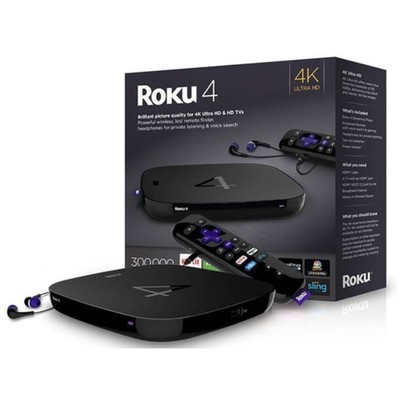
As part of its Gold Box deals of the day, Amazon has a refurbished Roku 4 for $53.99. It sells for $16 more at B&H in new condition.
When connected via HDMI this refurbished Roku 4 can stream compatible media to your TV in 4K resolution, allowing you to take advantage of every pixel that you bought. This is an older model, but the newer Roku Ultra is selling for $97, so it’s still worth considering.
Don’t forget, you can also grab a Fire TV 4K for $35 when you prepay for one month of DirecTV Now service or buy it from Amazon with an HD OTA antenna for $69.98.
See at Amazon
Huawei Mate 20, Honor 10, Nova 3, and more rumored for 2018 launch
Following the launch of the Mate 10 and Mate 10 Pro earlier this year, Huawei will take the stage once more on March 27 to introduce is P20 series. We already have a good idea of what to expect from that event, and thanks to a new rumor that’s popped up, we could have a look into Huawei’s other devices that are also scheduled for a 2018 release.

One user on Chinese social network Weibo recently shared screenshots of a spreadsheet for what’s supposed to be all of the upcoming phones Huawei will launch throughout the rest of the year. I advise taking all of this info with the usual grain of salt, but with that said, this is what’s being reported.
Huawei Mate 20 / Mate 20 Pro
Similar to the P-series, it’s said that Huawei will ditch the expected Mate 11 branding for its next Mate flagship in favor of the Mate 20. Both phones should be powered by the Kirin 980, have a 12MP + 20MP rear camera combo, 8MP front camera, and offer 4 or 6GB of RAM and 64 or 128GB of storage.
One area the phones will differ is with their displays. The Mate 20 will apparently have a 5.9-inch 2K display while the Mate 20 Pro will have a lower-res 6-inch 1080p one. It might sound odd for the Pro version of the Mate 20 to have the lesser-quality display, but this is actually similar to what we saw with the Mate 10 and Mate 10 Pro.
Pricing should start at ¥3899 for the Mate 20 and ¥4899 for the Mate 20 Pro with a launch window of October.
Honor 10 / Honor 10 Lite

The Honor 9 Lite
Huawei’s Honor sub-brand is known for kicking out quality phones at affordable price tags, and that shouldn’t be any different with the Honor 10 and Honor 10 Lite.
The Honor 10 will launch first in June, and it’ll be equipped with a 5.7-inch 1080p display, Kirin 970 CPU, 4 or 6GB of RAM, 64 or 128GB of internal storage, 12 and 20MP rear-facing cameras, and an 8MP front-facing one. Pricing will start at ¥2299. The Honor 10 Lite should come out later in December with the same display and Kirin 670 processor. Dual cameras will be present on the front and back with RAM configurations of 3 and 4GB, and pricing will start at ¥1299.
Nova 2 Lite / Nova 3 / Nova 3S
Huawei’s first entry in its Nova series for the year will be the Nova 2 Lite, and it’ll be the very first phone to launch with the company’s Kirin 670. The Nova 2 Lite will have a 5.6-inch 1080p display, and it’ll be offered in 4GB RAM/64GB storage and 6GB RAM/64GB storage configurations for ¥1999 and ¥2299, respectively, at some point in March.
May will see the launch of the Nova 3, and it’ll offer upgraded specs across the board. It’s reported to have a 6-inch 1080p screen, Kirin 960 processor, dual cameras on the front and back, up to 6GB of RAM, and as much as 256GB of storage. The Nova 3S will then make its debut in December, and while most of the specs will remain the same, it’ll get the newer Kirin 970 processor and a sharper 1200p display.
Enjoy 8 Plus / Enjoy 8 / Enjoy 8S
Lastly, we’ve got Huawei’s Enjoy series. The first of this bunch to come out is the Enjoy 8 Plus with a rumored launch of April. The phone will have a Kirin 670 processor with a 6-inch display, and you’ll get dual 13MP and 2MP rear cameras with an 8MP selfie shooter. The regular Enjoy 8 will follow this up in July, and while it’ll retain the Kirin 670 for the processor, it’ll have a cheaper 5.5-inch 720p screen with a single 12MP rear camera.
As for the Enjoy 8S, it’ll come out at the very end of 2018 with a Kirin 670 and 5.7-inch 1080 display. Dual cameras will be on the back with 2 or 3GB of RAM (same as the Enjoy 8 Plus), and pricing will start at ¥1099 (another thing it shares with the 8 Plus).
What are you most excited for?
With all of that out of the way, which of the above phones are you most excited for? Drop a comment down below and let me know!
PlayStation 4 : The Ultimate Guide

The extended user manual for all things PlayStation 4
Some of us have been PlayStation fans from day one, but this most recent generation of Sony’s infamous game console has really turned heads. The PlayStation 4 is not only a capable competitor in the market, the list of incredible games available for it is unrivaled. But there’s a whole lot more you can do with this console if you know where to look, and like all gadgets sometimes things go wrong and you need to troubleshoot a problem. So whether you’ve just bought your first PlayStation 4, or you just need a little help getting started, we’re here for you. In this article, we are going to document all of the resources you will need to ensure that your PlayStation experience is the best it possibly can be.
- What to do once you’ve finally set up your PlayStation 4
If you haven’t bought a PlayStation yet, we’ve also go the tools to help you out. Choosing your PlayStation might be difficult and if you ever plan on using a PlayStation VR you definitely want a PlayStation Pro. Aside from performance, you want to save money, and we want to help you do it. Buying products in bundles, especially if you already need the whole kit, can save you boatloads of money.
- Do you want a PlayStation 4 Classic, PlayStation 4 Pro or Slim PlayStation 4?
- The difference between a PS4 and a PS4 Slim
- Which PlayStation 4 is best for virtual reality (VR)?
- Save money buying these PlayStation Bundles!
Get to know the best hardware

Just like buying a new car there is always the option to get your possessions in a “fully loaded” style. Well, from the controllers to the headsets we’ve got all the information you’ll need to deck out your gear for the PlayStation. These accessories and upgrades aren’t just to improve the visual of your command center, but you can also improve the performance.
Last but not least, let’s take a moment to appreciate all the save files to our favorite games. The ones that, even if you don’t play for a few years, you never want to lose. PlayStation used to have an interchangeable memory card, but now it’s all on their internal hard drive. So if you’re running out of memory but don’t want to lose anything, you can also check out this list for the best external hard drives.
- The best PS4 controllers to own
- The best headset available for the PS4
- The best accessories available for your PS4
- The best travel accessories for your PS4
- The best charging stands for your accessories
- The best vertical docs for your PS4
- The best external hard drives for your PS4
- The best phone mounts for the PS4
The best fun to have on your PlayStation 4

While there are plenty of super cool apps to lose yourself in, one of the main reasons for owning a PS4 is for the games. As you know, exploring the PlayStation store from your console or even online can take hours and the only thing you’re going to do is wish your wallet was fatter. Well, you can save your time knowing that we’ve done most of the research for you! So instead of window shopping, check out these links here to get an idea of what people are already playing, and what you should be playing too!
Don’t forget to stay updated with our here on Android Central! Most of these articles are updated on a montly basis, so if you keep checking in we’re bound to have new content for you!
- Your favorite titles from PlayStation 2 that are available on PlayStation 4
- The best games for PlayStation 4 as of December 2017
- The best strategy games
- The best multiplayer games
- The best games for under $30
- The best free games
- Super cool demos you need to try out
- Every game that will release to PS4 this month
Help and how-tos

From troubleshooting to figuring out all the new commands for your console, we’ve got plenty of resources to help you out. Whether you’re a new PlayStation owner or just trying to figure something out you’ve never tried before, check out these links to see if any of these can help you out!
When buying a new PlayStation after already owning one
- How to transfer data from your old PlayStation 4 to your new PlayStation4
Navigating your PlayStation Store
- How to make a PlayStation Store Wishlist
- How to use PlayStation gift cards
- How to download from the Japanese PlayStation Store
Helpful how-to
- How to change the theme of your PlayStation 4 home screen
- How to eject a disk from your PS4
- How to use the share function on your PS4
- How to share your images off of PlayStation Network
- How to turn off auto-update for your games
- How to configure your audio controls
- How to wake up a PlayStation 4 with your phone
Troubleshooting
- How to deal with Blu-Ray problems
- How to get your PlayStation Move controllers to work with your Christmas tree (or any other crazy lights)
- How to fix your overheating issues
- How to use an external hard drive with your PS4
- How to enable HDR for PlayStation 4 on popular 4K TVs
Recommendations when owning a PlayStation console

So you’ve got everything settled, you know how your system works and everything is set up just the way you like it. Now you’re wondering if there’s anything more you can do to make your PlayStation scream “YOU” just a little bit more. Check out these links to see what choices you have, and how to get them done!
- What is PlayStation Plus and why do I need it?
- Should you wall mount your PlayStation 4?
- Customizing the lights on your PlayStation Conrollers
- What you can get with a PlayStation Plus account
Thoughts?
Do you have any questions regarding your PlayStation 4? What helpful hints would you like to see more of? Let us know in the comment section below!
PlayStation 4

- PS4 vs. PS4 Slim vs. PS4 Pro: Which should you buy?
- PlayStation VR Review
- Playing PS4 games through your phone is awesome
Amazon
 AIVAnet