


The settings you should change immediately after buying a new TV
It’s finally a good time to make the jump to a 4K TV. Prices have come down, HDR is up to snuff, and there are a bevy of great models to choose from. But once you bring your new TV home, you may want to take a trip through its settings and tweak a few in order to get the best possible picture.
If you peek into your TV’s settings, you’ll see a lot of features with catchy names — like “Ultra Black” or “Live Color.” Many of these features, however, are marketing gimmicks designed to sound impressive, one-up the competition’s spec sheets, and make the picture pop next to other TVs in brightly lit showrooms. In fact, many of them actually remove detail from the picture or cause distortions and artifacts that degrade picture quality. Here are the settings you’ll want to turn off for the best possible image.
The settings you should probably disable

Jump into your TV’s settings and head to the picture settings menu. Before you start tweaking, set the display’s mode to “Movie” (this is sometimes called “Cinema,” “Expert” or “Custom”). This will ensure that your basic brightness, contrast and color settings are as close to accurate as possible — at least, without going through a time-consuming calibration.
After that, you’ll want to head to the advanced picture menus to disable your TV’s post-processing features. In some cases, choosing that “Movie” picture mode may disable some of the below settings automatically — but it’s still a good idea to scour the settings menu yourself. Note that these recommendations apply to both standard and HDR TVs.
-
Dynamic Contrast: Sometimes called “Contrast Enhance,” this makes dark areas darker and bright areas brighter. That may make the picture “pop” a bit more, but in doing so, it’ll often crush blacks and whites, reducing the detail of the scene. It can also introduce color banding artifacts. Turn this off and you’ll ensure you’re getting the maximum amount of detail in the picture.
-
Black Tone: Similar to Dynamic Contrast, this attempts to make black areas look darker — but you can’t actually make your TV’s blacks blacker than they already are. Instead, this will make dark gray areas black, which will cause you to lose detail. It’s best to leave this off.
-
Black Detail: This is the opposite of Black Tone — it attempts to enhance details in dark areas by brightening them. You might think that’s a good thing, but in fact, it just causes the opposite problem: By lightening dark areas, you’re more likely to introduce artifacts.
-
Edge Enhancement: This feature attempts to make the image look a little sharper. That sounds good, but oversharpening can also create artifacts, like a “halo effect” around edges. In most cases, this should be left off.
-
Live Color, HDR+ Mode and Flesh Tone: All of these features introduce post-processing designed to enhance the color in some way. Live Color makes colors more saturated, HDR+ Mode attempts to make standard content look more like HDR, and Flesh Tone attempts to make skin pop. But if the movie you’re watching was properly mastered, the color should be fine; turn these off for the most natural-looking image. (Note that “Color Temperature” should not be lumped in with these features. You should leave that set to the Movie mode’s default, usually “warm.”)
-
Super Resolution, Reality Creation, Smooth Gradation and other Noise Reduction features: These attempt to make low-quality content look better, sharpening the picture and removing noise and other artifacts caused by digital compression or analog conversion. For high-quality content, like Blu-rays, these are best left off, since they can soften the picture. That said, you may want to turn them on for old DVDs (or even cable TV, if you find that it looks better).
-
Motion Interpolation: Every manufacturer has its own name for this. It goes by “Motionflow” on Sony TVs, “Motion Rate Supreme” or “Auto Motion Plus” on Samsung TVs, “TruMotion” on LG TVs and “Smooth Motion Effect” on Vizio TVs. Despite the different names, they all do essentially the same thing: generate more frames in between the already existing frames, for super-smooth motion. This is what causes that weird “soap opera effect” that so many people hate, and it can also introduce artifacts, so we recommend disabling it — unless you’re one of those people who actually enjoys it.
-
Auto Picture Mode: This is a feature on some Sony TVs that attempts to change your TV’s picture mode automatically based on what it sees on the screen. It’s generally a good idea to leave this off; the settings we recommend in this guide should work well no matter what you’re watching.
Note that not all TVs will have all these settings; cheaper panels, in particular, will have far fewer options. But this list should cover most of the image-processing settings you’ll see on popular TVs from big brands. At the end of the day, it’s all about what looks best to you. But if you want the most detail and the most accurate colors, as the filmmakers intended, we recommend disabling as many of these features as you can.

Will Lipman / Engadget
The settings you’ll need to try for yourself

Disabling all of the post-processing is the easy part. There are a few settings on your TV that can make the picture look much better (or worse), but which setting you should use depends a lot on your TV and what you’re watching. Here are a few settings you may need to experiment with:
-
Backlight: Most TVs have both a Backlight and a Brightness setting, and they do very different things. You should leave “Brightness” alone unless you’re calibrating your TV, as it affects the black levels. Backlight, however, you can set to whatever you want, as it just changes how bright your TV is. You’ll probably want it higher during the day, and lower if you’re watching in a dark room. (Your TV may also have an Energy Saving feature that attempts to adjust the backlight automatically.)
-
HDMI Range, Color Space, RGB Range or Black Level: This feature determines how the color signals sent to your TV are processed. If your TV lets you set this to Auto, leave it there. Otherwise, it should almost always be set to “Limited” (or “Low” in the case of some Samsung TVs). Make sure the devices plugged into your TV, like your game console or set-top box, are also set to “Limited.” “Full” is intended only for those who are using their TV as a PC monitor. (Note: On Sony TVs, Black Level is the same as Black Tone, and should be left off.)
-
24p Playback: Often called something like “Real Cinema” or “Pure Cinema,” this feature plays movies at 24 frames per second instead of using 3:2 pulldown. This is a rather complicated topic, but in short, it may remove some stutter when watching movies and TV shows. Some TVs do this automatically with no settings toggle needed, and some can’t do it at all. But if this setting exists, you’ll want to turn it on.
-
Local Dimming: This feature attempts to dim some of the LED lights in your TV to get darker blacks in certain parts of the picture. When implemented properly on full-array TVs, this feature can be great. On other TVs (especially edge-lit ones), it can lag behind the picture, darken certain areas too much, or cause flickering. Try this both on and off to see which you like better. This is called “Xtreme Black Engine Plus” on Vizio TVs. Sony TVs will have this, along with an “X-tended Dynamic Range” feature that does something similar with bright whites. Again, try it on and off to see what you like.
-
Game Mode: Intended for video games, this setting lowers the input lag of your TV to ensure that your button presses are registered onscreen as soon as possible. On some TVs, this comes at the expense of image quality. Try it on your TV — if it lowers the image quality of movies noticeably, you’ll want to turn it on only when you game.
-
Black Frame Insertion and PWM Dimming: Known as “Clear Action” on Vizio TVs, “Clearness” on Sony TVs, “LED Clear Motion” on Samsung TVs and “Motion Pro” on LG TVs — you’ll usually find this as a sub-setting under the Motion Interpolation setting described above. This feature inserts black frames in between the existing frames of the content you’re watching, which should reduce motion blur without introducing a strong soap opera effect. It will, however, cause the screen to dim considerably and flicker, which some people may not like, so try it on and off to see what you prefer.

There are hundreds of different TVs out there, and it’s impossible to cover every single setting you may come across, but this should give you a good idea of how to tweak your TV for close-to-optimal picture quality, without having to hire a calibrator or go through a time-consuming process yourself. If you find a setting that isn’t on the above lists, look it up online and see what people recommend — or sound off in the comments below.
Images: Vasquez / EyeEm via Getty Images (Color test); Will Lipman / Engadget (OLED starry sky); Vizio (TV settings menu); gorodenkoff via Getty Images (TV store)
Xiaomi aims to sell smartphones in the US by the end of this year
Xiaomi has long wanted to sell smartphones in the US, but there has always been something holding it back: overstretched resources, the challenges of making US-friendly devices, you name it. However, this might be the year it launches phones stateside… maybe. Chairman Lei Jun has revealed that Xiaomi intends to sell phones in the US market by the end of 2018 or early 2019. He didn’t outline details at this early stage, but he was aware that there would be hurdles to jump, including adapting to American regulations and accommodating customers’ needs. Xiaomi already sells fitness trackers and other accessories in the US, so some of the infrastructure is already in place.
It’s easy to understand why Xiaomi would make this push. The Chinese smartphone market is stagnating as rapid growth finally tapers off, for one thing. If Xiaomi wants to keep growing, it may have to shift its attention to untapped markets. Also, there’s been a percolating demand for its phones in the US — it’s no secret that American enthusiasts will import high-end phones like the Mi Mix 2 even though their network support can be patchy in the country.
With that said, Xiaomi may have to temper its expectations. When officials are pushing carriers to drop Huawei phones on the mere suspicion that they might be used for surveillance, it’s doubtful that another Chinese brand (particularly one with less brand recognition in the US) will fare much better. Xiaomi may have to be content with selling unlocked phones. It may have to be picky about the phones it brings over, as well. High-end phones like the Mi Mix series are a safe bet, but it’s a tougher call for budget hardware like the Redmi Note lineup or Mi A1. It could still be a viable market for Xiaomi — the company just isn’t likely to make Apple and Samsung nervous.
Source: Wall Street Journal
Netflix will let parents block individual movies and shows
Netflix announced today that it will soon be rolling out a new tool for parents. Already, parents can manage what their kids watch by putting all content above a particular maturity level behind a PIN or by marking which accounts belong to a child. But soon, parents will also be able to require a PIN for certain shows or movies. This way, parents won’t have to block full levels of content if they don’t want to and can instead just keep their children from watching certain titles. Additionally, maturity level ratings will also be displayed more noticeably on the screen when a new title begins playing.

Netflix’s changes come as a number of companies are working to make their platforms more child-appropriate. Apple plans to introduce more parental controls to its devices in the near future and YouTube recently had to deal with some disturbing content that was parading as kid-friendly. Gadgets geared towards children have also come under scrutiny as privacy concerns mount and Facebook’s new Messenger Kids app has attracted criticism for encouraging kids to spend more time on digital devices.
Netflix says its new controls will be rolling out in the coming months and that it’s also looking into how to make maturity level ratings more descriptive and easier to understand.
Via: VentureBeat
Source: Netflix
Microsoft is reportedly testing Cortana in Outlook mobile
Microsoft is reportedly testing an integration of Cortana and Outlook mobile. Sources told The Verge that the company is working on a version of Outlook for iOS and Android that has Cortana built right in and would allow users to ask Microsoft’s virtual assistant to read and reply to emails for them. With such an integration, you could, for example, ask Cortana to read you your emails or ask her to just read messages from specific people — all of which would be very useful for people on the go.
Cortana has been becoming more useful when it comes to emails. Last year, Microsoft introduced the ability for Cortana to scan your emails and remind you to do certain tasks and it also demonstrated a feature that would allow the assistant to sort and summarize your emails. Cortana can also now connect to Gmail accounts.
The Verge reports that the integration is currently being tested internally. If Microsoft decides to go forward with it, the feature would then go through beta testing prior to a public release.
Via: The Verge
Pizza Hut’s latest pizza-ordering shoes can also pause your TV
If you’re one of the many people who is bummed because your shoes can’t order pizza for you, boy do we have some news for you. Pizza Hut is bringing back its Pie Tops sneakers, which can order pizza at the press of a button, thanks to a Bluetooth connection with your phone and the Pie Tops app. Not only that, but the Pie Tops II can also pause your TV when your pizza is at the front door. How revolutionary.
Pizza Hut is the official pizza of March Madness, and it introduced the Pie Tops sneakers last year. However, this is the first time these beasts can actually be purchased. Pizza Hut and The Shoe Surgeon will make 50 pairs of these shoes available on hbx.com the week of March 19th, with more pairs to come later in the year — follow @PizzaHut and @Hypebeast on Twitter for more details. It is unclear how much they’ll cost, but honestly anything other than “zero dollars” is probably too much.
 The shoes will come in two different colors — red and wheat. There will be multiple size options available, including for women and teenagers. Ordering through the shoes snags you a two $5.99 two-topping medium pizza deal throughout the tournament. It’s not clear how a user can choose the toppings through the shoes; presumably the phone app will be involved in the specifics of ordering.
We’ve seen a lot of gimmick technology used for promotion (let’s not forget KFC’s chicken wing box that was also a drone), but you have to hand it to Pizza Hut here. At least these sneakers are, in and of itself, a useful item and you can use them once the promo is over as, you know, actual shoes.
Google sells restaurant review service Zagat
Google bought Zagat in 2011 with hopes of offering definitive restaurant reviews in its search results, but that dream is ending quietly. True to the rumors, Google has sold Zagat to The Infatuation, a restaurant discovery platform. The new owner will keep Zagat as a separate brand and increase its exposure while helping it with a “tech-driven platform” that provides a “more meaningful alternative” to crowdsourced review sites like Yelp. The terms of the deal aren’t public, although Google bought Zagat for $151 million.
Google hasn’t said why it’s selling Zagat, but the review brand hasn’t had an easy time. Its listings were quickly integrated into Maps and other Google services, but it was virtually silent from 2013 until the release of a reworked Zagat app and website in 2016. Google even started prioritizing its own user reviews over Zagat’s. Simply speaking, Zagat stopped growing while its rivals were on the rise.
In that regard, the sale might be beneficial. Google doesn’t need the cash, but there’s also no point to holding on to a brand when it’s no longer serving its original purpose. And for Zagat, this is a chance to regain its stature and adapt to the modern era.
Via: New York Times
Source: The Infatuation
What to expect from the Geneva Motor Show
The city of Geneva, Switzerland is about to become of the center of the automotive universe. Automakers from all over the world are descending upon the city to unveil their latest vehicles and Engadget will be there to keep you abreast of the breaking news. But first, we wanted to catch you up on what to expect from the show.
EVs
At this point it almost goes without saying that electrification (hybrids, EVs) will be a big part of this event. If a company shows off a concept car, expect it have some sort of electric drivetrain.
With that in mind, Volkswagen is going to unveil its latest I.D. vehicle, the Vizzion. The newest member of the automaker’s electric platform will be a showcase for autonomous driving. Yet, VW isn’t the only European car maker jumping even more into the world of electrons.
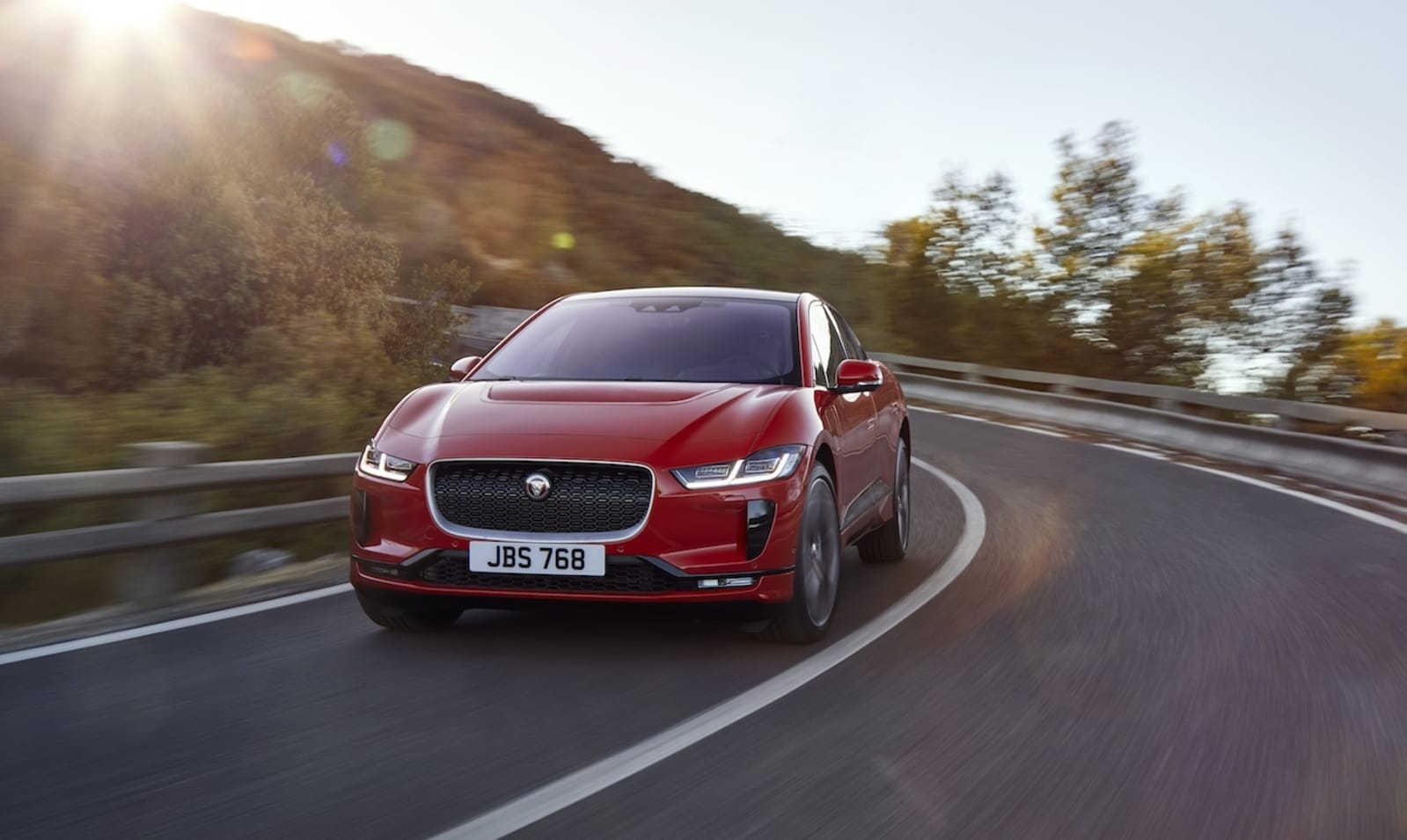
Jaguar will be showing off its I-Pace electric crossover which it unveiled last week. This will be our opportunity to see it up close and personal and make sure it’s worthy of the Jaguar moniker. This is the company’s first all-electric vehicle so a lot is riding on the SUV.
Meanwhile, Hyundai’s brand new Kona SUV is getting an electric version in Geneva. While not as flashy as a Jaguar, the Kona is a smart little crossover that could do well as an EV especially with a range of 292 miles.
For something a bit more outrageous than a Jaguar, Volkswagen and Hyundai, new automaker Rimac will be introducing its second all-electric supercar. Fans of Amazon’s The Grand Tour, might remember that Richard Hammond crashed one of the original Rimacs during filming. Hopefully, they keep him away from the company’s latest offering.
Also, the Italian designed, pure electric Giugiaro concept car will be premiering. It’s supposed to highly connected to the Internet of Things. So maybe it’ll be amazing looking and quick while also controlling your Wemo-paired lights.
On the rumor front, there’s talk of a Mercedes EV making a splash in Geneva. So far that’s all we’ve heard, but we’re excited to see what the German automaker has up its sleeve.

Plus, this will be Polestar’s first show. So we’re excited to see what Volvo’s performance brand will be bringing to the event.
Hybrids
The nearly bulletproof Honda CRV is expected to finally getting a hybrid variant. We’d also like to see an EV of this small SUV, but it looks like that’s not in the cards. At least not yet.
Bentley (yeah Bentley) is expected to unveil the Bentayga with a hybrid powertrain. So the uber rich can look stylish while also reducing some of their carbon footprint.

We’re also looking forward to seeing some surprise announcements about mobility, autonomous driving and of course, more electric cars. Just be prepared to stay up late for all the big reveals. Coverage starts March 6th at 8:00 AM Central European Time (2:00 AM ET/11:00 PM PT).
Click here to catch up on the latest news from the 2018 Geneva Motor Show.
Nintendo says Switch play time data hasn’t been deleted
Last week, Switch users began to notice that their activity log data had reset and play time from before March 3rd had been deleted. A number of Redditors reported the loss of play time data while a few of us here at Engadget noticed the reset as well. And for those who got a Switch when it launched last March, that could mean that up to a year of activity had suddenly disappeared. Nintendo has now commented on the issue and if you’re a Switch user you can breathe easy. Your data isn’t gone.
Some Nintendo Switch owners’ play activity info is displaying incorrectly, but play activity is still being recorded accurately in the background. A future system update will resolve this issue & ensure play time data is correctly displayed. We apologize for the inconvenience.
— Nintendo of America (@NintendoAmerica) March 5, 2018
In a tweet, Nintendo said that for some users, activity information is displaying incorrectly. However, players’ true activity is still being recorded accurately. “A future system update will resolve this issue & ensure play time data is correctly displayed,” said the company. Nintendo apologized for the problem.
Via: Polygon
Source: Nintendo
Netflix renews ‘Black Mirror’ for fifth season
Would it surprise you to hear that Netflix’s Black Mirror series is popular enough to justify more episodes? No? Well, we’re going to let you know regardless: Netflix has confirmed that Charlie Brooker and Annabel Jones’ technology-gone-wrong anthology show has been renewed for a fifth season. It’s not offering a release window or further details, but it’s safe to presume that Black Mirror will continue to explore new concepts and formats. Brooker has been adamant about wanting to avoid rehashing familiar ideas.
For Netflix, a fifth season is practically music to its ears. The streaming giant has been orchestrating a major sci-fi push as of late between Altered Carbon, Mute and its upcoming Lost in Space reboot, and more Black Mirror bolsters that effort. It’s also relatively rare in that Netflix doesn’t release every episode at once — Black Mirrors seasons typically arrive in two releases, giving you a reason to come back even if you’re the sort to marathon a series in one shot. As long viewership remains strong, more Black Mirror will likely remain a question of “when” rather than “if.”
The future will be brighter than ever. pic.twitter.com/slVeg3VPd7
— Black Mirror (@blackmirror) March 5, 2018
Via: Hollywood Reporter
Source: Black Mirror (Twitter)
Microsoft Planning to Integrate Cortana Into Outlook Apps for iOS and Android
Microsoft is planning to integrate its AI assistant Cortana directly into the Outlook mobile apps on iOS and Android, according to people familiar with the company’s plans speaking with The Verge. Cortana currently offers various email-related actions and commands on supported devices, but the assistant can not be called up within Outlook on smartphones.
Image by Tom Warren via The Verge
With the addition of Cortana, Outlook users will be able to hear their emails read aloud and respond to them with their voice. Details are still scarce, but the sources said that command phrases will include asking Cortana “What’s my email,” or asking to read recent emails from a specific contact.
The Cortana integration will allow users of the popular mobile email client to listen to and respond to emails with their voice. This will be particularly useful during car journeys, and Microsoft is testing Cortana integration directly within Outlook mobile that will work over Bluetooth and read messages aloud. Users will be able to ask Cortana phrases like “what’s my email,” or just to read messages from specific contacts.
The most recent Cortana-related iOS news saw the AI assistant’s iOS app gain native iPad support last month. Prior to that, Microsoft updated Cortana’s iPhone app last October with a revamped interface and improved performance.
Microsoft and Google each have apps dedicated to their AI assistants on the iOS App Store, aimed as competitors to Siri. The main limitation of the non-Apple assistants is that they lack system-wide functionality on iPhones and iPads, and can only work within their own apps.
Right now, the Cortana Outlook update is being tested internally within Microsoft and “if the feedback is positive,” then it will make its way to beta and public releases of Outlook on iOS and Android.
Tags: Microsoft, Cortana
Discuss this article in our forums
 AIVAnet