


Lawsuit claims Google failed to prevent sexual harassment
Google’s allegedly hypermasculine internal culture enabled serial sexual harassment of a female engineer, according to a new lawsuit. Loretta Lee, a developer at the search engine between 2008 and 2016 asserts that she was the subject of constant groping, touching and inappropriate conduct. Worse, is that Google, intentionally or negligently, allegedly failed to tackle her complaints, which left her feeling isolated and unprotected. Her performance suffered and she was fired at the start of 2016, even though the documents say that she was considered an excellent performer and a rising star in the company.
Lee claims that she was subject to harassment on a near-daily basis, including her colleagues making lewd comments about her. In addition, she asserts that her drinks were spiked with whiskey, her desk was regularly pelted with balls and she was sent messages by male colleagues asking if she wanted a “horizontal hug.” Another reportedly showed up at her home, unannounced, with a bottle of liquor and then refused to leave when asked.
Just before her dismissal, a male employee is said to have hid underneath her desk and, when she approached, jumped out. The desk-lurker then exclaimed “you’ll never know what I was doing,” leading Lee to believe that they may have installed surveillance equipment. A day later, and another co-worker is alleged to have toyed with her breasts in public, which led to a prolonged discussion with HR, although officials found the claims “unsubstantiated.”
The document then explains how Lee’s fear of being cast out was coming true, as colleagues would no longer approve her work. That, in turn, led to her being labeled as a poor performer and her eventual dismissal. Lee alleges that Google has a problem with identifying and properly tackling sexual harassment in the workplace. She is looking for in excess of $25,000 in damages for wrongful termination and discrimination,
It is the latest in a series of scandals about Google’s employee culture and its policies dealing with its staffers. One former worker was fired after publishing a misogynistic tract on the unsuitability of women for roles as engineers. Shortly after, another had their employment terminated, allegedly for criticizing the tract for being sexist and misogynistic. The more of these stories appear in the press, the more pressure will be heaped upon the search engine to “do an Uber,” and investigate its internal culture.
Source: Silicon Valley Business Journal, Mercury News, Sacramento Bee
UK asks Facebook to try harder in Russia-Brexit investigation
The end of 2017 saw Facebook launch an investigation into Russia’s use of the social network to influence the EU Referendum, aka Brexit. The company didn’t find anything nefarious, but the House of Commons asked that it continue its probe. Now, Facebook has delivered its findings — again suggesting no foul play — and UK officials remain unsatisfied with the conclusion.
Facebook used the same investigative measures it did to uncover Russian meddling in the 2016 US presidential election, where Russia-linked adverts were strategically placed in a bid to influence voting and exploit social divisions. Facebook says that despite reopening its initial investigation, it’s found no comparable Brexit campaign.
The House of Commons’ Digital, Culture, Media and Sport Committee (DCMS), however, has requested further information. In a statement, committee chair Damian Collins said: “I look forward to [Facebook] sharing with us, amongst other information: the exact number of accounts that they have suspended; how they are resourcing their fight against bots; their methodology of how they identify fake accounts; and how they determine what country those accounts come from.” Facebook has promised this additional data by March 14.
DCMS is taking a hard stance across the board, not just with Facebook. Only after asking Twitter to investigate its platform for a second time did the network uncover evidence of Russian meddling. Plus, the fresh requests to Facebook come just weeks after UK government accused Russia, in no uncertain terms, of last summer’s NotPetya cyberattack. Officials are clearly leaving no room for error.
Via: Bloomberg
An LG G7 showed up in Barcelona after all
After revealing an AI-powered version of its late-2017 flagship, LG seemed to be having a quiet MWC. As it turns out, the real action was happening elsewhere. Israeli news site YNET posted a brief hands-on of a smartphone called the G7 (NEO) that appears to pack a Qualcomm 845 chipset and a 6-inch, 19.5:9 OLED screen with a notch carved into the top. YNET’s report further suggests the device could come with either 4GB of RAM and 64GB of storage, or 6GB of RAM and 128GB of storage, as well as a 16-megapixel dual camera. Given its name and its apparent horsepower, this just might be the new flagship phone LG was planning to reveal after MWC, though the company stopped well short of confirming that.
An LG spokesperson told Engadget that the phone in question was a “concept,” and that LG never had this particular device at its main MWC booth. (That sadly means we couldn’t talk our way into some hands-on time of our own.) That spokesperson also added that “carriers and business partners always get to see early concepts” at trade shows like this one, which may indicate LG is trying to firm up its sales channel partners ahead of an upcoming announcement and launch.

Had LG shown this device off at MWC proper, it would’ve been in good company. Quite a few smartphone makers embraced notched screen designs this year. While some are relative unknowns — like Noa and Leagoo — ASUS notably paired a notched display of its own with a Snapdragon 845 in its new Zenfone 5Z. Like it or not, it looks like 2018 is going to be the year of the notch.
Given the G7’s concept status, though, it’s possible LG may not join the notch club after all. VentureBeat’s Evan Blass noted in a tweet that this might be a version of the G7 that was ultimately scrapped in favor of the “Judy” design and its super bright, low power display. If the rumors hold true, the Judy flagship will be announced sometime in June — looks like we won’t have to wait too long to start getting some actual answers.
Catch up on the latest news from MWC 2018 right here.
Interactive ‘#WarGames’ series goes live on March 14th
#WarGames is a new interactive series from Eko and Her Story creator Sam Barlow, and it’s set to hit Steam, Vudu.com, HelloEko.com and the Eko iOS app on March 14th. #WarGames is a fresh take on the 1983 film of the same name — minus the hashtag, of course.
Instead of following an unwitting high school student as he accidentally starts World War III through a computer simulation, the new version stars a team of international hackers and activists as they attempt to force peace on the world from their keyboards. Unsurprisingly, things don’t go as planned. The hacker group is led by Kelly, a young woman who’s set on a quest for justice after her mother, a sergeant in the US military, dies under a shroud of scandal.
However, that’s not the most interesting twist in this updated sci-fi series. While watching #WarGames, viewers will be able to choose which scenes to watch, deciding which characters and storylines to follow as the season plays out. The show tracks these choices and adapts accordingly, offering slightly different experiences for each viewer. #WarGames comes from Eko, a company that produces interactive narratives through proprietary technology.
This is all an expansion of the format Sam Barlow pioneered with Her Story, an independent game that gained acclaim in 2015 for its interactive, live-action storytelling mechanics. Barlow joined Eko in 2016, back when it was still called Interlude.
#WarGames is the first high-profile jam to come out of Eko, though the company has a handful of interactive series and documentaries that anyone can mess around with right now. The first season of #WarGames is six episodes, and aside from its launch platforms, the whole thing will be available on Xbox One “soon.”
Tesla Model 3 review: the fast and infuriating
I was standing next to the Model 3 when a guy on a bike rode by and yelled, “How is it?” My typical interactions with people who ask about Tesla’s affordable sedan (so many people asked me about the car), typically take about five minutes. I point out the highlights and issues I’ve encountered while driving. Without thinking, I threw him a thumbs up. It was a gut reaction to a car I’ve come to adore, but have also been confused by. I should have just yelled, “It’s complicated!
To say the $35,000 Model 3 is important to Tesla would be an understatement. Judging by its pre-orders (the highest the industry has seen), it’s already the most anticipated car ever. It’s the culmination of CEO Elon Musk’s nearly 12-year-old “master plan” to bring an affordable EV to market. Now that the Model 3 is here I can positively say it’s a joy to drive, but it’s also frustrating to do some of the simplest things in the cockpit. During a single trip I went from an electric-motor fueled grin on my face to throwing my hands up in exasperation trying to adjust the cruise control follow distance. So yeah, it’s complicated.
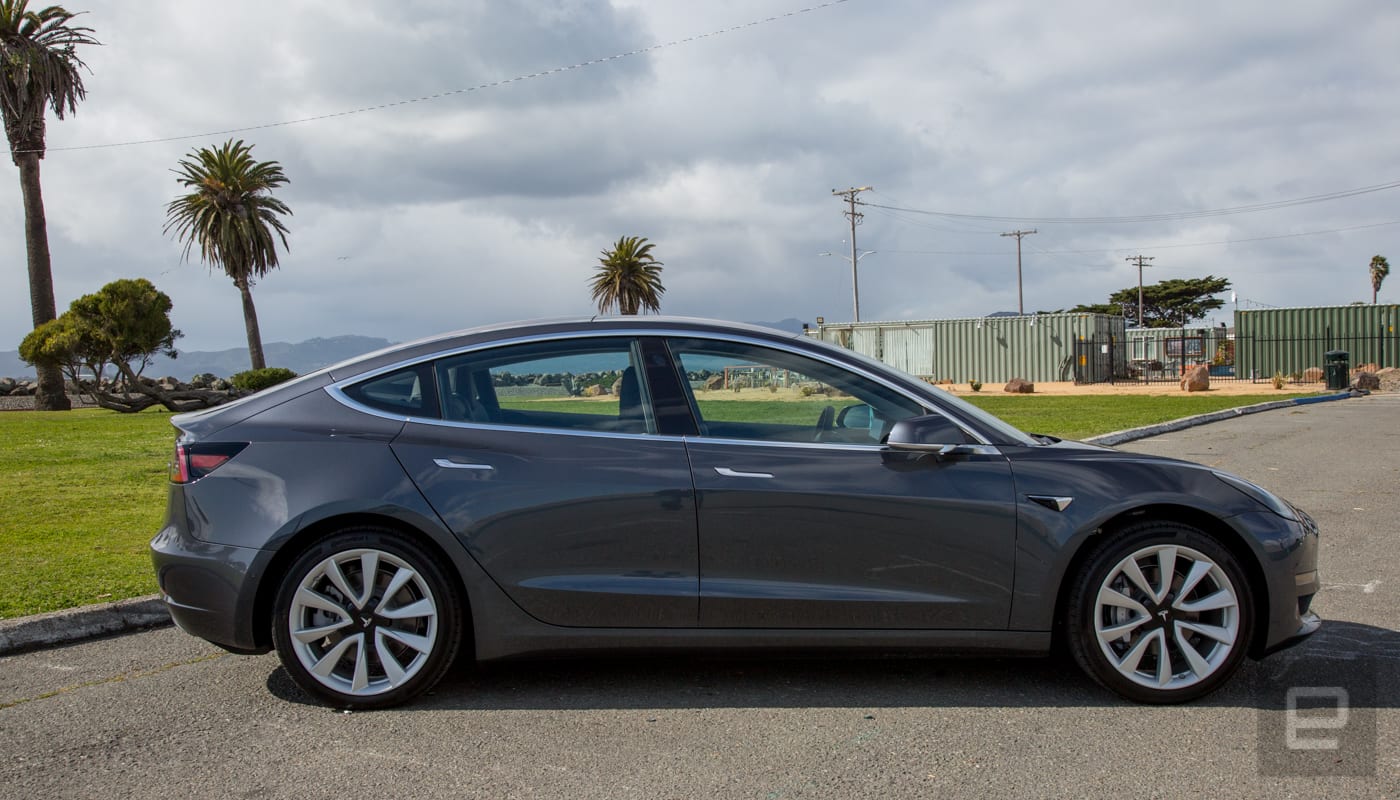
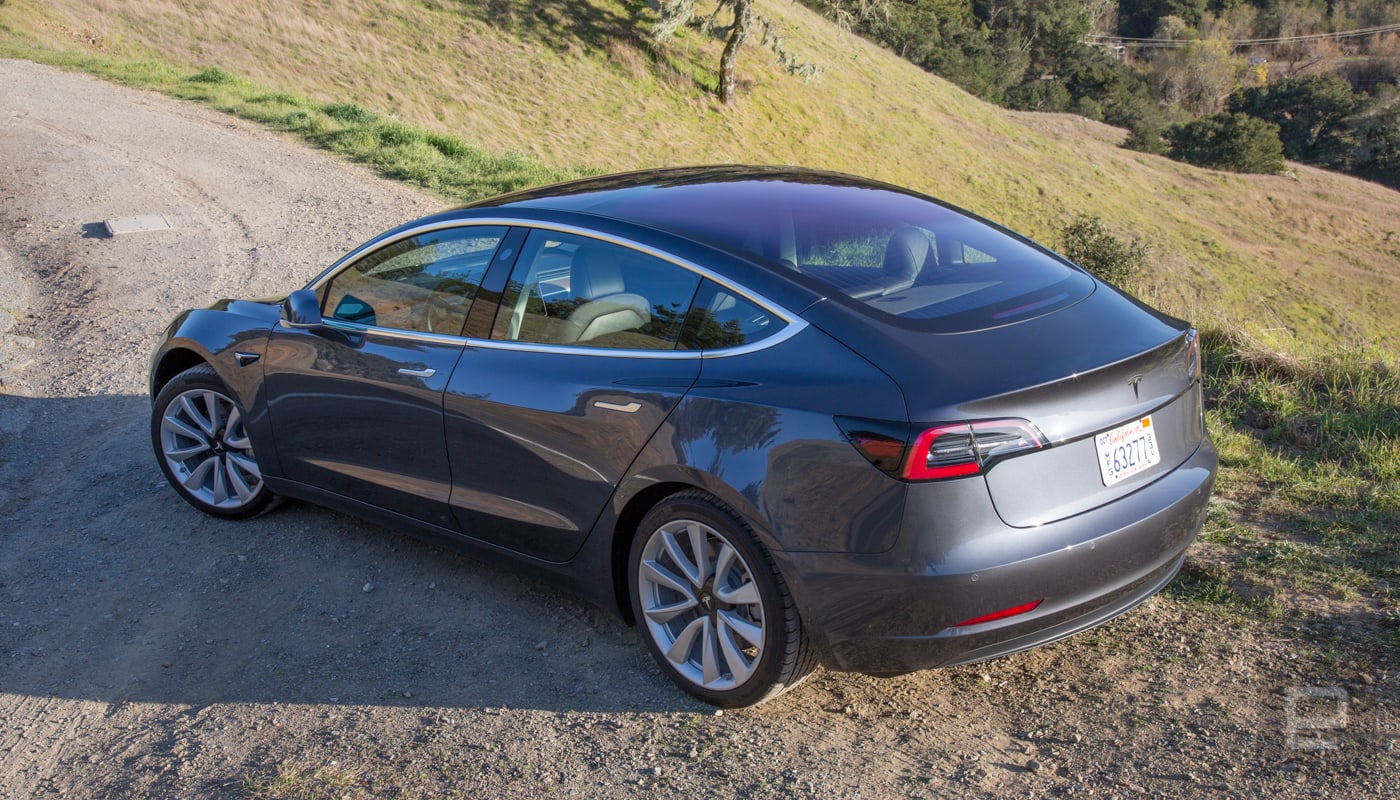
The relationship (and if you follow any Tesla forums or even hang out at a Supercharger station, you know the owners are in a relationship with their cars), starts out like all new affairs: filled with excitement. Behind the wheel, Model 3 is the best Tesla. I prefer it to the Model S (yes, even the P100D) as well as the Model X. It’s quick, but more importantly, nimble. It handles corners and is far lighter on its tires than the S or X. It doesn’t have the neck-snapping speed of Ludicrous mode, but the Long Range version’s 307 pounds of torque coupled with 271 horsepower make for a car that’s just asking the driver to punch the accelerator and hit a few curves.
The Model 3 also has a very smooth and nearly silent ride. It’s quieter than most other EVs and it glides almost as well as a mid-tier luxury sedan. With a range of 220 miles for the base model and 310 for the Long Range edition, you’re going to be spending a good amount of time behind the wheel instead of sitting at a Supercharger.
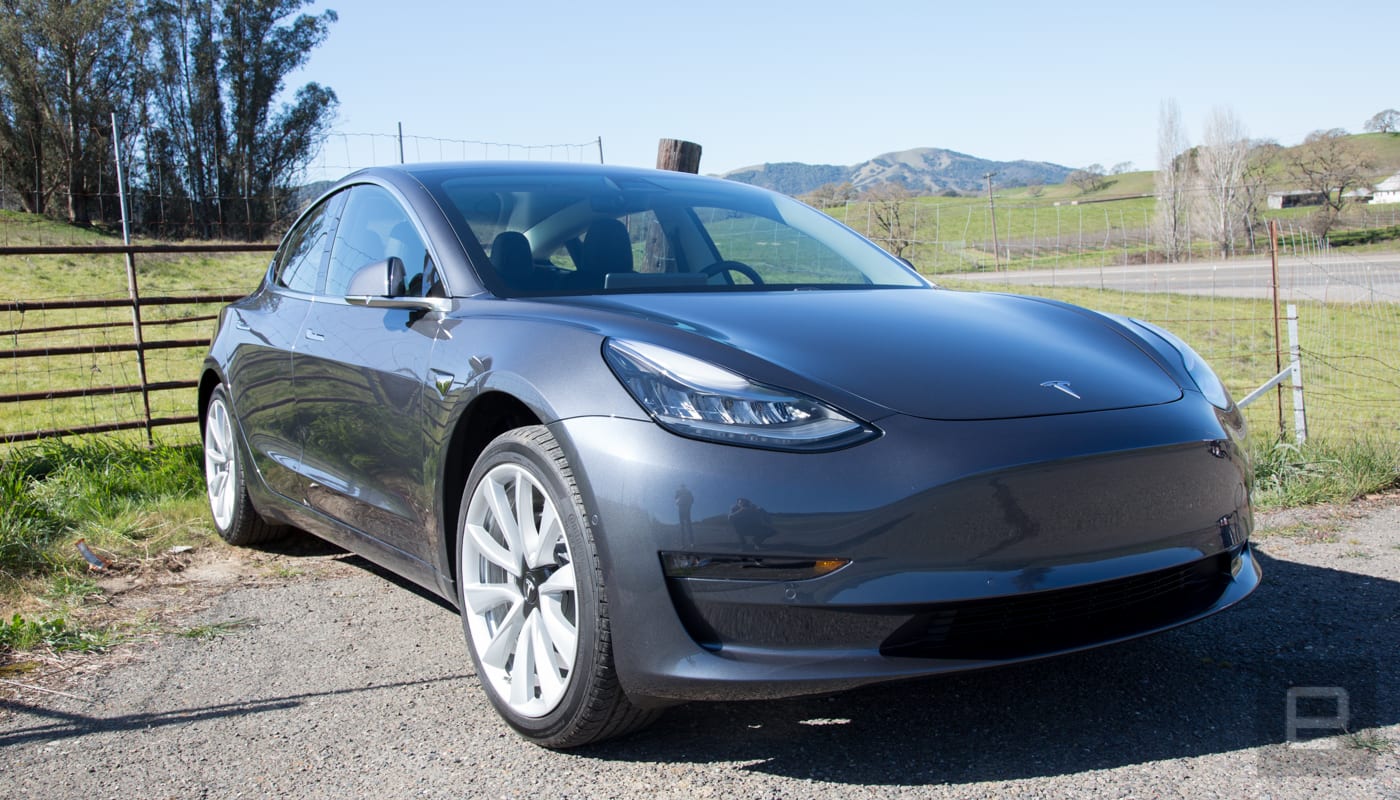
Yet, no matter how engrossed you are in the act of driving, the interior of the Model 3 will probably manage to confound you at some point. Some things are just too complex.
The act of driving is more than just pressing the accelerator and pointing a car toward its destination. While you’re on the road you turn things on and off and adjust various settings. At any given moment, h I’m changing the temperature or the volume of the radio, adjusting mirrors, using navigation, fine-tuning cruise control and sometimes even adjusting my chair. It’s a dynamic experience. As you’ll quickly find out, Tesla has moved some of these controls to submenus on the Model 3’s giant 15-inch display.
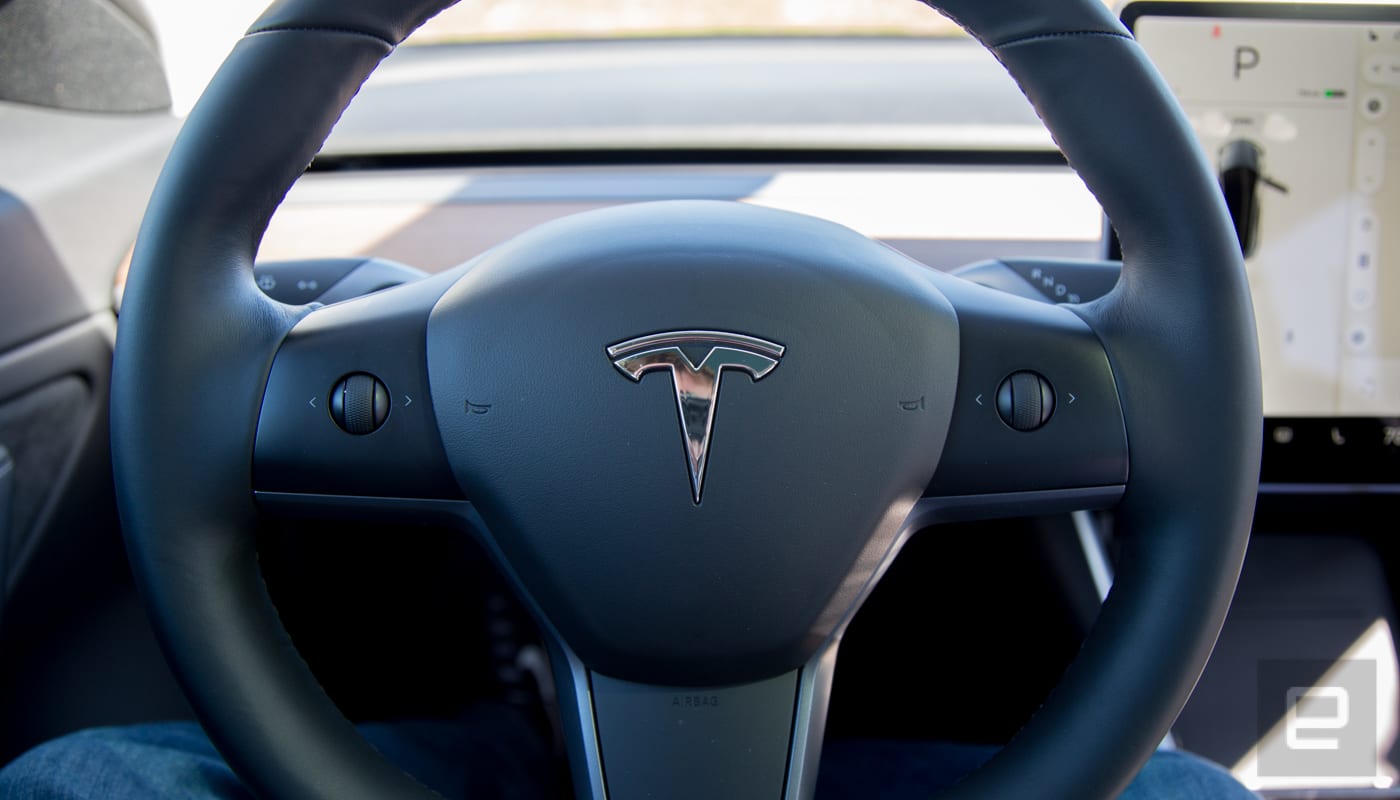
To be clear, there are hardware controls in the car, including two buttons on the steering wheel and two stalks on the steering column. The right stalk controls the transmission and turns autopilot on and off. The left stalk is the blinker control and is used for a single wipe and cleaning the windshield. The buttons are programmable by Tesla, but the left one is mostly for controlling your media. But that’s it and the hardware (or lack thereof) situation creates a bunch of issues pertaining to usability.
The first time I noticed this I was using Tesla’s semi-autonomous Autopilot feature. The controls for adjusting the top speed and follow distance of adaptive cruise control are on the wheel and steering stalk on the Model S and X. They’re easy to adjust without looking. On the Model 3 you have to tap the display to adjust the cruise control speed. Even worse, you have to go into a submenu to adjust the adaptive cruise control follow distance. First you tap on the car icon, then find and tap on “Autopilot” in the screen that pops up. Finally, you adjust the follow distance by tapping plus or minus. That’s not even close to a better experience and it’s potentially dangerous because instead of using muscle memory to find and adjust a physical item, you’re reaching and tapping while looking to the right.

Plus, a few times instead of tapping Autopilot, I hit something else because of a bump. That’s an ongoing issue with in-car touchscreens that every automaker should be aware of. But it didn’t stop Tesla from making that display the car’s primary input device.
Adjusting the mirrors also requires a few taps before they become adjustable via the two steering wheel buttons. Typically these are fixed before you start driving, so it’s not that bad. But the wipers, that’s a different story.
As noted earlier, you can enable a single swipe or a cleaning of the windshield via the left stalk. But, anything beyond that requires using the touchscreen. The Model 3 does have automatic wipers, which work well most of the time. During a rainstorm, however, it took longer than I was comfortable with to engage and didn’t wipe fast enough for my liking. So, to speed them up, I had to reach over and tap the speed I wanted.
If this were any other car or automaker that would be it. I’d tell you that these usability issues make an otherwise amazing car a pain to drive. But Tesla’s cars evolve while sitting in your driveway and apparently, they’re already working on these issues.
The ability to adjust the adaptive cruise control speed is coming to the right hardware button on the steering wheel. The wipers are also getting an update that puts a shortcut to start them on the left stalk. Both of these will arrive in the form of over the air updates. No word on whether the adaptive cruise control follow distance will also receive hardware-button support.
This is where the company shines: the ability to take feedback from owners and reviewers like myself and fix things with a software update. But, I can’t review a car based on what it’ll do in the future. I have to make my assessment based on what’s available now. And right now, I’m bewildered as to why these decisions were made in the first place.
I’m also annoyed by the lack of a dash cluster behind the steering wheel. The display that was in front of the driver on the Model S and X has been relocated to the left side of the touchscreen display. So, you’re looking to the right not just for your speed, but to see what gear you’re in, to see what the sensors see (which is especially important while parking), and to check on blinkers. It’s weird for the left blinker to be flashing in your right eye.
The lack of a display ahead of the driver is even more noticeable at night. After decades of having something glowing behind the steering wheel, complete darkness from that part of the car is eerie.
Tesla isn’t the first automaker to move the speedometer to the center of the dash. Mini did it decades ago. In fact, I own a Mini with the speedo in the middle of dash. I hate it. I’m not a fan. It wasn’t enough to dissuade me from buying and enjoying my car. But it’s something to keep in mind when you’re thinking about the Model 3.
These are dramatic changes from the Model S and X. Thankfully, though, some things do carry over from those two vehicles. Even though this is the affordable Tesla (its starting price is less than half the price of the base model Model S), if you plunk down $5,000 for the Autopilot option, you’re getting the same experience as the other models. Tesla continues to refine its semi-autonomous system, which is one of the best in the industry. The Model 3 had very few problems staying centered in its lane and tracking cars. The auto lane-change option feels a bit more aggressive than the last time I drove a Tesla. Most of the time it was fine, but in one instance it quickly changed lanes, then immediately started braking enough to catch everyone in the car and the vehicle behind me off guard. It’s a reminder that none of these systems are ready to be left on their own.
Another place where the Tesla excels is its voice control. Even when I flubbed the names of locations, it figured out what I was trying to say. “Umpire State Building” was quickly changed to Empire based on context. It did an outstanding job handling building numbers and parsing the names of friends I wanted to call. Currently, the feature controls navigation, the phone and media playback. But Musk said on Twitter that in the future, voice control would be integrated more into the vehicle’s control which is great news. But it’ll be better when that actually happens.
Definitely. You will be able to do pretty much anything via voice command. Software team is focused on core Model 3 functionality right now, but that will be done soon, then we will add a lot more features.
— Elon Musk (@elonmusk) January 15, 2018
In short, there’s a lot coming to the Model 3 — eventually.
That’s what’s so infuriating because being behind the wheel of the Model 3 puts a smile on my face. It delivers on so many levels and yet, when I have to do things that would be simple in any other car, here it involves tapping and swiping when I should be looking at the road. That’s frustrating. If this were a horrible car, it would be fine, you chalk it up to an overall failure of the automaker. A bad vehicle is a bad vehicle. But it’s not. It’s a great car held back by weird decisions. Tesla says it’s working on these issues. That’s great, but I can’t judge a car I haven’t driven yet.
So I have to caveat the hell out of this car. It’s great on the road and the tech is top notch but using some of the most important features are a pain and potentially dangerous to operate. The plus side (but not really), is that if you order the car today it’ll be 12 to 18 months before it’s delivered. By then, hopefully, Tesla will have a user interface that’s worthy of a car as great as the Model 3. Because right now, it’s complicated.
Source: Tesla
DisplayMate: Samsung Galaxy S9 Beats iPhone X With ‘Best Performing Smartphone Display’
The OLED display on the Samsung Galaxy S9 is the best smartphone display on the market, according to lab analysis by DisplayMate. The screen on Samsung’s latest handset showed consistent Top Tier display performance and became the first display to receive All Green ratings in all of DisplayMate’s lab test and measurement categories.
Based on our extensive Lab Tests and Measurements, the Galaxy S9 has an Impressive Display that establishes many new Display Performance Records, earning DisplayMate’s Best Performing Smartphone Display Award, and receiving our highest ever A+ grade.
Last year, DisplayMate praised the iPhone X as having the “best performing smartphone display” on a smartphone. It also congratulated Samsung – Apple’s iPhone X screen supplier – for developing and manufacturing the “outstanding” OLED panel, but said that it was actually the Apple-developed “Precision Display Calibration” that made the biggest difference, since it transformed the OLED hardware “into a superbly accurate, high performance, and gorgeous display”.
However, the Galaxy S9 has now knocked iPhone X off the top spot in DisplayMate’s rankings, matching or setting new smartphone display records in several categories including highest absolute color accuracy, highest peak display brightness, largest native color gamut, highest contrast ratio, and lowest screen reflectance. Yet despite all that, the 3K 2960×1440 panel in the S9 is said to have the same power efficiency as the one found on the Galaxy S8 and Galaxy Note 8.
DisplayMate found that the color accuracy of the Galaxy S9’s 5.8-inch display is “visually indistinguishable from perfect”, thanks to a record-setting high absolute color accuracy of 0.7 JNCD, which is “almost certainly better than your existing smartphone, living room 4K Ultra or HDTV, Tablet, Laptop, and computer monitor”. The 2,960 x 1,440 display, with 570 pixels per inch, also set a new reflectance score record with a 4.4 percent reflectance level, which measures display readability in bright conditions.
DisplayMate concluded by emphasizing the “tremendous performance advantages” that OLED displays now have over LCDs, which it said secured OLED as “the definitive premier display technology for Top Tier Smartphones in the foreseeable future over the next 3-5 years”. Out of the three new iPhones Apple is rumored to be introducing later this year, two are said to be OLED models measuring in at 5.8 and 6.5 inches, and one is a 6.1-inch lower-cost LCD model. All three are expected to feature Face ID and edge-to-edge displays.
According to KGI Securities analyst Ming-Chi Kuo, the 5.8-inch model will have a display with 458 pixels per inch, indicating the same 1,125 x 2,436 resolution of iPhone X, while the larger “Plus size” 6.5-inch model will offer 480 to 500 pixels per inch. Bloomberg has said the larger model will feature a screen resolution of 1,242 x 2,688, which would put it closer to the pixel density of the 5.8-inch display.
Apple is reportedly sourcing the majority of its OLED displays for the 2018 iPhone lineup from Samsung, but LG Display could provide displays for the 6.5-inch OLED iPhone, and Apple could also tap Sharp and Japan Display for extra supply.
Related Roundups: iPhone X, 2018 iPhonesTags: Samsung, DisplayMate, Galaxy S9Buyer’s Guide: iPhone X (Buy Now)
Discuss this article in our forums
Google Launches Slack Competitor ‘Hangouts Chat’ With Emphasis on AI Chat Bots
Google this week announced that its workplace chat app for Mac, PC, iOS, and Android, called “Hangouts Chat,” has come out of the Early Adopter Program beta and will be available to anyone who pays for a core G Suite service. Hangouts Chat is an expansion of Google’s Hangouts platform and the company’s answer to services like Slack, HipChat, Workplace by Facebook, and Microsoft Teams (via TechCrunch).
Google’s app emphasizes a few unique artificial intelligence features available for users, involving various chatbots. In one example, Google shows how one person could ask a @Meet bot to “Plan a review meeting next week,” and then the bot would communicate with Google Calendar to find the best time for all employees involved in the chat, create the meeting, and then add it to each person’s calendar.
App connections include the typical G Suite apps that will come alongside Hangouts Chat, including Docs, Sheets, and Slides, and Google said the workplace chat service will come with 25 bots pre-installed, created by third-party developers. Companies that have already confirmed bots include Xero, Freshdesk, Kayak, Egnyte, and more.
Use artificial intelligence to speed up workflows. When your teams collaborate in Chat, you can speed up manual work, like booking conference rooms, searching for files and more using artificial intelligence.
Schedule meetings, create tasks, or get updates from your team right within Chat. In addition to useful integrations with G Suite apps, Chat connects to several third-party tools, helping you manage all of your work in one place.
At launch, Hangouts Chat supports 28 languages and each room can include up to 8,000 members. In terms of security, Google said Hangouts Chat will follow the G Suite promise of a “security-first ecosystem,” with features like single sign-on, two-factor authentication, admin settings, integration with Google Vault, and more.

For businesses that embrace Hangouts Chat, Google noted that it is compatible with the original Hangouts software, so it will surface the user’s existing contacts when they sign up. The company said it’s rolling out the new app over the next week for G Suite users at no additional cost to their subscription. Once launched, Hangouts Chat will be available on Mac, PC, iOS [Direct Link], and Android devices.
Tag: Google
Discuss this article in our forums
Apple Pay Promo Celebrates Oscars With $5 Off Two or More Fandango Movie Tickets
One week after launching an Instacart promotion for Apple Pay users, Apple’s latest offer for Apple Pay customers is $5 off movie tickets with ticketing service Fandango.
To get the discount, Apple said that you’ll have to order two or more movie tickets in a single transaction within the Fandango app [Direct Link] or on Fandango.com, enter the promo code “STARPOWER” at checkout, and then choose Apple Pay to complete the order to receive $5 off the total.
The promo is tied into the upcoming 90th Academy Awards ceremony and aimed at moviegoers planning on heading to the theater this weekend, expiring on Sunday, March 4. Apple also encourages customers to “Look the part” for their movie night and use Apple Pay at Barneys New York and Ulta Beauty. The company also continues to promote Apple Pay Cash, this time as a solution for you to pay back your friend for the Fandango promotion, since one person has to make the order in a single transaction.
Fandango was one of the first partnerships that Apple launched as a way to promote Apple Pay, also including Postmates, two promos for Instacart, and more.
Note: MacRumors is an affiliate partner with Fandango. When you click a link and make a purchase, we may receive a small payment, which helps us keep the site running.
Related Roundups: Apple Pay, Apple DealsTag: Apple Pay promo
Discuss this article in our forums
Samsung Galaxy S9+ is the best smartphone camera DxOMark has ever tested
This is a great early indication that Samsung has something special here.
Few things changed in the Galaxy S9+ over its predecessor, but the one fundamental shift was in its camera hardware. Going with an all-new sensor, physically changing aperture and a secondary telephoto lens, Samsung knew it had something worth talking about. And according to DxOMark, it worked: the Galaxy S9+ received its highest-ever mobile rating of 99.

The Galaxy S9+ got to that combined score of 99 with big help from the “photo” portion of DxOMark’s testing, where it scored 104. It said that the GS9+ was great at controlling noise and had great colors, but was held back slightly by exposure instability and color fringing. The “video” score was a bit lower, at 91, with great stabilization and noise control but also loss of fine details in most conditions.
This all looks extremely promising.
Those keeping up with this sort of thing will know that’s just one point higher on DxOMark’s score table than the Google Pixel 2, which has been lauded by just about everyone as a fantastic photographic tool. It’s also two points higher than the Huawei Mate 10 Pro, and five higher than the Galaxy Note 8. Remember that DxOMark’s scoring system is not a fixed scale of 1 to 100 — you can read a bit more about its methodology here and also here.
We’ll need to spend far more time with the Galaxy S9+ to make our own conclusions on the camera, but seeing a great score out of DxOMark is a good indicator of the class of camera we’re dealing with here.
Samsung Galaxy S9 and S9+
- Hands-on with the Samsung Galaxy S9 and S9+
- Galaxy S9 and S9+: Everything you need to know!
- Complete Galaxy S9 and S9+ specs
- Galaxy S9 vs. iPhone X: Metal and glass sandwiches
- Galaxy S9 vs. Google Pixel 2: Which should you buy?
- Join our Galaxy S9 forums
Verizon
AT&T
T-Mobile
Sprint
Is the Galaxy S9+ too big of a smartphone?
It’s better than you think!
At MWC 2018, Samsung announced two new phones – the Galaxy S9 and S9+. Both handsets are very similar to one another, but only the S9+ gets two rear cameras, a larger 3,500 mAh battery, and 6GB of RAM as opposed to 4GB.

However, along with these increased specs, the S9+ is also a physically bigger phone (158.1 x 73.8 x 8.5mm and 189g, to be exact).
One of our forum members reached out to the community to see what other people thought about the Galaxy S9+’s size, and these are a few of the top responses.
VW Maverick
02-27-2018 11:56 AM“
I found the S8 Plus to be perfect for my use.
The S9 Plus is 1 mm bigger and will weigh slightly more.
Go to a store and hold the S8 Plus which will give you a very close ideal of the upcoming 9.Mav. 😎
Reply
tuckertje01
02-27-2018 12:48 PM“
I’m a female with small hands and my S8+ is perfect for me, feels good and easy to handle.
Reply
tube517
02-27-2018 01:04 PM“
I’m used to phablets/big screens so the S8+ is actually thinner than what I’m used to. It’s a great phone, though. I have had no issues with it.
Reply
hasasimo
02-27-2018 02:43 PM“
YES, it is too big in my opinion. I’m 6’1″ with proportionate hands. I’ve owned huge phones like the Lumia 1500 and currently own a Note8. Just because you can do most tasks with one hand on a big phone doesn’t mean it’s the most ideal or comfortable experience.
Keep in mind: It’s not just about the width or height of the phone, how thick the device is factors-in as well. You should be looking…
Reply
Now, we want to hear from you – Do you think the Galaxy S9+ is too big of a phone?
Join the conversation in the forums!
Samsung Galaxy S9 and S9+
- Hands-on with the Samsung Galaxy S9 and S9+
- Galaxy S9 and S9+: Everything you need to know!
- Complete Galaxy S9 and S9+ specs
- Galaxy S9 vs. iPhone X: Metal and glass sandwiches
- Galaxy S9 vs. Google Pixel 2: Which should you buy?
- Join our Galaxy S9 forums
Verizon
AT&T
T-Mobile
Sprint
 AIVAnet