


Fake version of top Bitcoin wallet appears on iOS App Store
An app pretending to be a popular cryptocurrency-storing wallet site, MyEtherWallet, has soared to the top of the iOS App Store, following a great weekend for Bitcoin as prices soared by 20 percent, exceeding a price of $17,000 per Bitcoin.
The app in question, priced at $5, makes no claims to be the popular website, despite sharing a name, and a quick browse of the creator’s past apps only reveals two panda-themed fighting games, and a handful of other apps — none related to Bitcoin or cryptocurrency.
The official MyEtherWallet Twitter account posted an update, urging users not to download the app, and revealed that the app has been reported to Apple.
This is NOT US. We have file reports and emailed and reported. Would appreciate the communities assistance in getting these scamtards out of our lives.
PS: We are #Foss4Lyfe https://t.co/SmI8cqNvxA
— MyEtherWallet.com (@myetherwallet) December 10, 2017
The importance of a wallet in regard to cryptocurrency is much the same as with real-life currency; a wallet helps to keep your funds safe until you’re ready to spend them. Given the enormous value of Bitcoin, and the recent boom, it’s worth investors’ time to ensure that the wallet service they choose is fully secured and safe, since losing their Bitcoin could cost them thousands of dollars. There’s nothing to overtly suggest that MyEtherWallet is not a legitimate wallet service, and the name could well be a coincidence — but Bitcoin-owners would be wise to avoid this particular app for now, especially given the lack of any development history with cryptocurrency.
Bitcoin has been in the news a lot of late, with its currency value continuing to rise. PC videogame retailer Steam recently stopped allowing use of the currency for sales of its games, but the popularity of Bitcoin has continued nonetheless, with investment firms planning to offer Bitcoin-based futures. While many people assume the bubble will burst eventually (and have even gone as far as to set up A.I. programs to predict when it will), investing in Bitcoins is still an option if you’re looking for volatile, short-term investment opportunities. We’ve put together a guide on how to buy your first Bitcoin, and how to get your systems set up. Or if you’re willing to invest a whole lot more, you can look into mining your own Bitcoin by setting up your very own mining rig.
Editors’ Recommendations
- Bitcoin reaches new heights, surges beyond $7,000 in value
- An estimated $30 billion in Bitcoins may be lost forever
- The value of cryptocurrencies is on the rise, but so are the risks from hackers
- Nearly $64 million in bitcoin is missing following NiceHash marketplace hack
- Major investment firms are preparing to offer Bitcoin futures
What happens when you ‘pause’ Project Fi service?

This is one of the things that makes this carrier great.
Project Fi does a few innovative things that set it apart subtly from other carrier offerings, and one of the lesser-advertised features is the ability to “pause” service on a whim without any hoops to jump through. Pausing service isn’t something offered by other carriers, and lets you simply disable your phone for as long as you want and instantly resume service with the press of a button.
This isn’t something you’ll be doing all the time on Project Fi, but it does turn out to be a neat feature. We’re going to show you how it works.
Why you’d want to pause service, and what happens

So what exactly happens to your phone when you pause Project Fi service? Just as it sounds, it puts the brakes on all aspects of your phone — no calls, texts or data will work until you resume service again. Of course your phone will still connect to Wi-Fi and work for everything but calls and texts. You’ll still be able to make emergency calls, as you would in a phone without a SIM, but you won’t be notified of texts or calls that were missed during the paused service. Anyone who tries to text your paused number will get an error saying the number isn’t active, and incoming calls just won’t arrive.
It immediately sounds like a great way to save money, but understand everything that happens first.
It sounds like a great idea to regularly pause service, particularly if your Project Fi line is a secondary device, but also keep in mind that you lose the ability to use your Project Fi number everywhere when it’s paused. That means you can’t make or receive calls via Hangouts on your computer, text on other phones via the Hangouts app, or have calls to your Fi number forwarded to other phones with active cell service — everything stops. Unfortunately the warnings about pausing your service aren’t super clear about this point, and when you go to send text messages from other device they appear to go through, but don’t.

Advertisement
If you do choose to pause service, there’s a reward involved. You’re refunded a portion of your $20 “Fi Basics” charge for every day of service that you are paused. Just like the refunds that are given for unused data, every day that you have your Fi service paused you’ll get back about $0.66 as a refund on your next bill.
As soon as you pause service you’ll immediately see a refund posted on your dashboard for the entire remainder of the billing period, but of course that isn’t finalized until the month is over. If you happen to resume service within the same billing period, the amount of time you were paused is calculated and the proper refund amount is posted. For example we paused our service for just over 24 hours, and were issued a $0.75 refund that’ll be applied to our next bill.
This feature is incredibly important if you want to keep a Project Fi account active for use with the eSIM inside your Google Pixel 2 or 2 XL when you travel internationally, but intend to still use another carrier most of the time. When you aren’t using your backup Project Fi service, you can just disable it and not pay a cent.
How to do it if you decide it’s right for you

The ability to pause service isn’t hiding from view, but it also isn’t exactly something that’s advertised as a feature of Project Fi. If you open up the Fi app or website, in the plan details area you’ll see a simple button that says “pause service.” Select it, and you’ll get a roundup and reminder of what happens if you choose to pause. Confirm your decision, and your phone’s cellular functions will stop working almost immediately.
You’re notified from the moment you pause service that it will automatically resume three months from that date, but of course you can resume service at any time by again opening up the Project Fi app or website. When you resume it’ll take a couple minutes to switch back on, and rebooting your phone at the same time is a good idea. But you’ll be back up and running in no time at all.
Advertisement
The ability to pause service is pretty great if you will have literally no need for your phone over a set period of time. For example if you’re going on a long camping trip in an area where you won’t have cellular service anyway, you could simply pause service just before you leave, and come home after a long weekend to a $3 or so refund. It’s also a great choice if Fi is a secondary line that you only want to use sometimes but don’t rely on the phone number for regular use.
Google Project Fi
- What is Project Fi?
- Get the latest Project Fi news
- Google Pixel 2 review
- Moto X4 review
- Discuss Project Fi in our forums
- Sign up for Project Fi!

What’s your favorite weather app?
These are the apps our forum users rely on for keeping up to date with Mother Nature.
We’re quickly getting well into December, and for some of us, that means colder temperatures, plenty of snowfall, and brisk winds. Having a reliable weather app on your phone is important no matter where you live, but especially for folks living in a northern part of the world around this time of year, being able to plan out your day based on how many inches of snow you’ll be battling with is essential.
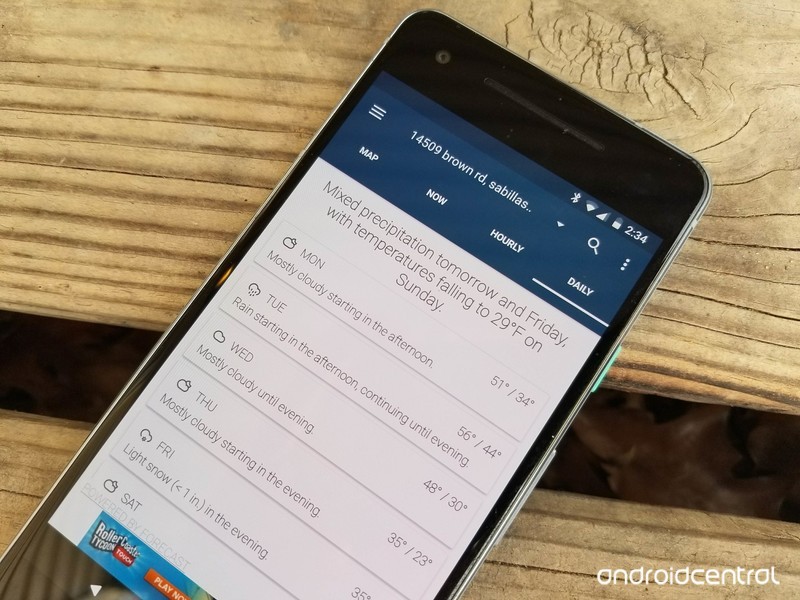
The Google Play Store is home to more than a few weather apps to choose from, and to help make your decision between all of these a bit easier, some of our forum users recently got to talking about which one is their favorite.
cbreze
12-09-2017 01:14 PM“
I have been using weather timeline for quite sometime on various devices and like it alot. The assorted amount of widget options is awesome as well as the tweaks you can make to each one.
Reply
Rukbat
12-09-2017 01:27 PM“
Have you tried Weather Underground: Forecasts? Minimal widget if you prefer, but the app, if you tap the widget, has a lot of information.
Reply
bhatech
12-09-2017 04:45 PM“
Use today weather, looks and works great.
https://play.google.com/store/apps/details?id=mobi.lockdown.weather
Reply
Morty2264
12-10-2017 09:54 PM“
I alternate between a few different weather apps; depending on how accurate I find them to be at the time.
I use The Weather Network at the moment, but I sometimes find that it’s not often accurate. What the Forecast, other than being “humorous”, is apparently accurate enough.
I’d recommend doing some research on the Google Play Store and seeing which apps have the highest amount of…
Reply
What about you – What’s your favorite weather app/widget?
Join the conversation in the forums!
These are the Android Wear watches that will be updated to Oreo
Google has announced which watches will soon be updated to Android 8.0 Oreo.
Google has already announced that Oreo is rolling out to the LG Watch Sport, and has now listed other watches that are slated to receive the update.

In a support forums thread, a Google employee listed the following watches that should have updates rolling out now:
- Fossil Q Venture
- LG Watch Sport
- Louis Vuitton Tambour
- Michael Kors Sofie
- Montblanc Summit
Additionally, most of the other watches released in the last year should see the update as well — models like the latest Fossil Qs, Casios, Michael Kors Access line, Huawei Watch 2 and the LG Watch Style. Google says that manufacturers are “pursuing” updates for dozens of models.
As with every Android update, though, the release schedule will vary between manufacturers. Notable devices that won’t receive this update include the second generation Moto 360 and 360 Sport, the LG Watch Urbane and the original Huawei Watch.
Is your watch going to be updated to Oreo? Let us know down below!
Android Wear
- Everything you need to know about Android Wear 2.0
- LG Watch Sport review
- LG Watch Style review
- These watches will get Android Wear 2.0
- Discuss Android Wear in the forums!
Get the HTC Vive, the Deluxe Audio Strap, and a $100 gift card for just $599
The worlds might be fake, but these savings aren’t!
This bundle on Amazon includes the HTC Vive, the Deluxe Audio Strap, and a $100 Amazon gift card all for $599. The HTC Vive alone is $599 at most retailers, including Best Buy and Amazon. So you’re essentially getting the audio strap, which retails for $100 by itself, and the gift card for free.

The HTC Vive is one of the most popular virtual reality systems out there, and VR Heads has a great guide if you’ve never used one before. The games you play will track the movement of your headset and the controllers you hold, giving you a full body virtual reality experience.
The Deluxe Audio Strap is designed to give you 360-degree realistic sound while still being comfortable and convenient. You’ll even be able to adjust the padding with a dial to get it just right.
See on Amazon
Andy Rubin returns to Essential following report of inappropriate behavior
Less than two weeks after his leave of absence began, Rubin has returned to Essential.
On November 28, a report from The Information came out claiming that Andy Rubin – the co-founder of Android – had engaged in an “inappropriate relationship” during his time at Google. Rubin promptly took a leave of absence from his new startup, Essential, following this claim, and less than two weeks later, he’s already made a return.

It’s now being said that Rubin announced his leave of absence on November 27, but according to one representative from Essential, the leave actually started earlier in the month.
Essential and Rubin still haven’t confirmed the reason for the leave of absence, but we’d advise not holding your breath for a further explanation anytime soon. Rubin’s spokesperson denied claims of the inappropriate relationship almost immediately after The Information’s report came out, and for the time being, that appears to be the end of this mini-controversy.
The Essential Phone is still available for purchase for its lower price of $499, and in the near future, we should see the release of a new color variant and a charging dock that’ll act as the second modular accessory for the device.
Essential Phone
- Essential Phone review
- Essential Phone specs
- The latest Essential Phone news
- Join our Essential Phone forums!
Amazon
Best Buy
Sprint
Telus
You can now buy the Google Home Max from Best Buy and Verizon
Still no word on Google Store availability.
At Google’s October 4 hardware event, one of the more surprising announcements was the Google Home Max – a beefed-up version of the regular Google Home with two 4.5-inch woofers, custom tweeters, 20 times the audio power, and a whole lot more. A listing in late November suggested that the Home Max would be released on December 11, and that appears to have been fairly accurate.

Spotted by Android Police, the Home Max is currently available for purchase at both Best Buy and Verizon Wireless for $399, but those are the only two retailers selling it at the time of publication. The Google Store still shows an option for joining a waitlist, and it’s unclear exactly when this will change.
Best Buy has the Charcoal and Chalk variants available for purchase with free shipping by Wednesday, December 13, but Verizon only has Chalk with the Charcoal one apparently already sold out.
If you want to pick up a Home Max for yourself, check the button below.
See at Best Buy
Google Home
- Google Home review
- These services work with Google Home
- Google Home vs. Amazon Echo
- Join our Google Home forums!
Google Store Best Buy Target
Google Pixel Buds UK review: A second opinion

Google’s smart earbuds are a decent proof of concept, but at £159 they’re a really tough sell.
With the removal of the headphone jack from this year’s Pixel phones it’s pretty clear Google expects buyers to go wireless for their mobile audio needs. And if you’re sticking within the Google ecosystem, the company is hoping to tempt you with a set of Bluetooth buds, nestled within a carpet-clad charging case, for £159.
Naturally, Google Assistant is a major selling point for the Pixel Buds, with the ability to instantly interact with Google via a touch, instead of using the “OK Google” keyword, and hear replies instantly and privately. Notification reading is another big value-add, offering a hands-free way to fire off message replies without pulling out your phone.
On the whole, the Pixel Buds are at least competent at everything they try to do. But after a few days of use, it’s clear to me that this is ultimately a “version 1.0” product. The Pixel Buds are promising, with occasional flickers of brilliance. But they’re also criminally overpriced, particularly in the UK, while suffering from a few classic early adopter gripes.
See at Google Store

The Pixel Buds ship, and are designed to be lugged around in, their fabric-coated charging case. This rounded-off clamshell case is around the size of a small power bank, with a magnetic clasp that (so far) has held securely in place whether the Buds are carried in a pocket or bag. Overall, it has the look of an even smaller Google Home Mini.
Although this material gives the case a unique look, it remains to be seen how well the carpet-like texture will stand the test of time, and that’s not the only durability concern around what is ultimately a soft plastic clamshell. On the inside, there’s a flimsy plastic hinge keeping this thing in one piece — likely a failure point in the future, even with the added strength of that carpet-textured backing.
The Pixel Buds live inside a tiny carpet-clad case that looks good, though with some durability concerns.
(If it does break, Google doesn’t sell the case separately, so barring a helpful customer service agent you’ll likely need to stump up the full asking price for a new set of Pixel Buds.)

The Buds themselves plug easily into the recesses inside the case, connecting them to an internal battery capable of providing up to an extra day of juice. After almost a week of use, I’ve been impressed with the longevity of the entire Buds-plus-case package. Unless you’re taking multiple long-haul flights without docking the Buds in their case, battery life probably won’t be an issue.
The earbuds themselves have large, rounded drums, with touch input enabled on the right bud, and a fabric cord holding them together. To keep everything secure in the case, you’ll need to double-loop this around the inside of the clamshell, which is a little awkward on the first few tries, but it gets easier with practice.
Also slightly awkward: the way the Pixel Buds fit in your ears. The fit isn’t as snug as other earbuds with rubber tips, and I often felt like they were in danger of falling out — even though they never did. That’s because the connecting cord can be adjusted into a loop via an adjustable toggle, holding them securely in the ear.
This fit is best described as just weird. It’s not terrible, and it’s easy to see why a conventional design might not work well with touch-enabled earbuds that are heavy, because of large internal batteries. But if you’re expecting the Pixel Buds to be as comfortable as your favorite set of neckbuds, you’ll be disappointed.

The best word for the in-ear feel of the Pixel Buds is just weird.
Opening the case and removing the Buds kicks off Google’s Bluetooth Fast Pairing. With your Android phone unlocked nearby, Play Services detects the Pixel Buds and kicks off the setup process, introducing you to the Buds and all their various features. It’s still Bluetooth, so managing multiple devices is a little painful. You need to either unpair the Buds from the first device, or make sure it’s out of range first, before pairing with the second device. (There’s also a button inside the case which you can use to force the Buds into pairing mode.)
This is a fringe case — Google clearly expects most people to use this product with one phone and just one phone. And for what it’s worth, in my experience the Pixel Buds rank pretty low on the Bluetooth frustration scale.
Google clearly expects most people to use this product with just one phone.
I used the Pixel Buds interchangeably with my Pixel 2 XL and an HTC U11+, and most of their functionality worked seamlessly across both devices. Audio quality was pretty good, with ample volume, clarity and and bass. (Without tweaking EQ levels at all, the Buds were a little bass-heavy, but not excessively so.) The Pixel Buds also work well for voice calls, which came through loud and clear, even in less than ideal conditions.
Other features, like Google Assistant and notification reading, worked great on both phones. Long-pressing the right earbud activates Google Assistant instantly, and releasing tells Google you’re done talking, so responses are always super-quick. Google Assistant on your phone is doing the heavy lifting though, so you’ll need a reliable data connection to get the most out of this feature.
Touch input on the Pixel Buds also works great for pausing music with a single tap, or adjusting volume with a swipe. You can’t quickly change tracks — but that’s where Google Assistant comes in. More complex requests, like skipping ahead or playing a specific track, are easy to perform (not to mention extremely quick) via voice.

As for notifications, you’ll get alerts as normal through the Pixel Buds, occasionally with extra information like the sender name for messages. A double-tap then lets you hear the full message, and then compose a reply via voice. If you ignore a few messages in a row from the same place, Assistant is smart enough to stop interrupting your music with subsequent alerts.
The only awkwardness I’ve come across with this touch input is while re-docking the Buds back into their case. It’s easy to accidentally start playing whatever you just stopped listening to with an unintentional tap. (That’s a small part of the general fiddliness that goes with docking the Buds into the case and double-looping the cord.)
Notifications in your ear, and Google Assistant in an instant.
Unlike Andrew Martonik, I didn’t find notifications to be particularly bothersome with the Pixel Buds, and the additional context that notification reading gives was actually useful for me. I was also much more inclined to use Assistant for various tasks while using the Pixel Buds, compared to when I just had my phone on me. (It also helps that you look like less of a dork talking into an earpiece then you do saying “OK Google” at a phone.)
The utility of Assistant in your ears at all times will depend on how much you’re bought into the Google ecosystem, as well as whether you own other connected home or entertainment gadgets like smart bulbs, Chromecast or Google Home. For me, it was a nice bit of added convenience, but hardly a game-changer.
We’re still in early adopter territory here.
The one big feature that’s exclusive to Pixel phones is voice translation, which hooks into the Google Translate app on your phone to form a slightly clunky present-day version of Star Trek’s Universal Translator. You speak, they speak, and the Pixel Buds (and your phone) makes sure you can both understand each other. The big caveat here is that you still need to have your phone out for all this to work, and there’s a lot of awkward waiting while Google works its magic. My Pixel Buds arrived too late to go with me on a two-week stint in Taiwan, which would’ve been an ideal test for this feature. Even so, in some casual testing in French and German, translation on the Pixel Buds isn’t the seamless experience some will have been hoping for. (Nor is it the killer app Google tried to pitch it as during the October 4 announcement event.)

There are a lot of positives to take away from the Pixel Buds: the sound quality is good. (You’d hope so, for the asking price.) Google Assistant is extremely quick, though the overall value here will depend on your affinity for talking to technology. And I’m onboard with having Google read back my notifications to me, even if translation is (for now) a non-starter. What needs to improve is the elegance of the overall package. Having to squish a piece of cord around your ear to hold the Buds in place isn’t ideal, nor is the level of comfort from earpieces that don’t fit particularly snugly in the ear. And the case, though attractive on the outside, looks flimsy, and docking the earbuds and cord inside can be fiddly.
So we’re still in early adopter territory here, and for most people the Pixel Buds won’t be worth anywhere near the current £159 asking price. If money is no object, or if you must experience notifications in your ear, or fool around with the translation features, then go ahead and splash your cash. The rest of us can probably find better Bluetooth buds elsewhere — or wait for the Pixel Buds to get a price cut in the coming months.
See at Google Store
Get $20 off for every $100 you spend at Target, including drones, Nest thermostats, and more
Time to do all your shopping in one day!
Target currently has an online sale for Green Monday where you can get $20 off for every $100 you spend. It’s cumulative, so if you spend $200 you get $40 off up to a maximum discount of $100. if you’ve got a bunch of items on your Christmas shopping list, you could knock it all out at a discount with no one ever knowing you bought them stuff on sale.

Or you could go for some of those big ticket items you’ve had your eyes on for a while:
- Nest Learning Thermostat for $209.99 (from $250)
- Nest Thermostat E for $129.99 (from $150) – You can also get a free Google Home Mini with any Nest device. That’s an extra $29 in savings.
- DJI Spark drone for $289 (from $349)
- TCL 49-inch 4K HDR Roku TV for $299.99 (from $360)
- Brother monochrome laser printer for $99.99 (from $120)
- Instant Pot Duo 8-quart pressure cooker for $109.99 (from $130) – The 6-quart is one cent shy of $100, but if you can find something small, like this $1 bag of candy, to add to that you can get $20 off on it as well.
There are a lot of exclusions including Bose, Sonos, Samsung, Xbox, Nintendo, and PlayStation. However, it also says Google Products are an exclusion, but Nest is owned by Google and works just fine. So it can’t hurt to try if you’re interested in something.
See on Target
STEM toys are on sale at Amazon today, like the $56 littleBits base kit
Hide some learning in their playtime.
A variety of STEM toys and games are on sale today only as part of Amazon’s Deals of the Day, including the popular littleBits Rule Your Room Base Kit which is down to $55.99 from its average of $80. This deal also brings it within $6 of its lowest price ever.

STEM toys promote the fundamentals of Science, Technology, Engineering and Math to children in fun, exciting ways. The littleBits Rule Your Room Base Kit focuses on the T and E in STEM, allowing a child to build a variety of inventions to have more control over their room, such as a burglar buzzer and a programmable pop-up puppet.
The coolest part about this littleBits base kit is that it can be combined with other similar kits to widen the kinds of inventions your child can create. One such kit is the Makey Makey which is also in Amazon’s sale, available for its lowest price ever of $34.34 at a discount of $15 off the average. This kit lets you create a controller for your computer, tablet or phone out of everyday objects like a banana or a notepad. Best of all, these kits prioritize learning and provide steps for your child to begin to understand how these inventions actually work.
Amazon’s STEM toys sale features other kinds of toys too, like the $5 kit that lets you turn a tin can into a robot, an 11-inch globe for $12, and National Geographic’s Ultimate Construction Engineering Set which lets you build 100 different motorized model vehicles for just $34.99.
See at Amazon
 AIVAnet