


Oreo beta now available for Nokia 5, coming soon to Nokia 6
HMD Global is now rolling out the Oreo beta build to the Nokia 5.
HMD Global kicked off its Android beta program for the Nokia 8 earlier this year, stating at the time that beta firmware would be available for other devices in due course of time. The company is now delivering on its word, and is rolling out the Android 8.0 Oreo beta update to the budget Nokia 5. Meanwhile, the Nokia 6 is also slated to receive a beta build shortly.
#AndroidOreo for #Nokia5 has landed on Nokia phones beta labs! Android has never tasted sweeter.What’s more, Android 8.0 Oreo™ beta for #Nokia6 is coming soon! https://t.co/91uhqstnnm pic.twitter.com/0slgeNbfdC
— Juho Sarvikas (@sarvikas) December 12, 2017
To get started, you’ll have to sign up for HMD’s beta labs program, and enter your device details. Once your phone is enrolled, you’ll receive beta builds as and when they’re available, and you’ll be able to provide feedback to the HMD team.
The beta program lasted a month for the Nokia 8, so it’s safe to assume a similar timeline for the Nokia 5, which suggests we’ll see a stable Oreo build sometime early next year. If you’re rocking the Nokia 5 and are interested in test driving Oreo right now, hit up the link below and register your device.
Register your Nokia 5
Essential Charging Gear Gift Guide
Keep in touch with those you love this season. Here are some of Team Thrifter’s choices for essential charge gear you shouldn’t be without, including wall chargers, portable batteries and more.

 Twelve South PlugBug all-in-one global power adapterA piece of essential gear for your more international phone charging needs, this little adapter lets you plug in and charge your iPhone anywhere in the world.Amazon$35.99Wishlist
 iClever 800A Peak 20000mAh car jump starterIf you have one of these in your car, you’ll have an 800A emergency jump starter if your battery dies or a 20000mAh portable battery charger when your phone does.Amazon$89.99Wishlist
 Aukey 300W Power Inverter with 2 outlets and 2 USB portsUse your car’s battery to create power for your mobile devices on the road. This power inverter can juice up a laptop, a smartphone, or any number of gadgets.Amazon$29.99Wishlist
 Seneo wireless charging pad and standThis minimalist stand works with any phone, including Android phones or the new iPhone X, that charges wirelessly. Set your phone horizontally or vertically and keep it powered up while still being able to see the screen.Amazon$22.99Wishlist
 Scosche 2-port USB Car ChargerI bought one of these car chargers back in 2014, and it has lasted longer than two different cars. Simple but effective and built to last.Amazon$13.30Wishlist
 Mophie Juice Pack protective battery case for iPhone 7A case like this is perfect for an extended night on the town. If you know you won’t be a wall flower anytime soon and want to keep your phone servicable, grab this on your way out the door.Amazon$68.00Wishlist
 Anker Powerline+ 3-foot Micro USB CableDon’t get caught out in the wilderness, like your car or an airport, without a charging cable handy. These Anker cords work like a charm.Amazon$8.99Wishlist
 Anker Powerline II 3-foot Lightning CableLightning cables are like socks. You think you’ve got plenty but then one or two always end up disappearing for no reason. Stay stocked up on charging cables that have gone as low as $8 recently.Amazon$8 with a codeWishlist
 Anker QC 3.0 5-port USB wall chargerStop for a moment and think about how many devices you have to charge these days. Your headphones, your smartphone, your computer… Charge all of them from the same place with this 5-port wall charger.Amazon$35.99Wishlist
 Aukey QC 3.0 30000mAh USB-C Portable ChargerIf you’re going to get one portable charger, get one to rule them all. This Aukey device has enough power for a Nintendo Switch or whatever smartphone you own.Amazon$59.99Wishlist
 Ghostek NRGbag backpack with 16000mAh power bank built inSure, you could get a portable charger and throw it in your pack on the way out the door. Or you could save yourself some time and get a backpack with the charger built right in. Just plug in your gear while you’re traveling and never worry about running out of power.Amazon$79.95Wishlist
 Charlemain 2-in-1 Lightning/Micro USB cables (6-feet, 3-pack)Switch between charging your Micro-USB and Lightning devices without needing to grab a new cable. These are perfect for the car so that your whole family can keep charged up.Amazon$9.49Wishlist
 AmazonBasics micro USB to Lightning adapterYou’re not the purist you pretend to be. I know you’ve got an iPad and an Android smartphone in the same bag! Charge them both with the same cord with this adapter.Amazon$10.89Wishlist
 Anker PowerPort Wireless ChargerI think I speak for everyone when I say “Thank you, world, that all modern phones now come with wireless charging!” Now all we need is wireless charging that works from anywhere as long as you’re connected to Wi-Fi.Amazon$24.00Wishlist
 Nomad Battery Lightning CableA battery pack built right into the cable you use to charge your phone? We aren’t joking, and this is a gift that anyone would love to receive.Nomad$50.00Wishlist
How to get Google Project Fi service

Signing up for Project Fi is simple, just like the service itself.
Google’s own carrier, called Project Fi, has been around for a quite a while now. But given its restrictions on compatible devices and just how infrequently U.S. consumers switch carriers, there’s a good chance you’ve only heard bits and pieces of information about Project Fi but haven’t ever actually looked into switching.
Just as you’d expect, it’s dead simple to sign up for Project Fi — here’s the process.
Early on in its life Project Fi required an invite. That hasn’t been the case for a while now. Anyone can go to fi.google.com and sign up now. The only restriction that remains is phone choice. At the time of writing, you can only use a handful of compatible devices from Google and one of its partners. That’s the Google Pixel 2 XL, Pixel 2, Android One Moto X4, Pixel XL, Pixel, Nexus 6P, Nexus 5X and Nexus 6. If you have one of these phones, are willing to buy one used or will buy one of the latest devices as part of your Project Fi signup process, you’re good to go. Just visit the Project Fi website and get going!

Project Fi is tied to your Google account for everything it does. As such, you’ll want to use your primary Google account — the one you use for your primary Gmail address, Google Play, Google Payments, etc. It will make the whole process of managing your account and paying your bill much simpler in the future.
Then, you choose what phone number will be associated with your Fi service — a current Google Voice number, a carrier number that you port to Fi, or an entirely new number. This is the “scary” step with lots of words and explanations that are somewhat confusing, but don’t worry — it’s not as bad as it seems.
If you currently use a Google Voice number as your primary phone number, don’t hesitate to port it to Project Fi. You’ll still be able to forward phone calls onward to other phones (and Hangouts on the desktop), and make outgoing calls from other phones and computers via that phone number. You lose specialized voicemail greetings and spam filtering, but those aren’t worth not going over to Fi for. Just go for it — if you ever cancel Fi, you’ll be able to send your number back to Google Voice (for as long as that service is around, anyway).

Advertisement
Even if you hesitate here, you’ll realize this is basically your only choice when you get to the next step. If you instead choose to get a new Project Fi number, it’ll force you to release your current Google Voice number so you don’t have it anymore anyway. This stems from Google’s requirement of only having one Google Voice number (aka Fi number) per Google Account. If you want to keep your current Voice number and get a new Fi number, you may consider paying to port that Voice number to a new Google Account instead.
If you don’t have or care about Google Voice, you’ll most likely want to port your current carrier number into Project Fi. That’ll work just like it does when you’re switching carriers — enter your carrier account information, and wait for the port to go through. The porting process won’t finalize until you have your Project Fi SIM or new phone with the pre-loaded SIM (or eSIM in the case of the Pixel 2) in hand, so you’ll still have your current carrier service until you can actually use Project Fi. Onward.
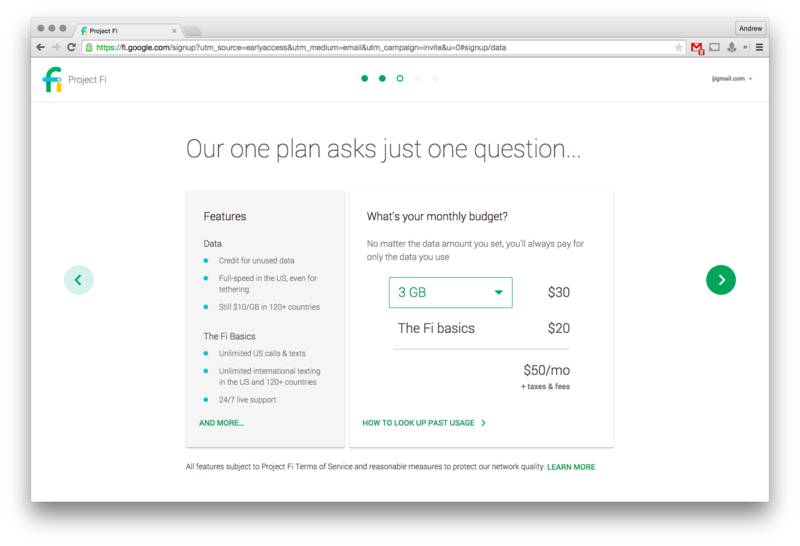
Choosing your plan couldn’t be simpler — you’ll always pay a base price of $20 per month for unlimited talk and texts, and a flat rate of $10 per gigabyte of data (which also works internationally, by the way). The interesting part about Project Fi is that this is just your best guess as to how much data you’ll use — for example you could pay $50 up front ($20 base + $30 for 3GB of data), and you’ll get refunded for the data you don’t use. If you happen to go over your guess, that extra data will just be tacked onto the next bill at the normal $10 per gigabyte rate instead.
Advertisement
You can choose between 1-10GB of data per month, but you’re never locked down — at any point during the month you can change your plan, and the new price will kick in at the next billing cycle. So don’t stress over what you choose on this page — you’ll never pay at a higher rate for overages, and you’ll never pay for something you don’t use.
That’s it for the plan, just one page — now you’ll need a phone. If you already have one of the compatible devices listed above, you’ll have to verify that you have the device to receive your Project Fi SIM. If you don’t have one yet, Google makes it easy to buy one — prices for the phones are the same full price as buying from the Google Store, barring any current specials. You’ll pay for the phone at the final step of setup, either up-front or with zero-interest monthly financing.
After confirming your billing and shipping addresses for the order, you’ll simply confirm your plan and your phone purchase one last time. You’ll notice that there isn’t any activation fee for the service, but you will pay applicable sales tax and shipping if you bought a phone.
The payment methods you use will be coming from Google Payments, so you’ll have to set that up if you haven’t already. Double check, press the “continue” buttons and your Fi service and/or device will be on its way!
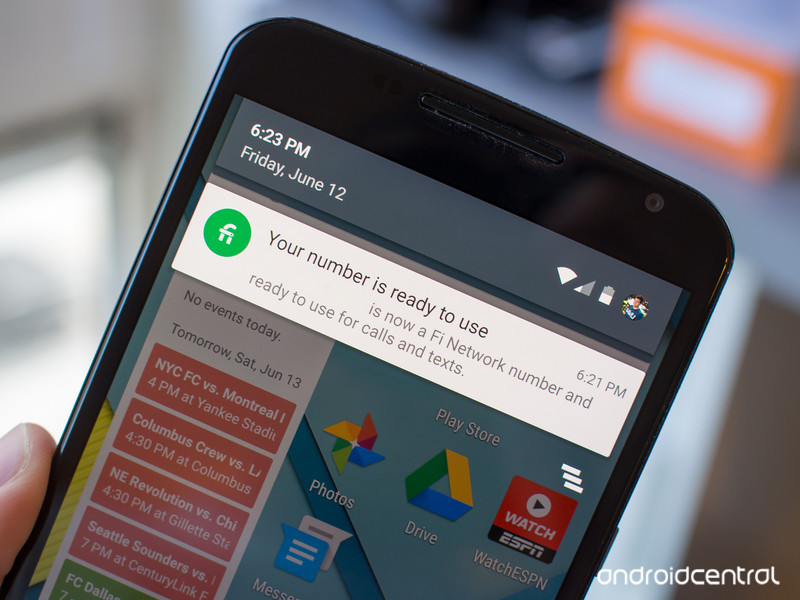
When your Project Fi device and/or SIM card arrive, you’ll simply have to power up your phone and confirm that you really want your number ported to the carrier. After a couple of hours or so, you’ll receive a notification that your number is now on Fi and you’re good to go!
Google Project Fi
- What is Project Fi?
- Get the latest Project Fi news
- Google Pixel 2 review
- Moto X4 review
- Discuss Project Fi in our forums
- Sign up for Project Fi!

The Morning After: Tuesday, December 12th 2017
Hey, good morning! You look fabulous.
This Tuesday, one Engadget editor attempted to become an Instagram star. (Spoiler: without money, it’s harder than you’d think.) We have the best gift ideas for the console gamer in your life. We also take issue with the FCC — and we’re not alone.
Have faith?Ataribox pre-orders start this week, without any game details

We don’t have a price, release date or list of game titles for this retro console, but discounted pre-orders will start this week. Want to be first in line? Sign up on the site for an email alert and keep an eye on your inbox.
Clear as mud.Hypocrisy at the FCC and the illusion of transparency
FCC Chairman Ajit Pai trumpets “transparency” at every turn, but only the telecoms seem satisfied by his explanations.
Everything new to watch this week.What’s on TV: ‘Mr. Robot’ and ‘PUBG’

This week, it’s time for the season-three finale of Mr. Robot, and PlayerUnknown’s Battlegrounds just launched in the preview program on Xbox One. You can also keep an eye out for the Okami HD remaster, Yooka-Laylee on Switch and Christopher Nolan’s Dunkirk.
Social media stardom is harder than it looks.I tried (and failed) to become an Instagram guru

The rules are pretty simple: Set up an Instagram account and use whatever (legitimate) means to push my following as high as possible. I’ll scour every how-to, every online guide, and learn from the master himself, Vaynerchuk, and it’ll be a piece of cake. (Narrator voice: It was not.)
Make the right choice.The best gifts for a console gamer

If you’re in the market for a new system, the Xbox One S, PlayStation VR, Nintendo Switch and 2DS XL all made it into our holiday gift guide, for different reasons. We even dug up the best accessories available, no matter which platform you prefer.
Oops.Bungie’s next ‘Destiny 2’ update backtracks on DLC mistakes

When Bungie rolled out its “Curse of Osiris” DLC, Destiny 2 players who didn’t pay up found themselves locked out of certain in-game activities. A new update rolling out today is reverting most of those changes and nerfing the Prometheus Lens weapon that has wreaked havoc in PvP.
‘Red Rocks’ – Dave Chappelle.Trump signs directive ordering NASA to return to the Moon

Yesterday the president signed Space Policy Directive 1, which orders NASA to lead an “innovative space exploration program” that sends astronauts to the Moon and, “eventually,” Mars. The plan is to partner with aerospace companies who have already begun work on their own, but it may take years to come to fruition.
But wait, there’s more…
- Facebook’s ticker is no more
- Tech pioneers tell FCC: “You don’t understand how the internet works”
- Microsoft offers developers a preview of its quantum computing kit
- Google brings ‘Star Wars’ and ‘Stranger Things’ augmented reality stickers to the Pixel
- New standard sets a baseline for HDR on PC displays
- Google app experiments push the limits of phone photography
The Morning After is a new daily newsletter from Engadget designed to help you fight off FOMO. Who knows what you’ll miss if you don’t Subscribe.
Craving even more? Like us on Facebook or Follow us on Twitter.
Have a suggestion on how we can improve The Morning After? Send us a note.
Three expands ‘Feel at Home’ roaming to 11 more destinations
Three has always been ahead of the pack when it comes to international roaming; it abolished charges in Europe well before the European Union made it law last June. The network has also expanded its “Feel at Home” program to other locations outside of the continent, including Australia, Brazil and the US. Today, it’s adding another 11 to the roster: Chile, Colombia, Costa Rica, El Salvador, Guatemala, Nicaragua, Panama, Peru, Uruguay, Vietnam and Mayotte. That brings the total number of destinations to 71, well beyond its UK rivals. Dave Dyson, CEO of Three, says it’s his “ambition” to offer “100 percent free roaming worldwide.”
Feel at Home is a tempting perk for Brits who frequently travel abroad. You can, after all, just pack your bags and go — there are no extra data bundles or hidden limits to worry about. It’s convenient, but not necessarily the best value. Feel at Home is only useful provided you have a healthy number of texts, minutes and megabytes in the first place. If you can find a better deal domestically, it’s worth weighing the price of a roaming add-on. Vodafone, for instance, has inclusive roaming in 50 destinations (some of which are outside the EU) and 60 “roam further” locations, which require an additional £6 fee. In short, just remember to do your homework.
Source: Three (Press Release)
You can now pre-order apps for Apple devices
Apple has launched a simple new feature that makes it even easier to get the apps you’ve been waiting for. The company announced a new pre-order function that lets developers make their future releases available on the App Store up to 90 days in the future and have them automatically download to devices when they launch.
Apple says that the feature is available for free and paid apps on all of its platforms, meaning that iOS, macOS and tvOS devices are all supported (as long as they’re running the most up-to-date software). Also, Apple won’t take your money until the day the app is released, similar to how Amazon handles hardware pre-orders via its online store.
If a developer decides to change the price of an app before it launches, Apple will always charge whatever is lower: the price it was pre-ordered at or the cost when it becomes available.
Although the App Store has largely remained the same since its launch in July 2008, Apple has made a number of changes over the past year and a half. In June 2016, the company finally introduced subscriptions and began allowing developers to inject paid App Store listings within search results. However, there’s still no option to test apps before you buy them.

Source: Apple
Adobe Lightroom CC v1.1 for Desktop Brings Enhanced Auto Mode, Split Tone Effect, and More
Adobe on Tuesday released Lightroom CC v1.1 for macOS, bringing some additional features and enhancements to the photo editing suite, including support for new cameras and lenses.
Top of the new feature list is an enhanced Auto mode for automatically applying optimized edits to images. Located in the Light panel in the Detail view, the mode now uses Adobe’s advanced Sensei machine learning to intelligently apply what it considers to be the best edits. By design, Auto adjusts a number of slider controls, including Exposure, Contrast, Highlights, Shadows, Whites, Blacks, Saturation, and Vibrance.
According to Adobe, the neural nets underlying Auto mode have been trained with thousands of professionally shot and manually edited photos to evaluate and correct an image. In an additional tweak, the Auto feature now also includes the ability to optimize the adjustments of the photo even after cropping has been applied.
Elsewhere, it’s now possible to use Tone Curve in the Light panel to fine-tune the tonal range and contrast in photos, while the Split Toning controls in the Effects panel have been enhanced to let users create a split tone effect in which a different color is applied to Shadows and Highlights.

In addition, users can now adjust the date and time of an individual photo or a group of photos. The feature aims to be useful in scenarios where users need to change the capture time of photos after clicking them. Meanwhile, fullscreen mode can now be activated from within the Detail view by pressing the F key, and the lists of supported cameras and lens profiles has been updated.
The new Auto mode is also available over on Adobe Lightroom for iOS, where the quality of HDR capturing has been improved. The mobile app now also lets users add watermarks during export, ACR 10.1 has been integrated, and a number of bug fixes and speed improvements have been applied.

Lightroom CC is available through Adobe’s Creative Cloud Photography plan, which bundles Photoshop and Lightroom together for $9.99 per month, or through Adobe’s complete Creative Cloud plan, featuring all Adobe software for $49.99 per month.
Lightroom for iOS can be downloaded from the App Store for free. [iPad: Direct Link] [iPhone: Direct Link]
Tags: Adobe, Adobe Lightroom
Discuss this article in our forums
Feral Releases ‘Deus Ex: Mankind Divided’ for macOS
Feral today released the Mac version of Deus Ex: Mankind Divided, the sixth installment in the hit series of action stealth games.
Mixing a first-person perspective with a third-person cover system, Deus Ex combines elements of classic FPS shooters with a role-playing upgrade system and dialogue interaction.
The year is 2029, and mechanically augmented humans are now outcasts, completely segregated from the rest of society.
Now an experienced covert operative, Adam Jensen is forced to operate in a world that has grown to despise his kind. Armed with a new arsenal of state-of-the-art weapons and augmentations, he must choose the right approach, and who to trust, in order to unravel a vast worldwide conspiracy.
Deus Ex: Mankind Divided is available from the Feral Store and Steam for $59.99. The Desperate Measures in-game mission and the Covert Agent pack, which includes various weapons and items, are available for free.
The Digital Deluxe Edition is available from the Feral Store and Steam for $89.99. The Deluxe Edition includes two new story-based DLCs, System Rift and A Criminal Past, as well as the Assault and Tactical packs, which include various weapons and items. On top of that, players get the Desperate Measures in-game mission and the Covert Agent pack, four Praxis kits, 5,000 credits, 1,000 weapon parts, five booster packs, and 20 Chipsets for Breach, a standalone online game mode.
To get the games to run, users will need a Mac running OS X 10.13.1 and at least an Intel Core i5 3GHz processor, 8GB of RAM, a 2GB video card, and 67GB of disk space. Feral says the game is officially supported on the following Macs: All 15-inch MacBook Pros released since late 2016, all 21.5-inch Retina 4K iMacs released since 2017, all 27-inch Retina 5K iMacs released since late 2014, and all Mac Pros released since late 2013.
The only caveat seems to be the 15-inch Retina MacBook Pro released in mid 2015 with an AMD Radeon R9 M370X, which Feral says is “capable of running the game but does not consistently meet the standards required for official support”.
Discuss this article in our forums
Watch SpaceX launch a reused capsule on a recycled rocket
SpaceX is making an historic first on Wednesday, when it gets one step closer towards realizing its vision of reusable space launch gear. The private space company is launching a space station resupply mission using a refurbished Dragon spacecraft and a previously-flown Falcon 9 booster. Dragon will spend around a month at the International Space Station unloading supplies and filling up with return cargo before returning to Earth, while SpaceX plans to recover Falcon 9 by landing it at its LZ-1 facility at Cape Canaveral. Both parts have been used on other resupply missions before, and if SpaceX’s dreams come to fruition, they’ll be used again. Watch them blast off live on Wednesday December 13 at 11:24 AM EST (08:24 AM PST).
Via: Techcrunch
Bank T&C’s for Digital Wallets Suggest Imminent Launch of Apple Pay in Brazil
Apple could well be on the cusp of launching Apple Pay in Brazil, almost two years after rumors of rollout in the region first surfaced. Users of iOS devices in the country who attempt to add a Visa Platinum Personnalité card from Itaú Unibanco to their Apple Wallet are now seeing a terms of service agreement relating to digital wallet use.
The message was first spotted by local tech site MacMagazine and picked up by AppleInsider. Prior to Monday, users trying to register the cards would see a message informing them that the card was not yet supported by Apple Wallet.
Indeed, the same message still shows up when users try adding other cards to their digital wallet, but the fact that Itaú bank’s card has been granted residence inside the native app suggests Apple Pay could well be about to launch.
Olha o @itau mostrando que o #ApplePay tá chegando no Brasil 😉 pic.twitter.com/DwkiDcQOGn
— Apple Pay Brazil (@ApplePayBR) December 11, 2017
Separately, local blog iHelp BR yesterday claimed that Apple Pay would roll out imminently, citing sources familiar with the matter, although no specific date was given.
Related Roundup: Apple PayTag: Brazil
Discuss this article in our forums
 AIVAnet