


The worst gadgets of 2017
2017 was not a great year, to say the least. And it wasn’t just the weekly political dramas, sexual harassment scandals or a massive security breach that affected nearly half the population that had us down. There was also a slew of terrible consumer devices that sullied our mood this year. Before we say goodbye to them, though, let’s relive the horror one last time. Here’s hoping that 2018 brings us better gadgets than this sorry lot.
Juicero

Even though Juicero technically debuted in 2016, it wasn’t until 2017 that it met its epic end, and it’s for that reason we’re naming it one of the worst gadgets of the year. Not only did it a cost a whopping $400 — which was actually a drop from its original $700 asking price — but you couldn’t use it to juice fruit and vegetables you bought from the store. Instead, the over-priced gadget only worked with proprietary packets of blended-up produce (priced at $4 to $10 each) that were only available through a subscription. Yes, it was basically an overpriced bag-squeezer.
It sounds dumb and, well, a lot of other people thought so, too. Adding to the embarrassment, a Bloomberg report revealed earlier this year that you could simply squeeze those packets with your hands to get at the juice, no machine required. And, despite Juicero’s claim that its machine delivered better results, and that its WiFi connectivity made subscriptions easier, the company ended up refunding unsatisfied customers anyway. In the end, no amount of hype could salvage this bad idea.
LG Watch Style smartwatch

If the past few months are any indication, the future isn’t bright for wrist-worn wearables. Brands like Pebble and Jawbone fell by the wayside, Tom Tom left the market altogether, and even category leader Fitbit struggled to bring its first smartwatch to market. Instead, the industry seems to be shifting toward lifestyle brands that emphasize style over substance. Which is what makes the LG Watch Style such a mistake.
With a name like the LG Watch Style, you’d expect this Android Wear watch from LG to be fetching. According to Reviews Editor Cherlynn Low, however, it’s anything but. Its basic lackluster design left a lot to be desired, and, what’s more, its battery life turned out to be terrible; it couldn’t make it through a full workday, much less 24 hours. By comparison, the Apple Watch 3 lasts well into the next day on a single charge. Sure, the Style’s $249 list price is relatively affordable as far as smartwatches go, but that’s not good enough for us to recommend it. In the end, Engadget gave the LG Watch Style a review score of 65, making it one of the lowest-rated devices of the year.
Bodega

An app-powered vending machine whose name was derived from the mom-and-pop corner shops it’s trying to replace? What could possibly go wrong? That is, unfortunately, the tone-deaf marketing mistake made by Bodega, a Silicon Valley startup named after the local groceries that have become staples of many New York City neighborhoods. Its idea was to sell non-perishable items like toothpaste and snacks in a large cabinet in places like gyms and lobbies of apartments buildings. Enter in a code on the app, grab your desired item and, voila, you’ve gotten the goods without having to brave the outside world.
That sounds like decent idea in theory, but it’s ultimately solving a problem that doesn’t exist. It’s not that hard to walk into a drugstore to get the things you want, and with services like Amazon Prime, you don’t have to leave your house to get them either. There’s also, you know, good old-fashioned vending machines that work just fine without an app. The bigger problem, really, is that name. Bodegas are an important part of the social fabric of living in a city, and even if Bodega’s founders claim they don’t want to actually get rid of mom-and-pop stores, the start-up would essentially be taking away some of their business. Plus, there’s no way a vending machine can serve you up a warm breakfast sandwich and a cup of coffee on the way to work.

Atari
Atari Speakerhat
Every once in a while, there’s a product that just makes you go “Why?” And Atari’s new line of Speakerhats is definitely that. As its name suggests, the Speakerhat is essentially a baseball cap with a Bluetooth speaker embedded right in the brim. Atari is apparently marketing this at fitness enthusiasts who don’t mind blasting their musical tastes to the world as they run laps. There’s also a microphone, giving you the option of having loud conversations in the middle of the park and looking crazier than you would if you were wearing a pair of headphones.
What’s more, Atari says the Speakerhat has a Multiplayer mode that allows multiple users to listen to a single audio stream, as if that’s somehow better than normal pair of speakers. On top of all of that?, these caps retail for at least $130. If you’re that much of an Atari fanboy, we’d recommend saving that cash for the upcoming Ataribox instead.
Nissin’s ramen fork
In Japan, slurping your ramen is a sign of respect for the cook. Plus, the noodles supposedly taste better that way. In most Western cultures, however, that wet sloppy sound is more rude than appetizing. So Nissin, the makers of Cup Noodle and Top Ramen, developed the Otohiko, a noise-cancelling ramen fork. No, this isn’t a joke. It’s real. And it costs an eye-watering $130.

Nissin
The fork connects to an app on your phone, which emits sounds at a certain wavelength to help cover up the offending slurp. That’s about it. It has a battery that lasts an hour between charges, and the handle isn’t waterproof, so the prongs need to be hand-washed. To be fair, the Otohiko is only available on pre-order right now, and if Nissin doesn’t sell at least 5,000 units, it won’t make them. Which is probably a good thing, because we’d rather spend that $130 on more ramen.
Samsung’s Bixby voice assistant

One of the most exciting announcements at Samsung’s Galaxy S8 launch event was Bixby, the company’s AI-powered personal assistant. Instead of just telling it what to do, Bixby could supposedly learn your daily habits and patterns and tailor itself to your life. It also promised a visual search feature that uses the phone’s camera to shop, identify objects and translate signs. Samsung even boasted that as complex as Bixby was, it would be as easy to use as your phone’s touchscreen. Unfortunately, however, it just never lived up to its promise.
For one thing, Bixby wasn’t even available for a good three months after the S8 and the S8 Plus came out, which is not a good look for what is supposedly the next driving force behind Samsung’s consumer products. And when it did arrive, it simply wasn’t very reliable. In our “Life with AI” series, senior editor Devindra Hardawar said it took forever to answer simple commands; sometimes repeating the same command would result in wildly different replies.
Bixby still has a lot of potential, but we’ll have to wait for 2018 for any improvements. In the meantime, why bother with something unfinished when the S8 has another personal assistant (the well-established Google Assistant) already baked in?
Google Pixel Buds

We were initially excited about Google’s Pixel Buds. A pair of earbuds that could translate languages on the fly? That sounded like Douglas Adams’ Babel fish come to life. Ultimately, though, it didn’t live up to the hype. They don’t block out noise at all; fitting them into the case is a hassle (plus it has a tendency to pop open); and the touchpads on the sides of the buds activate way too easily. Even using Google Assistant is a hit-or-miss experience. In his review, senior mobile editor Chris Velazco mentioned how he would sometimes make a request, and it would just hang without any response.
As for that much-hyped translation feature, it works, but only sort of. For one thing, you have to hand your phone over to the person you’re speaking to so they can respond to you. It’s also dependent on a reliable internet connection; anything less will result in a slow response, if any. Plus, the translation relies on Google Translate, which can be overly literal, especially when it comes to idioms and colloquialisms. Translations from non-Roman languages like Chinese and Japanese are especially error-prone. In short, the Pixel Buds aren’t very good headphones, with or without the feature that makes them special.
Hushme voice mask for smartphones

Want to look like Bane while making an important business call? You might want to get the Hushme, one of the most ridiculous gadgets we’ve seen this year. That said, the idea behind it isn’t completely terrible. This mouth-wrapping contraption aims to muffle your voice so as to not bother people around you when you’re on a call — and it prevents them from listening in on your private conversations, too. It even comes with a couple of earbuds, so you can make those calls hands-free.
But Hushme then thought, hey, let’s drown out your voice even further by emitting a series of sounds through external speakers, like R2-D2-style beeping or the more natural sound of rain. That seems to defeat the whole purpose of not disturbing others. Since we last saw it at CES, Hushme underwent a redesign. (It’s now white instead of black, which doesn’t make it any less creepy.) Our jokes aside, it seems quite a few people out there thought this was a good idea: The device has raised over $71,880 on Kickstarter and is now available through Indiegogo for $189.
Check out all of Engadget’s year-in-review coverage right here.
How to Set Up Your New iPhone or iPad Using Automatic Setup
If you got a new iPhone or iPad for Christmas and you already have at least one iOS device that’s running iOS 11, setting up the new device is simple and quick with Automatic Setup.
Introduced in iOS 11, Automatic Setup streamlines the setup process for new iPhones and iPads, transferring over Apple ID info, your WiFi network credentials, your preferred settings, and your iCloud Keychain.
Automatic Setup is meant to be used in tandem with a restore from an iCloud backup, because while it transfers many settings, it does not offer full device-to-device content transfer. When you buy a new device, Automatic Setup will pop up automatically, but there are some steps to follow to get everything transferred over:
Power on your new device, which will open up to a menu asking you to pick a language.
After choosing a language, you’ll see a “Set Up Your iPhone (or iPad)” prompt.
When this appears, place your existing iOS device near the new device to initiate Automatic Setup.
Your existing device will show a pop up letting you know you can use Automatic Setup. Tap “Continue” to start. 
An Apple Watch-style pairing image will appear on the new device, and you’ll be instructed to scan it with the camera on your existing device.
In an area with decent lighting, hold the existing device’s camera over the image on the new device to pair the two together.
Enter the passcode from your existing device on the new device.
From there, all of your data will start transferring from the old device to the new device.
When the first few Automatic Setup steps are complete, your iPhone or iPad will walk you through setting up Touch ID/Face ID, Siri, and Apple Pay, which are separate steps.
An additional “Express Settings” feature following Automatic Setup is designed to speed up new device activation even further. Express Setup automatically enables Find My iPhone, location services, and analytics, so if you don’t want these features on, make sure to tap “Customize Settings” to change them.
Once you’ve transferred all of your settings with Automatic Setup, you can restore from an iCloud backup to get all of your apps transferred over. If you want to set up a device as new without downloading all of your old content, though, you’re finished once Automatic Setup is completed.
If you don’t have an iOS device running iOS 11, you’ll need to go through a more traditional setup process. The steps are a lot like Automatic Setup, but instead of choosing an existing device after setting a language, you’ll need to manually enter data like your Apple ID and your WiFi password.
Discuss this article in our forums
How to Set Up Your New AirPods
AirPods, introduced last December, are Apple’s completely wire-free earphones that have a W1 chip inside for simple pairing between devices.
AirPods work like magic, and while they’re easy to set up, the process may not be intuitive to all users who received AirPods this Christmas, so we thought we’d share some quick, easy to digest instructions.
Remove the AirPods from the packaging.
Leave the AirPods in AirPods case.
Power on your iPhone or iPad, unlock it, and go to the Home screen (aka the main app screen).
Open up the lid to your AirPods case.
Hold the AirPods case with open lid next to your iPhone or iPad.
Your iOS device will recognize the AirPods and you’ll see a popup to connect your AirPods.
Tap “Connect.”
You’ll be instructed to press and hold on the back button of the AirPods case.
Press it for a few seconds, and the popup on your iPhone will change to “Connecting.”
When the connection is complete, the popup will display the battery life for both the AirPods and the case.
That’s all there is to it. Once this setup process has been completed, your AirPods will re-pair to your iOS device whenever you open up the case lid. This re-pairing process takes just a few seconds, so your AirPods are essentially ready to go whenever you pull them out.
Your AirPods are linked to your iCloud account, so once you pair them with one device, your other devices know they exist. You can switch connections between your devices through the standard Bluetooth settings options, where AirPods will be listed on any device that you’re signed into with your iCloud account.

On iOS devices, go to Settings –> Bluetooth and tap “AirPods.” On a Mac, click on the Bluetooth icon in the status bar, choose AirPods, and then select “Connect.” On Apple TV, open up the Settings app, choose “Video and Audio,” scroll down to “Audio,” select “Audio Output” and choose AirPods.
On iOS devices, you can also use the Now Playing widget in Control Center to select AirPods, and on Apple TV, you can hold down the Home button on the main Apple TV screen to bring up a shortcut to audio options.
Tag: AirPods
Discuss this article in our forums
What to Buy With the iTunes Gift Card You Unwrapped Today
If you show an interest in Apple or technology in general, chances are good that you received at least one iTunes gift card today from a friend or family member today.
Given the card can be used to purchase apps, games, music, movies, TV shows, books, and more, it can be difficult to decide what to buy with your newly acquired funds.
We’re here to help with a roundup of ongoing iTunes and App Store sales as well as some other hand-picked recommendations.
Holiday Movies on Sale
In addition to an iTunes sale on select 4K HDR movie bundles, Apple has also discounted a handful of popular holiday movies.

– Bad Santa 2 – $2.99, down from $12.99
– Die Hard (4K) – $7.99, down from $14.99
– Elf – $9.99, down from $14.99
– Home Alone (4K) – $9.99, down from $14.99
– Love Actually – $9.99, down from $14.99
– The Holiday (4K) – $9.99, down from $12.99
– How The Grinch Stole Christmas (4K) – $9.99, down from $14.99
Games on Sale

– Sonic the Hedgehog 2 Classic – Free, down from $2.99
– Streets of Rage Classic – Free, down from $0.99
– Phoenix Wright: Ace Attorney – Spirit of Justice – Free, down from $0.99
– Layton’s Mystery Journey – $7.99, down from $15.99
– The Room Three – $1.99, down from $3.99
– Mini Metro – $0.99, down from $4.99
– Jade Empire: Special Edition – $0.99, down from $9.99
– Euclidean Lands – $0.99, down from $3.99
– After the End: Forsaken Destiny – $0.99, down from $3.99
– Old Man’s Journey – $1.99, down from $4.99
– Cat Quest – $1.99, down from $4.99
– Abi: A Robot’s Tale – $0.99, down from $2.99
– Jaipur: the board game – $0.99, down from $4.99
– Flower – $2.99, down from $4.99
– Vignettes – $0.99, down from $2.99
– Smash Up – The Card Game – $2.99, down from $4.99
– Oceanhorn – $3.99, down from $7.99
– Transistor – $1.99, down from $4.99
– Full Throttle Remastered – $0.99, down from $4.99
– Day of the Tentacle Remastered – $0.99, down from $4.99
– Grim Fandango Remastered – $0.99, down from $4.99
– Don’t Starve: Shipwrecked – $0.99, down from $4.99
– Invisible, Inc. – $0.99, down from $4.99
– Minecraft Story Mode – S2 Episode 1 – Free, down from $4.99
Apps on Sale

– Tweetbot 4 for Twitter – $4.99, down from $9.99
– Picfx – Free, down from $1.99
– TapMeasure – AR utility – Free, down from $1.99
– Focus – Productivity Timer – Free, down from $7.99
– Vectorscope – Free, down from $1.99
– Fuelly – MPG, Mileage, Service – Free, down from $5.99
– BeatMaker – Free, down from $4.99
– Timepage – Free, down from $4.99
– My Wonderful Days – Free, down from $2.99
– Halide – RAW Manual Camera – $2.99, down from $4.99
– Duet Display – $9.99, down from $19.99
– Deliveries: a package tracker – $2.99, down from $4.99
– Castro 2 – $1.99, down from $4.99
– Superimpose – Free, down from $1.99
– Meditation Studio – Free, down from $3.99
Apple Music Subscription
iTunes gift cards can be used to pay for an Apple Music subscription, which costs $9.99 per month for individuals, $14.99 per month for families with up to six people, and $4.99 per month for students in the United States and Canada. Prices and student plan availability vary by country.
Those looking for a slightly better deal on an annual Apple Music subscription should consider a 12-month Apple Music gift card, which Apple sells for $99. A 12-month subscription to Apple Music normally costs $120 when paying for the service directly with iTunes credit or another form of payment, so you can save $20.
Apple Music provides on-demand access to over 40 million songs from the iTunes catalog across iPhone, iPad, iPod touch, Mac, Apple Watch, PC, and Android.
Other Subscriptions

iTunes gift cards can be used to pay for many subscriptions available as in-app purchases, although prices can be higher in the App Store as some companies charge extra to make up for Apple’s 30 percent cut of sales.
– Netflix
– Hulu
– Spotify
– Tidal
iBooks and Magazines

iTunes gift cards are also valid for purchases on the iBooks Store across iOS and Mac, providing an opportunity to do some reading over the holidays.
– Ready Player One
– A Wrinkle in Time
– Annihilation
– Station Eleven
– It
For magazines, iPhone and iPad users can download the Texture app and subscribe to unlimited access to over 200 of the world’s most popular magazines for $6.99 per month as part of an ongoing sale. Magazines can be read on up to five devices per subscription, with the ability to download issues for offline reading.
Some of the magazines available include People, Vogue, Rolling Stone, National Geographic, GQ, Sports Illustrated, Wired, Maxim, Men’s Health, GQ, Bloomberg Businessweek, ESPN The Magazine, and Entertainment Weekly. New issues are available alongside a searchable archive of thousands of past issues.
Numbered Coloring Books

The latest App Store craze is numbered coloring books in which children colorize pixel art by following a numeric guide. Many of the apps have in-app purchases available to unlock additional pixel art, remove watermarks, and/or remove ads.
– Color by Number
– UNICORN
– Pixel Art – Color by Number
– Sandbox Coloring
Mitchel Broussard contributed to this report.
Discuss this article in our forums
Unwrap a New Apple Device? Stock Up on Extra Certified Lightning Cables for as Little as $6
If you unwrapped an Apple product today it likely came with one of the company’s first-party Lightning cables, but having an extra on hand is always a good idea, so you can place it in other rooms in your house, in your car, or in a bag when you travel.
For that reason, now’s a good time to shop for third-party Lightning cables that are cheaper than Apple’s own accessory, but still Made For iPhone certified to guarantee their quality.
One of the best examples of this is well-known and reliable third-party accessory maker Anker, which has a 3ft / 0.9m Lightning Cable for just $5.99 on Amazon. Apple’s comparable product, the Lightning to USB Cable, sells for $19.00 on Apple.com.
Additionally, this holiday Anker has a combo promotion with the Lightning Cable. If you purchase the $5.99 cable (or other qualifying products), you can save 10 percent on either the Anker Elite Dual Port 24W USB Travel Wall Charger ($9.53, down from $10.59) or the Anker PowerCore 26800 Portable Charger ($55.79, down from $61.99). Anker has other cables, chargers, and power banks on its Amazon storefront.
Many of Anker’s accessories have been certified under Apple’s MFi program, which helps consumers identify products that are assured to work well with iPhone, iPad, and iPod. Shoppers should keep an eye out for MFi certifications when shopping for products like Lightning cables, and be wary of counterfeit accessories that are somewhat common on Amazon and could potentially harm their devices.
Note: MacRumors is an affiliate partner with Amazon. When you click a link and make a purchase, we may receive a small payment, which helps us keep the site running.
Discuss this article in our forums
Edward Snowden’s Haven app turns an Android device into a laptop security guard
Edward Snowden may be most (in)famous for his whistleblowing ways, but he’s set to prove that he’s capable of much more than leaking NSA secrets. The former CIA employee is keeping up his fight against digital surveillance, and this time, it’s in the form of an app. Meet Haven, Snowden’s new app that is meant to turn any Android phone into “a motion, sound, vibration and light detector, watching for unexpected guests and unwanted intruders.” Created with investigative journalists, human rights activists, and others “at risk of forced disappearance” in mind, Haven is said to leverage the existing sensors in a smartphone to prevent folks from “silencing citizens without getting caught in the act.”
The newly debuted app, created in partnership between the Freedom of the Press Association (of which Snowden is president) and the Guardian Project, can be installed on any old Android device, and will send notifications to your real smartphone should anyone attempt to tamper with your laptop.
Say you’re leaving your computer unattended in a hotel room or at home — simply place your Haven phone atop the device, and anytime the Android detects motion, light, or movement, it makes a note of this potential intrusion. It will take photos, record noises, and monitor variations in the environment, and then send notifications to you. Better yet, none of this information will be stored in the cloud — all communication you receive from Haven is end-to-end encrypted over Signal.
“Imagine if you had a guard dog you could take with you to any hotel room and leave it in your room when you’re not there. And it’s actually smart, and it witnesses everything that happens and creates a record of it,” Snowden told Wired via an encrypted phone call. “The real idea is to establish that the physical spaces around you can be trusted.”
Haven could also double as a baby monitor — after all, in the same way that it can detect someone tampering with your computer, it can detect someone walking in on your child. As Guardian Project founder Nate Freitas noted, “By tapping into the sensors and processing power on these devices with custom software, a system could feel the vibrations of someone walking, detect the shine of a flashlight, hear the sound of a door opening (or a child crying), or see someone entering into the view of a camera.” Every one of these potential “intruder alerts” is recorded on the Haven device, and users can receive real-time and, most importantly, secure notifications complete with image and sound to determine if they need to take action.
Currently available as a public beta, the open-sourced Haven project can be downloaded from Google Play today.
Editors’ Recommendations
- Protect your home with the Maximus Camera Floodlight
- Opter Pose wearable tracks your overall wellness in a stylish, organic package
- Aura Starter Kit review
- The Moon is a floating eyeball that can control and monitor your house
- The Nomad is a portable security solution you can take anywhere
How to set up a new Google account


Google Play, Chromebooks, Gmail … all these wonderful services start with (and require) a Google Account. And whether you’re setting up a professional account to help field headhunters and job offers, or finally offloading one of your tweens to their own account, setting up a Google account is simple and quick, but there are a few tricks to it.
Let’s open the door to the wonderful world of Google.
While you can set up a new account on a computer using this link, if you’re on an Android device, Google has baked the Google account setup right into the Settings menu, making things much easier. Here’s how to set it up.
Open Settings.
Scroll down to Accounts.
Tap Add Account, the plus icon in the top right corner of your screen.

Tap Google.
Tap Or create a new account.
Type in the name associated with the account. While you do not have to use your real name, if this is going to be your main account, using your real name is recommended.
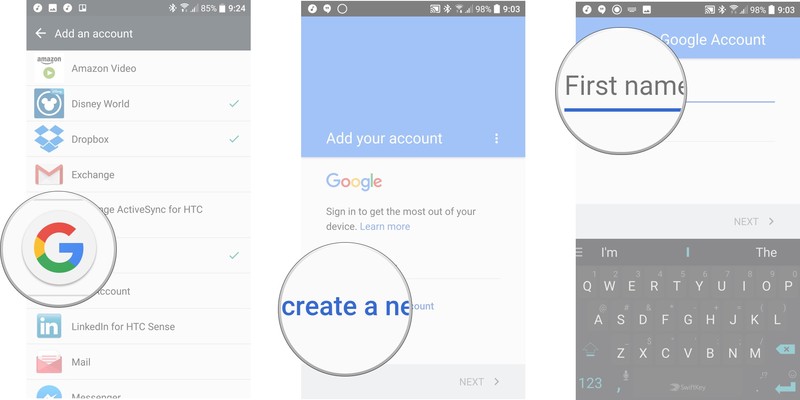
Tap Next
Enter the birthdate associated with the account. Note: Google requires all account users to be at least 13 years old and some countries have even high age requirement, but in order to have an account that can use Google Wallet (or use a credit card in Google Play), the account holder must be 18 years old.
Pick a gender. If you do not wish to be identified by your gender, you can decline to state. There is also a custom gender option for those who identify outside the cisgender binary.

Tap Next.
Type in your username. This username will become your Gmail address as well as how you log into Google.
Tap Next.
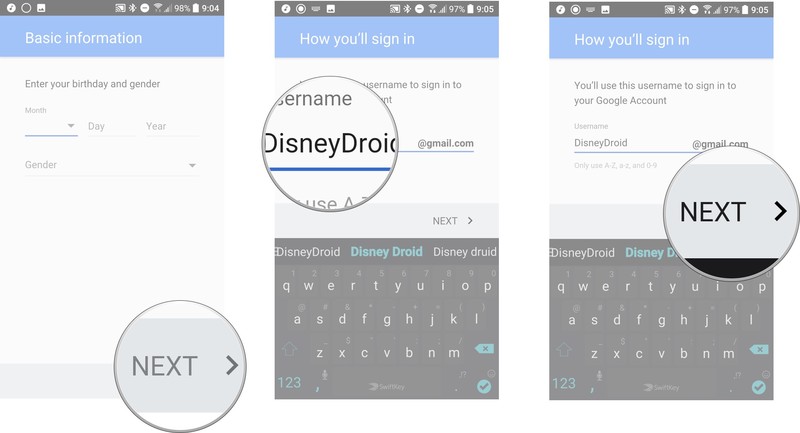
If your desired username is taken, you’ll be told to pick another and given suggestions. Either select one of the suggested usernames or type in a new one.
Tap Next.
Type in a new password for your account. The password has to be at least 8 characters, but thankfully is not required to have a number or special character, if you want to stick to plain old letters.

Re-type your new pasword in the Confirm password box. You’ll be told how strong or weak the password you’ve selected is.
You’ll be prompted to Add a phone number. This phone number can be used to verify your identity, help log into your account and help people find you if they have your phone number. If you want to add a phone number, type it in.
Tap Next to verify your number or Skip to skip putting a number in.
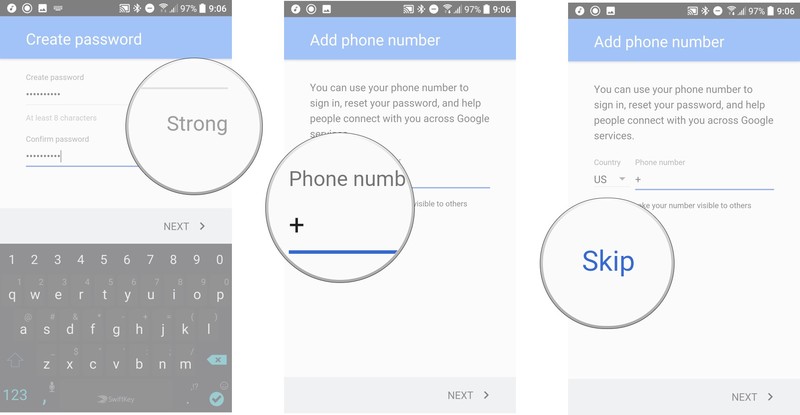
Google will present their terms of use. After scrolling through and reading the sections that interest you, tap I agree.
Your core Google Account is now set up, and your username and the length of your password will be shown.

If the birthdate associated with your account is over 18, you can add a credit or debit card to your account to use for buying apps or paying for subscription services like YouTube Red, but you’re not required to set one up this moment.
Your turn
What are your stories about opening a new Google account? Problems? Good experiences? Let us know in the comments below!
Comcast accused of enrolling customers in programs without consent
Subscribe to cable service for long enough and you’ll probably run into lousy customer service at some point, whether it’s technicians who don’t show up on time or phone reps that won’t let you cancel. However, Comcast’s behavior in Washington might take the cake. The state’s Attorney General has filed an amended complaint alleging that Comcast subscribed more than half of its Service Protection Plan customers without consent since the option was first available in 2011. It frequently enrolled customers without even mentioning the plan, according to the lawsuit, but the worst was when it did — employees reportedly claimed the $6 monthly service was free, and would even sign people up after they’d explicitly refused it.
To make matters worse, the Attorney General’s office added that the plan in question did… well, nothing. It was supposed to reduce the cost of repairs, but it excluded in-wall wiring and outdoor wiring — you know, a large portion of the service. As the Attorney General explained, all it really did was cover the technician coming to tell you that your equipment was broken.
Comcast denied doing anything wrong in a statement to Ars Technica, and said that it “strongly disagree[s]” with the Washington AG’s assertions. It maintained that the plan covered “virtually all charges over 99 percent of the time,” and that the lawsuit is based on a “flawed methodology and assumptions.”
However, the company hasn’t exactly gone to great lengths to provide evidence. The Attorney General’s Office said that Comcast has repeatedly refused to provide call recordings, and later admitted that it had deleted 90 percent of calls after it had been told to preserve them. Washington’s lawsuit is based in part on samples that supported accusations of deceptive practices.
Whoever’s telling the truth, this practice wouldn’t come out of the blue. Telecoms are notorious for including below-the-line fees that mask the true cost of service. However, it’s rare that they’re so audacious in those attempts that they charge you for services you didn’t want. If the lawsuit is successful, it could serve as a warning shot that deters other telcos.
Via: Ars Technica, Gizmodo
Source: Washington Attorney General
Getting a drone for Christmas? Be sure to register it before you fly sky high
The popularity of drones shows no sign of cooling, indeed, 2017 looks set to be the best year yet for sales of the remotely controlled flying machine. In the U.S. alone they’re expected to ship 3.4 million units this year, representing a sizable 40 percent increase on 2016, according to the Consumer Technology Association.
If you have a hunch that one of those boxes under the Christmas tree is a drone and you turn out to be right, you’ll be wanting to get out of the house pretty darn quick to get that bird flying high in the sky.
One thing to remember, however, is that you’ll need to register your drone with the authorities before you push the launch lever for the very first time. It doesn’t take long to do, only costs five bucks, and can be done online.
Mandatory registration, which started at the end of 2015, was put on hold earlier this year over a legal issue. But it was reinstated on December 12 as part of the National Defense Authorization Act signed into law by President Trump.
The Federal Aviation Administration (FAA) said it welcomed the reinstatement of drone registration as it should help encourage safe and responsible drone flights.
Anyone with a drone weighing between 0.55 pounds (250 grams) and 55 pounds (25 kg) needs to register their name, home address, and email address with the FAA. You’ll then receive a Certificate of Aircraft Registration/Proof of Ownership and a unique ID number on a sticker to affix to your aircraft. This helps the authorities to quickly identify you should your drone end up somewhere it shouldn’t.
The weight guidelines encompass pretty much all the popular drones on the market today, from DJI’s tiny Spark to the larger Phantom 4 Pro.
According to the FAA’s website, those who fail to register their drone “will be subject to civil and criminal penalties.”
Besides registration, newbie drone pilots should also avoid flying their machine higher than 400 feet, and always keep it within the line of sight. Also, keep it away from crowds and busy places and be sure to respect the privacy of others — in other words, don’t go buzzing over people’s yards or dropping low over people you don’t know.
It hardly needs to be said (though we’ll mention it anyway), but you should keep your quadcopter well away from places like airports and stadiums. In fact, the best way to find out about any permanent or temporary flying restrictions is by checking the FAA’s B4UFLY app (for iOS and Android), which also offers plenty of tips for newbie drone owners.
Follow these safety tips and you’re all set to have plenty of fun with your new drone. Enjoy!
Editors’ Recommendations
- The drone database is back, and most owners must register their details
- Drone ban — FAA adds to the list of places where you can’t fly your bird
- Wish you could fly? Here are the best drones on the market right now
- Looking to wipe your laptop? Here’s how to restore a Mac to its factory settings
- Don’t settle for the stock setup. Deck out your Phantom 4 with these accessories
What’s the true value of bitcoin? A Morgan Stanley analyst says it might be zero
According to Coindesk, bitcoin is currently worth about $13,000, but Business Insider reports that Morgan Stanley’s James Faucette suggest the true value of bitcoin might be zero.
Though Faucette’s report, entitled “Bitcoin Decrypted,” did not give an actual value for bitcoin, a section called “Attempts to Value Bitcoin” gave some insight into his thoughts on the currency and why it can be so difficult to determine bitcoin’s value.
The first point that he considered was whether or not bitcoin could be considered a true currency. He concluded that due to the fact that there is no interest rate attached to bitcoin, it could not be considered a true currency the way the dollar or the euro are considered currencies.
He did concede that bitcoin shared some similarities with precious materials such as gold, but noted that, unlike gold, bitcoin has no real-world applications. Gold is used in jewelry and electronics, whereas bitcoin exists only as data. That being said, he admitted that the cryptocurrency held some value due to the fact that investors were willing to give it value.
He discussed the value of bitcoin as a payment network and conceded that it did hold some value in that regard. However, he also noted there were some limitations to its usefulness. The two issues Faucette cited were the fact that it is a difficult payment network to scale and does not charge a transaction fee.
Bitcoin is accepted by a small number of companies, but, as Faucette points out with his chart, that number is small and getting smaller over time.
“If nobody accepts the technology for payment then the value would be 0,” Faucette said.
Of course, bitcoin currently does hold some value solely due to the fact that it can be exchanged for currency. However, the question that Faucette seems to be trying to address is whether or not bitcoin has intrinsic value. Is it truly worth anything or is its value constructed? To an extent, one could argue that fiat currencies such as the dollar hold no intrinsic value, but the faith and full credit of the United States government is still a very real thing, and there is no such institution supporting bitcoin.
Editors’ Recommendations
- Bitcoin is still soaring. What’s the limit?
- Go ahead, pass laws. Governments can’t kill bitcoin, even if they try
- An estimated $30 billion in Bitcoins may be lost forever
- Bitcoin’s latest boom sends it scorching past $9,000
- Survey: Bitcoin buyers prefer investing in it over using it as a payment method
 AIVAnet