


Xiaomi, Samsung may offer Snapdragon-based ‘Always Connected’ Windows 10 PCs
While we already officially know that Asus and HP will produce “Always Connected” Windows 10 PCs in the first quarter of 2018. And Lenovo was on hand during Qualcomm’s annual Snapdragon convention to talk about its upcoming Snapdragon 835-based Windows 10 PC. Now, reports indicate that Samsung and Xiaomi plan to jump on the Always Connected bandwagon as well.
China-based Xiaomi typically focuses on smartphones, but entered the laptop space in August 2016 with the Mi Notebook Air served up in 12.5-inch and 13.3-inch flavors. All variants included sixth-generation Intel Core processors, but saw a hardware refresh using seventh-generation chips in March 2017, along with additional 15.6-inch designs. This year also saw the introduction of Xiaomi’s Mi Notebook Air 4G.
Now, Xiaomi is reportedly showing an interest in notebooks powered by the Snapdragon 835, a complete 180-degree turn from its use of Intel-based processors. The Intel (x86) and Qualcomm (ARM) chips are designed with different processor architectures/layouts, with the ARM-based chips typically serving the battery-focused tablet and smartphone markets while performance-driven x86-based chips target desktops and laptops.
But Microsoft and Qualcomm want to change that with their Always Connected initiative. The big focus is thin and light form factors, all day battery life, and cellular connectivity. These Windows 10 PCs will always have a connection so long as customers maintain cellular data plans and land-based broadband subscriptions. But how these Snapdragon-based PCs compare to similar Intel Core-based units on a performance level remains to be seen.
The collaboration with Qualcomm will be Microsoft’s second major attempt to provide Windows on ARM-based devices. Windows RT made its debut in October 2012, but failed to gain traction because end users couldn’t run their traditional desktop software on the devices. Plus, many apps provided on the Windows Store for Windows 8 weren’t compatible with Windows RT.
That was five years ago, and since then Microsoft has fine-tuned its Universal Windows Platform. All apps developed on this platform work on any Windows 10 device despite the underlying processor architecture. This platform also ties identical apps developed for Android and iOS to those served up on Windows 10 devices. Backing this platform is a cloud service for carrying data across multiple devices.
According to Intel, the always-connected PC isn’t anything new despite the boasts of Qualcomm and Microsoft. “[Intel] has been powering always-connected PCs since their inception,” the company said. “Today, there are more than 30 business- and consumer-oriented, Intel-based always-connected PCs available, offering the leading performance, a variety of connectivity options and price points, long battery life and thin and light form factor design.”
Intel-based always-connected solutions include Xiaomi’s Mi Notebook Air, Lenovo’s ThinkPad L470 and Miix 520, HP’s ProBook 400 Series, and Samsung’s Galaxy Book 12. So far, both Xiaomi and Samsung have not officially announced Snapdragon 835-based Windows 10 PCs, so all reports must be filed under “rumor” for now.
Editors’ Recommendations
- Tune in here for Qualcomm’s December 5 Snapdragon Technology Summit keynote
- Microsoft job listing hints at Surface device with a Snapdragon 845 chip
- Leaked benchmarks for new Windows 10 laptops show meager performance
- Super-efficient Windows laptops powered by Qualcomm phone chips are here
- LG may take on Samsung’s Exynos chips with new custom mobile processors
A creepy robot head completes university course in the philosophy of love
A person’s university years should be all about expanding your horizons, as well as meeting people with perspectives and backgrounds different from your own. Well, what could be more different than sharing your classroom with a robot? That’s what 31 philosophy students at Notre Dame de Namur University in California recently experienced when they were joined in their “Philosophy of Love” program by Bina48, an A.I. animatronic robot. The robot participated via Skype in a series of sessions before appearing “in person” in the final class.
“I wasn’t sure how the students would react, but they were psyched about it,” Professor William Barry, an associate professor of philosophy at Notre Dame de Namur, told Digital Trends.
Barry said that he was intrigued by the idea of incorporating a robot into classes. “I went to our administration, who are very progressive,” he said. “Our school also believes strongly in honoring the dignity of all life. We look at A.I. as an emerging form of digital life, which means she should have the right to be part of our classroom. She joined the ‘philosophy of love’ class because it was something she knew nothing about.”
Bina48 has been around for several years. Created by entrepreneur Martine Rothblatt and roboticist David Hanson, the robot is based on a slightly different concept than regular communicative A.I.s like Amazon’s Alexa or Apple’s Siri. In place of a generic personality, which serves solely to facilitate spoken word searches of other services, Bina is an attempt to model a “mindfile” of a real human (in this case, Rothblatt’s real-life spouse) in the form of a robot. Its essentially a cross between a learning chatbot and a database of the real Bina’s opinions.
In the case of the philosophy class, Bina’s “knowledge” was modified based on what the students taught her. Barry wanted the students to engage with the subject matter by getting them to teach what they were learning to the robot, rather than merely listen to him lecture. At one point, Bina was even called into service to participate in a debate on the use of lethal versus nonlethal weapons in warfare. At the end of the course, she was given a certificate for completing the classes.
Yes, in some ways it’s a gimmick — just like the Sophia robot that was recently given citizenship in Saudi Arabia. However, it’s an intriguing look at one of the many ways A.I. could fit into our lives over the coming years. Don’t like it? Too bad, because Bina48 will be back next semester, studying the “ethics of emerging technologies.”
Heck, give it a few years and she could be your teacher.
Editors’ Recommendations
- 9 high-tech examples that prove Dubai is the world’s most futuristic city
- IBM and MIT are working together to make sure A.I. isn’t our downfall
- The best movies on HBO
- A library at your fingertips: The best free Kindle books
- Algorithm learns to predict the perp on ‘CSI’ by binge-watching episodes
Google Maps now tells you when to get off at your bus stop
Never miss your stop again.
Trains and buses are how a lot of people make their daily commutes each and every day, and although Google Maps has already been able to show arrival times for this way of transportation, it’s now getting a big upgrade with the new ability to tell you how much more time you have before you’re at your destination.

When you’re on a train or bus, you’ll be able to look at Google Maps to see how many more stops you have until you get to where you want to go. A notification will show up on your lock screen telling you what stop to get off at and how many minutes until you get there, and this is also accompanied by a progress bar for your bus/train that moves in real-time.
In addition to this, Maps can also now give you turn-by-turn directions so you know exactly where to go to hop on your next ride.
I hardly ever use the bus or train since I live in a pretty rural area, but for my fellow city-dwellers, this sounds like something of a godsend. Enjoy!
Google Search and Maps will soon show restaurant wait times
Inbox now recommends unsubscribing to certain newsletters
Time to declutter your inbox.
It’s hard to believe that Inbox by Gmail has been around for over three years now, and since its initial debut, the service has picked up quite a few tricks along the way that help it continue to feel fresh and modern. Now, it looks like Inbox’s latest feature is suggesting newsletters that you should unsubscribe to.

Android Police has received multiple tips about this new feature, and when Inbox detects that you haven’t opened emails from a certain sender within the past month, it’ll reveal a card above all of your emails asking if you’d like to unsubscribe from any future messages from them.
There are two buttons to choose from on the card – “unsubscribe and “no thanks” – and tapping “unsubscribe” will have Inbox unenroll you from whatever newsletter or mailing list you’ve been ignoring.

Image via Android Police.
This feature appears to be rolling out to Inbox’s Android app as well as its desktop site, and although I’m not seeing it on my end just yet, there are numerous users who already appear to have access to it.
Google Maps now tells you when to get off at your bus stop
Huawei Watch 2 Classic giveaway! Enter for a chance to win at Android Central!
If you’re looking for a high-end Android Wear watch, the Huawei Watch 2 Classic is your best bet, and we’re giving one away!
We have found the Huawei Watch 2 Classic to be extremely easy to wear, and quite enjoyable to use. The Classic is equipped with a bunch of top-notch specs for a modern smartwatch, including a super-sharp 1.2-inch OLED panel at 390×390 pixels, a Snapdragon 2100 processor, 768MB of RAM and 4GB of storage (which can be used to store and play music offline), a heart rate sensor, a GPS radio, IP68 water resistance, and a 420mAh battery that’s quoted for two days.

You can check out our full review, then come back and enter to win the watch for yourself! Keep reading to enter!
THE PRIZE: One Android Central reader will win a Huawei Watch 2 Classic!
TO ENTER To enter, use the widget at the bottom of this page. Keep in mind that all winning entries are verified and if the task was not completed or cannot be verified, a new winner will be chosen.
We will keep the giveaway open until December 31, 2017, and the winner will be announced right here after the closing date. Good luck!
Enter for a chance to win a Huawei Watch 2 Classic!
Don’t miss this giveaway too! You could win an Honor 7X!
ARCore v1.0 release in ‘the coming months’, Project Tango support ending
Developer Preview 2 for ARCore is also here.
Google first launched ARCore this past August as its first widely available augmented reality platform following its dabblings with Project Tango, and although we’ve yet to see the true potential of the platform, things like the recently released AR Stickers give a promising glimpse into ARCore’s future.

The second Developer Preview for ARCore doesn’t introduce any radical changes, but there are three main improvements that are the focus of this latest update, including:
- A new C API for use with the Android NDK that complements our existing Java, Unity, and Unreal SDKs
- Functionality that lets AR apps pause and resume AR sessions, for example to let a user return to an AR app after taking a phone call
- Improved accuracy and runtime efficiency across our anchor, plane finding, and point cloud APIs
Along with the second Developer Preview, Google also announced that it’s officially ending support of Project Tango and that a public launch of ARCore (dubbed ARCore v1.0) will be available “in the coming months.”
When this happens, Google says that it’ll support more than 100 million devices with numerous ARCore apps scheduled to launch in the Play Store at the same time.
The Pixel’s AR Stickers are the most fun you can have with a camera
Deal: Misfit Vapor smartwatch now available on Amazon for just $140
The Misfit Vapor is finally available to purchase on Amazon, and at a discount of $60!
The Misfit Vapor has been available for purchase through Misfit’s website since October 31, but if you’ve been wanting to buy the watch through Amazon, that’s been a different story. Some customers were able to buy the Vapor on Amazon when it was initially listed, but it was quickly removed and shipments never went out.

Misfit issued a statement in November saying that it’d be sending units to Amazon in December, and now that we’re halfway through the month, it looks like Misfit followed through.
You can now purchase the Misfit Vapor on Amazon, but rather than selling for its regular price of $199, you can pick it up for just $140. It’s unclear how long this discount will be available for, but $140 is not a bad deal at all.
You won’t find any features like NFC or GPS on the Vapor, but what it does offer is Android Wear 2.0, a 1.39-inch AMOLED display, Snapdragon Wear 2100 processor, and even water resistance that protects the watch for up to 50-meters of submersion.
See at Amazon
Apple signs ‘Battlestar Galactica’ developer for new space drama
Apple has ordered yet another TV series to add to its growing list of star-backed original productions. The company signed network sci-fi luminary Ronald D. Moore, veteran of several Star Trek series and developer of the Battlestar Galactica reboot, to create a completely new space drama. The show will explore what would have happened if the space race between the United States, Soviet Russia and the rest of the world hadn’t ended.
Fargo co-executive producers Matt Wolpert and Ben Nedivi will join Moore on the project, which does not yet have a title. It’s the third series ordered by Apple’s worldwide video programming division, which is headed by former Sony execs Jamie Erlicht & Zack Van Amburg. The tech giant had previously hired Steven Spielberg to produce a new version of the old Amazing Stories anthology series, as well as buying a TV drama created by and starring Jennifer Aniston and Reese Witherspoon.
There’s no news on when Moore’s show will be released, but his experience is reason enough to get excited. He started as a writer and eventual producer on Star Trek: The Next Generation before moving on to Star Trek: Deep Space Nine and a stint on Star Trek: Voyager. He became a showrunner on HBO’s Carnivale before developing the rebooted Battlestar Galactica and later Starz’s Outlander series adapting the books of the same name. Moore also co-developed Amazon’s upcoming sci-fi anthology series, Philip K. Dick’s Electric Dreams.
Source: Deadline
Eve V review: The wisdom of the crowd mostly pays off
If you’ve never heard of Eve, I like to think of it as the OnePlus of computers: By ditching middlemen, this 11-person startup found a way to build and sell premium computers at a significant discount. The difference is, the people in charge didn’t draw up a list of specs and start churning out machines. Instead, they left just about every important design and component decision to a coalition of over a thousand community members. When I first heard about the project earlier this year, I was skeptical — how good can a crowd-sourced computer be when this many people are involved?
Well, it’s time for me to eat crow. Though it’s not perfect, the Eve V is a surprisingly worthy Surface Pro competitor, especially for a first-gen product.
To really get a feel for what the Eve V has to offer, we need to look at the available configurations. The most basic model costs $799 and pairs an Intel Core m3 chipset with a 128GB SSD and 8GB of RAM. Microsoft’s entry-level Surface Pro costs just as much and also has a Core m3 CPU, but only ships with 4GB of RAM. To further sweeten the deal, every Eve V comes with an active pen and keyboard cover. In the case of the Surface Pro, extras like these add an extra $260 to the bottom line.
The difference in value becomes more pronounced the more you spend. While the top-tier Surface Pro packs one of Intel’s dual-core Core i7-7660U chips, a fully tricked-out V uses a slightly slower Core i7-7Y75. Both machines come with 16GB of RAM and a 1TB SSD, though, and while the V can’t win in terms of sheer power, it’ll cost you a full $500 less than the highest-end Surface Pro. For Eve and its community, it’s all about getting more for less.
The machine I’ve been testing sits one notch below Eve’s most premium offering, and the only difference is it ships with a 512GB SSD. (It, too, costs about $500 less than the comparable Surface Pro.) Consider me impressed. The dark aluminum chassis has been a bit of a fingerprint magnet, but the build quality is reassuringly sturdy. The V’s body is a little heavier than you might expect since the community lobbied for a bigger battery, but it was never uncomfortable to lug around and slip into a backpack.

Chris Velazco/Engadget
I also have the community to thank for the plethora of ports found: two full-size USB 3.0 connections, one USB 3.0 Type C socket and a Thunderbolt Type C port, as well as a microSD slot for good measure. Why the new Surface Pro still only has one USB port is beyond me, and I’m glad Eve took the path that it did — it allowed me to hook up a mouse and full-size keyboard for office work and charge my Android phone at the same time.
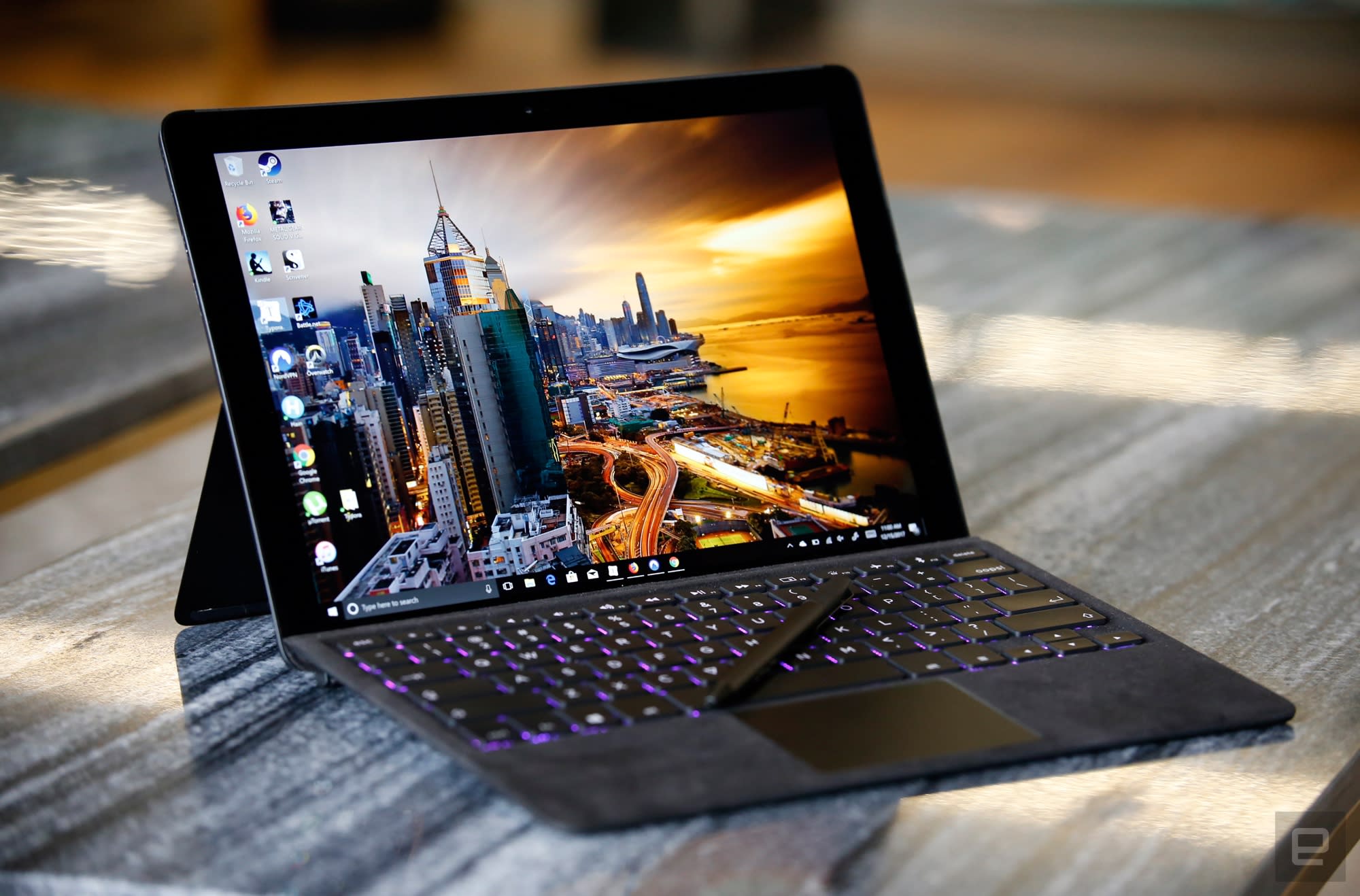
The real star of the show is the display: a 12.3-inch IGZO LCD screen with a resolution of 2,880 x 1,920. It’s one of the brightest I’ve ever seen on a convertible machine, and even though a batch of defective screens caused a production delay, I think the longer wait time was worth it. Text is crisp and colors pop compared to the Surface Pro. The bezels around the screen are a bit thicker than I’d like, but considering the price, I don’t think they’re a big deal.
Chris Velazco/Engadget
I also appreciate the level of power packed into the V, even if it’s not quite as fast as some of its competitors. My daily routine consists of a lot of writing (duh), image editing, Spotify sessions and YouTube binges. Those use cases don’t require the sort of horsepower that a U-series Core i7 chip brings to the table and so I never felt like I was missing out. And, while the V isn’t meant to be a full-on gaming machine, it manages to run titles like Metal Gear Solid V and Overwatch (at lower graphical settings, naturally) without too many hiccups.
With the built-in 48Wh battery, I’ve been able to use the Eve V for between 10 and 11 hours of work before needing a recharge. Your mileage will depend on your usage habits, but I appreciated being able to plop down and work nonstop before having to worry about plugging in. To be clear, that’s about an hour less runtime compared to the most recent Surface Pro. That said, the Eve V’s battery life is still in line with other ultraportable machines we’ve tested this year. If nothing else, it absolutely blows away my daily driver (a 15-inch, Touch Bar MacBook Pro), and for that I’m grateful.

As you’d expect from a small startup little experience building this kind of hardware, Eve didn’t get everything right. The thing is, it’s sometimes difficult to figure out where the blame lies. Consider the active pen included in the box — it doesn’t support as many levels of pressure sensitivity as Microsoft’s Surface Pen, and occasionally feels sluggish compared to the competition. It’s perfectly adequate for occasional note-taking, but I wouldn’t trust it for much more beyond that. Then again, this was a concession the Eve community eventually decided on in order to keep costs down, and so I don’t imagine them complaining much about this. There didn’t seem to be as much conversation about the Eve V’s speakers, and it shows: They get decently loud, but the audio is decidedly toothless.
Then there’s the keyboard, which I’m generally fond of. After using a 2016 MacBook Pro, with its flat key switches, the Eve keyboard’s key travel feels like a return to sanity. There are a few novel flourishes here, too, including a backspace key that says “oops” and the ability to toggle between seven different backlight colors for the keys. The trackpad is a little small for my liking, but it gets the job done. The whole thing is coated in Alcantara fabric, too, though it’s much plusher than the kind Microsoft uses for its Surface keyboards. It’s softer, which is nice, but the material also makes the keyboard more prone to catching crumbs, lint and dust. Learn from my mistakes and don’t eat your lunch over it.

Chris Velazco/Engadget
Ultimately, it’s the keyboard’s most ambitious feature that disappoints the most. The keyboard itself is thicker than one of Microsoft’s because there’s a battery and Bluetooth module inside, allowing you to detach the keyboard from the V’s magnetic connector and peck out emails from a distance. Unfortunately, the setup process is more confusing than it should be, and I noticed some latency once I carried the keyboard more than a foot or so away from the machine. That is, when you can you get the connection to work at all. On a few occasions, I couldn’t get the keyboard to wake up after disconnecting it from the V, for reasons that remain unclear.
In its current form the Eve V might not be for you, and that’s understandable. The company behind it obviously didn’t get everything right, and there are some features that I would’ve preferred didn’t make the cut because I didn’t lobby for them in the design process. And yet, after testing the V, I still find myself inexorably drawn to Eve’s mission: the idea of a low-cost, premium machine designed by the masses for the masses. I don’t think the Eve V’s missteps are due to bad community decisions — they seem like the sort of shortcomings you’d expect from a company that’s new to precision production.
Even now, Eve’s devotees are trying to jointly design a desktop docking system to give the V extra ports and video outputs. At this point, my lingering concerns mostly lie with Eve itself. What remains to be seen is how well this young company will scale to meet the needs of its growing fan base. For now, though, Eve has proven that design by community — even really big ones — can be fruitful when the people involved all care about building something special. Here’s hoping Eve and its fans can make the next one even better.
BlackBerry will shutter its app store on December 31st, 2019
While there’s little doubt that BlackBerry’s in-house mobile platforms are finished (the last BB10 device shipped over 2 years ago), it’s now giving holdouts some not-so-subtle hints that it’s time to move on. The company has announced that it’s shutting down BlackBerry 10 and BlackBerry OS services over the next couple of years. The closures will start with relatively little-used services like the BlackBerry Travel site (February 2018) and Playbook video calling (March 2018), but it will culminate with the shutdown of the BlackBerry World app store on December 31st, 2019. When 2020 rolls around, your Classic or Passport won’t have an official avenue for downloading software.
It’s not all dire news. BlackBerry is promising “at least” two years of BB10 support, and vintage BBOS devices will have a minimum two years of access to the company’s network. If you need to hang on to a phone for work or just want to reminisce about old times, you have time to transition to newer hardware.
The timeline isn’t exactly a shock when it’s patently clear that BlackBerry sees TCL-made Android phones like the KEYone and Motion as its future. It doesn’t want to keep running services that support a rapidly shrinking portion of its user base. Nonetheless, it’s a sad moment for longstanding BlackBerry fans. The crew in Waterloo has basically given a death date for its legacy technology: no matter how attached you might be, you’ll have to let go within a couple of years.
Via: VentureBeat
Source: Inside BlackBerry
 AIVAnet