


The space station is about as sanitary as your run-of-the-mill bachelor pad
Unfortunately, we’ve yet to discover life beyond our lonely planet, however, it seems as though the International Space Station orbiting hundreds of miles above Earth has become quite the, well, petri dish of goop. A series of recent reports detail the unique microbiome growing not only inside but also on the exterior of the laboratory and this orbiting testing ground isn’t nearly as pristine as one would imagine, to say the least.
Lacking many of the comforts we take for granted on Earth, basic hygiene is slightly more arduous on the space station. When they’re not performing grueling extravehicular missions, astronauts spend the rest of their live-long days showering in water reclaimed from breath and sweat, drinking recycled urine, and — seeing as fresh laundry is delivered in shipments — wearing the same clothes (including the unmentionables) for days on end. An astronaut who shalt not be named once wrote that he only changed his underwear about once every four days and wore the same pair of space shorts for months while in orbit.
Recently, microbiologists with the University of California, Davis used more than a dozen swab samples from the space station to juxtapose this ecosystem alongside microbes found in a standard household here on Earth. In total, the team identified more than 12,000 (mostly innocuous) species of microbes. This was substantially more “species-rich” than the microbiologists anticipated, however, the results were remarkable for other reasons as well.
The microbes pinpointed in the research didn’t perfectly match with organisms typically found in a terrestrial home or on an earthbound person’s skin. Furthermore, these microbes were overall more similar to ones found on household surfaces than on our skin. As noted by the study authors: “Unlike the ISS, homes on Earth are exposed to a variety of sources of microbes, including the outdoor air, tracked-in soil, plants, pets, and human inhabitants,” as noted by the authors of the study.
But these microscopic organisms aren’t limited to the interior of the space station by any means. Just last month, Russian astronaut Anton Shkaplerov famously stated cosmonauts had collected bacteria along the exterior of the space station, and went so far as to claim these “alien” microbes had come “from outer space.” This wasn’t the first or last seemingly outlandish claim made by Russian astronauts about microbes on the exterior of the space station. In 2014, cosmonauts claimed to have identified plankton on exterior space station windows. NASA wasn’t initially receptive to either of these claims with a NASA spokesperson stating, “I don’t know where all the sea plankton talk is coming from.”
While we still haven’t verified any real-world Andromeda Strain in orbit, over the years a regular smorgasbord of microscopic creatures have been identified not only surviving but thriving in the unforgiving vacuum of space. So-called “Water Bears” or Tardigrades have lived on the outside of the space station for 10 days even while experiencing more than 100 times the lethal radiation dose a human being could muster. But how can we utilize this data in the interim?
It has been well documented at this point in time, that astronauts who have spent extended periods onboard the space station have lowered immune functions. NASA takes extreme precautions to prevent contamination of not only the space station but also our solar system, however, the ability to study this inadvertent biome in orbit could but beneficial in identifying potentially dangerous pathogens before we send humans on extended missions deeper into the solar system.
Editors’ Recommendations
- NASA describes its plan for reaching Mars, but timing could be challenging
- Prepare for liftoff! 17 upcoming space missions worth getting excited about
- In order to stay in space for so long, Peggy Whitson exercised like crazy
- New spacesuit design boasts ‘auto home’ button for astronauts adrift in the void
- SpaceX Dragon capsule splashes down in Pacific with a crew of mouse astronauts
How to Deal with Circular Glare in Daydream View 2.0
New Lenses means positives and negatives.

One of the biggest upgrades to Daydream View’s 2017 model was the inclusion of the newer, Fresnel Lenses. These lenses are designed to be thinner, or flatter, but still, give the full range of optics when using them in VR. Both Oculus Rift, and Vive already use these lenses so it makes sense that Google would join in as well. But with great Lenses, comes great responsibility, or in this case, great glare.
The glare is caused by the manufacturing technique of Fresnel Lenses that create circular grooves in the glass. If the light from your phone shines just right it causes a circular light in your eye. It is frustrating but there are some tips to help.
Read more at VRHeads
Qualcomm Snapdragon 845: Everything you need to know
Qualcomm’s latest flagship SoC is here, and this is what you need to know.
Qualcomm, the semiconductor giant currently embroiled in lawsuits with Apple and a potential merger, announced today that its newest flagship platform, the Snapdragon 845, would be coming to devices in 2018.

While the system-on-a-chip, which combines the computing, graphics, modem and other essential components of a mobile processor, will only be available in the second quarter of next year, Qualcomm is ready to talk about how it will bring mobile devices — and not just phones — into the AI age.
It’s no coincidence that artificial intelligence is the cornerstone of Qualcomm’s branding for its next-gen platform; with companies like Apple, Huawei, and Google dedicating more of their devices and software to components dedicated to offloading the intense computational needs of on-device machine learning. To its engineers’ credit (and marketers’ chagrin), Qualcomm says that it’s been catering to developers’ machine learning needs since 2016’s Snapdragon 820 — its Hexagon digital signal processor, or DSP, has something called the Hexagon Vector Extension that processes the complex math equations used for artificial intelligence requirements. Qualcomm claims that AI performance with the new Hexagon 685 DSP is three times better than that of the Snapdragon 835, though it’s unclear at the moment how that translates to real-world usage.
More colors and better colors are how Qualcomm wants people to understand the Snapdragon 845’s display capabilities.
Hexagon’s improvements extend beyond just AI, though: developers can connect to advancements in audio, sensors and, of course, video.
Part of the Snapdragon 845’s biggest draw is something that we’ve seen, good and bad, from a number of manufacturers over the past year: HDR.
Specifically, the 845 supports capture in what Qualcomm calls Ultra HD Premium, which supports wider color gamuts, such as Rec. 2020 — that’s more colors — and considerably more shades of existing colors, in 10-bit HDR. This is powered by the new lower-power Spectra 280 ISP, an upgrade over the one inside the Snapdragon 835. With screens getting sharper and OLED displays becoming more vivid, the Snapdragon 845 promises to make video capture and playback significantly more vivid in 4K, something that Qualcomm has been pushing for a long time.

The new platform also has networking improvements, with Qualcomm touting its X20 LTE modem for its 20% faster speeds — up to 1.2 Gbps peak, far beyond what current networks can achieve in the real world. (That’s LTE Cat 18 download and Cat 13 upload, for those counting.) Wi-Fi is also improving, with the new 802.11ad standard on board offering multi-gigabit speeds. Plus, 2×2 802.11ac of course.
We’re beyond seeing meaningful jumps in single-core speeds happening every year.
In terms of substantive performance and efficiency improvements, the Snapdragon 845 is iterative, much like the last few revisions. Expect a 10-20% bump in performance depending on the application from the new Kryo 385 CPU, along with a 30% boost in efficiency, but we’re well beyond the time when meaningful jumps in single-core speeds are happening year-over-year. The Adreno 630 GPU offers an equivalent boost in performance — around 30% in performance and efficiency.
One intelligent way Qualcomm is cutting down on power use is through a system called Tile-based Foveation, which works with the Snapdragon 845’s eye-tracking system, helps the GPU render the part of the screen a user is looking at in greater detail than the area around it. This cuts down on energy usage and helps maintain frame rates in graphics-intensive games.
The Snapdragon 845 is, like the 835, a 64-bit octa-core chip built on Samsung’s 10nm process. The new chip runs at 2.8GHz and uses LPDDR4x dual-channel memory at 1866MHz. But it’s clear at this point that these nominal figures mean far less than the individual specialized portions of the SoC that enable specific features in devices.
So when can you get it? The chip will start shipping in the second quarter of next year so, like this year, expect the Samsung Galaxy S9 to be the first phone with the new chip.
What do you think? Share your thoughts on the Snapdragon 845 in the comments below!
How to get free mobile hotspot from your Android phone
Certain carriers prevent customers from using the mobile hotspot feature, but this guide may help get around that restriction.

While most carriers now offer some sort of unlimited plan, but most of these have some restrictions (which is the textbook definition of irony, but I digress). The most common restriction is tethering data: while users can use their data on their phones for whatever they desire, using that same data bucket while connected to computer is either not allowed, or has limits.
There are features in Android that let carriers check if a user has paid for tethering or mobile hotspot — different carriers use those terms interchangeably — and disable the feature if the user doesn’t have the feature on their plan.

There are some ways around this. Certain applications in the Play Store claim to help users bypass the carrier restrictions, and use their data however they intend. In our test case, we’re evaluating applications while using a Pixel 2 XL and Cricket Wireless’s Unlimited plan without official tethering.
EasyTether Full for Windows, macOS and Android tablets

EasyTether Full allows users to tether their laptop, desktop or tablet over USB or Bluetooth in order to share mobile data with the second device. Before trying to share data for the first time, users will need to download the necessary drivers or tablet-side application.
The drivers and tablet application can be downloaded to the phone application and moved over via USB cord. Unfortunately, the tablet-side application does not allow data to be shared with a Chromebook, and ChromeOS does not allow for drivers to be installed by the user. Because of this, EasyTether will not work for Chromebook users.
Magisk manager for Chrome OS and everything else — Root required

Covering 98% of all users makes EasyTether simple to recommend, but there are some situations where it wouldn’t be sufficient. Besides not being available to ChromeOS users, EasyTether also wouldn’t work for users who want to connect a game console to their mobile data, or for anyone who needs to connect more than one device at once.
In these cases, the only working solution we found was to root the phone and install Magisk Manager. Within Magisk Manager, navigate to the package installer and scroll down to the package titled “Tethering Enabler.” Press the down arrow within that block to download the package, and it will install. Once this is done, reboot your device, and you’ll be able to use the hotspot feature as normal.
Other options

It seems like a bit of a cop out, but the best option may be a different plan or carrier. Writing this guide made me finally try MetroPCS after using Cricket for about two years, and I’m glad I tried them. T-Mobile — which owns MetroPCS — has much better coverage in Indianapolis, with my phone working perfectly in areas that were previous dead spots.
Another solution would be using a different phone
I was hesitant to try MetroPCS in my rural hometown, but I found out that T-Mobile has expanded their coverage there as well. It’s not good by any definition of the word, but I can make phone calls, get text and instant messages and stream music (but not video). That’s much more than I could say the last time I tried to use T-Mobile’s service in my hometown. MetroPCS has an unlimited plan with tethering for the same price as my current Cricket plan, and I will be moving my personal line over soon.
Another solution would be using a different phone. I spent the better part of 2017 using the OnePlus 3T. One of the most handy features (for me) of Oxygen OS is that it doesn’t have the hooks the carriers use to check if a user has paid for the tethering feature. Because of this, tethering just works whenever the user turns it on, regardless of whether the user has paid for tethering or not.
I also tried other applications from the Play Store that may or may not work. Some users on other carriers and with other phones have had success, but I did not. All of these applications have free tiers though, so they’re worth a shot:
- Netshare
- FoxFi
- PDAnet+
Did any of these methods work for you? Let us know down below!
Star Wars themed OnePlus 5T coming to Europe
Available in Denmark, Finland, and Sweden.
This past Monday, OnePlus announced that it’d be releasing a special Star Wars version of its 5T flagship in India ahead of the release of The Last Jedi. Now, this variant of the phone has been confirmed for an expanded launch in Europe.

Per the official OnePlus blog, the Star Wars OnePlus 5T will be available for purchase in Denmark, Finland, and Sweden, and early customers will first be able to get it on December 13 at the premiere of The Last Jedi that’ll be shown at Tennis Palace. The day after this on December 14, customers will be able to buy the phone at Elisa stores and on OnePlus’s website.
We initially thought that this version of the 5T would be kept as an India exclusive, so it is encouraging to some countries in Europe now getting to share in on the Star Wars love.
There’s, unfortunately, no word on a U.S. release, but I’m still keeping my fingers crossed.
OnePlus 5T and OnePlus 5
- OnePlus 5T review: Come for the value, not the excitement
- OnePlus 5T specs
- Should you upgrade from the OnePlus 3T?
- OnePlus 5T vs. Galaxy S8: Beast mode
- All of the latest OnePlus 5T news
- Join the discussion in the forums
OnePlus
Amazon
How to use Instant Tethering with your Chromebook
Instant Tethering is a feature designed to enable to the clunkiness of signing into a portable hotspot. Here’s how to set it up!
Public WiFi is pretty common at this point, though it’s usually slow and insecure. Because of this, many users will instead tether their laptops and tablets to their phone’s cellular connection to connect to the web. Creating a portable hotspot has its own issues, include a clunky setup and connection process.

Chrome’s Instant Tethering feature has come to alleviate the clunky connection process at least. It’s also restricted to those who are using a Chromebook and one of Google’s Pixel smartphones, so most Android users can’t use the feature at this time. Having said that, let’s get into setting up Instant Tethering.
Pair your Chromebook and Pixel phone with each other with Bluetooth.
On your phone, open the Settings app and tap Google Services & preferences.
Scroll down and tap on Instant Tethering.
Make sure the Provide data connection option is enabed.
On your Chromebook, click on your photo in the lower right corner, then click network settings. Enable Mobile Data.
You will get a notification on your phone to verify the connection to your Chromebook. Tap on the notification and tap Connect.


That’s not quite as easy as setting up a traditional hotspot, but the payoff comes when you need to connect your Chromebook to your phone again. Simply unlock your Chromebook, and you’ll see a notification asking if you’d like to connect to the phone’s hotspot. Tap “Connect”, and that’s it! You’re online and ready to go!

Do you use Instant Tethering on your Chromebook? Let us know down below!
Chromebooks
- The best Chromebooks
- Should you buy a Chromebook?
- Google Play is coming to Chromebooks
- Acer Chromebook 14 review
- Join our Chromebook forums
Smart Text Selection finally available in Google Chrome
More than three months later, Smart Text Selection finally makes its way to Google Chrome.

Android 8.0 Oreo introduced a lot of new features for our favorite mobile OS, and in my opinion, one of the most underrated ones in Smart Text Selection. This is something that’s been available since 8.0 Oreo was released in August, but now on December 6, the stable version of Google Chrome is just now being updated to support it.

Smart Text Selection is coming to Google Chrome as part of the v63 update that’s rolling out to the Play Store now, and as long as you’re running either 8.0 or 8.1, it should work without any problems.
As a quick refresher, Smart Text Selection suggests different actions based on certain text that you’re highlighting/copying. If you highlight an address, you’ll get a new prompt that takes you right to Google Maps and automatically fills in said address. If you do the same with a phone number, you’ll get a prompt to take you to the dialer. It’s not a mind-blowing feature, but it is one of the more practical ones found in Oreo.
Now that we’re talking about it, have you been using Smart Text Selection?
Android Oreo
- Android Oreo review!
- Everything new in Android Oreo
- How to get Android Oreo on your Pixel or Nexus
- Oreo will make you love notifications again
- Will my phone get Android Oreo?
- Join the Discussion
OneDrive for Android gets fresh coat of paint, ditches hamburger menu
OneDrive for Android has picked up a snazzy new look in its latest update.

An update to Microsoft’s OneDrive app for Android is rolling out, bringing along a fresh coat of paint. While the app still touts OneDrive’s signature blue-and-white color scheme, Microsoft has changed up how you navigate your files by ditching the hamburger menu.
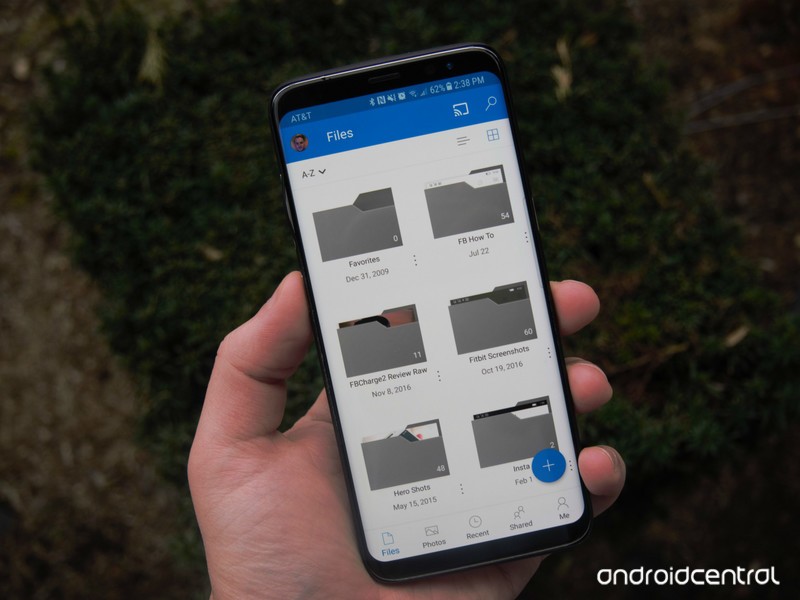
In place of the hamburger menu, you can now get around OneDrive using a set of category tabs at the bottom of the screen. The app defaults to a view of your files, but the tabbed navigation bar allows you to switch to Photos, Recent, and Shared sections as well. A new “Me” section is also available, acting as a location to see your OneDrive plan, how much storage you’re using, app settings, and more. Here’s a look at the full, official release notes for this update:
- A brand new look and feel! We’ve updated the look of the app to help you be more productive
- Get access to your Shared, Recent, and Sites content faster than ever with our new tab bar navigation
- Check up on Notifications, your Offline content and Account info in the all new Me view
Though it doesn’t represent a major overhaul, the update does make OneDrive look a touch more modern and potentially simpler to navigate. If OneDrive is one of your cloud storage apps of choice, you can grab the new look by updating from the Google Play Store now.
YouTube Rewind 2017 has fidget spinners and Jake Paul
The seventh annual YouTube Rewind is here.
Ever since 2010, YouTube’s released an annual “Rewind” video highlighting the most popular videos/trends of the platform over the past year. It first started out as a simple compilation of the top videos, but it’s since expanded into a massive gathering of the top YouTubers getting together to create a single video that showcases the year’s biggest and trendiest things.

2017’s YouTube Rewind is finally here, and, well, it’s a YouTube Rewind video.
There’s a lot going on here, with some of the biggest highlights being an appearance from Jake Paul, fidget spinners, recreations of the Shooting Stars and Salt Bae meme, and a lot of other stuff that you were probably thankful of having forgotten about.
If you’ve got seven minutes and fourteen minutes to kill, go crazy.
YouTube wants to have 10,000 humans reviewing videos on its site by 2018
With prices as low as $16, you can’t go wrong with either of these Bluetooth headphones
These are perfect for stuffing stockings or as a gift to yourself!
With each day that passes Bluetooth headphones become more of a necessity than a luxury. Phone manufacturers are removing headphone jacks left and right, and no one wants to deal with the wires anymore, but not everyone wants to spend a ton on headphones. Luckily, you don’t have to, and you can actually pick up some high-quality Bluetooth headphones for as little as $16.
Right now, at Amazon, you can pick up iClever’s sporty Bluetooth headphones for just $15.99 with coupon code 7EVHUCXM, or you can opt for Anker’s magnetic Bluetooth headphones for just $17.99 with coupon code SUPER236. So, how do you decide between the two pairs? You can’t go wrong with either of them, but there are a few differences here, so let’s break that down.

First off, if battery life is what you’re after, the iClever option is the way to go. For $2 less, you actually get an extra 2 hours of battery life over the Anker ones. The Anker headphones have magnetic buds, which means that when you aren’t using them and have them around your neck, they will clasp together. This keeps them a bit more secure on you and prevents them from possibly falling off by accident.
Both options are water resistant, making them perfect for working out or while tanning by the pool. Sound quality will be pretty similar on both, though some may prefer the sound of one over the other.
- See iClever headphones at Amazon
- See Anker headphones at Amazon
 AIVAnet