


Facebook rolls out a Messenger app just for kids
It’s no surprise that kids are using technology at a pretty young age these days, and a key part of that is using it to communicate with friends and family. But most kids tend to use tablets or iPod Touches that don’t have phone numbers, so normal texting and video chats are a no-go (unless it’s with mommy’s phone, which isn’t always great for mommy). Sure you could use an app like FaceTime or Hangouts, but most of them don’t offer the kind of control that parents want, especially for really young kids. Facebook, however, has come up with a solution. It’s called Messenger Kids and yes, it’s basically a standalone child-friendly Messenger app with parental controls baked right in.
Before you balk at the idea of having to sign your kid up on Facebook, don’t worry — you won’t have to. In fact, your kid doesn’t need a Facebook account at all in order to use Messenger Kids. You, however, do. That’s because it uses the parent’s Facebook account to set up the child’s Messenger Kids account.
Here’s how it works. When you download the Messenger Kids app, the first thing you’ll do is authorize it with your own Facebook account. This does not log you into the tablet — all it does is use your account to authenticate it. You then create a completely separate Messenger Kids account with your child’s first and last name. Again, this does not create a Facebook account for the child, and their name will not be publicly searchable. Oh, and don’t worry, Messenger Kids is also ad-free.
So how is your kid supposed to make friends on Messenger Kids? Well, the only way they can do that is through you. The parents are the only people who can add contacts for their kids. And the only way they can do that is through Facebook. Adding adult family members like grandpa and grandma is easy, because they likely already have Facebook accounts. Adults can use the normal Messenger app to talk to the kids on Messenger Kids — it’s completely interoperable.
But let’s say your child wants to befriend other children, like his classmate Peggy, on Messenger Kids. What then? In this case, you have to already be Facebook friends with Peggy’s parents. If Peggy is already on Messenger Kids, you’ll see her name under her parent’s name and you can tap it to add her as a friend to your child. Peggy’s parents will then have to approve your contact request in order to ass your child to Peggy’s contact list as well.
And, of course, parents can remove Messenger Kids contacts at any time from their own account, and the child cannot reinstate an account that have been removed. On top of that, Messenger Kids has report and block controls within the app itself, so kids can report and block people if they want. And, any time a child reports or blocks anyone, their parents will get a notification letting them know about it. Loren Cheng, a product manager at Facebook who led the Messenger Kids project, said that the company actually has a dedicated team at Facebook who looks at all the reports, and will proactively ban any account that is seen as harmful.
As for the app itself, well, it’s very visually oriented. The home screen has big shortcuts to frequent contacts like friends and family, with a heavy emphasis on real-time video chat. “Kids really like real-time communication,” said Cheng. “They want to be in the moment, back and forth […] Kids see it as play.” Of course, Messenger Kids also allows for normal text-based communications as well, just like regular Messenger.
That is also why the video chat on Messenger Kid is loaded with emojis, GIFs, selfie frames and stickers, all of which have been screened for kids and are age-appropriate. In fact, Facebook actually built a custom art team just for Messenger Kids, and worked with child development experts across the country to come up with what would be good for kids at this age, developmentally, and what would be good for families. One particular photo mask, for example, is an AR experience that helps educate kids about vaquitas, an endangered species of dolphins, and immerses them in a scuba-diving environment.
Facebook told us that it took great pains to reach out to child development experts such as the National PTA, the Center of Media and Child Health, the American Association of Pediatrics and many more as part of an Advisor Committee when developing Messenger Kids.
“What we learned is that parents want more control over who their kids have contacts with,” said Antigone Davis, Facebook’s head of safety. “They want the content to be appropriate, and they want to have better control over time spent on these technologies.” At the same time, Davis said that parents also want their children to be digitally literate, and to build the skills necessary to communicate in the modern world.
“Messenger Kids was designed to bring families together for conversations, as kids learn how to navigate the digital world,” said Cheng.
Messenger Kids is available for preview in the US starting today. It’s iOS-only at launch, but will roll out to Android users later this month.
GAME hooks up with Three to sell more smartphones
GAME is trying everything to turn its struggling retail business around. Today, the company announced a partnership with Three that will expand its in-store phone offerings. A Three-branded “gondola” will be trialed in 15 London stores, pushing smartphones, SIM cards, MiFi devices and pay-as-you-go top-ups. GAME sells handsets already but typically these are trade-ins rather than fresh devices. Clearly, this is an attempt to broaden the company’s wares and reverse its falling revenue, which dropped from £813 million to £783 million in the 12 month period leading up to July.
GAME knows it’s in trouble. Twelve months ago, it launched a series of experience stores in London and Milton Keynes branded “Belong.” They included tiny “arenas” — arcades for the eSports generation — that hosted tournaments and other casual events. It’s unclear if the concept has been successful, however. Last month, Game sold part of Multiplay — a company it acquired for £20 million in 2015 — to engine developer Unity for £19 million. Specifically, it ditched Multiplay’s server hosting division, keeping the portion that runs its Belong arenas and the gaming festival Insomnia.
All of this masks the real problem facing GAME: digital sales. Every year more people are choosing to buy software through Steam, PSN, the Xbox Store, and Nintendo’s eShop. Downloads are more convenient and a well-timed sale can beat the prices offered by GAME or even online retailers such as Amazon. There is, of course, still an interest in boxed copies — they make great gifts, you can share them with friends, and you can save money by trading them in or selling them on afterwards. The industry is shifting, however, and GAME needs a real, long-term solution to survive.
Via: Gamesindustry.biz
OnePlus launches ‘Star Wars’ 5T in time for ‘The Last Jedi’
As Star Wars: The Last Jedi approaches its December 15th theatrical release, get ready to see the power of Disney’s fully armed and operational merchandising machine. OnePlus has revealed that it will be part of that circus with the 5T Star Wars Limited Edition smartphone. Coming to India on December 14th, it’s bedecked with a red side button, backside Star Wars logo and screen theme featuring First Order stormtrooper wallpaper.
OnePlus teased the device via at the Bengaluru Comic Con in India, and will unveil it in Mumbai at a popup store on December 14th, with ticket sales kicking off on Thursday. In a teaser video (below) it also revealed what looks like a new, more geometric font, but that might be strictly part of the Star Wars branding tie-in.
Disney has done smartphone merchandising deals before, most notably with Japan’s Softbank on a special-edition Star Wars: Rogue One device. However, OnePlus presents itself as a company that can offer premium smartphones on the cheap because it’s lean and mean, so it’s a bit weird to see it splurging on what must be an expensive Star Wars license — even if it’s only in India. On the other hand, there’s no doubt that the Special Edition 5T pushes all the buttons for Android and Star Wars fans, two groups that have a lot of crossover. There’s no word on whether it’ll arrive in other regions.
Via: The Verge
Source: OnePlus
HP’s wearable VR system is an unnecessary luxury
You’ve never seen a PC like HP’s Omen X Compact Desktop. It’s a powerful gaming rig, and it’s small enough to do double duty as a pseudo console under your TV. But it also has a built-in battery. And when attached to HP’s revamped VR backpack accessory and its mixed reality headset, you can experience high-end virtual reality in a completely new and freeing way. The only problem? The entire package will cost you close to $3,500. That puts it far out of reach for the vast majority of gamers, even those who don’t mind shelling out for the latest hardware.
Hardware
True to its name, the Omen X Compact Desktop is sleek and relatively portable. On its own, it weighs 5.5lbs — lighter than popular gaming notebooks from Alienware and Razer. The desktop also shares the same aesthetic as HP’s Omen 15 and Omen X laptops. It’s got a sharp, angular design with a stylish black case and red accents. It makes a statement on its own, but it really shines when you place it in the bundled dock, which turns it into a monument to PC gaming.
The dock gives you an easy way to connect the desktop to your workspace, and quickly remove it, without having to deal with plugging in cables. The front features two USB 3.0 ports, as well as USB-C. While the back has another 3 USB connections, an ethernet jack, as well as DisplayPort and HDMI. There’s also a power connection for recharging the batteries from HP’s VR backpack.
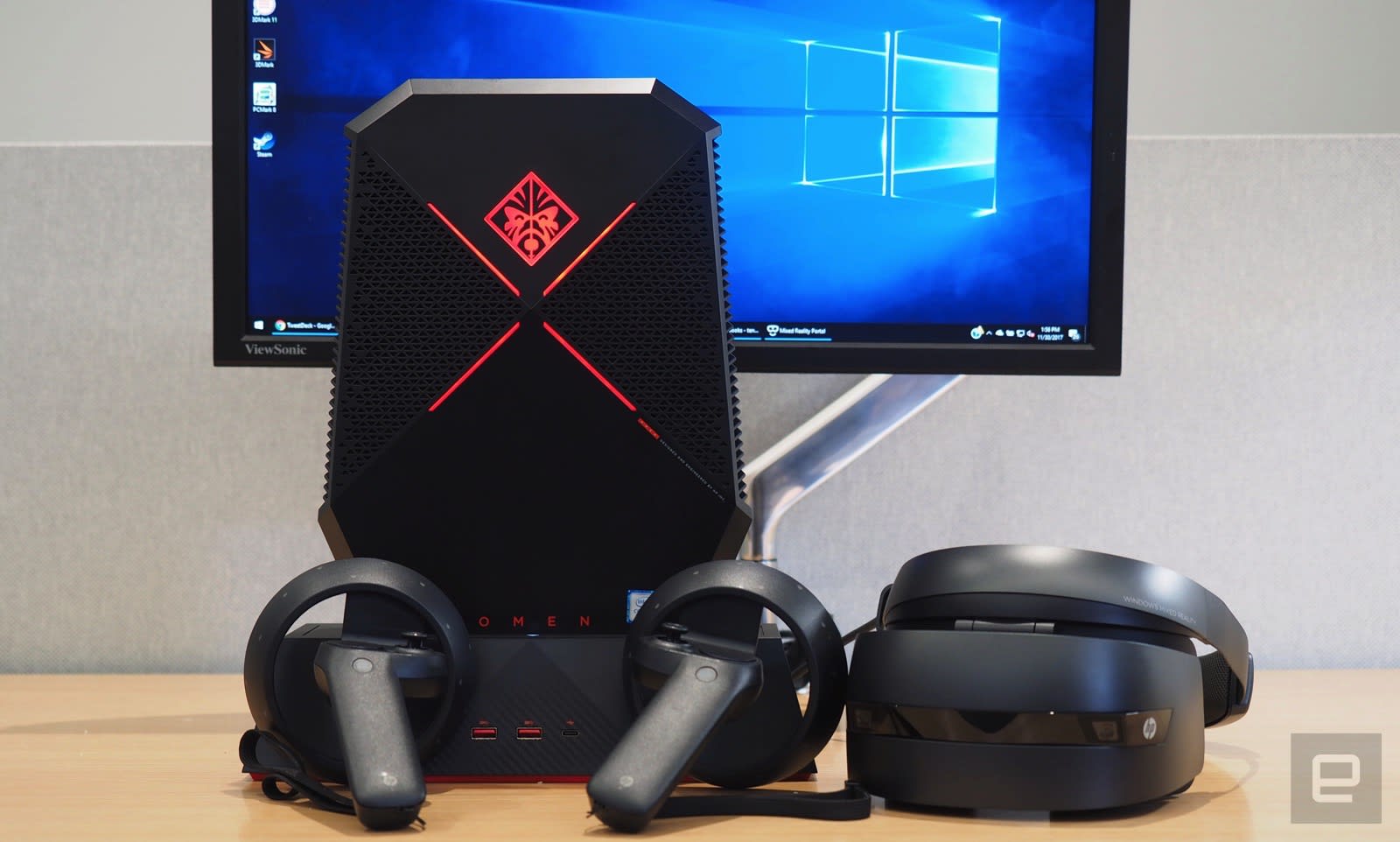
The compact desktop, meanwhile, has two USB ports up top, USB-C, HDMI, MiniDisplayPort, a headphone jack, and, conveniently enough, a power connection for the HTC Vive headset. On top of that, there are also two USB ports along the lower side of the desktop. There’s no SD card slot on the the computer or its dock, which seems like a surprising omission for such a fully featured setup.
As for HP’s Mixed Reality headset, it’s in line with what we’ve seen from other Windows VR gear. It’s relatively light and, most importantly, easy to put on and take off. There’s a liberal amount of padding around the face area and head band, which insures a comfortable fit. There also aren’t too many straps to mess with: you just loosen the headband with a rear dial, and tighten it once you’ve put it on. Thankfully, you can flip the visor portion up, allowing you to see the real world without removing the entire devices. That’s one of the more useful features we’ve seen from Mixed Reality devices.

Each of the headset’s lenses features a 1,440 by 1,440 resolution at 90Hz — the same specs we’ve seen on most Windows Mixed Reality headsets. There’s a headphone jack along the bottom (you’ll have to supply your own), as well as a short built-in cable. The latter is particularly helpful, since it lets you use a long cable to connect to the dektop normally, but you can also swap it out for a shorter cable to use with the backpack.
As you’d expect, HP also includes two mixed reality controllers. Each features a large sensor ring for spatial tracking, as well as a thumbstick, and a trackpad that can also be recognized as four separate buttons. There are also the usual things we see on every VR controller these days: trigger and grab buttons, along with menu and home options.
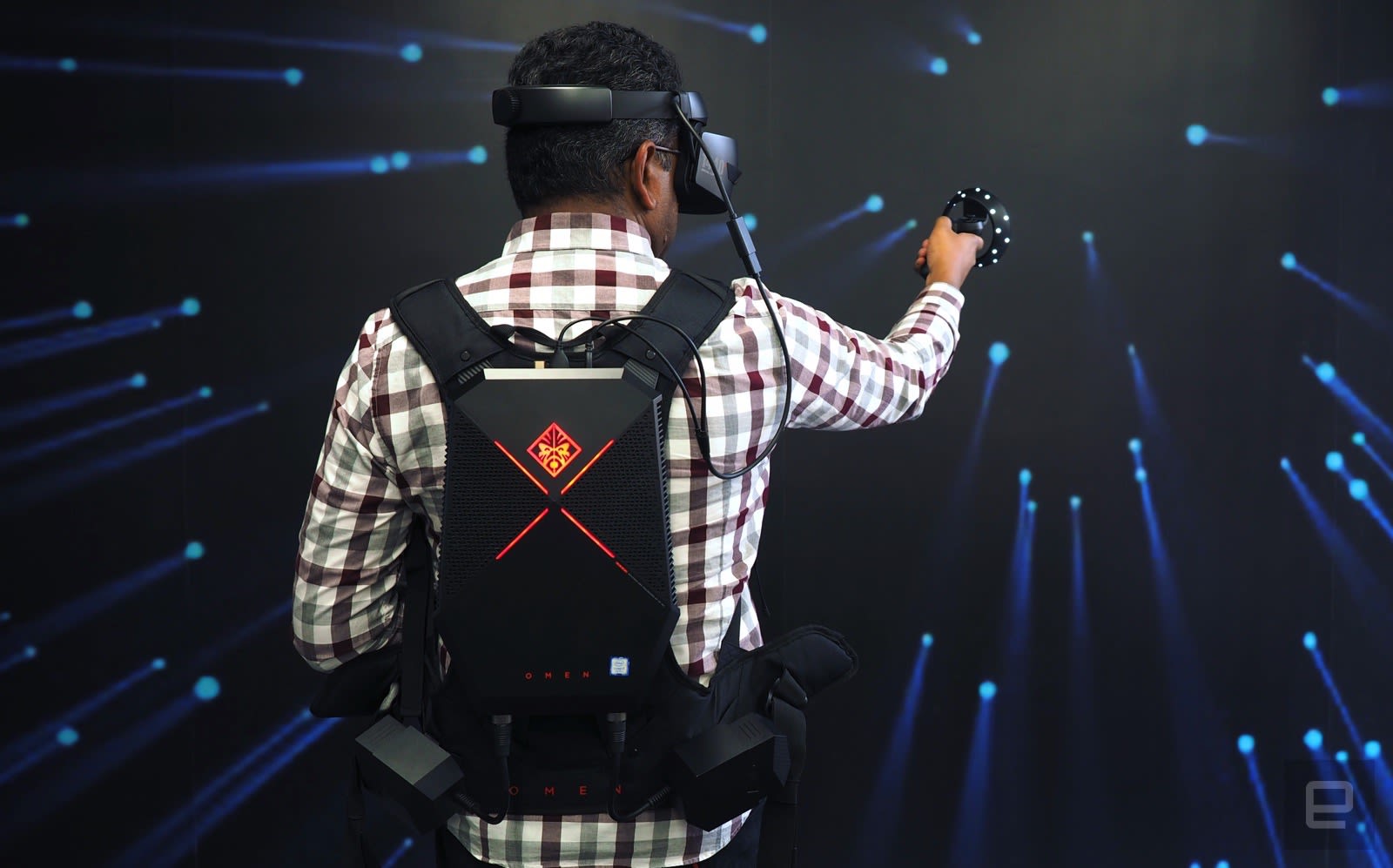
Tying all of these new gaming devices together is HP’s VR backpack, which is meant to let you experience virtual reality without being tied down to a large desktop. It sports padded straps and a plastic panel, which the Compact Desktop slides onto securely. It also has two side holsters for battery packs. HP includes four batteries with the backpack, so you can keep one pair charged while you’re using the other.
Performance and battery life
| HP Omen Compact Desktop (2.9Ghz-3.9GHz i7-7820HK, NVIDIA GTX 1080 [overclocked]) | 7,040 | N/A | E21,786 / P19,286 / X9,144 | 34,094 | 3.1 GB/s / 1.65 GB/s |
| HP Omen 15 (2.8GHz Intel Core i7-7700HQ, NVIDIA GTX 1060) | 6,727 | 6,436 | E14,585 / P11,530 / X4,417 | 20,659 | 1.7 GB/s / 704 MB/s |
| ASUS ROG Zephyrus (2.8GHz Intel Core i7-7700HQ, NVIDIA GTX 1080) | 6,030 | 7,137 | E20,000 / P17,017 / X7,793 | 31,624 | 3.4 GB/s / 1.64 GB/s |
| Alienware 15 (2.8GHz Intel Core i7-7700HQ, NVIDIA GTX 1070) | 6,847 | 7,100 | E17,041 / P16,365 | 20,812 | 2.9 GB/s / 0.9 GB/s |
| Alienware 13 (2.8GHz Intel Core i7-7700HQ, NVIDIA GTX 1060) | 4,692 | 4,583 | E16,703 / P12,776 | 24,460 | 1.78 GB/s / 1.04 GB/s |
| Razer Blade Pro 2016 (2.6GHz Intel Core i7-6700HQ, NVIDIA GTX 1080) | 6,884 | 6,995 | E18,231 / P16,346 | 27,034 | 2.75 GB/s / 1.1 GB/s |
| ASUS ROG Strix GL502VS (2.6GHz Intel Core i7-6700HQ , NVIDIA GTX 1070) | 5,132 | 6,757 | E15,335 / P13,985 | 25,976 | 2.14 GB/s / 1.2 GB/s |
| HP Spectre x360 (2016, 2.7GHz Core i7-7500U, Intel HD 620) | 5,515 | 4,354 | E2,656 / P1,720 / X444 | 3,743 | 1.76 GB/s / 579 MB/s |
| Lenovo Yoga 910 (2.7GHz Core i7-7500U, 8GB, Intel HD 620) | 5,822 | 4,108 |
E2,927 / P1,651 / X438 |
3,869 | 1.59 GB/s / 313 MB/s |
| Razer Blade (Fall 2016) (2.7GHz Intel Core-i7-7500U, Intel HD 620) | 5,462 | 3,889 | E3,022 / P1,768 | 4,008 | 1.05 GB/s / 281 MB/s |
| Razer Blade (Fall 2016) + Razer Core (2.7GHz Intel Core-i7-7500U, NVIDIA GTX 1080) | 5,415 | 4,335 | E11,513 / P11,490 | 16,763 | 1.05 GB/s / 281 MB/s |
| ASUS ZenBook 3 (2.7GHz Intel Core-i7-7500U, Intel HD 620) | 5,448 | 3,911 | E2,791 / P1,560 | 3,013 | 1.67 GB/s / 1.44 GB/s |
| Razer Blade Stealth (2.5GHz Intel Core i7-6500U, Intel HD 520) | 5,131 | 3,445 | E2,788 / P1,599 / X426 | 3,442 | 1.5 GB/s / 307 MB/s |
The Compact Desktop is actually made out of laptop hardware. It’s powered by an Intel Core i7-7820HK CPU, which is unlocked to make it easier to overclock. It also features NVIDIA’s GTX 1080 notebook GPU (overclocked out of the box) with 8GB of video RAM. Additionally, the Compact Desktop packs in 16GB of DDR4 memory and a 1TB SSD. Clearly, HP didn’t skimp on components — this thing can easily take on full-sized gaming rigs.
In Gears of War 4 running in 4K with high settings, it managed an impressive average framerate of 56FPS. Stepping down to 1,440p, it reached 90FPS with Ultra settings, and 121 FPS in 1080p. Basically, it’ll handle every modern game without trouble. Given its diminutive size, it could also serve as a home theater PC that can blow away the latest 4K ready consoles, like the Xbox One X and PlayStation 4. (Of course, that should be expected when it costs five times as much.)
The desktop also has a built-in battery, which lasted 1 hour and 10 minutes while running the PC Mark 8 benchmark. Clearly, it’s not something you’re meant to use unplugged for very long. It’s still convenient though, since it means you can connect the Compact Desktop to the VR backpack accessory, and swap out extra external batteries, without shutting it down. That’s a simple thing you can’t do with other VR backpack systems.
Devindra Hardawar/AOL
Using virtual reality
In desktop mode, HP’s mixed reality headset was a cinch to set up. All you have to do is plug in an HDMI and USB cable. There aren’t any sensors to install, like with the Oculus Rift and Vive. Everything on Microsoft’s VR platform relies on built-in sensors, instead.
When you put on the headset, you’re thrown into the Windows Mixed Reality Portal, which is where all of the VR magic happens. You’ll be asked how you want to use your headset: in walking mode, which replicates the room-scale VR we’ve seen on the HTC Vive, or sitting and standing in place. If you choose the latter, you can immediately start moving around Microsoft’s virtual living room and testing out mixed reality apps. If you want to walk around VR environments, though, you’ll need to clear out nearby furniture and trace a virtual boundary using the headset first. It’s all meant to keep you from bumping into your desk and nearby walls.

Compared to the virtual living rooms from Oculus and HTC Vive, which serve as a home base for everything you’re doing in VR, Microsoft’s feels comfortable. And even though there are only 60 virtual reality apps in the Windows Store so far, including notable entries like Superhot and Arizona Sunshine, there’s still plenty to do. Superhot, feels just as smooth and immersive as it did on the HTC Vive. And since the headset is higher res, everything looked sharper as well. Watching trailers in the virtual screening room almost felt like I was in a theater. And it handled 360-degree videos well. The Star Wars Rogue One behind-the-scenes experience felt just as immersive as other headsets.
Microsoft also wisely partnered with Valve to bring SteamVR over to Mixed Reality headsets. Steam automatically recognized HP’s model when I started it up, and I was able to hop into Rez Infinite. After playing for a while, though, it’s clear that Microsoft’s VR controllers aren’t nearly as ergonomic as Oculus’s excellent Touch controllers. Hitting the trigger and grip buttons don’t feel very natural, and since they have straight handles, they don’t fit easily into the natural curve of your hands. Hopefully, that’s something Microsoft can fix with its next controllers.

When it comes to HP’s backpack accessory, I was honestly surprised how much I enjoyed using it. It made diving into VR more immersive, since I didn’t have to worry about getting tangled in any cables tied to a large desktop. Sure, the setup is a bit more involved: You’ve got to attach the compact desktop, slide in the battery packs, and make sure everything is connected properly. The backpack feels surprisingly comfortable to wear, thanks to its padded shoulder straps and two front straps. The entire setup clocks in at 8.3 pounds, which isn’t much more than what I typically lug around every day in my backpack.
While playing Superhot, I was able to dodge bullets and take out bad guys far more easily, since I was free to move and bend in ways I couldn’t with a typical VR setup. Of course, there’s also the danger of hitting a wall and running into furniture. Even if you set up virtual borders, it’s easy to miss those when you’re swept up in the game world. And, oddly enough, you can’t quickly set up new borders in backpack mode — you can only do it in desktop mode with a monitor attached. So while you can conceivably take the entire VR backpack setup anywhere — as I did around our offices — you’re stuck using it without anything to warn you about walls or obstacles.
HP claims each pair of batteries adds one hour of juice to the backpack setup, on top of what you get from its built-in power source. In my testing, 15 minutes of gaming typically used up around 10 percent of battery life. (I wasn’t able to stay in VR long enough to drain the batteries completely.) Of course, that timing will depend on what, exactly, you’re doing. Sitting back and watching a video, or just browsing the web, could stretch the battery life longer.

But, I can’t help but be a VR backpack sceptic. Wireless VR solutions are already here, and they’re only going to get better over the next year. VR backpacks are already an incredibly niche category, but it won’t be too long until they’re completely unnecessary.
If you want to use HP’s headset with the backpack, you’ll also have to pick up a $10 virtual display dongle. That’s due to an issue with Windows, which simply doesn’t spit out an image to mixed reality headsets unless it detects a connected display. While it would make more sense for HP just to include one of those adapters in the box, the company says it’s hoping Microsoft comes up with a software fix instead. Oddly, the backpack setup will work fine with an HTC Vive without that workaround.
Pricing and the competition
 You’d really need a lot of extra spending money to dive into HP’s VR ecosystem. The compact desktop costs $2,499, while its mixed reality headset is an additional $449. And don’t forget about the backpack, which adds another $499. It’s so costly, that it’s even out of the realm of many early adopters. It’s more suited for developers who want to explore what’s possible with portable VR.
There are, of course, other VR backpack options on the market, like those from Zotac and MSI. They’re all bigger and clunkier than HP’s system, but at least they’re not as expensive. Zotac’s VR Go starts at $1,800, and it includes both the desktop and backpack accessory. You’ll still need to add your own headset, though.
Wrap-up

Kris Naudus/AOL
Ultimately, the Omen X Compact Desktop’s power and unique capabilities helps it stand out from the gaming crowd. HP’s mixed reality headset, meanwhile, is a solid entry into new territory, one that’s bolstered by Microsoft’s growing VR platform. And even though VR backpacks might not be around for long, and they’re certainly not something most people should consider, HP’s entry remains the best one we’ve seen so far.
Uber joins public transport group to win back city trust
Uber’s devil-may-care attitude to, uh, pretty much everything has managed to put noses out of joint all across the globe. Its new CEO, Dara Khosrowshahi, is hoping to build some bridges that Travis Kalanick burned by making peace with local transport providers. Consequently, the outfit is signing up with the International Association of Public Transport, an advocacy industry group for public transport providers. Its membership includes Transport for London, which recently revoked Uber’s license to operate in the city.
This new-found spirit of co-operation will be fostered with a series of training sessions designed around fixing the beginning and end of people’s daily journeys. In addition, Uber’s Andrew Salzberg told Reuters that the company is pledging to both work better with infrastructure providers and reduce congestion. Specifically, that Uber will somehow encourage people to adopt shared modes of transport rather than going it alone. That sort of talk is, unfortunately, pretty cheap, but given how low Uber’s reputation is right now, cities and regulators are hoping the company will now begin to turn over a new leaf.
Via: Reuters
Source: UITP
Dialog Shares Continue to Fall After Company Admits Apple Could Design Own iPhone Battery Chips
Dialog Semiconductor admitted on Monday that Apple, its top customer, could build its own power management chips for future iPhones without relying on the British-based chipmaker (via Reuters). The comments saw Dialog shares tumble as much as 19 percent, despite the firm claiming there was no risk to its existing supply deals in 2018.
Dialog said it was already in the advanced stages of working with Apple on designing “2019-type products” that could lead to commercial contracts by next March.
“Our position remains that we have seen no material change to our ongoing relationship with Apple Inc,” Chief Executive Jalal Bagherli told investors on a conference call.
However, the company acknowledged for the first time that “Apple has the resources and capability to internally design a PMIC and could potentially do so in the next few years”.
A report last week claiming Apple would design its own power management chips as early as 2018 came as a serious blow for Dialog, which exclusively designs the current main power management chip for iPhone, iPad, and Apple Watch models. Apple reportedly accounted for nearly three quarters of Dialog Semiconductor’s revenue in 2016.
Dialog’s PMIC chip controls an iPhone’s battery, including charging capabilities and energy consumption. Apple’s own design will supposedly be “the most advanced in the industry”, according to Nikkei Asian Review, and could enable future iPhones to have a better balance between performance and battery consumption. Taiwanese supplier TSMC will be the exclusive manufacturer of Apple’s in-house power management chip, according to the report.
Since last week’s report, Dialog shares have lost nearly a third of their value. At one point this morning they were down 15.2 percent at 26.47 euros ($31.38), according to Reuters.
Bagherli said Apple’s feedback so far on 2019 product plans had been ”very good” and that he expected to have more clarity by March on the terms of new business from Apple for 2019. Dialog would update investors when it had more details, he said.
Semiconductor suppliers are typically barred by Apple from revealing their supply relationships. Dialog, which has previously declined to name Apple, referring to it only obliquely as its “largest customer” or its “main business”, said it had received a special dispensation from Apple to mention it.
Dialog emphasized that it had no reason to believe its 2018 business with Apple would be affected if Apple chose to design its own chips, but acknowledged that it would need to meet the company’s “technology, quality, price, and volume expectations” if it wanted to remain a key supplier.
Dialog Semiconductor may turn out to be the second large British company to lose major business from Apple with the next couple of years. In April, Imagination Technologies shares plunged after Apple informed the firm it plans to stop using its PowerVR graphics technology in its devices by mid-2019.
Apple looks on course to start designing several other components in-house in the next few years, potentially including ARM-based Mac processors and iPhone modems.
Tag: Dialog
Discuss this article in our forums
Spotify Testing Like/Dislike Feature for Songs in Discover Weekly Playlists
Spotify is quietly testing a new feature that enables listeners to provide positive or negative feedback on track selections in Discover Weekly playlists.
First spotted by Mashable, Spotify has started including a small heart symbol and a blocked sign at the lower left corner of the desktop app interface when a song is playing in a Discover Weekly playlist. When users hover over the heart or blocked sign, a description overlay shows “Like” or “Don’t like”, respectively.
Clicking “Like” adds the track to the listener’s library, while clicking “Don’t like” causes a dialog to appear asking whether it’s the song or the artist the user isn’t keen on. Selecting either ensures that track/artist doesn’t show in Discover Weekly again.
According to Spotify, it is testing the like/dislike buttons as a possible new feature for Discover Weekly (they can already be found in the Daily Mix), but they won’t appear for everyone, and the streaming service still hasn’t decided if a full rollout will follow.
 Spotify’s Discover Weekly playlist has been a hit with subscribers. Spotify announced in May 2016 that more than 40 million people had used the playlist service, streaming just under five billion tracks in under a year. As Mashable notes, some users have been requesting like/dislike buttons for the playlists for at least a couple of years.
Tag: Spotify
Discuss this article in our forums
Facebook Announces Messenger App for Kids That Parents Can Remotely Monitor
Facebook today is rolling out a preview for a new standalone app aimed at kids under the age of 13, which the company says was built to make it easier for kids to “safely video chat and message with family and friends.” The “Messenger Kids” preview is available only on iPhone, iPod touch, and iPad in the United States, letting young family members download the app, which can then be controlled by their parent’s Facebook account.
Facebook said that it developed the app with guidance from the National PTA, as well as experts in child development and online safety. Messenger Kids does not require children to create a Facebook account, but instead asks parents to download the app, authenticate it, and then create a miniature profile of their kid that is linked to the parent’s Facebook account.
Once parents set up an account, kids can have one-on-one or group video calls only with contacts approved by their parents. The home screen of the app shows these approved contacts, as well as which are online.
Whether it’s using video chat to talk to grandparents, staying in touch with cousins who live far away, or sending mom a decorated photo while she’s working late to say hi, Messenger Kids opens up a new world of online communication to families. This preview is available on the App Store for iPad, iPod touch, and iPhone.
Like other Facebook apps, there are a wide variety of masks, emojis, and sound effects to use within video chats. Kids will be able to send photos, videos, and text messages — and edit them with GIFs, frames, stickers, and doodling tools — to their friends also on Messenger Kids, as well as adult family members. The adult contacts will receive these messages on their normal Messenger app.

For parents, there will now be a Messenger Kids parental controls panel on their own Facebook app, where they can approve or disallow certain contacts from being able to talk with their kid. Facebook said that there are “no ads” in Messenger Kids and any of the child’s information from the app “isn’t used for ads.”
Messenger Kids is available on the iOS App Store for free starting today [Direct Link], and Facebook confirmed that there are no in-app purchases. For more information, visit Facebook’s new website for the kid-focused app.
Tags: Facebook, Facebook Messenger
Discuss this article in our forums
Watch the space station astronauts make pizza in microgravity conditions
It’s not the 3D-printed pizza that astronauts could one day be scarfing down on lengthy missions to Mars, but it is, nevertheless, pizza in space.
It’s just the kind of comfort food some astronauts hanker for during their long stints aboard the International Space Station (ISS), evidenced by Italian astronaut Paolo Nespoli when he mentioned to his boss during a recent live-stream event that he really misses the cheesy snack. A short while later, he was eating one for dinner.
The crew did, however, have to make it themselves, presumably because the Domino’s delivery guy couldn’t make the trip on his scooter.
When you really, really miss pizza… you CASUALLY mention it to the International @Space_Station Boss during a live public event Thank you Kirk for surprising us with unexpectedly delicious pizzas! #VITAmission pic.twitter.com/WstvG3IKr1
— Paolo Nespoli (@astro_paolo) December 2, 2017
Knowing full well that Earthlings would be highly curious to see what space pizza looks like, Paolo’s fellow Expedition 53 crew member, Randy Bresnik, uploaded a video to YouTube over the weekend giving us the lowdown.
Truth be told, prepping pizza in space is much like prepping it at home, apart from the fact that just about everything is floating about.
Fortunately, the tomato paste that’s slathered across the base acts as a kind of adhesive to keep the topping — in the video we see plenty of pepperoni and anchovies — from floating off.
Once heated, the astronauts have some fun with their if-we’re-honest-not-particularly-tasty-looking pizza by launching them around the space station like frisbees. There’s a nice shot of the crew standing proudly with their pizza, with the astronauts and their dinner all floating together in front of the camera.
“Flying Saucers of the edible kind,” American astronaut Randy Bresnik tweeted, adding,”Pizza Pie created from scratch, the IPDS (Intergalactic Pizza Devouring Squad) says 12 thumbs up!”
Life aboard the space station
It’s not the first time the space inhabitants have shown us how they do everyday things aboard the ISS, proving that it’s never quite the same in microgravity conditions.
Former ISS astronaut Tim Peake once showed us how they make a coffee up there, and also answered the question that he said is asked the most – “How do astronauts use the bathroom?”
And we mustn’t forget astronaut Karen Nyberg’s entertaining video explaining everything you ever needed to know about washing your hair in space.
Editors’ Recommendations
- Watch a fidget spinner in the weightless environment of the space station
- Elon Musk unveils prototype for SpaceX astronaut suit with Crew Dragon capsule
- SpaceX Dragon capsule splashes down in Pacific with a crew of mouse astronauts
- Go spacewalking as an astronaut with a new VR experience for Vive, Rift
- In order to stay in space for so long, Peggy Whitson exercised like crazy
Even when the airwaves clog up, Li-Fi will keep us connected
The internet is vital for many of us. We work, play, and socialize online. Internet access has even been recognized as a basic human right by the United Nations. But fears of an impending spectrum crunch persist.
As demands grow, particularly video streaming, our cellular and Wi-Fi networks are being strained to breaking point. One possible solution to alleviating the strain is Li-Fi, an interesting technology that allows the internet to come through LED lights.
What is Li-Fi?
Li-Fi allows you to transmit data using light. While Wi-Fi relies upon radio frequencies to send data, Li-Fi employs infra-red and ultra-violet light, as well as visible light, to send data back and forth. With PureLiFi’s implementation, a router connects to an access point via Ethernet cable, the access point connects to a Li-Fi-enabled LED light and modulates the light at extremely high speeds. You plug a dongle with a transmitter and receiver into your laptop or tablet and it sends and receives data from and to the light. You can use it just the same way you would use Wi-Fi to surf the web, stream a video, or upload files.
Simon Hill/Digital Trends
We’ve been following the progress of Li-Fi for the last couple of years. After seeing a demonstration at MWC earlier this year, we gave Edinburgh-based PureLiFi our cool tech award. The team has been hard at work since then to miniaturize the technology and it recently took the wraps off a new product – the LiFi-XC.
New and improved LiFi-XC
Previous demonstrations relied on the LiFi-X, a chunky dongle produced as a proof of concept to allow potential customers to test the technology. The new LiFi-XC is much sleeker, with an aluminum casing and a stylish design that resembles a premium USB thumb drive.
“We’ve focused on the miniaturization, productization, and robustness of the technology,” PureLiFi Chief Operating Officer, Harald Burchardt, told Digital Trends. “We also substantially reduced the power draw of the dongle, which is particularly important as we move towards integration.”
“We’re looking at a two to three-year time frame to be able to integrate our technology into devices.”
The LiFi-XC system is comprised of the USB dongle, which plugs into a tablet or laptop, and an access point which connects a router to an LED bulb. It is the first fully certified Li-Fi system, with FCC, UL Listing, and CE approval. It’s designed to be plug-and-play and offers support for Windows, MacOS, and Linux.
We tried it out with a Microsoft Surface laptop and walked around the conference room of PureLiFi’s Edinburgh office while streaming a video. It worked flawlessly, offering speeds of 43 megabits per second (Mbps) up and down.
While LiFi-XC is a significant improvement over the original LiFi-X, the company is aiming to get the technology integrated into devices, in much the same way that Wi-Fi is integrated now.
“We were visited by the largest mobile manufacturers at MWC,” explains Burchardt. “We’re looking at a three-year time frame to be small enough for mass integration.”
If you strip away the casing, the board, receiver, and transmitter inside the LiFi-XC could be accommodated into a laptop today, maybe even a tablet. Further miniaturization will be needed before we see this technology in smartphones, but that’s what PureLiFi is working towards.
“Look at the path of LTE and Wi-Fi from dongle, to increased functionality, miniaturization, and lower power before it ended up in a product,” Alistair Banham, PureLiFi CEO, said. “This will follow the same path. We’re already developing new techniques to miniaturize and manage the way you collect photons.”
To that end, the company has hired another 30 people since the last time we spoke, taking the team up to 50. It’s an international mix that includes some of the best talent in the world. Little wonder then, that PureLiFi has tripled its revenue from last year and hopes to achieve similar growth in 2018.
Compelling use cases
Li-Fi offers some interesting advantages over Wi-Fi and cellular connections, which we’ll mention in a moment, but the main driver of adoption is the fast-growing burden on existing networks.
“Smartphones will need this technology to serve increasing demands.”
“Smartphones will need this technology to serve increasing demands,” Burchardt said.
There’s no doubt that we’re increasingly using smartphones and other mobile devices to access the internet. Global mobile data traffic grew 63 percent in 2016, according to Cisco, when 8 billion mobile devices each generated average traffic of 3.4GB per month. By 2021, it predicts there will be 11.6 billion mobile devices generating an average of 8GB of traffic per month.
“Li-Fi is a complementary technology,” Banham said. “The 5G framework is about using multiple bearers in a wireless environment to transfer data, that bearer could be light, it could be radio frequency (RF), it could be something else, so interoperability is all part of the 5G plan.”
Li-Fi offers around 1,000 times the data density that Wi-Fi can, enabling much more data per square meter. A single access point for each light is the ideal installation and will provide fast, reliable internet access, even in crowded situations.
There are security advantages as well. While Wi-Fi penetrates walls, light can be easily contained. Each Li-Fi enabled light has a unique IP address, so advanced geofencing is easy.
Some of PureLiFi’s early partners have been attracted by the lack of radio frequencies, which can interfere with equipment. Li-Fi can work well in environments like hospitals, power plants, and airplanes, because interference can be eliminated.
Earlier this year, PureLiFi teamed up with Nokia and Verizon to demonstrate the durability of Li-Fi in the aftermath of a simulated terrorist attack, in the shape of a simulated explosion in an underground tunnel in Georgia. RF often cuts out in these situations, making it impossible to maintain contact with first responders. Backup generators always focus on light first, so Li-Fi technology is a good fit, allowing people to communicate and locate each other in difficult circumstances.
A bright future
There are obviously some limitations to the technology right now, not least the fact you need the right hardware and the light to be on. Li-Fi increases the power needs of lights at a time when most of the industry is striving for greater power efficiency, but PureLiFi is already looking at how to reduce the power draw.
“We have the firm belief that Li-Fi will touch every aspect of our communications in the same way that Wi-Fi does now.”
Further miniaturization will also be vital as it looks to leave the dongle behind. PureLiFi is already working with OEMs on integration, though it won’t name them right now. It has also built partnerships with lighting manufacturers like Lucibel, Linmore LED, and Wipro to get the technology embedded into lights.
“We need a decent install base to serve devices for when smartphone integration comes,” Burchardt said.
The LiFi-XC is a clear step in the right direction and PureLiFi is working towards higher data rates using existing lighting structures and aiming for gigabit speeds in the long term. Li-Fi isn’t going to replace Wi-Fi any time soon, but it’s not aiming to – this is a complementary technology that can work in concert with existing networks to ensure we have seamless internet access all the time.
It may be a while before you see Li-Fi support in your home. For now, the LiFi-XC system is only for business partners, but PureLiFi is confident it will reach the consumer market in the next few years.
“We have the firm belief that Li-Fi will touch every aspect of our communications in the same way that Wi-Fi does now,” Burchardt said.
We’ll have to wait and see whether it can reach the heights of Wi-Fi, but looking at PureLiFi’s progress over the last year, we believe Li-Fi has a very bright future ahead of it.
Editors’ Recommendations
- Voltaic OffGrid Solar backpack (second-gen) review
- 2017 Vanderhall Venice first drive review
- If data is the new oil, are tech companies robbing us blind?
- FrontRow Camera Review
- Kindle Oasis (2017) review
 AIVAnet