


Fixed-wing drone lands on vertical surfaces like a bug
Scientists have borrowed a few tricks from Mother Nature in order to create a drone capable of landing flush against a wall. The Multimodal Autonomous Drone (S-MAD) looks like a small airplane and flies like a glider, but on approaching a flat surface is able to change configuration to make a smooth, ricochet-free vertical landing — much like a graceful bird or a large, unpleasant insect, depending on how this unsettling robotic behavior makes you feel.
Created by researchers at Canada’s University of Sherbrooke, the S-MAD uses microspines to attach itself to rough surfaces. These are commonly used on quadrotor drones, where landing is generally less of a problem. Fixed-wing landing presents more challenges, even before you throw perching into the mix, as the device needs to have slowed almost to a stop to prevent it from bouncing off the surface it’s trying to land on. And if the device is moving too slowly, it’ll stall. The researchers observed birds’ take-off and landing manoeuvres and installed similar mechanisms, and now the device will land successfully on vertical surfaces 100 percent of the time.
The S-MAD is a proof of concept creation, but the team is now working on further features, such as sensors to help with wall contact and thrust-assisted repositioning. It’s hoped that with a bit of refinement, the device could become to go-to drone for data gathering in logistically-challenging situations, such as inspecting a building or monitoring an area after an earthquake.
Via: TechCrunch
Source: SpringerLink
The eclipse caused people to look away from their screens
Turns out all it takes for people to put down their phones is a once-in-a-lifetime event. In case you missed it, the eclipse took over the sun (and our lives) yesterday. Flocks of people headed to the towns and cities within the path of totality to catch it in full. As a a result, smartphones, laptops, and even streaming services went unnoticed — for a little while. People bonded, Trump somehow didn’t go blind, and (for a brief moment) the horrid events of the past weeks were drowned out as we took in the awe-inspiring sight.
The exodus was picked up by a number of web giants. Netflix, for example, claims it witnessed a 10 percent drop in plays during the eclipse. Maybe, it was just a case of everyone binging The Defenders and moving on. More likely, however, people got off their asses and went out. Or switched over to livestreams of the event on Twitter and Facebook.
but really, there was a 10% drop in plays during the eclipse today. Well played, Moon
— Netflix US (@netflix) August 22, 2017
Speaking of President Trump’s fave platform, it seems the eclipse wasn’t anywhere near as popular as other events on Twitter. The six million tweets it generated were completely overshadowed (ahem) by the likes of the 2015 Super Bowl (28.4 million tweets) and the 2014 World Cup final (32.1 million tweets). Facebook fared better with 240 million interactions, but it has 2 billion members.
update: Over 6 million Tweets about #Eclipse2017 the past day https://t.co/nahOUt0Aje
— Twitter Data (@TwitterData) August 21, 2017
Instead of sharing status updates, it seems people were actually more interested in the news. While social media saw a minimal uptick in visitors, media outlets witnessed a 113 percent traffic spike, according to data from Fastly.
Ultimately, it seems we used our phones (and other screens) to read more than post. And, to blare out Bonnie Tyler’s Total Eclipse of the Heart.
VMware Fusion 10 Coming in October With macOS High Sierra and Touch Bar Support
VMware today announced the upcoming release of VMware Fusion 10, its popular virtualization software for Mac.
VMware Fusion 10 includes full compatibility with macOS High Sierra, integration with the Touch Bar on the latest MacBook Pro models, and support for Apple’s Metal 2 graphics acceleration technology for improved graphics performance, power efficiency, and accuracy of rendering.
Fusion 10 also features a redesigned user interface, including improved Installation and Migrate Your PC wizards.

Fusion 10 can run hundreds of operating systems, ranging from the latest Windows 10 versions to lesser-known Linux distributions. It will be able to run the Windows 10 Fall Creators Update expected to launch in October.
VMware will also be releasing Fusion 10 Pro, targeted at IT professionals and developers. The premium version features enhanced vSphere and networking controls, support for REST APIs, integration with VMware PhotonOS, and support for Microsoft’s new virtualization-based security features such as Credential Guard.
VMware Fusion 10 and Fusion 10 Pro are expected to be available in October for $79 and $159 respectively. Fusion 8.5 customers will be able to upgrade to Fusion 10 for $49 or Fusion 10 Pro for $119.
Additionally, customers who purchase Fusion 8.5 or Fusion 8.5 Pro between August 22 and November 1 this year will be eligible for an upgrade to Fusion 10 or Fusion 10 Pro, respectively, at no additional cost.
Fusion 10 will be accompanied by Workstation 14 Player and Workstation 14 Pro with enhanced data center management capabilities.
Related Roundups: MacBook Pro, macOS High Sierra
Tags: VMware, Fusion, Touch Bar
Buyer’s Guide: MacBook Pro (Buy Now)
Discuss this article in our forums
Face ID Described as iPhone 8’s ‘Crown Jewel’, Unlocking Device in ‘A Few Hundred Milliseconds’
The front-facing 3D sensor on Apple’s upcoming iPhone 8 will be the device’s “crown jewel,” able to unlock the iPhone 8 in a “few hundred milliseconds” to give users quick access to their smartphone and quickly authenticate Apple Pay purchases.
The statement comes in a new report by Bloomberg, and follows on the heels of a recent article by The Korea Herald which used similar language to describe the unlocking process on the iPhone 8. As we near the device’s launch, expected in September, so-called “Face ID” has risen to the forefront of iPhone 8 rumors and is largely believed to be replacing Touch ID entirely on Apple’s majorly redesigned tenth anniversary smartphone.
The Korea Herald: The new facial recognition scanner with 3-D sensors can deeply sense a user’s face in the millionths of a second.
Bloomberg: The next iPhone will seamlessly mesh screen and charging technologies invented by others with such Apple innovations as a 3-D face scanner that unlocks the phone in a few hundred milliseconds. Upgrades to core technologies aside, the new iPhone’s crown jewel will be a 3-D facial scanning sensor that will unlock device and authenticate purchases—an industry first.
Recent HomePod leaks have also been building up Face ID features over the past few weeks. The HomePod discoveries started off with mention of infrared sensors in the iPhone 8’s front-facing camera notch, which will reportedly allow the device to scan the user’s face in dark environments, and then led to a string of code that suggested the iPhone 8 will be able to scan faces at various odd angles, including when it’s flat on a table.
In the midst of the HomePod leaks, Mark Gurman tweeted that Apple’s pitch for Face ID over Touch ID during its upcoming September keynote will be that “Face ID is quicker, more secure, and more accurate than Touch ID.” Rumors that the iPhone 8 will omit Touch ID entirely began in early July in a report by Apple analyst Ming-Chi Kuo, which was then corroborated in a report by Bloomberg.
Bloomberg’s original report mentioned an “improved” security system coming to iPhone 8, potentially with eye scanning to “augment the system,” and the ability for the smartphone to be unlocked with an advanced 3D sensor within a few hundred milliseconds.
As more reports have built upon these original rumors — including the general idea that Face ID will be more secure than Touch ID because it can capture more data points than a fingerprint scan — users can expect that advanced facial recognition features will likely be one of the major talking points of Apple’s iPhone 8 keynote next month.
Check out Bloomberg’s full report here, including a few infographics about the new features coming to the iPhone 8 with a focus on Apple’s “best, not first” philosophy.
Related Roundup: iPhone 8
Tags: bloomberg.com, koreaherald.com
Discuss this article in our forums
‘BioShock Remastered’ Launches for macOS Computers on Steam, Mac App Store Coming Soon
Earlier in August, it was announced that a remastered version of the popular first-person shooter BioShock would be arriving on macOS platforms sometime this year. Today, BioShock Remastered has launched for compatible Mac computers on Steam and the online Feral store, and an official version of the remastered game for the Mac App Store is set to debut in the near future.
Users who download the game through Steam can get it for just $6.59 (£3.29) until August 28 [Direct Link].
BioShock Remastered is launching ten years and one day after the original BioShock debuted on Microsoft Windows and Xbox 360 on August 21, 2007. For its original release, Irrational Games developed BioShock, while 2K published it, and now the remastered version for Mac is being published by Feral Entertainment, which publishes many games for macOS, iOS, and Linux platforms.
BioShock [Direct Link], BioShock 2 [Direct Link], and BioShock: Infinite [Direct Link] are already available for purchase on the Mac App Store, but the first game in the series was last updated in April 2012 and lacked enhanced graphics that more recent Macs can allow for. BioShock Remastered enhances the original game to run at 1080p with a higher frame rate, similar to last year’s Windows- and console-only launch of BioShock: The Collection.
Specifically, the remastered version of the game includes a wealth of additional content from the original game, as well as DLC added later. The Museum of Orphaned Concepts is a museum-style level that players can walk through to visit early concept art and other ideas that never made it into the final version of BioShock. The game’s major DLC, the Challenge Rooms, are also in BioShock Remastered and exist out of the central storyline to offer the player various puzzle and combat challenges.
There’s also a director’s commentary featuring Ken Levine and Shawn Roberson, achievements support, full controller support, high resolution textures, models, and interface, and 4K resolution support on compatible Macs and displays.
To run BioShock Remastered, Mac users will need a 2.4Ghz Intel Core i5 processor, macOS 10.12.5 (released May 2017), 8 GB of RAM, and 27 GB of available space. Feral Interactive has broken down exactly which Macs will run BioShock Remastered at its full potential, as well as the Macs that are capable of playing the game, “but do not consistently meet the standards required for official support.”
Macs officially supported:
- All 21.5″ iMacs since late 2013 (1GB Nvidia GT 750M Models are not officially supported)
- All 27″ iMacs since late 2013 (1GB Nvidia GT 755M Models are not officially supported)
- All 13″ MacBook Pros since late 2016
- All 15″ MacBook Pros since late 2013
- All Mac Pros since late 2013
Macs that can run the game, but lack standards required for official support:
- All 21.5″ iMacs since early 2013
- All 13″ Retina MacBook Pros since mid 2012
- All 27″ iMacs since late 2012 with a 1GB graphics card
- All Mac Mini’s since late 2012
- All 13″ MacBook Pros since mid 2012
- All 15″ MacBook Pros since mid 2012 with a 1GB graphics card
- All MacBook Airs since mid 2012
- All MacBooks since early 2015
- All Mac Pros since 2009 with an AMD 7950 (Mac Edition) graphics card
Otherwise, the game hasn’t changed since 2007 and is set in an underground city called Rapture that was built in the 1940s, afterwards falling into a state of disrepair due to a civil war between Objectivist leader Andrew Ryan and crime lord Frank Fontaine. Players arrive to the city in 1960 after their plane crashes somewhere over the Atlantic Ocean, and must use Rapture’s gene-altering Plasmids, as well as more traditional FPS weapons, to fight their way through the city’s hordes of splicers.
Those interested can head over to the game’s Steam page, or the Feral store, to download BioShock Remastered on Mac starting today.
Tag: Feral
Discuss this article in our forums
Don’t pretend not to love these Bluetooth speakers with a working VU meter
Why it matters to you
Forget speaker styling that’s only suitable for the beach, or for climbing a mountain. Meters Music Cubed Bluetooth speakers are styled for the music aficionado’s home.
British audio experts Meters Music’s new Cubed speaker system is unashamedly cool, due not just to the minimalist design, but mainly because of the working volume unit (VU) meter built into the body itself. You may recall seeing the VU meter on Meters Music’s striking OV-1 headphones, but the placement of the meter in the cups meant it was for others to enjoy. Now you can sit back, relax, and watch the flick of that needle yourself.
Three components make up the Cubed system. Two speakers and a center amplifier unit, which has the VU meter mounted on the front. The meter is a signature trademark for Meters Music hardware, having reached fame glowing on the front if its Ashdown Engineering-branded amps, on stage with mega-bands including U2, Foo Fighters, and System of a Down. It works in the same way on the Cubed speakers, with the glowing gauge’s needle representing the music input level.
It’s a look that’s filled with musical heritage, and the mix of modern Bluetooth speakers and a classic working VU meter appeals to our inner geek. The speakers and amp all measure 90mm square, so are very compact. The two speakers contain a 2.5-inch driver each, producing 10watts RMS output each, in stereo. The Cubed system is mains powered, and has both a Bluetooth connection and a 3.5mm input, so it’s suitable for mobile devices and for use with your computer. Meters Music has added its own mSound audio enhancement profile to the digital sound processor (DSP).
This is Meters Music’s first set of Bluetooth speakers, but it’s not the first time we’ve come across the brand. We listened to the excellent Meters Music OV-1 headphones at the start of 2017, a set of cans that have the same working, illuminated VU meter in each of the cups. We were suitably impressed with the sound, and subsequently with the company’s in-ear M-Ears earbuds too.
The Cubed speaker system comes in either black or white, and costs 200 British pounds from the company’s own website. We’ve reached out to check the U.S. price and release details, and will update here when we know more.
ASRock wants to put its X10 router at the center of your smart home
Why it matters to you
ASRock’s new device is looking to do much more than just get you online. It wants to help smarten up your home.
ASRock’s new X10 internet of things (IoT) router is a smart piece of equipment in its own right, but its creator wants to make it the center of your own smart home. Linking up with smart appliances, you can use the X10’s connectivity to control just about anything with remote access, all from the comfort of your mobile handset.
Once upon a time, the idea of a smart home meant building brand-new houses with wired connections throughout. Nowadays though, thanks to the advent of fast local Wi-Fi connections and capable smartphones, we can all enjoy the benefits of increased appliance connectivity, no matter the age of our home. The X10 is ASRock’s attempt to facilitate that while being a core component of it.
The ASRock X10 features support for 802.11AC wireless networking and has a pair of high-gain antennas to offer good signal coverage. It also supports both MU-MIMO and beamforming. It has four Gigabit Ethernet ports and a single USB 3.0 connection. It also comes with additional features like parental controls and the ability to operate a private VPN server.
Although it’s described as an IoT router, the ASRock X10 actually stands apart through its smartphone application connectivity. Available on iOS and Android, you can use the official app to control aspects of your internet connection and local network, as well as the devices that connect to it. Whether smart locks, smart lighting, or smart home sensors or cameras, you can control them all through the X10’s own application.
The control doesn’t have to be manual, either. You can set up what ASRock describes as “scenes,” that automate certain functions. You can have the lights turn off when you go to bed, or turn on your TV when you get up in the morning. You can even have the curtains close and set some mood lighting when you want to watch a movie.
Combine that ability with the X10’s support for geofencing and you can have cameras and security systems turn on when you leave your house, or turn on your lights when you return.
Although none of these features are unique in their own right, in combination, they allow the X10 does offer a comprehensive connectivity platform, and ASRock is hoping that for many people, it will be their window to a new world of interconnected devices, with its router at the center of it all.
You can buy the ASRock X10 now for $140.
Bixby Voice expands to the UK, Canada, Australia and 200 other countries
Samsung’s Bixby Voice service has expanded to more than 200 countries — as long as you speak English.
Well, it’s finally happened, just not in the way many expected. Samsung has announced that Bixby Voice, its assistant-slash-intelligent-interface, is going to be available in more than 200 countries starting today, including Canada, the UK, Australia, and South Africa. Why point out these in particular? Because the service is still only going to be accessible in U.S. English, along with its original Korean, so while it will certainly be available in more places, it’s still only for English speakers.

Bixby launched on every Galaxy S8 and S8+ earlier this year in a limited capacity, its full potential limited by the lack of voice capabilities that it demoed alongside the phone in March. After launching in its native Korea, Samsung expanded Bixby Voice to U.S. users as a preview, and then to more people as a final version, though with the caveat that it is still very much a work in progress.
As it rolls out to nearly every country on earth, Bixby is still that work in progress, but the company believes that the deluge of new data from millions of people around the world is going to be helpful in making Bixby Voice a better service. Samsung says that 30% of Galaxy S8 users have tried Bixby in some form, and that Voice users are extremely happy with the results, even if it doesn’t always provide exactly the intended result.
According to the press release, “Samsung plans to continue expanding Bixby’s voice capabilities to additional countries, languages, devices, features and third-party applications. By further enhancing its mobile experience and solutions offerings, even more users can interact with their device and manage their apps and services more seamlessly and instinctively.”
Bixby Voice is available on Galaxy S8 and S8+ units today, and on the Note 8 whenever it goes on sale. It’s accessible by holding down on the dedicated button located on the left side of the phone, or by saying, “Hi Bixby” from any screen.
Samsung Galaxy S8 and S8+
- Galaxy S8 and S8+ review!
- Galaxy S8 and S8+ specs
- Everything you need to know about the Galaxy S8’s cameras
- Get to know Samsung Bixby
- Join our Galaxy S8 forums
Verizon
AT&T
T-Mobile
Sprint
Unlocked
Micromax joins the 18:9 display club with the $155 Canvas Infinity
Micromax looks to differentiate itself in the budget segment with an 18:9 display.
Micromax was India’s second-largest handset manufacturer until the end of 2015, but the company just wasn’t able to cope with the Chinese contingent of Lenovo, Xiaomi, OPPO, and Vivo, which took away market share both on the online and offline fronts. The Indian company is now looking to make amends with the Canvas Infinity, a budget phone with an 5.7-inch 18:9 display that is set to retail for ₹9,999 ($155) on Amazon India.

The highlight of the phone is the display, which at 18:9 is similar to what we’ve seen on the LG G6 and more recently the LG Q6. Micromax even calls it a Full Vision display, which is the same moniker used by LG for its 18:9 panels. However, the resolution itself is at 720 x 1440, leading to a pixel density of 282ppi. LG’s budget Q6, which retails for ₹14,990 ($235) in India, has a pixel density of 442ppi.
Other specs of the Canvas Infinity include a quad-core Snapdragon 425 — the same used in the ₹5,999 ($90) Redmi 4A, 3GB of RAM, 32GB storage, dedicated microSD slot along with two SIM card slots, 13MP f/2.0 camera at the back with a “Real Time Bokeh” effect, 16MP shooter up front with an LED flash, Wi-Fi 802.11b/g/n, 4G with VoLTE, and a 2900mAh battery. The phone comes with Nougat out of the box, and is slated to pick up an update to Android 8.0 Oreo “soon.”
There are several great options available in this segment, and as such Micromax will face an uphill battle with the Canvas Infinity. There isn’t anything particularly exciting about the phone other than the 18:9 display, and even that is limited to 720p, making it a hard sell.
The Canvas Infinity will go up for sale on Amazon India from September 1, and will be available from offline stores shortly thereafter. Anyone interested in picking it up?
See at Amazon
How to adjust Do Not Disturb settings in Android Oreo
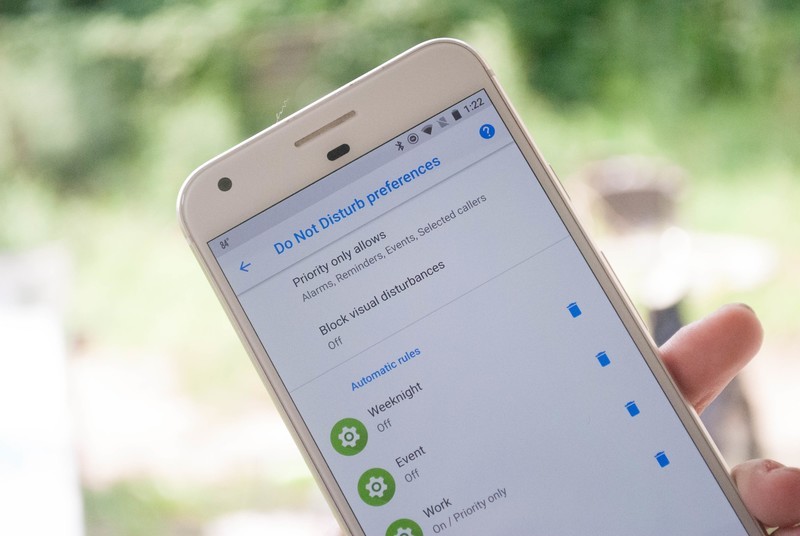
Android Oreo gives you options for your Do Not Disturb settings.
Android Oreo has made a few changes to what you can do with Do Not Disturb mode, and what it looks like. Whether you just want to make sure you don’t get hit with notifications while at the movies, or you want to know that certain notifications will always ping for you, there is a good bit going on here.
That’s why we’ve put together how everything works so that you can get back to your busy day without getting lost in the settings of your phone!
- How to turn on Do Not Disturb mode
- How to adjust Do Not Disturb Settings
- How to adjust Automatic rules
- How to add an Automatic rule
- How to delete an Automatic rule
- How to adjust Priority Only allowances
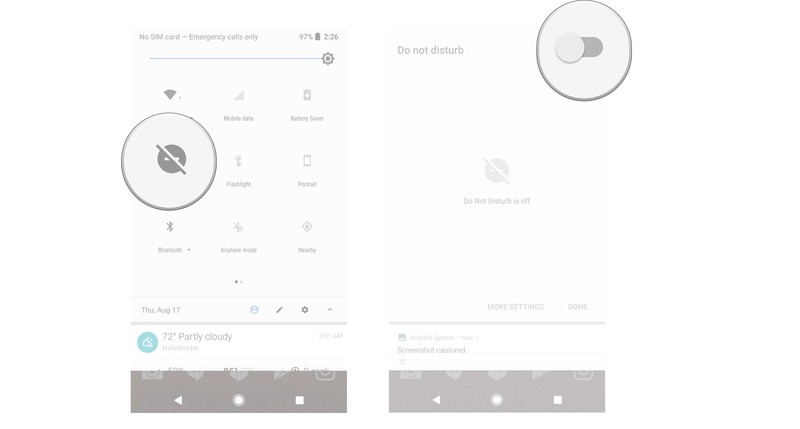
How to turn on Do Not Disturb mode
Do Not Disturb mode is how you ensure you aren’t hit with notifications when you don’t want to be, and opening it is as easy as a tap.
Swipe down from the top of your screen to pull down the shade.
Tap Do Not Disturb.
Tap the toggle to turn DND on.
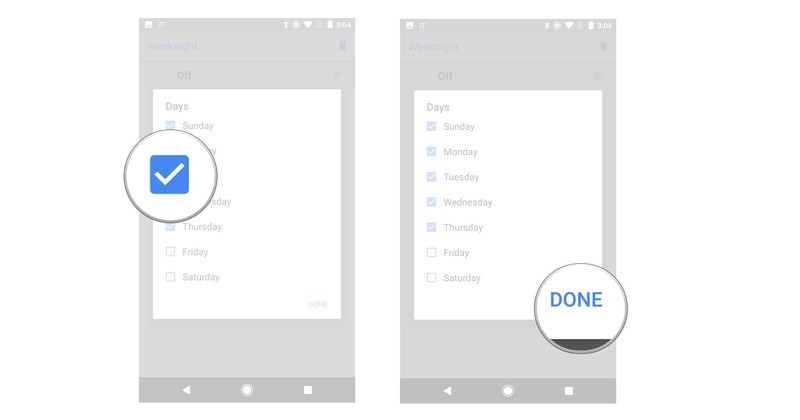
How to adjust Automatic rules
If you want to use Automatic rules, you’ll need to adjust them in order to fine tune when, and how, they work.
Open the Settings on your phone.
Tap Sounds.
Tap Do Not Disturb preferences.
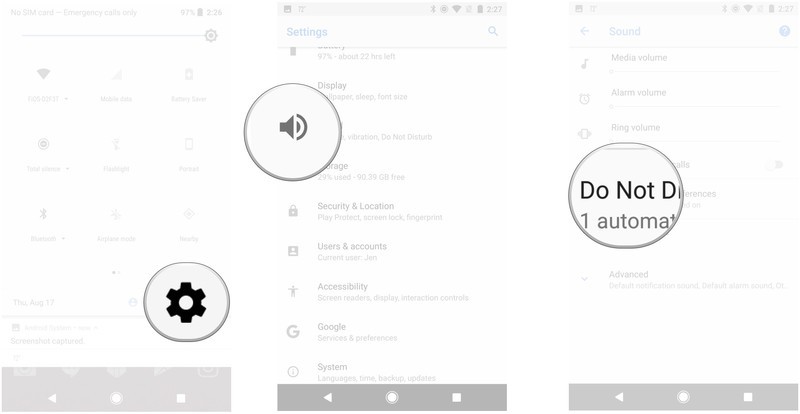
Tap the gear icon next to the rule.
Tap the information you want to adjust.
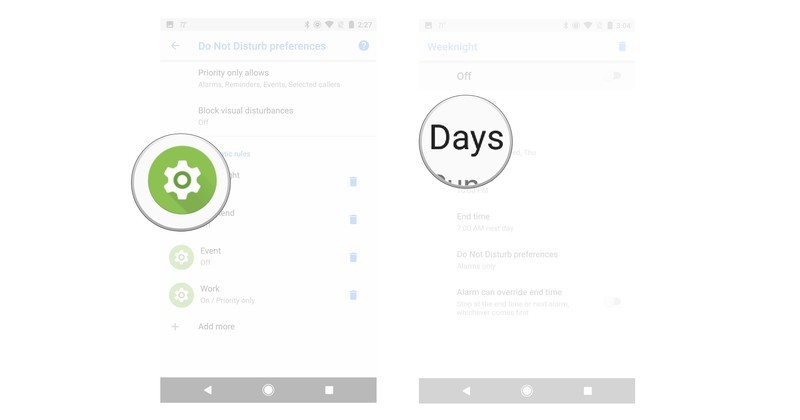
Tap to adjust the information you want to change.
Tap Done.
How to add an Automatic rule
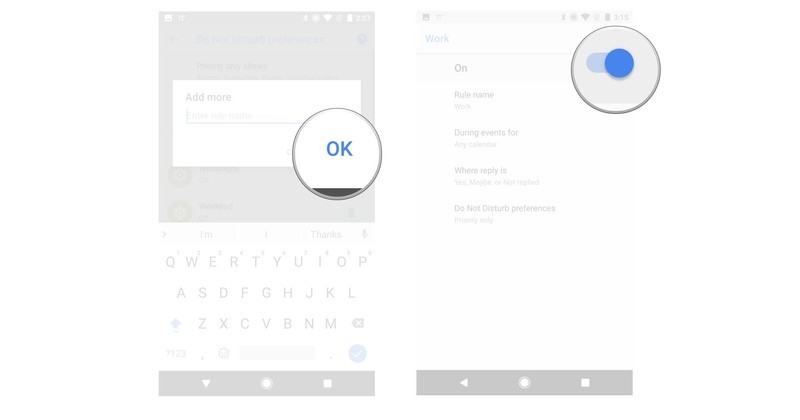
If none of the preset Automatic rules are up your alley, then you can always create a specific one to be used when you need it.
Open the Settings on your phone.
Tap Sounds.
Tap Do Not Disturb preferences.
Tap Add More.
Tap Event rule or Time rule.
Type out a name for your rule.

Tap OK.
Tap the toggle to turn your rule on or off.
How to delete an Automatic rule
If you no longer need an automatic rule, then you’ll need to delete it.
Open the Settings on your phone.
Tap Sounds.
Tap Do Not Disturb preferences.
Tap the trashcan icon.
Tap Delete.

How to adjust Priority only allowances
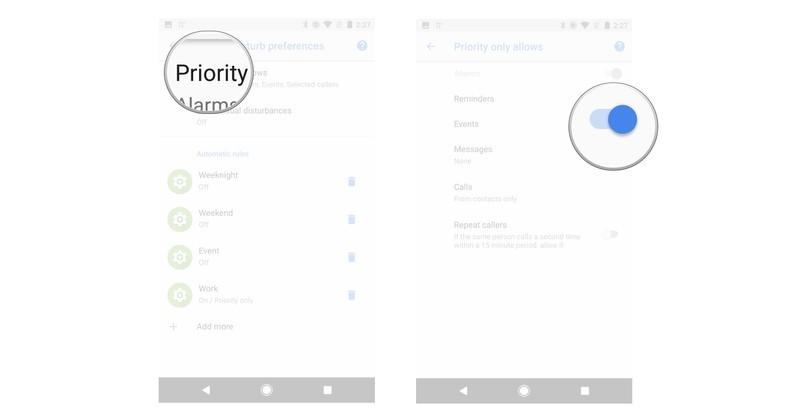
Priority only allowances show what notifications or noises will get through when you have Do not Disturb mode enabled.
Open the Settings on your phone.
Tap Sounds.
Tap Do Not Disturb preferences.
Tap Priority only allows.
Tap a toggle to adjust the settings.
Questions?
Do you still have questions about using Do Not Disturb settings with Android Oreo? Is there something we should have covered that we missed? Leave us a comment below to let us know about it!
Android Oreo
- Android Oreo review!
- Everything new in Android Oreo
- How to get Android Oreo on your Pixel or Nexus
- Oreo will make you love notifications again
- Will my phone get Android Oreo?
- Join the Discussion

