


Will ‘Final Fantasy XV’ have mods on PC? Hajime Tabata says “maybe”
By far the biggest announcement to come out of NVIDIA’s Gamescom 2017 presentation is the upcoming Windows PC port of Final Fantasy XV, developed in partnership with NVIDIA. Digital Trends sat down with game director Hajime Tabata (via translator) after the show to learn a bit more about Final Fantasy XV: Windows Edition, which is slated for an early 2018 release via Steam and Origin.
Digital Trends: How has developing for the PC compared to consoles?
Tabata: I don’t have any experience developing for PCs. Final Fantasy is traditionally a console franchise, with some subsequent ports over to PC (with the obvious exception being XI and XIV the online MMOs). But we really felt that we hadn’t done a game that was truly designed for PC gamers and what they want, so that’s a new challenge we wanted to take on for Final Fantasy XV.
“In a lot of ways handheld consoles and home consoles are not that different from a developer’s perspective. Spec-wise they’re not that different.”
In a lot of ways handheld consoles and home consoles are not that different from a developer’s perspective. Spec-wise they’re not that different. Certainly PC gaming is another animal entirely, though. Beyond the different setting in which you’re playing, you’ve got lots of different spec levels–people playing on different kinds of machines–which is something we obviously don’t have to take into account developing for console.
Personally, in my past I’ve loved playing a lot of great PC games, and so I know that there area ton of great games out there in that market, so if we really wanted to compete we couldn’t bring PC gamers the same experience they had on console: we had to add something new for them.
Can you elaborate on those new features?
The minimum level of what we had to do for PC is provide the best possible graphics experience with the technology we have. Then PC gamers really want to be able to enjoy the best experience they can have with the spec available to them, so we had to introduce a lot of graphical options, tuning and customization abilities so they could have the game at the best performance they can on their machine.
The other thing we really value is the way people relate to games. On PC, a lot of players really like first-person gameplay, so we decided to introduce a first-person view mode as well. We didn’t just want to have the camera change and everything else stay the same. Rather we’ve had to make sure that the whole experience really works as a first-person game as well.
One of the other things that we’re really looking into at the moment — something that’s quite important to the PC market — is the idea of adding mods to the game so players can enjoy the game the way they want to have fun with it on their own.
Mods will be supported on release?
We’re looking into that very much at the moment. We’ll probably have details about that — what the plan is and whether we’ll incorporate mods or not — some time around autumn this year, so you’ll have to hold out until then.
As a 30-year-old franchise there are a lot of people in the position that they were big fans of Final Fantasy in the past, but maybe moved away and don’t play anymore, or who used to be console gamers, but are now PC gamers, and we really wanted to create the opportunity for those people to come back to the series and play Final Fantasy XV the way they want to on PC.
A lot of the focus in PC gaming is on the highest graphical settings–what are your considerations for low-spec machines?
For graphics cards I believe GeForce is on their 10th generation now, and we’ve allowed so that the game will work quite well three generations back, so that’s the 760, I believe. You still need a 4-core CPU, but not necessarily the kind that just hardcore PC gamers have–we’ve done several tests, and it should work well on the quad-core processors that more regular PC users have as well. The way we’re approaching development, and we’re still working out the details, is we set the high bar of the top possible spec we could go for, and now we’re doing the work on how far down we can expand the range of how low we can push that and still get a good gaming experience. Though at the current spec we’re at the moment, my personal PC at home won’t play it, and that’s quite sad for me!
Logitech G433 review
Research Center:
Logitech G433
We often criticize gaming headsets for their cheesy designs, but we’d always rather have something that sounds good first, and looks good second. After all, gaming headsets are designed for communicating with teammates and exploring the virtual world, not the real one, and few people will likely see them anyway. However, Logitech seems to have flipped these priorities with the G433. While the exterior design is fit to compete with the latest from Beats, as we discovered in our Logitech G433 gaming headset review, the company may have put a little too much effort into looks, and not enough into performance.
Out of the box
After slipping off the box’s outer shell, the magnetized lid unfolds to reveal the G433 resting in a shell of molded plastic. The first impression is a strong one: The headphones are sleek and minimalist in design, cloaked in a single shade of black in matte across the headband, and mesh along the earcups.
Bill Roberson/Digital Trends
Removing the headset uncovers a small collection of accessories, including USB and 3.5mm cables, instructions, a detachable mic piece, and even an extra pair of earpads with a suede fabric instead of mesh. Also inside is a circular soft-zipper case for toting the G433 around.
Setup
Depending on your system of choice, you’ll plug in either the USB cable (for PC or PlayStation 4), or the 3.5mm cable to connect to an Xbox One, Nintendo Switch, 3DS, or mobile device. If you’re using a PC you’ll need to download drivers from Logitech’s website to enable 7.1 surround sound — otherwise you’ll be good to go for stereo listening.
Features and design
As we’ve alluded to, we really like the G433’s look. The succinct, single-color design is disrupted only by the stylized Logitech “G” on the earcups and headband, and unlike the decals for most gaming headsets, they’re tastefully designed for a pinch of visual flair. The attractive design makes sense considering Logitech is marketing the G433 as a pair of cans that easily transforms from a gaming headset to your daily headphones for music.
Bill Roberson/Digital Trends
Bill Roberson/Digital Trends
Bill Roberson/Digital Trends
Bill Roberson/Digital Trends
To make a quick transition from gaming to listening, the G433’s removable mic attaches easily via one of two 3.5mm jacks on the left earcup. The mic arm is highly articulate – more so than many other headsets we’ve reviewed – and stays put, making it easy to find an optimal spot.
The G433 includes every wired connection option you could want, though it falls just short of the plug-and-play nature of the Cloud Revolver S, whose USB virtual surround card can be used with both PC and PS4. The G433’s virtual surround, on the other hand, can only be used with PC, but since it’s a wired headset it can be used in stereo mode with PC, Xbox One, PS4, Nintendo Switch, and iOS or Android mobile devices.
The G433 has an attractive design that works as both a headset and headphones.
While we love the look, putting the G433 on is a different story. The clamping pressure is fairly severe for the first few hours, and even after breaking them in, they’re not very comfortable. This is largely due to the mesh fabric covering earpads. It’s stiff and scratchy, especially after longer gaming sessions. The second pair of suede earpads feels better, but only marginally so. Like the band, both sets of pads eventually break in, but we still never found them as comfortable as even the G433’s predecessor the G533, which is surprising considering it uses a similar mesh covering for the pads. That said, we do appreciate the G433’s lightweight construction, clamping force and scratchy fabric notwithstanding.
Despite these gripes, the G433 do have some positives. We especially appreciate the inclusion of a few more accessories than you’d normally get with a headset. It’s not much, mind, but the soft carrying case and (cables) is a modest improvement from the standard components included with most headsets. Finally, while the unit we tested was black, we also appreciate the availability of multiple colors, including blue, red, and blue/black camo.
Performance
We won’t bury the lead here – the G433 are not the greatest sounding headset. With gaming headsets, a strong seal around the ears is important for keeping your gameplay in, and outside noises out. The G433 have very poor sound isolation. In fact, when we put them on, we weren’t sure if they were open or closed backed, it’s that noticeable.
Bill Roberson/Digital Trends
We first gave this headset a go while playing the recent Destiny 2 beta and the recently released Final Fantasy XII: Zodiac Age. The G433 suffers from a distinct lack of bass, which left both games feeling gutless. Gun shots in Destiny 2 – arguably one of the primary highpoints of the series’ gameplay – sounded tame compared to the way sound in beefier headsets like the Cloud Revolver S or the Sennheiser GSP 350. In Final Fantasy XII, a game largely defined by its masterful orchestral soundtrack from composers Hitoshi Sakimoto and Hayato Matsuo, the music lacked texture and fullness, coming across as hollow.
Elsewhere in the mix, we noticed the upper register getting a bit muddy, and at higher volumes there was some distortion.
The mic arm is highly articulate, making it easy to find an optimal spot.
Compared to the G433’s more expensive wireless predecessor, the G533, this is a noticeable step down both in terms of sound quality and comfort. One could argue that the G433 being $50 cheaper than its older sibling is a point in its favor, but other $100 headsets like the Arctis 5 offer better quality, and even the Astro A10, which is just $60, outperforms the G433 — especially in terms of sound isolation.
The G433 does have one redeeming feature when it comes to audio quality: Virtual 7.1 surround sound. Though virtual 7.1 has become common among most serious gaming headsets out there, you’ll often have to cough up $150 or more to get it. As usual, we opted for a multiplayer shooter to test out the G433’s surround sound accuracy, specifically Overwatch. It worked well enough, making for more accurate sound staging, but we wouldn’t call it a massive improvement simply because the general sound quality is just passible.
Logitech G433 Compared To
Kingston HyperX Cloud Revolver S
Sound BlasterX H7 Tournament Edition
Sony Platinum (PS4) wireless headset
Sennheiser PC 373D
Logitech G533
PlayStation Gold
Turtle Beach Ear Force i30
Turtle Beach Ear Force i60
Tritton Kunai
Tritton Warhead 7.1
Turtle Beach Ear Force X32
Sennheiser X 320
Turtle Beach PX3
Cooler Master Storm Sirus
Turtle Beach Ear Force PX5
The final piece of performance critique is the mic. In testing, we found the G433’s mic to be decent quality compared to similar headsets – that is to say, it’s good, not great. It does have an edge over the mics on other headsets thanks to the G433’s mic being so articulate, so easy to find the perfect position, and once you’ve found it, it won’t budge. But that’s about it.
Warranty information
According to Logitech’s support site, the company offers a two year limited hardware warranty for the G433.
Our Take
In the end, this headset is mostly just “okay.” The best feature is the way it looks, but that’s immediately undermined by the way it feels. On the one hand, the variety of color options and small batch of accessories makes for a decent $100 option. But in many ways, it lags behind even less expensive models, specifically the Astro A10 and Arctis 3.
Is there a better alternative?
As mentioned above, $50 more lands the G533, which is more comfortable, sounds far better, and is wireless (though only compatible with PC or PS4). For something wired at the same price point, the Arctis 5 does everything the G433 does, but better, and with the added benefit of offering the best virtual surround software available. If you’re looking for something cheaper, the $80 Arctis 3 or the $60 Astro A10 are great alternatives, too.
How long will it last?
Logitech has clearly put most of its focus into the G433’s looks rather than performance. While that makes it much more enticing to take on the road, you’ll easily find a reason to leave these behind once you put on something more comfortable and better sounding.
Should you buy it?
No. On paper, this is a great headset; in execution, it’s only passible. The only reason we could recommend it is because of how good it looks and how light it feels when wearing it. But for serious gamers, there are better options out there.
Razer attacks the Xbox One Elite Controller with its vicious Wolverine Ultimate
Why it matters to you
If you’re looking for a new, elite controller for Xbox One and Windows 10, Razer’s new device is ideal for those who want customizable controls and cool RGB lighting.
While using a controller to play games on Windows 10 may seem like blasphemy to many die-hard PC gamers, they’re still useful for titles that don’t need precision controls, like No Man’s Sky and Mass Effect: Andromeda. Xbox One controllers work just fine on Windows 10, but if you’re looking for a bit more oomph in your PC or console gaming, then Razer’s new Wolverine Ultimate controller might just be your ticket to gaming glory.
According to Razer, its new gamepad can adapt itself to any gameplay style due to interchangeable parts. That includes a set of two different D-Pads, and another set of swappable thumbsticks with different shapes and heights. There are also six triggers and buttons that can be mapped via Razer’s free Synapse software on PC, and the upcoming Razer Synapse app on the Xbox Marketplace.
What’s interesting with the Wolverine Ultimate is that it supports the Razer Chroma illumination platform. The device includes an RGB strip running along a small area on the face of the controller, and across the front. The strip supports 16.8 million colors along with various cool lighting effects such as Spectrum, Wave, Breathing, and several others.
“The Razer Wolverine Ultimate will be the first console product to support the Razer Chroma SDK, allowing developers to integrate advanced lighting capabilities for Xbox One games, and console controllers for next level gaming immersion,” Razer says.
Based on product images, the Wolverine Ultimate is a wired device with a removable, braided USB cable. It includes four extra buttons on the bottom (M3 to M6), and two added buttons between the trigger sets (M1, M2). The controller’s face adds four buttons for muting the sound of a connected headset (via the built-in 3.5mm audio jack), muting the microphone, synchronizing profiles, and remapping button commands.
As for other features, this premium controller includes a hair-trigger mode that reduces the response time of the left and right triggers, allowing them to activate faster. There are trigger stop switches as well that shorten their overall travel distance. The action buttons are based on tactile switches that provide a slight “clicky” feel so that you know your action is recognized.
Finally, the controller ships with non-slip rubber grips, a carrying case, and a 10-foot braided fiber connector with a MicroUSB connector. It’s very similar in nature to the Razer Wildcat controller for Xbox One, but ditches the Wildcat’s Razer Green/Black theme for a completely black design. The Wolverine Ultimate also packs a few additional buttons, and appears to be more ergonomic in shape so it feels comfortable in your hands during long gaming sessions.
The Razer Wolverine Ultimate will arrive in North America sometime during September for a hefty price of $160. It’s slightly more expensive than the $150 wireless Elite Controller for the Xbox One, which has a few less buttons, no integrated media buttons, and no cool RGB illumination.
Tiny acoustic antennas could help make brain implants a reality
Why it matters to you
Revolutionary antenna, hundreds of times smaller than existing models, could help shrink phones and satellites, and even make smart brain implants a real thing.
Researchers at Northeastern University have made a major advance in developing significantly smaller antennas, hundreds of times tinier than currently existing versions. The development is significant because, in a world in which virtually every piece of portable wireless communications technology has shrunk over time, antennas have stubbornly remained the same size.
“Current antennas are limited to large sizes, which are hard for many applications like bio-implantable, bio-injectable, and bio-ingestible antennas,” Nian Sun, a professor of electrical and computer engineering at Northeastern, told Digital Trends.
The antennas described by Sun and his colleagues are based on an entirely different design principle to the traditional ones currently used. Traditional antennas receive and transmit large electromagnetic waves, and have to remain a certain size to function with electromagnetic radiation. Northeastern’s new antennas, on the other hand, are designed for acoustic resonance, which have a wavelength thousands of times smaller than electromagnetic waves.
The team has so far developed two types of acoustic antenna. The first has a circular membrane and is used for frequencies in the gigahertz range — including those frequencies used for Wi-Fi. The other acoustic antenna has a rectangular membrane for megahertz frequencies, typically used for TV and radio. Each antenna measures under a millimeter and both could be placed together on one chip. In tests, the new acoustic antennas have been shown to work better than traditional antennas in certain contexts.
Some of the potential applications for the new acoustic antennas include shrinking the size of technologies ranging from smartphones to satellites, which rely on antennas for communication. However, the really exciting possible uses involve incorporating antennas into technologies that are not yet in mass-market existence — opening up the possibility of ingestible antennas, brain implants, and the like.
As to what’s next for the project? “Further improving the acoustic antenna performance, and applying them to wireless communication systems,” Sun said. He acknowledges that the present models are still a proof-of-concept rather than a finished product but the researchers are optimistic about what is next. “We are in the process of commercializing these antennas now,” Sun said.
A paper describing the research was recently published in the journal Nature Communications.
Bixby: Everything you need to know!

What is Samsung Bixby? Get started here!
Bixby is Samsung’s take on the pocket assistant, combining machine learning, voice assistance, visual help and more into an all-encompassing helper. Whether you’re rocking a Galaxy S8 or you’re eyeing a shiny Galaxy Note 8, we can help you get started with Bixby the right way.
Everything you need to know about Bixby Voice

Up until the latest preview, all we knew about Bixby is that it enabled you to press a button to control the phone with your voice. Well, now that we’ve had some time with it, we can confirm that Bixby Voice really is all about talking to the Galaxy S8. It’s not quite the same as Google Assistant, though, as Bixby is more conversational and apologetic when it messes up. This is a voice-activated virtual assistant that truly aims to please.
Everything you need to know about Bixby Voice
Best tips for wrangling Bixby to get it to do what you want
Bixby Voice delivers a pocket assistant that you can talk to in order to get things done. However, if you can’t seem to get Bixby to do what you’re asking, then using the assistant can feel like more of a hassle than a help. These tips will help to ensure that when you tell Bixby Voice to do something, it listens.
Best tips for wrangling Bixby Voice to get it to do what you want
How to disable Bixby Voice

Bixby Voice lets you ask a question out loud to your Galaxy device and have your phone answer right back. While this is handy for some people, not everybody wants to have Bixby answering questions for them. By turning off Bixby Voice, holding the Bixby button will now launch the app instead of a speech bubble. Turning Bixby Off — or back on — only takes a few moments, and we’ve got the details for you here!
How to disable Bixby Voice
How to access your Bixby History
Bixby Voice records all of the questions you ask, along with all the answers that it has delivered in response. If you’ve been wanting to take a look back at something you’ve asked in the past, you can access the history feature from within the Bixby app. It only shows you the last 7 days’ worth of questions and answers, but it can be totally worth it.
How to access your Bixby History
How to use Bixby Vision

Bixby Vision is a feature that’s unlike any other and designed to take your pocket assistant to the next level. Using Bixby Vision you can extract or translate text, search for images similar to what your camera sees, shop for those items, and plenty more. With so much going on it can be hard to get a decent grasp on everything when you’re just starting out. That’s why we’ve done the hard work for you, and detailed out what you need to know to get the most out of everything Bixby Vision can do!
How to use Bixby Vision
How to replace Bixby Voice with Google Assistant
Not everyone wants to use Bixby Voice, and if you’d prefer Google Assistant, then you’re in luck! There are a few things you can do in order to replace Bixby with Google Assistant.
How to replace Bixby Voice with Google Assistant on your Galaxy S8
Most popular Bixby Voice commands

There is plenty that Bixby is capable of doing simply by using voice commands, from playing music from your favorite app, to adding items to your calendar. We’ve got the details on the most awesome commands to aid you in your Bixby adventures!
Most popular Bixby Voice commands
How to customize Bixby Home
Bixby Home is the central hub where Bixby delivers summaries of what is going on in your apps in the form of cards. We’ve got the details on how to customize the look of Bixby Home, as well as the information it displays for you!
How to customize Bixby Home
How to improve Bixby Voice using Samsung Feedback

Bixby Voice can easily answer your questions and help you access the apps you want with just a few words. However, if Bixby Voice doesn’t understand what you are saying, then you definitely aren’t going to get the results that you’ve been hoping for. There is an easy way to help fine tune what Bixby hears while you’re speaking to it using custom feedback to correct incorrect words or phrases.
How to improve Bixby Voice using Samsung Feedback
How to change the language and speaking style of Bixby Voice
Like most other virtual assistants, Bixby talks back — but some folks might not want to listen to Bixby’s default voice “Stephanie”. Or maybe you might like to have Bixby respond in a different language. Either way, it’s a pretty simple process from within the settings of the Bixby app, and we’ll show you how.
How to change the language and speaking style of Bixby Voice
How to customize Hello Bixby

You can conveniently access Bixby on the Galaxy S8 or Note 8 by swiping right on the home screen or by pressing the Bixby button (on the left, below the volume buttons) at any time.
But Bixby is only going to be useful if you make it your own. Here’s how to customize your Bixby experience.
How to customize Hello Bixby on your Galaxy S8
Questions?
Do you still have questions about a feature on Bixby? Have you been leveling up in Bixby, or do you miss Google Assistant? Tell us about it in the comments below!
Samsung Galaxy S8 and S8+
- Galaxy S8 and S8+ review!
- Galaxy S8 and S8+ specs
- Everything you need to know about the Galaxy S8’s cameras
- Get to know Samsung Bixby
- Join our Galaxy S8 forums
Verizon
AT&T
T-Mobile
Sprint
Unlocked
Samsung Galaxy Note 8
- Galaxy Note 8 hands-on preview
- Complete Galaxy Note 8 specs
- Galaxy Note 8 vs. Galaxy Note 5: Which should you buy?
- Which Galaxy Note 8 color should you buy?
- All Galaxy Note 8 news
- Join our Galaxy Note 8 forums
Verizon
AT&T
T-Mobile
Sprint
Best Buy
Sony Xperia XZ1 leak showcases bezels, camera bump, parrot
2017 specs, 2013 design.
Sony’s been putting out big, bezelly, monolithic smartphones for almost five years, and even in the age of the Essential Phone and Galaxy Note 8 it’s showing no sign of stopping.
The company’s upcoming handset, the Xperia XZ1, will purportedly break cover next week in Berlin, but Roland Quandt of WinFuture has already revealed the handset in all its underwhelming glory. Essentially, this is the same Sony design we’ve been seeing since the original Xperia Z, a phone launched in January 2013, with another round of incremental spec upgrades.
Sony Xperia XZ1 pic.twitter.com/ymb3KpFTF6
— Roland Quandt (@rquandt) August 23, 2017
Sony Xperia XZ1 pic.twitter.com/2MWjOgV5Et
— Roland Quandt (@rquandt) August 23, 2017
On the inside, the XZ1 is rumored to pack the same internals as the XZ Premium, namely a Snapdragon 835, 4GB of RAM and 19-megapixel with slow-mo video capabilities, only in a smaller 5.2-inch form factor.
More interestingly, showcased in today’s leak are: ample bezels, an ample camera hump, and a parrot on the screen. The bird appears to be an eclectus parrot, but we’ll have to wait for the official unveiling for confirmation of this.
Sony’s new phone, and parrot, are set to debut on August 31 ahead of IFA 2017 in Berlin, Germany. Any bets on whether it’ll finally be able to ship a fingerprint scanner in the U.S. this time?
(Sony, not the parrot.)
More: IFA 2017 preview
Microsoft’s Xbox One X is still a tough sell
We get it, Microsoft. The Xbox One X is a beast! It’ll run games in native 4K! (Not like that sometimes-4K from the PlayStation 4 Pro.) It’s basically everything we’ve ever wanted, spec-wise, from a video game console. And yet, many aspects of the Xbox One X still fall flat, even though we’re just a few months away from its November 7th release. That was clearer than ever at Gamescom this week, where Microsoft kicked things off with an over-long presentation that didn’t give us many reasons to actually get excited for the One X.
Let’s start with the good: It’s nice to see there there are more than 100 Xbox One X enhanced games on the horizon. While they won’t all be available for the system’s launch, the list is a good sign that developers are actually eager to take advantage of the new console’s additional horsepower. Unfortunately, it’s still unclear how “enhanced” these games will be — we don’t know if they’ll offer full 4K rendering, for example.
All of the other Xbox One X news at Gamescom, meanwhile, was disappointing on some level. Microsoft kicked off pre-orders of the console by announcing the limited edition “Project Scorpio” model, which has some special branding and a “sophisticated and dynamic” case pattern. Oh, and it’s the only launch Xbox One X with a vertical stand. Yay?
As for new games, there’s Jurassic World Evolution, the dino-theme park builder nobody asked for, and a “Definitive Edition” of the ill-received ReCore. Additionally, Microsoft is remastering its two Disney games, Disneyland Adventure and Rush: A Pixar Adventure, as well as Zoo Tycoon, with 4K and HDR support. I’m sure those games have an audience, but they’re not the sort who would care about having more pixels. And I wouldn’t call any of them system sellers — especially for a high-end console.
All in all, it’s a shame to see that Microsoft’s pitch for the Xbox One X hasn’t changed much since E3. At the time, I argued that it was too expensive and didn’t really have many compelling for Xbox One owners to upgrade this year. That’s still the case. Engadget associate editor Timothy J. Seppala called it “aspirational in the purest sense of the word.” To get the most of the Xbox One X, you’d need a 4K HDR TV and a fancy surround sound system with Dolby Atmos support. There’s nothing wrong with aspirational tech — Apple and Tesla have pretty much banked on that. But if you’re going to go down that route, you’d best be sure you’re offering something nobody else is.
In my brief hands on time with a few Xbox One X titles at Gamescom, it was clear that it was pushing out significantly better graphics than the standard Xbox One. Fighting enemies and running around the world of Middle-Earth: Shadow of War was silky smooth in native 4K and 30FPS — I didn’t notice any slowdown, even when I was surrounded by a dozen enemies. The HDR lighting also made my character’s ghostly superpowers pop on the screen. Gears of War 4 also looked fantastic, with better texture and model detail than before. It also features HDR, but so did the Xbox One S version. (It remains to be seen if future HDR games will support the older console.)

Microsoft
But while it looked better, seeing the Xbox One X in action made it abundantly clear that it’s something only hardcore gamers will appreciate. The $250 Xbox One S is still a very capable machine, especially if you’re stuck with a 1080p screen. Even if you’ve got a 4K TV, the One S also features 4K Blu-ray, and it upsamples games to the higher resolution (though that’s no match for actually rendering them with more pixels). Honestly, it seems like Microsoft is simply confused about how it wants to position its consoles. Why else would the company announce a $400 Xbox One S for Minecraft fans?
The Xbox One X is a particularly tough sell because it comes a year after the PlayStation 4 Pro, which also made 4K and HDR a big part of its appeal. It’s not powerful enough to play most games natively in 4K, but it still gives developers the ability to push past 1080p and cram in more visual effects. Together with the addition of HDR (high-dynamic range) lighting, the PS4 Pro can still make games look much better than the standard PS4. And it did all of that last year for $400. I wouldn’t be surprised if we see slight discounts as we approach the holiday season, which will make the Xbox One X’s $500 price stick out even more.

Another major disappointment? Microsoft still isn’t saying anything about the Xbox One X’s VR support. We know it’s coming eventually, but the lack of clarity around the company’s VR plans is a sore point. That’s particularly true since the PlayStation VR also launched last year, just in time to pair nicely with the PS4 Pro’s additional horsepower. Sure, PS VR had some issues at launch, but it was still better than I expected, and it managed to bring the entry price for VR down significantly. And since then, it’s also built up a solid library of games.
When Gamescom began, I eagerly pre-ordered the Xbox One X, even though I knew it wouldn’t reach its full potential until next year. But at this point, I’m considering canceling my order. It just doesn’t make sense to invest in the Xbox One X now, when there’s little differentiating it from the PS4 Pro. That will change eventually. And for Microsoft’s sake, I hope it’s sooner rather than later.
Follow all the latest news live from Gamescom here!
Twitter’s Xbox app can stream live 360-degree video
Twitter launched on the Xbox One last fall, and did so with a focus on video. Today, an update adds some new video types, most notably live 360-degree video. Given that just about every platform has been focusing on 360 video lately, so it’s not surprising to see Twitter look to expand the places where users can watch it. The Apple TV has supported live 360-degree video for a while now, so it’s not a huge surprise to see it arrive here as well.
For those among us with literally no attention span, the app also now supports watching two video streams side-by-side. It’s not clear exactly how the audio works in that situation; we’re guessing that you can just pick which stream you can hear at any given moment. And if you’re a Periscope fan, the Twitter app also lets you browse the “global map” that lets you see where people are broadcasting from at any given moment.
Ultimately, a focus on video makes sense for Twitter on a large screen — plenty of people tune in to Twitter to comment on big live events. Doing it all from your big TV can be a good way to keep up with the chatter around whatever particular video on Twitter catches your interest.
Source: Microsoft (Twitter)
Essential PH-1 review: A beautiful blank slate
Andy Rubin was disillusioned. He helped build the Android operating system. He watched as Google acquired the company, and he steered development on the mobile OS for years after that. And somewhere along the way, he grew a little weary of how the smartphone market worked.
To hear him tell it, the mobile industry prioritized iteration over innovation, to the point where it centered itself around only two companies: Apple and Samsung. Convinced that Apple’s premium phone business model would work for a startup, Rubin set about building his own phone, and here we are. That startup, Essential, offers its new PH-1 as a remedy to the industry’s ills. It’s a premium smartphone with an impeccable pedigree that embodies progress and choice and openness. That was the idea, anyway.
Here’s the thing about lofty goals though: You’re almost never going to achieve them in one shot. And really, that’s the Essential PH-1 in a nutshell. It’s an exceptionally crafted device and a stunning first effort from a company that didn’t exist 18 months ago. While the PH-1 stands as a testament to Rubin’s vision, a few shortcomings keep it from being as truly great as promised.
Hardware
Chris Velazco/Engadget
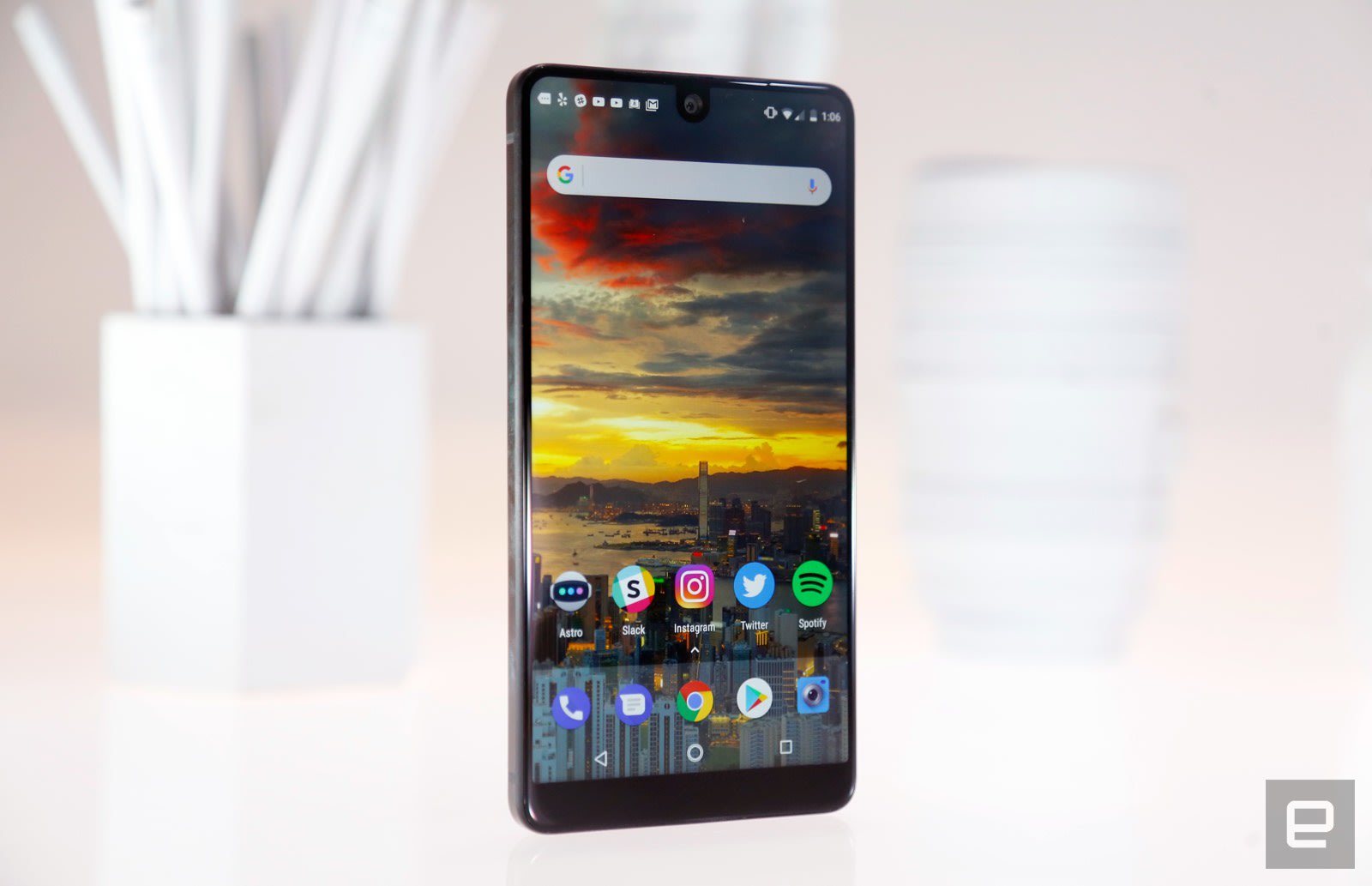
I’ve been testing the black PH-1 ($699), and it looks more like a blank slate than any phone I’ve tested in a while. There are no logos on the phone, no branding, no FCC labels or capacitive buttons (though the company’s engineers did consider them). Peer closely enough around the front-facing camera and you’ll spot a tiny cutout for the earpiece and an even tinier notification LED. Some will find the aesthetic a little too nondescript, but others (like me) will enjoy the intentional starkness. That minimalism gets disrupted when you turn the phone over. There you’ll find an LED flash, a 13-megapixel dual camera, a fingerprint sensor and two tiny, metallic spots.
This is Essential’s (much smaller) take on the Motorola’s Mod connector for its modular smartphone add-ons. Accessories, like a 360 camera I haven’t been able to test yet, magnetically attach to that spot and can transfer power and data into and out of the phone. It might seem a little awkward to snap things onto a phone’s corner, but Essential made the choice deliberately.
By putting the connector on a corner, the company is theoretically able to change the way future devices look without necessarily giving up the option of backward compatibility. Consider the most recent Moto Z phones: Motorola couldn’t change the design much because its Mods have to sit flush against the phone’s backs. Essential’s decision was a savvy one, but we’ll soon see how many companies are actually willing to invest in a startup’s ecosystem of accessories.
The PH-1 also feels dense, in a reassuring sort of way. Part of that is thanks to what the phone is made of. A polished titanium frame forms the PH-1’s skeleton, and its back is made of a shiny ceramic that has been pretty good at shrugging off scratches and dents. (It’s starting to show nicks now though.) I was worried that the PH-1 would exhibit Xiaomi Mi Mix levels of fragility, but so far, so good. The phone’s density is also due to how tightly packed all of its components are under that shiny surface. Jason Keats, Essential’s head of product architecture, said in an interview that there’s basically no extra space at all inside the chassis. Pending a glorious iFixit teardown, I’m inclined to believe him.
What’s inside the phone is a little more prosaic. Like just about every other flagship phone this year, the Essential uses one of Qualcomm’s Snapdragon 835 chipsets, paired with 4GB of RAM and an Adreno 540 GPU. More importantly, every Essential comes with 128GB of internal storage, which is crucial since there’s no microSD slot. That’s not the only notable omission here: There’s no headphone jack, just a USB-C port wedged in between a speaker and the SIM tray. There’s no water resistance here either, for reasons Essential has never entirely explained. These omissions certainly aren’t dealbreakers, but they’re still somewhat disappointing.
Display and sound

Chris Velazco/Engadget
While the phone’s design is intentionally subtle, that 5.7-inch Quad HD screen definitely isn’t. The PH-1’s defining feature is how its LCD display stretches almost completely across the phone’s face, leaving just a few millimeters of black chin beneath the panel. It’s stunning. When the screen is off, we’re left with an obsidian slab; when it’s on, it feels like something out of the future. Well, the near future, anyway. We’ve seen phones with expansive displays before, but there’s something sumptuous and thrilling about a phone that’s basically all screen. Arguably more impressive is how a divot has been cut out of the screen to accommodate the 8-megapixel front-facing camera. It sounds weird in theory, but since Android’s notification bar fills in from the sides, the camera never actually gets in the way.
Yes, it’s almost impossible at first not to gawk at the PH-1’s screen. The gap between the panel and the glass that covers it may as well not exist, so viewing angles are excellent. Colors are clean and vivid, though they lack the telltale punchiness of AMOLED screens (most likely due to cost). As technically impressive as it is, the screen does fall short in a few ways.

For one, I wish it were a little brighter: It’s perfectly readable in broad daylight, but phones like the Galaxy S8 and iPhone 7 are brighter and more clearly legible under the sun. It’s also a bummer to come across apps that don’t take full advantage of that extra screen space. The phone’s dialer, Chrome, Twitter, Spotify and more are all bounded on the top edge by a black bar, robbing you of the visual impact that comes with seeing, say, a Google map that stretches all the way across the phone. Unfortunately, this was the case with most of the apps I’ve tested this past week.
Other apps are prone to different issues. Spotify, for instance, has a lot of extra space below the notification bar, pushing all the actual content down a little more than expected. This issue has been less common, but it’s still mildly annoying whenever I come across it. Considering how niche the Essential phone is right now, it’s unclear when or if developers will update their apps to accommodate this eye-catching screen.

Meanwhile, the Essential’s single speaker mostly just gets the job done. It’s louder than I expected, but audio comes out sounding pretty thin and it’s easy to accidentally cover the grille with your finger when holding the phone sideways. If you spend most of your day listening to audiobooks, podcasts or music that doesn’t feature prominent bass, the speaker shouldn’t bother you much. As always, though, you’re better off using a pair of headphones, which in this case means having to rely on an included USB-C adapter. I had no issues with audio quality through the adapter, and its short, braided cable gave me hope that it would survive a long-term stay in the minefield that is my backpack. I was also a little concerned that such a small earpiece wouldn’t sound good, but it made for pleasant for voice calls; no one on the other end had any complaints about the audio quality either.
Software

And the “blank slate” theme continues. The PH-1 runs a clean, mostly untouched version of Android 7.1.1. I’ve said that about other phones before, most recently the Moto Z2 Force, but Essential takes cleanliness to a different level. I’ve only spotted a handful of changes here. For starters, the typical Android notification bar is thicker than usual, because it has to clear the camera sitting right in the middle of it. There’s also an option in the settings to discreetly send usage and diagnostic data back to Essential so the company can smooth out potential performance issues. Really, the biggest change to bare-bones Android is the inclusion of a custom camera app, which we’ll get to in a little bit.
The situation is a little different for Sprint customers: Upon activation, the My Sprint and Tidal apps are automatically installed. Considering how overzealous some carriers are when it comes to preloading apps to fulfill business agreements, Sprint’s minimal overreach feels downright refreshing. The rest is just Nougat as we all know it, and Essential has pledged to deliver Android updates to PH-1s in the wild for two years and security updates for three years.
Now, as much as I love stock Android, I have to wonder if it’s enough to whet the average consumer’s appetite for functionality. After all, there’s a reason Google offers more than just stock Android on its flagship Pixel phones: It’s all in the name of helping users more easily accomplish the things they want to do. I respect Essential’s devotion to openness and cleanliness, but there’s a way to deliver subtle, powerful changes without completely rewriting the playbook. In any case, I’m sure the decision to deliver one of the purest Android experiences out there won’t hurt the startup’s chances too much. If anything, it offers an extra dose of geek cachet.
Camera

Engadget
Like many of other top-tier smartphones, the Essential packs a dual-camera setup. Unlike a lot of other top-tier smartphones, however, the Essential blends one 13-megapixel color sensor with one 13-megapixel monochrome sensor, as opposed to, say, a wide-angle and telephoto camera. The idea is simple: When shooting normally, color information from one sensor is combined with the extra detail capture from the black-and-white camera to produce photos that embody the best of both worlds. When there’s good light to work with, the results are decently impressive: Colors are a bit more subdued than with rival cameras but still quite nice, and there’s a decent amount of detail to be found. Overall, devices like the Galaxy S8 and last year’s Google Pixels did a better job, but the Essential was never too far behind.


Now, here’s where things get a little tricky. Since I received the phone last week, Essential has pushed out two — two! — updates, both heavily focused on improving the camera. Before any of the updates went live, the PH-1 was frankly awful in low light; you’d find lots of fuzzy edges and an unreasonable amount of grain and discoloration, even when shooting in locales that weren’t that dim. After multiple updates, the performance has leveled off to the point where the Essential is mostly usable in low light (though it helps to keep your expectations low).
Since there’s no image stabilization here, you should still expect to see lots of indistinct edges in the dark, but better image processing has reduced the grain you’ll see to manageable levels. Compared to before, this is a huge improvement. Compared to the rest of this year’s flagship smartphones, the Essential phone’s camera still disappoints. The 8 megapixel front-facing camera works well — at least, most of my selfies were nicely exposed with accurate colors.
No matter which camera you’re using, shooting with the Essential is dead simple. You can shoot a normal photo in auto mode. You can shoot a black-and-white photo with Mono mode. You can shoot a (pretty ugly) slow-motion video. You can take a selfie, and you can record a video. That’s it. While other smartphone cameras pack loads of features and multiple camera modes, the Essential’s camera experience is among the most bare bones I’ve ever seen. For some people, that will be fine: There’s nothing wrong with pointing and shooting. Anyone looking for more nuance and control should look elsewhere. All you can do here is toggle the flash and HDR modes, set a timer, and change the quality of the video you want to shoot.
This wouldn’t be an issue if the Essential took better photos from the get-go, but here we are. I should also point out that, while improved, there’s still some lag when switching between the color and monochrome cameras, and I’ve taken one or two photos over the course of the week that appear to have never been saved to my camera roll. In both cases, I launched the camera by double-tapping the home button, but I still can’t figure out what happened to them.
Performance and battery life

As already mentioned, the Essential PH-1 packs an octa-core Snapdragon 835, 4GB of RAM and a dearth of obnoxious add-on software. Is it any surprise that it runs incredibly smoothly? General navigation feels pleasantly fast — as fast as the Pixels and the S8s, anyway — and frenzied multitasking proved to be no problem either. Visually intense games like Afterpulse ran with no problems as well; frame rates were consistently high, and lag essentially didn’t exist. Impressive, certainly, but maybe not a surprise: This consistently high level of performance is table stakes for a modern, $700 smartphone. Said differently, something would have been very wrong if Essential hadn’t been able to deliver.
If the phone’s performance wasn’t surprising, its battery life certainly was. The phone seemed to struggle getting through our first full workday together, but that was just a peculiar one-off. After that first day, I’ve been able to use the PH-1 for a full day without the need for a recharge. After nights when I forgot to charge it, I still had between 20 and 25 percent at my disposal — that was more than enough to keep me entertained during my morning commute to the office. You can expect more battery drain in areas where cell coverage isn’t great, a problem I’ve run into with Sprint more than other carriers. In places where the phone had trouble locking on to a signal, the battery barely lasted for a day. Long story short, most people will be pleased with the phone’s power consumption, but folks living out in the country may experience a little more trouble.
The competition

Essential has made more progress than most in eliminating bezels from phone bodies, but it’s definitely not alone. Samsung’s Galaxy S8 and S8 Plus remain two of the best smartphones out there, and they pair skimpy bezels with lots of horsepower and some truly excellent displays. Their aesthetics couldn’t be any more different than the Essential’s, but Samsung’s design work has been impeccable: While the PH-1 feels dense and masculine, the S8s feel friendlier and more welcoming. This is obviously a matter of taste, but unless you absolutely insist on pure Android, you can’t go wrong with either of these options.
LG’s G6 is another notable competitor, if only because it takes the exact opposite approach to dual cameras as the Essential. It’s not perfect, but the combination of normal and wide-angle 13-megapixel cameras seems infinitely more useful — not to mention more fun — than Essential’s implementation. Beyond that, the G6 brings slightly more modest levels of performance and battery life, but some will find the trade-off worth it just to have a more flexible camera.
Wrap-up

I had such high hopes for the Essential phone that there’s almost no way the PH-1 could have lived up to them. This isn’t just a reflection of my own unreasonable internal hype though; as truly impressive as the PH-1 can be, it lags behind the competition in some areas. That’s the difficult part about offering people a blank slate of a smartphone. Sure, it can assume whatever role the user wants it to. Since it doesn’t offer many flashy features of its own, though, the phone has to get all the basics right. In its current state, the PH-1 doesn’t.
Still, it’s heartening to see Essential build a phone that otherwise gets so much right on its first attempt. Andy Rubin seems to hold the usual conventions of smartphone making in contempt, so who knows when we’ll see another Essential phone. That’s too bad. After such an impressive first outing, I honestly can’t wait to see his team try again.
Apple’s Iowa data center could make Siri better in the US
Apple has been building data centers powered by renewable energy across the US for some time, now, with facilities in North Carolina, Arizona and Reno. The tech company plans to build it’s latest data center — a 400,000 square foot facitlity — in Waukee, Iowa by 2020. Construction should begin early next year with the resulting center aimed at supporting users of Apple’s online services in North America. “Our new data center in Iowa will help serve millions of people across North America who use Siri, iMessage, Apple Music and other Apple services — all powered by renewable energy,” said Apple CEO Tim Cook in a statement.
Apple says that the center will add 550 construction and operations jobs in the Des Moines area. The company will also contribute up to $100 million to a new Public Improvement Fund for parks, libraries, recreational spaces and infrastructure in Waukee. The city already has plans to build a youth sports center, which includes a greenhouse, playground, fishing pier and sports fields, with the funding.
“We’re honored Apple is choosing Iowa for the site of its most technologically advanced data center to date,” said Iowa Governor Kim Reynolds in a statement. “Apple’s commitment to innovation and renewable energy leadership mirrors our own. This investment in our state is vital as we continue to develop as a technology hub and grow our workforce.”
Source: Apple

