


The exquisite art and subculture of Def Con’s (unofficial) badges
A series of tweets sent me and other Def Con attendees scrambling to get to the Caesers Palace pool as quickly as possible. I cut short a conversation, shoved my gear in my bag and ran out of the press room without an explanation. I was after a piece of art. A piece of tech. But mostly I was excited about adding to my growing collection. I was on the hunt for Puffy, one of dozens of unofficial Def Con badges available for sale at the annual hacker conference from build-teams from all over the world. It’s a piece of electronics shaped like a fish, and I decided I must have it.
For myself and other attendees, it’s a bit like a treasure hunt. Waiting patiently for a tweet that’ll reveal the location of a sale of a blinking PCB (Printed Circuit Board) that we’ll wear around our necks like futuristic Mr. Ts. To the builders, it’s participating in a community that grows every year.
This year’s official Def Con badge is, well … disappointing. A few weeks ahead of the conference, the organizers dropped the news that there would be no special badges and no challenges. A huge blow to the attendees that have come to expect the conference would give them a unique keepsake filled with puzzles, tech or even radiation. Instead, the official event badges (the badge that actually gets you into the conference) are homages to yesteryear. The main “human” badge looks like the Def Con 1 badge. It’s a nice throwback, but people have come to expect more.
But while the conference proper was trying to how to go forward without using the company that has been designing the badge for years, a community of badge makers toiled away for months well ahead the opening day in Vegas trying to get their creations ready. Some of the design concepts were thought up years ago and only recently came to fruition. Others were thought up at last year’s conference and are the result of 12 months of hard work. What’s on display around the necks of those willing to part with cash are the fruit of many hours, burnt fingers from soldering and frustratingly mundane nights of flashing (adding the base software).

This year, the community outdid itself with features like botnets, games, RPGs, challenges, amazing art work and so many blinking lights. With prices ranging from free up to a few hundred dollars, the badges are far from money-making projects. Between design, testing and final assembly, even with the PCBs being created at factories, the actual work done by the individuals numbers in the hundreds of hours. When asked about the biggest obstacle to building a badge, one of the team members of the Mr. Robot Badge said, “Time. That’s the answer you’re going to hear from absolutely everybody that’s building a badge.” That crew alone lost three weeks because of shipping components between team members in other states.
Some creators are just hoping to break even, at least when it comes to hardware costs. Others are using the money to raise cash for a good cause. The DC801 badge is helping to fund its hackerspace, 801 Labs. But mostly, it’s a labor of love with the creations referencing pop- and hacker-culture and the conference theme of “community, discovery and the unintended uses of technology” with a “retro-futurist” vibe. You know, 8-bit stuff.
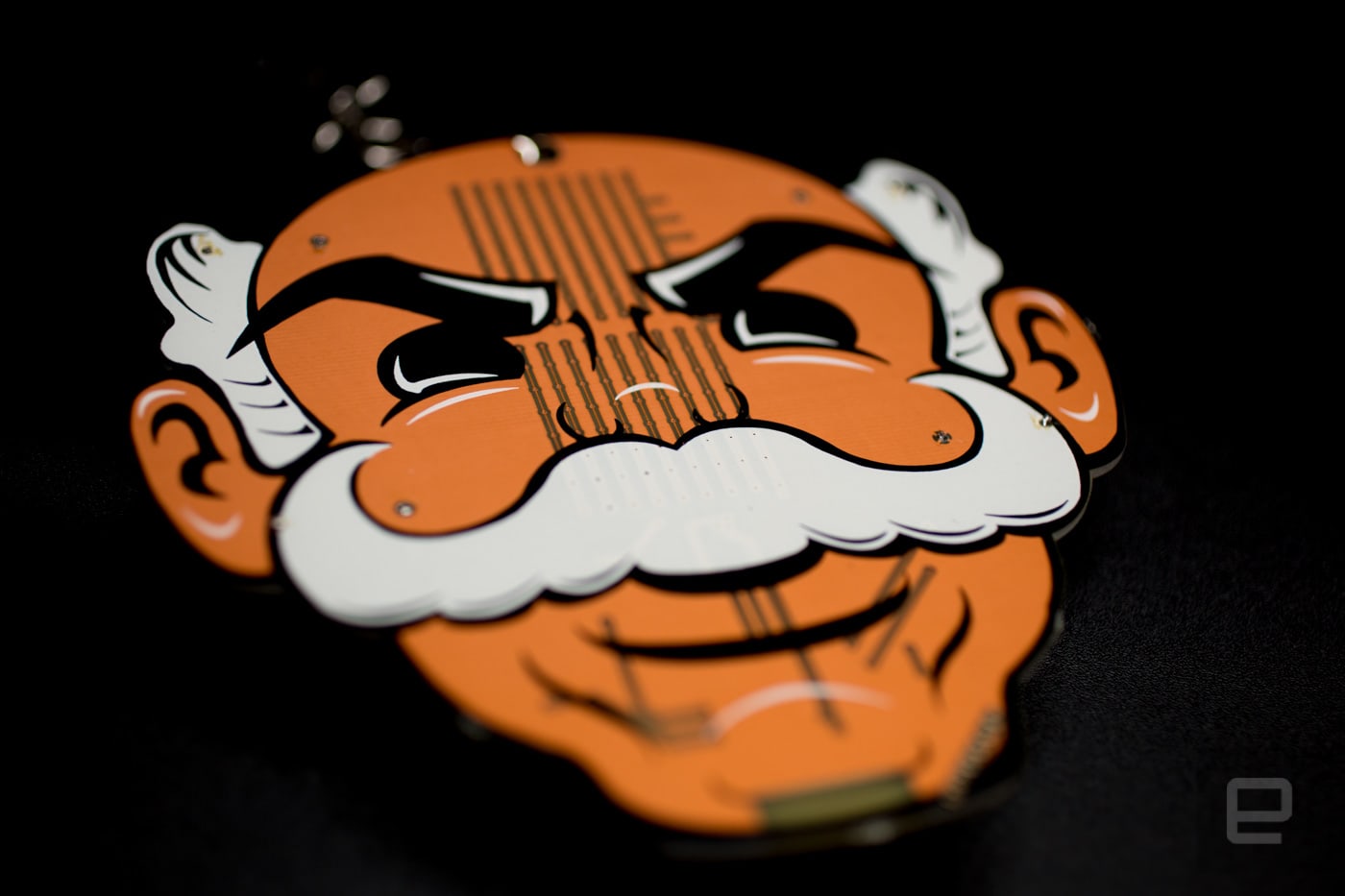
One badge that made a splash this year that’s based on a TV show popular with Def Con attendees is the Mr. Robot badge. The unauthorized face of the show made an appearance on Twitter before the conference even began. One of the team members who goes by @MrRobotBadge (many Def Con attendees insist on anonymity) noted that their badge is the key to an ARG (augmented reality game). Clues are being dropped on Twitter and within the badge itself as players try to determine, “Who is Mr. Robot?” Clearly something ripped directly from the show itself.
In addition to the ARG, the orange face also includes Tetris, Snake, Paint and what the team calls “wireless fun.” Like many of the badges, there’s a sense of discovery attached to them. You don’t just buy one — you investigate it. You dig into its secrets. It’s a thrill for the users and creators. “I love watching people getting to learn about the badge and actually use them and wear them around and be happy that they have it,” RuShan, a team member of the DC801 party badge, told Engadget.

DC801 party badge worked off the Caesars Palace theme and designed a sheep with a Hermes hat from Roman mythology. It has the requisite LEDs but also a tiny display and BLE. The designers created a badge that unlocks features as you attend events. It truly is the party badge. But it also interacts with other badges like the AND!XOR badge over a botnet. The badges are talking to one another and in some cases, battling.
Meanwhile, this is the AND!XOR’s team’s second year building a badge, and like last year, they went with the owner of everyone’s favorite shiny metal ass, Bender. But this time crossed with Hunter S. Thompson. The response they got last year to the Futurama character caught the team a bit off-guard. They tweeted the location of their sale on Twitter, and all hell broke loose. “Thirty seconds later we hear screams and all six elevators open up at the same time and people just start flooding in.” Zapp of team AND!XOR said. There were 300 people and only 70 badges available.

This year, they’ve bulked up their inventory (over 400), and Bender does more than just blink. Like the DC801, the robot is part of a botnet. It talks to and battles other nearby AND!XOR badges in a kind of low-level RPG battle. In addition to the screen showing you your character as it fights random strangers, it plays GIFs, games like a Flappy Bird clone (Flappy Defcon). You can also control the LEDs that line the teeth and make up the eyes and end of the cigarette, connect via an official app and even rickroll yourself. (BTW, I rickrolled myself.) It even has airplane mode, because of the WiFi and Bluetooth radios.
Like a lot of the other badges, and in theme with the show, you can hack it. Access to the badges is usually via USB or GPIOs (general-purpose I/Os). Attendees can modify the software or even create their own hardware add-ons. They are hackers, after all, and well, hackers are gonna hack.
But the level of complexity isn’t without its issues. The AND!XOR team ended up having to flash badges with new firmware. My personal DC801 badge also needed a flash after the buttons stopped working. Both were done without any fuss. The AND!XOR folks even set themselves up at a vendor booth and tweeted out their location for badge owners to get their Benders updated. Software, while not easy, isn’t quite as tough as hardware, which The Ides of Def Con and Mr Blinky Bling teams learned the hard way.

“It’s a lot of work. A lot of heartache. A lot of headache and a lot of late nights. Eventually you end up making them work, but the hardest thing with any manufacturing is yield,” John Adams said. Their badge’s “yield” included an issue with the CPU and the footprint it sits on. It’s a 64-pin piece of silicon on an 8-millimeter-by 8-millimeter square that the team had to reflow to the board in their room with a very fine soldering gun and a microscope. Unfortunately, that created another issue with the LEDs that don’t handle reflow and heat very well. It meant spending the night before Def Con sitting in a hotel room getting their elaborate badge ready for the masses.
The result is an impressive badge that resembles an old handheld console with the case ripped off. Like the DC801 badge, it also pays homage to the Caesars Palace venue with a botnet RPG of Roman characters (spoiler: There’s an Easter egg to make your character Bender).

Team member Bill Paul worked on the electrical and firmware, and wrote a bunch of the apps. Adams worked on additional apps and brought the game to life with game designer Egan Hirvela. Plus, being long-time Def Con attendees, they added a “constant retry” to attacks as redundancy to deal with the conference’s extremely noisy wireless environment. But even experience doesn’t protect you at Def Con.
The Mr. Blinky Bling team deals with hardware on a daily basis. That’s their business — they create custom badges for events. But when their badges showed up to Def Con on Thursday from the manufacturer in China, there was a deviation from the final test boards they received. These “final” boards were missing a diode, and the badge wouldn’t work with AA batteries. “We’re in Vegas — there’s no time for this,” said Blenster, co-founder of Blinky-Bling, reacting to the situation.

Most of the badges had already been paid for by Kickstarter backers, and many of those had opted for the less-expensive AA-battery version. So they got on the phone and Twitter and started looking for 250 LiPos (rechargeable lithium polymer battery). It turns out the Car Hacking Village had the batteries the team needed.
The badges with new batteries were handed out to backers at no extra cost. But while I was picking up mine, people were throwing down a few extra dollars to help cover the cost of the new piece of hardware. “The badge community really came together for us and helped us brainstorm ideas and looked for batteries for us,” Blenster said. Some hadn’t met in real life before the conference.
At the beginning of Def Con, the badge makers had a get-together. For months, many had corresponded on a dedicated Slack channel about what they were building. Over the internet, they talked ideas, traded tips and shared the names of companies for sourcing components. Now they gathered in a small beige conference room, marveling at each other’s creations, trading badges and telling stories of last-minute changes.

The community and its Slack channel are the only reason Kerry Scharfglass finished his exquisite dragonfly Sympetrum badge, based on the book The Diamond Age: “It was instrumental in the willpower to finish.” Scharfglass worked on his badge almost entirely alone (his mom did the silkscreening), and while it doesn’t have a battlemode or screen, its form-factor and random color cycling of LEDs are spellbinding. Yet it also also has an IR sensor, and when multiple badges are within sight of each other, they sync up their color variations.
It’s that level of detail that makes these badges so intriguing and collectible. Hardware is hard. Thousands of hardware products have popped up on crowdsourcing sites in recent years, and only a very small percentage of them ever actually make it to backers on their promised ship date, if ever.

These teams have been able to accomplish just that (some with the help of Kickstarter for funding). Still, all of the badge-makers were concerned that maybe their creation wouldn’t sell. That the Def Con hordes would look at their badges, turn up their collective noses and head to the next session about IoT or car-hacking.
Instead, people watched their phones for Twitter clues on where sales would take place. They stalked the creators and stopped strangers walking the halls to inquire about the hardware hanging around their neck. People bring hundreds to dollars to get as many badges as possible.
It’s a club within a club of like-minded hackers and researchers joining together to share their latest findings and just catch up with old friends in the middle of Sin City. But nowhere is that bond of long-term friendship more apparent than with the Telephreak badge that’s actually a motorcycle vest. Conceived four years ago on the drive back from Def Con, the “badge” is the brainchild of ch0l0man. Each vest has the area code of the wearer along the bottom of the back and the Telephreak name stitched across the top for select wearers.

When asked if they would do it again, every badge maker I talked to said yes. Even with the technical setbacks, concerns about cash flow and last-minute scrambles for batteries haven’t deterred them.
As I spoke with The Ides of Def Con team, Paul said, “we’ll probably make it a lot simpler next year.” Adams talked about hardware changes they could have made that would have led to an easier build with fewer issues. But after listening to Adams wax on about better chips and LEDs and how those components would have yielded fewer issues, I finally butted in.
“You say you want to do something simpler, but it sounds like you’re already figuring out a way to make another complex badge for next year.”
“Yeah, you’re right,” he admitted. “I’ll tell you: if you could make a board this complex and make it repeatable, increase the yield and reduce the failure rate, why not?”

In the end, Puffy sold out before I was able to find the team behind the badge. But I’m guessing they’ll be back next year with something better, and like other attendees, we’ll be waiting, cash-in-hand, for our own piece of hacker art.
What we’re using: The Razer Blade and switching back to Windows
Welcome to IRL, our series dedicated to the things that Engadget writers play, use, watch and listen to. This week, Features Editor Aaron Souppouris explains his switched to Windows and a new laptop, after an extended stint dedicated to MacBooks and Mac OS. How did that work out?
Aside from a few months with the “lamp” iMac and a brief affair with Linux, I grew up exclusively using Windows. That changed in 2011, when I traded my aging Sony Z1 laptop for a MacBook Pro. After just a year with macOS, I became the type of person who uses a MacBook, iPad and iPhone, and never really considered anything else. And so I watched last fall’s MacBook Pro announcement with great interest.
I was hoping to upgrade from my mid-2015 15-inch Pro, which, even when I bought it, was a little long in the tooth. But what Apple offered up was far from what I wanted. The Touch Bar seemed, and still seems, less convenient than function keys for someone used to keyboard shortcuts; the dearth of ports bothered me a little too, but it was the marginal CPU and GPU improvements that really stung, and the sharp like-for-like price increases only compounded my decision: It was time to look beyond Apple, and back to Microsoft, for my next laptop.
This might sound strange if you’ve never been immersed in Apple’s hardware ecosystem, but buying a new Windows machine can be a little scary. There is so much choice, so many different factors to consider. Even among Microsoft’s hardware options, you find vastly different takes on what a PC even is. I began asking myself what I actually wanted from a laptop; I’d spent so long letting Apple dictate a narrow set of options, I wasn’t really sure.
So I made a little checklist for what I needed. I travel a fair amount, so portability is quite important: I didn’t want anything heavier than my 4.5-pound MacBook. Battery life isn’t a huge concern for me — I only need enough juice to get me from outlet to outlet, and perhaps see me through the occasional live blog. In terms of ports, USB, USB-C, HDMI and an SD slot would be ideal. Performance is by far the most important factor for me: I have Photoshop running near-permanently, I like training neural networks to do stupid things and I also use InDesign, Premiere and Illustrator very regularly.
Then there’s gaming. The switch to Windows would grant me access to a giant library of games — should gaming performance be a consideration too?
I looked at tons of machines, but none of them were really a good fit. The front-runners were the Surface Book, which is immaculate but too small, and Dell’s XPS 15, which is super-portable but not quite powerful enough for my needs. It soon became clear that, at least in terms of performance, a gaming laptop was perfect for someone switching from a “Pro” Apple system to Windows.
I’ve got a strange affection for ASUS’ ROG lineup, but the models I like tend to weigh the same as me, and so I found myself looking at Razer’s laptops. I guess it makes sense: The Blade Stealth, Blade and Blade Pro essentially seem like ultra-powerful, matte black versions of the MacBook Air, the 15-inch Macbook Pro and the old 17-inch MacBook Pro. Sure, they’re a little gaudier — especially with the illuminated green snake logo and Chroma keyboard — but I was reassured that you can turn off all of the lights, should you wish.
After reading through countless reviews, I settled on a Razer. More specifically, a Razer Blade. It had almost everything I was looking for. The model I picked had an i7-6700HQ processor, a 6GB Nvidia GTX 1060, 16GB of RAM and a 1TB SSD. The screen — a 14-inch 3,200 x 1,800 panel — was a little smaller than I wanted, and it doesn’t have an SD reader, but the next option up in Razer’s range is the Blade Pro, which, despite being impressively thin, wasn’t quite portable enough, thanks to its 17-inch display.
It’s now been six months since I picked up the Blade, and I’m happy. But it took me nearly all of that time to get there.
Life with Windows
Switching over from macOS to Windows was simple enough. Almost all the apps that I use daily — Chrome, Creative Suite, Slack and Steam — offer the same or a better experience in Windows vs. macOS. But there are some I still miss on a daily basis. For the past few years, I’ve used Tweetbot for my personal Twitter and Notational Velocity to both write and take notes. If there’s a Windows app equal to Tweetbot, I’ve yet to find it, and I’ve tried using Simplenote (the note-taking service that Notational syncs with) for writing, but it lacks the streamlined interface and keyboard shortcuts of the app I’m used to.
Perhaps the hardest thing to come to grips with on the software side is Windows itself. It’s almost back to Windows 7 in terms of simplicity, but I still struggled for weeks with basic navigation. On macOS, I launch everything through Finder, and using the Start Menu for the same thing proved tricky. Running apps by pressing the Start key and typing works fine, but the rest of Finder’s functionality is sorely lacking in Microsoft’s implementation.
The main issues are that file searching through the Start Menu is very hit-and-miss, and that Windows 10 ignores your browser and search preferences, opening them in Edge and Bing, respectively. The former, as best I can tell, is because Windows’ file system isn’t journaled like macOS’s, while the latter seems like a desperate and user-hostile way of fighting Google’s dominance in those markets.
After a while struggling — and even installing third-party apps to divert Start Menu searches back to Google and Chrome — a friend recommended I try Wox, which is essentially a Finder/Alfred clone for Windows. It loads apps just as well as the Start Menu, opens web links and searches according to your preferences and also taps into the Everything disk-journaling app for near-instant file searches.
My remaining issue is one of troubleshooting. I can customize macOS with my eyes closed through System Preferences or Terminal, and diagnosing and fixing problems also comes naturally. In Windows, tweaking simple things often becomes a game of cat-and-mouse as I search through the inexplicably distinct Control Panel and Settings menus. This isn’t really a knock against Windows; it’s more that I’m still getting attuned to the way Microsoft has organized things.
Life with the Blade

My first impressions of the Blade were great. Its black aluminum shell is very attractive, and it’s slightly thinner and lighter than my old Pro. The 14-inch 1800p display is attractive, with well-balanced colors, good max brightness and only moderately reflective glass. The black levels aren’t quite as deep as Apple’s, but this doesn’t get to the point where it really bothers me. I run Windows at a 200 percent scale, so my desktop resolution is effectively 1,600 x 900, which can be a little cramped, especially coming from a MacBook with a larger display. Part of me wishes I’d gone for the 1080p matte version, but I do appreciate the extra sharpness in Creative Suite.
Two things I was very worried about at first were the keyboard and the trackpad. I’ve tried some atrocious Windows laptops over the years, but I didn’t really find much to complain about here. The keyboard is a little shallower than my MacBook’s, sure, but it has better travel than Apple’s new models. And the trackpad, after tweaking a few settings, is nearly as accurate and smooth as my MacBook’s. I usually have a mouse plugged in for gaming and a tablet for Creative Suite anyway.
Everyday performance outpaces my older MacBook, as you’d expect, but battery life was a huge problem. When I first started with the Blade, I was getting highly erratic results: Sometimes it would last six hours, other times just two. That inconsistency meant that, when it came to picking a machine to take with me on a work trip, I opted for the old MacBook every time. (It’s almost two years old, so the battery isn’t perfect, but it’s still good for around four hours.) I finally got around to working out what was wrong after returning from my last trip away, and I think I’ve fixed the issue by changing a mixture of Windows-, Intel- and Nvidia-specific settings. I now regularly get around five hours unplugged, in exchange for slightly less smooth performance.
Then there’s that other big problem with gaming laptops: fan noise. Out of the box, the Blade was beyond loud. Its idle noise was similar to my MacBook’s at full load, which itself isn’t exactly quiet when the GPU kicks in. When playing even simple games, the whine was so unbearable that I either had to use headphones or turn the game volume up high. Thankfully, a firmware update (which apparently came out in March, but I only found out about it a few weeks ago) changed the fan curves so significantly that there’s barely any noise coming from it at idle now. It still has the capacity to be a noisy machine when gaming or rendering video, but it rarely gets as loud as it once did, and playing something like Dead Cells barely registers.
The one downside I haven’t been able to mitigate in any way is heat. While it never gets dangerously hot, I basically use the Blade exclusively at a desk because of how warm it makes my lap. Maybe in the winter it’ll be a nice feature, but right now my apartment is 85 degrees and it makes me want to die.
MacOS or Windows?
I’m using the Blade a lot now, but I still haven’t managed to ditch the old MacBook Pro entirely. I wrote the majority of this article on my couch with my MacBook on my lap, partly because of the heat thing and partly because I still feel a little more comfortable working in macOS.
On a regular workday — I’m writing this on a Sunday — I tend to sit at my desk with two laptops in front of me. I’ll write and edit articles, chatter away at colleagues and generally browse the internet on my MacBook, while heavy tasks — Creative Suite, mostly — are designated to the Blade. When I’m not at my desk, it’s a mix. Razer’s machine has slightly stronger WiFi range than the Mac, so I take that out with me when I’m working on my balcony. On the other hand, because the Pro is so much cooler, it’s my go-to couch computer. It’s a pretty ridiculous setup, I know, but for now I’m stuck between two computers, not entirely happy with either.
The one thing I am 100 percent satisfied with is the Blade’s gaming performance. I haven’t really been a “PC gamer” since the mid-2000s, but now I guess I have to label myself one. Outside of … being outside (where the Switch and 3DS are my go-to machines), it’s only platform-exclusive games like Persona 5 for PS4 that I play on consoles now.
While there are very few games that are playable at the Blade’s native 1800p resolution, I can basically run everything on “high” settings at 1080p. The keyboard is comfortable enough at a desk that I need only plug in a mouse to get playing, and when I’m playing a game better suited to a pad, I tend to neatly stow the Blade behind my TV. An unexpected side effect of welcoming a gaming PC into my home is that I canceled my plans to buy an Xbox One — Microsoft has essentially pledged to treat Windows and Xbox as equals when it comes to exclusive game releases, so there’s really no need.
I’ve heard that switching OSes can be a slow process. An old colleague of mine took about three years to unlearn Apple and finally switch back to Windows, gradually replacing MacBooks with Ultrabooks and iMacs with Surface Studios. I might get there too, but I’m wavering slightly. Since I picked up the Blade, Apple has promised pro-level Macs, and Nvidia has started supporting macOS. Maybe the next MacBook refresh will come with a more “Pro” Pro. If I’m not fully acclimated to Windows by then, it’ll be a difficult proposition to refuse. But until that happens, I am very happy to be giving the Blade a shot. And at least, whatever happens, I have a gaming system that’ll last me half a decade.
“IRL” is a recurring column in which the Engadget staff run down what they’re buying, using, playing and streaming.
Multiplayer VR is about to look much more realistic
Multiplayer VR is imperfect, especially on a large scale. Body tracking tends to be quite limited, so it’s not uncommon to see generic animations and herky-jerky movements from your fellow players. OptiTrack hopes to fix that. It’s launching body sensors that promise whole-body skeletal tracking in VR arcades and other multiplayer venues. Attach it to your hands and feet and you should get accurate positional tracking that reflects more natural movements, such as aiming a weapon or peeking around a corner.
To no one’s surprise, this isn’t something you’re about to pick up for home use. It wouldn’t be as vital there as it is, since the room-scale tracking for the HTC Vive or Oculus Rift is frequently good enough. However, it could be important the next time you don a headset at a dedicated venue. While it won’t necessarily be fun to strap sensors to your body, that added immersion could be enough to justify a repeat visit the next time you’re looking for some virtual thrills.
Via: Variety
Source: OptiTrack
Lyft’s ‘Minnie Vans’ will drive guests around Disney World
Earlier this month, Lyft teamed up with Taco Bell for a new Taco Mode service that lets riders add a stop to the fast food chain on their late night route. Now, Lyft is partnering with another brand — Disney. As of today, guests staying in Disney World’s Boardwalk, Yacht Club and Beach Club resorts can call a Lyft to drive them to wherever they want to go within the Walt Disney World Resort. And the best part is that the vehicles are painted to look like Minnie Mouse’s dress and are called “Minnie Vans.”

Lyft has been doing pretty well for itself lately. While it still has a ways to go before catching up with Uber, Lyft has been growing faster that its popular but trouble-ridden competitor and its service hit one million rides per day earlier this month. Positioning itself alongside brands like Disney and offering exclusive services with companies like Taco Bell could keep pushing Lyft’s growth.
Minnie Vans can carry up to six guests, come equipped with two car seats for children and will be driven by Disney cast members in costume. Disney and Lyft haven’t said when or if the program will expand to other Disney World resorts or if the service will launch in Disneyland.
Image: Disney (Vans)
Source: Lyft
FCC says sharing DDoS attack details undermines security
Back in May, Comedy Central’s John Oliver exhorted viewers to add their public comment on the FCC’s website for net neutrality. While at first it seemed as if the server couldn’t handle the extra load of commenters, the FCC said that the site had been a victim of multiple distributed denial-of-service (DDoS) attacks. When asked for evidence of the cyberattack by regulators, senators and journalists, the FCC refused to share any data.
Last month, a group of ranking House committee members sent a letter to the FCC Chairman Ajit Pai, which expressed concerns about the agency’s “cybersecurity preparedness, and the multiple reported problems with the FCC’s website in taking public comments in the net neutrality proceeding.” Pai’s response — dated July 21st and posted on July 28th — was predictably vague in responding to the specific queries from the Representatives. He said “it would undermine our system’s security to provide a specific roadmap of the additional solutions to which we have referred.”
Pai doubled-down on the reasoning in response to requests for what specific hardware solutions were in place, saying, “While it would undermine our system security to provide a specific roadmap of what we are doing, we can state that FCC IT staff has notified its cloud providers of the need to have sufficient ‘hardware resources’ available to accommodate high-profile proceedings.”
As noted by Ars Technica, the FCC has refused to respond to several Freedom of Information Act (FoIA) requests around the DDoS attacks. The Commission has also denied reports that it didn’t even document the event, confusing matters further. In the current letter, Pai asks the House members to trust that everything is now under control, since things seem to be working. “The docket now contains more than 10 million comments overall, demonstrating that our processes are facilitating widespread public participation in this proceeding,” he wrote. “Although I cannot guarantee that we will not experience further attempts to disrupt our systems, our staff is constantly monitoring and reviewing the situation so that that everyone seeking to comment on our proceedings will be afforded the opportunity to do so.”
Via: Ars Technica
Source: FCC
HP brought a trippy tech museum to a music fest
It was a blazing hot summer’s day, but inside a pitch black room in HP’s “The Lab” at the Panorama music festival in New York, I got the chills. I was experiencing Right Passage, one of seven art installations hosted at a gallery set up by the company, which sponsored the festival. Right Passage was by far my favorite — it’s a spectacle that captured my imagination without inundating me with the “tech” of it all.
Most of the installations at The Lab were visually arresting and interactive structures that presented excellent selfie ops. But after a series of those works, walking into the dark, blacked-out room that housed Right Passage was disorienting. I felt apprehensive but excited, like I had walked into a haunted house. Moments later, rays of light shot out of a distant crevice, and I got slightly worried I had been abducted by aliens. Those of us in the area were drawn to it. But it was quickly obscured, and I noticed a stoic, expressionless woman standing in front of me. Without a word, she walked over to the side and pushed a large wall-like structure into the middle of the room.
Behind her, two other people did the same thing, splitting the room up into four smaller and almost claustrophobic sections. Lights continued to flash, the “walls” kept rearranging, synced to the throbbing music overhead. It was confusing, chaotic, and yet fascinating. After awhile, the people moving the panels started to dance in a slow, trance-like state; it was like interactive theatre meeting modern dance in a futuristic art museum. My fellow festival goers were just as absorbed, ooh-ing and ahh-ing aloud. Not once did I see an HP logo or feel like this was an orchestrated marketing stunt (even though, let’s be real, that’s exactly what it was).

At The Lab, branding is kept to a minimal. “We want to power the experiences; We don’t have to be the experience,” HP’s PR manager Conor Driscoll said. You’ll still see placards at each exhibit’s entrance, explaining what HP products were used to create it, but otherwise the pieces are left to speak for themselves. That’s a smart move on HP’s part, and the whole event itself is a clever marketing tactic. Although the company is far from being a “cool” brand the way Snapchat and Instagram are, it is so far one of the few PC makers to reach out to the ever-important millennial audience on their turf. You don’t see rivals like ASUS, Lenovo, Acer and Dell going to music festivals and engaging people the way HP has.
This isn’t the first time HP has used an unconventional, millennial-friendly event to reach a younger, savvier audience, either. The company also sponsored Panorama last year, and launched new laptops at Coachella this year. At both those festivals, HP also hosted similar exhibits to showcase works that blended art and technology.
As is usually the case when artists create with tech, the strongest works are the ones that don’t focus on the gadgets behind the product. Some of the displays at Panorama managed to do that, delivering transportational experiences with technological subtlety, including Right Passage and short film The Ark. The latter is presented in a dome-shaped theater, projected on the walls and ceilings for an audience that reclines on beanbag chairs. While Right Passage had me wondering if I had been kidnapped by aliens, The Ark straight up took me on an intergalactic adventure.

The film is an immersive, almost-360-degree animated ride through some very strange worlds — basically a trippy acid dream. Some people cheered, some whooped, and many gasped as we “fell” into a chasm that turned into a tube entering a spaceship. I was amused when I noticed some folks make beelines for the best seats in the house (in the middle of the room). It’s as if they knew what to expect, perhaps from attending a previous HP-hosted screening.
I was most surprised by the immense number of people lining up for one of HP’s demos — the “bandana inking station.” There, attendees could design and print their own free bandanas using one of HP’s recently launched laptops. This shows just how well HP understands what people at these events want — air-conditioning, picture-perfect staging and free swag.
Literally 🔥 🔥🔥🔥 #selfie #queen #PanoramaHP
A post shared by Cherlynn Low (@cherlynnstagram) on Jul 28, 2017 at 12:01pm PDT
HP did two things right at the event this year. It gave people mementos — whether it was a free bandana or a cool selfie video — that they could share or take home from the festival. It also offered engaging experiences that managed to avoid coming off as aggressive PR stunts. Of course, the entire tents were covered in HP logos, but once you’re immersed in the actual art, the advertising melts away. It’s a shrewd move that puts the company ahead of its relatively old-fashioned competitors for now. HP could have simply thrown money at the festival’s organizers in exchange for a “Sponsored by” logo on the event’s website and banners, but it participated in a more meaningful way. Doing so may not generate immediate returns for HP, but if it continues to work on its image with the creative crowd, it may see immense benefits in future.
Tech CEOs haven’t yet agreed to attend House net neutrality hearing
Last week, the House Energy and Commerce Committee invited CEOs from Facebook, Alphabet, Amazon, Netflix, Comcast, Verizon, AT&T and Charter Communications to testify at an upcoming hearing about net neutrality and potential legislation regarding it. When the invitations were announced, committee chairman Greg Walden said, “With almost everyone in agreement about fundamental principles to prevent anti-competitive behavior such as throttling and blocking, I think we are closer than ever to achieving a lasting resolution. The time has come to get everyone to the table and get this figured out.”
But as Recode reports, none of those companies have agreed to show up at the hearing. The committee initially placed a July 31st deadline on the companies’ attendance decisions, but has decided to extend that indefinitely in hopes of getting the CEOs to agree to appear. “The committee has been engaging in productive conversations with all parties and will extend the deadline for response in order to allow for those discussions to continue,” a spokesperson told Recode.
This spotlight on tech CEOs is making some of them look like they’re all talk and no action. Many of their companies participated in the Day of Action earlier this month and in a statement Verizon released that day it said, “We respectfully suggest that real action will involve people coming together to urge Congress to pass net neutrality legislation once and for all.” But none of them seem to want to get their hands dirty in the fight for or against net neutrality regulations when it comes to testifying before Congress.
Communications and Technology Subcommittee Chairman Marsha Blackburn told Recode, “I think it would be appropriate, I think it is expected, for the tech companies to choose to show up — to have the discussion — and I don’t think it’s a discussion they want to be absent from.”
The CEOs could be concerned about having a net neutrality conversation with Congress or they could be worried about what other questions might come up. But regardless of what’s causing their hesitation, the hearing is scheduled for September 7th. If they want their opinions on the table, they might want to choose to attend, because decisions could be made without them. “We’re very likely to see something with net neutrality take place this Congress,” Blackburn told Recode. “Congress needs to act, so therefore we’re going to do something about it.”
Source: Recode
Samsung hints how the Galaxy Note 8’s dual camera will work
It’s no secret that the Galaxy Note 8 will likely include dual rear cameras given all the leaks, but you don’t have to take the rumor mill’s word for it — Samsung appears to have dropped a not-so-subtle hint of its own. The company’s electromechanical division has posted a feature list for a dual camera module that lines up eerily well what’s expected from the Note 8’s rear sensors. To begin with, the second camera allows for 3X optical zoom, or a notch better than the 2X you see in the iPhone 7 Plus and OnePlus 5. If you’ve ever wanted to get a close-up shot at a concert using only your phone, this might be your handset of choice. And importantly, it’s not the only arrow in Samsung’s quiver.
There’s a depth-of-field effect, as you might guess, so it’s entirely possible that you’ll see an iPhone-style portrait mode as well as after-the-shot refocusing. However, Samsung is also promising that the module will improve image quality even in regular shots. The dual cameras enable brighter low-light shots when used in tandem, and “dual fusion” can expand the dynamic range of a photo to preserve details in highlights and shadows. There are a couple of more novelty-oriented features, too, such as a “background effect” (to blur the all but the center of a shot) and a “perspective view” (which tilts the image based on how you rotate your phone).
It’s possible that some of these software tricks won’t show up when Samsung unveils the Note 8 on August 23rd, but Samsung has a history of previewing components and features that are clearly destined for its next major smartphone. It would be more surprising these features didn’t appear. Either way, it’s likely that photography will be the Note 8’s biggest feature after its namesake pen.
Via: 9to5Google
Source: Samsung (translated)
Watchdog asks FTC to look into how Google collects shopping data
Back in May, Google introduced a new tool, “store sales measurement,” which tracks debit and credit card purchases in the real world. The company claimed it could help them prove that online ads directly lead to in-store purchases. But a privacy watchdog group isn’t comfortable with the vague safeguards the search giant put in place as it tracks buying habits, and has asked the FTC to investigate.
As written in its formal complaint to the FTC, the Electronic Privacy and Information Center (EPIC) is requesting the agency discover how Google’s tool connects online browsing with in-store shopping, which the search giant has kept secret. The company’s post introducing the tool back in May outlined its potential benefits to marketers, but not how it collects data; It did note that the tool’s methods “match transactions back to Google ads in a secure and privacy-safe way, and only report on aggregated and anonymized store sales to protect your customer data.”
But the complaint goes a step further. Google maintains that users can opt-out of the tool’s data collection by going to their account settings and toggling off “Web and App Activity.” But EPIC claims that’s a spurious assurance and outright deceptive trade practice because some users must also call their banking or credit institution, which might have its own third-party relationship feeding consumer purchasing data to Google. To that end, EPIC requests the FTC force Google to divulge all of its third-party partnerships, which the tech titan noted “capture approximately 70% of credit and debit card transactions in the United States” in the May blog post.
The FTC has its own FAQ page describing what rights users have when opting out. We’ve reached out to Google for comment and will add it when we hear back.
Via: The Hill
Source: Complaint by the Electronic Privacy and Information Center (PDF)
Spotify Hits 60 Million Paid Subscribers Ahead of Going Public
As it prepares to go public, Spotify has reached 60 million paid subscribers, reports TechCrunch. The 60 million mark comes nearly five months after the company announced its 50 million paid subscriber milestone in March.
When adding in customers who listen to the free ad-supported tier, Spotify has more than 140 million subscribers worldwide. Comparatively, Apple Music now boasts 27 million paying subscribers, a number Apple shared at its Worldwide Developers Conference in June.
Since its 2015 debut, Apple Music has been growing steadily by luring customers with exclusive album releases, concerts, and original television programming, but it does not offer a free tier like Spotify. Apple Music subscriptions start at $9.99 per month after a three-month free trial.
Spotify paid subscriptions are also priced at $9.99 per month, and in 2016, Spotify’s revenue grew over 50 percent to $3.3 billion.
In the near future, Spotify plans to go public through a direct listing, forgoing the traditional initial public offering and making existing Spotify shares available to the public. With this method, likened to an elopement instead of a full-on wedding, Spotify avoids the fanfare of an IPO and does not have to hire an underwriter. Spotify is expected to initiate its direct listing in 2018.
Tag: Spotify
Discuss this article in our forums

