


Netflix’s ‘Gypsy’ won’t be getting a second season
Gypsy was initially poised as another prestige drama for Netflix — with a star-filled cast including Naomi Watts and Billy Crudup, and some intriguingly dark material. Unfortunately, it didn’t quite live up to its potential, according to early reviews. Now, it looks like Netflix is ready to pull the plug. The company has canceled Gypsy, even though it was discussing a second season with producers, according to Deadline. Sources at Netflix also confirmed to us separately that it won’t be returning.
While it’s a shame for fans of the show, it was likely a victim of a slightly more selective Netflix. The streaming service used to be known for greenlighting practically any crazy idea, but earlier this year it cancelled Girlboss and Sense8 (though the latter is getting a two-hour finale next year, thanks to fan outcry). The Get Down, which was spearheaded by director Baz Luhrmann, was also axed after significant delays and a budget that skyrocketed to $120 million. Those cancellations are a bit hard to stomach, though, since Netflix thinks the world actually wants a second season of The OA. But hey, at least we’re getting more GLOW.
Source: Deadline
Coveting that canvas bag? Asos’ visual search tool will now find it for you
Why it matters to you
Don’t want to scroll through an inventory list of 85,000 items? Just upload a photo to find your desired piece of clothing instead at Asos.
Visual search is nothing new these days, but its application in the fashion industry may be one of its most useful manifestations. And jumping on the bandwagon is British ecommerce giant Asos, which has rolled out a new visual search tool that allows you to find your latest statement piece by using your smartphone camera. After all, if imitation is the sincerest form of flattery, then taking a photo of your friend’s shoes and then uploading it to Asos’ app and buying a pair for yourself is paying your friend a serious compliment.
Perhaps the most impressive thing about this new visual search tool is the sheer amount of inventory it is able to comb through in order to find you a matching handbag, blouse, or pair of pants. Given that Asos has around 85,000 products on its online store, and adds about 5,000 new products every week, it certainly comes as a relief that you can now find what you’re looking for simply by snapping a photo — either in the wild or via a screenshot online — and uploading it through the app.
Previously, in order to find an article of clothing or accessory on the site, users had to scroll through thousands of products, searching either by category or keyword. But now, the company has updated its iOS app to make it possible for you to perform an image-based search for similar items.
Asos didn’t actually develop the technology for this tool itself, but instead relied on a third-party provider. But regardless of who built it, Asos hopes that its customers will use it. After all, the company noted, the visual search function becomes increasingly robust as it learns users’ tastes.
Ultimately, Asos says, the addition of such a tool is all about discovery.
“If you know what you want, you can quite simply get to what you’re looking for. But what we’re trying to find is more of that discovery use case – if you’re not quite sure what you want, or you’ve seen something that’s inspired you, visual search is designed to kickstart that discovery,” Richard Jones, head of product at Asos, told Forbes. “It’s about getting as close as possible to giving you something that is visually similar.”
The visual search function is now available for iOS users in the U.K., and an international and Android launch is expected soon.
No more blinds! Stanford’s smart windows rapidly go from clear to dark
Why it matters to you
Smart self-tinting windows will allow you to control the amount of light in your room — no blinds required!
Searching for one final flourish to turn your smart apartment into the high-tech, minimalist dream home you’ve always wanted? If so, you may be interested in a new smart window prototype developed by engineers at Stanford University. Instead of making you clutter your ultra-chic rooms with anything as mundane as blinds, Stanford’s dynamic smart windows are capable of transitioning from transparent to opaque, or back again, in less than a minute. And all with the touch of a button.
The prototype windows are made of conductive glass that are outlined with metal ions spread across the surface and block light as a response to electrical current.
“Sunglasses that automatically change color use photochromic class,” Professor Michael McGehee told Digital Trends, comparing the new material to the well-established technology. “While it is great that these glasses require no electronics or power, it is unfortunate that the user has no control over the tinting. Moreover, these glasses do not work inside of a car because they respond to ultraviolet light, which does not get through a car window. The tinting of our windows, and electrochromics in general, is controlled electronically — and the users can specify whatever level of tinting they want.”
Other companies are already selling self-tinting smart windows. However, these are typically expensive, have a blue tint, take more than 20 minutes to dim, and become less opaque over a period of time. Stanford’s windows feature a more neutral color, are cheaper to make, and do not degrade in the same way. When the windows are in clear mode, they allow 80 percent of surrounding natural light through. In dark mode, that figure drops to less than 5 percent.
“We are working on making larger windows,” McGehee said. “Literally making them larger is quite easy, but it is a challenge to have large windows switch quickly because the degree of tinting depends on the voltage, and there can be a voltage drop across a large transparent electrode. We also need to demonstrate that our windows are going to be stable under real-world operating conditions. We have shown that we can cycle the device between the transparent and dark states more than 5,000 times without any degradation, but we have not yet run tests to see what would happen to the device at relatively high temperatures over long periods of time, or under exposure to sunlight.”
The team is currently speaking with window, automotive, and aerospace companies about commercialization. While Stanford’s not the only university to be investigating smart tinting windows, this is certainly one of the most promising demonstrations we’ve come across.
A paper describing the research was recently published in the journal Cell Press.
Moto E4 Plus Review
Research Center:
Moto E4 Plus
How do you stand out among a sea of devices all priced roughly the same, with similar spec sheets and features? It’s a question many budget phone makers have a difficult time answering – though we found Motorola did a pretty good job of it with the recently released $130 Moto E4. Just a few months later, the Lenovo-owned company has returned with yet another reasonably priced handset, starting at just $180 unlocked. In our Moto E4 Plus review, we found the phone to offer similarly compelling value, with one major benefit you’ll struggle to find anywhere else.
Uninspired but quality design
The E4 Plus is rather thick and hefty, with large bezels on the top and bottom. If you’ve seen the Moto E4, you’ve almost seen the E4 Plus. The major differences are the larger size and the back cover being made of metal, rather than plastic. It’s still removable, and underneath you’ll find access to the SIM card and MicroSD slots.
The phone feels big in the hand, but it’s not too unwieldy. The metal lends a high-end feel, and the volume rocker and power button are easy to locate on the right side. The fingerprint sensor is mounted below the screen like on other Motorola devices, and you can program it to serve double duty as the home button.
Adam Ismail/Digital Trends
Adam Ismail/Digital Trends
Adam Ismail/Digital Trends
Adam Ismail/Digital Trends
Adam Ismail/Digital Trends
Aesthetically speaking, the Moto E4 Plus is unremarkable, but not at all offensive. It’s chunky for good reason — the Moto E4 Plus has a massive 5,000mAh battery (more on that later).
The display is adequate for a budget device. The E4 Plus’ LCD panel borrows the 1,280 x 720 resolution of the smaller model, but enlarges the screen from 5 to 5.5 inches. It looks surprisingly sharp on the standard E4, but at half an inch larger, it’s easy to see more pixels.
Considering what you’re paying, 720p is by no means a deal breaker, and the color reproduction and viewing angles are satisfactory. If you want a sharper screen, at only 267 pixels-per-inch, the E4 Plus isn’t going to impress.
Surprisingly smooth performance
When paying low-end prices, you typically have to settle for low-end hardware. While that may be true of the E4 Plus on paper, we were impressed how well the device performed in spite of its modest processor.
The Moto E4 Plus is among the best sub-$200 phones on the market.
The E4 Plus comes in two configurations. Both feature Qualcomm’s Snapdragon 427 system-on-chip alongside 2GB of RAM, though you have the option of paying $20 more for 32GB of internal storage as opposed to 16GB. There’s a MicroSD slot to expand storage, so you can house extra media, apps, and games.
Simply put, it exceeded our expectations. There are devices priced $100 higher, with more capable silicon that don’t feel as smooth and lag-free as the E4 Plus in most cases.
Some resource-intensive apps, like Google Maps, displayed occasional stuttering. While Super Mario Run ran flawlessly, you’ll have trouble running a graphics-heavy game like Need For Speed No Limit at an acceptable framerate. Those limitations were evident in some of the benchmark results:
- AnTuTu: 36,586
- Geekbench 4: 651 single-core, 1764 multi-core
- 3DMark Slingshot: 61
The AnTuTu score is a little better than the regular E4’s 35,056, but still a ways off from the Moto G5 Plus’ 63,190, which starts at $50 more than the E4 Plus. If you’re a heavy gamer, or find yourself often jumping back and forth between recent apps, you’d be better served by the G5 Plus. Otherwise, the E4 Plus is one of the best performing devices at this price range.
The E4 Plus also offers one of the finest software experiences you’ll find among sub-$200 handsets. Motorola has always kept its Android customizations to the bare minimum, allowing a fresh, fluid, user-friendly experience. The E4 Plus continues this trend with zero bloatware atop Android 7.1.1 Nougat – just a couple convenient user interface options tucked away in the Moto app.
There’s the handy Moto Display that automatically shows the lockscreen when when you lift the device or pull it out of your pocket. It’ll show discreet notifications and provide shortcuts to the relevant apps when applicable. You can also activate Moto Actions for one-button navigation, eliminating the on-screen buttons so you can maximize all the available real estate of that large screen.
Like most of Motorola’s budget Android devices, there’s no NFC in the Moto E4 Plus, meaning you won’t be able to make contactless payments with Android Pay.
Two-day battery life – and then some
The design is fine, and the performance is respectable, but the humongous battery is the real reason you’d buy an E4 Plus. It doesn’t disappoint.
The battery will last you two days without even trying. Three isn’t out of the question.
At 5,000mAh, the E4 Plus’ battery does take quite a while to top off – three hours from completely empty, even with the included 10-watt charger. But in return, you get fantastic longevity. Combined with the E4 Plus’ power-sipping processor and display, the battery will last you two days without even trying. Three isn’t out of the question.
We watched YouTube videos, browsed Facebook, Twitter, and the web, streamed Spotify over Bluetooth for multiple hours, and could only kill 20 percent over half a day. At 36 hours off the charger, we were still a hair over 50 percent. Most phones that cost four times as much can’t even manage that.
Keep in mind, the standard E4 was no slouch in the battery department either. But with just a 2,800mAh unit, it’s absolutely blown away by its bigger sibling.
A middling camera experience
Like most other budget phones, there’s not a whole lot to say about the E4 Plus’ 13-megapixel rear camera. It tends to produce muted images in most scenarios, except when in the presence of the best lighting, and the lack of optical image stabilization leads to some unintended blur.
That said, the f/2.0 aperture is a welcome sight on such an inexpensive device, and it helps the E4 Plus capture occasionally satisfying shots with proper depth-of-field.
On the front, the 5-megapixel selfie camera benefits from an LED flash, and the results are just acceptable.
Warranty information
Motorola’s warranty is standard for the industry – it lasts 12 months, and covers production defects, but not accidental drops and water damage. You can guard against those eventualities with Motorola Care Accidental Protection, which runs $70 for 15 months, or $100 for 24 months.
The Moto E4 Plus starts at $180 unlocked. For that price, you get 16GB of internal memory. Spend $200, and Motorola will double that capacity. Verizon is offering the 16GB model for $130, but the device will be locked to its network.
Moto E4 Plus Compared To
OnePlus 5
Moto Z2 Force
Asus Zenfone 3 Zoom
Moto Z2 Play
Huawei Nova 2 Plus
ZTE Blade V8 Pro
Xiaomi Redmi Note 4X
LeEco Le S3
LeEco Le Pro3
HTC Bolt
Lenovo Moto Z
Alcatel Idol 4S
Meizu M3 Note
Oppo F1 Plus
LG G4
Amazon is selling a Prime Exclusive version for customers of the online retail giant’s subscription service. You can save $40 on either the 16GB or 32GB version, in exchange for lockscreen-filling ads.
Our Take
The Moto E4 Plus is the best sub-$200 phone on the market, and certainly the longest lasting on a charge.
Is there a better alternative?
Possibly, and ironically, it comes from Motorola. Spend $50 more over the base E4 Plus, and you can have the next step up – the G5 Plus. The G5 Plus is better in almost every way, trading the E4 Plus’ Snapdragon 427 processor for a markedly more powerful 625 chipset, 32GB of storage as standard, a full HD screen, and improved camera.
Unfortunately, the G5 Plus misses out on the benefit of a huge battery, opting instead for a 3,000mAh unit. That makes the decision a bit of a toss-up, and which way you lean will ultimately depend on what you demand more from your phone: Battery life or performance.
At the other end of the spectrum is the standard E4, starting at just $130. If you have the extra $50 to burn, get the E4 Plus – it’s worth it for the battery alone, but the slightly better processor and camera are welcome additions as well.
There are even more options out there, and you can read about them in our handy best cheap phones guide.
How long will it last?
While Motorola has squeezed as much performance as possible out of the E4 Plus’ measly silicon, we don’t expect the device to last much longer than two years. With how little you’re paying, that could be enough. The company’s track record with issuing Android updates has fallen somewhat astray recently, which also isn’t particularly encouraging.
In terms of physical longevity, we like the metal build, and the water-repellent nano-coating may help in the event of a spilled drink or a little rain. Don’t expect the E4 Plus to survive a swim in the pool – it’s not IP-rated water resistant.
Should you buy it?
Yes. The Moto E4 Plus is one of the best devices at its price point, offering unparalleled battery life and performance that defies its modest hardware. While the G5 Plus is certainly worthy of consideration, the E4 Plus is more budget-friendly.
The best unlocked phones you can buy
Many people still buy their smartphones directly from a carrier with a service contract attached, but buying phones unlocked is growing in popularity, so we’ve put together a list of the best unlocked phones. You’ll usually have to pay the full price upfront, but some companies offer payment plans, so you can pay your phone off month by month. An unlocked phone can potentially be used on different networks, and that means you can switch carriers when you feel like it, simply by changing your SIM card. With an unlocked phone, you can also sell or trade up whenever you want, instead of having to wait for the end of your contract.
Before you buy one of these phones from our list, be sure to double check that the phone you’re buying works on your carrier’s bands. Our smartphone bands guide explains how you can tell the difference.
Our pick
iPhone 7 Plus
Why should you buy this: It’s the best iPhone on the market, thanks to that dual-lens camera.
Our Score
The best
Apple iPhone 7 Plus
Wide carrier support in a stylish, powerful, secure package, with a great camera.
$769.00 from Apple
$877.98 from Amazon
Who’s it for: Apple fans who want an unlocked phone to work with any carrier.
How much will it cost: $770+
Why we picked the iPhone 7 Plus:
The iPhone 7 Plus edged the win in our best smartphones roundup because it’s powerful, secure, and sports a wonderful camera. Apple’s classic aluminum design doesn’t hurt and it’s also the first iPhone to be water resistant. The complete package is slick and there are no major weaknesses (aside from the lack of a headphone jack).
Buy unlocked directly from Apple, and your iPhone 7 Plus will work with all four major U.S. carriers and a long list of others besides. It will also work pretty much anywhere you care to wander, so globetrotters will be well covered. You can find the full list of supported carriers at Apple’s website.
It’s an obvious pick for anyone invested in Apple’s ecosystem, but it is expensive. If you want something smaller and cheaper, then check out the iPhone 7 or even the iPhone SE. If you’re happy to look beyond Apple’s wares, keep reading for plenty of great alternatives.
Our full review
The best unlocked Android phone
Google Pixel XL
Why should you buy this: For a pure and powerful Android experience, the Pixel XL can’t be beat.
Our Score
The best unlocked Android phone
Google Pixel XL
A premium design, fantastic camera, and the latest Android innovations in a global phone.
$769.99 from Verizon
$649.00 from Google Store
Who’s it for: Android fans seeking a slick, unlocked phone that will work on any carrier.
How much will it cost: $770
Why we picked the Google Pixel XL:
Google matches the iPhone on every front with its Pixel line and the Pixel XL is still the best Android phone on the market right now. It has a stunning display, a powerful processor, and a truly great camera. It also ducks some of the usual Android problems, with regular security updates, and super slick software that shows off Google’s elegant software design.
Buy the Pixel XL unlocked directly from Google, and you can use it on any U.S. carrier and on many, many other carriers worldwide. The full list of supported bands can be found on Google’s website.
The Pixel XL is also a pricey phone and it’s quite big, so you might consider the Pixel as an alternative that offers exactly the same fully unlocked credentials in a smaller, cheaper package. There’s very little difference between the two, apart from size.
Our full review
The best unlocked alternative phone
Galaxy S8
Julian Chokkattu/Digital Trends
Why should you buy this: It’s a beautifully stylish phone with all the features you could want.
Our Score
The best unlocked alternative phone
Samsung Galaxy S8
Stunning design, feature-rich, and you can use it anywhere.
$574.99 from Amazon
$574.99 from Samsung
Who’s it for: Samsung fans after the best-looking global phone around.
How much will it cost: $750+
Why we picked the Galaxy S8:
No one sells more phones than Samsung, and this is the current cream of the crop. Samsung refined its innovative curved display design with the Galaxy S8, packing a 5.8-inch screen into svelte body, and it’s absolutely gorgeous. The specs are not to be sniffed at either, with a fast processor, vibrant display, and an excellent camera. Samsung also stirred water resistance, quick charging, the Bixby voice assistant, and a few other extras into the mix.
An unlocked Samsung Galaxy S8 will work on all four major U.S. carriers and a bunch of smaller ones, too. It will also serve frequent travelers well, with support for countless carrier networks worldwide. However, there are a lot of different models of the S8, and you don’t want to buy the wrong one. The model number to look for is SM-G950UZKAXAA. You can find the full list of supported bands at Samsung’s website.
If you want something bigger and you’re willing to pay a bit more, then you could go for the Galaxy S8 Plus — the model number to look for is SM-G955UZKAXAA.
Our full review
The best $400 unlocked phone
ZTE Axon 7
Why should you buy this: You get an amazing flagship phone for a lot less money.
Our Score
The best
ZTE Axon 7
An all-metal body, great display, powerful dual speakers, and all the bells and whistles make this a compelling bargain.
$449.99 from Amazon
Who’s it for: People who don’t care about the big brands.
How much will it cost: $400+
Why we picked the ZTE Axon 7:
After glancing at the spec list for the Axon 7, you’d be forgiven for expecting a premium price tag, but you can actually snap it up for $400. It’s a speedy performer with a decent display and solid camera, though the highlights are the battery life and the superb audio quality. In terms of features and design, the Axon 7 holds its own with the current flagship line-up.
The ZTE Axon 7 supports a wide range of bands, and you’ll have no problems with it on AT&T, T-Mobile, and many other GSM carriers. It does also support CDMA, and so technically, it can work with Verizon or Sprint service, but that doesn’t mean it will. Neither carrier officially supports the device. Some people have got it working on Verizon, but not flawlessly, and it doesn’t seem to be working with Sprint at all right now.
Make sure that you check that it will work with your carrier before you buy. There are also a couple of different model numbers; the one you want is A7G333.
If you recoil at the idea of paying $700 or more for a smartphone, then the Axon 7 is well worth taking a chance on. If your budget doesn’t stretch to $400, but you like the look of the Axon 7, then you might consider the Axon 7 Mini at $300. But be warned, there are a few compromises, most notably the drop to a mid-range processor. ZTE also offers a payment installment plan, so you can pay the phone off in monthly payments. The Axon 7 is a year old, but it’s still a solid option.
Our full review
The best budget unlocked phone
Moto G5 Plus
Kyle Wiggers/Digital Trends
Why should you buy this: It boasts an impressive range of features and outperforms many more expensive phones.
The best $250 phone
Moto G5 Plus
This near stock Android phone boasts a solid camera, big display, and plenty of power.
$229.99 from Motorola
$299.99 from Newegg
Who’s it for: Bargain hunters looking for a decent phone to work on any carrier.
How much will it cost: $230+
Why we picked the Moto G5 Plus:
When you dive into the budget end of the pool, you should be careful, because deal-breaking compromises are common. Thankfully, Lenovo’s Moto G5 Plus is mercifully free of them. This phone ticks all the boxes, with a big, bright display, good performance in terms of speed and battery life, and a camera that easily outshines the budget competition.
Buy this phone unlocked directly from Motorola, and you’ll be able to use it on a wide range of carrier networks, including the big four in the U.S. You can find the full list at the Motorola website; the only notable omissions are US Cellular and Virgin.
Our full review
How we test
We are obsessed with smartphones here at Digital Trends and we test them to the limit. The phones we review serve as our main devices for at least a week, usually longer, and we use them for everything from messaging and calls, to photos and gaming. They go to work with us, they go to bed with us, and they even go to the toilet with us. We never recommend a device that we wouldn’t be happy using ourselves.
When it comes to unlocked phone testing, we make sure that the phones we recommend actually work on the majority of networks and warn you if there are caveats.
Will the phone works on your carrier?
You must be careful when buying an unlocked phone. Some retailers will advertise phones as unlocked, but that doesn’t necessarily mean that they will work with any carrier. Some carriers have stricter controls than others, and even if a phone could technically work on their network, they might not allow it.
Start by checking which bands your device supports and what carriers they correspond to. The vast majority of unlocked handsets will work with GSM networks (like AT&T and T-Mobile), but many won’t work with CDMA networks (like Verizon and Sprint).
Ideally, you’ll be able to find someone talking about using your chosen phone with your chosen carrier simply by searching in Google. For example, search “Axon 7 Verizon” and you’ll see a number of forum posts about the issues people have had. If in doubt, check with your carrier and do further research.
Manufacturers also sometimes produce different models of the same phone with different band support, so you must do your homework to ensure that your pick will work on your preferred carrier. The Will My Phone Work website is another good resource to help you.
Read our full guide here
Update: We updated this list with the Galaxy S8 and the Moto G5 Plus.
Amazing ‘biochip’ reprograms your skin cells to do whatever your body needs
Why it matters to you
Smart biochip can help repair injuries and restore the function of aging tissues, including organs, blood vessels, and nerve cells.
Imagine a smart chip that’s able to heal injuries by reprogramming skin cells when pressed onto a part of the body and given a quick jolt of electricity. It might sound like science fiction, but it’s actually the basis for new technology developed by researchers from the Ohio State University’s College of Engineering and Wexner Medical Center. Referred to as Tissue Nanotransfection (TNT), the device generates any cell type that’s required for treatment within a patient’s body. That means transforming the original cells into the building blocks necessary to do everything from repair injuries to restore the function of aging tissues, such as organs, blood vessels, and nerve cells.
In a demonstration, researchers used the biochip to reprogram skin cells to become vascular cells in a badly injured leg lacking proper blood flow. After a single week, active blood vessels appeared in the injured leg, and by the second week, the leg had been saved. Lab tests also showed that it was possible to reprogram skin cells into nerve cells. These were then injected into brain-injured mice to help them recover from strokes.
“Our TNT biochip is able to deliver large biomolecules, such as DNA and other genes, into the cells on the surface of a tissue or organ using a minimal invasive approach to achieve high dosage and minimal tissue or organ damage, not achievable by any existing technologies,” L. James Lee, professor of chemical and biomolecular engineering, told Digital Trends. “We found that the cell transfection effect may propagate quickly from surface cells to reach all cells in skin and muscle, leading to the formation of new blood vesicles and ‘difficult to reproduce cells,’ such as neurons in situ.”
Lee points out the technology’s use of a patient’s skin as a bioreactor means that the required “therapeutic cells” which are then delivered back to a damaged or malfunctioning organ carry minimal rejection and toxicity concerns.
“We believe the near-term clinical applications include wound healing via enhanced blood vessel formation in the local area, and the use of patient skin as a bioreactor to produce needed somatic cells,” Lee said. “In the long term, this technology may be extended to surgically exposed organs to facilitate treatment.”
At present, the TNT biochip has only been used in a mouse study. Next up, the team will conduct large animal studies, before hopefully progressing to clinical trials. Between this and some of the other smart biomedical breakthroughs we’re seeing, it’s certainly an exciting time for medicine.
A paper describing Ohio State University’s work was recently published in the journal Nature Nanotechnology.
FaceApp does a face plant — it launches, then removes ethnicity filters
Why it matters to you
The backlash against ethnicity filters on FaceApp is part of an ongoing struggle against discrimination in AI — and where to draw the line with facial filters.
Artificially-intelligent selfie editor FaceApp is once again taking heat from critics after an app update allowed users to apply a filter to change their race. After the backlash, FaceApp removed the ethnicity filters from the app on Wednesday, August 9, the same day the update launched, and this is not the first time the company has released, then removed, a controversial feature.
FaceApp uses AI and facial recognition to change faces, including aging an image, switching genders, changing expressions, or adding a goatee. The latest “ethnicity change filters” allowed users to upload a photo, of themselves or someone else, and use the software to morph into a different ethnicity. The update included 10 face-editing filters — and four of them were designed to alter race.
Wow… FaceApp really setting the bar for racist AR with its awful new update that includes Black, Indian and Asian “race filters” pic.twitter.com/Lo5kmLvoI9
— Lucas Matney (@lucasmtny) August 9, 2017
The company’s CEO, Yaroslav Goncharrov, said that filters for enhancing beauty would leave ethnicity intact, while the ethnic filters would change faces equally and even be listed in random order. FaceApp users, however, thought the app took things too far with the ethnic filters and the company later removed them in response.
FaceApp took heat earlier this year for its “hotness” filter, an effect that favored, among other things, lighter skin tones. The developer initially re-named the app before releasing a full fix, apologizing for what the company said resulted from a training bias in the AI program.
The practice of altering a face with software may inevitably attract controversy, raising such questions as who creates beauty standards, which will naturally vary among cultures. And FaceApp isn’t the only firm to come under fire for its choice of augmented reality face edits — Snapchat was ridiculed last year for a “yellowface” filter that created Asian caricatures.
Developers are often quick to place the blame on the AI. The software learns from feeding the computer thousands of examples — but if those examples are mostly white males, for example, the resulting program will have a bias towards those images. Discrimination in AI is the subject of several research projects, while the White House has itself identified discrimination as a challenge.
For now, face-altering apps are probably better off with turning selfies into cats and adding glasses and hats.
Could gene-edited pigs be used as organ donors for humans?
Why it matters to you
Pigs could be a solution to the shortage of transplant organs. CRISPR gene editing makes them safer candidates.
There is a massive shortage of transplant organs worldwide, and scientists are desperate to come up with a solution — whether that be boosting patient’s immune systems to let them accept otherwise incompatible organs, or creating technology for preserving organs after they are harvested. A new international research initiative has another approach: Using CRISPR gene editing on pigs to make them into safe organ donor candidates for humans.
The reason pigs are desirable as possible sources of organs is that their organs are similar to humans in both size and anatomy. Unfortunately, they also carry viruses — known as porcine endogenous retroviruses (PERVs) — embedded in their DNA. As this research demonstrated, this can be passed on to humans, although gene editing can be used to eradicate it.
“Currently, the major problem of human transplants is the great shortage of transplantable human organs,” Lin Lin, a researcher in the department of biomedicine at Denmark’s Aarhus University, told Digital Trends. “While using pig organs, we can in principle use as many as we need. Eradicating PERVs makes porcine organs safer for human transplants. However, there are still several other barriers that we have to cross in order to make pig organs better for human transplants. This is now achievable with the great development in CRISPR gene editing.”
Using an optimized CRISPR-Cas9 gene editing technology and porcine somatic cell nuclear transfer, this work successfully generated viable pigs that are 100 percent PERV-inactivated. Thirty-seven PERV-inactive piglets have so far been born, with 15 remaining alive. The oldest of these is four months old, which means it will need to be monitored for a longer period of time to make sure it suffers no ill-effects.
“The next major step is to solve the problem of vigorous immune responses, such as complement activation, coagulation and thrombosis, triggered by xenotransplantation,” Lin said. “Many previous works have demonstrated that the immunological incapability can be alleviated through tailoring the pig genome. Thus, a serial of very sophisticated gene editing and modifications will be further introduced into the PERV-inactivated pigs and tested in higher primates.”
A paper describing the research was recently published in the journal Science.
Google Play Movies & TV now available for Vizio smart TVs
Vizio TV owners will now have another option to watch their purchased content.
Google has announced its Movies and TV application is now available to Vizio TV owners.
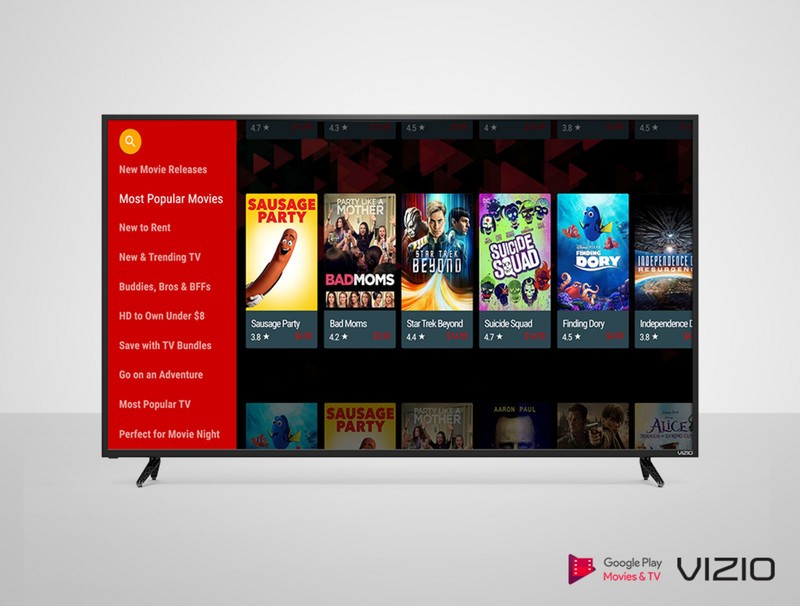
Vizio previously used Google Cast as the only smarts for its TVs, but the company rolled out an actual interface for the TVs earlier this month following customer feedback. The company was also fined $2.2 million by the U.S. Federal Trade Commission for improperly collecting customer data and selling that data to data brokers.
Google Play Movies and TV is also available for Samsung’s smart TVs, LG’s WebOS TVs, Roku and of course, Android TV and Chromecast. Play Movies and TV also integrates with Disney Movies Anywhere, and most recent Disney releases come with a code for a digital version of the movie that can be added to a Play Movies and TV library.
Learn more about Google Play Movies and TV
Mantis Headphones complete your PlayStation VR experience!

Clip on headphones are a great alternative to earbuds.
Stepping into another world is a part of the awesome glory of enjoying a game in VR. If you don’t have a decent pair of earbuds, or headphones though, you won’t really be able to truly immerse yourself in the experience. I’ve been using the earbuds that originally came with my PlayStation VR since I picked it up in October, but the truth is that I hate earbuds. Finding a pair of wired headphones that fit comfortably just hasn’t been happening for playing in VR, so of course, I was curious about Bionik’s Mantis headphones.
These bad boys clip directly onto the PlayStation VR headset, deliver excellent sound, and are a solid alternative. I spent some time with them, and I’ve got everything you want to know right here!
Read more at VRHeads
 AIVAnet