


Deal: Grab the LG Watch Style for a crazy low $108
The LG Watch Style is on sale for $107.99 with a coupon code.
For those that have yet to hop on the smartwatch bandwagon, eBay has a pretty compelling deal on the LG Watch Style, one of the launch devices for Android Wear 2.0. Right now you can get the watch for $107.99 by using coupon code PSCHOOL20, which saves you $27 from its listed price of $134.99
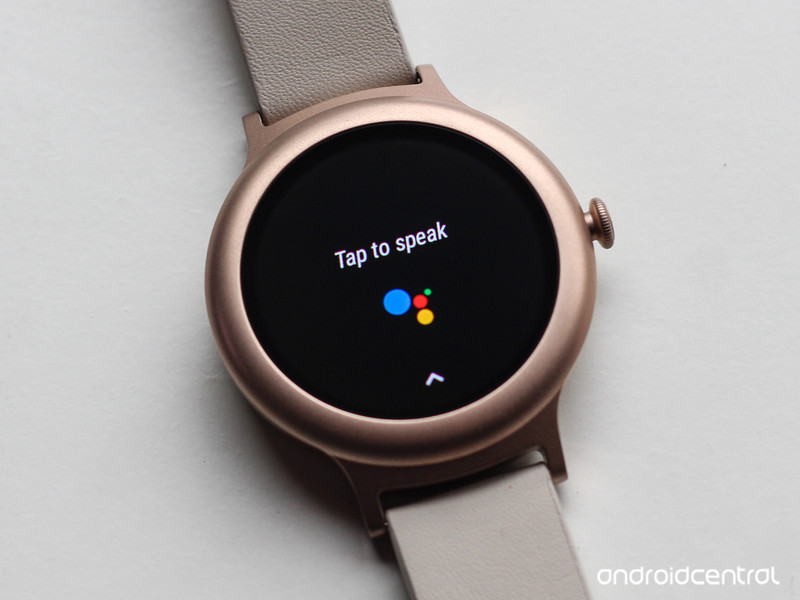
Flo noted in her review of the LG Watch Style that the device was the first smartwatch she felt comfortable wearing since most smart watches are bulky and not particularly well suited to smaller wrists. She also noted the 240 mAh battery inside the watch was enough to get through a single day or two days with lighter use. One key downside for the Watch Style is the lack of NFC, which means users can’t use the watch with Android Pay. That’s a hard pill to swallow at the suggested retail price of $250, but much easier at $108.
Are you interested in picking up the LG Watch Style? Let us know down below!
See at eBay
Eufy Genie review: It’s like an Echo Dot, only less expensive and not as good

Find the extra $15 somewhere, because what you save on the Eufy Genie isn’t worth the Echo Dot features you lose in the process.
The Eufy Genie was announced with a decent amount of internet fanfare because (a) we love to get excited about EVERYTHING and (b) the prospect of an even cheaper Amazon Echo Dot actually is something to pique our interest. What’s better than a $50 Dot? How about something that’s a close relative for a mere $35.
That, folks, is the Eufy Genie. It’s made by Anker (you know them from basically every sort of mobile accessory imaginable) and it’s pronounced Eww-fee.
And, yes. You can think of it as a third-party Echo Dot, only cheaper.
And also with a few caveats. Let’s take a look.
The Eufy Genie: Larger, cheaper, and almost as good
The Genie (as I’m going to refer to it from here on out because I’m tired of saying Eww-fee in my head) is actually a little bit bigger than the second-generation Echo Dot. It’s just a smidge wider and about a third taller. But it also looks better with the taper at the top — one of those little design differences that can go a long way.
The shell is glossy plastic, but the top is rubberized — another nice touch. You’ve got the same buttons as the Echo Dot as well: Volume up and down, a mute button for the mic for the times you want a little extra privacy, and a manual action button so Alexa will listen to you. (I don’t think I’ve ever actually used that button other than to set up Wi-Fi again, but OK.)
Don’t be dazzled by the $15 you save with Eufy Genie … You get what you pay for. Or not.
Setup is similar as with an Echo Dot. The Genie doesn’t come with your Amazon account info preloaded, of course, and you’ll have to download the EufyHome app, either from Google Play, or from Apple’s App Store. (Ironically, it’s not in Amazon’s App Store.) You’ll connect your phone to it and feed it your Wifi password, and that’s that.
All in all, a very Echo-like experience.
And using the Genie is pretty much the same, too. You talk to it and are greeted with what very much sounds like the exact same Alexa voice you’re used to. I can’t quite decide if the speaker is a little better on the Genie. If it is, it’s not by a whole lot. It’s interesting that the sound points downward and bounces off a table — OK, I guess that’s interesting — but for the most part the quality is about the same.
But that extra $15 you save on the Genie means something’s missing, right?
Yep.
The Eufy Genie doesn’t have Bluetooth. So you can’t pair your phone to it for music, and it can’t play music to Bluetooth-connected speaker. For that you’ll have to rely on the 3.5mm jack in the back, and the included cable. The Genie also doesn’t take advantage of the new Alexa calling just yet — that’ll come later in a firmware update, Anker tells me. And if for some reason you’re only running a 5GHz Wi-Fi network, you’re out of luck. This one’s 2.4GHz only.
Maybe that’s a big deal to you, and maybe it’s not. If you just have to have Bluetooth or really want to stash one of these somewhere for a kid or older relative to give you a shout without having to have a phone on hand, then you’re going to need to pony up the extra $15 for an Echo Dot.
I also think the Genie doesn’t respond to voice a well as the Echo Dot, which almost certainly is due to it having fewer microphones. (This was especially true when I had some music playing.) That one’s definitely bigger than just a minor annoyance.
Should you buy the Eufy Genie?
If you want something that looks better than an Echo Dot and for the most part acts the same, go for it. But you’ll be missing out on a few features, the biggest of which I’d say is Alexa messaging and calling. And the thing with the microphones would certainly bug me over time.
Me? I’d spring the extra $15 for an Echo Dot. But Anker also has shown Amazon how a better-looking Echo Dot can be done.
See at Amazon
Amazon Echo
- Amazon Echo review
- Echo Dot review
- Top Echo Tips & Tricks
- Tap, Echo or Dot: The ultimate Alexa question
- Amazon Echo vs. Google Home
- Get the latest Alexa news
See at Amazon
FrontRow is a livestreaming smart necklace with two cameras
Ubiquiti has announced a wearable necklace equipped with two cameras for live streaming.
For a lot of users, wearables are not an essential product. They’re certainly nice to have, but not as necessary for day to day life as a smartphone or laptop. I’ve personally used a Pebble, a couple Android Wear watches, and a Vector Watch before giving up on smartwatches altogether a few months ago. Google Glass is another interesting concept, but only focused on the enterprise for now and too expensive to justify for most people.

Now Ubiquiti, makers of the excellent Amplifi mesh Wi-Fi router, has announced the FrontRow (via Android Police), a necklace wearable that looks pretty interesting. The FrontRow features a round touch display (there is a flat tire), with two cameras for live streaming events to YouTube Live, Twitter Live and Facebook Live. The battery in the unit is said to be good for about 1 hour and 50 minutes of either recording or live streaming, or 50 hours of standby. When the battery is dead, the device can be charged over a USB Type-C connection with USB-PD fast charging.
The main camera on the device is an 8-megapixel, f/2.2 lens that can record up to 2.7K at 30fps and a 151-degree field of view. Most importantly, the main camera features optical image stabilization to combat shaky cam footage. The rear camera features a 5-megapixel, f/2.0 sensor that can record up to 2K at 30 frames per second and an 85-degree field of view. As for audio, the unit has stereo microphones for recording and a mono speaker for playback.
The device includes 2GB of RAM and 32GB of storage, an unspecified quad-core processor, software based on Android, and Bluetooth 4.1 and Wi-Fi 802.11b/g/n/ac for offloading video to a smartphone. The Frontrow is available in both black and rose gold, with the black option available now on Amazon, and the rose gold version coming September 15th. The FrontRow will work with both iOS and Android devices.

Curiously missing is support for Instagram and Snapchat, along with any mention of dust and water resistance. The latter would be especially important for a livestreaming wearable like this. I have reached out to the company about these features and will update the post when I hear back.
Are you interested in the FrontRow? Let us know down below!
See at Amazon
Best shooter games for Android

Spill some blood with the best Android shooters currently on the market.
We’ve rounded up some of the best shooting games across Android for those who always need a target. We have the full gamut here, ranging from simple, single-tap games to full-blown first-person shooters that nearly bring the console experience to your phone and tablet.
- Modern Strike Online
- N.O.V.A. 3
- Bullet Force
- Hitman: Sniper
- Combat Squad
- Modern Combat 5: Blackout
- Overkill 3
- Unkilled
- Dead Trigger 2
- Dead Plague
- Major Mayhem
- Pew Pew 2
- Gunman Clive
Modern Strike Online
Not interested in anything other than the thrill of online multiplayer? Modern Strike Online offers just that: a pure online FPS experience packed with features and game modes we’ve come to expect from the genre. Once you’ve leveled up some you unlock all six game modes, which include the standard fare you’d expect — free-for-all, team deathmatch, seek and destroy, and a hardcore mode. In-game currency can be bought via in-app purchases or earned via daily rewards, crates and generally kicking ass. Spend your gold and credits on new weapons, armor, and accessories for your character. There’s a decent amount of customization available for kitting, with over 30 types of weapons available to rent or buy.
It’s as complete an FPS as you’ll find on Android. You’ll want to head into the settings first to customize your controls and screen layout and tweak the graphics quality to optimize gameplay on your device. By default, your gun will auto-fire as soon as an enemy enters your crosshairs — you can switch this off in the settings, but it’s actually a pretty handy feature to have when you’re already using your thumbs to move and look around. Yes, there’s the occasional in-game ad and constant pressure to invest real cash, as is the case with most mobile games these days, but it’s not terribly invasive and there’s plenty of fun and loot to be had relying on the free crates and daily rewards.
Download: Modern Strike Online (Free)
N.O.V.A. 3: Freedom Edition
N.O.V.A. 3 picks up the story of former N.O.V.A. commander Kal Wardin as he crashlands in San Francisco amid an ongoing battle. Gameplay is mixed with cutscenes that tell the fairly in-depth story — it might, in fact, be the reason you keep coming back to N.O.V.A. 3.
Play against enemy A.I. units or play multiplayer over local Wi-Fi or the internet. Gameloft implements some measures against cheaters and boosters, namely encouraging players to record or document the actions of said cheaters.
Controls are responsive and targeting is aided by tapping a button to aim down sights, a nice feature for those with big fingers. There are some ads displayed on the menu screens and a popup once in awhile when you die, but nothing the experienced mobile gamer can’t handle.
Download: N.O.V.A. 3 (Free)
Bullet Force
Looking for nothing more than solid online FPS action? Look no further than Bullet Force!
This game supports 20-player battles and includes popular game modes including Team Deathmatch, Conquest, Free-For-All, and Gun Game. The graphics are pretty great for mobile and the on-screen controls can be tweaked as needed. There are over 20 weapons to unlock and customize and if you’re out of service range, don’t fret! You can play offline matches against bots and keep your skills sharp.
Download: Bullet Force (Free w/IAPs)
Hitman: Sniper
Hitman: Sniper finds you, Agent 47, stationed with a sniper rifle outside an estate filled with rich people, bodyguards, and a certain high-priority target. Your job is to take your time, plan a course of action, and begin removing enemies any way you see fit (as long as it’s through a scope). Each mission has different objectives you can complete for extra money, which you can then spend on weapon upgrades and new sniper rifles. If you’re especially proud of a mission, use the Share Replay function to share gameplay footage with your friends.
This game has nice graphics and great mechanics: you must lead enemies who are on the move and must account for their sometimes unforeseen actions. They will not shoot back but will take cover and move around the map attempting to help your prime target escape. Controls are easy and responsive, meaning you won’t have too much trouble lining up the shot. The music is great, especially when you miss a couple of shots and set off some alarms, and the voice acting is also above par for mobile games. Get your heart beating with this great shooter, and enjoy no ads or in-app purchases.
Download: Hitman: Sniper ($0.99)
Combat Squad
Tired of mobile first-person shooters that feel too familiar — almost cookie-cutter? Combat Squad brings an extra layer of tactical strategy to the table by having you control your own squad in one-on-one battles against online opponents. It works by letting you “dive” in and out of controlling your squad members, while the remaining teammates follow your lead via A.I. control.
You’ll need to build up a diverse squad and strategically control each member of your team to achieve victory. The gameplay and controls here are great, so if you’re looking for a fresh take on the genre for mobile, give Combat Squad a try!
Download: Combat Squad (Free w/IAPs)
Modern Combat 5: Blackout
Did someone replace my phone with a console? Modern Combat 5: Blackout is a first-person military shooter that gives you a real video game experience from the palm of your hand. Beginning with an escape mission in Venice, the campaign follows Caydan Phoenix as he travels the world battling Raiders and the World Liberation Army. Customize your soldier’s loadout and special abilities to best suit your playstyle — more options are unlocked as you rank up.
Gameplay is smooth and the controls are easier to manage than most shooters, likely due to the fact you can modify all settings, including audio, control, and HUD. Modern Combat 5 has beautiful graphics for a mobile game and runs without hiccups on an LG G4.
New to Modern Combat 5 is a PvP multiplayer mode that has five game modes: Free for all, VIP, Squad battle, Capture the flag, Zone control, and Team battle. Test your skills against players around the world and work your way up the global leaderboard. This game has minimal ads, though it does have some micro-transactions.
Download: Modern Combat 5: Blackout (Free)
Overkill 3
Overkill 3 is a third-person shooter that guides you through the level, also known as being on rails. Your job is to aim and shoot bad guys. Sounds easy? Overkill lets you choose a difficulty before each boss fight, meaning your recent disposal of entry-position bad guys has no bearing on what is to come.
Choose a loadout from the armory before each mission and unlock new weapons and gear as you progress through the game. You must collect stars by completing specific objectives during each mission — the stars are used to unlock more missions. A tally at the end of each level keeps track of your progress, so you’ll never be unsure of where you stand.
Graphics are not as great as other shooters, but Overkill 3 features a co-op mode that lets you team up with a friend or random player to crush the enemy. Ads are few and far between, but there are many in-app purchases.
Download: Overkill 3 (Free)
Unkilled
Unkilled takes you on a wild, zombie-killing ride with a variety of enemies for you to slay using a variety of weapons. Some missions require different weapons and gadgets, meaning you must enter your armory to upgrade current weapons and purchase new ones. There are plenty of upgrades and weapons rewarded to you for free as you move through the ranks, and you will feel like you’re achieving something each step of the way.
The controls are easy to use and sensitivities are adjustable. Your weapons will shoot automatically when you are aiming at a zombie except when you’re in a static mission; here you will aim and shoot using both thumbs.
There are two play modes available now — campaign and skirmish ops — with multiplayer apparently coming soon. Skirmish ops pits you and your base against other players and zombies. Defend yourself or go on the offensive; either way, you will find yourself moving up the leaderboard as you expend bullets and bash brains.
Ads are infrequent but in-app purchases are everywhere.
Download: Unkilled (Free)
Dead Trigger 2
Dead Trigger 2 continues to be the quintessential zombie-shooting experience on mobile. The graphics are amazing, though the game hardly takes itself seriously — there are lots of tongue-in-cheek references and over-the-top baddies to mow down. This version is a little different in that players now have their own hideout and a crew that can build stuff for them. The controls have also been streamlined for touch; all you have to do is move the crosshairs over a zombie, and if you’re in range, you’ll automatically start shooting.
There are tons of missions to enjoy, and the in-app purchases have been scaled back with the removal of the premium currency — now you can buy and build everything yourself without spending a cent.
Download: Dead Trigger 2 (Free)
Dead Plague
Dead Plague is an outstanding top down shooter that absolutely deserves a place on this list for its brilliant graphics, frantic gameplay, and support for online co-op play. You play as a member of a strike team that’s been dropped on an island where a zombie plague has broken out. You must fight your way through the swarms of zombies to find the DNA samples that are humanity’s only hope to finding a cure.
There’s a nice variety of enemies to battle, including some epic boss battles, along with a full arsenal of weapons to choose from. With tight dual-stick digital controls and an engaging campaign that you can play alone or online with friends, Dead Plague stands out as one of the best shooters for Android.
Download: Dead Plague (Free w/IAPs)
Major Mayhem
Major Mayhem is a fast, simple run-and-gun side-scroller. Players simply tap on ninjas, secret agents, or whoever else the president has commanded you to wipe out. There’s some kind of storyline in there about a girlfriend or something, but really, you just tap your targets as the pop out from behind cover.
It sounds simplistic, but the great cartoon feel, over-the-top storyline, and wide range of unlockables provide excellent bite-sized gameplay.
Download: Major Mayhem (Free)
Pew Pew 2
Pew Pew 2 is a classic top-down shooter game with a funky, retro art style. Don’t let the wireframe graphics fool you, though — there are some great visual effects thrown in here to make this game as gorgeous as it is frantic. New in Pew Pew 2 is a single player campaign where players dig through labyrinthine stages, but the real fun is found in the various infinite play modes. You can unlock new ships and game modes as you progress, too.
There aren’t any in-app purchases or ads to be seen here, which will be refreshing for many gamers.
Download: Pew Pew 2 ($2.57)
Gunman Clive
Gunman Clive is a throwback to early 2D platformers — we’re talking NES difficulty and mechanics. Run, jump, and shoot as Clive makes his way through traps, puzzles, and enemy gunmen. The control design reminded me a lot of NES with its directional pad and two button interface — responsive and easy to control.
In an arena of mostly flashy, cutting edge graphics, the monochromatic visual art design might be enough to cause you to overlook this dusty gem. This game isn’t about great graphics — it’s about challenging gameplay and a soothing soundtrack. Be prepared to lose track of time as you try just one more time to reach the end of the stage.
Adding to the retro feel and offering a nice change to the norm, Gunman Clive does not require any device permissions, does not have any in-app purchases, and does not display any ads.
Download: Gunman Clive ($1.99)
Did we miss any?
Let us know in the comments below your favorite shooter available for Android. If none of these games put the ammo in your clip, check out our roundup of the best Android games.
Updated August 2017: Revamped our list with the inclusion of Bullet Force, Combat Squad, and Dead Plague!
Alexa integration now available for UE Boom 2 and UE Megaboom speakers
Logitech has added Amazon Alexa to their UE Boom speakers.
Amazon’s Alexa platform has proven to be very useful for companies that want to create smart devices that are already part of an existing ecosystem. The latest addition to that ecosystem is the Logitech UE Boom 2 and the UE Megaboom.

The speakers added Google Now integration last year, but users now have one more option for their smart assistant: Alexa. Listeners will need to update the UE Boom or UE Megaboom companion app to update the firmware on the speakers before Alexa integration can be enabled.
Curiously, the update changelog specifies that the integration will not work if the user has a Huawei Mate 9, Google Pixel or OnePlus device. From the Play Store listing:
WHAT’S NEW
- Amazon Alexa voice integration on UE BOOM 2. The Amazon Alexa voice integration on UE BOOM 2 feature works through a quick press to the Bluetooth button on your UE BOOM 2. Amazon Alexa voice on UE BOOM 2 is available in the United States, United Kingdom, and Germany only. Huawei MATE 9, Pixel, and OnePlus phones are not supported.
The speakers do not feature always on microphones, so users will need to press the Bluetooth button on the speakers to trigger Alexa.
Do you own a UE Boom 2 or MEGABOOM and plan on using Alexa? Let us know down below!
See UE MEGABOOM at Amazon
See UE BOOM 2 at Amazon
Best Tempered Glass Screen Protectors for the Moto E4

The Moto E4 may not be an expensive phone, but it’s still worth a lot to you. Make sure its screen stays scuff-free!
The Moto E4 is a pretty new phone, but it only takes a second for it to drop out of a pocket and shatter into a million pieces. Don’t mean to scare you, but it’s the truth! And while a replacement can cost as little as $70 from Verizon, or $100 from Amazon, it doesn’t make the experience any less traumatic.
What you want in this situation is a high-quality tempered glass screen protector, which, when attached properly to a phone’s screen, adds both an improved touch surface and a layer between you and a broken screen.
The Moto E4 has only been out for a little while, but here are the best tempered glass protectors we’ve found so far.
Sparin Moto E4 Screen Protector

This two-pack of Sparin protectors has a nearly perfect rating, and for good reason: Sparin is a well-known and reliable company, whose cutouts are precise and of high quality.
Like all good screen protectors, Sparin’s has a hardness rating of 9H, and while that number is up for debate, it says that keys, coins, and other metals won’t do much damage. Of course, a hard glass sheet doesn’t prevent cracks and breaks, but that’s the whole point — if this one breaks, you can replace it.
You can find a two-pack of Sparin’s Moto E4 screen protectors for $7.99.
See at Amazon
Supershieldz Moto E4 Screen Protector

If you’re looking for a great two-pack of tempered glass screen protectors, Supershieldz is a reliable brand that has been proven time and time again.
Like Sparin’s options, the $6.99 Supershieldz pack offers 9H hardness, along with an easy, dry installation process that doesn’t leave bubbles. Like all good screen protectors, Supershieldz’s is anti-fingerprint and hydrophobic, so water just wicks off without affecting performance.
And there’s a lifetime warranty so if the protector breaks or malfunctions for reasons that aren’t user-related, it can be replaced.
If you want something a bit more robust and color-matching, Supershieldz is the only company amongst our picks that offers a black, “full-cover” option for the Moto E4, covering all of the cutouts and the fingerprint sensor.
See at Amazon
Wimaha Moto E4 Screen Protector

This is becoming a trend now, but the Wimaha two-pack of tempered glass screen protectors for the Moto E4 provides 99% clarity and 9H hardness, with an easy installation that doesn’t require water.
At $7.99, Wimaha’s option is an affordable choice, especially since it offers a 100% risk-free trial — customers can call in to get a refund if they’re not satisfied. Wimaha also says that its protectors offer a 2.5D “round edge” to “avoid chipped and sharp sides.”
Each set comes with a full set of instructions, along with wet and dry wipes, dust absorbers, guide stickers and more.
See at Amazon
Are you going to be buying a tempered glass screen protector for your Moto E4? Let us know in the comments!
Go full-on Kodi power user status with Logitech’s K400 Plus Keyboard for $18
Our friends at Thrifter are back again, this time with a great deal on Logitech’s K400 Plus wireless keyboard!
These days just about everyone has a smart TV or something smart connected to their TV, like an Xbox One, Kodi, Android TV, etc. Navigating the interfaces and trying to type in things as simple as a URL can quickly become a pain if you don’t have a keyboard to do it. Logitech’s K400 Plus wireless keyboard is a great way to solve this problem, and right now you can pick one up for just $17.99. This is the lowest price that the keyboard has hit, and it provides quite a bit of functionality for the price.

- Wireless TV keyboard with touchpad: Enjoy effortless control of your TV-connected computer
- Plug-and-play setup: Setting up K400 Plus is a snap. Plug the tiny Unifying receiver into a USB port and start the fun.Use the keyboard receiver to connect up to six Unifying devices to your computer.
- Comfortable, quiet keys and large (3.5-inch) touchpad: The ideal HTPC keyboard
- 10-meter (33-foot): wireless range Watch video, browse the web, chat with friends and more, without annoying delays or dropouts.
- Familiar, media-friendly key layout: Eliminates any learning curve while adding easy-access volume controls and arrow keys
- Plug-and-play design: Unifying receiver makes setup of your TV keyboard a snap
- 18-month battery life You might forget this keyboard needs batteries: Virtually eliminates the hassle of replacing batteries, Use the on/off switch to extend battery life even further.
- Wide compatibility: Works with Windows 10 or later, Windows 8 or 7; Android 5.0 or later; Chrome OS
At $18 you can totally justify having one of these around the house for the random times that you may need it. Even if it isn’t something that you use daily, the times when you do go to use it you’ll quickly realize it was worth the purchase!
See at Amazon
More from Thrifter:
- 5 travel apps to help you save big on hotel stays
- Upgrade your makeup bag on a budget this summer
For more great deals be sure to check out our friends at Thrifter now!
Apple sets $1 billion budget for original TV shows
Apple is finally putting its money where its mouth is, setting aside $1 billion to pursue the original programming agenda it’s been making so much noise about it recent times. In June, the company poached Jamie Erlicht and Zack Van Amburg — the TV execs behind Breaking Bad and The Crown — from Sony, noting at the time that it “had exciting plans in store for customers”. Now, according to the Wall Street Journal, Apple has opened its war chest to make those plans a reality.
There’s no word yet on how Apple will spend its budget, though. A cool $1 billion sounds like a lot but programming costs can easily run into the millions for an episode of a high-end show — Game of Thrones episodes regularly top $10 million apiece. And after Apple’s initial and extremely lackluster original show attempts in the form of Planet of the Apps and Carpool Karaoke, it’ll need at least one quality standout hit to make itself relevant in a market crowded by companies with much bigger budgets: Netflix is expected to spend more than $6 billion on its content this year.
It’s also not clear how original programming will fit into Apple’s existing video business, if at all. Buying movies and TV shows individually feels like an antiquated way of doing things now monthly-subscription services are the norm. Indeed, iTunes’ share of the movie sales and rental market has dropped to less than 35% from 50% in 2012. Plus, the company needs to find a way to take on rivals such as Netflix and Amazon without jeopardizing the 15% cut of subscriptions it gets from its app stores for video services such as HBO Go. But Apple has the right people on board, and the check the company has just given them demonstrates that it is genuinely serious about sliding out of Silicon Valley and into Hollywood. Whether Hollywood will have them though, is a different matter.
Via: Wall Street Journal
‘Hope Floats’ is a seaborne bot that spams lawmakers with calls
On a plain white wall at a large Brooklyn gallery, a seemingly old-fashioned phone booth sits about five feet off the ground. The words “Hope Floats” are painted in white on the black box, which houses a computer, a screen, a keyboard and a handset. It’s a nondescript façade for a potentially subversive art-meets-tech project. Hope Floats is a two-part interactive installation that encourages you to pick up the phone and make your voice heard, and it is also a commentary on the aging technology that powers the American political system.
The project started out as a reaction to the 2016 US presidential election. “Right after the election, we were strapped with wanting to provide something to our community (in Red Hook) and our audience … People needed to get stuff out,” says Bethany Tabor, technology programs manager at Pioneer Works, the nonprofit foundation behind Hope Floats. At first, the idea was to build something cathartic. “We wanted to just build a screaming booth where you could go in and scream,” added David Sheinkopf, the organization’s director of technology.
But Sheinkopf wanted to encourage what he called “constructive expression” instead of futile yelling, so the team decided to develop something more effective. So they set about building a phone booth for people to call their elected officials.

That’s the first part of Hope Floats, which launched online and in physical form this past Sunday at Pioneer Works’ monthly open house, which happens every second Sunday. As hundreds of New Yorkers wandered around the bright, airy gallery, the installation was actually quite easy to miss. Aside from a small sign next to the phone booth, there wasn’t an eye-catching setup to draw your attention to the installation. Still, several people stopped to read the project’s on-screen explanation, while a handful of them stayed to leave a message.
If sending your representative a note is something you prefer to do in private, you can also do so on the Hope Floats website. The physical phone booth lets people without internet access use the service. Sheinkopf pointed to the neighborhood’s elderly population as an example.
Only one phone booth is up and running at Pioneer Works right now, but Sheinkopf says the dream is to have phone booths that are solar-powered, with 3G or 4G LTE connections via a mobile hotspot so they can be installed “in the public space.” The setup is already weatherproof, making it a good fit for parks and sidewalks. The team’s ability to bring Hope Floats to more places depends on whether it gets enough sponsors.

Whether you make the trek out to Red Hook or see one in your neighborhood in future, placing a call via a Hope Floats booth is like entering a time warp. The device is anachronistic and somewhat confusing. The 15-inch screen is accompanied by a receiver on the right and a keyboard-and-mouse combo below it that evoke public phones from decades ago. Some people reached out to touch the screen last Sunday, and it took them a while to figure out that they actually had to use the accompanying mouse to navigate the menus.
At the booth, you can look up your district congressional representative, select a cause to discuss and leave a voice message for them. Tabor and Sheinkopf say they wanted to make Hope Floats a nonpartisan project, and as such, they tried to avoid leading questions or slanted scripts. Topics include immigration policy, travel bans, women’s reproductive healthcare, trans rights and NEA advocacy. There’s also an umbrella option called “Other” if your issue isn’t on the list.

Leaving a message at the booth can get tricky. Since the installation is basically a computer accessing the Hope Floats website and not an actual phone, you have to click the microphone symbol to start recording. At this point, most people, myself included, reached out to tap the screen. But you have to use the rolling ball next to the keyboard to move the cursor, press the “click” button below it, and click again to save your recording.
Sheinkopf is aware of the problems and says it’s a work in progress. In fact, after watching folks repeatedly tap the screen on Sunday, Sheinkopf added a label to the machine, indicating where the mouse was. He also says his team would work on shortening the introduction as well as improve the color scheme of the topics list, which is currently difficult to read.

The second part of the Hope Floats experience is more rewarding. All the messages people have left, whether from the booth or website, are being stored on a server. In September, Sheinkopf and his team will launch a callbot that will repeatedly dial the intended recipient of each message and play the recording. Sheinkopf says this is meant to help “people who have full-time jobs who can’t be on the phone all day long.” Since a large volume of calls on an issue can bring lawmakers offices to a halt, this is a more effective means of reaching your elected official than simply emailing or tweeting at them.
The team is also working on a raft-mounted device that will be launched into the water on September 30th. It will head towards Washington, DC, as it continues to place automated calls to various congressional representatives. During its symbolic journey to the nation’s capital and the heart of the government, the raft will use solar panels to stay powered, along with a mobile hotspot and radio to make calls. As you might expect, the raft will also have GPS to help keep it on course. But even if it meets an untimely demise, the spirit of Hope Floats will live on. The raft is only meant to place about 5 percent of calls made by participants; the main system, hosted on servers back home, will do the bulk of the work.

Hope Floats has many goals. It aims to show that participating in politics doesn’t necessarily demand a lifestyle change. “We would hope that people feel like it’s less of an obstacle to engage with their government and feel like they participated in something that up until now felt very distant from them,” Tabor says. “It’s also about demanding that your representatives do their job and represent you,” she adds. But the team also wants to inspire others to explore creative ways they can use technology for political engagement.
But the project can’t achieve much if it continues to operate at such a small scale. According to Pioneer Works, 30 messages were left on Sunday. At this rate, about a thousand calls will be saved by the time the raft launches at the end of next month. You can continue to send messages via the booth or the website even after the raft sets off. Hope Floats needs greater momentum to make politicians pay attention, but I suspect it will gather steam once the callbot starts dialing.
ESPN’s Apple TV app streams four live feeds at once
Just in time for football season, ESPN updated its Apple TV app to include a handy new feature for sports fans. Thanks to tvOS MultiCast, you can now watch up to four live streams at once across all of the network’s programming options. This means you can put shows and events from ESPN’s broadcast channels beside the online-only streams at the same time. It sounds fairly straightforward, but it’s sure to come in handy when you’re trying to follow multiple things that overlap in your viewing schedule.
Of course, you don’t have to watch four at once. You can also choose to watch one, two or three feeds and arrange them in one of five different layouts that suits you best. And yes, you can re-order the feeds, select audio and change to fullscreen view when the action gets intense. When you want to go back watching to all of your streams at once, you can do so easily.
Sure, this isn’t the first app to allow multi-feed viewing as the MLB At Bat app and ABC News are among the options already employing the feature. However, with football season nearly here, it makes a lot of sense for ESPN to take advantage and allow fans to track multiple games on Saturday afternoon. Yes, the ESPN app on Apple TV requires a cable subscription — at least until next year when Disney launches a standalone service for the 24/7 sports network.
Via: Recode
Source: ESPN
 AIVAnet