


Google adds allergy forecast info to mobile search results
One antihistamine or two? Google is making sure hay fever sufferers can answer that question in double quick time, thanks to the new addition of pollen measurements in search results. Plug an allergy- or pollen-related query into your Android smartphone and search results will now include a simple breakdown of current and predicted pollen levels. The new type of rich card result is populated by data from The Weather Channel, and as always, you can get more detailed info by tapping on the card itself.

Search within the Google app and you’ll also be prompted to turn on notifications. Your phone will hit you with a reminder if the pollen count is creeping particularly high in your area so you can dash to the nearest store and grab a pocket-pack of tissues before you start streaming from every facial orifice.
Source: Google
T-Mobile boosts coverage with the first 600MHz LTE network
That cellular equipment you see above may not look like much, but don’t dismiss it too quickly — it could be crucial to the future of wireless data. T-Mobile has switched on the world’s first 600MHz LTE sites in Cheynne, Wyoming, promising less congested networks (and thus higher real-world speeds) and better coverage, especially indoors and in those rural areas where range is vital. It’s a modest start, but the carrier promises more 600MHz sites in 10 additional states before the year is over. The tricky part is getting a device that can take advantage of it… you’ll have to wait a while for that.
The network notes that both LG and Samsung expect to ship 600MHz-ready phones sometime in the fourth quarter of 2017. While there’s no mention of which phones are in line, the timing suggests that the Galaxy Note 8 and V30 may be first in line. Whatever shows up, this could still leave you waiting a while before you can find out whether or not 600MHz is as helpful as T-Mobile makes it out to be. That’s especially true if you live elsewhere in the world, where 600MHz wireless is a long-term dream at best.
It’s potentially a coup for T-Mobile. While the 700MHz LTE you see across big carriers today isn’t exactly crude, it doesn’t perform quite as well as the 600MHz band. And T-Mobile’s huge number of 600MHz licenses gives it plenty of headroom, whether it’s for additional customers or future 5G rollouts. This isn’t to say that rivals like AT&T or Verizon are necessarily in trouble. It’s just that T-Mobile might have an ace up its sleeve.
Source: T-Mobile Newsroom
Google Home voice calling starts rolling out today
Google Home is getting a big upgrade today: The smart speaker can now place voice calls, no cellphone needed. This feature was first announced back at Google I/O in May, but it’s now ready to roll out to users in the US and Canada. It’s yet another feature that helps keep the Home competitive with Amazon’s Echo family, which added calling back in May. We haven’t gotten to try it out yet, but it sounds like it should be pretty straightforward to get your Home working as a speakerphone. But there are a few things you’ll want to know before you give it a shot.
For starters, voice calling on Google Home supports multiple users, so anyone in your household who has set up the device to recognize her particular voice will be able to make calls directly from her personal contact list. Basically, that means if you and a roommate both ask Home to call your mom, it’ll use your contacts to find and call the right parent.
Speaking of contacts, you’ll need a Google account with a well-maintained contact list for this to be useful. If you’re an Android user, this probably won’t be an issue. But if you’re using iOS and have also had a Gmail account for a long time, it’s entirely possible your contacts list is long, unorganized and unruly. Fortunately, Google has made managing your contacts online much, much easier in recent years: The current web contacts interface for your Google account is simple and clean. And if you have a master list stored somewhere else, you should be able to export it and then import it into your Google account without much trouble.

As Google said when this feature was first announced, Home doesn’t actually use your cellphone to place a call. Obviously, most everyone with a Google Home will also have a smartphone of some sort, but if your phone breaks or is otherwise unavailable, that won’t stop you from from making calls through your smart speaker. Unfortunately, that means the people you call won’t see your familiar phone number pop up when you ring them from Google Home. Instead, they’ll see “unknown caller” or “no caller ID” — not the best thing to pop up, given the growing annoyance of robo-callers. The good news is that Google will let you link your personal phone number to Google Home by the end of the year, so at least this will be a temporary problem. That said, if you use Google Voice or Project Fi, you can link those numbers up now rather than waiting until the end of the year.
Aside from these details, calling should be pretty straightforward: Just say “Hey, Google, call …” and name a contact. You can also ask Home to call local businesses using natural language like “call the nearest coffee shop.” All domestic calls are free, but you won’t be able to make international calls or dial up “premium rate” numbers unless you have a Project Fi or Google Voice account. In that case, you’ll get charged the same rate you’d pay through those services.
If you want to give Google Home calling a shot, just ask your speaker today — but there’s no guarantee it’ll work yet. As with many Google products, this is a gradual rollout over the next week. If you don’t feel like waiting, it might be worth giving the Google Home Preview Program a shot. You’ll get early access to new features, though there might be a few bugs along the way. But with something like voice calling that Google is officially announcing, things should work without a hitch. If you’re not feeling brave, you might have to be a little patient.
Microsoft Research uses AI to help drones soar like eagles
Microsoft is looking to the skies for its next round of AI inspiration. Specifically, Redmond’s Research division is using the birds that capture columns of warm air to glide around without expending much energy to guide its work. So far, it’s been able to keep a 16.5 foot, 12.5 pound sailplane in the air thanks in part to algorithms that aid the craft in finding and using the thermals.
“Birds do this seamlessly, and all they’re doing is harnessing nature.” principal researcher Ashish Kapoor says. “And they do it with a peanut-sized brain.” AI doesn’t have a brain, per se, so it has to not only assess air temperature, but then predict where the next thermal might be and then catch it. For this test, though, the craft had a motor and someone on the ground with a remote control serving as backup in case the craft’s smarts failed.
The ultimate goal is to keep the craft in the air indefinitely with solar or wind power, and, perhaps serve as autonomous floating cell towers. Kind of like what Google’s Project Loon and Facebook’s Tether-antenna.
More than that, Microsoft is looking at the complex AI at play here as a proving ground for applications where algorithms need to make split-second decisions — like self-driving vehicles.
Source: Microsoft Research
iFixit Launches New iPhone 7/7Plus Fix Kits for At-Home Battery Replacements and Screen Repairs
iFixit today released a collection of all-new Fix Kits for iPhone 7 devices that guide users through replacing batteries, cracked screens, and even the front and rear camera modules and sensors on an iPhone.
The new battery Fix Kits for the iPhone 7 and iPhone 7 Plus join previous kits already available for iPhones as far back as the iPhone 4s. iFixit said that these battery replacement kits help bring a dead iPhone back to life, and include all the usual tools needed for the replacement process: a collection of screwdrivers, tweezers, iFixit’s own Opening Tool and Opening Pick, and more. Battery Fix Kits start at $44.95 for the iPhone 7 and increase to $49.95 for the iPhone 7 Plus (pictured below).
The cracked screen Fix Kits are newly available for the iPhone 7 and iPhone 7 Plus as well, and include parts and tools for users to replace a broken iPhone 7 screen on their own. Contents include a custom driver, steel bits, opening tools, tweezers, and a replacement screen backed by iFixit’s lifetime guarantee, but users will have to transfer their old display’s home button assembly to retain Touch ID functions. Cracked screen Fix Kits cost $134.95 for the iPhone 7 and rise to $164.95 for the iPhone 7 Plus.
There are also new iPhone 7 repair components in the Small Parts Kits section, aimed at the iPhone 7 and 7 Plus’s Lightning Connector, front camera and sensors, and rear camera. The small parts Fix Kits vary more drastically in price, with an iPhone 7 front camera and sensor cable kit costing $34.95, and an iPhone 7 Plus Dual Rear Camera kit priced at $84.95.
While each Fix Kit has a guide for users to follow, iFixit has also published a few How To videos on its YouTube channel, including an iPhone 7-specific playlist, to make following along to some of the repair kits even easier.
Depending on the issue at hand, and the iPhone model, out-of-warranty repairs directly from Apple can cost as much as $349 for an iPhone 7 Plus. Similar to iFixit’s recent battery replacement Fix Kits for MacBook Pro devices, users have a chance to save money if they try out iFixit’s guided replacement kits, as long as they are also up for the challenge of an at-home repair.
Tag: iFixit
Discuss this article in our forums
Apple Watch Series 3 Unlikely to Support Direct Phone Calls, but VoIP Calling a Possibility
The third-generation Apple Watch, set to launch this fall with LTE support for the first time, is unlikely to support phone calls, KGI Securities analyst Ming-Chi Kuo told investors in a note shared this morning.
According to Kuo, while a voice service that replaces the iPhone’s calling functionality is “feasible,” he believes Apple must first work on improving the “user experience of data transmission.” As a result, he says the Apple Watch “probably” won’t support traditional phone calls “this year.”
The watch could, however, support VoIP services like FaceTime and Skype, as FaceTime audio calling is already supported on current Apple Watch models.
This has two benefits: (1) negotiations with mobile operators will be more simple and the chances of cooperation with mobile operators will improve; and (2) 3G connectivity can be scrapped, simplifying the antenna design and facilitating internal design. However, we think there is a chance that users may use LTE Apple Watch to access VoIP services, such as FaceTime and Skype.
Kuo also says that based on a lack of internal space, the LTE Apple Watch is likely to use an eSIM instead of a physical SIM slot, with the device set up to share the same phone number with an iPhone. He warns that LTE connectivity in the Apple Watch could be limited to specific countries and markets as not all mobile operators support that particular business model.
Rumors have already suggested that the major carriers in the United States, including Verizon, AT&T, and T-Mobile, will support and sell the upcoming LTE Apple Watch.
Though Apple is currently embroiled in an ongoing patent dispute with Qualcomm, Kuo believes Apple will use Qualcomm chips in the Apple Watch because Qualcomm’s technology is superior to Intel’s with smaller chips that consume less power.
Finally, Kuo predicts Apple has no intention of developing an Android app for the Apple Watch at this time, given that it would be difficult to have the same deep integration between Apple Watch and an Android phone that’s possible with the Apple Watch and iPhone.
The third-generation Apple Watch is expected to be introduced in September alongside new iPhones. LTE connectivity is expected to be the main selling point for the device, and while there were some rumors pointing towards major design changes, Kuo has previously said there will be no “obvious change” to the form factor.
Related Roundups: Apple Watch Series 2, watchOS 3, watchOS 4
Tags: KGI Securities, Ming-Chi Kuo
Buyer’s Guide: Apple Watch (Neutral)
Discuss this article in our forums
Best iOS app deals of the day! 6 paid iPhone apps for free for a limited time
Everyone likes Apple apps, but sometimes the best ones are a bit expensive. Now and then, developers put paid apps on sale for free for a limited time, but you have to snatch them up while you have the chance. Here are the latest and greatest iOS app deals available from the iOS App Store.
These apps normally cost money and this sale lasts for a limited time only. If you go to the App Store and it says the app costs money, that means the deal has expired and you will be charged.
Budget and expense tracking
Where did your money go? Try this easy and simple expense tracker and never be left wondering again.
Available on:
iOS
Millimeter
Millimeter Pro is a easy-to-use and helpful measurement tool for your iPhone. It uses your touchscreen as a ruler or tape measure to make quick measurements.
Available on:
iOS
Textkraft
Textkraft Pocket for iPhone and Apple Watch is a professional writing app and document reader with many specialities.
Available on:
iOS
Todokit
Organize tasks by project, priority, and urgency. Then, track your progress for each task and check your past achievements.
Available on:
iOS
Toast
Toast is the powerful photo editing tool to make beautiful and stylish photos. There are no in-app purchases — everything is included in the app.
Available on:
iOS
Moody
How were you feeling last week? What was your mood last September? It’s usually hard to remember your mood, but Moody is here to help you.
Available on:
iOS
How to use Bixby Vision
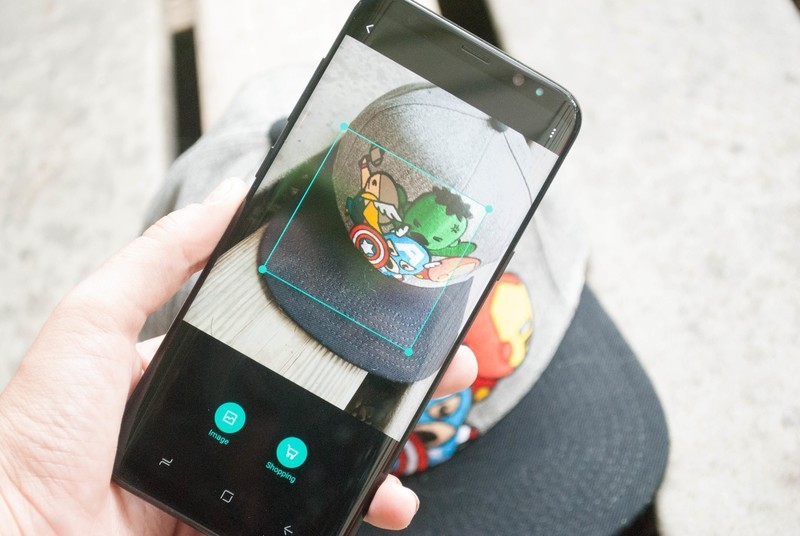
Bixby Vision can help you find images, shop and even translate text from different languages!
Bixby Vision for Samsung’s Galaxy S8 delivers a feature built to take your pocket assistant to the next level. Using Bixby Vision you can extract or translate text, search for images similar to what your camera sees, shop for those items, and plenty more. With so much going on it can be hard to get a decent grasp on everything. That’s why we’ve done the hard work for you, and detailed out everything you need to get the most out of everything Bixby Vision can do!
- How to open Bixby Vision
- How to adjust Bixby Vision Settings
- How to extract text with Bixby Vision
- How to translate text with Bixby Vision
- How to shop using Bixby Vision
- How to search for images using Bixby Vision
How to open Bixby Vision
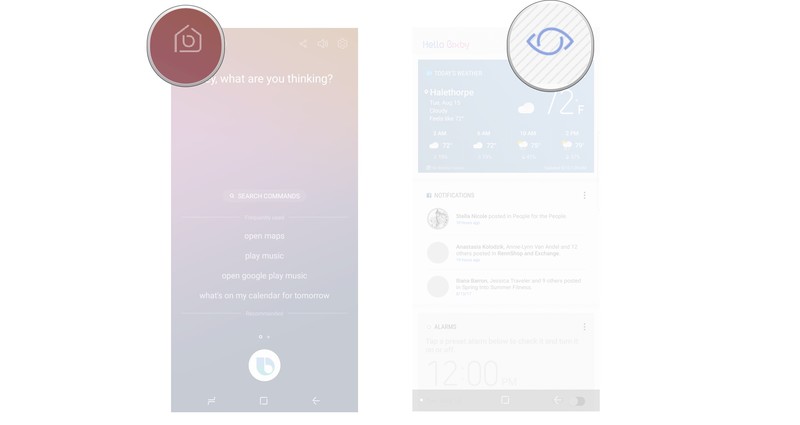
Bixby Vision is located within Bixby Home, which means you’ll need to know where to find it!
Open Bixby Home on your phone.
Tap the Bixby Vision icon at the top of your screen. (It looks like an eye.)
How to adjust Bixby Vision Settings
There are a number of different settings within Bixby Vision that can be turned on or off via toggle. Here’s how to adjust them to your liking!
Open Bixby Vision on your phone.
Tap the Menu button in the upper right corner of the screen. (It looks like three vertical dots.)
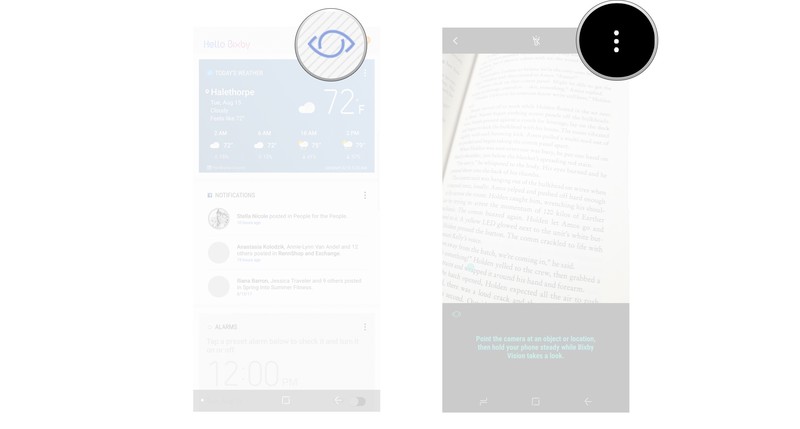
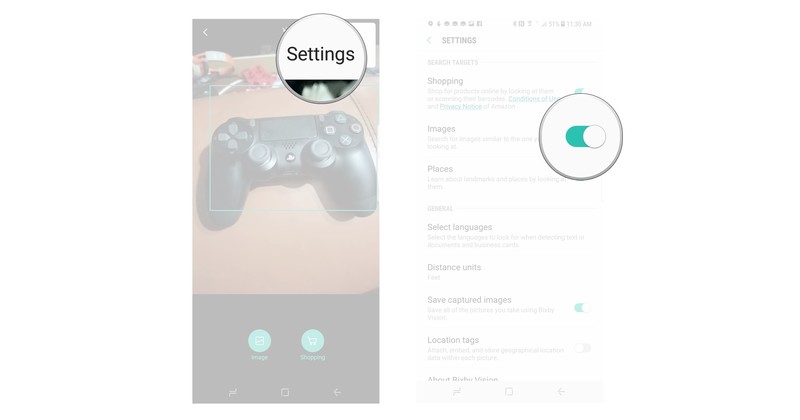
Tap Settings.
Tap the toggle to turn on or off specific settings.
How to extract text with Bixby Vision
Bixby Vision is able to capture and extract text from what it sees. It just takes a few taps to do, and it’s pretty simple.
Open Bixby Vision.
Scan an item to capture text.
Tap Text.
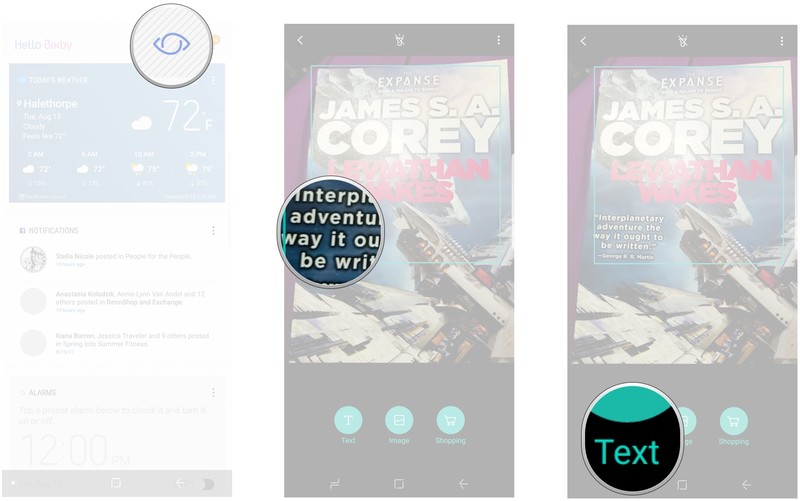
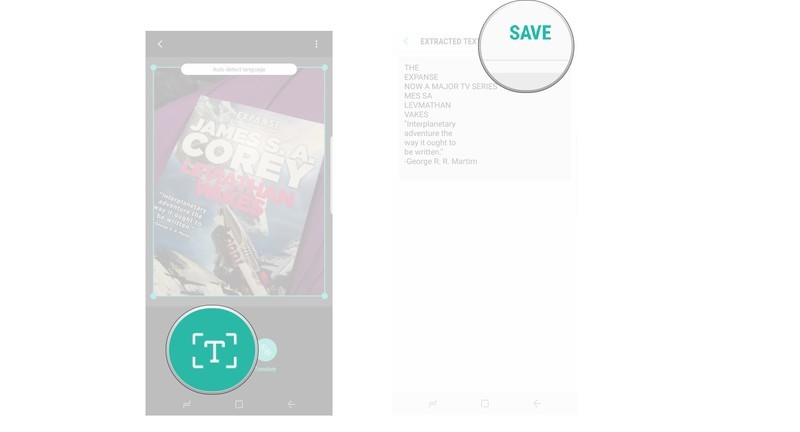
Tap extract. (it looks like a T at the bottom of the screen).
Tap Save to save extracted text.
How to use Bixby Vision to translate text.
When you use Bixby Vision to capture text in another language, you can automatically translate it. Here’s how to do it.
Open Bixby Vision.
Scan an item to capture text.
Tap Text.
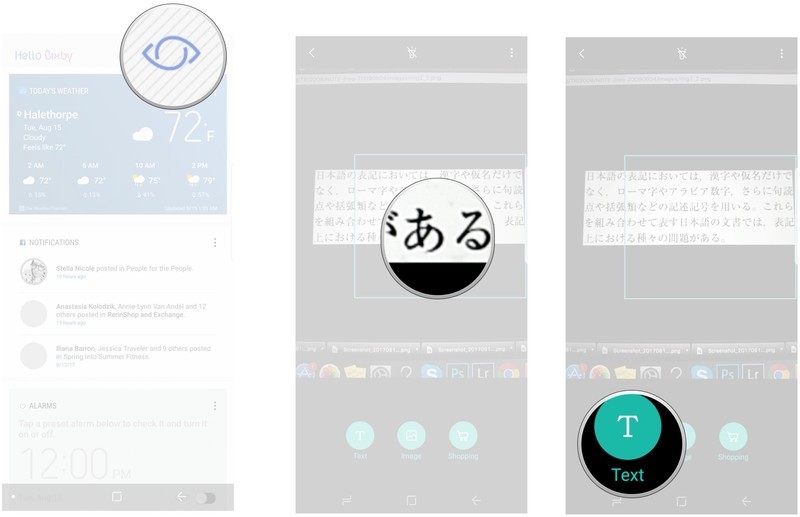
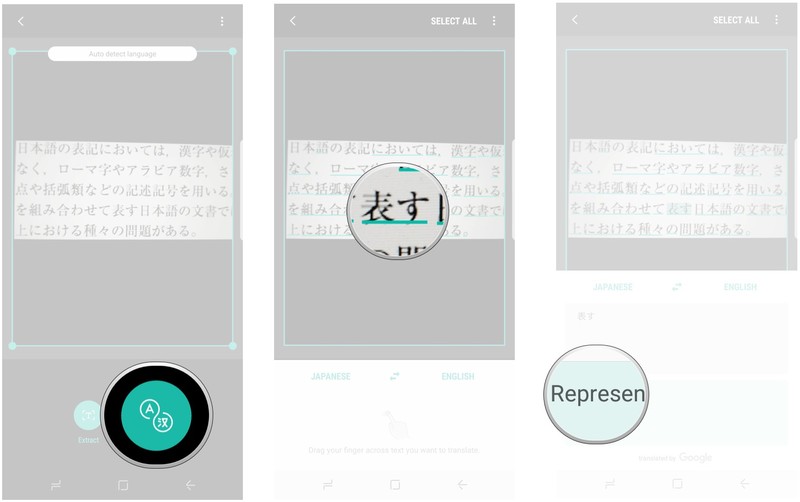
Tap Translate.
Swipe your finger over the text you want to translate.
Swipe up to see all of the translated text.
How to shop using Bixby Vision
After scanning an object with Bixby Vision you’ll be able search for it on amazon so that you can purchase it for yourself.
Open Bixby Vision.
Scan an item to capture it.
Tap shopping.
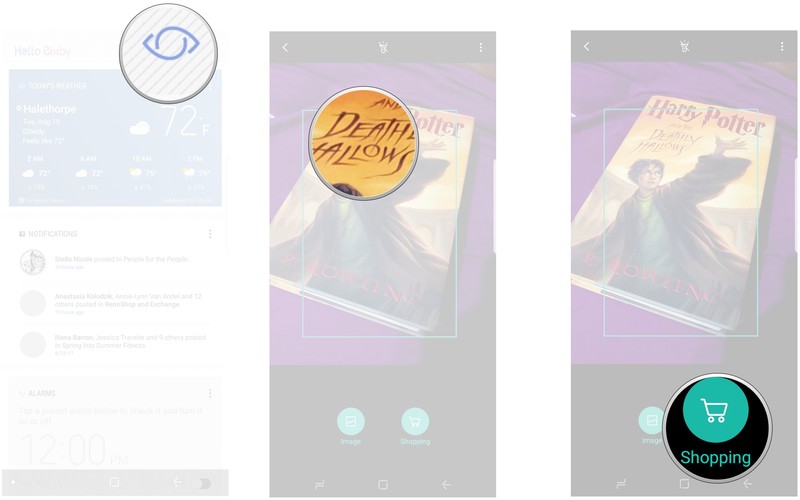
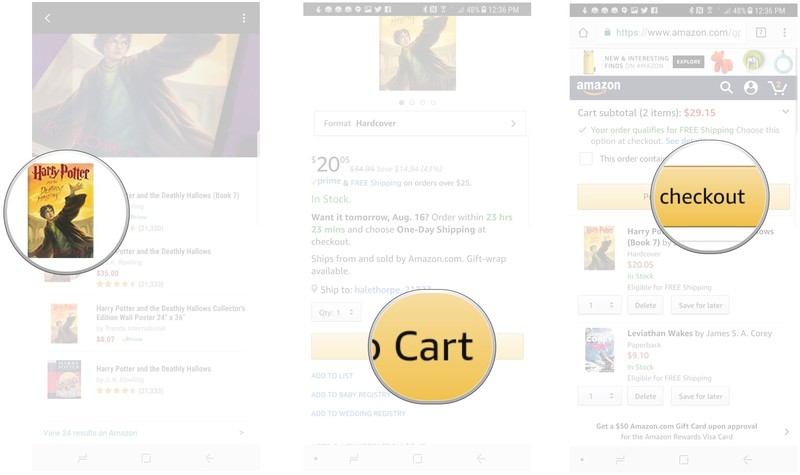
Tap the item you want off of the list.
Tap add to cart.
Tap proceed to checkout to purchase from Amazon.
How to search for images using Bixby Vision
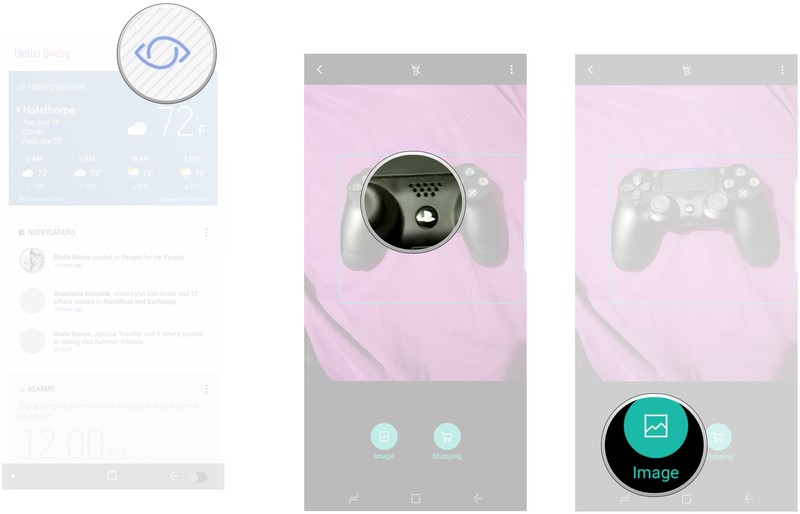
Bixby Vision can search for images similar to one you capture on your screen. This feature is still a bit rough, but depending on the image it can find you what you’re looking for.
Open Bixby Vision.
Scan an item to capture it.
Tap image to search for similar images.
Questions?
Do you still have questions about using Bixby Vision? Is there more going on here that we ought to have mentioned? Drop us a line in the comments below and let us know about it!
Samsung Galaxy S8 and S8+
- Galaxy S8 and S8+ review!
- Galaxy S8 and S8+ specs
- Everything you need to know about the Galaxy S8’s cameras
- Get to know Samsung Bixby
- Join our Galaxy S8 forums
Verizon
AT&T
T-Mobile
Sprint
Unlocked
Inside the battery-free cell phone of the future

The battery-free phone runs on ambient light and RF signals, though it’s not enough to power your favorite game.
Batteries: You can’t live with them, you can’t live without them, and I recite that cliche because I know you’re nodding along with me right now. Smartphone battery packs have become bigger so that they last longer, and a majority have been infused with fast charging technology. But a dead battery remains a major pain point, especially since we’ve become so reliant on mobile devices.
But what if you didn’t have to worry about the battery at all? Or ensuring it’s charged every night? What if you didn’t have to fret about running out of juice in the middle of the day? University of Washington researchers are working toward that reality. They’ve discovered a way to harvest power for the smartphone without cables and physical battery packs. Instead, the phone relies solely on ambient radio signals and light. It’s exactly what it sounds like: a battery-free smartphone.
Zero power required

Photo credit: Mark Stone/University of Washington
Researcher Shyam Gollakota, an associate professor at the University of Washington, called the battery-free cell phone the “first functioning cell phone that consumes almost zero power.” It works by taking advantage of the tiny vibrations in a phone’s microphone and speaker and converting those motions into an analog radio signal that can communicate through a cellular base station. “This process essentially encodes speech patterns in reflected radio signals in a way that uses almost no power,” explains the news release. “To transmit speech, the phone uses vibrations from the device’s microphone to encode speech patterns in the reflected signals. To receive speech, it converts encoded radio signals into sound vibrations that are picked up by the phone’s speaker.”
The first functioning cell phone that consumes almost zero power.
The device currently requires you press a button to switch between transmitting and listening modes, so it’s not exactly a touch-and-go experience like a regular smartphone. But in the future, the technology could be integrated into standard cellular network infrastructure and Wi-Fi routers to offer battery-free cell phone coverage.
I talked to Vamsi Talla, a research associate on the battery-free project, about the battery-free cell phone and what it takes to power such a device. “Our group had been working on battery-free devices and low power communication for the last five years,” said Talla. “This projects builds on some techniques that we have developed. For example, the battery-free phone uses a zero power analog backscatter microphone, which I developed in 2012. Then, we combined that with an analog headphone system and ambient backscatter communication.”
Talla and the research group, which also consists of two graduate students and two professors, initially started the project in early 2016. “I built two different hardware versions of the phone prototype,” he said. The initial one was powered by ambient RF signals transmitted through cell towers. The second added “a tiny photodiode (solar cell) to harvest energy from ambient light in a typical office or home setting.” In situations where it’s RF-barren — say, you’re in the forest or the middle of nowhere — the phone will harvest the light around you for power.

Photo credit: University of Washington, Battery-Free Cellphone
The battery-free phone prototype is comprised of a number of components you used to be able to buy at a Radio Shack: antennas, a power harvester to capture energy from ambient RF signals and solar cells, a microphone that listens for reflections and backscatter to record and transmit speech, a receiver, a headphone jack, a digital communication system, a small micro-controller, and a few LEDs and capacitive touch buttons for help with operating the device. Don’t expect to be playing games on the device anytime soon, however, as there’s not enough energy generated to power that sort of thing. “Unless we redesign that component, it might be hard to power it only with RF waves,” added Talla.
The battery-free phone prototype is comprised of a number of components you used to be able to buy at a Radio Shack.
Current phones consume up to ten-thousand times more power than what’s available from ambient light and RF signals. The research team had to reduce the power required to transmit and receive speech to a few microwatts. It was no small feat, explained Talla. “The amount of power that can be harvested from RF signals depends on the distance between the phone and the cell tower. Typically, one to 100 microwatts can be harvested from ambient RF signals. We redesigned the battery-free phone’s architecture to reduce the power consumption by about 10,000 times so that it can be continuously powered from the tiny amount of power that is available.”
The research team’s next objectives are to improve the battery-free phone’s operating range and ensure that conversations are encrypted.
If you’d like to know more about the battery-free unicorn — er, I mean, mobile phone, you can peruse the full research paper for yourself, which was published in early July. You can also read more at the Battery Free Phone project’s official page.
Add some color to your home with 3rd-gen Philips Hue bulbs for $41 each
Our friends at Thrifter are back again, this time with a great deal on the latest Philips Hue bulbs!
Philips Hue is one of the biggest names in the smart lighting space, but the price of its bulbs can hold people back from adding them in every room of their house. From time to time we see some great deals on the bulbs, and now is one of those times. Right now you can pick up 3rd-gen Smart LED bulbs (white and color ambiance) for $41.07 each. This is a savings of around $9 from the normal $50 selling price.
B&H Photo has also matched this price point.

- Choose between millions of colors and shades of white light to light your home, wirelessly control with your smartphone or tablet, and sync your light immersively to music, games, and movies.
- Requiring the Hue Bridge (sold separately) for the full Hue experience, this bulb fits standard-size table and floor lamps. Enjoy richer shades of green, cyan, and blue with improved design.
- Install the LED light as you would install ordinary bulbs, then pair them with the Hue Bridge, which allows you to control smart-bulb-equipped lamps and overhead lights via the Philips Hue App.
- Easily expand your lighting system with accessories (sold separately), such as a Hue Dimmer Switch, Hue Tap, or Hue Motion Sensor. Pair it for automation with your existing Nest or SmartThings system.
You will need a Philips Hue Bridge in order for the bulbs to work in your home. If you haven’t already begun your own Philips Hue setup, you can pick up this Starter Kit for $64.99, which comes with the Hue Bridge and two white bulbs. The Hue Dimmer Kit is also down to $27.98 today, which comes with another white bulb and the dimmer for your wall.
See at Amazon
More from Thrifter:
- How to get the most out of your Amazon Prime membership
- How to save money when driving
For more great deals be sure to check out our friends at Thrifter now!
 AIVAnet