


Want to live longer? Forever Labs wants to help, using your stem cells
Why it matters to you
Forever Labs hopes that by storing your stem cells, you can fight disease and slow aging.
We may have found the Fountain of Youth. Or at the very least, we’ve found Forever Labs. It’s a new Y Combinator startup that seeks to help you live longer and healthier by preserving adult stem cells. Because as it turns out, drinking from a mythical source of water is not, in fact, the key to eternity.
While some of us may be familiar with the concept of freezing our eggs, few until now have considered applying the same concept to our stem cells. But this, Forever Labs believes, is a mistake. This is because stem cells can be transformed into any kind of cell the body needs (which is why so much research already exists surrounding these supremely adaptable cells). However, as Forever Labs points out on its website, “The number and therapeutic quality of our stem cells diminishes with age.” But if you store them, you may be able to preserve them for future use, thereby combating disease and, just maybe, aging.
How does it work? Using a patented device, Forever Labs collects stem cells from your blood marrow, which the team calls “a wellspring for stem cells that replenish your blood, bone, immune system, and other vital tissues.” The whole process is said to take around 15 minutes, with “most clients” reporting a “five to 10 second pressure-like sensation.” And don’t worry — no scars will result from the process.
Once your cells have been extracted, the company offers to “grow and bank your cells for $2,500,” as TechCrunch explains. You’ll need to pay an extra $250 every year for storing your cells, or if you’d rather, just pay a flat fee of $7,000 for life.
If you’re looking to get into the storage game earlier rather than later (Forever Labs will start collecting cells as long as you’re 18 or over, and suggests that younger is better), then it seems that this $7,000 option might be a bit better. “As the loss and decline of bone marrow stem cells continues throughout one’s life,” Forever Labs notes, “and as this decline accelerates with age, storing at any age may provide benefits to your future self,”
So if you’re looking for a way to live forever (or just a bit longer), this may be a good way to hedge your bets.
What devices can play Amazon Music?
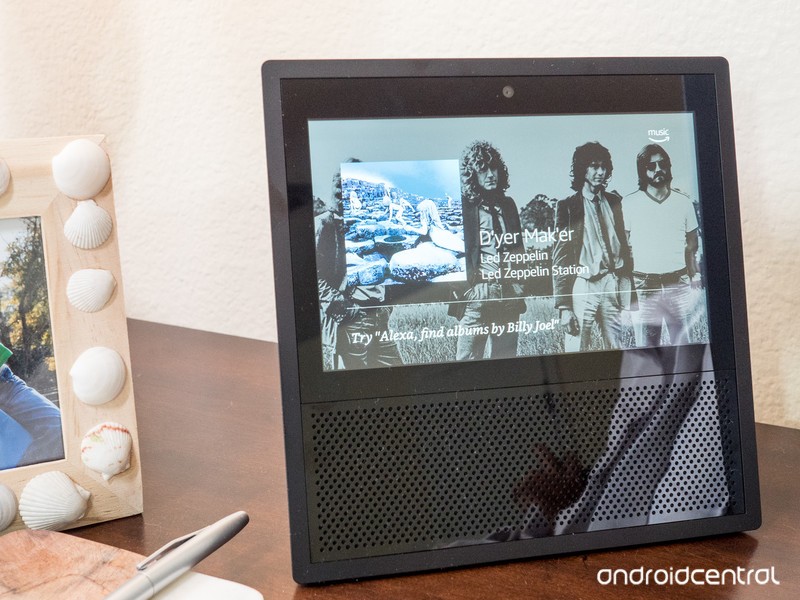
You can listen to Amazon Music on nearly any device that’s out there. String up two tin cans on a flag pole, and that might work, too. (Or not.) Here’s a more definitive list, though.
Amazon Music is as ubiquitous as just about any other music service out there. Tens of millions of songs. Available on nearly any device you can think of. In your car. On your phone. On a TV. On your computer.
Here’s the breakdown of all the devices you can use with Amazon Music, and where to find their respective applications:
- iPhone and iPad: Hit up this link in iTunes.
- Android: You’ll find it on Google Play, and on the Amazon Appstore.
- Mac and PC desktop app: Download it here. Works with Mac OS 10.9 and up, and Windows 7 and up.
- Amazon Echo: If you’ve got an Amazon Echo and are an Amazon Prime subscriber, you’re good to go. Just tell Alexa to play some music!
- On the web: Get to your nearest internet browser and head here.
- In your car: If you’ve got Android Auto or Apple’s CarPlay, you’re covered. Amazon Music works on both. And a number of car manufacturers let Amazon Music work directly with their stock infotainment systems.
- Amazon Fire TV: Amazon’s TV operating system also has access to Amazon Music. Have at it!
- Amazon Fire Tablets: You’ll find Amazon Prime Music preloaded on Amazon’s Fire tablets.
- Elsewhere: A few other places you can play Amazon Music include Roku, Sonos, Polk Omni, Bose, HEOS, Definitive Technology, and PlayFi.
Amazon Music
- Get started with Amazon Music
- Which Amazon Echo should you buy?
- All about Alexa Skills
- Top Echo Tips & Tricks
- Amazon Echo vs. Google Home
See at Amazon
Samsung Galaxy Note 8 might be out as soon as September 15th
For a while after the Note 7 debacle, the fate of Samsung’s supersized phone line was uncertain. It soon became pretty clear, though, that the Korean manufacturer isn’t killing the name: Samsung is launching the Galaxy Note 8 on August 23rd, and according to notable leaker Evan Blass (evleaks), it will be available as soon as September 15th. In addition, you’ll reportedly be able to pre-order the phone on August 24th, a day after the the company’s Unpacked event.
If you’re ready to take a chance on the latest Note 8 — and your bank account is ready to take the hit — you may want to reserve one instead of waiting for it to come out. Blass said pre-orders will come with either a 256GB microSD card and a wireless charger or Samsung’s cute Gear 360 camera. It’s unclear what extras other countries and territories are getting, but Blass revealed that Samsung will bundle European pre-orders with the DeX dock instead. That’s the same dock the company released with the Galaxy S8 that can turn your phone into a computer.
Back in late July, evleaks also tweeted out full renders of the device in black and gold, which can give you an idea of what the phone and its dual camera could look like. We can also likely expect a smaller battery than the Note 7’s to prevent the same fiery fiasco. You’ll only have a few more days to find out what makes the phone special anyway… and just a day longer to reserve one for yourself.
CORRECTION: the options are as follows
1. 256GB card + wireless charger
2. 360 camSorry for the confusion. https://t.co/Db42n4kVCf
— Evan Blass (@evleaks) August 19, 2017
(The pre-order gift in Europe is a DeX dock.) https://t.co/Db42n43kKH
— Evan Blass (@evleaks) August 18, 2017
Source: evleaks (Twitter)
Fighting classic ‘Tekken’ debuts on mobile
Fighting game Tekken is coming to your smartphone screens, joining the likes of Final Fantasy, The Legend of Zelda, South Park and some Sega Genesis titles in the ring. Maker Bandai Namco announced the Tekken Mobile game is open for pre-registration today via its newly launched website, and iOS users in Canada can already try out a preview.
In Tekken Mobile, players can collect more than 100 characters, create personal fighting styles and adapt that to specific opponents. The game will feature a Story Mode that sees you create a team of three players who assist Kazuya Mishima against a new enemy called Revenant, who was created for the mobile game. Players will also be able to challenge friends and other users in Dojo mode, and the company will host live events featuring different themed content.
If you pre-register for the game today, you may receive special in-app bonuses. Bandai said in a statement that “as more people pre-register for the game, more rewards and in-game contents will be available for the Global Launch.” The company hasn’t shared when that will be yet, but fighting game fans will likely have a new option to install soon.
Via: Android Police
Source: Bandai Namco
Mercedes uses art deco inspiration for electric car concept
Luxury vehicles from the 1930s were nearly aircraft carrier-long. It was the art deco era dominated by seemingly never ending clean lines. So it’s no surprise that the Vision Mercedes-Maybach 6 Cabriolet is over six meters long (about 20 feet) and has a single line that runs the length of the vehicle. Hell, the back the car is inspired by yachts and called a “boat tail.” In other words, it’s going impossible to find parking for it.
Of course if you’re the owner of a Mercedes-Maybach vehicle you’re probably going to be getting it valet parked everywhere you go anyways. The automaker’s ultimate luxury brand is known for big powerful cars that cost a pretty penny. The Vision 6–if it ever makes it to market–will no doubt be no different. And like other cars in the line, it’ll be powerful. But instead of gas, it’ll use electrons to push its girth down the road.
The all-wheel drive cabriolet has four compact permanent magnet synchronous electric motors pumping out 750 horsepower. It’ll do zero to 60 in under four seconds and has a top speed governed at 155 miles per hour. The flat battery pack stationed at the base of the vehicle will keep the gigantic–and fast–car on the road for 200 miles according to Mercedes. Plus thanks to DC fast charging, Mercedes says the Vision can be charged to go up to 60 miles in five minutes.
While the exterior of the car is from the time of Al Capone, the interior is futuristic in most regards. The Vision 6 extends the dash design found in the Mercedes EQ SUV. Like that concept car, it’ll intelligently share information with the driver and passenger based on location, time of day and upcoming events. The controls are entirely touchscreen, which is expected. What’s unexpected is the visible pulsing blue wires at the front of the cab that are used to display the energy usage of the car.
There is one area that’s a throwback to the past and that’s the cluster in front of the driver. The gauges are based on wind turbines a common design element used in Art Deco. Surprisingly they fit well in the futuristic interior of the car.
Yet, like most concept cars, it’s unlikely the Vision 6 will ever make it to production in its current form. Still it could be the basis of the design of future cars. So if you’re a fan of huge convertibles and your bank account runneth over, keep an eye on the Maybach lineup for the next few years.
Source: Mercedes Benz
Yes, you can photograph the eclipse with your smartphone — here’s how
The 2017 solar eclipse could easily be the most photographed event of the year, but what if the only camera you own is inside your smartphone? While it won’t get you those close-ups of the celestial phenomenon, even NASA agrees that it is possible to shoot the eclipse with a smartphone. Merging NASA’s smartphone recommendations with the same advice given to DSLR-toting photographers, we’ll tell you how to photograph an eclipse with a smartphone.
What to expect
Just because it’s possible to shoot the eclipse with a smartphone doesn’t mean you’ll get those detailed close-ups as the moon passes in front of the sun. Smartphones have wide-angle lenses, which means the moon will look small in the picture — just take a look at how small the full moon appears in this shot from the iPhone 7. Even the zoom lens in the iPhone 7 Plus will only get you so close, but it’s a better option than employing digital zoom.
The eclipse will take up roughly the same amount of space as the full moon shown in the section below.
The eclipse lasts less than three minutes, so don’t waste that time trying to get a close-up with digital zoom.
So, should you tuck your smartphone away and leave the shots up to the professionals? Not at all. The trick to photographing the eclipse with a smartphone is to understand the limitations of your gear and use that to your advantage. The eclipse lasts less than three minutes, so don’t waste that time trying to get a close-up with a smartphone’s digital zoom — you won’t be happy with the results.
Instead, embrace the wide-angle lens and photograph the eclipse with the surrounding scenery. Show the eclipse with everyone watching, or, scope out a scenic location and show the eclipse over a local scene like a lake or city skyline.
What you’ll need to photograph the eclipse with a smartphone
Besides a smartphone, what else do you need?
Safety first — looking at the eclipse without proper eyewear can cause permanent damage to your eyes. Pick up two pairs of eclipse glasses and make sure they are certified to ISO 12312-2, which will be marked on the side of the glasses — beware of fakes!
If you decide to shoot the solar eclipse with an iPhone, the eclipse will be about the size of this full moon.
Why two pairs? One for your eyes, and one for your phone, of course. While DSLRs need proper protection in order to avoid damaging the sensor, Apple suggests that the smaller sensor and smaller lens of an iPhone means that photographing the eclipse isn’t going to permanently damage the smartphone. But it also varies depending on the camera’s sensor size and the lens aperture, therefore smartphones with better cameras or with zoom lenses may not fall under the same statement.
Shooting the eclipse probably isn’t going to break your phone, but you should err on the side of caution. Because of the sun’s brightness, NASA suggests placing a pair of eclipse glasses over the smartphone camera in order to get more detail (if you’re situated within the path of totality, you can temporarily remove the glasses when the sun is completely covered).You can hold the glasses in front of the lens, or tape the glasses in place. And if there’s anyone to trust with eclipse photography tips, it’s NASA.
When the moon covers the sun, lighting conditions will resemble twilight hours. With any low-light photography, you’ll need a tripod. We recommend something good and inexpensive, like these $40-$60 Joby GorillaPod smartphone tripods. Don’t have enough time to buy a tripod? Find a surface to lean your smartphone on and keep the phone as still as possible. Some smartphone cases also have kickstands that can double as makeshift tripods.
There are a few other accessories that may come in handy. A Bluetooth remote control to trigger the camera also helps with keeping things steady. You can find plenty of these devices for around $20 or less. You can also employ a quality add-on lens, like those from Zeiss and Moment, to enhance the quality of the image.
While you can photograph the eclipse with a native camera app, to get better results and more control over the final image, an app with manual camera modes is helpful. If you don’t already have a favorite manual camera app, try Lightroom’s shooting mode for both iOS and Android.
How to photograph the eclipse with a smartphone
Now that you know what to expect and what accessories to bring along, you can get started. We’ll also repeat some of the things we mentioned above.
1. Arrive early and plan your shot.
The eclipse will only last for a few minutes, so make sure to plan enough time to arrive and scope out your spot. Use Time’s eclipse planner to see how the eclipse will look in your location and what time the action starts.
Remember, you’ll get better results if you use the smartphone’s wide-angle lens to your advantage. Determine what you want to include in the photo with the eclipse — like a treeline, city skyline, or lake scene — and set up accordingly. Make sure the eclipse will actually happen over your scene by watching the sun’s movement.
Lindsey Parnaby/Getty Images
Once you have the scene in mind, set up the tripod if you have one, or find something to hold the phone against for a steadier shot. Attach those glasses to the front of the smartphone — even if you don’t need them for your smartphone’s safety, they’ll create more detail in the shots.
Don’t forget, you should also photograph the partial eclipse before and after the full or nearly-full eclipse occurs.
2. Turn HDR on.
The eclipse contains both very bright and very dark areas, which is ideal for the high dynamic range or HDR mode on your phone. If your smartphone has an HDR option — and most do — make sure it’s on. If you’re using Lightroom Mobile’s camera mode, tapping the drop-down menu next to the circular shutter release on the bottom of the screen brings up the HDR option. In the iOS native app, HDR options are at the top of the screen while Android’s built-in camera app has the feature inside the shooting mode menu.
3. Focus on the moon.
Dark scenes wreak havoc on autofocus — so don’t autofocus. Instead, tap on the moon on the screen to focus on the moon.
4. Adjust the exposure.
Getting a proper exposure (the photo term used to describe how light or dark the image is) can be tricky during an eclipse. After tapping on the moon to focus, adjust the exposure until you see the most detail in the eclipse. On iOS, after tapping, you can slide your finger up and down to adjust the exposure. Inside Google Camera, turn “manual” on in the settings menu then adjust using the +/- scale on the bottom of the screen.
If you are shooting inside Lightroom Mobile, you can use the “Exp.” icon to adjust the exposure compensation without shooting on full manual. Of course, if you know how to adjust shutter speed and ISO, you can use the Pro mode in Lightroom mobile to shoot with manual exposure settings. However, the few minutes during the eclipse is not a good time to try out manual mode for the first time.
5. Shoot, adjust, then shoot again.
With the focus and exposure locked, go ahead and snap that eclipse. Use a remote release if you have one. Next, quickly preview the shot and make any necessary adjustments. The eclipse only lasts in totality for a few minutes, so shoot quickly, but don’t forget to experience the phenomenon with your own eyes (with those glasses, of course). During totality, you can take the glasses off the front of the smartphone, but during the partial eclipse phases, the glasses will help the brightest areas from being overexposed.
Getting creative with smartphone eclipse photography
Want to take your eclipse photography a bit further? Try some of these ideas.
Look for shadows. The partial phases of the eclipse will create funny shadows, since the sun isn’t creating a spherical light. Capturing them can be fun — try using that exposure compensation to darken the image and bring those odd shadows out.
Shoot all the phases, then mix in a photo editing app. Shooting the eclipse during several different stages of totality and mixing them together later in Photoshop is a common trick professionals use, but that doesn’t mean you can’t try the same thing with a smartphone too. Take several photos before and after totality. Then, use a photo app that allows you to layer photos to mix them all together, leaving the scene intact but creating several “eclipses” across the sky. PicsArt is a good photo app for the task, as well as Adobe Photoshop Mix.
Try a video or a time lapse. Besides shooting a still image, smartphones also make it possible to shoot a video; merge several photos into a video to create a time-lapse; or a video where time speeds up. Of course, unless you have two smartphones, you’ll have to pick one or the other. Videos can be shot with the built-in app, while Hyperlapse and Lapse It are good time-lapse apps.
Sure, A DSLR and a telephoto lens will get you much closer, detailed shots of the solar eclipse. But, with a few tricks, you can capture excellent wide-angle shots of the eclipse using just your smartphone and a few inexpensive extras.
T-Mobile and Sprint reduce payment plan prices for select LG devices
Why it matters to you
If you’re interested in purchasing the LG G6 or LG V20, you could get them at a reasonable price under Sprint or T-Mobile’s payment plans.
On Friday, August 18, both T-Mobile and Sprint announced new summertime deals for customers right before the season comes to an end. If you’ve been eyeing an LG phone lately — particularly the LG G6 or the LG V20 — you could be in luck.
For a limited time, T-Mobile is offering both models on its Equipment Installment Plan. When you add a line as well, you’ll also receive another LG V6 or V20 for free after rebate. To receive the rebate, The Un-carrier is offering a prepaid MasterCard of up to $500 if you register on the T-Mobile Promotions Hub.
If you’re leaning toward the LG G6 which has a full retail price of $500, it’s available for $20 down and $20 a month in the Ice Platinum and Black color options. As for the LG V20 that normally runs for $480, the device is available for $0 down and $20 a month in Titan.
Over at Sprint, the carrier has dropped the monthly price for the LG G6 from $29.50 per month to $20 per month instead — under its Sprint Flex plan. The announcement comes one day after the company opened up pre-orders for the Essential Phone in black. For a limited time, the phone is 50 percent off its Flex Lease payments if you purchase the phone under the plan.
The Sprint Flex plan was introduced back in July, in order to provide customers with the latest smartphone without having to shell out a ton of money on the spot. After choosing a phone under the Flex plan, you can lease it for 18 months and exchange it for a new phone. If you’re set on keeping the one you already have, then you can pay it off completely in one installment instead.
T-Mobile and Sprint are slashing prices on its LG G6 and V20 only weeks ahead of the LG V30 launch. Rumored to be unveiled at the end of August or early September, there have already been a number of leaked images surfacing. Based on the renders, it’s very likely the device will be similar to the V20 but with minimal bezels and rounded edges instead. The V30 might also include a dual camera on top, fingerprint scanner on the bottom, and a metallic backing.
U.S. unlocked Galaxy Note 8 shows up on Samsung’s online store
The U.S. unlocked Galaxy Note 8 makes an appearance on Samsung’s store page.
The Samsung Galaxy Note 8 will be announced next week in New York, and the leaks just keep coming as we run up to the event. This time, Samsung has prematurely listed the U.S. unlocked version (model UZKAXAA, consistent with the U.S. unlocked Galaxy S8s) of the device on its online store. The product link itself doesn’t go anywhere, but we still learn a few things about it.

Before getting too excited: the listing doesn’t yet show a price. But it does corroborate the brochure that leaked earlier which stated the device would ship with 64GB of internal storage in the base model. Most importantly, it suggests the U.S. unlocked model might ship at the same time as the carrier versions.
For context, the U.S. Galaxy S8 shipped about a month after the carrier versions, while the U.S. unlocked GS7 shipped three months after launch. Getting a U.S. unlocked version of the Note 8 on the same day as the carrier version would be great for both users and Samsung.
Would you be interested in an unlocked Galaxy Note 8? Let us know down below!
Samsung Galaxy Note 8
- Galaxy Note 8: Everything we know so far
- Rumored Galaxy Note 8 specs
- All Galaxy Note 8 news
- Should you buy the Galaxy S8+ or wait for the Note 8?
- The buttonless future of Samsung phones
- Join our Galaxy Note 8 forums
‘Secret World Legends’ expands into disaster-ridden Tokyo
The Secret World was rebooted in June as the free-to-play, shared-world RPG Secret World Legends and it just received the first of three updates that will expand the game into a “disaster-ridden and monster-infested” Tokyo. Tokyo: Back to the Beginning brings hours of added gameplay and expanded storyline as well as a slew of new enemies.
“The Tokyo updates represent the final part of the storyline that was The Secret World,” said Executive Producer Scott Junior in a statement. “But there is much more to come, and we especially want our veteran players to know that as the storyline of The Secret World ends, the storyline of Secret World Legends is about to start. This winter, a brand new story will be revealed.”
Tokyo: Back to the Beginning brings players to Kaidan, Tokyo, also known as Ground Zero since it’s where all of The Secret World events were set in motion. With the expansion come enemies based on Japanese folklore, shady parts of Tokyo to explore and Kaidan’s “horror-haunted avenues.” Players will also come across a lot of quarantined areas that will become accessible with the two additional Tokyo updates. Once all three updates are launched, the game will begin a new story that will bring with it new locations, characters and adventures.
Tokyo: Back to the Beginning is available now.
Source: Funcom, Secret World Legends
Astronauts aboard the International Space Station launch 3D-printed satellite
Why it matters to you
Launching stuff into space gets expensive quickly and these 3D-printed satellites can help offset those enormous costs for space programs.
Around the globe, 3D printing is changing manufacturing as we know it and it looks like this innovation is by no means limited to our planet. On Thursday, a pair of cosmonauts aboard the International Space Station launched the world’s first satellite made almost wholly out of 3D-printed components.
It is ungodly expensive to launch items to space. In fact, it costs about $10,000 per pound to launch an object into orbit. Consequently, NASA has been exploring 3D printing to minimize costs. The agency, in partnership with the company Made In Space, has 3D printed an array of tools to use onboard the ISS.
To avoid the harsh vacuum of space, these materials have been predominantly used inside of the space station. However, Thursday, Russian cosmonauts Fyodor Yurchikhin and Sergey Ryazanskiy released five nanosatellites as part of larger extravehicular activity mission. The first of which had an exterior casing made with a 3D printer at Russia’s Tomsk Polytechnic University. It is important to note that the 3D-printed satellite contains traditional internal electronics.
This launch is part of a larger effort to better understand the how 3D-printed components weather the vacuum of space. Highly reminiscent of the Voyager Golden Record, the 3D-printed satellite also contains greetings in a host of languages from around the globe. The small satellites (each is less than two feet in size) are expected to orbit the Earth for about six months. One of the satellites celebrates the 60th anniversary of Sputnik 1, the world’s first successful satellite while another commemorates the 160th birthday of Konstantin Tsiolkovsky, who is considered the father of Russian rocketry.
As part of the satellite launches, the two Russian astronauts spent nearly eight hours outside of the space station. This was substantially longer than the planned six-hour spacewalk. This mission included collecting other experiments outside of the ISS and also wiping residue from the exterior for analysis.
“We will have actually some grounds to get drunk today, I think,” joked one of the cosmonauts.
Currently, the cosmonauts share the space station with three Americans and an Italian. You ever hear the one where a pair of cosmonauts, three American astronauts, and an Italian walk into a space bar?

