


Watch Hulu’s live TV service on your Mac or PC
It’s been a month since Hulu added its live television service to the Amazon Fire TV and only a day after the company announced Xbox 360 compatibility for its subscribers. Now the company that Disney, Fox, NBC and Time Warner owns is putting its subscription-based live streaming product on PC and Mac.
This is the first time Hulu will stream live television to something other than set-top boxes and mobile devices. It makes sense, as Netflix, Amazon and HBO already allow you to watch from the comfort of your web browser. The web-based version will be basic to start while Hulu takes more time to finalize the final interface, according to Hulu’shulu macbook Ben Smith. “This is a very early version of the new Hulu experience on the Web and we expect it to evolve significantly over the next few months,” writes Smith. “From point, click, and keyboard interactions, to responsive pages to fit all screen sizes; we are carefully considering all of the things that make building a web experience unique from living room and mobile devices.”
You’ll be able to watch live television from more than 50 channels from individual networks, all the Hulu on-demand movies and originals, premium channels like HBO, Cinemax and Showtime, and catch the latest live games from ESPN, Fox Sports and CBS. If you live in a “select market,” you’ll also be able to tune in to local ABC, CBS, Fox and NBC affiliates. Supported browsers include Chrome, Safari, Firefox, Microsoft Edge and Internet Explorer 11.
Source: Hulu
Pre-register for ‘Monument Valley 2’ on Google Play
The sequel to the mind-bending, gorgeous puzzler Monument Valley has been available for iOS since June; it was announced at Apple’s developer conference, WWDC. Now Android users get to experience the MC Escher-inspired mobile game. Well, almost. Monument Valley 2 is available for pre-registration on the Google Play Store.
When you hit the pre-register button on the Play store, you’re essentially signing up to get a notification on your device when the app is released. Once you’ve registered, you can unregister with another click (or tap) on the same button. Monument Valley 2 has you guiding a mother and child duo across a magical landscape, full of mysterious, moving architecture and secret pathways. It’s a good thing to see it showing up on Android, so even more of us can check it out. We’ve reached out to developer Ustwo to find out when it will officially release and will update this post when we hear back.
Via: Android Police
Source: Google Play
Danny Glover is advising Airbnb’s diversity efforts
When he isn’t busy raising awareness for pseudobulbar affect (PBA) and generally being too old for shit, actor Danny Glover will be advising Airbnb. It’s part of the push the short-term rental company is making to promote staying in communities of color. He’ll be joining the NAACP in Airbnb’s work to educate, train and “take advantage of the economic opportunity of hosting” on the service, according to a statement.
While it might seem odd to pull a random celebrity in to help, Glover’s history as a philanthropist and activist seem a good fit for what Airbnb is trying to achieve. The company has been aggressively working to rebuild its reputation since early 2016 when stories of hosts rejecting potential guests based on their race started cropping up. Airbnb went as far as taking out an ad during this year’s Super Bowl that denounced discrimination and racism.
In early July, the company ordered a host to take an Asian American studios class, fined her $5,000 and banned her from the service wholesale because she canceled a reservation and made racist remarks to a guest.
Since then, Airbnb has announced a partnership with the NAACP that would work to improve its workforce diversity and return 20 percent of rental proceeds to the organization. That’s in addition to actively helping people of color renting out their homes or spare rooms.
Source: TechCrunch
Facebook will livestream 15 upcoming college football games
Facebook secured exclusive rights to livestream college football games during the upcoming season, starting with a pair of games on September 2nd. Users worldwide need only visit the sports network Stadium’s Facebook page to watch the matches, or they can view them on the social network’s recently-launched Watch platform.
Facebook’s been pushing hard to snag athletic events it can livestream, but it’s not alone, tussling with Snapchat and Twitter for the rights to upload clips of the 2018 World Cup. Facebook did make a deal with Major League Baseball to start broadcasting games every week back in May, but college football has its own rabid fanbase.
Fans will get a few extras if they tune to the Stadium page on game day, including a curated chat with football personalities. It’s a good deal for folks following these particular teams, but it’s still an incremental victory in the perpetual tug-of-war between all the top social platforms jockeying for more sports content.
Here’s the full schedule of games, per TechCrunch:
- Saturday, Sept. 2: Miami (OH) at Marshall, 6:30 p.m. ET
- Saturday, Sept. 2: UC Davis at San Diego State, 8:30 p.m. ET
- Thursday, Sept. 7: Idaho State at Utah State, 8:00 p.m. ET
- Saturday, Sept. 9: New Mexico State at New Mexico, 8:00 p.m. ET
- Saturday, Sept. 23: FIU at Rice, 7:30 p.m. ET
- Saturday, Sept. 23: Utah State at San Jose State, 7:30 p.m. ET
- Saturday, Sept. 30: Texas State at Wyoming, 4:00 p.m. ET
- Saturday, Oct. 7: Southern Miss at UTSA, 7:00 p.m. ET
- Saturday, Oct. 14: Wyoming at Utah State, 4:30 p.m. ET
- Saturday, Oct. 21: Rice at UTSA, 7:00 p.m. ET
- Saturday, Oct. 28: FIU at Marshall, 2:30 p.m. ET
- Saturday, Nov. 4: North Texas at Louisiana Tech, 3:30 p.m. ET
- Saturday, Nov. 11: Southern Miss at Rice, 3:30 p.m. ET
- Saturday, Nov. 18: Marshall at UTSA, 7:00 p.m. ET
- Saturday, Nov. 25: FAU at Charlotte, 2:00 p.m. ET
Source: TechCrunch
Apple Updates Machine Learning Journal With Three Articles on Siri Technology
Back in July, Apple introduced the “Apple Machine Learning Journal,” a blog detailing Apple’s work on machine learning, AI, and other related topics. The blog is written entirely by Apple’s engineers, and gives them a way to share their progress and interact with other researchers and engineers.
Apple today published three new articles to the Machine Learning Journal, covering topics that are based on papers Apple will share this week at Interspeech 2017 in Stockholm, Sweden.
The first article may be the most interesting to casual readers, as it explores the deep learning technology behind the Siri voice improvements introduced in iOS 11. The other two articles cover the technology behind the way dates, times, and other numbers are displayed, and the work that goes into introducing Siri in additional languages.
Links to all three articles are below:
- Deep Learning for Siri’s Voice: On-device Deep Mixture Density Networks for Hybrid Unit Selection Synthesis
- Inverse Text Normalization as a Labeling Problem
- Improving Neural Network Acoustic Models by Cross-bandwidth and Cross-lingual Initialization
Apple is notoriously secret and has kept its work under wraps for many years, but over the course of the last few months, the company has been open to sharing some of its machine learning advancements. The blog, along with research papers, allows Apple engineers to participate in the wider AI community and may help the company retain employees who do not want to keep their progress a secret.
Tags: Siri, machine learning, artificial intelligence
Discuss this article in our forums
Apple Releases Safari Technology Preview 38 With Beacon API Enabled by Default
Apple today released a new update for Safari Technology Preview, the experimental browser Apple first introduced in March of 2016. Apple designed the Safari Technology Preview to test features that may be introduced into future release versions of Safari.
Safari Technology Preview release 38 includes fixes and improvements for Fetch API, Web Payments, CSS, Web API, Media, Apple Pay, Web Inspector, and WebDriver. Today’s update also enables the Beacon API by default and implements new Beacon API features.
With Safari 11 now available to developers through the macOS High Sierra beta, Apple is providing two versions of Safari Technology Preview, one for macOS Sierra users and one for those using macOS High Sierra.
The Safari Technology Preview update is available through the Software Update mechanism in the Mac App Store to anyone who has downloaded the browser. Full release notes for the update are available on the Safari Technology Preview website.
Apple’s aim with Safari Technology Preview is to gather feedback from developers and users on its browser development process. Safari Technology Preview can run side-by-side with the existing Safari browser and while designed for developers, it does not require a developer account to download.
Tag: Safari Technology Preview
Discuss this article in our forums
eero Home WiFi System review

If there’s one thing that aggravates me more than not having a Wi-Fi signal, it’s having a poor one. Yes, I’d rather not have a connection at all than to deal with wonky, unreliable, data on a phone, tablet, TV, or other device. Sadly, this scenario has been all too common in my household.
As someone who has reviewed countless Wi-Fi devices over the years, I’ve come to really appreciate a good signal. On the other hand, I’ve also learned to despise how terrible things can be when connections drop or slow. My teenage son loves to stream videos, play video games online, and watch TV on demand. My wife loves to binge watch shows and often has her phone out, too. Between the three of us, we were really taxing our home internet plan.
After jumping from a plan with 18MBps down to another provider of upwards of 70Mbps down, we thought we’d gotten beyond our main problems. It took us all of around two months to understand that while we had much faster internet, we didn’t have a better one in parts of our home.

I had already been in the market for something that had a mesh network. Google WiFi is high on my list, but I have my eyes on others, including eero. Approached with the opportunity to review its setup, I was eager to test out the eero and its “TrueMesh” network.
eero:
- Tri-band WiFi radios, simultaneous 2.4GHz, 5.2GHz, and 5.8GHz wireless
- 2×2 MU-MIMO, beamforming, IEEE 802.11a/b/g/n/ac
eero Beacon:
- Dual-band WiFi radios, simultaneous 2.4GHz and 5GHz wireless
- 2×2 MU-MIMO, beamforming, IEEE 802.11a/b/g/n/ac
We’d previously set up our wireless router in the center of the house, on the main floor. Ideally, the network would span out and reach the upper and lower floors, hitting the four sides of the home. That would normally work on most occasions but we found it would slow and drop at night when more of us were taxing the system.
I was sent the 2nd-generation eero Home WiFi System ($399), a bundle that includes an eero and two eero Beacons. Designed for houses with 2-4 bedrooms, it is the kit that eero suggests for “most homes”. Note that there are other packages to choose from, each with its own designated use case or preferred setup.
Setup
Taking things out of the box, the bundle looked to be really simple to install. There was very little literature to be found. In fact, you’re directed to an app to walk you through the setup.
It took me all of about ten minutes to get going. It’s literally a case of plugging one device into a modem and the other two into wall outlets. I spent about as much time walking up and down stairs as the app and network did working to get started.

I couldn’t be happier with how simple the process went. Each time I set up a Beacon the app would check to see if its placement was good. There are a few tips provided to help ensure it goes in the right room or area of the house. Twice I received a message about placing it “like a pro”.
The app is where you spend all of your time managing things. There’s no need to log into a website or pull up anything special on your computer. Really it’s just a case of opening the app and following the prompts.
1 of 5


You start out by naming your network and creating the password but you’ll quickly be creating user profiles and managing connected devices. As I was setting things up I created one user for each of us in the house. I assigned my son’s Xbox One and Chromebook to his profile and helped him connect them to the new network.
Performance
As someone who contends with a teen who doesn’t always go to bed at reasonable hours, I appreciate the control I have with the eero app. Now that I have his devices under his profile I can pause his data connection. Moreover, I can also schedule days and times for pausing. So, with school starting next week, I have his account paused at 10 PM, keeping him from sneaking in a few more episodes of TV when dad goes to bed.

The app is handy for looking at which recent devices are on the network and what sort of connection speeds they’re getting. You can also run speed tests and see which particular beacon or eero a phone is paired with.
If you have guests coming over and don’t want them to have access to your full WiFi network, you can create a temp account and password for them. What’s more, you can set it to expire on them so they’re not auto-connecting the next time they visit.
Since setting up our eero network we’ve had zero connectivity issues. We’re finding that, depending on where we are in the house, we are each pairing with different beacons. Not only are we staying connected in places we’d routinely have trouble, but we’ve not had any buffering or pausing.
I might like to have an extra Ethernet port or two on the back of the main device, but it’s not a dealbreaker. Reasons for this could include network attached storage (NAS) units, a Sonos bridge, or a network-ready printer. I’m okay in my current situation, but there’s something to be said about peace of mind for later on.

Although I don’t use them, it’s possible to set the Beacons up so that they put off a night light. So, should you place one in a hallway or central room, you can have it pull double duty after dark.
We had a software (firmware) update ready to install on the day we took it out of the box. About ten minutes later it was installed and we were ready to continue going about our business. According to eero, there are updates pushed out roughly once per month, sometimes with bug fixes, and others with features like enhanced speeds or a custom Amazon Alexa skill.
eero Plus
Customers who are looking for an even better level of security, protection, or peace of mind may want to consider adding on the eero Plus plan. Priced at $9.99 per month, or $99 for a full year, it includes tools for anti-malware, anti-ransomware, content filtering, and much more. If you’re a parent or appreciate priority support, I recommend giving it a try. Included with the purchase of the Home WiFi System is a 30-day trial.

You Should Also Know
After launching in the United States back in June, the 2nd-generation eero and eero Beacons are now available in Canada. Customers north of the border can purchase the products at eero.com, Amazon.com, BestBuy.com, and in select Best Buy stores. This marks the first time eero systems will be available internationally.
Conclusion
I don’t know if I could ever go back to a traditional wireless network, let alone one that I can’t control so easily from a mobile app. I’ve truly come to appreciate the way in which the multiple beacons crisscross each other, spreading the network into places otherwise left alone. Although switching carriers played a big deal into my general internet experience, it wasn’t until I set up the eero network that I could stop thinking about it.
Prior to my time with eero I would routinely hear from my wife that the Fire Stick disconnected or that she would watch her phone pickup and drop from the router. In the two-plus weeks we’ve had this set up she has not had one problem. We’ve actually all three become conditioned to not thinking about internet and just enjoying it.
At $400 this particular eero Home WiFi System doesn’t come cheaply. But, in looking around, I’ve found that you’ll drop a few hundred on just about any brand’s take on mesh networks. For what it’s worth, Amazon is currently listing the same kit for about $360.
I can’t speak for others, but I do know that I love having this sort of configuration and control. If you’re at all interested in stepping up your network game, I have no reservations in recommending eero.
Kid Chameleon – A retro blast from the blast (Review)

Overview
Back in June, Sega announced it will be bringing some its best retro games to your Android handset. The company delivered what was promised and mobile users can now play games like Sonic, the Hedgehog, Comix Zone or Kid Chameleon on their phones. At launch, Sega explained the games have been specially adapted for mobile devices while remaining faithful to the original games.
And in today’s review, we’re going to take a closer look at Kid Chameleon for Android – a side-scrolling action game with an exciting background story and lots of challenging levels to play. The original platform game launched for the Sega Genesis in 1992.
Getting started
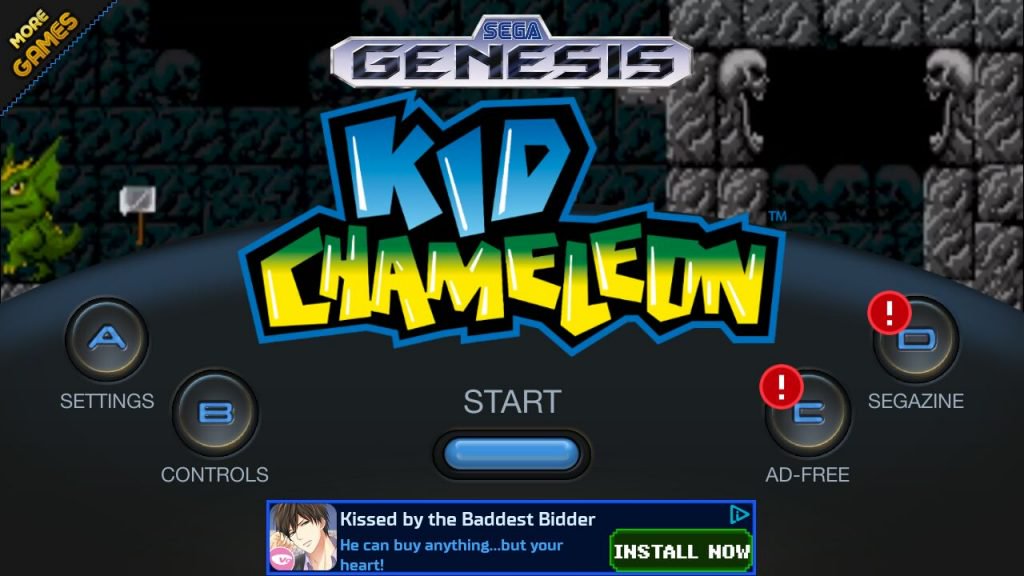
The game is available for download from the Play Store free of charge. However, you can pay $1.99 to turn the ads off. Kid Chameleon for Android also offers with modern features like allowing users to save their game in the cloud, Bluetooth controller support, and online leaderboards.
Experience
Kid Chameleon is backed up by an interesting story. The plot of the game is that the boss of a new virtual reality game called “Wild Side” becomes conscious and begins abducting players. It’s up to the main character, Casey to rescue them by attempting to complete the game’s 100 stages which are packed with secret warp points and hidden areas to explore.

What’s it like to play Kid Chameleon? If you were a fan of 16-bit games of the early 90’s you’ll love the retro feel. However, you won’t be playing it on console (alas you have the option of adding a Bluetooth controller) but on Android, so expect the game play to feel a bit different.
I for one struggled with the controls. Maybe I have fat fingers but I kept pushing more than one button while attempting to navigate in-game. The navigation controls are crammed in the left part of the display while the buttons for jumping or using a weapon live on the right.
Most levels contain a flag and to reach it is the primary goal of each level. Much of the action involves jumping between platforms and on monster’s heads to kill them. You’ll also spend a lot of time breaking blocks with contain power-ups such as crystals or different masks which give the hero additional powers and access to weapons.







These masks make gameplay more exciting. There are nine masks in total which you can acquire throughout the game. For example, there’s a knight’s helmet that allows you to climb walls (handy if you’ve fallen in a pit) or a hockey mask that lets you throw axes at your enemies – mostly generic reptiles and zombies spitting things.
I’ve been playing the game for over one week and I’m nowhere near reaching the final stage, so I guess it will take me a while before I’ll be able to complete it.
Overall the game runs smoothly, even if at times the app simply refused to load. When it did load, it took its sweet time to do so, but maybe the Exynos 7578 inside my Galaxy A3 (2016) was to blame.
Another thing I wasn’t really impressed with was the music. It just didn’t seem to add anything extra to the overall experience. Actually, I found it so annoying at times, I chose to play with the sound off instead.
Conclusion:
Kid Chameleon offers a nice-enough experience. If you prefer games with mind-blowing graphics and soundtrack, then this game is definitely not for you. However, those looking for a long game that will take a while to complete will probably enjoy playing it. Also recommended for those who like to run sideways and jump over things.
Download Kid Chameleon from the Google Play Store
It’s safe. But here’s why you shouldn’t buy the Galaxy Note 8 (yet)
The Samsung Galaxy Note 8 is the safest smartphone you can buy. Compared to the Galaxy Note 7 and its unfortunate tendency to catch fire, that’s a very good thing. Sadly, in its quest to create a phone that doesn’t spontaneously set ablaze, Samsung forgot to make a phone that has any fire at all.
The new Note 8, while technically impressive, reeks of a company unwilling to rock the boat. What could have been 2017’s most exciting phone is an exercise in restraint, and a letdown. Lucky for you, competition to take the Note 8’s spot is just heating up.
Nothing new to see here
The Galaxy S8 is a great phone, and one of our favorites in 2017. It’s beautiful, capable, and selling in great numbers. On arrival, the Infinity screen stood out as its big new feature, which was a good thing because otherwise the Galaxy S8 wasn’t a big technological leap forward in smartphone history.
The Note 8 is basically a slightly less pretty Galaxy S8 Plus with a stylus.
That’s because Samsung was saving itself for the Galaxy Note 8, right? After all, the Galaxy Note 7 introduced several exciting features to the range and the line-up, including iris scanning, water resistance, and an even more sensitive S Pen stylus. Now the Galaxy Note 8 is here, we know the answer: No.
The Note 8 is basically a slightly less pretty Galaxy S8 Plus with a stylus. Samsung got the formula right with the Galaxy S8, the sales proved it, and because the Note 7’s advancements caused problems, it appears Samsung decided to play it really safe with the Galaxy Note 8. Even the designers seem to have held back, giving the Note 8 squared off corners, fewer curves, and flatter sides. “Careful,” it seems like they thought, “let’s not push our luck.”
The one feature that does separate the Note 8 from the S8 Plus is the dual-lens camera. It’s a lot like the Apple iPhone 7 Plus’s dual-lens camera, and pretty much all the other dual-lens cameras out there. It’s a safe, established feature Samsung thought up by watching other phone makers do it first. Yes, there are other new features, mostly software, but nothing that would make you want to buy this phone over a Galaxy S8 Plus, unless you absolutely must have a stylus.
The Galaxy S8 could be forgiven for not having masses of new features, because the design is gorgeous, the screen is great, and it has the fastest processor out there. Seeing Samsung try to pull the same trick with the Note 8, but with a less attractive design, isn’t exciting.
All safety, no fun
Without a doubt, the Samsung Galaxy Note 8 will be the safest, least-likely-to-explode smartphone you’ll hold in your hand this year. Samsung top brass must have acted like hypochondriacs, requesting test after test on the Note 8, eliminating all possibility of an explosion caused by battery failure, suspect design choices, or internal overheating. If it could legitimately label the Note 8 as fireproof, we’re sure it would.
It’s a natural reaction to tragedy. If our homes are burgled, we buy better locks and an alarm system to minimize the chances of it happening again. The Note 7’s name will forever be synonymous with exploding batteries, and Samsung will want to ensure it’s only that model number that suffers. The estimated $17 billion the company may have lost due to the accidents, recalls, and PR disasters are also strong encouragement to get the Note 8 exactly right.
For the Galaxy S8, Samsung introduced an 8-point battery test, which includes everything from visual checks to x-ray tests, along with voltage and charging assessments. Just in case you’re still worried, Samsung states in big bold letters “Safety is our priority,” at the bottom of the webpage detailing its battery safety checks. The same level of diligence has been used on the Note 8.
Making such a big deal about its phones not being fire hazards is probably not what Samsung wants to spend its marketing budget on, and the only way to stop that from happening with the Galaxy S9 is to make sure no more phones explode. Samsung knows the reasons why the Note 7 failed — it has told us several times — and isn’t going to make the same mistake again. It’s also putting the right measures in place ensuring it doesn’t end up making a different mistake, that has the same fiery outcome. Outside of owners dowsing it in gasoline and dropping a match on it, the Galaxy Note 8 almost certainly won’t catch fire.
But as much as we like Samsung’s new “Safety first” stance, the Galaxy Note 8 is too frightened to stand out.
Before you buy a Note 8, check out these phones
The Galaxy Note 8 is a Galaxy S8 Plus with a stylus, and a dual-lens camera thrown in. It is going to be a good phone, no doubt. But it hasn’t caused our hearts to flutter, our pupils to widen, or our wallets to open. It shouldn’t open your wallet either, at least not yet. There are a few phones coming very soon that could generate the excitement the Galaxy Note 8 lacks.
The LG V30 is shaping up very nicely. It has a beautiful screen just like the LG G6 (only OLED and even bigger this time), a revised wide-angle dual-lens camera (which really does do something different than all the other dual-lens cameras out there), and great audio. LG’s phones are usually cheaper than Samsung devices, and the V30’s design looks like a winner, so far.
Google is expected to launch a successor to the Pixel in October. It’s still one of our favorite Android phones, and the Pixel 2 leaks have us excited.
Huawei will also launch what we expect is the Mate 10 in October. It may be the company’s first phone with a bezel-less screen, and a new, more powerful processor. Huawei’s Leica-tuned cameras have been consistently excellent, so we’re hoping for more of the same.
Finally, Apple will arrive with up to three phones in September or October, one of which may be very special indeed.
There are plenty more phones that have been released in 2017 that are all worthy contenders, including the HTC U11, and the OnePlus 5. You can check out our best smartphones guide here.
There are a few phones coming very soon that could generate the excitement the Galaxy Note 8 lacks.
LG, Huawei, Google, and Apple all have direct challengers to the Galaxy Note 8 and, on paper, they’re all more exciting than Samsung’s safe baby. If you’re tempted by the Note 8, our advice is to wait and see what comes out with this autumn, and then pick the best.
The Galaxy Note 8 is not going anywhere. It can’t get any safer, outside of Samsung encasing it in yards of bubble wrap. There probably won’t be a recall happening between now and October either.
If you’re in the market for a big phone, you should see this as an opportunity. There has never been a better time to look around at the competition. There are a lot of fantastic smartphones out right now, and some good cheap phones, too.
Score a new work laptop and save with our favorite Amazon Chromebook deals
Chromebooks were regarded as something of a novelty when they first came onto the scene several years ago. The Linux-based Chrome OS was a unique departure from Windows, Mac, and even other Linux operating systems, but these lightweight and compact notebooks have become surprisingly popular recently — and as Google continues to improve its operating system, it doesn’t look like the Chromebook tide will be receding any time soon.
If you’re on the hunt for a compact work laptop that won’t break the bank, then now is the perfect time to jump onto the Chromebook bandwagon. We’ve picked out a handful of Chromebook deals available on Amazon right now which include some ultra-compact laptops, some midsized ones, and a couple of higher-end convertible 2-in-1 options.
Ultra-compact Chromebook deals
These 11-inch Chromebooks are the perfect portable companions for those times when you need to take your work on the move without dragging around the extra weight and bulk of a traditional 14- or 15-inch laptop.
- Samsung Chromebook 3: The Samsung Chromebook 3 is one of the most budget-friendly Chromebooks on the market and boasts an 11.6-inch display, 4GB of RAM, 16GB of flash storage, and a dual-core Intel Celeron N3060 CPU. A $21 discount means you can score the Chromebook 3 for just $169 from Amazon.
- Lenovo Chromebook N22: Lenovo’s Chromebook N22 offers similar specs to the Samsung Chromebook 3 with some added features such as reinforced hinges and connection ports, a rotatable digital camera, and a reinforced drop-resistant frame. The N22 can be yours for $218 after a $31 discount.
Midsized Chromebook deals
Looking for something bigger? These 13- and 14-inch Chromebooks offer wider screens and a larger form factor for users who prefer a more traditional laptop, but still deliver the same lightweight OS and high affordability as their smaller siblings.
- Asus Chromebook C300SA: The Asus C300SA puts a 1.6GHz dual-core CPU and 4GB of RAM behind a 13.3-inch screen, delivering efficient performance in a “Goldilocks” notebook size that’s not too small and not too bulky. A $20 discount knocks this Chromebook down to $209 on Amazon.
- HP Chromebook 14 G4: With its 14-inch HD display and 2.16GHz N2840 dual-core CPU, the HP Chromebook 14 G4 provides a little more screen real estate and processor power than the Asus. It also offers the biggest savings of any of the Chromebook deals on our roundup: The HP 14 G4 is just $228 on Amazon after a solid $71 discount.
Touchscreen and convertible Chromebook deals
These convertible touchscreen laptops are the cream of the Chromebook crop, offering a lot of versatility with their touchscreen displays and foldable designs that let you to use these devices as either a laptop or a tablet.
- Asus Chromebook Flip: The Chromebook Flip is powered by an Intel Core M3 CPU and 4GB of RAM and features a boosted 64GB of internal flash storage for your apps and files. The 12.5-inch 1080p touch display also rotates and folds down, allowing for either laptop or tablet use depending on the task at hand. The Flip can be yours for $469 from Amazon for a savings of $30.
- Samsung Chromebook Pro: The Samsung Chromebook Pro is one of our favorite Chrome OS notebooks (and we’re not the only ones). This 2-in-1 has a vibrant 12.3-inch 2400 x 1600 HD display which can rotate 360 degrees and fold flat for use as a tablet with the included stylus. A $50 discount lets you snag this deluxe convertible laptop for $500 from Amazon.
More deals
- Just in time for school, save up to $299 with six great laptop deals
- Hungry for knowledge? Check out our 15 favorite and free online courses
- 8 must-have portable tech gadgets you can score for cheap right now
Looking for more great deals on computers and other electronics? Check out our deals page to score some extra savings on our favorite tech.
 AIVAnet