


Face ID Described as iPhone 8’s ‘Crown Jewel’, Unlocking Device in ‘A Few Hundred Milliseconds’
The front-facing 3D sensor on Apple’s upcoming iPhone 8 will be the device’s “crown jewel,” able to unlock the iPhone 8 in a “few hundred milliseconds” to give users quick access to their smartphone and quickly authenticate Apple Pay purchases.
The statement comes in a new report by Bloomberg, and follows on the heels of a recent article by The Korea Herald which used similar language to describe the unlocking process on the iPhone 8. As we near the device’s launch, expected in September, so-called “Face ID” has risen to the forefront of iPhone 8 rumors and is largely believed to be replacing Touch ID entirely on Apple’s majorly redesigned tenth anniversary smartphone.
The Korea Herald: The new facial recognition scanner with 3-D sensors can deeply sense a user’s face in the millionths of a second.
Bloomberg: The next iPhone will seamlessly mesh screen and charging technologies invented by others with such Apple innovations as a 3-D face scanner that unlocks the phone in a few hundred milliseconds. Upgrades to core technologies aside, the new iPhone’s crown jewel will be a 3-D facial scanning sensor that will unlock device and authenticate purchases—an industry first.
Recent HomePod leaks have also been building up Face ID features over the past few weeks. The HomePod discoveries started off with mention of infrared sensors in the iPhone 8’s front-facing camera notch, which will reportedly allow the device to scan the user’s face in dark environments, and then led to a string of code that suggested the iPhone 8 will be able to scan faces at various odd angles, including when it’s flat on a table.
In the midst of the HomePod leaks, Mark Gurman tweeted that Apple’s pitch for Face ID over Touch ID during its upcoming September keynote will be that “Face ID is quicker, more secure, and more accurate than Touch ID.” Rumors that the iPhone 8 will omit Touch ID entirely began in early July in a report by Apple analyst Ming-Chi Kuo, which was then corroborated in a report by Bloomberg.
Bloomberg’s original report mentioned an “improved” security system coming to iPhone 8, potentially with eye scanning to “augment the system,” and the ability for the smartphone to be unlocked with an advanced 3D sensor within a few hundred milliseconds.
As more reports have built upon these original rumors — including the general idea that Face ID will be more secure than Touch ID because it can capture more data points than a fingerprint scan — users can expect that advanced facial recognition features will likely be one of the major talking points of Apple’s iPhone 8 keynote next month.
Check out Bloomberg’s full report here, including a few infographics about the new features coming to the iPhone 8 with a focus on Apple’s “best, not first” philosophy.
Related Roundup: iPhone 8
Tags: bloomberg.com, koreaherald.com
Discuss this article in our forums
‘BioShock Remastered’ Launches for macOS Computers on Steam, Mac App Store Coming Soon
Earlier in August, it was announced that a remastered version of the popular first-person shooter BioShock would be arriving on macOS platforms sometime this year. Today, BioShock Remastered has launched for compatible Mac computers on Steam and the online Feral store, and an official version of the remastered game for the Mac App Store is set to debut in the near future.
Users who download the game through Steam can get it for just $6.59 (£3.29) until August 28 [Direct Link].
BioShock Remastered is launching ten years and one day after the original BioShock debuted on Microsoft Windows and Xbox 360 on August 21, 2007. For its original release, Irrational Games developed BioShock, while 2K published it, and now the remastered version for Mac is being published by Feral Entertainment, which publishes many games for macOS, iOS, and Linux platforms.
BioShock [Direct Link], BioShock 2 [Direct Link], and BioShock: Infinite [Direct Link] are already available for purchase on the Mac App Store, but the first game in the series was last updated in April 2012 and lacked enhanced graphics that more recent Macs can allow for. BioShock Remastered enhances the original game to run at 1080p with a higher frame rate, similar to last year’s Windows- and console-only launch of BioShock: The Collection.
Specifically, the remastered version of the game includes a wealth of additional content from the original game, as well as DLC added later. The Museum of Orphaned Concepts is a museum-style level that players can walk through to visit early concept art and other ideas that never made it into the final version of BioShock. The game’s major DLC, the Challenge Rooms, are also in BioShock Remastered and exist out of the central storyline to offer the player various puzzle and combat challenges.
There’s also a director’s commentary featuring Ken Levine and Shawn Roberson, achievements support, full controller support, high resolution textures, models, and interface, and 4K resolution support on compatible Macs and displays.
To run BioShock Remastered, Mac users will need a 2.4Ghz Intel Core i5 processor, macOS 10.12.5 (released May 2017), 8 GB of RAM, and 27 GB of available space. Feral Interactive has broken down exactly which Macs will run BioShock Remastered at its full potential, as well as the Macs that are capable of playing the game, “but do not consistently meet the standards required for official support.”
Macs officially supported:
- All 21.5″ iMacs since late 2013 (1GB Nvidia GT 750M Models are not officially supported)
- All 27″ iMacs since late 2013 (1GB Nvidia GT 755M Models are not officially supported)
- All 13″ MacBook Pros since late 2016
- All 15″ MacBook Pros since late 2013
- All Mac Pros since late 2013
Macs that can run the game, but lack standards required for official support:
- All 21.5″ iMacs since early 2013
- All 13″ Retina MacBook Pros since mid 2012
- All 27″ iMacs since late 2012 with a 1GB graphics card
- All Mac Mini’s since late 2012
- All 13″ MacBook Pros since mid 2012
- All 15″ MacBook Pros since mid 2012 with a 1GB graphics card
- All MacBook Airs since mid 2012
- All MacBooks since early 2015
- All Mac Pros since 2009 with an AMD 7950 (Mac Edition) graphics card
Otherwise, the game hasn’t changed since 2007 and is set in an underground city called Rapture that was built in the 1940s, afterwards falling into a state of disrepair due to a civil war between Objectivist leader Andrew Ryan and crime lord Frank Fontaine. Players arrive to the city in 1960 after their plane crashes somewhere over the Atlantic Ocean, and must use Rapture’s gene-altering Plasmids, as well as more traditional FPS weapons, to fight their way through the city’s hordes of splicers.
Those interested can head over to the game’s Steam page, or the Feral store, to download BioShock Remastered on Mac starting today.
Tag: Feral
Discuss this article in our forums
Don’t pretend not to love these Bluetooth speakers with a working VU meter
Why it matters to you
Forget speaker styling that’s only suitable for the beach, or for climbing a mountain. Meters Music Cubed Bluetooth speakers are styled for the music aficionado’s home.
British audio experts Meters Music’s new Cubed speaker system is unashamedly cool, due not just to the minimalist design, but mainly because of the working volume unit (VU) meter built into the body itself. You may recall seeing the VU meter on Meters Music’s striking OV-1 headphones, but the placement of the meter in the cups meant it was for others to enjoy. Now you can sit back, relax, and watch the flick of that needle yourself.
Three components make up the Cubed system. Two speakers and a center amplifier unit, which has the VU meter mounted on the front. The meter is a signature trademark for Meters Music hardware, having reached fame glowing on the front if its Ashdown Engineering-branded amps, on stage with mega-bands including U2, Foo Fighters, and System of a Down. It works in the same way on the Cubed speakers, with the glowing gauge’s needle representing the music input level.
It’s a look that’s filled with musical heritage, and the mix of modern Bluetooth speakers and a classic working VU meter appeals to our inner geek. The speakers and amp all measure 90mm square, so are very compact. The two speakers contain a 2.5-inch driver each, producing 10watts RMS output each, in stereo. The Cubed system is mains powered, and has both a Bluetooth connection and a 3.5mm input, so it’s suitable for mobile devices and for use with your computer. Meters Music has added its own mSound audio enhancement profile to the digital sound processor (DSP).
This is Meters Music’s first set of Bluetooth speakers, but it’s not the first time we’ve come across the brand. We listened to the excellent Meters Music OV-1 headphones at the start of 2017, a set of cans that have the same working, illuminated VU meter in each of the cups. We were suitably impressed with the sound, and subsequently with the company’s in-ear M-Ears earbuds too.
The Cubed speaker system comes in either black or white, and costs 200 British pounds from the company’s own website. We’ve reached out to check the U.S. price and release details, and will update here when we know more.
ASRock wants to put its X10 router at the center of your smart home
Why it matters to you
ASRock’s new device is looking to do much more than just get you online. It wants to help smarten up your home.
ASRock’s new X10 internet of things (IoT) router is a smart piece of equipment in its own right, but its creator wants to make it the center of your own smart home. Linking up with smart appliances, you can use the X10’s connectivity to control just about anything with remote access, all from the comfort of your mobile handset.
Once upon a time, the idea of a smart home meant building brand-new houses with wired connections throughout. Nowadays though, thanks to the advent of fast local Wi-Fi connections and capable smartphones, we can all enjoy the benefits of increased appliance connectivity, no matter the age of our home. The X10 is ASRock’s attempt to facilitate that while being a core component of it.
The ASRock X10 features support for 802.11AC wireless networking and has a pair of high-gain antennas to offer good signal coverage. It also supports both MU-MIMO and beamforming. It has four Gigabit Ethernet ports and a single USB 3.0 connection. It also comes with additional features like parental controls and the ability to operate a private VPN server.
Although it’s described as an IoT router, the ASRock X10 actually stands apart through its smartphone application connectivity. Available on iOS and Android, you can use the official app to control aspects of your internet connection and local network, as well as the devices that connect to it. Whether smart locks, smart lighting, or smart home sensors or cameras, you can control them all through the X10’s own application.
The control doesn’t have to be manual, either. You can set up what ASRock describes as “scenes,” that automate certain functions. You can have the lights turn off when you go to bed, or turn on your TV when you get up in the morning. You can even have the curtains close and set some mood lighting when you want to watch a movie.
Combine that ability with the X10’s support for geofencing and you can have cameras and security systems turn on when you leave your house, or turn on your lights when you return.
Although none of these features are unique in their own right, in combination, they allow the X10 does offer a comprehensive connectivity platform, and ASRock is hoping that for many people, it will be their window to a new world of interconnected devices, with its router at the center of it all.
You can buy the ASRock X10 now for $140.
Bixby Voice expands to the UK, Canada, Australia and 200 other countries
Samsung’s Bixby Voice service has expanded to more than 200 countries — as long as you speak English.
Well, it’s finally happened, just not in the way many expected. Samsung has announced that Bixby Voice, its assistant-slash-intelligent-interface, is going to be available in more than 200 countries starting today, including Canada, the UK, Australia, and South Africa. Why point out these in particular? Because the service is still only going to be accessible in U.S. English, along with its original Korean, so while it will certainly be available in more places, it’s still only for English speakers.

Bixby launched on every Galaxy S8 and S8+ earlier this year in a limited capacity, its full potential limited by the lack of voice capabilities that it demoed alongside the phone in March. After launching in its native Korea, Samsung expanded Bixby Voice to U.S. users as a preview, and then to more people as a final version, though with the caveat that it is still very much a work in progress.
As it rolls out to nearly every country on earth, Bixby is still that work in progress, but the company believes that the deluge of new data from millions of people around the world is going to be helpful in making Bixby Voice a better service. Samsung says that 30% of Galaxy S8 users have tried Bixby in some form, and that Voice users are extremely happy with the results, even if it doesn’t always provide exactly the intended result.
According to the press release, “Samsung plans to continue expanding Bixby’s voice capabilities to additional countries, languages, devices, features and third-party applications. By further enhancing its mobile experience and solutions offerings, even more users can interact with their device and manage their apps and services more seamlessly and instinctively.”
Bixby Voice is available on Galaxy S8 and S8+ units today, and on the Note 8 whenever it goes on sale. It’s accessible by holding down on the dedicated button located on the left side of the phone, or by saying, “Hi Bixby” from any screen.
Samsung Galaxy S8 and S8+
- Galaxy S8 and S8+ review!
- Galaxy S8 and S8+ specs
- Everything you need to know about the Galaxy S8’s cameras
- Get to know Samsung Bixby
- Join our Galaxy S8 forums
Verizon
AT&T
T-Mobile
Sprint
Unlocked
Micromax joins the 18:9 display club with the $155 Canvas Infinity
Micromax looks to differentiate itself in the budget segment with an 18:9 display.
Micromax was India’s second-largest handset manufacturer until the end of 2015, but the company just wasn’t able to cope with the Chinese contingent of Lenovo, Xiaomi, OPPO, and Vivo, which took away market share both on the online and offline fronts. The Indian company is now looking to make amends with the Canvas Infinity, a budget phone with an 5.7-inch 18:9 display that is set to retail for ₹9,999 ($155) on Amazon India.

The highlight of the phone is the display, which at 18:9 is similar to what we’ve seen on the LG G6 and more recently the LG Q6. Micromax even calls it a Full Vision display, which is the same moniker used by LG for its 18:9 panels. However, the resolution itself is at 720 x 1440, leading to a pixel density of 282ppi. LG’s budget Q6, which retails for ₹14,990 ($235) in India, has a pixel density of 442ppi.
Other specs of the Canvas Infinity include a quad-core Snapdragon 425 — the same used in the ₹5,999 ($90) Redmi 4A, 3GB of RAM, 32GB storage, dedicated microSD slot along with two SIM card slots, 13MP f/2.0 camera at the back with a “Real Time Bokeh” effect, 16MP shooter up front with an LED flash, Wi-Fi 802.11b/g/n, 4G with VoLTE, and a 2900mAh battery. The phone comes with Nougat out of the box, and is slated to pick up an update to Android 8.0 Oreo “soon.”
There are several great options available in this segment, and as such Micromax will face an uphill battle with the Canvas Infinity. There isn’t anything particularly exciting about the phone other than the 18:9 display, and even that is limited to 720p, making it a hard sell.
The Canvas Infinity will go up for sale on Amazon India from September 1, and will be available from offline stores shortly thereafter. Anyone interested in picking it up?
See at Amazon
How to adjust Do Not Disturb settings in Android Oreo
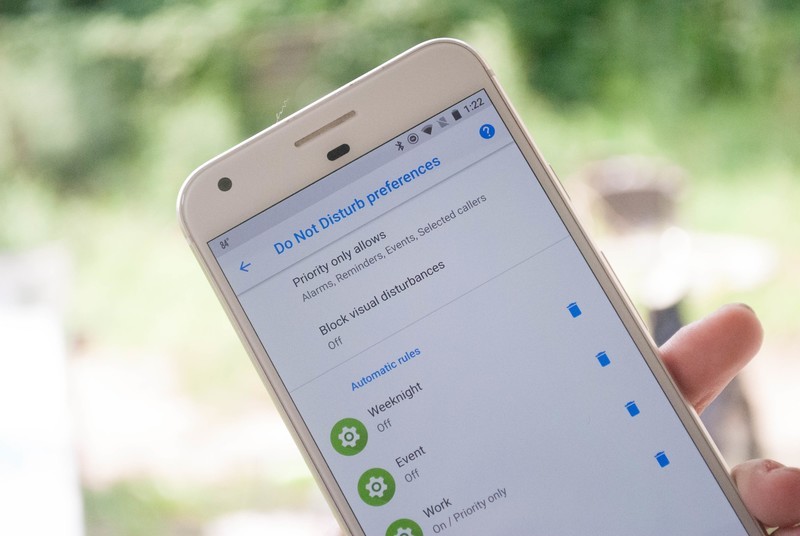
Android Oreo gives you options for your Do Not Disturb settings.
Android Oreo has made a few changes to what you can do with Do Not Disturb mode, and what it looks like. Whether you just want to make sure you don’t get hit with notifications while at the movies, or you want to know that certain notifications will always ping for you, there is a good bit going on here.
That’s why we’ve put together how everything works so that you can get back to your busy day without getting lost in the settings of your phone!
- How to turn on Do Not Disturb mode
- How to adjust Do Not Disturb Settings
- How to adjust Automatic rules
- How to add an Automatic rule
- How to delete an Automatic rule
- How to adjust Priority Only allowances
How to turn on Do Not Disturb mode
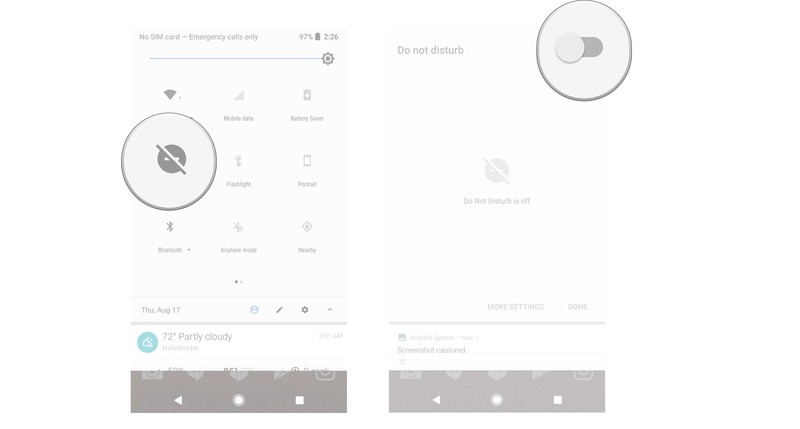
Do Not Disturb mode is how you ensure you aren’t hit with notifications when you don’t want to be, and opening it is as easy as a tap.
Swipe down from the top of your screen to pull down the shade.
Tap Do Not Disturb.
Tap the toggle to turn DND on.
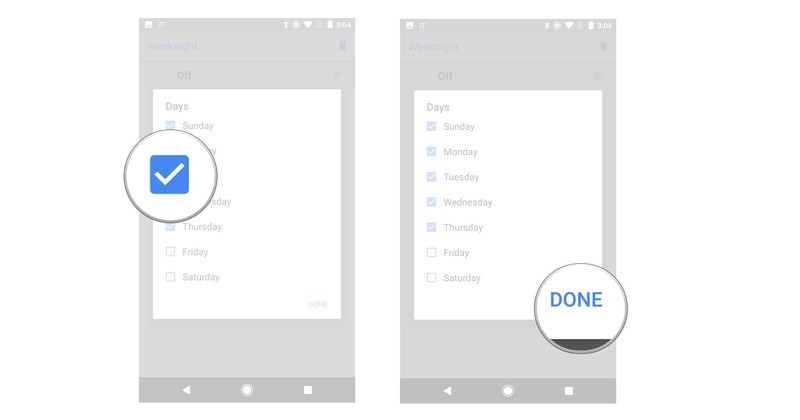
How to adjust Automatic rules
If you want to use Automatic rules, you’ll need to adjust them in order to fine tune when, and how, they work.
Open the Settings on your phone.
Tap Sounds.
Tap Do Not Disturb preferences.
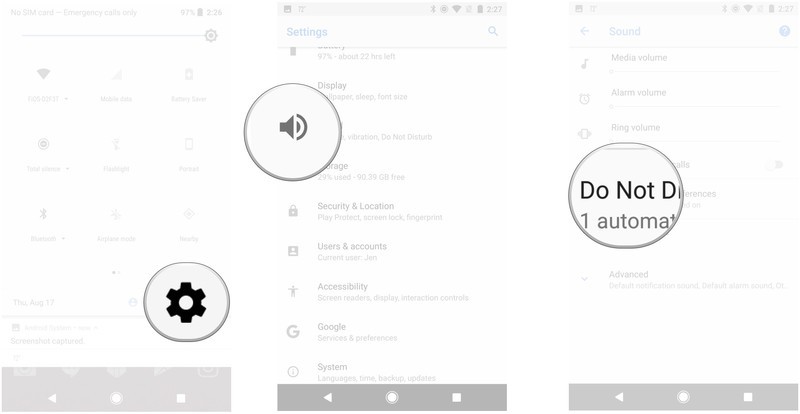
Tap the gear icon next to the rule.
Tap the information you want to adjust.
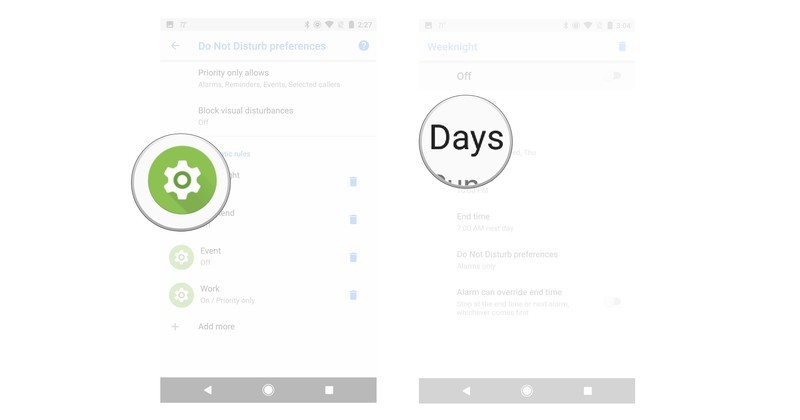
Tap to adjust the information you want to change.
Tap Done.
How to add an Automatic rule
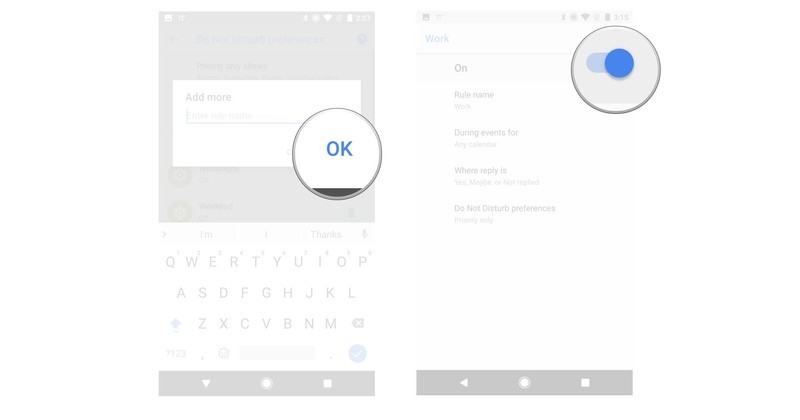
If none of the preset Automatic rules are up your alley, then you can always create a specific one to be used when you need it.
Open the Settings on your phone.
Tap Sounds.
Tap Do Not Disturb preferences.
Tap Add More.
Tap Event rule or Time rule.
Type out a name for your rule.

Tap OK.
Tap the toggle to turn your rule on or off.
How to delete an Automatic rule
If you no longer need an automatic rule, then you’ll need to delete it.
Open the Settings on your phone.
Tap Sounds.
Tap Do Not Disturb preferences.
Tap the trashcan icon.
Tap Delete.

How to adjust Priority only allowances
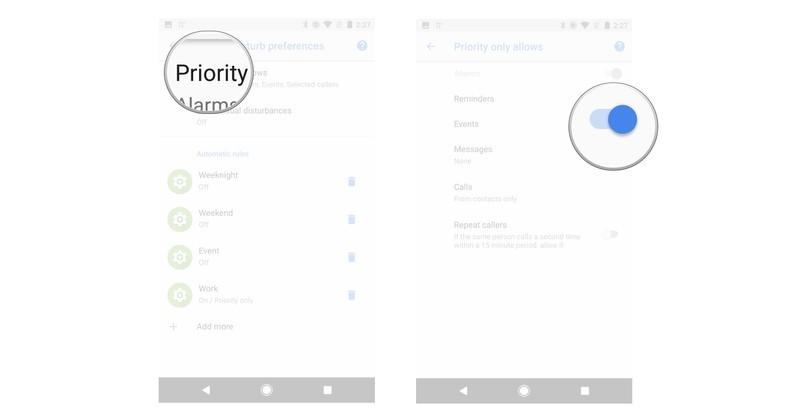
Priority only allowances show what notifications or noises will get through when you have Do not Disturb mode enabled.
Open the Settings on your phone.
Tap Sounds.
Tap Do Not Disturb preferences.
Tap Priority only allows.
Tap a toggle to adjust the settings.
Questions?
Do you still have questions about using Do Not Disturb settings with Android Oreo? Is there something we should have covered that we missed? Leave us a comment below to let us know about it!
Android Oreo
- Android Oreo review!
- Everything new in Android Oreo
- How to get Android Oreo on your Pixel or Nexus
- Oreo will make you love notifications again
- Will my phone get Android Oreo?
- Join the Discussion
Deal: Buy a Moto Z2 Force from T-Mobile and get one FREE!

A great deal on an indestructible phone!
For a limited time, new and existing T-Mobile customers can get a FREE Moto Z2 Force with the purchase of a Moto Z2 Force on the 24-month equipment installment plan.
To take advantage of the offer, new customers need just to purchase both phones on the Equipment Installment Plan and activate them on a T-Mobile ONE Unlimited plan. Existing customers can just choose the phone on the Equipment Installment Plan (EIP), then add one voice line + unlimited data to this plan. If you get on the EIP deal, you have 24 months to pay the device off and if you do cancel your service, any remaining device balances will become due.
The BOGO offer comes in the form of an online rebate, so after getting everything activated you can submit online for a refund of up to $750 via prepaid MasterCard. As an added bonus you can get a free Insta-Share Projector Moto Mod ($299.99 value), as well.
Go to motorola.rewardpromo.com by 9/25/17 to redeem offer by submitting proof of purchase.
Buy Moto Z2 Force
‘Cuphead’ is as wondrous as it is difficult
Cuphead is a flashback in many ways. It hearkens back to the classical, hand-drawn animation style of the 1930s. And it’s reminiscent of 2D, 8-bit-era platformers that were so tough, they wanted to make you throw your controllers against the wall. Those are both reasons I can’t wait to play the rest of the game when it finally hits the Xbox One and Windows PCs on September 29th.
Just take one look at Cuphead’s gorgeous hand-drawn art style and you’ll understand the hype. First-time indie developer Studio MDHR created a game that’s as detailed and fluid as classic Disney cartoons. And it has that hint of magic that you can only get from traditional, non-CG animation. It’s also a dream to play, with controls reminiscent of Contra and other extremely difficult 2D side scrollers. Simply running around and shooting enemies feels great — and that’s a good thing, since you’ll be doing a lot of it.
You’ve got a variety of weapons to choose from, a dash-move for getting out of danger quickly, and you can also parry any pink-colored object by jumping off of them at just the right time. The vast majority of Cuphead is made up of elaborate boss fights — and I really mean elaborate.
The bosses, and their accompanying stages, feature some of the most unique designs I’ve ever seen in a video game. But you won’t have much time to drink in the gorgeous visuals before the bosses start filling up the screen with deadly projectiles. While there are attack patterns you’ll have to learn, you’ll still have to keep your wits about you for some randomized changes. Cuphead is the sort of game where you should expect to die — a lot.
Thankfully, the game gives you a few different difficulty levels to help you get your bearings. A beautiful overworld map connects all of the different boss battles, and you can also interact with other characters there. Cuphead also features a handful of platforming stages, which should evoke plenty of classic gaming nostalgia.
In addition to playing through the game solo, you can also have a friend join you in co-op mode. That’s something we don’t typically see in games today, and it brought back memories of sitting on the couch for hours on end when I was a kid.

Studio MDHR
In fact, co-op mode seemed like the ideal way to confront some of Cuphead’s more nefarious boss battles. It’s extremely helpful to have someone cover your back. If one of you dies, your partner can also save you at the last minute by parrying your ghost before it flies offscreen. You only come back with a single health bar, but at least it keeps you in the game.
Although I only had a short amount of time with Cuphead, I’m eager for more. But then again, I’ve been dying to play it since Studio MDHR gave us our first glimpse back in 2014. Like No Man’s Sky before it, Cuphead built up an insane amount of buzz over the years — so much so, that I was worried it couldn’t possibly meet my expectations. I certainly wasn’t disappointed with my first taste of the game, but as astounding as Cuphead looks, it’s also sometimes frustrating to play because it’s so difficult. It’s not unfair, but there are certainly points where you’ll want to give up in frustration. Like any great side-scroller, though, if you invest the time you’ll get better at it.
You owe it to yourself to buy Cuphead — it simply doesn’t look like any game we’ve had before. And while it might be tough, it’s ultimately a rewarding experience.
The Morning After: Tuesday, August 22nd 2017
This Tuesday morning, we’re still talking about the eclipse, getting a name for Google’s latest version of Android and testing the best virtual assistants out there.
It’ll be on the Pixel very soon.
Oreo is officially the next name for Android

Google loves to make a big splash when it reveals the name for the latest version of Android. But the company is going all out this year, using the solar eclipse as an opportunity to reveal that Android O will henceforth be referred to as Oreo. It makes at least a little sense to tie this reveal into the eclipse — those iconic photos of the solar event are at least a little bit evocative of Oreos, after all.
But why?
The solar eclipse hype is annoying, but the event is worth it

By now, it’s possible that you are completely fatigued by the August 21st total solar eclipse and all the media hype surrounding it — and it hasn’t even happened yet. It seems as though every outlet is talking nonstop about this event. But this actually is a big deal, which is why it’s gotten so much coverage. Let us break it down for you: this is one of those rare cases where the event is worth the hype.
No clear winner.
Engadget is testing all the major AI assistants

Hardly a day goes by that we don’t cover virtual assistants. If it’s not news about Siri, there’s some new development with Alexa, or Cortana or Google Assistant. Perhaps a new player, like Samsung, is wading into the space. Even Android-creator Andy Rubin is considering building an assistant of his own. And his company probably isn’t the only one that thinks there’s room for another AI helper.
With virtual assistants becoming such an integral part of our lives (or at least our tech-news diets), we felt it was time to stop and take stock of everything happening here. For one week, we asked five Engadget reporters to live with one of the major assistants. First up, Google Assistant.
The law enforcement agency has met with firms in the energy and tech sectors
FBI reportedly advising companies to ditch Kaspersky apps.
Kaspersky Lab’s tussle with the US government could have ramifications for its dealings with the private sector. A new report claims the FBI has been meeting with companies to warn them of the threat posed by the cybersecurity firm. The briefings are the latest chapter in an ongoing saga over government agencies’ use of Kaspersky’s products. Officials claim the company is a Russian stooge that can’t be trusted with protecting America’s critical infrastructure. The company denies these claims — its CEO, Eugene Kaspersky, has even offered up its source code in a bid to clear his firm’s name.
But wait, there’s more…
- Watch the trailer for Amazon’s answer to ‘Black Mirror’
- ‘Star Wars Battlefront II’ space skirmishes put Yoda in the cockpit
- Elon Musk urges the UN to limit AI weapons
 AIVAnet